Unsolved
1 Rookie
•
68 Posts
0
1962
December 7th, 2021 08:00
XPS 9710 On-Board Diagnostics issue
Hi,
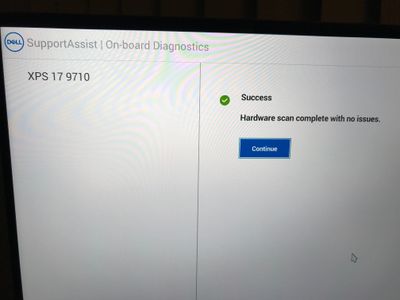
It has been happened few times especially in over night, and the XPS 9710 screen shows the following contents:
After clicking "Continue", it becomes the OS Recovery stage (so of...).
Any suggestion?
Thanks.
No Events found!


houming
1 Rookie
•
68 Posts
0
December 7th, 2021 08:00
Thanks for the reply.
It does not happen to my XPS 9500... if both laptops have the identical issue and the power outage may be the cause.
JOcean
11 Legend
•
12.6K Posts
•
69.5K Points
0
December 7th, 2021 08:00
Usually that happens if the system was not shutdown properly or lost power such as a brief power outage or possibly a flaky power bar connection.
houming
1 Rookie
•
68 Posts
0
December 7th, 2021 09:00
I am wondering that the issue may be caused by the USB peripherals?!
houming
1 Rookie
•
68 Posts
0
December 10th, 2021 12:00
After clicking "Continue" on the On-Board Diagnostics, the next "Recovery" screen is:
If disable OS Recovery option from BIOS, the "Recovery" screen will be the landing screen directly.
houming
1 Rookie
•
68 Posts
0
December 11th, 2021 04:00
My XPS 9500 has the same issue now:
mneuroth
14 Posts
0
December 12th, 2021 02:00
Did you connect the USB-C adapter to HDMI and USB-A (Dell DA20 Adapter, which was delivered with your XPS 17) to your XPS 17? I discovered recently, that the USB-C adapter caused the screen which you saw above with my XPS 17 too. It also caused the behaviour, that the my XPS 17 9710 gets a DPC_WATCHDOG_VIOLATION blue screen after waking up from sleep mode when the sleep mode lasts more than 1 hour (see XPS 17 9710 Sporadic BSOD (DPC_WATCHDOG_VIOLATION) after resuming from modern standby mode - Dell Community). So I think, that my USB-C adapter has a hardware failure or the windows device driver has a bug. My XPS 17 works fine with several other USB-C docking stations, so I'm quite sure that the problem is caused by my Dell DA20 Adapter.
houming
1 Rookie
•
68 Posts
0
December 12th, 2021 05:00
No, I am using Dell USB-C to USB-A adapter.
Are we have the same blue screen?
mneuroth
14 Posts
0
December 12th, 2021 11:00
I saw this blue screen once, yesterday. Normaly I get the DPC_WATCHDOG_VIOLATION blue screen when I try to wake up the laptop after more than one hour in sleep mode. What do you mean with the "Dell USB-C to USB-A adapter". Is this not the adapter which is delivered with your XPS 17 9710? -> Multi-Port-USB-Typ-C-Adapter DA20 als Mitlieferung für XPS-Systeme | Dell Deutschland
houming
1 Rookie
•
68 Posts
0
December 12th, 2021 13:00
The adapter can be found at https://www.dell.com/en-us/work/shop/dell-adapter-usb-c-to-usb-a-30/apd/470-abne/pc-accessories