UNSOLVED
J
jschaefer1
5 Posts
0
160482
November 16th, 2012 11:00
Set different Rules for HDD Space Alarms
Dear Community,
we are just starting to use vFoglight. Now we are thinking about the right way to monitor our different HDDs.
What we want to get is an Alarm if an specified drive is lower than a specified value.
We had a rule that fires an alarm if available Disc Space is lower than 10%. So far so good but a 30 GB drives fires an alarm under 3 GB and a 500 GB drive fireas an alarm under 50 GB.
So we decided to create different rules which fires an alarm if a HDD free Disk Space is under a specified GB value.
We have a rule where a warning is fired under 10 GB free Disk Space and one under 8GB, one und 5 GB and there further more.
The critical value is 33% lower than warning and fatal 33% lower than critical. For example. Warning 3GB - Critical 2GB -Fatal 1GB.
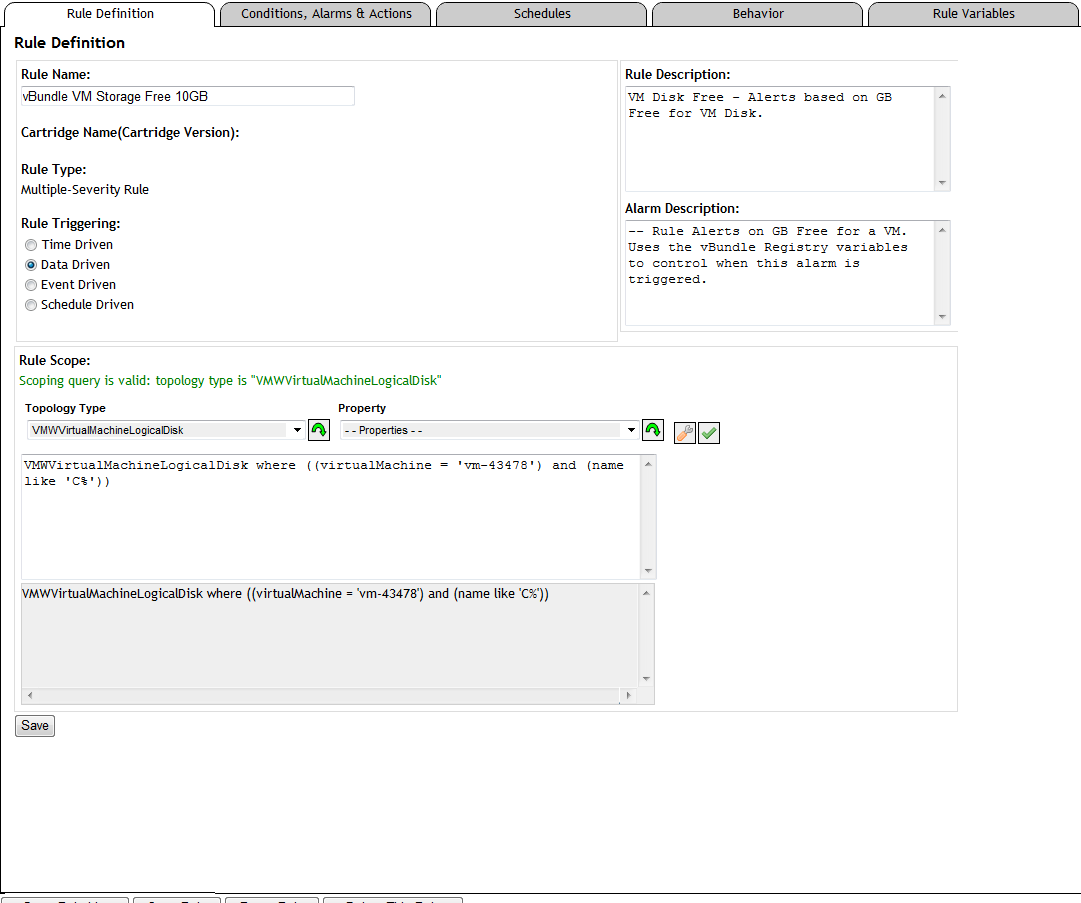
Now i have the Problem how to assign one drive of a Host to a specified Rule.
I created the Rule with the following: VMWVirtualMachineLogicalDisk where ((virtualMachine = 'vm-43478') and (name like 'C%'))
The rule should fire an alarm if Drive C form vm-43478 is lower than the warning Variable but it did not.
By the way it is a very time-consuming work.
Has anybody know the Solution for my Problem or has a Best Practice how to monitor the different Hosts with diferent Drives ?
Thanks in advance!
Jochen