Dell Pro Rugged
No Cloud Required
Pole to pole, mountain to desert, run your own 70B AI model in the field. No cloud or internet required.
Key takeaways 8 min read
A practical guide to bringing AI to the edge of the world by pairing a Dell Pro Max with GB10 with a Dell Pro Rugged laptop, where the GB10 serves a 70-billion-parameter model to every device on a closed local network.
-
- A complete roadmap for the build, covering hardware specs, real benchmarks, Ollama configuration and client setup on your rugged device.
- Two documented paths; Ollama with Open WebUI in the browser, or LM Studio end to end as the alternative, plus VS Code and Python access for developers.
- Five field and federal deployment scenarios, from an agency working inside its own perimeter to a mobile command post working with thin connectivity and sensitive operations.
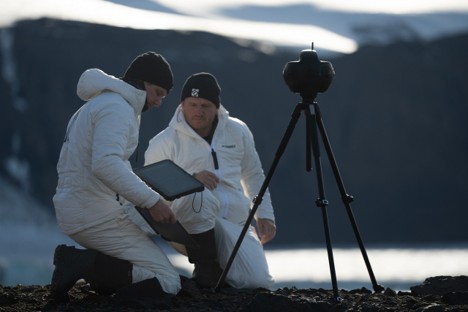
Field work takes engineers, analysts and operators to regions where the cloud doesn’t reach. The Dell Pro Rugged devices are MIL-STD-810H certified against drops, vibration and blowing dust. They are built for extreme weather and temperatures ranging from −29°C to 63°C, but their GPUs tend to be modest.
This article shows you how to bring AI to the edge of the world by pairing a Dell Pro Max with GB10 with a Dell Pro Rugged laptop. The GB10 stays at home base as a dedicated inference server, running a 70-billion-parameter model on its 128 GB of unified memory. Backed by the GB10, the rugged device becomes an AI endpoint over one local network via a browser chat interface, Open WebUI, served from the GB10.
We provide a roadmap for the complete build with hardware specs, benchmarks, Ollama configuration and client setup on your rugged device.
Spec’ing the AI workstation
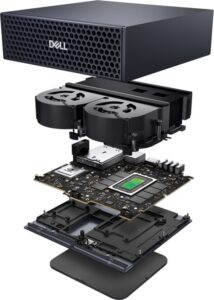 A 70-billion-parameter model fits in 128 GB of unified memory because the GB10’s CPU and Blackwell GPU read from the same address space. Popular open source models such as Llama 3.3 70B load directly, Qwen2.5 72B fits with room and a 120-billion-parameter model can run locally on the GB10 when quantized. Two GB10 units can be connected via their QSFP ports to form a small cluster with 256 GB of combined memory, enabling inference on models up to 405 billion parameters.
On a discrete-GPU system, where the CPU and GPU are separate, the weights must fit in dedicated VRAM and tokens travel back and forth over PCIe. On the GB10 there is no PCIe hop. NVLink-C2C connects the two halves of the chip at five times the bandwidth of PCIe Gen 5.
The Dell Pro Max with GB10 weighs 1.31 kg and measures 150 by 150 by 50.5 millimeters. It fits in a ruggedized Pelican 1510 carry-on alongside its 280 W USB-C adapter, which lets it provision on inverter power in a vehicle without rack hardware. ServeTheHome measured idle draw at 40 to 45 W. NVIDIA’s headless spec is closer to 35 W.
The full specs are listed in the closing reference section.
Measuring throughput on the GB10
Token throughput depends heavily on the model, the precision and serving stack. Independent benchmarks from LMSYS using SGLang show the following results:
|
Model |
Precision |
Prefill (tokens/sec) |
Decode (tokens/sec) |
|
Llama 3.1 8B |
FP8 |
7,991 (batch 1) |
20.5 (b1) → 368 (b32) |
|
GPT-OSS 20B |
MXFP4 |
2,053 |
49.7 |
|
Llama 3.1 70B |
FP8 |
803 |
2.7 |
|
Llama 3.3 70B |
Q4 (Ollama) |
fits in memory |
~15 to 25 (typical) |
Precision is how tightly the model’s numbers are compressed. FP8, MXFP4 and Q4 are progressively smaller formats. A smaller format means the model takes up less memory and runs faster, at a small and usually unnoticeable cost to answer quality. Q4 is what lets a 70-billion-parameter model fit on a single GB10 and still respond at a usable speed. Prefill is how quickly the model reads your prompt; decode is how quickly it writes the answer back, one token at a time, where a token is roughly three-quarters of a word. Decode is the number the user actually feels.
At 15 to 25 tokens per second, a 70B answer streams onto the screen faster than most people read, the same word-by-word flow as a cloud chatbot, so no one sits watching a spinner. The cell labelled “fits in memory” for Llama 3.3 70B at Q4 means the entire model loads into the GB10’s 128 GB of unified memory and runs locally at full speed, instead of spilling onto slower storage or failing to load at all.
The fastest numbers come from SGLang, a serving framework the testers used to find the hardware’s ceiling, in the same family as Ollama but tuned for raw throughput. The build in this guide uses Ollama, which is far simpler to stand up and trades a little speed for it.
The row that describes a field operator’s experience is the last one. Llama 3.3 70B at Q4 provides a steady 15 to 25 tokens per second, which serves a 200-word answer in 8 to 14 seconds. The 8B model’s jump from 20.5 tokens per second at one request to 368 across thirty-two is the other number worth knowing, because it shows the box keeps pace as more field laptops query it at once.
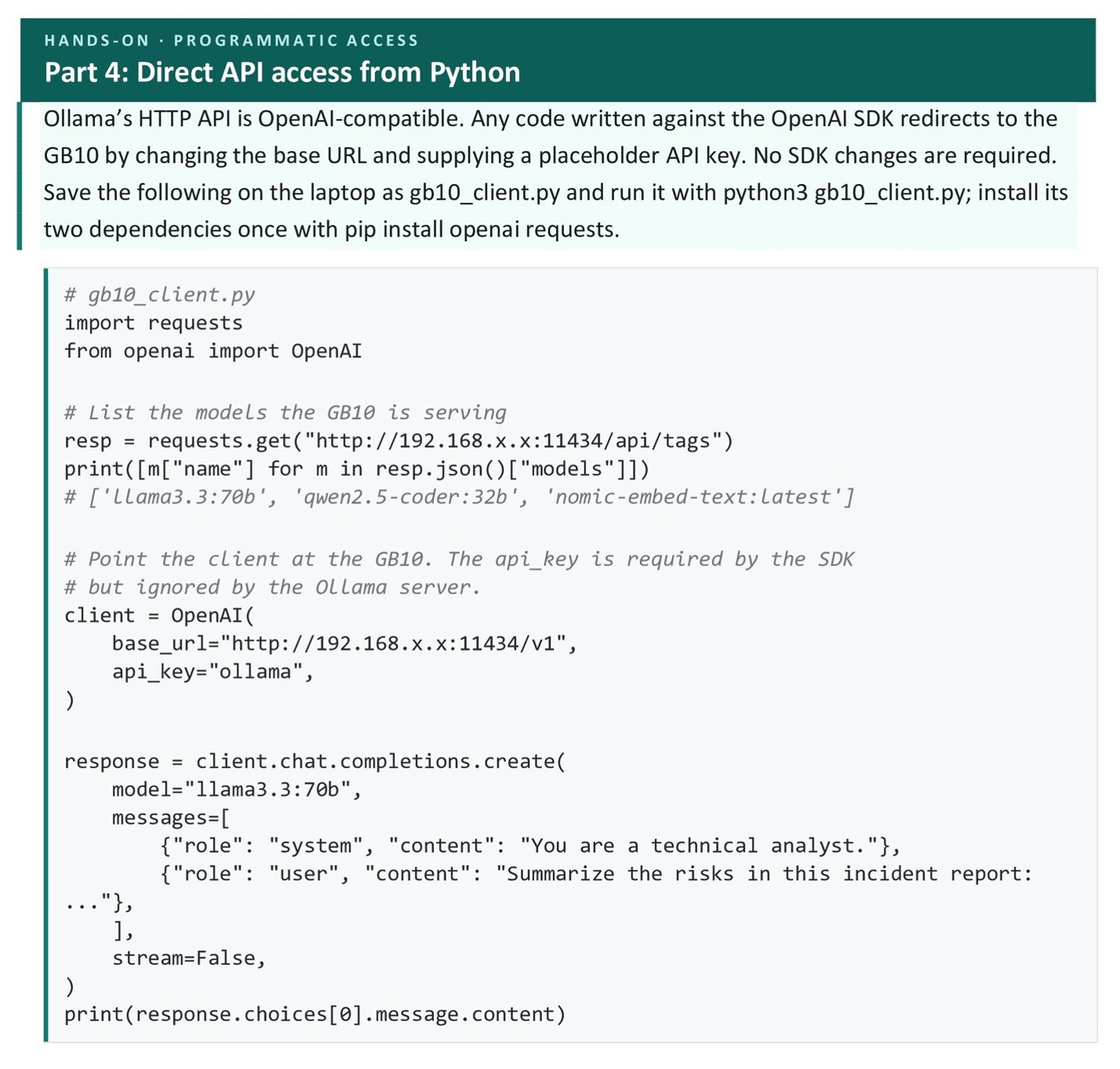
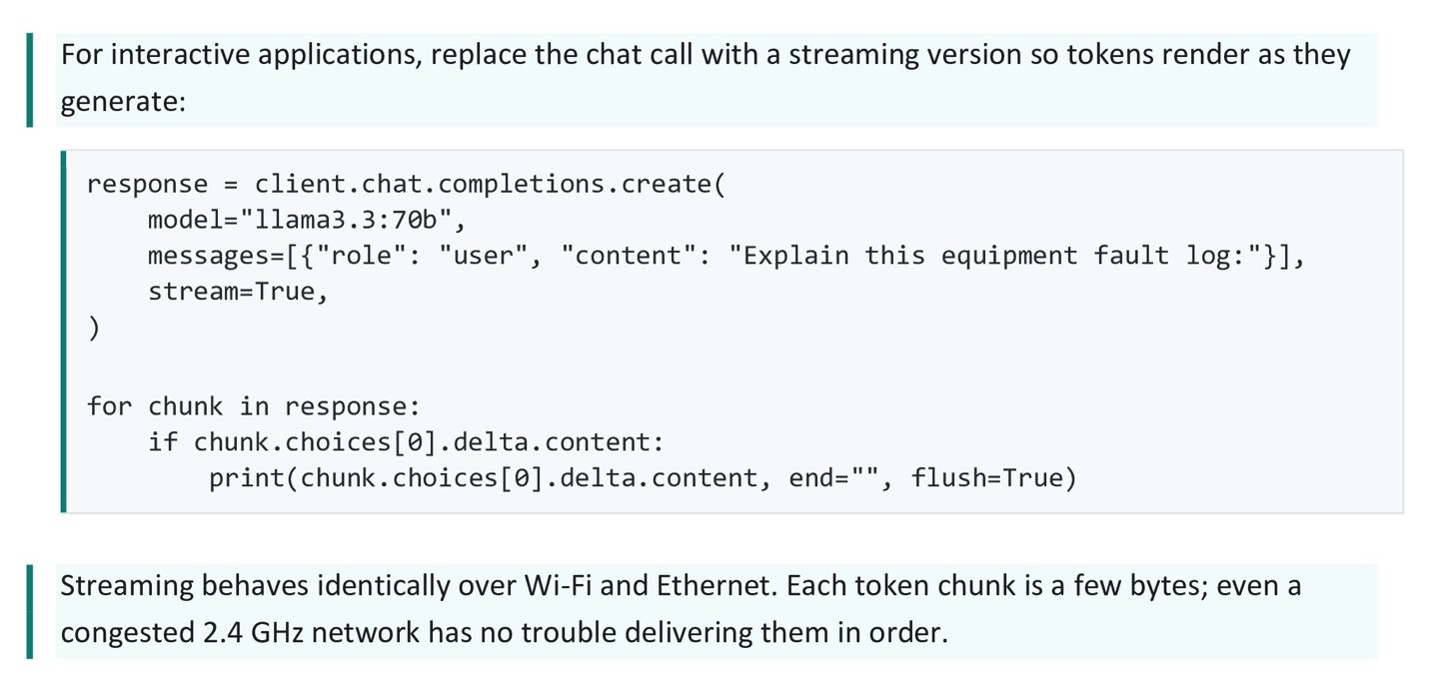
The model lives on the GB10 back at base, and each laptop reaches it over Wi-Fi without meaningful network lag. A prompt and its answer are 2 to 20 KB of JSON, small enough that even a saturated field Wi-Fi moves them instantly. The only wait that matters is the GPU writing the answer, described in the decode rate column above.
Building it
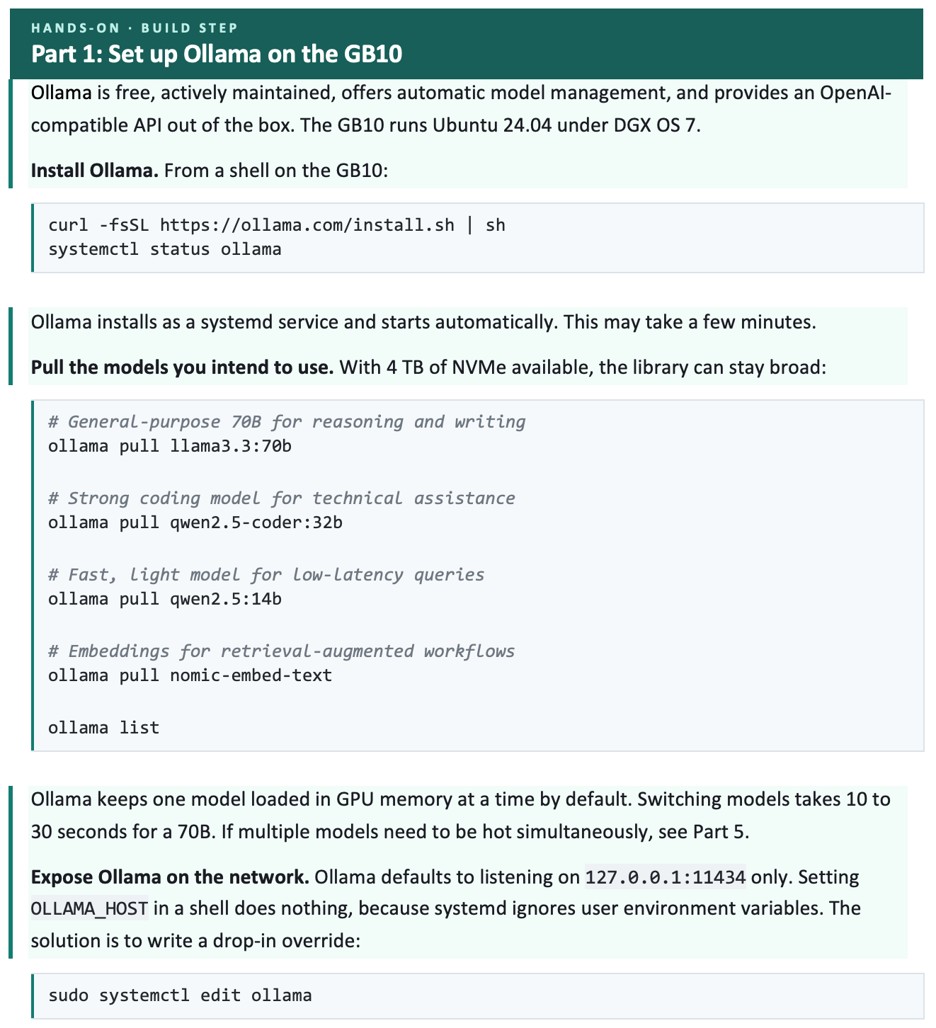
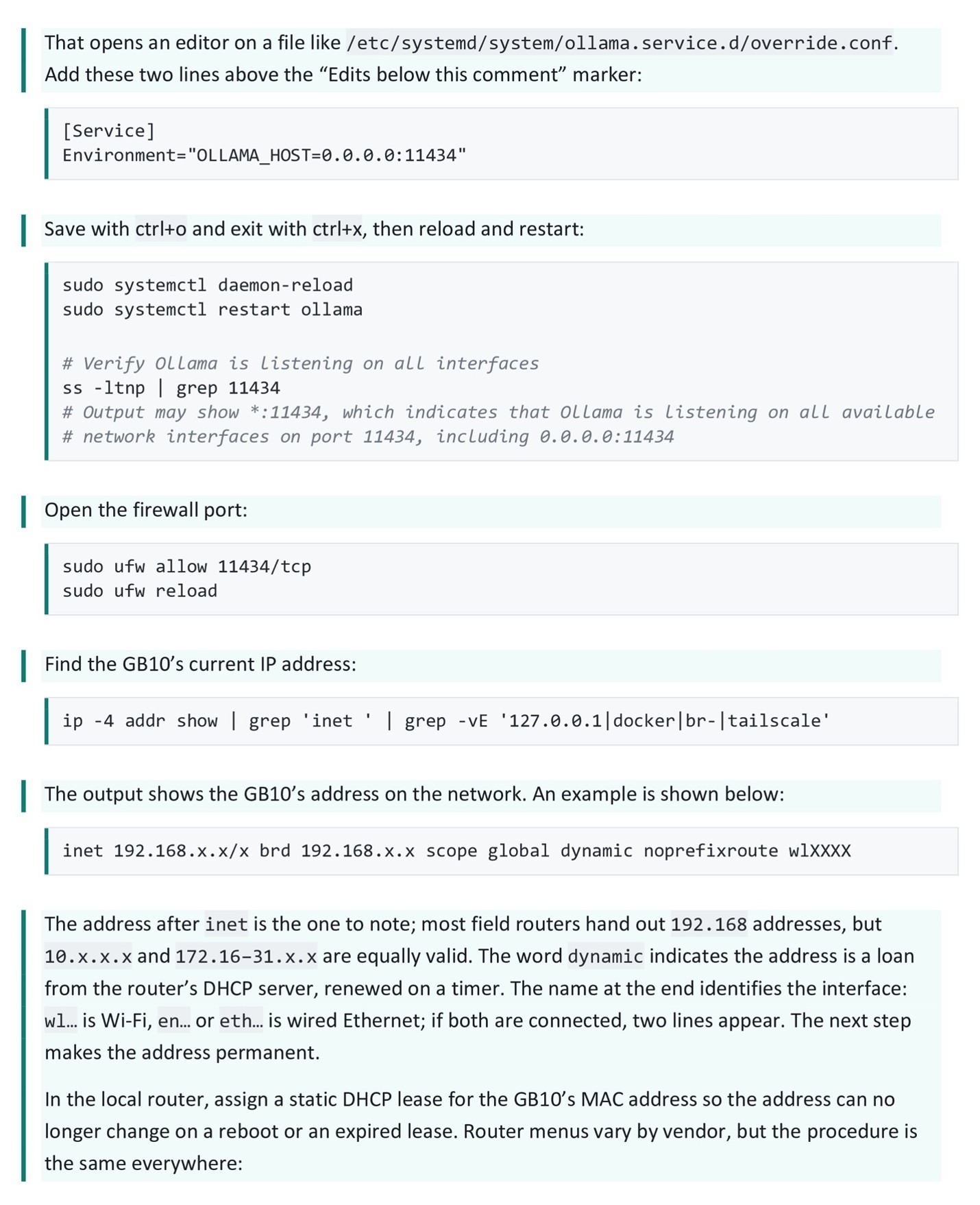
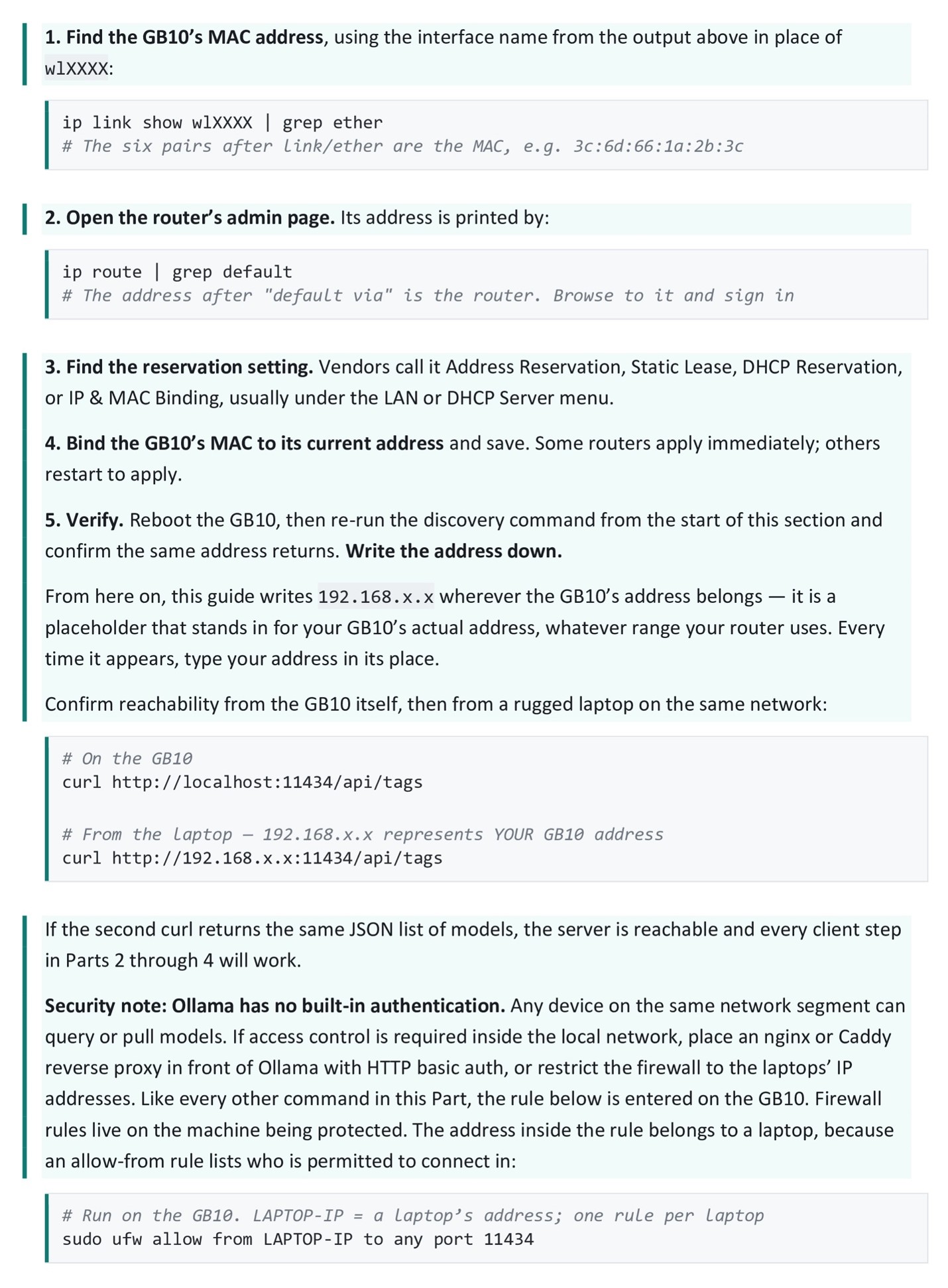
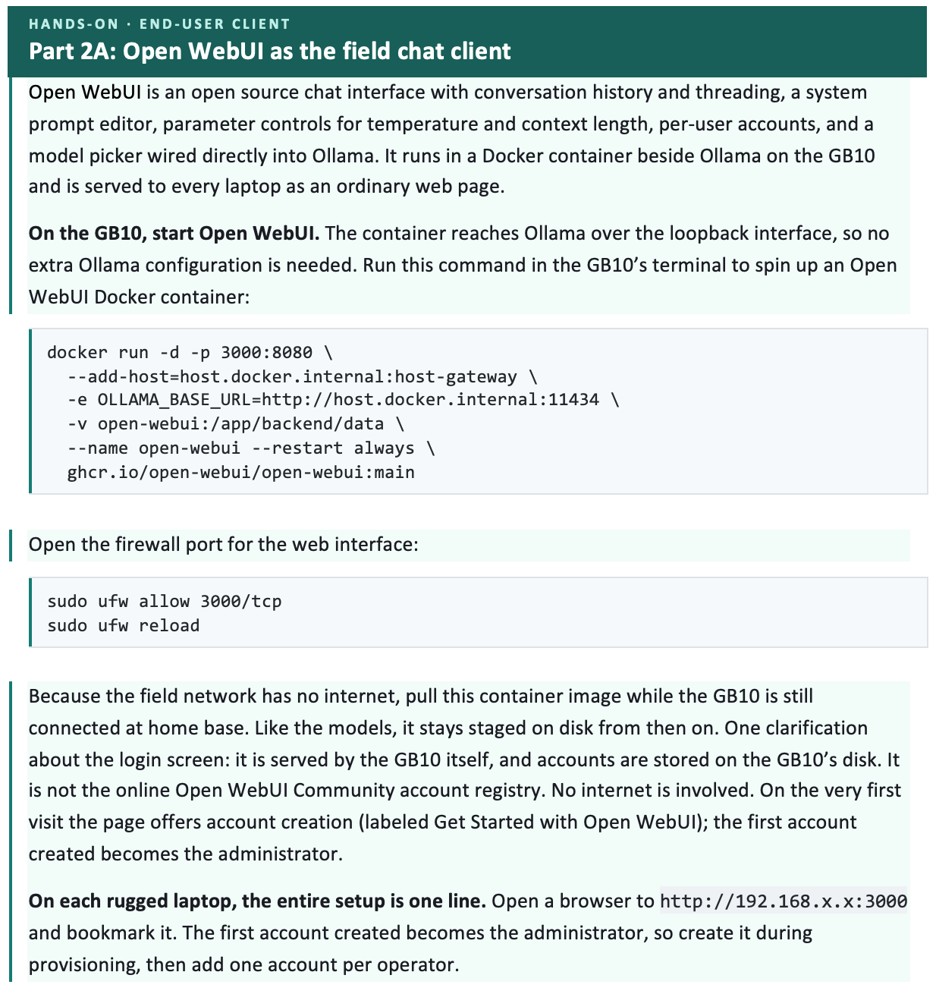
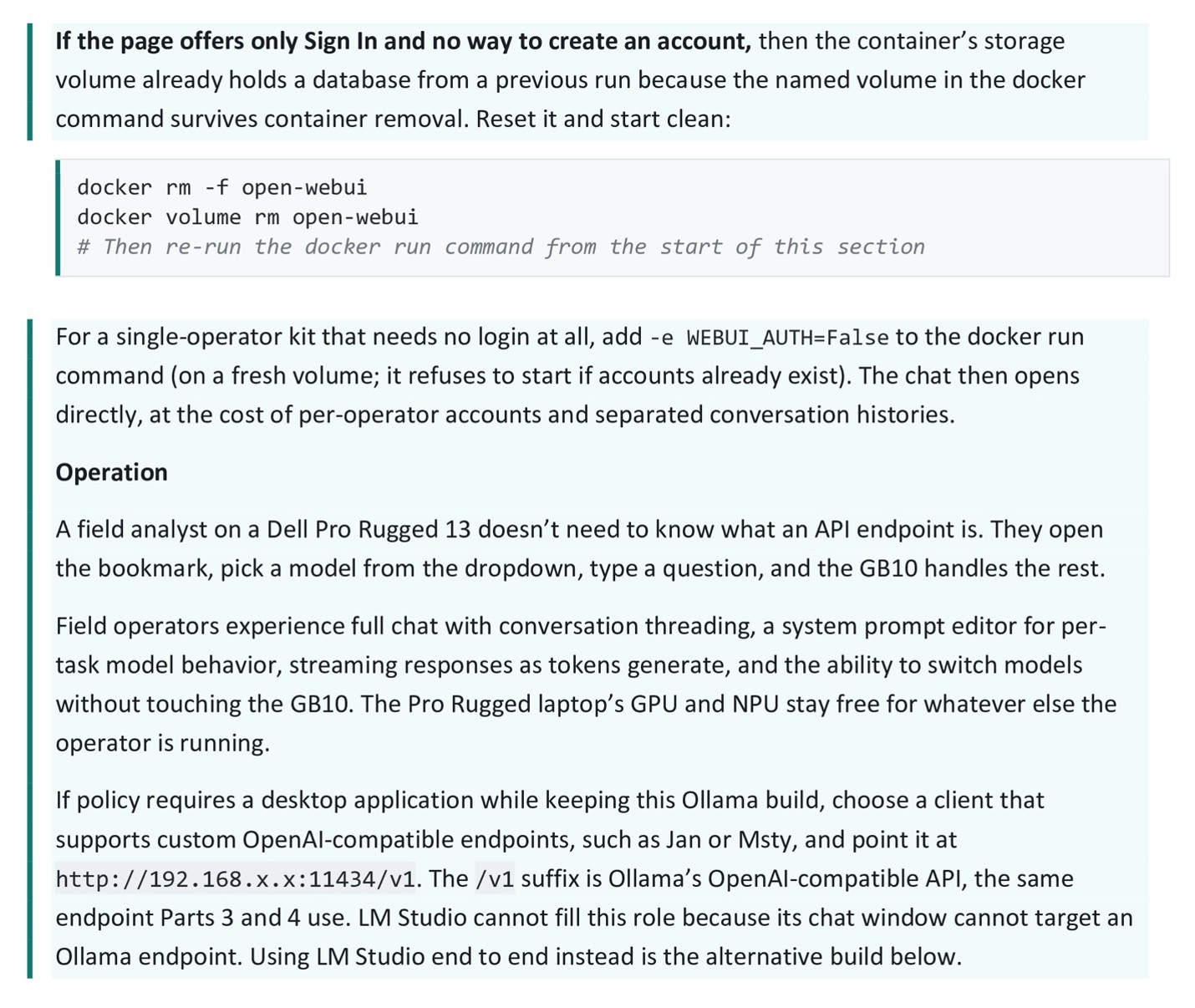
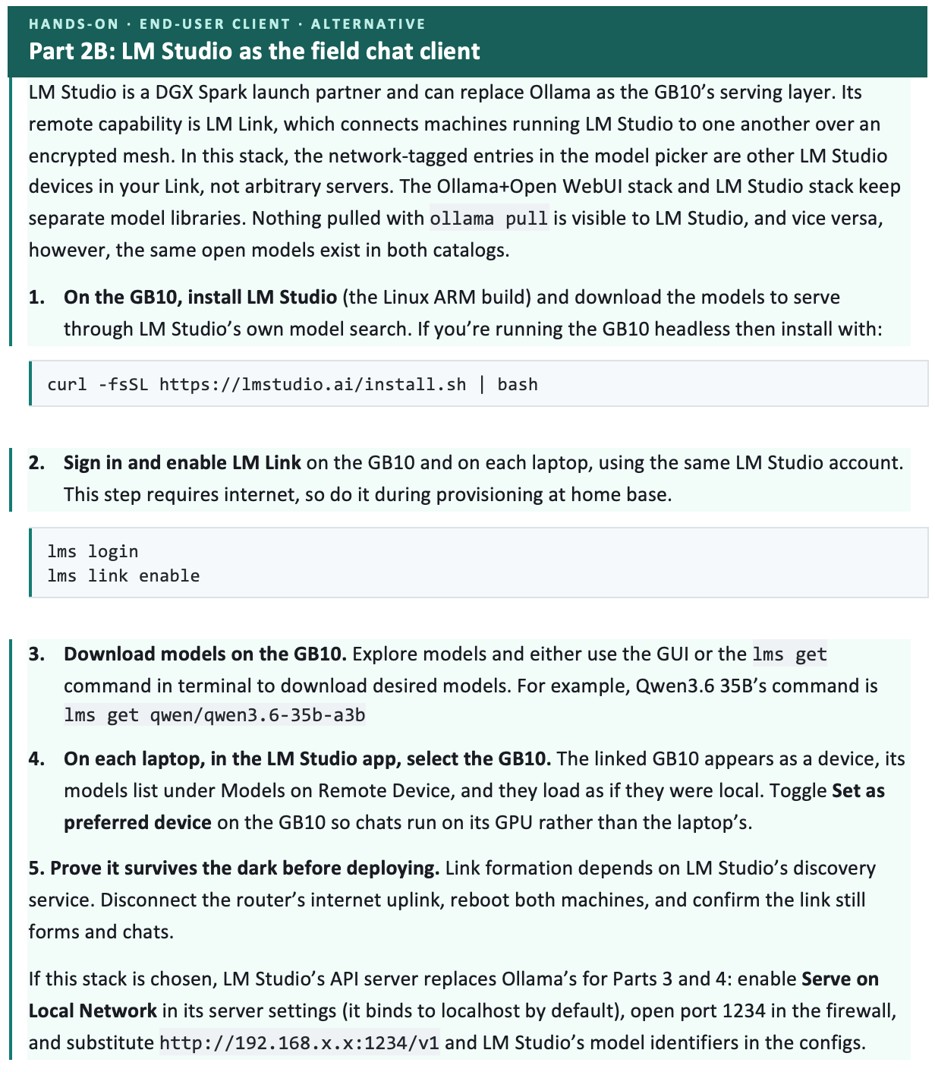
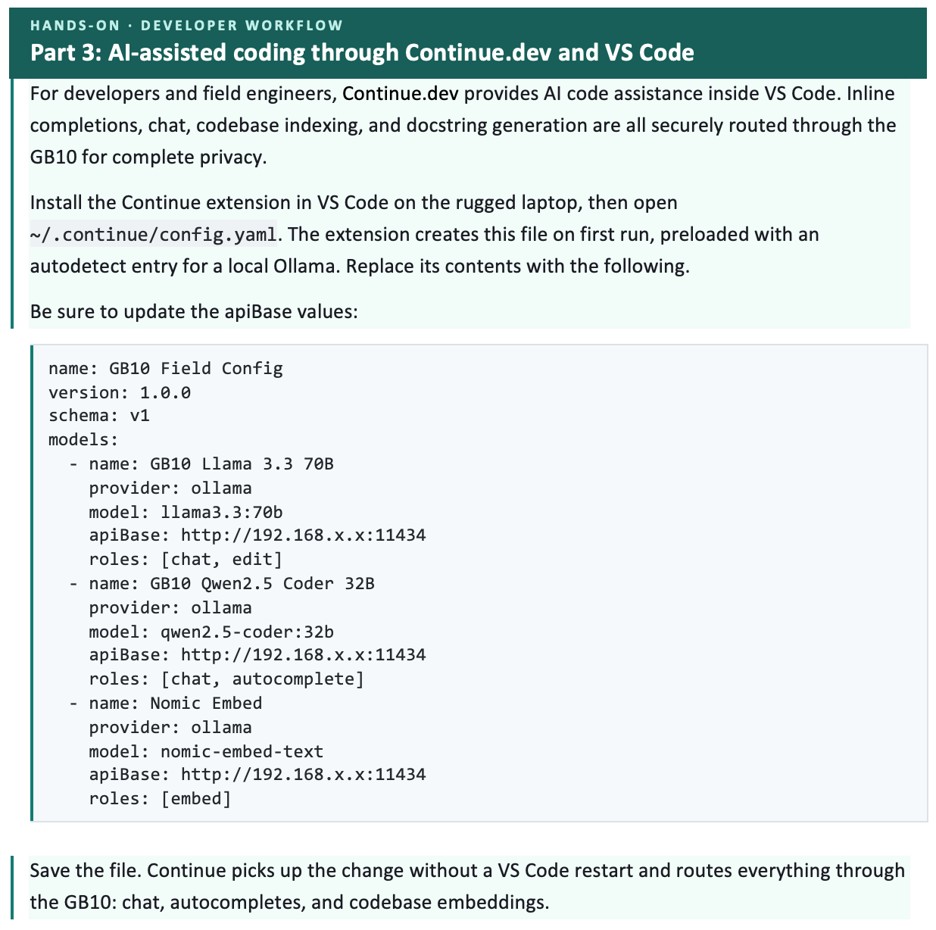
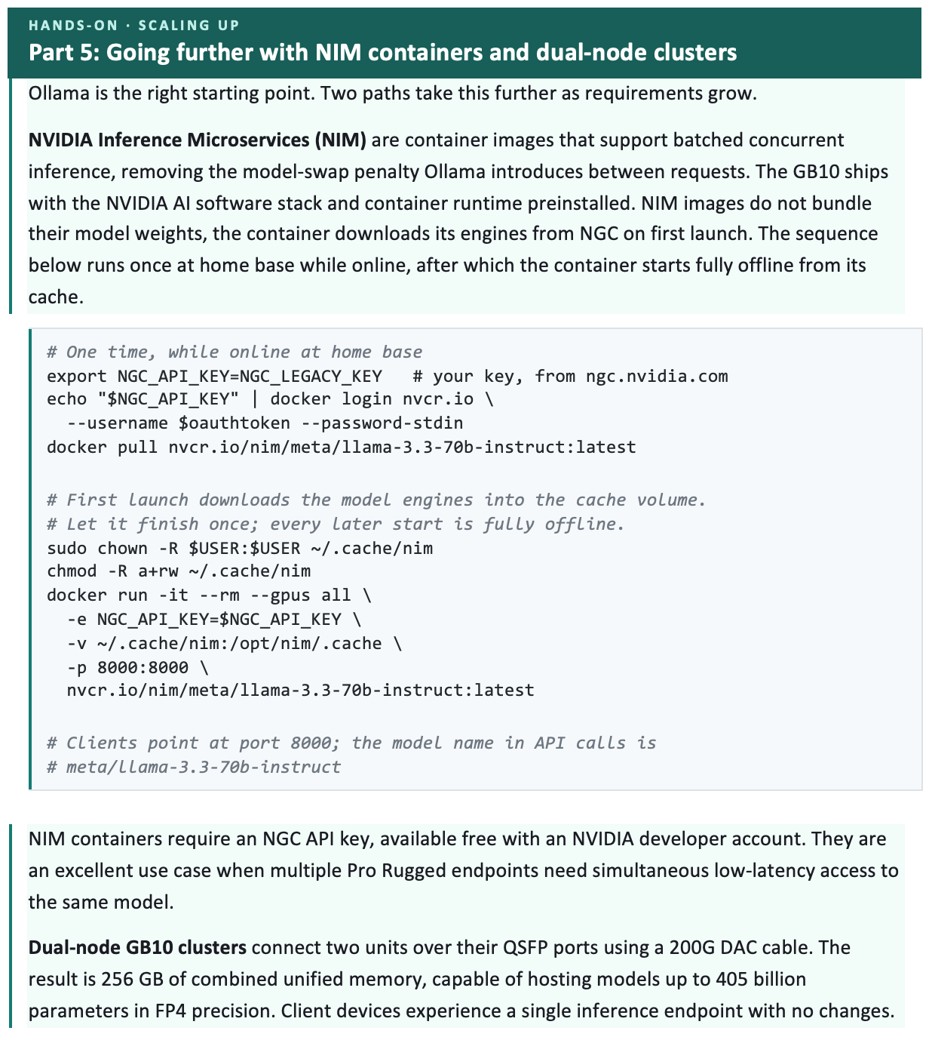
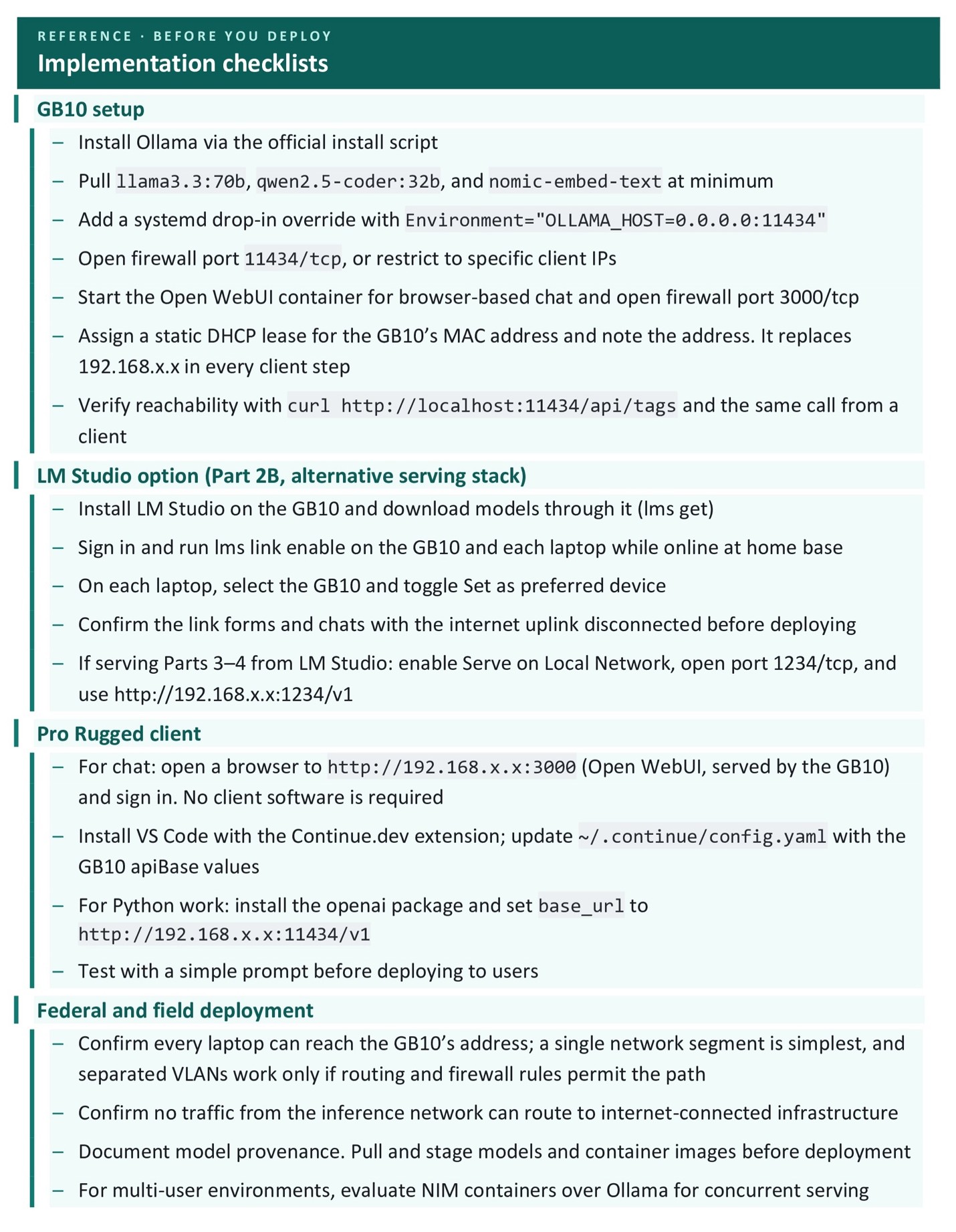
The hands-on sections below set up the GB10 as a network inference server, then point each rugged laptop at it. The boxed steps are the parts you can follow command by command, or skim past if you only need the architecture.
Field and federal scenarios
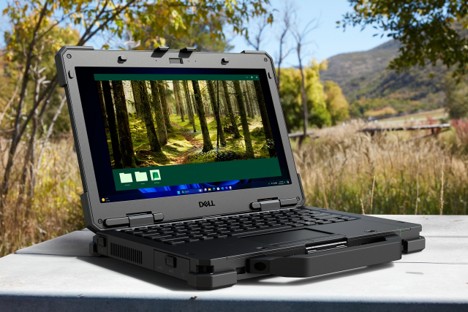
Using the Dell Pro Max with GB10 as a remote server and Dell Pro Rugged devices as clients in the field map to real-world scenarios. Our first two examples are taken from Dell case studies. The remaining three are illustrative archetypes that show up across federal, industrial and tactical environments.
1. Federal AI inside the perimeter
An analyst at a federal agency needed to dig through case files, video and field data, but the rules forbade sending any of it to a commercial cloud. So, the model came to the data. A GB10 sat inside the agency’s own network and answered the analyst’s questions locally, and nothing left the building. Dell documented this case in its Federal AI Anywhere writeup, where pairing local GB10 models with the right tasks cut response time by 47% and lifted accuracy by 10%. For an agency that answered to FISMA, keeping the work on-premises erased an entire category of compliance headaches.
2. On-prem inference instead of a cloud bill
A team had already put a 70B model on a GB10 for a project, but they noticed people still reached for a cloud chatbot out of habit. They pointed the day-to-day chat and the coding help at the local model. Dell’s customer writeups documented teams making exactly that move to improve cost, control and the convenience of having the model in the room.
3. Forward operating base
A small team at a forward operating base was buried in paper. Field reports came in faster than anyone could read them, some in languages no one on the team spoke well, and there was no internet to send any of it to. The GB10 went in a hardened case beside a portable Wi-Fi point, and the team connected to it from their Dell Pro Rugged 14 laptops.
Loaded with a 70B model and a search index over the team’s own documents, the GB10 answered questions in seconds. Someone could ask what the last three patrols had reported about a particular road and get an answer back, pulled only from the team’s own files, with nothing leaving the camp.
4. Mobile command post
A command vehicle was already full of capable equipment, radios and mapping. What it did not have was a private model that could read the stream of incoming text and answer questions about it on the spot, because the obvious option, a cloud service, was off the table when connectivity was thin or the operation was sensitive.
The solution was a GB10 that rode in the vehicle, ran off the vehicle’s own power and gave the people inside a way to get summaries from incoming reports.
5. Industrial maintenance on an isolated network
A maintenance technician on the plant floor was standing in front of a machine that was throwing a fault, and the answer was somewhere in a shelf of manuals and years of repair history. The plant’s control network was sealed off from the corporate network on purpose, so the cloud was not an option.
A GB10 in the control room held the manuals, the fault history and the standard procedures, and the technician queried it from a Dell Pro Rugged 14 right there at the machine. Nothing crossed the line between the plant network and the outside. The Pro Rugged 14 shipped with an RS-232 serial port, so it plugged straight into the older controllers that predated USB and talked to the equipment itself.
Reference: full hardware specs
|
Component |
Dell Pro Max with GB10 |
|
Chip |
NVIDIA GB10 Grace Blackwell Superchip. 20-core Arm CPU plus Blackwell GPU, NVLink-C2C interconnect |
|
GPU compute |
6,144 CUDA cores, 5th-gen Tensor Cores with FP4/NVFP4 support |
|
AI performance |
Up to 1 PFLOP FP4 sparse |
|
Unified memory |
128 GB LPDDR5X at 273 GB/s, shared between CPU and GPU |
|
Storage |
1 to 4 TB M.2 PCIe Gen4 NVMe |
|
Networking |
10 GbE Ethernet; optional QSFP DAC for two-node clustering |
|
Wireless |
Wi-Fi 7, Bluetooth 5.4 |
|
OS |
NVIDIA DGX OS 7 (Ubuntu 24.04 LTS) |
|
Form factor |
150 × 150 × 50.5 mm, 1.31 kg |
|
Idle power |
40 to 45 W measured (ServeTheHome); ~35 W headless per NVIDIA spec |
|
Model capacity |
Inference up to 200B parameters single unit; fine-tune up to 70B; dual-unit cluster supports 405B |
|
List price (US) |
~$6,300.00 |
Specs from Dell’s product page and NVIDIA’s DGX Spark documentation.
AI access anywhere on earth
Once the model is loaded at base, a question from the rugged device comes back in seconds. No internet required at the Wi-Fi access point.
The setup is a curl install on the GB10, a one-line systemd override to expose it on the network, a static DHCP lease, an Open WebUI container for browser chat and a new ~/.continue/config.yaml file on each developer laptop. The hardware is one Pelican case and a rugged device per operator, which gives each operator a steady stream of compute no matter how remote their field of operations may be.
RESOURCES
|
› Dell Pro Max with GB10: product page › NVIDIA DGX Spark: hardware documentation › Dell Pro Rugged 13: product page |
› NVIDIA developer blog: DGX Spark performance › Dell: GB10 customer scenarios |