3-Tier Platform Design Guide

Oct 20, 2026
3-Tier Platform Design Guide This design guide describes the architecture and design of a 3-Tier converged infrastructure using Dell PowerMax, Dell PowerStore, Dell PowerScale, and Dell Unity storage arrays with Connectrix MDS SAN switches, Cisco Nexus LAN switches, and Cisco UCS compute

Introduction

Introduction

This chapter presents the following topics:

Solution introduction

Business challenges

Managing IT infrastructure in a data center is becoming increasingly difficult due to growing complexity in advancing technologies and user requirements.

The evolving requirement to change data center infrastructure can affect stability, performance, costs, and upgradability. Dell 3-Tier Platform solutions are proven, tested, and optimized to help organizations meet their long-term data center needs for mixed workloads. The 3-Tier Platform solution that this guide describes provides the simplicity of a flexible, validated converged infrastructure (CI) that is based on:

  • Dell PowerMax-V4, 2nd Generation Dell PowerStore, Dell PowerScale, and Dell Unity XT storage
  • Cisco Nexus switches
  • Cisco UCS or UCS-X compute
  • VMware vSphere virtualization

Key benefits

The 3-Tier Platform for CI environments offers the following benefits:

  • Resiliency: The 3-Tier Platform architecture eliminates any single point of failure by incorporating platform redundancy in server high availability (HA) features, networking, and multipath storage.
  • Scalability: The 3-Tier Platform is configurable to meet your virtualized infrastructure needs. It enables you to choose from various configuration options, such as the number, model, and memory capacity of compute servers and the storage type and capacity.
  • Validated interoperability: The 3-Tier Platform hardware and software components have been tested and validated for HA and compatibility to ensure known quality in platform run-time.

Documentation purpose

This guide helps you design a 3-Tier Platform solution by providing design principles, best practices, and architectural guidance for compute, management, networking, and storage.

The guide includes component specifications for validated configuration and scaling options and considerations.

Audience

This guide helps you design a 3-Tier Platform solution by providing design principles, best practices, and architectural guidance for compute, management, networking, and storage.

The guide includes component specifications for validated configuration and scaling options and considerations.

We value your feedback

Dell Technologies and the authors of this document welcome your feedback on the solution and the solution documentation.

Contact the Dell Technologies Solutions team by email.

Revision history

Table 1. Document revision history
Publication date Part number Description of changes
January 2024 H19670 Initial release
March 2024 H19670.1 Added data protection backup content for PowerProtect Data Manager, Data Domain, Data Protection Advisor, and Data Protection Central.
June 2024 H19670.2 Added M7 and Data Domain content .
September 2024 H19670.3 Replaced Dell PowerPath with VMware Native Multipathing for the compute components.

Added PowerScale F210, F710, and F910 All-Flash storage models.

Solution design and key components

Introduction

This chapter provides an overview of the components and design of the Dell 3-Tier Platform Architecture for Converged Infrastructure Environments.

Key components

The Dell 3-Tier Platform includes compute, network, storage, management, and virtualization resources.

Compute

The Cisco compute portfolio, which is designed to optimize production and ensure a stable, worry-free environment, encompasses fabric interconnects (FIs), rackmount servers, and blade servers.

The portfolio consists of:

  • Cisco UCS Manager and Cisco Intersight
  • Cisco B-series, C-series, and X-series servers
  • Cisco 4th-generation and 5th-generation FIs

Cisco Intersight provides software as a service (SaaS) delivery and full life cycle management (LCM) of distributed infrastructure and workloads across data centers, remote sites, branch offices, and edge environments. Cisco Intersight enables efficient deployment, configuration, security, maintenance, automation, and scaling of your environment through a cloud-operating model. It enhances your operational consistency and compliance, and strengthens your security posture to accelerate the delivery of IT infrastructure, resources, and applications to support business growth.

For more information, see the Cisco Intersight website (access requires Cisco login credentials).

Network

For LAN connectivity, the 3-Tier Platform provides a data plane and a management plane.

  • Data plane: The Top of Rack (TOR) switches carry all the production network traffic that flows through the three-tiered architecture. Cisco Nexus 9000 series switches provide an Ethernet switching fabric for the production traffic flow between the Cisco UCS and the core customer network. The Cisco 9000 series switches provide high-performance ports (10 GbE, 25 GbE, 40 GbE, 50 GbE, and 100 GbE), density, and low latency. They feature superior power efficiency across various compact form factors. Dell Technologies recommends configuring data plane network switches in pairs for redundancy and scalability.
  • Management plane: Cisco Nexus 9000 series switches provide management plane network connectivity for out of band (OOB) management of the various 3-Tier Platform components. Dell Technologies recommends configuring management network switches in pairs for redundancy and scalability.

Storage

This solution incorporates the following Dell storage systems: PowerMax, PowerStore, PowerScale, and Unity XT.

  • The PowerStore advantage begins with a comprehensive line-up of enterprise capabilities that provide maximum headroom and flexibility for change. The PowerStore platform adaptable architecture and integrated intelligence ensure that it is continuously modern. Consistent and predictable performance ensures lasting value across multiple solution life cycles to help build long-term business success.
  • PowerMax is a powerful, simple, and trusted storage array. Designed uncompromisingly for the mission-critical applications of today and tomorrow, PowerMax incorporates end-to-end NVMe, next-generation storage media (SCM), real-time machine learning (ML), and inline deduplication and compression. It also delivers the essential features and data services that businesses require.
  • PowerScale is an exceptionally flexible and secure scale-out NAS solution that is adept at managing demanding, data-intensive projects. Powered by the PowerScale OneFS operating system, PowerScale hybrid and archive nodes are the ideal platform for efficient storage, management, security, protection, and analysis of unstructured data. They support a broad range of applications and workloads.
  • Unity XT is the latest family member in Dell Technologies midrange storage. Unity XT is a unified storage solution that provides all-inclusive data storage software, optimized efficiency, multicloud enablement, and all-flash performance. Unity XT is available in two formats: All-Flash Arrays (AFA) and Hybrid Flash Arrays (HFA).

Management

The management solution uses workloads to adapt and respond to evolving management capabilities for one or more 3-Tier Platforms.

The solution runs core applications, optional Dell Technologies applications, and ecosystem applications to provide:

  • Health monitoring
  • Performance and capacity management
  • Fault domain isolation

Both single-system and multisystem management solutions are supported on the 3-Tier Platform.

Virtualization

The 3-Tier Platform uses VMware vSphere for virtualization to manage and orchestrate infrastructure resources such as compute, storage, and networking. This solution provides users with a seamless, versatile, and dynamic experience.

vSphere encompasses the following components and features:

  • VMware ESXi: A Type 1 hypervisor that abstracts processors, memory, storage, and other resources for use by one or more guest operating systems that are configured as virtual machines (VMs).
  • VMware vCenter Server: A central control point for data center management services, providing a single view of all ESXi hosts.
  • VMware vSphere HA: Services that restart failed VMs on other available servers.
  • VMware vSphere DRS: Services that perform resource scheduling and load balancing.
  • VMware vSphere vMotion: Feature that enables live migration for powered-up VMs in the same data center.
  • VMware vSphere Storage vMotion: Feature that enables the live migration of virtual disks or configuration files to a new datastore while a VM is running.
  • VMware vSphere Client: HTML5-based management interface that enables users to connect remotely to VMware vCenter Server.

CI considerations and recommendations

When installing and configuring a production-ready CI, keep these considerations in mind:

  • Distributing system and virtualization software.
  • Allocating cluster services and data storage to physical nodes and arrays.
  • Selecting appropriate server hardware.
  • Determining size and scalability.

Challenges include:

  • Understanding the types of workloads that run on the cluster.
  • Managing a system that is designed for multiple general-purpose, virtualized workloads.
  • Keeping up with the fast-moving pace of the industry.

Dell Technologies recommends that the data center hosting the 3-Tier Platform includes the following infrastructure elements:

  • Sufficient power and cooling to support the 3-Tier Platform.
  • Panduit power distribution units (PDUs) and cabinets for optimal results. For more information, see Panduit PDUs.

Cisco UCS-managed compute layer

Cisco UCS-managed compute layer

Introduction

This chapter describes the 3-Tier Platform compute components that are supported in Cisco UCS-Managed Mode.

The Cisco UCS Manager (UCSM) system runs on the Fabric Interconnects (FIs). It enables you to access, configure, administer, and monitor the network and server resources across all the connected chassis, blades, and rackmount servers.

Cisco UCS components

Cisco UCS 4th and 5th generation FI components provide compute power in the 3-Tier Platform.

The following table shows the Cisco Nexus and Cisco UCS components.

Table 2. Cisco Nexus and Cisco UCS 3-Tier Platform components
Component Description
Cisco UCS 5108 blade server chassis Cisco UCSM manages the 6U blade server chassis that houses FIs, fabric extenders (FEX), and servers.
Cisco UCS B-Series blade servers and X-Series Blade Servers Cisco UCS Manager manages the 7U X-series compute node chassis that houses FIs, FEX, and servers.
Cisco UCS B-Series blade servers and X-Series Blade Servers B200 M6 servers

X210 M6 or M7 servers

X410 M7 servers

Cisco UCS VICs:

  • 1440 (mLOM)
  • 1480 (Mezzanine)
  • 15411 (M6 Only)

Cisco UCS X-series VICs:

  • 14425 (M6 Only)
  • 14825 (M6 Only)
  • 15231
  • 15420
  • 15422
Cisco UCS C-Series rack servers C220/240 M6 or M7 Servers

Cisco UCS M6 VICs:

  • 1467 (mLOM)
  • 1477 (mLOM)
  • 15428 (mLOM)¾ (The recommended UCSM firmware release is 4.2(2) and later.
  • 1495 (Mezzanine)
  • 1455 (Mezzanine)
  • 15238 (mLOM)
  • 15235 (PCIe)
  • 15425 (PCIe)

Cisco UCS M7 VICs:

  • 15428 (mLOM)
  • 15238 (mLOM)
  • 15235 (PCIe)
  • 15425 (PCIe)

For the Cisco UCS VIC 15428, the recommended UCSM firmware release is 4.2(2).

M7 Servers are only supported in existing UCSM domains for expansions. For new builds, M7 servers are only supported in IMM as they require an Intersight license within UCSM.

Note: To support M7 servers and UCSX servers in UCSM, the firmware release should be 4.3(2b) or greater.

4th-generation Cisco UCS 6454 FIs Contains two, four, or six 100 Gbps uplinks.

Configured with four, eight, or 16 FC connections per FI.

4th-generation Cisco UCS 64108 FIs Contains four, six, or eight 100 Gbps uplinks.

Configured with eight or 16 FC connections per FI

4th-generation Cisco UCS 2408, 2204XP, or 2208XP Fabric Extender (FEX)

The FEX connects the I/O fabric between the Cisco UCS 6454 FI and the Cisco UCS 5108 blade server chassis.

Note: The Cisco UCS 64108 FI supports only the Cisco UCS 2408 FEX.

4th-generation Cisco Nexus 2232PP FEX The FEX provides thirty-two 10 GbE and FcoE SFP+ server ports and eight 10 GbE and FcoE SFP+ uplink ports in a compact, 1U form factor.
5th-generation Cisco UCS 6536 FIs Contains two, four, six, or eight 100 Gbps uplinks.

Configured with eight or 16 FC breakout ports per FI.

Cisco UCS X9108-25G and X9108-100G Intelligent Fabric Module (IFM) X9108-25G IFM contains eight 25 Gbps connections from the X9508 Chassis to the Gen4 or Gen5 Fabric Interconnects.

X9108-100G IFM contains eight 100 Gbps connections from the X9508 Chassis to the Gen4 or Gen5 Fabric Interconnects.

Each FI reserves multiple ports to connect Cisco SAN switches and carry FC traffic between the compute layer and the storage layer. SAN port channels carry FC traffic between the FIs and upstream Cisco MDS switches. The FEX within the blade server chassis connects to the FIs over converged networking. By default, servers in the 3-Tier Platform boot VMware vSphere ESXi from local M.2 cards. Booting from SAN is optional.

Regardless of the number of blade servers in the blade server chassis, the FEX connect northbound to the FIs with:

  • Four or eight Cisco UCS fourth generation 10/25 GbE connections with either the 2408IOM or the X9108-25G IFM
  • Two or four Cisco UCS fifth generation 40 GbE connections from the 2304v2 40 GbE IOM
  • Four or eight Cisco UCS fifth-generation 100 GbE connections from the 9108-100G IOM

The Cisco UCS 2408 FEX has eight external 25 GbE ports and 32 internal 10 GbE ports. Each FEX connects northbound to the FIs, regardless of the number of blade servers in the blade server chassis. The Cisco UCS 2408 FEX works with the Cisco UCS 6454 or 64108 FI at 25 Gbps.

Cisco UCS C-Series rack servers connect directly to the following FIs:

  • Cisco UCS 6454
  • Cisco UCS 64108
  • Cisco UCS 6536

Cisco UCS fabric interconnects

Each 3-Tier Platform contains at least two Cisco UCS FIs to form a HA cluster. Each FI pair:

  • Provides network connectivity and management capability for the Cisco UCS 5108 blade server chassis and blades.
  • Forms a Cisco UCS compute domain.
  • Runs the Cisco UCS Manager application and database.

The Cisco UCS 4th-generation components are:

  • Cisco UCS 6454 FIs: Switches with 54-port, 16 Gbps or 32 Gbps FC, 10 GbE or 25 GbE and 6 QSFP 100 GbE capabilities. These FIs connect to a pair of 100 Gbps-capable Cisco Nexus 9336C-FX2 data plane switches that support up to seven Cisco UCS compute domains.

    For more information, see the Cisco UCS 6454 FI data sheet.

  • Cisco UCS 64108 FIs: Switches with 108-port, 16 Gbps or 32 Gbps FC, 10 GbE or 25 GbE and 12 QSFP 100 GbE capabilities. These FIs connect to a pair of 100 Gbps capable Cisco Nexus 9336C-FX2 switches. The Cisco Nexus 9336C-FX2 switches support up to seven Cisco UCS compute domains.

    For more information, see the Cisco UCS 64108 FI data sheet.

Cisco UCS 5th-generation components

The Cisco UCS 6536 Fabric Interconnects are 36 port, 32 Gbps FC, 25 GbE, or 100 GbE capable switches.

The Cisco UCS 6536 Fabric Interconnects connect to two 100 Gbps-capable Cisco Nexus 9336C-FX2 data plane switches that support up to seven Cisco UCS compute domains.

For more information, see the Cisco UCS 6536 Fabric Interconnect data sheet.

Cisco UCS servers

Cisco UCS M6 and M7 servers combine compute, network, storage access, and virtualization resources into a single converged system. Cisco UCS integrates a low-latency, lossless 10 GbE, 25 GbE, 40 GbE, or 100 GbE unified network fabric with x86-architecture servers.

Cisco UCS B-Series blade servers and Cisco UCS C-Series rack servers provide:

  • Integrated redundancy for high availability
  • Hot-swappable components for serviceability, upgrade, or expansion
  • Reduced cabling
  • Improved energy efficiency over traditional blade server chassis

For VMware deployments, the 3-Tier Platform can scale from three to hundreds of Cisco UCS servers.

Note: Any M7 server that is used in an existing UCSM environment requires an Intersight license that is purchased with the server for it to function in UCSM.

The following table shows the maximum number of Cisco UCS servers that the 3-Tier Platform supports.

Table 3. Tier-3-supported Cisco UCS servers
Server and model type Servers per domain Servers per system
- 4th-generation Cisco UCS 6454 FI 4th-generation Cisco UCS 63108 FI 5th-generation Cisco UCS 6536 FI Cisco Nexus 9336C-FX2 switch
Cisco UCS 6454 FI Cisco UCS 6454 FI Cisco UCS 6454 FI
Cisco UCS B200 M6 88 160 128
Note: Only supported with Gen3 2304v2 40 GbE IOM on 5108 chassis with M6 blades

616 1120 1024
Cisco UCS X210c M6 or M7 compute node 88 160 112 1120 560 784
Cisco UCS X410c M7 compute node 44 80 56 560 280 392
Cisco UCS

C220 M6

C240 M6

C220 M7

C240 M7 (direct-connect)

44 80 32 308 560 224

The following table shows the maximum number of Cisco UCS B-Series blade servers to deploy that are directly connected with Cisco UCS C-Series rack servers in the same domain.

Table 4. Cisco UCS B-Series deployment details
Chassis count Cisco UCS B-Series blade servers Cisco UCS C-Series rack servers
4th-generation Cisco UCS 64108 FI 4th-generation Cisco UCS 6454 FI 5th-generation Cisco UCS 6536 FI 4th-generation Cisco UCS 64108 FI 4th-generation Cisco UCS 6454 FI 5th-generation Cisco UCS 6536 FI
0 0 0 0 44 88 32
1 8 8 8 40 84 30
2 16 16 16 32 80 28
3 24 24 24 32 76 26
4 32 32 32 28 72 24
5 40 40 40 24 68 22
6 48 48 48 20 64 20
7 56 56 56 16 60 18
8 64 64 64 12 54 16
9 72 72 72 8 50 14
10 80 80 80 4 46 12
11 88 88 88 0 42 10
12 0 96 85 0 38 8
13 0 104 104 8 34 6
14 0 112 112 0 30 4
15 0 120 0 0 22 0
16 0 128 0 0 26 2
17 0 136 0 0 18 0
18 0 144 0 0 14 0
19 0 152 0 0 10 0
20 0 160 0 0 0 0

The following table shows the CPUs and memory that the Tier-3 Platform supports.

Table 5. Supported CPUs and memory
Cisco UCS server CPUs (maximum) Memory (maximum)
B200 M6, C220, M6, and C240 M6 servers Two 3rd-Gen Intel® Xeon® scalable processors
  • Up to 8 TB with DDR4 SDRAM
  • Up to 12 TB with Intel® Optane® memory
Cisco UCS X210 M6 and M7 Compute Node
  • M6: Two Intel Xeon Scalable
  • M7: Two 4th Gen Intel Xeon Processors
M6 and M7: 8 TB
Cisco UCS X410c M7 Compute Node Four 4th-Gen Intel Xeon Processors 16 TB
  • Cisco UCS X210, C220 M7
  • Cisco UCS C240 M7
  • Two 4th-Gen Xeon scalable processors
  • Two 5th-Gen Xeon scalable processors
  • Up to 4 TB with 32 x 128 GB DDR5-4800 DIMMs, in a 20-socket configuration.
  • Up to two 5th-Gen Intel Xeon Scalable Processors (with up to 64 cores per socket)

Order CPUs from the factory or by requesting an additional server through the expansion services. All Cisco UCS servers are preconfigured with local M.2 cards for operating system booting. For issues and concerns that are related to CPUs that are ordered as part of a converged system, Dell Technologies liaises directly with Cisco support.

Compute server connectivity

Cisco UCS B-Series blade servers and Cisco UCS C-Series rack servers contain at least one physical Cisco UCS virtual interface card (VIC) for server connectivity.

The VIC passes converged FC and IP network traffic through the Cisco UCS 5108 blade server chassis midplane to the FEX.

The Cisco UCS C-Series rack servers can connect directly to each FI.

Cisco UCS-X Compute Nodes, UCS B-Series Blade Servers, and Cisco UCS C-Series Rack Servers contain at least one physical Cisco UCS VIC for server connectivity.

For the Cisco UCS servers, the VIC passes converged FC and IP network traffic through the Cisco UCS 5108 Blade Server Chassis midplane to the FEX.

The Cisco UCS C-Series Rack Servers can connect directly to each FI with direct connect mode, or to a pair of FEX connected to the FIs.

The Cisco UCS X9508 supports the Cisco UCS X210c M6 and M7, and the X410c M7 Compute Node.

Cisco UCS B-Series blade server connectivity

Cisco UCS B-Series blade servers contain half-width blades with 4th-generation Cisco UCS VICs on supported servers.

Half-width M6 servers can contain a 4th-generation Cisco UCS VIC 1440 in the motherboard (mLOM) mezzanine slot. The Cisco UCS VIC 1440 is installable with a port expander card for native 40 Gbps connectivity to each fabric.

The following table shows the UCS B-Series network connectivity.

Table 6. Cisco UCS B-Series network connectivity
Blade type Cisco UCS VIC combination Bandwidth to each FEX Total available bandwidth
Half-width 1440 20 Gbps 40 Gbps
1440 + port expander 40 Gbps 80 Gbps
1440 + 1480 (see note below) 60 Gbps 120 Gbps
1440 + port expander + 1480 80 Gbps 160 Gbps
15411 20 Gbps 40 Gbps
15411 + port expander 40 Gbps 80 Gbps
Note: Dell Technologies does not recommend using a 1440 + 1480 combination without a port expander to avoid causing unbalanced workloads. When pairing the two VICs, use a port expander on the 1440 VIC to balance the workload per fabric appropriately.

Table 7. Cisco UCS-X Series network connectivity
Compute node type Cisco UCS VIC combination Bandwidth to each FEX Total available bandwidth
Full-height 14425 50 Gbps 100 Gbps
X210 M6 14425 + 14825 100 Gbps 200 Gbps
15231 100 Gbps 200 Gbps
X210 and X410 M7 15420 50 Gbps 100 Gbps
15420 + 15422 100 Gbps 200 Gbps
15231 100 Gbps 200 Gbps

Cisco UCS X9508 chassis connectivity

The Cisco UCS X9508 chassis contains Cisco UCS X210c M6 and M7, and X410c M7 Compute Nodes with 14000 and 15000-series VICs.

The following table shows the uplink connectivity from the Cisco X9508 chassis to the fabric interconnect.

Table 8. Cisco UCS 6454 and 64108 FI connectivity to X9508 chassis
Cisco UCS Fabric Interconnect Fabric Module (IFM) IFM uplink Ethernet Maximum chassis per domain
Cisco UCS 6454 FI Cisco UCS 9108 25 G Intelligent Fabric Module 4 2 11
4 11
6 11
8 2 5
4 5
6 5
Cisco UCS 64108 FI Cisco UCS 9108 25 G Intelligent Fabric Module 4 2 16
4 20
6 20
8 2 8
Note: The double-width X410c compute node cannot be inserted using slots 4 and 5 on the X9508 chassis. Slots that work are 1/2, 3/4, 5/6, and 7/8. This issue is due to a partition that sits vertically in the chassis right between slots 4/5. Plan accordingly when racking your servers.

Intersight license for M7 server within a UCSM domain

Cisco UCS C220/240 rackmount servers and X210c and X410c M7 compute nodes continue to only be supported in Intersight in new deployments. M7 servers are supported in UCSM with firmware release 4.3(2b). However, each UCSM environment with M7 servers must purchase Intersight licensing and deploy a SaaS, CVA, or PVA environment even if they are running UCSM.

In this case, Cisco prescribes that the UCSM domain be claimed as a target within Intersight. Then, Intersight licenses can be distributed to M7 servers that are managed in UCSM. In CVA and PVA environments, all servers that are in a UCSM domain that are claimed to Intersight automatically take up a license (including M6 servers). However, in a SaaS environment you can have dedicated Intersight licenses to only M7 servers in your UCSM domain. Dell Technologies highly recommends that you deploy an Intersight SaaS environment in this case, to avoid having to license every server in your UCSM environment.

The use of M7 servers within UCSM has no limitations on functionality. As of right now you get a warning for each M7 server that does not have an Intersight license. However, Cisco has stated that future firmware releases will likely block functionality of M7 servers in UCSM that do not have an Intersight license assigned.

If you implement M7 servers into a new or existing UCSM domain without Intersight licenses assigned, you must understand that this configuration is unsupported. You must understand that each M7 server within that UCSM domain will likely lose functionality within UCSM during a future firmware release.

The following figure shows an eight-link l/O module (IOM) at 25 Gbps port speed on a Cisco UCS blade server chassis with FEX to FI connections.
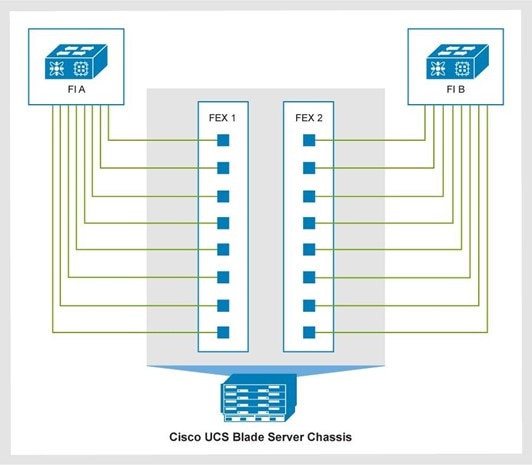
Figure 1. FEX to FI connections on a Cisco UCS blade server chassis
A diagram showing FEX to FI connections on a Cisco UCS blade server chassis

Cisco UCS Manager 4.1 (2a) or later allows the configuration of Cisco UCS 2408 FEX (IOM) with Cisco UCS VIC 1440 adapters and port expanders. This configuration supports up to 40 Gbps aggregate flow and 25 Gbps single flow per virtual Network Interface Card (vNIC).


Cisco UCS C-Series rack server connectivity

Cisco UCS C-Series rack servers connect directly to the FIs. The Direct Connect mode allows single-cable management and data traffic for these servers by the Cisco UCS Manager. Each Cisco UCS VIC connects to the FI using a single link. This approach is preferred for configurations with fewer servers.

A single server does not support different generations of VICs. Use either the Cisco UCS VIC 15xxx or 14xx series.

In Direct Connect mode, 4th-generation Cisco UCS C-Series rack servers include the following features:

  • Cisco UCS VIC 1467, a Small Form-Factor Pluggable (SFP28) mLOM card for the M6 servers.
    • The card supports 10/25-Gbps Ethernet or FCoE.Cisco UCS VIC 1477, a dual-port Quad Small Form-Factor (QSFP28) mLOM card for the M6 servers, and 40-Gbps or 100-Gbps Ethernet or FCoE.
  • Cisco UCS VIC 15428, a Small Form-Factor Pluggable (SFP28) mLOM card for the M6 servers.
    • The card supports 10, 25, or 50-Gbps Ethernet or FCoE.
  • Cisco UCS VIC 15238, a Small Form-Factor Pluggable (SFP28) mLOM card for the M6 servers.
    • The card supports 40, 100, 200-Gbps Ethernet or FCoE.

Cisco UCS C-Series rack server direct connect license

On Cisco UCS C220/240 M7 rackmounts only the following VICs are supported:

  • 15428 mLOM (25 G)
  • 15425 PCIe (25 G)

The UCS 15238 mLOM can be paired with a 15235 in the PCIe slot of a M7 rackmount server to achieve 4 x 100 Gb connections (200 Gb per fabric). Fifth-generation

  • 100 Gbps per fabric on a Cisco UCS VIC 1497 or 1495 on Cisco UCS M5 servers.
  • The Cisco UCS VIC 1477 is a dual-port Quad Small Form-Factor (QSFP28) mLOM card for the M6 servers. The card supports 40/100-Gbps Ethernet or FCoE.

On Cisco UCS C220/240 M7 rackmounts only the following VICs are supported:

  • 15238 mLOM (100 Gb)
  • 15235 PCIe (100 Gb)

The UCS 15428 mLOM can be paired with a 15425 in the PCIe slot of a M7 rackmount server to achieve 8 x 25 Gb connections (100 Gb per fabric).

The following table shows the port-to-FI connections of the Cisco UCS VICs.

Table 9. Cisco UCS C-Series VIC connections
Connectivity type Connections
Single-link connectivity 1477(mLOM)

1477(mLOM)

1495(PCIe)

1497 (mLOM)

15238 (mLOM

15235 (PCIe)

Port 1 connects to FI A.

Port 2 connects to FI B.

Dual-link connectivity

1455(PCIe)

1457 (mLOM)

1467 (mLOM)

15428 (mLOM)

15425 (PCIe)

Ports 1 and 2 connect to FI A.

Ports 3 and 4 connect to FI B.


Cisco UCS mixed server configuration

The Cisco UCS architecture uniquely combines compute, data network, and storage network access into a unified set of components that is managed through a single interface.

Cisco UCS integrates access layer networking and servers. Its unified fabric, supported by hardware and software components, runs diverse data center traffic over one converged network adapter. The elimination of switching in a Cisco UCS 5108 blade server chassis reduces network access-layer fragmentation. It cuts down the number of switches, cables, adapters, and management points by up to two-thirds. All devices in a Cisco UCS domain are managed under a single domain, which remains highly available by using redundant components.

The following figure shows a mixed server configuration with Cisco UCS B-Series blade servers and Cisco UCS C-Series rack servers.
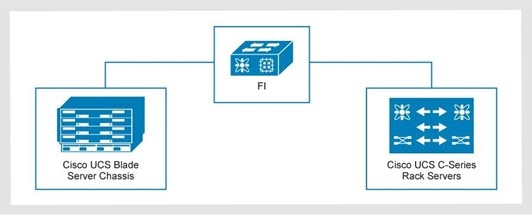
Figure 2. Mixed server configuration: Cisco UCS B-Series blade servers and Cisco UCS C-Series rack servers
A diagram showing a mixed server configuration: Cisco UCS B-Series blade servers and Cisco UCS C-Series rack servers

FI oversubscription

For best performance, maintain an oversubscription rate of 8:1 or lower across all compute domains. In this ratio, 8 denotes the committed host bandwidth, while 1 denotes the Ethernet and FC uplinks.

The following table shows a 5108 chassis with 4-link and 8-link 25 G connections to the FI. A 6454 FI can have two, four, or six uplink options to a 9336C ToR switch. Oversubscribed areas are marked in bold italics. As an example, 11 chassis with eight links per side provide 2,200 GB of bandwidth to the FI per side. Two uplinks to the ToR provide only 200 GB of bandwidth. This configuration results in an oversubscription of 2,200 / 200 = 11. To avoid oversubscription, provide four uplinks from the 6454 FI to the 9336C ToR switch.

Table 10. 5108 chassis with 4-link and 8-link 25 G connections to the FI (example)
Cisco B-Series Quantity Total bandwidth used per side Oversubscription rates per side on the 6454 FI (8:1 ratio)
One domain 2-uplinks (200 GB) 4-uplinks (400 GB) 6-uplinks (600 GB)
Chassis IOM with 4-Links 25 G 20 chassis (80 servers) 2 TB 10:1 5:1 3.3:1
Chassis IOM with 8-Links 25 G 11 chassis (88 servers) 2.2 TB 11:1 5.5:1 3.6:1
Chassis IOM with 8-Links 25 G 10 chassis (80 servers) 2 TB 10:1 5:1 3.3:1

When planning your CI environment, follow the guidance in the previous table to avoid oversubscribing on Ethernet or FC connections.


Cisco UCS with NVMe over Fibre Channel

Starting with the Cisco UCS firmware release 4.2, the Cisco UCS Manager (FC-NVMe) supports NVMe over Fibre Channel.

Version 4.2 of Cisco UCS Manager supports FC-NVMe on the following FIs:

  • UCS 6454
  • UCS 64108

3-Tier Platform support for FC-NVMe requires:

  • Cisco UCS VIC 14xx series adapters on M6 blade and rack mount servers
  • VMware vSphere ESXi release versions 7.0 or later

Disjoint Layer 2 configuration

In a Disjoint Layer 2 configuration, traffic is split between two or more networks at the FI to support two or more discrete Ethernet clouds. Configure Disjoint Layer 2 on the FI on ports that are not used for the standard LAN uplink traffic.

On the 4th-generation Cisco UCS 6454 or 64108 FIs, the network ports are:

  • Non-FC 10 Gbps or 25 Gbps unified ports
  • 40 Gb or 100 GbE Uplink ports

Upstream Disjoint Layer 2 networks give access to the cloud to servers or VMs in the same Cisco UCS domain.

The following figure shows an example of Disjoint Layer 2 networking into a Cisco UCS domain.
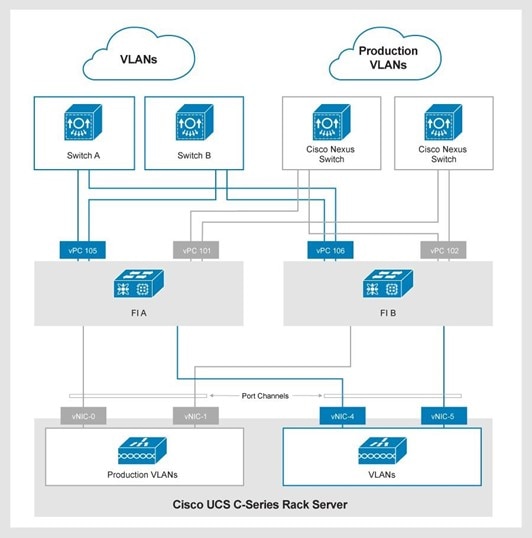
Figure 3. Disjoint Layer 2 networking into a Cisco UCS domain
A diagram showing an example of Disjoint Layer 2 networking into a Cisco UCS domain
  • vPCs 101 and 102 are production uplinks that connect to the network layer of the 3-Tier Platform.
  • vPCs 105 and 106 are external uplinks that connect to other switches.

You can also configure Disjoint Layer 2 network connectivity with an individual uplink on each FI.

UCSM domain supported cabling

The following tables show the supported cabling.

Table 11. Supported cabling on Cisco UCS 6454 FI
Source equipment Destination Connection type SFP/cable type Ports
Cisco UCS 6454 FI Cisco Nexus 9336C Ethernet uplink 100G AOC cables (domains 1 and 2)

QSFP-40G/100G-SRBD or QSFP-100G-SR4-S (domains 3 to 7)

49 to 54
Cisco UCS 6454 FI Cisco MDS 9148T, 9396T, 9706-v2, and 9710-v2 FC uplink DS-SFP-FC32G-SW with LC-LC FC cable 1 to 16
Cisco UCS 6454 FI Cisco UCS 5108 chassis w/ B200 M6 and M7 blade servers

Cisco C220 and C240 M6 and M7 rackmount servers

Server 10/25G Twinax (SFP-H10GB-CUxM)

(SFP-H25G-CUxM)

FP-25G-SR-S with LC-LC FC cable

SFP-10G-SR-S with LC-LC FC cable

Note: 10G is only supported on chassis connections. All rackmount connections use 25G options.

Note: The x in SFP-H25G-CUxM and SFP-H10G-CUxM denotes the length of the cable.

5 to 48, 9 to 48, or 17 to 48 depending on how many FC uplinks are used.
Table 12. Supported cabling on Cisco UCS 64108 FIs
Source equipment Destination Connection type SFP/cable type Ports
Cisco UCS 64108 FI Cisco Nexus 9336C Ethernet uplink 100G AOC cables (domains 1 and 2)

QSFP-40G/100G-SRBD or QSFP-100G-SR4-S (domains 3 to 7)

97 to 108
Cisco UCS 64108 FI Cisco MDS 9148T, 9396T, 9706-v2 and 9710-v2 FC uplink DS-SFP-FC32G-SW with LC-LC FC cable 1 to 16
Cisco UCS 64108 FI Cisco UCS 5108 chassis w/ B200 M6 and M7 blade servers

Cisco C220 and C240 M6 rackmount servers

Server 25G Twinax (SFP-H25G-CUxM) SFP-25G-SR-S with LC-LC FC cable
Note: The x in SFP-H25G- CUxM and SFP-H10G-CUxM denotes the length of the cable.

9 to 96 or 17 to 96 depending on how many FC uplinks are used.

For more information about the supported cabling on a specific Cisco FI, see the corresponding data sheet:

Table 13. Supported cabling on Cisco UCS 6536 Fis
Source equipment Destination Connection type SFP/cable type Ports
Cisco UCS 6536 FI Cisco Nexus 9336C Ethernet uplink 100G AOC Cables (Domains 1 and 2)

QSFP-40G/100G-SRBD or QSFP-100G-SR4-S (Domains 3 to 7)

25 to 32
Cisco UCS 6536 FI Cisco MDS 9148T, 9396T, 9706, and 9710 FC uplink DS-SFP-4X32G-SW

Multimode OM4 MPO female to 4x LC type-B breakout cable

33 to 36 (FC Breakout Ports)
Cisco UCS 6536 FI Cisco UCS 5108 chassis w/ B200 M6 blade servers

Cisco UCS X9508 chassis w/ X210c or X410c compute nodes

Cisco C220 and C240 M6 and M7 rackmount servers

Server 40 Gb Twinax on 5108 chassis only

(SFP-H40G-CUxM)

100 Gb Twinax (QSFP-100 Gb-CUxM)

100 Gb AOC (QSFP-100 Gb-AOCxM)

QSFP-100 Gb-SR4-S with MPO OM4 Multimode Fiber

Note: The x in QSFP-100 Gb-CU3M and QSFP-100 Gb-AOCxM is the length of the cable.

1 to 24 or 1 to 30 depending on how many FC and Ethernet uplinks are used.

For more information about the supported cabling on a specific Cisco FI, see the corresponding data sheet:

Cisco Intersight-managed compute layer

Cisco Intersight-managed compute layer

Introduction

This chapter describes the 3-Tier Platform compute components that Cisco Intersight Managed Mode (IMM) supports.

Cisco Intersight

Cisco Intersight is a management platform that is delivered as a service for your data center environment.

Cisco IMM enables you to administer and monitor multiple domains through one interface. Cisco UCS X-Series and 4th-generation components provide compute power in the 3-Tier Platform.

The following table shows the Cisco Nexus and Cisco UCS components that are used in Intersight-managed domains.

Table 14. Cisco Nexus and Cisco UCS components in Intersight-managed domains
Component Description
Cisco UCS X9508 chassis

Cisco UCS 5108 blade server chassis

Cisco Intersight manages the 6U Cisco UCS 5108 chassis, the 7U Cisco UCS X9508 chassis, and the 4th-generation FIs and servers.
Cisco UCS B-Series blade servers The Cisco UCS 5108 blade server chassis can house:
  • Cisco UCS B-Series blade servers:
    • Cisco UCS B200 M6
  • Cisco UCS VICs:
    • Cisco UCS 1440 VIC
    • Cisco UCS 1480 VIC
Cisco UCS-X compute nodes The Cisco UCS X9508 chassis supports:
  • Compute nodes:
    • Cisco UCS X210c M6 and M7 compute nodes
    • Cisco UCS X410c M7 compute nodes

The Cisco UCS X9508 Chassis supports the following IFMs:

  • X9108-25G
  • X9108-100G

The Cisco X210c M6 compute nodes support the following VICs:

  • Cisco UCS 14425 VIC
  • Cisco UCS 14825 VIC
  • Cisco UCS 15231 VIC

The Cisco UCS X210c and X410c M7 compute nodes support the following VICs

  • Cisco UCS 15231 (mLOM)
  • Cisco UCS 15420 (mLOM)
  • Cisco UCS 15422 (Mezz)
Cisco UCS C-Series rack servers Compute nodes:
  • Cisco UCS C220 M6 or M7 servers
  • Cisco UCS C240 M6 or M7 servers

Cisco UCS M6 VICs:

  • Cisco UCS 1467 (mLOM)
  • Cisco UCS 1477 (mLOM)
  • Cisco UCS 1495 (Mezzanine)
  • Cisco UCS 1455 (Mezzanine)
  • Cisco UCS 15428 (mLOM)
  • Cisco UCS 15238

Cisco UCS M7 VICs:

  • Cisco UCS 15238 (mLOM)
  • Cisco UCS 15235
  • Cisco UCS 15428 (mLOM)
  • Cisco UCS 15425
4th-generation Cisco UCS 6454 FIs Contains two, four, or six 100 Gbps uplinks.

Configured with four, eight or 16 FC connections per FI.

4th-generation Cisco UCS 64108 FIs Contains four, six, or eight 100 Gbps uplinks.

Configured with eight or 16 FC connections per FI.

5th-generation Cisco UCS 6536 FIs Contains two, four, six or eight 100Gbps uplinks.

Configured with two breakout ports (eight 32 Gbps) or four breakout ports (sixteen 32 Gbps) FC-uplinks.

4th-generation Cisco UCS 2408 FEX The FEX connect the I/O fabric between the Cisco UCS 6454 FI and the Cisco UCS 5108 blade server chassis. The Cisco UCS 64108 FI supports only the Cisco UCS 2408 25 Gbps FEX.
Cisco UCS X9108 25 Gbps Intelligent Fabric Module (IFM) The IFM connects the I/O fabric between the Cisco UCS 6454 or 64108 FI and the Cisco UCS X9508 chassis.
Cisco UCS X9108 100 Gbps IFM The IFM connects the I/O fabric between the Cisco UCS 6536 FI to the Cisco UCS X9508 chassis.

Each FI reserves several ports to connect Cisco SAN switches and carry FC traffic between the compute layer and the storage layer. SAN port channels carry FC traffic between the FIs and upstream Cisco MDS switches. The fabric extenders (FEX) within the blade server chassis connect to FIs over converged networking. By default, servers in the 3-Tier Platform boot VMware vSphere ESXi from local mirrored SD cards or M.2 cards, with booting from SAN is optional. Regardless of the number of blade servers in the chassis, the FEX establishes northbound connections to the FIs using four or eight of the following IOMs:

  • Cisco UCS 4th-generation 10 Gbps with 2204/2208XP IOMs
  • Cisco UCS 25 GbE connections with 2408 IOM or 9108 25 Gbps IFM
  • Cisco UCS 100 GbE connections with X9108 100 Gbps IFMs (on the 6536 FI only)

The Cisco UCS 2408 FEX has eight external 25 Gbps ports and 32 internal 10 Gbps ports. Each FEX connects northbound to the FIs, regardless of the number of blade servers in the blade server chassis. The Cisco UCS 2408 FEX works with the Cisco UCS 6454 or 64108 FI at 25 Gbps.

The Cisco UCS X9108 25 Gbps IFM is equipped with eight SFP28 external connectors on an IFM to interface with FI 6400 series FIs. Internally, the IFM provides eight 25 Gbps connections to each UCS X210c or X410c compute node in the Cisco UCS X9508 chassis.

Cisco UCS M6 and M7 C-Series rack servers connect directly to the following FIs:

  • Cisco UCS 6454 FIs
  • Cisco UCS 64108 FIs
  • Cisco UCS 6536 FIs

The Cisco UCS X9108-100G IFM is equipped with eight QSFP28 external connectors on an IFM, enabling itto interface with FI 6 series FIs. Internally, the IFM provides either one 100 Gb or four 25 Gb connections to each UCS X210c or X410c compute node in the Cisco X9508 chassis.

Cisco UCS M6 and M7 C-Series rack servers connect directly to the following FIs:

  • Cisco UCS 6454 FIs
  • Cisco UCS 64108 FIs
  • Cisco UCS 6536 FIs

Use a pair of Cisco Nexus 2000 Series FEX to increase the scale for Cisco UCS C-Series rack servers on Cisco UCS 6332-16UP FIs. The Cisco UCS 6454 FIs can use a pair of Cisco Nexus 2232PP FEX to increase the scale of Cisco UCS C-Series rack servers. These connections carry IP and FC traffic. The Cisco UCS 64108 and 6536 FIs do not have a supported FEX for rack mounting.

Cisco Intersight software and licensing

You can deploy Cisco Intersight as SaaS on Intersight.com, or running on your premises as a Cisco Intersight virtual appliance. The virtual appliance provides the benefits of Cisco Intersight with more flexibility for deployments that require additional data locality and security requirements. The Centera Virtual Archive virtual appliance software is deployable on-premises, allowing users to take advantage of the SaaS functionality. The Private Virtual Appliance (PVA) can be deployed on-premises with further security restrictions.

You can use the following Cisco Intersight deployment types on the 3-Tier Platform:

  • SaaS (Cloud)
  • Centera Virtual Archive
  • PVA

The following table compares the different Cisco Intersight deployment types.

Table 15. Comparison of Cisco Intersight deployment types
Feature Intersight.com (SaaS) Connected Virtual Appliance (CVA) Private Virtual Appliance (PVA)
Cisco Intersight deployment host Cisco-hosted at Intersight.com Software appliance (VM) hosted on 3-Tier Management Software appliance (VM) hosted on 3-Tier Management
Minimum license tier Base Essentials Essentials
Deployment or scale No limit Small deployment:
  • 2,000 managed servers
  • 16 vCPUs
  • 32 GB memory
  • 500 GB disk

Medium deployment:

  • 5,000 managed servers
  • 24 vCPUs
  • 64 GB memory
  • 500 GB disk
Small deployment:
  • 2,000 managed servers
  • 16 vCPUs
  • 32 GB memory
  • 500 GB disk

Medium deployment:

  • 5,000 managed servers
  • 24 vCPUs
  • 64 GB memory
  • 500 GB disk
Connectivity to Cisco Required for all endpoints Required for the appliance only None
User authentication SSO: (SAML 2.0) Cisco ID (CCO) SSO: (SAML 2.0)LDAP/AD SSO: (SAML 2.0)LDAP/AD
Intersight upgrades Automatic Automatic, scheduledManual Automatic
Data collection Full only Full or minimal None
Licensing Smart Smart Smart Specific License Reservation (SLR)
Other differences from SaaS N/A Mobile application is not supported. Mobile application is not supported.

Automatic software downloads are not supported.

Intersight is not connected to the Cisco Technical Assistance Center (TAC).

Cisco Intersight virtual appliance deployments support the following 3-Tier Management solutions:

  • 3-Tier Management Solution Central with Dell Unity and Unity XT storage
  • 3-Tier Management Solution Central with vSAN

Cisco Intersight virtual appliance configuration

A single Cisco Virtual Appliance instance of Intersight can manage multiple 3-Tier Platforms.

If resources are available on the 3-Tier Management solution, you can host multiple virtual appliance instances on the platform. However, the discovered devices and virtual infrastructure must meet specific requirements, as shown in the following table.

Table 16. Minimum resource requirements based on the deployment size
Resource System requirements
Small Medium
vCPU 16 24
RAM (GB) 32 64
Storage (Disk) 500 GB 500 GB
Number of servers 2,000 5,000
Supported hypervisors VMware ESXi 7.0 and later VMware ESXi 7.0 and later
Number of supported concurrent operations 50 100
Note: The small deployment size supports deploying a maximum of 50 profiles.

Note: The tiny deployment size with 8 vCPU and 16 GB of RAM is for Cisco Intersight Assist only. The Cisco Intersight Assist Virtual Appliance is needed for SaaS users to manage supported non-Cisco components.

Note: Cisco Intersight Assist functionality is embedded in the Cisco Intersight Connected Virtual Appliance and Cisco Intersight Private Virtual Appliance.


Cisco Intersight licensing tiers

Cisco Intersight offers subscription-based licensing with a choice of license types.

As you move up the licensing tiers, more capabilities become available. You can purchase a subscription for one, three, or five years, and then select the Cisco UCS server volume tier that suits your needs for the selected subscription period.

Table 17. Cisco Intersight licensing tiers
Licensing tier Description
Essentials This tier includes Intersight functionality that is available in Cisco UCS servers and additional features such as:
Advantage This tier offers all the features and functionality of the Essentials tier, and also:
  • Advisories
  • Launch tunneled vKVM
  • Operating system installation
  • Storage inventory
  • Virtualization inventory
  • Virtualization operations

For more information, see Cisco Intersight Licensing.


Cisco Intersight orders

Cisco Smart Accounts and Smart Licensing are required for Cisco Intersight.

A Cisco Connection Online (CCO) user account is required for the Cisco Intersight UI.

Table 18. Order details for Cisco Intersight licenses
Part number Description
DC-MGT-SAAS Product family: Cisco Intersight
DC-MGT-IS-SAAS-ES Intersight Infrastructure Services SaaS: Essentials
DC-MGT-IS-SAAS-AD Intersight Infrastructure Services SaaS: Advantage
DC-MGT-IS-PVAPP-ES Intersight Infrastructure Services Private Virtual Appliance: Essentials
DC-MGT-IS-PVAPP AD Intersight Infrastructure Services Private Virtual Appliance: Advantage
Note: You can use a Cisco Intersight Infrastructure Services SaaS license (DC-MGT-IS-SAAS-ES and DC-MGT-IS-SAAS-AD) for SaaS, and also Centera Virtual Archive deployment options. They have the same part number.

For more information about Cisco Intersight licensing tiers and ordering, see:


Cisco UCS-Managed Mode

Cisco Intersight discovers and monitors targets that Cisco UCS Manager manages, a process known as Cisco UCS-Managed Mode (UMM). In this mode, you can claim Cisco UCS domains as targets known as Cisco UCS-managed targets. Cisco Intersight enables you to monitor multiple Cisco UMM domains through a single interface.

The following table shows the software versions that Cisco UCS hardware and Cisco UCS Manager support.

Table 19. Cisco Intersight-supported hardware and software
Supported hardware Version
Cisco UCS FIs 6400 (Gen 4): Cisco UCS Manager 4.0 and later
Cisco UCS-Managed B-Series and C-Series servers Cisco UCS B-Series blade servers:
  • B200 M6 servers

Cisco UCS VICs:

  • 1440
  • 1480

Cisco UCS C-Series rack servers:

  • C220/240 M6/M7
  • C240 M6/M7

Cisco UCS VICs:

  • 1455
  • 1467
  • 1477
  • 1495
  • 15238
  • 15428
Note: Cisco Intersight does not support Dell storage arrays as targets.

Cisco Intersight supports VMware 7.0 and 8.0.

Cisco Intersight device connector requirements

The device connector is an embedded management controller that enables the Cisco Intersight capabilities. It provides a secure way for the connected targets to send information to Cisco Intersight and receive control instructions from it.

To enable Intersight Management, turn on the device connector and select Admin > Device Connector > Cisco UCS Manager.

The following table shows the minimum supported firmware versions that are required on the FI to claim targets from the Intersight Virtual Appliance.

Table 20. Device connector software and firmware requirements
Component Centera Virtual Archive PVA Components with integrated device connector
Cisco UCS Manager 3.2 (1) 4.0 (2a) 4.0 (2a)
Cisco IMC M6 Servers: 4.2 (1a) 4.0 (2d) 4.0 (2d)
Device connector 1.0.9-2290 1.0.9-335 N/A

Cisco UCS blade server connectivity

Cisco UCS and blade servers contain half-width blades with Cisco UCS VICs on supported Cisco UCS B-Series blade servers.

Cisco UCS 5108 chassis half-width blades

Half-width Cisco UCS B-Series M6 blade servers can contain a 4th-generation Cisco UCS VIC 1440 in the motherboard (mLOM) mezzanine slot.

4th-generation Cisco UCS VIC 1480 M6 servers are installed in the PCIe mezzanine slot. The slot is next to the Cisco UCS VIC 1440. Both VICs can direct network traffic to a separate physical adapter.

The Cisco UCS VIC 1440 is installed with a port expander card for native 40 Gbps connectivity to each fabric. The Cisco UCS VIC 1440 supports a port expander with a Cisco UCS 2408 FEX IOM. The VIC 1440 does not support port expanders with Cisco UCS 2204XP or the Cisco UCS 2208XP IOMs.

Cisco UCSX compute node connectivity

Cisco UCS X9508 chassis compute nodes

Each vNIC on a VIC 14000 provides:

  • An aggregate bandwidth of 50 Gbps across multiple flows.
  • A single-flow maximum of 25 Gbps.
  • 100 Gbps across both IFMs with two vNICs.
  • 200 Gbps across both IFMs with four vNICs.

For a 14825 UCSX-V4-Q25GME rear mezzanine VIC card, a 14425 mLOM VIC (UCSX-V4-Q25GML) is required. A UCSX-V4-BRIDGE VIC bridge card is included, and connects the mLOM to the mezzanine adapter. The UCSX rear mezzanine card has Ethernet connectivity to the IFM using the UCSX-V4-BRIDGE, and a PCIE Gen3 x16 connectivity towards CPU2.

The Cisco UCS 15000 VICs provide:

  • An aggregate bandwidth of 50 Gbps or 100 Gbps across multiple flows
  • A single-flow maximum of 25 Gbps
  • 100 Gbps across both IFMs with one or two vNICS

If a UCSX 15422 mezzanine VIC card is installed, a 15420 mLOM is required. A bridge connector (UCSX-V5-BRIDGE-D) is required and included when a 15422 mezzanine is paired with a 15420 mLOM.

The following table shows the network connectivity requirements for a Cisco UCS 5108 chassis.

Table 21. Network connectivity requirements for a Cisco UCS 5108 chassis
Blade type Cisco UCS VIC combination Bandwidth to each FEX Total available bandwidth
Half-width 1440 20 Gbps 40 Gbps
1440 + port expander 40 Gbps 80 Gbps
1440 + port expander + 1480 80 Gbps 160 Gbps
15411 20 Gbps 40 Gbps
15411 + port expander 40 Gbps 80 Gbps

The following table shows the network connectivity requirements for a Cisco UCSX 9508 chassis.

Table 22. Network connectivity requirements for a Cisco UCSX 9508 chassis
Compute node type Cisco UCS VIC combination Bandwidth to each FEX Total available bandwidth
X210c M6 14425 + 14825 100 Gbps 200 Gbps
15231 100 Gbps 200 Gbps
X210c and X410c M7 15420 50 Gbps 100 Gbps
15420 + 15422 100 Gbps 200 Gbps
15231 100 Gbps 200 Gbps

The network connectivity for a Cisco UCS X9508 chassis is:

  • Compute node type: Full-height
  • Cisco UCS VIC combination: 14425
  • Bandwidth to each FEX: 50 Gbps
  • Total available bandwidth: 100 Gbps

The following figure shows an eight-link IOM at 25 Gbps port speed with FEX to FI connections on a Cisco UCS or UCS X server chassis.
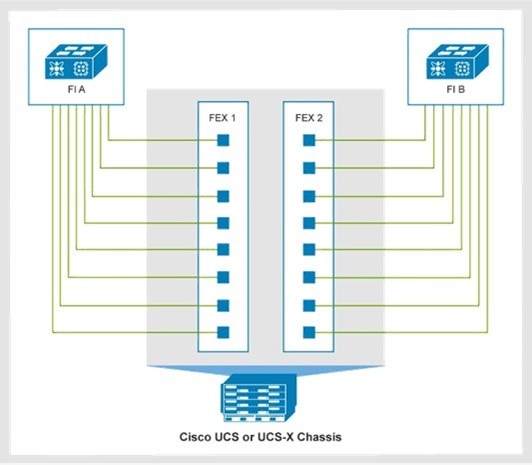
Figure 4. Eight-link IOM on a Cisco UCS or UCS X server chassis
A diagram of an eight-link IFM at 100 Gbps port speed with FEX to FI connections on a Cisco UCS X server chassis with a 9108-100G IFM

The following figure shows an eight-link IFM at 100 Gbps port speed with FEX to FI connections on a Cisco UCS X server chassis with a 9108-100G IFM.
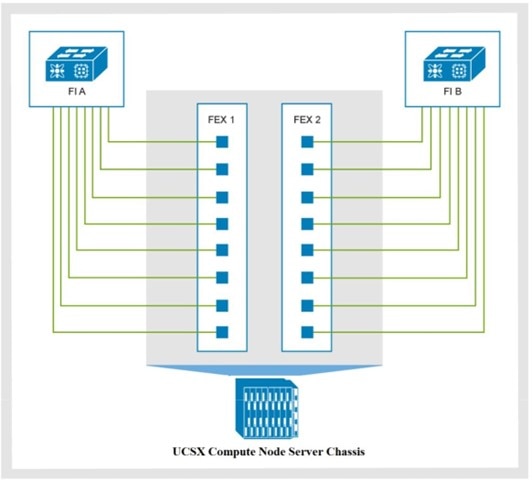
Figure 5. Eight-link IFM with FEX to FI connections on a Cisco UCS X server chassis
A diagram of an eight-link IFM at 100 Gbps port speed with FEX to FI connections on a Cisco UCS X server chassis with a 9108-100G IFM

Cisco UCS fabric interconnects

Every 3-Tier Platform that Cisco Intersight manages is equipped with two Cisco UCS 4th- or 5th-generation FIs to form an HA cluster.

The following table shows the supported 3-Tier FI configurations.

Note: You cannot use the Cisco UCS 2408 IOM on a Cisco UCS X9508 chassis, or a Cisco UCS 9108 IFM on a Cisco UCS 5108 chassis.

Table 23. Supported 3-Tier FI configurations
FI Chassis
Cisco 2408 IOM Cisco UCS 5108 chassis
Cisco UCS 9108 IFM Cisco UCS X9508 chassis

Cisco UCS 2408 IOM requires Cisco UCS Intersight Infrastructure 4.1 (2b) or later.

To run IMM on your FIs, use IMM version 4.1 (3) or later.

Cisco UCS X210c M7 compute node on chassis 9508 and C-Series 220 and 240 M7 servers are supported on FIs running 4.2(3b) or greater. Cisco Infrastructure bundle 4.3(2c) and later supports Cisco UCS X410c M7 servers.

Each FI pair performs the following functions on the 3-Tier Platform:

  • Provides network connectivity and management capability for the Cisco UCS 5108 chassis or the Cisco UCS X9508 chassis
  • Forms a Cisco UCS compute domain
  • Runs the Cisco Intersight application and database

Cisco UCS components

Cisco UCS M6 blade and rackmount servers combine compute, network, storage access, and virtualization resources into a single converged system.

Cisco UCS integrates a low-latency, lossless 10 GbE or 25 GbE unified network fabric with x86-architecture servers.

Table 24. Cisco Intersight UCS servers
Name Number of ports Port description Description
Cisco UCS 6454 FI 1 32 Gbps FC For the Cisco UCS 6454 FI, the total number of ports is 96 for the 16 or 32 G and 10 or 25 G combined.
44 10 GbE or 25 GbE For more information, see the Cisco UCS 6454 FI data sheet .
6 QSFP 100 GbE Connect to a pair of 100 Gbps capable Cisco Nexus 9336C-FX2 data plane switches that support up to seven Cisco UCS compute domains.
Cisco UCS 64108 FI 16 32 Gbps FC For the Cisco UCS 64108 FI, the total number of ports is 96 for the 16 or 32 G and 10 or 25 G combined.
88 10 GbE or 25 GbE For more information, see the Cisco UCS 64108 FI data sheet.
12 QSFP 100 GbE Connect to a pair of 100 Gbps capable Cisco Nexus 9336C-FX2 data plane switches that support up to seven Cisco UCS compute domains.
Cisco UCS 6536 FI 4 (16 total after breakout) 32 Gbps FC breakout ports The Cisco UCS 6536 FI data sheet contains more information. For more information, see the Cisco UCS 6536 FI data sheet.
32 QSFP 100 GbE Connect to a pair of 100 Gbps-capable Cisco Nexus 9336C-FX2 data plane switches with two, four, six, or eight uplinks. The uplinks support up to seven Cisco UCS compute domains.

For the Cisco UCS 6536 FI, the total number of 100 G ports is 32 for the 100 G uplinks and server ports combined. The final four ports are for FC connectivity.

Note: Cisco Intersight supports a maximum of 20 chassis per domain.

Cisco UCS B-Series blade servers, Cisco USC X210c compute nodes, and Cisco UCS C-Series rack servers provide:

  • Integrated redundancy for high availability.
  • Hot-swappable components for serviceability, upgrade, or expansion.
  • Fewer physical components than in a comparable system, built piece by piece.
  • Reduced cabling.
  • Improved energy efficiency over traditional blade server chassis.

For VMware deployments, the 3-Tier Platform can scale from three to hundreds of Cisco UCS servers. The maximum number of servers requires:

  • A maximum of seven Cisco UCS domains
  • Ten chassis per domain with the two-link connection option for Cisco UCS B-Series blade servers
  • The underlying storage array configuration
  • Consistent server models within the domain or system
  • Connected storage arrays that support the configured host count.

Mixed server models are supported on a Cisco UCS 5108 chassis, but they may impact the maximum permitted quantity of servers. A mixed chassis environment of a Cisco UCS 5108 chassis and a Cisco UCS X9508 chassis in the same domain is also supported.

The following table shows the maximum number of supported Cisco UCS servers by domain and by system:

Table 25. Cisco UCS servers that are supported by domain and system
Server model and type Servers per domain Servers per system
4th-generation Cisco UCS 6454 FI 4th-generation Cisco UCS 64108 5th-generation UCS 6536 FI Cisco UCS 6454 FI Cisco UCS 64108 FI 5th-generation UCS 6536 FI
Cisco UCS B200 M6 (half-width) 88 160 N/A 616 1120 N/A
Cisco UCS X210c M6 and M7 compute node 88 160 112 616 1120 784
Cisco USC X410c M7 44 80 56 308 560 392
Cisco UCS C220 M6 and M7Cisco UCS C240 M6 and M7 44 88 32 308 616 224

The Cisco UCS 64108 FI and Cisco UCS 6536 FI are not supported with a FEX. All rackmount servers are directly connected.

The following table shows the maximum number of Cisco UCS B-Series blade servers to deploy. The limits apply when the blade servers are directly connected to Cisco UCS C-Series rack servers in the same domain.

Table 26. Cisco UCS B-Series blade servers per deployment
Chassis count Cisco UCS B-Series or X-Series blade servers Cisco UCS C-Series rack servers
4th-genCisco UCS 6454 FI 4th-gen Cisco UCS 64108 5th-generation Cisco UCS 6536 FI 4th-generation Cisco UCS 6454 FI 4th-generation Cisco UCS 64108 5th-generation UCS 6536 FI
0 0 0 0 44 88 32
1 8 8 8 40 84 30
2 16 16 16 32 80 28
3 24 24 24 32 76 26

The following table shows the maximum supported CPUs and memory per Cisco UCS server.

Table 27. CPUs and memory per Cisco UCS server
Cisco UCS server CPU Memory
Cisco UCS X210c M6 and M7 Compute Node M6: Two Intel Xeon scalable

M7: Two 4th-generation Intel Xeon Processors

M6: 8 TB

M7: 8 TB

Cisco UCS X410c M7 Compute Node Four 4th-generation Intel Xeon Processors 16 TB
Cisco UCS B200 M6

Cisco UCS C220 M6

Cisco UCS C240 M6

Two 3rd-generation Intel Xeon scalable processors DDR4 SDRAM: Up to 8 TB.Intel

Optane memory: Up to 12 TB

Cisco UCS C220 M7

Cisco UCS C240 M7

Two 4th-generation Xeon scalable processors Up to 4 TB with 32 x 128 GB DDR5-4800 DIMMs, in a 2-socket configuration.

Up to 8 TB with 32 x 256 GBDDR5-4800 DIMMs, in a 2-socket configuration.

Cisco UCS X210c M6 compute node Two Intel Xeon scalable processors 8 TB
Cisco UCS B200 M6

Cisco UCS C220 M6

Cisco UCS C240 M6

Two 3rd-generation Intel Xeon scalable processors DDR4 SDRAM: Up to 8 TB.

Intel Optane memory: Up to 12 TB

Order CPUs from the factory or by ordering an additional server through the expansion services. By default, all Cisco UCS servers come with local M.2 cards installed for booting the operating system.

Dell Technologies contacts Cisco support for issues and concerns with CPUs that are ordered as part of a converged system.

Compute server connectivity

Cisco UCS-X compute nodes, UCS B-Series blade servers, and Cisco UCS C-Series rack servers contain at least one physical Cisco UCS VIC for server connectivity.

  • For Cisco UCS servers, the VIC passes converged FC and IP network traffic through the Cisco UCS 5108 blade server chassis midplane to the FEX.
  • Cisco UCS C-Series rack servers can connect directly to each FI.
  • Cisco UCS X9508 supports the Cisco UCS X210c M6, X210c M7 and X410c M7compute nodes.

Cisco UCS X9508 chassis connectivity

The Cisco UCS X9508 chassis contains Cisco UCS X210c M6, X210c M7 and X410c M7 compute nodes along with 14000 or 15000-series VICs.

The following tables show the uplink connectivity from the Cisco X9508 chassis to the FI.

Table 28. Uplink connectivity from the Cisco X9508 chassis to the FI
Cisco UCS FI Cisco UCS IFM IFM uplink Ethernet uplinks Maximum chassis per domain
Cisco UCS 6454 FI Cisco UCS 9108 25 G IFM
  • 4
  • 8
  • 2
  • 4
  • 6
  • 2
  • 4
  • 6
  • 11
  • 11
  • 11
  • 5
  • 5
  • 5
Cisco UCS 64108 FI Cisco UCS 9108 25G IFM
  • 4
  • 8
  • 2
  • 4
  • 6
  • 2
  • 4
  • 6
  • 16
  • 20
  • 20
  • 8
  • 16
  • 20
Cisco UCS 6536 FI Cisco UCS 9108 25G IFM
  • 2
  • 4
  • 8
  • 2
  • 4
  • 6
  • 8
  • 2
  • 4
  • 6
  • 8
  • 2
  • 4
  • 6
  • 8
  • 8
  • 14
  • 13
  • 12
  • 4
  • 7
  • 6
  • 6
  • 2
  • 3
  • 3
  • 3

Cisco UCS C-Series rack server direct connect mode

Directly connecting rackmount servers to the FIs lets Cisco Intersight manage the Cisco UCS C-Series rack servers using a single cable for both management and data traffic. The Cisco UCS VIC connects to the FI using a single connection from each VIC to each FI. This method is used for configurations that require fewer servers.

Different generations of VICs are not supported in a single server. Use the Cisco UCS VIC 14xx or 15xxx series. These servers include the following features:

  • 4th-generation Cisco UCS C-Series rack servers with:
    • 25 Gbps per fabric on the Cisco UCS VIC 15428 or 1467 mLOMs and a 1455 PCIe on Cisco UCSM6 servers.
    • Cisco UCS VIC 15428, 1467, and 1455 Small Form-Factor Pluggable (SFP28) cards for the M6 servers. These cards support 10/25-Gbps Ethernet or FCoE.
    • Cisco UCS C-Series rack server Direct Connect license.
  • On Cisco UCS C220/240 M7 rackmounts only the following VICs are supported:
    • 15428 mLOM (25G)
    • 15425 PCIe (25G)

The UCS 15238 mLOM can be paired with a 15235 in the PCIe slot of a M7 rackmount server to achieve 4 x 100 Gb connections (200 Gb per fabric).

  • 5th-generation Cisco UCS C-Series rack servers in Direct Connect mode with:
    • 100 Gbps per fabric on a Cisco UCS VIC 15238 or 1477 mLOMs and a 1495 PCIe on Cisco UCS M6 servers.
    • The Cisco UCS VIC 15238, 1477, and 1495 are dual-port Quad Small Form-Factor (QSFP28) mLOM cards for the M6 servers. These cards support 40/100-Gbps Ethernet or FCoE.
    • On Cisco UCS C220/240 M7 rackmounts only the following VICs are supported:
      • 15238 mLOM (100 Gb)
      • 15235 PCIe (100 Gb)

The UCS 15428 mLOM can be paired with a 15425 in the PCIe slot of a M7 rackmount to achieve 8 x 25 Gb connections (100 Gb per fabric).

The following table shows the port-to-FI connections on the Cisco UCS VICs:

Table 29. Cisco UCS VIC port connections
Cisco UCS VIC Connections
Single-link connectivity:

1477

1497

1495

15235

15238

Port 1 or 2 connects to FI A and port 3 or 4 connects to FI B.
Dual-link connectivity:

1455

1457

1467

15428

15425

Ports 1 and 2 connect to FI A.

Ports 3 and 4 connect to FI B

Note: Cisco UCS FIs support dual-link connectivity.

Cisco UCS mixed server configuration

Cisco UCS has a unique architecture that integrates compute, data network, and storage network access into a common set of components under a single management interface.

Cisco UCS fuses access layer networking and servers. The hardware and software components support the Cisco UCS unified fabric, which runs multiple types of data center traffic over a single converged network adapter. When switching is not used in a Cisco UCS X9508 chassis, network access-layer fragmentation is reduced. All devices in a Cisco UCS domain remain under a single management domain, which uses redundant components to remain highly available.

The following figure shows a mixed server configuration with Cisco UCS B-Series blade servers and Cisco UCS C-Series rack servers.
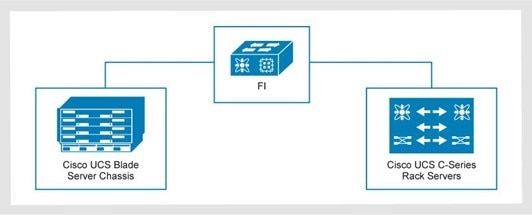
Figure 6. Mixed server configuration: Cisco UCS B-Series blade servers and Cisco UCS C-Series rack servers
A diagram showing a mixed server configuration for Cisco UCS B-Series blade servers and Cisco UCS C-Series rack servers

Fabric interconnect oversubscription

The following figure shows a mixed-server configuration with the Cisco UCS X9508 compute node chassis and Cisco UCS C-Series rack servers.
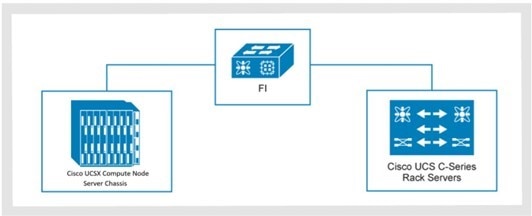
Figure 7. Cisco UCS mixed-server configuration example: X9508 compute node chassis and C-Series rack servers
A diagram showing a mixed-server configuration with the Cisco UCS X9508 compute node chassis and Cisco UCS C-Series rack servers

For optimal performance, keep all compute domains at an oversubscription rate of 8:1 or lower. The 8 in this ratio is the committed host bandwidth and the Ethernet uplinks, while the 1 is for the FC uplinks.

The following table shows an example of a 5108 chassis with 4-link and 8-link 25G connections to the FI. The FI shows 2-, 4-, or 6-uplink options from a 6454 FI to a 9336C ToR switch. The area that is marked in bold italics is oversubscribed. The 11 chassis with 8-links per side provides 2,200 GB or bandwidth to the FI per side, as compared with 2-uplinks to the ToR, providing only 200 GB of bandwidth. That yields 2.200/200 = 11. To avoid oversubscription, provide 4-upinks from the 6454 FI to the 9336C ToR switch, as shown in the table.

Table 30. Cisco UCS 5108 chassis with 4-link and 8-link 25G connections to the FI (example)
B-Series QTY Total bandwidth used per side Oversubscription rates per side on the 6454 FI (8:1 ratio)
One domain 2-uplinks (200 GB) 4-uplinks (400 GB) 6-uplinks (600 GB)
Chassis IOM with 4-Links 25 G 20 chassis (80 servers) 2 TB 10:1 5:1 3.3:1
Chassis IOM with 8-Links 25 G 11 chassis (88 servers) 2.2 TB 11:1 5.5:1 3.6:1
Chassis IOM with 8-Links 25 G 10 chassis (80 servers) 2 TB 10:1 5:1 3.3:1

When planning your environment, use the guidance in the preceding table to ensure that you do not oversubscribe on Ethernet or FC connections.

Disjoint Layer 2 configuration

In a Disjoint Layer 2 configuration, traffic is split between two or more networks at the FI to support two or more discrete Ethernet clouds.

Disjoint Layer 2 on the FI must be configured on ports that are not used for the standard LAN uplink traffic.

On the 4th-generation Cisco UCS 6454 or 64108 FIs, the network ports are:

  • Non-FC 10 Gbps or 25 Gbps unified ports
  • 40 GbE or 100 GbE Uplink ports

Cisco UCS servers connect to different Ethernet clouds that otherwise never connect. Upstream Disjoint Layer 2 networks give access to the cloud to servers or VMs that reside in the same Cisco UCS domain.

The following figure shows an example of Disjoint Layer 2 networking into a Cisco UCS domain.

Figure 8. Disjoint Layer 2 networking into a Cisco UCS domain
A diagram showing an example of Disjoint Layer 2 networking into a Cisco UCS domain

The 101 and 102 vPCs uplinks are production uplinks that connect to the network layer of the 3-Tier Platform. vPCs 105 and 106 are external uplinks that connect to other switches.

Disjoint Layer 2 network connectivity is also configurable with an individual uplink on each FI.

Supported cabling in an Intersight domain

The following tables provide information about supported cabling on the specified FIs.

Table 31. Cisco UCS 6454 FIs
Source equipment Destination Connection type SFP/cable type Ports
Cisco UCS 6454 FI Cisco Nexus 9336C Ethernet Uplink 100G AOC cables (domains 1 and 2)

QSFP-40G/100G-SRBD or QSFP-100G-SR4-S (domains 3 to 7)

49 to 54
Cisco UCS 6454 FI Cisco MDS 9148T, 9396T, 9706-v2 and 9710-v2 FC uplink DS-SFP-FC32G-SW with LC-LC FC Cable 1 to 16
Cisco UCS 6454 FI Cisco UCS 5108 chassis w/ B200 M6 blade servers

Cisco C220 and C240 M6 and M7 Rackmount Servers

Server 25G Twinax (SFP-H25G-CUxM)SFP-25G-SR-S with LC-LC FC cable
Note: The x in SFP-H25G-CUxM is the length of the cable.

5 to 48, 9 to 48, or 17 to 48 depending on how many FC uplinks are used.
Table 32. Cisco UCS 64108 FIs
Source equipment Destination Connection type SFP/cable type Ports
Cisco UCS 64108 FI Cisco Nexus 9336C Ethernet uplink 100G AOC cables (domains 1 and 2)

QSFP-40G/100G-SRBD or QSFP-100G-SR4-S (domains 3 to 7)

97 to 108
Cisco UCS 64108 FI Cisco MDS 9148T, 9396T, 9706-v2 and 9710-v2 FC uplink DS-SFP-FC32G-SW with LC-LC FC cable 1 to16
Cisco UCS 64108 FI Cisco UCS 5108 chassis w/ B200 M6 and M7 blade servers

Cisco C220 and C240 M6 and M7 rackmount servers

Server 25G Twinax (SFP-H25G-CUxM)SFP-25G-SR-S with LC-LC FC cable
Note: The x in SFP-H25G-CUxM is the length of the cable.

9 to 96 or 17 to 96 depending on how many FC uplinks are used.
Table 33. 6536 Cisco UCS FIs
Source equipment Destination Connection type Sfp/cable type Ports
Cisco UCS 6536 FI Cisco Nexus 9336C Ethernet uplink 100 G AOC Cables (domains 1 and 2)

QSFP-40G/100G-SRBD or QSFP-100G-SR4-S (domains 3 to 7)

25 to 32
Cisco UCS 6536 FI Cisco MDS 9148T, 396T, 9706-v2 and 9710-v2 FC uplink DS-SFP-4X32G-SW

Multimode OM4 MPO female to 4x LC type-B breakout cable

33 to 36 (FC breakout ports)
Cisco UCS 6536 FI Cisco UCS 5108 chassis w/ B200 M6 blade servers

Cisco UCS X9508 chassis w/ x210c M6, X210c M7, X410c M7 compute nodes

Cisco C220 and C240 M6 and M7 rackmount servers

Server 40G Twinax on 5108 Chassis only(SFP-H40G-CUxM)

100G Twinax (QSFP-100G-CUxM)

100G AOC (QSFP-100G-AOCxM)

QSFP-100G-SR4-S with MPO OM4 Multimode Fiber

Note: The x in QSFP-100G-CU3M and QSFP-100G-AOCxM is the length of the cable.

1 to 24 or 1 to 30 depending on how many FC and Ethernet uplinks are used.

For more information about supported cabling on the specified FIs, see:

Network layer

Introduction

This chapter describes the 3-Tier network layer requirements, components, topologies, and switches.

LAN layer

The following table shows the Dell recommendations for the 3-Tier LAN network components.

Table 34. Dell-recommended network components
Component Minimum Maximum
Cisco Nexus 93108TC-FX3P management switches One pair

96 management ports

Two pairs

192 management ports

Cisco Nexus 92348GC-X management switches One pair

96 management ports

Two pairs

192 management ports

Cisco Nexus 9336C-FX2 management aggregation switches N/A One pair
Cisco Nexus 9336C-FX2 data plane switches One pair Nine pairs

SAN components

The following table shows the SAN component requirements for 3-Tier Platforms.

Table 35. SAN component requirements
Component Minimum Maximum
Cisco MDS 9148T, 9396T, 9706-v2 or 9710-v2 multilayer fabric switches One pair One pair

LAN layer topology

LAN connectivity includes Cisco Nexus data plane switches. The compute layer connects to Ethernet components in the network layer.

The FIs connect to the Cisco Nexus data plane switches through 10 GbE, 40 GbE, or 100 GbE port channels. The LAN supports 10 Gbps, 40 Gbps, and 100 Gbps uplinks to the external network. It also supports 10 Gbps, 25 Gbps, 40 Gbps, or 100 Gbps access for attached devices.

Configuring the switch airflow

When incorporating a LAN switch into a 3-Tier platform, consider the airflow in your data center design.

The LAN 93108TC-FX3P, 92348GC-X, or 9336C-FX2 switches may be configured with either port-side intake or port-side exhaust airflow. Follow these best practices:

  • If the switch is configured with port-side intake, the ports face the cold aisle.
  • If the switch is configured with port-side exhaust, the ports face the hot aisle.

LAN layer architecture

The 3-Tier platform LAN layer consists of switches that manage, route, and store data.

The following figure shows the high-level architecture of the 3-Tier Platform with Layer 3 uplinks and Open Shortest Path First (OSPF).
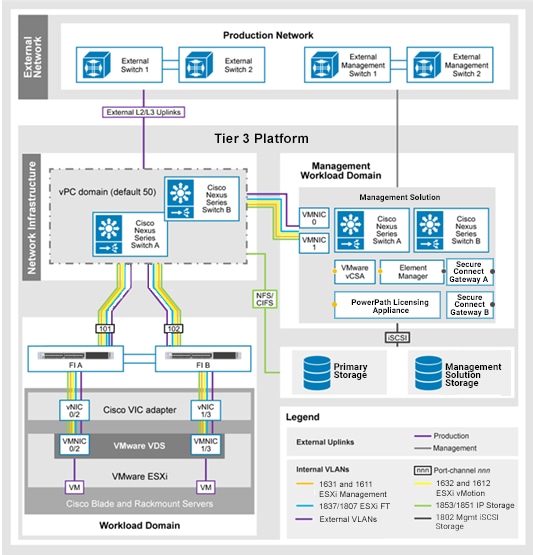
Figure 9. 3-Tier Platform with Layer 3 uplinks and OSPF
A diagram showing the high-level architecture of the 3-Tier Platform with Layer 3 uplinks and Open Shortest Path First

LAN network routing topology

The 3-Tier Platform supports a Layer 2 uplink topology or a Layer 3 routing-protocol-based uplink topology.

Both routing topologies are supported on the management plane and the data plane. Configure the uplinks as 10 Gbps, 40 Gbps, or 100 Gbps to the external network. The 3-Tier Platform is configured with a pair of ToR Cisco Nexus 9300 Series switches.


Layer 2 uplink scenario A

The 3-Tier Platform is connected to the external network over L2 links. Routing for all 3-Tier Platform and external VLANs occurs at the external network.

This scenario applies if you need L2 adjacency between endpoints both inside and outside the3-Tier Platform. L2 uplinks allow workload mobility without requiring a network overlay such as VXLAN, because a subnet can be consumed both inside and outside the 3-Tier Platform.

L2 uplinks reduce the amount of traffic that traverses the uplinks to the external network for 3-Tier Platform inter-VLAN communication, improving overall performance.

Layer 3 uplink scenario B

With an L3 uplink scenario, the 3-Tier Platform implements the OSPF, Enhanced Interior Gateway Routing Protocol (EIGRP), or static routing protocol.

These protocols provide L3 routing services for east-west traffic within the ToR switches and north-south flows for traffic that is leaving the 3-Tier Platform.

Management network layer

Management switches provide OOB management connectivity to all the connected devices, such as:

  • Cisco UCS Fis
  • Cisco ToR switches
  • Management solution components
  • Dell storage devices
  • Dell data protection devices

The management network layer of the 3-Tier Platform includes at least one pair of Cisco Nexus 93108TC-FX3P or Cisco Nexus 92348GC-X management switches.

For systems with more than one pair of Cisco Nexus 93108TC-FX3P or 92348GC-X management switches, use two 9336C-FX2 management aggregation switches to aggregate management traffic.

  • 93108TC-FX3P switch: Provides 100 Mbps, 1 Gbps, or 10 Gbps connectivity to the management interfaces of the 3-Tier Platform components and the management solution components.
  • 92348GC-X switch: Provides 1 Gbps, 10 Gbps, or 25 Gbps connectivity to the management interfaces of the Tier 3 Platform components and the management solution components.

The following table shows the management network layer components.

Table 36. Management network layer components
Switch Description
Cisco Nexus 92348GC-X management 1U form factor

Supports:

  • 48 fixed, 100 Mbps, or 1,000 Mbps twisted-pair connectivity ports
  • Four fixed 1 Gbps, 10 Gbps, or 25 Gbps SFP28; and two 40 Gbps, or 100 Gbps QSFP28 uplink ports for the management layer
Cisco Nexus 93108TC-FX3P 1U form factor

Supports:

  • 48 fixed, 100 Mbps, 1,000 Mbps, or 10 Gbps twisted-pair connectivity ports
  • Six fixed, 40 Gbps or 100 Gbps QSFP uplink ports for the management layer
  • 10 Gbps, 25 Gbps, 40 Gbps, 100 Gbps connections for external uplinks
Cisco Nexus 9336C-FX2 management aggregation 1U form factor

Supports:

  • 36 fixed, 100 Gbps QSFP28 connectivity ports to aggregate Cisco Nexus 93108TC-FX3P or Cisco Nexus 92348GC-X
  • 10 Gbps, 40 Gbps, or 100 Gbps SFP+ or QSFP28 connections for external uplinks

Cisco Nexus 92348GC-X management switch

The Cisco Nexus 92348GC-X management switches are deployed in pairs.

Table 37. Cisco Nexus 92348GC-X management switch details
Port type Number of ports Speed
Fixed 48 100 Mbps, or 1 GbE Base-T
SFP28 2 40 GbE or 100 GbE
QSFP28 4 1 GbE, 10 GbE, or 25 GbE

The following components connect to the Cisco Nexus 92348GC-X switches using Category 6 connections at 100 Mbps, or 1 Gbps:

  • FI management
  • Cisco Nexus 9336C-FX2 switch management aggregation (if present)
  • Cisco MDS SAN switch management
  • Storage array management
  • Data protection appliance connections
  • Management solution servers Cisco IMC
  • Management plane connections for either a single system or multisystem management solution
  • Management solution Dell Unity XT management and iSCSI
    • Management solution configurations using the Cisco Nexus 92348GC-X switch can be single system or multisystem management solutions with a Dell Unity XT 480 array. The array is configured with 25 GbE optical connectivity through the mezzanine adapter, which connects to the Cisco Nexus 92348GC-X switch using SFP28 25 GbE ports.
    • Connects the servers to the Cisco Nexus 92348GC-X switch using QSFP 4 x10 GbE breakout ports.

The Cisco Nexus 92348GC-X switches uplink to the external network using multimode fiber at 10 Gbps, 25 Gbps, or 40 Gbps.

Uplink connectivity options are limited to QSFP 10 GbE breakout ports using multimode fiber if:

  • The Cisco Nexus 92348GC-X supports either a single system or multisystem management solution with a Unity XT 480 array that is configured with optical connectivity.

The Cisco Nexus 92348GC-X management switch supports four fixed 10 Gbps, 25 Gbps SFP28, or two 40 Gbps QSFP28 uplink ports for the management layer.

Two uplinks are required per management switch.

Cisco Nexus 93108TC-FX3P management switch

The base Cisco Nexus 93108TC-FX3P switches are deployed in pairs. Each switch provides:

  • 48 fixed ports with speeds of 100 Mbps, 1 GbE, or 10 GbE Base-T
  • Six QSFP28 ports to provide four 10 GbE, 25 GbE, 40 GbE, or 100 GbE connections.

The following components connect to the Cisco Nexus 93108TC-FX3P switches using Category 6 connections at 100 Mbps, 1 Gbps, or 10 Gbps:

  • FI management
  • Cisco Nexus 9336C-FX2 Switch management aggregation (if present)
  • Cisco MDS SAN switch management
  • Storage array management
  • Data protection appliance connection
  • Management solution servers Cisco IMC
  • Management plane connections for either a single system or multisystem management solution
  • Management solution Dell Unity XT management and iSCSI

The Cisco Nexus 93108TC-FX3P switches uplink to the external network using multimode fiber at 10 Gbps, 25 Gbps, 40 Gbps, or 100 Gbps.

At least two uplinks to the external core per management switch are required.

Cisco Nexus 9336C-FX2 management aggregation switch

The Cisco Nexus 9336C-FX2 switch provides thirty-six 40 Gbps or 100 Gbps QSFP28 ports. The 9336C-FX2 switch is used in the management plane to aggregate pairs of Cisco Nexus 92348GC-X or Cisco Nexus 93108TC-FX3P switches.

The management aggregation layer enables a larger scale for the management network and is needed only if the solution requires more than 96 management ports.

Each Cisco Nexus 92348GC-X switch or Cisco Nexus 93108TC-FX3P switch has one or two uplinks to each Cisco Nexus 9336C-FX2 switch. The 9336C-FX2 switch provides:

  • Up to 40 Gbps QSFP ports to aggregate traffic between multiple pairs of Cisco Nexus 92348GC-X or Cisco Nexus 93108TC-FX3P switches for management.
  • 100 Gbps QSFP ports for the vPC peer link
  • 10 Gbps, 40 Gbps, or 100 Gbps uplinks to the external network

Supported management network topologies

The 3-Tier Platform network layer supports small or large-scale environments.


3-Tier Platform with no management aggregation layer

For a single 3-Tier Platform with no management aggregation, the least complex management network deployment includes two Cisco Nexus management switches that are connected directly to the external network in L3 mode.

The base management network topology allows management network Switch Virtual Interfaces (SVIs) and Hot Standby Router Protocol (HSRP) addresses to reside on either:

  • The 3-Tier Platform management switches (L3)
  • The external network (L2)

The following figure shows the base management network topology using a pair of Cisco Nexus management switches.
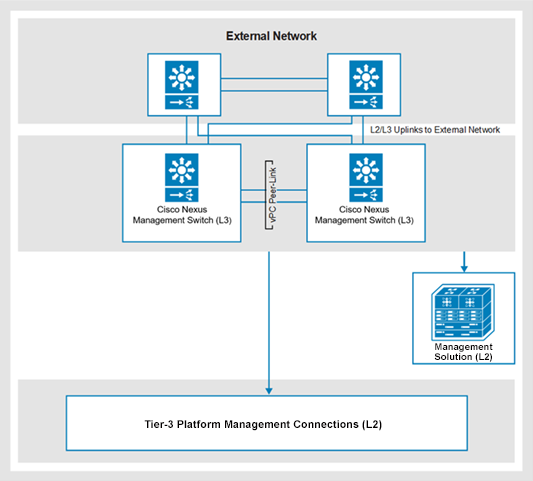
Figure 10. Base network topology with a Cisco management switch pair
A diagram of the base management network topology using a pair of Cisco Nexus management switches

3-Tier Platform with a management aggregation layer

For a single 3-Tier Platform, the management aggregation layer enables a larger scale for the management network.

The management network L3 SVIs and HSRP addresses can reside on either:

  • The 3-Tier Platform management aggregation switches
  • The external network

There is one uplink from each management switch to each management aggregation switch at 40 Gbps.

The following figure shows the network topology for the 3-Tier Platform with the management aggregation layer using a pair of Cisco Nexus management switches.
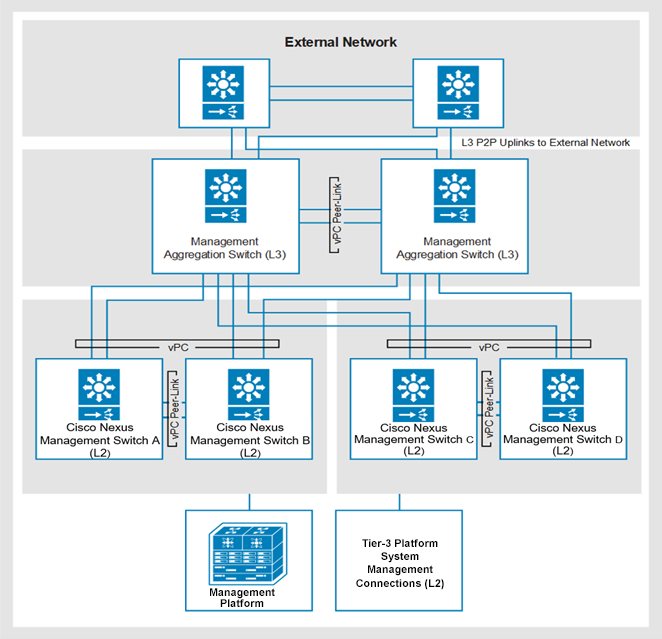
Figure 11. 3-Tier Platform with a management aggregation layer
A diagram of the network topology for the 3-Tier Platform with the management aggregation layer using a pair of Cisco Nexus management switches

Multiple 3-Tier Platform systems with a management aggregation layer

The management aggregation switches provide the management network for multiple 3-Tier Platforms:

  • All management network Layer 3 SVIs and HSRP addresses reside on the 3-Tier Platform management aggregation switches.
  • Each connected 3-Tier Platform has a unique VLAN ID and subnet for OOB management.

When adding a second 3-Tier Platform to an existing management plane, you can add two Cisco Nexus 9336C-FX2 management aggregation switches to the second 3-Tier Platform.

The following figure shows multiple Tier 3 systems with management aggregation using two pairs of Cisco Nexus management switches.
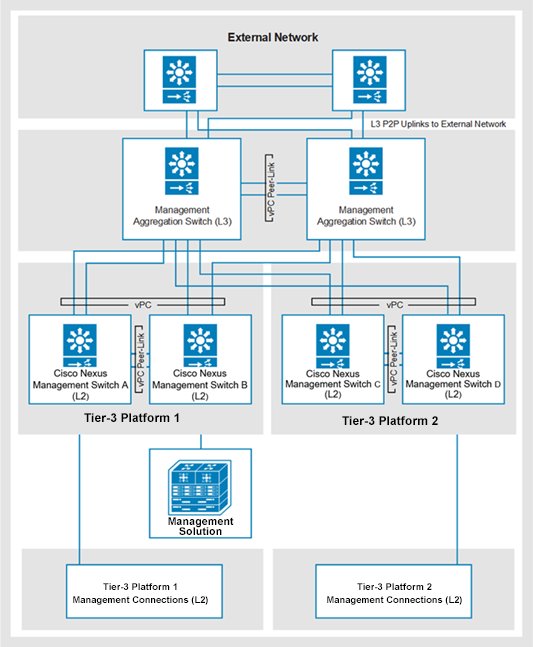
Figure 12. 3-Tier Platform Systems with management aggregation
A diagram showing multiple Tier 3 systems with management aggregation using two pairs of Cisco Nexus management switches

Software licenses

The following table shows the LAN Layer 2 and 3 uplink model requirements for LAN licenses.

Table 38. License requirements for LAN layer uplink models
Management switch LAN layer uplink model License requirement
Cisco Nexus 92348GC-X Layer 3 LAN Enterprise Services license
Layer 2 No license required
Cisco Nexus 93108TC-FX3P Layer 3 Cisco NX-OS Essentials or NX-OS Advantage tiered license
Layer 2 No license required

For solutions that include management aggregation switches, see the information about Cisco Nexus 9336C-FX2 Data Plane Switch software licenses in Software licensing. Only the management aggregation switch pair is licensed, if present.

Data plane network layer

The data plane network layer carries all the production network traffic that flows through the 3-Tier Platform.

Cisco Nexus 9336C-FX2 data plane switch

The Cisco Nexus 9336C-FX2 switch provides 36 x 40 Gbps or 36 x 100 Gbps QSFP28 ports.

Each QSFP28 port can be divided into four 10 Gb connections or four 25 Gb connections to facilitate connections to SFP+ or SFP28 based interfaces. There are no restrictions on dividing ports on a Cisco Nexus 9336C-FX2 data plane switch. This switch can be used for the ToR network and for additional switch pairs to support PowerScale connectivity.

vPC peer-link

Two 100 Gbps direct-attach connections form the vPC peer link with the Cisco Nexus 9336C-FX2 switches.

Cisco UCS 4th-generation and 5th-generation uplinks

Uplinks from the Cisco UCS 6454, Cisco UCS 64108, and Cisco UCS 6536 FIs to the Cisco Nexus 9336C-FX2 switch use:

  • Cisco 100 Gbps QSFP Active Optical cables for the first two Cisco UCS domains
  • QSFP optical bi-directional transceivers for Cisco UCS domains 3 through 7

The Cisco UCS 6454 FIs can consume four, eight, or 12 total ports on a pair of Cisco Nexus 9336C-FX2 switches for a standard or enhanced bandwidth uplink topology:

  • (Standard) FI 2-uplink (each FI has two uplink ports): Each pair of Cisco UCS 6454 FIs consumes four QSFP ports.
  • (Enhanced) FI 4-uplink (each FI has four uplink ports): Each pair of Cisco UCS 6454 FIs consumes eight QSFP ports.
  • (Enhanced) FI 6-uplink (each FI has six uplink ports): Each pair of Cisco UCS 6454 FIs consumes 12 QSFP ports.

The Cisco UCS 64108 FIs can consume eight, 12, or 16 ports on a pair of Cisco Nexus 9336C-FX2 switches for a standard or enhanced bandwidth uplink topology:

  • (Standard) FI 4-uplink (each FI has four uplink ports): Each pair of Cisco UCS 64108 FIs consumes eight QSFP ports.
  • (Enhanced) FI 6-uplink (each FI has six uplink ports): Each pair of Cisco UCS 64108 FIs consumes 12 QSFP ports.
  • (Enhanced) FI 8-Uplink (each FI has eight uplink ports): Each pair of Cisco UCS 64108 FIs consumes 16 QSFP ports.

The Cisco UCS 6536 FIs can consume four, eight, 12, or 16 total ports on a pair of Cisco Nexus 9336C-FX2 switches for a standard or enhanced bandwidth uplink topology:

  • (Standard) FI 2-uplink (each FI has two uplink ports): Each pair of Cisco UCS 6536 FIs consumes four QSFP ports.
  • (Standard) FI 4-uplink (each FI has four uplink ports): Each pair of Cisco UCS 6536 FIs consumes eight QSFP ports.
  • (Enhanced) FI 6-uplink (each FI has six uplink ports): Each pair of Cisco UCS 6536 FIs consumes 12 QSFP ports.
  • (Enhanced) FI 8-uplink (each FI has eight uplink ports): Each pair of Cisco UCS 6536 FIs consumes 16 QSFP ports.

The following table shows the supported connection types to the Cisco Nexus 9336C-FX2 ToR switches for Cisco UCS 4th-generation and 5th-generation FI uplinks.

Table 39. Supported connection types for Cisco UCS 4th- and 5th-generation FI uplinks
Bandwidth Transceiver Media Minimum uplinks per switch pair Maximum uplinks per switch pair Maximum distance
100 Gbps QSFP-100G-SR4-S OM4 MPO MMF 4 16 100 M
100 Gbps QSFP-40G/100G-SRBD OM4 LC MMF 4 16 100 M
100 Gbps QSFP-100G-AOC AOC Direct Attach Cable 4 16 30 M

Unified storage array NAS connections

A Cisco QSFP-40G-SR4 or QSFP-100G-SR-S transceiver connects the 10 Gbps, 25 Gbps, or 40 Gbps NAS ports on a storage array to the Cisco Nexus 9336C-FX2 switch.

A combination of MPO-to-LC hydra cables, MPO trunks, and MPO-to-LC cassettes provide fiber connectivity to the endpoint. NAS devices are cross-connected to both switches.

The following table shows the transceiver connections for each ToR switch.

Table 40. Transceiver connections per ToR switch
ToR switch Transceiver Breakout type Array ports
Cisco Nexus 9336C-FX2 QSFP-100G-SR4-S A combination of MPO-to-LC hydra cables, MPO trunks, and MPO-to-LC cassettes 25 GbE
Cisco Nexus 9336C-FX2 QSFP-40G-SR4 A combination of MPO-to-LC hydra cables, MPO trunks, and MPO-to-LC cassettes 10 GbE
Cisco Nexus 9336C-FX2 QSFP-40G-SR4 A combination of MPO-to-LC hydra cables, MPO trunks, and MPO-to-LC cassettes 40 GbE

PowerStore T model Mezz 0 card connections

A combination of MPO-to-LC hydra cables, MPO trunks, and MPO-to-LC cassettes provide four 25 Gbps LC fiber connectivity from each QSFP module to the endpoint. These connections are used for SDNAS and intracluster communication.

The following table shows the transceiver connections for each PowerStore T model appliance.

Table 41. Transceiver connections per PowerStore T model appliance
ToR switch Transceiver Breakout type Mezz card
Cisco Nexus 9336C- FX2 QSFP-100G-SR4-S A combination of MPO-to-LC hydra cables, MPO trunks, and MPO-to-LC cassettes 25 GbE
QSFP-40G-SR4 A combination of MPO-to-LC hydra cables, MPO trunks, and MPO-to-LC cassettes 10 GbE

For each node, mezzanine ports 0 and 1 are an LACP vPC pair across the ToR switches. Mezzanine ports connect to the ToR switches as follows:

  • Node A Mezz Port 0 connects to ToR switch A
  • Node A Mezz Port 1 connects to ToR switch B
  • Node B Mezz Port 0 connects to ToR switch B
  • Node B Mezz Port 1 connects to ToR switch A

Starting from PowerStoreOS 3.0, you can update the LACP pair from two ports to four ports. Other mezzanine ports are cabled as:

  • Node A Mezz Port 2 connects to ToR switch A
  • Node A Mezz Port 3 connects to ToR switch B
  • Node B Mezz Port 2 connects to ToR switch B
  • Node B Mezz Port 3 connects to ToR switch A

PowerScale connections

The following table shows the transceiver connections for each ToR switch.

Table 42. Transceiver connections per Cisco Nexus 9336C-FX2 ToR switch
Transceiver Breakout type PowerScale front-end
QSFP-100G-SR4-S A combination of MPO-to-LC hydra cables, MPO trunks, and MPO-to-LC cassettes 25 GbE
QSFP-40G-SR4 A combination of MPO-to-LC hydra cables, MPO trunks, and MPO-to-LC cassettes 10 GbE
QSFP28 A combination of MPO-to-LC hydra cables, MPO trunks, and MPO-to-LC cassettes 25 GbE
QSFP-40G-SR4 A combination of MPO-to-LC hydra cables, MPO trunks, and MPO-to-LC cassettes 40 GbE
QSFP28 A combination of MPO Type B crossover cable, multimode Fiber OM4 MPO cable 100 GbE

Cisco Nexus external uplinks

The following table shows connections to the external network for Cisco Nexus uplinks.

Table 43. External network connections for Cisco Nexus uplinks
Bandwidth Transceiver Media Minimum uplinks per switch pair Maximum uplinks per switch pair Maximum distance
100 Gbps QSFP-100G-SR4-S OM4 MPO MMF Four 16 100 M
100 Gbps QSFP-40G-SRBD or QSFP-100G-SRBD OM4 LC MMF Four 16 100 M
40 Gbps QSFP-40G-SRBD OM4 LC MMF Four 16 150 M
40 Gbps QSFP-40G-SR4 OM4 MPO MMF Four 16 100 M
10 Gbps QSFP-10G-SR4 OM4 MPO MMF, terminated with LC Four QSFP(16 x 10 Gbps) Eight QSFP(32 x 10 Gbps) 150 M

Software licensing

The Cisco Nexus 9336C-FX2 switch has a tiered licensing model with two options:

  • Layer 3 uplink model: The NX-OS Essentials or the NX-OS Advanced package. Both packages include all L3 protocols.
  • Layer 2 uplink model: A license bundle is not required. Subordinate switches that are connected to 9336C-FX2 switches do not require a tiered license package because they uplink to the ToR switch at Layer 2.

Cisco Smart Licensing

Cisco is moving away from the traditional PAK-based licensing model for Nexus switches. Cisco Smart Licensing is a flexible software licensing method that is designed to simplify the way you activate and manage licenses across your organization.

Smart Licensing Using Policy (SLP) is an enhanced version of Smart Licensing. The aim is twofold:

  • To provide a licensing solution that does not interrupt the operations of your network.
  • To enable a compliance relationship to account for the hardware and software licenses that you purchase and use.

For Smart Licensing, Cisco requires you to register Cisco Nexus switches with the Cisco Smart Account portal (CSSM) for easier license management. Familiarize yourself with the following guidelines and terminology:

  • Smart Account Creation: Connect to the CSSM and create a Cisco Smart account for your organization. You can use an existing smart account or virtual account for Nexus switch registration and license management.
Note: Cisco NX-OS 10.2(x) and later requires registration with the Cisco Smart Account regardless of the licensing requirements. With NX-OS 10.2(1) and later, only SLP is supported. Traditional licenses are not supported.

  • Communication method: The method that the Cisco Nexus switch uses to communicate with CSSM for registration, license, and usage information.
  • Offline - air gap: No direct connectivity is required to Cisco or CSSM. The RUM report is generated on the switch and manually uploaded to CSSM to register the switch. You must manually download the ACK file from the CSSM portal and import it back into the switch.
  • Direct Internet: The switch requires connectivity to CSSM. The switch communicates with CSSM over the Internet for license registration and management.
  • Direct Internet with proxy server: The switch communicates with the Cisco Smart Account portal using the Internet through a proxy server. The switch communicates with the CSSM for license registration and management.
  • On-premises Cisco Smart License Utility: The Cisco Smart License Utility (CSLU) is deployed at the customer site to consolidate the reports from all the Cisco end devices. The CSLU can communicate to the CSSM on behalf of the end devices over the Internet or offline by uploading reports manually.

For more information, see the Cisco Nexus 9000 and 3000 Series NX-OS Smart Licensing Using Policy User Guide.

Storage layer

Introduction

This chapter describes the SAN network layer requirements and storage array components that are used in the 3-Tier Platform architecture.

Connectivity

Two Cisco MDS switches or directors provide connectivity between the compute layer and the storage layer:

  • The Cisco MDS model depends on the speed and total number of SAN ports that are required to support the compute and storage components. Connections from the storage components are over 32 Gbps connections.
  • The number of storage connections varies based on the storage platform and size.

Cisco UCS 4th and 5th generation FIs provide an FC port channel with one of the following connections:

  • Four 32 Gbps connections (128 Gbps)
  • Eight 32 Gbps connections (256 Gbps)
  • Sixteen 32 Gbps connections (512 Gbps) for 5th-Gen FI

The 32 Gbps connections require 32 Gbps SFPs and SAN ports. The Cisco MDS 9148T multilayer fabric switch supports eight connections from the Cisco UCS domain and up to two domains.

The Cisco MDS switches provide:

  • FC connectivity between the compute and storage layer components
  • Connectivity for backup and business continuity requirements (if configured)

The Cisco MDS switches automatically negotiate the port speed, based on the SFPs in the FIs. Front-end IOMs in the storage array connect to the Cisco MDS switches in the network layer over 32 Gbps FC links.

Switch airflow configuration in 3-Tier Platforms

When incorporating any SAN switch into a 3-Tier Platform, consider airflow in the data center design.

Some of the switches can be configured with either port-side intake or port-side exhaust airflow, while others can only be configured with port-side intake.

  • If the switch is configured with port-side intake, the ports face the cold aisle.
  • If the switch is configured with port-side exhaust, the ports face the hot aisle.
Table 44. Switch airflow configuration in 3-Tier Platforms
Switch Airflow
9148T Port-side intake or port-side exhaust
9396T Port-side intake or port-side exhaust
9706-v2 Port side intake (front to back)
9710-v2 Port side intake (front to back)
Note: ISLs to the external SAN or between switches are not permitted.

Cisco MDS switches

The following table describes Cisco MDS switches.

Table 45. Cisco MDS switches
Component Description
Cisco MDS 9148T multilayer fabric switch 1U appliance that provides 24 to 48 line-rate ports for nonblocking, 32 Gbps throughput.

The base license contains 24 ports per switch.

Add pod licenses to increase the port count to 32, 40, or 48 per switch.

Cisco MDS 9396T multilayer fabric switch 2U appliance that provides 48 to 96 line-rate ports for nonblocking, 32 Gbps throughput.

The base license contains 48 ports per switch.

Add pod licenses to increase the port count in increments of 16.

Cisco MDS 9706-v2 multilayer director 9U appliance that provides up to 12 Tbps front panel FC line rate nonblocking, system-level switching.

It consists of two 48-port line cards at a line rate of 32 Gbps for all ports.

Add up to two 48-port line cards.

Four Fabric 3 modules are required with all Cisco MDS 9706-V2 Multilayer Directors for:

  • An N+1 configuration
  • Full line rate support for all 32 Gbps line cards

It includes four PDUs and two supervisor modules.

Cisco MDS 9710-v2 multilayer director 14U appliance that provides up to 24 Tbps front panel FC line rate nonblocking, system-level switching.

It consists of two 48-port line cards at a line rate of 32 Gbps for all ports.

Add up to six pairs of 48-port line cards.

Four fabric-3 modules are included with all Cisco MDS 9710-V2 Multilayer Directors for:

  • An N+1 configuration
  • Full line rate support for all 32 Gbps line cards

Two additional power supplies are required with all Cisco MDS 9710-V2 Multilayer Directors.

It includes six PDUs and two supervisor-4 modules.


Cisco MDS 9148T multilayer fabric switch

The Cisco MDS 9148T multilayer fabric switch provides 24 to 48 line-rate ports for nonblocking, 32 Gbps throughput. In the base configuration, 24 ports are licensed. More ports can be licensed as necessary in eight-port increments.

The following table shows core connectivity for the Cisco MDS 9148T multilayer fabric switch per fabric.

Table 46. Connectivity per fabric for the Cisco MDS 9148T multilayer fabric switch
Feature Used ports Port speeds Media
Cisco UCS 4th- and 5th-generation FI uplinks Four or eight per domain 32 Gbps SFP+ and optical cable
Storage arrays 2 to 40 32 Gbps SFP+ and optical cable

Cisco MDS 9396T multilayer fabric switch

The base license includes 48 ports. More ports can be licensed in 16-port increments. The Cisco MDS 9396T 32G Multilayer Fabric Switch is a 96-port fixed switch with no IOM expansion slots.

The following table describes core connectivity for the Cisco MDS 9396T 32 G Multilayer Fabric Switch per fabric.

Table 47. Connectivity per fabric for the Cisco MDS 9396T 32 G multilayer fabric switch
Feature Ports used Port speeds Media
Cisco UCS 4th- and 5th-generation FI uplinks Four or eight per domain 32 Gbps SFP+ and optical cable
Storage arrays 2 to 88 32 Gbps SFP+ and optical cable

Cisco MDS 9706 and 9710 v2 multilayer fabric switch

Cisco MDS 9706-v2 and 9710-v2 multilayer directors are modular directors that provide greater scalability than the fixed SAN switches.

Both models deploy two supervisor modules for redundancy and three fabric modules for intradirector communication.

The Cisco MDS 9700 multilayer directors are director-class SAN switches with IOM expansion slots for 48-port 32 Gbps FC line cards. The Cisco MDS 9706-v2 switches and the Cisco MDS 9710-v2 multilayer directors have four and eight slots available for line cards, respectively. Each line card must be ordered in pairs per director and added in pairs to each director. Port licenses are not required for the 9700 multilayer directors.

Only four fabric-3 modules for each Cisco MDS 9706-v2 and 9710-v2 multilayer directors are required for N+1 redundancy and for full-line rate support for all 32 Gbps FC line cards.

The following table shows core connectivity per fabric for the Cisco MDS 9706-v2 and 9710-v2 multilayer directors.

Table 48. Core connectivity per fabric for Cisco MDS 9706-v2 and 9710-v2 multilayer directors
Feature Ports used Port speeds Media
Cisco UCS 4th-generation FI uplinks 4 or 8 per domain 32 Gbps SFP+ and optical cable
Cisco UCS 5th-generation FI uplinks 4 or 8 per domain 32 Gbps 128G – 4x32G breakout
Cisco MDS 9706-v2 2 to 184 32 Gbps SFP+ and optical cable
Cisco MDS 9710-v2 2 to 376 32 Gbps SFP+ and optical cable

Storage block configuration

The following figure shows a 3-Tier network block storage configuration using PowerMax arrays.
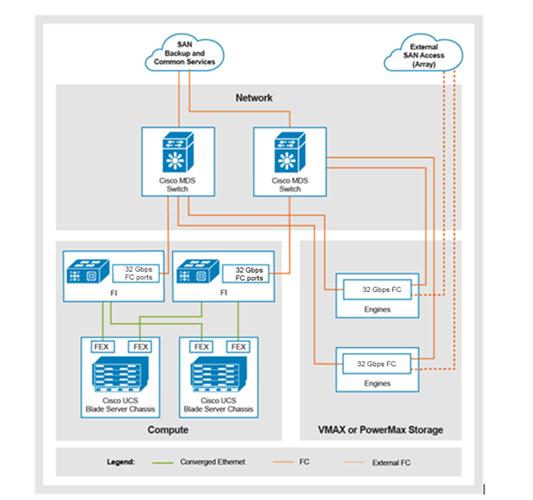
Figure 13. Network block storage configuration using PowerMax arrays
A diagram showing a 3-Tier network block storage configuration using PowerMax arrays

Dell PowerMax storage

The PowerMax family of products is designed to provide a fully active/active storage solution. It meets the ever-increasing levels of performance, storage density, intelligent automation, and high security required by enterprise data centers and applications.

The PowerMax family consists of the legacy PowerMax 2000 and 8000 models, and the latest next generation PowerMax 2500 and 8500 systems. The architecture, features, and functions of these systems provide the following core value propositions for Dell Technologies customers:

  • Performance: PowerMax systems provide high performance and low latency for mission-critical applications.
  • Efficiency: PowerMax systems offer high storage density and intelligent automation to reduce operational costs.
  • Resiliency: PowerMax systems provide high availability and data protection to ensure business continuity.
  • Security: PowerMax systems offer end-to-end security and compliance to protect data from cyber threats.

Legacy PowerMax 2000 and 8000 models

When introduced, the PowerMax 2000 and 8000 arrays raised standards again for enterprise storage, delivering unmatched levels of performance and consolidation for high-value, high-demand workloads. These arrays support 32 Gb/s NVMe/FC to deliver on the promise of end-to-end NVMe, along with Storage Class Memory Drives (SCMs) used as persistent storage.

The PowerMax 2000 and 8000 arrays provide all the features and proven data services that are demanded of an enterprise active/active controller array. These features include security, protection, availability, scalability, and massive consolidation. They are now delivered at latencies that are measured in microseconds, not milliseconds.

Next Generation PowerMax 2500 and 8500 arrays

The Next Generation PowerMax storage platform is designed to offer industry-leading cyber resiliency, security, and intelligent automation. It provides a balance of high performance with remarkable efficiency.

The Next Generation PowerMax family consists of two storage systems:

  • The PowerMax 2500 model provides organizations with an attractive, highly efficient entry point into mission-critical storage. It includes up to 7x1 more storage capacity (8PBe) and a 2.8 x improvement in IOPS per watt over the PowerMax 2000 in half the footprint.
  • The PowerMax 8500 model delivers extreme performance at scale. Customers can start small with two nodes and grow large to 16 nodes and up to 18 PBe of total capacity. The 8500 model is ideal for the most demanding mixed workloads that require always-on operations with industry-leading, advanced cyber resiliency including the PowerMax cyber vault solution.

Both the PowerMax 2500 and 8500 models use industry-leading rich data services. They excel at workload consolidation because both systems provide storage for block, file, and mainframe workloads.

Based on the powerful Dynamic Fabric architecture and Flexible RAID, the next generation PowerMax systems offer a powerful yet flexible design. This design enables them to independently grow nodes and storage capacity in increments of a single drive. The PowerMax 2500 and 8500 arrays use Intel® Xeon® Scalable processors and the most advanced storage technologies available today. These features include end-to-end NVMe, InfiniBand 100 Gb/s, dual-ported NVMe flash drives, NVMe/TCP, and NVMe/FC connectivity. Both models employ hardware-based data reduction and come with a 5:1 data reduction guarantee for Open Systems and 3:1 for Mainframe. Each PowerMax model is designed for six nines of availability and ships with new intelligent PDUs that provide real-time power consumption monitoring and alerting.

The following table provides a high-level comparison between the PowerMax legacy and next-generation systems.

Table 49. Comparison of PowerMax legacy and next-generation systems
Feature PowerMax 2000 PowerMax 2500 PowerMax 8000 PowerMax 8500
Active/active, scale out, scale up architecture Yes Yes Yes Yes
Disaggregated storage architecture No Yes No Yes
Zero trust architecture No Yes No Yes
Self-encrypting drives No Yes No Yes
Single drive upgrades No Yes No Yes
NVMe/TCP support No Yes No Yes
64-bit file support No Yes No Yes
Mainframe workload support No Yes Yes Yes
Max effective capacity per array 1.2 PBe 8 PBe 4.5 PBe 18 PBe
Data Reduction Guarantees 3.5:1 Open Systems 5:1 Open Systems, 3:1 for Mainframe 3.5:1 Open Systems, No mainframe data reduction 5:1 Open Systems, 3:1 for Mainframe

For more information about the PowerMax family of products go to:

Dell Unity XT storage

Dell Unity XT systems provide a powerful storage system with a cost-efficient and space-efficient profile. Some of the Dell Unity highlight features include:

  • Dual-Active architecture: Unity XT uses both Storage Processors (SPs) to serve host I/O and run data operations in an active/active manner to make efficient use of all available hardware resources. Doing so optimizes performance, cost, and density in customer data centers.
  • Truly unified offering: Unity XT delivers a full block and file unified environment in a single 2U enclosure. Use the same pool to provision and host LUNs, Consistency Groups, NAS Servers, File Systems, and vVols alike. The Unisphere management interface offers a consistent look and feel whether you are managing block resources, file resources, or both.
  • A modern, simple interface: Unisphere, the Unity XT management interface, has been built with the modern-day data center administrator in mind. Using browser-native HTML5, Unisphere can be used across various operating systems and web browsers without the need for additional plug-ins. The interface has been designed to mimic the practical flow of the daily life of an administrator. It organizes the provisioning and management functions into easy-to-find categories and sections.
  • Flexible deployment options: Unity XT enables deployment offerings for a range of different use cases and budgets. These scenarios range from the virtual offering of Dell UnityVSA to the purpose-built Unity XT platform. The purpose-built system can be configured as an All-Flash system with only solid state drives. It can also be configured as a Hybrid system with solid state and spinning media to deliver the best on both performance and economics.
  • Inline data reduction: Data reduction technologies play a critical role in environments in which storage administrators are attempting to do more with less. The Unity XT Data Reduction feature aids in this effort by attempting to reduce the amount of physical storage that is required to save a dataset. This feature helps reduce the total cost of ownership of the storage system. Data Reduction provides space savings by using data deduplication and compression. Data Reduction is easy to manage, and once enabled, the storage system controls it intelligently.
  • Optional I/O modules: A wide variety of connectivity options are supported on the purpose-built platform. Also, I/O Modules that support iSCSI and NAS may be used for both simultaneously.
  • Expanded file system: At its heart, the Unity XT File System is a 64-bit based file system architecture that provides increased maximums to keep pace with the modern data center. Provision file systems and VMware NFS Datastores in sizes as large as 256 TB and enjoy creating multiple millions of files per directory and subdirectories per directory.
  • Native data protection: Security and availability of data are critical concerns for many customers, and Unity XT offers multiple solutions to address this need. Unified snapshots provide point-in-time copies of block and file data that can be used for backup and restoration purposes. Asynchronous Replication offers an IP-based replication strategy within a system or between two systems. Synchronous Block Replication benefits FC environments that are close together and require a zero-data loss schema. Data at Rest Encryption (D@RE) ensures that user data on the system is protected from physical theft. It can substitute for drive disposal processes, such as shredding.
  • VMware integration – Discovery of a VMware environment has never been easier, with Unity XT VMware Aware Integration (VAI). Use VAI to retrieve the ESXi host and vCenter environment details into Unisphere for efficient management of your virtualization environment. Support for VMware vStorage APIs for Storage Awareness (VASA) and later enables the provisioning and use of VMware Virtual Volumes (vVols), a VMware ESXi virtualization storage technology. Unity XT supports vVols for both block and file configurations.
  • Multiple management paths – Configure and manage your Unity XT system in the way you are most comfortable. The Unisphere UI is browser-based and provides a graphical view of your system and its resources. Use Unisphere CLI (UEMCLI) over SSH or over a Windows host to run CLI commands against the system. Unity XT also has a full REST API library available. Any function possible in Unisphere is also possible using REST API. Developing scripts or integrating management of your system into existing frameworks has never been easier.

For more information about Unity XT, see the Unity XT information page or the Unity XT Info Hub.

Dell PowerStore T storage

In a constantly changing world of increasing complexity and scale, the need for an easy-to-use, intelligent storage system continues to grow. Organizations that use new applications and solutions require dependable storage and often face the challenge of doing more with less. PowerStore addresses this challenge by packaging a powerful storage system into a cost-efficient and space-efficient profile. Key PowerStore features and benefits include:

  • Active/active architecture: PowerStore uses both nodes to serve host I/O and run data operations in an active/active manner. This design efficiently uses all available hardware resources and optimizes performance, cost, and density in data centers.
  • NVMe platform: PowerStore is designed to use the latest storage and interface technologies to maximize application performance and eliminate bottlenecks. PowerStore can maximize performance with NVMe flash storage. PowerStore supports front-end NVMe connectivity with NVMe over Fibre Channel and NVMe over TCP, for a complete end-to-end NVMe solution.
  • VMware integration: PowerStore is designed for deep integration with VMware vSphere, including:
  • VAAI
  • VASA
  • Event notifications
  • Snapshot management
  • VMware vSphere Virtual Volumes (vVols)
  • Virtual machine discovery and monitoring in PowerStore Manager
  • Unified offering: PowerStore has a single architecture for block, file, and vVols storage. This architecture uses the latest technologies to provide flexible functionality without sacrificing the cost-effective nature of enterprise storage. PowerStore provides storage in multiple formats to applications, ranging from physical and virtual volumes, to containers and traditional files. This ability provides the ultimate workload flexibility and enables IT to simplify and consolidate infrastructure.
  • A modern, simple interface: PowerStore Manager, the PowerStore management interface, is built with the data-center administrator in mind. Using browser-native HTML5, PowerStore Manager can be used across various operating systems and web browsers without requiring an external management server or appliance.
  • Inline data reduction: Data reduction technologies play a critical role in environments in which storage administrators are attempting to do more with less. PowerStore data reduction supports this effort by optimally reducing the amount of physical storage that is required to save a dataset. PowerStore data reduction provides space savings by using software data deduplication and compression through hardware assist. The storage system always enables and intelligently controls data reduction.
  • Native data protection: Security and availability of data are critical concerns for many organizations, and PowerStore storage offers multiple solutions to address this need. Snapshots provide point-in-time copies of block, file, and virtual machine data that can be used for backup and restoration purposes. Asynchronous replication offers an IP-based replication strategy within a system or between two systems. Data at Rest Encryption (D@RE) ensures that user data on the system is protected from physical theft. It can substitute for drive disposal processes, such as shredding.

For more information about PowerStore, see the Dell PowerStore information page or the PowerStore Info Hub.

PowerScale storage

The PowerScale family includes PowerScale storage arrays. The scale-out NAS storage solution delivers increased performance for file-based data applications and workflows from a single file-system architecture.

The PowerScale all-flash storage arrays can exist in the same cluster with Isilon Gen 6 nodes to drive your traditional and modern applications.

Note: PowerScale storage arrays cannot exist in the same cluster with Isilon Gen 5 nodes.

PowerScale provides scale-out capacity for use as NFS and SMB CIFS shares in the VMware vSphere VMs. PowerScale is available in the following configurations:

  • PowerScale All-Flash Scale-out NAS
  • PowerScale Hybrid Scale-out NAS
  • PowerScale Archive Scale-out NAS

The following table shows the hardware components that are used with each configuration.

Table 50. PowerScale hardware components based on configuration
PowerScale model Node Processor Memory
PowerScale All-Flash F210 Single Socket CPU Intel® Sapphire Rapids® 128 GB
F710 Dual Socket Intel Sapphire Rapids 512 GB
F910 Dual Socket Intel Sapphire Rapids 512 GB
F200 Single Socket CPU 48 GB or 96 GB
F600 Dual Socket Intel® Cascade Lake® 4210 2.2 GHz 128 GB, 192 GB, or 384 GB
F900 Dual Socket Intel Cascade Lake 6240R 2.4 GHz 24C 736 GB
PowerScale Hybrid H700 Intel 6208U 16-Core, 2.9 GHz 192 GB
H7000 Intel 6208U 16-Core, 2.9 GHz 384 GB
PowerScale Archive A300 Intel 3024 6-Core, 1.9 GHz 96 GB
A3000 Intel 3024 6-Core, 1.9 GHz 96 GB

The Cisco Nexus 9336C-FX2 is the only supported switch for PowerScale node front-end connectivity.

The following table shows the PowerScale back-end switches that support Isilon Gen 6 nodes and PowerScale Gen 6.5 nodes.

Table 51. PowerScale back-end switch support for PowerScale Gen 6.5 nodes
PowerScale back-end switch PowerScale Gen 6.5 nodes
Dell S4112 10 GbE 24 P A300, A3000, H700, H7000, F200
Dell S4148 10 GbE 48 P A300, A3000, H700, H7000, F200
Dell S5232 40 GbE or 100 GbE 32 P A300, A3000, H700, H7000, F200, F600, F900
Dell Z9264 40 GbE or 100 GbE 64 P A300, A3000, H700, H7000, F200, F600, F900
Arista 7304 10 GbE 8U 96 P* with 40 Gb LC and 32 P A300, A3000, H700, H7000, F200, F600, F900
Arista 7308 40 GbE 13U 64 P** A300, A3000, H700, H7000, F200, F600, F900
Celestica 10 GbE 1U 24 P (Legacy) A300, A3000, H700, H7000, F200
Celestica D2060 10 GbE 1U 48 P (Legacy) A300, A3000, H700, H7000, F200
Celestica D4040 40 GbE 1U 32 P (Legacy) A300, A3000, H700, H7000, F200, F600, F900

* The Arista 7304 ships with two line cards, each with 48 10 GbE ports. You can add:

  • One additional line card with 48 x 10 GbE ports
  • Two additional line cards with 32 x 40 GbE ports

** The Arista 7308 ships with two line cards, each with thirty-two 40 GbE ports. You can add:

  • Three additional line cards with 32 x 40 GbE ports
  • Two additional line cards with 48 x 10 GbE ports

The PowerScale back-end Ethernet switches provide:

  • 10 GbE 24 port
  • 10 GbE 48 port
  • 10 GbE 96 port (2 x 48-port leaf modules)
  • 10 GbE 48-port leaf module
  • 40 GbE or 100 GbE 32 port
  • 40 GbE 64 port (2 x 32-port leaf modules)
  • 40 GbE 32-port leaf module
  • 40 GbE or 100 GbE 32-port leaf module
  • 40 GbE or 100 GbE 64 port

For leaf and spine implementations:

  • The Dell S5232 and Z9264 switches are supported for leaf-spine architecture.
  • The same switch is used for both the leaf and the spine.

PowerScale components and specifications

  • Front end: 10 GbE, 25 GbE, 40 GbE, or 100 GbE optical (depending on the node type and generation)
  • Back end: 10 GbE, 25 GbE, 40 GbE, or 100 GbE optical (depending on the node type)
  • Single onboard 1 GbE
  • DB-9 serial connection
Note: 1 GbE connections are not used.

  • Up to 2 x 2.5 in. SSD for cache
  • Up to 2 x M.2 vault disks
  • Dual 1100 W or 1450 W PDUs
Note: Do not use ports 1 to 6 and 33 to 36 for 40 GbE node connectivity because of port limitations in Cisco NX-OS 9.x.

Note: Use the last four ports (33-36) for vPC/Uplinks. You can scale up to 26 nodes only per switch pair.

For more information, see Guidelines and Limitations for Layer 2 Interfaces.


PowerScale All-Flash F210

PowerScale All-Flash F210 model is a 1U node with the following components:

  • Four NVMe SSDs per node
  • Single-socket CPU Intel® Sapphire Rapids®, 2G, 12C
  • 128 GB ECC memory per node
  • The front-end is a dual-port NIC:
    • Dual-port 25 G NIC supporting 10 G or 25 G connections (SFP+/SFP28)
    • Dual-port 100 G NIC supporting 40 G or 100 G connections
  • The back-end is a dual-port 100 G NIC supporting 100 G or 25 G connections.
  • Dual redundant 286 W PSU that operates at 100 V to 240 V.

The following table shows the PowerScale F210 array hardware and software specifications.

Table 52. PowerScale F210 specifications
Component F210
Processors per node Single-socket CPU Intel Sapphire Rapids
Memory per node (GB) 128 GB
Chassis Capacity 1.92 TB SSD

7.68 TB

3.84 TB SSD

15.36 TB

7.68 TB SSD

30.72 TB

15.36 TB SSD

61 TB

Front-end networking Dual-port 25G NIC supporting 10 G or 25 G connections (SFP+/SFP28)

Dual port 100 G NIC supporting 40 G or 100 G connections

Back-end networking Dual-port 25 G NIC supporting 10 G or 25 G connections (SFP+/SFP28) Dual port 100 G NIC supporting 40 G or 100 G connections (QSFP+/QSFP28)

PowerScale All-Flash F710

PowerScale All-Flash F710 model is a 1U node with the following components:

  • Ten NVMe SSDs per node
  • Dual socket CPU Intel® Sapphire Rapids®, 2G, 12C
  • 512 GB ECC memory per node
  • The front-end is a dual-port NIC:
    • 100 G NIC supporting 100 connections (QSFP+/QSFP28)
    • 25 G NIC supporting 25 connections (SFP+/SFP28)
  • The back-end is a Dual port 100 G NIC supporting 40 G or 100 G connections (QSFP+/QSFP28).
  • Dual redundant 769 W PSU that operates at 100 V to 240 V.

The following table shows the PowerScale F710 array hardware and software specifications.

Table 53. PowerScale F710 specifications
Component F710
Processors per node Dual socket CPU Intel Sapphire Rapids
Memory per node (GB) 512 GB
Chassis Capacity 3.84 TB SSD

38 TB

7.68 TB SSD

77 TB

15.36 TB SSD

154 TB

30.72 TB SSD

307 TB

Front-end networking Dual-port 25 G NIC supporting 10 G or 25 G connections (SFP+/SFP28)

Dual port 100G NIC supporting 40 G or 100 G connections (QSFP+/QSFP28)

Back-end networking Dual-port 100G NIC supporting 40 G or 100 G connections (QSFP+/QSFP28)

PowerScale All-Flash F910

PowerScale All-Flash F910 model is a 2U node with the following components:

  • 24 NVMe SSDs per node
  • Dual socket CPU Intel® Sapphire Rapids®, 2.6G, 24C
  • 512 GB ECC memory per node
  • The front-end is a dual-port NIC:
    • 100 G NIC supporting 100 G connections (QSFP+/QSFP28)
    • 25 G NIC supporting 25 G connections (SFP+/SFP28)
  • The back-end is a Dual port 100 G NIC supporting 40 G or 100 G connections (QSFP+/QSFP28)
  • Dual redundant 877 W PSU that operates at 100 V to 240 V.

The following table shows the PowerScale F910 array hardware and software specifications.

Table 54. PowerScale F910 specifications
Component F910
Processors per node Dual socket CPU Intel Sapphire Rapids
Memory per node (GB) 512 GB
Chassis Capacity 3.84 TB SSD

92 TB

7.68 TB SSD

184 TB

15.36 TB SSD

368 TB

30.72 TB SSD

737 TB

Front-end networking Dual port 25 G NIC supporting 10 G or 25 G connections (SFP+/SFP28)

Dual port 100 G NIC supporting 40 G or 100 G connections (QSFP+/QSFP28)

Back-end networking Dual-port 100 G NIC supporting 40 G or 100 G connections (QSFP+/QSFP28)

PowerScale All-Flash F200

PowerScale All-Flash F200 model is a 1U node with the following components:

  • Four 25-inch SSD drives
  • Single-socket CPU
  • 48 GB or 96 GB ECC memory (per node)
  • The front-end is a dual-port 25 G NIC supporting 10 G or 25 G connections (SFP+/SFP28)
  • The back-end is a dual-port 25 G NIC supporting 10 G or 25 G connections (SFP+/SFP28)
  • Dual redundant 750 W PSU that operates at 100 V to 240 V, and 50 Hz or 60 Hz.

The following table shows the PowerScale F200 array hardware and software specifications.

Table 55. PowerScale F200 specifications
Component F200
Processors per node Single-socket CPU
Memory per node (GB) 48 GB

96 GB

Chassis capacity 960 GB SSD: 3.84 TB
1.92 TB SSD: 7.68 TB
3.84 TB SSD: 15.36 TB
7.68 TB SSD: 30.72 TB
Front-end networking Two 10 GbE or two 25 GbE
Back-end networking Two 10 GbE or two 25 GbE

PowerScale All-Flash F600

The PowerScale All-Flash F600 model is a 1U node with the following components:

  • Eight 2.5-inch NVMe SSD drives
  • Dual-socket Intel® Cascade Lake® CPU
  • 8 or 12 DDR4 DIMMs
  • Front-end dual-port 25 G NIC supporting 10 Gb or 25 Gb connections (SFP+ or SFP28) or dual-port 100 G NIC supporting 40 Gb or 100 Gb connections (QSFP+ or QSFP28)
  • Back-end dual-port 100 G NIC supporting 40 Gb or 100 Gb connections (QSFP+ or QSFP28)
  • Dual redundant 750 W PSU that operates at 100 V to 240 V, and 50 Hz or 60 Hz.

The following table shows the PowerScale F600 model hardware and software specifications.

Table 56. PowerScale F600 specifications
Component F600
Processors per node Dual-socket Intel Cascade Lake 4210 2.2 GHz
Memory per node (GB) 128 GB (eight 16 GB Dual Rank DDR4 RDIMMs)1

92 GB (twelve 16 GB Dual Rank DDR4 RDIMMs)

384 GB (twelve 32 GB Dual Rank DDR4 RDIMMs)

Chassis capacity 15.36 TB, SSD: 1.92 TB
30.72 TB SSD: 3.84 TB
61.44 TB SSD: 7.68 TB
122.88 TB SSD: 15.36 TB
Front-end networking Two 10 GbE or two 25 GbE

Two 40 GbE or two 100 GbE

Back-end networking Two 40 GbE or two 100 GbE

PowerScale All-Flash F900

The PowerScale All-Flash F900 is a 2U node containing the following components:

  • Twenty-four 2.5-inch NVMe SSD drives
  • Dual Socket Intel® Cascade Lake® 6240R (2.4 GHz, 24C)
  • 23 DDR4 DIMMs
  • Front-end dual-port 25 Gb NIC supporting 10 Gb or 25 Gb connections (SFP+ or SFP28) or dual-port 100 Gb NIC supporting 40 Gb or 100 Gb connections (QSFP+ or QSFP28)
  • Back-end dual-port 100 Gb NIC supporting 40 Gb or 100 Gb connections (QSFP+or QSFP28)
  • Dual redundant 750 W PSU that operates at 100 V to 240 V, and 50 Hz or 60 Hz.

The following table shows the hardware and software specifications for the PowerScale F900 array.

Table 57. PowerScale F900 specifications
Component F900
Processors per node Dual-socket Intel Cascade Lake 6240R (2.4 GHz, 24C)
Memory per node 736 GB (twenty-three 32 GB Dual Rank DDR4 RDIMMs)
Chassis capacity 46 TB SSD: 1.92 TB

92 TB SSD: 3.84 TB

184.3 TB SSD: 3.847.68 TB

368.6 TB SSD: 7.6815.36 TB

Front-end networking Two 10 GbE or two 25 GbE

2 x 40 GbE or 2 x 100 GbE

Back-end networking Two 40 GbE or two 100 GbE

PowerScale H700 and H7000 nodes

PowerScale Gen-6 hybrid and archive models are contained in a four-node chassis.

PowerScale H700 node

The PowerScale Hybrid H700 node has the following components:

  • Infinity 4U; four nodes per chassis
  • Standard chassis: 5 x 3.5-in. drives per node
  • Intel® Xeon® Gold 6208U (16 C, 2.9 GHz)
  • Up to two 2.5-in. SSDs for cache
  • 192 Gb DDR4
  • Dual redundant 1528 W PSU that operates at 200 V to 240 V (per chassis)
  • Front-end dual-port 25 Gb NIC supporting 10 Gb or 25 Gb connections (SFP+ or SFP28) or dual-port 100 Gb NIC supporting 40 Gb or 100 Gb connections (QSFP+ or QSFP28)
  • Back-end dual-port 25 Gb NIC supporting 10 Gb or 25 Gb connections (SFP+ or SFP28) or dual-port 100 Gb NIC supporting 40 Gb or 100 Gb connections (QSFP+or QSFP28)

The following table shows the hardware and software specifications for the PowerScale H700 array.

Table 58. PowerScale H700 specifications
Component H700
Operating system PowerScale OneFS 9.2.1.4 or later
Chassis nodes Infinity 4U/4 nodes per chassis
Chassis depth Standard – 15 drives per node
Processor Intel Xeon Gold 6208U (16 C, 2.9 GHz)
Memory (Fixed) 192 Gb DDR4
Storage: drive options Fifteen 3.5-in. HD capacity options:
  • 2 TB (30 TB/node)
  • 4 TB (60 TB/node)
  • 8 TB (120 TB/node)
  • 12 TB (180 TB/node)
  • 16 TB (240 TB/node)
SED/FIPS support Yes (SAS Drives)
Cache SSD One or two .8/1.6/3.2 TB
Inline data reduction Yes
Front-end connectivity Two 10 GbE or two 25 GbE

Two 40 GbE or two 100 GbE

Back-end connectivity Two 10 GbE or two 25 GbE

Two 40 GbE or two 100 GbE

PowerScale H7000 node

The PowerScale Hybrid H7000 node has the following components:

  • Infinity 4U; four nodes per chassis
  • Deep chassis: twenty 3.5-in. drives per node
  • Intel® Xeon® Gold 6208U (16 C, 2.9 GHz)
  • Up to two 2.5-in. SSDs for cache
  • 384 Gb DDR4
  • Dual redundant 1688 W PSU that operates at 200 V to 240 V (per chassis)
  • Front-end dual-port 25 Gb NIC supporting 10 Gb or 25 Gb connections (SFP+ or SFP28) or dual-port 100 Gb NIC supporting 40 Gb or 100 Gb connections (QSFP+ or QSFP28)
  • Back-end dual-port 25 Gb NIC supporting 10 Gb or 25 Gb connections (SFP+ or SFP28) or dual-port 100 Gb NIC supporting 40 Gb or 100 Gb connections (QSFP+or QSFP28)

The following table shows the hardware and software specifications for the PowerScale H7000 array.

Table 59. PowerScale H7000 specifications
Component H7000
Operating system PowerScale OneFS 9.2.1.4 or later
Chassis: nodes Infinity 4U/4 nodes per chassis
Chassis: depth Deep – 20 drives per node
Processor Intel Xeon Gold 6208U (16 C, 2.9 GHz)
Memory (fixed) 384 Gb DDR4
Storage and drive options Twenty 3.5-in. HD capacity options:
  • 12 TB (240 TB/node)
  • 16 TB (320 TB/node)
SED/FIPS support Yes (SAS Drives)
Cache SSD Two 3.2 TB
Inline data reduction Yes
Front-end connectivity Two 10 GbE or two 25 GbE

Two 40 GbE or two 100 GbE

Back-end connectivity Two 10 GbE or two 25 GbE

Two 40 GbE or two 100 GbE


PowerScale A300 and A3000 nodes

This topic describes the PowerScale A300 and A3000 nodes.

PowerScale A300 node

The PowerScale Archive A300 node has the following components:

  • Infinity 4U: four nodes per chassis
  • Standard chassis: fifteen 3.5-in. drives per node
  • Intel® Xeon® Bronze 3204 (6 C, 1.9 GHz)
  • Up to two 2.5-in. SSDs for cache
  • 96 Gb DDR4
  • Dual redundant 1070 W PSU that operates at 200 V to 240 V (per chassis)
  • Front-end dual-port 25 Gb NIC supporting 10 Gb or 25 Gb connections (SFP+ or SFP28) or dual-port 100 Gb NIC supporting 40 Gb or 100 Gb connections (QSFP+ or QSFP28)
  • Back-end dual-port 25 Gb NIC supporting 10 Gb or 25 Gb connections (SFP+ or SFP28) or dual-port 100 Gb NIC supporting 40 Gb or 100 Gb connections (QSFP+ or QSFP28)

The following table shows the PowerScale A300 hardware and software specifications.

Table 60. PowerScale A300 specifications
Component A300
Operating system PowerScale OneFS 9.2.1.4 or later
Chassis: nodes Infinity 4U/4 nodes per chassis
Chassis depth Standard: 15 drives per node
Processor Intel Xeon Bronze 3204 (6 C, 1.9 GHz)
Memory (fixed) 96 Gb DDR4
Storage or drive options Fifteen 3.5-in. HD capacity options:
  • 2 TB (30 TB/node)
  • 4 TB (60 TB/node)
  • 8 TB (120 TB/node)
  • 12 TB (180 TB/node)
  • 16 TB (240 TB/node)
SED/FIPS support Yes (SAS drives)
Cache SSD One or two .8/1.6/3.2 TB
(One 0.8 TB for L3 cache version)
Inline data reduction Yes
Front-end connectivity Two 10 GbE or two 25 GbE

2 x 40 GbE or two 100 GbE

Back-end connectivity Two 10 GbE or two 25 GbE

Two 40 GbE or two 100 GbE

PowerScale A3000 node

The PowerScale Archive A3000 node has the following components:

  • Infinity 4U; four nodes per chassis
  • Deep chassis: twenty 3.5-in. drives per node
  • Intel® Xeon® Bronze 3204 (6 C, 1.9 GHz)
  • Up to two 2.5-in. SSDs for cache
  • 96 Gb DDR4
  • Dual redundant 1230 W PSU that operates at 200 V to 240 V (per chassis)
  • Front-end, dual-port 25 Gb NIC supporting 10 Gb or 25 Gb connections (SFP+ or SFP28) or dual-port 100 Gb NIC supporting 40 Gb or 100 Gb connections (QSFP+ or QSFP28)
  • Back-end dual-port 25 Gb NIC supporting 10 Gb or 25 Gb connections (SFP+ or SFP28) or dual-port 100 Gb NIC supporting 40 Gb or 100 Gb connections (QSFP+ or QSFP28)

The following table shows the PowerScale A3000 hardware and software specifications.

Table 61. PowerScale A3000 specifications
Component A3000
Operating system PowerScale OneFS 9.2.1.4 or later
Chassis/nodes Infinity 4U/4 nodes per chassis
Chassis depth Deep: 20 drives per node
Processor Intel Xeon Bronze 3204 (6 C, 1.9 GHz)
Memory (fixed) 96 Gb DDR4
Storage: drive options Twenty 3.5-in. HD capacity options:
  • 12 TB (240 TB/node)
  • 16 TB (320 TB/node)
SED/FIPS support Yes (SAS drives)
Cache SSD Two 3.2 TB (1 x 8 TB for L3 cache version)
Inline data reduction Yes
Front-end connectivity Two 10 GbE or two 25 GbE

2 x 40 GbE or two 100 GbE

Back-end connectivity Two 10 GbE or two 25 GbE

Two 40 GbE or two 100 GbE


PowerScale network topology

PowerScale uses uplinks and peer-links to connect the ToR Cisco Nexus 9000 series switches to the 3-Tier Platform.

The PowerScale network topology uses the following port channels:

  • Port channel 3: Uplinks to connect the PowerScale ToR switch and the 3-Tier Platform ToR switch.
  • Port channel 50: Peer-links to the 3-Tier Platform ToR switch. More Cisco Nexus 9000 Series Switch pair uplinks start from port channel or vPC ID 4 and increase for each switch pair.
  • Port channel 51: Peer-links to the Converged Technology Extension for PowerScale ToR switches. More Cisco Nexus 9000 series switch pair peer-links start from port channel 52, and increase for each switch pair.
  • Port channel 1001: PowerScale node and ToR switch. More PowerScale nodes start from port channel or vPC ID 1002 and increase for each LC node.

Adhere to the following restrictions:

  • The last four ports on the PowerScale ToR switches are reserved for uplinks. Depending on the switch, more uplinks may be used.
  • vPC connections between the PowerScale switches and the 3-Tier Platform switches must be cross-connected.
  • The two ports immediately preceding the uplink ports on the PowerScale switches are reserved for peer-links.
  • All the ports that are not uplinks or peer-links are reserved for nodes.

Create a port channel for the nodes starting at PC or vPC 1001 to directly connect the Isilon nodes to the 3-Tier Platform ToR switches.

The following table shows the vPC maximum limit for Cisco Nexus 9000 Series NX-OS release 9.3 (1) and later.

Table 62. vPC limits on Cisco Nexus switch
Cisco switch vPC limit
Cisco Nexus 9336C-FX2 switch 80
Cisco Nexus 93180LC-EX switch 48

PowerScale back-end architecture

With PowerScale OneFS 9.x, the leaf-spine back-end or flat back-end topology supports a maximum of 252 nodes on PowerScale clusters.

PowerScale leaf-and-spine architecture is based on the maximum internal bandwidth and 32-port count of Dell Z9100 and Dell S5232 switches or the 64-port count of Dell Z9264 switches.

A leaf-and-spine architecture provides the following benefits:

  • Supports high scalability.
  • Minimizes latency and the likelihood of bottlenecks in the back-end network.

PowerScale supports only Ethernet as the back-end network.

The following table shows the minimum OneFS software version that is required on PowerScale nodes.

Table 63. PowerScale OneFS version requirements
PowerScale node Minimum OneFS software version
F210 9.7.0.0 or later
F710 9.7.0.0 or later
F910 9.8.0.1 or later
F200 9.1.0.4 or later
F600 9.1.0.4 or later
F900 9.2.0.0 or later
A300 or A3000

H700 or H7000

9.2.1.4 or later

Back-end leaf-and-spine network deployments can have a minimum of one spine switch and two leaf switches. For small-to-medium clusters, the back-end network includes a pair of redundant ToR switches. Dell S5232 and Dell Z9264 Ethernet switches are supported in the leaf-and-spine architecture. The same switch is used for both the leaf and the spine.

The back-end architecture contains a leaf-and-spine layer. The nodes connect to leaf switches in the leaf layer. The aggregation and core network layers are condensed into a single spine layer.

The leaf-and-spine architecture requires that:

  • Every leaf switch connects to every spine switch.
  • Connections from the leaf switch to the spine switch must be evenly distributed.
  • There should be the same number of connections to each spine switch from each leaf switch.
  • Cluster nodes connect to leaf switches that use spine switches to communicate.
  • Same-type switches (leaf or spine) do not connect to one another.
  • Downlinks (links to PowerScale nodes) support one 40 Gbps or four 10 Gbps using a breakout cable.
  • Downlinks (links to PowerScale nodes) support one 100 Gbps or four 25 Gbps using a breakout cable.
  • Downlinks (links to PowerScale nodes) support one 40 Gbps or one 100 Gbps connectivity.

The following guidelines apply to the back-end switch configuration for PowerScale clusters:

  • OneFS version 9.x requires switch operating system version 10.5.0.6C2 or higher.
  • The switch operating system version 10.5.0.6C2 or later requires manual designation of a personality through the CLI for Dell back-end network switches. The exception is the Dell S5232 switch, which requires operating system version 10.5.2.7 or later for a flat network topology.
  • You may have to:
  • Upgrade the switch operating system version to 10.5.0.6C2 or later.
  • Manually designate a personality through the CLI from the switches for a flat network or leaf-and-spine network configuration.
  • For information about those procedures, look for the following documents on Dell Support:
  • To support leaf-spine network topology, the Dell S5232 switch requires the minimum switch operating system version to be 10.5.2.9. If you add S5232 to a leaf-spine network consisting of Z9100 or Z9264 switches, the operating system of all the switches in the cluster must be upgraded to 10.5.2.9 to support leaf-spine topology.

Scale planning

Scale planning prevents recabling of the backend network. Scale planning makes it easier to upgrade by installing the projected number of spine switches and scaling the cluster by adding leaf switches. The leaf-spine back-end network supports a maximum of 252 nodes with 10 GbE, 25 GbE, or 40 GbE back-end connectivity. It supports a maximum of 128 nodes using 100 GbE front-end connectivity.

The following table shows the switch requirements for the interfaces connecting to the A side network as the cluster scales. The same number of additional switches are required for the B side network. The A and B networks provide redundant paths.

Table 64. S5232 switch as leaf and spine
Maximum nodes Leaf switches Spine switches Leaf uplinks to each spine
For all 40 GbE ports
44 2 1 9
66 3 1 9
88 4 2 5
110 5 2 5
132 6 2 5
154 7 3 3
176 8 3 3
198 9 3 3
220 10 5 2
242 11 5 2
252 12 5 2
For all 100 GbE ports
32 2 1 16
64 4 2 8
112 7 4 4
128 8 4 4

With a 22-downlink 40 GbE connection, you can have up to 88 10 GbE nodes using four 10 GbE breakout cables.

With a 16-downlink 100 GbE connection, you can have up to 64 25 GbE nodes using four 25 GbE break out cables.

Table 65. Z9264 switch as leaf and spine
Maximum nodes Leaf switches Spine switches Cables between each pair
For all 40 GbE ports
88 2 1 20
176 4 2 10
252 6 3 7
For all 100 GbE ports
64 2 1 32
128 4 2 16
  • With a 44-downlink 40 GbE connection, you can have up to 128 10 GbE nodes using four 10 GbE breakout cables.
  • With a 32-downlink 100 GbE connection, you can have up to 128 25 GbE nodes using four 25 GbE break out cables.
  • For 100 GbE nodes, the 3-Tier Platform supports only 128 nodes on a 100 GbE front-end connection. Do not exceed 12 spine or leaf switches per side. (Interface A and Interface B equal 24 switches per cluster.)
  • For 40 GbE nodes, the 3-Tier Platform supports up to 252 nodes on a 40 GbE front-end connection. Do not exceed 17 spine or leaf switches per side. (Interface A and interface B equal 34 switches per cluster.)

Scale guidelines

The uplink bandwidth must be equal to or more than the total bandwidth of all the nodes that are connected to the leaf switch.

For example, each switch has nine downlink connections that at 40 Gbps require 360 Gbps of bandwidth. At least four 100 Gbps uplink connections to the spine layer should be made from that leaf.

The following table shows the recommended uplink (leaf to spine) and downlink (back-end node connectivity) port reservations on the Z9264 and S5232 switches.

Table 66. Recommended reserved ports for Z9264 and S5232 switches
Switch Reserve uplink ports Reserve downlink ports
Z9100 switch with all 40 Gb ports 1 to 10 11 to 32
Z9100 switch with all 100 Gb ports 1 to 16 17 to 32
Z9264 switch with all 40 Gb ports 1 to 20 21 to 64
Z9264 switch with all 100 Gb ports 1 to 32 33 to 64
S5232 switch with all 40 Gb ports 23 to 32 (see note below) 1 to 22
S5232 switch with all 100 Gb ports 17 to 32 (see note below) 1 to 16
Note: The Dell S5232 switch port 32 does not support breakout connections. For more information, see the Dell PowerScale: Leaf-Spine Network Best Practices Guide.


SmartConnect with multiple SmartConnect Service IPs

OneFS 8.2 and later uses SmartConnect with multiple SmartConnect Service IPs (SSIP) per subnet.


Recommendations for multiple SSIPs per subnet

Dell Technologies recommends that:

  • The number of SSIPs available per subnet depends on the SmartConnect license. SmartConnect Basic allows two SSIPs per subnet, while SmartConnect Advanced allows six SSIPs per subnet.
  • SmartConnect Multi-SSIP is not an extra layer of load balancing for client connections. More SSIPs provide redundancy and reduce failure points in the client connection sequence.
  • SSIPs are supported only for use by a DNS server. Although SSIPs may be used in other configurations, the design intent was for a DNS server. Other implementations with SSIPs are not supported.
  • The SmartConnect Service IP addresses and SmartConnect Zone names must not have reverse DNS entries, also known as pointer (PTR) records.
  • The number of SSIPs available per subnet depends on the SmartConnect license. SmartConnect Basic allows two SSIPs per subnet, while SmartConnect Advanced allows six SSIPs per subnet. SmartConnect Multi-SSIP is not an extra layer of load balancing for client connections. More SSIPs provide redundancy and reduce failure points in the client connection sequence.
  • SSIPs are supported only for use by a DNS server. Other implementations are not supported. The SSIP addresses and SmartConnect Zone names must not have reverse DNS entries, also known as pointer records.

PowerScale storage features

PowerScale contains the OneFS operating system, which provides encryption, file storage, and replication features.


Encryption

The OneFS operating system is available as a cluster of PowerScale OneFS nodes that contain only self-encrypting drives (SEDs).

The system requirements and management of data-at-rest on self-encrypting nodes are identical to the nodes without self-encrypting drives. Clusters of mixed node types are not supported.

Self-encrypting drives store data on a PowerScale cluster that is designed for Data at Rest Encryption (D@RE). D@RE on self-encrypted drives occurs when data that is stored on a device is encrypted to prevent unauthorized data access. All data that is written to the storage device is stored and encrypted. All data that is read from the storage device is decrypted when it is read.


File storage

The OneFS operating system combines file systems, volume managers, and data protection into a single intelligent distributed file system that runs on a PowerScale storage cluster.

The 3-Tier Platform configures the two front-end interfaces of each node in an LACP port channel. The front-end interfaces use SmartConnect to load balance share traffic across the nodes in the cluster depending on the configuration.


Replication

The OneFS operating system leverages the SyncIQ licensed feature for replication.

SyncIQ is an application that enables you to manage and automate data replication between two PowerScale clusters. SyncIQ delivers a unique, highly parallel replication performance that scales with the dataset to provide a solid foundation for disaster recovery. SyncIQ can send and receive data on every node in the PowerScale cluster, which means that replication performance is increased as your data grows.


InsightIQ

InsightIQ provides performance monitoring and reporting tools to help you maximize the performance of a PowerScale scale-out NAS platform.

With InsightIQ, you can identify performance bottlenecks in workflows and optimize the amount of high-performance storage that is required in an environment. InsightIQ provides advanced analytics to optimize applications, correlate workflow and network events, and monitor storage requirements.


PowerScale software licensing

PowerScale OneFS is available in a perpetual and a subscription model with various bundles.

Table 67. PowerScale OneFS subscription details
Subscription model Type Software
Perpetual Basic bundle SmartConnect, SnapshotIQ
Enterprise Bundle SmartConnect, SnapshotIQ, SmartQuotas
Enterprise Advanced Bundle SmartConnect, SnapshotIQ, SmartQuotas, SyncIQ, SmartPools
Subscription OneFS Essentials Subscription SmartConnect, SnapshotIQ, SmartQuotas
OneFS Advanced Subscription All software except CloudPools
OneFS CloudPools third-party Subscription CloudPools for third party

The following table shows the PowerScale license features.

Table 68. PowerScale license features
Feature Details
CloudPools Cloud tiering
Security hardening Cluster security, Security Technical Implementation Guide (STIG), and so on
HDFS Hadoop file system protocol
Isilon Swift OneFS Swift object API
SmartConnect Advanced Cluster connection load balancing
SmartDedupe Data deduplication
SmartLock WORM data immutability
SmartPools Data tiering
SmartQuotas Quota management
SnapshotIQ File system snapshots
SyncIQ Cluster asynchronous replication
InsightIQ Performance monitoring and reporting

PowerScale storage scale

The number of PowerScale nodes that are supported depends on the ports that are available in the ToR switch.

All the node front-end ports are placed in LACP port channels. The front-end ports for each of the nodes are connected to a pair of redundant network switches.

Note: Do not use ports 1 to 6 or ports 33 to 36 for 40 GbE node connectivity. This restriction is due to port limitations in Cisco NX-OS 9.x. Use the last four ports (33 to 36) for virtual private cloud (vPC) or uplinks. You can scale up to 26 nodes only per switch pair. For more information, see Guidelines and Limitations for Layer 2 Interfaces.

The following table shows the number of nodes that are supported.

Table 69. Maximum number of supported nodes
Node Node scalability Capacity scale per chassis
A300 4 to 252, 10 GbE

4 to 252, 25 GbE

4 to 252, 40 GbE

4 to 128, 100 GbE

120 TB, 240 TB, 480 TB, 720 TB, 960 TB
A3000 4 to 252, 10 GbE

4 to 252, 25 GbE

4 to 252, 40 GbE

4 to 128, 100 GbE

960 TB, 1.28 PB
F200 3 to 252, 10 GbE

3 to 252, 25 GbE

3.84 TB, 7.68 TB, 15.36 TB, 30.72 TB
F600 3 to 252, 10 GbE

3 to 252, 25 GbE

3 to 252, 40 GbE

3 to 128, 100 GbE

15 TB, 30 TB, 60 TB, 122 TB
F900 3 to 252, 10 GbE

3 to 252, 25 GbE

3 to 252, 40 GbE

3 to 128, 100 GbE

46 TB, 92 TB, 184 TB, 368 TB
H700 4 to 252, 10 GbE

4 to 252, 25 GbE

4 to 252, 40 GbE

4 to 128, 100 GbE

120 TB, 240 TB, 480 TB, 720 TB, 960 TB
H7000 4 to 252, 10 GbE

4 to 252, 25 GbE

4–252, 40 GbE

4 to 128, 100 GbE

960 TB, 1.28 PB

Multiple storage arrays

You can add as many storage arrays or platforms as the connectivity model allows.

Block storage

You can combine multiple storage arrays for block-level storage.

Implement the following best practices when combining multiple storage arrays and storage array platforms for block-level storage:

  • Each port group per array is spread across the SAN fabric.
  • Hosts do not share array workloads when performance is required.
  • VMware vSphere ESXi advanced settings are configured.
  • Common settings are used to mix storage array platforms.

File storage

You can combine multiple storage arrays for file-level storage.

Implement the following best practices when combining multiple storage arrays and storage array platforms for file-level storage:

  • Storage array Ethernet ports are spread across the LAN switches.
  • Each pair of ports is configured in an LACP port channel.
  • Host-level and array-level maximum boundaries are maintained per array.

Data protection and replication

Data protection and replication

This chapter presents the following topics:

Introduction

Integrated Data Protection solutions

Integrated Data Protection solutions provide backup systems and business continuity and disaster recovery services. The following table describes the functions that these solutions provide.

Table 70. Integrated Data Protection solution functions
Function Description
Extended data protection and recovery Replication throughout the day and roll back to any time to minimize data loss and decrease restore times locally and to a remote site.

Uses RecoverPoint for Virtual Machines.

Synchronous replication of data to avoid downtime if there is an outage or if maintenance is necessary.

Uses VPLEX.

Migration of systems to another facility without downtime in response to, or in anticipation of, an outage.

Uses VPLEX and VMware vSphere vMotion.

Backup systems Point-in-time backups are available for various workloads, including VMware VMs, File Systems, Kubernetes clusters, Microsoft Exchange Server, Microsoft SQL databases, and Oracle databases. Also, SAP HANA databases, NAS shares, VMAX storage groups, and PowerStore block volumes are also supported.

The backup system uses PowerProtect Data Manager and PowerProtect Data Domain for these operations.

Data Protection Management Management solutions provide reporting and analytics, enabling visibility into the effectiveness of the data protection strategy, as well as active application monitoring and management.

The backup system uses Data Protection Advisor and Data Protection Central for these operations.

Business continuity

Dell Integrated Data Protection provides business continuity services through VPLEX and related technologies.

VPLEX

VPLEX delivers enhanced availability, characterized by zero loss of data and near-zero application downtime. VPLEX also delivers enhanced mobility, which is the migration of applications and data between systems without the overhead of work, planning, and downtime that is associated with traditional migrations.

A VPLEX cluster resides in the data path between the converged system servers and storage, where it can create data copies. Copies are created locally or over distance and read and write access is available.

VPLEX enables dynamic workload mobility and continuous availability within and between converged systems over distance. VPLEX also provides simultaneous access to storage devices at two sites through the creation of VPLEX distributed virtual volumes (vVols). vVols are supported on each side by a VPLEX cluster.

The VPLEX integrated data protection cluster for converged systems uses the following components and technologies:

  • One or more converged systems
  • VPLEX
  • VMware vCenter Server
  • VMware vSphere High Availability (HA)
  • VMware vSphere vMotion

Dell supports the following VPLEX systems for integrated data protection solutions:

  • VPLEX Local: A VPLEX cluster that enables you to manage and mirror data between multiple converged systems from a single interface in a single data center.
  • VPLEX Metro: Two VPLEX clusters that are connected over distance by intercluster links. VPLEX Metro enables concurrent read and write access to data by multiple hosts across two locations. By mirroring data between two sites, VPLEX Metro provides nonstop data access if there is a component failure or a site failure.
  • The Cluster Witness is an optional component for Metro implementations of VPLEX Metro and Dell Metro node. If cluster failures and intercluster communication loss occur, the Cluster Witness is deployable at a third site to improve data availability. The Cluster Witness is deployed as a VM for VPLEX VS6. Its VMware ESXi host must reside in a separate failure domain from both VPLEX clusters. This separation eliminates the possibility of a single fault affecting both a VPLEX cluster and the Cluster Witness. A customer-supplied VM or physical server running SLES 15 SP3 is required to run the Cluster Witness with Metro node.

The Cluster Witness observes the state of the clusters and can distinguish between an outage of the intercluster link and a cluster failure. The Cluster Witness uses this information together with the preconfigured detach-rules to guide the clusters to resume or suspend I/O.


VPLEX use cases

The following table describes VPLEX use cases in converged systems.

Table 71. VPLEX use cases in converged systems
Use case Description
Mobility Enables data mobility and relocation between storage arrays that reside in converged systems in a single data center, or between converged systems in two remote data centers, without impacting users.
Collaboration Provides efficient real-time data collaboration over distance for big data applications.
VPLEX Metro HA without cross-connect Reduces the recovery time objective (RTO) by combining VPLEX Metro HA with VMware HA. Virtual machines automatically restart after a failure.
VPLEX Metro HA with cross-connect Eliminates RTOs for most of the failure scenarios. The only failure scenario that causes a virtual machine restart is a host failure.
MetroPoint (VPLEX VS6 only) MetroPoint combines VPLEX Metro and RecoverPoint to create a three-site or four-site solution that provides the best of both products for converged systems. This solution includes continuous availability, operational and disaster recovery, and continuous data protection.

Dell Metro node

The Metro node hardware platform is based on the PowerEdge R640 server platform. Metro node is designed with embedded management services, I/O path simplification, and 32 Gbps FC connectivity.

Metro node supports the same use cases as the VPLEX VS6 platform with the following exceptions:

  • No support for RecoverPoint
  • No support for MetroPoint
  • No IPv6 support
Note: Support for IPv6 is scheduled for a future Metro node release.

Metro node is available in a two-node cluster only (single engine). By contrast, the VPLEX VS6 scales out to dual and quad engines. Like the VPLEX VS6, The Metro node supports both the Local and Metro configurations.

Note: Effective January 23, 2023, the VPLEX VS6 is offered only as a single engine configuration for both Local and Metro configurations. Dual and quad engine configurations are no longer sold.


VPLEX models

The VPLEX product is offered for sale in the following models:

  • VPLEX VS6:
    • The VS6 is positioned for customers that have a performance-intensive environment. These customers run all-flash storage arrays or a hybrid mix of storage arrays and want to refresh their VPLEX hardware from the VS2 platform.
    • The VS6 platform provides front-end and back-end speeds at a maximum of 16 Gbps over FC. The VS6 platform uses 40 Gbps InfiniBand for intracluster communication and offers 10 GbE IP or 16 Gbps FC for WAN replication.
  • Metro node:
    • Metro node has a small footprint (2U) and does not require a dedicated data protection cabinet. The nodes are racked in the 3-Tier Platform system cabinets.
    • Metro node provides front-end and back-end speeds at a maximum of 32 Gbps over FC and 10 GbE for IP WAN replication.

VPLEX performance and scale

The following table shows the VPLEX VS6 and Metro node hardware specifications for converged systems.

Table 72. VPLEX VX6 and Metro node specifications for converged systems
Specification item VPLEX VS6 Dell Metro node
Processor generation Intel® Haswell® dual six-core per director Dual Intel® Xeon® Silver 4208 CPUs (eight cores per CPU) per node
DRAM capacity 128 GB per director 64 GB per node
Front end or Back end 16 Gbps FC 32 Gbps FC
Interconnect 40 Gbps InfiniBand N/A
WAN 16 Gbps FC, 10 GbE 10 GbE
Management server Integrated internal server module, dual MMCS Management services run on Metro node servers. A separate management server is not required.
Rack Configuration Single (effective 01-23-1923) Single
Rack Density 20U for Single 2U for single

VPLEX cluster components

A VPLEX cluster consists of the following hardware components:

  • One VPLEX engine:
    • Backup power protects each engine, which contains two directors. The VS6 Battery Backup Unit (BBU) is internal to the engine.
  • One management server consisting of:
    • VS6: The VS6 has two Management Module and Control Stations (MMCS) in the base engine with internal storage. The MMCSs are named MMCS-A and MMCS-B.
    • Cluster Witness, residing in a third failure domain up to one second away.
    • A lightweight VM with one vCPU and 1 GB RAM, a 2.54 GB disk, and IP connectivity.
  • Metro node is available in a single engine configuration only:
    • The engine contains two nodes.
    • With Global Cache removed, a dedicated battery backup is no longer required. It is a best practice to supply backup power to the data center through battery backup or a power generator.
    • With the availability of powerful CPUs, a dedicated management server is no longer required. The management services run on both Metro node servers.
    • Intercluster communication is done over four peer-to-peer connections.
Note: Metro node no longer uses the engine term or context. This implementation guide uses the term as a reference point.


VPLEX VS6 engine management and l/O modules

The following figure shows the VPLEX VS6 engine management and I/O modules.
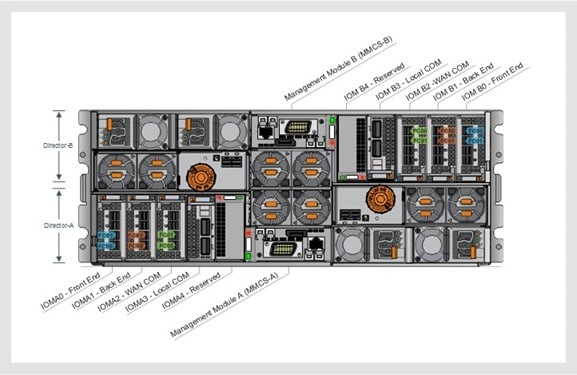
Figure 14. PLEX VS6 engine management and I/O modules
A photograph showing the VPLEX VS6 engine management and I/O modules

Metro node director

A single Metro node cluster has two directors.

The following figure shows one Metro node director.
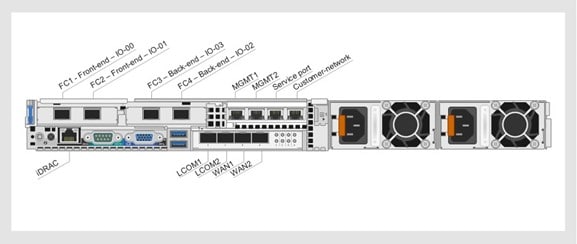
Figure 15. Metro node engine
A photograph showing one metro node director

Recommended configurations

The following table shows Dell-recommended configurations for business continuity and workload mobility.

Table 73. Recommended integrated data protection configurations
Configuration Description
Noncross-cluster connect (VPLEX Metro Stretched) Servers in this configuration access data from the local VPLEX system only. A noncross-cluster configuration:
  • Provides zero data loss in all single failures including that of an entire site.
  • Provides zero outage time if there is a storage array failure.
  • Limits the maximum outage time to the application restart time for a server domain failure or VPLEX failure.

For a VPLEX Metro Stretched configuration, you can deploy a noncross-cluster, where the clusters are separated by a latency of less than a 5-millisecond round-trip time (RTT).

Cross-cluster connect Servers in this configuration can access data from the VPLEX system at either site. Cross-cluster connect is suitable for deployment in a campus, or in multiple isolated zones in a single data center. This configuration does not require a server failover when an entire storage cluster (VPLEX) or the underlying storage goes down. VPLEX cross-connect is configured at the host layer only and does not imply any cross-connection of the back-end storage.

A cross-cluster configuration:

  • Provides zero data loss in all single failures including that of an entire site.
  • Provides zero outage time if there is a storage array failure.
  • Limits the maximum outage time to the application restart time for a server domain failure or VPLEX failure.
  • Requires a ping RTT of less than 1 millisecond between VPLEX Metro sites that are in a cross-connect configuration.
  • Requires that the auto-resume attribute on the CG is set to True. For more information about CGs, see CGs.

VPLEX storage protocols

VPLEX and Metro node support only the FC protocol. In a vSphere environment, VPLEX and Metro node support only VMFS datastores.

VPLEX and Metro node do not support VMware vVols data stores.

Disaster recovery

Dell Integrated Data Protection provides disaster recovery services through RecoverPoint for Virtual Machines and related technologies.

RecoverPoint for Virtual Machines

RecoverPoint for Virtual Machines software protects VMs residing in a VMware vSphere environment. The product provides local and remote replication capabilities with virtual machine-level granularity.

Note: 3-Tier Platform systems with secure boot enabled support RecoverPoint for Virtual Machines 5.3.2 on installations of VMware vSphere 7.0.

No version of RecoverPoint for Virtual Machines supports 3-Tier Platform systems that run vSphere 8.0.

RecoverPoint for Virtual Machines and RecoverPoint are different products. RecoverPoint for Virtual Machines refers to the VMware-related product. RecoverPoint refers to the hardware-based product. The following table shows the differences.

Table 74. RecoverPoint for Virtual Machines compared with RecoverPoint
Feature RecoverPoint for Virtual Machines RecoverPoint
Uses physical RecoverPoint Appliances (RPA) No Yes
Uses virtual RecoverPoint Appliances (vRPA) Yes Yes
Note: vRPA is not supported on integrated data protection solutions.

Target user group VMware administrators Storage administrators

RecoverPoint for Virtual Machines vRPAs are installed in the VMware vSphere environment and provide the plug-in into the VMware vSphere web client.

VMware vRPAs use the IP protocol to communicate with the VMware vSphere data store. Each vSphere ESXi host that participates in protecting virtual machines requires the RecoverPoint for Virtual Machines installed splitter.

VMware administrators use the vSphere web client to actively protect and recover virtual machines to any point in time using integrated orchestration and automation capabilities. RecoverPoint for Virtual Machines fully supports the following standard RecoverPoint operations:

  • Test Copy
  • Recover Production
  • Failover

Because RecoverPoint for Virtual Machines provides automation and orchestration capabilities, VMware Site Recovery Manager (SRM) is not required. Use VMware SRM only with RecoverPoint Classic.


Supported RecoverPoint for Virtual Machines configurations

Several RecoverPoint for Virtual Machines configurations are supported on converged systems, as shown in the following table.

Table 75. Supported RecoverPoint for Virtual Machines configurations on converged systems
RecoverPoint for Virtual Machines configurations Supported options
Host converged systems -
Data protection configurations
  • Local replication
  • Remote replication
  • Local and remote replication
  • Remote replication to Amazon Cloud
Replication types
  • Synchronous replication over IP
  • Asynchronous replication over IP

RecoverPoint for Virtual Machines architecture

The RecoverPoint for Virtual Machines system consists of:

  • One or more RecoverPoint for Virtual Machines clusters. For the maximum number of clusters that a RecoverPoint for Virtual Machines system can contain, see the latest RecoverPoint for Virtual Machines Release Notes on the Dell Technologies Support website.
  • A minimum of one vRPA and a maximum of eight vRPAs for each cluster. The vRPAs manage all aspects of the data replication process.
Note: Although you can use a single vRPA to create a RecoverPoint for Virtual Machines cluster, a minimum of two vRPAs is preferred for converged systems.

  • A RecoverPoint for Virtual Machines splitter installed on:
    • The VMware ESXi hypervisor.
    • Every VMware ESXi host in the VMware vSphere cluster that hosts virtual machines that RecoverPoint for Virtual Machines protects.

The splitter separates the write coming from the host and sends it to the vRPA and the virtual machine disk format (VMDK). The vRPAs handle all traffic to the journals and replicas as in a physical RecoverPoint system. Storage traffic between the vRPAs and the vSphere datastores uses the IP protocol.

  • VMware vSphere Web client plug-in. This plug-in provides the UI for managing the RecoverPoint for Virtual Machines system. The vAdmin manages all operations from this UI. Starting from RecoverPoint for Virtual Machines 5.3 the plug-in comes in two versions:
    • vSphere Flex plug-in for vSphere 6.7 and earlier.

This plug-in is the UI for managing the RecoverPoint for Virtual Machines system. The plug-in communicates directly with the vRPA clusters:

  • vSphere HTML5 plug-in for vSphere 6.7 U1 and later.

This plug-in communicates with the vRPA clusters through the HTML5 plug-in server.

Note: Starting from vSphere 6.7 VMware deprecated the vSphere Flex plug-in. Dell Technologies recommends using the vSphere HTML5 plug-in as the primary client and the Flex plug-in for features that the HTML5 plug-in does not support.

The following figure shows the RecoverPoint for Virtual Machines system architecture with the vSphere HTML5 plug-in.
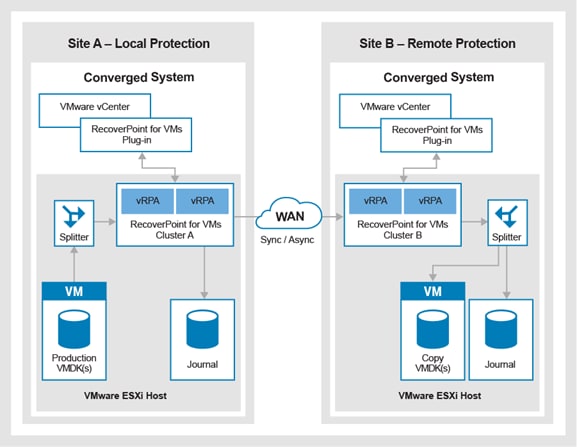
Figure 16. RecoverPoint for Virtual Machines architecture with the vSphere HTML5 plug-in
A diagram of the RecoverPoint for Virtual Machines system architecture with the vSphere HTML5 plug-in

vSphere HTML5 plug-in server

This dedicated plug-in server provides replication management for one or more RecoverPoint for Virtual Machines systems and communicates through the REST API.

The server deploys from an OVA and runs on SUSE Linux 12.5. The plug-in server hosts the HTML5 plug-in and the UI logic. It serves as a single endpoint for the new REST API, through which it manages all RecoverPoint for Virtual Machines systems running 5.3 or later on the vCenter server. A single HTML5 plug-in server can manage one or more vRPA clusters per vCenter Server. Every vCenter server and HTML5 plug-in server supports a maximum of 50 vRPA clusters.

The plug-in server communicates securely with every registered vCenter Server and with every vRPA cluster that is registered with a vCenter Server.

Note: All vRPA clusters registered to the same plug-in server require the same admin password.

Environments running vCenter in Embedded Linked Mode can install one of the following servers:

  • HTML5 plug-in server per vCenter server where vRPA clusters are registered.
  • HTML5 plug-in server to manage all vRPA clusters that are registered across the different vCenter servers. RecoverPoint for Virtual Machines supports up to seven vCenter servers using vCenter Enhanced Linked Mode.

Sizing

A Dell-certified specialist carries out a sizing analysis with the customer using the following considerations:

  • Amount of data to be replicated
  • Data rate of change
  • Maximum rollback window required, by disk volume
  • Available network bandwidth

Multisite support

RecoverPoint for Virtual Machines enables a single cluster to replicate to multiple clusters, or multiple clusters to replicate to a single cluster.

RecoverPoint for Virtual Machines supports the following multisite designs:

  • Fan-out replication from a local site to up to four remote copies, or to one local and three remote copies. Each copy contains data from the same CG.
  • Fan-in replication from up to four remote sites to one central site. Each copy contains data from a different CG.
  • Starting from RecoverPoint for VMs 5.2.2 and Cloud DR 19.1 the maximum number of noncloud replica copies per CG is two.
Note: For fan-in topologies, one remote copy per CG can be synchronous; the other can be asynchronous. Each link is independent, so you can access different points in time in different locations.

In addition to these multisite options, RecoverPoint for Virtual Machines supports a fully connected system where all sites are connected with each other.


Orchestration and automation

RecoverPoint for Virtual Machines provides the vAdmin with integrated automation and orchestration capabilities to simplify the recovery of virtual machines. The vAdmin accesses these capabilities using the vSphere web client snap-in.

The following table shows the automation capabilities and orchestration capabilities that are available with RecoverPoint for Virtual Machines.

Table 76. RecoverPoint for Virtual Machines automation and orchestration capabilities
Group Capability Description
Automation VMDK manageability
  • Select the type of VMDK to use for the copy VM. The options are:
    • Same as the source
    • Thick provisioned (lazy zeroed or eager zeroed)
    • Thin provisioned
  • Exclude certain VMDKs, for example, shared or nonpersistent VMDKs.
  • Expand or add a VMDK without losing the journal or causing a full sweep of the CG.
  • Enable or disable to automatically protect newly added VMDKs.
Replication of VM hardware changes VM version, MAC address, CPU, memory, resource reservations, NIC status, and NIC type are replicated to all copy VMs in the CG.
Note: When a VMDK is removed from a protected virtual machine, the corresponding copy VMDK is not removed. This option protects against accidental changes.

When a protected VM is deleted, the corresponding copy VMs are not removed. This option protects against accidental changes.

Replication of the SR-IOV NIC type is not supported. If the ESXi at a copy does not support the production VM version, no hardware resources are replicated.

MAC address replication MAC addresses of remote copy VMs on a different vCenter are automatically replicated.
Application-consistent bookmarks The RecoverPoint for Virtual Machines KVSS utility supports application-consistent bookmarks for Microsoft Windows.
Orchestration Start-up Sequence Install VM Tools on VMs that require protection by RecoverPoint for Virtual Machines.

Both CGs and group sets can use theStart-up Sequence feature to define the startup order (priority) for the VMs in the CGs and the CGs in the group sets.

User prompts To provide the vAdmin with configurable messages at certain points in the workflow, add user prompts in theStart-up Sequence for a CG for each VM.

If a timeout is defined, the prompt is automatically dismissed when the time-out period elapses. If no time-out is defined, the start-up sequence does not continue until the prompt is dismissed.

User scripts
  • Add external scripts for before and after power-up in theStart-up Sequence for a CG for each VM.
  • Define an external host for each vRPA cluster in the RecoverPoint for Virtual Machines system.
  • Install an SSH server on each external host. The scripts are run with SSH configured on the external host. Each script has a mandatory time-out period. Recovery is halted until the script runs successfully. If the script fails, a prompt is displayed.
Networking enhancements
  • The network settings for a VM can be changed for the copy VM in three different ways. The method to use depends on the number of VMs that require their network settings to be changed.
  • Use the RecoverPoint for Virtual Machines UI to change the network configuration of a few virtual machines.
  • Use a CSV file to change the network configuration of multiple VMs at a copy.
  • Use a CSV file to change the network configuration of multiple VMs in a system.
  • If re-IP glue scripts have already been implemented in a previous version of RecoverPoint of Virtual Machines, continue to use these glue scripts.
  • To ensure that you do not lose your protection VM network configuration when you fail back to the production, edit the copy network configuration of your production VMs.

For information about specific operating systems, see the RecoverPoint for Virtual Machines Administrators Guide on the Dell Technologies Support website.


Design recommendations

RecoverPoint for Virtual Machines systems provide additional configuration settings to optimize the 3-Tier Platform and allow for maximum growth based on the analyzed data. Here are the key areas that require careful planning for converged systems.


Security

During installation, replace the default admin user password with a unique password. This password is also the password for the root user across all vRPAs in the system.

The predefined admin user is granted all permissions for managing the system, including system engineer (SE) permissions. Starting from release 5.2.0.2 of RecoverPoint for Virtual Machines, the admin account is the only predefined user. For upgrades from RecoverPoint for Virtual Machines 5.1.1.4, the other predefined users remain as they were before the upgrade.

Root access is disabled by default for remote and local access. Access can be enabled or disabled from the Boxmgmt CLI.

RecoverPoint for Virtual Machines appliances use the following Federal Information Processing Standard (FIPS) 140-2 validated cryptographic modules:

  • RSA BSAFE® Crypto-J, JSAFE, and JCE Software Modules (FIPS certificate number 2057)
  • RSA BSAFE® Crypto-C Micro Edition (FIPS certificate number 2056)
  • OpenSSL FIPS Object Module (FIPS certificate number 1747)

All the modules are installed in accordance with the applicable security policies.

All encrypted network connections to and from RecoverPoint for Virtual Machines appliances use only the previously mentioned FIPS 140-2 validated cryptographic modules. On new installations, the vRPA communication security level is set by default to Authenticated and Encrypted.

To make the RecoverPoint for VMs system FIPS-140-2 compliant, verify that the vRPA communication security level is set to Authenticated and Encrypted on all vRPAs. To verify, log in to Boxmgmt as an admin and run the following CLI command: get_security_settings.

RecoverPoint for Virtual Machines supports Message Passing Interface (MPI) security for communication between vRPAs, between vRPA clusters, with storage, and with VMware vCenter servers. MPI security is applied to vRPA communications in the cluster and communications between clusters over WAN (IP). The following table describes the vRPA communication security levels.

Table 77. vRPA communication security levels
vRPA communication security level Description
Not authenticated, not encrypted Communication between vRPA clusters is not authenticated or encrypted. However, vRPA clusters can communicate with each other only by adhering to the RecoverPoint for Virtual Machines proprietary protocol.
Authenticated and encrypted (default) vRPA clusters use certificates to authenticate one another before communicating. All communication between VRPA clusters is also encrypted using Advanced Encryption Standard (Rijndael) with 256-bit keys.
Note: The splitter on each ESXi server communicates with the vRPA using the IP protocol.


Scale limitations

The following table shows important scale limitations on RecoverPoint for Virtual Machines. For the complete list of limitations, see the RecoverPoint for Virtual Machines 5.x Scale and Performance Guide on the Dell Technologies Support website.

Table 78. RecoverPoint for Virtual Machines scale limitations
Parameter Limit
vRPA clusters per RecoverPoint for Virtual Machines system 5
VMs that are protected per RecoverPoint for Virtual Machines system 1,024
ESXi clusters that are connected to a vRPA cluster 8
ESXi hosts with a splitter that can be attached to a vRPA cluster 128
vRPA clusters that are connected to a vCenter Server 50
vRPA clusters that are registered to an ESXi cluster 50
vCenter Servers that are connected to a vRPA cluster 5
Linked vCenter servers 7

RecoverPoint for Virtual Machines port usage and firewall rules

When configuring RecoverPoint for Virtual Machines solutions, follow the guidelines in the corresponding Security Guide. To obtain the guide:

  1. Log in to Dell Technologies Support.
  2. Search for RecoverPoint for Virtual Machines Security Configuration Guide.
  3. In the search results, click RecoverPoint for Virtual Machines x.x Security Configuration Guide, where x.x stands for the RecoverPoint for Virtual Machines software version.

CGs

A CG is a group of virtual machines and their disks that are replicated together in a way that ensures write-order consistency.

The CG is the basic building block where most replication operations occur. Recovering production or enabling Image access is all done per CG. Virtual machines are the entities that are protected, and they reside inside the CG.

CGs ensure write-order consistency on multiple disks in a single virtual machine, but also across multiple virtual machines that reside in the CG. For example, the system can ensure consistency between the application and database servers that reside in the same CG for any point in time. Newly created CGs are load-balanced across the vRPAs in the cluster by the number of CGs per vRPA. For converged systems, after the CG has been replicated for at least a week, check the I/O load on all vRPAs and manually rebalance the CGs across the vRPAs in the cluster.

Unlike RecoverPoint, RecoverPoint for Virtual Machines does not use the concept of distributed CGs. A single CG runs on a single vRPA and is limited by the resources of the vRPA.

Careful planning is required to create CGs and assign virtual machines to each. Review the following guidelines:

  • Within a RecoverPoint for Virtual Machines system, which can consist of multiple vRPA clusters, you can replicate up to 256 CGs.
  • Fewer CGs improve performance.
  • If the load of two virtual machines is greater than what a single vRPA can replicate, protect the virtual machines using two CGs. In this way, each CG runs on a separate vRPA.

If you require write-order consistency between these two CGs, place them together in a group set on which parallel bookmarking is enabled.

Group sets with parallel bookmarking enabled have the following limitations:

  • A single group set may contain up to 32 CGs.
  • The minimum frequency for parallel bookmarking is every 20 seconds, which means that CGs that use parallel bookmarking do not support recovery to any point in time.

RecoverPoint for VMs storage protocols

RecoverPoint for VMs supports both VMFS and vVols datastores when used in a 3-Tier Platform system.


Journals

Journals are crucial to the performance of RecoverPoint for Virtual Machines systems. Two types of journals are required for any CG:

  • Production journals: Product journals are required when a failover event has occurred and the direction of replication has changed. Production journals are required for any CG.
  • Copy journals: Copy journals receive successive writes that are written in production. The write-order is maintained, so it is possible to apply or undo writes so that the copy image can reflect any point-in-time. Verify that the underlying performance of the datastore where the journal resides has been configured properly to support the incoming writes for the CG.
Note: For VMware datastores that support RecoverPoint for Virtual Machines journals, choose a RAID 5 or (better) RAID 1/0 RAID group.


Required journal size

Use the values in the following table as a starting point for journal sizing.

Note: A certified specialist must perform journal performance and capacity sizing.

Table 79. Guidelines for journal sizing
Application writes (MB/s) Protection window (journal size in GB)
Minimum journal size 1 hour 8 hours 24 hours 3 days 7 days 30 days
1 KB 10 10 10 10 10 10 10
10 KB 10 10 10 10 10 20 40
100 KB 10 10 10 20 40 90 380
1 10 10 50 130 380 870 3,710
2 10 20 90 250 750 1,740 7,420
3 10 20 130 380 1,120 2,600 11,130
4 10 30 170 500 1,490 3,470 14,830
5 10 30 210 620 1,860 4,330 18,540
10 10 60 420 1,240 3,710 8,660 37,070
15 10 80 620 1,860 5,570 1,2980 55,600
20 10 110 830 2,480 7,420 1,7300 74,140
25 10 140 1,040 3,100 9,270 2,1630 92,670
30 10 160 1,240 3,710 11,130 2,5950 111,200
35 10 190 1,450 4,330 12,980 3,0280 129,740
40 10 210 1,650 4,950 14,830 34,600 148,270
60 10 320 2,480 7,420 22,250 51,900 222,400
80 10 420 3,300 9,890 29,660 69,200 296,530
100 10 520 4,120 12,360 37,070 86,490 370,660
120 10 620 4,950 14,830 44,490 103,790 444,790
150 10 780 6,180 18,540 55,600 129,740 555,990

To start sizing:

  • Begin with a number that is 15 to 25 percent of the total protected VM capacity. Add storage as required. The maximum journal size is three times the initial journal size and is subject to the following exceptions:
    • If three times the initial journal size is less than 1.09 TB, use 1.09 TB as the maximum journal size.
    • If three times the initial journal size is greater than 1.09 TB, use 10.00 TB as the maximum journal size.

vRPAs and vRPA clusters

Like RecoverPoint, RecoverPoint for Virtual Machines has a limit on the minimum and maximum number of vRPAs that are deployable in a single vRPA cluster. The minimum is one, and the maximum is eight.

Note: Even though a single vRPA can be used to create a RecoverPoint for Virtual Machines cluster, the best practice for converged systems is to deploy at least two vRPAs.

vRPAs can have three different virtual hardware specifications or configuration profiles. The supported vRPA configuration profiles are:

  • Two vCPUs and 8 GB RAM (Bronze +)
  • Four vCPUs and 8 GB RAM (Silver)
  • Eight vCPUs and 8 GB RAM (Gold)

In VMware vCenter, the OVA deployment process automatically reserves all the memory that is assigned to the virtual machines and reserves 3,400 MHz for the CPUs. Adhere to the following guidelines:

  • The four-vCPU and 8 GB RAM (Silver) configuration is suitable for most situations.
  • If low throughput is expected, use a two-CPU and 8 GB RAM (Bronze +) configuration.
  • For synchronous replication or when deduplication is required, use the eight-CPU and 8 GB RAM (Gold) configuration.
  • Deploy all vRPAs in a single cluster with the same configuration profile. If impossible, then ensure that the first and second vRPAs in the vRPA cluster use a more powerful configuration profile. They are candidates to run cluster control. The cluster control vRPAs run additional logic and require additional CPU and memory resources.
  • When deploying vRPAs with different configuration profiles, deploy vRPAs in pairs of the same configuration profile to provide, at a minimum, enough failover capacity and performance if there is a vRPA failure.
  • The more memory the vRPA has, the better it can handle stronger and longer peaks of write I/Os before entering high load.
  • The performance of the vRPAs does not scale up linearly when moving to a larger configuration profile. It is sometimes more cost-effective to use two smaller-sized vRPAs instead of a single larger vRPA. See vRPA configuration details for replication use cases and vRPA configuration sizing for the performance data.
  • The performance of the vRPA cluster scales up linearly as vRPAs are added.
  • If possible, spread out the vRPAs over the VMware ESXi hosts. If impossible, ensure that at least the first two vRPAs never reside on the same VMware ESXi host. The first two vRPAs are the only two vRPAs that can run the cluster logic and placing both on the same host creates a single point of failure.
  • Ensure that VMware vCenter HA is enabled. If a VMware ESXi host fails, the vRPA restarts on another VMware ESXi host.
  • Depending on the configuration of the VMware ESXi host, you can configure the vRPA to gain up to 20 percent performance. For example, if the VMware ESXi host has two NUMA nodes with eight CPU cores each, the recommended 8-CPU and 8 GB RAM vRPA configuration is to use one physical socket and eight cores per socket. This configuration keeps all the memory as close as possible to the CPU cores, maximizing performance.
CAUTION: Never place vRPAs on the VMware ESXi host on which the VM that the vRPA is replicating resides. Doing so prevents the vRPA and the VM from competing for ESXi resources, especially at peak times. If there is a VMware ESXi host failure, VMware vCenter HA restarts the VM and the vRPA on a different ESXi host. This scenario might move the VM CG to another vRPA to continue VM protection, potentially triggering a full sweep and a longer period where the VM is unprotected. It does not mean that other vRPAs should not share ESXi resources with the production VM.

The following table shows vRPA configurations for different replication use cases.

Table 80. vRPA configuration details for replication use cases
vRPA configuration Supported replication use case
Two CPUs, 8 GB RAM (Bronze +) Up to 128 CGs per vRPA

Up to 512 VMs per vRPA

Total VMs’ write throughput of up to 70 MB/sec

Asynchronous replication only

Four CPUs, 8 GB RAM (Silver) Total VMs’ write throughput of up to 200 MB/sec

Asynchronous replication only

Eight CPUs, 8 GB RAM (Gold) Total VMs’ write throughput of up to 350 MB/sec (for asynchronous)

Synchronous and asynchronous replication

Enabling deduplication

CAUTION: Upgrading VMware tools on the vRPAs is not supported and may lead to unwanted results.

The following table provides a starting point for deciding how many vRPAs are required. The calculations are based on the vRPA Configuration Profile 4 vCPU and 4 GB RAM. A certified specialist must perform the official sizing.

Table 81. vRPA configuration sizing
Protected virtual machines Total IOPs Total writes Number of vRPAs Read latency (milliseconds) Write latency (milliseconds)
25 21,250 17,000 1 0.29 0.78
50 42,500 34,000 1 0.31 1.44
50 42,500 34,000 2 0.28 0.94
64 63,750 51,000 3 0.40 1.02

Network performance

All vRPA traffic moves across the IP network, making the reliability and performance of the network increasingly important. The following diagram shows the write path from a VM.
Figure 17. vRPA write path
A diagram of the write path from a virtual machine
  1. The production VM initiates a write.
  2. The RecoverPoint for Virtual Machines splitter intercepts the write and sends it to the datastore to be written to the VMDK.
  3. The splitter sends the write to the vRPA over the RP_Data network.
  4. The vRPA sends the data over the WAN to the vRPA in the remote cluster.
  5. The remote vRPA sends the data over the RP_Data network to the VMware ESXi host.
  6. The RecoverPoint for Virtual Machines splitter intercepts the write and writes it to the replica VMDK.
  7. The write is available for the shadow VM.

Configuring the network

Implement the following best practices:

  • Configure the RP_Data networks with an MTU value of 9000.
  • For asynchronous replication, ensure that the RTT between RecoverPoint for Virtual Machines sites does not exceed 200 milliseconds and that packet loss is below one percent.
  • For synchronous replication, ensure that the RTT between RecoverPoint for Virtual Machines sites does not exceed 10 milliseconds and that packet loss is below one percent.
  • Ensure that compression is enabled. Compression enhances throughput because the compressed data is written to the journal.
  • For optimal performance and HA, ensure that the three networks (LAN, WAN, and RP_Data) are on separate virtual switches.

Performance data

The Dell 3-Tier engineering team obtained the performance data based on the following parameters:

  • vRPAs are configured with all cores on a single socket.
  • The WAN connection is 10 GbE with an RTT of 0 ms, and 64 or 128 or 256 VMs are protected.
  • Each VM has 5 VMDKs.
  • The I/O pattern is 100 percent random writes, with up to 320 or 640 or 1,280 concurrent outstanding I/Os over all replicated VMDKs.
  • A compression ratio of two when compression was enabled.
Table 82. Performance data
vRPA Asynchronous replication by a single vRPA with (WAN and journal Synchronous replication by a single vRPA Latency 1 CG (WAN and journal compression)
I/O size CGs Result I/O size CGs Result I/O size Speed Result
8 vRPA, 8 GB RAM 8 K 1 25 K IOPS 8 K 1 14 K IOPS 8 K 15 K IOPS 1.17 milliseconds
8 vRPA, 8 GB RAM 8 K 64 30 K IOPS 8 K 64 12 K IOPS - - -
8 vRPA, 8 GB RAM 64 K 1 250 MB/s 64 K 1 200 MB/s - - -
8 vRPA, 8 GB RAM 64 K 64 250 MB/s 64 K 64 200 MB/s 64 K 150 MB/s 1.65 milliseconds
4 vRPA, 8 GB RAM 8 K 1 18 K IOPS - - - 8 K 12 K IOPS 2.70 milliseconds
4 vRPA, 8 GB RAM 8 K 64 18 K IOPS - - - - - -
4 vRPA, 8 GB RAM 64 K 1 200 MB/s - - - - - -
4 vRPA, 8 GB RAM 64 K 64 200 MB/s - - - 64 K 150 MB/s 2.26 millisecond

The following table shows the performance of the RecoverPoint for Virtual Machines splitter on a single VMware ESXi host:

Table 83. Splitter performance on a VMware ESXi host
ESXi splitter performance (asynchronous replication with WAN/Journal compression)
vRPA I/O size CGs Result
2 x 8 vRPA, 8 GB RAM 8 K 64 50 K IOPS
2 x 8 vRPA, 8 GB RAM 64 K 64 500 MB/S

For additional information, see the RecoverPoint for Virtual Machines Product Guide and the RecoverPoint for Virtual Machines Administrator’s Guide on the Dell Technologies Support website.

RecoverPoint for Virtual Machines Cloud Solution

RecoverPoint for Virtual Machines 5.2.2 adds the capability to protect VMs directly to Amazon Simple Storage Service (S3) using proprietary snap-based replication with an RPO of 15 minutes.

Use RecoverPoint for Virtual Machines to protect production VMs while a Cloud DR Server (CDRS) instance is deployed to Amazon Elastic Compute Cloud (EC2) to manage the cloud copies and run orchestrated recovery flows to native Amazon EC2 instances.

Optionally, deploy the Cloud DR Add-on appliance to fail back from Amazon Web Services (AWS) to an on-premises vCenter server or to VMware Cloud on AWS. If the source VMs or sockets are licensed in the same way as a noncloud solution, the CDRA is a no-cost option with RecoverPoint for Virtual Machines.

By implementing the RecoverPoint for Virtual Machines Cloud Solution, you can:

  • Allow multiple local and remote copies on-premises and to the cloud and test or failover to AWS EC2.
  • Fail back to on-premises VMware environments or VMware cloud on AWS (SDDC) by using the Cloud DR appliance (CDRA)
  • Orchestrate in-cloud DR.

The HTML5 plug-in for RecoverPoint for Virtual Machines 5.3 cannot configure and manage the RecoverPoint for Virtual Machines Cloud Solution. Manage the Cloud Solution through the RecoverPoint for Virtual Machines 5.3 Flex plug-in for vSphere vCenter servers supporting FLEX or the RecoverPoint for Virtual Machines RESTful API.

Use cases

Replicating to AWS using the RecoverPoint for Virtual Machines cloud solution offers the benefit of cost reduction. RecoverPoint for Virtual Machines replicates data on a CG basis, so the replication topology is decided on a CG basis.

A combination of the following use cases is permitted:

  • Cloud as a DR site:
    • An on-premises DR site or secondary site is not required. An RPO as low as 15 minutes and an RPO of seconds or zero requires RecoverPoint for Virtual Machines replication to a noncloud site.
    • Recover to EC2 or VMware cloud on AWS.
  • Protection tiering:
    • Tier-1 VMs are protected by replication to a remote VMware vCenter (DR site).
    • Tier-2 VMs can be recovered directly from the cloud to the DR site.
  • Extra protection layer
    • Production VMs are protected by replication to a remote on-premises VMware vCenter DR site).
    • A secondary copy is replicated to the AWS cloud. The use case is:
      • Distance: A production VM is replicated to a location far enough away that local or regional disasters do not impact the cloud VM.
      • Long time retention: The RecoverPoint for Virtual Machines Cloud Solution enables you to retain a VM copy for up to 90 days.

The following Cloud DR server orchestration features are available for RecoverPoint for Virtual Machines copies:

  • Automated recovery workflows:
    • You select the VM to be recovered.
    • You select the point-in-time to which the VM is to be recovered.
    • You select the target (AWS EC2 or vCenter).
    • You select the network to which the VM is connected.
    • The CDRS starts the rehydration and conversion process, and then starts the instance.

The rehydration and conversion process is slow. Using Rapid Recovery Copies (RRCs) mitigates this issue as follows:

  • A maximum of five RRCs are re-created for a short RTO and the slow rehydration and conversion process is avoided.
  • The RRC copy interval is configured 6 to 24 hours.
  • DR plans:
    • Configure multiple DR plans for recovery of multiple VMs.

The DR plan can customize the VM power-up order, and configure network and private IP details, cloud instance type, and security group association.

  • The DR plan VM power-up order has five levels of priority. One level is the highest priority and starts first. The default is three, which is the medium priority. The lowest priority is five, which starts last.

RecoverPoint for Virtual Machines Cloud DR scalability

The following table shows the Cloud DR scalability values.

Table 84. RecoverPoint for Virtual Machines Cloud DR scalability values
Item Number
CDRS deployed on AWS 1
S3 buckets on AWS 1
Maximum number of noncloud replicas copied per CG 2
Maximum number of CGs protected by a single vRPA cluster (replicating to AWS cloud) 128
Maximum number of CGs per vRPA cluster (hybrid, including up to 128 AWS cloud copies) 256
Maximum VM size 5 TB
Maximum VMDK size 4 TB
Total size of CG 60 TB

Performance and scale best practices for replicating to AWS

For optimal performance when replicating to AWS cloud, adhere to these best practices:

  • Use the following configuration profiles:
    • Four vCPUs and 8 GB RAM (Silver)
    • Eight vCPUs and 8 GB RAM (Gold)
  • Distribute VMs evenly across the maximum of CGs. When multiple VMs share a single CG, the recovery operation in the cloud remains per VM.
  • To calculate the size of the snap replication datastore, use 40 percent of the total size of the protected VM.
  • RecoverPoint for Virtual Machines supports up to 128 CGs per vRPA cluster when replicating to the AWS cloud.
  • Use a maximum of 256 CGs in a hybrid RecoverPoint for Virtual Machines system where both cloud and noncloud replica copies exist. Do not use more than 128 CGs for AWS cloud copies.
  • The recommended snapshot interval is one hour. For smaller environments, a snapshot interval of 15 minutes is available.
Table 85. Throughput and latency with 32 CGs
vRPA profile I/O size or pattern Snap interval Throughput IOPS Added latency (milliseconds)
Four vCPUs and 8 GB RAM (Silver) 64 K random 1 hr 250 MB/s 3.1
Eight vCPUs, 8 GB (Gold) 8 K random 1 hr 15 K IOPS 1.5
Table 86. Recovery process to EC2 (including rehydration and conversion):
Number of virtual machines Virtual machine size Recovery process (minutes)
1 150 GB 65
20 150 GB 100
64 150 GB 280
128 150 GB 360

Cloud DR sizing

Sizing a solution based on RecoverPoint for Virtual Machines replication to AWS is different to sizing a non-AWS continuous replication solution.

RecoverPoint for Virtual Machines can achieve an RPO as low as 1 second for asynchronous replication in an on-premises solution. An RPO of 0 seconds is achievable with synchronous replication. The RPO parameter whose default value is 25 seconds is only used for monitoring to validate the required RPO.

The Snap Replication interval plays a large part in sizing a RecoverPoint for Virtual Machines cloud solution. It impacts the replication frequency, the number of points-in-time, the storage required on S3, and more.

For replication to AWS, the periodic Snap Replication interval is the minimum achievable RPO. The minimum selectable RPO is the snap interval plus 30 minutes. For example, a snap interval of 15 minutes gives a minimum selectable RPO of 45 minutes. The maximum selectable RPO is one day. The RPO parameter is also used for monitoring.


Journal sizing

The best practice when replicating to AWS is to size the production journal at 3 GB per CG.


Snap replication volume

When sizing the snap replication volume, ensure that the maximum size the volume can consume per CG is 40 percent of the total size of all production VMDKs in the CG. Two snap replication volumes protect each CG during replication to the cloud. When a snap replication volume is full, a replication cycle starts automatically, regardless of the timing.

Perform a realistic sizing calculation with the help of a Certified Data Protection sizing specialist. Use the following formula:

Volume size = 2 x ((CG Size in GB x Daily Change Rate in %) / (1440 minutes /
Interval in minutes))

Where:

  • CG Size in GB = the total size of all VMDKs in the CG in GB
  • Daily Change Rate = the percentage of change for all VMDKs (virtual machines) in the CG
  • 1440 minutes = 1 day
  • Interval in minutes = interval in minutes when the snap-based replication occurs. This value is 15 <= Interval <= 1440
  • Example:
  • CG size in GB = 150 GB
  • Daily Change Rate = 3%
  • Interval in Minutes = 60 minutes
  • Volume size = 2 x ((150 x 3%) / (1440 / 60)) => 0.375 GB

Number of vRPAs

A calculation of the required number of vRPAs requires the snap-based interval and the amount of data to be replicated during each interval. When calculating the required number of vRPAs to use for replicating to AWS, Dell Technologies recommends using the Gold profile (8 vCPUs/8 GB RAM). This profile can sustain a maximum throughput of 250 MB/s of 64 K random IOs.

Use the following formula for this exercise:

Required number of vRPAs = 1 + Round (((Change Rate in GB * 1024) / (Interval in min * 60)) / Max Throughput)

Where:

  • Change Rate = the amount of data that changes during the interval in GB.
  • 1,024 = the value used to convert from GB to MB.
  • Interval in minutes = interval in minutes when the snap-based replication occurs. This value is 15 <= Interval <= 1,440.
  • 60 = the value used to convert the interval from minutes to seconds.
  • Max Throughput = the maximum throughput for a Gold profile vRPA in MB per second.
  • Example 1:
  • Change Rate in GB = 16 GB
  • Interval in Minutes = 60 Minutes
  • Max Throughput = 250
  • MB/s calculation:
    • Required number of vRPAs = 1 + Round (((16 * 1024) / (15 * 60)) / 250)
    • Required number of vRPAs = 1 + Round (0.072817778)
    • Required number of vRPAs = 2
    • Example 2:
    • Change Rate in GB = 200 GB
    • Interval in Minutes = 60 Minutes
    • Max Throughput = 250 MB/s Calculation: Required number of vRPAs = 1 + Round (((200 * 1024) / (15 * 60)) / 250)
    • Required number of vRPAs = 1 + Round (0.910222222)
    • Required number of vRPAs = 2

For more information, look for the latest versions of the following documents on the Dell Technologies Support website.

  • RecoverPoint for Virtual Machines Product Guide
  • RecoverPoint for Virtual Machines Administrator's Guide
  • RecoverPoint for Virtual Machines - Replication to AWS - Planning and Deploying Replication to the Cloud with RecoverPoint for Virtual Machines

Business continuity and disaster recovery design recommendations

FC-WAN connectivity

Two FC-WAN configurations are supported on converged systems:

  • External FC-WAN
  • Internal FC-WAN (the most commonly used configuration)
Table 87. FC-WAN configurations on converged systems
FC-WAN configuration Description
External FC-WAN FC switches with FC-WAN replication are in place. VPLEX WAN-COM replication ports connect directly to external switches, and no ISLs exist between the converged systems.
Internal FC-WAN The customer has one of the following:
  • An existing point-to-point dark fiber link, which can be terminated into the converged system FC.
  • DWDM multiplexor (MUX), which can be connected with an ISL to the converged system FC switch.

Use the correct SFPs. A standard shortwave SFP has a limit of 300 meters (approximately 984 ft). If the connection is greater than 300 meters, use longwave SFPs.

Best practices

When you deploy VPLEX Metro with internal FC-WAN connectivity, ensure that you:

  • Keep VSAN 10 and 11 local and isolated to a single Cisco MDS switch. More VSANs are required to facilitate VPLEX FC-WAN replication traffic.
  • Configure VSAN 30 for Fabric A and VSAN 31 for Fabric B as follows:
    • Dedicate VSAN 30 and 31 to FC-WAN replication traffic.
    • Extend VSAN 30 between both Fabric A switches.
    • Extend VSAN 31 between both Fabric B switches.
    • Configure VSAN 30 and 31 with unique FC domain Identifiers between converged systems. Use even numbers for Fabric A and odd numbers for Fabric B.
  • To avoid a configuration mismatch when attempting to extend (merge) VSANs, do not complete any zoning activities until after the required VSAN has extended successfully.

Any new switch can become the principal switch when it joins a stable fabric. During the principal switch selection phase, the switch with the highest priority becomes the principal switch.

  • Ensure that you:
    • Configure VSAN 30 and 31 with a higher switch priority on the primary converged system to enforce wanted roles.

By default, the configured priority is 128 and the valid range is 1 to 254.

  • Do not use a switch priority value of 1. Adherence to this rule is necessary to allow for future migration scenarios.

If two switches have the same priority, the switch with the lower WWN becomes the principal switch.

  • If you extend VSANs between new and existing Cisco MDS switches or unified Cisco Nexus switches, verify that the merge conditions, such as zoning mode and zoneset distribution, are correct. These switches can have different default configurations.

VPLEX and Metro node design recommendations

The following recommendations apply to VPLEX and Metro-node-based Integrated Data Protection solutions providing business continuity and DRR, including:

  • General design recommendations for VPLEX and Metro node
  • Design recommendations for VPLEX
  • Design recommendations for Metro node

Management network

Adhere to the following best practices when configuring the management network for VPLEX on converged systems:

  • The VPLEX Management Server in each converged system must connect to the converged system management network (101 or 1801 or OOB).
  • VPLEX Metro requires a routable connection between the VPLEX management servers for each cluster, and between each management server and the Cluster Witness server. If a firewall exists between any of these servers, it must allow ICMP and IPsec traffic in both directions. For more information, see the VPLEX Security Configuration Guide on the Dell Technologies Support website.
  • Metro node in a Metro configuration requires a routable connection between the director management IP addresses of each cluster in the Metro system. If a firewall exists between any of these servers, see the information in the Metro Node Security Configuration Guide on the Dell Technologies Support website.

Ideally, this routable connection does not use the L2 DCI link. You do not have to extend the management VLAN.

  • Link latency between the two VPLEX management servers and the VPLEX Cluster Witness server must not exceed 1 second.
  • The IP management network must not be able to route packets to the reserved IPv4 VPLEX subnets 128.221.252.0/24 and 128.221.253.0/24.
  • The IP management network must not be able to route packets to the following reserved IPv4 Metro node subnets: 128.221.250.0/24, 128.221.251.0/24, 128.221.252.0/24, and 128.221.253.0/24.
  • The management servers (MMCSs) for the VPLEX VS6 require two management network connections and two IP addresses per VPLEX cluster.

Even though the VPLEX VS6 uses two MMCSs, the second MMCS does not provide any function (such as HA or failover). However, it must be configured with an IP address and be always operational. Failure of MMCS-B creates alerts and becomes a Field Replaceable Unit (FRU) event.


Workload mobility and extending VLANs

When you configure workload mobility solutions, adhere to the following best practices:

  • Ensure that there is Layer-2 (L2) adjacency between the two converged system production networks. Doing so ensures connectivity following a live vSphere vMotion migration or a VMware HA-triggered VM restart event.
  • At a minimum, extend the ESXi Management (205 or 1611) VLAN that is used to host the VMware vSphere management VMs between sites. Doing so necessitates trunking a subset of VLANs that are considered to be internal outside the converged system.
  • The customer is responsible for the L2 extension between sites. The chosen technology (OTV or back-to-back vPC) must comply with latency requirements.
  • Effective from VMware vSphere 6.0, VMware introduced Layer 3 vMotion capabilities. You do not have to extend the Layer 2 VLAN 206 that is used for VMware vSphere vMotion in the compute hosts.
  • For full resilience, provide gateway redundancy between sites. Ideally, implement FHRP isolation to avoid hosts and virtual machines unnecessarily crossing the DCI link to reach their gateway.

VPLEX Metro detach rules

When configuring VPLEX Metro, bear in mind the following considerations:

  • A detach rule is defined for each VPLEX Metro distributed vVol.
  • When a communication failure occurs between the two clusters in a VPLEX Metro configuration, the detach rule identifies which VPLEX cluster must detach its mirror leg. This rule enables services to continue.
  • The purpose of a defined preferred site is to ensure that there is no possibility of a split-brain scenario with both VPLEX clusters continuing to allow I/O during a communication failure.
  • After a complete communication failure between the two VPLEX clusters, the preferred site continues to provide service to the distributed vVol.
  • The other VPLEX cluster suspends I/O service to the volumes. That cluster is known as the nonpreferred site.
  • The detach rule is at the distributed vVol level. Either converged system in a VPLEX Metro configuration can be the preferred site for some distributed vVols and the nonpreferred site for others.
  • A VPLEX Metro instance can support up to 5,000 distributed vVols, and each volume has its own detach rule.
  • VPLEX Witness failure-handling semantics apply only to the distributed vVols in a CG. CGs have a bias rule set similar to a detach rule to determine the preferred site.
  • All distributed vVols common to the same set of VMs must be in one CG. All VMs that are associated with that CG must be at the preferred site.

Failure conditions that invoke VPLEX detach rules

The following failure conditions invoke VPLEX detach rules:

  • A total VPLEX cluster failure at one site (all directors in a cluster)
  • A VPLEX WAN partition

Total VPLEX cluster failure at one site

The following conditions occur during the failure and after the failure is resolved:

  • A complete VPLEX cluster failure triggers detach rule behavior because the surviving VPLEX cluster cannot determine between intersite communication loss and complete VPLEX cluster failure.
  • The distributed vVols whose preferred site is the surviving VPLEX cluster continue to run without interruption.
  • The distributed vVols whose preferred site is the site with the failed VPLEX cluster site enter into I/O suspension.
  • After the VPLEX cluster failure is resolved, the distributed vVols are reestablished, enabling I/O on both VPLEX clusters in a Metro configuration.

VPLEX WAN partition

The following conditions occur during the failure and after the failure is resolved:

  • The VPLEX cluster WAN partition (intersite communication failure) also triggers execution of the detach rule.
  • Each distributed vVol allows I/O to continue at the preferred site and suspends I/O at the nonpreferred site.
  • After the VPLEX cluster WAN partition condition is resolved, the distributed vVols are reestablished, enabling I/O on both VPLEX clusters in a Metro configuration.

VPLEX Metro persistent device loss

VMware vSphere does not recognize all types of total path failure when running in VPLEX environments. To remedy this issue, configure VPLEX Metro for persistent device loss under the advanced VMware ESXi settings, following these guidelines:

  • VMware vSphere recognizes two types of total path failure to a VMware ESXi server. The VMware ESXi server can declare either condition following a failure condition.
  • All paths down (APD).
  • Persistent device loss (PDL): PDL is a state that a VMware ESXi server declares when a SCSI sense code is sent from the underlying storage array (in this case, VPLEX) to the VMware ESXi host. It informs the host that the paths can no longer be used. This condition can occur if VPLEX suffers a WAN partition, causing storage volumes at the nonpreferred location to suspend. VPLEX sends the PDL SCSI sense code to the VMware ESXi server from the site that is being suspended (the nonpreferred site).

VMware HA does not automatically recognize that a SCSI PDL state causes a VM to invoke an HA failover, which causes an outage. This scenario is not acceptable when VMware HA is used with VPLEX in a stretched cluster configuration.

  • VMware vSphere can act on the SCSI PDL state by powering off the VM, invoking HA failover. This behavior requires additional settings in the VMware vSphere cluster. For more information, see Advanced VMware parameters to regulate PDL conditions in the Tier-3 Platform Logical Build Guide. To obtain a copy of the guide, contact your Dell Technologies sales representative.

VMware vCenter Server placement

When implementing HA for VMware vCenter Server, adhere to the following best practices:

  • In a stretched cluster solution, VMware vCenter Server requires site mobility capabilities to enable automatic failover to either converged system if there is an outage.
  • Without VPLEX Metro and a VMware stretched clustering solution, each converged system would use its own instance of vCenter Server in the 3-Tier Management solution to manage its ESXi hosts. To deploy an active/active stretched clustering solution with VPLEX Metro, use a single VMware vCenter Server instance to manage all the hosts in the two converged systems that participate in VMware stretched clusters.

The following options are supported on converged systems:

  • If all ESXi hosts from Site-A and Site-B participate in a VMware stretched cluster, one vCenter server hosts all 3-Tier Management solution VMs from Site-A and Site-B. All VMs on VPLEX distributed volumes that are attached to VMware ESXi hosts in Site-A and Site-B.
  • For any VMware ESXi hosts in Site-A or Site-B or both that do not participate in a VMware stretched cluster:
    • Use the vCenter Server in each converged system to manage the 3-Tier Management solution and the local VMware ESXi hosts.
    • Deploy a third vCenter server to manage the participating VMware ESXi hosts.
  • Converged system management VMs include the VMware vCenter Server Appliance. All other management functions that reside in the 3-Tier Management solution remain local to their converged system.
  • Ensure that you apply the additional VMware parameters to Cisco UCS C-Series servers when building a VMware stretched cluster. For more information, see Advanced VMware parameters to regulate PDL conditions in the Tier 3 Platform Logical Build Guide. To obtain a copy of the guide, contact your Dell Technologies sales representative.

VPLEX on converged systems design recommendations

Dell Technologies recommends the following best practices for VPLEX on converged systems.


General back-end best practices

Consider the following general best practices when configuring back-end connectivity:

  • Each VPLEX director has redundant physical connections to the back-end storage array across dual fabrics.
  • For single converged systems, only 50 percent of the available VPLEX back-end ports, A1-FC00, A1-FC01, B1-FC00, and B1-FC01, are connected as standard for each engine.
  • Use the remaining VPLEX back-end ports, A1-FC02, A1-FC03, B1-FC02, and B1-FC03, in a high-bandwidth environment or for connecting a second back-end storage array.
  • VMware vVols are unsupported on VPLEX.
  • Moving the ESXi host boot LUN behind VPLEX is not supported. Boot LUNs must be provided to the host directly from the storage array, and not from VPLEX.

Storage array-specific best practices

Consider the following best practices when configuring back-end connectivity.

VNX2 storage arrays

  • Each VPLEX director must have logical and physical connectivity to storage controllers.
  • VPLEX recognizes the nonpreferred paths and does not use them during normal conditions.
  • Set mode 4 (ALUA) during VPLEX back-end initiator registration before the device presentation. Do not change this value after the presentation.

The minimum supported configuration is four paths (two active and two passive) per VPLEX director for any given LUN. For more information about VPLEX back-end zoning, see the Dell Integrated Data Protection Zoning for VPLEX spreadsheet. To obtain a copy of the spreadsheet, contact your Dell Technologies sales representative.

Dell Unity and Unity XT storage arrays

  • Each VPLEX director must have logical and physical connectivity to storage controllers.
  • The minimum supported configuration is four paths (two active and two passive) per VPLEX director for any given LUN.

The Dell Unity and Unity XT arrays come in two versions, a hybrid array and an all-flash array. Both versions potentially require large amounts of bandwidth. The following tables show the bandwidth that is required to ensure that VPLEX properly protects the data.

Table 88. VPLEX VS6 back-end requirements for Dell Unity and Unity XT arrays
VPLEX (50 percent cabled) <-> Dell Unity configuration Dell Unity and Dell Unity XT configuration size
XS S M L XL
Number of VPLEX VS6 engines Single 64 Gbps <-> 32 Gbps 64 Gbps <-> 64 Gbps - - -
Dual - 128 Gbps <-> 64 Gbps 128 Gbps <-> 128 Gbps - -
Quad - - 256 Gbps <-> 128 Gbps 256 Gbps <-> 192 Gbps 256 Gbps <-> 256 Gbps

By default, Dell Technologies cables only 50 percent of the ports on each VPLEX VS6 engine on converged systems. There are four ports, each running at 16 Gbps. The Unity and Unity XT arrays start with the XS configuration with two 16 Gbps FC ports each. Each larger model adds an additional two FC ports (XS=2, S=4, M=6, L=8, and XL=10 FC 16 Gbps ports). In the preceding table, the configurations in bold can support the maximum bandwidth requirement with only 50 percent of the ports cabled. The configurations in plain type are oversubscribing the VPLEX ports when only 50 percent of the ports are cabled. The Dell Technologies Sales Team must order the VPLEX configuration with all VPLEX back-end ports cabled.

Note: VPLEX VS6 can support all available Dell Unity and Unity XT configurations without oversubscribing the VPLEX ports, even with only 50 percent of the ports cabled.

For information about VPLEX back-end zoning, see the Dell Integrated Data Protection Zoning for VPLEX spreadsheet. To obtain a copy of the spreadsheet, contact your Dell Technologies sales representative.

PowerStore arrays

Consider the following best practices when configuring back-end connectivity with PowerStore storage arrays:

  • Each node has two I/O module (IOM) slots and at least one FCIOM.
  • Every VPLEX engine is zoned to all appliances in the array cluster using the same FC ports. Each appliance owns a LUN, enabling LUN migration between the appliances in the array cluster.
  • The minimum supported configuration is four paths per VPLEX director for any given LUN.

VPLEX VS6 - PowerStore with one FC IOM

The following table shows configurations that oversubscribe the VPLEX ports when 50 percent of the ports are cabled.

Table 89. VPLEX ports oversubscription configurations – one FC IOM
VPLEX (100% cabled) <-> PowerStore configuration Dell PowerStore configuration size with one FC IOM
One PowerStore appliance Two PowerStore appliances Three PowerStore appliances Four PowerStore appliances
Number of VPLEX VS6 engines Single 64 Gbps <-> 128 Gbps 64 Gbps <-> 256 Gbps - -
Dual - 128 Gbps <-> 256 Gbps 128 Gbps <-> 384 bps 128 Gbps <-> 512 Gbps
Quad N/A N/A N/A N/A

By default, Dell connects 50 percent of the ports on each VPLEX VS6 engine in a converged system. Each engine has four ports, each running at 16 Gbps each.

The PowerStore array starts with a single appliance with two 32 Gbps FC ports per node, for four 32 Gbps FC ports per appliance. The array can scale up to four appliances. Each appliance adds an additional four 32 Gbps ports. Proper sizing is required to determine the number of ports to be cabled.

VPLEX VS6 - PowerStore with two FC IOM

The following table shows configurations that are oversubscribed to the VPLEX ports when 100 percent of the ports are cabled.

Table 90. Oversubscription to VPLEX ports with two FC IOM
VPLEX (100% cabled) <-> PowerStore configuration Dell PowerStore configuration size with two FC IOM
One PowerStore appliance Two PowerStore appliances Three PowerStore appliances Four PowerStore appliances
Number of VPLEX VS6 engines Single 128 Gbps <-> 256 Gbps 128 Gbps <-> 512 Gbps - -
Dual - 256 Gbps <-> 512 Gbps 256 Gbps <->768 Gbps 256 Gbps <->1024 Gbps
Quad N/A N/A N/A N/A

By default, Dell connects 50 percent of the ports on each VPLEX VS6 engine in a converged system. Each engine has four ports, each running at 16 Gbps each. The preceding table shows that the VPLEX is cabled at 100 percent, which means that each engine has eight ports, each running at 16 Gbps.

The PowerStore array initially consists of a single appliance. Each node in the appliance has two 32 Gbps FC ports per node, for eight 32 Gbps FC ports per appliance. The PowerStore array can scale up to four appliances, with each appliance contributing eight additional 32 Gbps ports. However, even when all the ports are cabled, as shown in the previous table, each configuration is oversubscribing the VPLEX ports. Proper system sizing is necessary to determine the number of ports to be cabled.

For more information, see the Dell Integrated Data Protection Zoning for VPLEX spreadsheet for the VPLEX back-end. To obtain a copy of the spreadsheet, contact your Dell Technologies sales representative.

VMAX, VMAX3/AF, and PowerMax arrays

Consider the following best practices when configuring back-end connectivity with VMAX, VMAX3/AF, and PowerMax series storage arrays:

  • Each VPLEX director must have a minimum of two I/O paths to every local back-end storage array and to every storage volume that is presented from that storage array.
  • Each director can have a maximum of four active paths to a given LUN. Exceeding that limit is not supported.

The zoning examples in this guide enforce the maximum path recommendations and must not be modified to exceed four active paths per director.

For more information, see the Dell Integrated Data Protection Zoning for VPLEX spreadsheet. Look for the following topics:

  • VPLEX back-end zoning
  • Front-end port assignments. See the VMAX3_AF-FE ports tab for VMAX3 and PowerMax configurations that are included with an eNAS.

Configuring VMAX AF bit settings for connections to VPLEX

The following table describes best practices for configuring VMAX AF bit settings for connections to VPLEX.

Table 91. VMAX AF bit settings for connections to VPLEX
Set Do not set Optional
SPC-2 Compliance (SPC2)

SCSI-3 Compliance (SC3)

Enable Point-to-Point (PP)

Unique Worldwide Name (UWN) Common Serial Number (C)

For Release 5.2 and later:OS-2007 (OS compliance)

Disable Queue Reset on Unit Attention (D)

Avoid Reset Broadcast (ARB) Environment Reports to Host (E)

Soft Reset (S) Return Busy (B)

Enable Sunapee (SCL)

Sequent Bit (SEQ)

Non-Participant (N)

For releases 5.2 and prior:OS-2007 (OS compliance)

Link speed

Enable Auto-Negotiation (EAN)

ACLX

  • Set the ACLX bit on each VMAX FA that is zoned to VPLEX back-end ports if the VMAX FA is also shared for hosts that require conflicting bit settings.
  • Enable the OS2007 bit on VMAX FAs that are connected to VPLEX back-end ports.
Note: Enabling the OS2007 bit allows VPLEX to detect configuration changes on the array storage view. It enables VPLEX to react to such changes by automatically rediscovering the back-end storage view and detecting LUN remapping issues.

  • To enable OS2007 bit on VMAX FA port 8e:0, run the following commands:
symconfigure -sid xxx -cmd "set port
8e:0 SCSI_Support1=ENABLE;" preview symconfigure -sid xxx -cmd "set
port 8e:0 SCSI_Support1=ENABLE;"
commit
  • It may not be possible to set the OS2007 bit on the target VMAX FA port because the port is shared with non-VPLEX initiators. In that case, run the following commands:
symaccess -sid xxx -wwn <VPLEX
initiator> set hba_flags on os2007 -enable symaccess -sid xxx
-wwn <VPLEX initiator> list logins -dirport 8e:0
-v
  • For VMAX3 arrays using Solutions Enabler 8.4 and later, run the following command to set the OS2007 bit on shared FA ports:
symaccess -sid xxx set hba_flags on
OS2007 –enable -wwn <VPLEX initiator> -dirport
ALL:ALL
  • Repeat the previous commands for each VPLEX initiator.

This procedure is nondisruptive to host I/O and requires no specific actions on VPLEX.


VPLEX front-end best practices

Adhere to the following best practices when configuring front-end zoning for VPLEX on converged systems:

  • Ensure that the front-end I/O module on each director has a physical connection to each fabric. Connect even ports to Fabric A, and odd ports to Fabric B.
  • Ensure that each host has at least one path to an A director and one path to a B director on each fabric, totaling four logical paths. A minimum of four paths are required for network data usage (NDU).
  • Ensure that a VMware ESXi cluster connects to exactly two VPLEX directors.
  • For a dual or quad engine, spread the host I/O paths across the engines and the directors.
  • Register all VMware ESXi host initiators with a Host Type of default.
  • For single converged systems, ensure that only 50 percent of the available VPLEX front-end ports are connected as standard for each engine: A0-FC00, A0-FC01, B0-FC00, and B0-FC01.
  • Use the remaining VPLEX front-end ports, A0-FC02, A0-FC03, B0-FC02, and B0-FC03, in a cross-connect configuration or when connecting a second converged system.
  • Ensure that field personnel rebalance the front-end host connectivity when upgrading the engine count (single to dual, dual to quad) on the customer premises.

VPLEX WAN-COM best practices

The following sections describe best practices for configuring VPLEX WAN-COM.


General connectivity best practices

Keep in mind that:

  • In a VPLEX configuration, intracluster connectivity means director-to-director communication in the VPLEX cluster.
  • In a Metro configuration, intercluster connectivity means communication between the VPLEX clusters. The configuration uses the WAN-COM module on each director.
  • Customers must purchase VPLEX Metro with the appropriate WAN-COM module because reconfiguration of the hardware module is not supported after the initial installation.

VPLEX FC-WAN-COM connectivity best practices

Consider the following general best practices when configuring Cisco MDS replication VSANs and FC Inter-Switch Links for VPLEX Metro with FC replication.

When you deploy VPLEX Metro with internal intersite connectivity, ensure that:

  • Internal intersite connections terminate at the converged system Cisco MDS switches. For example, an ISL to a local DWDM multiplexor (MUX) or termination of a directly connected point-to-point dark fiber link.

External intersite connections are external to the converged systems. VPLEX WAN-COM replication ports connect directly to external switches and no ISLs exist between the converged systems.

  • The FC WAN-COM module supports switched fabric, DWDM, and FCIP protocols.
  • The FC WAN-COM module does not support using Cisco Inter-VSAN routing for WAN-COM zoning.
  • Use independent FC WAN links for redundancy on converged systems.
  • Each VPLEX director has two FC WAN ports. You must connect them to separate fabrics to maximize redundancy and fault tolerance.
  • Logically isolate replication traffic from other traffic using dedicated VSANs.

Configuring the Inter-Switch Link

Adhere to the following guidelines when configuring Inter-Switch Link (ISL) for trunking and buffer-to-buffer credits and deploying VPLEX Metro with DWDM and SONET.


Trunking

Adhere to the following best practices:

  • Trunking enables interconnected ports to transmit and receive frames in more than one Cisco VSAN over the same physical link using the enhanced ISL (EISL) frame format.
  • When trunking mode is disabled, add ISL interfaces to the Cisco VSAN that is being extended before activating the links. Doing so ensures that only the Cisco VSAN is extended between converged systems.
  • By default, trunk mode is enabled on all FC interfaces, but it takes effect only when in E-port mode.
  • An operational E-port with trunk mode enabled is called a TE port.
  • The trunking protocol uses the trunk-allowed Cisco VSANs configured for TE ports to determine the allowed active Cisco VSANs in which frames can be received or transmitted.
  • If configuring ISLs with trunking mode enabled, do not add local Cisco VSANs to the trunk-allowed Cisco VSAN list.
  • Enable trunking only when multiple Cisco VSANs must be extended between converged systems.
  • On the Cisco MDS 9000 switches, set the primary converged system end of the trunk setting to “on” and the secondary converged system end to “auto.”

For more information about how to configure inter-switch links between converged systems, see the following documentation:


Buffer-to-buffer credits

Adhere to the following best practices:

  • FC uses buffer-to-buffer credits (BB_Credits) as a mechanism for hardware-based flow control, so it is not necessary to switch hardware to discard frames caused by high congestion.
  • Standard FC flow control and BB_Credit value are adequate for most short-haul deployments. Extra buffering and WAN-optimized flow control are often needed for longer distances.
  • Determining sufficient BB_Credits before use is crucial because miscalculations might lead to performance degradation due to credit starvation.
  • Add 20 percent to the calculated BB_Credit value to account for spikes in traffic.
  • Credit starvation occurs when the number of available credits reaches zero, preventing all forms of FC transmissions. This condition triggers a timeout value, causing the ISL link to reinitialize.
  • Depending on the distance between ISL end-points and the MDS switch or switching module being used, BB_Credits must be used to ensure optimal operation.

The following table provides guidelines for determining how many BB_Credits are required based on the distance and speed of the ISL. If the calculated value exceeds the default value, adjust the ISL interface configuration.

Table 92. Recommended buffer-to-buffer credit configuration settings
ISL link speed (Gbps) BB credits per km
1 0.5
2 1
4 2
8 4

The following table shows the default and maximum values for the buffer-to-buffer credit configuration settings per ISL.

Note: The Cisco MDS 9148 Multilayer Fabric Switch has a maximum of 128 BB_Credits per port group.

Table 93. Buffer-to-buffer credit configuration settings per ISL
Switch BB_Credits buffers per ISL port
Default Maximum
Cisco MDS 9148 Multilayer Fabric Switch 32 125
48-Port 8-Gbps FC Module 250 500
24-Port 8-Gbps FC Channel Module 500 500

DWDM and SONET best practices

If using DWDM or SONET connectivity between converged systems, ensure that the two rings have diverse pathing and that latency is measured for both paths.

The following behavior is expected:

  • VPLEX directors load-balance (implement round-robin) between the two paths so that any large discrepancy in latency causes VPLEX to operate at speeds based on the slower path.
  • If there is a large discrepancy, VPLEX issues call home events but does not act.

Cisco MDS Inter-VSAN Routing

Before you configure Cisco MDS Inter-VSAN Routing (IVR), review the following information about licensing and the Cisco MDS Enterprise Package part numbers.


Licensing

Consider that:

  • The Cisco MDS Enterprise Package must enable Inter-VSAN (IVR) routing on each converged system FC switch. IVR is a feature of Advanced Traffic-Engineering.
  • IVR allows a selective transfer of data traffic between specific initiators and targets on different VSANs. This feature eliminates the requirement to merge VSANs into a single logical fabric.
  • IVR facilitates resource sharing across VSANs without compromising the VSAN benefits of scalability, reliability, availability, or network security.
  • IVR works across WANs using FCIP. VPLEX Metro supports FCIP.
  • The Cisco MDS Enterprise Package enables zone-based Quality of Service (QoS) to complement the standard QoS that is already available. It also enables extended buffer-to-buffer credits to increase the distance for SAN extension.
  • In addition to Advanced Traffic-Engineering, the Cisco MDS Enterprise Package enables Enhanced Network Security with the following features:
    • Cisco TrustSec FC Link Encryption
    • Switch-switch and host-switch authentication with the FC Security Protocol (FCSP)
    • Diffie-Hellman Challenge Handshake Authentication Protocol (DH-CHAP)
    • Port security that locks mappings of entities to switch ports.
    • VSAN-based access control
    • IP Security (IPsec) for FCIP
    • Digital certificates and fabric binding for open systems

Cisco MDS Enterprise Package

The following table shows the part numbers to use when ordering a Cisco MDS Enterprise Package.

Table 94. Cisco MDS Enterprise Package part numbers
Part number Description
M97ENTK9 Cisco MDS Enterprise Package for one Cisco MDS 9700 Series Multilayer Director
M9500ENT1K9 Cisco MD Enterprise Package for one Cisco MDS 9500 Series Multilayer Director
M9100ENT1K9 Cisco MDS Enterprise Package for one Cisco MDS 9100 Fabric Switch

VPLEX IP WAN-COM connectivity

Adhere to the following best practices.

  • Connect the IP WAN ports to the Cisco Nexus 9000. The IP WAN ports are optical 10 Gbps and do not automatically negotiate down to slower speeds. They must connect to 10 Gbps SFPs.
  • Provide 10 Gbps connectivity locally where the IP WAN-COM ports attach to the network. Other network segments can run at speeds other than 10 Gbps.
  • Assign all IP WAN ports in port-group 0 to the same VLAN in each site.
  • Assign all IP WAN ports in port-group 1 to the same VLAN in each site.

The IP WAN ports do not support 802.1Q tagging.

  • Use different VLANs for port-group 0 and port-group 1.
  • Configure the switch interfaces as access ports.
  • The Maximum Transmission Unit (MTU) size attribute affects IP WAN-COM performance. The default IPv4 MTU size for network switches is 1,500.
    • Increasing the size of the MTU increases performance over the WAN.
    • VPLEX supports a maximum MTU size of 9,000. Use the highest MTU size that is supported on the network.
    • Configure every network switch in the path between the VPLEX clusters to support jumbo frames. Otherwise, the frame is fragmented into multiple smaller frames with an MTU of 1500, which negatively affects performance.
  • When jumbo frames are used with IPv6, the routers do not fragment the packet on behalf of the source. Instead, they drop the packet and send back an error message.
  • Set the correct socket buffer size according to your anticipated workload. The following values are suggested for starting your base lining process with a specified socket buffer size:
    • 1 MB5 MB is optimal for an MTU of 1,500 with an RTT of 1 millisecond.
    • 5 MB is optimal for an MTU of 1,500 with an RTT of 10 milliseconds.
    • 5 MB is optimal for an MTU of 9,000 with an RTT of 1 millisecond and 10 milliseconds.

For instructions on how to change the MTU size or the socket buffer size, see docu58234 VPLEX IP Networking: Implementation Planning and Best Practices on the Dell Technologies Support website.


VPLEX Cluster Witness Server configuration

Before you configure the VPLEX Cluster Witness Server, consider that:

  • VPLEX Cluster Witness Server is a VPLEX component that is provisioned as a VM on a VMware ESXi host. VPLEX Witness is typically deployed in a third site or failure domain to enforce isolation from failures that could potentially affect the VPLEX clusters at either site.
  • Deploying a VPLEX Metro solution with VPLEX Witness provides continuous availability to the storage volumes if a site failure or intercluster link failure (WAN partition) occurs.
  • VPLEX Witness failure-handling semantics apply only to the distributed vVols in a CG.
  • VPLEX Witness server is a mandatory requirement for cross-connect.
  • VPLEX Witness server is recommended for noncross-connect.

VPLEX security considerations

Note: A VPLEX Metro system does not support native encryption over an IP WAN-COM link.

Dell Technologies recommends that you deploy an external encryption solution such as IPsec. Such encryption enables data confidentiality and end-point authentication over IP WAN-COM links between VPLEX clusters on converged systems.

VPLEX port usage and firewall rules

When configuring VPLEX solutions, apply the recommended guidelines for port usage and firewall rules.

Look for the VPLEX Security GeoSynchrony Configuration Guide on the Dell Support website.

Metro node design recommendations

Dell Technologies recommends the following Metro node design best practices guidance.


General best practices for the Dell Metro node back-end

On converged systems, consider that:

  • Each Metro node director must have redundant physical connections to the back-end storage array across dual fabrics.
  • Metro node systems require that 100 percent of all front-end and back-end ports are connected.
  • Metro node does not support vVols.
  • Moving the ESXi host boot LUN behind Metro node is not supported. Boot from SAN LUNs must be provided to the host directly from the storage array, and not from the Metro node.

Zoning guidelines and examples

Metro node zoning is based on the following design principles:

  • Zone Metro node director A ports to one group of four storage array ports.
  • Zone Metro node director B ports to a different group of four storage array ports.
  • Each Metro node director is treated as a VMware ESXi cluster (host). Follow the host connectivity guidelines in the Tier-3 Logical Build Guide. Look for the document on the Dell Support website. In a Metro node environment, the same array ports are zoned to Metro node director-A, with two active paths per fabric. The storage array ports that are reserved for the second VMware ESXi cluster are zoned to Metro node director-B.
  • The even back-end port (IO-02) connects to Fabric A. The odd back-end port (IO-03) connects to Fabric B.

See the Dell Integrated Data Protection Zoning for Metro node spreadsheet for back-end zoning examples with Dell Unity XT and PowerStore arrays. To obtain a copy of the spreadsheet, contact your Dell Technologies sales representative.


Array-specific best practices for the Dell Metro node back-end

Adhere to the following best practices for specific storage arrays.


Unity XT

As an Asymmetric Logical Unit Access (ALUA) array, the Unity XT array requires the four active and four passive connectivity rules. Each director node of the Metro node cluster must have four active and four passive paths to all LUNs.

Each Metro node director has two back-end ports. For compliance, each Metro node director back-end port must be zoned to two ports on each Unity XT storage processor (SP). The SP that owns the LUN provides the active paths to the LUN, while the second SP provides the passive paths.

When configuring back-end connectivity with Unity and Unity XT storage arrays, ensure that:

  • Each Metro node director has logical and physical connectivity to storage controllers.
  • The minimum supported configuration is eight paths (four active and four passive) per Metro node director for any given LUN.

For more information, see the Dell Integrated Data Protection Zoning for Metro node spreadsheet on the Dell Technologies Support website.


PowerStore

When configuring back-end connectivity with PowerStore storage arrays, ensure that:

  • Each PowerStore node has two IOM slots.
  • Each node has at least one FC IOM.
  • The even FC ports (0 and 2) are cabled to the Cisco MDS switch A fabric.
  • The odd FC ports (1 and 3) are cabled to the Cisco MDS switch B fabric.
  • Each Metro node engine is zoned to a port group on each appliance: FC00 is zoned to two Fabric A ports, and FC01 is zoned to two Fabric B ports.
  • Each metro node engine is zoned to all appliances in the array cluster using the same FC ports. Each LUN is owned by one appliance, enabling LUN migration between appliances in the same array cluster.
  • Each Metro node director must have logical and physical connectivity to storage controllers.
  • The minimum supported configuration is four paths per Metro node director for any given LUN.

General best practices for the Dell Metro node front-end

When configuring front-end zoning for Metro node on converged systems, ensure that:

  • The front-end I/O module on each Metro node director has a minimum of two physical connections, one to each fabric.
  • Even port IO-00 connects to Fabric A, odd port IO-01) connects to Fabric B.
  • Each host has at least one path to Metro node director-A and one path to Metro node director B on each fabric, totaling four logical paths.
  • Four paths are configured from each host to the Metro node cluster to complete an NDU.
  • All VMware ESXi host initiators are registered with a Host Type of default.

Metro node WAN-COM connectivity

In a Metro node configuration:

  • Intracluster connectivity means director-to-director communication within the Metro node cluster.
  • Intercluster connectivity means communication between the Metro node clusters.

IP WAN-COM connectivity

Connect the IP WAN ports to the Cisco Nexus 9000 switches.

Consider that:

  • Each of the four Metro node directors has two WAN ports that are configured into two port groups: WC-00 and WC-01.
  • Dell Technologies recommends independent WAN links for redundancy.
  • Two separate non-vPC VLANs for the WC-00 port group must be defined on Switch A and for the WC-01 port group on Switch B.
  • IP WAN-COM ports cannot participate in a port channel, so attaching to a member switch in a vPC pair results in orphan ports. The vPC peer-link between Cisco Nexus switches in a converged system is not sized to account for Metro node Metro traffic.
  • Separate uplinks are configured for the non-vPC VLANs. You can attach IP WAN-COM ports directly to the customer dark fiber network switches.
  • As optical 10 Gbps ports, the IP WAN-COM ports do not automatically negotiate down to slower speeds and must connect to 10 Gbps SFPs. Provide 10 Gbps connectivity locally where the IP WAN-COM ports attach to the network. Other network segments can run at speeds other than 10 Gbps.
  • All WC-00 ports are assigned to the same VLAN in each site.
  • All WC-01 ports are assigned to the same VLAN in each site.
  • The IP WAN ports do not support 802.1Q (VLAN) tagging. Configure the switch interfaces as access ports.
  • The MTU size attribute affects IP WAN-COM performance.
  • The default IPv4 MTU size for network switches is 1,500.
  • Increasing the size of the MTU increases performance over the WAN.
  • Metro node supports a maximum MTU size of 9,000. Use the highest MTU size that is supported on the network.
  • Every network switch in the path between the Metro node clusters is configured to support jumbo frames. Otherwise, the frame is fragmented into multiple smaller frames with an MTU of 1,500, which negatively affects performance.
  • The supported network round-trip latency is less than or equal to 10 milliseconds.
  • The correct socket buffer size (socket-buf-size) is set for your anticipated workload.

To start your base lining process, use the following socket buffer size values:

  • 1 MB for an MTU of 1,500 with an RTT of 1 millisecond
  • 5 MB for an MTU of 1,500 with an RTT of 10 milliseconds
  • 5 MB for an MTU of 9,000 with an RTT of 1 millisecond and 10 milliseconds

For information about changing the MTU size or the socket buffer size, look for the Metro node best practices document on the Dell Technologies Support website.

Metro Cross-Connect best practices

When configuring a host Cross-Connect for Metro node Metro, consider that:

  • The maximum round-trip latency for Cross-Connect is 1 millisecond with all Metro node Metro configurations.
  • The maximum round-trip latency for Cross-Connect is 5 milliseconds with VMware vSphere.
  • Metro node Witness server is mandatory for Cross-Connect.
  • Dell Technologies does not support Cross-Connect for converged systems that do not include Cisco MDS FC switches. This scenario is known as the separated networking option.
  • Host Cross-Connect requires front-end SAN connectivity between converged systems. This configuration ensures that hosts in the primary converged system can communicate with front-end ports of the Metro node cluster that is connected to the secondary converged system, and conversely.
  • The autoresume feature must be set to true for all Metro node Metro CGs.
  • The thin-rebuild feature must be set to true for all Metro node Metro distributed volumes.
  • Cross-Connect zoning follows the rules that are defined in Metro node front-end (FE) logical port groups.
  • Storage array cross-connect (back-end SAN connectivity) is sometimes implemented for adding protection to system volumes.

Data protection backup systems

Dell Technologies recommends using the components that are shown in the following table to provide data protection backup for the 3-Tier platform.

Integrate these components directly within the 3-Tier platform to protect its workloads. This way, you can isolate the backup traffic and contain it within the 3-Tier platform, preventing the traffic from moving to and from the external core network.

Table 95. System components
Product Component
PowerProtect Data Manager
  • PowerProtect Data Manager virtual appliance
  • PowerProtect Data Manager VM Direct Protection Engines appliance
  • Supported Data Domain
PowerProtect Data Domain
  • PowerProtect Data Domain DD3300 Controller
  • PowerProtect Data Domain DD6900 Controller
  • PowerProtect Data Domain DD9400 Controller
  • PowerProtect Data Domain DD9900 Controller

3-Tier Platform data protection backup system data sizing

Proper sizing of a data protection backup system for a 3-Tier Platform requires an understanding of:

  • The workloads
  • The amount of front-end data to be protected
  • The available backup window
  • The required Recovery Time Objective (RTO) and Recovery Point Objective (RPO)

Proper sizing also includes current backup requirements with a plan to seamlessly scale up to meet the capacity requirements for three to five years. Selecting the right components requires the use of appropriate sizing tools and assistance from an experienced Dell Technologies data protection professional.

Dell PowerProtect Data Manager

PowerProtect Data Manager software is an enterprise backup solution that provides software-defined data protection, deduplication, operational agility, self-service, and IT governance.

PowerProtect Data Manager key features include:

  • Software-defined data protection with integrated deduplication, replication, and reuse.
  • Data backup and recovery self-service operations from native applications that are combined with central IT governance.
  • Multicloud optimization with integrated Cloud Tiering.
  • SaaS-based monitoring and reporting.
  • Modern services-based architecture for ease of deployment, scaling, and updating.

PowerProtect Data Manager integrates multiple data protection products within the Dell Technologies Data Protection portfolio to enable data protection as a service, providing the following benefits:

  • Enables the data protection team to create data paths with provisioning, automation, and scheduling to embed protection engines into the infrastructure for high-performance backup and recovery.
  • Enables backup administrators of large-scale environments to schedule backups for the following asset types from a central location on the PowerProtect Data Manager server:
    • VMware virtual machines (VMs)
    • File systems
    • VMAX storage groups
    • PowerStore Block Volumes
    • Kubernetes clusters
    • Microsoft Exchange and SQL databases
    • Oracle databases
    • SAP HANA databases
    • Network attached storage (NAS) shares
  • Uses an agent-based approach to discover the protected and unprotected databases on an application server.
  • Enables governed self-service and centralized protection by:
    • Monitoring Service Level Objectives (SLOs)
    • Identifying violations of RPOs)
  • Supports deploying an external VM Direct appliance to move data with a VM Direct Engine. The PowerProtect Data Manager software comes prebundled with an embedded VM Direct Engine. The VM Direct Engine is automatically used as a fallback proxy for performing backup and restore operations when the external VM Direct Engines fail or are disabled. Dell Technologies recommends that you deploy external VM Direct Engines, because the embedded VM Direct Engine has limited capacity for performing backup streams. The embedded VM Direct Engine is sufficient, however, for VM crash-consistent protection policies that use the Transparent Snapshot Data Mover (TSDM) protection mechanism.
  • Supports the vRealize Automation DP extension, which enables provisioning of VMs with PowerProtect Data Manager protection, manual backup, and restore to the original or a new location. For more information, see the vRealize Automation Data Protection Extension for PowerProtect Data Manager Installation and Administration Guide . Look for the guide on Dell Technologies Support.
  • Supports integration of Dell Cloud Disaster Recovery (Cloud DR), including workflows for Cloud DR deployment, protection, and recovery operations in the AWS or Azure cloud.
  • Supports PowerProtect Search, which enables backup administrators to quickly search for and restore VM file copies. The Search Service can be enabled by adding a search node to the configurable search engine that is automatically deployed during the PowerProtect Data Manager deployment.
  • Provides a RESTful interface that allows the user to monitor, configure, and orchestrate PowerProtect Data Manager. Customers can use the APIs to integrate their own automation framework or quickly write new scripts with the help of easy-to-follow tutorials.
  • Integrates with Dell Technologies PowerProtect Cloud Snapshot Manager to view PowerProtect Cloud Snapshot Manager jobs, alerts, and reports from a consolidated PowerProtect Data Manager dashboard.

PowerProtect Data Manager deploys as a VM from an OVA in a VMware vSphere environment, and stores all backups and data on a PowerProtect Data Domain. The Data Domain Boost (DD Boost) protocol provides advanced integration with backup and enterprise applications for increased performance. DD Boost distributes parts of the deduplication process to the backup server or application clients, enabling client-side deduplication for faster and more efficient backup and recovery.

PowerProtect Data Manager appliance provides the following features for Converged Systems:

  • Deployable as a virtual appliance on the 3-Tier platform management solution.
  • Ability to back up a wide variety of physical and virtual compute environments, applications, and database, at image and file level.
  • VMware vSphere Web-Client plug-in.
  • Instant Access VM restore from Data Domain. For information about the features and limitations of the Instant Access process, see the PowerProtect Data Manager documentation on Dell Technologies Support website.

PowerProtect Data Manager scalability limits

See the latest PowerProtect Data Manager Deployment Guide for more information about:

  • Scalability information about the number of vCenter servers
  • External VM Direct Engines
  • PowerProtect Data Domain systems
  • VMs supported per PowerProtect Data Manager server
  • Limits for network latency

PowerProtect Data Manager resource requirements

See the latest PowerProtect Data Manager Deployment Guide for information about resource requirements such as vCPUs, RAM, Storage, and vNICs for:

  • PowerProtect Data Manager
  • External VM Direct Engine
  • PowerProtect Search Engine

Network requirements

When configuring PowerProtect Data Manager, do not use an IP address in the 172.24.0.192 /26 subnet. IP addresses from 172.24.0.192 through 172.24.0.255 are reserved for the private Docker network.

Performance and scalability

The following table shows the targeted performance and scalability numbers for the PowerProtect Data Manager software.

Table 96. Target performance and scalability metrics
Components Test limits
VMware Crash- and App-consistent 10,000 assets
VMware App Aware 10,000 DBs (400 VMs x 25 DBs)
ADM-SQL Application Direct 2,500 assets (50 hosts x 50 DBs)
ADM-Oracle Application Direct 200 assets (40 hosts x 5 DBs)
File System 1,000 FS with 40 million files
Blended Scale and jobs per day 100 K jobs (including vProxy, ADM, and FS assets)
The number of vCenter Servers supported with a single PowerProtect Data Manager server 12
The number of external VM Direct engines supported with a single PowerProtect Data Manager server 40
The number of DD systems supported per PowerProtect Data Manager server 10
The number of concurrent NBD + Preferred Hot Add backups per ESXi host 48
Concurrent VMDK backups per vCenter Server 180 (recommended count)
The number of proxies per vCenter Server 25 (7 recommended)
The number of files and directories per file level recovery 200,000

Encryption

PowerProtect Data Domain provides for in-flight data encryption as a default for new installations.

Although you can disable encryption, Dell Technologies strongly recommends leaving it enabled. If encryption is enabled later, the cleaning cycle is CPU-intensive. The cycle can also be lengthy.

Encryption for replication is also enabled by default, but may be disabled.

For more information about encryption, see the latest Dell PowerProtect Data Manager Administrator and Security Configuration Guides on the Dell Technologies Support website.

VMware backup and recovery

Through integration with vSphere vCenter, PowerProtect Data Manager manages, protects, and recovers VMs. PowerProtect Data Manager automates data retention SLA compliance by ensuring that the correct number of backup copies are stored in the correct location, at the required protection level.

To be able to protect VMs, the first step is to add vSphere vCenter to the PowerProtect Data Manager UI. The system discovers the vCenter and installs the PowerProtect Data Manager plug-in for vSphere. After vCenter is discovered, deploy the external Protection Engine in vCenter as a best practice. The Protection Engine enables you to perform VM snapshot backups and move the backup data to the target Data Domain.

HotAdd is a VMware feature where devices can be added “hot” while a VM is running. The Protection Engine takes a snapshot and creates a linked clone of the production VM. It then attaches and reads VMDKs of the linked clone for backup. For more information, see the VMware document HotAdd Transport.

The Protection Engine also supports Change Block Tracking (CBT). CBT allows PowerProtect Data Manager to determine the changes (or deltas) that have occurred since the previous backup. At the next incremental backup, the deltas are transferred to Data Domain through the Protection Engine.

During the first full backup of a VM, the Protection Engine reads the entire content of all VMDKs. It uses DD Boost, which uses global deduplication, to transfer the data to Data Domain. The next backup only reads the changes that have occurred since the previous backup. It overlays them on a copy of that backup to create a new full backup, while transferring only the incremental changes.

PowerProtect Data Manager and VMware datastores

PowerProtect Data Manager supports image-level backup and recovery of VMs on both VMFS and VMware vVols datastores when integrated with a 3-Tier Platform.

For more information about support for vVols datastores with PowerProtect Data Manager, see the Dell PowerProtect Data Manager Administration and User Guide on the Dell Technologies Support website.

External VM Direct Engine best practices

When using PowerProtect Data Manager with the external VM Direct Engine:

  • Install VMware Tools on every VM.
  • Enable CBT on every VM.
  • Deploy one or more External Protection Engines to enable you to use the HotAdd transport mode. It enables faster backups and restores while putting less pressure on the network, routers, and firewalls.
  • Do not use special characters in the vSphere Data Center name, datastore names, or VMs. Special characters include: {, }, %, &, $, #, @, !, /, \, <, >, :, and so on. Using such characters causes backup problems with the VMware Protection Engine.
  • For VMs with vFlash enabled disks protected with the HotAdd transport mode, ensure that the ESXi host where the Protection Engine is located has vFlash resources that are configured to be greater than or equal to the resources of the VM. If there are not enough resources, the backup of any vFlash enabled VMDK fails.
  • PowerProtect Data Manager does not support the following disk types:
    • Independent disks (persistent and nonpersistent)
    • RDM Independent – Virtual Compatibility Mode
    • RDM Physical Compatibility Mode
    • First class disks
    • SCSI disks that are configured to the SCSI controller with SCSI Bus Sharing set as Physical or Virtual
  • Avoid deploying VMs with IDE due to degradation of backup performance. Use SCSI virtual disks whenever possible.
Note: Do not use HotAdd mode with IDE virtual disks. When performing backups of IDE virtual disks, use NBD mode.

PowerProtect Data Domain

PowerProtect Data Domain systems provide a data protection backup storage target for PowerProtect Data Manager on 3-Tier platforms.

PowerProtect Data Domain supports deduplication of backup data before writing it to storage, thus minimizing storage requirements by storing only unique data.


PowerProtect Data Domain models

Dell Technologies recommends using the following PowerProtect Data Domain models for the 3-Tier Platform:

  • DD3300
  • DD6900
  • DD9400
  • DD9900

Dell Technologies recommends the following PowerProtect Data Domain configurations.


DD3300 configuration

Add the Network Card option of an Intel® X710 Dual Port 10 GbE SFP+ PCIe Full Height Adapter.


DD6900 and DD9400 configuration

You can configure these models in any way, including for HA, following these recommendations:

  • Include DD Boost licensing for integration with PowerProtect Data Manager.
  • Include replication licensing to support Data Domain Replication.
  • Add the Network Daughter Card – DD 10GSFP I/O Module NDC Intel with four 10GbE SR SFP Transceivers.
  • Add one of the following options for DPE Input Output Cards and Transceivers:
    • Two 10GSFP ENET 4 PT INTEL with eight 10GbE SR SFP Transceivers
    • One 25GSFPENET 2PT INTEL and one 10/25G SFP ENET 2P Low Profile INTEL with four 25GbE SR SFP-NOF Transceivers
Note: Although you can select other Input Output Cards, doing so may affect the overall configuration and limit expandability.


DD 9900 configuration

Configure this model in any way, including for high availability, following these recommendations.

  • Include DD Boost licensing for integration with PowerProtect Data Manager.
  • Include Replication licensing to support Data Domain Replication.
  • Add a network daughter card – DD 10GSFP I/O Module NDC Intel with four 10 GbE SR SFP transceivers.
  • Add one of the following options for DPE input-output cards and transceivers:
  • Two 10 G SFP ENET four-port INTEL with eight 10 GbE SR SFP transceivers
  • One 25 G SFP ENET two-port INTEL and one 10/25 G SFP ENET two-port Low Profile INTEL with four 25 GbE SR SFP-NOF transceivers
  • Two 100 G QSFP I/O Module Mellanox with four 100 GbE SR4 SFP-NOR transceivers
Note: Although you can select other Input Output Cards, doing so may affect the overall configuration and limit expandability.


Data Domain Boost

Data Domain Boost (DD Boost) extends the optimization capabilities of Data Domain solutions.

DD Boost also simplifies disaster recovery procedures and increases performance by distributing parts of the deduplication process to the backup server or application clients. It provides faster and more efficient backup and recovery.

For more information about DD Boost, see the following documents on the Dell Technologies Support website:

  • Dell DDOS Administration Guide
  • Dell DD Boost for Partner Integration Administration Guide
  • Dell DD Boost for OpenStorage Administration Guide
  • Dell DD Boost FS for Linux Configuration Guide
  • Dell DD Boost FS for Windows Configuration Guide

Data Domain Replication

Replication is performed for disaster recovery and multisite backup and archive consolidation.

Data Domain replication provides automated, policy-based, network-efficient, encrypted replication, replicating compressed, deduplicated data over a wide area network asynchronously. Data Domain replication requires a minimum of two Data Domain systems, both of which require replication licensing.

Data Domain supports the following replication topologies:

  • One to One
  • One to One bi-directional
  • One to Many
  • Many to One
  • Cascaded

For additional information, see the latest Data Domain DDOS Administration Guide.


Data Domain Metadata on Flash

The Data Domain Metadata on Flash feature creates caches for the Data Domain file system metadata.

The caches are created on solid state drives (SSD) and accelerate access to metadata and backup data through low latency and high IOPS. This feature improves performance for both traditional and random workloads.

The DD9900 model includes a mandatory 2U SSD storage shelf, called the FS25 SSD Shelf. It counts towards the total number of shelves that are connected to the Data Domain system. This shelf supports 10 SSD drives.

The DD9400 controller contains five SSDs in the front-facing 2.5" bays for support of the Metadata on Flash feature. The DD6900 controller contains two SSDs in the front facing 2.5" bays for support of the Metadata on Flash feature.

Table 97. Metadata on Flash support by DD model
DD model Minimum number of SSD Disks Maximum number of SSD Disks Minimum SSD Capacity Maximum SSD Capacity
DD3300 Not supported Not supported Not supported Not supported
DD6900 Two Two 3.84 TB 3.84 TB
DD9400 Five Five 19.2 TB 19.2 TB
DD9900 (FS25) 10 10 38.4 TB 38.4 TB

Data Domain high availability

Data Domain offers a high availability option which supports all current Data Domain features and functionality and integrates with all Data Domain-supported converged infrastructure systems.

Data Domain HA is supported on the following Data Domain systems:

  • DD6900
  • DD9400
  • DD9900

Data Domain high availability features

In a Data Domain HA configuration, two identical Data Domain controllers (nodes) are configured as an Active-Standby pair. This pair allows for redundancy if there is a system failure, such as loss of power, or a system crash of the Active node.

Data Domain HA provides the following benefits:

  • Automatic failover requiring no user intervention
  • Fully redundant design with no single point of failure within the system
  • No loss of performance on failover
  • Failover within 10 minutes for most operations (DD Boost applications may take longer. CIFS, DD VTL, and NDMP must be manually restarted)
  • Ease of management and configuration through DD OS CLIs
  • Alerting for hardware failures and malfunctions
  • Single-node performance and scalability within an HA configuration in both a healthy and degraded state
  • Support of the same feature set as single-node Data Domain systems (except for Data Domain Extended Retention and vDisk)
  • Support for systems with all SAS drives.
  • No impact to the ability to scale the Data Domain system.
  • Support for nondisruptive software updates and upgrades

Data Domain high availability architecture

Data Domain HA functionality is supported with IP. To ensure HA, the Active and Standby nodes must have access to the same IP networks.

For IP connectivity, the Data Domain HA system uses a floating IP address. This address ensures data access to the Data Domain HA system, regardless of which physical node is the Active node.


Integrated Dell Remote Access Controller with Data Domain

The onboard Integrated Dell Remote Access Controller (iDRAC) is configured for system upgrades and maintenance operations.

You can also use iDRAC to change security settings, and to remotely power the system on and off. Do not use the iDRAC to change the storage configuration, system settings, or BIOS settings, as doing so impacts system functionality. Only Data Domain technical support should perform changes to these settings.

PowerProtect DD Management Center

PowerProtect DD Management Center (DDMC) is a scalable solution for centralized management of multiple Data Domain systems. Dell Technologies highly recommends DDMC, a browser-based VMware virtual system, for installation on the management platform of the 3-Tier platform. However. If a management platform is not available, you can install DDMC on another system that is IP-accessible. DDMC includes the following features:

  • Provides current and historical data for all managed systems with subject presentation ranging from site-wide summaries to granular detail for a selected object.
  • Projects system capacity and availability, capacity threshold health, and a compression factor.
  • Monitors storage on multiple systems with DD Boost backup and replication.
Note: For more information, see the Dell PowerProtect DD Management Center Installation and Administration Guide on the Dell Technologies Support website.

3-Tier Platform backup systems connectivity overview

The 3-Tier Platform Data Protection backup system uses either the 3-Tier Platform top-of-rack or a dedicated pair of network switches for backup traffic.

Dell Technologies recommends using the 3-Tier platform top-of-rack switches unless there are not enough available ports to support the backup system. In that scenario, allocate a dedicated pair of switches for the backup system.

With dedicated network switches for the backup system, the 3-Tier Platform network is extended into the backup system network with uplinks. This configuration allows only backup traffic and management traffic to pass. Dell Technologies recommends using Cisco Nexus 93180YC-FX network switches for dedicated data protection backup.

Dell Technologies recommends that out of band management traffic, in particular iDRAC for PowerProtect Data Domain, connects into the 3-Tier Platform management platform network switches.

Note: Connect in-band band management interfaces to either the 3-Tier Platform top-of-rack or the dedicated data protection backup network switches.

Use the following table to determine the number of ports that are required for:

  • OOB management on the management platform network switches
  • In-band management or backup data on the 3-Tier platform or dedicated data protection switches
Table 98. Ports requirement for OOP or in-bound management interfaces
3-Tier Platform backup system components Number of ports for OOB (1 GigE) on management platform switch Number of ports for In- Band management (10 GigE) on 3-Tier Platform Top of Rack or Data Protection Backup switch Number of ports for backup data on 3-Tier Platform Top of Rack or Data Protection Backup switches
Data Domain 6900/9400/9900

10 GigE

1 1 8
Data Domain 6900/9400/9900

10 GigE in High Availability Configuration

2 2 16
Data Domain 6900/9400/9900

25 GigE

1 1 4
Data Domain 6900/9400/9900

25 GigE in HA Configuration

2 2 8
Data Domain 9900

100 GigE

1 1 2
Data Domain 9900

100 GigE in HA Configuration

2 2 4

The following figure shows the 3-Tier Platform data protection backup network connectivity without dedicated network switches:

If you are using the recommended top-of-rack network switch for the 3-Tier Platform, breakout connectivity may be required for 10/25 GbE connections. See the Network Layer chapter in this guide for more information.

Note: A PowerProtect Data Domain HA system has a similar network topology, but it includes a secondary controller. The secondary controller adds an equal number of network connections, as shown in the diagram below.
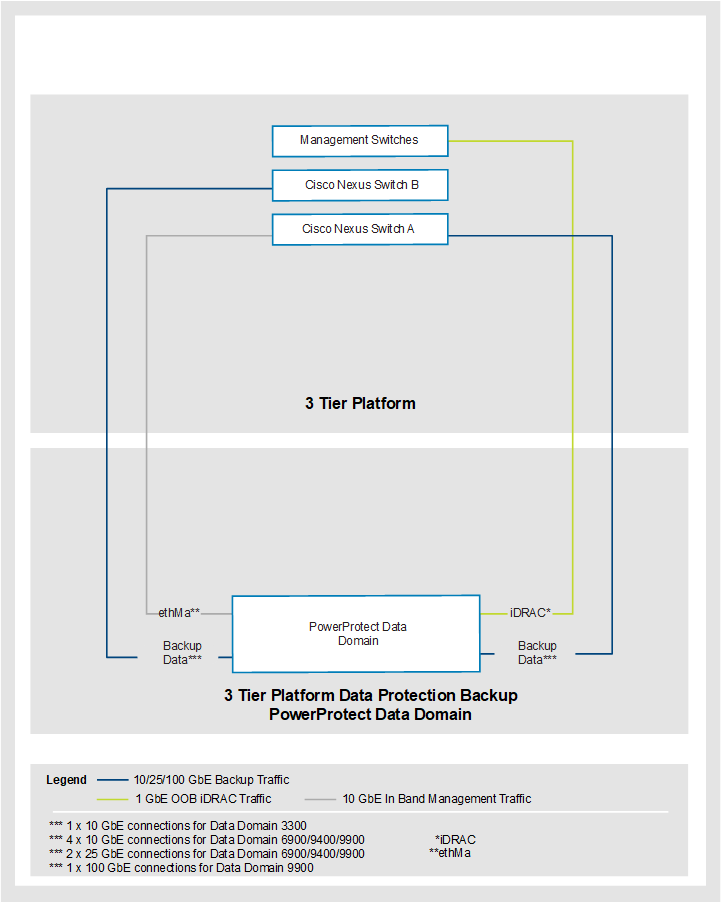
Figure 18. 3-Tier Platform data protection backup without dedicated switches
A diagram showing a PowerProtect Data Domain HA system network topology

The following figure shows the 3-Tier Platform data protection backup network connectivity with dedicated network switches.

Note: A PowerProtect Data Domain HA system has a similar network topology, but it includes a secondary controller. The secondary controller adds an equal number of network connections, as shown in the diagram below.
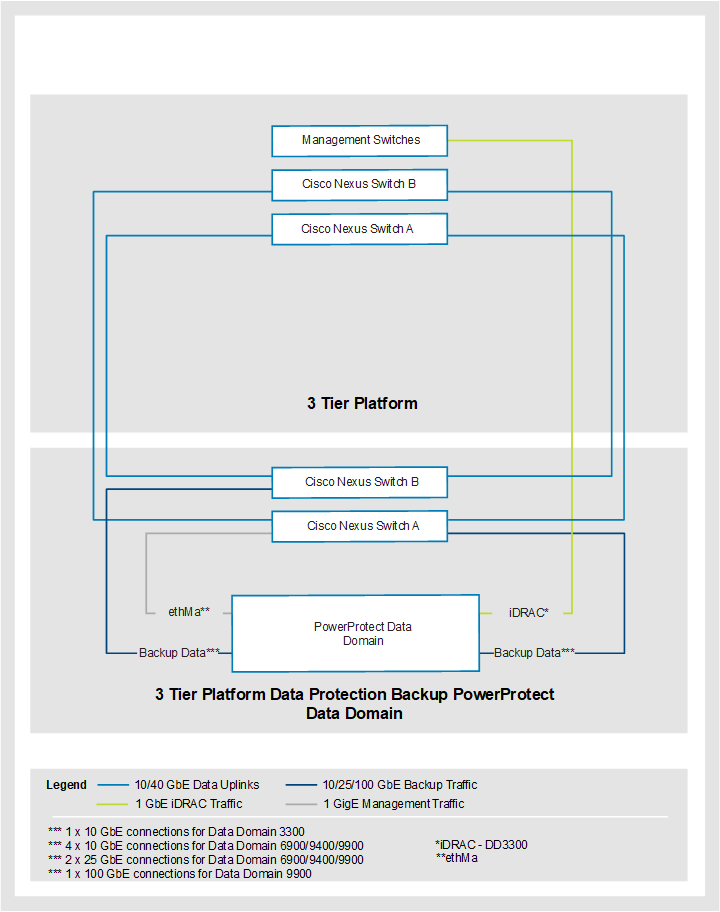
Figure 19. 3-Tier Platform data protection backup with dedicated switches
A diagram of a 3-Tier Platform data protection backup with dedicated switches

Dell Technologies recommends the VLANs for 3-Tier Platform data protection backup.

Table 99. Recommended VLANs for 3-Tier Platform data protection backup
VLAN ID VLAN name Switch
1801 OOB Management

oob

Management platform
1611 In Band Management

m-mgmt

Top of Rack and dedicated data protection backup switch
1835 Backup Data

brs-data

Top of Rack and dedicated data protection backup switch

Data Protection management solutions

The ability to protect critical data and to manage and view system health, performance, and efficiency is imperative in an enterprise environment.

Dell Technologies offers various solutions to make managing your data protection systems easier. You can integrate the following data protection management solutions with a 3-Tier Platform:

  • Data Protection Central
  • Data Protection Advisor

Data Protection Central

Data Protection Central is a management console for PowerProtect Data Domain, PowerProtect Data Manager, and Data Protection Advisor.

Data Protection Central provides the following features:

  • Ability to launch the following administrator consoles from a central location:
    • PowerProtect Data Manager
    • PowerProtect DD System Manager
    • Data Protection Advisor Console
  • Supports single sign-on authentication for the following:
    • PowerProtect Data Manager
    • PowerProtect Data Domain
  • Comprehensive and customizable Dashboards for information for PowerProtect Data Manager, PowerProtect Data Domain, and Data Protection Advisor details:
    • PowerProtect Data Manager
  • Launch PowerProtect Data Manager UI using Single Sign-On.
  • Monitor system health status and any alerts from the system.
  • View and tag assets that are added to PowerProtect Data Manager.
  • Monitor backup and replication activities at the asset and job level:
    • PowerProtect Data Domain
  • Launch PowerProtect DD System Manager using Single Sign-On.
  • Monitor system health status and any alerts from the system.
  • Monitor Storage capacity usage:
    • Data Protection Advisor
  • Launch Data Protection Advisor Web Console using Single Sign-on.
  • Ability to run most used Data Protection Advisor reports for PowerProtect Data Manager and PowerProtect Data Domain.
  • Reporting capabilities through integration with Data Protection Advisor

Data Protection Central requires the following resources:

Table 100. Data Protection Central resource requirements
Resource Requirement
CPU Four CPUs
Memory 8 GB
Disk Space 560 GB

Dell Technologies recommends that Data Protection Central be deployed to the 3-Tier management platform as a VM. Once it is deployed, the Data Protection Central console is accessible through a web browser.

Through the console, you can perform the following actions:

  • Add and launch the following systems for management:
    • PowerProtect Data Manager
    • PowerProtect DD System Manager
    • Data Protection Advisor
  • Access the following monitors:
    • Activity monitor
    • Alert Monitor
    • Capacity monitor
  • Generate reports for PowerProtect Data Manager and PowerProtect Data Domain when Data Protection Advisor is in the environment.

Data Protection Advisor

Data Protection Advisor is a platform for performing reporting and analytics in a data protection environment.

This solution can provide full visibility into the health and effectiveness of the data protection strategy. It can monitor technologies including backup software, storage array replication, servers, databases, and virtual infrastructures.

The Data Protection Advisor reporting engine provides highly customizable reports for:

  • Highlighting issues within the environment
  • Capacity management
  • Service level
  • Chargeback
  • Change management

Troubleshooting

The Data Protection Advisor Predictive Analysis Engine provides:

  • Early warnings about potential issues
  • Alerts to allow for early resolution of potential issues
  • A reduction in negative business impacts

The following systems are discovered and monitored in the initial release of Data Protection Advisor:

  • PowerProtect Data Manager
  • PowerProtect Data Domain
  • VPLEX
  • RecoverPoint
  • RecoverPoint for Virtual Machines

You can add other hardware or software that is listed in the Data Protection Advisor Software Compatibility Guide for monitoring after the initial deployment.

A Data Protection Advisor deployment includes the following installations:

  • A Data Protection Advisor datastore server on a single virtual machine
  • A Data Protection Advisor application server on a single virtual machine
Note: Installation of both the datastore server and application server on a single virtual machine is not supported. Each virtual machine that is listed above also includes the installation of a Data Protection agent. These agents are intended for monitoring the Data Protection Server environment only. Data Protection Advisor agents should be installed on separate hosts or virtual machines for performing remote data collection on monitored object such as Avamar or Data Domain.


Data Protection Advisor datastore and application server sizing

To determine the sizing for the Data Protection Advisor datastore server and application server, use Solution Builder by engaging a Dell Technologies professional.

The sizing estimator uses the following input to size the Data Protection Advisor environment:

  • Total number of backup servers to be monitored.
  • Total number of backup jobs per day.
  • Storage replication capacity.
  • Reports and analysis rules that are run per day.
  • Expected annual growth.

The sizing estimator provides the following output for both the datastore server and application server using this input:

  • Minimum storage requirement
  • Minimum CPU requirement
  • Minimum memory requirement

The sizing estimator is not exact and may only provide a general recommendation that is based on assumptions and expectations. It is a best practice is to virtualize each of these components for flexible system resource expansion.

Dell Technologies recommends that the Data Protection Advisor datastore and application servers be installed on Windows Server VMs that are hosted on the 3-Tier management platform.

The following resource settings are applied to the memory, CPU, virtual disk, and NIC of each of the VMs.

Table 101. Data Protection Advisor resource settings
VM CPU Shares Memory Shares Memory Reservation Reserve all guest memory (All locked) Virtual Disk Format vNIC Type
Data Protection Advisor Datastore VM High High Maximum Yes Thick Provision Eager Zeroed VMXNET3
Data Protection Advisor Application VM High High Maximum Yes Thick Provision Eager Zeroed VMXNET3

Data Protection Advisor datastore backup

Dell Technologies recommends that the datastore be exported to a flat file on a regular schedule in order to safely back up the Data Protection datastore. Back this up using a backup product such as Avamar or NetWorker. This technique is the only supported method for backing up the Data Protection Advisor datastore.

Note: Do not rely on VMware snapshots or replication solutions such as RecoverPoint for Virtual Machines or RecoverPoint Classic for the datastore backup. The only supported method of backup and recovery is the export and backup of the datastore flat file.

Data Protection Advisor agents

The Data Protection Advisor (DPA) agents perform data collection from objects that DPA monitors. For objects such as PowerProtect Data Manager and Data Domain, deploy a DPA proxy agent on a designated host, other than the datastore and application servers, for data collection services.

When monitoring objects at remote sites, deploy DPA proxy agents at each site for collection duties. The agents typically communicate with monitored objects by using CLI, SNMP, SSH, or direct database connection. The DPA proxy agents may be sensitive to latency, which might cause data collection to fail.

No limit applies to the number of objects that a single DPA agent can monitor. There is no limit on the number of DPA agents that may be deployed. There are also no additional licensing costs for the DPA agents themselves. However, additional licensing costs may apply for the operating systems on which the agents operate.

Management and virtualization

Management and virtualization

This chapter presents the following topics:

Introduction

The management solution uses workloads to adapt and respond to evolving management capabilities for one or more 3-Tier Platforms. The solution runs the workloads as collections of core applications, optional Dell Technologies applications, and ecosystem applications to provide:

  • Health monitoring
  • Performance and capacity management
  • Fault domain isolation

Design principles

The following principles are central to the design and architecture of the 3-Tier Platform:

  • No single point of failure: The critical aspects of the 3-Tier platform system incorporate redundancy, including server HA features, redundant networking, and multipath storage.
  • Integrated management: When the VMware hypervisor is deployed, the 3-Tier Platform includes integrated management by using Cisco UCS C-Series servers and a Dell Unity XT Hybrid Array.
  • Hardware configuration for virtualization: The 3-Tier platform is designed for general-purpose virtualized workloads. Each server is equipped with the processing power, memory, and converged network adapters that support Ethernet and FC, as required for virtualization.
  • Best practices: The 3-Tier platform design incorporates storage, networking, and hypervisor best practices to ensure availability and serviceability.
  • Flexible configuration: The 3-Tier platform is configurable to suit requirements for a specific virtualized infrastructure. The system supports flexible options to suit customer needs, including:
    • Rack and blade server models
    • Compute server quantity
    • Processor model
    • Memory capacity
    • Storage array types and capacity

Supported management solutions

The following management solutions are supported on the 3-Tier Platform:

  • Single system management
  • Multisystem management

Single system management

Single system management uses one VMware vCenter Server to operate core applications for the management and workload domain on the 3-Tier Platform. Single system management uses Cisco ToR and management switches for network connectivity.

Multisystem management

Multisystem management contains servers and shared storage that manage multiple 3-Tier Platforms in a data center. The 3-Tier Platform multisystem management solution uses Cisco ToR and management switches for network connectivity and supports up to 14 production domain VMware vCenter servers.

The following table shows the available configurations:

Table 102. 3-Tier Platform management configurations
Configuration Storage array Servers
Single system management (integrated) Dell Unity XT 480 Two to 16 Cisco UCS C220 M6/M7 Servers with 256 GB or 512 GB RAM
Dell Unity XT 480 with optical connectivity Two to six Cisco C220 M6/M7 Servers with 256 GB or 512 GB RAM
Multisystem management (integrated) Dell Unity XT 480 Four to 16 Cisco UCS C220 M6/M7 Servers with 256 GB or 512 GB RAM
Dell Unity XT 480 with optical connectivity Four to six Cisco UCS C220 M6/M7 Servers with 256 GB or 512 GB RAM
Note: Three servers are required to build the management solution when VMware vSphere HA and DRS are enabled on a cluster.

Management components

Single-system and multisystem management solutions use installed software components that are based on the LCM release for the deployed solution version.

The following table shows the hardware and software components of the management solution:

Table 103. Management solution hardware and software components
Resource Components
Compute Cisco UCS C220 M6 SFF rack server

Cisco UCS C220 M7 SFF Rack Server

/M7/M7

Storage Dell Unity XT 480 Hybrid

Dell Unity XT 480 Hybrid with optical connectivity

Network Cisco Nexus 93108TC-FX3P OOB management switch

Cisco Nexus 92348GC-X OOB management switch

Cisco Nexus 9336C-FX2 OOB management aggregation and ToR switch

VMware vSphere Distributed Switch (VDS)

Management tools Dell Secure Connect Gateway

Windows Server Embedded Standard

Cisco Intersight Appliance

Dell Technologies optional, and ecosystem applications

Virtualization VMware vSphere with the following features:
  • VMware vSphere ESXi
  • VMware vCenter Server Appliance (vCSA)
  • VMware vSphere Client (HTML5)
  • VMware Host Client (HTML5)
  • VMware vSphere Lifecycle Manager (vLCM)
  • VMware Single Sign-On (SSO) Service
  • VMware vSphere HA
  • VMware Distributed Resource Scheduler (DRS)
  • VMware vSphere Distributed Switch (VDS)
  • VMware vSphere vMotion
  • VMware Storage vMotion
  • VMware Enhanced vMotion Compatibility (EVC)
  • VMware Distributed Resource Scheduler (DRS) (capacity only)
  • VMware Storage-driven profiles (user-defined only)
  • VMware vSphere Inventory Service
  • VMware Syslog Service
  • VMware Core Dump Collector

Compute specifications

The following table shows the compute specifications for the management solution.

Table 104. Management solution compute specifications
Cisco UCS C220 M6 specifications Cisco UCS C220 M7 specifications
Two Intel® 4310 2.1 GHz, 120 150 W, 12C, 18.00 MB DDR4 2667 MHz Two Intel 4410Y 2.0 GHz, 150 W, 12 C, 30.00 MB DDR5 4800 MHz
Single: 256 GB using sixteen 16 GB DDR4-3200-MHz RDIMM, 1Rx4, 1.2 v

Multi: 512 GB using sixteen 32 GB DDR4-3200-MHz RDIMM, 2Rx4, 1.2 v

Single: 256 GB using sixteen 16 GB DDR5-4800-MHz RDIMM, 1Rx8, 1.2 v

Multi: 512 GB using sixteen 32 GB DDR5-4800-MHz RDIMM, 1Rx4, 1.2 v

One Cisco UCS VIC 1467 Quad Port 10/25G SFP28 mLOM

One Intel X550 Dual Port 10GBase-T LOM

One Cisco UCS VIC 15427 Quad Port 10/25/50G mLOM (SFP+/SFP28/SFP56)

One Intel X710T2LG Dual Port 10Gbase-T PCIe NIC

Two 240 GB M.2 (RAID 1) Two 240 GB M.2 (RAID 1)
TPM 2.0 (non-TPM server is available) TPM 2.0 (non-TPM server is available)
Two Cisco UCS 1050 W AC PSU Two Cisco UCS 1200 W AC PSU

Storage

Storage offerings allow for entry-level capacity, expansion, and large-capacity solution configurations. The amount of storage available in a management solution depends on the requirements that are associated with the deployed core and optional and ecosystem applications.

Unity XT hybrid configurations

The management solution uses iSCSI for the supported Unity XT Hybrid storage arrays to provide block storage to the Cisco UCS servers.

The solution uses one of the following Unity storage arrays:

  • Unity XT 480 hybrid storage array
  • Unity XT 480 hybrid storage array with optical connectivity. Uses 25 GbE mezzanine card ports.

Unity XT hybrid storage arrays are available in multiple configurations to support growth and expansion. The default storage array configuration consists of eight 2.0 TB data LUNs, while the extra small system consists of four 2.0 TB LUNs. If capacity exists on the deployed storage array, you can expand the default LUNs or create LUNs.

The following table shows the available configurations:

Table 105. Dell Unity XT hybrid configurations
Storage array Raw capacity (TB) Usable capacity (TB) Performance (IOPS)
Extra small (single system management only) 16 10 14,156
Small 27 21 23,750
Medium 37 30 33,250
Large 54 45 45,499
Extra large 72 60 64,218

The Unity XT Hybrid configurations include FAST Cache, D@RE, and FAST VP in the base license.

The default pool specifications are based on a two-tiered storage configuration of performance (SAS) and extreme performance (SSD) and drives. The specifications include an appropriate device count of each to meet the specified capacity options.

Dell Unity OE 5.2 (Kite) and later versions changed the default pool type for hybrid arrays from traditional to dynamic. To understand the concepts and operational changes and for additional information, see the Dell Unity: Dynamic Pools White Paper.

Bill of materials

The following tables show details of the components that are common to all Dell Unity storage configurations.

Note: The tables do not include software, support, mounting hardware, or consumables (transceivers, cables, and so on).

Table 106. Unity array components
Module name Option name Quantity
Starter pack drives Unity SYSPACK 4X 600 GB 10K SAS 25 X 2.5 1
Fast cache drives Unity 400 GB FAST CACHE 25 X 2.5 SSD 3
4-port cards Copper: Unity 2 X 4 Port Card 10GBaseT 1
Optical: Unity 2 X 4 Port Card 25 GbE OPT 1
Table 107. Storage array components by size
Module name Option name 10 TB 20 TB 30 TB 45 TB 60 TB
Extra drives (Extreme Performance) D4 400 GB SAS FLASH 25X2.5 SSD 6 10 14 19 27
Extra drives (Performance) Unity 1.2 TB 10K SAS 25 X 2.5 drive 11 20 28 42 55
SPIO Copper: Unity 2 x 4-port I/O 10 GB a set 1 2 2 2 2
Optical: N/A - - - - -
Unity XT HFA 25 x2.5 DAE Unity 2U 25 x 2.5 DAE customer-supplied rack (pair of SAS cables included) 0 1 1 2 3

Network

The management solution uses Cisco Nexus management and ToR network switches for network connectivity.

The following server hardware is used for connectivity to management and ToR network switches:

  • Cisco UCS VIC mLOM uses the first two ports to connect to the ToR switches.

If the Cisco Nexus 92348GC-X is the management switch, the last two mLOM ports connect through 10 G optical to the QSFP 10 G breakout ports on the management switch.

  • Cisco UCS 10 Gbase-T LOM (M6) or PCIe NIC (M7), and Cisco UCS IMC 1 GbE connectivity to the management switches.

The server VIC connects to the ToR switch ports using 100 GbE QSFP 4 x 25 GbE breakout transceivers to support multiple connections per port. The default is two transceivers per switch to connect a minimum of four servers. There are two servers per switch port, using two of four breakout cables per transceiver.

When the Cisco Nexus 92348GC-X is used as the management switch, the switch QSFP ports are provisioned with QSFP-40G- SR4 in a 10G breakout configuration. The default is two transceivers per switch, which provides connectivity to a maximum of six servers. This configuration consumes three of the four breakout ports on the QSFP. The fourth breakout port on each QSFP is for the customer uplinks. Each server uses mLOM ports 2 and 3, which are provisioned with an SFP-10G-SR to connect to the QSFP 10G breakout ports.

The following table shows the network components that the Unity XT storage arrays use.

Table 108. Dell Unity XT network components
Storage arrays in management and data networks Components
Dell Unity XT hybrid management networks Two 1 GBase-T management ports (one per storage processor)
Dell Unity XT 480 hybrid data networks Four 10 GBase-T ports from the mezzanine card (two per storage processor)

Sixteen 10 GBase-T ports from the input and output modules, iom_0 and iom_1 (eight per storage processor)

Dell Unity XT 480 hybrid w/ optical data networks Four 10/25 Gbps ports from the optical mezzanine card (two per storage processor)

IOM slots are not populated.

iSCSI shared storage design

The shared storage design uses Internet Small Computer Systems Interface (iSCSI) for single-system and multisystem management solutions. The solutions have the following iSCSI characteristics:

  • Dell Unity XT with 10BASE-T connectivity accesses block storage using iSCSI. The Cisco Nexus 93108TC-FX3P management switch provides connectivity that is based on 10BASE-T on each SP and is connected to the management switch ports.
  • Dell Unity XT with optical connectivity storage accesses block storage using iSCSI. The Cisco Nexus 92348GC-X management switch provides connectivity that is based on optical 25 GbE ports, using the mezzanine adapter on each SP that is connected to the management switch uplink ports.
Note: The Cisco Nexus 92348GC-X switch does not support iSCSI connections on the downlink ports due to a port speed limit of 1 GbE.

The connectivity to the management switches is:

  • SPA even ports - switch A
  • SPA odd ports - switch B
  • SPB even ports - switch B
  • SPB odd ports - switch A

The iSCSI network design is based on the following Dell and VMware best practices:

  • VMware vSphere ESXi setting for Delayed Ack is disabled.
  • iSCSI is Layer 2.
  • Switch ports are set to access mode.
  • Jumbo frames are enabled.
  • Unity XT with 10BASE-T connectivity uses the following IP address subnet range assignments:
    • /28 subnets within the iSCSI VLAN for data traffic between Dell Unity XT and VMware vSphere ESXi hosts.
    • One subnet for up to two servers for single system and multisystem management.
    • Round-robin assignments for servers across Unity XT front-end storage ports.
    • Two iSCSI VMkernel ports on each host per subnet and one per NIC uplink.
    • Up to two hosts may connect to a pair of iSCSI array ports for single system and multisystem management. For example, hosts 1 and 11 map to the SPA ETH 2 and SPB ETH2 pair.
  • Unity XT with 25 GbE optical connectivity uses the following IP address subnet range assignments:
    • /28 subnets within the iSCSI VLAN for data traffic between Unity XT and VMware vSphere ESXi.
    • One subnet for up to three servers for single-system and multisystem management.
    • Round-robin assignments for servers across Unity XT front-end storage ports.
    • Two iSCSI VMkernel ports on each host per subnet and one per NIC uplink.

Up to three hosts can connect to a pair of iSCSI array ports for single-system and multisystem management. For example, hosts 1, 3, and 5 map to the SPA mezzanine port 2 and SPB mezzanine port 2 pair.

Management tools

This section describes the 3-Tier Platform management tools.

Windows Server

Array management modules which are installed on Windows Server include:

  • Unisphere Client
  • Unisphere Service Manager
  • Dell Unity XT Initialization Utility
  • SMI-S Provider

Cisco Intersight Virtual Appliance

Cisco Intersight Virtual Appliance provides the management features and benefits of Cisco Intersight in its VMware Open Virtualization Appliance (OVA).

Intersight Virtual Appliance offers intelligent management for customers to analyze, simplify, and automate their environments in more advanced ways than previous generations of the tools. Intersight Virtual Appliance also provides additional flexibility with data locality, security, and compliance requirements. For more information, see What is OVA & OVF Files?.

Deploy Intersight Virtual Appliance in one of the following modes:

  • Intersight Connected Virtual Appliance: This mode delivers the management features of Intersight, while allowing you to control what system details leave your premises. Intersight Connected Virtual Appliance deployments requires a connection back to Cisco and Intersight services for automatic updates and access to services for full functionality. You can deploy Intersight Virtual Appliance as:
    • A single-node virtual machine in your existing environment.
    • A multiple node cluster, allowing for HA, increased stability, and better resilience. After you have completed the initial setup of the single-node appliance, you can add additional nodes to create a multiple-node cluster.
  • Intersight Private Virtual Appliance: This mode delivers the management features of Intersight and allows you to ensure that no system details leave your premises. Intersight Private Virtual Appliance is intended for an environment where you operate data centers in a disconnected (air gapped) mode.

Secure Connect Gateway

Secure Connect Gateway is an enterprise monitoring technology that is delivered as a virtual appliance. The gateway monitors your devices and proactively detects hardware issues that may occur.

For the list of supported device types and device models, see the Secure Connect Gateway 5.x — Virtual Edition User’s Guide.

Note: Access requires Dell login credentials.

The guide also provides minimum system and network requirements and deployment instructions for the gateway.

Virtualization

This section describes the core components of the management solution and 3-Tier Platform virtual infrastructure.

VMware vSphere

vSphere is highly configurable. It is an attractive hypervisor choice for organizations, whether they choose a private cloud, a public cloud, or a hybrid cloud approach.

Key components and features of vSphere include:

  • VMware ESXi: Type 1 hypervisor that abstracts processors, memory, storage, and other resources into multiple VMs.
  • VMware vCenter Server: Central control point for data center management services, providing a single view of all ESXi hosts.
  • VMware vSphere Client: HTML5-based management interface that enables users to remotely connect to VMware vCenter Server.
  • VMware vSphere vMotion: Feature that enables live migration for powered-up VMs in the same data center.
  • VMware vSphere Storage vMotion: Feature that enables the live migration of virtual disks or configuration files to a new datastore while a VM is running.
  • VMware vSphere HA: Services that restart failed VMs on other available servers.

VMware ESXi

During the initial system build, the management solution and 3-Tier Platform changes are integrated into the virtual infrastructure configuration. The integration aligns with VMware best practices and use of VMware ecosystem products and solutions.

VMware ESXi runs on the management appliance and 3-Tier Platforms servers using VMware vSphere Enterprise Plus.

VMware ESXi is installed on a mirrored pair of M.2 cards as the boot device. It hosts the OSDATA partition, which includes scratch data stores, VMware Tools, and core dumps.

All servers are required to boot in UEFI Secure Boot mode.

The management solution and 3-Tier Platform do not support stateless boot into memory.


Trusted Platform Module

The Cisco Trusted Platform Module (TPM) is a system unit that securely stores measurements, passwords, certificates, or encryption keys that are used to authenticate the converged system.

The TPM provides authentication and attestation services to enable safer computing in all environments. The TPM is enabled by default.

VMware vCenter Server

The management solution capacity, server count, and physical location of the managed 3-Tier Platform and networking requirements may impact the number of supported VMware vCenter Servers.

The management solution hosts the VMware vCenter Server that supports the virtual infrastructure.

  • Single-system management supports a single VMware vCenter Server for the local workload and 3-Tier Platform resources.
  • Multisystem management uses a dedicated VMware vCenter Server to manage the local workload and one or more VMware vCenter Servers. The solution supports a maximum of fourteen VMware vCenter Servers to manage the 3-Tier Platform resources.

The VMware vCenter Server enables the following management and orchestration functionality:

  • Clone virtual machines.
  • Create templates.
  • Monitor hosts and virtual machines.
  • Create alerts.
  • VMware vSphere vMotion and Storage vMotion.
  • Configure VMware DRS and vSphere HA clusters.

3-Tier Platform administrators can create and apply the following alarms to all managed objects in VMware vCenter Server:

  • Data center, cluster, and host health, inventory, and performance
  • Data store health and capacity
  • VM usage, performance, and health
  • Virtual network usage and health

Authentication

VMware Single Sign-On (SSO) provides authentication to configure security policies and lock out or disable an account.

Default policies do not require modification. If regulations require different policies, or when troubleshooting a problem, you may have to modify policies or accounts.

The 3-Tier Platform supports the VMware SSO in order to integrate the following multiple identity sources:

  • Active Directory (AD)
  • Open LDAP
  • Local accounts for authentication

The following services run separately: VMware vCenter Server, Inventory, vSphere Client, VMware SSO, VMware Core Dump Collector, and VMware vCenter Lifecycle Manager. You can configure each service to use a dedicated service account depending on the security and directory services requirements.

VMware vCenter Server features

VMware vSphere supports Enhanced Link Mode (ELM) in the vCenter Server.

Multisystem management uses an ELM configuration with a single VMware Single Sign-on (SSO) domain. This configuration provides an authentication interface for all VMware vCenter Servers to manage the local workload and 3-Tier Platform.

The VMware ring topology allows the Management solution to support up to 15 vCenter Servers in a single VMware SSO domain. The following figure shows this topology.
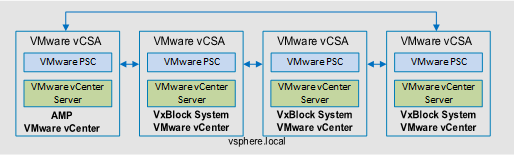
Figure 21. VMware ring topology
A diagram showing VMware ring topology

Cluster configurations

VMware ESXi hosts resources are pooled into clusters that contain CPU, memory, network, and storage resources for allocation to VMs. Clusters can scale up to a maximum of 64 hosts, enabling support for thousands of VMs.

VMware vSphere clusters support Cisco UCS B-Series blade servers and C-Series rack servers. VMware vSphere clusters are configured with VMware DRS and HA, with EVC mode enabled to ease expansions and migrations. On single-system management with less than three host clusters, VMware DRS or HA may not be configured.

3-Tier Platforms configure a VMware VDS per cluster to increase clarity and establish discrete configurations for ease of management.

VMware VDS uses Class of Service (CoS) to increase the resiliency and performance of the virtual network.

Patch management

VMware vSphere includes vSphere Lifecycle Manager (vLCM) for host patch management.

On each cluster, the VMware vLCM implements a single cluster image concept. The server firmware component and hardware compatibility checks are not included. To understand the capabilities and limitations of this feature, see About Managing Host and Cluster Lifecycle. For information about the scalability that vLCM supports, see the VMware Configuration Maximums Matrix.

VMware vLCM is not supported on environments that contain:

  • Stateless hosts, all hosts must have a local boot device
  • Metro or stretch clusters, also known as multiple availability zones

The following table shows VMware vLCM cluster image components.

Table 108. VMware vLCM cluster image components
Component Management Workload
VMware ESXi VMware ESXi 7.0U3, or later VMware ESXi 7.0U3, or later
Updated drivers Cisco VIC FC NIC driver (nfnic)

Cisco VIC Ethernet NIC driver (nefic)

M6: Intel® Native network driver (ixbgen)

M7: Intel native network driver (i40en)

Cisco VIC FC NIC driver (nfnic)

Cisco VIC Ethernet NIC driver (nefic)

Intel native network driver (i40en)

Data stores

The 3-Tier Platform with VMware vSphere supports block-level storage using VMFS, or file-level storage using NFS. Data stores are provisioned on storage arrays that use SAN connectivity.

Virtual volumes

The 3-Tier Platform with VMware vSphere supports VMware vSphere vVols for the VMs on the production workloads.

vVols simplify operations through policy-driven automation that allows:

  • Agile storage consumption for VMs
  • Dynamic adjustments in real time

The following storage arrays support vVols on the FC protocol:

  • PowerMax
  • PowerStore
  • Dell Unity XT

The vVols reside in storage containers that logically represent a pool of hard drives on the storage array. On the vCenter Server and ESXi side, storage containers are presented as vVol data stores.

Before creating vVol data stores from storage containers, ensure that the storage array VASA provider is registered to the vCenter server. The Unity XT storage array is automatically registered in vSphere as a VASA provider when the corresponding vCenter and ESXi hosts are granted access to the system in Unisphere.

The VMware ESXi host does not have direct access to the vVol storage. Instead, the host accesses the vVols through an intermediate point in the data path, called a protocol endpoint. The protocol endpoints establish a data path on demand from the VMs to their respective vVols. VMware ESXi hosts must be zoned to the array, like traditional LUNs, for access to the protocol endpoints. Ensure that the vCenter instance that manages the vVol host cluster has VM storage policies that match the service levels that are present in the storage data store and capability profiles.

Each production ESXi host cluster has separate storage containers provisioned. At least one storage container is provisioned for each ESXi host cluster for the VMware vSphere Cluster Lifecycle (vCLS) VMs.

Adhere to the following best practices:

  • Do not mix traditional Virtual Machine File System (VMFS), excluding BOOT and scratch datastores, and vVols in the same vSphere cluster. Instead, create separate clusters for vVols and VMFS.
  • Provision vVols from different storage arrays to the same vSphere cluster.

vSphere Distributed Switch LAN traffic network configuration

When using VMware as the hypervisor, you can achieve bandwidth prioritization for different traffic classes using Virtual Dedicated Server (VDS) technology. These traffic classes include host management, vSphere vMotion, and VM network.

The VDS, which you can configure, manage, and monitor from a central interface, provides:

  • Simplified VM network configuration
  • Enhanced network monitoring and troubleshooting capabilities
  • Support for network bandwidth partitioning when NIC Partitioning (NPAR) is not available.

The following diagram shows the VDS configuration. The dual-port FC host bus adapters are used for connecting to shared storage.
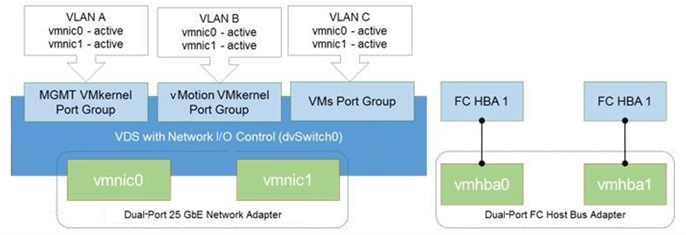
Figure 22. VDS configuration
A diagram showing a VDS configuration with dual-port FC host bus adapters

Virtual networks

VMware VDS provides virtual networking using a minimum of four uplinks that are presented to VMware ESXi.

vNICs are equally distributed across all available physical adapter ports to ensure redundancy and maximum bandwidth. Equal distribution provides consistency and balance across all Cisco UCS B-Series blade servers and C-Series rack servers, regardless of the VIC hardware.

VMware vSphere ESXi has a predictable uplink interface count. All applicable VLANs, native VLANs, MTU settings, and QoS policies are assigned to the vNIC for migration to VMware VDS from uplinks.

3-Tier Platforms configure a vSphere VDS per cluster to increase clarity and establish discrete configurations for ease of management. NIOC is used on each management domain VDS for the specific port groups to optimize the traffic flow for priority data. QoS is used on each workload domain VDS with specific port groups to increase the resiliency and performance of the virtual network.

The following table shows the VDS01 and VDS02 port group attributes for the management domain.

Table 109. VDS01 and VDS02 port group attributes for the management domain
Port group VDS number MTU Physical adapter Teaming and failover Load balancing
Management 01 1,500 Uplink1 (VMNIC 0) Active Originating port ID
Uplink2 (VMNIC 1) Active
vMotion 01 9,000 Uplink1 (VMNIC 0) Active Explicit failover
Uplink2 (VMNIC 1) Standby
iSCSI (A) 02 9,000 Uplink1 (VMNIC 4) Active Originating port ID
Uplink2 (VMNIC 5) Unused
iSCSI (B) 02 9,000 Uplink1 (VMNIC 4) Unused Originating port ID
Uplink2 (VMNIC 5) Active

The following table shows the VDS01 port group attributes for the workload domain.

Table 110. VDS01 port group attributes for the workload domain
Port group MTU Physical adapter Teaming and failover VMware CoS Load balancing
Management 1500 Uplink1 (VMNIC 0) Active Platinum

CoS 6, DSCP 48

Originating port ID
Uplink2 (VMNIC 1) Active
Uplink3 (VMNIC 2) Active
Uplink4 (VMNIC 3) Active
vMotion 9000 Uplink1 (VMNIC 0) Active Gold

CoS 4, DSCP 26

Explicit failover
Uplink2 (VMNIC 1) Standby
Uplink3 (VMNIC 2) Active
Uplink4 (VMNIC 3) Standby
NFS 9000 Uplink1 (VMNIC 0) Active Silver

CoS 2, DSCP 16

Originating port ID
Uplink2 (VMNIC 1) Active
Uplink3 (VMNIC 2) Active
Uplink4 (VMNIC 3) Active
BRS data 9000 Uplink1 (VMNIC 0) Active N/A Originating port ID
Uplink2 (VMNIC 1) Active
Uplink3 (VMNIC 2) Active
Uplink4 (VMNIC 3) Active

vSphere VLAN names and values

VMware vSphere uses unique names for VLAN names, port group names, and sample values. These sample values are provided for the management solution and the 3-Tier Platform. Work with your Dell Technologies Sales representative to customize naming requirements. Unique naming is essential for autonomous computing, containers, and the use of APIs and custom scripting to manage virtual infrastructure.

The VLAN names and port groups names meet the requirements to deploy the management domain.


Port groups

Distributed port group names contain specific information to determine the function and location of the port group.

The port group names contain:

  • Region or physical site
  • Domain type (management or 3-Tier Platform workload)
  • Cluster number
  • VMware vSphere VDS number
  • The port group that explains the function within the environment.

VLAN IDs and names

The switch and Cisco UCSM VLAN IDs are examples of values that use the same methodology as the port group names, without VMware object information.

The VLAN IDs and names contain:

  • Region or physical site
  • Domain the VLAN (management or 3-Tier Platform workload) services. The domain section does not have an associated number because VLAN IDs in the physical infrastructure can span workload domains or VMware vCenter Servers.
  • The VLAN type and the function of that VLAN within the environment.

VMware object information that is not required in the physical infrastructure is not shown.

The following figure shows the management port group that is connected to the VMware VDS in San Francisco (Region A).
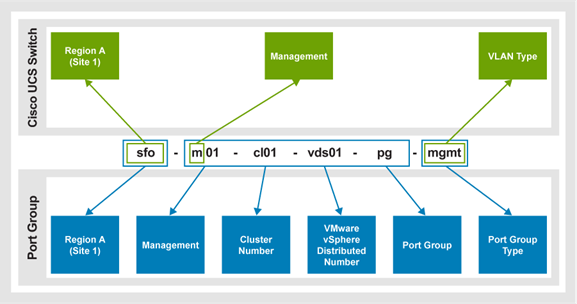
Figure 23. Management port group that is connected to the VMware VDS in Region A
A diagram showing a management port group connected to the VMware VDS in Region A.

The following figure shows the management port group that is connected to the VMware VDS in Los Angeles (Region B).
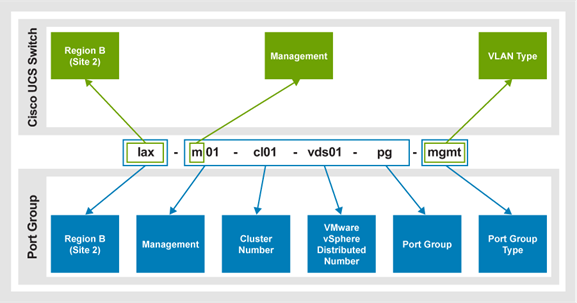
Figure 24. Management port group connected to the VMware VDS in Region B
A diagram showing a management port group connected to the VMware VDS in Region B

The following figure shows the VI workload domain vSphere vMotion port group that is connected to VMware VDS in the San Francisco (Region A).
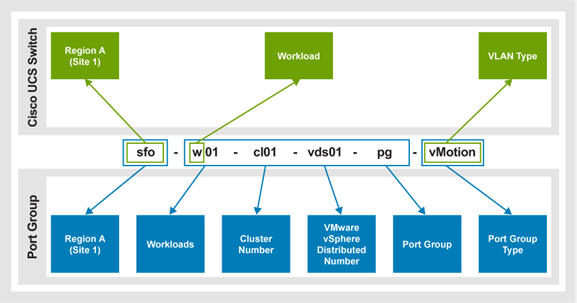
Figure 25. VI workload domain vMotion port group that is connected to the VMware VDS in Region A
A diagram showing a VI workload domain vMotion port group connected to the VMware VDS in Region A.

The following example shows the Region B (Los Angeles) data center.
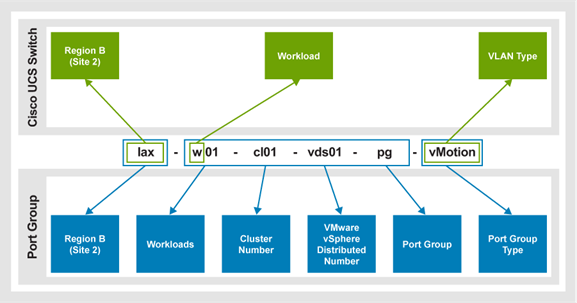
Figure 26. Region B data center
A diagram showing a VI workload domain vMotion port group connected to the VMware VDS in Region B.

The following example shows the Region A (San Francisco) data center.
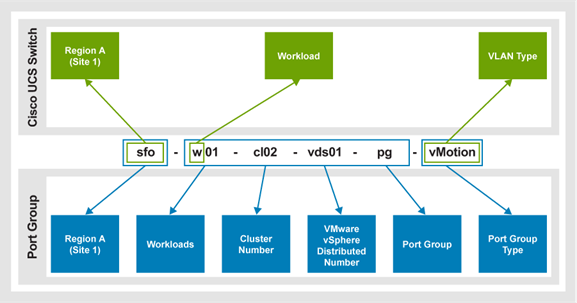
Figure 27. Region A data center
A diagram showing the Region A data center.

The following example shows the Site B (Los Angeles) data center.
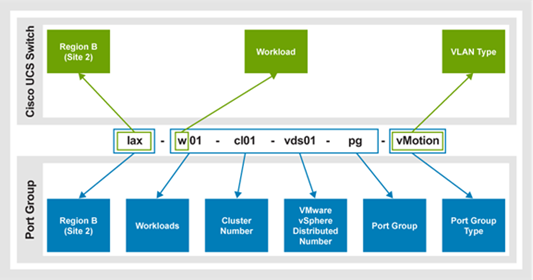
Figure 28. Site B data center
A diagram that shows the Site B data center.

Compute VLAN examples

The following table shows compute domain VLAN examples.

Table 111. Compute domain VLAN examples
VMware vSphere
VLAN ID Port group name VLAN name Switch
50 N/A 9k_l3_transit Management
1631 sfo-m01-cl01-vds01-pg-mgmt w-mgmt ToR
1632 sfo-m01-cl01-vds01-pg-vmotion w-vmotion ToR
1634 sfo-m01-cl01-vds01-pg-overlay w-host-overlay ToR
1835 sfo-m01-cl01-vds01-pg-brs-data brs-data ToR
1840 N/A Kvm -
1851 N/A ext-cis ToR
1852 N/A ext-nfs ToR
1853 sfo-w01-cl01-vds01-pg-int-nas int-nas ToR
1854 N/A int-sdnas ToR
1855 sfo-w01-cl01-vds01-pg-data-rp data-rp ToR
1856 sfo-w01-cl01-vds01-pg-brs-vplex brs-vplex ToR
1857 sfo-w01-cl01-vds01-pg-brs-rep brs-rep ToR
2301 sfo-w01-cl01-vds01-pg-custdata Custdata ToR
2731 sfo-w01-cl01-vds01-pg-uplink01 w-edge-uplink01 ToR
2732 sfo-w01-cl01-vds01-pg-uplink02 w-edge-uplink02 ToR
2733 sfo-w01-cl01-nvds01-pg-edge w-edge-overlay ToR
911 N/A unused_port_security Management or ToR

Management applications

The Management solution enables applications to manage one or more 3-Tier Platforms.

Different types of application are available for deployment in single-system and multisystem management environments, as described in the following table.

Table 112. Management application types
Application type Contains
Core
  • All hypervisor management
  • Element Managers
  • Virtual networking components
Dell Technologies optional
  • Supported management workloads.
  • Optional components that are not required to manage the 3-Tier Platform.
Ecosystem
  • Workloads to manage or support one or more 3-Tier Platforms.
  • Applications that have not been engineered as part of the 3-Tier Platform but are installable subject to the specific sizing guidelines of the application.

Ecosystem workloads require that more servers be added to the Management solution.

Core applications

The core applications contain the minimum required management software set to install and operate a 3-Tier Platform. The set includes hypervisor management, element managers, and virtual networking components such as VDS.

The following table shows the core application virtual machines:

Table 113. Core application virtual machines:
Virtual machine Contains
VMware vCenter Server A VMware embedded Linux appliance to manage VMware vCSA.
Element Manager Server A Windows server to manage platform component management tools.
Dell Secure Connect Gateway Virtual Appliance A An embedded Linux appliance to monitor 3-Tier platform storage arrays and SAN switches.
Dell Secure Connect Gateway Virtual Appliance B
Cisco Intersight Connected Virtual Appliance, Cisco Intersight Private Virtual Appliance, or Cisco Intersight Assist VM. An embedded CentOS appliance to monitor and manage a Cisco UCS domain.

Ecosystem applications

The ecosystem management applications consist of management tools and certified software.

The following table describes the management role of each ecosystem application VM:

Table 114. Ecosystem application virtual machines
Virtual machine Description
VMware vCloud Director An embedded Linux appliance that provides a single management control plane for heterogenous storage environments.
Cisco UCS Director An embedded Linux appliance that monitors and reports details.
Cisco UCS Central An embedded Linux appliance that provides multisystem Cisco UCS management and provisioning.

Managing multiple 3-Tier Platforms

The integrated multisystem management solution manages more than one 3-Tier Platform.

The solution connects to a single pair of management and ToR switches in a 3-Tier Platform. The data traffic must traverse the external network core to manage additional 3-Tier Platforms.

The multisystem management solution hosts the workload domain VMware vCenter Servers. You can use a single VMware vCenter Server for multiple 3-Tier Platforms (up to the 2000 server limit) or purchase more VMware vCenter Server licenses. Doing so enables you to separate the workloads for each system.

The following figure shows network connectivity for a multisystem management solution using a Unity XT array.
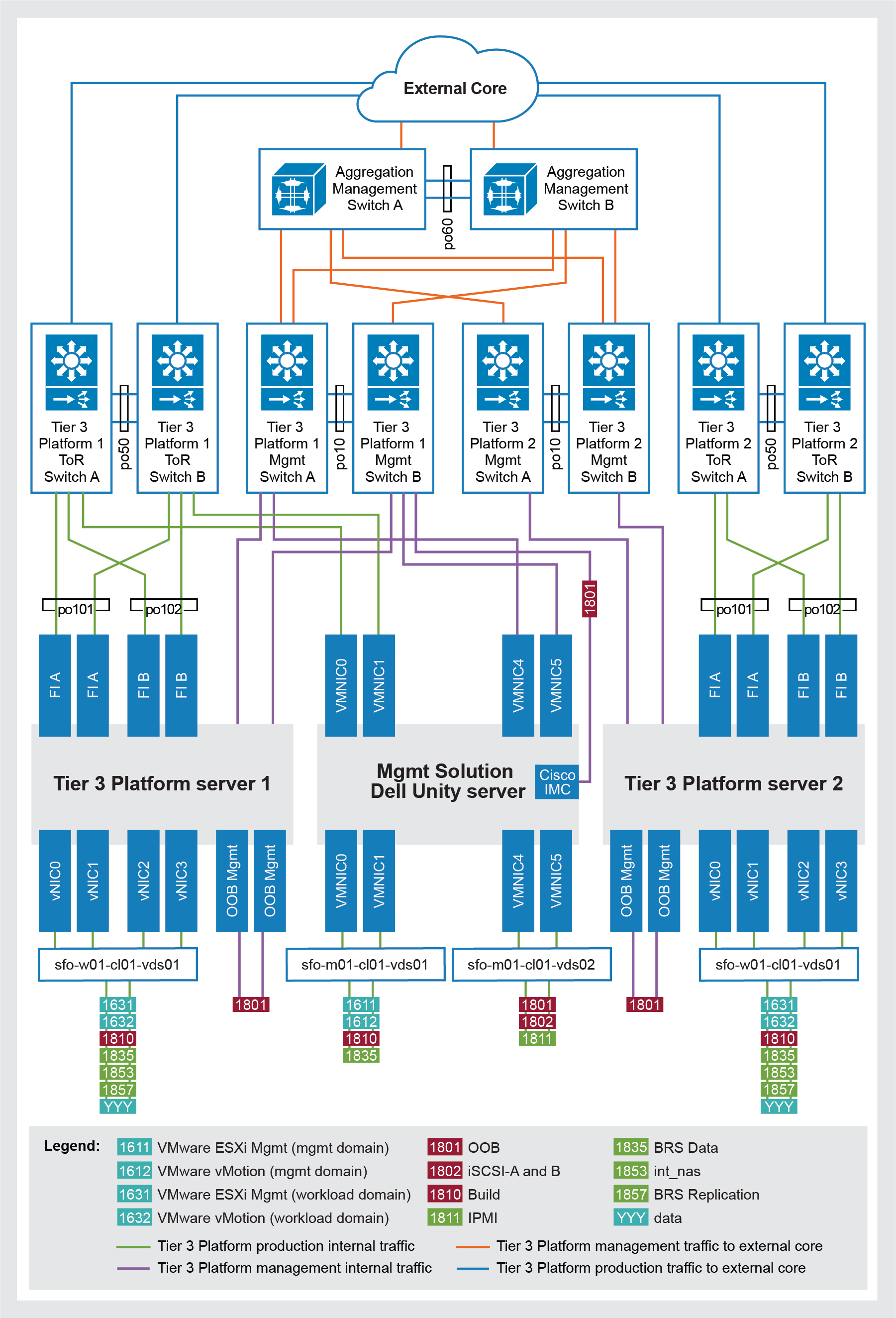
Figure 29. Network connectivity for a Unity XT multisystem management solution
A diagram that shows network connectivity for a multisystem management solution using a Unity XT array.

VLANs 1611 and 1612 are for the management domain.

VLANs 1631 and 1632 are for the workload domain.

Note: DVSwitch-Mgmt uses VMNIC 4 and 5 when connecting to the Cisco Nexus 93108TC-FX3P. DVSwitch-Mgmt uses VMNICs 2 and 3 when connecting to the Cisco Nexus 92348GC-X.

Distributed management

The following table shows the components and requirements for managing each distributed 3-Tier Platform:

Table 115. 3-Tier Platform management component requirements
Component Requirement
Multisystem management and 3-Tier Platform networks High bandwidth, low error, and low latency L3 connectivity.
Modern data centers A minimum of 10 GbE connectivity for high bandwidth and low latency.
Subnets or VLANs There must be no subnet or VLAN overlap on the management solution or managed, distributed 3-Tier Platforms.
Multisystem management and 3-Tier Platform network subnets Routable network subnets that use L3 to the respective networks.
Multisystem management and components Enable VMware-supported IP address ports and protocol connectivity.
Note: Configure firewalls for the management solution and 3-Tier Platform subnets and ports.

Distributed management for storage

For LCM discrepancies, deploy more Element Manager VMs to support the following storage management software:

  • Dell PowerMax: Install Solutions Enabler on the Element Manager VM to manage a single array at a time.
  • Dell Unity XT: Unisphere manages Unity XT arrays over TCP/IP connections to the array management IP addresses. Install the Unisphere CLI on the Element Manager VM to access the Unity XT arrays.
  • Dell PowerScale: OneFS storage administration manages PowerScale over a TCP/IP connection to the management IP address of the cluster.
  • Dell Secure Connect Gateway: Secure Connect Gateway is an embedded Linux appliance to monitor 3-Tier Platform storage arrays and SAN switches.
  • Cisco MDS: Cisco MDS SAN switches and directors are managed over standard TCP/IP connections.

Distributed management for virtualization

Multisystem management uses a highly redundant model to maintain service and is restricted to a single geographic location for a VMware vSphere HA cluster.

A dedicated VMware vCSA manages local workloads. The number of supported production VMware vCSAs depends on the management solution configuration.

Production VMware vCSAs can manage multiple 3-Tier Platforms. Each managed 3-Tier Platform must be in its own VMware vSphere data center.

Production workload servers should be in a subordinate VMware vSphere Cluster with a dedicated VMware VDS. VMware vSphere production workload migration does not support inter-3-Tier platforms.

Size the management solution local vCSA and workload domain vCSAs appropriately. Consider the following requirements for managing multiple distributed 3-Tier Platform vSphere resources:

  • Each production VMware vCSA is a fault domain. Analyze the type and number of resources for a single production vCSA to manage.
  • Each production vCSA is homogenous from a firmware and software perspective. Run the same vSphere release on the production vCSA and its managed resources on supported configurations.
  • Each production vCSA is a single maintenance domain. Analyze change control processes and timelines with the number of resources that a single vCSA manages.
  • High bandwidth, low error, low latency, L3 connectivity to each distributed 3-Tier platform must be available on the management solution 3-Tier platform vCSA. 10 GbE connectivity is required to provide high bandwidth and low latency between the production vCSA and managed 3-Tier platform cluster resources in modern data centers. This connectivity level provides a consistent deployment and operational experience for all vSphere managed resources.
  • Management solution components require IP address ports and protocol and port connectivity that is compatible with VMware to all managed distributed 3-Tier Platform resources. For more information, see VMware Ports and Protocols.
  • Use L3 connectivity for production vCSAs to connect to multiple distributed 3-Tier Platforms. This configuration reduces the risk of overlapping VLANs and duplicate subnets.
  • Determine the total production vCSA requirements and do not exceed vCSA configuration limits.
  • Review ELM configuration maximums if vCSA ELM is configured for a production vCSA.
  • Duplicate names for the VDS, port group, and production hosts in a production vCSA may cause management and 3-Tier Platform orchestration issues. Rename the resources to reduce the risk of operation error or separate them into different data centers in the same vCenter Server instance.
  • If needed, update administrative practices to set vCSA permissions at the vSphere data center level or host level.

vSphere ESXi and vCenter Server are the core components of the virtual infrastructure for the management solution and the 3-Tier Platform.

Solution configuration and specifications

Solution configuration and specifications

This chapter presents the following topics:

Introduction

Solution components

The following table shows the hardware and software components that Dell Technologies recommends for 3-Tier Platform resources:

Table 116. 3-Tier Platform components
Solution resource Components
Management An integrated management option, run on the Cisco UCS X or B series blade servers.
Virtualization
  • VMware vSphere Server Enterprise Plus
  • VMware ESXiVMware vCenter Server
  • VMware vSphere HTML5 Client
Compute
  • Cisco UCS X9508 chassis
  • Cisco UCS 5108 Blade Server chassis
  • Cisco UCS B-Series blade servers
  • Cisco UCS C-Series rack servers
  • Cisco UCS X-Series blade servers
Cisco UCS 4th-generation components:
  • Cisco UCS 2204XP or 2208XP Fabric Extenders
  • Cisco UCS 2408 Fabric Extenders (IOM)
  • Cisco Nexus 2232PP Fabric Extenders
  • Cisco UCS X9108-25G Intelligent Fabric Modules (IFM)
  • Cisco UCS 6454 FIs
  • Cisco UCS 64108 FIs
Cisco UCS 5th-generation components:
  • Cisco UCS 6536 FIs
  • Cisco UCS X9108-100G IFM
Network Systems with Cisco UCS 4th-generation and 5th-generation components:
  • Cisco Nexus 9336C-FX2 data plane switch
  • Cisco MDS 9148T multilayer fabric switch
  • Cisco MDS 9396T multilayer fabric switch
  • Cisco MDS 9706-v2 or Cisco MDS 9710-v2 multilayer director
  • Cisco Nexus 93108TC-FX3P or Cisco Nexus 92348GC-X for management
  • Optional Cisco Nexus 9336C-FX2 switch for management aggregation
  • VMware vSphere Distributed Switch (VDS)
Storage
  • Unity XT models: 380, 480, 680, 880, and 380F, 480F, 680F, 880F
  • PowerMax models: 2500, 8500
  • PowerScale models: F200, F600, F900, H700, H7000, A300, A3000
  • PowerStore T models: 500, 1200, 3200, 5200, 9200

Cisco compute components

The following table shows the domain requirements for the Cisco compute components.

Table 117. Cisco compute component requirements
Component Minimum Cisco UCS 4th-generation Cisco UCS 5th-generation
Cisco UCS domain One Seven Seven
Cisco UCS 5108 blade server chassis Two 11 per domain, up to 77 on a Cisco UCS 6454 FI

20 per domain, up to 160 on a Cisco UCS 64108 FI

N/A
Cisco UCS X9508 chassis Two 11 per domain, up to 77 on a Cisco UCS 6454 FI

20 per domain, up to 160 on a Cisco UCS 64108 FI

14 per domain, up to 112 with two-link 100 Gbps IFM connectivity (four 100 Gbps Ethernet and 16 32 Gbps FC Uplinks)
Cisco UCS B-Series Servers with M6 servers Two Eight half-width servers per Cisco UCS 5108 chassis (616 total) N/A
Cisco UCS C-Series rack servers with M6 servers Three 44 dual ports, 22 total with quad port on the Cisco UCS 6454 FI

88 dual ports, 44 total with quad port on the Cisco UCS 64108 FI

160 10 Gbps or 25 Gbps Cisco UCS C- Series rack servers using FEX connect mode, per domain (1,120 total) on the Cisco UCS 6454 FI only.
As many as 28 single-link (one per side) with 100 Gbps links. This configuration can be achieved with four 100.

Gbps Ethernet and 16x32 Gbps FC uplinks.

Cisco UCS X210c M6 Compute Node Three Eight full-height blade servers per Cisco UCS X9508 chassis Eight full-height blade servers per Cisco UCS X9508 chassis (784 total across seven domains)
Cisco UCS C-Series Rack Server for bare metal deployments One UCS domain supported up to 160 total servers per domain (1,120 total) Cisco UCS supports up to 160 total servers per domain (1,120 total).

In 4th-generation environments, you can add more Cisco UCS servers and Cisco UCS 5108 or X9508 chassis in IMM.

The combined components offer balanced CPU, I/O bandwidth, and storage capacity relative to the 3-Tier Platform compute and storage arrays. All components have a minimum of N+1 redundancy.

Fabric interconnects

The following table shows the maximum number of servers with seven domains for FIs.

Table 118. Permitted number of servers with fabric interconnects
FI Cisco UCS B-Series blade server Cisco UCS X-Series nodes Cisco C-Series rack servers
Half-width - Direct connect FEX connect
Cisco UCS 6454 616 616 308 1120
Cisco UCS 64108 1120 1120 616 N/A
Cisco UCS 6536 N/A 784 (100 Gbps IFM) 196 (100 Gbps connectivity) N/A

Intersight Managed Mode components

The following table shows the requirements for IMM components:

Table 119. IMM component requirements
Component Model
FIs
  • Cisco UCS 6454 FI
  • Cisco UCS 64108 FI
  • Cisco UCS 6536 FI
Chassis
  • Cisco UCS 5108 blade server chassis
  • Cisco UCS X9508 chassis
Servers
  • Cisco UCS 5108 chassis blade servers:
  • Cisco B-Series M6 blade servers: Cisco UCS X9508 chassis compute nodes:
  • Cisco UCS X210c M6 compute node rackmount servers
  • Cisco C-Series M6 rackmount servers
IOM with an IFM
  • Cisco UCS 5108 chassis:
  • Cisco 2204XP, 2208XP, and 2408 IOM
  • Cisco UCS X9508 chassis:
  • Cisco UCS 9108-25G IFM (on UCSX chassis only)
  • Cisco UCS 9108-100G IFM (on UCSX chassis only). The 100 Gbps IFM is supported only on the 6536 FI.
FEX Cisco Nexus 2232PP FEX (on 6454 FIs only)

Network components

The following table shows the network component requirements.

Table 120. Network component requirements
Component Minimum Maximum
Cisco Nexus 91308TC-FX3P management switches One pair, 96 management ports Two pairs of 192 management ports
Cisco Nexus 92348GC-X management switches One pair, 96 management ports Two pairs of 192 management ports
Cisco Nexus 9336C-FX2 management aggregation switches N/A One pair
Cisco Nexus 9336C-FX2 data plane switches One pair Nine pairs

SAN components

The following table shows the SAN component requirements.

Table 121. SAN component requirements
Component Quantity
Cisco MDS 9148T, 9396T, 9706-v2 or 9710-v2 multilayer fabric switches One pair

Dell PowerMax storage

The following table shows the requirements for PowerMax storage arrays.

Table 122. PowerMax requirements
Storage array Component Minimum Maximum
PowerMax 8500 Engine 1 8
Front-end ports 16 256
Drive support 10 384
PowerMax 2500 Engine 1 2
Front-end ports 16 64
Drive support 10 96

Dell PowerStore storage

You can have up to four appliances in a PowerStore T cluster.

Each appliance has two nodes (storage processors) and up to three disk expansion units. Base enclosures in an SCM configuration do not support expansion enclosures. The maximum number of drives in an SCM configuration is 21.

The following table provides information about 2nd-generation PowerStore 500T, 1200T, 3200T, 5200T, and 9200T drives. The drive counts come from the use of newer IOMs and different expansion enclosures: IOMv1 supports SAS expansion enclosures with a maximum of 96 drives per appliance. IOMv2 supports the NVMe expansion enclosures with a maximum of 93 drives per appliance.

The following table shows the hardware requirements.

Table 123. PowerStore hardware requirements
Storage array model Minimum drives Maximum drives Minimum FC/ Eth IOMs Maximum FC/ Eth IOMs NVRAM drives 25 GbE SFP-based Mezz 0 card
PowerStore 500T 6 93 2 4 0 2
PowerStore 1200T 6 93 2 4 2 2
PowerStore 3200T 6 93 2 4 2 2
PowerStore 5200T 6 93 2 4 4 2
PowerStore 9200T 6 93 2 4 4 2
Note: Block-only single appliance clusters do not require a Mezz 0 card. All other clusters require two Mezz O cards.

Dell PowerScale storage

Front-end connectivity:

  • PowerScale All-Flash nodes scale from three to 252 nodes with 10 Gbps, 25 Gbps, and 40 Gbps.
  • PowerScale scales from three to 128 nodes for 100 Gbps.

The following table shows the number of drives that are supported in a PowerScale Generation 6.5 cluster.

Table 124. Number of drives supported in a PowerScale Generation 6.5 cluster
Storage array Drives supported in a PowerScale Generation 6.5 cluster
F200 Four 2.5 in. drives
F600 Eight 2.5 in. drives
F900 24 2.5 in drives

The following table shows the PowerScale configuration with Cisco Nexus 9336C-FX2 data plane switches.

Table 125. PowerScale configurations with Cisco Nexus switches
Configuration Number of required switch pairs Switch requirements
Minimum 1 Six 10 Gbps ports or two 40 Gbps ports for 10 Gbps nodes
Six 25 Gbps ports or two 100 Gbps ports for 25 Gbps nodes
Six 40 Gbps ports for 40 Gbps nodes
Six 100 Gbps ports for 100 Gbps nodes
Maximum 8 Six 10 Gbps ports (provided by two QSFP+ ports that are broken out to four 10 Gbps SFP+ connections each).
Six 25 Gbps ports (provided by two QSFP28 ports that are broken out to four 25 Gbps connections each).
Six 40 Gbps ports for 40 Gbps nodes.
Six 100 Gbps ports for 100 Gbps nodes

The Cisco Nexus operating system 9.3 (1) or later is required on the ToR switch to support more than 144 nodes.

Front-end connectivity:

  • PowerScale hybrid and archive storage arrays scale from four to 252 nodes with 10 Gbps, 25 Gbps, and 40 Gbps front-end connectivity.
  • PowerScale Hybrid and Archive storage arrays scale from four to 128 nodes for 100 Gbps front-end connectivity.

The following table shows the maximum drive requirements for PowerScale hybrid and archive storage arrays.

Table 126. PowerScale hybrid and archive drive requirements
Storage array Drive count per chassis
H700 15 3.5 in drives
H7000 20 3.5 in drives
A300 15 3.5 in drives
A3000 20 3.5 in drives

The following table provides configuration information for PowerScale hybrid and archive nodes with Cisco Nexus 9336C-FX2 data plane switches.

Table 127. PowerScale hybrid and archive requirements with Cisco Nexus 9336C-FX2 switches
Configuration Number of required switch pairs Switch requirements
Minimum 1 Eight 10 Gbps ports or two 40 Gbps ports for 10 Gbps nodes
Eight 25 Gbps ports or two 100 Gbps ports for 25 Gbps nodes
Eight 40 Gbps ports for 40 Gbps nodes
Eight 100 Gbps ports for 100 Gbps nodes
Maximum 8 Eight 10 Gbps ports (provided by two QSFP+ ports that are broken out to four 10 Gbps SFP+ connections each).
Eight 25 Gbps ports (provided by two QSFP28 ports that are broken out to four 25 Gbps connections each).
Eight 40 Gbps ports for 40 Gbps nodes
Eight 100 Gbps ports for 100 Gbps nodes

Cisco Nexus operating system 9.3(1) or later is required on the ToR switch to support more than 144 nodes.

Dell Unity XT storage

The following table shows the requirements for Unity XT storage arrays.

Table 128. Unity XT storage requirements
Unity XT array type Model Minimum drives Maximum drives
Dell Unity XT Hybrid 380 10 500
480 10 750
680 10 1000
880 10 1500
Dell Unity XT All Flash 380F 10 500
480F 10 750
680F 10 1000
880F 10 1500

Sizing your implementation

The 3-Tier Platform design flexibly addresses various virtualization use cases and workloads, including the increasing demands from unstructured data. Sizing a physical infrastructure for virtualized workloads in a specific environment requires knowledge of the individual workloads and the related compute, memory, storage, and network performance requirements.

After creating one or more VM profiles, you can estimate the physical infrastructure that is required to support VMs while also considering the expected future growth. Server and storage maintenance requirements, and virtualization features such as HA. Conduct a site survey in situations where an approximation is not sufficient.

Note: This design guide describes a typical implementation. For information about using these resources and methodologies for a smaller or large-scale implementation, consult your Dell Technologies sales representative and the vendor documentation.’

References

References

Documentation

The following documentation provides additional information about the compute, storage, network, and virtualization components of the 3-Tier Platform solution. If you do not have access to a document, consult your Dell Technologies sales representative.

Dell documentation

Cisco documentation

VMware documentation