Accelerating AI Inference with Open Source and Dell ObjectScale
TL;DR
- Long-context inference breaks GPU memory. A single 235K-token request generates a 43 GB KV Cache—large enough that a typical GPU can only hold a few such requests in HBM and far too expensive to throw away and recompute.
- The fix is tiering the KV Cache into fast shared storage. The catch has been that object storage meant accepting HTTP overhead, so the high-performance path was file-only.
- An industry first: Dell Technologies, with NVIDIA, contributed an accelerated engine for the NIXL OBJ plugin—merged upstream—so vLLM + LMCache + NIXL can offload KV Cache to Dell ObjectScale over RDMA, landing directly in GPU memory via cuObject. No fork, no custom client.
- Measured on PowerEdge XE9680 / H100 / ConnectX-7: 13.4× faster TTFT at 235K tokens (837 ms vs. 11,223 ms baseline), 1.3–1.5× faster than S3-HTTP, and ~90% lower CPU utilization measured at the client. Below ~8–16K tokens, offload overhead outweighs the benefit—baseline (recompute) still wins.
- Object storage now delivers file-like performance for KV Cache. Customers get a cheaper path to inference scale than buying more GPUs without giving up object's scale and simplicity.
- Availability: customer preview in ObjectScale 4.3; GA planned for 4.4 (August). Upstream in LMCache v0.4.5 and NIXL v1.1.0.
Modern AI models continue to grow larger and more capable. Serving them in production has become an infrastructure problem. Token generation costs compute and time, and in interactive applications, users experience that cost as latency. When a model must recompute context it has already processed, response time climbs, GPUs become busy on redundant recomputation, and the cost of every query rises with it.
Key-Value (KV) caching is the leading solution to this problem. By storing the attention state a model has already computed, KV caching lets the system reuse previously computed tensors instead of recomputing, accelerating Time to First Token (TTFT), increasing the token throughput, and lowering the cost-per-user request. For organizations scaling AI workloads faster than their GPU infrastructure, this becomes a core architectural consideration rather than a simple optimization exercise.
The challenge is that the KV Cache grows linearly with context length, and the combined KV cache memory requirement also grows with the number of concurrent users. At long context lengths, it quickly outgrows the GPU's High Bandwidth Memory (HBM). In our own testing, a single request of 235K-token context produced a 43 GB KV Cache; just a few requests of that length consume far more than in the available GPU memory, and they are far too valuable to discard and recompute. The solution is to extend the GPU memory by tiering the KV Cache out of the GPU and into fast, shared storage, then retrieve it when it is needed again.
Object storage is a strong fit for KV cache offload because KV blocks are typically large, immutable or append-oriented data objects that can be stored and retrieved by key, making the object model well suited for scalable inference cache.
In this blog, we explore how Dell Technologies is contributing to the open-source AI inference ecosystem and, in partnership with NVIDIA, extending high-performance, RDMA-accelerated object storage into the open-source inference stack. This enables KV cache offload to Dell ObjectScale, delivering GPU Direct-powered, file-like performance for storing and retrieving large inference caches.
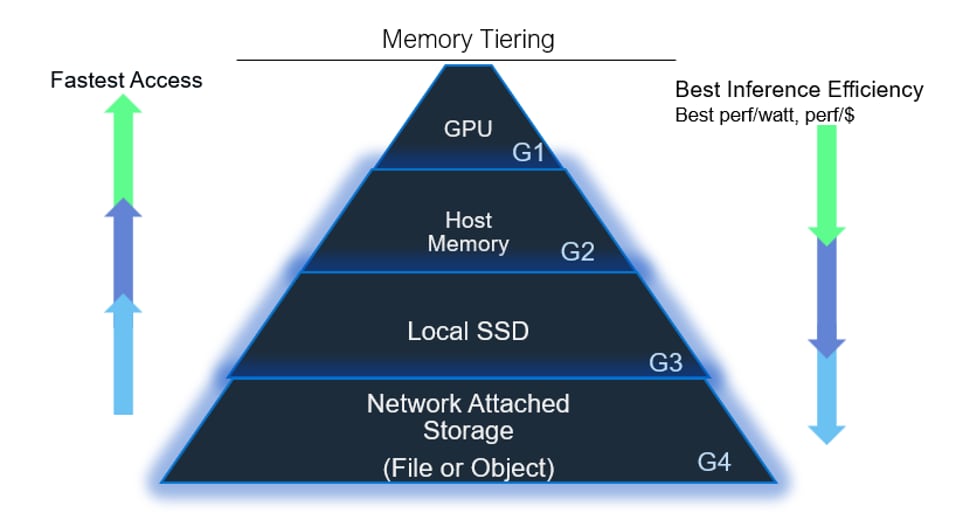
Figure 1. Hierarchical KV Cache storage tiers enabling scalable LLM inference from GPU memory to network-attached storage such as Dell ObjectScale
The evolution of Inference Acceleration
This work builds on two bodies of technology that Dell Technologies and others have already covered in depth.
- RDMA for S3-compatible storage on ObjectScale: RDMA (Remote Direct Memory Access) enables zero-copy, kernel-bypass data transfers directly between GPU or host memory and the storage server. Dell Technologies, in partnership with NVIDIA, introduced RDMA for S3-compatible storage on ObjectScale and detailed how it works. The storage benefits were dramatic: substantially higher throughput, much lower latency, and dramatically lower CPU utilization measured at the client compared to traditional S3 over TCP/HTTP.
- KV Cache tiering and offload fundamentals: Why KV Cache matters, the prefill versus decode phases, and the value of reusing cached context across requests.
For readers new to either topic, those resources provide the baseline. The rest of this post focuses on what is new: bringing GPU-direct RDMA for S3-compatible storage into the open-source inference and KV Cache ecosystem.
Open-source Inference Acceleration
Modern open-source inference has converged on a powerful layered architecture. Dell Technologies contributed the components necessary to make Dell ObjectScale a first-class, RDMA-accelerated storage backend within that stack, with all enhancements merged upstream rather than maintained in a private fork. The stack looks like this:
- vLLM (v0.19): An open-source, high-throughput LLM inference engine that uses PagedAttention to efficiently serve models.
- LMCache (v0.4.5): An open-source cache management layer for LLM inference that stores and reuses previously-computed KV Cache to avoid redundant computation across repeated or similar prompts.
- NVIDIA NIXL (v1.1.0): The NVIDIA Inference Xfer Library, an open-source data-movement library that accelerates high-performance transfer of KV Cache, tensors, and model data across GPUs, memory, and storage in distributed inference systems.
- NVIDIA cuObject client (v1.0.0, CUDA 13.1): A high-performance library for direct data transfers between GPU memory or system memory and S3-compatible object storage over RDMA. cuObject is the core library that enables GPU-direct movement of KV Cache to and from persistent object storage.
- Dell ObjectScale (v4.3): Dell's exascale object store, now with RDMA-accelerated S3-compatible object storage.
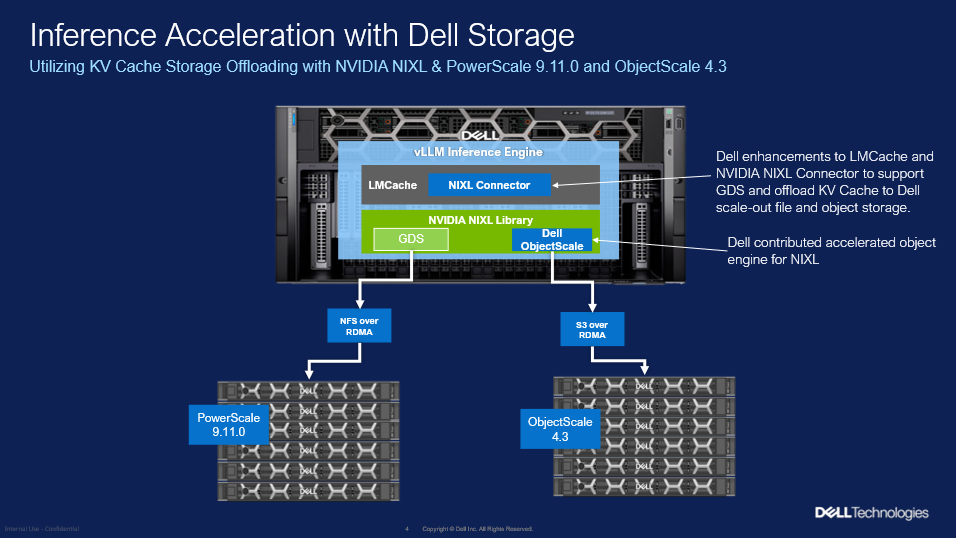
Figure 2. Inference acceleration stack with Dell storage
Dell Technologies has contributed code to both NIXL and LMCache. The introduction of an accelerated engine for the NIXL OBJ plugin adds RDMA-based asynchronous PUT/GET, VRAM (GPU memory) segment support, and runtime engine selection. This is the piece that lets KV Cache move directly between GPU memory and ObjectScale persistent storage over RDMA by utilizing the NVIDIA cuObject libraries.
The result is that a customer running the standard open-source vLLM + LMCache inference stack can point KV Cache offload at Dell ObjectScale and get RDMA-accelerated, GPU-direct performance using upstream software.
LMCache and NIXL Data Path
When LMCache decides to offload (write) or fetch (read) a chunk of KV Cache, it hands the operation to NIXL. The Dell ObjectScale accelerated engine for the NIXL's OBJ plugin sends S3 API calls to an ObjectScale endpoint and indicates that RDMA will be used to transfer object data. The NVIDIA cuObject library performs the necessary setup to allow GPU direct transfer of object data. Object data is transferred via RDMA between NVIDIA ConnectX-series NICs on both the GPU server and the ObjectScale nodes. The cuObject client libraries ship with the NVIDIA CUDA Toolkit (v13.1 and greater), so there is no additional client installation required.
The data path for RDMA accelerated transfers differs from traditional S3 over HTTP:
- S3 over HTTP: On a read (GET), data is transferred over HTTP from the object endpoint into host DRAM, then copied into GPU memory (a host bounce buffer plus a host-to-device copy). On a write (PUT), data is staged in host memory and asynchronously persisted to storage. The CPU and host memory are squarely in the data path.
- RDMA for S3-compatible storage (GPU-direct): On a read (GET), data is transferred via RDMA directly from the object endpoint into a GPU buffer without the need for a host bounce buffer, the host-to-device copy is avoided, and minimal CPU processing is required. This LMCache managed GPU buffer is then DMA transferred directly into the model’s KVCache. On a write (PUT), the path remains tiered—data is first placed in the local memory tier and then asynchronously persisted to the storage backend—moving data using RDMA rather than HTTP.
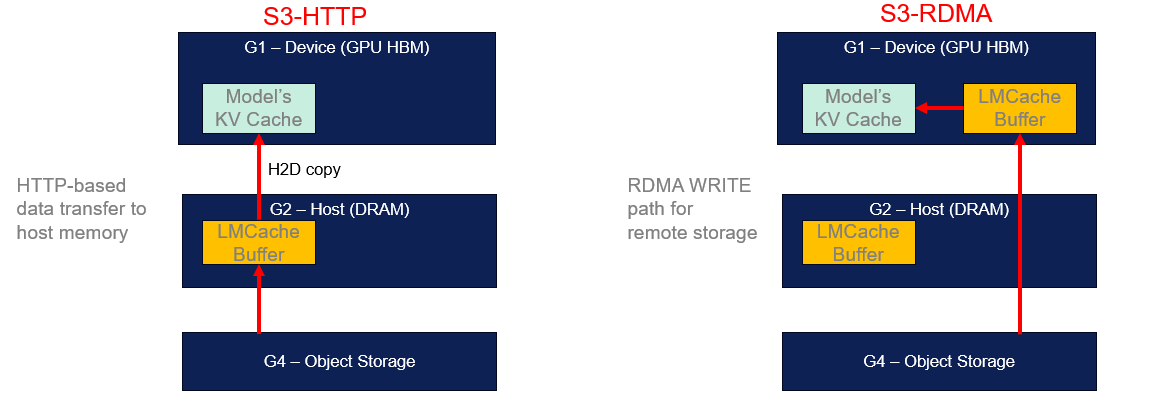
Figure 3. S3-RDMA enables direct data movement into GPU memory, avoiding host memory copies
Routing RDMA transfers through a CPU bounce buffer adds extra device-to-host and host-to-device data copies, increasing overhead and reducing effective throughput. Eliminating these copies by landing transfers directly in GPU memory is key to realizing the full performance potential of this solution. The following results were obtained using the recommended GPU-direct configuration.
Configuring LMCache for NIXL OBJ and Dell ObjectScale
To enable RDMA-accelerated KV Cache offload to Dell ObjectScale, you configure LMCache to use the NIXL OBJ backend with the Dell accelerated engine. This requires two configuration files: LMCache configuration (`lmcache.yaml`) and cuFile configuration (`cufile.json`).
LMCache configuration (`lmcache.yaml`) enables the NIXL OBJ backend and specifies your ObjectScale S3 endpoint and credentials. Key settings include:
- `nixl_buffer_device: cuda` - NIXL uses GPU buffers
- `nixl_backend: OBJ` - selects the NIXL OBJ plugin
- `nixl_backend_params` - your S3 access key, secret key, bucket name, and ObjectScale endpoint (e.g., `http://192.168.1.100:9020`)
- `nixl_buffer_size` - sized to your model (e.g., ~8 GB for Llama-3.1-8B)
Critical Dell ObjectScale accelerated engine parameters in `nixl_backend_params`:
- `accelerated: "true"` - enables the Dell ObjectScale accelerated engine
- `type: "dell"` - selects the Dell vendor-specific engine
- `req_checksum: "required"` - disables AWS SDK request body checksum validation
- `resp_checksum` - defaults to `required` for the Dell engine (disables AWS SDK response body checksum validation; RDMA GET responses have empty HTTP bodies and transport integrity is ensured by RoCEv2 iCRC)
Here is a complete example:
chunk_size: 256
local_cpu: false
nixl_buffer_size: 8589934592
nixl_buffer_device: cuda
extra_config:
  enable_nixl_storage: true
  nixl_backend: OBJ
  nixl_backend_params:
    access_key: your_access_key
    secret_key: your_secret_key_here
    bucket: your-bucket-name
    endpoint_override: http://192.168.1.100:9020
    scheme: http
    use_virtual_addressing: "false"
    req_checksum: "required"
    accelerated: "true"
    type: "dell"
Optionally, distribute tensor-parallel workers across multiple ObjectScale endpoints using `nixl_endpoint_list` for load balancing.
Calculating NIXL buffer size
The `nixl_buffer_size` must be sized to hold the maximum KV Cache you expect to offload. The formula accounts for model architecture, tensor parallelism, chunk size, and KV data type:
buffer_size = num_chunks * chunk_size * num_layers * 2 * (num_kv_heads / tp) * head_dim * dtype_bytes
For `Llama-3.1-8B-Instruct` at TP=1 with chunk_size=256 and a 64K-token context:
- 32 layers, 8 KV heads, 128 head dimension, fp16 dtype (2 bytes)
- Align: `32 × 2 × 8 × 128 × 2 = 131,072 bytes/token/TP`
- Chunk: `256 × 131,072 = 32 MiB per S3 object`
- Chunks: `ceil(64,000 / 256) = 250`
- Buffer: `250 × 32 MiB = 8,589,934,592 bytes (~8 GiB)`
cuFile configuration (`cufile.json`) configures NVIDIA's GPUDirect Storage for RDMA. The critical setting is `rdma_dev_addr_list`, which lists the IP addresses of your RDMA NICs (Mellanox ConnectX-series). Run `ip addr` on the host to identify your IB/RoCE interface addresses. For best throughput, include all NICs with GPU-NIC PCIe affinity to this list. The file also enables `use_pci_p2pdma`and sets RDMA peer type to `dmabuf` for the Dell accelerated engine path.
Note: The CUFILE_ENV_PATH_JSON environment variable indicates the location of this configuration file.
With these two configuration files in place, LMCache automatically uses the NIXL OBJ plugin, which selects the Dell ObjectScale accelerated engine at runtime when the endpoint is a Dell ObjectScale cluster. The cuFile configuration ensures that RDMA transfers land directly in GPU memory with GPU-Direct Storage.
Achieving file-like performance with object
We benchmarked the full open-source stack against Dell ObjectScale on the following configuration:
- Server: Dell PowerEdge XE9680
- GPU: NVIDIA H100
- NIC: NVIDIA ConnectX-7 (CX-7)
- Model: `Qwen/Qwen3-Coder-30B-A3B-Instruct`, tensor parallelism = 4
- Workload: single request (concurrency = 1), TTFT measured as the median of 5 hot passes, across context sizes from 4K to 235K tokens
We compared three configurations:
- Baseline - pure vLLM with no prefix caching nor external KV Cache (every prefill recomputed).
- S3-HTTP - KV Cache offload to ObjectScale over traditional S3/HTTP.
- S3-RDMA (GPU-direct) - KV Cache offload to ObjectScale over S3 with RDMA, landing directly in GPU memory via the Dell accelerated NIXL engine.
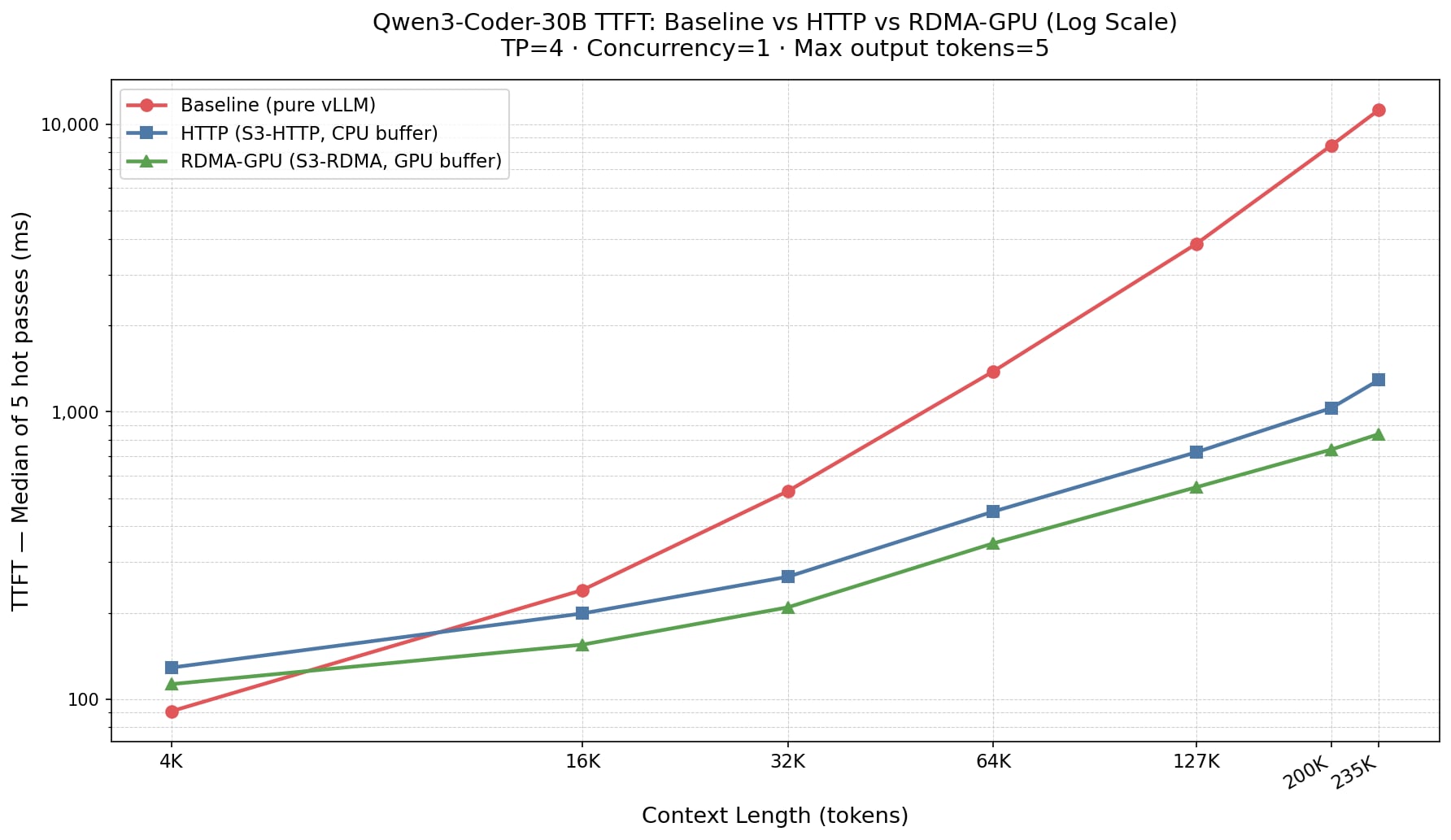
Figure 4: TTFT Comparison (Y-axis, log-scale): S3-Based KV-Cache Significantly Reduces Latency Across Context Lengths
Performance Highlights:
- At short contexts (4K), the baseline (recomputing the prefill) wins. Offload overhead outweighs the benefit when there is little to cache (91 ms baseline versus ~113-129 ms with offload). This is expected.
- The crossover occurs around 8K-16K tokens. Beyond that point, external KV Cache is faster than recomputing.
- At long contexts, the advantage is dramatic. At 235K tokens, baseline TTFT reaches 11,223ms, while S3-RDMA delivers the same first token in just 837ms a 13.4x speedup. This is precisely the use case where the 43 GB KV Cache no longer fits comfortably in GPU memory, and where offload matters most. Larger models would likely show even greater benefits for using S3-RDMA.
- RDMA consistently outperforms HTTP, and the gap widens with scale. With this model, S3-RDMA is roughly 1.3-1.5x faster than S3-HTTP across the range, with the largest margin at the longest contexts.
RDMA brings object storage file-like performance for KV Cache offload. Consistent with the CPU-efficiency results published in our earlier RDMA for S3-compatible storage work, the RDMA path also keeps CPU utilization dramatically lower than HTTP-on the order of 90% lower-freeing host resources for other important work.
Customer choice: file and object, both accelerated
Dell Technologies offers two high-performance storage platforms for external KV Cache and inference acceleration: Dell PowerScale (file) and Dell ObjectScale (object). Customers can choose the model that best fits their architecture. Historically, the highest-performance, RDMA-accelerated data path was associated with file storage. Object storage, with its lighter metadata model, is attractive for KV Cache at very large scale—a multi-instance, shareable cache is a natural fit for an object namespace—but has traditionally meant accepting the overhead of object access over HTTP.
That trade-off is what this work removes. With Dell's contribution of RDMA for S3-compatible storage into NIXL and LMCache, Dell ObjectScale now delivers object storage with file-like performance and all the advantages of RDMA data transfer. Dell customers no longer have to trade performance for the scale and simplicity of object.
Summary
Generative AI inference demands storage that delivers high throughput and low latency at scale—requirements that traditional object storage over HTTP struggles to meet. By bringing GPU-direct RDMA for S3-compatible storage all the way up into the open-source inference stack, Dell ObjectScale serves KV Cache offload with file-like performance: a 13.4× faster TTFT at 235K-token contexts and roughly 90% lower CPU utilization than HTTP. Customers gain a scalable, cost-effective alternative to adding more GPUs—without giving up the scale and simplicity of object storage.
Just as importantly, this is built entirely on upstream open-source software—vLLM, LMCache, and NVIDIA NIXL—with Dell's contributions already merged, so the components are available to the community today. Dell Technologies remains committed to open storage protocols and industry standards, and the best is yet to come with fast object in the enterprise.
Availability and getting started
RDMA for S3-compatible storage is available now in Dell ObjectScale 4.3 as a customer preview and is planned for general availability in ObjectScale 4.4 (coming in August).
LMCache and NIXL changes to support RDMA for S3-compatible storage with Dell ObjectScale are available in LMCache v0.4.5 and NIXL v1.1.0 source code. Official NIXL builds will soon be available with this support as well.
Dell Technologies is ready to partner with customers on this journey. If you are scaling AI inference and want to put NVIDIA GPU-direct, RDMA-accelerated KV Cache offload to work on Dell ObjectScale, we would like to hear from you.
Author: Jason Goldschmidt, Distinguished Engineer