
Building Azure Arc-enabled Data Services for a SQL Managed Instance on Dell PowerFlex

Oct 19, 2026
Building Azure Arc-enabled Data Services for a SQL Managed Instance on Dell PowerFlex This white paper describes the configuration and best practices for building a Database as a Service platform using Microsoft Azure Arc SQL Managed Instance with Dell PowerFlex to simplify lifecycle management, build resilience, and achieve better performance.

Introduction

Business challenge

Various organizations are choosing hybrid cloud strategies and implementing hybrid cloud solutions to meet their business needs. Hybrid cloud solutions can provide enhanced data placement due to their agility, elasticity, and cost management with complex operational overheads. To reduce these overheads, Microsoft has introduced a true hybrid cloud solution with Microsoft Azure Arc to streamline the management of hybrid and multi-cloud environments. Azure Arc simplifies governance and management by enabling Azure services to run across the edge, on-premises, and in hybrid clouds. You can think of Azure Arc as a connective tissue between the Azure Resource Manager in Azure and your own workload in any data center or cloud.

The theme of this paper is to convey a true DBaaS environment, or in this case, a database instance as a service. Delivering the core tenants of ease of use, time to DevOps, and multi-level resiliency.

PowerFlex is ideal for high-performance applications and databases that require elasticity and scale, building agile private and hybrid clouds, or consolidating resources in heterogeneous environments. PowerFlex gives you flexible deployment options such as PowerFlex rack and PowerFlex appliance that enable two-layer, single-layer (HCI), and storage-only architectures.

Solution overview

This white paper explains how PowerFlex and Azure Arc-enabled data services with a SQL Managed Instance provide a Database as a Service (DBaaS) integrated platform. The solution that is described in this paper provides a true DBaaS offering with a self-service provisioned SQL database, elastic scale, and unified management on a flexible software-defined infrastructure platform with linearly-scaling performance and network throughput.

Leveraging existing tools, making use of portal deployments and management, and dynamic scripting and automation, are all components of a true DBaaS platform. The integrated solution of Azure Arc-enabled data services with PowerFlex provides all these benefits while adding high performance at scale.

Revisions

Date

Description

June 2022

Initial Release

Objective

This white paper briefs about the PowerFlex and Azure Arc-enabled data services integrated platform and describes its implementation and values.

Audience

This white paper is intended for decision-makers, business leaders, architects, cloud administrators, database administrators, hyperconverged infrastructure administrators, and technical administrators of IT environments who are responsible for the deployment and management of resources on PowerFlex Family and on Microsoft Azure.

Readers must have a working knowledge of PowerFlex, VMware vSphere technologies, and Microsoft Azure Arc, and should have a basic familiarity with storage, compute, and network technologies and topologies

Terminology

The following table provides definitions for some of the terms that are used in this document.

Table 1.      Terminology 

Term

Definition

CAG

Contained Availability Group

CSI

Container Storage Interface

DBaaS

Database as a Service

HCI

Hyperconverged Infrastructure

IOTM

IT Operations Management

LCM

Life Cycle Management

MDM

Meta Data Manager

OS

Operating System

OLTP

Online Transaction Processing

SDS

Storage Data Server

SDC

Storage Data Client

SQL MI

Azure Arc-enabled data services – SQL Server Managed Instance

TPM

Transactions per minute

VM

Virtual Machine

We value your feedback

Dell Technologies and the authors of this document welcome your feedback on the solution and the solution documentation. Contact the Dell Technologies Solutions team by email. 

Author: Robert Sonders, Vinutha Shenoy

Contributors: Ripa Bhagawati

Product overview

Product overview

This section describes the key components of the PowerFlex and Azure Arc-enabled services solution.

PowerFlex family

PowerFlex is a software-defined infrastructure platform that is built to reduce operational and infrastructure complexity. PowerFlex empowers organizations to move faster by delivering flexibility, elasticity, and simplicity with extraordinary predictable performance for mission-critical workloads, while also providing resiliency at scale. The PowerFlex family provides a foundation that combines compute and high-performance storage resources in a managed, unified fabric.

PowerFlex delivers transformational value

• Delivers stringent SLAs effortlessly

PowerFlex leverages software to unlock the full potential of rapid advances in industry-standard hardware and deliver extreme SLA outcomes. PowerFlex aggregates resources across a broad set of nodes, unlocking massive input, output, and throughput performance while minimizing the latency. Its self-balancing architecture eliminates any hotspots and ensures consistency and simplicity over time. You can scale the system while linearly scaling performance from a minimum of four nodes to thousands of nodes, on-demand and without any disruption. And with its self-healing architecture, PowerFlex can handle outages, upgrades, and maintenance without downtime resulting in 99.9999 percent availability.

• Flexible and dynamic architecture

PowerFlex delivers transformational agility that enables organizations to rapidly respond to changing business needs. PowerFlex offers flexibility to mix and match the storage, compute, and hyperconverged nodes in a dynamic deployment, allowing you to scale storage and compute resources together or independently, one node at a time as per your requirements.

• Shared platform for heterogeneous workloads

The platform can also support a broad range of operating environments simultaneously such as bare metal operating systems, hypervisors, and container platforms with a unified underlying infrastructure platform and management. You can also support heterogeneous workloads with varying requirements on a flexible shared infrastructure platform and modernize your application architectures on your schedule.

• Extensive automation for predictability and simpler workflows

PowerFlex offers full-stack IT Operations Management (ITOM) and Life Cycle Management (LCM) with PowerFlex Manager. It provides extensive automation capabilities with PowerFlex Manager REST APIs and custom Ansible modules to integrate with your infrastructure, application, and DevOps workflows. PowerFlex Manager enables automated deployments and expansions with minimal firsthand time for the IT team, letting them focus on other strategic initiatives.

• Broad ecosystem of workload solutions

PowerFlex is designed to deliver superior outcomes at any scale for the most demanding mission-critical environments. It is optimized for a wide range of validated workload solutions ranging from traditional relational databases and modern cloud-native NoSQL databases to throughput-intensive analytics workloads.
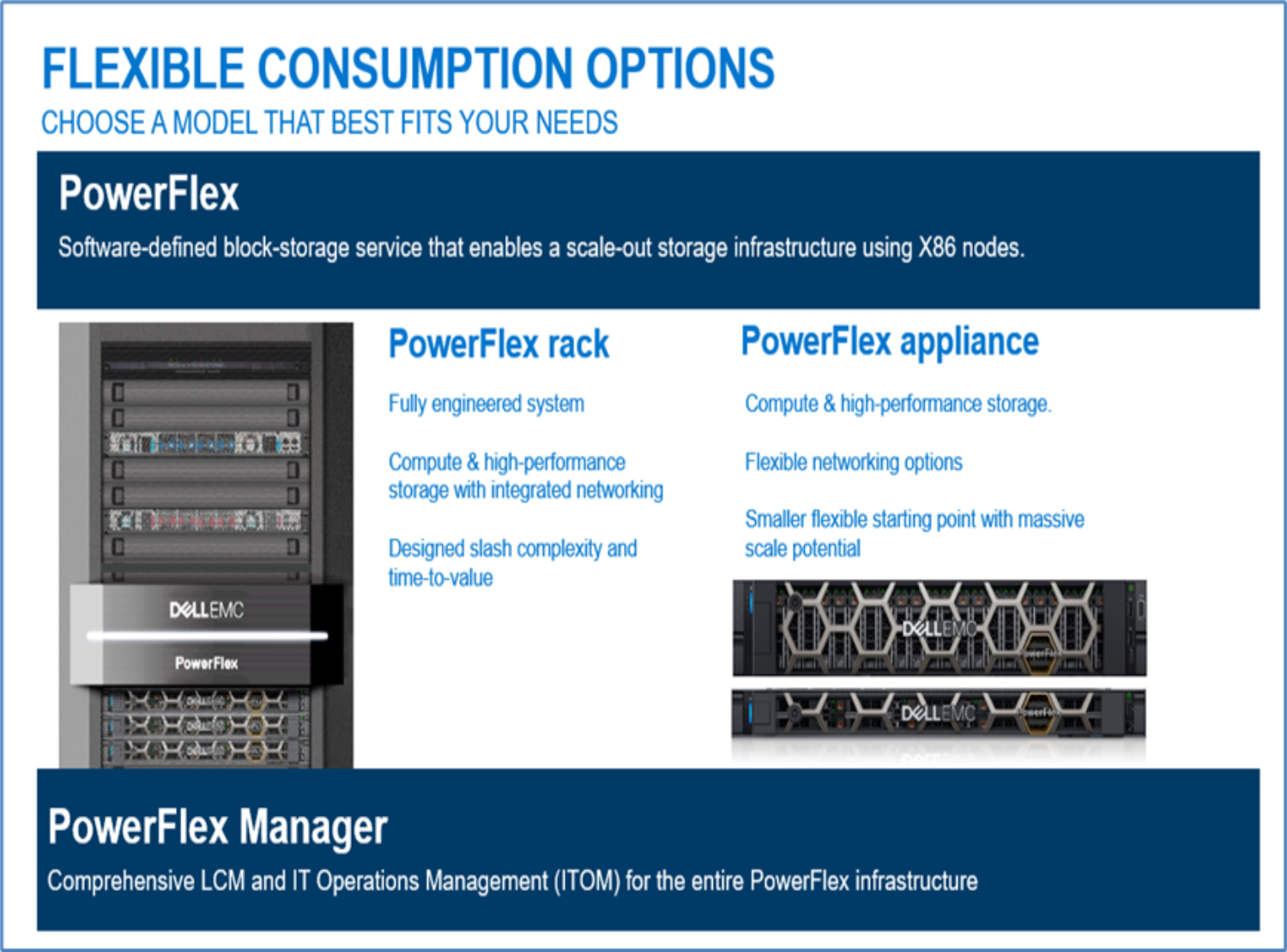
Figure 1.        PowerFlex family

PowerFlex software components

PowerFlex software components provide software-defined storage services. The software components help to simplify the infrastructure management and orchestration with comprehensive ITOM and LCM capabilities that span compute and storage infrastructure, from BIOS and firmware to nodes, software, and networking.

PowerFlex

PowerFlex, the software foundation of the PowerFlex platform, delivers high performance and a highly resilient block storage service that can scale to thousands of nodes.

PowerFlex Manager

PowerFlex Manager is the software component in the PowerFlex family that enables ITOM automation and LCM capabilities while enabling flexible APIs and extensive automation.

PowerFlex consumption options

PowerFlex is available in multiple consumption options to help customers meet their project and data center requirements. The PowerFlex appliance and PowerFlex rack give customers the flexibility to choose a deployment option to meet their exact requirements.

PowerFlex rack

The PowerFlex rack is a fully engineered system with integrated networking that enables customers to simplify deployments and accelerate time to value.

PowerFlex appliance

The PowerFlex appliance allows customers the flexibility and savings to choose their compatible networking. The PowerFlex appliance offers customers a smaller starting point of four nodes while enabling them to use their existing network infrastructure.

With PowerFlex, the customers deploy to match their initial needs and easily expand with massive scale potential, without having to compromise on performance and resiliency.

Flexible consumption-based billing options

PowerFlex is available through APEX custom solutions by the APEX Flex on Demand and APEX Datacenter Utility for customers looking to adopt consumption based OpEx models. 

APEX Flex on Demand 

APEX Flex on Demand allows you to pay for technology as you use it and provides immediate access to buffer capacity. Your payment adjusts to match your usage.

APEX Data Center Utility

APEX Data Center Utility provides the leading product portfolio from Dell Technologies that is coupled with your choice of professional services and support to manage your data center and its operations. A simple and single invoice provides monthly payments that are based on a predictable rate and vary based on your usage.

Microsoft Azure Arc

Microsoft Azure Arc simplifies the management and governance of complex environments that are spread across core on-premises, multi-cloud, and across edge. Azure Arc provides a single control plane by extending non-Azure resources from on-premises, multi-cloud, or edge into the Azure Resource Manager. Azure Arc extends the Azure data services and management capabilities to any infrastructure. These services fulfill the rapidly increasing hybrid cloud requirements across the organizations.

Azure Arc enables users to manage the following resource types from any infrastructure-

  • Azure Arc-enabled servers
    • Windows and Linux operating system
  • Azure Arc-enabled Kubernetes
    • Any CNCF deployment
  • Azure Arc-enabled data services
    • SQL Managed Instance
    • PostgreSQL HyperScale 
  • Azure Arc-enabled SQL server

SQL Managed Instance tiers

Azure Arc-enabled SQL Managed Instance enables the deployment of Azure SQL data services anywhere. Microsoft committed to deliver this service with total compatibility with the SQL Server database engine and integrated management capabilities.

The SQL Managed Instance provides two tiers:

  • General purpose – This purpose suffices for many workloads requiring standard performance and high availability. The PowerFlex Software-Defined Storage (SDS) system provides a highly available and resilient platform with robust data protection and management services. A combination of the general-purpose tier with a PowerFlex system is often sufficient for most needs. 
  • Business critical – The business-critical tier is suitable for databases requiring the highest level of availability with no limits of CPU cores or memory per instance. High availability (HA) is achieved by deploying multiple replicas and using Microsoft SQL Always On availability groups. Azure Arc-enabled data services with a SQL Managed Instance, creates an availability group, and all databases are automatically added to the group. Applications can also benefit from read scale out to offload read-intensive workloads to secondary replicas.

Note: For more information, see the Microsoft release notes. Dell EMC PowerFlex is an Azure Arc validated Storage and Hyperconverged platform optimized to run hybrid data workloads. For more information about Azure Arc services, see Azure Arc- Extend Azure management and services anywhere.

Solution architecture

Solution architecture

This section provides an overview of the logical architecture of the PowerFlex and Azure Arc-enabled data services platform is built using a tightly integrated multi-layered setup in the lab. Each is easy to deploy, scale, manage, and maintain by platform engineers and DBAs. 

The architecture has PowerFlex at the platform layer, ESXi hypervisor for server virtualization with VMware vSphere, and a containers layer to deploy DBaaS as self-service provisioned Azure Arc-enabled data services. 
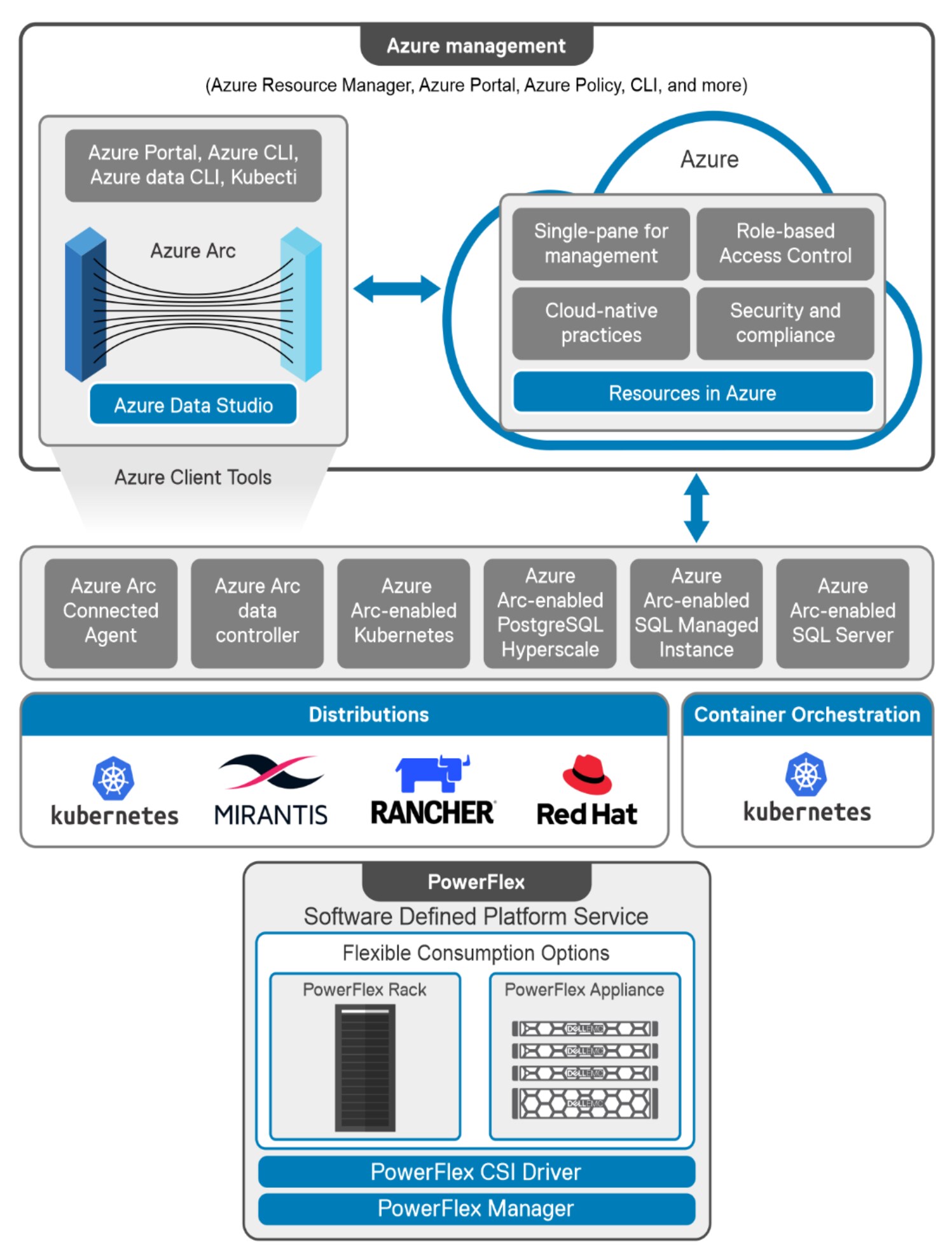
Figure 2.        PowerFlex and Azure Arc-enabled data services logical architecture

PowerFlex setup

PowerFlex 3.6.0 is built in the lab with four PowerFlex HCI nodes. PowerFlex Manager is used to automatically create all required PowerFlex network components and provision the PowerFlex cluster on VMware vSphere 7.0 U2. PowerFlex SDS, MDM, and SDC components are installed on each of the HCI nodes by the PowerFlex Manager cluster creation job. The SDS aggregates and serves as raw local storage in each node and shares that storage as a part of the PowerFlex cluster. A single protection domain is created from the drives on these HCI nodes. Then two storage pools are configured, and multiple volumes are carved out to meet the SQL Managed Instance storage requirements. The volumes are mapped to compute nodes and later mapped to the virtual machines.

Table 2.      The configuration details of the PowerFlex System in the lab

Cluster design elements

Description

Cluster node model

PowerEdge R640

Number of cluster nodes

4

CPU

2 x Intel(R) Xeon(R) Gold 6132 CPU @ 2.60 GHz

Memory

384 GB (12 x 32 GB)

Network

rNDC - Intel(R) 10 GbE 4P X710 rNDC 

PCIe - 2 x MLNX 25 GbE 2P ConnectX4LX Adapter BOSS card 

Network topology

PowerFlex Proprietary 

Volume resiliency

2

Usable storage capacity

10 x 1788.5 GB (SSD) per Node

Note: The solution was validated in an engineering lab using PowerFlex HCI platform with a VMware vSphere environment. However, the implementation and validation that this paper describes are applicable for a PowerFlex HCI and two-layer platform with virtualized and bare metal configurations. See, Microsoft Azure Arc on Dell EMC PowerFlex for details. The protection domain, storage pool, and volumes for PowerFlex platform can be configured according to requirements. For more information, see PowerFlex Storage definitions.


Kubernetes and CSI setup

Five virtual machines(VMs) are created with the Red Hat Enterprise Linux 8.4 operating system running on each one. Each of these VMs is configured with datastores that are mapped to the PowerFlex volumes. Upstream Kubernetes cluster v1.21.5 is built with one control plane node and four worker nodes using these VMs. PowerFlex CSI driver v2 is installed on the control plane node. This installation is done using Helm charts and Dell CSI Helm installer. PowerFlex SDC is installed on each of the worker nodes to communicate and consume PowerFlex-based storage volumes that are automatically provisioned by the CSI driver to meet the container’s storage requirement.

Table 3.      Kubernetes cluster details

Kubernetes cluster 

Value

Upstream Kubernetes

1.21.5

Workload cluster Kubernetes version

1.21.5

Control plane node count

1

Worker node count

4

Worker node operating system

Red Hat Enterprise Linux 8.4

Worker node VM size

48 vCPUs, 128 GB RAM


Storage classes

PowerFlex CSI 1.4 onwards does not create any storage classes as part of the driver installation. It is therefore necessary to create additional storage classes during CSI installation using the sample YAML file from the GitHub.

The following storage classes were created in the lab to meet the SQL MI storage requirements:

NAME                        PROVISIONER                RECLAIMPOLICY   VOLUMEBINDINGMODE      ALLOWVOLUMEEXPANSION   AGE

vxflexos (default)          csi-vxflexos.dellemc.com   Delete          WaitForFirstConsumer   true                   106d

vxflexos-xfs                csi-vxflexos.dellemc.com   Delete          WaitForFirstConsumer   true                   106d

vxflexos-xfs-sql-data       csi-vxflexos.dellemc.com   Delete          WaitForFirstConsumer   true                   105d

vxflexos-xfs-sql-datalogs   csi-vxflexos.dellemc.com   Delete          WaitForFirstConsumer   true                   105d

Note: Follow the compatibility matrix and the latest available CSI version before planning and configuring the PowerFlex platform. For more information about how to deploy PowerFlex CSI Driver, see CSI Driver by Dell EMC and ensure that the prerequisites are met before the installation. 

Management and operations

PowerFlex and Azure Arc-enabled data services architecture offers a wide range of tools and services for the management and operations of the PowerFlex system and Azure Arc-enabled data services. These tools and services are broadly categorized into two areas –

  • PowerFlex System Management and Kubernetes related tools
  • Azure Arc supported tools

PowerFlex System Management and Kubernetes related tools

The following tools provide the automation of the PowerFlex System build, installation of all software components, PowerFlex specific network configurations, firmware update, disk operations, volume management, storage replication, volume snapshots, firmware, and software update, system monitoring, and so on. Each Kubernetes distribution offers a set of tools for container orchestration, cluster management and monitoring. The following table lists the tools that are used in the lab by Upstream Kubernetes cluster management.

Table 4.      PowerFlex System Management and Kubernetes related tools

Tool

Purpose

Version

PowerFlex Manager

PowerFlex Manager is a robust toolset, which simplifies the IT operations for the entire infrastructure by automating complex LCM and IT operations tasks, boosting IT productivity and infrastructure predictability. PowerFlex Manager also offers standards-based open APIs and custom Ansible modules, making it simple to integrate. PowerFlex Manager is installed as a virtual appliance.

3.7.1

PowerFlex GUI

PowerFlex GUI performs standard configuration and maintenance activities, as well as monitor the storage system’s health and performance. Also, PowerFlex GUI retrieves overall PowerFlex performance metrics, and examines various elements.

3.6.0

vCenter

VMware vCenter Server is an advanced server management software that provides a centralized platform for controlling vSphere environments for visibility across hybrid clouds. The ESXi hosts and VMs running on PowerFlex Systems are managed from vCenter.

7.0.2

kubectl

Used for a wide variety of management and maintenance activities in Kubernetes.

1.21.2

helm

Used to install software built for Kubernetes.

3.6.3

Azure Arc supported tools

The following table lists the set of tools and services that enables the management and monitoring of Azure components running on PowerFlex. These tools enable to deploy DBaaS Azure data services, scale-up or scale-out of the instances as required, editing the running services, backup and restore of the databases, high availability using always on availability group, monitoring of running services, applying Azure policies and RBAC across cloud and on-premises, and many other capabilities.

Table 5.      Azure Arc supported tools 

Tool

Purpose

Version


Azure Arc-enabled Kubernetes

Provides rich monitoring, GitOps-based configuration management, policy enforcement, and a target for Azure Arc-enabled data services.

1.3.8

Azure CLI (including required extensions)

Used to interact with Azure Arc-enabled Kubernetes resources. The following extensions were also installed: k8s-extension (v0.6.1), connectedk8s (v1.1.7), k8s-configuration (v1.0.0).

2.27.0

Azure portal

Used to interact with Azure Arc-enabled Kubernetes resources and Azure Arc-enabled data services.

N/A

Azure Monitor Container Insights

Used for monitoring performance and capacity in the Kubernetes environment through the Azure portal.

2.8.2

Azure Data Studio

Azure Data Studio is a cross-platform database tool that enables database management across on-premises and cloud platforms. Azure data controller and SQL MIs deployed on PowerFlex Systems are managed from Azure Data Studio. Functions like SQL database management, backup/restore, and monitoring are performed from here.

1.35.1

Azure Arc-enabled SQL Managed Instance

PowerFlex and Azure Arc-enabled data services architectures deliver the Azure data services capability on flexible software-defined storage with linearly-scaling performance and network throughput. The SQL Managed Instance and PostgreSQL Hyperscale services for Microsoft Azure Arc are available with or without a direct Azure connection. Both these modes allow you to get the latest releases from Azure and receive regular updates on patches and new features.

The Azure Arc data controller is a collection of Kubernetes resources, that orchestrates the Azure Arc data services architecture. It provides maximum flexibility and consistency across platforms along with a range of management capabilities including provisioning, monitoring, elastic scaling, automated updates, high availability, and backup. 

Two types of connectivity modes are available for the data controller:

  • Direct mode – Intended for organizations who maintain network connectivity to Azure and prefer to leverage Azure Resource Manager – including Azure portal and Azure CLI – for management of this DBaaS architecture. Usage data, metrics, and logs are automatically sent to Azure.
  • Indirect mode – Intended for organizations with limited or no connectivity to Azure because of data sovereignty, data gravity, or other similar security requirements. DBAs use tools like Azure Data Studio and Azure CLI (az) with the arcdata extension to manage the data controller directly. This mode requires manual uploads of usage data, metrics, and logs to Azure using the Azure CLI. This is the connectivity mode that we used in this deployment example.

Indirect connectivity mode prerequisites

The prerequisites to deploy data controller in indirect mode are:

  • Install or upgrade all the client tools to the latest available versions in accordance with the Azure Arc-enabled data services pre-requisites. 
  • Connect the Kubernetes cluster to Azure using Azure Arc-enabled Kubernetes.
  • Create the service principal and roles for metrics. Then assign the service principal to the appropriate role – Monitoring Metrics Publisher – for uploading usage data, metrics, and logs to Azure Monitor. 

Note: In this deployment example the service principal name (SPN) was scoped at the subscription level, because this was the only setup used. Microsoft documentation provides commands for more granular scope, such as at the resource group level.

The following Azure CLI commands are run to create the SPN.

az ad sp create-for-rbac --name azure-arc-metrics --role Contributor --scopes /subscriptions/<subscription ID>

az role assignment create --assignee <application ID> --role 'Monitoring Metrics Publisher' --scope subscriptions/<subscription ID>

The first command produced the following output. These values are used during the deployment of the data controller:

{

  "appId": "<application ID>",

  "displayName": "azure-arc-metrics",

  "name": "http://azure-arc-metrics",

  "password": "Xt3OLAd51U420fTOBd.K5C.0i0Ihxb7nNT",

  "tenant": "<Azure Active Directory tenant ID>"

}

For Azure arc data controller pre-requisites and deployment options, see Microsoft Azure Arc on Dell EMC PowerFlex | Dell Technologies Info Hub.

Deploy Azure Arc-enabled data services data controller in indirect connectivity mode

The data controller in indirect connectivity mode is deployed using Azure Data Studio or Azure CLI. For this deployment, we used the Azure CLI, as shown in the following code sample:

$ENV:AZDATA_USERNAME = $arcDataControllerAdminUsername

$ENV:AZDATA_PASSWORD = $arcDataControllerAdminPassword

$ENV:dcName = $arcDataControllerName

$ENV:SUB = $azSubId

$ENV:RG = $azResourceGroup

$ENV:AZDATA_LOGSUI_USERNAME=$arcDataControllerAdminUsername

$ENV:AZDATA_LOGSUI_PASSWORD=$arcDataControllerAdminPassword

$ENV:AZDATA_METRICSUI_USERNAME=$arcDataControllerAdminUsername

$ENV:AZDATA_METRICSUI_PASSWORD=$arcDataControllerAdminPassword

az arcdata dc create `

--connectivity-mode indirect `

--name $arcDataControllerName `

--k8s-namespace arc `

--subscription $azSubId `

--resource-group $azResourceGroup `

--location eastus `

--storage-class vxflexos-xfs `

--profile-name azure-arc-kubeadm `

--infrastructure onpremises `

--use-k8s

For more information, see the Reference link for the data controller deployment.

Deploy SQL Managed Instances

SQL Managed instances in indirect mode are deployed from the PowerShell using Azure CLI commands or from the Azure Studio after the data controller is connected. In this setup, the Azure CLI scripts were used to deploy the SQL Managed Instances. 

Ten General Purpose SQL Managed Instances and three business-critical instances are deployed to run the test cases mentioned in the following sections, ranging from 2vCPU/4 GiB memory to 16vCPU/ 16 GiB memory. These instances are deployed on the four Kubernetes worker nodes with PowerFlex volumes automatically created as the persistence layer. 

For the scripts to deploy a SQL MI, see the SQL MI creation Scale-up scenario section of this document.

Backup and Restore options for a SQL Managed Instance

Azure Arc-enabled data services SQL MIs have an integrated automatic backup feature enabled. This feature triggers a full database backup, a differential backup, and a log backup when a new database is created or restored from other databases. These backups are stored in a backup storage class that is specified during the SQL MI deployment. The backups are retained in accordance with the –retention-days value. This value can be set between zero and 35 days. The default value is seven.

The SQL database backup and restore operations are monitored and performed from Azure Studio.

For more information about SQL MI point-in-time capabilities and features, see point-in-time restore.

Test scenarios

Test scenarios

This section describes the results of the performance testing of the PowerFlex and Azure Arc-enabled platform that we performed in the Dell Technologies lab. We used HammerDB for benchmarking.

Testing methodology introduction

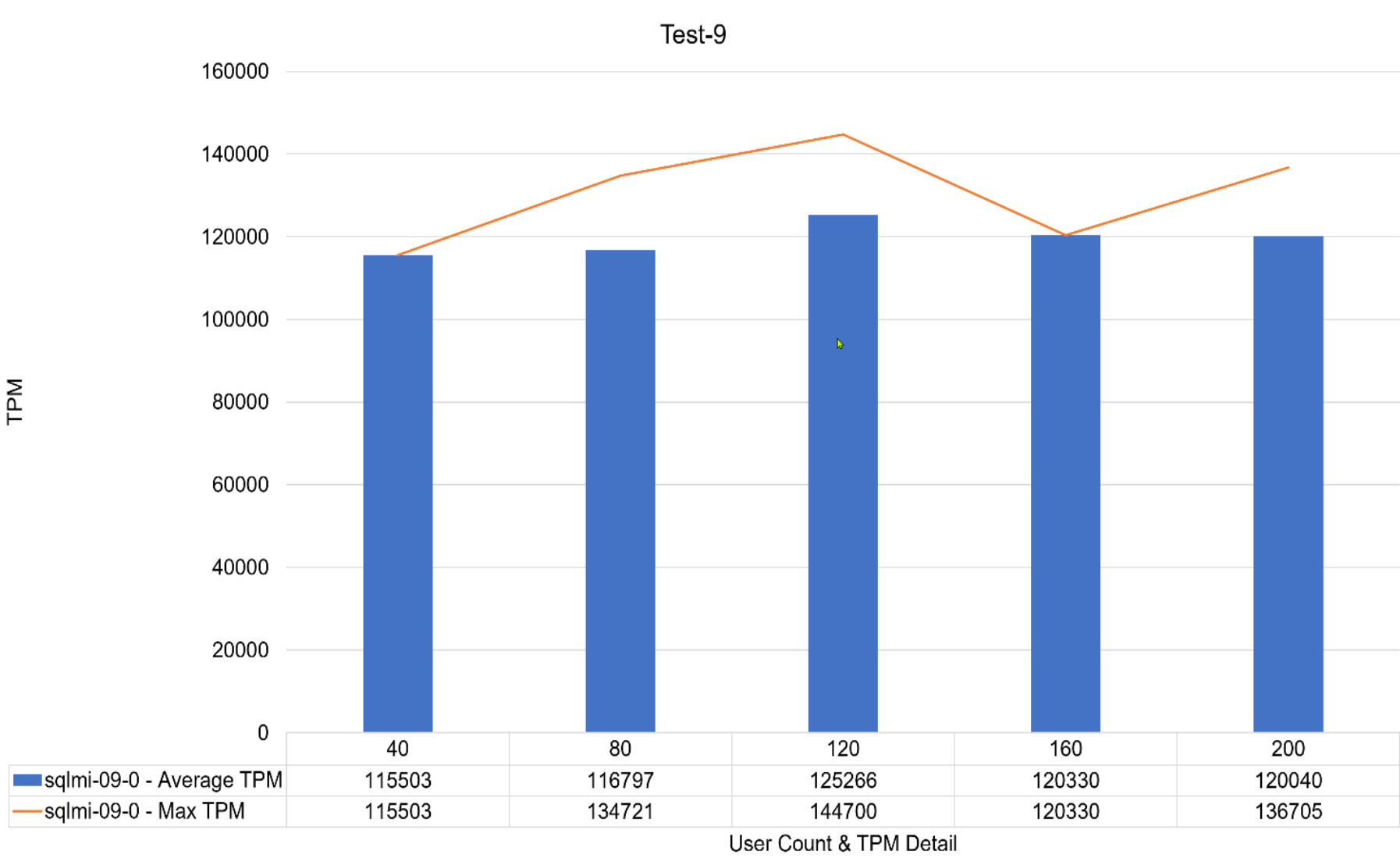
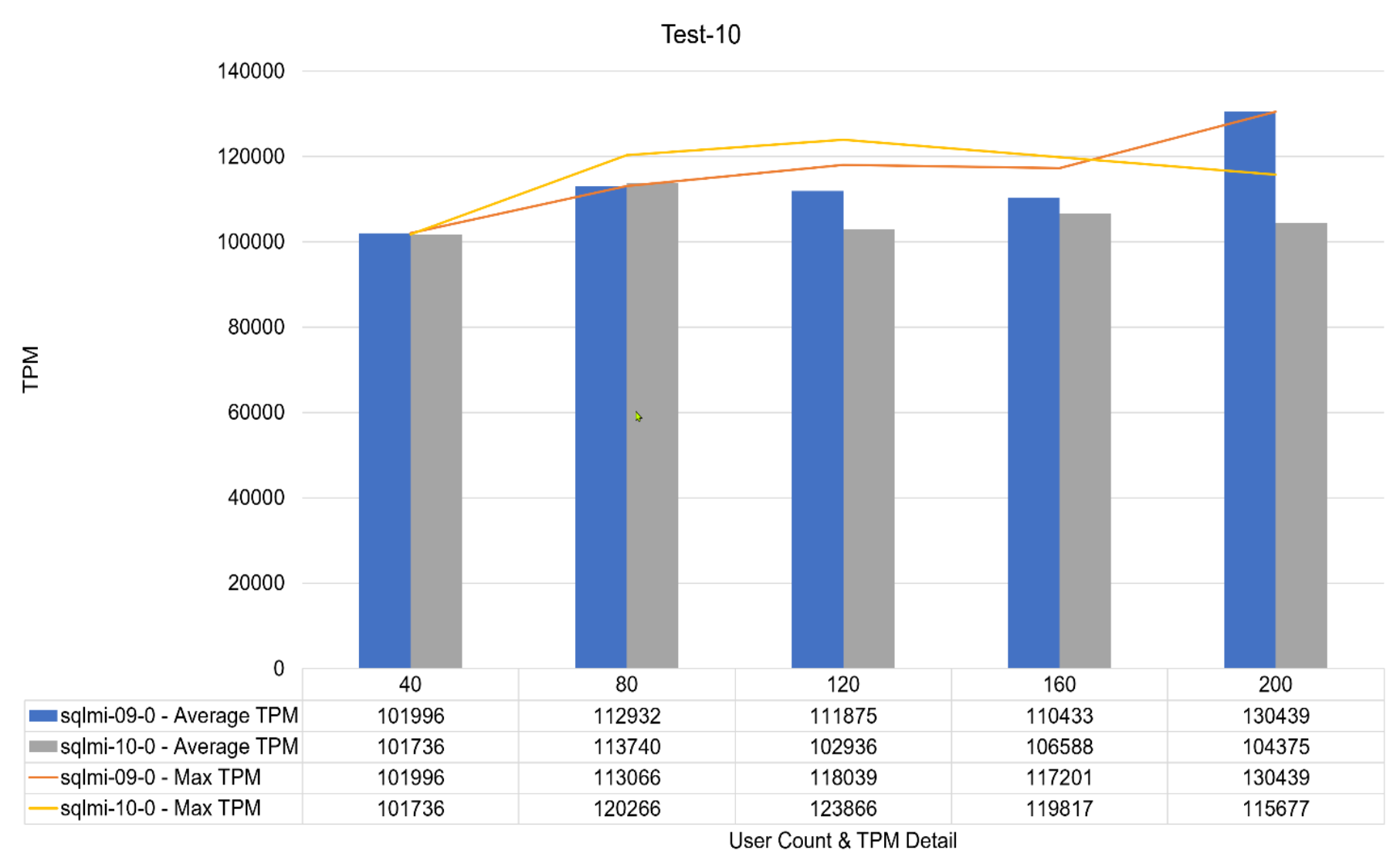
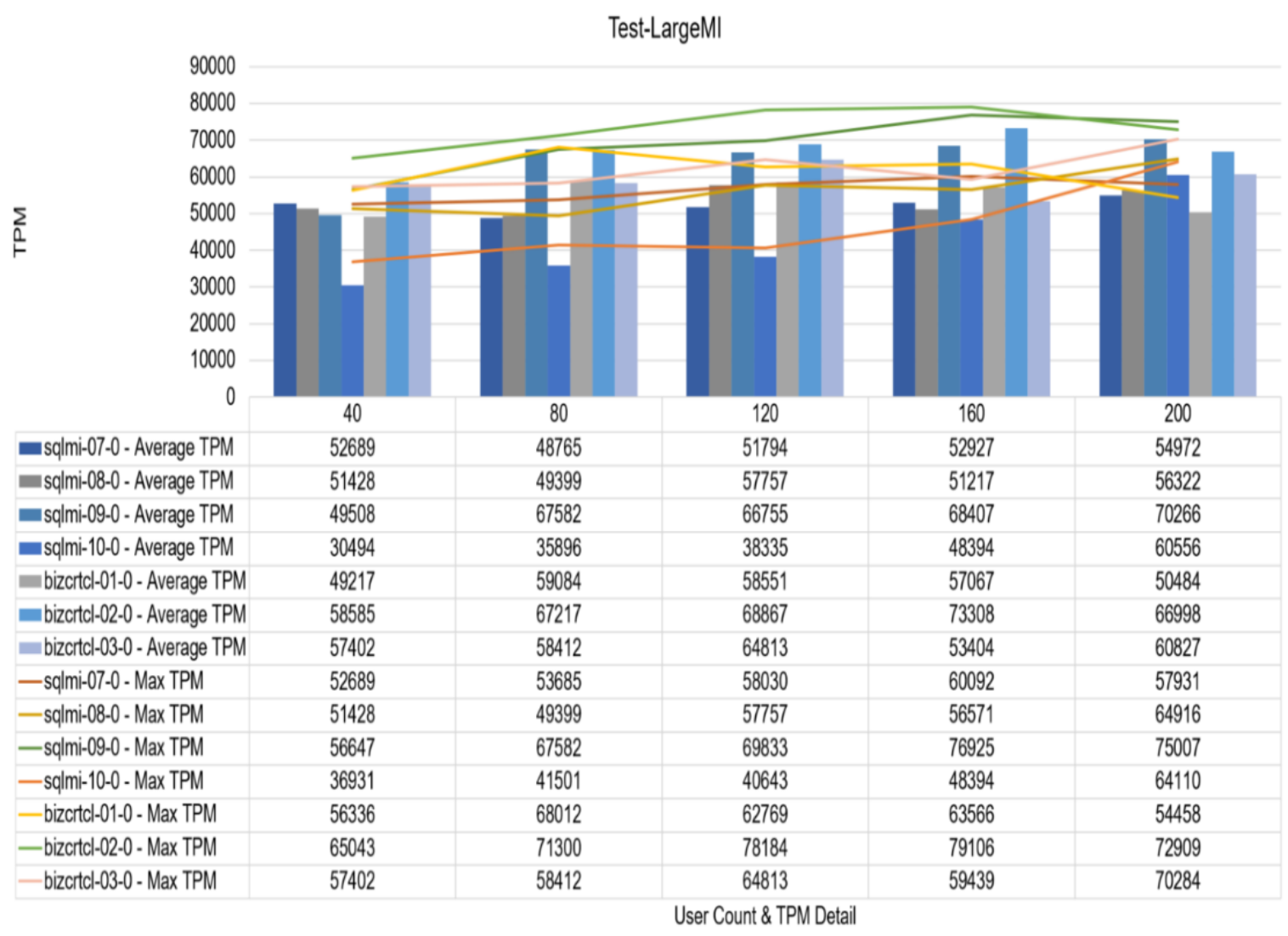
The testing methodology that is used for this paper considered all the architectural layers of the DBaaS integrated architecture holistically. Rather than stressing an individual SQL MI to its resource limits, the goal was to balance the utilization of the storage, cluster, CPU, and memory. This demonstrates the primary benefits of the DBaaS integrated architecture - rapid deployment, ease of management, and elastic resource scalability while also optimizing cluster resource utilization and delivering a performance that meets SLAs. To generate the appropriate load on the SQL MIs, an industry-accepted pattern of an Online Transaction Processing (OLTP) workload from HammerDB was used. 

A robust set of scripts were used to automate the different benchmark tests and collect their results. These include T-SQL logging and reporting framework to harvest HammerDB transactions per minute (TPM) metrics from a jump host outside of the DBaaS environment. Also, the HammerDB CLI, with the associated. tcl scripting was constructed to manage the autopilot timed execution. Doing so allows for the capture of TPM metrics from a multi-instance SQL workload at SQL MI instance granularity with individualized batch request/second logging.

Note: The test suite that is used is not part of the DBaaS integrated architecture offering and was used internally to perform robust stress and performance tests of the deployment. It allows for testing the deployment, at scale, of multiple SQL MI instances, each running a stress workload, while monitoring all aspects of their database performance and environment.

With an Azure Arc-enabled SQL Server Managed Instance, there is no SQL Server instance to deploy HammerDB against. However, SQL MIs are near 100% compatible with SQL Server database engine. Therefore, the HammerDB workload can run against each SQL MI, where the system databases are used to log metrics to a single table. Then these metrics are pulled back to a master reporting SQL instance for aggregation and review.

A dedicated host (virtual machine) was used to initiate the HammerDB tests. This host also resides on the same PowerFlex cluster.

The HammerDB software and SQLCMD are deployed on the HammerDB host.

The HammerDB host had the following virtual hardware profile and specifications:

  • Operating System: Windows 10
  • 4 vCPU
  • 16 GB memory

The metrics that are described in the testing section below are aggregated TPM numbers for each SQL MI and user count for the entire run duration. The following figure shows the architectural layers of the DBaaS integrated architecture used for the tests.
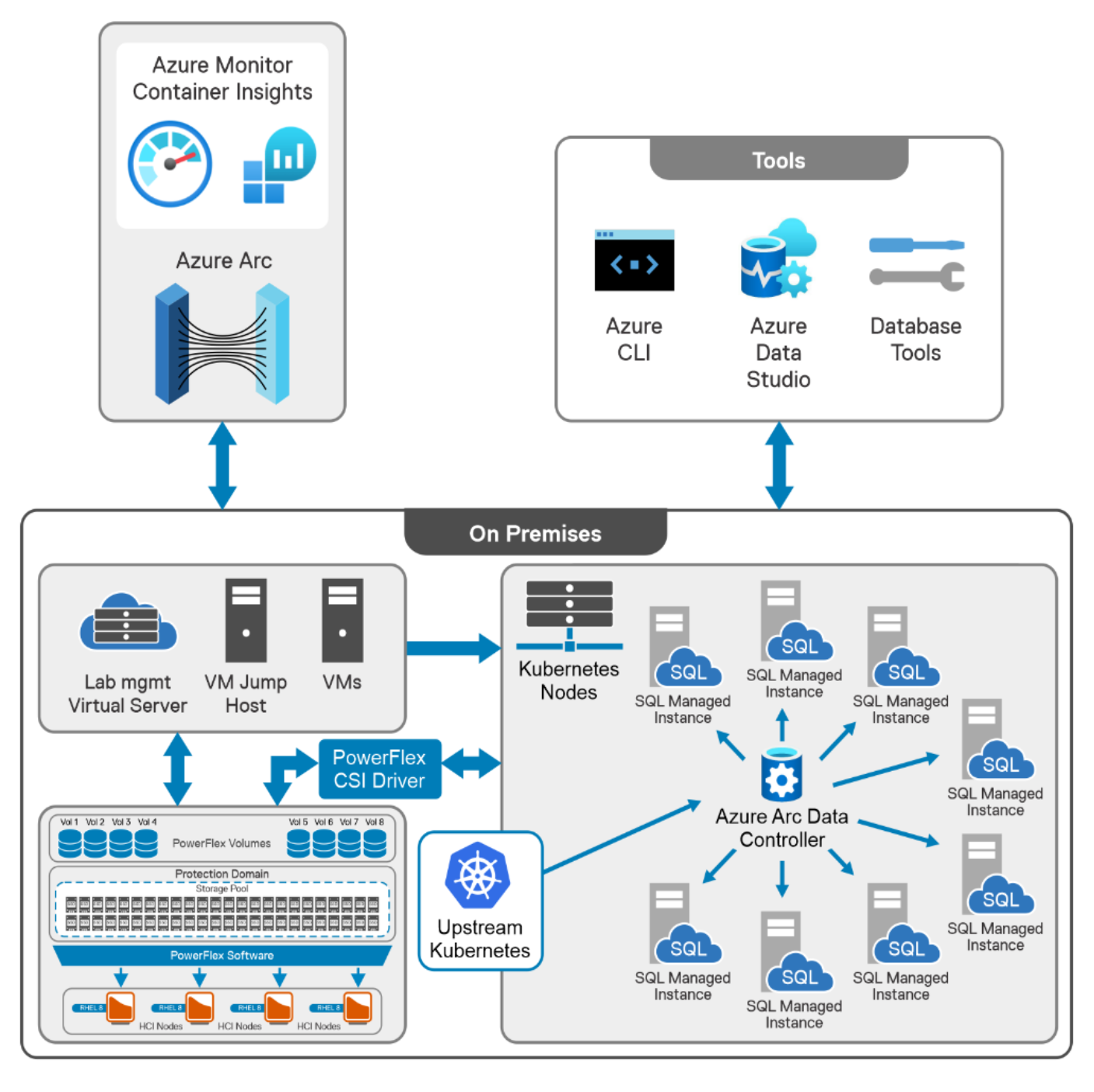
Figure 3.        The architecture followed in the lab

HammerDB initial configuration

To retrieve the HammerDB samples SQL transaction rates, run the following query:

SELECT @cntr_value = cntr_value,

FROM sys.dm_os_performance_counters WITH (NOLOCK)

WHERE counter_name = 'Batch Requests/sec'

The same views and predicates are used to capture and aggregate the TPM values of all the SQL MI instances using the internal test suite developed for these tests. The goal is to monitor the full multi-instance Azure Arc-enabled data services SQL MI deployment – capturing TPM results for each instance with the same workload as more SQL MI instances were added. The monitoring approach used leveraged Grafana to analyze performance at the individual SQL MI layer and Azure Monitor Container Insights to analyze performance at the Kubernetes layer.

At the same time, the aggregated HammerDB virtual user count was captured from all the running instances. The system session SPIDs were removed from the total user count along with removing the running reporting SPIDs.

SELECT @UserCount = COUNT(es.session_id)

FROM sys.dm_exec_sessions AS es WITH (NOLOCK)

CROSS APPLY sys.dm_exec_input_buffer(es.session_id, NULL) AS ib

WHERE es.database_id = DB_ID(@DatabaseName)

AND es.session_id > 50

AND es.session_id <> @@SPID

OPTION (RECOMPILE);  

HammerDB configuration

To monitor all the SQL MIs simultaneously, HammerDB CLI automation was used. This section describes how the auto build and auto drive dictionary parameters for the testing are configured. 

Extensive consideration for the proper, real-life database configuration was analyzed. The goal was to achieve a balance between performance and ease of deployment, such as required from a DBaaS solution.               

HammerDB OLTP database configuration (repeated for every environment and for every test)

  • 300 Warehouses created with 30 users
  • Roughly 30 GB in size (each HammerDB warehouse contains about 100 MB of data)
  • Databases are restored to original 300 Warehouse state before each test group execution
  • The database has pre-sized data and log files to remove SQL auto growth contention.

Table 6.      SQL table row counts for fully prepared – 300 warehouses OLTP database

Table Name

Row Count

[dbo].[customer]

9000000

[dbo].[district]

3000

[dbo].[history]

9000000

[dbo].[item]

100000

[dbo].[new_order]

2700000

[dbo].[order_line]

90002727

[dbo].[orders]

9000000

[dbo].[stock]

30000000

[dbo].[warehouse]

300

Note: The above metrics gave the TPM results that are 50% of the HammerDB tests with 12x database size or 4000 warehouses (500 GB). As the Hammer DB testing with the maximum warehouses does not fit in to a true DBaaS mindset. We used a more streamlined approach that gave excellent TPM numbers. 

Auto build configuration

dbset db mssqls

diset connection mssqls_server 192.168.101.xxx

diset connection mssqls_tcp true

diset connection mssqls_port 1433

diset connection mssqls_authentication sql

diset connection mssqls_odbc_driver ODBC Driver 17 for SQL Server

diset tpcc mssqls_count_ware 300

diset tpcc mssqls_num_vu 30 

vuset logtotemp 1

Auto drive configuration

dbset db mssqls

diset connection mssqls_server 192.168.101.xxx

diset connection mssqls_tcp true

diset connection mssqls_port 1433

diset connection mssqls_authentication sql

diset connection mssqls_odbc_driver ODBC Driver 17 for SQL Server

diset connection mssqls_keyandthink false

diset tpcc mssqls_total_iterations = 1000000

diset tpcc mssqls_driver timed

diset tpcc mssqls_rampup 1

diset tpcc mssqls_duration 9

diset tpcc mssqls_checkpoint true

diset tpcc mssqls_allwarehouse true

diset tpcc mssqls_timeprofile true

Autopilot

The total duration run time, per virtual user, is 11 minutes. Autopilot was configured as follows.

loadscript

puts "SEQUENCE STARTED"

foreach z { 40 80 120 160 200 } {

puts "$z VU TEST"

vuset vu $z

vucreate

puts "TCOUNTER STARTED"

tcstart

tcstatus

vurun

#Runtimer, set in seconds, must exceed rampup + duration 660 = 11 min

#Rampup 1, Duration 9, 1 extra minute to capture TPM

runtimer 660

vudestroy

after 5000

}

SQL Server VM baseline test

To create a comparison point (baseline) before the SQL MI performance testing, a SQL Server VM (sql-vm) is deployed within the same PowerFlex cluster

The sql-vm had the following virtual hardware profile and specifications:

  • Operating System: Linux (Red Hat Enterprise Linux 8.4 (Ootpa)
  • 16 vCPU
  • 32 GB memory
  • SQL Version: Microsoft SQL Server 2019 (RTM-CU14) (KB5007182) - 15.0.4188.2 (X64)
  • Multiple file system mount points are used:
    • Operating system, SQL binary files
    • SQL system and user databases (data)
    • SQL system and user databases (log)
    • SQL system tempdb (data and log)
  • CPU utilization goal is not to exceed 50 percent

HammerDB configuration:

  • OLTP database presized similarly to the SQL MI
  • SIMPLE Recovery Model is set

The initial benchmark TPM numbers for the SQL Server VM are mentioned below. This VM is running on the PowerFlex cluster. This PowerFlex cluster is the same cluster running the Red Hat Enterprise Linux VM worker nodes for the Kubernetes cluster that is used by Azure Arc and SQL MI. This was the only workload running on the cluster during the testing.

The environment averaged 500,000 TPM metrics, which provide a comparison baseline for the PowerFlex and Azure Arc-enabled data services architecture performance tests.

SQL Server MI tests

Test cases defined

Eleven SQL MI instance test cases were defined to simulate different test scenarios and combinations. TPM results were documented for each test run. These test cases are listed in the table below. 

This grouping configuration represents a good mix of Dev, Test, QA, and Production, all within the same cluster. 

Table 7.      Test group matrix

SQL MI instance name

Business Tier

Resources Requested

Test Group

SQLMI-01

General

2vCPU, 4Gi

Test-1, Test-2 

SQLMI-02

General

2vCPU, 4Gi

Test-2

SQLMI-03

General

4vCPU, 4Gi

Test-3, Test-4 

SQLMI-04

General

4vCPU, 4Gi

Test-4 

SQLMI-05

General

6vCPU, 8Gi

Test-5, Test-6 

SQLMI-06

General

6vCPU, 8Gi

Test 6 

SQLMI-07

General

8vCPU, 8Gi

Test-7, Test 8, Test-LargeMI

SQLMI-08

General

8vCPU, 8Gi

Test-8, , Test-LargeMI

SQLMI-09

General

16vCPU, 16Gi

Test-9, Test-10, Test-LargeMI

SQLMI-10

General

16vCPU, 16Gi

Test-10, Test-LargeMI

BIZCRTCL-01

Business Critical

(8vCPU, 8Gi) x 3

Test 11, Test-12, Test-13, Test-LargeMI

BIZCRTCL-02

Business Critical

(16vCPU, 16Gi) x 3

Test-12, Test-13, Test-LargeMI

BIZCRTCL-03

Business Critical

(8vCPU, 8Gi) x 3

Test 11, Test-12, Test-13, Test-LargeMI


168 Total vCPU requested | 176GI memory requested

Test case user count

To avoid CPU exhaustion in the HammerDB client host, the total HammerDB user counts were configured appropriately. HammerDB user count for each loop that is used during each test cases are:

  • foreach z { 40 80 120 160 200 }

Note: To understand the foreach loop of the HammerDB. tcl code, see the autopilot section of the document.

Azure Arc-enabled data services build versions

The test environment consisted of the following build versions. 

Table 8.      Azure Arc product versions

Product

Version

Azure Arc Data Controller

v1.4.0_2022-02-25

(Indirect mode configuration)

SQL MI version – General Purpose

Microsoft Azure SQL Managed Instance - Azure Arc - 15.0.2255.118 (X64) Jan 25 2022 18:51:31 Copyright (C) 2019 Microsoft Corporation General Purpose (64-bit) on Linux (Ubuntu 20.04.3 LTS) <X64>


SQL MI version – Business Critical*

Microsoft Azure SQL Managed Instance - Azure Arc - 15.0.2255.119 (X64) Feb 14 2022 12:24:57 Copyright (C) 2019 Microsoft Corporation Business Critical (64-bit) on Linux (Ubuntu 20.04.3 LTS) <X64>


Note: The business-critical tier is not generally available (GA) at the time of publication and is in Public Preview status.

SQL MI creation scale - up scenario

Azure Arc data controller and SQL MI comes with minimal sizing requirement and guidance. We recommend reviewing the Sizing Guidance and consulting with Microsoft to arrive at the correct amount of compute, memory, and storage required to run a Kubernetes cluster, Azure Arc data controller, and the number of SQL managed instances.

Note: The SQL MI has a resource limit for vCPU and Memory allocation. We can request an increase to these resource limits by using the commands from Azure CLI or from Azure Studio. There is a significant difference between SQL MI vCPU and Memory limits and requests. For more information, see the Overview of Azure SQL Managed Instance resource limits. 

The configuration options described in the following sections are used for the SQL MIs performance cases.

To view the arguments that can be used for SQL MI deployments, run:

az sql mi-arc create –help

The General purpose tier deploys a single SQL MI instance that supports a multitude of workload scenarios for SQL Server. It deploys a single pod (cluster of one) AlwaysOn Availability Group Cluster or CAG (Contained Availability Group).

The business-critical tier deploys a three-pod (default) AlwaysOn Availability Group Cluster or CAG (Contained Availability Group).

In both the tier the pod will have four containers running as listed in the below table.

Table 9.      SQL MI containers

Container Name

Description

arc-sqlmi

SQL Server executable

arc-monitor-collected

Application to collect performance metrics

arc-monitor-fluentbit

Logging and metrics processing

arc-ha-supervisor

SQL Server HA monitor and agent for bridging between SQL Server and Kubernetes

General purpose – SQL Managed Instance

The following Azure CLI command was issued to create the first General Purpose SQL MI, named ‘sqlmi-01’ in the lab to run the test cases mentioned in the following sections. Subsequent SQL MIs used for the test cases were create by changing the CPU and memory specifications with the same storage and volume values as listed below.

az sql mi-arc create --name sqlmi-01 --k8s-namespace arc --dev --replicas 1 --cores-request "2" --cores-limit "2" --memory-request "4Gi" --memory-limit "6Gi"

--storage-class-data "vxflexos-xfs-sql-data" --storage-class-logs "vxflexos-xfs"--storage-class-datalogs "vxflexos-xfs-sql-datalogs" --volume-size-backups "30Gi" --volume-size-data "50Gi" --volume-size-logs "20Gi"--volume-size-datalogs "50Gi" --use-k8s

Business critical – SQL Managed Instance

The following Azure CLI command was issued to create the SQL MI with the business-critical trier enabled, named ‘bizcrtcl-01’ in the lab to run the test cases mentioned in the following sections.

az sql mi-arc create --name bizcrtcl-01 --k8s-namespace arc --dev --tier BusinessCritical --replicas 3 --cores-request "4" --cores-limit "4" --memory-request "4Gi" --memory-limit "6Gi" --storage-class-data "vxflexos-xfs-sql-data" --storage-class-logs "vxflexos-xfs"--storage-class-datalogs "vxflexos-xfs-sql-datalogs" --volume-size-backups "30Gi" --volume-size-data "50Gi" --volume-size-logs "20Gi"--volume-size-datalogs "50Gi" --use-k8s

Storage class configuration

Storage class is the abstraction of underlying storage by Kubernetes. The storage class must be specified while provisioning the pods for each of the volumes. PowerFlex CSI driver performs the persistent volume claim for all the pods by mounting them to the PowerFlex based storage volumes. 

Each SQL MI has data, log, and backup persistent volumes (PV). The storage class for each of these persistent volumes must be specified at the time of SQL MI deployment. The parameters that are listed in the following table are used to set the storage classes for each PV. 

Table 10.  Storage class

Switch

Description

CLI Access Modes

--storage-class-data

SQL data .mdf files

RWO

--storage-class-datalogs

SQL log .ldf files

RWO

--storage-class-backups

SQL Server backup files. Full, Diff, T-log

RWX

--storage-class-logs

SQL agent, error log, trace files, health logs, and so on

RWO


Kubernetes data access modes

Four storage class access modes can be configured to access container persistent storage volumes as listed in the below table. The data, log, and backup storage classes referenced in the scale-up scenario section use RWP and RWX access modes as mentioned in the table 10.

Table 11.  Kubernetes access modes

CLI Abbreviation

Description

RWO

Read Write Once

ROX

Read Only Many

RWX

Read Write Many

RWOP

Read Write Once Pod

Note: Microsoft recommends using Read Write Many (RWX) capable storage classes for SQL backups for both General Purpose and business critical service tiers. By default, if we do not specify the backup storage class then the data storage class will be used for backups. For more information, see Create an SQL Managed Instance. In the lab data storage class with RWO is used for SQL backup, because PowerFlex OS 3.6 does not support shared file storage. 

Scale SQL MI up/down

The minimum for SQL MI is 1 vCore and 2 GB memory. The following is an example of scaling down resources for the sqlmi-01 deployment from 2vCPU and 4 GB memory to 1vCPU and 2 GB memory.

az sql mi-arc edit -n sqlmi-01  --cores-request 1  --cores-limit 2 --memory-request 2Gi --memory-limit 4Gi --use-k8s

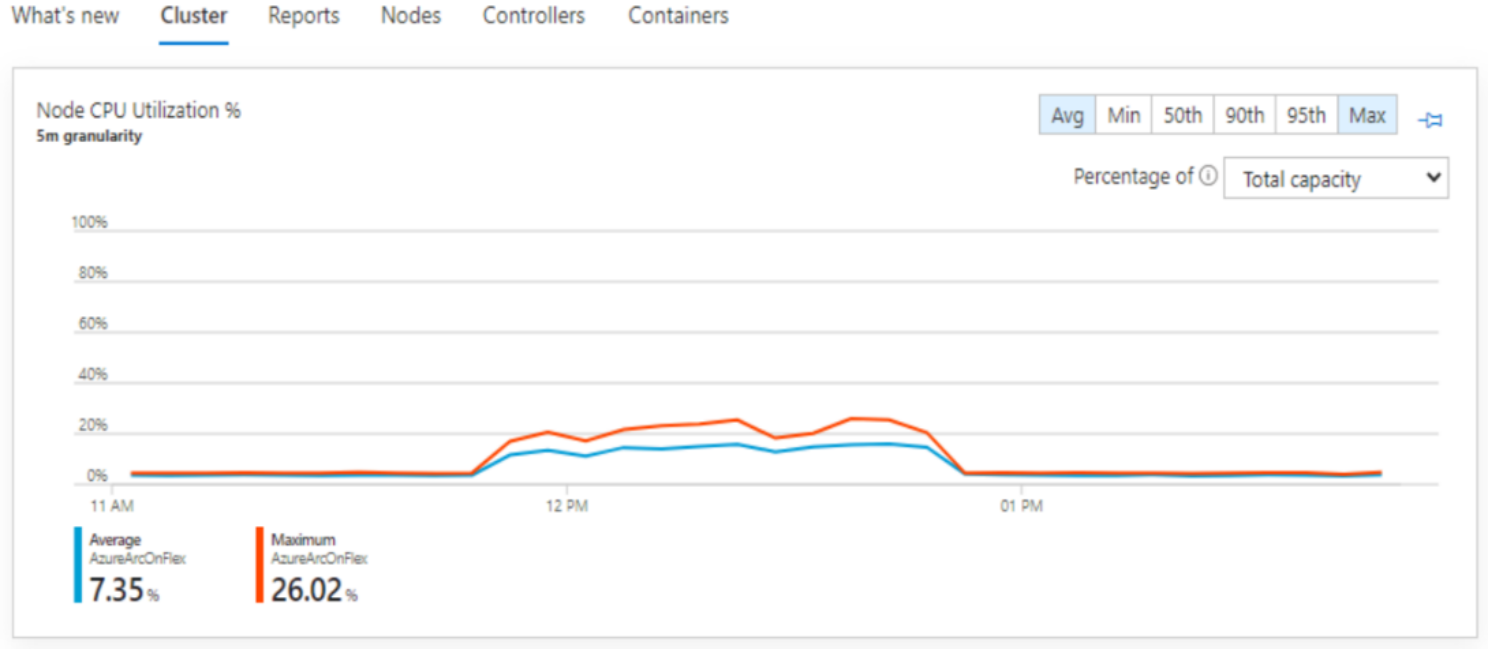
Node CPU utilization – Azure Arc for Kubernetes | Insights

The Users can reference Azure Monitor from the Azure Portal. There is a wealth of observability information with Azure Monitor. The chart below references CPU node utilization during the Test-LargeMI run. From this graph we can observe that, there is still plenty of room for the additional workloads with regard to CPU. 
Chart, line chartDescription automatically generated 

Figure 4.        Azure Monitor

Test case results

Test case results

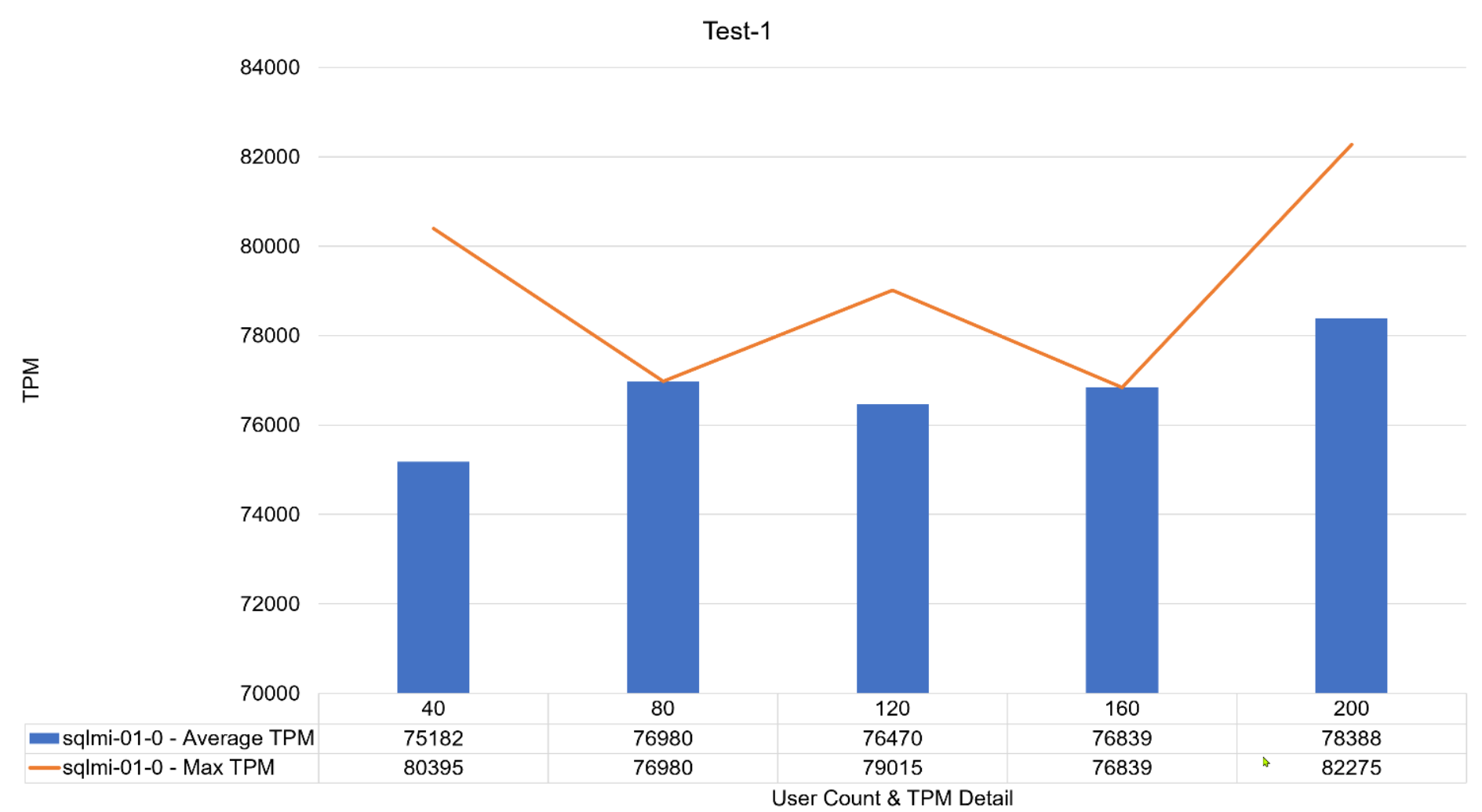
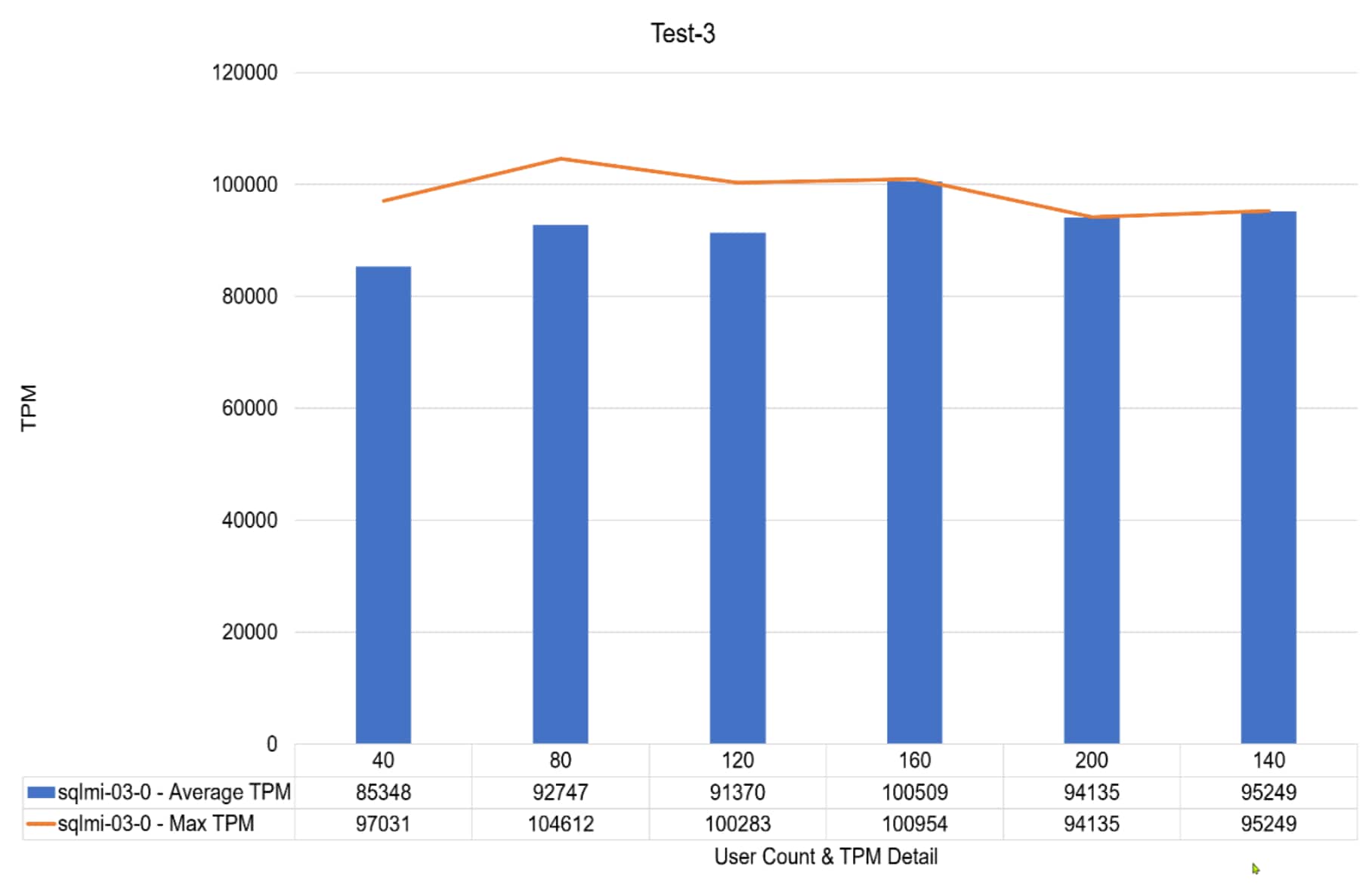
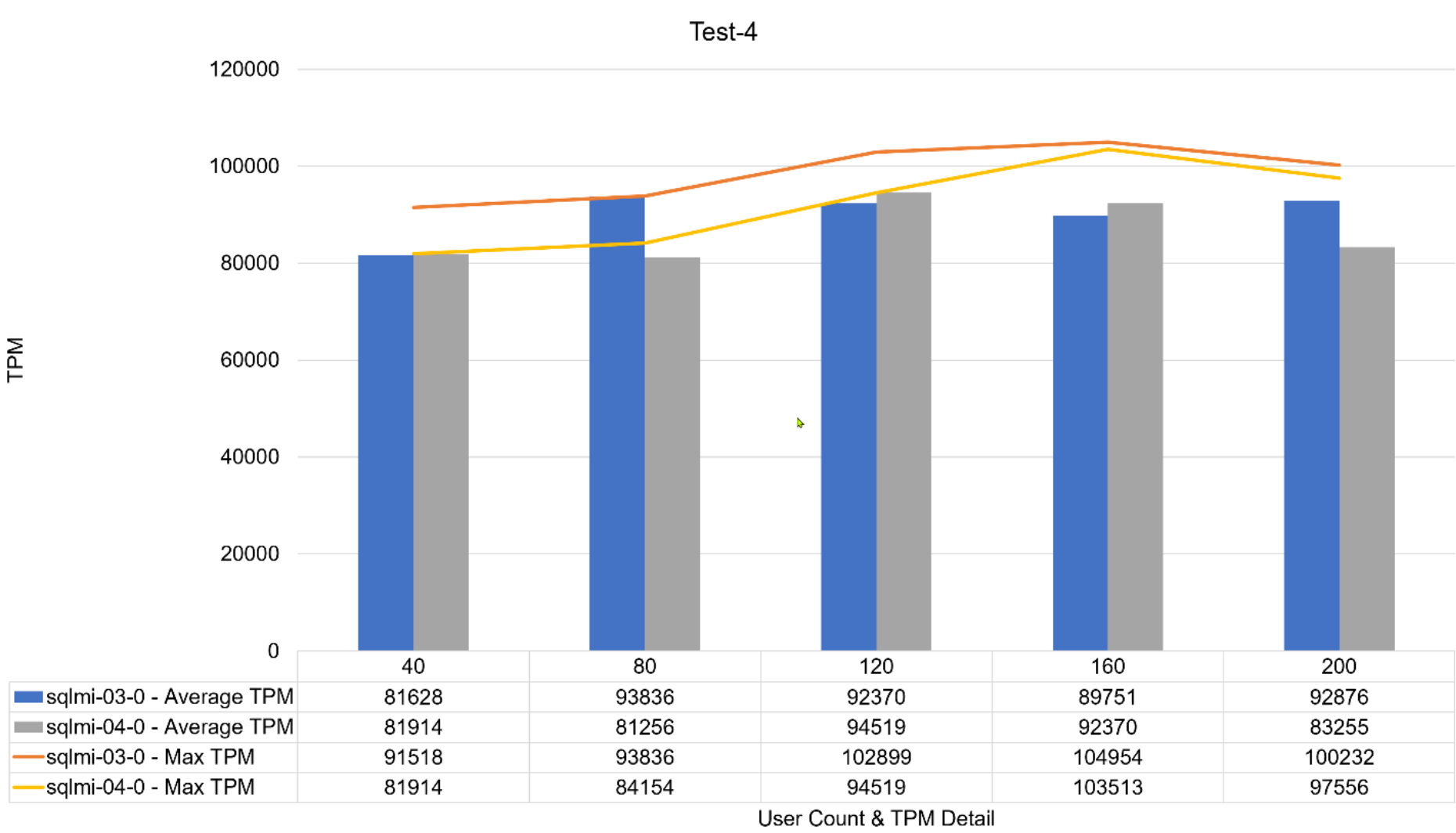
The following figures show the test results that we obtained, by the test groups. For more information about the test cases, see the Test cases defined.
ChartDescription automatically generated 

Figure 5.        Test 1 results – 1 SQLMI with 2 vCPUs and 4Gi memory 
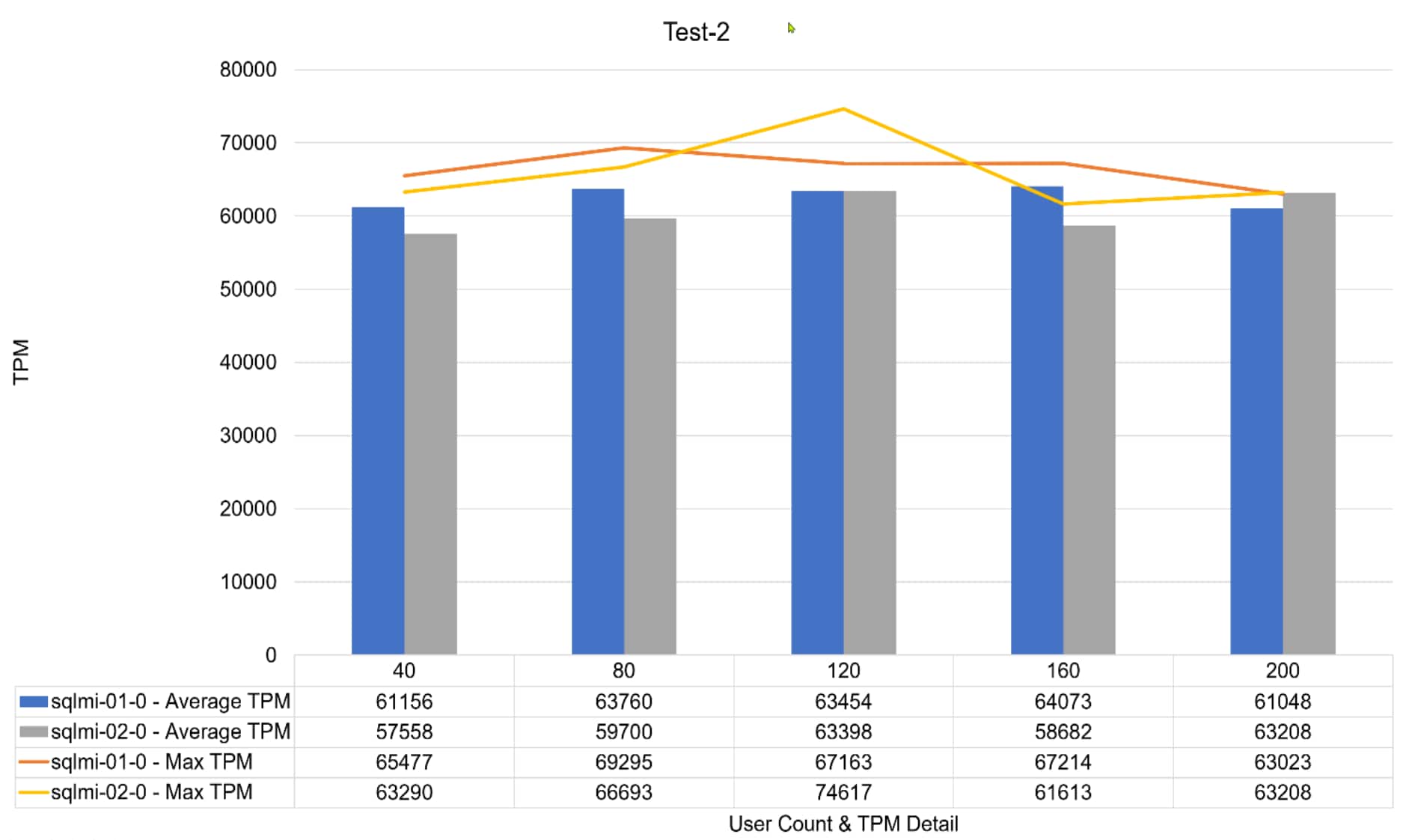

Figure 6.        Test 2 results – 2 SQL MI with 2 vCPUs and 4Gi memory each
Chart, bar chartDescription automatically generated 

Figure 7.        Test 3 results – 1 SQL MI with 4 vCPUs and 4Gi memory
ChartDescription automatically generated 

Figure 8.        Test 4 results – 2 SQL MI with 4 vCPUs and 4Gi memory each
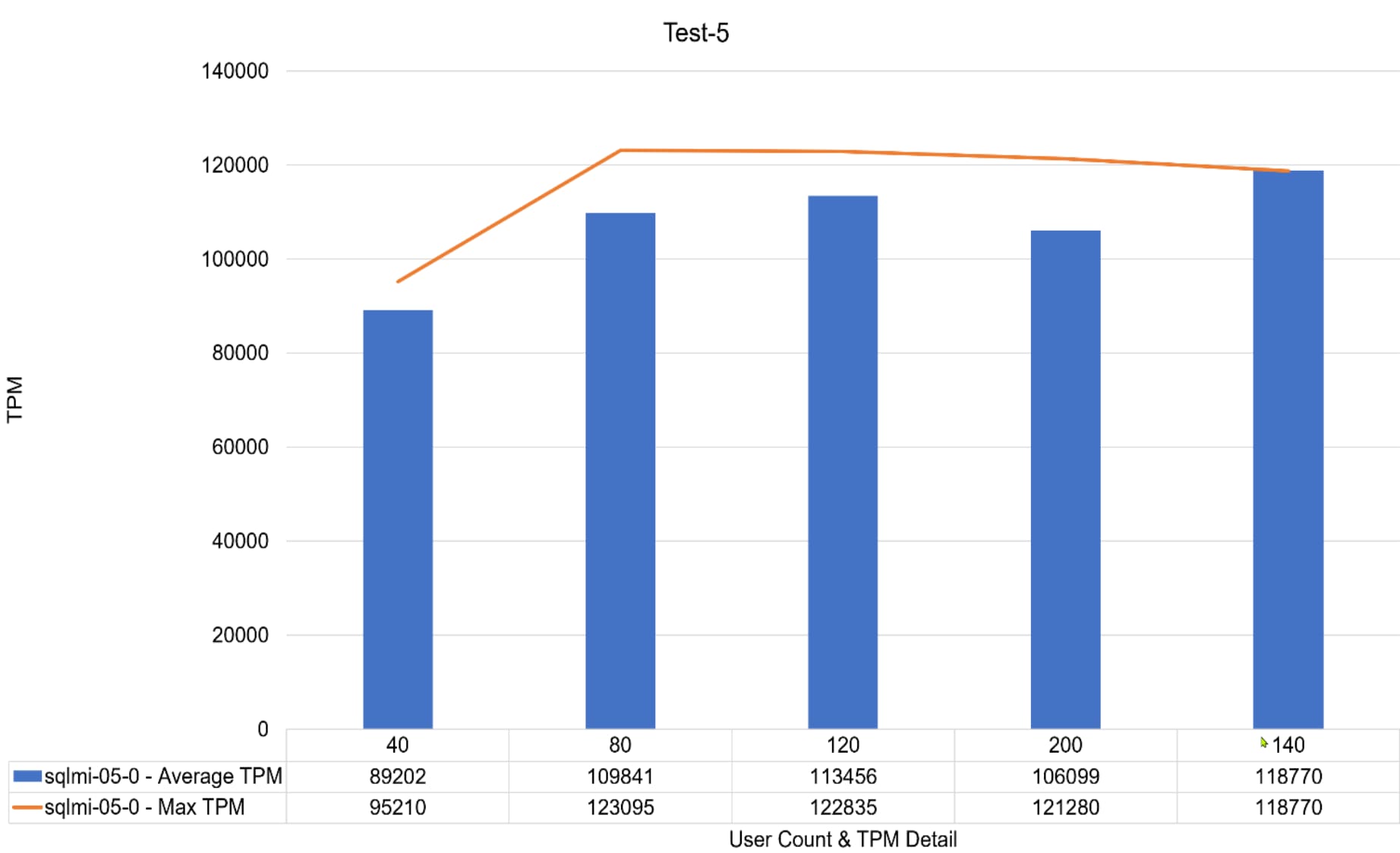
Chart, bar chartDescription automatically generated 

Figure 9.        Test 5 results – 1 SQL MI with 6 vCPUs and, 8Gi memory 
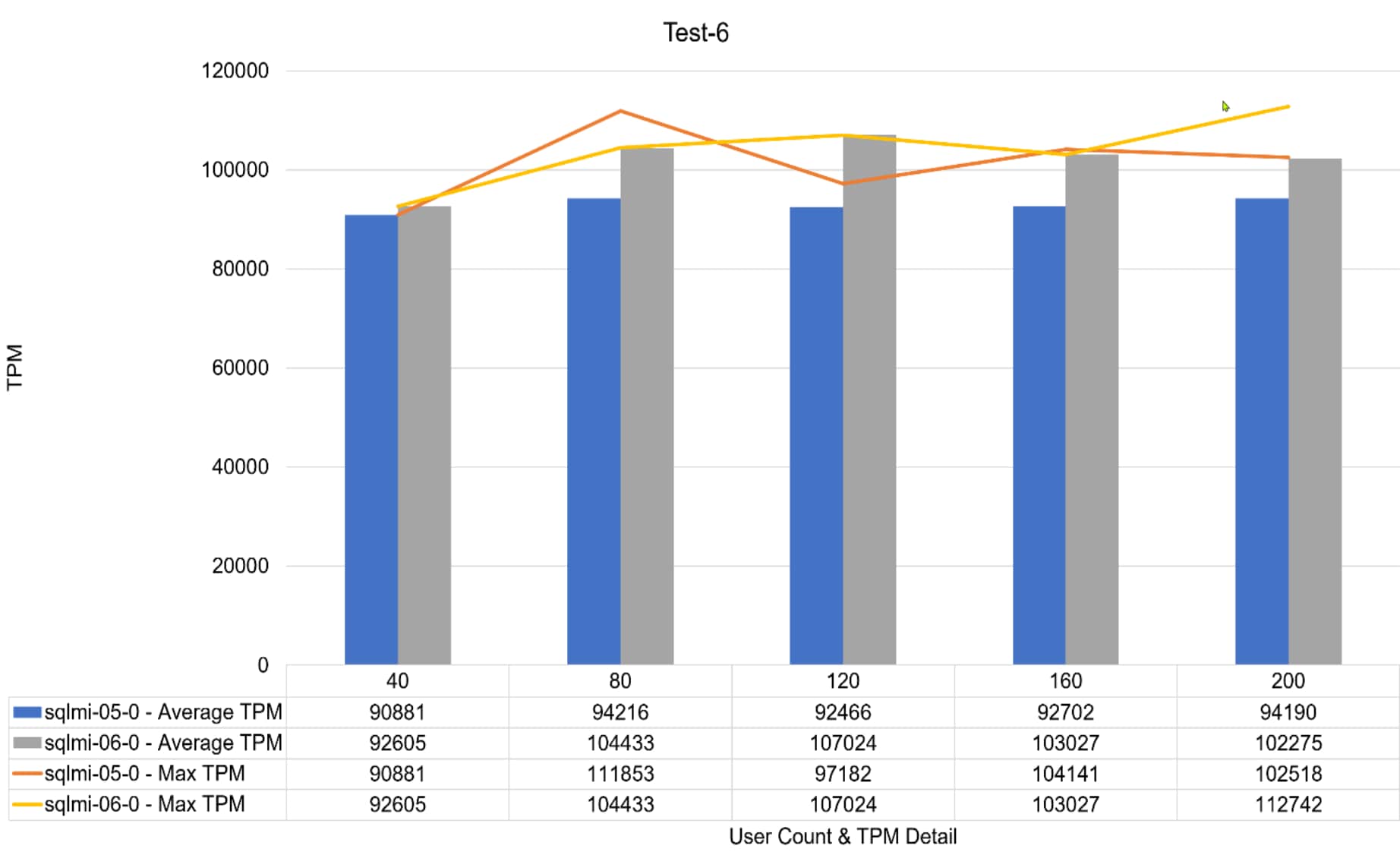
Chart, bar chartDescription automatically generated
Figure 10.    Test 6 results – 2 SQL MI with 6 vCPUs and 8Gi memory each
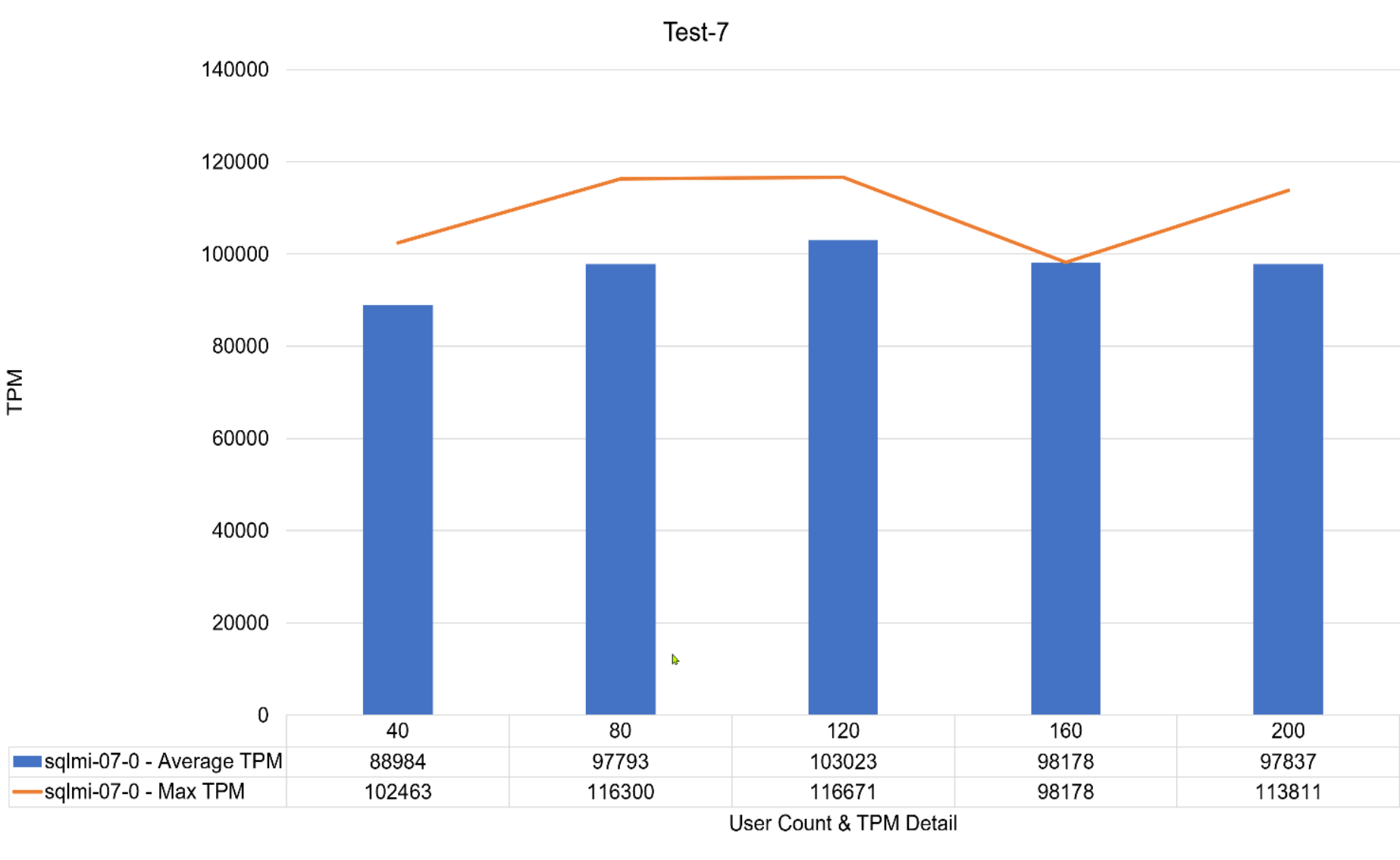
Chart, bar chartDescription automatically generated 

Figure 11.    Test 7 results – 1 SQL MI with 8 vCPUs and 8Gi memory 
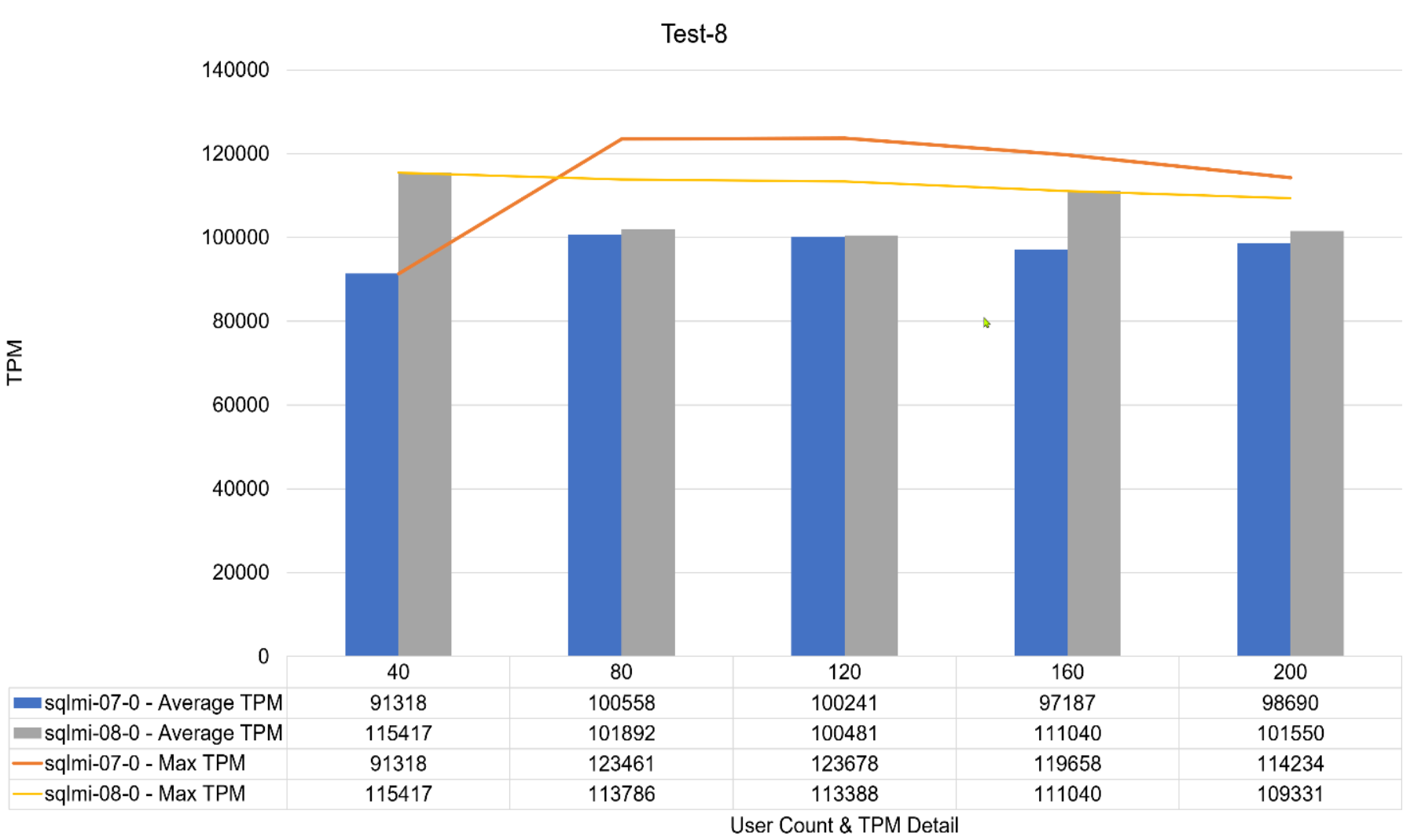
Chart, bar chartDescription automatically generated 

Figure 12.    Test 8 results – 2 SQL MI with 8 vCPUs, 8Gi memory each
Chart, bar chartDescription automatically generated

Figure 13.    Test 9 results – 1 SQL MI with 16 vCPUs, 16Gi memory
Chart, bar chartDescription automatically generated

Figure 14.    Test 10 results -2 SQL MI with 16 vCPUs, 16Gi memory 
TableDescription automatically generated

Figure 15.    Test-large-MI results

Conclusion

Conclusion

Our functional and performance testing showed that a SQL Managed Instance with PowerFlex enables rapid deployment, ease of management, and elastic scale, while ensuring that the database Transactions Per Minute are aligned with the SLAs of the business. The SQL MI DBaaS platform delivered substantial ease of use while addressing database management challenges.

This paper demonstrates the power and capability of the PowerFlex and Azure Arc solution architecture when combined with Azure Arc-enabled data services to deliver DBaaS with ease, performance, and scale.

For more information about the PowerFlex and Azure Arc architecture, contact your Dell representative.

Appendix A: SQL MI and Hammer DB Test Harness details

Appendix A: SQL MI and Hammer DB Test Harness details

This section provides best practices and recommendations for SQL MI and Hammer DB test harness.

Perform the following deployment steps for the multi-instance SQL MI test harness:

Note: All the tasks are authored and managed with VS Code.

                  1. Deploy a SQL MI with Azure Arc-enabled data services in indirect mode.

                  2. build the TPCC database on the first SQL MI and presize the SQL Server data and log files.

                  3. Retrieve the SQL MI endpoint IP for the instance that we were restoring the database into.

                  4. Restore the database backup is to the arc-sqlmi container in the appropriate SQL MI pod.

                  The T-SQL Stored Procedure test harness is deployed.

                  5. Create a custom T-SQL procedure and deploy to the Master database on the instance and insert the results into a reporting table:

CREATE TABLE dbo.TPSvalues 

    (

    RowID_TPSvalues INT IDENTITY (1,1)

    ,ServerName VARCHAR(20)

    ,ValueReportTime SMALLDATETIME

    ,TPSvalue BIGINT

    ,TPSvaluePerMinute BIGINT

    ,TPSvaluePerSecond AS (TPSvaluePerMinute / 60) PERSISTED

    ,UserCount INT

    ,CPUCount INT

    ,[CommittedMemory(MB)] BIGINT

    ,[TargetMemoryGoal(MB)] BIGINT

    ,BatchID UNIQUEIDENTIFIER

    ,CpuRank NVARCHAR(MAX)

    ) ;

Perform the following deployment steps for the HammerDB test harness:

A timed HammerDB workload is run with an incrementing user count. The autorundrive.tcl file is used and updated with the IP address of the SQL MI endpoint. Then the batch file is run using the integrated terminal from the HammerDB root directory in C:\Program Files\HammerDB-4.2. 

The multiinstance test batch file included two execution statements per instance:

  1. Run a small piece of dynamic SQL was in a .sql file that resides in the HammerDB root execution directory.
  2. Start the SQL MI specific HammerDB drive CLI - each containing the specific IP for each instance endpoint.
  3. Run the process for the duration that is configured in the HammerDB autorundrive.tcl file.
  4. A master reporting SQL instance is deployed. A linked Server connection is used for each of the SQL MIs to retrieve the records by batch ID.
  5. The TPM results must be grouped by batch ID on the reporting host.
  6. Finally, pull the aggregated data to an Excel and use it as pivot tables to display the results in charts.

Appendix B: SQL MI related service management using kubectl

Appendix B: SQL MI related service management using kubectl

This section provides best practices and recommendations for SQL MI related service management using kubectl.

Run the following command to expose the external services:


Kubectl get services -n arc | grep “sqlmi-01”

Figure 16.    Get Services – General Purpose

Run the following command to check the services that are deployed by the various SQL MIs.
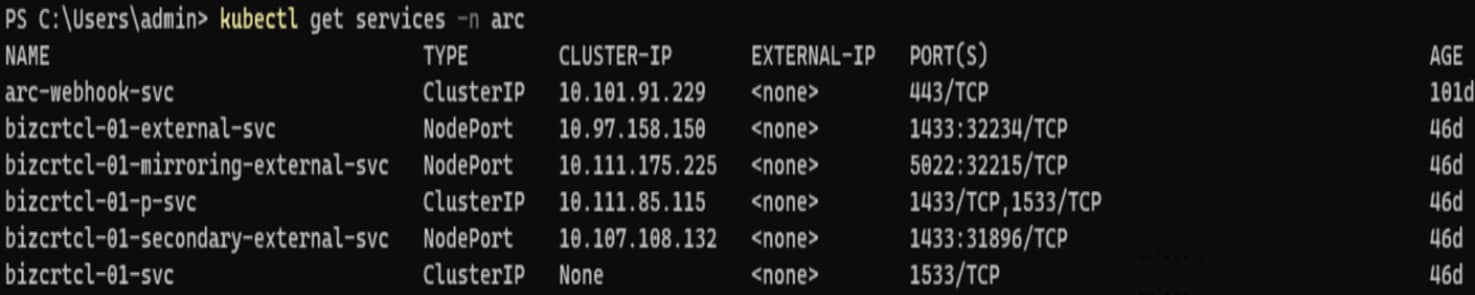
TextDescription automatically generated
Kubectl get services -n arc

Figure 17.    Get Services

To work with the other HA nodes that were deployed as part of the business-critical tier, a Load Balancer service is added.

kubectl -n arc expose pod bizcrtcl-01 --port=1533 --name= bizcrtcl-01-p --type=LoadBalancer

Appendix C: Red Hat Linux configuration

Appendix C: Red Hat Linux configuration

This section provides best practices and recommendations for configuring the Red Hat Linux operating system.

Perform the following steps:

  • Run the following command to modify max_sector_kb to 1024 for all database volumes

echo 1024 > /sys/block/sdc/queue/max_sectors_kb

  • Run the following command to modify nr_requests to 1024 for all database volumes

echo 1024 > /sys/block/sdc/queue/max_sectors_kb/nr_requests

  • Microsoft recommendations

See, Performance best practices and configuration guidelines for SQL Server on Linux

  • Apply the tuned-profile for SQL Server
    • Create a directory with the name mssql under /usr/lib/tuned
    • Create a file named tuned.conf

# A tuned configuration for SQL Server on Linux 

[main]

summary=Optimize for Microsoft SQL Server

include=throughput-performance 

[cpu]

force_latency = 5

[sysctl]

vm.swappiness = 1

vm.dirty_background_ratio = 3

vm.dirty_ratio = 80

vm.dirty_expire_centisecs = 500

vm.dirty_writeback_centisecs = 100

vm.transparent_hugepages=always

# For , use

# vm.transparent_hugepages=madvice

vm.max_map_count=1600000

net.core.rmem_default = 262144

net.core.rmem_max = 4194304

net.core.wmem_default = 262144

net.core.wmem_max = 1048576

kernel.numa_balancing=0

kernel.sched_latency_ns = 60000000

kernel.sched_migration_cost_ns = 500000

kernel.sched_min_granularity_ns = 15000000

kernel.sched_wakeup_granularity_ns = 2000000

  • Save the following file to activate:

chmod +x /usr/lib/tuned/mssql/tuned.conf

tuned-adm profile mssql

  • Confirm that the profile has been activated, by running:

tuned-adm list

References

Dell Technologies documentation

The following Dell Technologies documentation provides additional information that is relevant to this solution. Access to these documents depends on your login credentials. If you do not have access to a document, contact your Dell Technologies representative.