CloudPools Operation Workflows
The Dell PowerScale CloudPools feature of OneFS allows tiering cold or infrequently accessed data to move to lower-cost cloud storage. CloudPools extends the PowerScale namespace to the private cloud, or the public cloud. For CloudPools supported cloud providers, see the CloudPools Supported Cloud Providers blog.
This blog focuses on the following CloudPools operation workflows:
- Archive
- Recall
- Read
- Update
Archive
The archive operation is the CloudPools process of moving file data from the local PowerScale cluster to cloud storage. Files are archived either using the SmartPools Job or from the command line. The CloudPools archive process can be paused or resumed.
The following figure shows the workflow of the CloudPools archive.
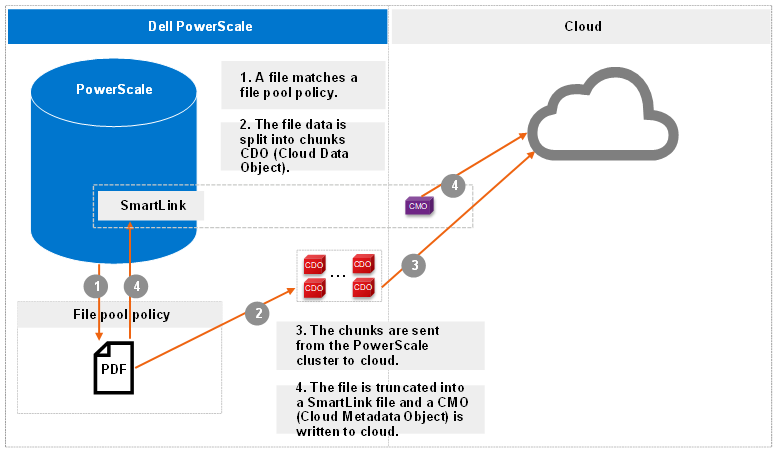
Figure 1. Archive workflow
More workflow details include:
- The file pool policy in Step 1 specifies a cloud target and cloud-specific parameters. Policy examples include:
- Encryption: CloudPools provides an option to encrypt data before the data is sent to the cloud storage. It uses the PowerScale key management module for data encryption and uses AES-256 as the encryption algorithm. The benefit of encryption is that only encrypted data is being sent over the network.
- Compression: CloudPools provides an option to compress data before the data is sent to the cloud storage. It implements block-level compression using the zlib compression library. CloudPools does not compress data that is already compressed.
- Local data cache: Caching is used to support local reading and writing of SmartLink files. To optimize performance, it reduces bandwidth costs by eliminating repeated fetching of file data for repeated reads and writes. The data cache is used for temporarily caching file data from the cloud storage on PowerScale disk storage for files that have been moved off cluster by CloudPools.
- Data retention: Data retention is a concept used to determine how long to keep cloud objects on the cloud storage.
- When chunks are sent from the PowerScale cluster to cloud in Step 3, a checksum is applied for each chunk to ensure data integrity.
Recall
The recall operation is the CloudPools process of reversing the archive process. It replaces the SmartLink file by restoring the original file data on the PowerScale cluster and removing the cloud objects in cloud. The recall process can only be performed using the command line. The CloudPools recall process can be paused or resumed.
The following figure shows the workflow of CloudPools recall.
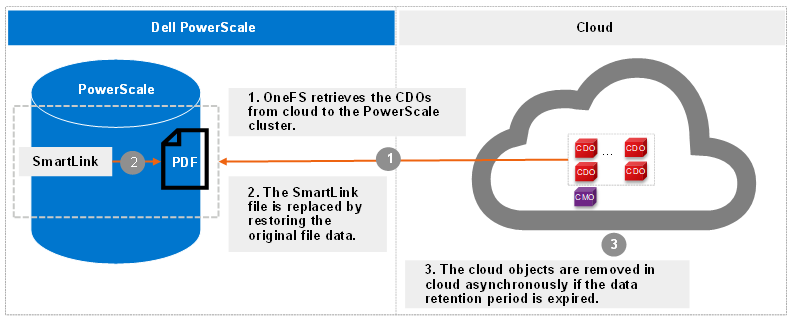
Figure 2. Recall workflow
Read
The read operation is the CloudPools process of client data access, known as inline access. When a client opens a file for read, the blocks are added to the cache in the associated SmartLink file by default. The cache can be disabled by setting the accessibility in the file pool policy for CloudPools. The accessibility setting is used to specify how data is cached in SmartLink files when a user or application accesses a SmartLink file on the PowerScale cluster. Values are cached (default) and no cache.
The following figure shows the workflow of CloudPools read by default.
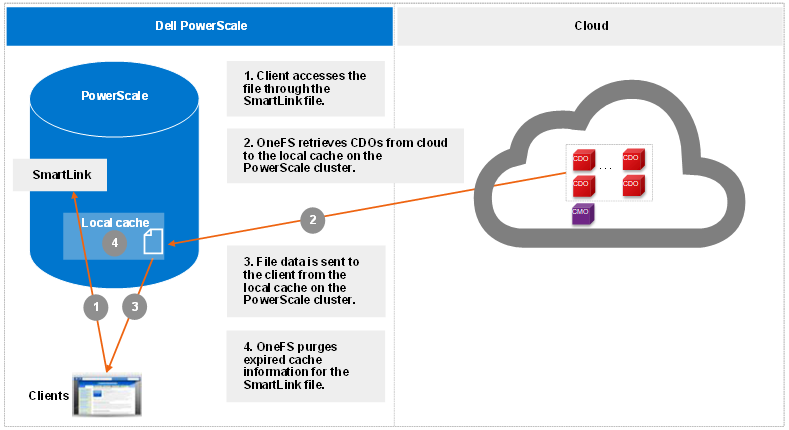
Figure 3. Read workflow
Starting from OneFS 9.1.0.0, cloud object cache is introduced to enhance CloudPools functions for communicating with cloud. In Step 1, OneFS looks for data in the object cache first and OneFS retrieves data from the object cache if the data is already in the object cache. Cloud object cache reduces the number of requests to cloud when reading a file.
Prior to OneFS 9.1.0.0, in Step 1, OneFS looks for data in the local data cache first. It moves to Step 3 if the data is already in the local data cache.
Note: Cloud object cache is per node. Each node maintains its own object cache on the cluster.
Update
The update operation is the CloudPools process that occurs when clients update data. When clients change to a SmartLink file, CloudPools first writes the changes in the data local cache and then periodically sends the updated file data to cloud. The space used by the cache is temporary and configurable.
The following figure shows the workflow of CloudPools update.
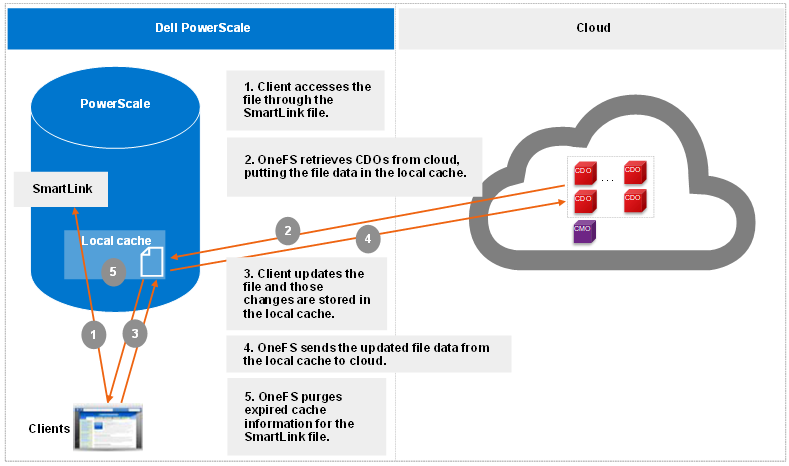
Figure 4. Update workflow
Thank you for taking the time to read this blog, and congratulations on gaining a clear understanding of how the OneFS CloudPools operation works!
Author: Jason He, Principal Engineering Technologist