Code Generation Deployment Guide - Dell Generative AI with Intel | Enterprise RAG
Introduction
Solution Introduction:
Dell Generative AI Solutions with Intel | Enterprise RAG combines the power of Intel® Xeon® processors and Intel® Gaudi® 3 AI accelerators with Dell’s high-performance servers, storage, networking, professional services, and full stack of open-source software to offer a turnkey RAG solution that makes turning enterprise data into actionable insights easy. This jointly engineered RAG solution offers several open, end-to-end, enterprise-specific RAG use cases that are optimized to deliver enhanced performance, cost efficiency, and scalability, all while ensuring user and data security.
The Code Generation use case, powered by the Open Platform for Enterprise AI (OPEA), enables enterprises to automate code generation to adhere to best practices, reduce human error, and reduce technical debt.
Example applications:
- Automatically complete code snippets based on retrieved documentation.
- Suggest code modifications based on historical fixes or patches.
Document purpose:
This deployment guide provides an overview of the steps required to install and deploy Dell Generative AI Solutions with Intel | Enterprise RAG Code Generation using Docker Compose. A set up demonstration video is also available here.
This deployment guide is a companion guide to the Dell Generative AI Solutions with Intel | Enterprise RAG deployment guide, which provides an overview of the entire solution, including software, hardware, and networking requirements.
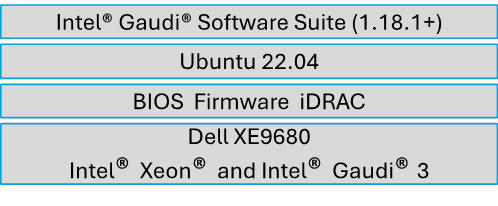
Note: The contents of this document are valid for the following software and hardware versions. For information about updated configurations for newer software and hardware versions, contact your Dell Technologies sales representative.
Audience:
This deployment guide is intended for solution architects, system administrators, and deployment personnel as well as anyone who is interested in AI-driven code generation systems. Experience with networking, container technology, and Dell and Intel hardware and software is required.
Installation Guide using Docker Compose
1. Clone the Codebase: Retrieve the codebase from the Git repository by executing the following command on your host machine:
git clone https://github.com/opea-project/GenAIExamples -b v1.0
2. Set Up Environment Variables: Configure the necessary environment variables:
export no_proxy="localhost, 127.0.0.1, 192.168.1.1”
export http_proxy=${http_proxy}
export https_proxy=${https_proxy}
export host_ip=<<PROVIDE THE HOST IP ADDRESS>>
export LLM_MODEL_ID="Qwen/Qwen2.5-Coder-7B-Instruct"
export TGI_LLM_ENDPOINT="http://${host_ip}:8028"
export HUGGINGFACEHUB_API_TOKEN="<<PROVIDE YOUR HUGGINGFACE API TOKEN>>”
export MEGA_SERVICE_HOST_IP=${host_ip}
export LLM_SERVICE_HOST_IP=${host_ip}
export BACKEND_SERVICE_ENDPOINT="http://${host_ip}/v1/codegen"
Note:
- If you're operating within a proxy environment, make sure to set the appropriate proxy-related environment variables.
- Please set HUGGINGFACEHUB_API_TOKEN environment variable (required to authenticate and download models from the Hugging Face Hub).
3. Navigate to the Compose File Directory: Navigate to the directory containing the Docker Compose file for Gaudi:
cd GenAIExamples/CodeGen/docker_compose/intel/hpu/gaudi
4. Build and Deploy Code Generation Example: Build and Deploy Code Generation Example on Gaudi using Docker Compose.
docker compose up -d
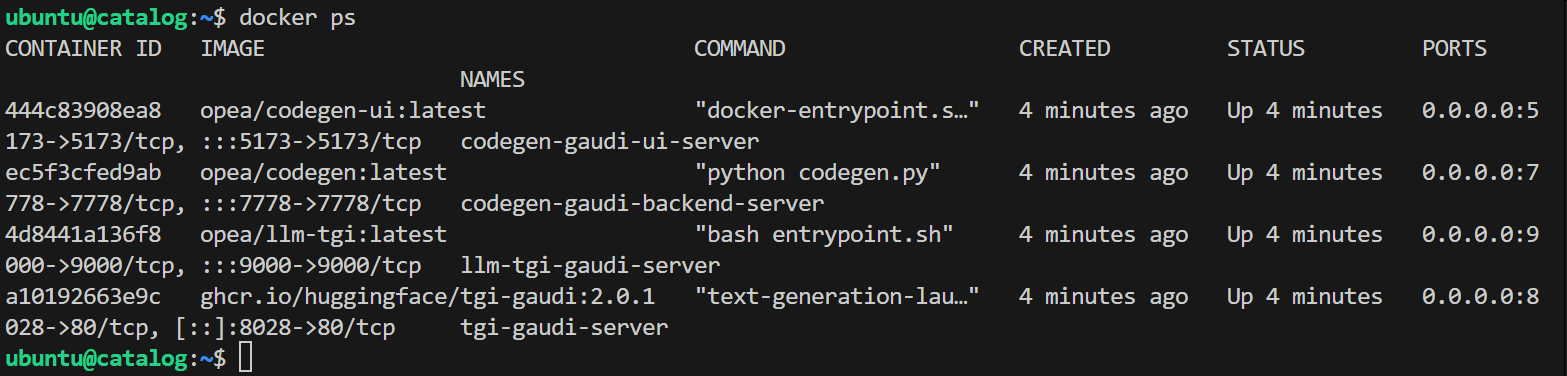
5. Verify Service Status: Once the services are deployed successfully, check the status of all services to ensure they are running correctly. Use the following command to list the status of the services:
docker ps
6. Validate the Mega Service: Validate the Mega Service using the following CURL command:
curl -X POST http://${host_ip}:7778/v1/codegen -H "Content-Type: application/json" -d '{ "messages": "Write a Python function to add two numbers and return the result" }'
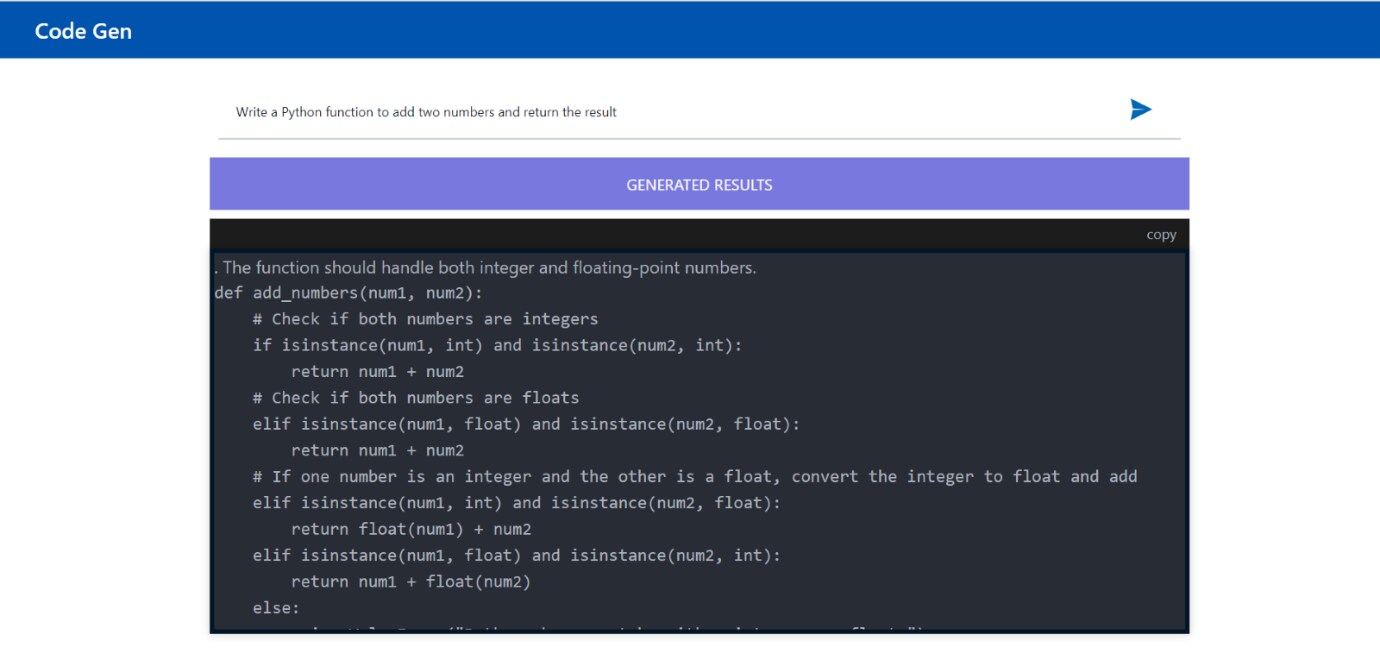
7. Access the Code Generation GUI: To access the frontend, open the following URL in your browser:
http://${host_ip}:5173
Note: Ensure the host_ip matches the environment variable set earlier.
Summary
This deployment guide provides guidance for deploying the Code Generation use case, powered by OPEA. Code Generation is one of several use cases offered by Dell GenAI Solutions with Intel | Enterprise AI. The deployment steps describe how to install, build, and deploy the Code Generation use case on Intel Gaudi using Docker Compose. The final deployment steps describe how to verify the solution using a CURL command to validate the Mega Service.
References
- Enterprise RAG Deployment Guide with Intel® Gaudi®3 and Dell PowerEdge
- Deploy | Each of the following use case deployment guides provides full details on technical execution, including dependencies: