Container Storage Modules for Dell PowerFlex : Authorization Module
Executive summary
Solution overview
Dell Technologies Container Storage Modules (CSM) enables simple and consistent integration and automation experiences, extending enterprise storage capabilities to Kubernetes for cloud-native stateful applications. It reduces management complexity so that the developers can independently use enterprise storage and automate daily operations such as provisioning, snapshotting, replication, observability, authorization, application mobility, and resiliency.
The Dell CSM Authorization module extends the Kubernetes API to support role-based access controller for PowerFlex storage using CSI Drivers.
This paper explains the Authorization feature of Dell Container Storage Modules (CSM) and how it can be used to apply quotas and role-based access control rules to use the storage resources on Dell PowerFlex.
For more information about Authorization module, see the Authorization documentation.
Audience
The document is intended for sales engineers, field consultants, IT administrators, customers, and anyone else interested in configuring and deploying Kubernetes on Dell PowerFlex family.
Readers are expected to have an understanding and working knowledge of containers, Kubernetes, PowerFlex, Red Hat Enterprise Linux operating system and PowerFlex.
Terminology
The following table provides definitions for some of the terms that are used in this document.
Table 1. Terminology
|
Term |
Definition |
|
CSM |
Container Storage Modules |
|
CSI |
Container Storage Interface |
|
CRD |
Custom Resource Definition |
|
iDRAC |
Integrated Dell Remote Access Controller |
|
PV |
Persistent Volumes |
|
PVC |
Persistent Volumes Claim |
|
RBAC |
Role Based Access Control |
|
SDC |
Storage Data Client for PowerFlex |
|
SDS |
Storage Data Server for PowerFlex |
|
VLAN |
Virtual Local Area Network |
|
VM |
Virtual Machine |
We value your feedback
Dell Technologies and the authors of this document welcome your feedback on the solution and the solution documentation. Contact the Dell Technologies Solutions team by email .
Author: Sushil Kumar Suvarna
Note: For links to additional documentation for this solution, see Dell Technologies Solutions Info Hub for PowerFlex.
Product overview
PowerFlex
PowerFlex family
PowerFlex software-defined infrastructure enables broad consolidation across the data center, encompassing almost any type of workload and architecture. The software-defined architecture offers automation and programmability of the complete infrastructure and provides scalability, performance, and resiliency to enable effortless adherence to stringent workload SLAs.
The PowerFlex family provides a foundation that combines compute and high-performance storage resources in a managed unified fabric. PowerFlex comes in flexible deployment options (rack, appliance, or custom nodes and in the public cloud) that enables independent (two-layer), HCI (single-layer), or mixed architectures. PowerFlex is ideal for high-performance applications and databases, building an agile private/hybrid cloud, or consolidating resources in heterogeneous environments.
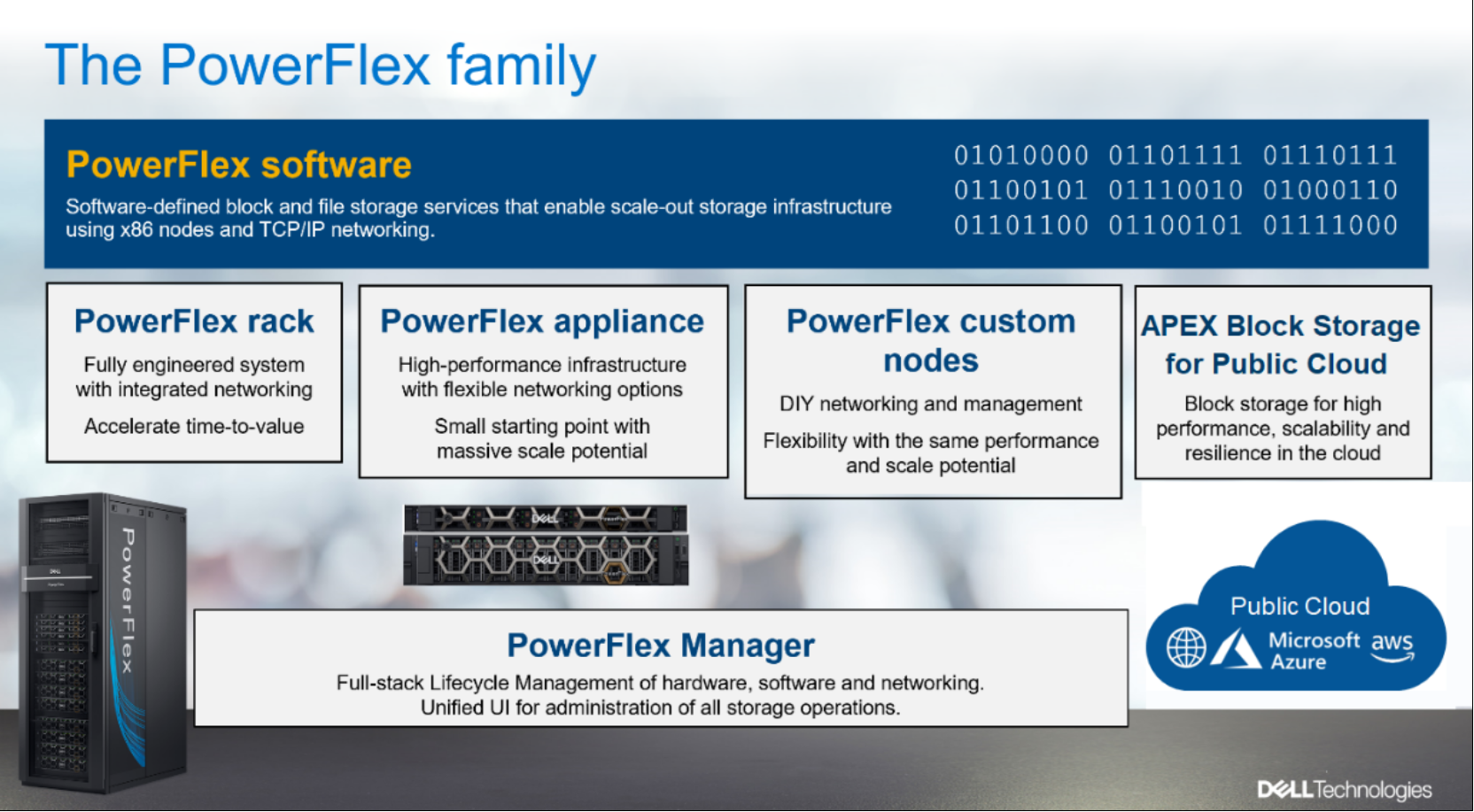
Figure 1. PowerFlex family
PowerFlex software components
Software is the key differentiation in the PowerFlex offering. PowerFlex software components not only provide software-defined storage services, but also help simplify infrastructure management and orchestration. This software enables comprehensive IT Operational Management (ITOM) and Life Cycle Management (LCM) capabilities that span compute as well as storage infrastructure, from BIOS and Firmware to nodes, software, and networking.
PowerFlex
PowerFlex is the software foundation of PowerFlex software-defined infrastructure. It is a scale-out block and file storage service that is designed to deliver flexibility, elasticity, and simplicity with predictable high performance and resiliency at scale.
PowerFlex Manager
PowerFlex Manager is the software component in the PowerFlex family that enables ITOM automation and LCM capabilities for PowerFlex systems. Starting with PowerFlex 4.0, the unified PowerFlex Manager brings together three separate components used in previous releases – PowerFlex Manager, the core PowerFlex UI, and the PowerFlex gateway. The new PowerFlex UI runs in Kubernetes and embraces a modern development framework.
PowerFlex File Services
PowerFlex File Controllers, also known as File Nodes, are physical nodes that enable PowerFlex software defined File Services. They host the NAS Servers, which in turn host the tenant namespaces and file systems, mapping PowerFlex volumes to the file systems presented by the NAS Servers. All major protocols are supported, such as NFS, SMB/CIFS, FTP, and NDMP. PowerFlex file service is supported from PowerFlex 4.0.
PowerFlex with NVMe over TCP (NVMe/TCP)
NVMe is a family of open specifications that defines an industry standard for both a logical interface and a communication protocol for accessing block storage across an internal PCIe fabric or through external fabrics such as TCP/IP and FC. NVMe is designed to take advantage of the internal parallelism and low latency inherent in flash-based media SSDs.
NVMe/TCP is an extension of the NVMe base specification that defines the binding of the NVMe protocol to message-based fabrics using TCP. By binding the NVMe protocol to TCP, NVMe/TCP enables the efficient end-to-end transfer of commands and data between NVMe hosts and NVMe controller devices by any standard Ethernet-based TCP/IP networks.
From PowerFlex release 4.x onwards, support for NVMe/TCP has been added for on-premises deployment with the introduction of a new Storage Data Target (SDT) component installed in the storage layer. The NVMe initiator in the operating system or hypervisor communicates with the SDT, which then communicates with the Storage Data Server (SDS). The NVMe initiator is part of the kernel of the application host operating system or hypervisor.
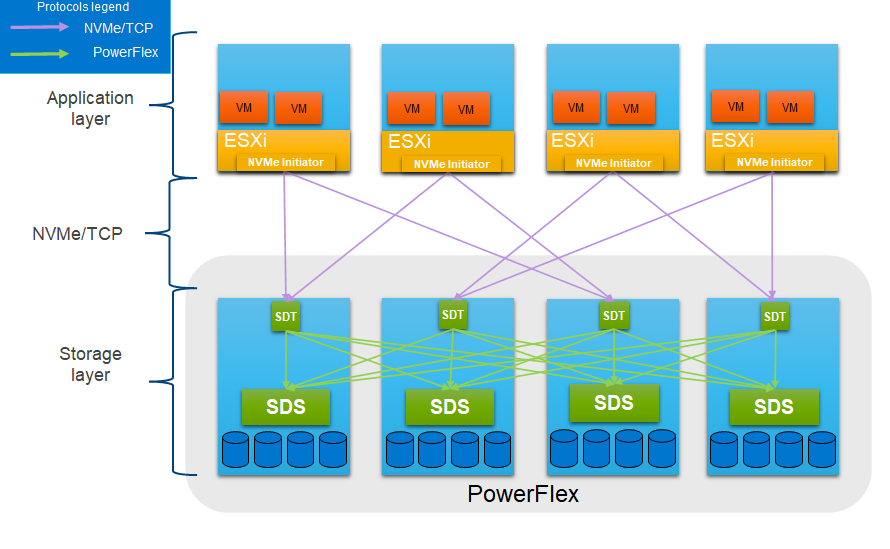
Figure 2. PowerFlex with NVMe/TCP
For more information, see PowerFlex with NVMe over TCP.
PowerFlex deployment architectures
PowerFlex software-defined infrastructure excels in deployment flexibility. PowerFlex can be deployed in a two-layer (independent compute and storage layers), single-layer (Hyperconverged Infrastructure, or HCI), or a mixture of the two architectures (Mixed).
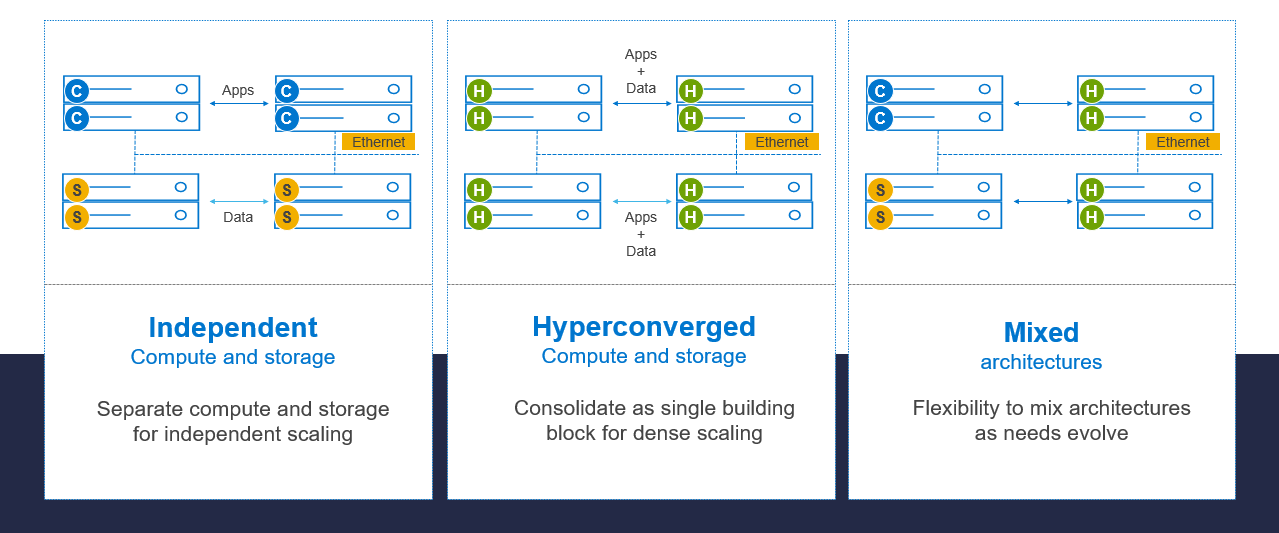
Figure 3. PowerFlex deployment architectures
Independent architecture
In an independent architecture, or two-layer architecture, some nodes provide storage capacity for applications data while other separate and independent nodes provide compute resources for applications and workloads. Compute and storage resources can be scaled independently by adding nodes to the cluster while it remains active. This separation of compute and storage resources can help minimize software licensing costs in certain situations. This architecture is ideal for high-performance databases and application workloads.
Hyperconverged architecture
In an HCI architecture, each node in the cluster contributes storage and compute resources simultaneously to the applications and workloads. This architecture allows you to scale your infrastructure uniformly with building blocks that add both storage and compute resources. This architecture is appropriate for data center and workload consolidation.
Mixed architecture
A mixed architecture is a combination of both the HCI and Independent architectures. As shown in Figure 3 there are some storage-only nodes, compute-only nodes, and HCI nodes as a part of the same PowerFlex cluster. This is a desirable architecture when working with an existing compute infrastructure and adding high-performance software-defined infrastructure. This can also be a starting point for a two-layer deployment design as external workloads are migrated to PowerFlex.
PowerFlex consumption options
PowerFlex rack
PowerFlex rack is a software-defined infrastructure platform that delivers flexibility, elasticity, and simplicity with predictable performance and resiliency at scale by combining compute as well as high-performance storage resources in a managed unified network. This rack-based engineered system, with integrated networking, enables customers to achieve the scalability and management requirements of a modern data center.
PowerFlex appliance
PowerFlex appliance is a PowerEdge server which has been configured as a node in a software-defined infrastructure deployment that runs PowerFlex software components. This offering allows customers the flexibility and savings to bring their own compatible networking.
PowerFlex custom nodes
PowerFlex Custom Nodes are validated server building-blocks that are configured for use with PowerFlex. Custom nodes are available with thousands of configuration options and are available for customers who want to build their own environments.
Dell APEX Block Storage for Public Cloud
PowerFlex software is also available in the public cloud as Dell APEX Block Storage for Public Cloud. It offers the same on-premises benefits of high-performance, linear scalability, and high resilience as in cloud. It also adds cloud-specific benefits, such as large volume sizes, extreme performance based on NVMe drives, and predictable scalability. The Dell APEX Block Storage self-healing architecture simplifies and increases the availability of infrastructure. It is designed to remain running even when it encounters failures. With fast rebuilds, Dell APEX Block Storage recovers rapidly from failures and keeps operating, without degrading performance or compromising availability. You can also extend this availability and configure it to protect your application availability across multiple availability zones.
PowerFlex CSI/CSM
An important component outside of PowerFlex that enables a flexible consumption model for Kubernetes is the PowerFlex CSI driver, developed as a part of the Dell Kubernetes strategy. After loading the CSI driver for PowerFlex into Kubernetes, it can be used to provision persistent volumes from the underlying PowerFlex storage resource. If the Kubernetes deployment is running low on PowerFlex storage resources, you can seamlessly add PowerFlex storage nodes to increase the system capacity and performance.
The CSI driver connects the PowerFlex system and Kubernetes deployments. It is a storage broker which dynamically provisions volumes from PowerFlex through the PowerFlex API gateway to the Kubernetes cluster. Once the volume is available on PowerFlex, it is immediately mapped to the requesting pod. If a pod is destroyed or rescheduled, the CSI plug-in ensures that the volumes are remapped upon that pod’s rescheduling.
Customers running Kubernetes clusters on PowerFlex make use of the Dell Container Storage Modules (CSM), which extend the CSI driver capabilities. These modules:
- Provide enterprise storage capabilities to Kubernetes for cloud-native stateful applications.
- Reduce management complexity, so that developers can independently use enterprise storage with ease and automate daily operations.
- Extend storage functionality and capabilities beyond using the CSI driver alone.
These modules include replication, observability, authorization, application mobility and resiliency.
PowerFlex supports multiple operating systems, different deployment options on-premises and public cloud deployment model (available in AWS and Azure). PowerFlex is validated with the leading Kubernetes distributions as shown in the following figure:
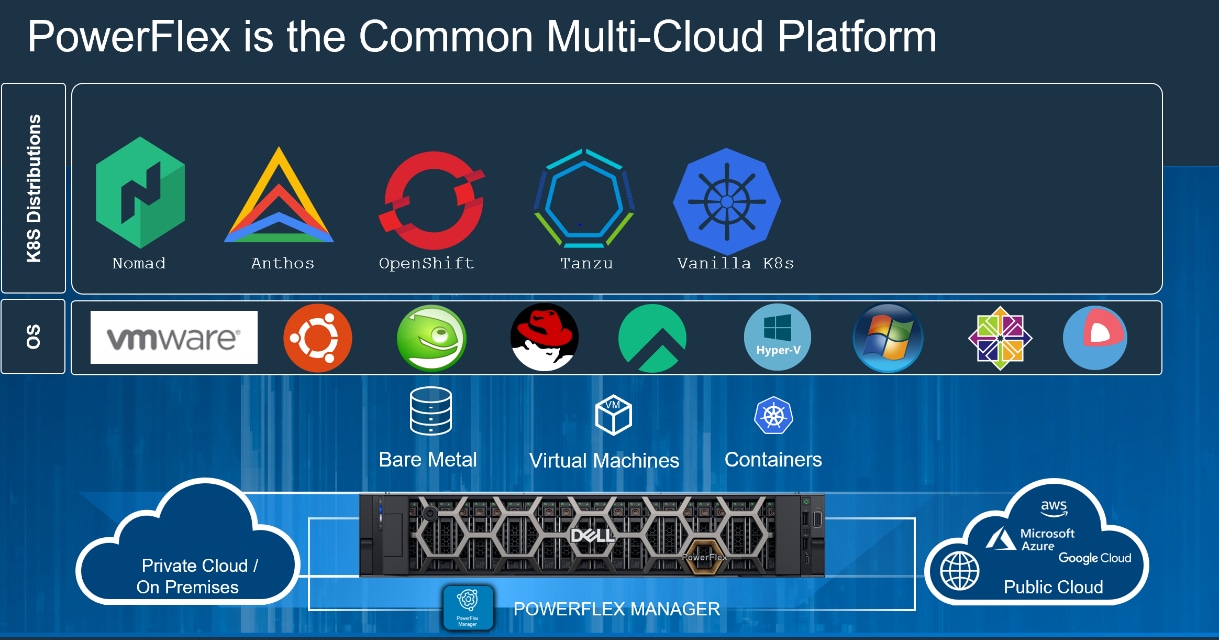
Figure 4. PowerFlex for different Kubernetes distributions
Dell CSM Modules
Overview
Dell Technologies provides various Container Storage Modules (CSM) that are designed to help organizations manage their containerized applications efficiently. These modules provide persistent storage for containerized applications running in a cloud-native environment, while also addressing the challenges of storage in container environments, such as data persistence, scalability, and data protection.
For more information, see Dell Container Storage Module.
Dell CSM module
Dell Container Storage Modules (CSM) has its own unique features and capabilities. Current features that are available with Dell Container Storage Modules (CSM) are as follows:
- Snapshots: Built on CSI point-in-time recovery with additional capabilities such as group/crash consistent snapshots with referential integrity. CSM for Volume Group Snapshots allows you to take crash-consistent snapshots of all the volumes that are attached to a pod simultaneously to avoid inconsistent/corrupt volumes which can be used for backup/testing/restoring.
- Authorization: CSM for Authorization provides storage and Kubernetes administrators the ability to apply RBAC for Dell CSI Drivers.
- Resiliency: CSM for Resiliency is designed to make Kubernetes Applications, including those that use persistent storage, more resilient to various failures.
- Application Mobility: CSM for Application Mobility provides Kubernetes administrators the ability to clone their stateful application workloads and application data to other clusters, either on-premises or in the cloud.
- Replication: CSM for Replication is part of the open-source suite of Kubernetes storage enablers for Dell products.
- Observability: CSM for Observability is part of the open-source suite of Kubernetes storage enablers for Dell products.
To summarize, the Dell Container Storage Modules (CSM) provide a range of features and capabilities that can help organizations to manage their containerized applications efficiently, while also ensuring scalability, flexibility, and data protection.
Kubernetes
Overview
Kubernetes is an open-source container orchestration system that is portable and can be extended to manage containerized workloads and services. Kubernetes facilitates both declarative configuration and automation. Containers are a good way to bundle and run your applications because they have their own file system, CPU, memory, process space, and so on. As the containers are decoupled from the underlying infrastructure, they are portable across clouds and operating system distributions. Kubernetes provides a framework to run distributed systems resiliently.
For more information about Kubernetes, see the Kubernetes documentation.
Solution design
Overview
For using Dell Container Storage Module (CSM) Authorization capabilities, the solution design implements a containerized environment based on a two-layer PowerFlex deployment. One VM is deployed as Kubernetes control node and three compute-only nodes are configured as Kubernetes worker nodes.
The CSM components are installed on the Kubernetes cluster along with the required CRDs and PowerFlex CSI driver.
Logical architecture
The following figure shows the logical architecture of this solution. The figure includes the PowerFlex compute layer with the Kubernetes environment, the PowerFlex storage layer, and the PowerFlex management components.
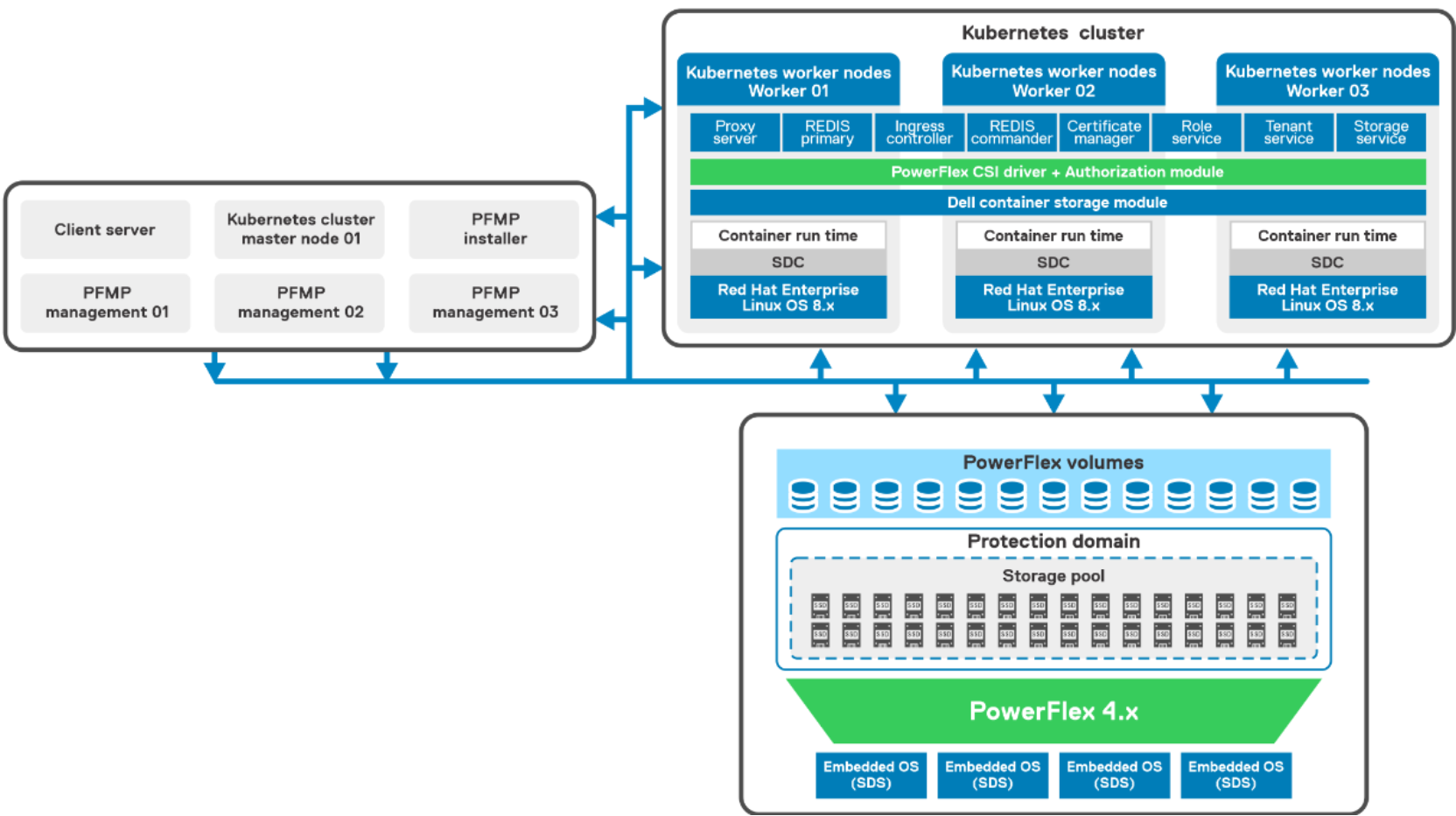
Figure 5. Logical design of Kubernetes Cluster with PowerFlex
The two-layer PowerFlex cluster consists of:
- PowerFlex compute-only node – Three PowerFlex R640 compute only nodes are installed with the Red Hat Enterprise Linux operating system. A Kubernetes cluster with a VM as control node and three bare metal worker nodes are deployed. The PowerFlex SDC component is installed on each worker node to host the workloads. The SDC enables PowerFlex storage to be used by applications running on the compute-only nodes.
- PowerFlex Storage node – Four PowerFlex R640 servers running the PowerFlex Embedded operating system. Each server is attached with SAS SSDs disks. The PowerFlex SDS component is installed on each server which contributes to the PowerFlex storage. The role of the SDS is to perform back-end I/O operations as requested by SDC.
- The PowerFlex storage cluster is deployed using the PowerFlex Manager, which automates the whole deployment process.
- PowerFlex management components – Three PowerFlex R640 servers running ESXi 7.x as the hypervisor hosts multiple PowerFlex management virtual machines (VMs), as follows:
- VMware vCenter Server Appliance (VCSA) deployed as a VM.
- Installer and PowerFlex management are deployed as VMs for deployment of PowerFlex 4.0.
- Network requirements such as Ethernet switching capable of L3 routing and supports trunking, L2 VLAN ID and tagging, VLAN names and numbers, and Port-channel with link aggregation control protocol (LACP) are met.
- NTP is configured for correct time synchronization for ESXi hosts, VMs, and all the bare metal servers.
- DNS and PTR records are set up and properly configured.
For more information about the hardware and operating system that is used in this solution, see Configuration details.
Network architecture
The following diagram shows the network architecture of this solution:
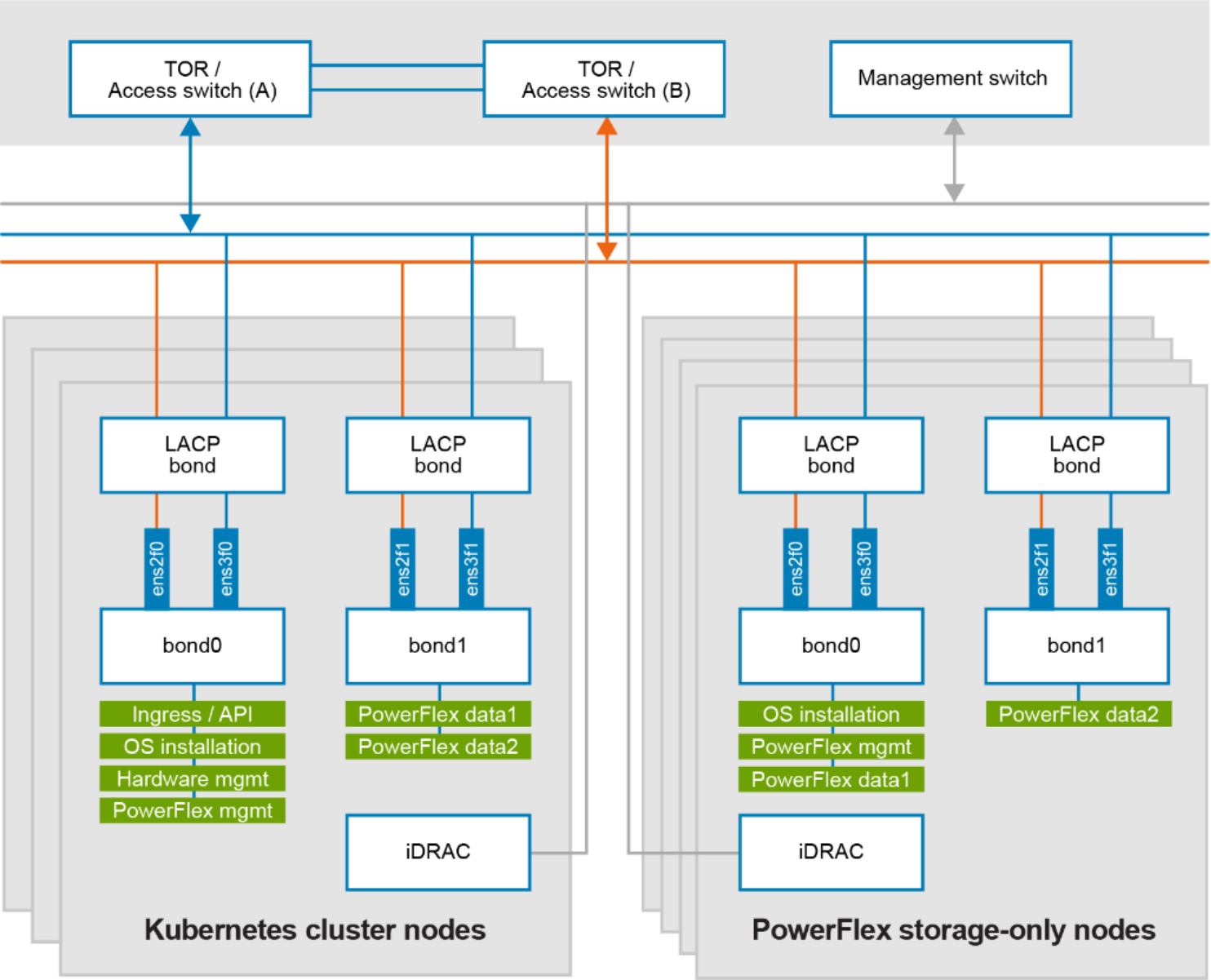
Figure 6. Network design of bare metal nodes and Powerflex SO nodes
At the physical layer, two supported Top of Rack (TOR) switches are used for redundancy and load-balancing purposes. A peer link is configured on both the TOR switches. VLANs are created to separate different traffic types on the network bonds.
The following table shows the different networks that are configured for this solution. See PowerFlex node VLAN setup for more information:
Table 2. Network details
|
Network type |
VLAN ID |
|
Ingress/API |
105* |
|
Operating System Installation |
104 |
|
Hardware Management |
101 |
|
PowerFlex Management |
150 |
|
PowerFlex Data 1 |
152 |
|
PowerFlex Data 2 |
153 |
Note: 105*, is the network required for container Ingress/API traffic and need to Internet connectivity on this network.
Authorization architecture
CSM for Authorization provides storage and Kubernetes administrators the ability to apply RBAC for Dell CSI Drivers. This is achieved by deploying a proxy between the CSI driver and the PowerFlex system to enforce role-based access and usage rules.
Authorization Module - Installs the proxy server, ingress controllers certificate manager and few additional, as part of the module deployment.
Proxy server - This pod forwards all storage requests made by the user applications to the CSM Authorization server.
Karavictl - This is a command line interface that is used to interact with the CSM Authorization module and configure user roles, tenants, and so on.
For more information about the Authorization module and architecture, see the Authorization and Authorization design documentation.
Deploying CSM and Authorization module
Deploying the CSM
Installing the Dell CSM Operator requires:
- A functional Kubernetes cluster - In this solution the Kubernetes cluster is deployed as described in the Logical Architecture section.
- PowerFlex cluster - The cluster to be used by the authorization module for provisioning storage.
Dell CSM enables simple and consistent integration and automation experience, extending enterprise storage capabilities to Kubernetes for cloud-native stateful applications.
The following methods are supported to deploy the authorization module:
- Helm – This is the method that is used in this solution.
Deploying the Authorization module
Steps to deploy the Authorization module:
- Run the following command to download the Authorization module source files from GitHub:
$ git clone https://github.com/dell/helm-charts.git
- Run the following command to create a namespace authorization:
$ kubectl create namespace authorization
- Run the following command to change the directory to edit the config.yaml file, which contains the JWT signing secret:
cd /root/CSM_Modules/helm-charts/samples/csm-authorization
- To update/change the secret, run the following command:
$ vi config.yaml
- To create a secret called karavi-config-secret, run the following command:
$ kubectl create secret generic karavi-config-secret -n authorization --from-file=config.yaml=samples/csm-authorization/config.yaml
- Run the following command to copy and edit the default values.yaml file, to prepare the configuration file:
$ cp charts/csm-authorization/values.yaml myvalues.yaml
- Run the following command to update the configuration file to install the authorization module:
$ vi /root/CSM_Modules/helm-charts/myvalues.yaml
ingress-nginx:
enabled: true # Enable this if using nginx
# the role-service ingress will use role.hostname
hostname: csm-authorization.com #Change as per requirement
hosts:
- authorization-ingress-nginx-controller.authorization.svc.cluster.local
Note: While updating the configuration file, if the default ingress controller nginx is used, then hosts should be updated (as observed above) to indicate the application and namespaces.
- Run the following command to install the authorization module with self-signed certificates:
$ helm -n authorization install authorization -f myvalues.yaml charts/csm-authorization
- Run the following command to verify that the authorization module is successfully installed:
$ kubectl get pods -n authorization
NAME READY STATUS RESTARTS AGE
authorization-cert-manager 1/1 Running 0 45s
authorization-cert-manager-cainjector 1/1 Running 0 44s
authorization-cert-manager-webhook 1/1 Running 0 44s
authorization-ingress-nginx-controller 1/1 Running 0 44s
proxy-server-8c758975c 3/3 Running 0 44s
redis-commander 1/1 Running 0 45s
redis-primary 1/1 Running 0 45s
role-service 1/1 Running 0 45s
storage-service 1/1 Running 0 44s
tenant-service 1/1 Running 0 45s
Note: The pod redis-primary will be in pending state until a local PV is created. Check the event logs to verify for any errors during the installation of the authorization module. If a certificate manager is not available, then the Kubernetes certificate manager needs to be installed.
The installation of the authorization module is complete.
For more information about the Authorization module, such as deployment methods, supported operating system design, and so on, see the Authorization documentation.
Installing Karavictl
Karavictl
Karavictl is a command-line interface (CLI) used to interact and manage Container Storage Modules (CSM) Authorization deployment.
Installing Karavictl
Steps to install Karavictl.
- To download the latest release of karavictl, run the following command:
$ curl -LO https://github.com/dell/karavi-authorization/releases/latest/download/karavictl
- To install karavictl, run the following command:
$ sudo install -o root -g root -m 0755 karavictl /usr/local/bin/karavictl
Karavictl commands and details are available at Karavictl CLI.
Configuring the Proxy Server
Proxy Server details
To complete the CSM authorization module installation, the configurations are performed using the karavictl command to connect to the proxy server. In the following section, detailed steps are provided to complete the configuration.
- To get the ingress rules, run the following command:
$ kubectl -n authorization get ingress
NAME CLASS HOSTS ADDRESSPORTS AGE
proxy-server nginx authorization.dell.labs 80 443 13d
- To check which port is exposed for ingress service, run the following command:
$ kubectl -n authorization get service
NAME PORT(S) AGE
authorization-cert-manager 9402/TCP 13d
authorization-cert-manager-webhook 443/TCP 13d
authorization-ingress- 80:32120/TCP,
nginx-controller 443:30601/TCP 13d
authorization-ingress-nginx-
controller-admission 443/TCP 13d
proxy-server 8080/TCP 13d
redis 6379/TCP 13d
redis-commander 8081/TCP 13d
role-service 50051/TCP 13d
storage-service 50051/TCP 13d
tenant-service 50051/TCP 13d
Make a note of the authorization- ingress-nginx-controller ports, as these will be used later while configuring the proxy server.
- Update the etc/hosts file on the server where the karavictl is installed:
<master_node_ip> authorization.dell.labs
Configuring an Authorization Proxy Server
For configuring authorization, the following parameters must be configured using karavictl.
- Karavictl admin token
- Storage systems
- Tenants
- Roles
- Role bindings
To configure the admin token, run the following command from the server where karavictl is installed.
$ karavictl admin token --name admin --jwt-signing-secret supersecret --access-token-expiration 30s --refresh-token-expiration 120m > admintoken.yaml
The signing secret to be used above is the same secret key that was updated during the installation of the Authorization module in Step 4.
Storage systems
To add PowerFlex as the storage system, run the following command:
$ karavictl storage create --type powerflex --endpoint https://192.168.105.205/ --system-id cf786ba3109e8e0f --user admin --password Dellam123! --array-insecure --insecure --addr authorization.dell.labs:30601 --admin-token admintoken.yaml
Note: The endpoint to be used is the PowerFlex Manager IP address. In addr we can choose to add any of the node port number for 80/443.
To list the storage systems added, run the following command:
$ karavictl storage get --type powerflex --insecure --admin-token admintoken.yaml --system-id cf786ba3109e8e0f --addr authorization.dell.labs:30601
{
"Endpoint": "https://192.168.105.205/",
"Insecure": true,
"Password": "(omitted)",
"User": "admin"
}
Tenants
To create a tenant, run the following command:
$ karavictl tenant create --name Tenant01 --approvesdc=false --insecure --addr authorization.dell.labs:30601 --admin-token admintoken.yaml
To list the tenants created, run the following command:
$ karavictl tenant get --name Tenant01 --insecure --addr authorization.dell.labs:30601 --admin-token admintoken.yaml
{
"name": "Tenant01",
"roles": "Role_Tenant01",
"approvesdc": false
}
Roles
Roles consists of a name for the role to be bound to a tenant, the storage to use, and the quota limit for the storage pool to be used.
To create a role, run the following command:
$ karavictl role create --role=Role_Tenant01=powerflex=cf786ba3109e8e0f=CSM-Auth=550Gi --insecure --addr authorization.dell.labs:30601 --admin-token admintoken.yaml
Note: Role=Role Name, PowerFlex=PowerFlex System ID, Storage Pool=CSM-Auth, Quota-Size in Gi/GB.
To list the created roles, run the following command:
$ karavictl role get --name Role_Tenant01 --insecure --addr authorization.dell.labs:30601 --admin-token admintoken.yaml
{
"Role_Tenant01": {
"system_types": {
"powerflex": {
"system_ids": {
"cf786ba3109e8e0f": {
"pool_quotas": {
"CSM-Auth": 590558003
}
}
}
Role binding
To bind the role to a tenant, run the following command:
$ karavictl rolebinding create --tenant Tenant01 --role Role_Tenant01 --insecure --addr authorization.dell.labs:30601 --admin-token admintoken.yaml
Token generation
A fresh token needs to be generated once the role binding is completed; the token that is generated will be used to create a secret that will be used during the deployment of CSI drivers. Run the following command to generate a fresh token:
$ karavictl generate token --tenant Tenant01 --insecure --addr authorization.dell.labs:30601 --admin-token admintoken.yaml > Tenant01.yaml
It is required to create a new token for every new tenant, the token is consumed as the secret for the CSI driver deployment.
Deploying CSI driver
Configuring PowerFlex CSI Driver with CSM for Authorization
Prerequisites
The following are the requirements that must be met before installing the CSI Driver:
- Install Helm 3
Configuring the CSI driver
Configuring the PowerFlex CSI driver for CSM Authorization requires that the Kubernetes cluster, PowerFlex cluster, and CSM Authorization proxy server all be deployed. The following are the steps to configure the CSI driver to successfully work with the Authorization sidecar.
- Run the following command to create the namespace called vxflexos:
$ kubectl create namespace vxflexos
- Run the following command to apply the secret created in the namespace vxflexos, and use the token that is generated in the Token generation section:
$ kubectl apply -f Tenant01.yaml -n vxflexos
- Run the following command to download the installation source files from GitHub:
$ git clone -b v2.7.0 https://github.com/dell/csi-powerflex.git
- Run the following command to change to the downloaded CSI directory:
$ cd root/CSM-Module/auth-installers/csi-powerflex
- Using vi, edit these parameters in samples/secret/karavi-authorization-config.json,
$ vi /samples/secret/karavi-authorization-config.json
[{"username":"","password":"","intendedEndpoint":"https://192.168.105.205/","endpoint":"https://localhost:9400","systemID":"cf786ba3109e8e0f","skipCertificateValidation":true,"isDefault":true}]
Note: Username and password fields are not updated; intended endpoint is the https address of PowerFlex; endpoint is the local proxy server address; system id used is PowerFlex system ID.
- Run the following command to create the karavi-authorization-config secret:
$ kubectl -n vxflexos create secret generic karavi-authorization-config --from-file=config=samples/secret/karavi-authorization-config.json -o yaml --dry-run=client | kubectl apply -f -
- Run the following command to create the proxy-server-root-certificate secret running in insecure mode:
$ kubectl -n vxflexos create secret generic proxy-server-root-certificate --from-literal=rootCertificate.pem= -o yaml --dry-run=client | kubectl apply -f -
For more information about the CSM Authorization deployment, see Authorization.
Deploying the CSI Driver
For deploying the CSI driver, the csi secret file and values.yaml files must be prepared, as described in the following steps:
- Using vi, prepare the driver configuration file in, /CSM-Module/auth-installers/csi-powerflex/samples. The PowerFlex username and password (admin-level credentials in the MDM cluster) can be ignored as they are already provided in the karavi-authorization-config.json. The endpoint should be the local authorization proxy server address:
$ vi samples/config.yaml
- username: "ignored"
password: "ignored"
systemID: "cf786ba3109e8e0f"
endpoint: “https://localhost:9400”
skipCertificateValidation: true
isDefault: true
mdm: "192.168.xxx.xxx,192.168.xxx.xxx"
- Run the following commands to create a secret using the config.yaml file configured in Step 1:
$ kubectl create secret generic vxflexos-config -n vxflexos --from-file=config=samples/secret.yaml
- Run the following command to copy and edit the default values.yaml file as required:
$ cd helm && cp csi-vxflexos/values.yaml myvalues.yaml
- To enable the Authorization Module, edit the file in csi-powerflex/helm/myvalues.yaml
$ vi csi-powerflex/helm/csi-vxflexos/myvalues.yaml
# CSM module attributes
# Default value: "false"
authorization:
enabled: true
# sidecarProxyImage: the container image used for the csm-authorization-sidecar.
# Default value: dellemc/csm-authorization-sidecar:v1.7.0
sidecarProxyImage: dellemc/csm-authorization-sidecar:v1.7.0
# proxyHost: hostname of the csm-authorization server
# Default value: None
proxyHost: authorization-ingress-nginx-controller.authorization.svc.cluster.local #From Step 6
# skipCertificateValidation: certificate validation of the csm-authorization server
# Allowed Values:
# "true" - TLS certificate verification will be skipped
# "false" - TLS certificate will be verified
# Default value: "true"
skipCertificateValidation: true
- Run the following commands to install the driver using csi-install.sh:
$ cd dell-csi-helm-installer
$ ./csi-install.sh --namespace vxflexos --values ../helm/myvalues.yaml --node-verify-user root
- The PowerFlex CSI storage class is not created as part of the driver installation. Edit the storage class YAML files available under samples/storageclass. Provide values for the storage pool and system ID in the storage class YAML files and create it by running the following command:
$ kubectl create -f storageclass.yaml
For more information about the PowerFlex CSI deployment, see PowerFlex CSI Documentation.
Deployment of Sample Application
Deploying SQL pods
A new namespace is created in the Kubernetes cluster where the Authorization module and CSI Driver are installed. For demonstration purposes, a SQL Server pod is deployed, and multiple volumes of various sizes are attached to it. The deployment steps are as follows:
- Run the following command to create a namespace:
$ kubectl create namespace tenant01
- To create persistent volumes, create a YAML file as shown in the Appendix:
- Run the following command to create a persistent volume.
$ kubectl apply -f pv-mssql01.yaml -n tenant01
- Run the following command to list the persistent volumes created:
$ kubectl get pv
NAME CAPACITY ACCESS MODES STORAGECLASS AGE
k8s-386bbdf308 8Gi RWO vxflexos 3d13h
k8s-181a51820e 16Gi RWO vxflexos 3d13h
k8s-5e2b6e83b1 16Gi RWO vxflexos 3d13h
- Run the following command to list the persistent volume claims for the SQL server pod:
$ kubectl get pvc -n tenant01
NAME STATUS VOLUME CAPACITY AGE
data-logs01 Bound k8s-386bbdf308 8Gi 3d13h
data-sql01 Bound k8s-5e2b6e83b1 16Gi 3d13h data-temp01 Bound k8s-181a51820e 16Gi 3d13h
- To create persistent volumes, create a YAML file as shown in the Appendix:
- Run the following command to deploy a SQL server pod:
$ kubectl apply -f mssql01.yaml -n tenant01
- Run the following command to check if the pod deployment was successful:
$ kubectl get pods -n tenant01
NAME READY STATUS RESTARTS AGE
mssql01-6479dbdd8d-csf8f 1/1 Running 0 3d13h
- Deploy a few more pods of different volumes, as shown in Step 2 :
- Run the following command to verify that the pods were deployed successfully:
$ kubectl get pods -n tenant01
NAME READY STATUS RESTARTS AGE
mssql01-6479dbdd8d-csf8f 1/1 Running 0 3d13h
mssql02-74875bd5b8-6r4hp 1/1 Running 0 3d12h
mssql03-544468867b-vkv2v 1/1 Running 0 3d12h
- Run the following command to list the persistent volume claims for the SQL server pods:
$ kubectl get pvc -n tenant01
NAME STATUS VOLUME CAPACITY AGE
data-logs01 Bound k8s-386bbdf308 08Gi 3d14h
data-logs02 Bound k8s-2cd0342937 16Gi 5m35s
data-logs03 Bound k8s-e8113153e8 56Gi 4m34s
data-sql01 Bound k8s-5e2b6e83b1 16Gi 3d14h
data-sql02 Bound k8s-9fe7f9cd0d 32Gi 5m35s
data-sql03 Bound k8s-8b531a1c02 104Gi 4m34s
data-temp01 Bound k8s-181a51820e 16Gi 3d14h
data-temp02 Bound k8s-4122efd023 32Gi 5m35s
data-temp03 Bound k8s-54cdd71c6d 104Gi 4m34s
In the above section we deployed three pods, each having different volume sizes. These pods were deployed successfully because the specified quota for Tenant01 in the role Role_Tenant01 did not exceed 550Gi, as specified in the Role section.
Over provisioning
A new SQL pod MSSQL04 with three volumes of sizes, 152Gi for data, 128Gi for temp, and 80Gi for logs is deployed so that the total storage capacity of all the PVCs deployed will be greater than the quota of 550Gi.
- Run the following command to create a persistent volume:
$ kubectl apply -f pv-mssql04.yaml -n tenant01
- Run the following command to list the persistent volume claims for the SQL pod:
$ kubectl get pvc -n tenant01
NAME STATUS VOLUME CAPACITY AGE
data-logs01 Bound k8s-386bbdf308 08Gi 3d14h
data-logs02 Bound k8s-2cd0342937 16Gi 5m35s
data-logs03 Bound k8s-e8113153e8 56Gi 4m34s
data-logs04 2m34s
data-sql01 Bound k8s-5e2b6e83b1 16Gi 3d14h
data-sql02 Bound k8s-9fe7f9cd0d 32Gi 5m35s
data-sql03 Bound k8s-8b531a1c02 104Gi 4m34s
data-sql04 Bound k8s-8b531a1c02 152Gi 6s
data-temp01 Bound k8s-181a51820e 16Gi 3d14h
data-temp02 Bound k8s-4122efd023 32Gi 5m35s
data-temp03 Bound k8s-54cdd71c6d 104Gi 4m34s
data-temp04 2m34s
- Run the following command to list the pods that were deployed:
$ kubectl get pods -n tenant01
$ NAME READY STATUS RESTARTS AGE
mssql01-6479dbdd8d-csf8f 1/1 Running 0 3d14h
mssql02-74875bd5b8-6r4hp 1/1 Running 0 42m
mssql03-544468867b-vkv2v 1/1 Running 0 41m
mssql04-68789459cb-7888x 0/1 Pending 0 9s
In the above list of PVCs, only one PVC is created for the new pod. As the storage quota has been set to 550Gi, the PVCs are not created and are listed in an unbound state. The new pod will not be deployed since the total size of volumes required for deploying the pod exceeds the quota for the tenant.
Increasing quota
The size/quota that has been specified in the roles can be dynamically increased by the storage/Kubernetes administrators to complete the deployment of the pods.
- Run the following command to list the information of the roles created:
$ karavictl role list --admin-token admintoken.yaml --insecure --addr authorization.dell.labs:30601
{
"Role_Tenant01": {
"system_types": {
"powerflex": {
"system_ids": {
"cf786ba3109e8e0f": {
"pool_quotas": {
"CSM-Auth": "591 GB"
}
}
- Run the following command to change the quota/size for a specific role:
$ karavictl role update --role= Role_Tenant01=powerflex=cf786ba3109e8e0f=CSM-Auth=800Gi --admin-token admintoken.yaml --insecure --addr authorization.dell.labs:30601 --admin-token admintoken.yaml
- Run the following command to list the information of the roles created:
$ karavictl role list --admin-token admintoken.yaml --insecure --addr authorization.dell.labs:30601 {
"Role_Tenant01": {
"system_types": {
"powerflex": {
"system_ids": {
"cf786ba3109e8e0f": {
"pool_quotas": {
"CSM-Auth": "859 GB"
}
}
- Run the following command to list the pods that were deployed:
$ kubectl get pods -n tenant01
$ NAME READY STATUS RESTARTS AGE
mssql01-6479dbdd8d-csf8f 1/1 Running 0 3d14h
mssql02-74875bd5b8-6r4hp 1/1 Running 0 62m
mssql03-544468867b-vkv2v 1/1 Running 0 61m
mssql04-68789459cb-7888x 1/1 Running 0 30s
- Run the following command to list the persistent volume claims for the pods:
$ kubectl get pvc -n tenant01
NAME STATUS VOLUME CAPACITY AGE
data-logs01 Bound k8s-386bbdf308 8Gi 3d14h
data-logs02 Bound k8s-2cd0342937 16Gi 5m35s
data-logs03 Bound k8s-e8113153e8 56Gi 4m34s
data-logs04 Bound k8s-9e01bc7994 80Gi 29m
data-sql01 Bound k8s-5e2b6e83b1 16Gi 3d14h
data-sql02 Bound k8s-9fe7f9cd0d 32Gi 5m35s
data-sql03 Bound k8s-8b531a1c02 104Gi 4m34s
data-sql04 Bound k8s-8b531a1c02 152Gi 39m6s
data-temp01 Bound k8s-181a51820e 16Gi 3d14h
data-temp02 Bound k8s-4122efd023 32Gi 5m35s
data-temp03 Bound k8s-54cdd71c6d 104Gi 4m34s
data-temp04 Bound k8s-acc27ab6f7 128Gi 29m
All the PVCs and the new SQL pod will now be deployed successfully.
References
Dell Technologies documentation
The following Dell Technologies documentation provides additional information. Access to these documents depends on your login credentials. If you do not have access to a document, contact your Dell Technologies representative.
Dell CSM documentation
The following Dell Technologies documentation provides additional information about CSM:
Kubernetes documentation
The following Kubernetes documentation provides additional and relevant information:
Sample YAML files
Persistent Volume YAML file
Persistent Volume and Volume Claim for SQL Server Container
The following code shows a sample Persistent Volume (PV) and PVC YAML file:
kind: PersistentVolumeClaim
apiVersion: v1
metadata:
name: data-sql01
namespace: tenant01
spec:
accessModes:
- ReadWriteOnce
volumeMode: Filesystem
resources:
requests:
storage: 16Gi
storageClassName: vxflexos
---
kind: PersistentVolumeClaim
apiVersion: v1
metadata:
name: data-logs01
namespace: tenant01
spec:
accessModes:
- ReadWriteOnce
volumeMode: Filesystem
resources:
requests:
storage: 6Gi
storageClassName: vxflexos
---
kind: PersistentVolumeClaim
apiVersion: v1
metadata:
name: data-temp01
namespace: tenant01
spec:
accessModes:
- ReadWriteOnce
volumeMode: Filesystem
resources:
requests:
storage: 16Gi
storageClassName: vxflexos
SQL Server YAML file
SQL Server pod YAML
The following code shows a sample SQL Server container YAML file:
apiVersion: apps/v1
kind: Deployment
metadata:
name: mssql01
spec:
replicas: 1
selector:
matchLabels:
app: mssql01
template:
metadata:
labels:
app: mssql01
spec:
terminationGracePeriodSeconds: 30
hostname: mssql01
securityContext:
fsGroup: 10001
containers:
- name: mssql01
command:
- /bin/bash
- -c
- cp /var/opt/config/mssql.conf /var/opt/mssql/mssql.conf && /opt/mssql/bin/sqlservr
image: mcr.microsoft.com/mssql/rhel/server:2019-latest
resources:
limits:
memory: 32Gi
cpu: 16000m
ports:
- containerPort: 1433
env:
- name: MSSQL_PID
value: "Developer"
- name: ACCEPT_EULA
value: "Y"
- name: SA_PASSWORD
valueFrom:
secretKeyRef:
name: mssql
key: MSSQL_SA_PASSWORD
volumeMounts:
- name: mssqldb
mountPath: /var/opt/mssql/data
- name: mssqllogs
mountPath: /var/opt/mssqlogs/logs
- name: mssql-config-volume
mountPath: /var/opt/config
- name: mssqltemp
mountPath: /var/opt/mssqltemp/tempdb
volumes:
- name: mssqldb
persistentVolumeClaim:
claimName: data-sql01
- name: mssqllogs
persistentVolumeClaim:
claimName: data-logs01
- name: mssqltemp
persistentVolumeClaim:
claimName: data-temp01
- name: mssql-config-volume
configMap:
name: config-mssql
---
apiVersion: v1
kind: Service
metadata:
name: mssql01
spec:
selector:
app: mssql01
ports:
- protocol: TCP
port: 1433
targetPort: 1433
nodePort: 30011
type: NodePort
Hardware configuration details
Management cluster
The following table shows the hardware configuration details of the management cluster:
Table 3. Management cluster details
|
Hardware |
Configuration |
|
CPU cores |
2 x 16 cores Intel(R) Xeon(R) CPU E5-2683 v4 @ 2.10 GHz |
|
Memory |
24 x 32 GB |
|
NIC |
NIC Intel(R) 2 P X520/2P I350 rNDC NIC Slot 2: Intel(R) 10G 2P X520 Adapter |
|
Storage |
BOSS-S1: 2 x 240 GB SATA SSD Dell HBA330 Mini (Embedded): 10 x 1.92 TB SAS SSD |
|
Operating system |
VMware |
|
VMware |
ESXi 7.0 U3c |
PowerFlex storage-only nodes
The following table shows the hardware configuration details of the PowerFlex storage-only nodes:
Table 4. PowerFlex storage-only node details
|
Hardware |
Configuration |
|
CPU cores |
2 x Intel(R) Xeon(R) Gold 6126 CPU @ 2.60 GHz |
|
Memory |
14 x 16 GB |
|
NIC |
NIC rNDC: Intel(R) Ethernet 10G 4P X710/I350 rNDC NIC Slot 2: 2 x Mellanox ConnectX-4 LX 25 GbE SFP Adapter |
|
Storage |
BOSS-S1: 2 x 240 GB SATA SSD Dell HBA330 Mini (Embedded): 10 x 1.9 TB SAS SSD |
|
Operating system |
SLES 15.3 |
|
PowerFlex |
4.0 |
|
PowerFlex Manager |
4.0 |
Kubernetes compute-only nodes
The following table shows the hardware configuration details of the Kubernetes compute-only nodes:
Table 5. Kubernetes compute-only node details
|
Hardware |
Configuration |
|
CPU cores |
2 x Intel(R) Xeon(R) Gold 6248 CPU @ 2.50 GHz |
|
Memory |
24 x 32 GB |
|
NIC |
NIC rNDC: Intel(R) Ethernet 10G 4P X710/I350 rNDC NIC Slot 2: 2 x Mellanox ConnectX-4 LX 25 GbE SFP Adapter |
|
Storage |
BOSS-S1: 2 x 240 GB SATA SSD Dell HBA330 Mini (Embedded): 7 x 1.92 TB SAS SSD |
|
Operating system |
Red Hat Enterprise Linux 8.6 |
|
Kubernetes version |
1.27.x (where x is the latest version). |