Creating iDRAC Redfish Workflow Scripts Using AI Prompt-based Coding
White Paper

Notes, cautions, and warnings

|
NOTE: A NOTE indicates important information that helps you make better use of your product.
|

|
CAUTION: A CAUTION indicates either potential damage to hardware or loss of data and tells you how to avoid the problem.
|

|
WARNING: A WARNING indicates a potential for property damage, personal injury, or death.
|
Copyright
Copyright © Dell Inc. All Rights Reserved. Dell Technologies, Dell, and other trademarks are trademarks of Dell Inc. or its subsidiaries. Other trademarks may be trademarks of their respective owners.
Executive summary
Overview
Creating iDRAC automation through AI‑driven, prompt‑based coding can transform how server administrators build, refine, and maintain server management workflows. Instead of manually stitching together REST calls, parsing Redfish schemas, and troubleshooting authentication flows, administrators can now use natural‑language prompts to generate production‑ready scripts that interact cleanly with Dell's iDRAC Redfish interface. This approach accelerates development, reduces human error, and makes complex configuration tasks,such as firmware updates, BIOS setup, local storage orchestration, and user provisioning, easer to automate. By combining the precision of the Redfish API with the flexibility of AI‑assisted scripting, teams can rapidly prototype, test, iterate, and deploy automation at scale.
This document introduces core concepts, sample tools, and workflows to build reliable iDRAC scripts using prompt‑based coding. It explains how to structure prompts for simple and more complex requirements. Whether you are configuring a single server or orchestrating thousands of servers, AI‑assisted scripting provides a powerful foundation for modern infrastructure automation. Throughout this guide, you will see how prompts can generate complete workflows, enhance existing scripts, and streamline repetitive tasks—unlocking a faster, more intuitive way to automate Dell iDRAC.
Audience
This document is intended for server administrators, architects, and developers who want to deploy and manage PowerEdge servers. Readers should have an understanding of iDRAC and a basic knowledge of server components.
Revisions
| Date | Part number | Description |
|---|---|---|
| October 2026 | H04776 | Initial release |
Terminology
The following table provides definitions for some key terms that are used in this document:
| Term abbreviation | Definition |
|---|---|
| iDRAC | Integrated Dell Remote Access Controller |
| Redfish | Industry standard RESTful API for out-of-band management |
| JID | iDRAC Job Identifier |
We value your feedback
Dell Technologies and the authors of this document welcome your feedback on this document. Contact the Dell Technologies team by email.
Author: Mark Maclean
Contributors: Anuj Bajaj, Texas Roemer
|
|
NOTE: For links to other documentation for this topic, see the Dell Technologies Info Hub for PowerEdge. Using AI prompt-based coding overview
|
Using AI prompt-based coding
Introduction
AI prompt-based coding makes iDRAC automation easier by turning natural-language intent into precise, Redfish-aligned script logic. Instead of manually navigating schema paths or crafting REST calls, server admins can describe the desired outcome and let the AI generate a structured PowerShell or Python script that handles authentication, resource targeting, and error control. This approach can also create a tight feedback loop: refine the prompt, regenerate the improved workflow, and validate against iDRAC outcomes. Over time, certain prompts can become reusable “automation words and phrases” that accelerate script production. The real power is how AI abstracts complexity while preserving full control of the underlying Redfish operations.
The core implementation of iDRAC AI prompt-based coding centers on a context-aware orchestration layer bridging Large Language Models (LLMs) with the iDRAC RESTful API and Redfish schema. Administrators and developers pass high-level intent, such as configuring local storage or updating firmware, directly to the AI engine. Methods to achieve this include using Claude Code, Google Gemini, or Microsoft Copilot.
Customers should understand that model choice can have a significant impact on the quality, accuracy, and completeness of the generated output. The appropriate LLM is ideally selected based on the complexity of the workflow being automated. For straightforward tasks, such as "retrieve server power status,” a free or entry-level model will likely be sufficient. If a workflow requires significantly more interfacing with the iDRAC, reasoning, conditional logic, validation, error handling, and orchestration across multiple stages, a higher-end paid model is generally a better choice.
Prompt-based coding for iDRAC is about turning intent into precise, Redfish‑aligned automation. The goal is to craft prompts that consistently generate correct, production‑ready scripts. To help with development and testing, Dell tools including Dell's iDRAC simulator and a library of example scripts are available from Dell iDRAC Redfish GitHub repository alongside iDRAC Redfish reference documentation. In certain scenarios, it may also be useful to have access to a third-party testing platform such as Postman to test complex API calls.
This approach can also teach foundational Redfish concepts, resource navigation and authentication, with practical examples to help any customer learn more about automation of PowerEdge servers' iDRAC management capabilities.
Core implementation and basic syntax
This section presents basic implementation examples.
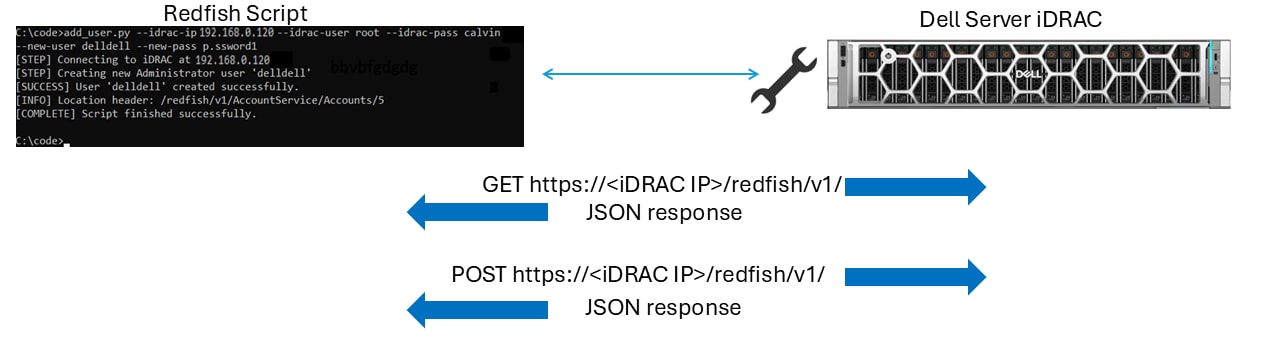
Redfish high level communication workflow
The core iDRAC architecture relies on structured HTTPS requests and JSON payloads. All iDRAC API interactions use at lease basic user and certificate security.
Implementing prompt-based coding for use with the iDRAC requires bridging natural language processing to the iDRAC RESTful Redfish API, starting with basic queries and expanding toward full automation workflows. The key is crafting a prompt that clearly expresses intent, targets the correct iDRAC function, and defines the required operation. A strong prompt states what you want and how the action should behave. Phrase your prompts with explicit outcomes.
The following examples demonstrate how to begin iDRAC prompt-based coding:
write me a PowerShell script for a Dell iDRAC using redfish API to
shutdown a Dell server which accepts iDRAC details as arguments
Add iDRAC explicit instructions:
Allow self-signed iDRAC certificate
Use Basic Auth header for iDRAC credentials
Add more requirements as needed:
Include status report of each step output to the console
Add logging
Add error handling
Example 1: Add iDRAC user
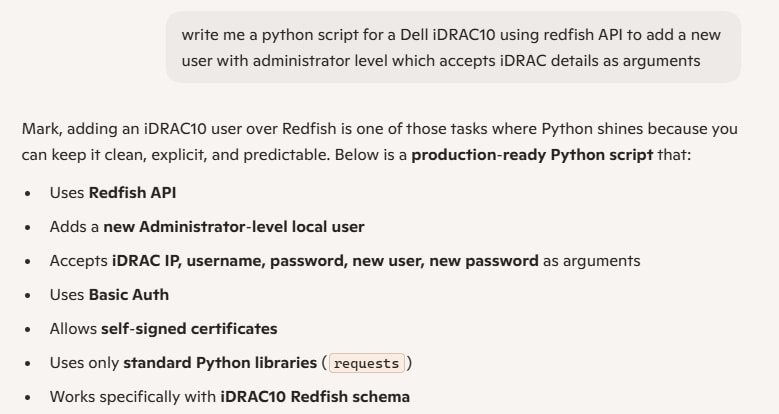
The following prompt creates a simple python script to add an administrator level user to an iDRAC10:
write a python script for a Dell iDRAC10 using redfish API to add a new user with administrator level which accepts iDRAC details as argumentsWhen creating a script, tools such as Copilot display a summary at the start:
Copilot summary
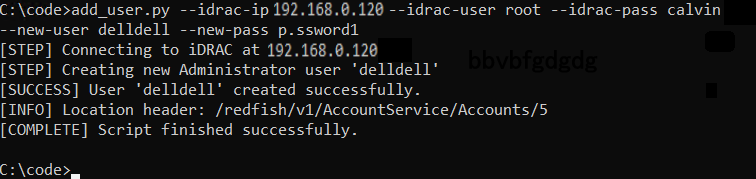
For the sample Add iDRAC user Python script that was produced, see Appendix A: AI-generated Add iDRAC10 user script (Python).
Add user AI-generated script running successfully
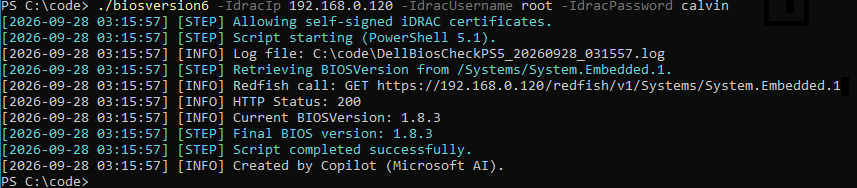
Example 2: Get Bios Version
The following prompt creates a simple PowerShell script to report server BIOS version for an iDRAC9 and 10:
Write me a PowerShell5 script for a Dell server iDRAC using redfish API to check the current BIOS version on a Dell server, compare it with a Dell update package version supplied on a cifs file share with the current version installed on server. Execute the update if not the same. monitor task. Write a log of the status each step and display each step to the console with relevant data and validate the installed bios version afterward and report script completion. Allow self-signed iDRAC certificate. Use basic auth header for iDRAC credentials. Use Powershell5 compatible HttpWebRequest client. use URL formatted network path for the ImageURI. Including information on what tool created the script. Get the firmware update job number from the http status code header "Location" for task monitoring. Use parameters of iDRAC ip, iDRAC username, iDRAC password, cifs server, cifs share URI, cifs username, cifs password and name of bios DUP file.
|
|
NOTE: Incorporating a request to “Allow self-signed iDRAC certificate” to trust the iDRAC certificate is useful for testing. Ensure that this request is reviewed in production environments.
|
For the sample BIOS version script that was produced, see Appendix A: AI-generated Add iDRAC10 user script (Python).
BIOS version AI-generated script running successfully
Advanced optimization
This section presents advanced optimization examples.
Example 3: BIOS update
The following prompt creates a PowerShell5 script to update server BIOS firmware for an iDRAC9:
Write me a PowerShell5 script for a Dell server iDRAC using redfish API to check the current BIOS version on a Dell server, compare it with a Dell update package version supplied on a cifs file share with the current version installed on server. Execute the update if not the same. monitor task. Write a log of the status each step and display each step to the console with relevant data and validate the installed bios version afterward and report script completion. Allow self-signed iDRAC certificate. Use basic auth header for iDRAC credentials. Use Powershell5 compatible HttpWebRequest client. use URL formatted network path for the ImageURI. Including information on what tool created the script. Get the firmware update job number from the http status code header "Location" for task monitoring. Use parameters of iDRAC ip, iDRAC username, iDRAC password, cifs server, cifs share URI, cifs username, cifs password and name of bios DUP file.
|
|
NOTE: Incorporating a request to “Allow self-signed iDRAC certificate” to trust the iDRAC certificate is useful testing. Ensure that this request is reviewed in production environments.
|
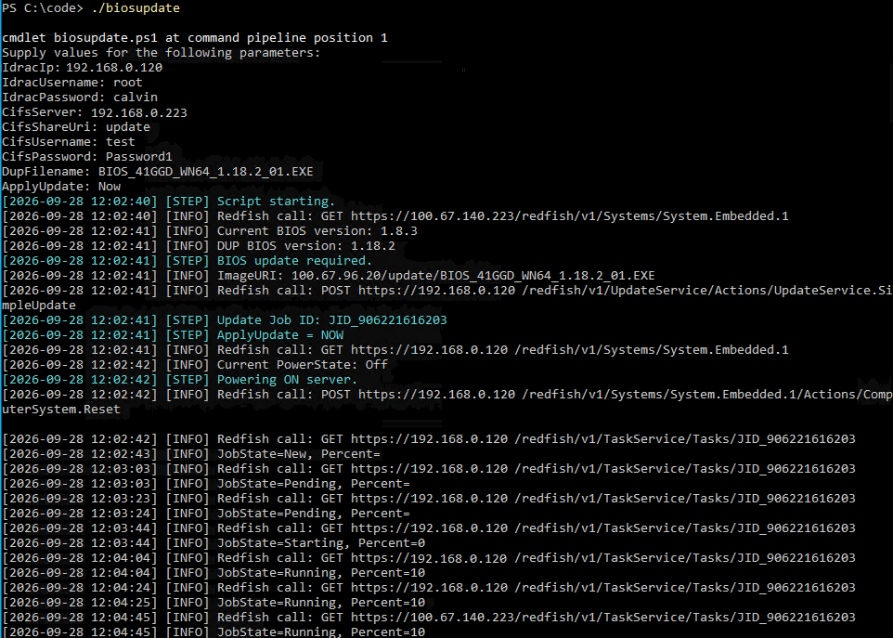
You can add extra steps to the request, as in the following example
Add a parameter of when to apply update allow values of Now or NextReboot. Insert new code after creating the update task if apply update is now do the following if server is powered off then power up if server is power up then do a graceful shutdown & restart.
For the sample BIOS update PowerShell script that was produced, see Appendix C.
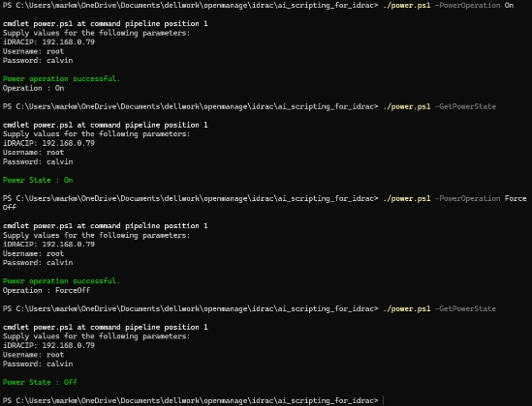
Power status script running
Example 4: Power status and control
The following prompt creates a PowerShell7 script to report about the the power status of a server. If required, it changes the power state:
Create a PowerShell7 script using iDRAC Redfish API to perform power operations on a Dell server. Include script arguments for iDRAC IP, iDRAC username and iDRAC password, it should have arguments to get current server power setting and perform power operations. By default, this script will ignore cert check for Redfish calls but add an optional argument to check cert. Finally, when performing Redfish calls make sure to validate response status code to validate a successful request and if error return the error message along with status code..For the sample Add iDRAC user Python script that was produced, see Appendix A.
Power status script running
Tools and troubleshooting
If the script produced by AI prompting fails to complete the requested task, certain tools may be useful in troubleshooting. Use the following tools to troubleshoot particular iDRAC Redfish calls, including the formatting of the Redfish call, the syntax of any required JSON body, and the output from the iDRAC.
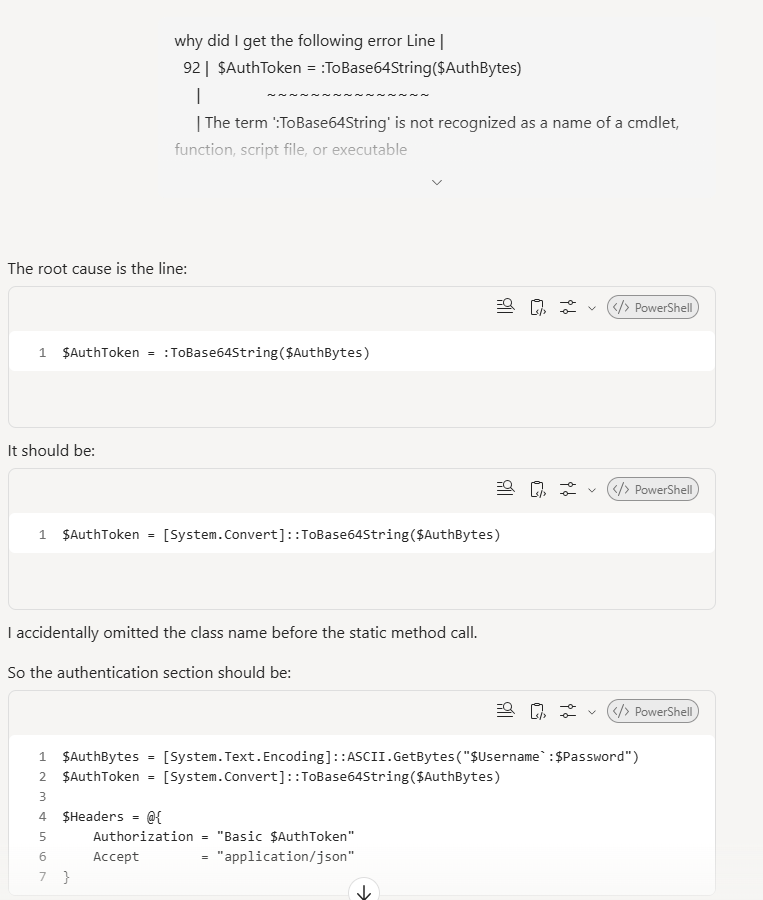
If the code fails, it may be necessary to instruct the AI tool to review the code. Here is an example of a prompt you can use:
why did I get the following error The term ':ToBase64String' is not recognized as a name of a cmdlet, function, script file, or executable
Code error correction
Postman
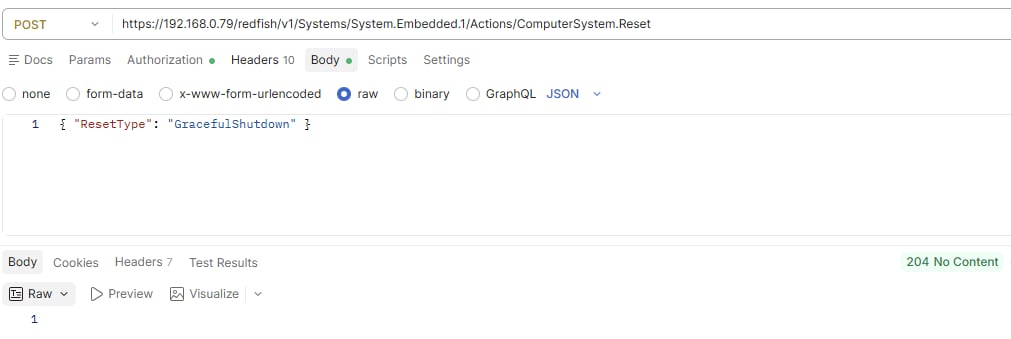
Postman, an API test platform, simplifies iDRAC Redfish API call testing using a web- based UI that makes it easy to send standard requests to iDRAC and analyze the responses.
Postman interfacing with iDRAC API, sending a shutdown command
cURL
In a REST API context, cURL, which stands for Client URL, is a popular command-line tool that is supported by both Windows and Linux and can be used by developers to test Redfish commands. cURL transfers data over network protocols such as HTTP and HTTPS. Because REST APIs communicate using standard web protocols, cURL can act like a Redfish call while operating entirely inside the terminal or command prompt. The utility supports post, put and other commands and can interface with the iDRAC redfish API.
cURL interfacing with iDRAC API
Redfish mockup
Redfish mockup server is an effective method to simulate a basic Redfish iDRAC environment without using a physical server or iDRAC to test simple scripts. Using Redfish mock-up server, you can:
- Test Redfish PATCH or POST calls without being destructive on a live server.
- Enable users who do not have iDRAC correct user privileges on a live server or access to a physical iDRAC to test Redfish calls.
- Train team members on simple Redfish calls without iDRAC or physical servers
Multiple iDRAC Redfish mockup clients are available for download from Dell iDRAC Redfish GitHub repository.
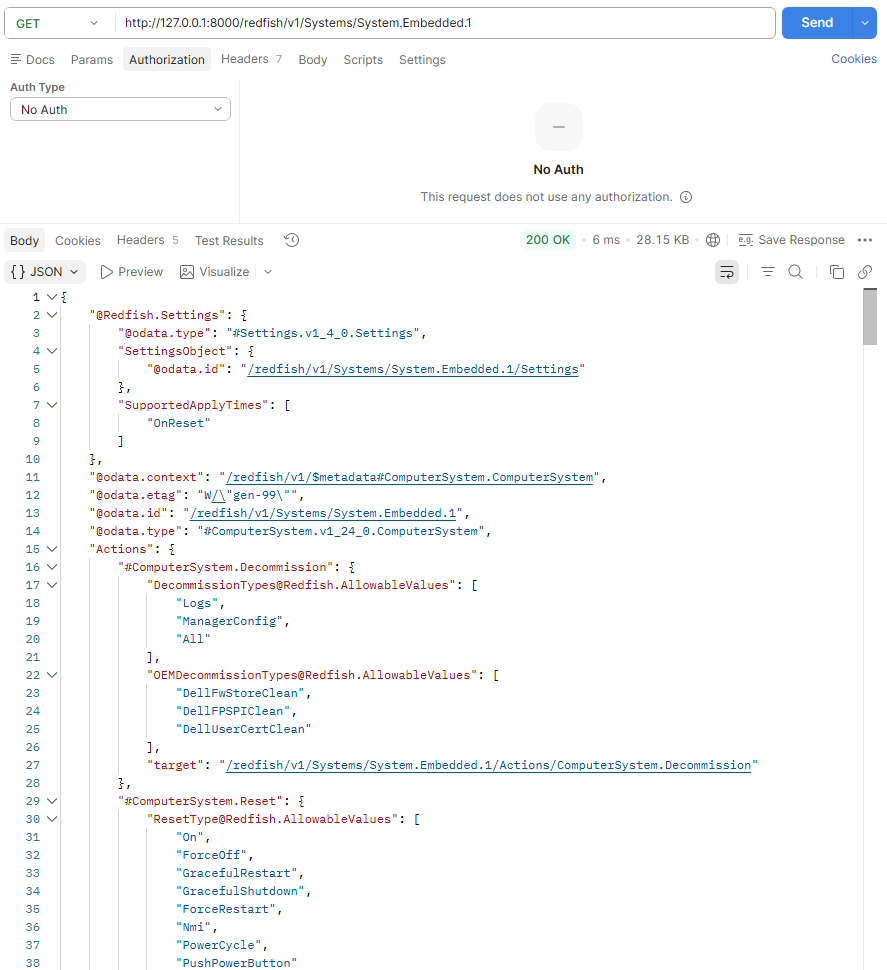
When the Redfish mockup server is running, you can run Redfish calls using any supported method, such as Python script, Curl, Postman, and PowerShell script. To start the Redfish calls, use the specified IP address, port, or the default localhost IP address or port. For example, you can use the default 127.0.0.1:8000 with no authorization required. For more information about Redfish workflow examples, see the relevant white paper link in References.
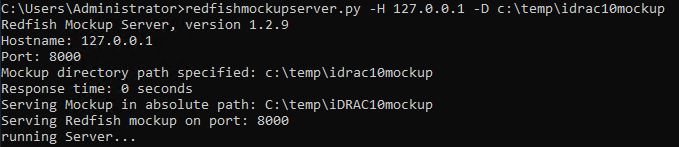
Starting the Redfish mockup service
Postman interfacing with the Redfish mockup
Summary
Accelerate development cycles by leveraging natural language to translate high‑level intent into operational workflows. This reduces manual scripting overhead and enables the rapid, deterministic transformation of concepts into production‑ready orchestration that delivers velocity, lowering the barrier to adopting iDRAC Redfish automation. Customers can also leverage AI code generation techniques on Dell's Open Manage Enterprise (OME) REST API, to manage and orchestrate server infrastructure, again reducing manual effort and accelerating operational workflows.
References
Dell Technologies documentation
The following Dell Technologies documentation provides additional relevant information. Access to these documents depends on your login credentials. If you do not have access to a document, contact your Dell Technologies representative.
Appendix A: AI-generated Add iDRAC10 user script (Python)
#!/usr/bin/env python3
import argparse
import requests
import sys
import urllib3
# Disable SSL warnings for self-signed iDRAC certificates
urllib3.disable_warnings(urllib3.exceptions.InsecureRequestWarning)

def add_idrac_user(idrac_ip, idrac_user, idrac_pass, new_user, new_pass):
    base_url = f"https://{idrac_ip}/redfish/v1"
    accounts_url = f"{base_url}/AccountService/Accounts"

    headers = {
        "Content-Type": "application/json"
    }

    payload = {
        "UserName": new_user,
        "Password": new_pass,
        "RoleId": "Administrator",
        "Enabled": True
    }

    print(f"[STEP] Connecting to iDRAC at {idrac_ip}")
    print(f"[STEP] Creating new Administrator user '{new_user}'")

    try:
        response = requests.post(
            accounts_url,
            json=payload,
            headers=headers,
            auth=(idrac_user, idrac_pass),
            verify=False
        )
    except Exception as e:
        print(f"[ERROR] Transport failure: {e}")
        sys.exit(1)

    if response.status_code in [200, 201]:
        print(f"[SUCCESS] User '{new_user}' created successfully.")
        print(f"[INFO] Location header: {response.headers.get('Location')}")
    else:
        print(f"[ERROR] Failed to create user. HTTP {response.status_code}")
        print(response.text)
        sys.exit(1)

    print("[COMPLETE] Script finished successfully.")

def main():
    parser = argparse.ArgumentParser(description="Add Administrator user to Dell iDRAC10 via Redfish API")

    parser.add_argument("--idrac-ip", required=True, help="iDRAC IP address")
    parser.add_argument("--idrac-user", required=True, help="iDRAC username")
    parser.add_argument("--idrac-pass", required=True, help="iDRAC password")
    parser.add_argument("--new-user", required=True, help="New iDRAC username to create")
    parser.add_argument("--new-pass", required=True, help="New iDRAC user password")

    args = parser.parse_args()

    add_idrac_user(
        args.idrac_ip,
        args.idrac_user,
        args.idrac_pass,
        args.new_user,
        args.new_pass
    )

if __name__ == "__main__":
    main()
Appendix B: AI-generated Report BIOS version script (PowerShell 5)
<#
    Script:     Dell-Redfish-BiosCheck-PS5.ps1
    Purpose:    Check BIOS version via iDRAC9 and iDRAC10 Redfish, log each step,
                display console output, and report completion.

    Requirements:
                - PowerShell 5.1 (Windows PowerShell)
                - Allow self-signed iDRAC certificates
                - Basic Auth header
                - HttpWebRequest (PS5-compatible)

    Created by: Copilot (Microsoft AI)
#>

param(
    [Parameter(Mandatory = $true)]
    [string]$IdracIp,

    [Parameter(Mandatory = $true)]
    [string]$IdracUsername,

    [Parameter(Mandatory = $true)]
    [string]$IdracPassword
)

# -----------------------------
# Logging
# -----------------------------

$ScriptStartTime = Get-Date
$LogFile = Join-Path (Get-Location) ("DellBiosCheckPS5_{0:yyyyMMdd_HHmmss}.log" -f $ScriptStartTime)

function Write-Log {
    param(
        [string]$Message,
        [ValidateSet('INFO','WARN','ERROR','STEP')]
        [string]$Level = 'INFO'
    )

    $timestamp = Get-Date -Format 'yyyy-MM-dd HH:mm:ss'
    $line = "[{0}] [{1}] {2}" -f $timestamp, $Level, $Message

    switch ($Level) {
        'ERROR' { Write-Host $line -ForegroundColor Red }
        'WARN'  { Write-Host $line -ForegroundColor Yellow }
        'STEP'  { Write-Host $line -ForegroundColor Cyan }
        default { Write-Host $line -ForegroundColor Gray }
    }

    Add-Content -Path $LogFile -Value $line
}

# -----------------------------
# Allow Self-Signed Certificates (No TLS Enforcement)
# -----------------------------

Write-Log -Message "Allowing self-signed iDRAC certificates." -Level STEP
[System.Net.ServicePointManager]::ServerCertificateValidationCallback = { $true }

# -----------------------------
# Basic Auth Header
# -----------------------------

function Get-BasicAuthHeader {
    param([string]$Username, [string]$Password)
    $pair = "{0}:{1}" -f $Username, $Password
    $encoded = [Convert]::ToBase64String([System.Text.Encoding]::ASCII.GetBytes($pair))
    return "Basic $encoded"
}

# -----------------------------
# PS5-Compatible HttpWebRequest Redfish Client
# -----------------------------

function Invoke-RedfishPS5 {
    param(
        [string]$Method,
        [string]$Uri,
        [hashtable]$Headers
    )

    Write-Log -Message "Redfish call: $Method $Uri" -Level INFO

    try {
        $request = [System.Net.HttpWebRequest]::Create($Uri)
        $request.Method = $Method
        $request.AllowAutoRedirect = $false
        $request.Timeout = 30000

        foreach ($h in $Headers.Keys) {
            $request.Headers.Add($h, $Headers[$h])
        }

        $response = $request.GetResponse()
        $status = [int]$response.StatusCode

        Write-Log -Message "HTTP Status: $status" -Level INFO

        $reader = New-Object System.IO.StreamReader($response.GetResponseStream())
        $raw = $reader.ReadToEnd()
        $reader.Close()

        if ($raw) {
            return ($raw | ConvertFrom-Json)
        } else {
            return $null
        }
    }
    catch {
        Write-Log -Message "Transport failure: $($_.Exception.Message)" -Level ERROR
        throw
    }
}

# -----------------------------
# BIOS Version Retrieval
# -----------------------------

function Get-BiosVersion {
    param([string]$BaseUrl, [hashtable]$Headers)

    Write-Log -Message "Retrieving BIOSVersion from /Systems/System.Embedded.1." -Level STEP

    $uri = "$BaseUrl/Systems/System.Embedded.1"
    $systemInfo = Invoke-RedfishPS5 -Method GET -Uri $uri -Headers $Headers

    $version = $systemInfo.BiosVersion

    if ($version) {
        Write-Log -Message "Current BIOSVersion: $version" -Level INFO
    }
    else {
        Write-Log -Message "BiosVersion attribute not found." -Level WARN
    }

    return $version
}

# -----------------------------
# Main Script Logic
# -----------------------------

Write-Log -Message "Script starting (PowerShell 5.1)." -Level STEP
Write-Log -Message "Log file: $LogFile" -Level INFO

$baseUrl = "https://$IdracIp/redfish/v1"
$authHeader = Get-BasicAuthHeader -Username $IdracUsername -Password $IdracPassword
$headers = @{ Authorization = $authHeader }

# Step 1: BIOS version
$biosVersion = Get-BiosVersion -BaseUrl $baseUrl -Headers $headers

Write-Log -Message "Final BIOS version: $biosVersion" -Level STEP
Write-Log -Message "Script completed successfully." -Level STEP
Write-Log -Message "Created by Copilot (Microsoft AI)." -Level INFO
Appendix C: AI-generated BIOS update script (PowerShell 5)
<#
    Script:     Dell-Redfish-BiosUpdate-PS5.ps1
    Purpose:    Check BIOS version, compare with DUP version on CIFS share,
                execute update if needed, monitor job, validate final version,
                and log each step.
		Uses Dell standard bios DUP file name format

    Created by: Copilot (Microsoft AI)
#>

param(
    [Parameter(Mandatory = $true)] [string]$IdracIp,
    [Parameter(Mandatory = $true)] [string]$IdracUsername,
    [Parameter(Mandatory = $true)] [string]$IdracPassword,
    [Parameter(Mandatory = $true)] [string]$CifsServer,
    [Parameter(Mandatory = $true)] [string]$CifsShareUri,
    [Parameter(Mandatory = $true)] [string]$CifsUsername,
    [Parameter(Mandatory = $true)] [string]$CifsPassword,
    [Parameter(Mandatory = $true)] [string]$DupFilename,
    [Parameter(Mandatory = $true)]
    [ValidateSet("Now","NextReboot")] [string]$ApplyUpdate
)

# -----------------------------
# Logging
# -----------------------------

$ScriptStartTime = Get-Date
$LogFile = Join-Path (Get-Location) ("DellBiosUpdatePS5_{0:yyyyMMdd_HHmmss}.log")

function Write-Log {
    param([string]$Message,[ValidateSet('INFO','WARN','ERROR','STEP')] [string]$Level = 'INFO')

    $timestamp = Get-Date -Format 'yyyy-MM-dd HH:mm:ss'
    $line = "[{0}] [{1}] {2}" -f $timestamp, $Level, $Message

    switch ($Level) {
        'ERROR' { Write-Host $line -ForegroundColor Red }
        'WARN'  { Write-Host $line -ForegroundColor Yellow }
        'STEP'  { Write-Host $line -ForegroundColor Cyan }
        default { Write-Host $line -ForegroundColor Gray }
    }

    Add-Content -Path $LogFile -Value $line
}

# -----------------------------
# Allow Self-Signed Certificates
# -----------------------------

[System.Net.ServicePointManager]::ServerCertificateValidationCallback = { $true }

# -----------------------------
# Basic Auth Header
# -----------------------------

function Get-BasicAuthHeader {
    param([string]$Username,[string]$Password)
    $pair = "{0}:{1}" -f $Username,$Password
    $encoded = [Convert]::ToBase64String([System.Text.Encoding]::ASCII.GetBytes($pair))
    return "Basic $encoded"
}

# -----------------------------
# PS5 HttpWebRequest Redfish Client
# -----------------------------

function Invoke-RedfishPS5 {
    param([string]$Method,[string]$Uri,[hashtable]$Headers,$Body)

    Write-Log -Message "Redfish call: $Method $Uri" -Level INFO

    try {
        $request = [System.Net.HttpWebRequest]::Create($Uri)
        $request.Method = $Method
        $request.AllowAutoRedirect = $false
        $request.Timeout = 30000

        foreach ($h in $Headers.Keys) { $request.Headers.Add($h,$Headers[$h]) }

        if ($Body) {
            $json  = $Body | ConvertTo-Json -Depth 10
            $bytes = [System.Text.Encoding]::UTF8.GetBytes($json)
            $request.ContentType   = "application/json"
            $request.ContentLength = $bytes.Length
            $stream = $request.GetRequestStream()
            $stream.Write($bytes,0,$bytes.Length)
            $stream.Close()
        }

        $response = $request.GetResponse()
        $headersOut = $response.Headers

        $reader = New-Object System.IO.StreamReader($response.GetResponseStream())
        $raw    = $reader.ReadToEnd()
        $reader.Close()

        $jsonObj = $null
        if ($raw) { $jsonObj = ($raw | ConvertFrom-Json) }

        return [pscustomobject]@{
            Body    = $jsonObj
            Headers = $headersOut
        }
    }
    catch {
        Write-Log -Message "Transport failure: $($_.Exception.Message)" -Level ERROR
        throw
    }
}

# -----------------------------
# BIOS Version Retrieval
# -----------------------------

function Get-BiosVersion {
    param([string]$BaseUrl,[hashtable]$Headers)

    $uri = "$BaseUrl/Systems/System.Embedded.1"
    $result = Invoke-RedfishPS5 -Method GET -Uri $uri -Headers $Headers
    return $result.Body.BiosVersion
}

# -----------------------------
# Read DUP Version from CIFS Share
# -----------------------------

function Get-DupParsedVersion {
    param(
        [string]$CifsServer,[string]$CifsShareUri,
        [string]$CifsUsername,[string]$CifsPassword,
        [string]$DupFilename
    )

    $netPath = "\\$CifsServer\$CifsShareUri"
    $dupPath = Join-Path $netPath $DupFilename

    New-PSDrive -Name "CIFS" -PSProvider FileSystem -Root $netPath -Credential (
        New-Object System.Management.Automation.PSCredential(
            $CifsUsername,(ConvertTo-SecureString $CifsPassword -AsPlainText -Force)
        )
    ) -ErrorAction Stop

    $dupInfo = Get-Item $dupPath
    $sourceString = $dupInfo.Name

    if ($sourceString -match "(\d+\.\d+\.\d+)") {
        return [pscustomobject]@{
            Version = $Matches[1]
            Source  = $sourceString
        }
    }

    throw "Unable to extract numeric version."
}

# -----------------------------
# Create BIOS Update Job
# -----------------------------

function Start-BiosUpdate {
    param(
        [string]$BaseUrl,[hashtable]$Headers,
        [string]$ImageUri,[string]$CifsUsername,[string]$CifsPassword
    )

    $uri  = "$BaseUrl/UpdateService/Actions/UpdateService.SimpleUpdate"

    $body = @{
        ImageURI         = $ImageUri
        TransferProtocol = "CIFS"
        Username         = $CifsUsername
        Password         = $CifsPassword
    }

    return Invoke-RedfishPS5 -Method POST -Uri $uri -Headers $Headers -Body $body
}

# -----------------------------
# Extract Job ID from Location header
# -----------------------------

function Get-JobIdFromLocation {
    param([System.Net.WebHeaderCollection]$Headers)

    $loc = $Headers["Location"]
    if (-not $loc) { throw "Missing Location header." }

    return ($loc -split "/")[-1]
}

# -----------------------------
# Power State Helpers
# -----------------------------

function Get-PowerState {
    param([string]$BaseUrl,[hashtable]$Headers)

    $uri = "$BaseUrl/Systems/System.Embedded.1"
    $result = Invoke-RedfishPS5 -Method GET -Uri $uri -Headers $Headers
    return $result.Body.PowerState
}

function Power-On {
    param([string]$BaseUrl,[hashtable]$Headers)

    Write-Log -Message "Powering ON server." -Level STEP
    $uri = "$BaseUrl/Systems/System.Embedded.1/Actions/ComputerSystem.Reset"
    $body = @{ ResetType = "On" }
    Invoke-RedfishPS5 -Method POST -Uri $uri -Headers $Headers -Body $body
}

function Graceful-Restart {
    param([string]$BaseUrl,[hashtable]$Headers)

    Write-Log -Message "Graceful shutdown + restart." -Level STEP
    $uri = "$BaseUrl/Systems/System.Embedded.1/Actions/ComputerSystem.Reset"
    $body = @{ ResetType = "GracefulRestart" }
    Invoke-RedfishPS5 -Method POST -Uri $uri -Headers $Headers -Body $body
}

# -----------------------------
# Monitor BIOS Update Job
# -----------------------------

function Monitor-BiosJob {
    param([string]$BaseUrl,[hashtable]$Headers,[string]$JobId)

    $jobUri = "$BaseUrl/TaskService/Tasks/$JobId"

    while ($true) {
        $result = Invoke-RedfishPS5 -Method GET -Uri $jobUri -Headers $Headers
        $job = $result.Body

        Write-Log -Message ("JobState={0}, Percent={1}" -f $job.TaskState,$job.PercentComplete) -Level INFO

        switch ($job.TaskState) {
            "Completed" { return $true }
            "Failed"    { return $false }
            "Cancelled" { return $false }
            default     { Start-Sleep -Seconds 20 }
        }
    }
}

# -----------------------------
# Main Script Logic
# -----------------------------

Write-Log -Message "Script starting." -Level STEP

$baseUrl    = "https://$IdracIp/redfish/v1"
$authHeader = Get-BasicAuthHeader -Username $IdracUsername -Password $IdracPassword
$headers    = @{ Authorization = $authHeader }

# Step 1: Current BIOS version
$currentVersion = Get-BiosVersion -BaseUrl $baseUrl -Headers $headers
Write-Log -Message "Current BIOS version: $currentVersion" -Level INFO

# Step 2: DUP version
$parsedVersion = Get-DupParsedVersion -CifsServer $CifsServer -CifsShareUri $CifsShareUri -CifsUsername $CifsUsername -CifsPassword $CifsPassword -DupFilename $DupFilename
Write-Log -Message "DUP BIOS version: $($parsedVersion.Version)" -Level INFO

# Step 3: Compare
if ($currentVersion -eq $parsedVersion.Version) {
    Write-Log -Message "BIOS already up to date." -Level STEP
    exit
}

Write-Log -Message "BIOS update required." -Level STEP

# Step 4: ImageURI
$imageUri = "$CifsServer/$CifsShareUri/$DupFilename"
Write-Log -Message "ImageURI: $imageUri" -Level INFO

# Step 5: Start update
$jobResponse = Start-BiosUpdate -BaseUrl $baseUrl -Headers $headers -ImageUri $imageUri -CifsUsername $CifsUsername -CifsPassword $CifsPassword

# Step 6: Extract Job ID
$jobId = Get-JobIdFromLocation -Headers $jobResponse.Headers
Write-Log -Message "Update Job ID: $jobId" -Level STEP

# -----------------------------
# NEW LOGIC: ApplyUpdate = Now / NextReboot
# -----------------------------

if ($ApplyUpdate -eq "Now") {

    Write-Log -Message "ApplyUpdate = NOW" -Level STEP

    $powerState = Get-PowerState -BaseUrl $baseUrl -Headers $headers
    Write-Log -Message "Current PowerState: $powerState" -Level INFO

    if ($powerState -eq "Off") {
        Power-On -BaseUrl $baseUrl -Headers $headers
    }
    else {
        Graceful-Restart -BaseUrl $baseUrl -Headers $headers
    }
}
else {
    Write-Log -Message "ApplyUpdate = NextReboot (no immediate power action)" -Level STEP
}

# Step 7: Monitor job
$success = Monitor-BiosJob -BaseUrl $baseUrl -Headers $headers -JobId $jobId

if (-not $success) {
    Write-Log -Message "BIOS update job FAILED." -Level ERROR
    exit
}

Write-Log -Message "BIOS update job completed successfully." -Level STEP

# Step 8: Validate final BIOS version
$finalVersion = Get-BiosVersion -BaseUrl $baseUrl -Headers $headers
Write-Log -Message "Final BIOS version: $finalVersion" -Level INFO

if ($finalVersion -eq $parsedVersion.Version) {
    Write-Log -Message "BIOS update validated successfully." -Level STEP
} else {
    Write-Log -Message "BIOS update validation FAILED." -Level ERROR
}

Write-Log -Message "Script completed successfully." -Level STEP
Write-Log -Message "Created by Copilot (Microsoft AI)." -Level INFO
Appendix D: AI-generated power status script (PowerShell 7)
[CmdletBinding()]
param(
    [Parameter(Mandatory)]
    [string]$iDRACIP,

    [Parameter(Mandatory)]
    [string]$Username,

    [Parameter(Mandatory)]
    [string]$Password,

    [switch]$GetPowerState,

    [ValidateSet(
        "On",
        "ForceOff",
        "ForceRestart",
        "GracefulShutdown",
        "GracefulRestart",
        "Nmi"
    )]
    [string]$PowerOperation,

    [switch]$ValidateCertificate
)

# Validate parameters
if (-not $GetPowerState -and -not $PowerOperation)
{
    throw "Specify either -GetPowerState or -PowerOperation."
}

if ($GetPowerState -and $PowerOperation)
{
    throw "-GetPowerState and -PowerOperation cannot be used together."
}

# Build Basic Authentication Header
$AuthBytes = [System.Text.Encoding]::ASCII.GetBytes("${Username}:${Password}")
$AuthToken = [System.Convert]::ToBase64String($AuthBytes)

$Headers = @{
    Authorization = "Basic $AuthToken"
    Accept        = "application/json"
}

function Invoke-RedfishRequest
{
    param(
        [Parameter(Mandatory)]
        [ValidateSet("GET","POST")]
        [string]$Method,

        [Parameter(Mandatory)]
        [string]$Uri,

        [object]$Body
    )

    try
    {
        $Params = @{
            Uri         = $Uri
            Method      = $Method
            Headers     = $Headers
            ErrorAction = "Stop"
        }

        if (-not $ValidateCertificate)
        {
            $Params.SkipCertificateCheck = $true
        }

        if ($null -ne $Body)
        {
            $Params.ContentType = "application/json"
            $Params.Body = $Body | ConvertTo-Json -Depth 10
        }

        $Response = Invoke-RestMethod @Params

        return [PSCustomObject]@{
            Success    = $true
            StatusCode = 200
            Data       = $Response
            Error      = $null
        }
    }
    catch
    {
        $StatusCode  = $null
        $ErrorText   = $_.Exception.Message
        $ExtendedInfo = $null

        try
        {
            if ($_.Exception.Response)
            {
                $StatusCode = [int]$_.Exception.Response.StatusCode
            }
        }
        catch
        {
        }

        if ($_.ErrorDetails.Message)
        {
            try
            {
                $JsonError = $_.ErrorDetails.Message | ConvertFrom-Json

                if ($JsonError.error.message)
                {
                    $ErrorText = $JsonError.error.message
                }

                if ($JsonError.error.'@Message.ExtendedInfo')
                {
                    $ExtendedInfo = $JsonError.error.'@Message.ExtendedInfo'
                }
            }
            catch
            {
                $ErrorText = $_.ErrorDetails.Message
            }
        }

        return [PSCustomObject]@{
            Success      = $false
            StatusCode   = $StatusCode
            Data         = $null
            Error        = $ErrorText
            ExtendedInfo = $ExtendedInfo
        }
    }
}

$SystemUri = "https://$iDRACIP/redfish/v1/Systems/System.Embedded.1"

# Get Current Power State
if ($GetPowerState)
{
    $Result = Invoke-RedfishRequest `
        -Method GET `
        -Uri $SystemUri

    if (-not $Result.Success)
    {
        Write-Error "HTTP Status: $($Result.StatusCode) Error: $($Result.Error)"

        if ($Result.ExtendedInfo)
        {
            $Result.ExtendedInfo | Format-List
        }

        exit 1
    }

    Write-Host ""
    Write-Host "Power State : $($Result.Data.PowerState)" -ForegroundColor Green
    Write-Host ""

    exit 0
}

# Power Operations

$ResetTypeMap = @{
    On               = "On"
    ForceOff         = "ForceOff"
    ForceRestart     = "ForceRestart"
    GracefulShutdown = "GracefulShutdown"
    GracefulRestart  = "GracefulRestart"
    Nmi              = "Nmi"
}

$ResetUri = "$SystemUri/Actions/ComputerSystem.Reset"

$Body = @{
    ResetType = $ResetTypeMap[$PowerOperation]
}

$Result = Invoke-RedfishRequest `
    -Method POST `
    -Uri $ResetUri `
    -Body $Body

if (-not $Result.Success)
{
    Write-Error "HTTP Status: $($Result.StatusCode) Error: $($Result.Error)"

    if ($Result.ExtendedInfo)
    {
        $Result.ExtendedInfo | Format-List
    }

    exit 1
}

Write-Host ""
Write-Host "Power operation successful." -ForegroundColor Green
Write-Host "Operation : $PowerOperation"
Write-Host ""