cuno S3 Performance and Validation Testing
Executive summary
Overview
This document outlines the performance testing using a cuno S3 mount with ECS, using an R-7525 server and an ECS EXF900 appliance. The findings are based on Dell internal testing (Dell Healthcare labs), performed November 2022 through January 2023.
Audience
This document is targeted for life sciences and healthcare. It is a general solution for enabling file-based/POSIX applications on Linux to run on S3 with high performance. It can also be leveraged in other verticals.
Revisions
|
Date |
Part number/ |
Description |
|
April 2023 |
H19558 |
Initial release |
We value your feedback
Dell Technologies and the authors of this document welcome your feedback on this document. Contact the Dell Technologies team by email.
Author: James Fleming
Note: For links to other documentation for this topic, see the References section.
Environment
Server
Dell R7525 PowerEdge Server:
- Dual AMD EPYC 7H12 64 cores
- 512 GB RAM
- Mellanox Connectx-6 100 Gb/s dual port
- CentOS 8 Stream
Storage
Dell ECS EXF900 appliance:
- Five-node configurations.
- 3.84 TB drives with 12 drives in each node
- 25 Gb/s frontend/backend interfaces
- ECS Object Version 3.8.0.1.138598.3d5db7c96f2
Terminology
The following table provides definitions for some of the terms that are used in this document.
Table 1. Terminology
|
Term |
Definition |
|
S3 |
S3 (Simple Storage Service) provides object storage, which is built for storing and recovering any amount of information or data from anywhere over the internet. |
|
Gb Mb |
b is an abbreviation for ‘bit’, a measurement of data networking |
|
TB GB MB kB |
B is an abbreviation for ‘byte’, a measurement of data storage |
Testing and verification
Setup
Testing was performed using a Dell PowerEdge R7525 rack server connected to a Dell ECS EXF900 appliance, using a 100 Gb/s network on the server side and 25 Gb/s on the ECS side. The cuno mount was loaded on the R7525 server running CentOS 8 Stream.
The cuno software was loaded using a file (cuno-eval_v1.0.1p3_glibc_rpm.run) provided by PetaGene Ltd. After installing cuno, a .cred credentials file was created to interface with the ECS appliance.
Table 2. Credential file
|
content |
|
|
Ecs900.cred |
aws_access_key_id=**** aws_secret_access_key=********** endpoint=http://10.246.22.171:9020 skipssl pathstyle host = ViPR |
After completing the setup, connecting cuno to ECS was seamless and operated as designed.
Testing dataset and process
For performance testing, the Linux cp (copy) command was used to move data from the server to storage, and from storage to server. Two different datasets where used:
- Five 32 GB files to demonstrate the ability to transfer large files at a consistent speed.
- 75,000 small files to demonstrate the ability to transfer many small files with high throughput.
Table 3. File count and capacity
|
Size (kB) |
File count |
|
4 |
38746 |
|
8 |
12527 |
|
12 |
6710 |
|
16 |
4239 |
|
20 |
2955 |
|
24 |
2042 |
|
28 |
1633 |
|
32 |
1229 |
|
36 |
1002 |
|
40 |
764 |
|
44 |
705 |
|
48 |
538 |
|
52 |
451 |
|
56 |
387 |
|
60 |
312 |
|
64 |
295 |
|
68 |
273 |
|
72 |
192 |
Testing results
The results of the testing are broken down into two results sets. One is based on Mb/s; the other is based on time.
PetaGene claims that cuno supports POSIX ACL permissions, users/groups, symbolic/hard links, timestamps, and other POSIX attributes on standard S3-compatible storage. This was not explicitly tested here.
Testing results: large files
This testing was done by transferring five 32 GB files from the server to ECS and from ECS to the server.
Table 4. Large file read/write results
|
Read (Gb/s) |
Write (Gb/s) |
Read (sec) |
Write (sec) |
|
44.53 |
48.99 |
48.71 |
30.25 |
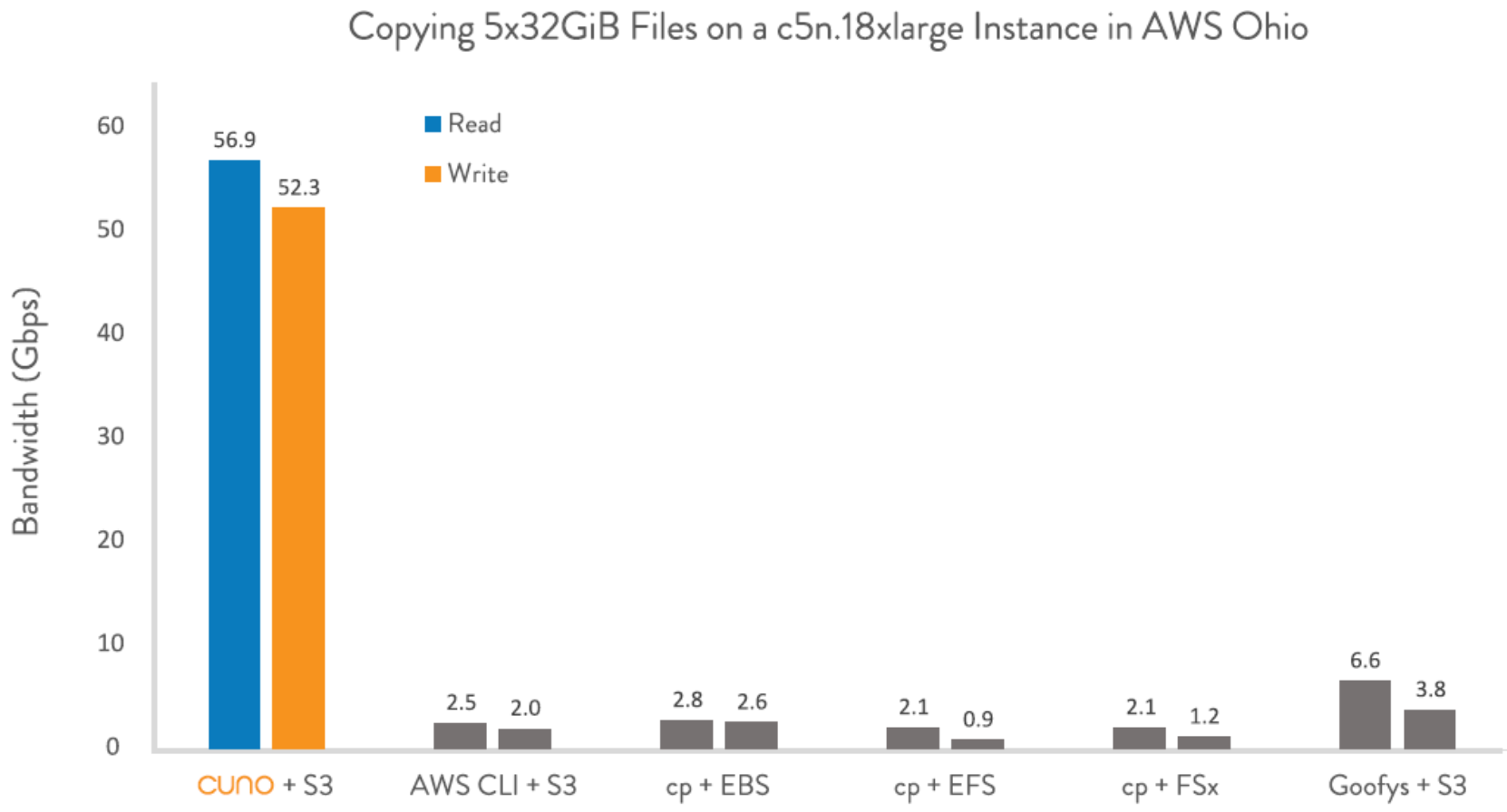
The following image represents testing that cuno has performed in the past and is provided here as reference to the testing that was performed in the Dell Healthcare labs.

Figure 1. cuno testing (AWS)
Testing results: small files
This part of the testing was done by transferring 75,000 small files of varying sizes from the server to ECS and back. The focus on this testing was the length of time transferring many small files. This test included transferring the files to ECS, deleting them from the server, transferring them back to the server, and deleting them from ECS. Each test ran 30 cycles and used the average of these cycles as the result. This test was run many times.
Table 5. Small file read/write results
|
Read (Gb/s) |
Write (Gb/s) |
Read (sec) |
Write (sec) |
|
28.80 |
9.06 |
54.50 |
137.82 |
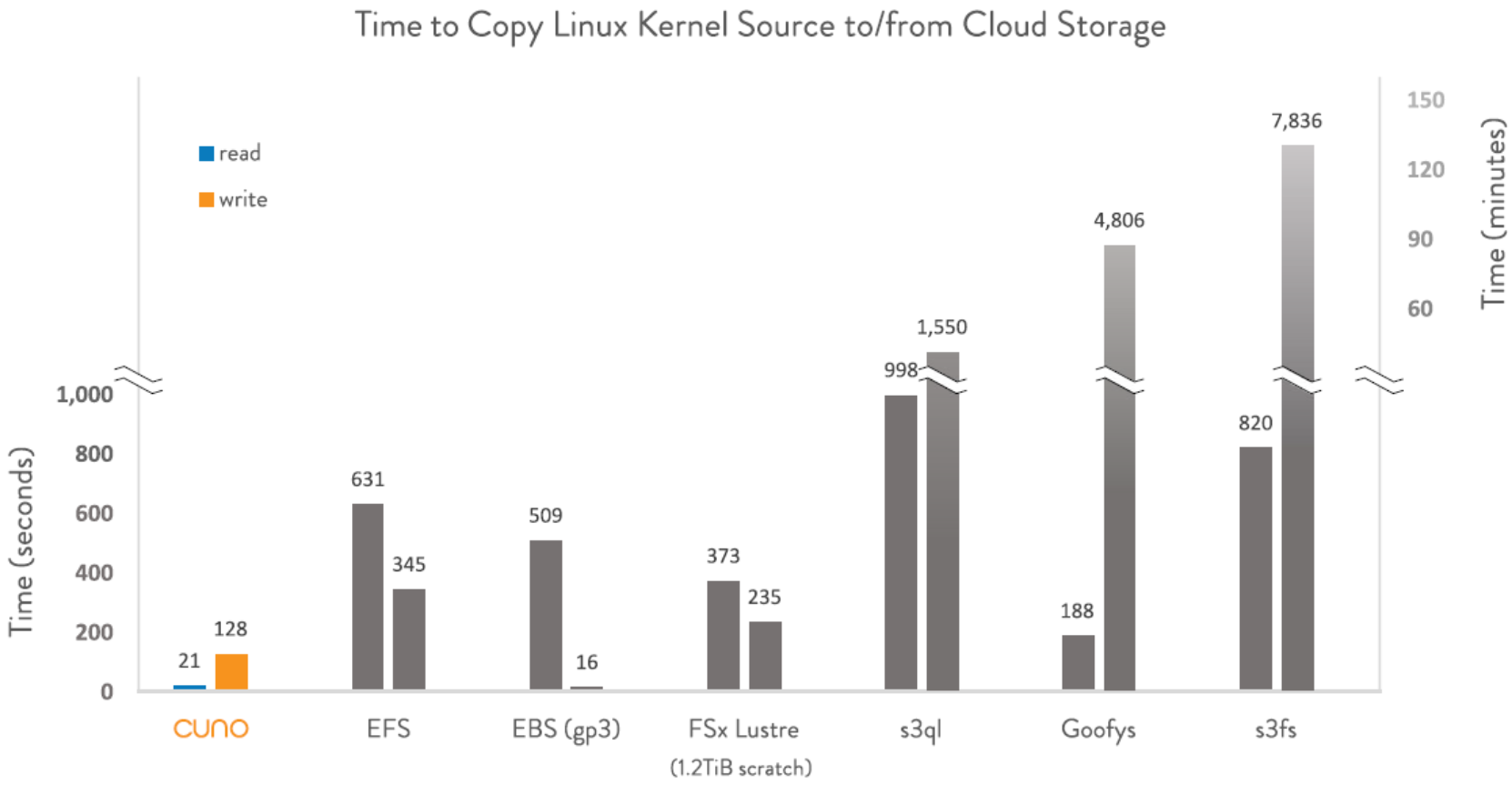
The image below represents testing that cuno has performed in the past and is provided as a reference to the testing that was performed in the Dell Healthcare labs.

Figure 2. cuno testing (Linux)
Summary
Summary
cuno enables file-based/POSIX workloads run directly on S3 storage with high performance. The result of this testing is in line with the original published results from https://cuno.io and validates the robustness of the cuno S3 mount. For partners looking to adopt object storage and do not have the resources or ability to rewrite their applications to natively use S3, cuno would be a great option to offer our partners to help close the time for adoption of S3.
Appendix
Appendix
The following script was used for testing. The script was slightly modified for testing small files.
#!/bin/bash
BUCKET=cuno
REMOTE_DIRECTORY=test
REMOTE_PREFIX=s3://
LOCAL_DIRECTORY=/mnt/cunodrive
TEST_OUTPUT=test_results.txt
REPEATS=2
TEST_FILE_SIZE_GiB=3
cleanup() {
rm -rf "$LOCAL_DIRECTORY/src"
rm -rf "$LOCAL_DIRECTORY/dst"
rm -rf "$REMOTE_PREFIX$BUCKET/$REMOTE_DIRECTORY/dst"
rm -rf "$REMOTE_PREFIX$BUCKET/$REMOTE_DIRECTORY/src"
}
create_source_directories() {
mkdir -p $LOCAL_DIRECTORY/src
mkdir -p $LOCAL_DIRECTORY/dst
mkdir -p $REMOTE_PREFIX$BUCKET/$REMOTE_DIRECTORY/src
mkdir -p $REMOTE_PREFIX$BUCKET/$REMOTE_DIRECTORY/dst
}
clear_cache() {
rm -rf /dev/shm/cuno*
}
setup_source_files() {
echo " -- Preparing local" | tee -a $TEST_OUTPUT
dd if=/dev/urandom of=$LOCAL_DIRECTORY/src/gen_file count=1048576 bs=$((1024*$TEST_FILE_SIZE_GiB))
mv $LOCAL_DIRECTORY/src/gen_file $LOCAL_DIRECTORY/src/test_file1
cp $LOCAL_DIRECTORY/src/test_file1 $LOCAL_DIRECTORY/src/test_file2
cp $LOCAL_DIRECTORY/src/test_file1 $LOCAL_DIRECTORY/src/test_file3
cp $LOCAL_DIRECTORY/src/test_file1 $LOCAL_DIRECTORY/src/test_file4
cp $LOCAL_DIRECTORY/src/test_file1 $LOCAL_DIRECTORY/src/test_file5
echo " -- Uploading to cloud" | tee -a $TEST_OUTPUT
cp -r $LOCAL_DIRECTORY/src/* $REMOTE_PREFIX$BUCKET/$REMOTE_DIRECTORY/src/.
LOCALSRC= du -sh $LOCAL_DIRECTORY/src/
#echo Local Src $LOCALSRC
REMOTESRC= du -sh $REMOTE_PREFIX$BUCKET/$REMOTE_DIRECTORY/src/
#echo Remote Src $REMOTESRC
}
clear_dest_remote() {
rm -rf $REMOTE_PREFIX$BUCKET/$REMOTE_DIRECTORY/dst | tee -a $TEST_OUTPUT
}
clear_dest_local() {
rm -rf $LOCAL_DIRECTORY/dst | tee -a $TEST_OUTPUT
}
copy_large_local_remote() {
cp -r $LOCAL_DIRECTORY/src $REMOTE_PREFIX$BUCKET/$REMOTE_DIRECTORY/dst | tee -a $TEST_OUTPUT
}
copy_large_remote_local() {
cp -r $REMOTE_PREFIX$BUCKET/$REMOTE_DIRECTORY/src $LOCAL_DIRECTORY/dst | tee -a $TEST_OUTPUT
}
echo "-- Cleaning up test directory --" | tee -a $TEST_OUTPUT
cleanup
echo "-- Creating test directories --" | tee -a $TEST_OUTPUT
create_source_directories
echo "-- Setup test files --" | tee -a $TEST_OUTPUT
setup_source_files
echo "-- Run Cloud Tests --" | tee -a $TEST_OUTPUT
echo "---------------------------LARGE FILES LOCAL TO REMOTE (WRITE) --------------------------------" | tee -a $TEST_OUTPUT
i=0
sum=0
while [[ "${i}" -lt "${REPEATS}" ]]; do
clear_dest_remote
clear_cache
start=$(date +%s.%N)
copy_large_local_remote
finish=$(date +%s.%N)
duration=$(echo "scale=5;${finish}-${start}" | bc -l | awk '{printf("%.5f",$1)}')
speed_gbips=$(echo "scale=5;(${TEST_FILE_SIZE_GiB}*5)/${duration}" | bc -l | awk '{printf("%.5f",$1)}')
speed_gbps=$(echo "scale=5;${speed_gbips}*8.58993" | bc -l | awk '{printf("%.5f",$1)}')
echo "RUN[${i}] - Time Taken (s): $duration | Speed (Gbps): $speed_gbps | Speed (GiB/s): $speed_gbips" | tee -a $TEST_OUTPUT
i=$((i + 1))
sum=$(echo "scale=5;${sum}+${speed_gbps}" | bc -l | awk '{printf("%.5f",$1)}')
done
average_speed=$(echo "scale=5;${sum}/${REPEATS}" | bc -l | awk '{printf("%.5f",$1)}')
#average_speed=$(echo "scale=5;${sum}/${REPEATS}" | bc -l | awk '{printf("%.5f",$1)}')
echo "Results - Average (Gbps): $average_speed" | tee -a $TEST_OUTPUT
echo "------------------------------------------------------------------------------------" | tee -a $TEST_OUTPUT
echo "--------------- Clear local src -----------------------"
rm -rf "$LOCAL_DIRECTORY/src"
echo "--------------------------LARGE FILES REMOTE TO LOCAL (READ) -------------------------------" | tee -a $TEST_OUTPUT
i=0
sum=0
while [[ "${i}" -lt "${REPEATS}" ]]; do
clear_dest_local
clear_cache
start=$(date +%s.%N)
copy_large_remote_local
finish=$(date +%s.%N)
duration=$(echo "scale=5;${finish}-${start}" | bc -l | awk '{printf("%.5f",$1)}')
speed_gbips=$(echo "scale=5;(${TEST_FILE_SIZE_GiB}*5)/${duration}" | bc -l | awk '{printf("%.5f",$1)}')
speed_gbps=$(echo "scale=5;${speed_gbips}*8.58993" | bc -l | awk '{printf("%.5f",$1)}')
echo "RUN[${i}] - Time Taken (s): $duration | Speed (Gbps): $speed_gbps | Speed (GiB/s): $speed_gbips" | tee -a $TEST_OUTPUT
i=$((i + 1))
sum=$(echo "scale=5;${sum}+${speed_gbps}" | bc -l | awk '{printf("%.5f",$1)}')
done
average_speed=$(echo "scale=5;${sum}/${REPEATS}" | bc -l | awk '{printf("%.5f",$1)}')
echo "Results - Average (Gbps): $average_speed" | tee -a $TEST_OUTPUT
echo "------------------------------------------------------------------------------------" | tee -a $TEST_OUTPUT
References
Dell Technologies documentation
The following Dell Technologies documentation provides other information related to this document. Access to these documents depends on your login credentials. If you do not have access to a document, contact your Dell Technologies representative.
PetaGene documentation
See also the following documentation.