
Dell and AMD for Deep Learning Analytics

Sep 25, 2026
Dell and AMD for Deep Learning Analytics This document shows how the Dell PowerScale All-Flash Scale-out NAS platform and Dell PowerEdge R7525 servers with AMD Instinct™ MI100 GPUs can help accelerate and scale deep learning training workloads. Benchmark results using TensorFlow are included.

Executive summary

Overview

Deep learning (DL) techniques have enabled great successes in many fields, such as computer vision, natural language processing (NLP), gaming, and autonomous driving. These techniques enable a model to learn from existing data and then to make corresponding predictions. The success is due to a combination of improved algorithms, access to larger datasets, and increased computational power. To be effective at enterprise scale, the computational intensity of DL requires highly efficient parallel architectures. The choice and design of the system components, carefully selected and tuned for DL use-cases, can have a big impact on the speed, accuracy, and business value of implementing artificial intelligence (AI) techniques.

In such a demanding environment, it is critical that organizations be able to rely on vendors that they trust. Over the last few years, Dell Technologies and AMD have established a strong partnership to help organizations fast-track their AI initiatives. Our partnership is built on the philosophy of offering flexibility and informed choice across a broad portfolio that combines outstanding GPU accelerated compute, scale-out storage, and networking.

This paper focuses on how the Dell PowerScale F900 scale-out NAS platform accelerates AI innovation by delivering the performance, scalability, and I/O concurrency for high-performance AI workloads, using Dell PowerEdge servers and AMD Instinct™ MI100 GPUs.

Audience

This document is intended for organizations interested in simplifying and accelerating DL solutions with advanced computing and scale-out data management solutions. Solution architects, system administrators, and other interested readers within those organizations constitute the target audience.

Revisions

Date

Description

June 2022

Initial release


Introduction

Introduction

DL is an area of AI which uses artificial neural networks to enable accurate pattern recognition of complex real-world patterns by computers. These new levels of innovation have applicability across nearly every industry vertical. Some of the early adopters include advanced research, precision medicine, high tech manufacturing, advanced driver assistance systems (ADAS), and autonomous driving. Building on these initial successes, AI initiatives are springing up in various business units, such as manufacturing, customer support, life sciences, marketing, and sales. Organizations are faced with a multitude of complex choices related to data, analytic skill sets, software stacks, analytic toolkits, and infrastructure components—each with significant implications on the time-to-market and the value associated with these initiatives.

Over the last few years, Dell Technologies and AMD have established a strong partnership to help organizations accelerate their AI initiatives. Together our technologies provide the foundation for successful AI solutions that drive the development of advanced DL software frameworks. These technologies also deliver massively parallel compute in the form of AMD Graphic Processing Units (GPUs) for parallel model training and scale-out file systems to support the concurrency, performance, and capacity requirements of unstructured image and video data sets.

This document presents how customers could use Dell PowerScale F900 Object Storage and Dell PowerEdge R7525 servers to train an AI model using AMD Instinct MI100 GPUs. This new offer gives customers more flexibility in how they deploy scalable, high performance DL infrastructure. The results of standard image classification training benchmarks using TensorFlow are included.

Solution architecture

Overview

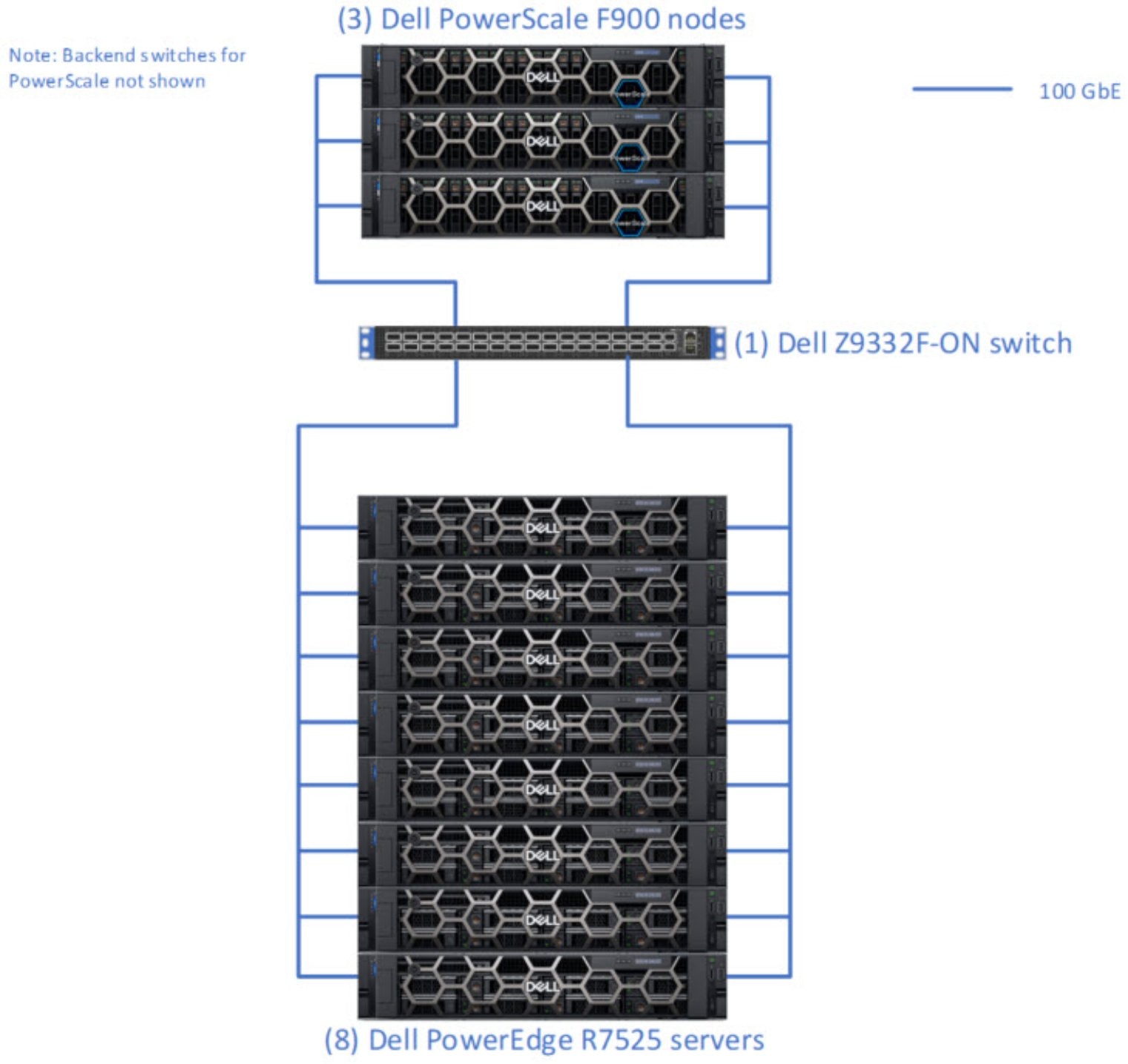
Figure 1 illustrates the architecture showing the key components that made up the solution as it was tested and benchmarked. In a customer deployment, the number of Dell servers, and Dell PowerSwitch and Dell PowerScale F900 storage nodes, will vary and can be scaled independently to meet the requirements of the specific DL workloads.
DiagramDescription automatically generated

Figure 1.   Architecture diagram

Dell PowerScale F900

PowerScale is the next evolution of OneFS – the operating system powering the industry’s leading scale-out NAS platform that enables you to innovate with your data. The PowerScale family includes Dell PowerScale platforms and the Dell Isilon platforms configured with the PowerScale OneFS operating system. OneFS provides the intelligence behind the highly scalable, high-performance modular storage solution that can grow with your business. A OneFS powered cluster is composed of a flexible choice of storage platforms including all-flash, hybrid, and archive nodes. These solutions provide the performance, choice, efficiency, flexibility, scalability, security, and protection for you to store massive amounts of unstructured data within a cluster. The PowerScale all-flash platforms co-exist seamlessly in the same cluster with your existing Isilon nodes to drive your traditional and modern applications. Powered by the OneFS operating system that supports NFS Over Remote Direct Memory Access (NFSoRDMA), the platforms are available in several product lines. For more details about PowerScale product lines, see the official PowerScale Family website.

During these tests, we have used PowerScale F900 platforms. With new NVMe drives, the F900 provides larger capacity with massive performance to power the most demanding workloads. Each node allows you to scale raw storage capacity from 46 TB to 368 TB per node and up to 93 PB of raw storage per cluster. The F900 includes inline software data compression and deduplication. The minimum number of nodes per cluster is three while the maximum cluster size is 252 nodes.

Dell PowerEdge R7525 Servers

The Dell PowerEdge R7525 is a two socket, 2U rack servers that is designed to run workloads using flexible I/O and network configurations. The PowerEdge R7525 features the 2nd and 3rd Gen AMD EPYC processors, supports up to 32 DIMMs, PCI Express (PCIe®) Gen 4.0 enabled expansion slots, and a choice of network interface technologies to cover networking options. The PowerEdge R7525 is designed to handle demanding workloads and applications, such as data warehouses, ecommerce, databases, and high-performance computing (HPC).

During these tests, we have used PowerEdge R7525 provisioned with three AMD Instinct MI100 Accelerators.

PowerSwitch Networking

Dell Technologies offers top-of-rack switches built for building high-capacity network fabrics, and core and aggregation switches designed for building optimized data center leaf and spine fabrics of virtually any size. Dell PowerSwitch S-and Z-Series switches are tested and proven in Dell Technologies’ performance labs, by industry tests, and are currently deployed in customer data centers around the world.

The PowerSwitch Z9332F-ON provides outstanding density of either 32 ports of 400GbE in QSFP56- DD form factor or 128 ports of 100GbE or up to 144 ports of 10/25/50GbE (by breakout), in a 1RU design.

To learn more about Dell PowerSwitch S-and Z-Series switches, see Dell PowerSwitch Data Center Switches.

AMD Instinct MI100 accelerator

AMD Instinct accelerators are engineered specifically for this new era of data center computing, supercharging HPC and AI workloads to propel new discoveries. The AMD Instinct family of accelerators can deliver high performance for the data center at any scale, from single server solutions to the world’s largest supercomputers.

The AMD Instinct MI100 GPU brings customers all-new Matrix Core Technology with superior performance for a full range of mixed precision operations. These options bring you the ability to work with large models and enhance memory-bound operation performance for whatever combination of machine learning workloads you need to deploy.

Designed to run with the AMD ROCm™ open ecosystem and addressing virtually any HPC or machine learning requirement, the MI100, combined with AMD EPYC CPUs and the AMD ROCm platform, delivers this solution in a single data center platform.

AMD provides a collection of advanced GPU software containers and deployment guides for HPC, AI and machine Learning applications, enabling researchers, scientists and engineers to speed up their time to science. These containers are available on the AMD Infinity Hub.

Bill of materials

Table 1.      Bill of materials

Component

Purpose

Quantity

  • Dell PowerScale F900
  • 92 TB (24 x 3.84 TB NVMe Drives)
  • 736 GB RAM
  • 2x 100 GbE interfaces

Shared storage

3 nodes

  • Dell PowerEdge R7525
  • 2 x AMD EPYC 7H12 CPU @ 2.6GHz with 64 Cores /128 Threads).
  • 512 GB RAM
  • BOSS-S2 controller card with 1x M.2 240GB Drive
  • 1x 960 GB SSD Drive (unused)
  • 3x AMD Instinct MI100 accelerators with 32GB HBM2
  • 2x 100 GbE Network (Melanox MT2892 Family [ConnectX-6])
  • 2x BCM57414 NetXtreme-E 10Gb/25Gb RDMA Ethernet Controller
  • 2x NetXtreme BCM5720 2-port Gigabit Ethernet PCIe

Compute Server

8

Table 2.      Software versions that were tested for this document

Component

Purpose

Dell PowerScale F900 - OneFS

9.2

Dell PowerEdge R7525 - Linux kernel

5.4.0-107-generic

Dell PowerEdge R7525 - Ubuntu

20.04.3 LTS

ROCm Driver

4.5.2.40502-164

AMD TensorFlow Image

rocm/tensorflow:rocm4.5.2-tf1.15-dev

TensorFlow Benchmark

https://github.com/tensorflow/benchmarks

Deep learning training performance and analysis

Benchmark methodology

To measure the performance of the solution, the image classification benchmark from the TensorFlow Benchmarks repository was run. This benchmark performs training of an image classification convolutional neural network (CNN) on labeled images. Essentially, the system learns whether an image contains a cat, dog, car, or train. The well-known ILSVRC2012 image dataset (often referred to as ImageNet) was used. This dataset contains 1,281,167 training images in 144.8 GB. All images are grouped into 1000 categories or classes. This dataset is commonly used by DL researchers for benchmarking and comparison studies.

The individual JPG images in the ImageNet dataset were converted to 1024 TFRecord files. The TFRecord file format is a Protocol Buffers binary format that combines multiple JPG image files with their metadata (bounding box for cropping and label) into one binary file. It maintains the image compression offered by the JPG format. The total size of the dataset remained roughly the same (148 GB). The average image size was 115 KB.

There are many ways to parallelize model training to take advantage of multiple GPUs across multiple servers. In our tests, we used MPI and Horovod.

Prior to each execution of the benchmark, the L1 and L2 caches on PowerScale were flushed with the command isi_for_array isi_flush. In addition, the Linux buffer cache was flushed on all R7535 servers by running sync; echo 3 > /proc/sys/vm/drop_caches.

The following commands were used to perform the ResNet-50 (V1.0) training with 23 GPUs.

vardate=$(/bin/date '+%Y-%m-%d-%H-%M-%S')

mkdir -p /mnt/isilon/data/imagenet-scratch/train_dir/${vardate}-resnet

mpirun --n 23 \

--allow-run-as-root \

--host hop-r7525-01:3,hop-r7525-03:3,hop-r7525-04:3,hop-r7525-05:3,hop-r7525-06:3,hop-r7525-07:3,hop-r7525-08:3,hop-r7525-02:2 \

--report-bindings \

-bind-to none \

-map-by slot \

-x LD_LIBRARY_PATH \

-x PATH \

-mca plm_rsh_agent ssh \

-mca plm_rsh_args "-p 2222" \

-mca pml ob1 \

-mca btl ^openib \

-mca btl_tcp_if_include ens3f1 \

-x NCCL_DEBUG=INFO \

-x NCCL_IB_HCA=mlx5_1 \

-x NCCL_SOCKET_IFNAME=^docker0,lo,eno,ens3f0 \

/mnt/isilon/data/ai-benchmark-util/round_robin_mpi.py \

python3 -u /root/benchmarks/scripts/tf_cnn_benchmarks/tf_cnn_benchmarks.py \

--model=resnet50 \

--batch_size=512 \

--batch_group_size=20 \

--num_batches=500 \

--nodistortions \

--num_gpus=1 \

--device=gpu \

--force_gpu_compatible=True \

--fuse_decode_and_crop=True \

--data_format=NCHW \

--use_fp16=True \

--use_tf_layers=True \

--data_name=imagenet \

--use_datasets=True \

--num_intra_threads=1 \

--num_inter_threads=40 \

--datasets_prefetch_buffer_size=40 \

--datasets_num_private_threads=4 \

--train_dir=/mnt/isilon/data/imagenet-scratch/train_dir/${vardate}-resnet50 \

--sync_on_finish=True \

--summary_verbosity=1 \

--save_summaries_steps=100 \

--save_model_secs=600 \

--variable_update=horovod \

--horovod_device=gpu \

--data_dir=/mnt/isilon1/data/imagenet-scratch/tfrecords \

--data_dir=/mnt/isilon2/data/imagenet-scratch/tfrecords \

--data_dir=/mnt/isilon3/data/imagenet-scratch/tfrecords

The script round_robin_mpi.py was used to select a single --data_dir parameter that distributed the processes across three different mount points.

For different numbers of GPUs, only the --n parameter was changed. Note that the -map-by slot setting causes MPI to use all 3 GPUs (slots) on a R7525 server before it begins using the next server.

Note that during our tests, only ResNet-50 v1.0 was used for a simple reason: this model generates the most throughput, and our goal was to evaluate storage performance. If you are interested you can easily test other models by changing the --model parameter value (to resnet50, resnet152, vgg16, inception3, inception4, googlenet, and so on).

Benchmark results

Figure 2 shows that the image throughput scales linearly from one to 23 GPUs. During tests, GPU utilization ranged from 95% to 99%, which indicates that the storage was not a bottleneck.

\Chart, bar chartDescription automatically generated
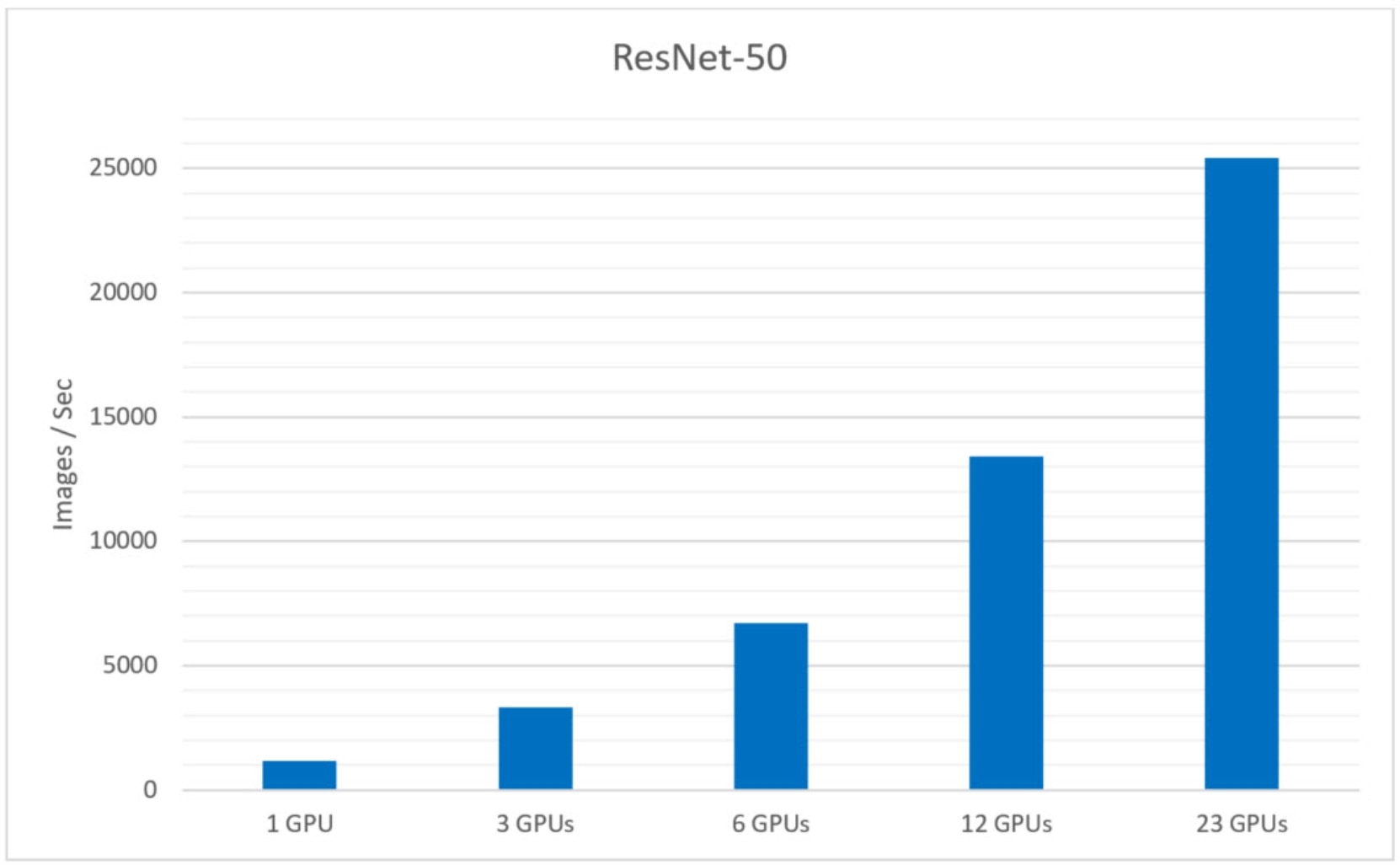
Figure 2.   Training benchmark results

Solution sizing guidance

DL workloads vary significantly with respect to the demand for compute, memory, disk, and I/O profiles, often by orders of magnitude. Sizing guidance for the GPU quantity and configuration of F900 nodes can only be provided when these resource requirements are known in advance. That said, it is usually beneficial to have a few data points on the ratio of GPUs per PowerScale F900 node for common image classification benchmarks.

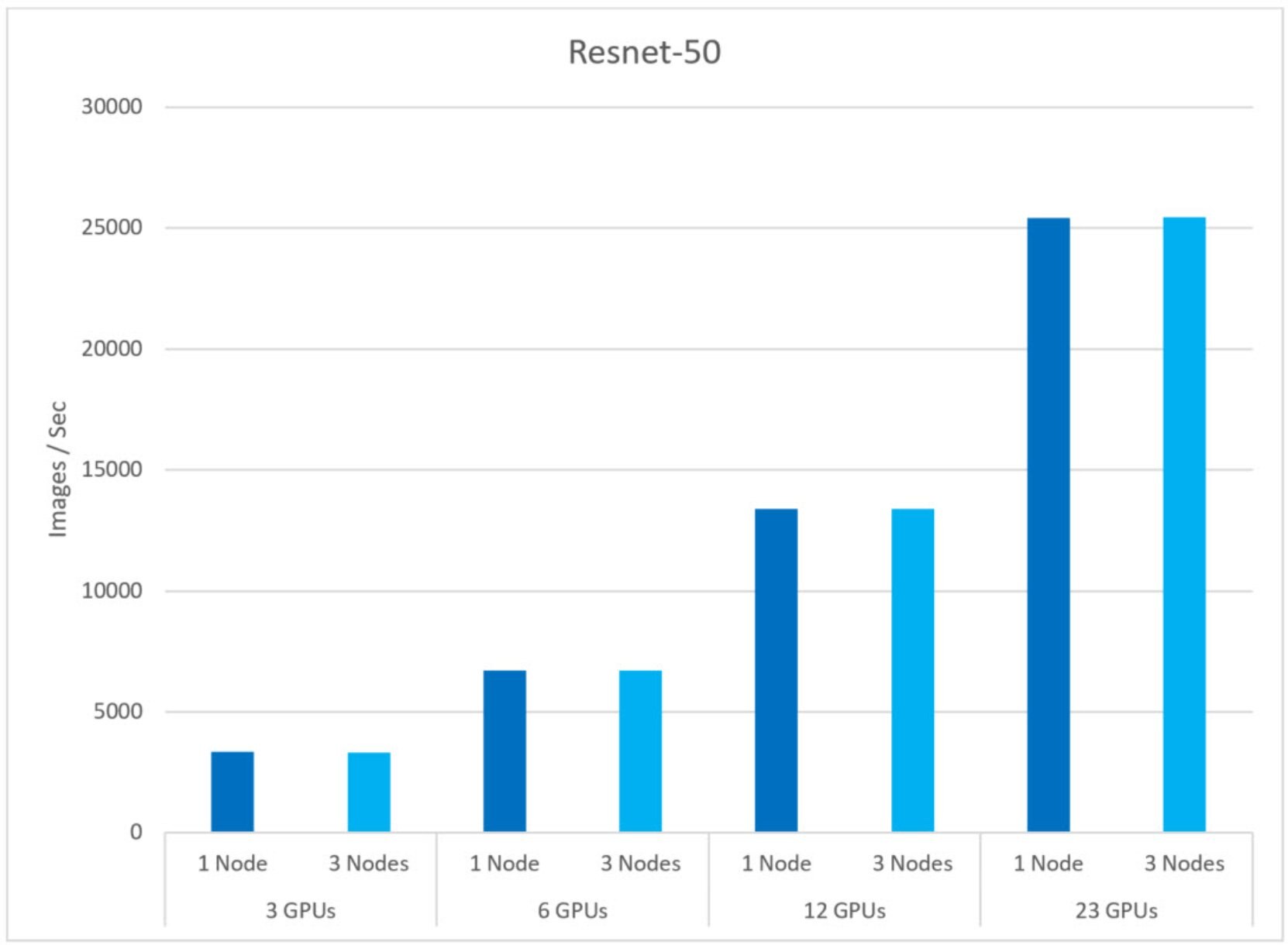
Based on the results from the TensorFlow benchmark, Figure 3 compares the image throughput between results where N GPUs were assigned to N F900 Nodes (where N is the number of GPUs and F900 nodes used during the test). For example, with three GPUs we run two different tests where one and three F900 nodes were used, respectively. The goal of this test is to identify the number of GPUs that a single F900 node can support without performance degradation.

During the test, we have seen similar image throughput from one to 23 GPUs assigned to one and three F900 nodes, respectively. We have not noticed any performance degradation with 23 GPUs assigned to a single F900 node.

From this test we can conclude that a single PowerScale F900 can support at least 23 AMD Instinct MI100 GPUs without performance degradation.
Chart, bar chartDescription automatically generated

Figure 3.   Sizing guidance

Benchmark setup

Obtain the TensorFlow benchmarks

The TensorFlow Benchmark suite can be obtained from the following Git repository. Note that the benchmark is also included in the rocm/tensorflow docker image.

cd /mnt/isilon/data

git clone https://github.com/tensorflow/benchmarks tensorflow-benchmarks

cd tensorflow-benchmarks

NFS volume mounting

In this paper, PowerScale F900 storage is used to store two types of file storage. First, it is used for scripts, binaries, and logs. This requires low bandwidth and must support NFS locks for consistency and proper visibility of changes. This generally uses the default mount options and is mounted with the following command on each physical server:

mount -t nfs 10.3.2.1:/ifs /mnt/isilon

Second, there is the data that will be read at high speed by the TensorFlow benchmark. To ensure an even balance of traffic across all F900 nodes, we want to create several mount points on each R7525 system carefully, pointing to the IP address of each PowerScale node.

mount -t nfs 10.3.2.1:/ifs -o rsize=524288,wsize=524288,nolock /mnt/isilon1

mount -t nfs 10.3.2.2:/ifs -o rsize=524288,wsize=524288,nolock /mnt/isilon2

mount -t nfs 10.3.2.3:/ifs -o rsize=524288,wsize=524288,nolock /mnt/isilon3

Start TensorFlow containers

In a basic bare-metal deployment of TensorFlow and MPI, all software must be installed on each node. MPI then uses SSH to connect to each node to start the TensorFlow application processes.

In the world of Docker containers, this becomes a bit more complex but significantly easier for managing dependencies. On each server, a single Docker container is launched that has an SSH daemon that listens on the custom port 2222. This Docker container also has TensorFlow, OpenMPI, and AMD ROCm libraries and tools. We can then run the docker exec and the mpirun command on one of these containers and MPI will connect to the Docker containers on all other VM instances by SSH on port 2222.

First, a custom Docker image is created using the following Dockerfile.

# Build with: docker build --network=host --rm -t user/tensorflow-amd:rocm4.5.2-tf1.15-dev .

FROM rocm/tensorflow:rocm4.5.2-tf1.15-dev

RUN wget -qO - http://repo.radeon.com/rocm/rocm.gpg.key | sudo apt-key add –

# Install SSH and various utilities.

RUN apt-get update && apt-get install -y --no-install-recommends \

        openssh-client \

        openssh-server \

        lsof \

    && \

    rm -rf /var/lib/apt/lists/*

# Configure SSHD for MPI.

RUN mkdir -p /var/run/sshd && \

    mkdir -p /root/.ssh && \

    echo "StrictHostKeyChecking no" >> /etc/ssh/ssh_config && \

    echo "UserKnownHostsFile /dev/null" >> /etc/ssh/ssh_config && \

    sed -i 's/^#*Port 22/Port 2222/' /etc/ssh/sshd_config && \

    echo "HOST *" >> /root/.ssh/config && \

    echo "PORT 2222" >> /root/.ssh/config && \

    mkdir -p /root/.ssh && \

    ssh-keygen -t rsa -b 4096 -f /root/.ssh/id_rsa -N "" && \

    cp /root/.ssh/id_rsa.pub /root/.ssh/authorized_keys && \

    chmod 700 /root/.ssh && \

    chmod 600 /root/.ssh/*

# Install Python libraries.

RUN pip install ConfigArgParse

WORKDIR /root

EXPOSE 2222

As you can see, this Dockerfile is based on the AMD ROCm Docker image for TensorFlow release.

Run the following command to build the Docker image. Replace user with your Docker ID, or host:port if you are using an on-premises container registry.

docker build -t user/tensorflow-amd:rocm4.5.2-tf1.15-dev .

Note that during the build process, a new RSA key pair is randomly generated and stored in the image. This key pair allows containers running this image to SSH into each other. Although this is convenient for a lab environment, a production environment should never store private keys in an image.

Next, you must push this image to a Docker container registry so that it can be pulled from all other servers. Once logged into your container registry, run the following command to upload the container.

docker push user/tensorflow-amd:rocm4.5.2-tf1.15-dev

You are now ready to start the containers on all servers. Repeat this command for each server, replacing host with the server name and user by your Docker ID or host:port.

ssh host \

docker \

run \

--rm \

--detach \

--privileged \

-v /mnt:/mnt \

--network=host \

--device=/dev/kfd \

--device=/dev/dri \

--ipc=host \

--shm-size 16G \

--ulimit memlock=-1 \

--group-add video \

--cap-add=SYS_PTRACE \

--security-opt seccomp=unconfined \

--name tf \

user/tensorflow-amd:rocm4.5.2-tf1.15-dev \

bash -c \

"/usr/sbin/sshd ; sleep infinity"

The final line starts the SSH daemon which waits forever. At this point, the container can be accessed by MPI by the SSH daemon listening on port 2222.

Choose any one of the VM instances as the primary and enter the container by running the following command. This will give you a bash prompt within the container.

docker exec -it tf bash

Confirm that this container can connect to all other containers by password-less SSH on port 2222.

ssh -p 2222 dl-worker-01 hostname

ssh -p 2222 dl-worker-02 hostname

Next, test that MPI can launch processes across all VM instances.

mpirun --allow-run-as-root -np 2 -H dl-worker-01 -H dl-worker-02 hostname

To stop the containers and all processes within them, run the following command on each server

docker stop tf

Conclusion

Conclusion

This document presents a high-performance architecture for DL by combining Dell PowerEdge R7525 servers with AMD Instinct MI100 GPUs, Dell PowerSwitch Z9332F-ON switches, and Dell PowerScale F900 all-flash storage. We have discussed the key features of PowerScale that make it a powerful persistent storage for DL solutions. This new architecture extends the commitment from Dell Technologies to make AI simple and accessible to every organization. We offer our customers informed choice and flexibility in how they deploy high-performance DL at scale. Throughout the benchmark process we validated that the PowerScale F900 Scale-Out NAS storage was able to keep pace and linearly scale performance with AMD Instinct MI100 GPUs.

DL algorithms have a diverse set of requirements with various compute, memory, I/O, and disk capacity profiles. That said, the architecture and the performance data points presented in this white paper can be used as the starting point for building DL solutions tailored to varied sets of resource requirements. More importantly, all the components of this architecture are linearly scalable and can be independently expanded to provide DL solutions that can manage tens of PBs of data.

While the solution presented here provides several performance data points and demonstrates the effectiveness of PowerScale in handling large scale DL workloads, there are several other operational benefits of persisting data for DL on PowerScale:

  • The ability to run AI in-place on data using multi-protocol access
  • Enterprise grade features out-of-the-box
  • Scale up to 93 PB RAW per cluster

In summary, PowerScale-based DL solutions deliver the capacity, performance, and high concurrency to eliminate I/O storage bottlenecks for AI. This provides a rock-solid foundation for large scale, enterprise-grade DL solutions with a future proof scale-out architecture that meets your AI needs of today and that scales for the future.

References