Dell APEX Cloud Platform for Red Hat OpenShift
Executive summary
Overview
APEX Cloud Platform for Red Hat OpenShift is a platform for delivering OpenShift on-premises, while simplifying the process of deploying and managing the underlying infrastructure. This gives customers the ability to meet regulatory and data-locality requirements, while still providing an experience similar to consuming OpenShift in a public cloud.
Audience
The premise of this paper is to define both the business and technical details related to implementing the Dell APEX Cloud Platform for Red Hat OpenShift. This paper is not a deployment guide, but is designed to foster successful research and planning of the resources required for such a deployment.
This guide is intended for Platform Management, DevOps admins, cloud integration admins, and technical decision makers with a cloud-native or a multicloud focus. The individuals will find the use cases presented compelling as they evaluate Dell APEX Cloud Platform for Red Hat OpenShift.
Revisions
|
Date |
Part number/ |
Description |
|
October 2023 |
H19823 |
Initial release |
We value your feedback
Dell Technologies and the authors of this document welcome your feedback on this document. Contact the Dell Technologies team by email.
Author: Michael Wells
Contributors: Florian Coulombel, Brian Dean, Anthony Foster, Roy Laverty, Robert Sonders
Note: For links to other documentation for this topic, see the APEX Cloud Platform Info Hub.
Terminology
The following terms and abbreviations are used throughout this document.
Table 1. Terminology used in this document
|
Acronym |
Description |
|
ACM |
Red Hat Advanced Cluster Management |
|
ACP |
APEX Cloud Platform |
|
ACS |
Red Hat Advanced Cluster Security |
|
BOSS |
Boot Optimized Server Storage |
|
CNCF |
Cloud Native Computing Foundation – the organization responsible for maintaining upstream Kubernetes and its various specifications |
|
CPFS |
Cloud Platform Foundation Software, often called the ACP Foundation |
|
CSI |
Container Storage Interface |
|
CSM |
Container Storage Module |
|
Dell SDS |
Dell Software-defined Storage |
|
Hyperscaler |
Any large public cloud service provider that can provide services such as compute and storage |
|
IaC |
Infrastructure-as-Code is a cloud construct that uses declarative language to define an application or systems operating environment |
|
iDRAC |
Integrated Dell Remote Access Controller |
|
Knative |
Open-Source Enterprise-level solution to build Serverless and Event Driven Applications |
|
On-prem or on-premises |
A locally deployed data center set of hardware components |
|
PowerFlex Gateway |
The REST API endpoint service for PowerFlex versions prior to 4.0 |
|
PowerFlex Manager |
The web user interface used for configuring and managing Dell SDS components, often called the Element Manager |
|
Protection Domain |
A group of storage nodes that provide data isolation, security, and optimal performance |
|
PV |
Persistent Volume (Kubernetes construct) |
|
PVC |
Persistent Volume Claim (Kubernetes construct) |
|
RHEL |
Red Hat Enterprise Linux |
|
SDC |
Storage Data Client. The Dell Software-Defined Storage component installed on a node enabling access to block storage volumes |
|
SDS |
Storage Data Server. The Dell Software-Defined Storage component that presents the local disks to the cluster for use in the storage pool |
|
Storage Pool |
A group of disks within a Protection Domain which contribute capacity. Volumes are defined in an SP and volume data is distributed across all disks in the SP |
Introduction
What is the APEX Cloud Platform?
The Dell APEX Cloud Platform is a new family of products that are designed to seamlessly extend the customer’s cloud operating model of choice to run on-premises. Customers have recognized the power and flexibility of the cloud operating model but understand that not all workloads are good candidates for relocation to a public cloud provider. This may be due to regulatory reasons, security reasons, or even cost reasons. Even when a workload is not suitable for running in a public cloud there are benefits to adopting the cloud operating model. These include flexibility to easily change where an application or service will run, maintaining both a common application architecture and deployment models, and ensuring consistent policies and governance.
What is Red Hat OpenShift?
Red Hat OpenShift is an enterprise-grade container orchestration and management platform based on Kubernetes. While many organizations understand the value of moving to containerization, and are familiar with the name Kubernetes, most do not have a clear understanding of what Kubernetes is. OpenShift uses Red Hat’s proprietary Kubernetes distribution, and layers on top critical enterprise features like:
- Multi-Cluster deployment, management, and shift-left security enforcement
- Developer experience – CI/CD, GitOps, pipelines, logging, monitoring, and observability
- Integrated networking including ServiceMesh and multi-cluster networking
- Integrated web console with distinct administrator and developer views
- Automated platform updates and upgrades
- Multiple workload options – containers, virtual machines, and serverless
- Operators for extending and managing additional capabilities
OpenShift can run on all types of infrastructure, from a wide variety of public cloud providers to virtualized on-premises to bare metal servers, making it an ideal platform for implementing it in both hybrid cloud and multicloud environments.
Red Hat OpenShift can be consumed in 3 different ways:
- Red Hat OpenShift Kubernetes Engine (OKE) – OKE is the base layer providing the operating system up to the Kubernetes cluster.
- Red Hat OpenShift Container Platform (OCP) – OCP includes OKE, but also adds to it an ecosystem of additional services designed to make developing and deploying workloads easier.
- Red Hat OpenShift Platform Plus (OPP) – OPP includes all of the components and services in both the OKE and OCP layers, and adds additional functionality to support managing health, and security across multiple clusters. OPP also includes Quay, Red Hat’s distributed global image registry.
Dell APEX Cloud Platform for Red Hat OpenShift Value Proposition
The Dell APEX Cloud Platform for Red Hat OpenShift, hereby referred to as APEX Cloud Platform, introduces a new level of integration for running OpenShift on bare metal servers. Until now, all management of the infrastructure has been through separate OEM tooling and is handled separately from the management of OpenShift itself. This increases the number of team members and different skillsets required to maintain the system, thus increasing the cost and complexity of such a solution. For example, staff are required to test BIOS, firmware, and driver updates as they become available, and schedule a maintenance period to apply those updates.
Through the use of Dell’s Cloud Platform Foundation software, we can expose the infrastructure management into the OpenShift Web Console, allowing administrators to update the hardware using the same workflow that updates the OpenShift software. This allows the OpenShift administrators to manage the infrastructure with the same tooling they use to manage the cluster and the applications running on it, freeing maintenance teams for other tasks. This, combined with our Continuously Validated State, means that each update to the environment is thoroughly tested to ensure that all of the various components throughout the stack work together.
Architecture Overview
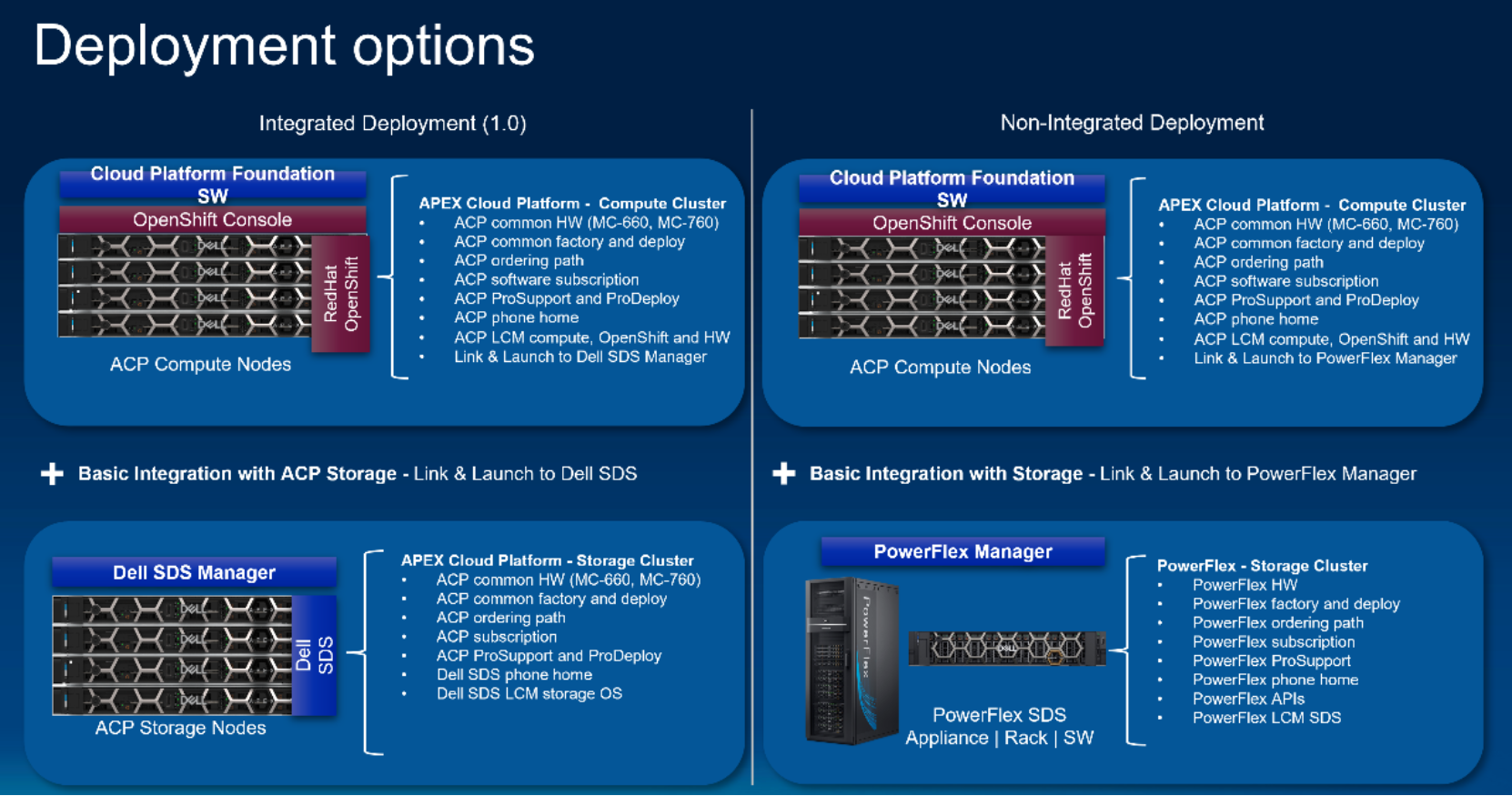
APEX Cloud Platform uses a two-layer architecture, with storage and compute separated for optimal usage. The architecture has two separate groups of nodes:
- Compute nodes
- 
Storage nodes
The compute nodes run the OpenShift software, and to ensure resiliency of the control plane, a minimum of 4 compute nodes are required. The compute nodes run OpenShift on bare metal, meaning that OpenShift is running directly on the hardware without the need of a hypervisor. By running in this manner, we can take advantage of all the OpenShift features including OpenShift Virtualization for running VMs and Knative for serverless compute.
The storage nodes run the Dell SDS software on Red Hat Enterprise Linux (RHEL) directly on the storage nodes. The management components related to Dell SDS are co-resident on the storage nodes and do not consume resources on the compute nodes. Currently, there is basic integration between OpenShift and the Dell SDS Element Manager. In future releases, primary storage operations will be available directly in the OpenShift Web Console. This will include creating volumes, replacing disks, and adding or removing nodes from the storage cluster. This will also incorporate lifecycle management of the Dell SDS components into the same update workflow that maintains OpenShift, the Cloud Platform Foundation Software, and the infrastructure hardware components.
Lifecycle Management
Lifecycle Management of APEX Cloud Platform is automated through the Cloud Platform Foundation Software, and is controlled via the APEX Cloud Platform menu in the OpenShift Web Console. In a connected system you have the ability to apply the latest update from the Dell support endpoint. For disconnected systems you can download the update package from an internet connected system and then move it using USB to a system that can connect to the OpenShift Web Console. The update process will update the following components:
- OpenShift Platform, including CoreOS
- Cloud Platform Foundation Software
- BIOS, firmware, and drivers for the physical nodes
- Dell SDS components (coming soon)
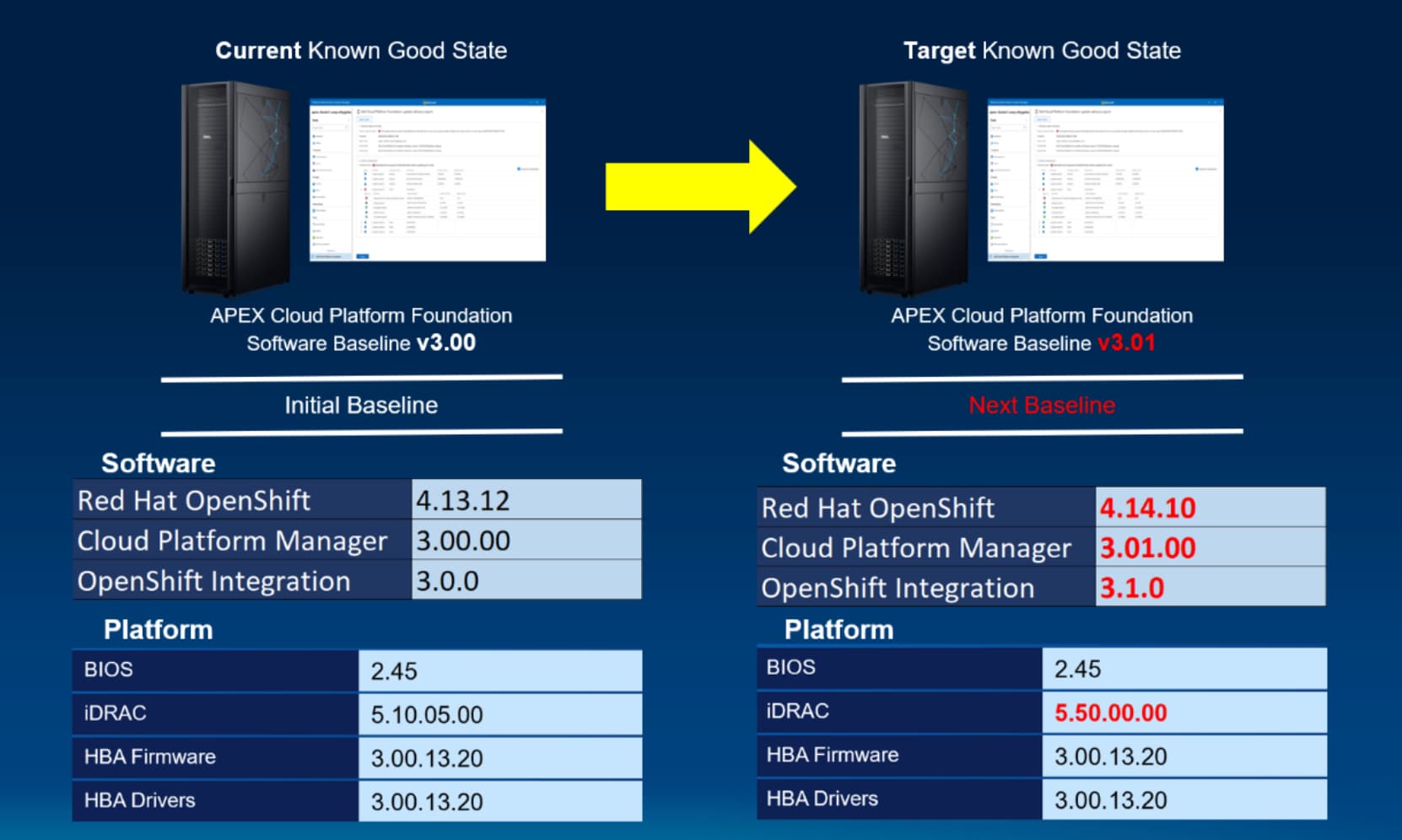
The APEX Cloud Platform Lifecycle Management (LCM) process uses the concept of Known Good State by delivering platform updates as an update bundle. Each update bundle is thoroughly validated by Dell to ensure that the solution as a whole continues to function as expected. The update bundle is applied using a single update workflow that updates the entire solution stack. By performing all these updates in a single workflow, we can sequence the updates to prevent downtime and reduce the time needed to apply the updates. For example, we can pre-stage all the firmware and BIOS updates on all the nodes in parallel, but wait for each node reboot triggered by the OpenShift software update before applying the hardware updates.
Storage Options
APEX Cloud Platform Storage Nodes
The default deployment for new APEX Cloud Platform clusters uses ACP storage nodes to provide the persistent storage for the compute cluster. Dell SDS block services are based on Dell PowerFlex, a software-defined storage platform that provides extreme performance as well as linear scalability. This provides the best experience as the coming full integration provides seamless management of the storage cluster from within the OpenShift Web Console. In this way, consuming ACP storage is more like consuming a storage service than the traditional experience of managing a storage cluster.
PowerFlex Storage
When bringing Dell APEX Cloud Platform for Red Hat OpenShift into an existing environment that already utilizes Dell PowerFlex storage, you can choose to implement the ACP compute cluster connected to PowerFlex and not use ACP storage nodes. This allows you to utilize your existing investment and skillset in PowerFlex.
It is important to note that by choosing PowerFlex for the back-end storage you will not be able to leverage any future storage integration features. You must continue to manage PowerFlex software and hardware using the same methods you do today.
Choosing to use a back-end PowerFlex storage deployment model is beneficial in the following circumstances:
- You have an existing PowerFlex cluster that you want to leverage
- You prefer for storage to be managed by a storage management team
- You would like to consume PowerFlex storage from other systems in your environment beside ACP compute
Container Storage Interface
Regardless of whether you chose to leverage ACP Storage or PowerFlex, the OpenShift nodes consume that storage through the Dell Container Storage Interface (CSI). The CSI driver is a Kubernetes driver that runs on the OpenShift compute nodes and can communicate with the storage management layer to provision, mount, snap, and de-provision volumes.
A critical component related to the CSI driver is a Kubernetes resource called a Storage Class, which defines the storage cluster as well as options like the Protection Domain and Storage Pool. The APEX Cloud Platform creates a single storage class by default and marks that class as the default class, you also have the ability to define additional storage classes so that you can isolate data onto specific storage nodes (Protection Domains) or use different storage pools with different performance characteristics, or different Quality-of-Service policies applied.
When you provision a Persistent Volume Claim (PVC), you define the size of the volume, the volume type, and the storage class. The CSI driver uses that information and communicates with the storage system to create the Persistent Volume (PV), either immediately (if the storage binding type is Immediate), or when the PVC is attached to a pod (if the storage binding type is WaitForFirstConsumer). If that PVC resource is deleted, then the default behavior is to delete the PV and by extension the volume on the storage cluster. This capability allows the developers to control the underlying infrastructure in a consistent way, using Infrastructure-as-Code (IaC), which is a core tenant of the cloud operating model.
Container Storage Modules
The Container Storage Interface is based on a specification that is maintained by the CNCF, to provide features above and beyond what are covered by the CSI specification Dell has released a collection of Container Storage Modules (CSM). Some of the modules that may be of particular interest for APEX Cloud Platform users are:
- Resiliency Module – provides faster failover for pods that use Persistent Volumes.
To protect the integrity of the data within the Persistent Volume, when a node fails the pod will not be scheduled on a new node until an admin confirms the node is no longer running and not writing to the volume. This is known as “Non-graceful node shutdown” scenario. The resiliency module uses the API of the underlying Dell SDS to immediately identify a node failure and confirm that no data is being written to the volume, and automatically marks the pod as schedulable without any manual tasks. This greatly minimizes the time needed for a pod to recover in the event of a node failure.
The module works with allow-list, every Pod with the label podmon.dellemc.com/driver:csi-vxflexos are protected.
-
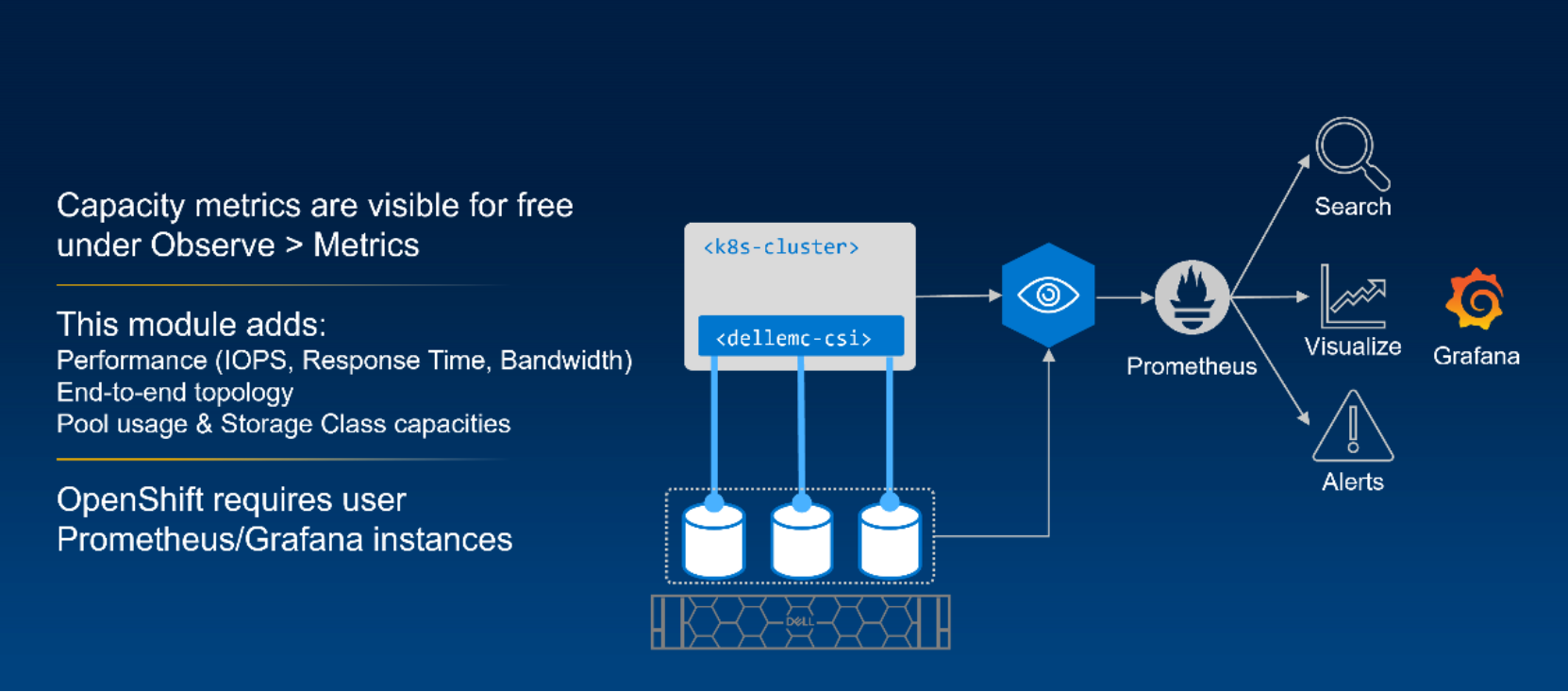
Observability Module – provides storage metrics into Kubernetes that can be used to identify storage usage and performance down to the pod level.
Kubernetes allows storage providers to expose simple capacity metrics to kube-stat. This is achieved natively in the CSI driver and allows all persistent volumes in APEX Cloud Platform to be visible in the OpenShift UI and OpenShift Monitoring.
The Observability module uses OpenTelemetry to capture performance metrics and topology from the storage cluster and makes them available in a Prometheus database. The module also includes standard Grafana dashboards that allow easy access to performance and storage cluster data like:
- Node Bandwidth
- Node Latency
- Node IOPS
- Volume Bandwidth
- Volume Latency
- Volume IOPS
- Storage Pool Capacity
- Storage Pool Usable Space
- Storage Pool Used Space
- Storage Pool Provisioned Space (thick and thin)
Note: OpenShift monitoring forbids adding external metrics to its Prometheus instance. To visualize the metrics, deploying or connecting to a separate Prometheus/Grafana stack is necessary.
This is not an extensive list of the Dell Container Storage Modules. For more information, see https://dell.github.io/csm-docs/docs/.
Networking
Networking
The APEX Cloud Platform for Red Hat OpenShift uses 2 dual-port network interface cards (NICs) to connect to top-of-rack switches, along with a single gigabit management switch for the iDRACs. The NIC options include 25Gb and 100Gb, however the 25Gb NICs can be connected to 10Gb switches if needed. Three VLANs are used in the solution, 1 Management VLAN (Flex-Management) is for OpenShift application traffic, and 2 Data Path VLANs are for connectivity to the storage cluster.
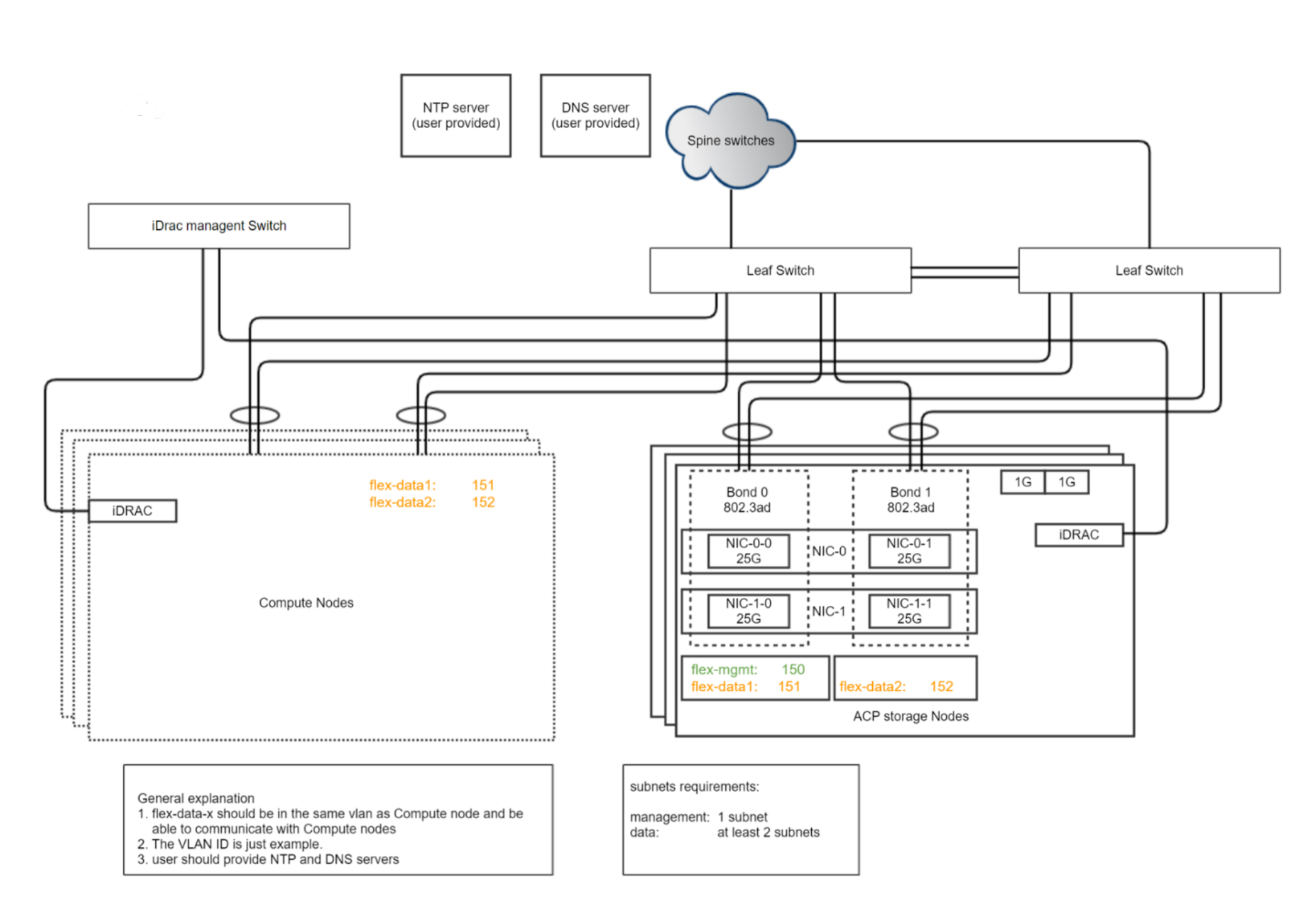
The solution requires that DNS and NTP services within the environment and prior to deployment IP addresses for these services must be provided. The DNS and NTP endpoints must be accessible from the Flex-Management VLAN.
Hardware Configurations
ACP Nodes
APEX Cloud Platform uses Multicloud Nodes (MC), which are based on the industry leading Dell PowerEdge 16th generation servers and use 4th Generation Intel Xeon Scalable Processors. The MC nodes for both compute and storage currently offer 2 chassis options:
-

MC-660
-
MC-760
Compute Nodes
ACP Compute nodes are diskless and utilize the latest generation BOSS-N1 to provide redundant local storage for the Red Hat CoreOS Operating System and feature externally accessible, hot-swappable NVMe drives. The nodes are available either partially populated with a single CPU, or fully populated with 2 CPUs. This gives customers more options when trying to balance their performance needs with hardware and licensing costs.
The MC-760 is also accommodates a wide variety of GPUs, making it an ideal candidate for AI, ML, and DL workloads that are deployed in many organizations.
|
|
MC-660 |
MC-760 |
|
CPU Cores |
Min: 8 total cores Max: 104 total cores |
|
Memory |
Up to 4TB DDR5 up to 4800 MT/s |
|
Nvidia GPU |
Up to 1x A2 |
Up to 4x A2 or 2x A16/A30/A40 |
Storage Nodes
ACP storage nodes utilize BOSS for the RHEL operating system, the remaining drives are dedicated to the Dell SDS and are pooled together to provide SDS volumes for OpenShift. The storage nodes offer many drive options including SSD and NVVMe.
|
|
MC-660 |
MC-760 |
|
CPU Cores |
Min: 16 total cores Max: 104 total cores |
|
Memory |
Up to 4TB DDR5 up to 4800 MT/s |
|
Drives |
Up to 10 SAS/NVMe |
Up to 24 SAS/NVMe |
Additional Details
Deployment
APEX Cloud Platform requires ProDeploy services to implement. This deployment service includes racking, and cabling of the nodes, deployment of the storage cluster, and deployment of the compute cluster. If you would like additional assistance with application migration or application modernization, we have a number of standard services that can be added on. If you need something more specific, we would be happy to build a custom statement of work to help you meet your organization’s specific goals.
Understanding Bare Metal
Red Hat uses the term Bare Metal to describe a cluster where the OpenShift software is deployed directly on server hardware. Meaning the physical nodes boot the Red Hat CoreOS directly. This is different from the traditional, virtual deployment where the cluster nodes are virtual machines running on a hypervisor. Virtual deployments were common because they offered an abstraction between the hardware and the OpenShift cluster, which was useful because OpenShift had no ability to manage the hardware beyond basic power on/power off/reboot functions.
With the Cloud Platform Foundation Software created by Dell for the APEX Cloud Platform, we now have the ability to do full hardware lifecycle management within the OpenShift Web Console using the same workflow that updates the OpenShift software. This means the hypervisor licensing costs are removed and there is no overhead between the hardware and OpenShift software. This also means one less layer of the stack to maintain and secure.
Licensing
APEX Cloud Platform for OpenShift requires OpenShift Platform Plus subscriptions covering the physical compute nodes. Subscriptions can be purchased directly from Dell as part of the APEX Cloud Platform purchase.
APEX Cloud Platform uses Bare Metal subscriptions, which is different from the Red Hat vCore licensing model used when running OpenShift on top of a hypervisor.
|
vCore |
Bare Metal |
|
1 subscription covers up to 4 virtual cores |
1 subscription covers a single bare metal node with up to 2 sockets and up to 64 total cores |
|
Subscriptions can be stacked to reach the required virtual core count |
Subscriptions can be stacked to reach the required socket and total core counts |
The following table displays significant consolidation which can be achieved by moving to OpenShift on bare metal, even without considering the savings from removing the hypervisor.
References
Dell Technologies documentation
The following Dell Technologies documentation provides other information related to this document. Access to these documents depends on your login credentials. If you do not have access to a document, contact your Dell Technologies representative.
Red Hat documentation
The following Red Hat documentation provides other information related to this document. Access to these documents depends on your login credentials. If you do not have access to a document, contact your Red Hat representative.
