VMware has been at the forefront of the shift towards the modern data center, enabling organizations to take advantage of the unprecedented agility provided by the software-defined data center (SDDC) and the delivery of all infrastructure-as-a service (IaaS). This data center evolution has resulted in an increasingly converged and software-driven environment that empowers IT and organizational transformation.
However, protecting VMware workloads (applications and their data) in this new model is more complex, creating challenges that are not easily met by data protection solutions built for legacy SAN-based architectures:
Virtual machine (VM) sprawl due to the growth of data, virtualization, and the ease of spinning up new VMs
Increasingly stringent protection requirements, such as government regulations, compliance, and more critical applications running in virtual environments, etc.
Shrinking protection/backup windows
The lack of data protection solutions architected and ready for the SDDC
Many of today’s data protection solutions are limited by their inability to provide holistic data protection, which forces trade-offs between key requirements. Bottom line, common data protection architectures such as the traditional hardware and software model and initial approaches to converged hardware and software don’t work well for larger VMware environments and are not designed to support the SDDC.
Dell EMC data protection integration benefits
Dell EMC data protection integration provides:
Seamless Integration—Enable VM admins to manage data protection directly from native vSphere UI
Simplified Proxy Management—Automated to minimize and virtually eliminate manual effort and the potential for mistakes
Policy Management—Age-based policy management, dynamic policies, and multi- system management
Protection Storage—Leverage Dell EMC DD series appliances, Dell EMC DD Virtual Edition (DDVE), or the Dell EMC Integrated Data Protection Appliance (IDPA) within the SDDC
Simplified Networking Automation—Enable automation throughout the entire VMware data protection stack via native dynamic protection
Constructedfortodaywithtomorrowinmind,DellEMCdataprotectionisarchitectedfromthegrounduptoincreasespeed and agility for every business. By automating data protection, it offers IT, executive staff, and lines of business(LOBs) a competitive advantage, namely more time to be productive. Dell EMC data protection solutions deliver IT andstorageadminsthetoolstheyneedtomanageuptimeandincreaseservicelevelagreements(SLAs),improveapplication performance,andlowerthetotalcostofownership(TCO)ofprimarystorageinfrastructureANDapplicationdataprotection.
Now, users can spin up data protection automatically with each workload environment that has been designedspecificallytointegratewithanorganization’sexistingVMwaretools.DellEMC’sfifteen-plusyearassociationwithVMwarehasenabledthedeepestlevelsofintegrationbetweentheVMwareenvironmentanddataprotection.OneofthemainadvantagesoftheDellEMCdata protectionarchitectureforVMwareisthatweprovidedeepintegrationwithVMwareandautomationacrosstheentirevirtualizeddataprotectionstack.Thisisakeydifferentiatorforoperationaleffectivenessandlong-termscalability.
Seamless integration
DellEMCdata protectionsolutionsarefullyintegratedwithvSpheretoenableVMadminstomanagedataprotectiondirectlyfromthenativevSphereUI.WithDellEMC data protection’s advancedVMwareintegration,VMwareAdminsareempoweredtocontroltheirowndataprotection more efficiently, resultinginfasterbackupsandrestoresforvirtualizedmission-criticalapplications.
VMware vRealize Automation
AsmoreusersadoptVMwareandVMwarevRealizeAutomation(vRA),DellEMC data protection’s seamlessintegrationwithVMware’s UI becomes more and more important. Pair VMware vRealize Suite with Dell EMC data protection and the solutionoffersautomation,governance,andcomplianceforuserswiththedeepestintegrationpointsforourcustomer’scloudorchestrationportal.
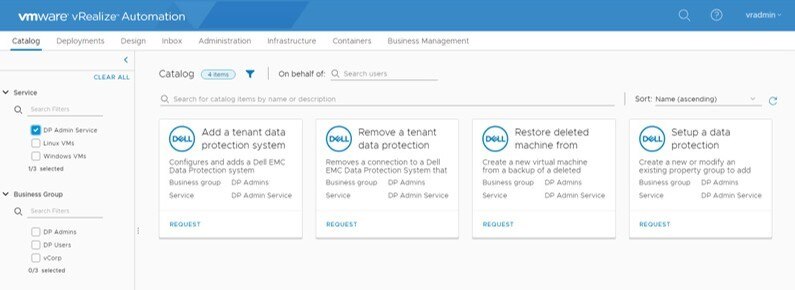
ThevRealizeDataProtectionExtensionprovidesout-of-the-boxintegrationofvRA.DellEMCdata protection softwareoffers data protection natively as part of the vRA Advanced Services. By using an add-on extension, virtualizationadminscanquicklycreatedataprotectionservicesforend-usersandbenefitfromkeyfeatureswhichincludepre-builtDay1andDay2workflowsaswellasfile-levelrecoveryandapplicationprotectionworkflows.ThevRADataProtectionExtensionembedsdataprotectiondirectlyintotheblueprints.
Figure 1.Dell EMC vRealize Data Protection Extension on the VMware Solution Exchange
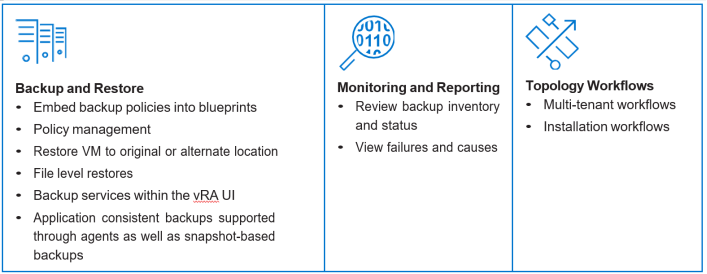
DellEMC data protectionintegrationintoVMwarevRAprovides:
With Dell EMC data protection, proxy management becomes simpler while increasing visibility and awareness ofpotentialconflicts.Inaddition,DellEMCautomaticallymanagesandcleansupVirtualMachineDisk(VMDK)snapshots,whichgreatlysimplifiesVMwareimagebackups,improvingoverallVMwareoperationsandreducingOPEXcosts.Thiszero-touchfeatureautomaticallyperformsthefollowingvalue-addedVMDKSnapshotManagementtasks–allwithoutuserintervention:
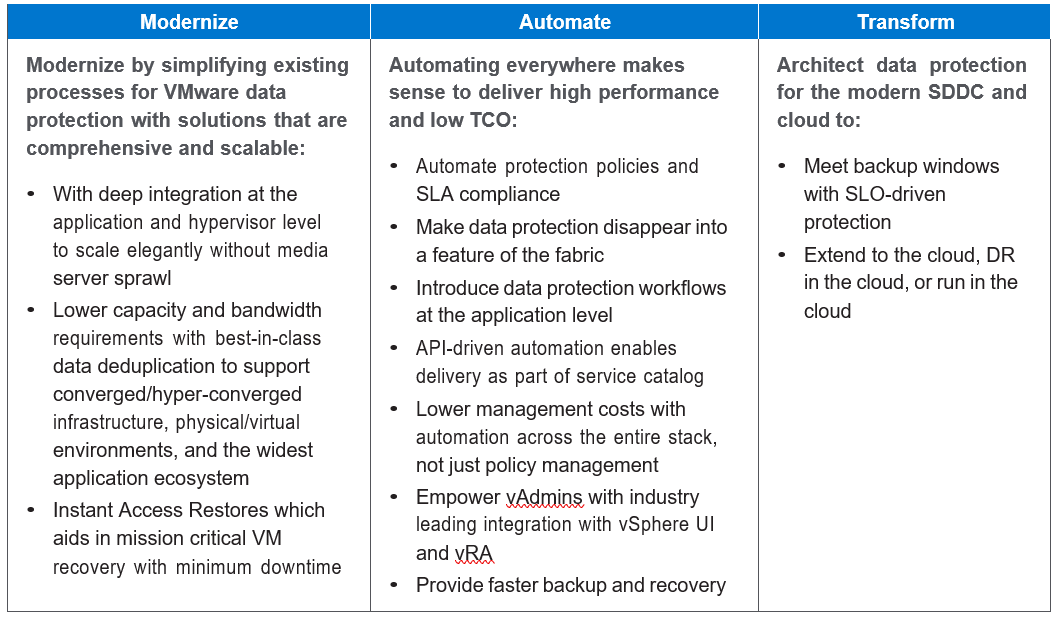
The following table summarizes the Dell EMC data protection for VMware strategy.
Table 2.DellEMCdata protectionforVMwarestrategy
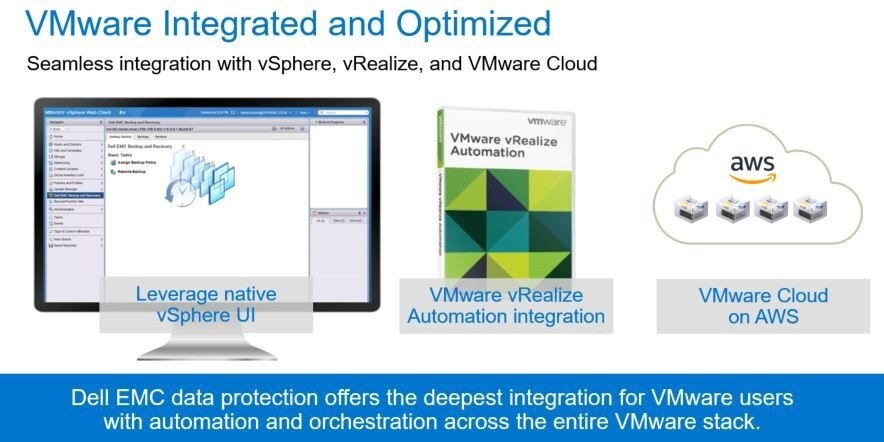
Figure 2.Integration across the VMware stack
Integration with vSphere Web Client
Dell EMC data protection integrates with the VMware vSphere web client via a plug-in that provides the VMware administrator with:
Control to perform backups and restores
The ability to oversee all backup and recovery activity
Detailed reporting and configuration of data protection
Transform through the cloud
Overview of support for common cloud use cases
Dell EMC is the leading vendor of data protection solutions. It has a comprehensive portfolio to cover multi-cloud use cases, built upon the industry’s leading data protection platform with the widest protected workload use cases and ecosystem. Dell EMC data protection solutions are ready to support all phases of your journey to the cloud and provide you with superior cloud data protection for multiple common cloud use cases.
Retention to the cloud
Dell EMC data protection solutions support native backup tiering to public or private cloud for cost-effective storage of long-term backup retention data eliminating the need for physical tape infrastructure.
Disaster recovery
The Dell EMC Cloud Disaster Recovery (Cloud DR) solution provides capabilities in the AWS public cloud. Cloud DR protects on-premises applications into AWS S3 with no additional Dell EMC data protection application server or Dell EMC deduplication protection storage components needed in the cloud. The solution does not require additional compute resources. Recovery of VMs can be done temporarily for DR test purposes or used to recover from an actual disaster.
VMware workloads on AWS
Dell Technologies was selected as the first VMware partner to deliver data protection for VMware Cloud on AWS. Dell EMC data protection software provides fast, efficient, and secure image and guest level backup and recovery for workloads running on VMware Cloud. Tight integration into VMware enables self-service protection within native VMware interfaces, notably with a 3 click failover, 2 click failback feature that is easy to use and manage.
All these solutions support multiple clouds and enable you to have a single, consistent management of your data protection across on-premises ecosystems and multiple clouds. Our solutions also enable data protection across clouds, with the ability to tier older data to almost any major cloud or to store recent copies on a cloud for DR purposes, while benefiting from full DR orchestration capabilities like you experience in your on-premises environment.