Dell EMC PowerStore Metro Node with Microsoft SQL Server
Executive summary
Overview
Revisions
We value your feedback
SQL Server availability
Basic fault tolerance
A typical SQL Server storage architecture consists of a single SQL Server host connected through redundant storage paths to a storage appliance such as Dell PowerStore. This SQL Server architecture has many redundant features and works well to provide roughly 99.9%, or “three nines”, of availability which is 8.77 hours of downtime per year. For many organizations, this is perfectly acceptable. The system will be taken offline for short periods of time to apply upgrades and if something happens to the SQL Server host, the database recovery plan is to restore from a backup. Often, this is all achievable within the allotted downtime.
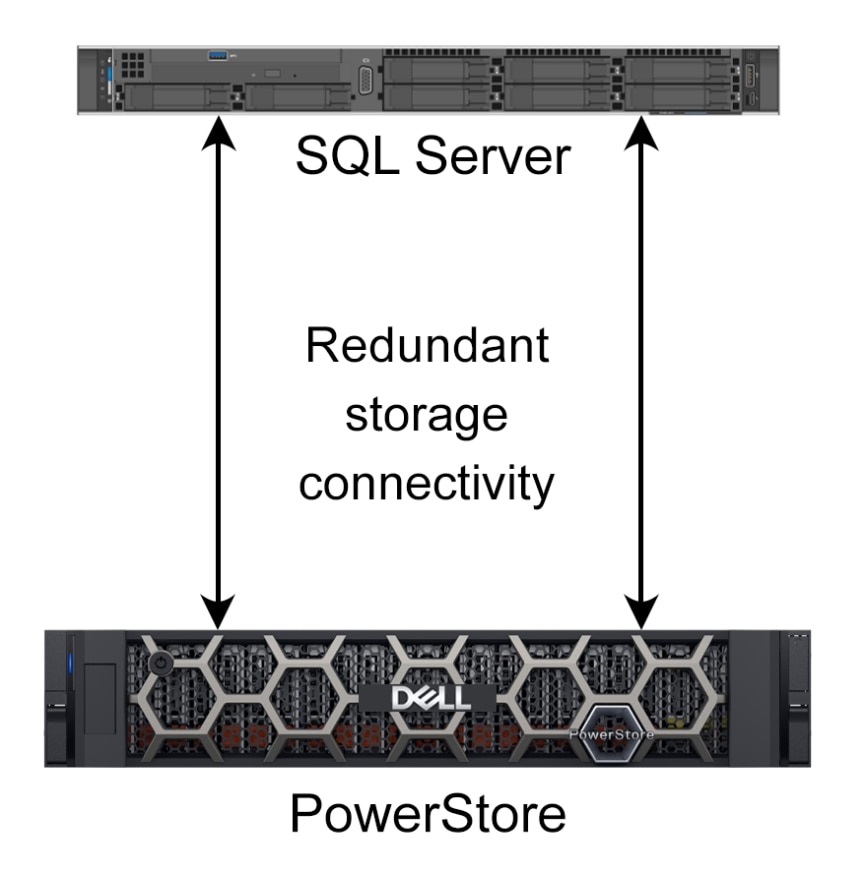
Figure 1. Basic SQL Server storage configuration
The single points of failure still include the SQL Server host itself or the entire storage appliance. There will also be times when the host or storage appliance may need to be taken offline for an upgrade. If a site disaster occurred, the whole system would need to be reestablished at another site.
SQL Server relies on resilient storage hardware for reliable data storage. If the underlying storage hardware becomes unavailable, SQL Server takes databases offline in order to preserve data integrity. This action results in an outage to the SQL Server application and its users.
Resilient data storage architectures leverage redundant components wherever possible to reduce the possibility of component failure. Dell PowerStore leverages fully redundant hardware and high-availability features to achieve the 99.9999% availability1 design. Complete information about Dell PowerStore availability can be found in the Dell PowerStore: Clustering and High Availability paper.
________________
1 Based on the Dell Technologies specification for Dell EMC PowerStore, April 2020. Actual system availability may vary.
However, there are many more components in the application stack other than PowerStore, such as power, cooling, networking, application servers, and so on. An outage of any single component can impact availability.
Designing additional fault tolerance into an architecture to improve uptime and add “nines” of availability typically involves eliminating single points of failure and adding nondisruptive transitions to redundant components whenever possible.
The next few sections of this paper describe some approaches to improving fault tolerance, using SQL Server features and Dell PowerStore metro node, and how to combine both to improve fault tolerance.
Always On features
SQL Server provides many features that you can use for high availability. Two of the primary availability features are branded as AlwaysOn features: AlwaysOn Failover Clustering Instances (FCI) and AlwaysOn Availability Groups (AG). These features use multiple copies of compute, storage, or both to increase availability for SQL Server applications.
Failover Cluster Instances
A SQL Server AlwaysOn Failover Cluster Instance (FCI) relies on Windows Server Failover Clustering (WSFC) and is the basis of many enterprise SQL Server deployments. FCI operates at the SQL Server instance level to protect all databases and resources within a SQL Server instance. A basic SQL Server FCI runs on two or more Windows Servers configured as a WSFC and requires shared storage between the servers. If an issue is detected on the server running the SQL Server instance, that SQL Server instance (leveraging WSFC functionality) will be restarted on another server in the WSFC and the SQL Server instance will bring all related databases online. Complete information can be found on the Microsoft Always On Failover Cluster Instances page.
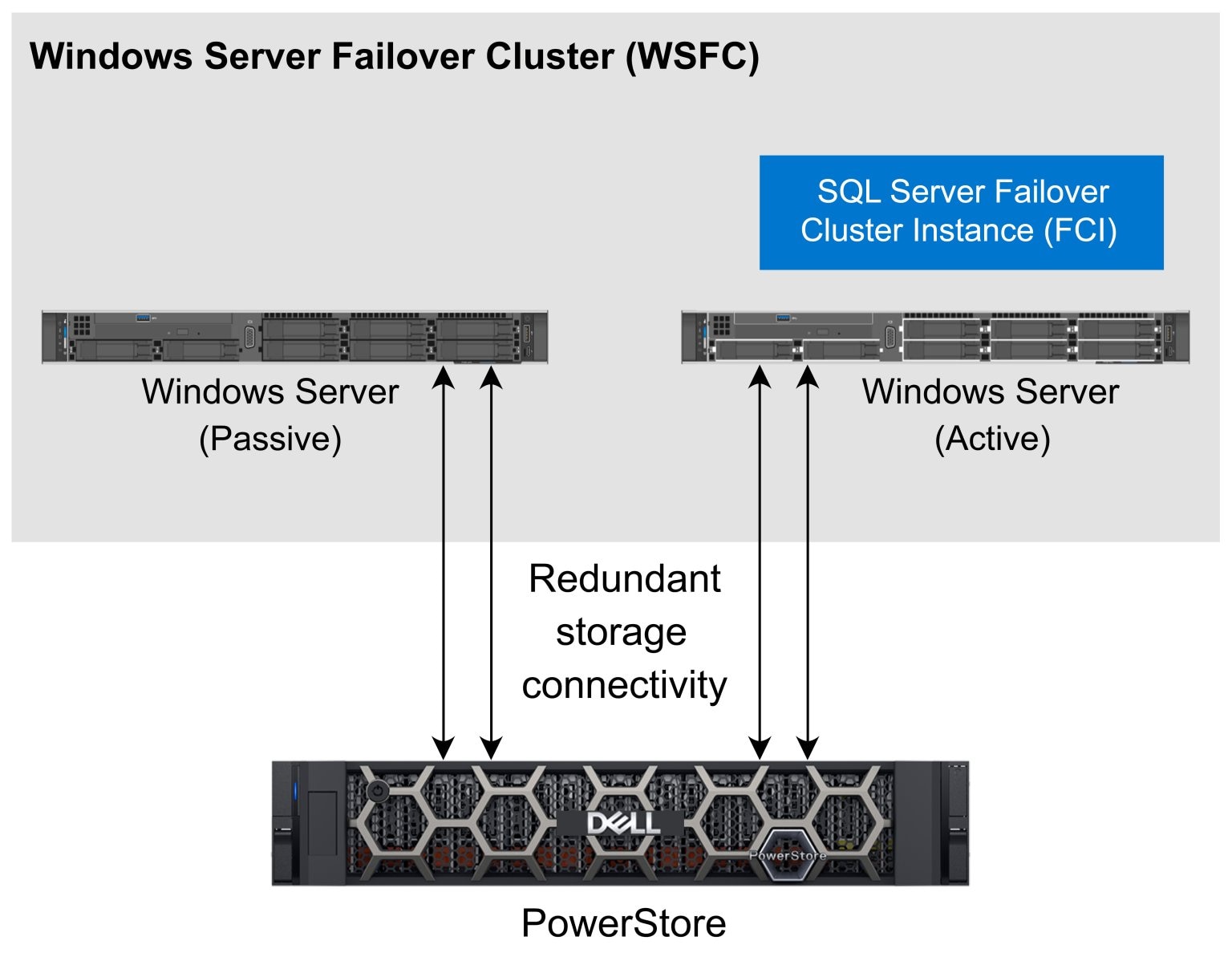
Figure 2. Basic WSFC storage configuration
Availability groups
Always On Availability groups (AG) provide a replicated environment for one or more SQL Server databases. Databases that need to failover together are placed in the same AG. When using Availability Groups, the main database or databases are known as the primary and data is replicated to one or more copies known as secondaries.
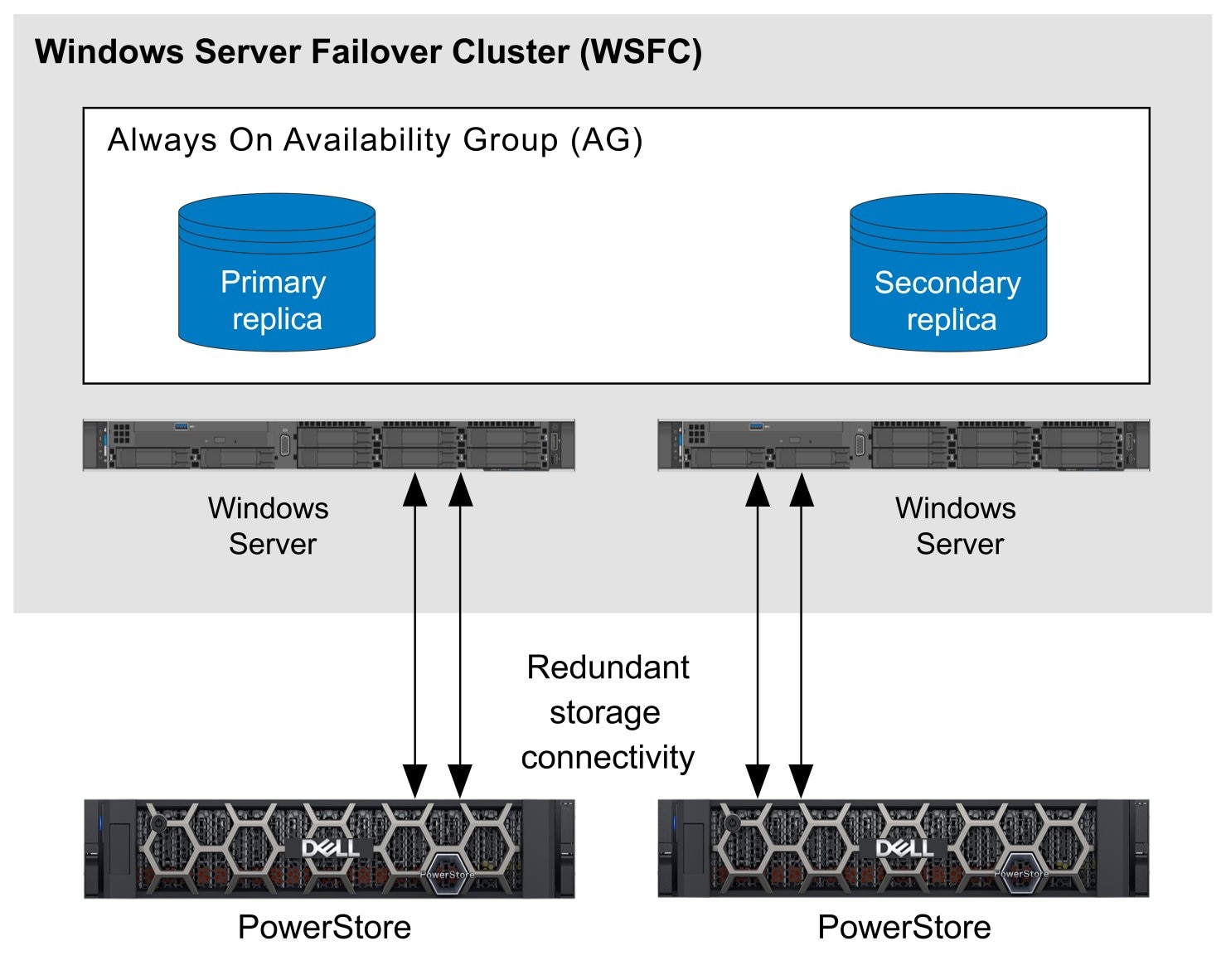
Figure 3. Basic AG storage configuration
An important distinction between FCI and AG is that FCI protects an entire SQL Server instance and all of the databases it contains. By contrast, AGs are configured at the database level and protect a single database or a group of databases. Another important difference is that shared storage is used with FCI and storage for AGs are agnostic. There are many different ways AGs can be configured. Complete information can be found in the Microsoft article What is an Always On availability group.
Limitations
The availability features within SQL Server offer various ways to minimize disruption to business applications, but if a failover is required between SQL Server instances, it often results in a disruption of service. The following sections describe a few of the reasons and the possible results of these disruptions.
Dropped database connections
One of the main limitations of features in the Always On architecture is that when a failover occurs, active database connections are terminated and need to be reestablished. When using FCI, the active instance is terminated, and the SQL Server instance is started on another cluster node. With AGs, a role change occurs in which a secondary database assumes the primary role, and database connections reconnect to the SQL Server instance hosting the primary. Depending on the method used, whether they are read-only or read/write, and how the application connects to SQL Server will determine whether the application experiences a disruption of service. Graceful handling of a failover scenario requires careful planning and application changes, which may not be possible when using third-party applications. For business continuity, it is best to avoid a failover whenever possible, especially unplanned failovers.
Failover and recovery time
When a SQL Server instance is started or restarted, crash recovery is performed on every database in the SQL Server instance. Depending on the database recovery model, the amount of activity in the database, and several other factors, database recovery time can take seconds to hours in extreme cases. Accelerated Database Recovery was a feature introduced in SQL Server 2019 to accelerate this process and improve the experience. However, the best way to maximize uptime is to avoid the failover event if possible.
External application data
Another limitation is that there is often critical application data that lives outside of the database. This could be configuration files, large image files (such as FILESTREAM), and so on. This critical application data that is stored outside of the database needs to be protected, but it is not included with SQL Server HA features; another method must be used.
Resynchronization and failback
Following a failover event, the data needs to be synchronized to the original primary and possible a failback event is required to the original primary and secondary roles. SQL Server availability features do not provide automatic data resynchronization. This needs to be done manually or through custom scripts.
Dell PowerStore metro node
Dell PowerStore metro node
SQL Server with PowerStore metro node Local
Microsoft SQL Server high availability features can be enhanced by adding PowerStore metro node Local. Whether SQL Server is deployed as a standalone instance, a Failover Cluster Instance (FCI), or Always On Availability Group (AG), each deployment model can benefit from added storage resiliency.
A simple architecture diagram illustrates how a basic SQL Server configuration is enhanced with PowerStore metro node Local.
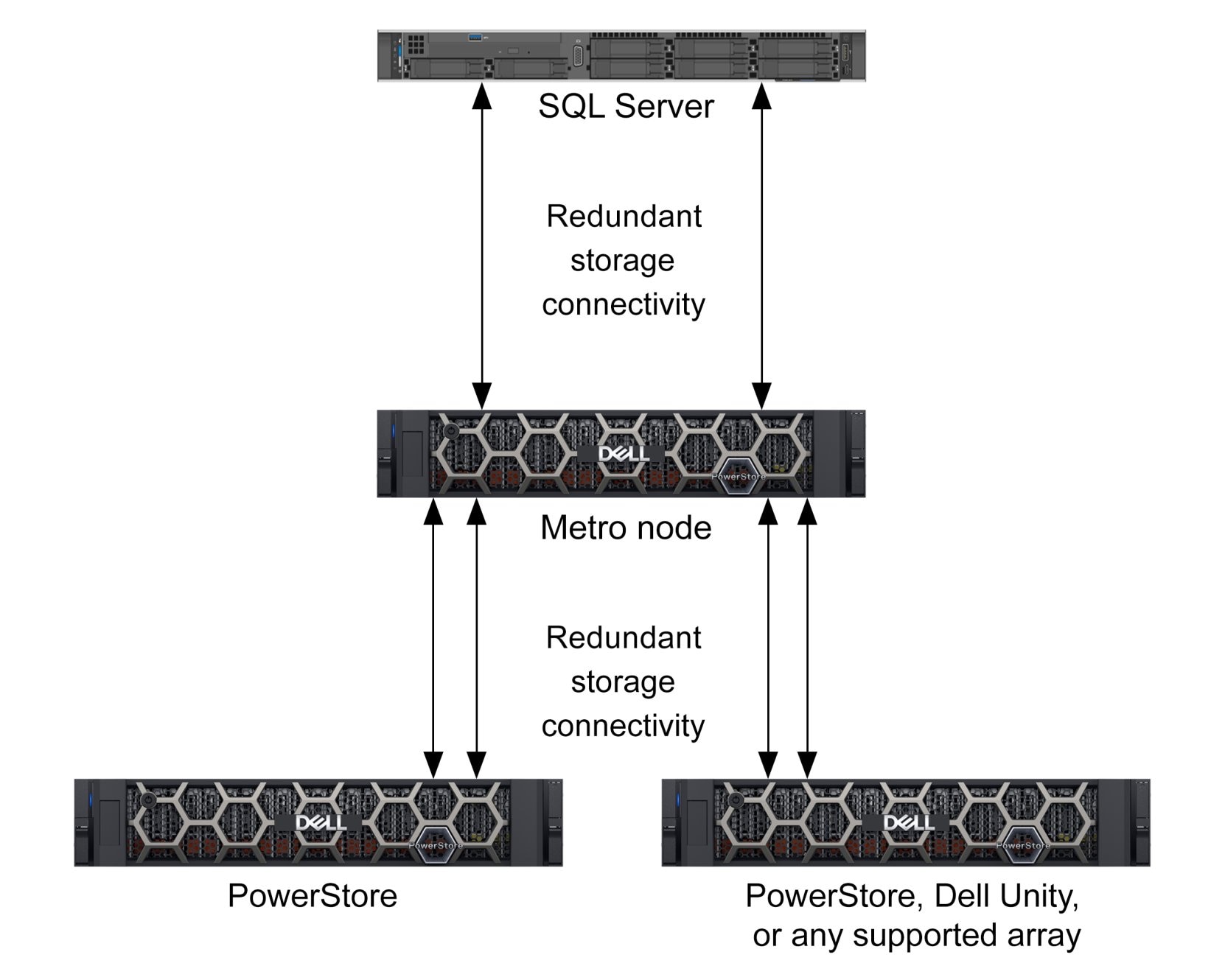
Figure 4. Basic SQL Server configuration with PowerStore metro node Local
Adding metro node to the SQL Server FCI storage architecture adds additional resiliency and can prevent cluster failover due to storage related events, both planned and unplanned. In this architecture, the shared storage requirement of an FCI is provided by metro node and enhanced with nondisruptive array failover.
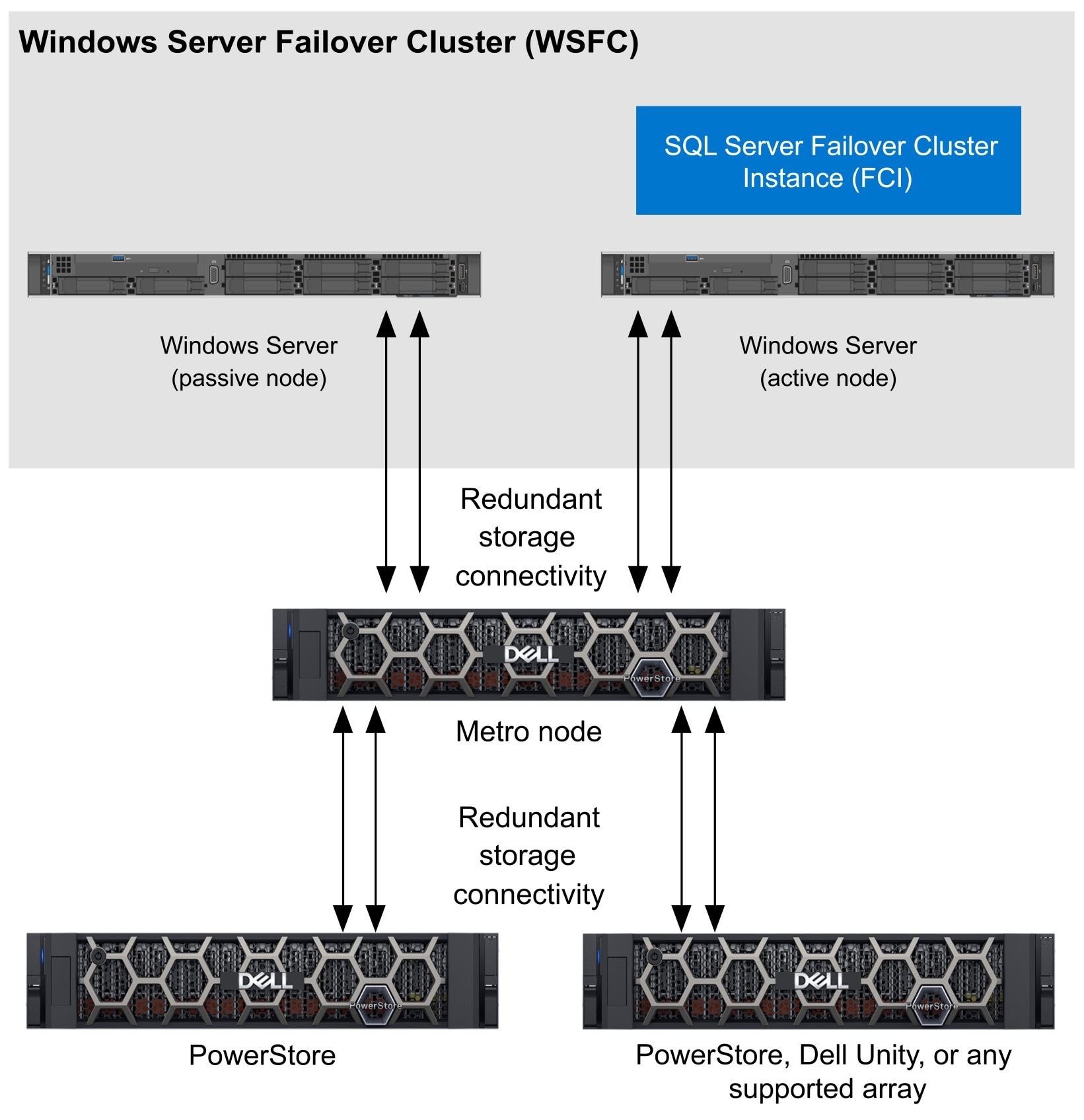
Figure 5. WSFC storage configuration with metro node Local
Always On Availability Group architectures can benefit from metro node as well. Adding PowerStore metro node to the storage architecture allows nondisruptive storage failover to a secondary array to occur without initiating an AG failover that would occur with a single array.
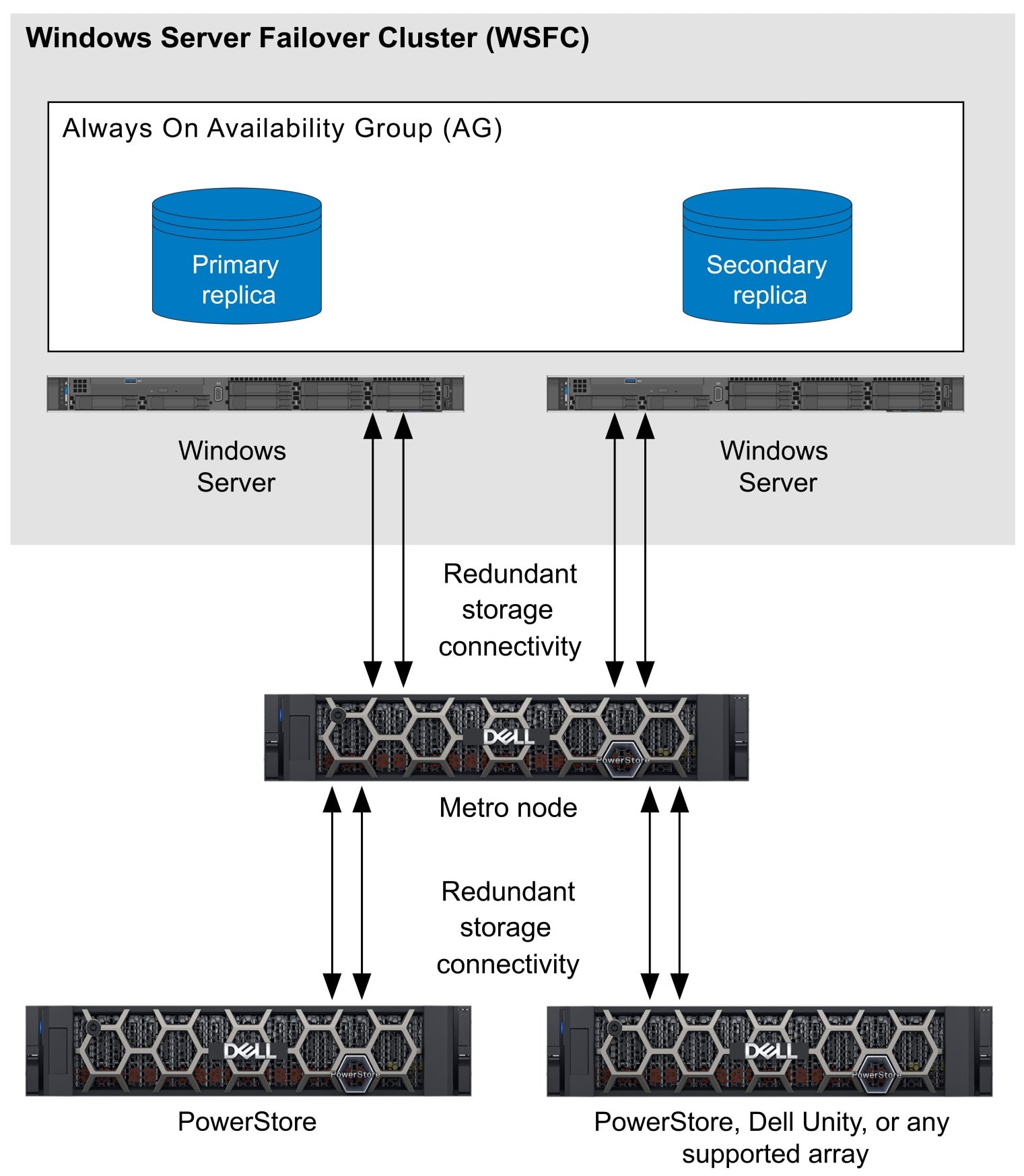
Figure 6. AG storage configuration with metro node Local
SQL Server with PowerStore metro node Metro
PowerStore metro node Metro enables metro node capabilities over distance. By adding a second metro node cluster in another location, storage resiliency can be stretched between data centers or multiple buildings. This provides an alternative for product-specific data replication mechanisms for extended cluster or geo-cluster applications.
For example, in a metro node Metro configuration, one metro node cluster is placed at Site A and another is placed at Site B as shown in the example below.
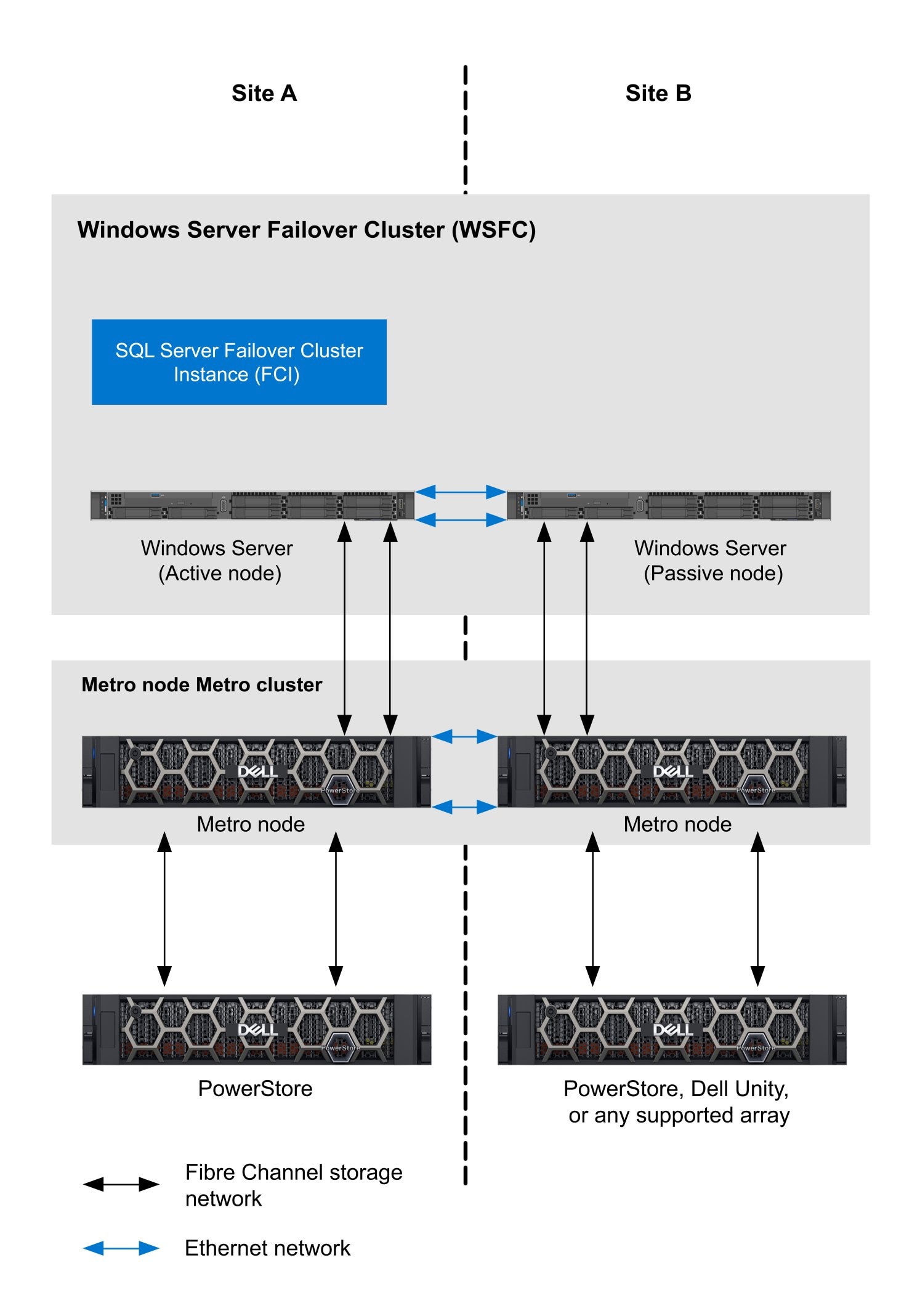
Figure 7. WSFC storage configuration with Metro node Metro
In a metro node Metro configuration, storage network traffic is local to the site and cross-site communication is handled by the Ethernet network. In this example, in the case of a local storage failure at Site A, IO traffic would flow across the ethernet network between metro node clusters and access storage at Site B. At this point an administrator could decide whether to failover the compute to Site B as a planned event, or to wait until the storage issue at Site B is resolved, metro node performs automatic resynchronization, and all IO traffic is returned to normal at Site A.
The same architecture pattern can be applied to SQL Server Always On Availability Groups (AG). In this way, additional protection against site failure is added while maintaining persistent storage connectivity to the applications in the event of a single site storage failure that would otherwise introduce a SQL Server instance failover and likely an unplanned outage.
It is recommended that distance between metro node Metro clusters is less that 100km and the Round Trip Time (RTT) over the inter-cluster link is no more than 10ms. See the Dell Metro Node Product Guide for more information.