Dell EMC Spanning Tree Interoperability Reference Guide
Notes, cautions, and warnings
Notes, cautions, and warnings
Spanning Tree Overview
Introduction
About this reference guide
This interoperability document has been created as a result of performing various tests between Dell EMC Networking and Cisco switches running similar and different spanning-tree modes. The document characterizes and provides some insight into the network traffic behavior when different flavors of spanning tree and device redundancy configurations are deployed between Cisco and Dell EMC switching environment.
The intended audience of this reference guide is the network architect, system engineer, or network administrator. The tests that are performed can be used as a reference point for new designs or integration purposes. There are two major technologies that are covered in this interoperability exercise:
- Spanning Tree Protocol
- VLT/vPC with STP
Spanning Tree Protocol overview
To ensure the reliability of a network, network switches are equipped with redundant equipment such as power supplies, CPUs, and interswitch links. Redundant links between the Layer 2 devices in a network can cause traffic loops which can bring down a network. Spanning tree is a Layer 2 protocol that protects a network from Ethernet network loops. After convergence, where all devices agree on what the network topology looks like, the network becomes a logical tree, as the redundant paths are disabled until required (due to a link or switch failure in the network). From any source to destination, there is only a single logical path in the network. The protocol forces the redundant ports to block all the traffic. In this way, even if there are redundant physical paths in the network, there are no traffic loops in the network. It is only when the active port goes down that the protocol reconverges, and the blocking port starts to forward the traffic in the new logical topology.
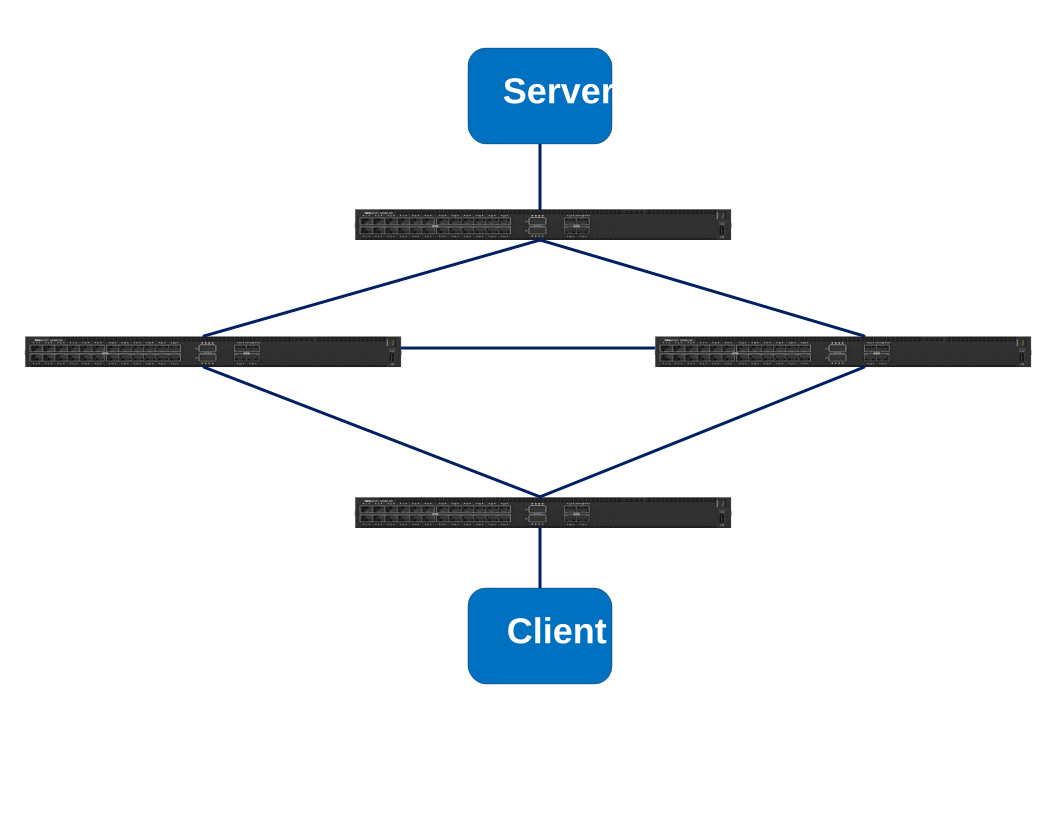
The figure below shows how a loop is created in an Ethernet network. If the client needs to communicate to the server, an Ethernet frame is sent to Switch 4 using its MAC address as the source, and the broadcast address (FF:FF:FF:FF:FF:FF) as the destination MAC address. Switch 4 then learns the MAC address of the client, and since it does not know the MAC address of the server, it will flood it by sending it to all the ports except the port on which the frame was received. The frame is sent to Switch 1 and Switch 3. Next, Switch 1 floods the frame to both Switch 2 and Switch 3. The frame is flooded from Switch 3 to Switch 1 and Switch 2. The frame that Switch 1 received is then flooded again to Switch 2 and Switch 4. Notice that Switch 4 (the switch that initiated the frame) receives the same frame, and the frame starts looping in the network.
Spanning Tree Protocol
Originally defined in IEEE 802.1D, Spanning Tree Protocol (STP) is a network protocol that provides a loop-free topology for any bridged Ethernet Local Area Network (LAN). STP prevents bridge loops and the broadcast storms that result from these loops. STP allows a network design to include redundant links. STP provides automatic backup paths in case an active link fails without the danger of creating bridge loops or the need to manually enable or disable the backup links. STP uses bridge protocol data units (BPDUs) to create a loop-free topology. The BPDUs work as control packets that calculate the best path in a network, and disables secondary paths, which result in a loop-free topology.
Spanning tree uses the following actions to create a loop-free topology:
- Root switch and bridge election
- The switch with the lowest bridge ID becomes the root bridge in the network. The bridge ID consists of the bridge priority and the MAC address of the switch. The default bridge priority is 32768. If each of the switches in the network keeps the bridge priority at Default, the switch with the lowest MAC address becomes the root switch. Selecting the appropriate root bridge is important.
- Root port election
- The root port is the upstream port towards the root bridge.
- Designated port election
- The designated port is the downstream port away from the root bridge.
- Blocking all non-edge ports
- Once the root bridge, root ports and designated ports are elected, the rest of the ports are put in blocking state for all traffic.
Spanning tree example
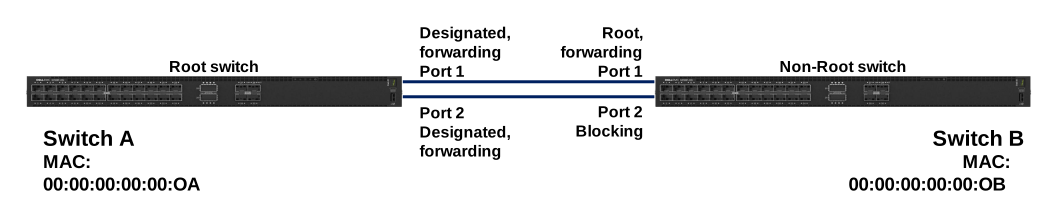
In the beginning, every switch claim to be the root and sends BPDUs to all the other switches connected to it. Any switch receiving the BPDU compares its bridge ID to the bridge ID it just received. The bridge ID is made of two parameters; Bridge priority and MAC address. The lowest bridge ID switch wins the root bridge election. If a switch receives a BPDU with lower bridge ID, it stops sending its own inferior BPDU. In this way, once the topology converges, only the root bridge sends the BPDUs and the rest of the switches forward the BPDUs received from the root bridge. By this mechanism, all switches in the network agree on a single root bridge. Consider the below topology:

Since the default bridge priorities are being used, the switch with the lower MAC address is elected as the root bridge. In this topology, Switch A becomes the root switch of the network since it has the lower MAC address. Next, all non-root switches determine the root port that is used to reach the root switch. The root port is the port on each switch that receives the best BPDU, or the lowest path cost to the root bridge. In this case, Switch B has two links to Switch A, so one of the ports will become the root port. Assuming that the two links have the same bandwidth, or lowest path cost to the root bridge, the tie breaker is the lowest upstream port ID. So, Port 1 on Switch B becomes the root port.
Next, the designated ports are selected in each segment. In this example, since Switch A is the root bridge, all the ports on Switch A become designated ports, with the lowest path cost to the root bridge, and go into the forwarding state. Lastly, Port 2 on Switch B goes into a blocking state as it is not the root or the designated port. The following figure shows how spanning tree makes the logical topology of the network.
The following enhancements or extensions have been made to the original spanning tree implementation:
- RSTP (802.1w)
- In 2001, the IEEE standards body introduced Rapid Spanning Tree Protocol (RSTP) as 802.1w. This enhancement provides significant faster spanning tree convergence after a network topology change has taken place. While STP can take between 30-50 seconds to respond to a topology change, RSTP can respond to changes within 6 seconds or milliseconds to a physical link failure. RSTP is backward-compatible with legacy spanning tree.
- MSTP (802.1s)
- Multiple Spanning Tree Protocol (MSTP) is an extension to RSTP which adds efficiency to the legacy spanning tree instance per VLAN. Before the introduction of MSTP, every VLAN on a network required a spanning tree instance. With MSTP, a group of VLANs can now be assigned to a single spanning tree instance which reduces CPU resources from having to create multiple spanning tree instances. The benefits of MSTP are more evident when the network environment consists of thousands of VLANs. MSTP is fully backward-compatible with RSTP.
- Rapid PVST+
- Rapid Per-VLAN Spanning Tree is a Cisco enhancement of RSTP that uses PVST+, which is a Cisco proprietary Layer 2 protocol used to create separate spanning tree instances on a per-VLAN basis. Creating separate per VLAN spanning tree instances allows for the usage of different network links providing load-balancing capabilities. There are multiple networking vendors such as Dell EMC, Extreme Networks, and Avaya that support this protocol.
Hardware overview
Dell EMC PowerSwitch S4128F-ON
The Dell EMC PowerSwitch S4128F-ON is a 1-Rack Unit (1U) switch with 28 fixed 10 GbE SFP+ ports, and two fixed 100 GbE QSFP28 ports.
Note: Two S4128F-ON switches are used in the deployment examples.

Cisco Nexus 5548UP
The Cisco Nexus 5548UP is a 1U, 1/10 Gigabit Ethernet switch with 32 fixed, unified ports on the base chassis, and one expansion slot that totals 48 ports. The slot can support any of the three modules: Unified Ports, 1/2/4/8 native Fiber Channel, and Ethernet or FCoE.
Note: Two 5548UP switches are used in the deployment examples.
Cisco Catalyst 4900 series switch
The Catalyst 4900 series switch is a 2U horizontal high-performance dedicated Ethernet switch.
Test methodology
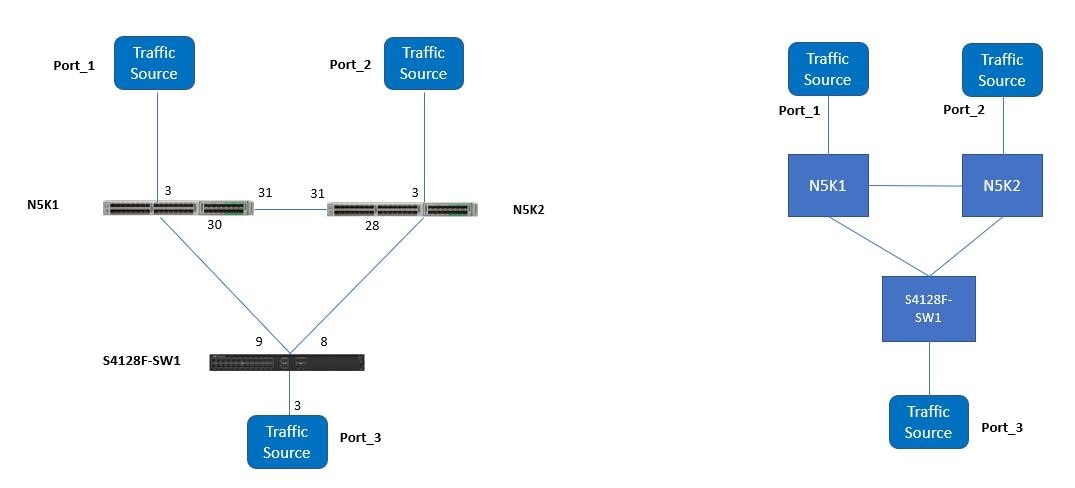
The Physical and logical reference network test-bed with spanning tree figure below shows the reference test-bed diagram that is used for the first set of tests. Tagged traffic was generated and transmitted from either ends of the network. Some test cases source traffic from Ports 1 and 2 to Port 3, and others sourced traffic from Port 3 to Ports 2 and 1. RPVST+ is the spanning tree mode that is enabled by default in Dell EMC SmartFabric OS10.
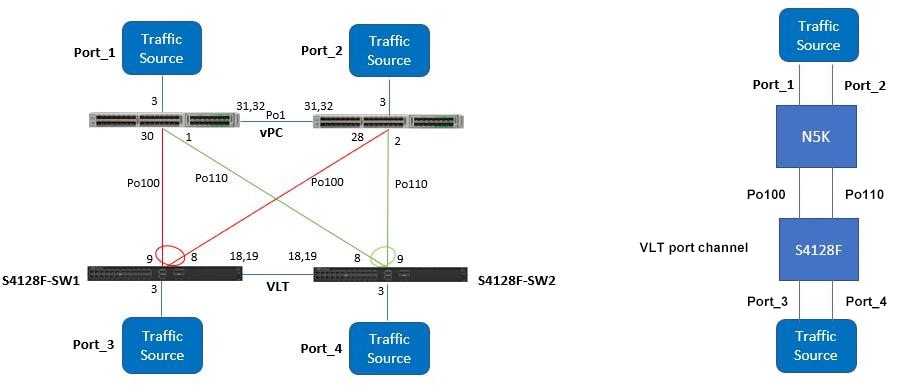
The following figure shows the reference test-bed diagram that is used for the second set of tests.
Dell EMC SmartFabric OS10 Virtual Link Trunking (VLT) aggregates two identical physical switches to form a single logical extended switch. This single logical entity ensures high availability and high resilience for all its connected access, core switches, and clients.
Note: A Spanning Tree protocol is still required to prevent the initial loop that may occur before VLT is established. After VLT is established, RSTP may be used to prevent loops from forming with new links that are incorrectly connected and outside the VLT domain.
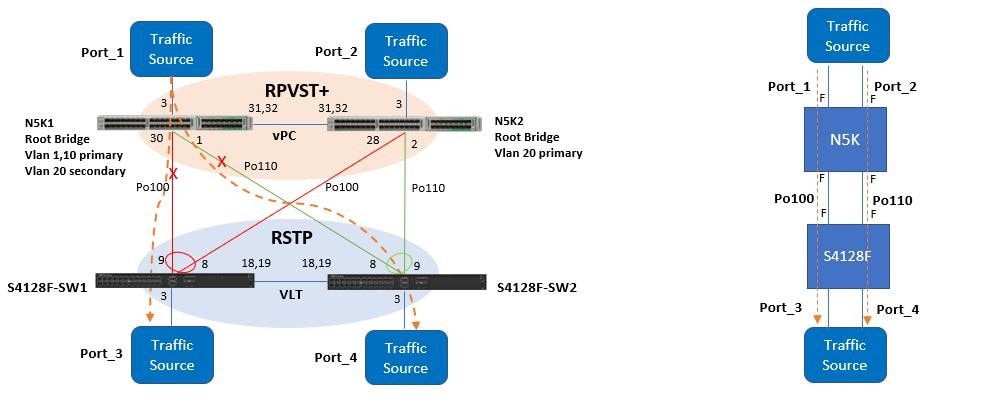
VLT provides a Layer 2 multipath which creates redundancy through increased bandwidth, enables multiple parallel paths between nodes, and load-balances traffic where alternative paths exist. A VLT interconnect (VLTi) synchronizes states between VLT peers. The Test setup with VLT and vPC image above shows the typical network layout with VLT.
The Cisco vPC, or Virtual Port Channel, allows links that are physically connected to two different Cisco Nexus® devices to appear as a single port channel to a third device. The third device can be a Cisco Nexus 2000 Series Fabric Extender, a switch, server, or any other networking device. A vPC provides Layer 2 multipathing, which allows you to create redundancy by increasing the bandwidth, enabling multiple parallel paths between nodes, and load-balancing traffic where alternative paths exist. The vPC domain includes both vPC peer devices, the vPC peer keepalive link, the vPC peer link, and all the port-channels in the vPC domain connected to the downstream device. You can have only one vPC domain ID on each device.
Notice that when vPC and VLT are configured, the logical network topology creates a simple pair of switches that is connected back-to-back using a quad member port channel link.
The quad member port channel link comes from the dual homed links from each switch (Cisco Nexus 5548UP and Dell EMC PowerSwitch S4128F-ON) where the Cisco single port channel links are identified in red and green from each switch, and the Dell EMC dual port channel links are identified with a circle icon. Once spanning tree protocol runs, the port-channel goes into the forwarding mode because to spanning tree, this is a single port-channel with four links, not two separate individual port channels where one must be blocked in order to avoid a loop in the network.
The following hardware and software is used in this exercise:
- Hardware
- Dell EMC PowerSwitch S4128F-ON (two)
- Cisco Nexus 5548UP (two)
- IXIA XM2 chassis with 4-10GE for the traffic source
- Cisco Catalyst 4900 series switch
- Module software
- Dell EMC SmartFabric OS10 (version 10.5.2.1)
- Cisco 5.1 (3) N2 (1)
The following formulae were used to calculate the frame loss and frame loss duration:
- Frame Loss = (Total Frames Sent – Total Frames Received) \ Total Frames Sent
- Frame Loss Duration = (Total Frames Sent – Total Frames Received) \ Frames Sent Rate
Test Cases
RPVST+ (Dell EMC) and RPVST+ (Cisco)
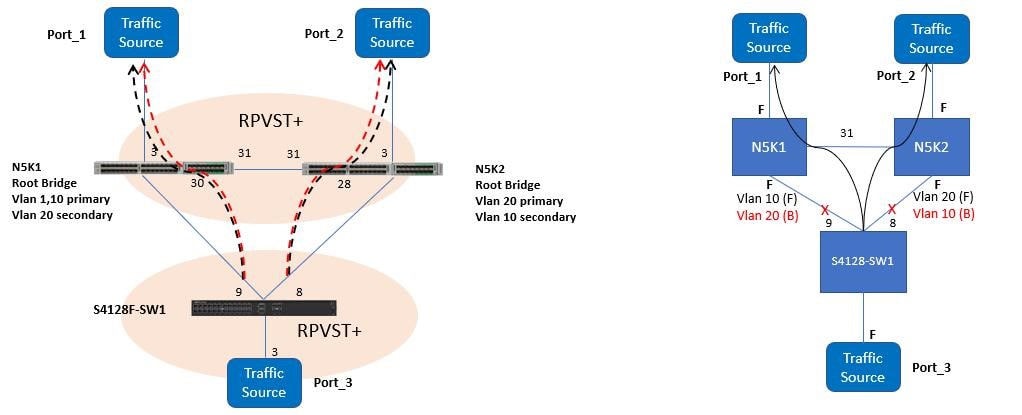
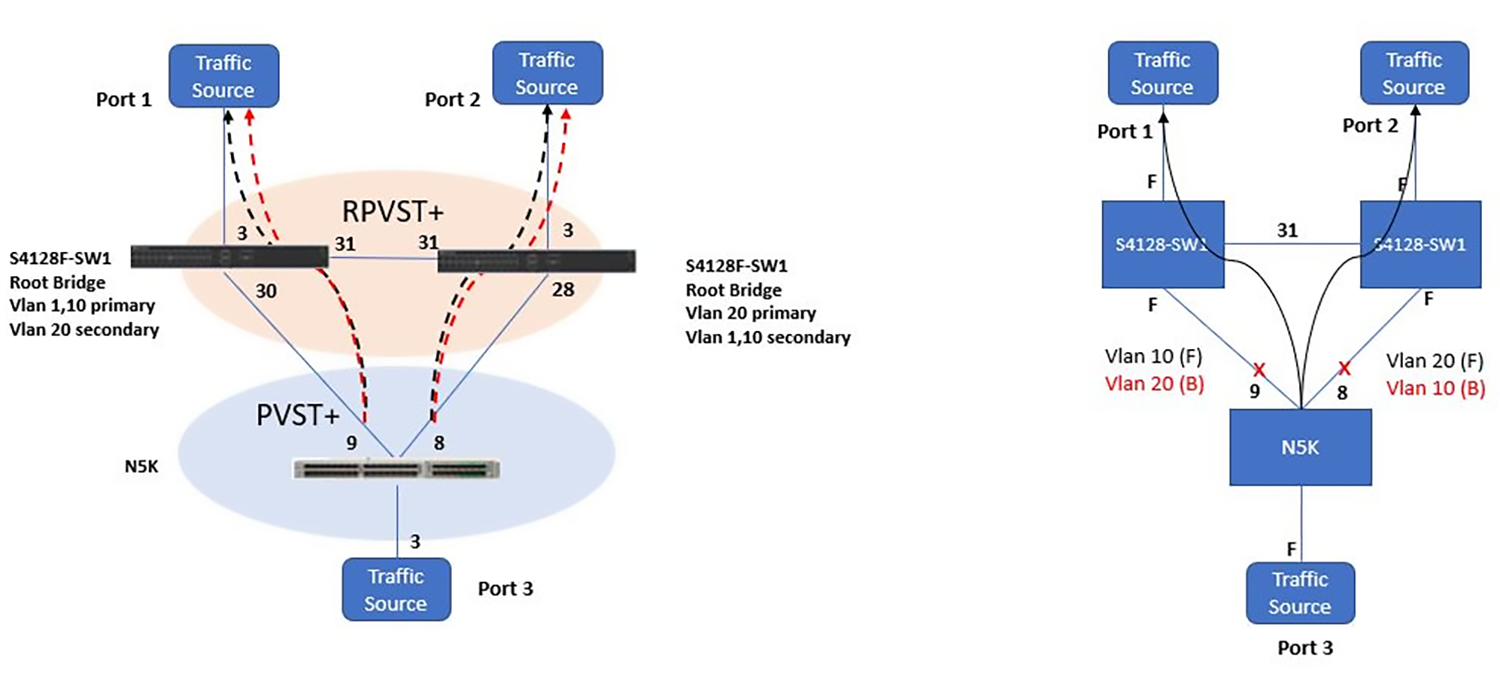
The following figure depicts the physical and logical network topology with traffic flow at a steady state. Each Cisco N5K is a root for VLAN 10 and VLAN 20 respectively with the other acting as secondary. VLAN 10 is forwarded on port 9 and blocked on port 8 and vice versa for VLAN 20. This is the normal behavior of having different spanning tree instances for each VLAN.
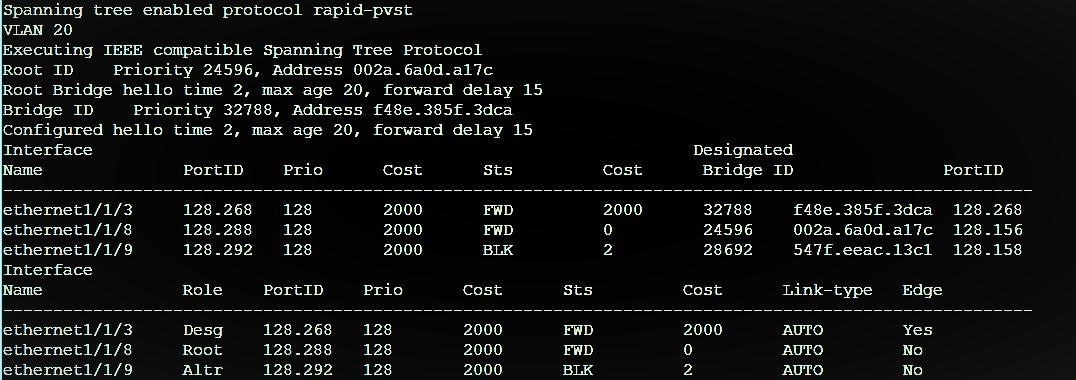
The following figure shows the port status and port roles for VLAN 20 on S4128-SW1.
Test steps
The following test steps were conducted using Ixia IxExplorer to simulate a fail-over scenario:
- Create two tagged streams of VLAN ID 10 and 20 with source port 3 and destination ports 1 and 2.
- Shut down e1/1/9 on S4128-SW1 to simulate a fail-over scenario and check for any traffic disruption.
- Recover e1/1/9 on S4128-SW1 and check for any traffic disruption and ensure N5K1 becomes the root.
- Repeat steps 2 and 3 for e1/1/8 on the S4128-SW1 switch.
Results
In RPVST+, different per-VLAN spanning tree instances were created. Traffic converges in both the RPVST+ instances 10 and 20. The blocked VLANs started to forward traffic right away upon a link failure. Both spanning tree modes use the same convergence timers, therefore convergence times upon link failures are quick as expected.
MST (Dell EMC) and MST (Cisco)
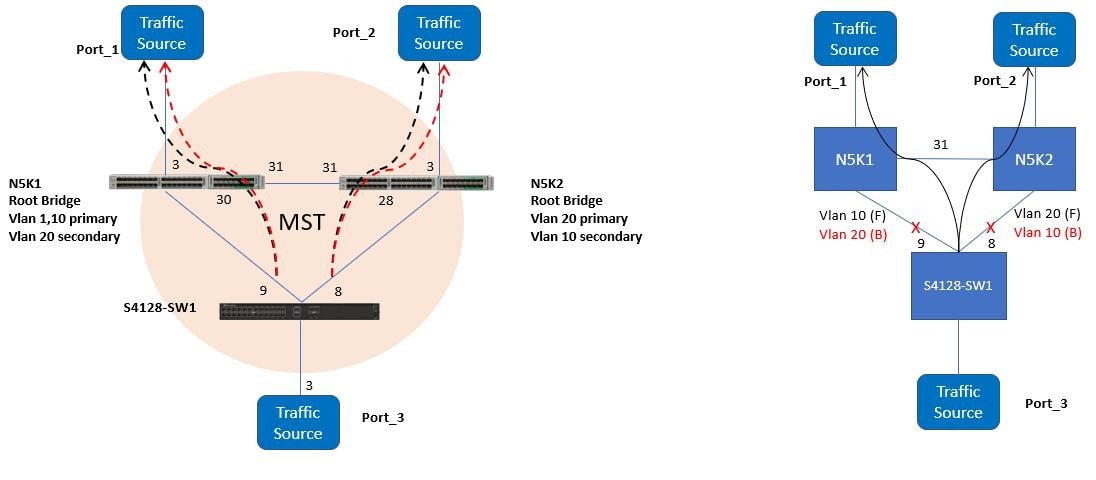
Test steps
- Create two tagged streams of VLAN ID 10 and 20 with source port 3, and destination ports 1 and 2.
- Shut down e1/1/9 on S4128-SW1 switch and measure traffic loss and duration of traffic loss.
- Recover e1/1/9 on S4128-SW1 and measure traffic loss and duration of traffic loss and ensure that N5K1 becomes the root bridge.
- Repeat steps 2 and 3 for e1/1/8 on the Dell EMC S4128-SW1 switch.
Results
VLAN 1, which is the default VLAN, is in the default MST instance 0. VLAN 10 is in MST instance 1. Both instances converged.
RSTP (Dell EMC) and RPVST+ (Cisco)
For this scenario, two sets of tests were performed by using the following configuration:
- Cisco switches act as the root bridge for the respective VLANs
- Dell EMC S4128-SW1 acts as the root bridge
Cisco Nexus as the root
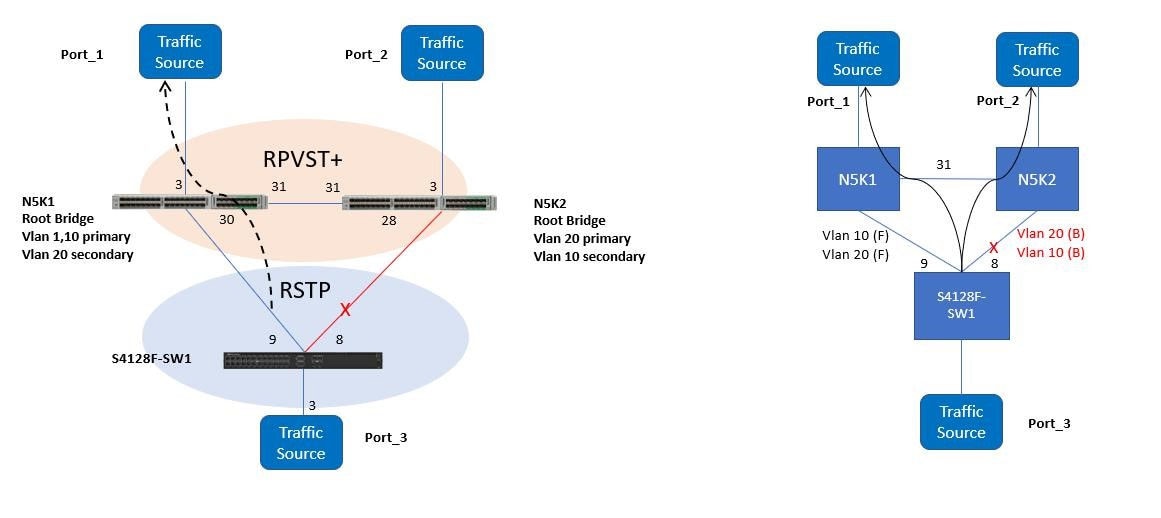
The image below depicts the physical and logical network topology respectively. The logical spanning tree network topology shows how port 9 is forwarding and port 8 is being blocked on S4128-SW1. The black arrow describes the traffic flow for VLANs 10 and 20. This is the normal behavior of having a single spanning tree instance for all VLANs where the Dell EMC switch runs RSTP.
For Cisco N5Ks running RPVST+, two different spanning tree instances are created. From the N5K1 perspective, the VLAN 20 root bridge is N5K2, and so it creates a separate instance pointing to N5K2 as the root switch. From the N5K2 perspective, the VLAN 10 root bridge is N5K1, and it creates a separate instance pointing to N5K1 as the root switch for that VLAN as shown in the N5K1 VLAN 20 spanning tree instance and N5K2 VLAN 10 spanning tree instance sections below.
Test steps
- Create two tagged streams of VLAN ID 20 with source port 3, and destination ports 1 and 2.
- Shut down ethernet1/1/9 on S4128-SW1 to simulate a fail-over scenario and check for any traffic disruption.
- Recover ethernet1/1/9 on S4128-SW1 and check for any traffic disruption.
S4128-SW1 RSTP default instance for VLAN 1
S4128-SW1# show spanning-tree active
Spanning tree enabled protocol rstp with force-version stp
Executing IEEE compatible Spanning Tree Protocol
Root ID	Priority 24577, Address 547f.eeac.13c1
Root Bridge hello time 2, max age 20, forward delay 15
Bridge ID	Priority 32768, Address f48e.385f.3dca
Configured hello time 2, max age 20, forward delay 15
Flush Interval 200 centi-sec, Flush Invocations 50
Flush Indication threshold 65535
Interface
Name		  PortID Prio Cost Sts Cost BridgeID  PortID
------------------------------------------------------------------------
ethernet1/1/3 128.524 128 2000 FWD 2000 32768     f48e.385f.3dca 128.524
ethernet1/1/8 128.544 128 2000 BLK 2    32769     002a.6a0d.a17c 128.156
ethernet1/1/9 128.548 128 2000 FWD 0    24577     547f.eeac.13c1 128.158
Interface
N5K1 VLAN 20 spanning tree instance
VLAN0020
Spanning tree enabled protocol rstp
Root ID	Priority	32788
	Address	002a.6a0d.a17c	>> N5K2 MAC address
	Cost	2
	Port	159 (Ethernet1/31)
	Hello Time  2  sec  Max Age 20 sec  Forward Delay 15 sec
Bridge ID  Priority	32788	(priority 32768 sys-id-ext 20)
	Address	547f.eeac.13c1
	Hello Time  2  sec  Max Age 20 sec  Forward Delay 15 sec
Interface Role  Sts Cost Prio.Nbr Type
---------------------------------------
Eth1/3    Desg  FWD  2	128.131  P2p
Eth1/30   Desg  FWD  2	128.158  P2p
Eth1/31   Root  FWD  2	128.159  P2p
N5K2 VLAN 10 spanning tree instance
VLAN0010
Spanning tree enabled protocol rstp
Root ID	Priority	24586
Address	547f.eeac.13c1	>> N5K1 MAC address
Cost	2
Port	159 (Ethernet1/31)
Hello Time  2  sec  Max Age 20 sec  Forward Delay 15 sec
Bridge ID	Priority	32778  (priority 32768 sys-id-ext 10)
Address	002a.6a0d.a17c
Hello Time  2  sec  Max Age 20 sec  Forward Delay 15 sec

Interface	Role	Sts Cost Prio.Nbr Type
-------------------------------------------
Eth1/3	   Desg	FWD  2	128.131	P2p
Eth1/28	  Desg	FWD  2	128.156	P2p
Eth1/31	  Root	FWD  2	128.159	P2p   >> pointing to N5K1 as the root switch
Results
As expected in this test, there are two different spanning tree modes. One mode is a purely vendor proprietary implementation (RPVST+), and the other is the standard-based (RSTP).
Note: With RSTP in OS10, there is only 1 spanning tree instance. RSTP instance of OS10 converged only with RPVST+ instance of VLAN 1 in Cisco. In order to interoperate with the Cisco RPVST+, the ports should be untagged to VLAN 1 in Cisco.
When e1/1/9 is disabled, the alternate root e1/1/8 on S4128-SW1 moves to the forwarding state immediately. The behavior is expected in RSTP. Since this is the alternate root port, a BPDU exchange does not take place within the network which allows for fast switch over and forwarding times.
With RSTP, a direct message exchange takes place between point-to-point links. This exchange consists of an RSTP BPDU proposal message and an agreement message. Proposal and agreement BPDUs are used to negotiate fast-convergence parameters should a failure occur. For 802.1Q tagged VLANs (all VLANs besides VLAN 1), Cisco switches send their BPDUs only to the reserved Cisco multicast address of 01-00-0C-CC-CC-CD. Unless the Dell EMC switch is also listening to this multicast address, it will only have visibility and an understanding of the logical topology of the CST. For a Cisco bridge running PVST+ to be able to converge with a third-party bridge running 802.1w RSTP, VLAN 1 must be allowed on all 802.1Q trunks that interconnect them.
The output below shows that for VLAN 20, BPDUs are sent only to the Cisco reserved address that the Dell EMC switch floods on all its other ports. That means that the rapid failover and convergence that RSTP offers is only evident on VLAN 1.
N5K1# debug spanning-tree all
N5K1# 2019 Jan 7 16:32:40.844091 stp: MTS: dropping MTS_OPC_DEBUG_WRAP_MSG msg id (48856751) on q 7
2019 Jan 7 16:32:41.022537 stp: handling batch flush timer
2019 Jan 716:32:41.272546 stp: inserting instance 1 hello timer in C queue
2019 Jan 7 16:32:41.272565 stp: Malloc in fu_cq_node_alloc@../utils/fsmutils/cqueue.c[922]-
2019 Jan 7 16:32:41.360178 stp: BPDU Rx: Received BPDU on vb 1 VLAN 20 port Ethernet1/31 pkt_len 64
bpdu_len 42 netstack flags 0x00ed enc_type sstp
2019 Jan  7 16:32:41.360207 stp:  BPDU RX: vb 1 VLAN 20 port Ethernet1/31 len 64 flags 0xed: Ethernet
Hdr 01000ccccccd<-002a6a0da146 type/len 0032: SNAP aa aa 03 00000c 010b SSTP CFG P:0000 V:02 T:02 F:3c R:60:14:00:2a:6a:0d:a1:7c 00000000 B:60:14:00:2a:6a:0d:a1:7c 809f A:0000 M:0014
Dell EMC PowerSwitch S4128F-ON as the root
The following scenario has the S4128-SW1 as the root. The spanning tree network topology in the figure below shows how port 9 and port 8 on the S4128-SW1 are forwarding, and how port 31 on N5K2 is blocked.
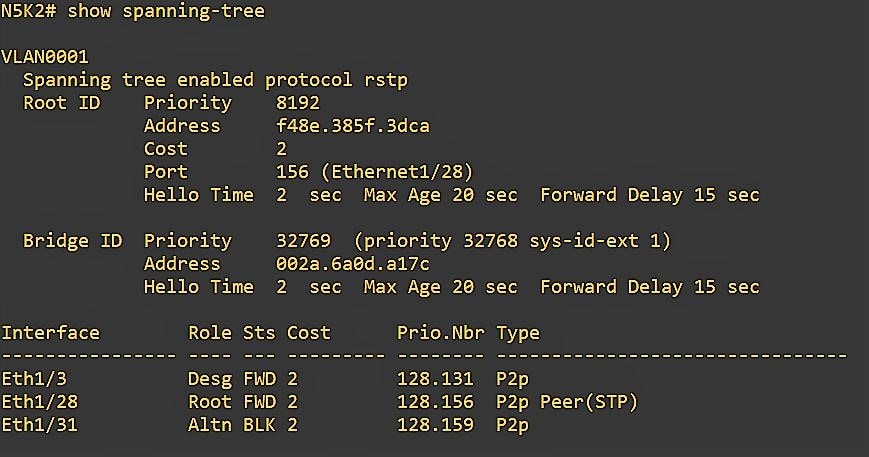
N5K2# debug spanning-tree all
N5K2#2019 Jan 28 15:46:33.577122 stp: MTS: dropping MTS_OPC_DEBUG_WRAP_MSG msg id (244602708) on q 8
2019 Jan 28 15:46:33.782530 stp: handling batch flush timer
2019 Jan 28 15:46:34.032568 stp: handling batch flush timer
2019 Jan 28 15:46:35.232858 stp: BPDU Rx: Dropping redundant SSTP packet received on port Ethernet1/31 VLAN VLAN0001
2019 Jan 28 15:46:35.232871 stp: BPDU RX: vb 1 VLAN 10, ifi 0x1a01b000 (Ethernet1/28
2019 Jan 28 15:46:35.232883 stp: BPDU Rx: Received BPDU on vb 1 VLAN 10 port Ethernet1/28 pkt_len 64 bpdu_len 42 netstack flags 0x00ed enc_type sstp
2019 Jan 28 15:46:35.232908 stp: BPDU RX: vb 1 VLAN 10 port Ethernet1/28 len 64 flags 0xed: Ethernet Hdr 01000ccccccd<-547feeac13a5 type/len 0032: SNAP aa aa 03 00000c 0 10b SSTP CFG P:0000 V:02 T:02 F:3c R:60:0a:54:7f:ee:ac:13:c1 00000000 B:60:0a:54:7f:ee:ac:13:c1 809e A:0000 M:0014 H:0002 F:000f T:0000
Test steps
- Create two tagged streams of VLAN ID 20 with source port 3, and destination ports 1 and 2.
- Shut down ethernet1/1/9 on S4128-SW1 to simulate a fail-over scenario and check for any traffic disruption.
- Recover ethernet1/1/9 on S4128-SW1 and check for any traffic disruption.
Results
The blocked link, ethernet1/31 on N5K2 starts forwarding when e1/1/9 is shut down.
RSTP (Dell EMC) and MST (Cisco)
The following figure describes the physical and logical spanning tree view of the network under a common/single spanning tree configuration. Two sets of tests were performed using the following configuration:
- Default common/single spanning tree instance that is created by MST and RSTP
- Two spanning tree instances on the Cisco switches with VLANs 10 and 20 assigned to each instance respectively
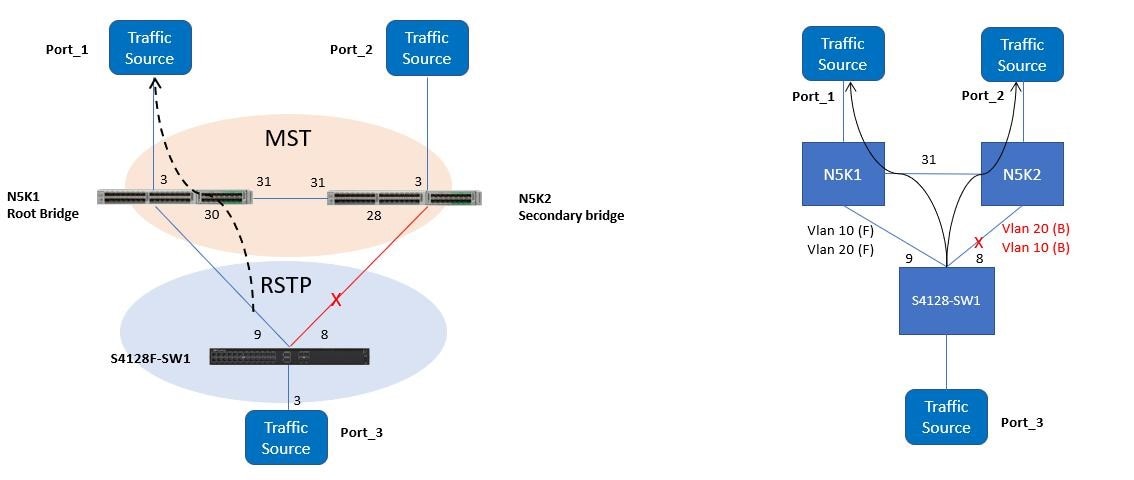
Common spanning tree instance
The following command examples show how Cisco switches share the same spanning tree region, same instances, and RSTP running under-the-hood. It is reasonable to expect great convergence times.
N5K1# show spanning-tree mst
MST0   VLANs mapped:	1-9,11-19,21-4094
Bridge	address 547f.eeac.13c1   priority    24576 (24576 sysid 0)
Root	this switch for the CIST
Regional Root this switch
Operational	hello time 2 , forward delay 15, max age 20, txholdcount 6
Configured	hello time 2 , forward delay 15, max age 20, max hops 20
Interface Role  Sts Cost  Prio.Nbr Type
-------------------------------------------------
Eth1/3    Desg  FWD  2000	128.131  Edge P2p
Eth1/30   Desg  FWD  2000	128.158  P2p Bound (STP)
Eth1/31   Desg  FWD  2000	128.159  P2p
N5K2# show spanning-tree mst
##### MST0 VLANs mapped: 1-9,11-19,21-4094
Bridge address 002a.6a0d.a17c priority 32768 (32768 sysid 0)
Root address 547f.eeac.13c1 priority 24576 (24576 sysid 0)
port Eth1/31 path cost 0
Regional Root address 547f.eeac.13c1 priority 24576 (24576 sysid 0)
internal cost 2000 rem hops 19
Operational hello time 2 , forward delay 15, max age 20, txholdcount 6
Configured hello time 2 , forward delay 15, max age 20, max hops 20
Interface Role Sts Cost Prio.Nbr Type
-------------------------------------------------
Eth1/3 Desg FWD 2000 128.131 P2p
Eth1/28 Desg FWD 2000 128.156 P2p Bound (STP)
Eth1/31 Root FWD 2000 128.159 P2pS4128-SW1# show spanning-tree active
Spanning tree enabled protocol rstp with force-version stp
Executing IEEE compatible Spanning Tree Protocol
Root ID Priority 24576, Address 547f.eeac.13c1
Root Bridge hello time 2, max age 20, forward delay 15
Bridge ID Priority 32768, Address f48e.385f.3dca
Configured hello time 2, max age 20, forward delay 15
Flush Interval 200 centi-sec, Flush Invocations 49
Flush Indication threshold 65535
Interface Designated
Name PortID Prio Cost Sts Cost BridgeID PortID
------------------------------------------------------------------------
ethernet1/1/3 128.524 128 2000 FWD 2000 32768 f48e.385f.3dca 128.524
ethernet1/1/8 128.544 128 2000 BLK 0 32769 002a.6a0d.a17c 128.156
ethernet1/1/9 128.548 128 2000 FWD 0 24576 547f.eeac.13c1 128.158
Interface
Name Role PortID Prio CostSts Cost Link-type Edge
------------------------------------------------------------------------
ethernet1/1/3 Desg 128.524 128 2000 FWD 2000 AUTO No
ethernet1/1/8 Altr 128.544 128 2000 BLK 0 AUTO No
ethernet1/1/9 Root 128.548 128 2000 FWD 0 AUTO No
Test steps
- Create two tagged streams of VLAN ID 10 and 20 with source port 3, and destination ports 1 and 2.
- Shut down ethernet1/1/9 on S4128-SW1 switch and measure traffic loss and duration of traffic loss.
- Recover ethernet1/1/9 on S4128-SW1 and measure traffic loss and duration of traffic loss.
Results
RSTP instance of OS10 converged with mst0 in Cisco. Ideally, traffic disruption should be negligible because all switches are under the same spanning tree region. Upon shutting down e1/1/9, the blocked link (port 8) moves into the forwarding state immediately.
When ethernet1/1/9 is restored, ethernet1/1/8 goes into a blocking status.
When Dell EMC switch converged initially, it recognized port 8 as the ALTR or alternate port, ready to take over if (root) port 9 were to fail. When this transition takes place, none of the BPDUs are transmitted since there is no interaction with another switch; therefore, the only events that take place are related to the link operational status (on e1/1/8 and e1/1/9) and the RSTP timers when transitioning from "Discarding" to "Forwarding". In this case, when using RSTP, transitioning from DISCARDING > LEARNING > FORWARDING is almost instant.
Multiple spanning tree instance
For this test, multiple spanning tree instances are configured on the Cisco switches.
VLAN 10 was assigned to instance 1 and N5K1 switch is configured as the root switch for this instance. VLAN 20 was assigned to instance 2 and N5K2 switch is configured as the root switch for this instance. Although multiple spanning tree instances have been configured on the Cisco switches, we expect the results to be identical such as when having a single spanning tree instance. The following command examples depict the spanning tree instances on the Cisco switches:
N5K1# show spanning-tree mst 1
##### MST1	VLANs mapped:	10
Bridge	address 547f.eeac.13c1	priority	24577 (24576 sysid 1)
Root	this switch for MST1
Interface Role  Sts Cost   Prio.Nbr Type
-------------------------------------------------
Eth1/3    Desg  FWD  2000	128.131  P2p
Eth1/30   Desg  FWD  2000	128.158  P2p
Eth1/31   Desg  FWD  2000	128.159  P2p
N5K2# show spanning-tree mst 1
##### MST1 VLANs mapped: 10
Bridge address 002a.6a0d.a17c priority 28673 (28672 sysid 1)
Root address 547f.eeac.13c1 priority 24577 (24576 sysid 1)
port Eth1/31 cost 2000 rem hops 19
Interface Role Sts Cost Prio.Nbr Type
-------------------------------------------------
Eth1/3 Desg FWD 2000 128.131 P2p
Eth1/28 Desg FWD 2000 128.156 P2p
Eth1/31 Root FWD 2000 128.159 P2pN5K1# show spanning-tree mst 2
##### MST2 VLANs mapped: 20
Bridge address 547f.eeac.13c1 priority 28674 (28672 sysid 2)
Root address 002a.6a0d.a17c priority 24578 (24576 sysid 2)
port Eth1/31 cost 2000 rem hops 19
Interface Role Sts Cost Prio.Nbr Type
-------------------------------------------------
Eth1/3 Desg FWD 2000 128.131 P2p
Eth1/30 Desg FWD 2000 128.158 P2p
Eth1/31 Root FWD 2000 128.159 P2pN5K2# show spanning-tree mst 2
##### MST2 VLANs mapped: 20
Bridge address 002a.6a0d.a17c priority24578 (24576 sysid 2)
Root this switch for MST2
Interface Role Sts Cost Prio.Nbr Type
-------------------------------------------------
Eth1/3 Desg FWD 2000 128.131 P2p
Eth1/28 Desg FWD 2000 128.156 P2p
Eth1/31 Desg FWD 2000 128.159 P2pTest steps
- Create two tagged streams of VLAN ID 10 and 20 with source port 3, and destination ports 1 and 2.
- Shut down port 8 on the S4128-SW1 switch, measure the traffic loss, and duration of the traffic loss.
- Recover port 8 on S4128-SW1 switch, measure the traffic loss, and the duration of the traffic loss.
Results
The results were identical as having a single spanning tree instance. MST uses RSTP timers, so the convergence times should be identical.
RPVST+ (Dell EMC) and MSTP (Cisco)
Cisco switches running MST connected to non-MST domains run PVST simulation automatically on a per-port basis when PVST BPDUs are received. In such cases, the following rules must be followed for better convergence:
- If the root bridge for CIST is within a non-MST region where MST is not running, the spanning-tree priority of VLANs 2 and above within that domain must be lesser than that of VLAN 1.
- If the root bridge for CIST is within an MST region, VLANs 2 and above that are defined in the non-MST domains must have their spanning-tree priorities greater than that of the CIST root.
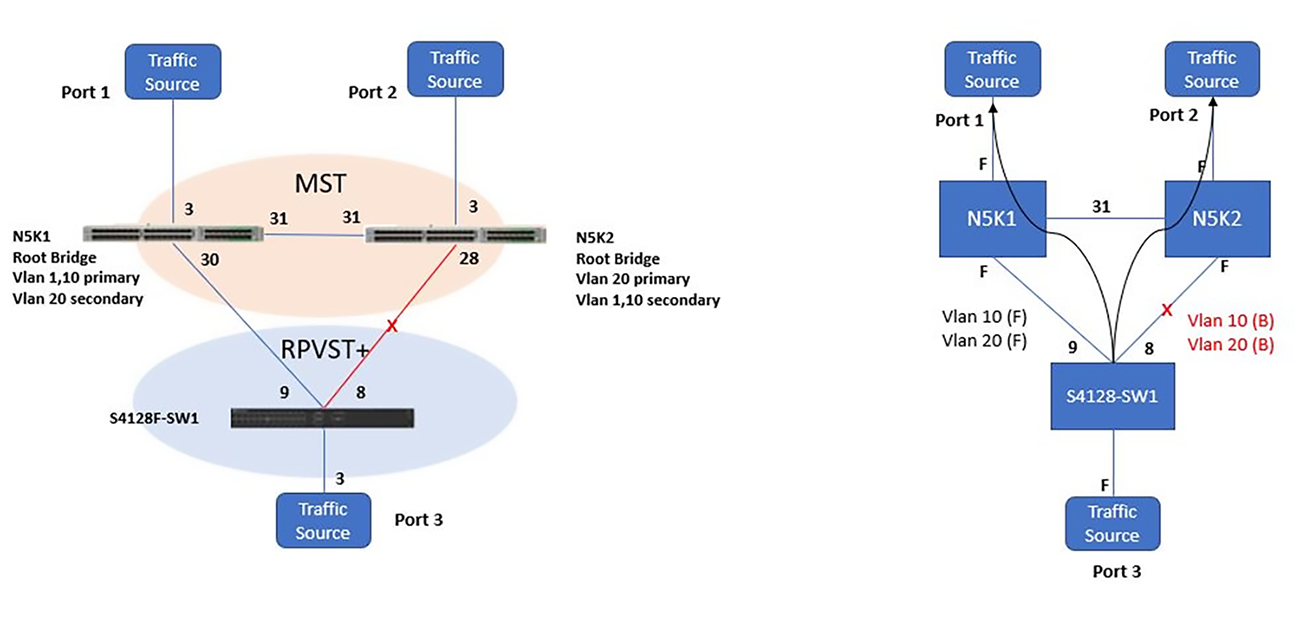
Test steps
- Create two tagged streams of VLAN ID 10 and 20 with source port 3, and destination ports 1 and 2.
- Shut down e1/1/9 on S4128-SW1 switch and measure traffic loss and duration of traffic loss.
- Recover e1/1/9 on S4128-SW1 and measure traffic loss and duration of traffic loss.
Results
VLAN 1, the default VLAN in OS10, converges with mst0 in Cisco. All other VLAN instances in RPVST+ and other MSTI in the MSTP do not converge.
MST (Dell EMC S4128F) and RPVST+ (Cisco)
MST maps multiple VLANs to an instance, which reduces the number of spanning tree instances. Rapid-PVST+ creates an instance for each VLAN. In this example, each Cisco N5K is a root for VLAN 10 and VLAN 20 with the other acting as secondary.
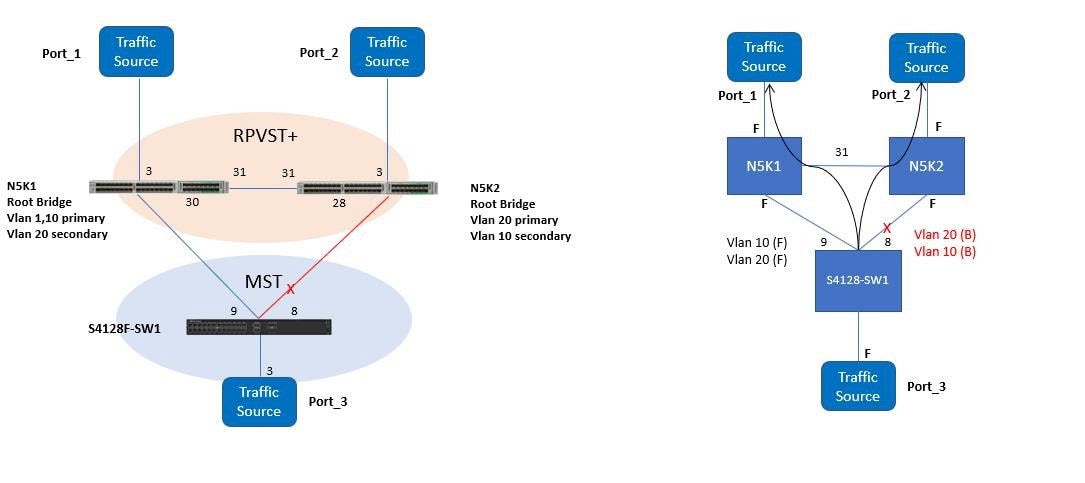
Test steps
- Create two tagged streams of VLAN ID 10 and 20 with source port 3, and destination ports 1 and 2.
- Shut down e1/1/9 on S4128-SW1 switch and measure traffic loss and duration of traffic loss.
- Recover e1/1/9 on S4128-SW1 and measure traffic loss and duration of traffic loss.
Results
Note: Only mst0 in OS10 converged with the RPVST+ VLAN 1 instance in Cisco.
For VLAN 1, both the switches interoperate and agreed on the root bridge. For VLANs 10 and 20, Dell EMC and Cisco switches saw themselves as root and did not interoperate. The different port roles on Dell EMC switch are shown in the MSTI 0 and MSTI 1 on S4128-SW1 example below. Ports, e1/1/9 and e1/1/8 on S4128-SW1 will be elected as Master and alternate ports since e1/1/9 is the non-blocking boundary port connected to CIST (Common and Internal Spanning Tree) root when Cisco N5K1 is the root bridge for VLAN 1.
N5K1# show spanning-tree
VLAN0001
Spanning tree enabled protocol rstp
Root ID	Priority	24577
Address	547f.eeac.13c1
This bridge is the root
Hello Time 2 sec Max Age 20 sec Forward Delay 15 sec
Bridge ID Priority 24577 (priority 24576 sys-id-ext 1)
Address	547f.eeac.13c1
Hello Time 2 sec Max Age 20 sec Forward Delay 15 sec

Interface Role Sts Cost Prio.Nbr     Type
--------- ---- --- ---- ------------ -------
Eth1/3    Desg FWD 2	128.131	     Edge P2p
Eth1/30   Desg FWD 2	128.158      P2p
Eth1/31   Desg FWD 2	128.159      P2p

VLAN0010
Spanning tree enabled protocol rstp
Root ID	Priority	24586
Address	547f.eeac.13c1
This bridge is the root
Hello Time 2 sec Max Age 20 sec Forward Delay 15 sec
Bridge ID Priority 24586 (priority 24576 sys-id-ext 10)
Address	547f.eeac.13c1
Hello Time 2 sec Max Age 20 sec Forward Delay 15 sec

Interface Role Sts Cost Prio.Nbr Type
--------- ---- -------- -------- --------
Eth1/3    Desg FWD 2    128.131  Edge P2p
Eth1/30   Desg FWD 2    128.158	 P2p
Eth1/31   Desg FWD 2    128.159  P2p
S4128-SW1# show spanning-tree active
Spanning tree enabled protocol msti with force-version mst
MSTI 0 VLANs mapped 1-9,11-19,21-4093
Executing IEEE compatible Spanning Tree Protocol
Root ID Priority 24577, Address 547f.eeac.13c1
Root Bridge hello time 2, max age 20, forward delay 15, max hops 20
Bridge ID Priority 32768, Address f48e.385f.3dca
Configured hello time 2, max age 20, forward delay 15, max hops 20
CIST regional root ID Priority 32768, Address f48e.385f.3dca
CIST external path cost 2000
Name PortID Prio Cost Sts Cost BridgeID PortID
--------------------------------------------------------------------------
ethernet1/1/3 128.524 128 2000 FWD 2000 32768 f48e.385f.3dca 128.524
ethernet1/1/8 128.544 128 2000 BLK 2 32769 002a.6a0d.a17c 128.156
ethernet1/1/9 128.548 128 2000 FWD 0 24577 547f.eeac.13c1 128.158
Interface
Name Role PortID Prio Cost Sts Cost Link-type Edge
--------------------------------------------------------------------------
ethernet1/1/3 Desg 128.524 128 2000 FWD 2000 AUTO No
ethernet1/1/8 Altr 128.544 128 2000 BLK 2 AUTO No
ethernet1/1/9 Root 128.548 128 2000 FWD 0 AUTO No
MSTI 1 VLANs mapped 10
Executing IEEE compatible Spanning Tree Protocol
Root ID Priority 32768, Address f48e.385f.3dca
Root Bridge hello time 2, max age 20, forward delay 15, max hops 20
Bridge ID Priority 32768, Address f48e.385f.3dca
We are the root of MSTI 1
Configured hello time 2, max age 20, forward delay 15, max hops 20
CIST regional root ID Priority 0, Address 0023.00ed.0700
CIST external path cost 0
Interface
Name PortID Prio Cost Sts Cost BridgeID PortID
----------------------------------------------------------------------------
ethernet1/1/3 128.524 128 2000 FWD 0 32768 f48e.385f.3dca 128.524
ethernet1/1/8 128.544 128 2000 BLK 0 32768 f48e.385f.3dca 128.544
ethernet1/1/9 128.548 128 2000 FWD 0 32768 f48e.385f.3dca 128.548
Name Role PortID Prio Cost Sts Cost Link-type Edge
---------------------------------------------------------------
ethernet1/1/3 Desg 128.524 128 2000 FWD 0 AUTO No
ethernet1/1/8 Altr 128.544 128 2000 BLK 0 AUTO No
ethernet1/1/9 Master 128.548 128 2000 FWD 0 AUTO No
RPVST+ (Dell EMC) with PVST+ (Cisco)
When an OS10 switch that is configured in RPVST+ mode is connected to a Cisco switch running PVST+ mode, convergence happens only on VLAN1. For other VLANs, STP does not converge.
When VLAN 1 is native, the Cisco proprietary PVST+ behavior is such that it sends untagged IEEE STP BPDUs and tagged PVST+ BPDUs. For all other VLANs, Cisco sends tagged PVST+ BPDUs. When VLAN 1 is not native, untagged PVST+ BPDUs are sent for that specific VLAN. For example, if native VLAN is set to VLAN 50 then untagged PVST+ BPDUs are sent for VLAN 50.
An OS10 switch sends untagged RSTP BPDU on VLAN1 and tagged RPVST+ PBDU on other tagged VLANs, for example VLAN 50. And in this case, convergence happens for VLAN1 since Rapid-PVST+ mode is backward compatible with the legacy STP mode. However, convergence fails for other VLANs due to incompatible BPDU exchange between the OS10 switch and the peer switch (Cisco).
To support the convergence when the peer switch is running PVST+, a new feature is available with OS10.5.2.1. This new CLI needs to be enabled by the user on the interface for proper convergence with Cisco or any other vendor.
OS10(config)# no spanning-tree rapid-pvst default behaviorThe command is used to enable or disable the transmission of RSTP BPDUs in VLAN 1 when the port is an untagged member other than VLAN 1. By default, OS10 sends RSTP BPDU for the untagged VLAN. The no version of this command handles the RSTP BPDU for VLAN 1 if the port is a member of VLAN 1.
Note: This command should be used on the ports that are connected to vendors other than OS9/OS10.
A show command is introduced that displays the compatibility mode in which the port is operating. This command can be used to confirm if the port has received the STP BPDU and is running in backward compatibility mode.
OS10# show spanning-tree compatibility-modeGeneral log messages will be displayed when a port enters or exits the STP backward compatibility mode as shown below:
%STP_COMPATIBILITY_MODE: STP:Compatibility mode Chg Interface port-channel1 enters into STP backward compatibility mode for instance 1
%STP_COMPATIBILITY_MODE: STP:Compatibility mode Chg Interface port-channel1 exits STP backward compatibility mode for instance 1
Test Cases with VLT (aggregation) and vPC (core)
RSTP (Dell EMC) and RPVST+ (Cisco)
In this set of tests, the Dell EMC switches and Cisco switches have been configured with their respective device redundancy technologies.
Rapid PVST+ is configured on the Cisco switches and RSTP on the Dell EMC switches. Both rapid spanning tree protocol (RSTP) and rapid per-VLAN spanning tree (RPVST+) modes of spanning tree protocol is supported in VLT mode. Two sets of tests were performed using the following configuration:
- In the first test, Cisco switches act as the root bridge for the respective VLANs
- Dell EMC switch as the root bridge
Cisco Nexus as root
The information that is provided in this section allows you to test the Cisco Nexus as the root bridge for the VLANs.
Test steps
The following test steps were conducted with Ixia IxExplorer to simulate a fail-over scenario:
- Create two tagged streams, where VLAN ID 10 is sourced from port 1 with MAC address 1, to destination port 3, and port 4.
Note: For destination port 3 and port 4, use MAC destination addresses 3 and 4.
- Using the diagram as a reference, verify that tagged VLAN 20 traffic from the Port 1 traffic source is going through the N5K1 Cisco switch.
- Shut down port-channel 100 and port-channel 110 on N5K1 to simulate a fail-over scenario and check for any traffic disruptions.
- Verify that the data flow from Port 1 to Port 3 and Port 4 flows through the vPC port-channel to N5K2, and down through each respective link.
- Recover both ports, check for traffic disruption, and ensure that N5K1 becomes the root bridge.
- Shut down port 30 and port 1 on N5K1 and measure for traffic loss.
Results
To understand the results achieved, we must look at the interconnections between switches. When vPC and VLT are configured on the Cisco and Dell EMC switches respectively, a 4-member port-channel link is created between the switches. On the Dell EMC switch, once the discovery interfaces are configured on both the nodes, port-channel 1000 is automatically configured. The ports should be configured as no switchport from the default Layer-2 mode while configuring the discovery interfaces. From the S4128F perspective, 1/1/18 and 1/1/19 interfaces form the discovery interfaces/VLTi (Po-1000) on the VLT Peer1(S4128-SW1). Similarly, 1/1/18 and 1/1/19 interfaces form the discovery interface on VLT Peer2 (S4128-SW2).
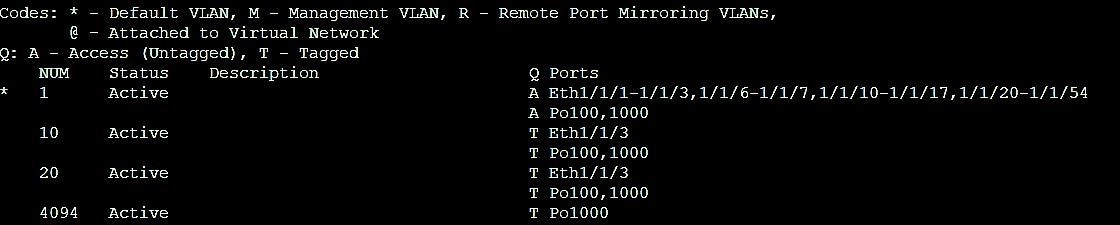
Port-channel 100 is configured on S4128-SW1 and port-channel 110 on S4128-SW2. VLANs 10 and 20 are mapped to both the port channels. The VLAN membership is shown in the following figure:
From the Cisco N5K perspective, by shutting down Po100 locally, Po110 continues to forward the traffic since both port channels are continuously forwarding. VLT ports, similar to vPC ports, are always in the forwarding state by default as per the feature implementation. Shutting down the individual links on the Dell EMC switch made no difference on the results because there are three available links forwarding.
The following code examples show the spanning tree link status for all four switches.
S4128-SW1# show spanning-tree active
Spanning tree enabled protocol rstp with force-version rstp
Executing IEEE compatible Spanning Tree Protocol
Root ID	Priority 24577, Address 547f.eeac.13c
Bridge ID	Priority 32768, Address f48e.385f.3dca

Interface       Designated
Name            PortID   Prio Cost Sts Cost BridgeID PortID
ethernet1/1/3   128.524  128  2000 FWD 501  32768    f48e.385f.3dca 128.524
port-channel100 128.2517 128  500  FWD 1    32769    0023.04ee.be01 144.99

Interface
Name            Role PortID   Prio Cost Sts Cost Link-type Edge
ethernet1/1/3   Desg 128.524  128  2000 FWD 501  AUTO      No
port-channel100 Root 128.2517 128  500  FWD 1    AUTO      No
S4128-SW2# show spanning-tree active
Spanning tree enabled protocol rstp with force-version rstp
Executing IEEE compatible Spanning Tree Protocol
Root ID Priority 24577, Address 547f.eeac.13c1
Bridge ID Priority 32768, Address 6400.6af6.faf4
Interface Designated
Name PortID Prio Cost Sts Cost BridgeID PortID
ethernet1/1/3 128.524 128 2000 FWD 502 32768 6400.6af6.faf4 128.524
port-channel110 128.2517 128 500 FWD 502 32768 6400.6af6.faf4 128.2517
Interface
Name Role PortID Prio Cost Sts Cost Link-type Edge
ethernet1/1/3 Desg 128.524 128 2000 FWD 502 AUTO No
port-channel110 Root 128.2517 128 500 FWD 502 AUTO No
|
|
Dell EMC as the root
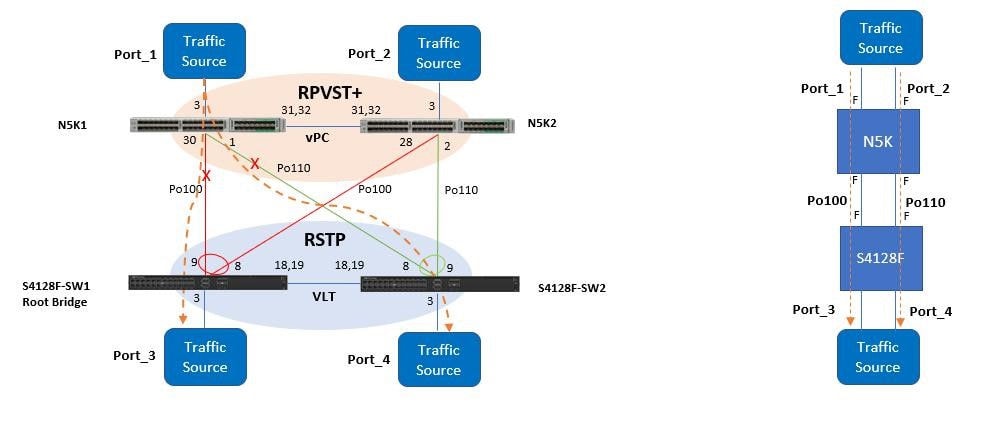
The S4128-SW1 switch is configured as the root bridge in this test case. The figure below shows how the traffic flow is sent from port 1, to port 3 and to port 4.
Test steps
- Create two tagged streams, where VLAN ID 10 and VLAN ID 20 are sourced from port 1 with MAC address 1, to destination port 3, and port 4.
- Using the diagram as a reference, verify that tagged VLAN 20 traffic from the Port 1 traffic source is going through the N5K1 Cisco switch.
- Shut down port-channel 100 and 110 on N5K1 to simulate a fail-over scenario and to check for traffic disruption.
- To check for traffic disruptions, shut down port 30 and port 1.
- Recover port 30 and port 1 to check for any measurable traffic disruption.
- Repeat steps 4 and 5 and source traffic from port 3 to port 1 and port 2.
Results
The results for both tests were identical.
RSTP (Dell EMC) and MST (Cisco)
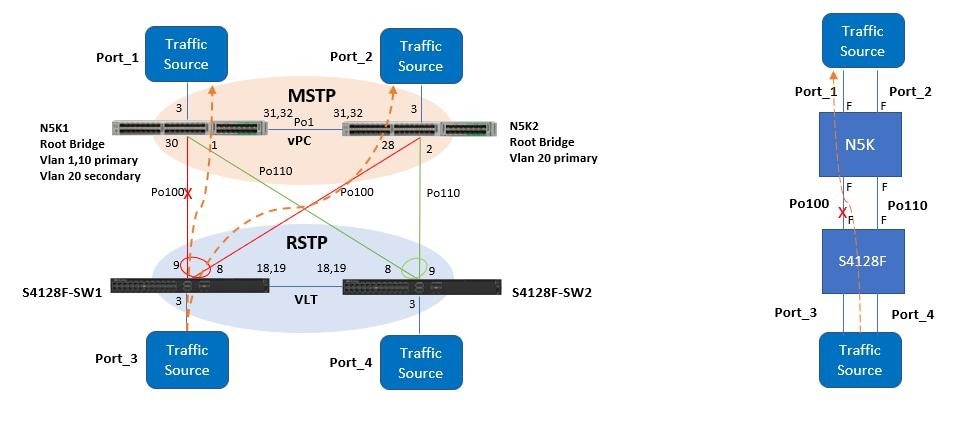
Test steps
- Create two tagged streams of VLAN ID 20 with source port 3, and destination port 1 and port 2.
- Ensure that the VLAN 20 traffic from port 3 is going through the N5K1 since this is the common spanning tree root bridge. The interface counters on N5K2 Port 1 and Port 2 should read 0. The only interface on N5K2 that should be incrementing should be the internal vPC channel, and the Port 3 transmit counter.
- To simulate a failover scenario, shut down Port-channel 100 on N5K1 and check for any traffic disruption.
- Recover Po100 on N5K1 and ensure that N5K1 becomes the root bridge.
- Shut down individual port 9 and port 8 on S4128-SW1 switch, and check for any traffic disruptions. The traffic should switch-over to Po110 on the S4128-SW2 switch and continue without measurable disruption.
- Recover port 9 and port 8 and check for any measurable traffic disruption.
Results
With RSTP and MST enabled, considering that MST uses RSTP convergence timers, and only a single spanning tree instance running between the two different regions, we should expect to get great convergence times.