Dell Enterprise Hub Inference Performance Optimizations Explained
Introduction
The Dell Enterprise Hub is a rapidly evolving ecosystem allowing Dell Customers to easily deploy models on-premises, optimized for Dell Hardware. But how do we optimize for Dell Servers? What are our optimization targets? And what is our approach to inference performance?
Overview
The AI industry is advancing rapidly, and it is often common to hear the following about the latest trends/releases:
- “2 x Faster than the previous version”
- “4.5 x more throughput than vendor Y”
- “3 x faster requests”
- “We support 4x more users”
However, the problem with these types of claims is that inference performance depends on many variables, including specific configurations and the test case used in the benchmark. Without direct comparisons, these statements lack context.
LLM inference has two key phases that impact LLM performance: prefill and decode. Prefill involves processing input tokens, which is compute-intensive and quadratic in nature (regarding input tokens). Higher FLOPs on the GPU can reduce Time to First Token (TTFT) with faster prefill. Decode involves token generation, which is memory bandwidth-bound.
GPUs with higher memory and memory to GPU bandwidth significantly improve token generation.
The context window (input + output token) greatly impacts inference performance and varies by model. Reasoning models inherently process and generate more tokens due to their iterative nature through its reasoning process compared to a non-reasoning model.
Dell Enterprise Hub
Since the initial release of DEH, our goal has been to consistently measure performance, especially as new GPU partners and models join the ecosystem. We believe that if you cannot measure performance consistently—you cannot optimize it.
Our approach has evolved to include:
- Initial functions tests: Tuning hyperparameters such as Max Input Tokens and Initial Prefill Cache size based on the model, GPU type, and the Dell PowerEdge platform.
- Comprehensive performance tests: Conducting tests (like Grid Search) at different concurrency levels and context lengths, reflecting real enterprise applications than obscure input/output sequence lengths.
- Performance comparison: Comparing current model performance with previous versions to improve the software stack and select the right stack that delivers the best performance for the model for the specific GPU and platform.
In the future, we plan to extend our approach by:
- Focusing on Goodput: Prioritizing effective throughput
- Optimizing within the Goodput range: Ensuring performance is maximized around this metric.
- Offering three options: Providing customers with choices tailored to their application requirements.
Initial functional test
During this phase, we work closely with Hugging Face and silicon vendor partners to identify the optimal configuration the Dell servers and GPU. Every new model features a different transformer architecture with newer techniques that must be implemented downstream into the inference software stack and the silicon vendor’s AI software stack.
For instance, a solution containing a GPU (48 GB virtual memory) may require different parameter tuning than a solution with single or multiple GPUs (96 GB or 128 GB virtual memory). In more complex situations, other parameters such as Batch Bucket Size and Waiting Served Ratio also need optimization. Once parameters are optimized, we conduct various endpoint tests (based on TGI). By the end of this phase, we know a model performs well with single requests of different sizes.
Full performance test
Once we are sure that a model is fully functional, we move to a more destructive phase of testing the model to exhaustion. Before this, we establish baselines for our tests and ensure the application does not crash under the stress test. If any failures occur, we work closely with Hugging Face and our silicon vendors to debug and resolve the issue.
In collaboration with our Dell partners, we settled on testing the following scenarios for now, knowing that as agentic frameworks and reasoning models become prevalent, token numbers will increase. Additionally, input token sizes for images are significantly larger, even in simple Q&A and chat applications. We continuously tune these values as well depending on the application requirements and model capabilities.
|
Scenario |
Input Tokens |
Output Tokens |
|
Simple Q&A |
200 |
200 |
|
Chat |
200 |
1000 |
|
Summarization |
2000 |
200 |
|
RAG |
7000 |
1000 |
The number of input tokens passed and output tokens generated are crucial for performance discussions. For example, a request with 7000 input tokens and 1000 output tokens will take significantly longer than one with 200/200.
Tip: When reviewing request throughput data, always ask about the input/output tokens used.
To run a full performance test for a DEH model, for each Dell Server/GPU pair, we simulated concurrent users from 1 to 500 for each Input/Output combination from the table above. This produces a large grid of data with different Input/Output combinations that will be used in the next phase. During pre-release testing, it is common to find issues with a model that is stressed under load. We then revisit the configuration, apply a bug fix, and repeat the test. Our goal is to ensure that when customers receive a model on DEH, it performs reliably under load.
Analyze performance
In this phrase, we compare the performance of a model with its predecessors using our internal system. We could see in the past that upgrading the DEH containers from TGI 2.4.0 to TGI 3.0.0 gave us a 30 percent jump in token throughput. For more details, see our blog Dell Enterprise Hub just got even faster.
Typical metrics analyzed include Time to First Token (TTFT), Time Per Output Token (TPOT), Request Latency, and Request Throughput. In our case, we graph performance across different numbers of concurrent users, revealing that while a model can execute up to 500 concurrent users, performance impact is too dramatic to be useful.
Goodput
Goodput, a term that has existed within the networking space for some time, refers to application-level throughput. The standard LLM throughput metric, tokens per second, does not align well with application needs. Tokens per second vary greatly depending on input tokens, output tokens, and concurrent user requirements of an application.
Let’s examine an example from a recent DEH performance test:
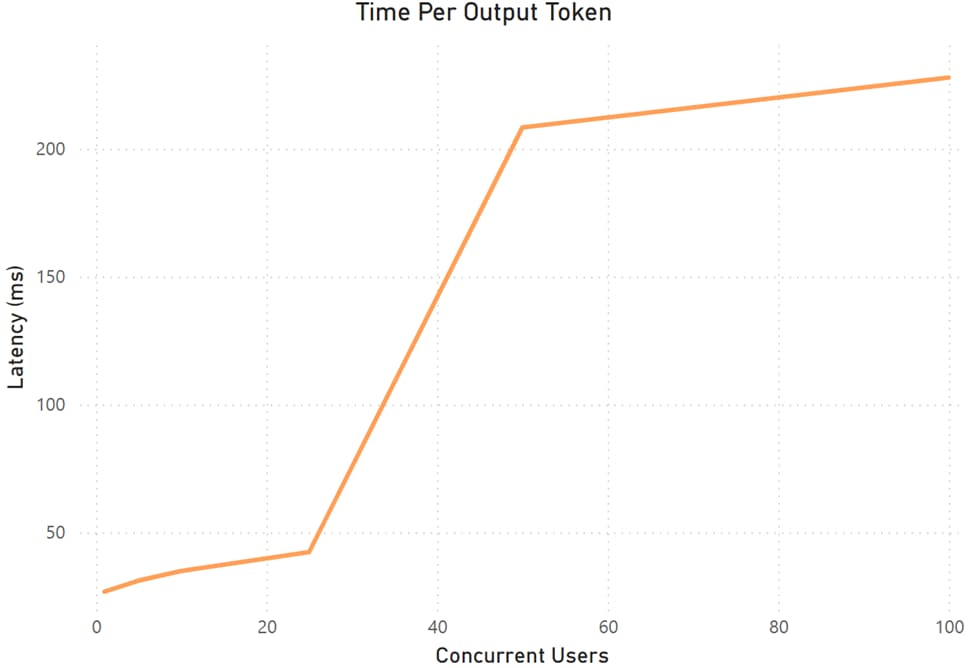 Latency for a specific A Model on a Dell platform
In this case, we defined “good” as generating each token in less than 50 ms. The green box highlights where we identify Goodput. To the left of the box, the system is underutilized; to the right, latency rapidly increases to 200 ms. Not all values meet our definition of Goodput in this simple case. This plot is specific to a model and platform, and Goodput values vary across different models and Dell platforms.
Let examine another graph where we look at results for a specific model on different platforms but focusing on TTFT instead of end-to-end latency. Depending on the inference engine and its dynamic batching implementation and the underlying GPU type, a platform can support more concurrent users while maintaining TTFT under 1000 ms.
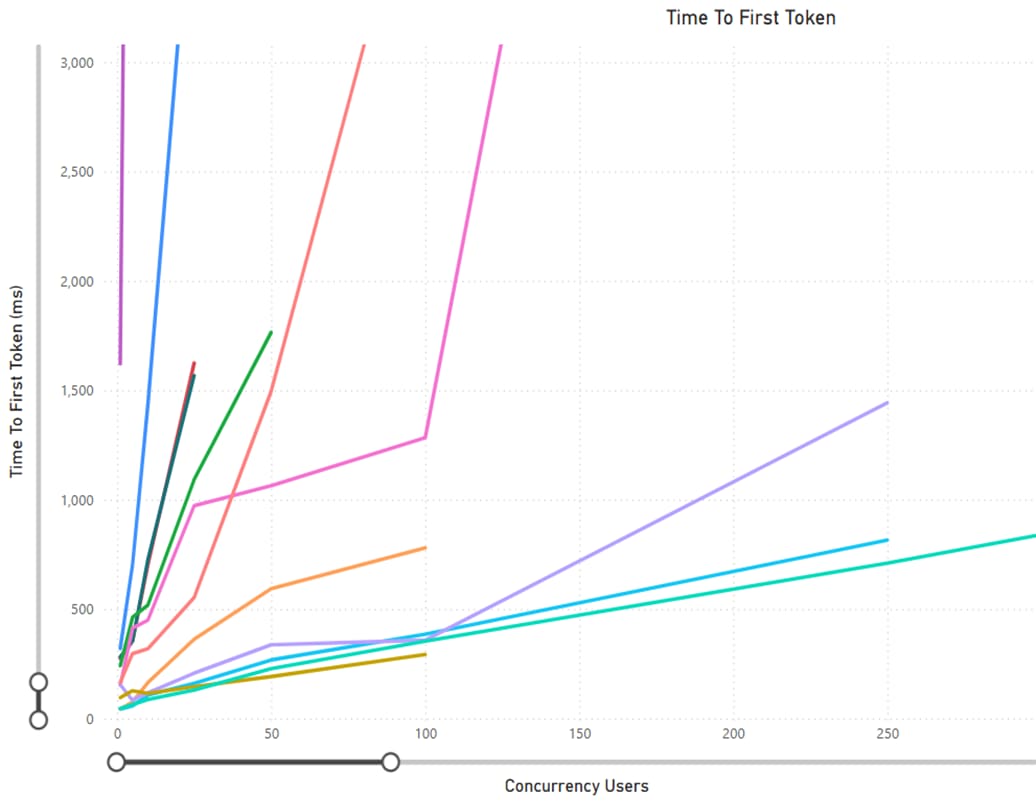 TTFT for a specific model on various Dell platforms
It's important to note that there is no universal single value of Goodput—it varies greatly depending on the application. For example, TTFT is critical for a Digital Human, while it's less relevant for a Summarization task. In future phases, we will emphasize Goodput for DEH containers and provide three Goodput options for each model on a specific platform.
Conclusion
Inference performance can be as complex as navigating a mine field. You now understand the exhaustive steps Dell and Hugging Face take before a DEH container is available to end users.
With that in mind, when you hear bold claims like “10x Performance,” consider asking:
- What parameters were used during the test?
- Does this matter to my application?
- If yes, how does it impact my application?
References
- Dell Enterprise Hub by Hugging Face.
- DistServe: disaggregating prefill and decoding for goodput-optimized LLM inference.
- DEH technical blogs on the Info Hub (see the Dell Info Hub homepage and search “tags: DEH”).