
Dell ObjectScale Best Practices

Oct 6, 2026
Dell ObjectScale Best Practices This document describes best practices for the Dell ObjectScale software-defined cloud-scale object storage platform.

Executive summary

Overview

Dell ObjectScale is a software-defined, cloud-scale, storage platform offering for traditional, archival, and next-generation workloads. It provides geo-distributed and multiprotocol (Object, CAS, Atmos, and NFS) access to data. With ObjectScale, any organization can deliver scalable and simple public cloud services with the reliability and control of a private-cloud infrastructure.

The goal of this white paper is to highlight general ObjectScale best practices relating to physical deployment, external infrastructure services required networking, provisioning, and application development when using ObjectScale APIs. It describes some of the common pitfalls associated with deployment, provisioning, and lists practices to mitigate them.

Revisions

Date

Part number/
revision

Description

March 2017

H16106

Initial release

January 2018

H16106.1

Minor updates to the Operations section

October 2018

H16106.2

Add link to new KEMP load balancer paper

February 2019

H16106.3

Updated for ECS 3.3 release

February 2021

H16106.4

Updated for ECS 3.6 release

July 2021

H16106.5

Updated about auto-delete on retention expiration

March 2022

H16106.6

Updated for ECS 3.7 release

January 2023

H16106.7

Updated for ECS 3.8.0.1 release

March 2023

H16106.8

Updated for data retention with multiple replication groups

November 2023

H16106.9

Removed intermix between HDD and AFA cluster

January 2024

H16106.10

Updated the capacity expansion section

May 2024

H16106.11

Updated for ECS 3.8.1 release

April 2025

H16106.12

Updated for ObjectScale 4.0  and support for only one storage pool in a VDC

October 2025

H16106.13

Updated for ObjectScale 4.1 and network chapter

June 2026

H16106.14

Updated for ObjectScale 4.3

September 2026

H16106.15

Updated Hardware Capacity Expansion and Intermix Guidelines. Added X7700

Architecture overview

Architecture overview

ObjectScale is a strongly consistent, indexed, object storage platform. It is a scalable solution providing secure multitenancy and superior performance for both small and large objects. ObjectScale was built as a completely distributed system following cloud principles. The ObjectScale software running on commodity nodes forms the underlying cloud storage, providing protection, geo replication, and data access. ObjectScale continues to serve as a foundational storage engine for the Dell AI Data Platform, supporting modern AI, analytics, and cloud-native workloads across appliance-based and software-defined deployments while maintaining the same best-practice principles described in this document. The software was built with the following design principles in mind:

  • Layered services for horizontal scalability
  • Both the index and data use the same underlying storage mechanism
  • Good small and large object performance
  • Multiple protocol access—Object and File
  • Geo replication with lower storage and Wide Area Network (WAN) overhead
  • Global access—Read and write access from any site within a replication group

The following figure illustrates the different layers of ObjectScale. For additional information, see the ObjectScale Overview and Architecture white paper.
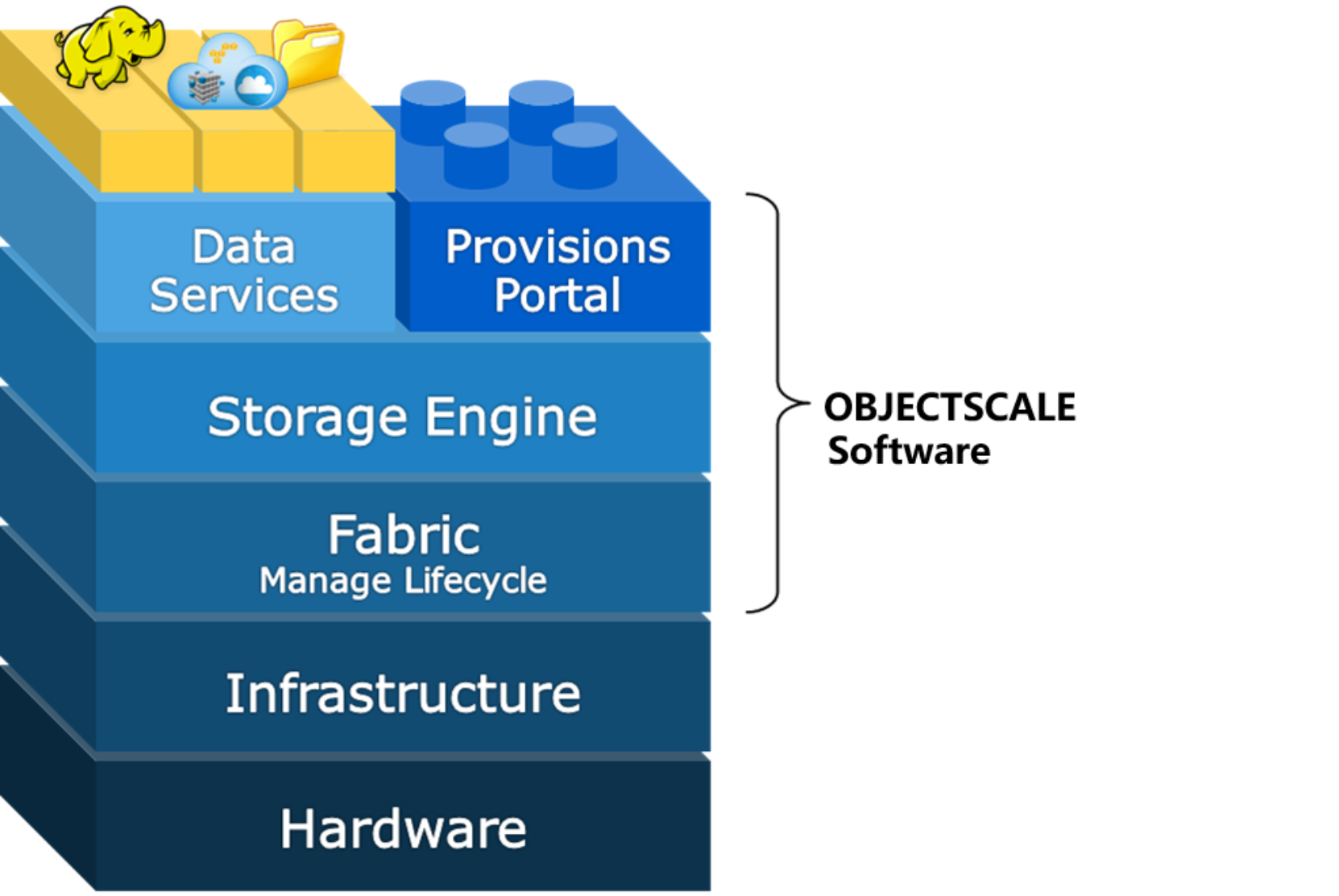
Hardware layer is on the bottom with Infrastructure layer on top of it.  ECS software on top of Infrastructure layer with Fabric, Storage Engine, Data Services and the Provisioning Portal layers up from it.

Figure 1.   ObjectScale layers

Physical deployment

Overview of considerations

Strategic planning is critical to the success of any ObjectScale deployment. Some of the factors to consider during physical deployment relate to:

  • Space and power
  • Networking
  • Single-site and multisite considerations

Working closely with Dell personnel, reading the documentation, and using tools that are available for planning are important in designing ObjectScale.

Planning documentation and tools

Making assumptions relating to power, space, and infrastructure services, such as firewall, network, ACL, DNS, NTP, and so on, is a common pitfall and poses challenges for ObjectScale installation. Thus, knowledge of requirements and existing infrastructure at the customer site is important to mitigate this issue. Documentation and tools are available to help plan, prepare, and design ObjectScale to fit your requirements and eliminate the guesswork.

To review, the following components illustrated in Figure 2 form the basis of an ObjectScale deployment:

  • Site: A site is a unique physical location, for example, a data center in Arizona, USA. An ObjectScale deployment consists of one or more sites.
  • Site ID: Dell assigns a unique identifier to each site. All hardware, software, and services are tied to individual site IDs.
  • Rack: A rack consists of hardware that is physically in a single data center floor tile space.
  • Node: A node is a server in a rack. Racks consist of five or more nodes.
  • Cluster: One or more racks of hardware physically connected at a single site constitutes a cluster. In general, each site has one cluster that is made up of one or more racks of hardware, and federation is done between at most one cluster at each site. That is, it is possible to have two clusters at a single site, but ObjectScale is designed to federate geographically, not locally. A cluster is also referred to as a Virtual Data Center (VDC).
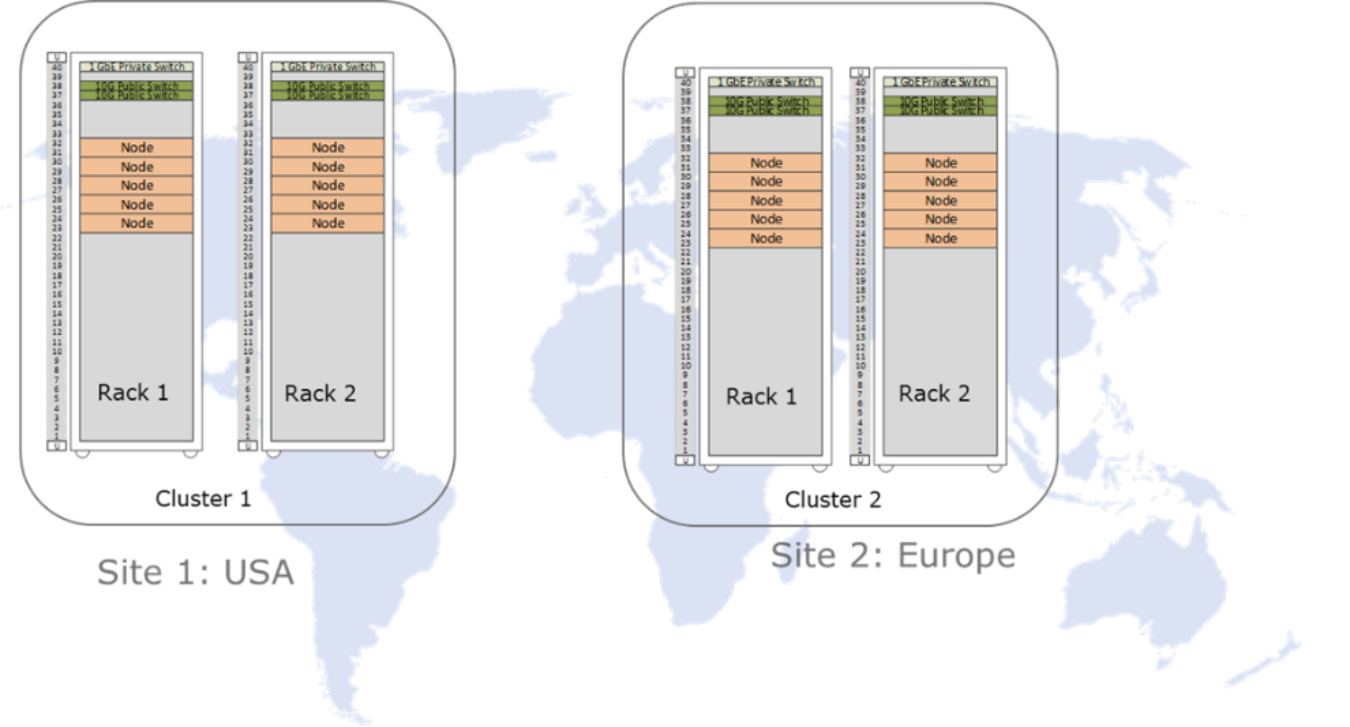
This is an example of the Physical ECS deployment. site 1 in the USA with two racks and site 2 in Europe with another 2 racks.

Figure 2.   Physical ObjectScale deployment

A VDC is built up of one or more racks, where each rack requires a tile space on the data center floor. Racks communicate across the site's local area network (LAN) by means of uplink network connections through a pair of 25 GbE switches for X560, EX5000, and 100GbE for XF960. These switches may be purchased with the ObjectScale as part of the solution or may also be customer-provided switches. In addition, ObjectScale communicates privately over a closed backend for administrative tasks; no data travels over the backend network except XF960, which uses a dedicated RDMA backend network. Storage and performance requirements primarily determine the quantity of racks deployed at each site. Floor space and plans for future growth are also considerations.

A multisite deployment is built by federating two or more sites. ObjectScale enables you to configure replication either within a single site or across multiple sites. It provides flexibility in solution design, allowing for data separation, protection against many types of failures, and global access. In addition to appliance-based deployments, ObjectScale also supports software-defined deployments on qualified PowerEdge servers (for example, R7725xd), allowing customers to apply these best practices consistently across both appliance and SDS environments.

After understanding the terminology and components, review the documentation and tools that can help in the planning and deployment. They include:

  • ObjectScale Hardware Guide—A guide that contains the hardware information (whether an ObjectScale appliance or customer rack is used)
  • Security Configuration Guide—A guide that provides an overview of settings and configurations for secure operation
  • ObjectScale Designer—An Excel spreadsheet for use in recording and centralizing required information

All hardware, software, and licensing are associated with a specific and unique site ID. Use the ObjectScale Designer to perform the critical work of keeping site information up to date. Verify the site information for accuracy from the earliest planning stages, through the ordering process, and all the way through provisioning, alerting, and remote access. Support issues are tied to site IDs as well. Contact your account team if you do not receive the installation scripts from the ObjectScale Designer team.

Planning documentation and tools best practices

  • Make no assumptions; understand all requirements and existing infrastructure.
  • Carefully review the planning and site preparation guides.
  • Obtain and use the ObjectScale Designer.
  • Verify that Site ID information is accurate and that all hardware, software, and licenses are properly associated with sites. Verify that license for encryption is ordered correctly and received for each site.
  • Account for growth and retention requirements when planning.
  • Design deployment based on your high availability and disaster recovery requirements.

Power and space

Power and space are important considerations when planning an installation. Underspecifying the power requirements can cause overload and overheating issues. Consider the total weight of the rack. A fully loaded EX5000 ObjectScale appliance weighs more than a ton. Due to the density of ObjectScale hardware, ObjectScale might have unique requirements such as custom rack size, depth, cable management, and brackets, which some locations might not be typically equipped with. Knowledge of the power and space requirements helps in alleviating issues and planning for future growth.

You must use the documentation and tools that are referenced in Planning documentation and tools to ensure that installation locations within the data center are compatible with requirements. Adhering to the requirements outlined in the documentation assists facilities in supporting ObjectScale.

Power and space best practices

  • Customers who purchase ObjectScale appliances but move the hardware to their own rack should plan for the disposal of the cabinet purchased with the appliance.
  • When expanding ObjectScale clusters, purchase nodes for existing racks to consolidate space, and purchase racks to allow for future consolidation.
  • Consider reserving additional tiles for cluster growth.
  • Allow extra time when purchasing hardware outside of a rack as the switches and nodes do not come preinstalled with operating systems and require additional inspection.
  • Consult the most recent hardware specifications guide for power requirements, dimensions, and weight when ordering hardware.

Networking

ObjectScale networking terms include:

  • Front-end switches—Public or top-of-rack (ToR) switches that connect to the customer’s network, which includes the default public network and any defined separated networks such as management, replication, or data. The customary names for the two physical components in this switch complex are rabbit and hare. The node is configured to bond the two NICs into a single LACP bonding interface.
  • Public network—The default network of the appliance that consists of two bonded interfaces with connections to the public (front-end) switch. By default, all types of public traffic use the public network, unless explicitly defined.
  • Management network—An optional separated VLAN dedicated to hosting the ObjectScale web portal, all common infrastructure services such as NTP, DNS, DHCP, and Dell Secure Connect Gateway.
  • Replication network—An optional separated network dedicated to replicating objects between virtual data centers.
  • Back-end switches—Private switches used for internal maintenance, including the ObjectScale private network and the private.4 network (also known as Nile Area Network (NAN)). The customary names for these physical switches are hound and fox. All server nodes in an ObjectScale intra-rack have two connections going to a back-end switch. Both connections are bonded into a single LACP bonding interface.
  • Private network—A rack-only network used for service operations such as install, reinstall, and expansion.
  • Private.4 network—A network that interconnects all co-located ObjectScale racks through their private switches onto a single VLAN, which is VLAN 4 by default. Also referred to as the Nile Area Network (NAN).

Networking for X560

The X560 appliance uses the Dell S5248F for the front-end pair of switches and for the pair of back-end switches. Customers have the option of using their own front-end switches instead of the Dell switches.

The following figure shows how ports in front-end network switches are intended to enable ObjectScale node traffic and customer uplink ports. This is standard across all implementations.
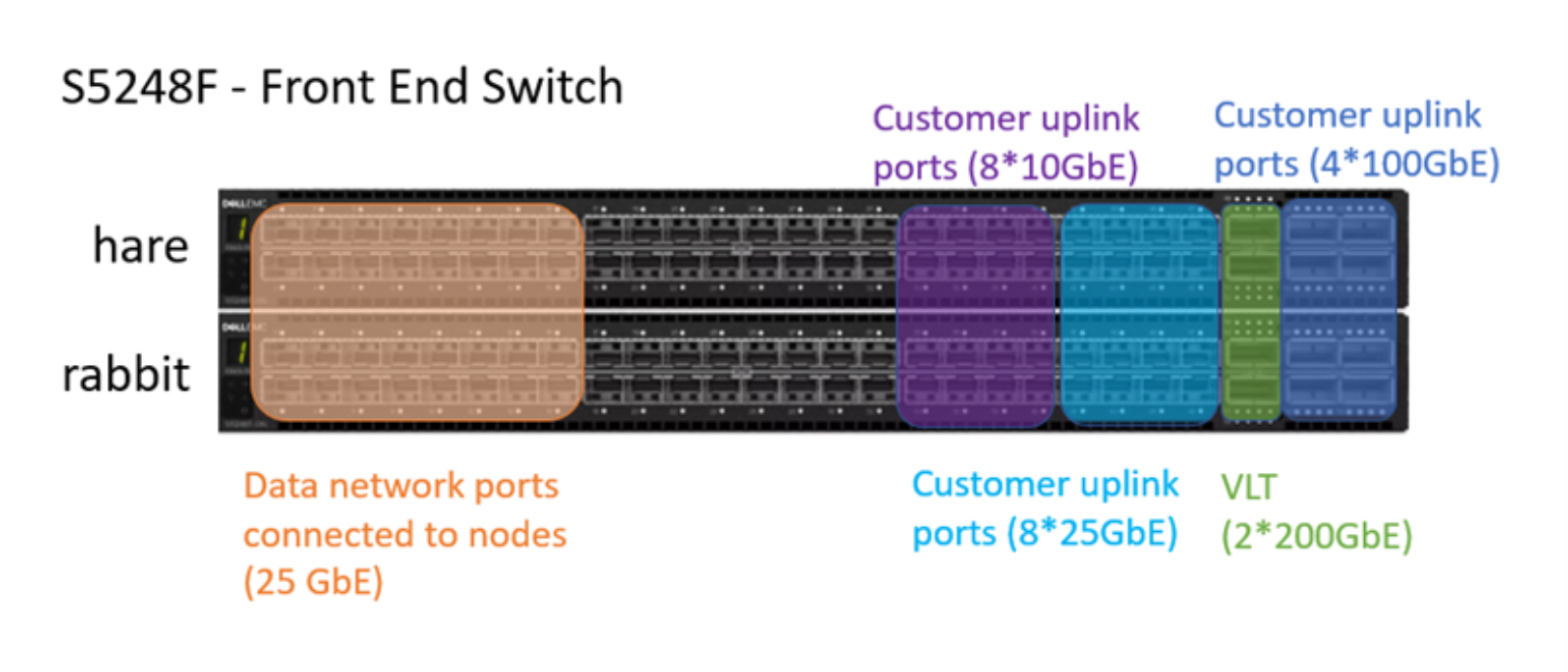
This is an example of an S5248F switch which is used as a front end switch. It includes 25GbE data network ports and 200GbE VLT ports.

Figure 3.   Front-end network switch port of S5248F

The following figure shows how ports are intended to be used to enable ObjectScale management traffic and diagnostic ports.
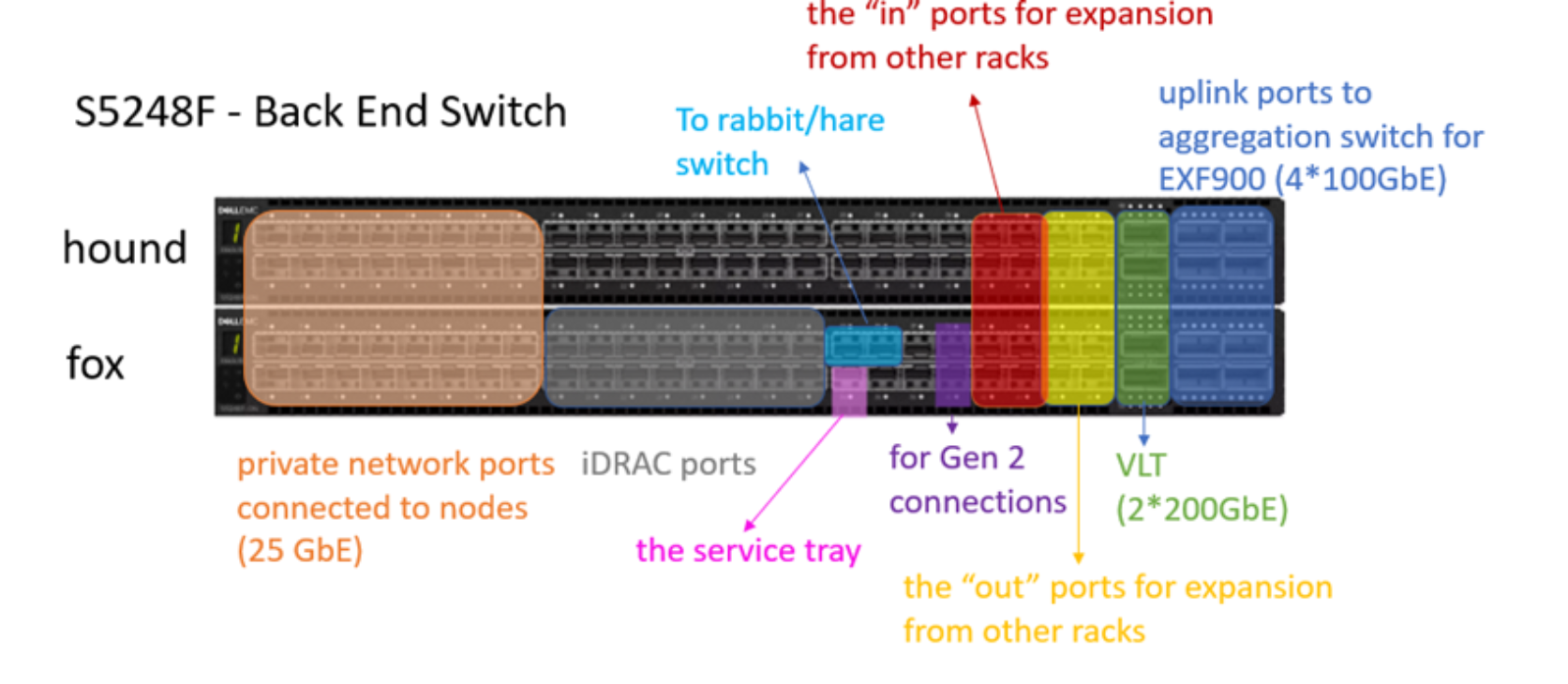
This is an S5248F back end switch, which includes 25GbE private network ports connected to nodes, iDRAC ports and VLT ports.

Figure 4.   Back-end network switch port of S5248F

Networking for X7700S

Dell offers an HA pair of front-end S5448F switches (100 GbE capable) for the X7700S, providing customer-facing data network connectivity. The X7700S front-end switch uses the same S5448F model as the XF960 AFA appliance.
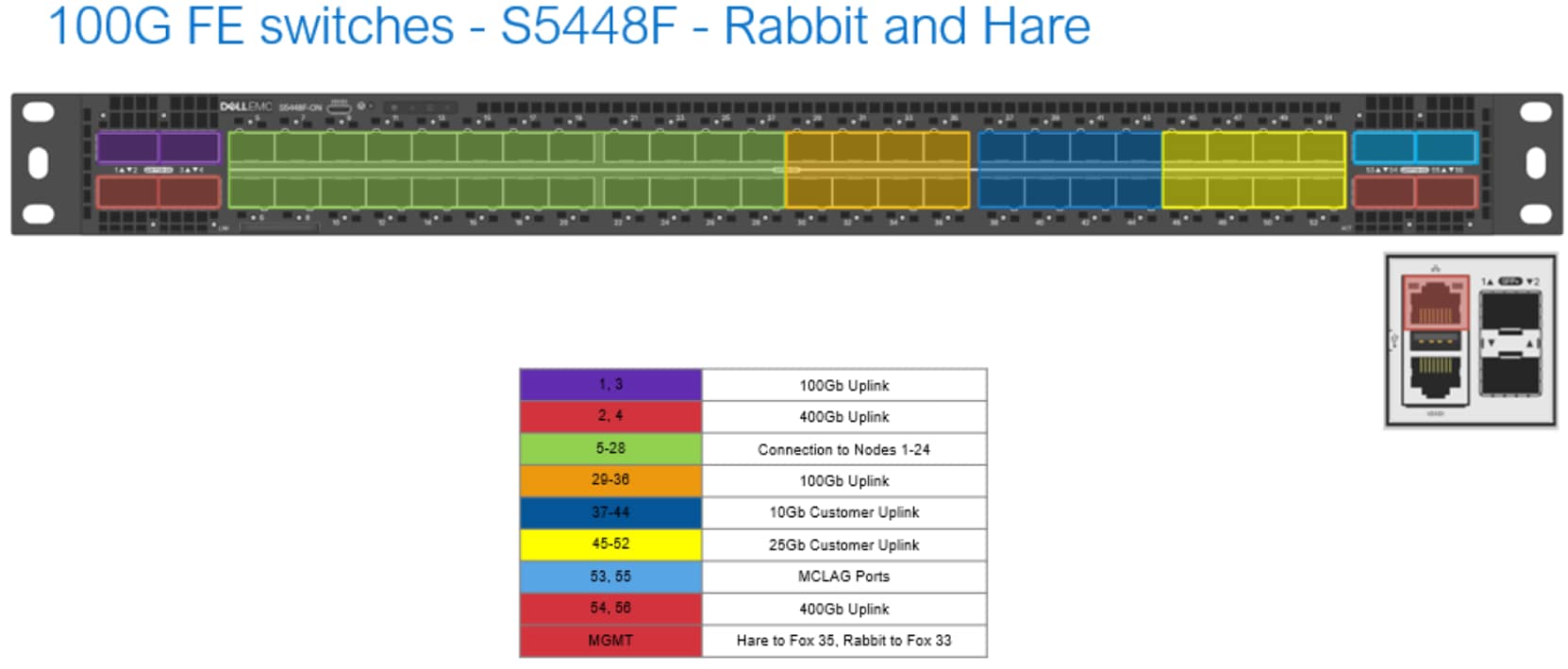
Figure 5.   S5448F — front-end public switches for dense HDD (X7700S) appliance

The X7700S primary rack includes a pair of Dell S3248T 1 GbE back-end switches running DES network OS. These switches provide private back-end management and storage interconnect traffic within the rack. Expansion racks do not include back-end switches; nodes in expansion racks connect back to the primary rack's S3248T switch pair.
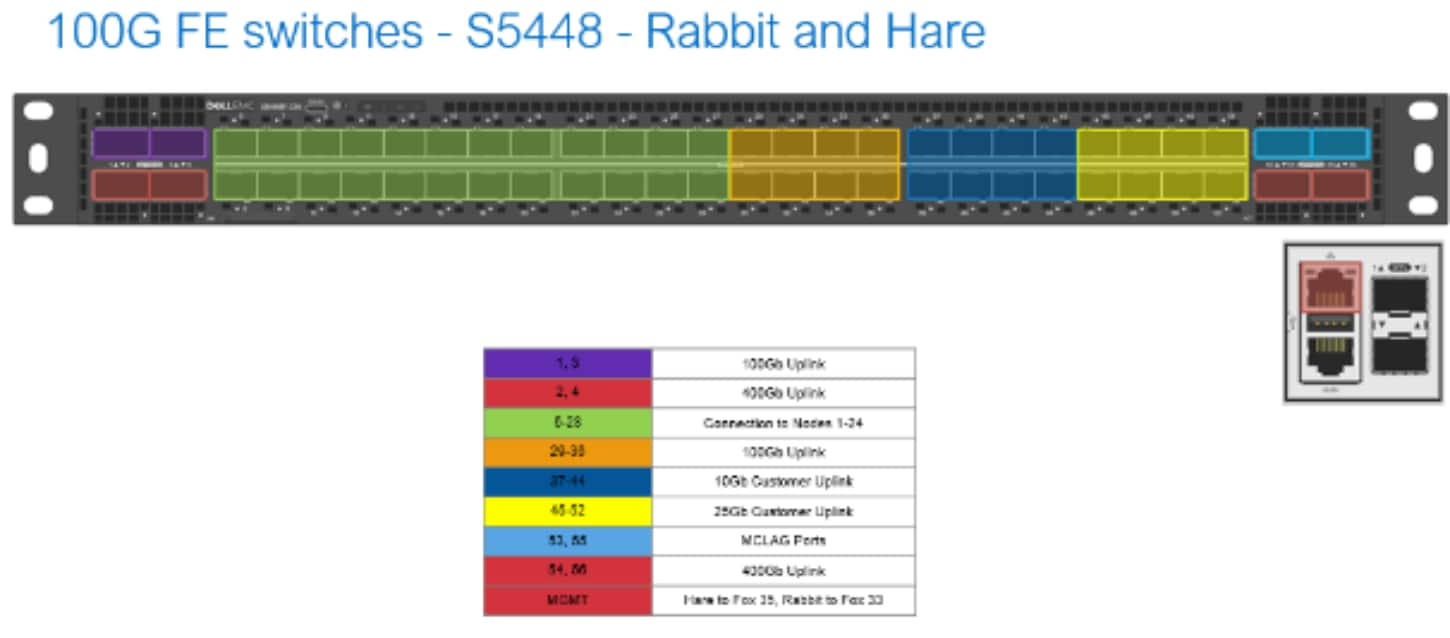
Diagram of a 100G FE S5448 switch layout for “Rabbit and Hare,” showing front-panel port assignments and connectivity groups. Color-coded blocks and legend distinguish 100G/400G uplinks, Linux connections, and reserved ports, with a separate inset showing management or auxiliary connectors.

Figure 6.   S3248T — back-end private switches for dense HDD (X7700S) appliance

Network diagram documenting 1G BE S3248T switches named Hound and Fox, with front-panel port layouts and color-coded assignments. Port legend identifies connections to nodes 1–10, RICAC nodes 1–16, Rabbit MDS7, Service Ports A1–2, Hound MGT, 100G Customer Connect, Service Ports A3–4, 100G NAN Connect ingress/egress, and Hound Port 1–2 (10–12).

Figure 7.   S3248T

Networking for XF960

The XF960 is the highly performant ObjectScale object storage appliance. The ObjectScale software uses an NVMe engine to configure local NVMe targets and establish NVMe over Fabric (NVMe-oF) connections. High-performing and reliable connections to remote storage nodes are accomplished by having a dedicated highly available network using Ethernet-based RDMA as the transport fabric.

The XF960 appliance uses the Dell S5448F switches for the front-end and back-end pair.  When aggregating multiple racks together, a pair of Z9432F switches is needed. Customers have the option of using their own front-end switches instead of the Dell switches.

The following figure shows ports in a front-end network switch are used to enable ObjectScale node traffic and customer uplink ports.
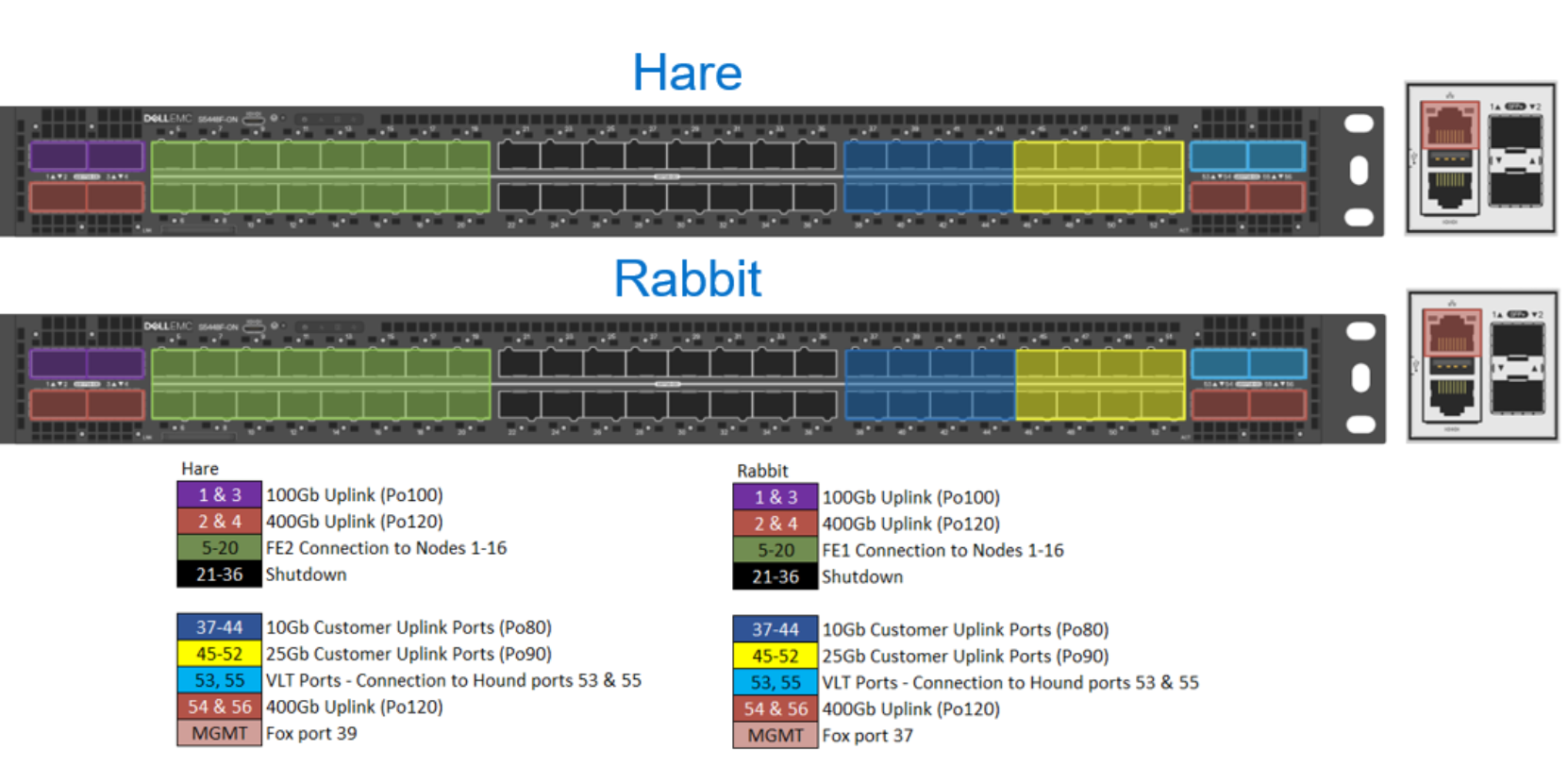
Rack-port diagram compares Hare and Rabbit network layouts using color-coded port blocks. Legends identify 100GbE and 400GbE uplinks, FDX node connections, customer uplink ports, and labeled port ranges across green, blue, yellow, red, and black sections.

Figure 8.   Front-end network switch port of S5448F

The next figure shows how ports are intended to be used in a back-end network switch. These port allocations are standard across all implementations.
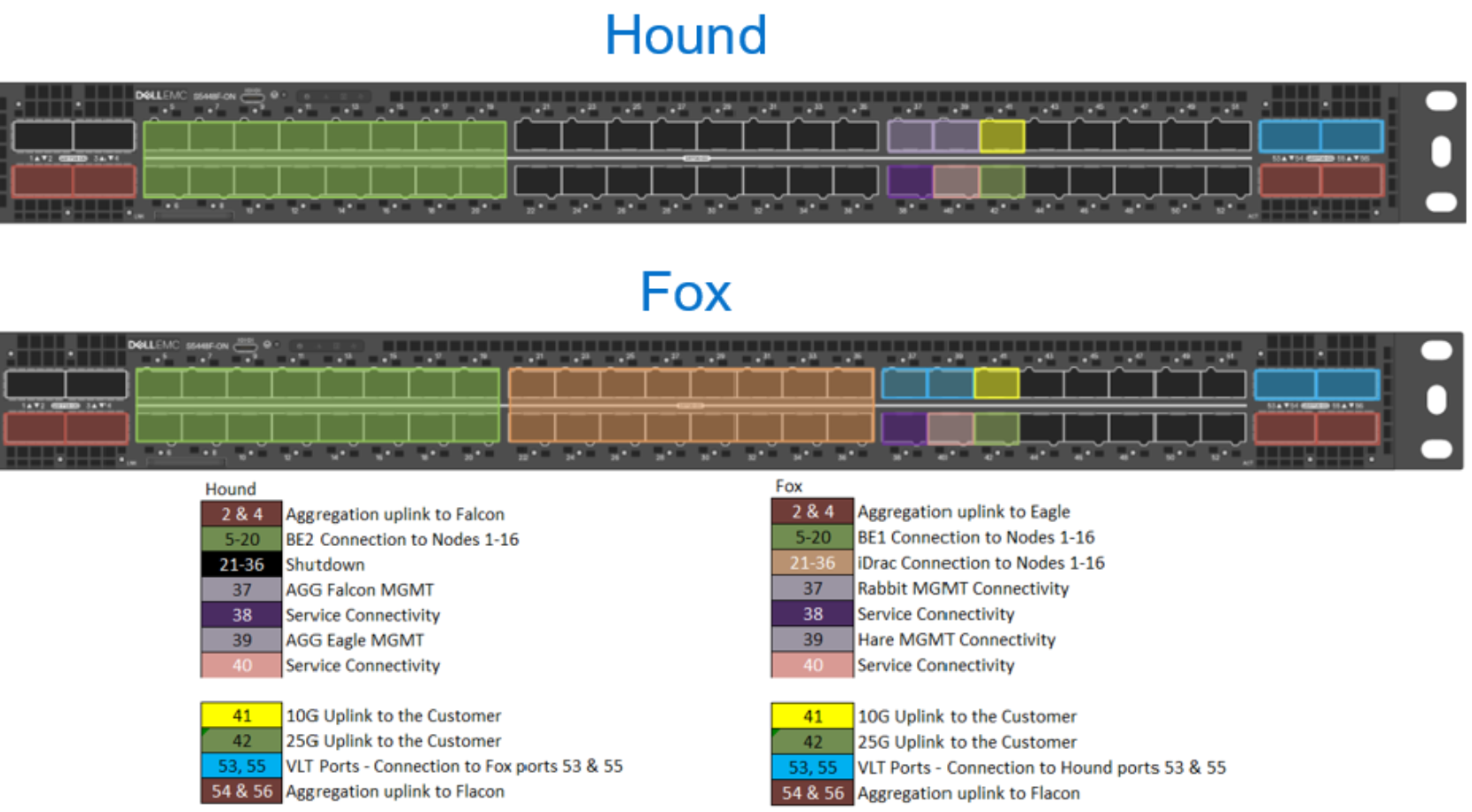
Rack-port layout diagram compares Hound and Fox switch configurations, using numbered front-panel ports and color-coded legends to map aggregation, node, management, service, and customer connections. Hound highlights a long green node-connection block plus Falcon and Fox links, while Fox splits node connections into green and orange blocks and marks Eagle and Hound links with yellow uplink markers and blue customer-port groups.AI-generated content may be incorrect.

Figure 9.   Back-end network switch port of S5448F

Dell provides two 400GbE Z9432F back-end aggregation switches (AGG1 and AGG2) . These switches are referred to as the Falcon and Eagle switches.
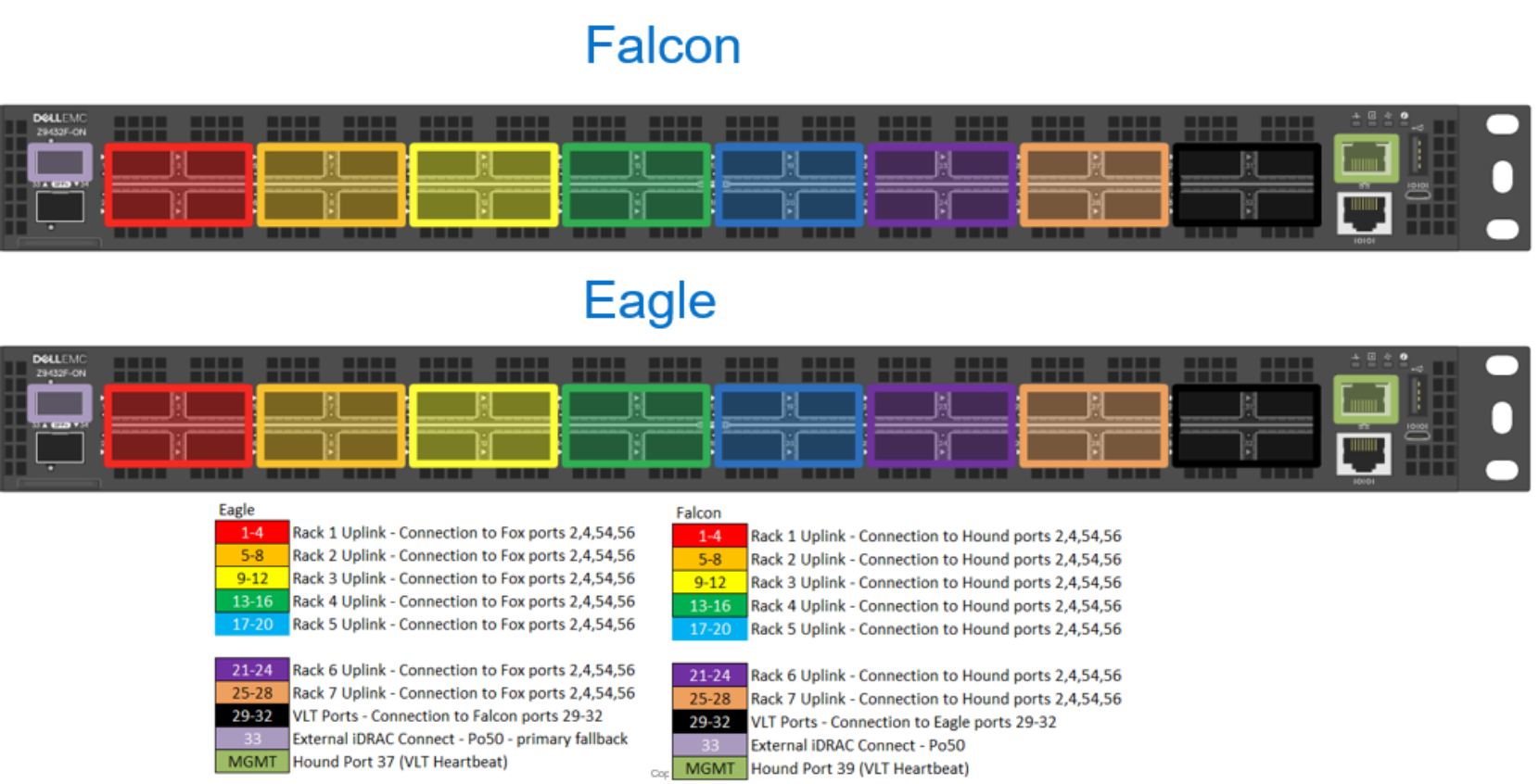
Diagram showing two network switch models, Falcon and Eagle, with color-coded port groups representing uplink connections to various devices. Each model has labeled port blocks in red, orange, yellow, green, blue, purple, brown, and black, with a legend detailing port ranges and connection types, highlighting differences in uplink port assignments and management ports.AI-generated content may be incorrect.

Figure 10.    Aggregation switch port of Z9432F

Consult the following information for switch, switch port, and overall network planning guidance:

  • ObjectScale Designer Spreadsheet Overview—A critical and informative video about the design and provisioning process, especially about switches and their related configuration, which guides users through important questions. Contact your account team if you do not receive the installation scripts.
  • ObjectScale Hardware Guide—A guide that provides information about supported hardware configurations, upgrade paths, and rack cabling requirements.

Networking best practices

  • Use the ObjectScale Designer throughout the design and deployment process. Record customer-provided switch manufacturers, models, and firmware versions. Record ObjectScale rack uplink information along with switch and port identifiers and cabling descriptions.
  • Reserve the necessary number of ports on the customer’s switch infrastructure.
  • Understand the options for port channel configuration.


ObjectScale network configurations

Introduction

The previous section briefly described the switches and related networks used ObjectScale appliances. This section will explore further the public production network, and the private ObjectScale internal management network referred to as the Nile Area Network, or NAN for short. Design considerations and best practices in both production and internal networks are discussed to offer guidance for network architects.

Production network

The production network involves the connections between the customer’s network and the two ToR ObjectScale front-end, public data switches and the connections within the ObjectScale rack. These connections act as the critical paths for in and out client requests and data (“north to south”), and internode traffic (“east to west”) for replication and processing requests as shown in the following figure for a single rack.
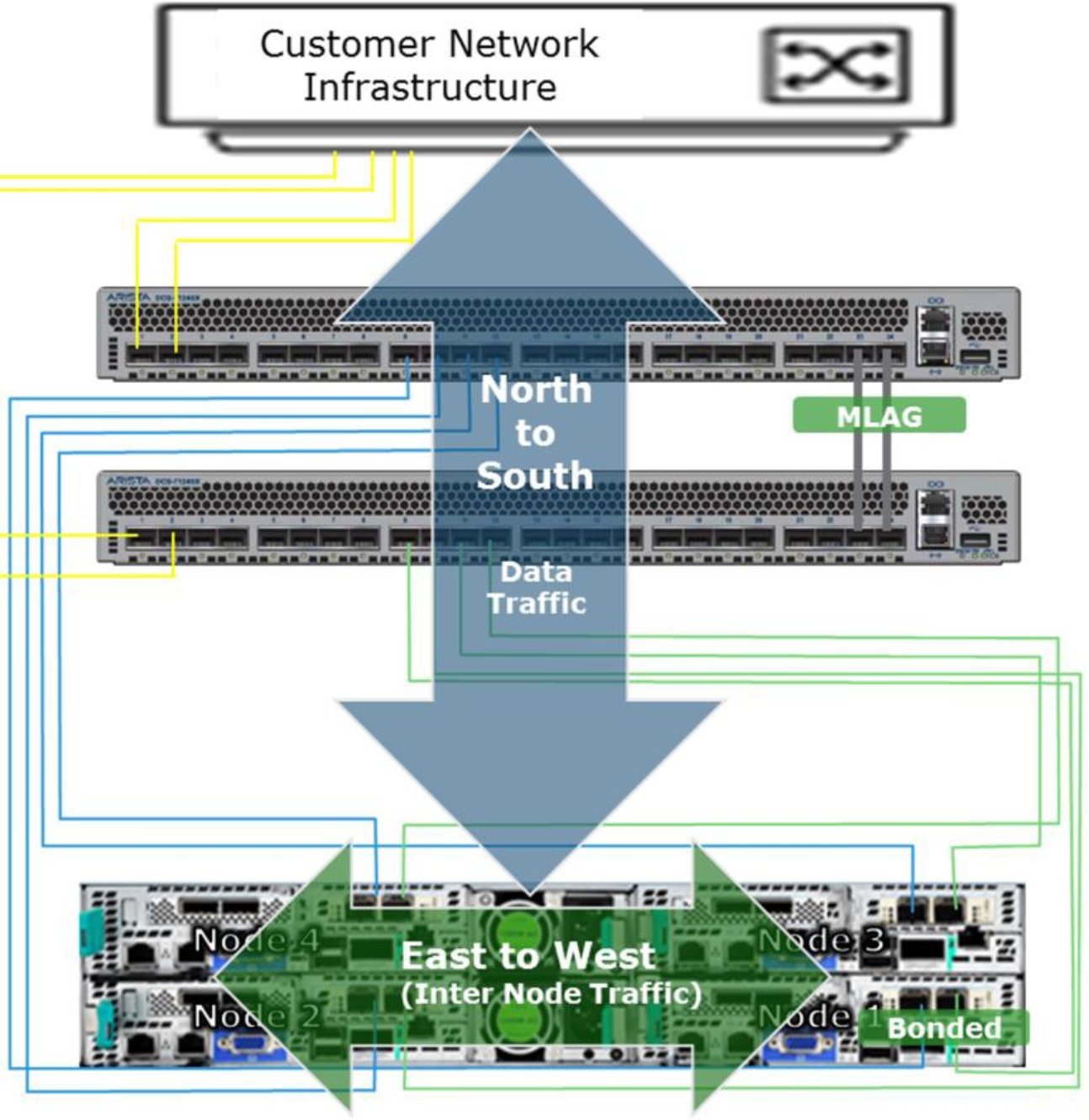
Network infrastructure diagram illustrates data traffic flow between customer network infrastructure and clustered nodes. Large blue arrows show north-to-south traffic, while green arrows show east-to-west inter-node traffic across Nodes 1–4, with MLAG and bonded links labeled.

Figure 11.    Network traffic flow in a single rack

For multirack with HDD cluster, internode traffic flows north to south and over to the customer network and to the other ObjectScale racks as shown in the following figure.
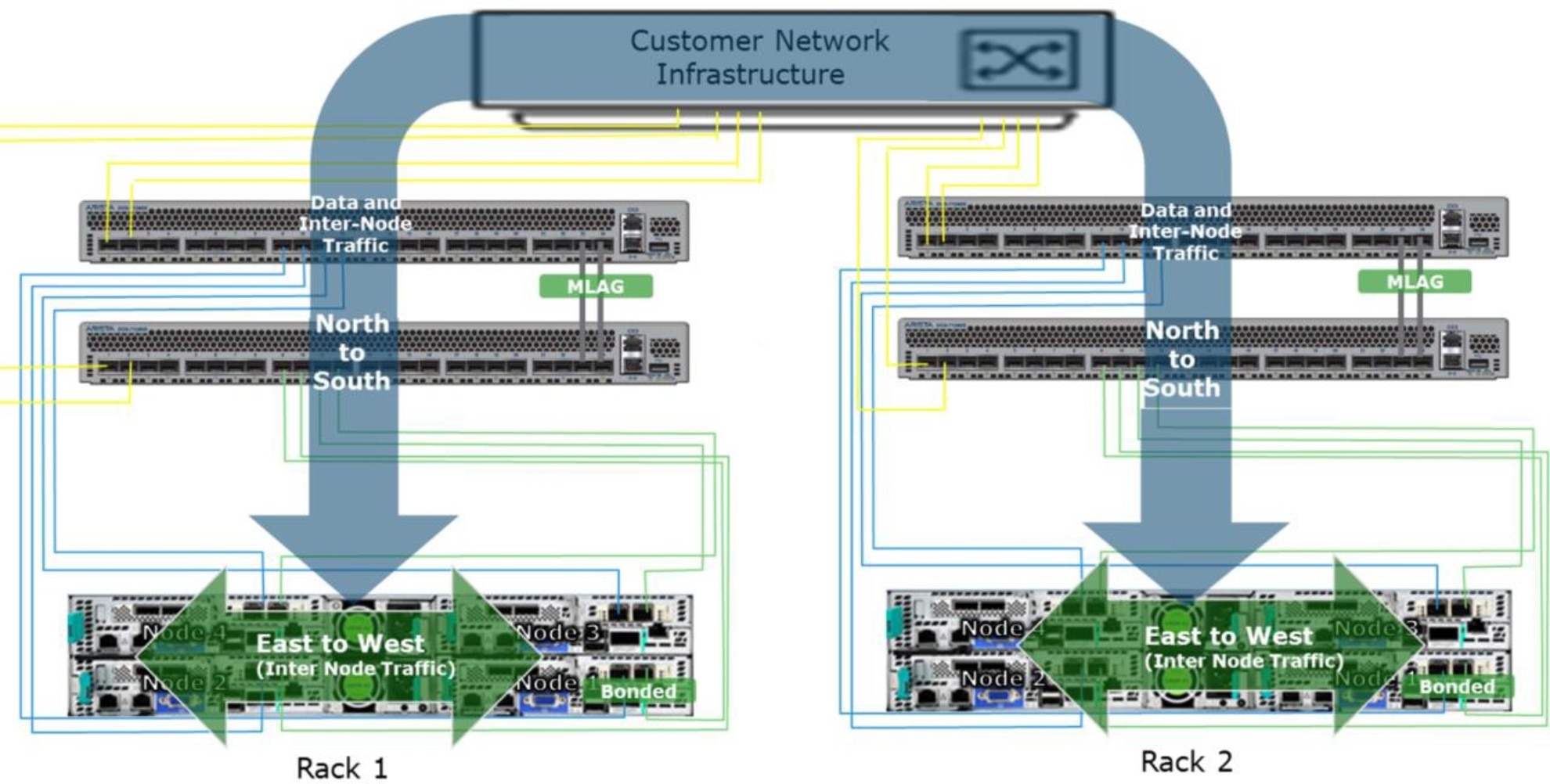
Network architecture diagram shows Customer Network Infrastructure linking Rack 1 and Rack 2 through MLAG switches. Blue arrows mark North-to-South traffic and green arrows mark East-to-West inter-node traffic across bonded nodes, with labeled data and inter-node connections.

Figure 12.    Network traffic flow in a multirack

Note: For XF960, it is designed with NVMe-oF architecture, the internode traffic will go through inside the private switch and dedicated aggregation switch to improve the performance.

Network connections in the production network as a best practice should be designed for high availability, resiliency, and optimal network performance.

ToR public switch configuration and node connectivity

The public ToR switches work in Virtual Link Trunking (VLT) with the Dell switches. This configuration creates an HA network for the nodes in the rack. The aggregation of multiple ports results in higher bandwidth, resiliency, and redundancy in the data path.

Each node in the rack is connected to both switches through two NICs which are aggregated together using a Linux bonding driver. The node is configured to bond the two NICs into a single LACP bonding interface also known as a "mode 4" bond. This bonding interface connects one port to each switch as demonstrated in the following images.

The following figure is example of nodes bonded with a public switch pair.
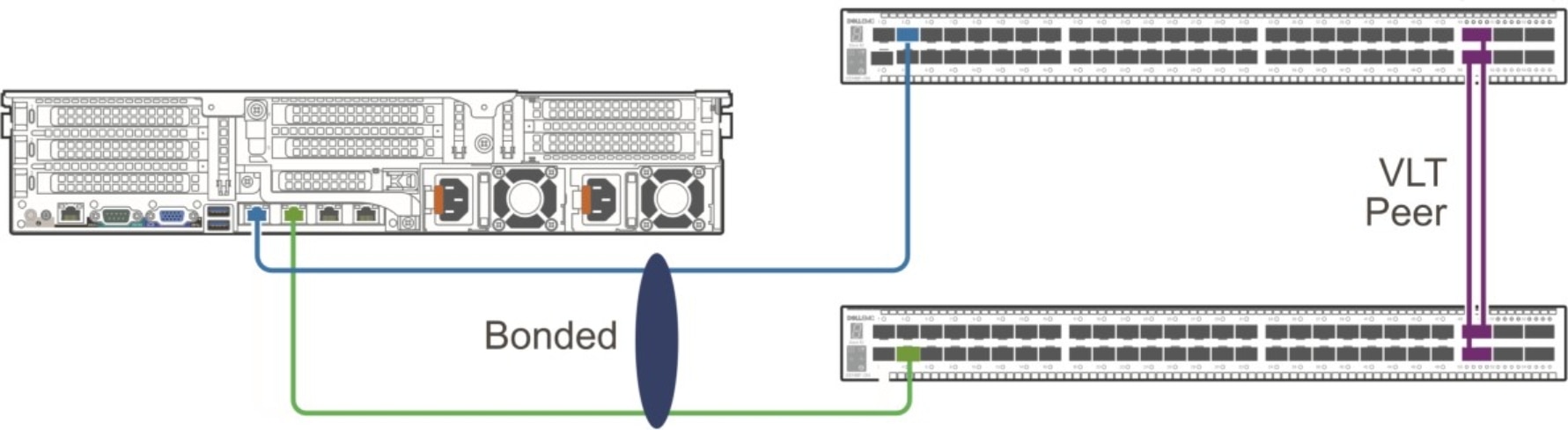
Network topology diagram illustrating a bonded server connection to two switches configured as VLT peers. Blue and green links connect server ports to separate switches, while a purple vertical link marks VLT peer connectivity.

Figure 13.    Node connectivity by VLT

Internal private network

The internal private network, also known as the Nile Area Network (NAN), is mainly used for maintenance and management of the ObjectScale nodes and switches within a rack and across racks. Ports on the management switch can be connected to another management switch on another rack, creating a NAN topology. From these connections, nodes from any rack or segment can communicate to any other node within the NAN. The management switch is split in different LANs to separate the traffic to specific ports on the switch for segment-only traffic, cluster traffic and customer traffic to RMM:

  • Segment LAN: Includes nodes and switches within a rack
  • Private.4 LAN: Includes all nodes across all racks
  • iDRAC LAN: Includes uplink ports to customer LAN for RMM/iDRAC access from customer’s network

NAN topologies

The NAN is where all maintenance and management communications traverse within rack and across racks. A NAN database contains information such as IP addresses, MAC addresses, node name, and ID on all nodes within the cluster. This database is locally stored on every node and is synchronously updated by primary node using the setrackinfo command. Information on all nodes and racks within the cluster can be retrieved by querying the NAN database. One command that queries the NAN database is getrackinfo.

The racks are connected to the management switches on designated ports. These connections allow nodes within the segments to communicate with each other. There are different ways to connect the racks or rack segments together. Each rack segment is specified a unique color during installation and thus identifying the racks within the cluster. The figures below depict some of the topologies and give some advantages and disadvantages of each NAN topology.

The following figure shows a simple topology linearly connecting the segments through ports of the management switches in a daisy-chain fashion. The disadvantage of this topology is that when one of the physical links breaks, there is no way to communicate to the segment or segments that has been disconnected from the rest of the segments. This event causes a split-brain issue in NAN and forms a less reliable network.
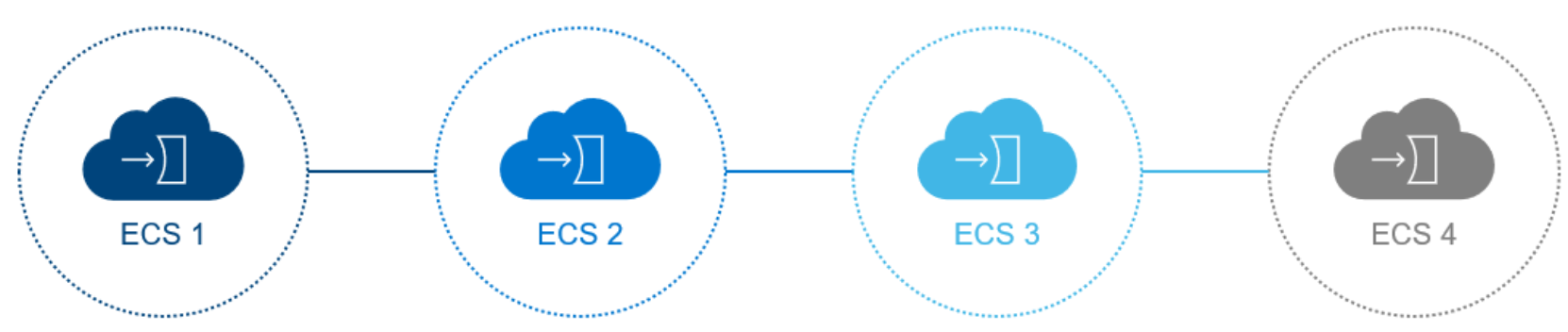
Diagram illustrating four connected cloud-service stages labeled ECS 1 through ECS 4. Blue nodes mark ECS 1–3, while gray ECS 4 appears inactive or completed, with dotted circular outlines and horizontal connector lines showing progression.

Figure 14.    Linear or daisy chain topology

Another way to connect the segments is in a ring topology as illustrated in the following figure. The advantage of the ring topology over the linear is that two physical links would need to be broken to encounter the split-brain issue, proving to be more reliable.
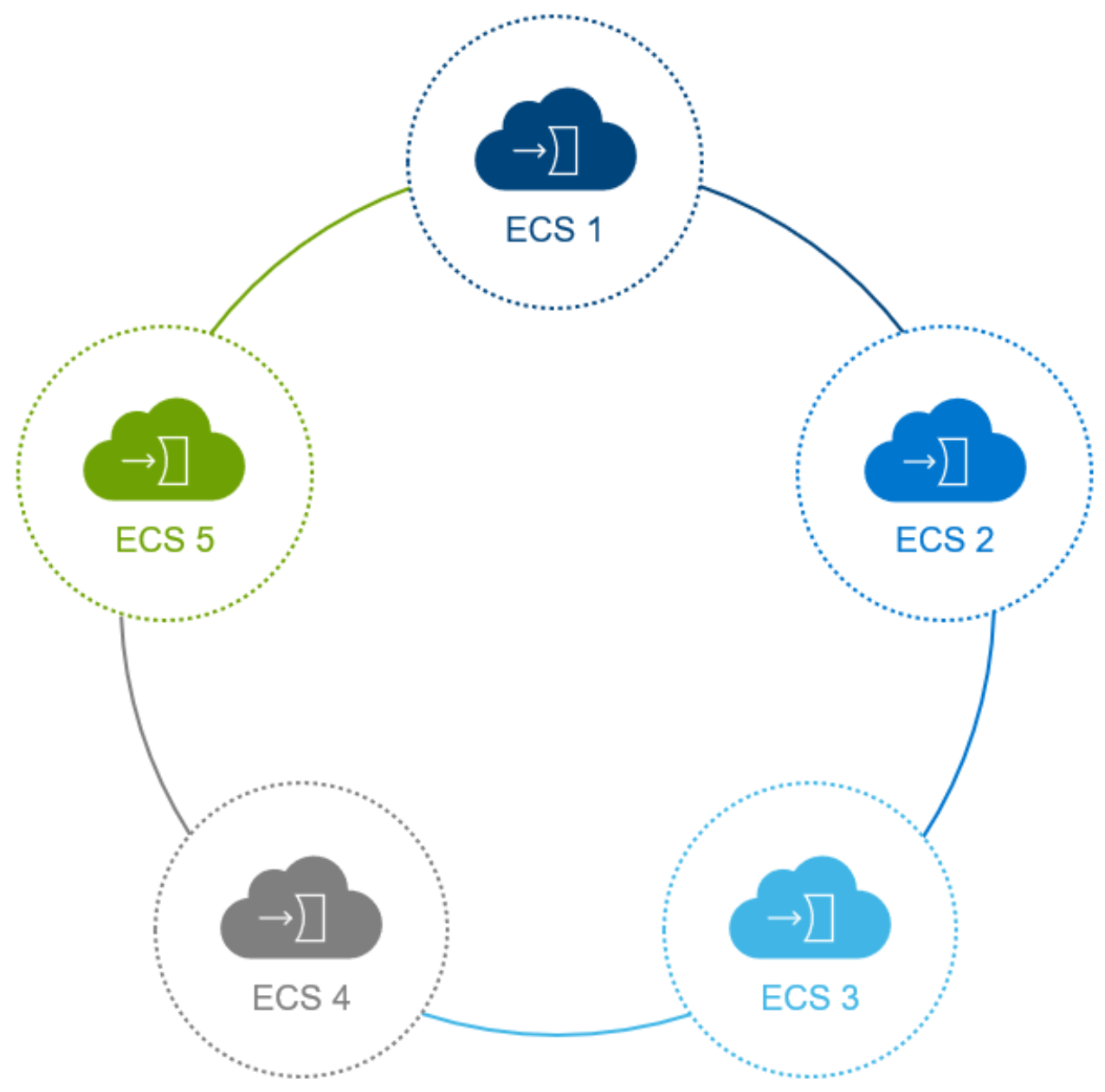
Circular process diagram showing five cloud-based ECS stages arranged in a loop. Color-coded nodes labeled ECS 1 through ECS 5—blue, cyan, gray, green, and olive—highlight a continuous sequence connected by curved lines.

Figure 15.    Ring topology

For large installations, the split-brain issue in the ring or linear topologies could be problematic for the overall management of the nodes. A star topology is recommended for an ObjectScale cluster where there are ten or more racks or customers wanting to reduce the issues that ring or linear topologies pose. In the star topology, an aggregation switch would need to be added and would be an extra cost; however, it is the most reliable among the NAN topologies.

Segment LAN

The Segment LAN logically connects nodes and switches within a rack to a LAN identified as VLAN 2. This LAN consists of designated ports on the management switch or switches and are referred to as the blue network. All traffic is limited to members of this segment for ease of management and isolation from the customer network and other segments within the cluster. The Ethernet ports on the nodes are configured with a private IP address derived from the segment subnet and node ID number. Thus, the IP address is of the form 192.168.219.{NodeID}. The IPs are not routable and packets are untagged. These addresses are reused by all segments in the cluster. To avoid confusion, it is not recommended to use these IP addresses in the topology file required when installing the ObjectScale software on the nodes.

Private.4 LAN

Multiple segment LANs are logically connected to create a single Cluster LAN for administration and access to the entire cluster. Designated interconnect ports on management switches provide interconnectivity between management switches. All members will tag their IP traffic with VLAN ID 4 and communicate through the IPv4 link local subnet. During software installation, all nodes in the rack are assigned a unique color number. The color number acts as the segment ID and is used together with the node ID to consist of the new cluster IP address for every node in the cluster. The IP addresses of the nodes in the cluster LAN will be in the form of 169.254.{SegmentID}.{NodeID}. This unique IP address would be the recommended IP address to specify in the topology file for the nodes within the cluster.

iDRAC access from customer network (optional)

iDRAC access from customer network is optional, and it is recommended to determine specific requirement from customer. A relevant use of the iDRAC connection would be for ObjectScale software-only deployments where the hardware is managed and maintained by customers. Another use is when customers have a management station in which they would require iDRAC access to all hardware from a remote location for security reasons.

Customer-provided infrastructure

Overview of customer-provided infrastructure

An ObjectScale deployment depends on certain customer-provided infrastructure components that need to be reachable by the ObjectScale system, as shown in Figure 13. Components include:

  • DNS server—Domain Name System server or forwarder
  • NTP server—Network Time Protocol server
  • DHCP server—Server that is only required if you are assigning IP addresses by DHCP
  • Authentication providers – Active Directory, LDAP, or Keystone for authentication of users (system administrator, namespace administrator, and object users)
  • SMTP server (optional)—Server for use in sending reports from the ObjectScale rack
  • Load balancer (optional, but highly recommended)—Load balancer to evenly distribute loads across all nodes. Integrated Load Balancer starting with ObjectScale 4.3
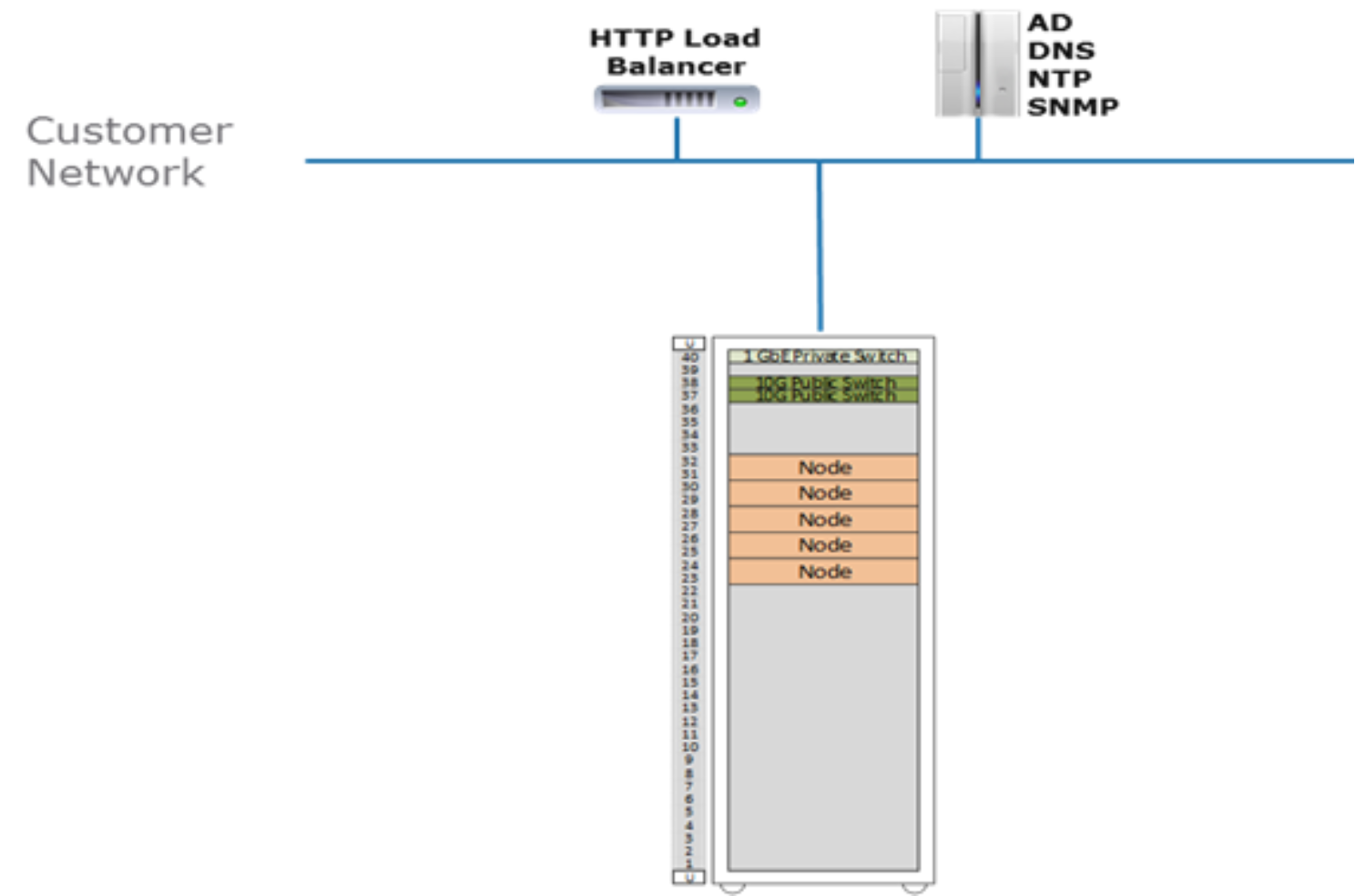
This is an example of customer-provided infrastructure, which includes the ECS, load balancer, AD, DNS, NTP, and SNMP.

Figure 16.    Customer-provided infrastructure

The following sections describe best practices associated with these external services.

Domain Name System

Each node in an ObjectScale cluster requires both forward and reverse Domain Name System (DNS) entries and access to one or more domain name servers. Each workflow might require unique DNS entries (and IP and load balancer configuration). DNS administrators should be given ample time to meet with all necessary application and workflow engineers so that the naming requirements can be fully understood and met.

DNS best practices

  • Use a minimum of two DNS servers for redundancy.
  • During planning, make a record of site DNS server IP addresses, server names, and relevant search domains per site.
  • Engage all relevant groups as early as possible in the design phase. Obtaining domain names and associating them with IP addresses can often take longer than expected.
  • Work directly with application developers and workflow owners so that all required domain names can be obtained, properly recorded, and configured when needed.

Network Time Protocol

Network Time Protocol (NTP) accessibility is essential for ObjectScale to operate correctly. Precise time is necessary for consistent clock synchronization between nodes in ObjectScale, ensuring clean log and journal entries for chunk timestamp values. Unstable NTP sources can result in data corruption or excessive system journal activity. Multisite ObjectScale deployments should use common sources. Include NTP server IP addresses and names for each site in planning documents. For more information, see industry NTP best practices.

NTP best practices

  • Use at least four and no more than seven NTP servers.

IP addressing and Dynamic Host Configuration Protocol

A minimum of one customer-provided IP address is required for each node. Use of local or global load balancers requires additional IP addresses. If hosts retrieve IP addresses from a Dynamic Host Configuration Protocol (DHCP)’ server, record DHCP server IP addresses and names. In addition, if traffic separation is used, additional IP addresses might have to be reserved. Enough IP addresses or subnets must be identified and reserved for deployment. If a separate network team exists, planners should consult that team early during the planning and design phase. Network teams are instrumental in deciding which deployment model works best for each site and allocating and reserving IP addresses or subnets.

DHCP is used for assigning IP addresses. Many customers choose to use static IP addresses, often with reservations in DHCP. For large scale-out environments, however, DHCP could be leveraged to avoid hard coding many addresses.

Putting DHCP in a DMZ, which might not be part of the traditional model, is a common requirement for cloud-based storage. Begin this conversation early to give ample time for all involved to plan accordingly.

DHCP best practices

  • If you are using DHCP, MAC addresses should be persistent so that nodes get the same IP addresses during reboot.

Note:

  • When two or more VDCs are federated, Network Address Translation (NAT) cannot be used within unnamed public, named replication, and named management networks.

Load balancing

Load balancers are highly recommended in ObjectScale deployments to evenly distribute data loads across all service nodes.

Although customers are responsible for implementing and configuring their deployed load balancers, Dell does provide recommendations and suggestions about how to configure some of them with ObjectScale workflows. Load-balancing needs should be examined at the workflow level. Each workflow might justify or rule out the use of load balancers. Use of load balancing is important for Atmos traffic, recommended for S3, and can be used with NFS. Load balancers are not required for CAS because CAS workflows have load balancing built into the client applications.

Both local and global load balancers are recommended where workflows justify their need. In addition to distributing the load across ObjectScale nodes, a load balancer provides high availability (HA) for the ObjectScale cluster by routing traffic to healthy nodes. For each workflow that uses a load balancer, record each load balancer's IP address and Fully Qualified Domain Name (FQDN) in planning documents.

For multisite deployments, consider when load balancing should be implemented to provide a method to balance writes across sites to take advantage of the ObjectScale XOR data reduction capability. For example, in a three-site deployment using an archive, if the application is performing writes in only one site, ObjectScale will not take advantage of its XOR capabilities despite having all three VDCs in a replication group. This can be corrected by using a load balancer to redirect traffic and balance writes across sites.

Integrated Load Balancer

Beginning with ObjectScale 4.3, a native, integrated load balancer is available for production use. This built-in option can eliminate the need for dedicated external load-balancing appliances for many deployments while providing high-availability entry points and health-based traffic distribution across nodes and racks. The best practices in this section apply whether you are using an external load balancer, the integrated ObjectScale load balancer, or a combination of both.

The integrated load balancer supports multiple service paths, including object data and S3 access, management and control‑plane APIs, and other platform service endpoints. It provides automatic node health detection and consistent traffic distribution across nodes and racks within a Virtual Data Center (VDC).

Use of the integrated load balancer is optional. Customers upgrading from earlier versions of ObjectScale may continue using existing external load‑balancing solutions without change and may choose to transition to the integrated load balancer later. External load balancers remain valid and supported for advanced traffic‑management requirements, such as global traffic steering, policy‑based routing, or alignment with enterprise load‑balancing standards.

Load balancing best practices

  • Carefully configure and size load balancers so that that they do not reduce performance or pose a bottleneck to performance. So that the load balancer will not hinder peak throughput (based on PUT/GET), verify that the maximum transaction rate and bandwidth can pass through the load balancer.
  • Deploy redundant load balancers (according to manufacturer’s instructions) to eliminate single points of failure.
  • Only use DNS round robin if you cannot implement global DNS/load balancing, which is a better approach.
  • For best performance, terminate SSL connections at load balancer, passing traffic unencrypted to the ObjectScale nodes. This offloads the encryption from ObjectScale to the load balancer.
    For workflows carrying Personally Identifiable Information (PII), do not terminate SSL at the load balancer. This is important to prevent clear text transmission of PII between routers and ObjectScale nodes.
  • If SSL termination is required on ObjectScale nodes themselves, use Layer 4 (TCP) to pass through the SSL traffic to ObjectScale nodes for handling. The certificates must be installed on the ObjectScale nodes and not on the load balancer.
  • For NFS traffic, use only the high availability functionality of the load balancer.
  • When federating three or more ObjectScale sites, employ a global load balancing mechanism to distribute load across sites to take advantage of ObjectScale XOR storage efficiency. This is also important to optimize the local object read hit rate in a global deployment.
  • Enable web monitoring of traffic.

Authentication providers

Many customers use local ObjectScale authentication for management users. The management users then define all object users, one per application. For customers that leverage Active Directory or LDAP, groups or users are assigned to management roles, as opposed to local user accounts. Consider the following information when using authentication providers:

  • Active Directory—An Active Directory domain group can be only the namespace administrator for one namespace. Storage administrators create an Active Directory group for each namespace and assign Active Directory users to that group. Namespace users can use the Web UI and only see things pertaining to their namespace.
  • Lightweight Directory Access Protocol (LDAP)—LDAP users can be administrative users in ObjectScale. LDAP groups are not used in ObjectScale.
  • Local—Local management users are not replicated between sites.

Simple Network Management Protocol

Simple Network Management Protocol (SNMP) servers, also known as SNMP agents, are optional. SNMP servers provide data about network-managed device status and statistics to SNMP Network Management Station clients. ObjectScale supports SNMP basic queries and SNMP traps.

SNMP best practices

For each SNMP server that will be used with an ObjectScale deployment, plan for its IP addresses, names, ports, version, and type of SNMP service used, and community name.

Firewalls

Certain ports must be open for ObjectScale traffic. Firewall rules must be modified to open the ports that are required for ObjectScale traffic.

Firewall best practices

When firewalls are in use, refer to the latest version of the ObjectScale Security Configuration Guide for a complete list of ports to open; define rules in your firewall accordingly.

Provisioning

Provisioning overview

Once the physical hardware is installed and deployed and the external services are configured and available, you can provision VDCs, namespaces, replication groups, users, buckets, and so on, to provide data access to the ObjectScale storage platform. Components that can be provisioned, as shown in Figure 14, include:

  • Virtual Data Center (VDC)—A VDC is a geographical location defined as a single ObjectScale deployment within a site. Multiple VDCs can be federated and managed as a unit.
  • Storage pool—A storage pool can be thought of as a subset of nodes and its associated storage belonging to a VDC.
  • Replication group—Replication groups define where storage pool content is protected and locations from which data can be read or written. Local replication groups protect objects within the same VDC against disk, node, and rack failures. Global replication groups span multiple VDCs and protect objects against disk, node, rack, and site failures.
  • Namespace—A namespace is a logical construct and is conceptually the same as a “tenant.” The key characteristic of a namespace is that users from one namespace cannot access objects belonging to another namespace. Namespaces can represent a department within an organization or a group within a department.
  • Buckets—Buckets are containers for object data. They are created in a namespace to give applications access to data stored within ObjectScale. In S3, these containers are called “buckets,” and ObjectScale has adopted this term. In Atmos, the equivalent of a bucket is a “subtenant,” in Swift, the equivalent of a bucket is a “container,” and for CAS, a bucket is a “CAS pool.” Buckets are global resources in ObjectScale. Where the replication group spans multiple sites, a bucket is similarly replicated across sites.
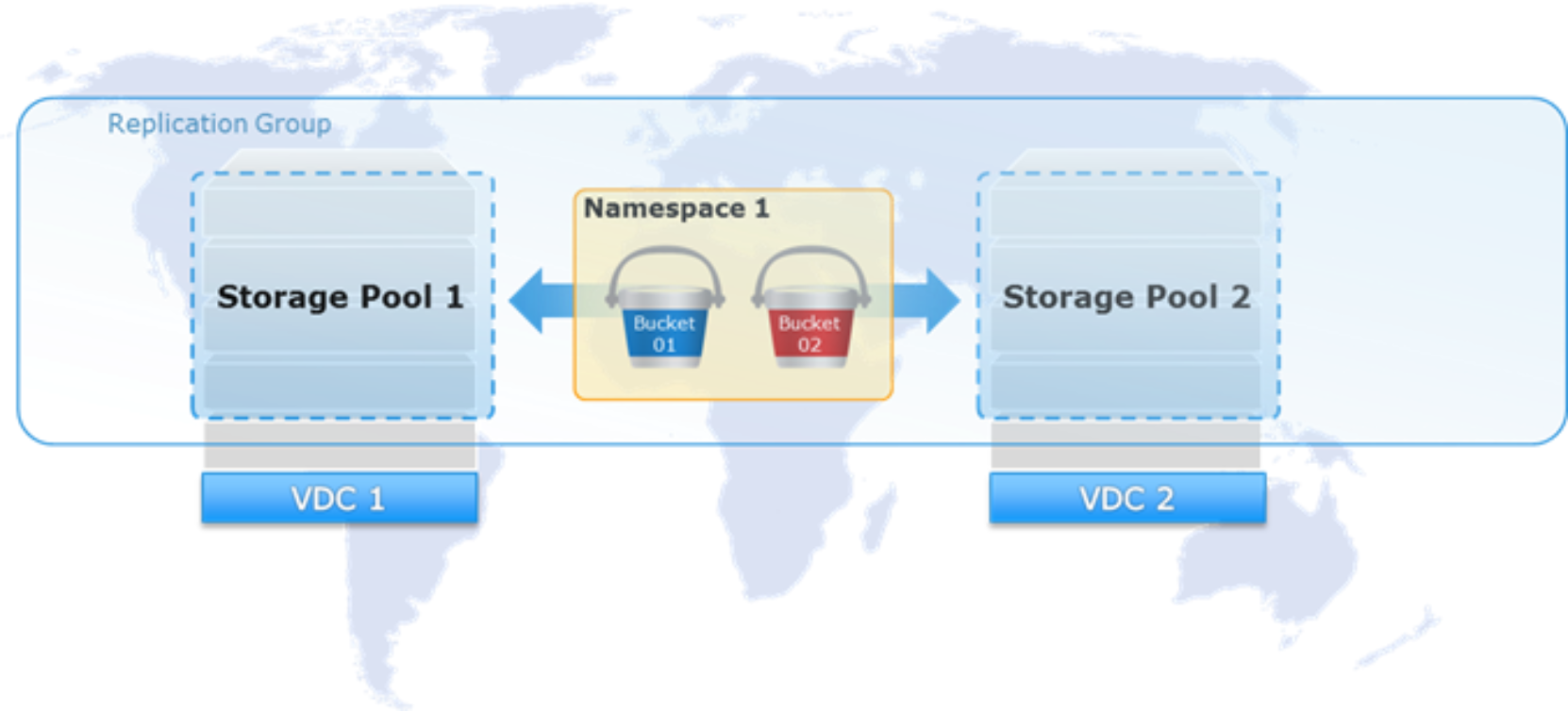
 This is an example of the ECS components, including vdc, storage pool, and namespace.

Figure 17.    ObjectScale components

This section highlights several best practices and considerations for provisioning ObjectScale. When provisioning ObjectScale, certain settings, as outlined in the following table, can only be configured during creation time; once set, they cannot be modified. The sections that follow the table provide additional details, where applicable.

Table 1.      Uneditable ObjectScale settings once set during creation

Level Setting

Sub-level Setting

Settings

Default

Storage Pool

Erasure coding

10+2, 12+4
24+2, 24+4 (ObjectScale 4.3 and later)

NA

Replication Group

Replicate to all sites

Disabled, Enabled

Disabled

Namespace

Name

User defined

Not applicable

Server-side encryption

Disabled, Enabled

Disabled

Compliance

Disabled, Enabled

Disabled

Buckets

Name

User defined

Not applicable

Namespace

User defined, associated with bucket

Not applicable

Replication group

User defined, associated with bucket

Not applicable

Server-side encryption

Disabled, Enabled

Disabled if not set in namespace level


Enabled if set in namespace level

File system

Disabled, Enabled

Disabled

CAS

Disabled, Enabled

Disabled

Metadata search

Disabled, Enabled

Disabled

Naming conventions

Defining proper names for components is sometimes overlooked when provisioning, which might be problematic in some cases and, in other cases, inconvenient to change once set. Use DNS-appropriate naming conventions for all ObjectScale constructs—hosts, clusters, VDCs, storage pool, replication groups, namespaces, and buckets. While some constructs might allow additional characters, such as underscores, limiting characters to those that are acceptable to DNS eliminates potential application-related conflicts that might arise when valid namespace or bucket names that do not translate DNS are used. Use only the following characters:

  • Lower case letters (a-z). Do not use upper case letters.
  • Numbers (0-9).
  • Hyphens. Avoid the use of underscores.

Naming conventions best practices

  • Use DNS-appropriate naming conventions.
  • Do not use personal or confidential information as names.

Storage pool

The first step in provisioning a site is creating a storage pool and assigning nodes to the pool. Storage pool is a logical construct that contains physical nodes. Erasure coding (EC) is configured at the storage pool level during pool creation. In addition to the existing 12+4 and 10+2 erasure coding schemes, ObjectScale 4.3 added more storage-efficient options—24+2 and 24+4—designed for high-density deployments.EC cannot be changed once created.

All cluster nodes belong to a storage pool. Storage pool along with their associated replication groups are integral in ObjectScale indexing.

System metadata, user data, and user metadata all co-exist on the same disk infrastructure. Space is reserved so that ObjectScale does not run out of space while persisting system metadata. Storage pool space considerations are also important when sites are replicated. Multisite environments require sufficient available space to handle temporary and permanent site failures. When adding additional storage capacity to a site, expand other sites as needed to accommodate space requirements.

Storage pool best practices

  • For multisites, account for the space needed in case of temporary site outage and permanent site removal.
  • Keep the total capacity lower than 80 percent. When the storage pool reaches 90 percent of its capacity, it does not accept write requests, and it becomes a read-only system.

Note:

  • The minimum number of nodes for 12+4 EC is five. The minimum number of nodes for 10+2 EC is seven. The minimum number of nodes for 24+4 EC is eight, and the minimum number of nodes for 24+2 EC is fourteen.
  • In practice on ObjectScale 4.3, 12+4 remains an appropriate choice for smaller pools (for example, VDCs with roughly 5–8 nodes), while 24+4 is recommended for larger (8 nodes or more), general-purpose pools that meet the minimum node requirements, offering better storage efficiency at scale.

Virtual Data Center

A VDC identifies the nodes that are participating in an ObjectScale instance. The first VDC must contain the nodes from the local ObjectScale instance. Additional VDCs can then be configured, identifying all the nodes in that remote ObjectScale instance. Adding remote VDCs to a local ObjectScale instance creates the federation of ObjectScale instances. To create a replication group that includes storage pools from a remote VDC, that remote VDC must be federated with the local VDC.

A physical site has one VDC. Some organizations have multiple VDCs per site—for example, one for engineering and one for operations—and can be federated together for ease of management. However, we do not recommend creating replication groups consisting of VDCs that are all in one local site to use the ObjectScale XOR feature for storage efficiency. In such scenarios, when a site is down, more than one VDC becomes unavailable.

VDC best practices

  • Plan for redundancy and availability. Replication to VDCs in different geographic locations increases data availability.

Note:

  • VDC names must be unique.
  • VDC names cannot be reused.
  • The maximum number of VDC per ObjectScale federation or replication group is eight.

Replication groups

Replication groups allow grouping of storage pools from different geographically located VDCs for replication of data across sites. Replication of data across sites has the following advantages:

  • In case of site failure, data is accessible from the surviving site or sites within the replication group.
  • For three or more sites, the ObjectScale XOR feature provides better storage efficiency.

Create the minimum number of replication groups due to the indexing overhead associated with storage pool and replication group pairs. Do not create more replication groups that serve the same function. For example, two replication groups containing the same set of VDC storage pools will add additional and unnecessary overhead.

In general, create one replication group for local data (non-replicated) and one for replicated data that spans all VDCs. Organizations with more than two sites might consider additional replication groups for times when data should only be replicated to a subset of all sites. One replication that spans all sites is sufficient. Compliance requirements might dictate additional replication groups be created, for example, where data privacy or sovereignty laws prohibit shared data across specific borders.

For scenarios in which there is massive data with short-term and long-term retention times, especially for the backup and archive use case, it is better to create two separate replication groups for them. Having short-term and long-term data that are mixed and stored in a chunk within one replication group will impact the efficiency of the garbage collection (space reclamation) in ObjectScale. The separate replication groups can avoid this problem because the garbage collection mechanism is based on each replication group.

When three or more sites are in a replication group, efficiencies in storage overhead can be gained. ObjectScale can XOR chunks written at two sites at a third site. To gain these efficiencies, new writes must occur at two or more sites. To balance the efficiency across all sites in a replication group, all sites must have similar write workloads. This benefit might not be appropriate for all workloads, especially in scenarios where WAN latency creates unacceptable bottlenecks. However, there are tradeoffs when data is spread across sites. For instance, there is an additional latency for WAN lookups of objects not local to the VDC. Geo-caching does alleviate some of this; however, this latency can pose some issues for applications if data is not in cache.

Replication group best practices

  • When determining the number of replication groups, first consult Dell Professional Services to discuss unique, complicated workload requirements and patterns.
  • Carefully plan for replication groups. Careful planning is critical because replication groups cannot be deleted.
  • For three or more sites, distribute write requests across sites to take advantage of XOR feature benefits. However, be aware of the latency tradeoffs for WAN lookups of objects not in local cache.
  • Federate all VDCs before attempting to create a replication group.
  • Ensure that replication network bandwidth is at least equal to or greater than data injection by fronted switch. Otherwise, use the QoS to throttle the network or call Dell Service team to tune bases on the network situation.
  • When replicating two XF960s across sites, consider the potential performance impacts over the WAN. Large ingest might put high load on the link, causing saturation or delayed RPO. Also, a user or application might experience higher latency times on remote reads and writes as compared to local requests.

Namespaces

A namespace provides a way to organize or group items for the purpose of separating the space for different uses or purposes. It allows for the multitenancy feature in ObjectScale. Unlike storage pools and replication groups, many namespaces can be created. Some environments might do well with a single namespace; in other cases, you might consider creating namespaces as follows:

  • One per business unit.
  • One per application.
  • One per reporting boundary.

Note: Buckets can also be reported on.

  • One per subscriber—for Internet Service Providers, for example. Dell ObjectScale Test Drive is configured in this manner, with a unique namespace created for each user.

As a workaround, namespaces can be used to allow targeting buckets in specific replication groups for legacy applications. Some legacy applications cannot access a specific storage pool so those applications might have to use buckets that access storage pools through specific replication groups.

Namespace best practices

  • In a multitenant environment, create a namespace administrator for configuration based on tenant requirements.
  • Understand that the settings in the namespace that are set during creation time cannot be modified once set. Plan accordingly.
  • For best performance, create less than 1,000 buckets in a namespace.

Buckets

Buckets are containers for object data. Buckets are created in a namespace to give applications access to data stored within ObjectScale. Buckets are global resources in ObjectScale. Where the replication group spans multiple sites, a bucket is similarly replicated across sites.

Bucket best practices

  • Use buckets for specific environments, workflows, or uses. For instance, “dev,” “test,” “finance,” “operations,” and so on.
  • In multisite deployments, create buckets at the VDC site closest to the application accessing and updating the objects. There is overhead involved with checking the latest copy if the ownership of object is at a remote site.
  • Follow DNS naming convention best practices when naming buckets. Bucket names must be unique within a namespace.

Users and roles

Users of ObjectScale can be management users, object users, or both, as shown in Figure 15. Management users have access to the ObjectScale through its web portal and through the management API. Object users have access to the ObjectScale object interfaces for S3, OpenStack Swift, Atmos, Centera CAS, and NFS. An object user uses a native object interface (for example, the standard S3 API) to perform data access operations such as reading, writing, or listing objects in buckets. They can also create or delete buckets. If a user requires access to both the ObjectScale portal and the ObjectScale object interfaces, that user must be created as both a management user and an object user. ObjectScale does not know, for example, that a single individual named Bob is both a management user and also an object user. To ObjectScale, management and object users are not correlated.
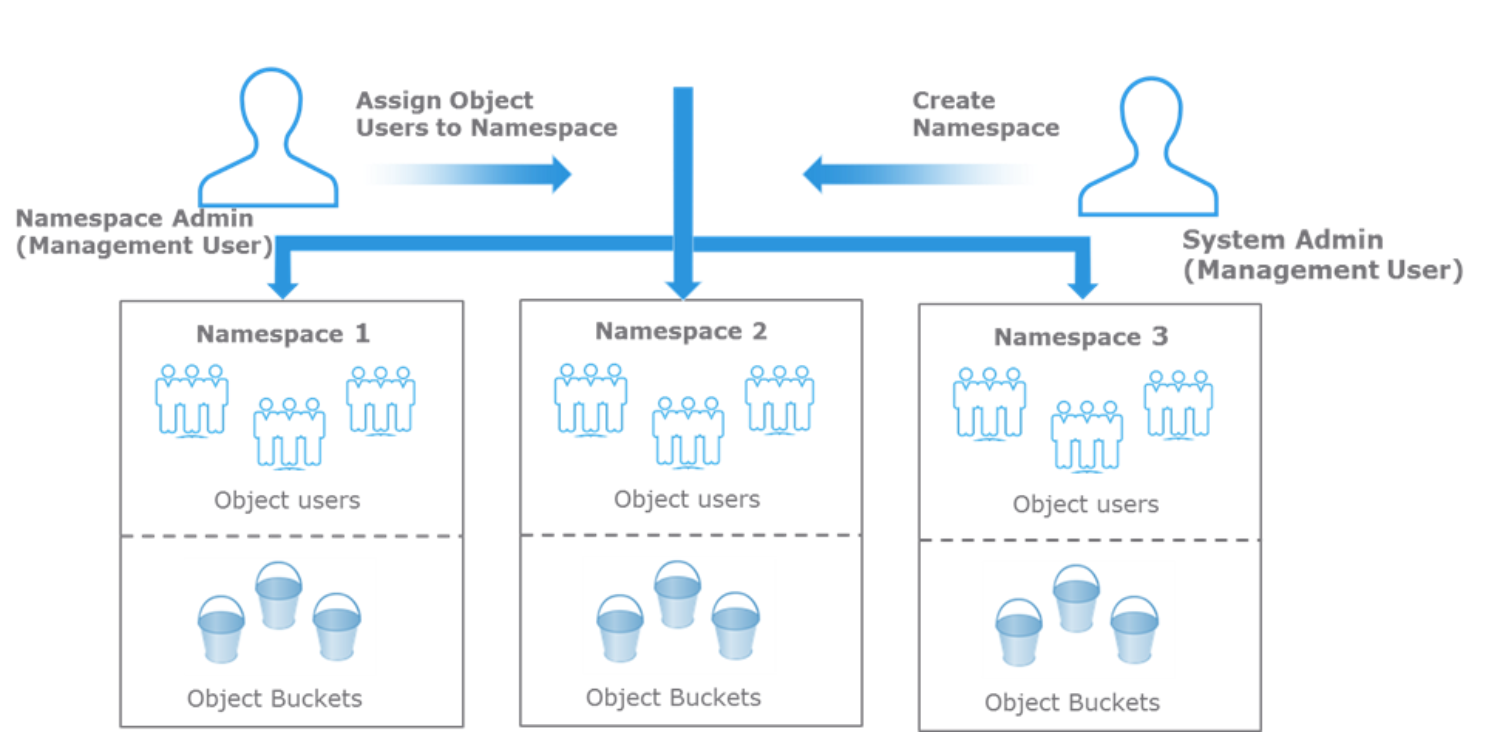
This is an example of the ECS roles, such as namespace admin and system admin.

Figure 18.    Types of ObjectScale users

Users and roles best practices

  • When there is a large group of users to be given access to the object store, leverage existing Active Directory or LDAP infrastructure.
  • A common pitfall to make names unique and consistent with Active Directory names is to create local accounts using a domain style. This implies that Active Directory or LDAP performs authentication. However, in ObjectScale, authentication is done using secret keys; thus, to avoid confusion, do not use domain-style names as local accounts that are not part of any domain.
  • The user scope setting must be made before the first object user is created. That is, once the first object user is created in a VDC, the user scope setting cannot be changed. The default user scope setting is GLOBAL. If you intend to use ObjectScale in a multitenant configuration and want to ensure that tenants are not prevented from using names that are in use in another namespace, change this default configuration to NAMESPACE.

Note:

  • Management users, whether local or domain based, are not replicated across geo-federated VDCs. This means that all administrators except namespace administrator must be created at each VDC that requires the account or role. Domain-based namespace administrator accounts are excluded in this caveat because namespaces are global constructs and, as such, their associated administrators are also global.
  • Local management accounts are not replicated across sites, so a local user who is a namespace administrator can only log in at the VDC at which the management user account was created. If you want the same username to exist at another VDC, the user must be created at the other VDC. Because the accounts are different, changes to a same-named account at one VDC, such as a password change, are not propagated to the account with the same name at the other VDC.
  • Namespace administrator can only be the administrator of a single namespace.

Identity and Access Management

ObjectScale Identity and Access Management (IAM) enables users to have fine-grained access to the ObjectScale S3 resources securely. This functionality ensures that each access request to an ObjectScale resource is identified, authenticated, and authorized. ObjectScale IAM allows users to add users, roles, and groups. Users can also grant and restrict access by adding policies to the ObjectScale IAM entities.

Note: ObjectScale IAM functionality is only supported for the S3 protocol.

IAM best practices

  • Create an IAM user and give the user administrative permissions. Create individual users for others who must access the ObjectScale account. Provide each IAM user a separate set of credentials and grant different permissions. For IAM users, the administrator can change or revoke permissions anytime.
  • Access keys provide systematic access to ObjectScale. Do not share the credentials between users. Applications should preferably use temporary credentials using an IAM role for access to ObjectScale.
  • Change access keys regularly to avoid misuse of credentials when credentials have been compromised. Delete IAM user credentials that are no longer required.
  • When creating IAM policies, follow the standard security advice of granting least privilege or granting only the permissions required to perform a task.
  • Do not define permissions for individual IAM users who perform similar job functions. Create groups, define the permissions for each group, and assign IAM users to groups.
  • Use IAM roles to permit users to access resources.

Temporary site outage

In a multisite ObjectScale deployment, ObjectScale offers  Access During Outage (ADO) feature. This feature allows access to data when there is a temporary disconnect or site outage between two sites or a failure of one site due to a power failure or natural disaster. If an application requires access because of a Temporary Site Outage (TSO), it is best to enable ADO when you create the bucket.

TSO best practices

  • If possible, use a Global Load Balancer to handle failover so that requests are automatically directed to an available site in case of a failure.

Note:

  • FS buckets (NFS) are read-only during TSO.
  • During rejoin, conflict resolution favors secondary site, though it is nondeterministic.
  • Listing of some buckets might fail during a TSO.

Security

Introduction to ObjectScale security

Besides assigning specific roles for certain access and control for users for security, additional measures must be taken to make ObjectScale less vulnerable to unwarranted access, common user mistakes, or security data breach. ObjectScale provides several features to enable security of customers’ data, such as encryption, platform lockdown, retention, and so on. The next sections describe available features and best practices for protecting ObjectScale.

Protection from unwarranted access

ObjectScale features that protect against unwarranted access include:

  • Platform lockdown—Disables SSH access to nodes
  • Retention policies—Limit the ability to change records or data under retention
  • Audit events—Record changes in the system configuration, and track logins and sudo commands run on node, bucket operations such as setting bucket permissions, and user operations such as set or delete password.

Protection from unwarranted access best practices

  • Immediately change the ObjectScale default account password for administrator on nodes and for root on ObjectScale portal.
  • Use individual user accounts for day-to-day administration as opposed to the integrated ObjectScale account.
  • Use the “Platform Lockdown” feature if ObjectScale nodes must not be accessible by SSH.
  • Set appropriate retention for objects to protect from accidental deletions.
  • Use SSL for additional security.
  • Monitor “unauthorized” access and modifications through audit events.

Data at Rest Encryption

ObjectScale provides server-side encryption to protect data on disk. Key management is either done automatically or specified by the user. Enabling this ObjectScale Data at Rest Encryption (D@RE) option is done at the namespace level or bucket level, allowing customers to control what level handles encryption. If encryption is at the namespace level, all buckets within namespace are encrypted unless encryption is disabled at bucket creation time. If encryption is not enabled at namespace level, buckets can enable encryption individually at create time.

The ObjectScale 4.1 platform introduces support for Self-Encrypting Drives (SEDs) managed via an iDrac Local Key Manager (iLKM), enhancing data security across all-flash XF960 appliances. During manufacturing, each drive is encrypted with a unique passphrase generated, ensuring secure ownership from day one. At deployment, customers can change the default passphrase through API or UI workflows and rotate keys periodically to mitigate security risks such as ransomware.

D@RE best practices

Be aware of the performance impact on workflows when using encryption.

  • Avoid double encryption scenarios. For example, if encryption is in place with the use of Isilon CloudPools, do not use encryption on ObjectScale as well.

Object Lock

Dell ObjectScale Object Lock protects object versions from accidental or malicious deletion such as a ransomware attack. It provides this protection by allowing object versions to enter a write-once, read-many (WORM) state where access is restricted based on attributes set on the object version.

There are two lock types for Object Lock:

  • Retention period—Specifies a fixed period during which an object version remains locked. During this period, your object version is WORM-protected and cannot be overwritten or deleted.
  • Legal hold—Provides the same protection as a retention period but has no expiration date. Instead, a legal hold remains in place until you explicitly remove it. Legal holds are independent from retention periods.

The retention period has two modes:

  • Governance mode—Users cannot overwrite or delete an object version or alter its lock settings unless they have special permissions. With governance mode, you protect objects from being deleted by most users, but you can still grant some users permission to alter the retention settings or delete the object if necessary. You can also use governance mode to test retention-period settings before creating a compliance-mode retention period.
  • Compliance mode—A protected object version cannot be overwritten or deleted by any user, including the root user in your account. When an object is locked in compliance mode, its retention mode cannot be changed, and its retention period cannot be shortened. Compliance mode helps ensure that an object version cannot be overwritten or deleted during the retention period.

Object Lock requires the use of versioned buckets. Enabling Object Lock on a bucket automatically enables versioning. Once Object Lock is enabled, it is not possible to disable it or suspend versioning for the bucket. Object locks apply to individual object versions only; different versions of a single object can have different retention modes and periods.

Object Lock best practices

  • Be careful when using compliance mode retention because it cannot be decreased or removed.
  • Keep in mind that only locked object versions are protected from deletion; it is still possible to delete the objects.

Note:

  • Compliance mode is stricter than governance mode; locks cannot be removed, decreased, or downgraded to governance mode.
  • Governance mode is less strict, it can be removed, bypassed, or elevated to compliance mode.

Application development

Application development overview

ObjectScale was designed for archival, content repository, Internet of things, video surveillance, and modern applications. Consider the following information when designing an application for ObjectScale:

  • ObjectScale was designed for applications or use cases that do not require high IOPS.
  • ObjectScale has a 99.999 percent success rate for transactions. Handle failures accordingly by either using the integrated retry mechanism in most software development kits (SDKs) or creating appropriate error handlers.
  • Use an SDK for your programming language to facilitate your efforts.
  • Use ObjectScale S3 if you want to take advantage of ObjectScale features.
  • Use AWS SDK if you want to maintain compatibility with AWS.
  • Use the protocol that best fits your needs and skills—S3, Swift, or Atmos.

ObjectScale provides a set of REST APIs for customers to use for data access and management of ObjectScale through their applications. The next sections highlight some best practices and considerations for developing or customizing an application for ObjectScale, as related to namespaces and buckets, objects, retention, extensions, security, and data management.

Traffic management

Because communication to ObjectScale is through HTTP/HTTPs, it is best practice to keep in mind the back and forth traffic or how to mitigate traffic issues within your application.

Traffic management best practices

  • Use pre-signed URLs. ObjectScale supports pre-signed URLs to enable users to access objects without needing credentials.
  • Object update frequency should be low since object storage platforms are not designed for transactional workloads but ideally for static content such sensor data, images, videos.
  • Only one application should be written to each bucket. Other applications may read from them but not write.
  • Use the object copy operation instead of downloading and uploading the object again.
  • Beware of the concurrent requests for the same object.
  • If the order needs to be guaranteed, use Conditional PUTs (ObjectScale extensions).
  • If there is no external load balancing in your ObjectScale deployment, implement client-side load balancing to distribute load across ObjectScale nodes for increased performance.
  • Use “Range Reads” for listing objects. Align the range to your application and request only what is needed. There are “Markers,” “NextMarker,” and “MaxKeys” parameters available to paginate listings.

ObjectScale extensions

ObjectScale APIs have support for additional extensions that are not available in the standard S3 APIs. These features extend ObjectScale capabilities and provide an advantage over other solutions.

Metadata search

ObjectScale provides a facility for metadata search of objects to improve performance of queries. ObjectScale maintains an index of the objects in a bucket, based on their associated metadata. This index allows S3 object clients to search for objects within buckets based on the indexed metadata using a rich query language. Search indexes can be up to 30 system and user metadata fields per bucket. The indexes are configured at the time of bucket creation through the ObjectScale portal, ObjectScale Management REST API, or S3 REST API. Considerations for developing applications using the metadata search capability include:

  • Supported operations include “<, >, <=, >=, =, !=, AND/OR.”
  • Metadata search must be enabled during bucket creation. Also, fields and values must be specified at bucket creation time.
  • Performance is lower for accessing objects on buckets configured for metadata search so use the feature wisely and after careful consideration. The more indexes created the larger the performance impact.

Byte range extensions

Unlike AWS S3 in which objects are immutable, ObjectScale REST APIs provide byte range extensions to update and read parts of an object. Features that ObjectScale provides as part of this extension include:

  • Partial reads and updates within an object (which still maintains append-only behavior).
  • Overwrite part of an object by providing only the starting offset in the data request.
  • Ability to atomically append data to an object without specifying an offset, and the offset is returned in the response. This is useful for multiclient streams, for example, syslog, sensor data.

Retention and expiration

Retention means you cannot update or delete the object until the retention period ends. You can assign retention in three ways:

  • At the bucket level (compatible with generic S3)
  • At the policy defined at namespace and assigned to objects (such as, email = 5 years, documents = 3 years)
  • Explicit retention period at an object level

When retention is defined in multiple places, the longest time wins. Also, if object-level retention period is assigned at the application level, do not use ObjectScale to assign a retention period greater than the application retention period. This might lead to application errors.

For short-term and long-term data retention, it is better to put them in separate replication groups. The efficiency of garbage collection (space reclamation) is affected if the short-term and long-term data is stored in a chunk within one replication group.

Retention best practices

  • Consider creating two separate replication groups for short-term and long-term data, if needed.

As an extension to general retention, ObjectScale supports write-once, read-many (WORM) for data ingested by the NFS protocol. When buckets are file-enabled, ObjectScale can accommodate WORM access behavior by providing an auto-commit function on data written to the bucket. It is a bucket-level setting and is only available from the ObjectScale bucket controls. The setting allows the administrator to define a time-interval delay period after which files are converted to read-only.

NFS WORM best practices

The auto-commit period should be as short as possible to minimize the chance that the file is modified while waiting for conversion to write-only. A 24-hour maximum auto-commit period should be observed but use a shorter period if possible.

Security

Security is important to safeguard your credentials and data being transmitted over the Internet.

Security best practices

  • Use TLS (HTTPS) to transport your data.
  • Validate your server’s certificate; otherwise, the application will be vulnerable to man-in-the-middle attacks.
  • Revoke access to unused applications.
  • Store your tokens securely.
  • Grant as few permissions as possible. For example, do not grant read/write permissions if your application only needs to read data.
  • Use client-side encryption for maximum protection and keep your primary key secure. If you lose your primary key, you lose your data.

ObjectScale supports the use of external key servers to store top-level key encrypting keys (KEKs). Customers can take advantage of the additional layer of security provided by HSM-based key protection and the latest encryption technology provided by specialized key management servers. In addition, storing top-level key information outside the appliance protects data stored on ObjectScale against loss of the entire appliance.

Object version

To avoid memory issues and 500 errors due to large object version numbers, we suggest enforcing a limit and rejecting requests to create versions above the limit.

Object version best practices

Note:

  • Beginning with ECS 3.6, the limitation is set as 50k and is enforced on new installs (not upgrades).
  • When object version limitation settings are enabled, there will be two version thread alerts (50 percent and 80 percent) in the system.

S3 Select

Beginning with version 3.7, ObjectScale supports S3 Select, which enables applications to retrieve only a subset of data from an object by using simple SQL expressions. By using s3 Select to retrieve only the data needed by your application, you can achieve drastic performance increases.

S3 Select best practices

  • Enable S3 Select with 192 GB memory profile.

Operations

Introduction to ObjectScale operations best practices

Maintaining the health of ObjectScale requires the use of tools such as the ObjectScale portal to monitor overall system-level health and performance information, E-mail alerting, syslog, and SNMP. The following sections provide information about best practices for ObjectScale administrators’ day-to-day operations such as monitoring, Dell Secure Connect Gateway (formerly ESRS), and product alerts and updates, as well as best practices for hardware capacity expansion.

Monitoring

The primary methods for monitoring ObjectScale are:

  • ObjectScale portal—The dashboard on the ObjectScale portal provides the first view into system health. From the dashboard, you can further explore major issues by using the other monitoring panes provided by the ObjectScale portal. Dashboard items that indicate the need for further investigation include:
  • Nodes and disks with a red X or yellow caution marks. If you see any of these, go to the Nodes and Process health pane to determine which disk and node is not working and investigate further.
  • Critical alerts. Examine the Events pane to see critical alerts and determine if action is required.
  • Capacity. The Metering Pane indicates which namespace or buckets are using capacity. View Capacity Utilization to determine if more disks need to be added.
  • Performance data. Determine if workload performance is as expected by using the historical view.
  • Geo monitoring. Look at failover progress to validate that failover is as expected.
  • Audit logs—Audit logs record changes in the system configuration. Review the audit logs for unauthorized modifications such as owner or ACL changes, quota changes, or creation and deletion of buckets and users.
  • Event notifications—Types of event notifications in ObjectScale include:
  • SNMP: Information about network-managed device status and statistics to SNMP network management clients.
  • Syslog: Provides a method for centralized storage and retrieval of system log messages.
  • E-mail alerting: ObjectScale supports email alerts through SMTP. Customers can add multiple SMTP servers in the ObjectScale system to receive email alerts
  • ObjectScale service logs—ObjectScale service logs are available on each node and are accessible over SSH by the system administrator user. These are output logs collected for each of the services running on a node—authsvc, blobsvc, eventsvc, and so on. These logs are designed for ObjectScale experts and engineering to further probe and diagnose issues. The service logs are in opt/emc/caspian/fabric/agent/services/object/main/log.

Monitoring best practices

  • Look for unevenness of CPU, memory, and network bandwidth between nodes.
  • Be familiar with the system's performance and the metrics expected over time so that if rates are out of the normal range, an investigation can be started.
  • Do not let ObjectScale get too full. Account for rebalancing time when expanding.
  • Look for a higher than normal number of failed requests and determine root cause.
  • Regularly check events and audit logs.

Dell Secure Connect Gateway

Dell Secure Connect Gateway provides secure two-way connection between customer-owned Dell equipment and Dell customer service. It provides faster problem resolution with proactive remote monitoring and repair. Although use of Dell Secure Connect Gateway Services is optional, it is highly recommended and should be included during deployment planning.

Product alerts and updates

We recommend that ObjectScale administrators sign up to receive product updates and alerts as follows:

  1. At www.dell.com/support, click Preferences.
  2. On the Account Settings and Preferences page, select the Subscription and Alerts tab, and subscribe to product updates.
  3. In the Alert section on the same page, subscribe to product advisories.

The minimum recommended subscriptions are for ObjectScale Software or ObjectScale Appliance and ObjectScale Software with Encryption. A search for ObjectScale reveals all available subscription options.

Product alerts and updates best practices

  • Sign up to receive ObjectScale product updates and alerts.
  • Review release notes for details about new features and known problems and limitations.

Hardware capacity expansion

The best practice is to add additional capacity to a VDC before capacity utilization reaches 85%. If your rate of utilization growth is high, start adding additional capacity at 80% utilization. The goal is to have additional capacity available for the system when utilization reaches 85%.

Rack awareness

The rack_awareness_enabled configuration defaults to false for new installations in ObjectScale 4.1 through 4.4. During an upgrade, the existing value is preserved. Therefore, a system with rack_awareness_enabled=true retains that value after upgrading to ObjectScale 4.x. For VDCs with fewer racks than required by the configured EC scheme, consider manually setting rack_awareness_enabled to false, particularly when nodes are imbalanced across racks. The upgrade does not change this setting automatically.

Table 2.      Rack-awareness configuration behavior by installation and upgrade scenario

Scenario

rack_awareness_enabled behavior

New installation on ObjectScale 4.1–4.4

Defaults to false

Upgrade to ObjectScale 4.x

Preserves the existing value

VDC with fewer racks than required by its EC scheme

Consider manually setting the value to false

VDC with imbalanced nodes across racks

Consider the setting with Dell guidance

Table 3.      ObjectScale hardware capacity expansion best practices

Hardware capacity expansion

Capacity utilization

Rack Aware

Best practice

In The Same Rack

Below 80%

N/A

Minimum number of nodes to be added in the same rack is 1

Above 80%

4 nodes are enough for proper data distribution regardless of EC scheme
Note: Technically 1 node is supported

Additional Rack

Below 80%

ON

Minimum number of nodes required for EC to continue:

(See details in Table 2)
 

Above 80%

ON

Minimum number of nodes to be added must be the same as the number of existing nodes (in a rack)

Below 80%

OFF

Minimum number of nodes to be added in the same rack is 1
 

Above 80%

OFF

4 nodes are enough for proper data distribution regardless of EC scheme
Note: Technically 1 node is supported

Tech Refresh

N/A

N/A

Minimum number of new nodes required for EC to continue and minimum capacity to do the tech refresh, whichever is greater

Capacity and performance of new nodes must be ≥ existing VDC. Node size/capacity must be ≥ existing nodes.

Note: If capacity utilization is 90% or higher, use the minimum node count required for the EC scheme (Table 2)
Note: In all scenarios, the size/capacity of nodes added must be equal to or greater than the size/capacity of the existing nodes.

Note: VDCs with fewer racks than required for the configured EC scheme should have rack_awareness_enabled manually set to false when upgrading to ObjectScale 4.x. For example, VDCs with fewer than five racks using 12+4 EC should disable rack awareness. The upgrade does not change this setting automatically.

Table 4.      ObjectScale Erasure Coding minimum number of nodes for EC coding to work and minimum number of racks needed when configuring a new cluster.

EC Scheme

Minimum # of nodes

Minimum # of racks

24+2

14

14

24+4

8

8

10+2

7

7

12+4

5

5

When rack awareness is disabled, nodes may be placed without rack-level placement constraints.

When new installations require multiple racks for rackaware enabled, divide the number of nodes equally, as much as possible. Keep in mind the following as best practice.

Hardware capacity best practice for new installation

  • Single Node/Sleds configurations
    • The minimum number of nodes per rack is 5.
  • Dual node/Sleds configurations
    • The minimum number of chassis per rack is 4 (4 chassis include 8 nodes)

Use case 1

Customer wants to deploy eight nodes of X7700 Single node using primary racks only:

  • This config requires two primary racks because one primary rack can only fit seven X7700 nodes.
  • Rack 1 – 4 X7700 nodes
  • Rack 2 – 4 X7700 nodes

Use case 2

Customer wants to deploy 17 nodes of X560.

  • This config requires two racks because one rack can only fit 16 X560 nodes.
  • Rack 1 – 9 X560 nodes
  • Rack 2 – 8 X560 nodes

Intermix guidelines

Dell ObjectScale supports multiple appliance platforms:

  • X560 (Gen4)– HDD based latest Gen4 appliance which replaced EX500, which can be deployed in 6/12/24 drive options per node.
  • XF960 (Gen4) – All‑flash NVMe which replaced EXF900, high‑performance platform for analytics/AI workloads, which can be deployed in 6/12/24 drive options per node
  • X7700S (Gen4) – based latest Gen4 appliance which replaced EX5000, which can be deployed in 27, 52, 77, and 102 drive options per node (disk enclosure).
  • EX5000 (Gen3) – HDD based dense, high‑capacity platform which can be deployed as single or dual node options with 25, 50, 75 and 100 drive options per chassis
  • EX500 (End of sale Life) - the former version aims to provide economy with density.
  • EXF900 (End of sale Life) – the former version of all-flash object storage solution of hyper-converged nodes.
  • EX300 (End of sale Life) – the former version of HDD platform.
  • EX3000 (End of sale Life) – the former version of HDD density platform.

Following are the memory configs of the different appliances. For more information about the hardware configuration, please refer to the ObjectScale Hardware documentation.

Table 5.      Memory configs for different appliances

Appliances

Default Memory (GB) / per node

X560

256

XF960

256

X7700S

192

EX5000

192

EXF900

192

EX500

64/128/192

EX300

64/192

EX3000

64/192

Customers with systems configured which contain less than 192GB of memory can upgrade to 192GB with assistance from Dell Professional Services.  This was supported starting in ECS version 3.8.0.x.

See the following for the Intermix guidelines and requirements for each ObjectScale platform:

Table 6.      VDC-level ObjectScale Intermix requirements


EX300

EX500

EXF900

EX3000

EX5000

X560

XF960

X7700

X560

All nodes minimum code version 4.0

All nodes minimum code version 4.0

N/A

All nodes minimum code version 4.0

All nodes minimum code version 4.0

N/A

N/A

All nodes minimum code version 4.4.x

XF960

N/A

N/A

All nodes minimum code version 4.3.x

N/A

N/A

N/A

N/A

N/A

X7700S

All nodes minimum code version 4.4.x

All nodes minimum code version 4.4.x

N/A

All nodes minimum code version 4.4.x

All nodes minimum code version 4.4.x
Supported with RPQ only
 

All nodes minimum code version 4.4.x

N/A

N/A

Table 7.      Rack-level ObjectScale Intermix requirements


EX300

EX500

EXF900

EX3000

EX5000

X560

XF960

X7700

X560

All nodes minimum code version 4.0

All nodes minimum code version 4.0

N/A

Not supported

Not supported

N/A

N/A

Not supported

XF960

N/A

N/A

All nodes minimum code version 4.1

N/A

N/A

N/A

N/A

N/A

X7700

Not supported

Not supported

N/A

Not supported

All nodes minimum code version4.4.x-RPQ Only

Not supported

N/A

N/A

Conclusion

Conclusion

Most of the best practices outlined in this document are also described in the Dell product documentation. We recommend that you read and become familiar with all existing ObjectScale documentation. Work closely with Dell personnel during the planning phase and refer to the appropriate hardware specifications.

Technical support and resources

Tags: