Dell ObjectScale: Enhanced Storage Efficiency with Compression

Sep 27, 2026
Dell ObjectScale: Enhanced Storage Efficiency with Compression This white paper describes the Dell ObjectScale data compression feature and also provides best practices guidance.

Executive summary

Overview

As enterprises contend with exponential growth in unstructured data—ranging from IoT sensory streams to rich media archives—storage efficiency becomes paramount. Dell ObjectScale offers built-in, transparent data compression to maximize capacity utilization, reduce costs, and maintain performance. This white paper explores the architecture, algorithms, benefits, and real-world impact of compression in Dell ObjectScale, guiding IT leaders through implementation considerations and quantifiable outcomes.

Revisions

Table 1. Revision history
Date Part Number/Revision Description
August 2025 H04547 Initial release
December 2025 H04547.1 Updated with ObjectScale 4.2
July 2026 H04547.2 Updated with ObjectScale 4.3

We value your feedback

Dell Technologies and the authors of this document welcome your feedback on this document. Contact the Dell Technologies team by email.

Author
Michelle Sullivan
Note: For links to other documentation for this topic, see the ObjectScale and ECS Info Hub.

Architecture

Introduction

Data volumes are skyrocketing at an unprecedented rate. Storing and managing petabytes of files, logs, images, and video not only strains budgets but also complicates network transfer, backup, and recovery processes. Traditional approaches—such as adding more disks—address capacity shortfalls but neglect cost, energy, and operational complexity. Data compression emerges as a strategic lever, shrinking data footprints while preserving accessibility.

Dell ObjectScale provides built-in data compression that can be tuned for specific environments and workloads at both the global and bucket levels. It leverages advanced algorithms to reduce on-disk data sizes. Beginning with ObjectScale 4.x, the compression framework has evolved from a single algorithm (Snappy) to a flexible compression system exposing multiple algorithms, configurable policies, and integrated monitoring.

This whitepaper describes how the ObjectScale compression framework works, how to configure it, and how to choose the appropriate compression policy for different hardware profiles and workloads.

Architecture

Compression Configuration

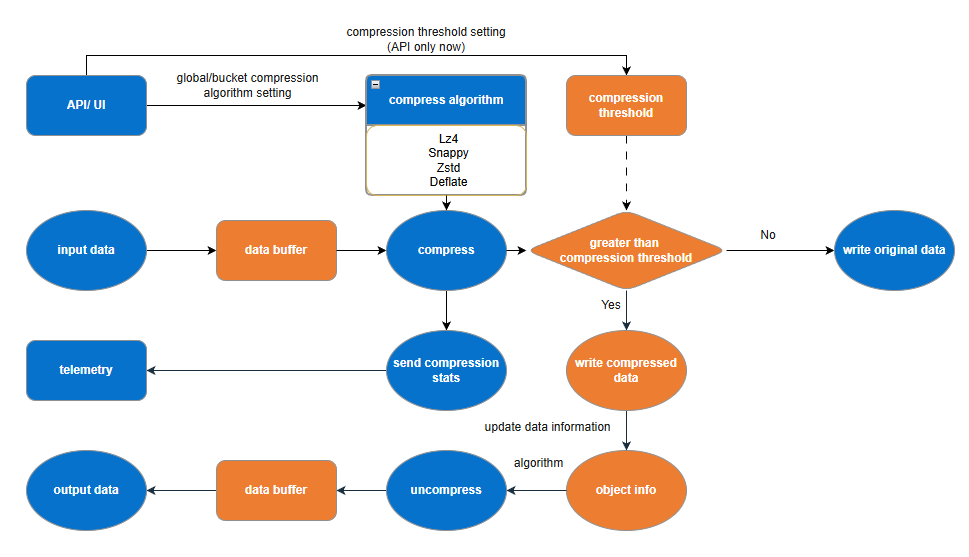
  • Compression settings are defined at the global or bucket level via the API/UI.
  • Users can select from supported algorithms: No compression, Snappy, LZ4, Zstandard (ZSTD), or Deflate.
  • A compression threshold (0 -100) is also configured, determining whether data is compressed or stored as-is based on space savings.

ObjectScale's compression implementation enables customers to control when system resources are used for data compression through a configurable compression trigger. By default, this trigger is set to 0%, meaning all data is eligible for compression. The trigger functions by evaluating the compressibility of incoming data: if the potential compression savings meet or exceed the configured threshold, ObjectScale applies the selected compression algorithm. For example, with a trigger value set to 50%, only data that can be compressed by 50% or more will be compressed. Data that yields less than 50% compression will be stored in its original form.

Data Ingestion and Decision Flow

  • Input data enters ObjectScale and is temporarily stored in a data buffer.
  • The selected compression algorithm attempts to compress the buffered data.
  • ObjectScale then evaluates whether the compression savings exceed the configured threshold:
    • If not: ObjectScale bypasses compression and writes the original data.
    • If yes: ObjectScale writes the compressed data and records object-level metadata about the compression algorithm used and the compression ratio.

Compression Output and Metadata Handling

  • Compression stats are sent back for monitoring and reporting.
  • Object information is updated with algorithm and size details.

Decompression and Data Access

  • When data is requested, ObjectScale reads the object info, determines if the data is compressed, and selects the appropriate algorithm.
  • The data is uncompressed, moved back into a data buffer, and then delivered as output data to the client or application.

Monitoring and Optimization

  • ObjectScale telemetry captures the compression stats and logs.
  • These insights help administrators tune threshold settings and algorithm choices for optimal performance and storage efficiency.
  • Starting with ObjectScale 4.3, compression telemetry is further integrated with the system metering framework to provide enhanced visibility into compression efficiency. Compression metrics, including bucket-level compression ratios, are collected during object create and update operations and are available through monitoring interfaces and APIs. This integration provides more granular insight into storage efficiency trends without introducing additional overhead to the data path.

Compression configurations

Compression configurations

ObjectScale provides flexible and efficient data compression capabilities through its Storage Efficiency settings. Administrators can optimize storage utilization by configuring compression modes at the global level or bucket level.

  1. Configure global compression mode, as shown in the figure below.
    1. Navigate to the Settings section in the left-hand menu.
    2. Select Storage Efficiency.
    3. Under the VDC Compression tab, locate the Compression Mode drop-down menu.
    Figure 2. Configure global compression mode
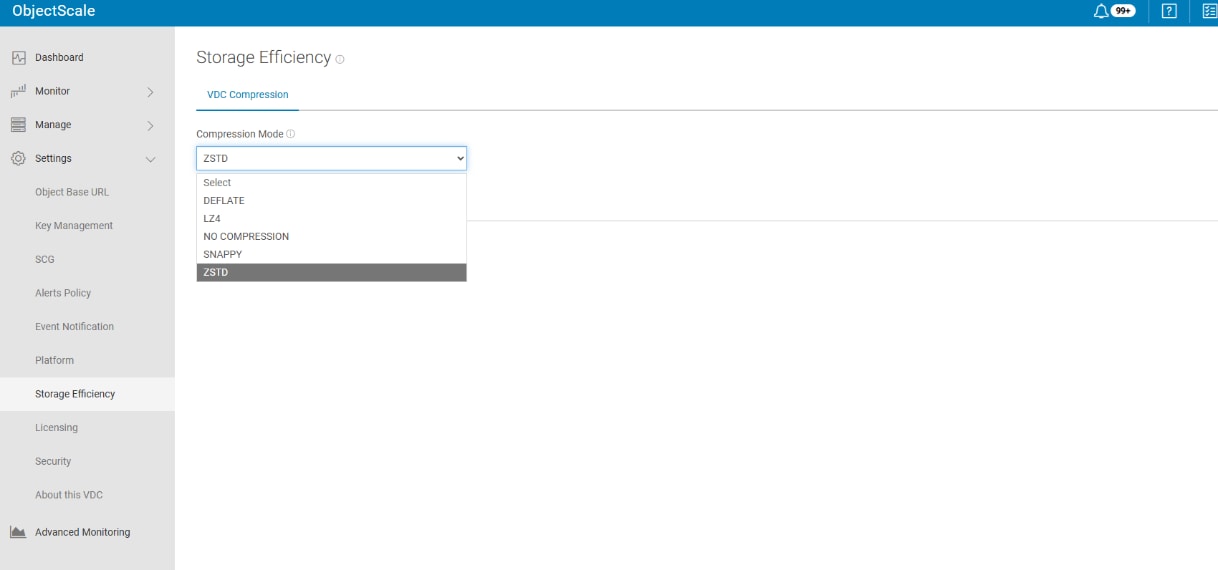
    The figure shows a Storage Efficiency settings page with a compression mode drop-down menu, where ZSTD is selected from the options.
  2. Configure bucket compression mode, as shown in the figure below.
    1. Navigate to the Buckets section in the left-hand menu.
    2. Under the Compression Setting tab, locate the Compression Mode drop-down menu.
      Figure 3. Configure bucket compression mode
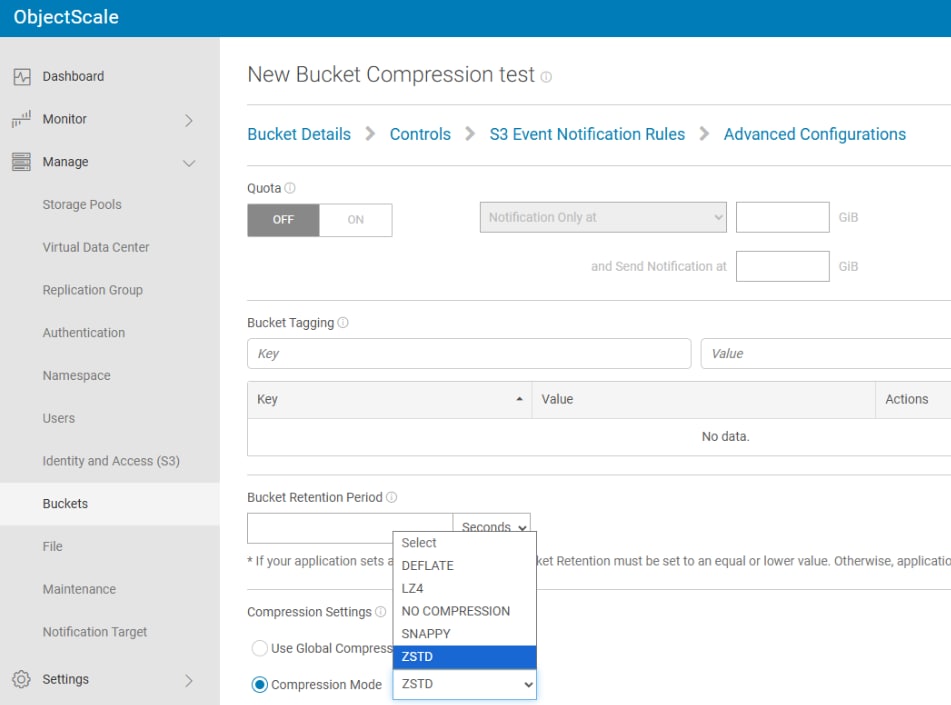
      The figure shows the ObjectScale interface for creating a bucket compression test, with configuration options and the compression setting configured to ZSTD.

In the compression settings, two fields are shown: Use Global Compression Setting and Compression Mode. If a bucket has not explicitly set its own compression mode, it will default to using the global compression mode. Conversely, if the bucket has defined its own compression mode, and compression mode will correspond to the bucket-specific configuration.

Compression mode options

ObjectScale 4.3 supports multiple algorithms, each optimized for different priorities. The available options at the VDC and bucket level are:

  • DEFLATE
    • High compression ratio
    • Medium speed
    • Medium CPU cost
    • Well suited to workloads that benefit from additional space savings and can tolerate modest CPU overhead.
  • LZ4
    • Low compression ratio
    • Very high speed, especially on decompression
    • Low CPU cost
    • Recommended where performance and low latency are critical (for example, All-Flash Arrays) and only moderate compression is needed
  • ZSTD (Zstandard)
    • High compression ratio
    • High speed but with high CPU cost
    • Ideal when capacity savings are paramount and sufficient CPU headroom is available (for example, HDD-based environments or cold data).
  • SNAPPY
    • Low compression ratio
    • High speed
    • Low CPU cost
    • Algorithm used in ObjectScale 4.0 and earlier; optimized for speed over compression ratio.
  • NO COMPRESSION
    • Disables compression entirely.
    • Appropriate when data is already compressed (e.g., JPEG, MP4, ZIP) or when CPU must be strictly reserved for other workloads.

These modes can be used in combination with the compression threshold to implement environment-specific policies, such as:

  • “Always-on compression with ZSTD for HDD cold archives.”
  • “LZ4 with moderate thresholds on performance-sensitive workloads on AFA.”
  • “No compression for buckets storing pre-compressed media.”

API reference

This chapter outlines the API interfaces provided for managing and interacting with the compression framework. ObjectScale exposes a set of REST APIs that allow automated management of compression configuration at both global and bucket scope. These APIs are designed to offer flexible, efficient, and programmatic access to compression configuration.

Global compression setting APIs

Below are the APIs for global compression settings


Set compression algorithm

  • Endpoint:

    PUT /compression/compress-algorithm/{algorithm}

  • Description:

    Sets the active compression algorithm.

  • Path Parameter

    algorithm: One of ZSTD, LZ4, DEFLATE, SNAPPY, or NONCOMPRESS

  • Request Example:
    curl -X PUT -H "$TOKEN" -k
    ‘https://xx.xx.xx.xx:4443/compression/compress-algorithm/NONCOMPRESS’
    -s -v

Get current compression algorithm

  • Endpoint:

    GET /compression/compress-algorithm

  • Description:

    Returns the currently configured compression algorithm.

  • Request Example:
    curl -X GET -H "$TOKEN" -k
    'https://xx.xx.xx.xx:4443/compression/compress-algorithm'

Set compression threshold

  • Endpoint:

    PUT /compression/compress-percentage-threshold/{value}

  • Description:

    Updates the compression threshold to a specified percentage.

  • Path Parameter:

    value: Integer 0~100 (e.g., 50)

  • Request Example
    curl -X PUT -H "$TOKEN" -k
    'https://xx.xx.xx.xx:4443/compression/compress-percentage-threshold/50'
    -s -v

Get compression threshold

  • Endpoint:

    GET /compression/compress-percentage-threshold

  • Description:

    Retrieves the current compression percentage threshold setting.

  • Request Example:
    curl -X GET -H "$TOKEN" -k
    'https://10.236.222.145:4443/compression/compress-percentage-threshold'

Bucket compression setting APIs

Below are the APIs for bucket level compression setting:


Set compression mode when creating bucket

  • Endpoint:
    curl -X POST -H "$TOKEN"  -H "Content-Type: application/json" -H "ACCEPT: application/json" -k https://"$IP_ADDRESS":4443/object/bucket -s -v -d '{
    "name": "$BUCKET_NAME",
    "owner": "$OWNER",
    "namespace": "$NAMESPACE",
    "compress_mode": "$COMPRESS_MODE"
    }'
  • Path Parameter:
    • original create bucket parameters
    • "compress_mode”: SNAPPY, DEFLATE, ZSTD, LZ4, NONCOMPRESS, GLOBALCOMPRESS

Edit bucket compression mode

  • Endpoint:
    curl -X PUT -H "$TOKEN" -H "Content-Type: application/json" -H "ACCEPT: application/json" -k https://"$IP_ADDRESS":4443/object/bucket/"$BUCKET_NAME"/compress-mode -s -v -d '{
    "compress_mode": "$COMPRESS_MODE",
    "namespace": "$NAMESPACE"
    }'
  • Path Parameter:
    • namespace
    • "compress_mode”: SNAPPY, DEFLATE, ZSTD, LZ4, NONCOMPRESS, GLOBALCOMPRESS

Get bucket compression mode

  • Endpoint:
    curl -X GET -H "$TOKEN" -k
    "https://$IP_ADDRESS:4443/object/bucket/$BUCKET_NAME/compress-mode?namespace=$NAMESPACE"
    -s -v
  • Path Parameter:

    namespace

Performance comparison

Performance comparison

This chapter presents a detailed performance comparison of four compression algorithms—SNAPPY, DEFLATE, LZ4, and ZSTD—across different storage environments and file types. The evaluation includes compression ratios, CPU utilization, and bandwidth performance under both HDD and All-Flash Array (AFA) configurations.

HDD environment scenario

Compression evaluations were performed using an EX500 cluster in our laboratory environment. ZSTD consistently achieved the highest compression ratio and bandwidth, albeit with increased CPU utilization.

The following table presents a comparison of the new compression algorithms—DEFLATE, LZ4, ZSTD and SNAPPY, which was utilized in previous versions of ObjectScale.

Table 2. Compress ratio between SNAPPY, DEFLATE, LZ4, and ZSTD
File Type SNAPPY LZ4 DEFLATE ZSTD
bible.txt 1.41x 2.05x 2.79x 3.44x
cp.html 2.07x 2.06x 2.78x 2.89x
fields.c 2.33x 2.12x 3.06x 3.25x
grammar.lsp 2.0x 1.9x 2.75x 2.78x
kennedy.xls 2.43x 2.75x 4.07x 9.2x
fax picture 5.52x 5.9x 8.38x 9.42x
Note: The dataset comprises six file types: TXT, HTML, C source code, LSP, Excel spreadsheets, and fax images. All files were sourced from the Canterbury Corpus, available at: https://corpus.canterbury.ac.nz/descriptions/#cantrbry.

The following table compares the CPU performance of the DEFLATE, LZ4, and ZSTD compression algorithms against Snappy, as implemented in former ObjectScale versions. While the ZSTD compression algorithm consumes more CPU resources, the HDD systems have sufficient CPU capacity to handle this. Even with ZSTD enabled, the total CPU utilization remains around 50%.

Table 3. CPU performance between DEFLATE, LZ4, and ZSTD with former ObjectScale version in HDD environment
Algorithm %user %system %iowait %util BW[MB/s]
ZSTD 24.01 5.93 20.70 50.92(+25.9%) (+42%)
DEFLATE 10.86 4.53 23.58 39.24(-2.9%) (+8.6%)
LZ4 11.85 5.02 21.24 38.41(-5%) (-13.2%)
SNAPPY 15.79 5.04 19.33 40.44(100% base) X (100% base)

All flash (AFA) environment scenario

Compression tests conducted on the XF960 cluster in a laboratory environment yielded compression ratio results consistent with those observed in the HDD-based scenario.

Table 4. Compress ratio between SNAPPY, DEFLATE, LZ4, and ZSTD
File Type SNAPPY LZ4 DEFLATE ZSTD
bible.txt 1.41x 2.05x 2.79x 3.44x
cp.html 2.07x 2.06x 2.78x 2.89x
fields.c 2.33x 2.12x 3.06x 3.25x
grammar.lsp 2.0x 1.9x 2.75x 2.78x
kennedy.xls 2.43x 2.75x 4.07x 9.2x
fax picture 5.52x 5.9x 8.38x 9.42x
Note: The dataset comprises six file types: TXT, HTML, C source code, LSP, Excel spreadsheets, and fax images. All files were sourced from the Canterbury Corpus, available at: https://corpus.canterbury.ac.nz/descriptions/#cantrbry.

In the AFA architecture, the read/write speed is fast and even though ZSTD has a high compression ratio, it doesn't compensate for the slower compression speed. As a result, ZSTD performs poorly in terms of bandwidth on AFA. LZ4 is recommended as the default compression algorithm due to its consistent performance and low CPU overhead.

Table 5. CPU performance between DEFLATE, LZ4, and ZSTD with former ObjectScale version in AFA environment
Algorithm %user %system %idle %util BW[GB/s]
ZSTD 49.06 6.713 43.93 56.06(+5.2%) (-22.8%)
DEFLATE 47.35 8.39 43.99 56(+5.1%) (+6.3%)
LZ4 46.63 8.52 44.58 55.41(+4%) (+5.1%)
SNAPPY 44.81 8.30 46.71 53.28(100% base) X (100% base)

Summary and recommendations

  • ZSTD is ideal when compression ratio is prioritized, and CPU resources are ample.
  • LZ4 offers the best trade-off for performance-sensitive applications, especially on AFA.
  • SNAPPY performs best with minimal CPU usage, suitable for high-throughput scenarios.
  • DEFLATE delivers solid overall results with balanced compression and bandwidth.

HDDs use ZSTD compression by default, while AFAs default to LZ4. When the compression algorithm changes, new data is stored with the new algorithm, whereas existing data remains compressed with the previous one.

For existing customers upgrading from an earlier release, the compression transitions from Snappy to ZSTD/LZ4, which improves efficiency with negligible performance impact on newly ingested data.

Compression Monitoring

Compression Monitoring

Efficient data compression is essential for optimizing storage usage and improving system performance. Monitoring compression metrics provides visibility into how well data is being compacted over time, helping teams make informed decisions about resource allocation, performance tuning, and cost management.

ObjectScale 4.2 integrated compression monitoring in the Grafana dashboard to help administrators easily evaluate compression effectiveness, track data growth, and optimize storage configurations across Virtual Data Centers (VDCs) and buckets.

With ObjectScale 4.3, compression monitoring is significantly enhanced to provide deeper visibility into compression efficiency at the bucket level. This capability enables administrators to better understand the effectiveness of compression policies and identify opportunities for further storage optimization.

As part of this enhancement, starting with ObjectScale 4.3, the billing APIs have been enhanced to provide compression metrics as a ratio for programming interface.
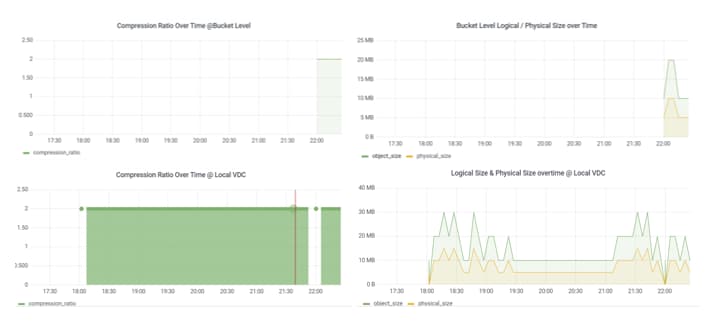
Figure 4. Compression overview
The figure shows a four-panel compression overview dashboard with line charts comparing compression ratios and logical versus physical storage sizes over time at bucket and local VDC levels.

ObjectScale’s dashboard separates metrics into bucket-level and VDC-level views.

  • The bucket-level view enables administrators to evaluate the compression behavior of individual applications or datasets, identifying specific workloads that compress well.
  • The VDC-level view aggregates all compression activity within a site, offering a high-level understanding of storage efficiency across the cluster.

This layered visibility ensures that both operational teams and capacity planners can assess compression performance from detailed to global perspectives.

Compression Ratio Visibility

ObjectScale 4.3 introduces native visibility into compression ratios for S3 buckets, providing a key metric for evaluating storage efficiency. The compression ratio reflects how effectively data is reduced through compression and is calculated using the following formula:

Compression Ratio = sum(Object Size) / sum(Chunk Size)

This metric provides insight into logical data reduction without exposing underlying physical disk consumption. Compression ratios are presented in a user-friendly format (for example, x.yy:1) and are intended as an indicative measure of efficiency rather than a direct representation of physical storage usage.

Compression ratio metrics are captured during object create and update operations and are integrated into the ObjectScale metering framework. The data is stored and aggregated within internal metering tables and exposed through multiple interfaces, including the ObjectScale UI, telemetry systems such as Grafana, and billing APIs.

This enhanced visibility enables several operational benefits:

  • Improved transparency into compression effectiveness across workloads
  • Data-driven capacity planning and total cost of ownership (TCO) optimization
  • Historical trend analysis for compression efficiency

Compression ratio visibility is currently supported for S3 buckets created on ObjectScale version 4.3 or later. For unsupported cases—including pre-upgrade buckets, empty buckets, and non-S3 protocols such as NFS, CAS, Swift, or Atmos—the system displays a value of “NA” in the user interface.

Compression ratio metrics are accessible through both the Metering UI and programmatic interfaces. The billing APIs have been enhanced to return compression ratios at the bucket level, enabling integration with external reporting and chargeback systems. When the API returns a compression ratio of zero, such as for empty or unsupported buckets, the UI displays “NA” to indicate that the metric is not applicable.
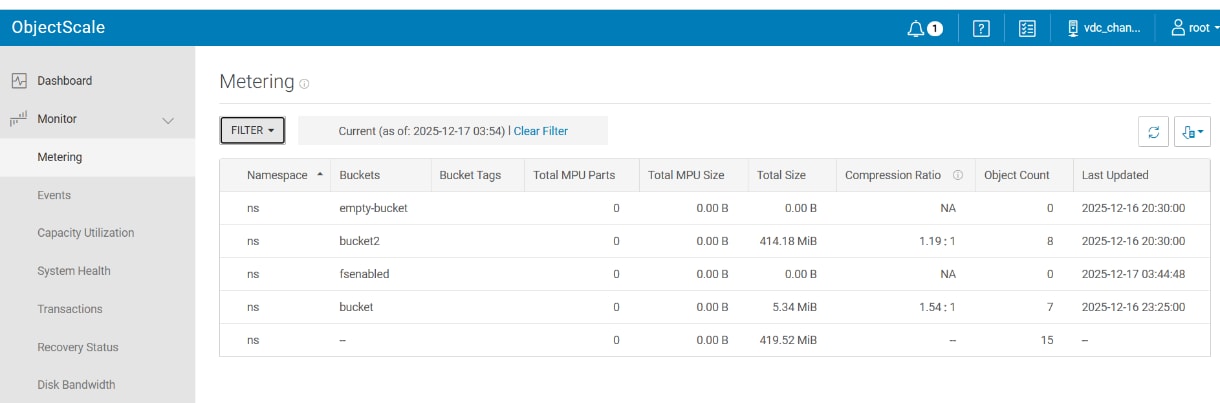
Figure 5. Compression ratio visibility
The figure shows the ObjectScale Metering dashboard displaying storage usage and compression ratio details for namespaces and buckets, including total size, object count, and last updated information.

The introduction of compression ratio visibility does not introduce additional overhead to object create, read, update, or delete operations. Metrics are collected as part of the existing metering workflow, enabling enhanced observability without affecting system performance.

Compression configuration best practices

Align algorithm selection with hardware type

  • HDD-based systems:
    • Use ZSTD when maximizing compression ratio is the top priority. It significantly reduces I/O by minimizing disk writes.
    • Opt for SNAPPY or LZ4 when reducing CPU utilization is critical but expect lower compression efficiency.
  • All-Flash systems (AFA):
    • LZ4 (default) and DEFLATE provide excellent bandwidth and compression performance, making them ideal for AFA environments.
    • Use ZSTD cautiously if CPU budget allows, as it consumes more CPU and offers less throughput compared to LZ4/DEFLATE in AFA.

Consider file types and workload patterns

  • Text-heavy and structured files (e.g., .txt, .xls, .html) see the highest compression gains—ZSTD performs best here.
  • Binary or incompressible data (e.g., random or already compressed files) can lead to wasted CPU cycles—consider NO COMPRESSION for such workloads.

Apply compression policy per use case

  • For archival and infrequent-access data, ZSTD is preferred due to its storage savings.
  • For real-time analytics or transactional workloads, LZ4 or SNAPPY are more appropriate.

When an existing deployment is upgraded from an earlier release that supports only Snappy compression, newly ingested data benefits from the selected modern algorithm (for example, ZSTD or LZ4), while previously stored objects remain compressed with Snappy. This approach improves efficiency for new data without requiring a bulk recompression operation.

Summary

Summary

ObjectScale 4.3 delivers a mature, flexible compression framework that allows enterprises to:

  • Improve storage efficiency and delay capacity expansions.
  • Maintain consistent performance by matching algorithms to hardware and workload.
  • Automate configuration with REST APIs at both global and bucket levels.
  • Continuously optimize behavior using Grafana-based compression monitoring.

By carefully choosing compression algorithms, tuning thresholds, and monitoring outcomes, organizations can significantly reduce the cost of storing unstructured data on ObjectScale while continuing to meet performance and availability SLAs.

References

Tags: