Dell ObjectScale: High Availability Design
Executive summary
Overview
Revisions
Terminology
We value your feedback
High availability design overview
Introduction
Chunks
A chunk is a logical container that ObjectScale uses to store all types of data, including object data, custom client provided metadata, and ObjectScale system metadata. Chunks contain 128 MB of data consisting of one or more objects from a single bucket, as shown in the following figure.
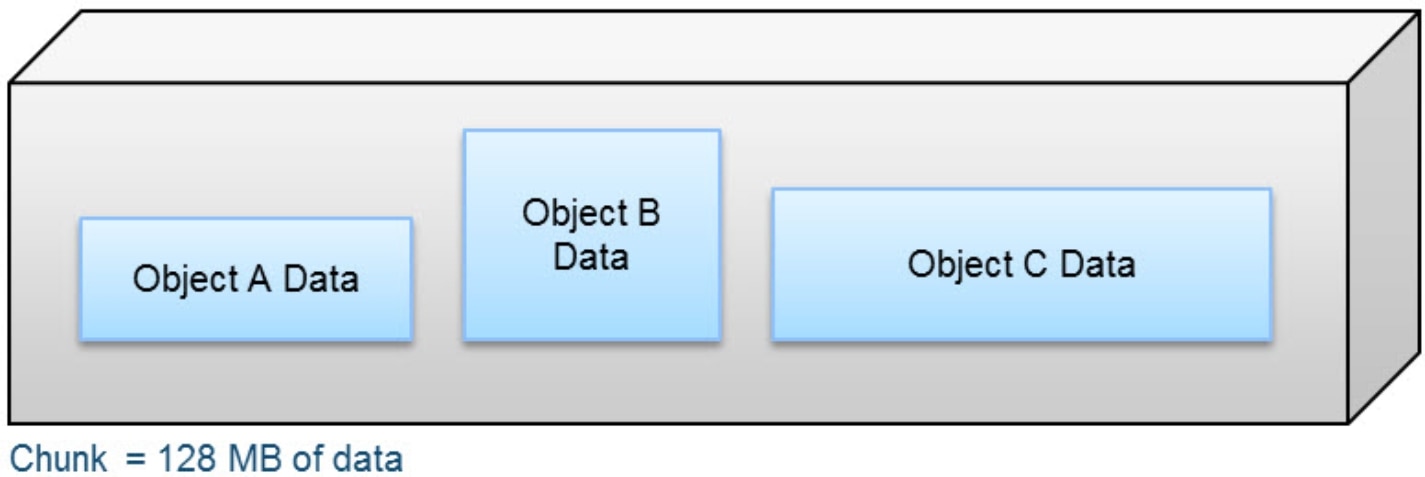
Figure 1. Logical chunk
ObjectScale metadata
ObjectScale maintains its own metadata that tracks data locations and transaction history. This metadata is maintained in logical tables and journals.
The tables hold key-value pairs to store information relating to the objects. A hash function is used to do fast lookups of values associated with a key. These key-value pairs are stored in a B+ tree for fast indexing of data locations. By storing the key-value pair in a balanced, searched tree format, like a B+ tree, the location of the data and metadata can be accessed quickly. In addition, to further enhance query performance of these logical tables, ObjectScale implements a two-level log-structured merge (LSM) tree. Thus, there are two tree-like structures where a smaller tree is in memory (memory table) and the main B+ tree resides on disk. A lookup of key-value pairs first queries the memory table and if the value is not memory, it looks in the main B+ tree on disk.
Transaction history is recorded in journal logs, which are written to disks. The journals track the index transactions not yet committed to the B+ tree. After the transaction is logged into a journal, the memory table is updated. After the table in memory becomes full or after a set period, the table is merged, sorted, or dumped to B+ tree on disk. A checkpoint is then recorded in the journal. The following figure illustrates this process.
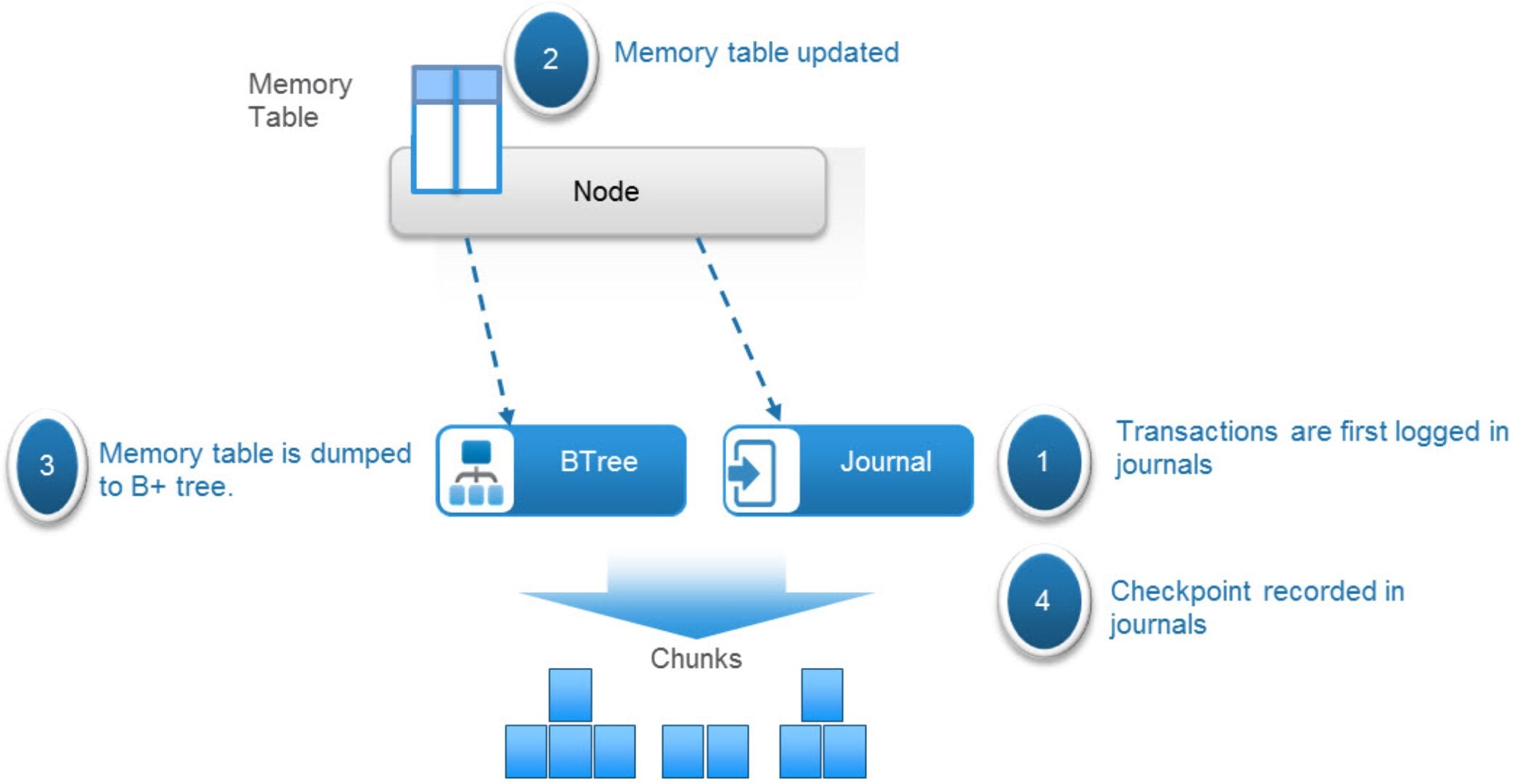
Figure 2. Workflow of transaction updates to ObjectScale tables
Both the journals and B+ trees are written to chunks.
ObjectScale uses several different tables, and each table can get quite large. To optimize performance of table lookups, each table is divided into partitions that are distributed across the nodes in a VDC/site. The node where the partition is written becomes the owner or authority of that partition or section of the table.
One such table is a chunk table, which tracks the physical location of chunk fragments and replica copies on disk. The following table shows a sample of a partition of the chunk table. Each chunk identifies its physical location by listing the disk within the node, the file within the disk, the offset within that file, and the length of the data. Chunk ID C1 is erasure coded, and chunk ID C2 is triple mirrored. For more details about triple mirroring and erasure coding, see Advanced data-protection methods.
Table 2. Sample chunk table partition
|
Chunk ID |
Chunk location |
|
C1 |
Node1:Disk1:file1:offset1:length Node2:Disk1:File1:offset1:length Node3:Disk1:File1:offset1:length Node4:Disk1:File1:offset1:length Node5:Disk1:File1:offset1:length Node6:Disk1:File1:offset1:length Node7:Disk1:File1:offset1:length Node8:Disk1:File1:offset1:length Node1:Disk2:File1:offset1:length Node2:Disk2:File1:offset1:length Node3:Disk2:File1:offset1:length Node4:Disk2:File1:offset1:length Node5:Disk2:File1:offset1:length Node6:Disk2:File1:offset1:length Node7:Disk2:File1:offset1:length Node8:Disk2:File1:offset1:length |
|
C2 |
Node1:Disk3:File1:offset1:length Node2:Disk3:File1:offset1:length Node3:Disk3:File1:offset1:length |
Another example is an object table, which is used for object names to chunk mapping. The following table shows an example of a partition of an object table that lists the chunk or chunks and shows where an object resides in the chunk or chunks.
Table 3. Sample object table
|
Object name |
Chunk ID |
|
ImgA |
C1:offset:length |
|
FileA |
C4:offset:length C6:offset:length |
A service called vnest, which runs on all nodes, maintains the mapping of table partition owners. The following table shows an example of a portion of a vnest mapping table.
Table 4. Sample vnest mapping table
|
Table ID |
Table partition owner |
|
Table 0 P1 |
Node 1 |
|
Table 0 P2 |
Node 2 |
Failure domains
Advanced data-protection methods
Within ObjectScale, when an object is created, it includes writing data, custom metadata, and ObjectScale metadata. ObjectScale metadata includes journal chunks and btree chunks. Each is written to a different logical chunk that contains ~128 MB of data from one or more objects. ObjectScale uses a combination of triple mirroring and erasure coding to protect the data within a virtual data center (VDC)/site.
- Triple mirroring ensures that three copies of data are written, thus protecting against two node failures.
- Erasure coding provides enhanced data protection from disk and node failures. It uses the Reed Solomon erasure coding scheme, which breaks up chunks into data and coding fragments that are equally distributed across nodes within a VDC/site.
Depending on the size and type of data, data is written using one of the data protection methods shown in the following table.
Table 5. Data protection methods based on data type and size
|
Type of data |
Data protection method used |
|
Journal chunks |
Triple mirroring |
|
Btree chunks/custom metadata |
Erasure coding with redundant data segments |
|
Object data <128 MB |
Triple mirroring plus in-place erasure coding |
|
Object data >128 MB |
Inline erasure coding |
Note: In the all-flash architecture like XF960, the btree chunks protection is triple mirroring.
Triple mirroring
The triple-mirror write method is applicable to the ObjectScale journal chunks, of which ObjectScale creates three replica copies. Each replica copy is written to a single disk on different nodes across failure domains. This method protects the chunk data against two-node or two-disk failures.
The following figure shows an example of triple mirroring whereby a logical chunk, containing 128 MB metadata, has three replica copies, each written to a different node.
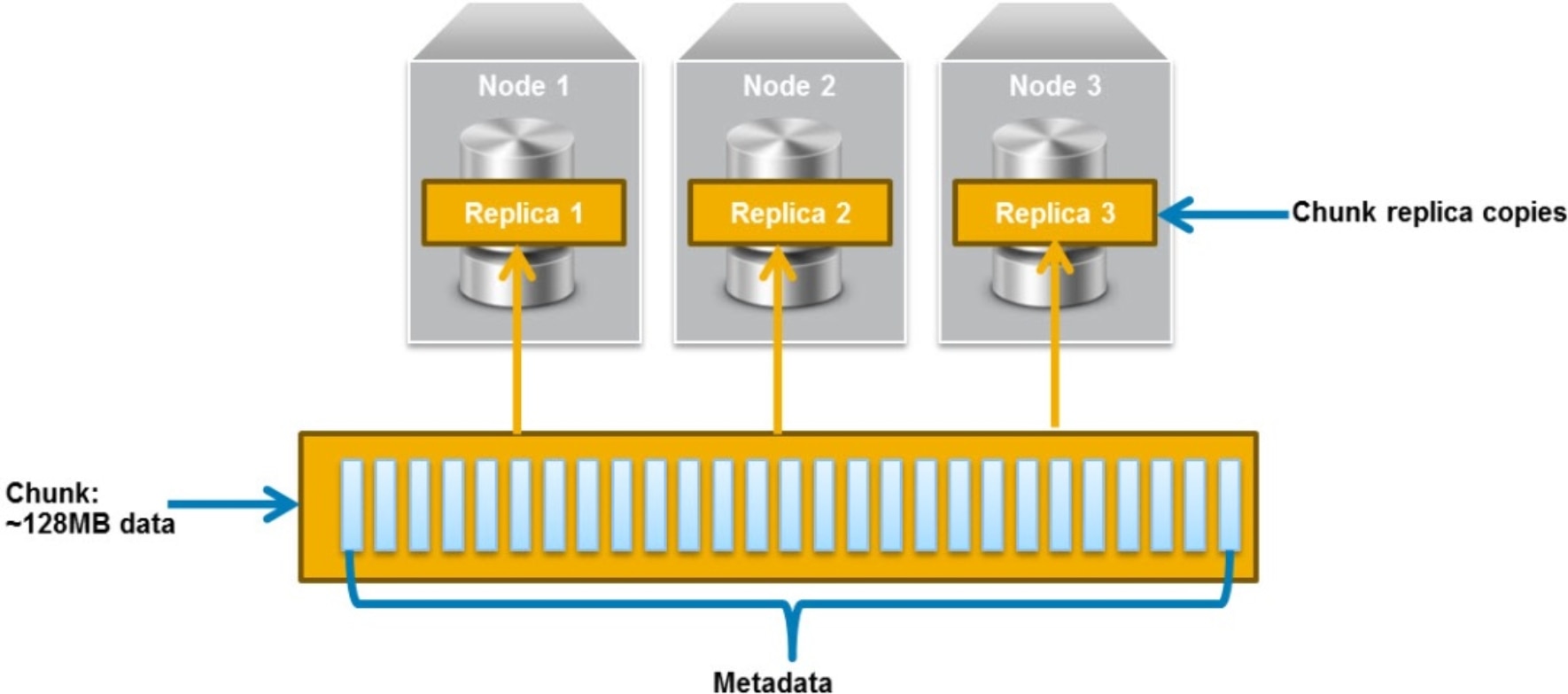
Figure 3. Triple mirroring
Erasure coding with redundant data segments
The erasure coding with redundant data segments write method is applicable to ObjectScale btree chunks and custom object metadata. It includes 12 data segments, 12 replicated data segments, and 4 parity segments. The new btree chunk-redundant data EC scheme saves metadata protection overhead.
Triple mirroring plus in-place erasure coding
This write method is applicable to the data from any object that is less than 128 MB in size.
As an object is created, it is written to a chunk. ObjectScale creates three replica copies of the chunk as follows:
- One copy is written in fragments that are spread across different nodes and disks. The distribution spreads the fragments across as many failure domains as possible. The size that gets written to each disk depends on the erasure coding scheme being used.
- If the erasure coding scheme is 12+4, each disk gets a maximum of ~10.67 MB
- If the erasure coding scheme is 10+2, each disk gets a maximum of ~ 12.8 MB
- If the erasure coding scheme is 24+4 or 24+2, each disk gets a maximum of ~ 5.33 MB
- A second replica copy of the chunk is written to a single disk on a node.
- A third replica copy of the chunk is written to a single disk on a different node.
This method provides triple mirroring and protects the chunk data against two-node or two-disk failures.
Other objects are written to the same chunk until it contains ~128 MB of data or after a predefined time. The Reed Solomon erasure coding scheme calculates coding (parity) fragments for the chunk and writes these fragments to different disks. This process ensures that all fragments within a chunk, including coding fragments, are written to different disks and distributed across failure domains.
Once the coding fragments have been written to disk, the second and third replica copies are deleted from disk. After this sequence is complete, the chunk is protected by erasure coding, which provides higher levels of availability than triple mirroring.
Inline erasure coding
This write method is applicable to data from any object that is 128 MB or larger. Objects are broken up into 128 MB chunks. The Reed Solomon erasure coding scheme calculates coding (parity) fragments for each chunk. Each fragment is written to different disks and distributed across failure domains. The size that gets written to each disk depends on the erasure coding scheme being used.
- If the erasure coding scheme is 12+4, the fragments are spread across 16 disks, each fragment being ~10.67 MB.
- If the erasure coding scheme is 10+2, the fragments are spread across 12 disks, each fragment being ~ 12.8 MB.
Any remaining portion of an object that is less than 128 MB is written using the triple mirroring plus in-place erasure coding scheme. As an example, if an object is 150 MB, 128 MB is written using inline erasure coding. The remaining 22 MB is written using triple mirroring plus in-place erasure coding.
The following figure shows an example of how chunks are distributed across failure domains. This example has a single VDC/site that spans two racks, with each rack containing four nodes.
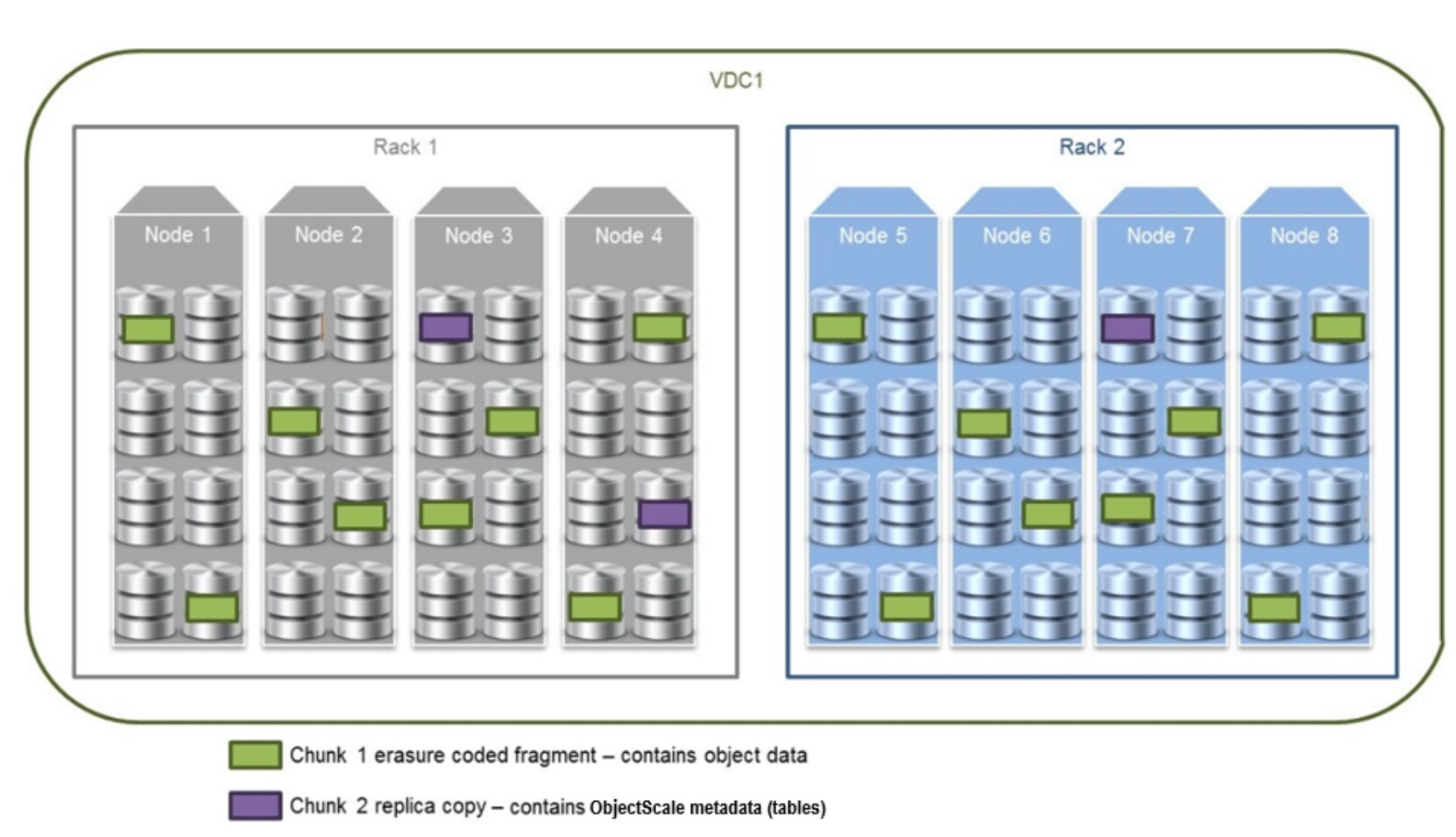
Figure 4. How chunks are distributed across failure domains
- Chunk 1 contains object data that has been erasure coded using an erasure coding of 12+4. Fragments are equally distributed across all eight nodes, four per rack. Each node contains two fragments, which it writes to two different disks.
- Chunk 2 contains ObjectScale metadata (tables) and, thus, is triple mirrored. Each replica copy is written to a different node, each on a single disk. The copies span racks to provide the highest availability. For more information about the metadata protection, please refer to the beginning of this chapter.
Erasure coding protection levels
Checksums
Writing objects
When a write operation happens in ObjectScale, it starts with a client sending a request to a target. ObjectScale was designed as a distributed architecture, allowing any node in a VDC/site to respond to a read or write request. A write request involves writing the object data and custom object metadata and recording the transaction in a journal log. Once this activity is complete, an acknowledgment is sent to the client.
The following figure and steps provide a high-level overview of a write workflow.
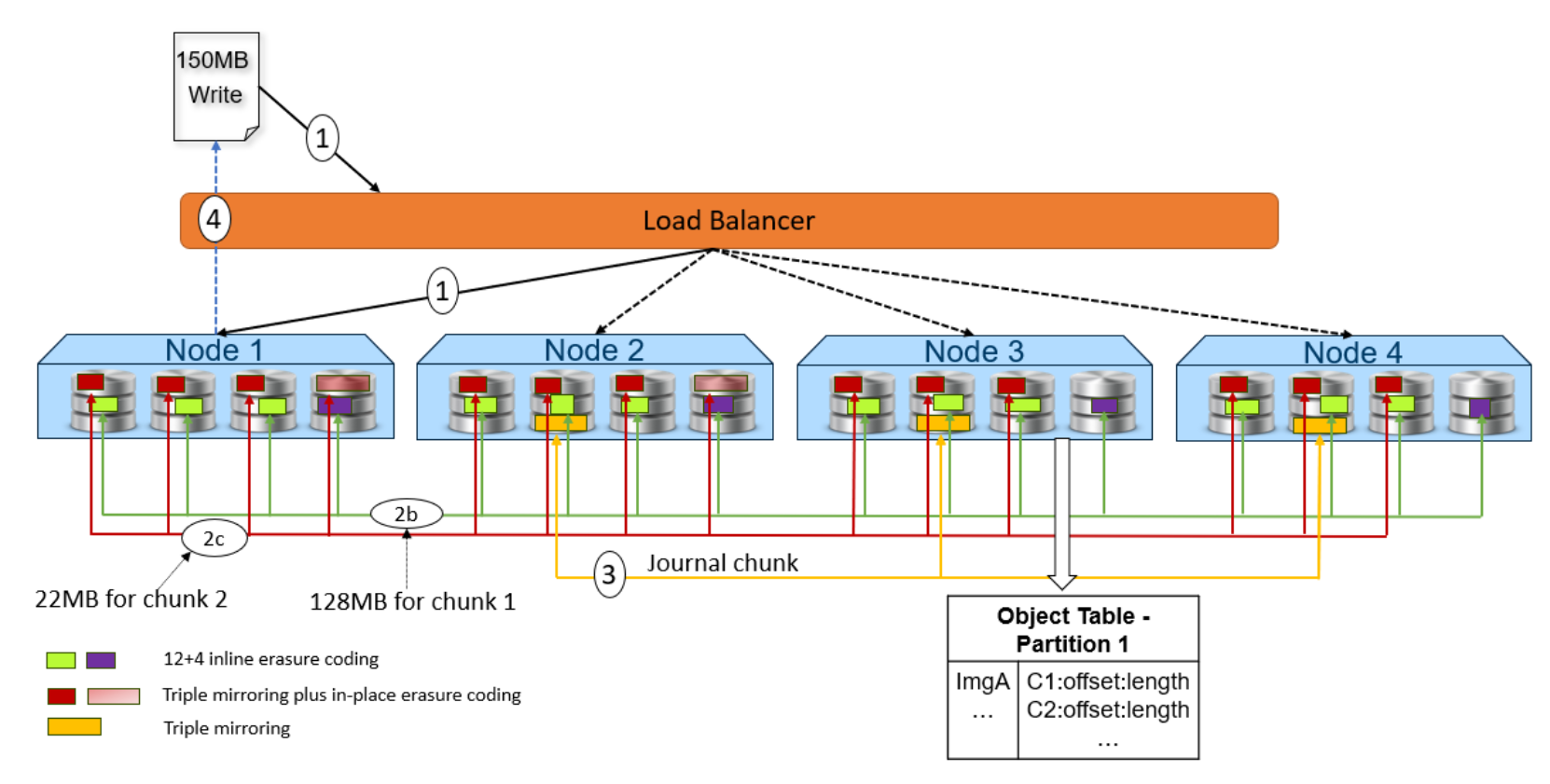
Figure 5. Object write workflow
- A write object request is received. Any node can respond to this request. In this example, Node 1 processes the request.
- Depending on the size of the object, the data is written to one or more chunks. Each chunk is protected using advanced data protection schemes such as triple mirroring plus in-place erasure coding and inline erasure coding. Before writing the data to disk, ECS runs a checksum function and stores the result.
In this example, the object size is 150MB, it will be divided 128MB as chunk 1 and 22MB as chunk 2.
For the chunk 1 with 128MB size, it uses the inline erasure coding scheme (12+4).
For the chunk 2 with 22MB size, it uses the triple mirroring plus in-place erasure coding scheme.
- After the object data is written successfully, the object metadata will be stored. In this example, Node 3 owns the partition of the object table in which this object belongs. As owner, Node 3 writes the object name and chunk ID to this partition of the object table’s journal logs. Journal logs are triple mirrored, so Node 3 sends replica copies to three different nodes in parallel—Node 2, Node 3, and Node 4 in this example.
- Acknowledgment is sent to the client.
- In a background process, the memory table is updated.
- Once the table in memory becomes full or after a set period, the table is merged, sorted, or dumped in B+ trees as chunks. Then, a checkpoint is recorded in the journal.
Reading objects
ObjectScale was designed as a distributed architecture, allowing any node in a VDC/site to respond to a read or write request. A read request finds the physical location of the data using table lookups from the partition record owner. The request also includes byte offset reads, checksum validation, and return of the data to the requesting client.
The following figure and steps provide an overview of the read workflow.
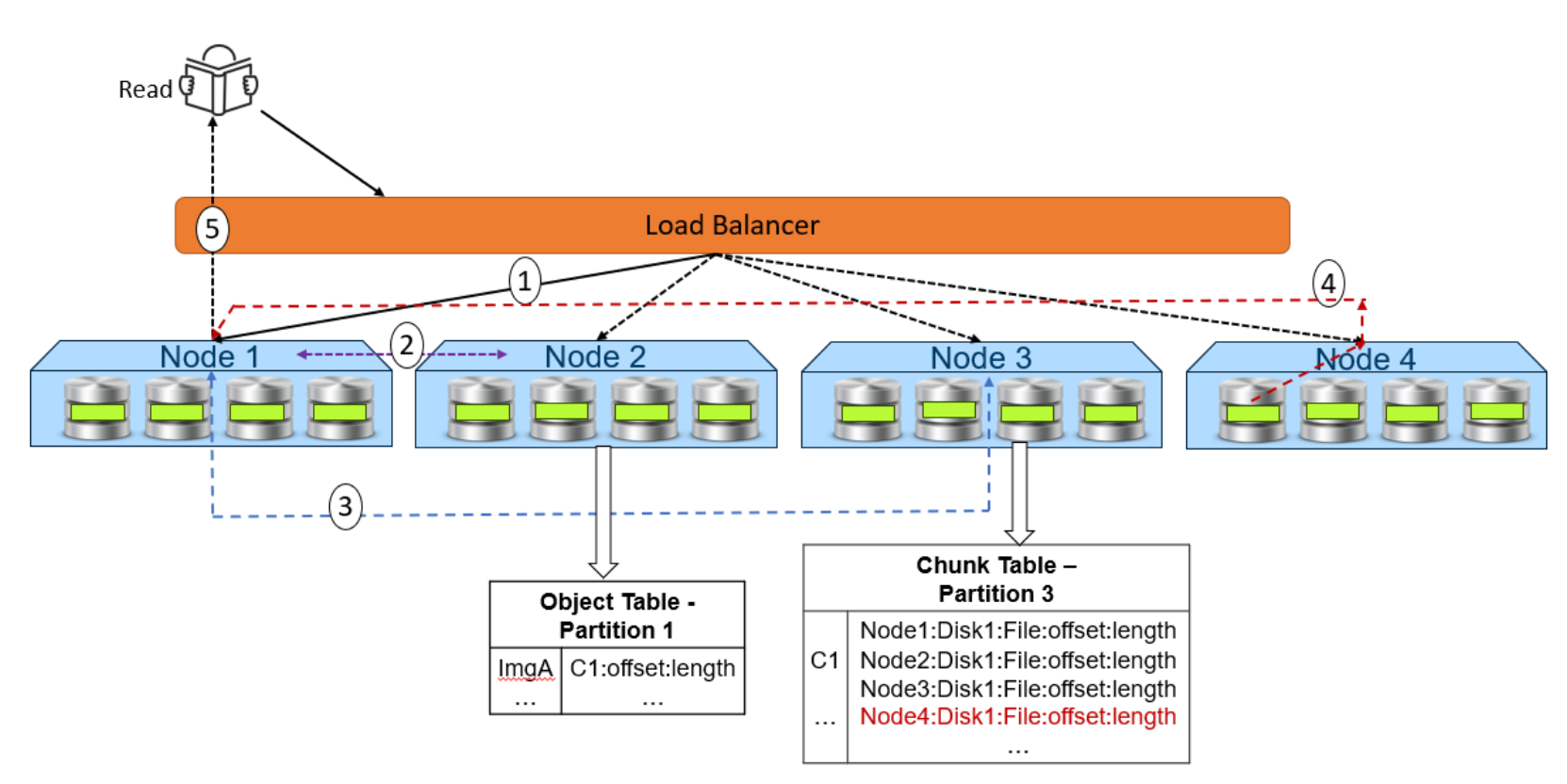
Figure 6. Object read workflow
- A read request is received for ImgA. In this example, Node 1 processes the request.
- Node 1 requests the chunk information from Node 2 (object table partition owner for ImgA).
- Knowing that ImgA is in C1 at a particular offset and length, Node 1 requests the chunk’s physical location from Node 3 (chunk table partition owner for C1).
- Now that Node 1 knows the physical location of ImgA, it requests that data from the node or nodes that contain the data fragment. In this example, the location is Node 4 Disk 1. Then, Node 4 performs a byte offset read and returns the data to Node 1.
- Node 1 validates the checksum which together with the data payload and returns the data to the requesting client.
Note: In step 4, for all-flash architecture like XF960, each node can directly read data from the other node. This architecture contrasts with a hard-drive architecture like the EX500, EX5000, and X560 in which each node can only read the data store.
Local site availability
Introduction
Disk failure
ObjectScale node failure
ObjectScale is constantly performing health checks on nodes. To maintain system availability, the ObjectScale distributed architecture allows any node to accept client requests. If one node is down, a client can be redirected either manually or automatically (for example, using DNS or a load balancer) to another node that can service the request.
In ObjectScale 4.3, a native, integrated load balancer is available for production use. This built‑in load balancer distributes traffic across nodes and racks, helping maintain high availability without requiring external load‑balancing appliances, while preserving the same failure‑handling and recovery behavior described in this paper.
To avoid reconstruction operations being triggered for spurious events, a full reconstruction operation is not triggered unless a node fails a set number of sequential health checks. The default is 60 minutes. The following actions occur if an I/O request comes in for a node that is not responding but before a full reconstruction is triggered:
- If the request is for a partition table hosted on a node that is not responding, the requested partition table’s ownership is redistributed across the remaining nodes in the site. Once this redistribution is complete, the request is completed successfully.
- If the request is for data that exists on disks from the unresponsive node, reconstruction occurs using either the remaining erasure coded data and parity fragments or the replica copies. The chunk information is then updated. Once the fragments have been re-created, any outstanding or new read requests use the updated chunk information to request the data fragment or fragments and service the read request.
After a node fails a set number of sequential health checks (the default is 60 minutes), it is deemed down. This action automatically triggers a re-creation operation of the partition tables and the chunk fragments on the disks owned by the failed node.
As part of the re-creation operation, a notification is sent to chunk manager, which starts a parallel recovery of all chunk fragments stored on the failed node’s disks. This recovery can include chunks containing object data, custom client-provided metadata, and ObjectScale metadata. If the failed node comes back online, an updated status is sent to chunk manager, and any incomplete recovery operations are canceled. For more details about chunk fragment recovery, see Disk failure.
Besides monitoring hardware, ObjectScale also monitors all services and data tables on each node.
- If there is a table failure but the node is still up, ObjectScale automatically tries to reinitialize the table on the same node.
- If ObjectScale detects a service failure, it first tries to restart the service.
If these efforts fail, ObjectScale redistributes ownership of the tables owned by the down node or service across all remaining nodes in the VDC/site. The ownership changes involve updating the vnest information and re-creating the memory tables owned by the failed node. The vnest information is updated on the remaining nodes with new partition table owner information.
The memory tables from the failed node are re-created by replaying journal entries that were written after the latest successful journal checkpoint.
Multiple node failures
In some scenarios, multiple nodes within a site can fail, either one by one or concurrently:
- One-by-one failure—When nodes fail one by one, it means that one node fails, all recovery operations are completed, and then a second node fails. This action can occur multiple times and is analogous to a VDC going from something like 4 sites to 3 sites to 2 sites to 1 site. This process requires that the remaining nodes have sufficient space to complete recovery operations.
- Concurrent failure—When nodes fail concurrently, it means that the nodes fail at the same time, or a node fails before recovery from a previous failed node is complete.
The impact of the failure depends on which nodes go down. The following tables describe the best-case scenarios for failure tolerances of a single site based on the erasure coding scheme and number of nodes in a VDC.
Table 8. Best-case scenario of multiple node failures within a site based on the 12+4 erasure coding scheme

|
Number of nodes in VDC at creation |
Total number of failed nodes since VDC creation |
Status after concurrent failures |
Status after most recent one-by-one failure |
Current VDC state after previous one-by-one failures |
|
5 |
1 |
|
|
5-node VDC with 1 node failing |
|
2 |
|
|
VDC previously went from 5 to 4 nodes; |
|
|
3–4 |
|
|
VDC previously went from |
|
|
6 |
1 |
|
|
6-node VDC with 1 node is failing |
|
2 |
|
|
VDC previously went from 6 to 5 nodes; |
|
|
3 |
|
|
VDC previously went from 6 to 5 to 4 nodes; |
|
|
4–5 |
|
|
VDC previously went from |
|
|
8 |
1–2 |
|
|
8-node VDC or VDC that went from 8 to 7 nodes; now 1 node failing |
|
3–4 |
|
|
VDC previously went from |
|
|
5 |
|
|
VDC previously went from |
|
|
6–7 |
|
|
VDC previously went from |


Table 9. Best-case scenario of multiple node failures within a site based on the 10+2 erasure coding scheme

|
Number of nodes in VDC at creation |
Total number of failed nodes since VDC creation |
Status after concurrent failures |
Status after most recent one-by-one failure |
Current VDC state after previous one-by-one failures |
|
6 |
1 |
|
|
6-node VDC with 1 node failing |
|
2 |
|
|
VDC previously went from 6 to 5 nodes; |
|
|
3 |
|
|
VDC previously went from 6 to 5 to 4 nodes; |
|
|
4–5 |
|
|
VDC previously went from |
|
|
8 |
1 |
|
|
8-node VDC with 1 node failing |
|
2 |
|
|
VDC previously went from 8 to 7 nodes; |
|
|
3–5 |
|
|
VDC previously went from |
|
|
6–7 |
|
|
VDC previously went from |
|
|
12 |
1–2 |
|
|
12-node VDC or 12-node VDC that went from 12 to 11 nodes; |
|
3–6 |
|
|
VDC previously went from |
|
|
7–9 |
|
|
VDC previously went from |
|
|
10–11 |
|
|
VDC previously went from 12 to 11 to 10 to 9 to 8 to 7 to 6 to 5 to 4 to 3 nodes |
Table 10. Best-case scenario of multiple node failures within a site based on the 24+4 erasure coding scheme
|
Number of nodes in VDC at creation |
Total number of failed nodes since VDC creation |
Status after concurrent failures |
Status after most recent one-by-one failure |
Current VDC state after previous one-by-one failures |
|
8 |
1 |
|
|
8-node VDC with 1 node failing |
|
2 |
|
|
VDC previously went from 8 to 7 nodes; |
|
|
3-5 |
|
|
VDC previously went from |
|
|
6-7 |
|
|
VDC previously went from |
|
|
9 |
1 |
|
|
9-node VDC with 1 node failing |
|
2 |
|
|
VDC previously went from 9 to 8 nodes; |
|
|
3-6 |
|
|
VDC previously went from |
|
|
7-8 |
|
|
VDC previously went from |
|
|
14 |
1–2 |
|
|
14-node VDC or 14-node VDC that went from 14 to 13 nodes; |
|
3–7 |
|
|
VDC previously went from |
|
|
8-11 |
|
|
VDC previously went from |
|
|
12-13 |
|
|
VDC previously went from |


Table 11. Best-case scenario of multiple node failures within a site based on the 24+2 erasure coding scheme
|
Number of nodes in VDC at creation |
Total number of failed nodes since VDC creation |
Status after concurrent failures |
Status after most recent one-by-one failure |
Current VDC state after previous one-by-one failures |
|
14 |
1 |
|
|
14-node VDC with 1 node failing |
|
2 |
|
|
VDC previously went from 14 to 13 nodes; |
|
|
3-11 |
|
|
VDC previously went from |
|
|
12-13 |
|
|
VDC previously went from |
|
|
15 |
1 |
|
|
15-node VDC with 1 node failing |
|
2 |
|
|
VDC previously went from 15 to 14 nodes; |
|
|
3-12 |
|
|
VDC previously went from |
|
|
13-14 |
|
|
VDC previously went from |
|
|
26 |
1–2 |
|
|
26-node VDC or 26-node VDC that went from 26 to 25 nodes; |
|
3–13 |
|
|
VDC previously went from |
|
|
14-23 |
|
|
VDC previously went from |
|
|
24-25 |
|
|
VDC previously went from |
The following basic rules determine what operations fail in a single site with multiple node failures:
- If you have three or more concurrent node failures, some reads and writes will fail due to the potential loss of all three replica copies of the associated triple mirrored metadata chunks.
- Writes require a minimum of three nodes.
- Erasure coding will stop, and erasure coded chunks will be converted to triple mirror protection if the number of nodes is fewer than the minimum required for each erasure coding scheme. Because the 12+4 erasure coding scheme requires 4 nodes, erasure coding will stop if there are fewer than 4 nodes. For erasure coding of 10+2, erasure coding will stop if there are fewer than 6 nodes.
- For the newer 24+4 and 24+2 schemes introduced in ObjectScale 4.3, erasure coding can continue only while the number of failed nodes does not exceed two and the available node count remains at or above the minimum thresholds for each scheme. For 24+4, if the number of available nodes falls below seven, erasure coding stops and protection falls back to triple mirroring. For 24+2, the minimum number of available nodes before erasure coding stops and protection falls back to triple mirroring is thirteen. With ObjectScale 4.3, 24+4 is the recommended erasure coding scheme for general-purpose deployments when these minimum node requirements are met, as it provides a stronger balance of resilience and storage efficiency.
- If the node count goes below the minimum required for the erasure coding scheme, erasure coded chunks will be converted to triple mirror protection. As an example, in a VDC with default erasure coding and 4 nodes, after a node failure, the following events occur:
- 4 fragments are lost.
- Missing fragments are rebuilt.
- Chunk creates 3 replica copies, one on each node.
- EC copy is deleted.
- One-by-one failures act like single-node failures. As an example, if you lose two nodes one-by-one, each failure only consists of recovering data from the single node outage.
As an example, with 6 nodes and 12+4 erasure coding:
- First failure: Each of the six nodes has up to three fragments (16 fragments/6 nodes). The missing three fragments are re-created on the remaining nodes. After recovery is complete, the VDC ends up with 5 nodes.
- Second failure: Each of the five nodes has up to 4 fragments (16 fragments/5 nodes). The missing four fragments are re-created on the remaining nodes. After recovery is complete, the VDC ends up with 4 nodes.
- Third failure: Each of the four nodes has up to 4 fragments (16 fragments/4 nodes). The missing four fragments are re-created on the remaining nodes. After recovery is complete, the VDC ends up with 3 nodes. Because this number is below the minimum for erasure coding, the erasure coded chunk is replaced by three replica copies distributed across the remaining nodes.
- Fourth failure: Each of the three nodes has one replica copy. The missing replica copy is re-created on one of the remaining nodes. After recovery is complete, the VDC ends up with 2 nodes.
- Fifth failure: There are three replica copies, two on one node and one on the other node. The missing replica copy, or copies, are re-created on the remaining node. After recovery is complete, the VDC ends up with 1 node.
Multisite design
Site-wide data protection
Beyond system availability and data durability designed within a single site, ObjectScale also includes protection against a complete site-wide failure. This protection is accomplished in a multisite deployment by federating multiple VDCs or sites and configuring geo-replication.
Federating sites involves providing replication and management endpoints for communication between sites. Once sites are federated, they can be managed as a single infrastructure.
Replication group policies determine how data is protected and where it can be accessed from. ObjectScale supports both active geo-replication and passive geo-replication.
Active geo-replication provides active/active access to data, allowing data to be read and written from any site within its defined replication group. When replicating an all-flash system such as XF960 across sites, consider the potential performance impacts over the WAN. Large ingest might put high load on the link, causing saturation or delayed RPO. Also, a user or application might experience higher latency times on remote reads and writes, compared to local requests. Another scenario to consider is if partial garbage collection fails and there is large ingestion from both the local and replicated sites. In such a case, the system might soon reach 90 percent and, thus, stop writing and reclaiming data.
Note: With partial garbage collection, when a chunk is 50% garbage in general, reclaim the chunk by merging the valid parts with other partially filled chunks to a new chunk, and then reclaim space.
The replication can also be configured as passive, which designates two to four source sites and one or two sites to be used only as a replication target. The replication targets are used for recovery purposes only. Replication targets block direct client access for create, update, and delete operations.
The benefits of passive geo-replication include:
- Potential for optimized storage efficiency—By ensuring that writes from both source sites go to the same replication target, passive geo-replication increases the chances of XOR operations running.
- Increased administrator control—Passive geo-replication allows the administrator to control where the replication copy of data exists, such as in a backup-to-cloud scenario.
ObjectScale provides geo-replication configuration options at the bucket level, allowing the administrator to configure various levels of replication for different buckets.
The following figure shows an example of how an administrator could configure the replication of three buckets:
- Bucket A: Engineering test/dev data—do not replicate, keep locally only
- Bucket B: European sales data—replicate between sites within Europe only
- Bucket C: Company-wide training data—replicate to all sites within the company
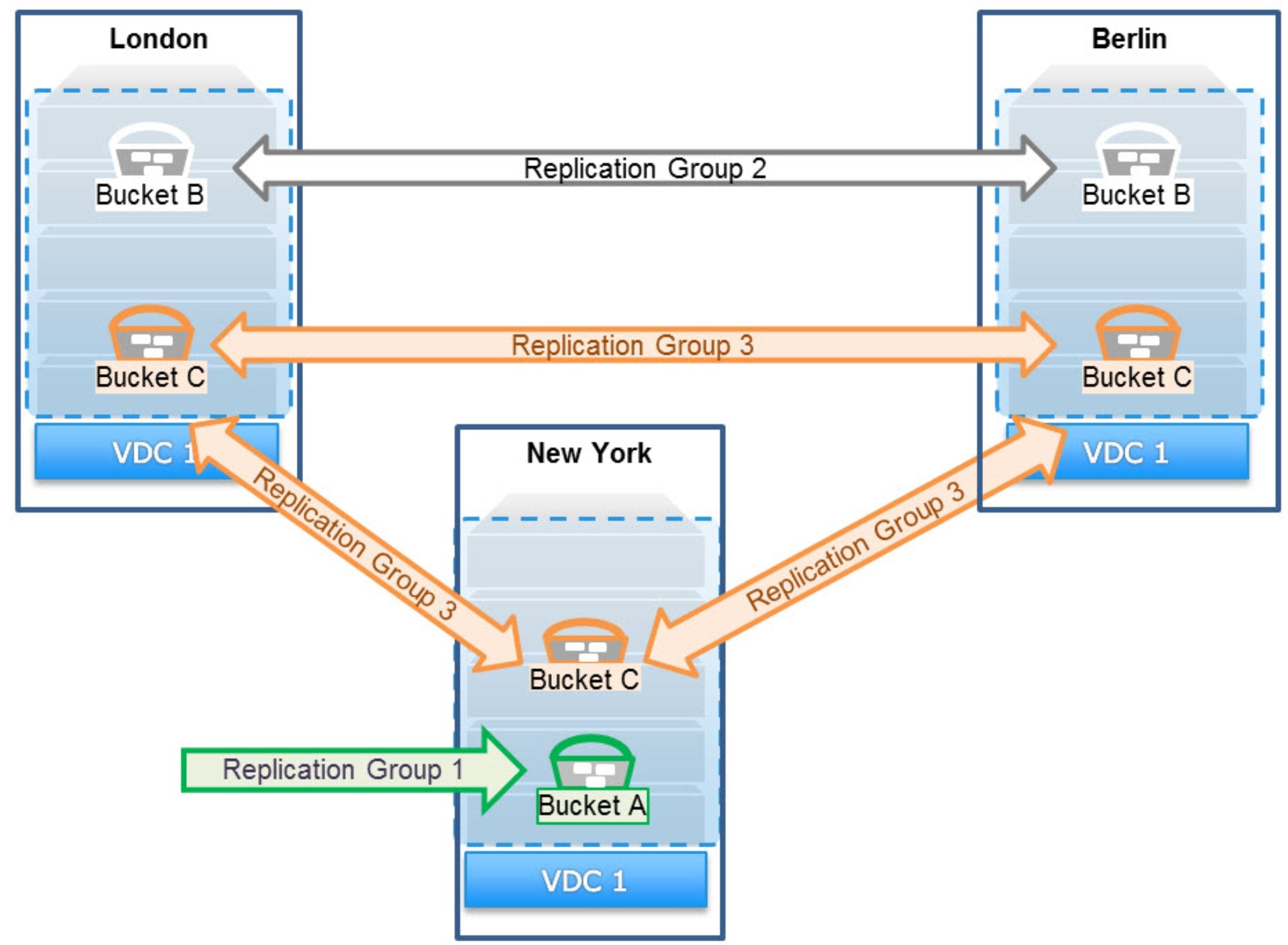
Figure 7. Sample showing how different buckets can use different replication policies
As a best practice, configure replication groups for specific replication paths. As an example, the preceding figure shows that there is a replication group that replicates data between London and Berlin. That group should be used for all buckets that require replication only between London and Berlin.
Geo-replication protects data by storing a primary copy of the data at the local site and a secondary copy of data at one or more remote sites. The number of copies and the amount of space the secondary copy takes are determined based on the number of sites configured in the replication group, how data is written across sites, and whether Replicate to All Sites is enabled.
Each site is responsible for local data protection, meaning that both the local and secondary copies individually protect the data using erasure coding, triple mirroring, or both methods. The erasure coding schemes at each site do not have to be the same. One site can use the default erasure coding scheme of 12+4 while the other site uses the erasure coding scheme of 10+2.
Replicated data is encrypted (AES256) and compressed before being sent to the other site through HTTP.
ObjectScale uses strong consistency to protect data. To maintain consistency between sites, there must be an authority that is responsible for maintaining the latest version of metadata. The authority is defined at the site level and determines ownership of namespaces, buckets, and objects. Ownership information is first stored on the owner site but is also replicated to the other sites as part of the ObjectScale metadata.
- Authoritative version: The authoritative version is always the owner that is used to provide strong consistency.
- Replicated version: The replicated version or versions might not be the most recent but are used during failure operations including:
- If Access During Outage is enabled (eventual consistency)
- During permanent-site-failover operations
There are authoritative versions of the bucket and object owners.
Namespace owner:
- The site that creates the namespace is the namespace owner.
- The namespace owner is responsible for maintaining the authoritative version of the bucket list.
Bucket owner:
- The site that creates the bucket is the bucket owner.
- The bucket owner is responsible for maintaining the authoritative version of:
- The bucket listing, which includes the most up-to-date version of which objects are in a bucket
- The listing of object ownerships for objects within its bucket
Object owner:
- Initially, the site that first created the object is the object owner. This owner can change; for more details, see TSO behavior with Access During Outage enabled.
- The object owner is responsible for maintaining the authoritative version of the object metadata.
Chunk manager tables
XOR encoding
Replicate to All Sites
Write data flow in geo-replicated environment
Chunks contain 128 MB of data consisting of one or more objects from a bucket or buckets that share the same replication group settings. Replication is performed asynchronously and initiated at the chunk level by the chunk partition owner. If the chunk is configured with geo-replication, it is added to a replication queue as it is written to the primary site’s chunk. It does not wait for the chunk to be sealed. Worker I/O threads continuously process the queue.
The write operation first occurs locally, including adding data protection, and then it is replicated and protected at the remote site. The following figure and steps provide an example of the write process for a 128 MB object to a geo-replicated bucket.
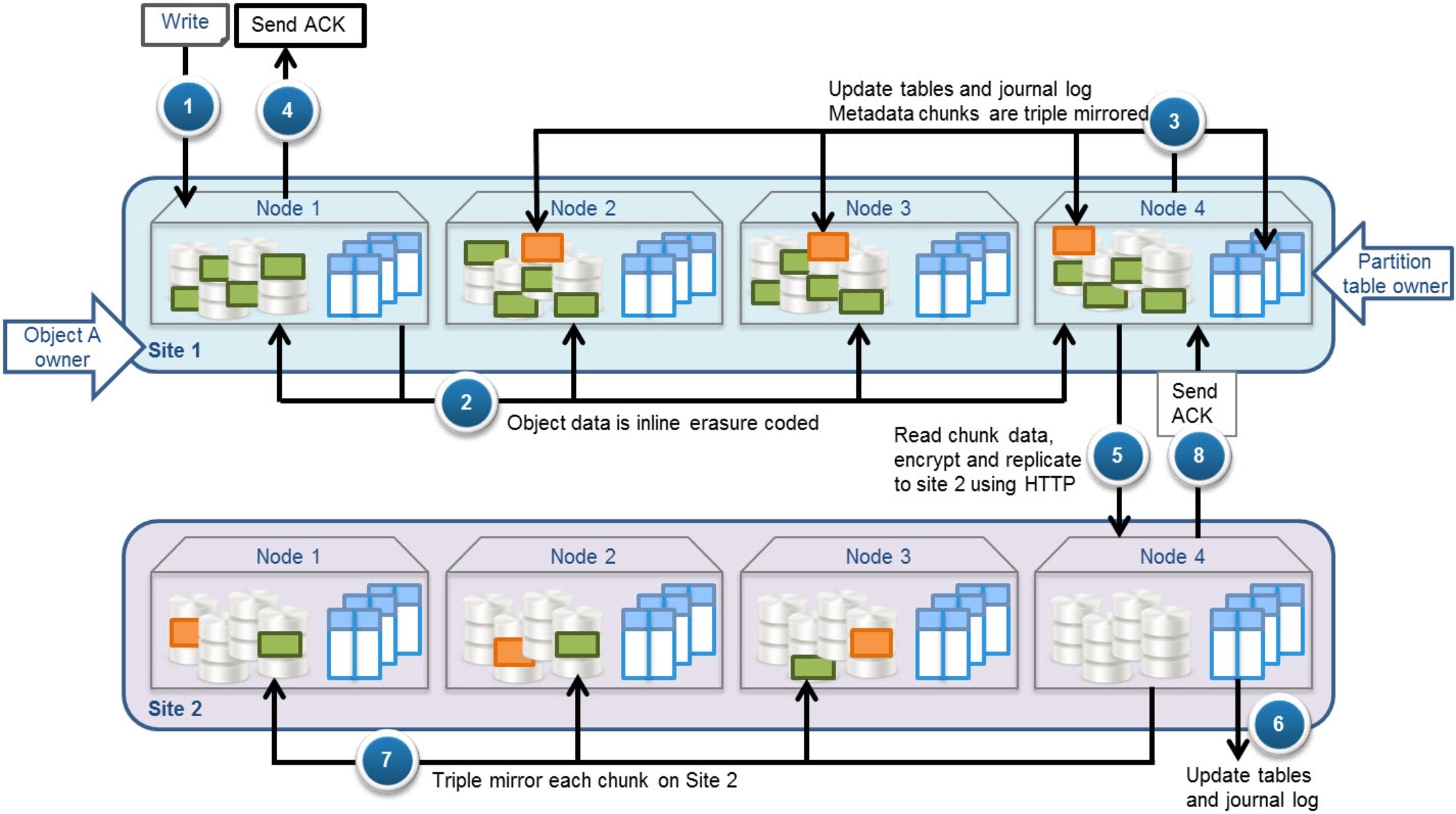
Figure 8. Write data workflow for a 128 MB object to a geo-replicated bucket
- Write request for Object A is sent to a node—in this example, Site 1 Node 1. Site 1 becomes the Object A owner.
- Data is inline erasure coded and written to a chunk in Site 1.
- Table partition owners—in this example, Node 4—update the appropriate tables (for example, chunk, object, and bucket listing tables) and write the transactions into the table journal logs. This metadata is written to a metadata chunk that is triple mirrored in Site 1.
- Acknowledgment of the successful write is sent to the client.
- For each chunk, the chunk partition table owner (in this example, Node 4) performs these actions:
- Adds the data inside the chunk to the replication queue after it is written locally; does not wait for the chunk to be sealed
- Reads the data fragments of the chunk (parity fragments are only read if required to re-create a missing data fragment)
- Encrypts and replicates the data to site 2 by HTTP
- Table partition owners for the replicated chunks—in this example site 2 Node 4—update the appropriate tables and write the transactions into the table journal logs, which are triple mirrored.
- Each replicated chunk is initially written on Site 2 using triple mirroring.
- Acknowledgment is sent back to the primary site’s chunk partition table owner.
Note: Data written to the replicated site is erasure coded after a delay that allows time for other processes, such as XOR operations, to be completed first.
Read data flow in geo-replicated environment
Because ObjectScale replicates data asynchronously to multiple VDCs within a replication group, it requires a method to ensure consistency of data across sites or VDCs. ObjectScale ensures strong consistency by fetching the latest copy of the metadata from the site that is the object owner. If the requesting site contains a copy (chunk type = local or copy) of the object, it uses that copy to service the read request; otherwise, it fetches the data from the object owner. The following figure shows an example of the read data flow. The figure depicts a read request for Object A from a site other than the object owner site.
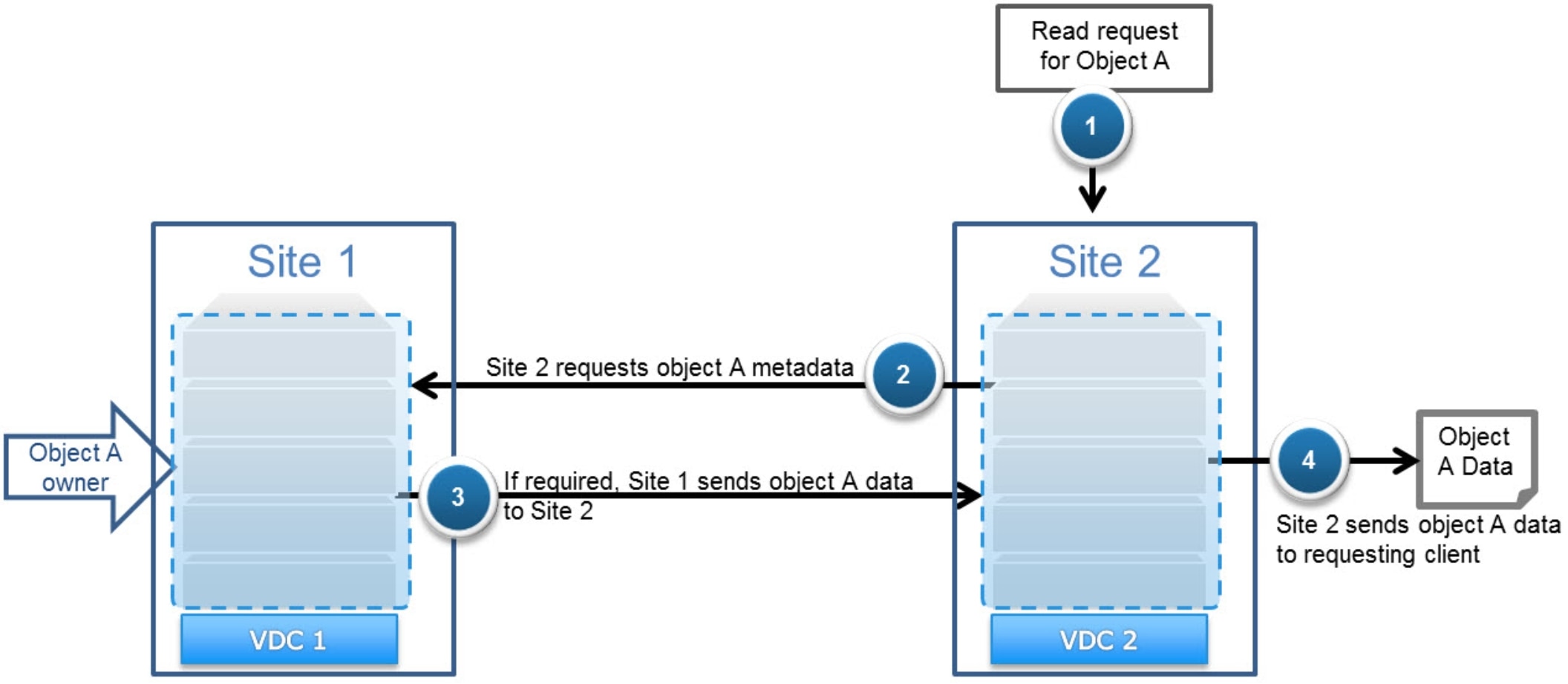
Figure 9. Read data workflow for a geo-replicated object owned by another site
In this example, the flow of the read operation is as follows:
- Site 2 receives a read request for Object A, which is owned by Site 1.
- Site 2 contacts the bucket and object owner—in this example, Site 1—to get the latest version of metadata.
Object ownership:
- If Access During Outage is disabled, Site 2 checks its local information to determine if it is the object owner. If it is not, it contacts the bucket owner to determine who the object owner is.
- If Access During Outage is enabled on the bucket, the requesting site checks with the bucket owner to determine who the current object owner is.
- If Site 2 does not contain a copy of the object (chunk type = local or copy), Site 1 sends the Object A data to Site 2.
- Site 2 sends the Object A data to the requesting client.
Update data flow in geo-replicated environment
ObjectScale is architected to allow active/active updating of data from nodes within the associated bucket’s replication group. It can achieve this result by requiring non-object owner sites to synchronously send information about an object update to the primary owner site and wait for acknowledgment before they can send the acknowledgment back to the client. The data related to the updated object is replicated as part of the normal asynchronous chunk replication activities. If the data is not yet replicated to the owning site, and the site receives a read request for the data, the site will request the data from the remote site.
The following figure shows an example of an update request for Object A from a site other than the object owner site.
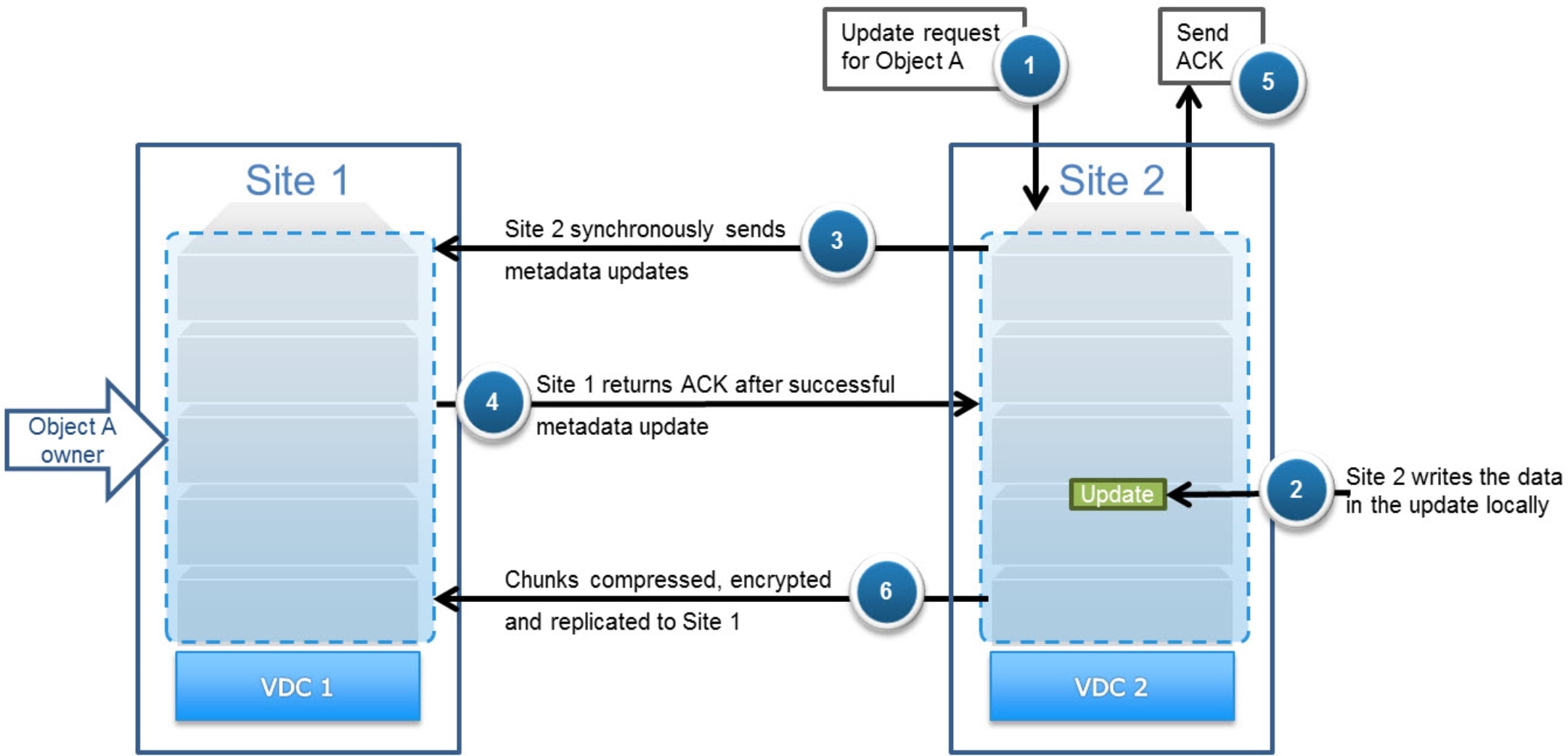
Figure 10. Update object workflow for a geo-replicated object owned by another site
In this example, the flow of the update operation is as follows:
- Site 2 receives an update request for Object A, which is owned by Site 1.
- Site 2 writes the data in the update locally.
- Site 2 sends metadata updates synchronously to the object owner—Site 1, in this example.
Note: If Access During Outage is enabled on the bucket or Site 2 is not the object owner, Site 2 contacts the bucket owner first to determine who the current object owner is.
- Site 1 sends an acknowledgment to Site 2 that the metadata update was successful.
- Site 2 sends an acknowledgment to the requesting client that the update was successful.
- The chunks are added to the replication queue, encrypted, and asynchronously replicated to Site 1 as usual.
Under normal conditions, the object owner does not change after an update is performed, regardless of which site the update originated from. In this example, the object owner remains as Site 1 even after the successful update that originated from Site 2. The only exception is during a temporary site outage if Access During Outage is enabled; for more details, see TSO behavior with Access During Outage enabled.
Multisite availability
Overview
Temporary site outage (TSO)
Temporary site outages occur when a site is temporarily inaccessible to other sites in a replication group. ObjectScale allows administrators two configuration options that affect how objects can be accessed during a temporary site outage.
- Disable the Access During Outage (ADO) option, which retains strong consistency by:
- Continuing to allow access to data owned by sites that are accessible
- Preventing access to data owned by an inaccessible site
- Enable the Access During Outage option, which allows read access and, optionally, write access to all geo-replicated data including that which is owned by the site marked as failed. During a TSO with Access During Outage enabled, the data in the bucket temporarily switches to eventual consistency. Once all sites are back online, the data reverts to strong consistency.
The default is for Access During Outage to be disabled.
The Access During Outage option can be set at the bucket level, so you can enable this option for some buckets and not for others. This bucket option can be changed any time if all sites are online; it cannot be changed during a site failure.
During a temporary site outage:
- Buckets, namespaces, object users, authentication providers, replication groups, and NFS user and group mappings cannot be created, deleted, or updated from any site. (Replication groups can be removed from a VDC during a permanent site failover.)
- You cannot list buckets for a namespace when the namespace owner site is not reachable.
- File systems within NFS buckets that are owned by the unavailable site are read-only.
- When you copy an object from a bucket owned by the unavailable site, the copy is a full copy of the source object. Therefore, the same object's data is stored more than once. Under normal non-TSO circumstances, the object copy consists of the data indexes of the object, not a full duplicate of the object's data.
- OpenStack Swift users cannot log in to OpenStack during a TSO because ObjectScale cannot authenticate Swift users during the TSO. After the TSO, Swift users must re-authenticate.
Default TSO behavior
Because ObjectScale provides strong consistency, I/O requests require checking with the owner before responding. If a site is inaccessible to other sites within a replication group, some access to buckets and objects might be disrupted.
The following table shows which access is required for an operation to succeed.
Table 17. Access requirements
|
Operation |
Requirements for success |
|
Create object |
The bucket owner must be accessible. |
|
List objects |
The bucket owner and all objects in the bucket must be accessible by the requesting node. |
|
Read object |
The requestor must be either one of these:
|
- A create object operation includes updating the bucket listing with the new object name. This action requires access to the bucket owner and so will fail if the requesting site does not have access to the bucket owner.
- Listing objects in a bucket requires both listing information from the bucket owner and head information for each object in the bucket. Therefore, the following bucket listing requests will fail if Access During Outage is disabled:
- Requests to list buckets owned by a site that is not accessible to the requestor
- Buckets that contain objects owned by a site that are not accessible to the requestor
- Read object requires first reading the object metadata from the object owner.
- If the requesting site is the object owner and Access During Outage is disabled, the request will succeed.
- If the requesting site is the object and bucket owner, the request will succeed.
- If the object owner is not local, the site needs to check with the bucket owner to find the object owner. If either the object owner or bucket owner sites are unavailable to the requestor, the read operation will fail.
- Updates to objects require successfully updating the object metadata on the object owner.
- If the requesting site is the object owner and Access During Outage is disabled, the request will succeed.
- If the requesting site is the object and bucket owner, the request will succeed.
- If the object owner is not local, the site must check with the bucket owner to find the object owner. If either the object owner or bucket owner sites are unavailable to the requestor, the read operation will fail.
The following figure shows an example of the bucket and object layout in a three-site configuration.
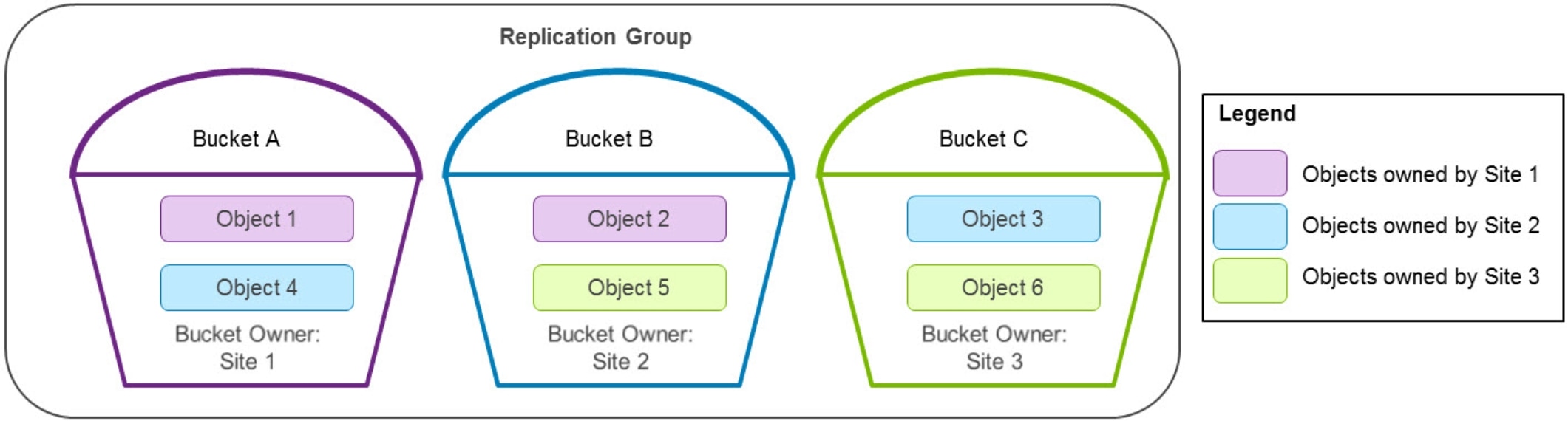
Figure 11. Bucket and object ownership example
The following table lists which operations will succeed or fail in the three-site configuration example in the preceding figure if Site 1 is inaccessible to the other sites in the replication group. To simplify interpretation of the table, the inaccessible site is listed as “failed” and the other two sites are listed as “online.”
Table 18. Operations that succeed or fail if Site 1 is inaccessible to other sites
|
Operation |
Bucket/object |
Request sent to |
||
|
Site 1 (failed) |
Site 2 (online) |
Site 3 (online) |
||
|
Create objects in |
Bucket A |
Success Bucket owned locally |
Fail Cannot access bucket owner |
Fail Cannot access bucket owner |
|
Bucket B |
Fail Cannot access bucket owner |
Fail Cannot access bucket owner |
Fail Cannot access bucket owner |
|
|
Bucket C |
Fail Cannot access bucket owner |
Success Bucket owned by online site |
Success Bucket owned locally |
|
|
List objects in |
Bucket A |
Fail Although bucket is owned locally, it contains an object that is owned by a site it cannot access |
Fail Cannot access bucket owner |
Fail Cannot access bucket owner |
|
Bucket B |
Fail Cannot access bucket owner |
Fail Although bucket is owned locally, it contains an object that is owned by the failed site |
Fail Although bucket owner is online, the bucket contains an object that is owned by the failed site |
|
|
Bucket C |
Fail Cannot access bucket owner |
Success Bucket owner is online site, and all objects are from online sites |
Success Bucket owned locally and all objects are from online sites |
|
|
Read or update object |
Object 1 |
Success Object owned locally |
Fail Cannot access object owner |
Fail Cannot access object owner |
|
Object 2 |
Success Object owned locally |
Fail Cannot access object owner |
Fail Cannot access object owner |
|
|
Object 3 |
Fail Cannot access object owner |
Success Object owned locally |
Success Object is not locally owned so gets object owner from bucket owner, which is online |
|
|
Object 4 |
Fail Cannot access object owner |
Success Object owned locally |
Fail Object is not locally owned so requires accessing the bucket owner, which is the failed site |
|
|
Object 5 |
Fail Cannot access object owner |
Success Object is not locally owned, so it gets object owner from bucket owner |
Success Object owned locally |
|
|
Object 6 |
Fail Cannot access object owner |
Success Object is not locally owned, so gets object owner from bucket owner, which is online |
Success Object owned locally |
|
TSO behavior with Access During Outage enabled
When a site is first inaccessible to other sites within a replication group, the behavior is detailed in the default TSO behavior section. After the heartbeat is lost between sites for a sustained period (the default is 15 minutes), ObjectScale marks a site as failed.
Enabling Access During Outage (ADO) on a bucket changes the TSO behavior after a site is marked as failed, allowing objects in that bucket to use eventual consistency. Thus, after a site is marked as temporarily failed, any buckets that have the option Access During Outage enabled will support reads and, optionally, writes from a non-owner site. ObjectScale accomplishes this result by allowing usage of the replicated metadata when the authoritative copy on the owner site is unavailable. You can change the Access During Outage bucket option at any time except during a site failure.
The benefit of enabling Access During Outage is that it allows access to data after a site is marked as failed. The disadvantage is that the data returned might be outdated.
ECS 3.1 and later versions have an additional bucket option for Read-Only Access During Outage. This option ensures that object ownership never changes and removes the chance of conflicts otherwise caused by object updates on both the failed and online sites during a TSO.
The Read-Only Access During Outage option is available during bucket creation only, it cannot be modified afterwards.
The disadvantage of Read-Only Access During Outage is that after a site is marked as failed, no new objects can be created. Also, no existing objects in the bucket can be updated until after all sites are back online.
As mentioned, a site is marked as failed when the heartbeat is lost between sites for a sustained period. The default is 15 minutes. If the heartbeat is lost for a sustained period:
- In a two-site configuration, each site considers itself as online and marks the other site as failed.
- In a configuration with three or more sites, a site will only be marked as failed if both conditions are met:
- Most sites lose heartbeat for the sustained period to the same ObjectScale site
- All remaining sites are marked as online
A failed site might still be accessible by clients and applications—for example, when a company’s internal network loses connectivity to a single site, but extranet networking remains operational. As an example, in a five-site configuration, if Sites 2 through 5 lose network connectivity to Site 1 for a sustained period ObjectScale will mark Site 1 as temporarily failed. If Site 1 is still accessible to clients and applications, it can service requests for locally owned buckets and objects because lookups to other sites are not required. However, requests to Site 1 for non-owned buckets and objects will fail. The following table shows which access is required after a site is marked as failed for an operation to succeed if Access During Outage is enabled.
Table 19. Successful operations after a site is marked as failed with Access During Outage enabled
|
Operation |
Request sent to the failed site (in a federation that contains three or more sites) |
Request sent to an online site including:
|
|
Create object |
Success for locally owned buckets unless Read-Only Access During Outage is enabled on the bucket Fail for remotely owned buckets |
Success unless Read-Only Access During Outage is enabled on the bucket |
|
List objects |
Only lists objects in its locally owned buckets if all objects are also locally owned |
Success Will not include objects owned by failed site that have not finished being replicated |
|
Read object |
Success for locally owned objects in locally owned buckets (might not be most recent version) Fail for remotely owned objects |
Success. If the object is owned by the failed site, it requires that the original object had finished replication before the failure occurred |
|
Update object |
Success for locally owned objects in locally owned buckets unless Read-Only Access During Outage is enabled on the bucket Fail for remotely owned objects |
Success, unless Read-Only Access During Outage is enabled on the bucket. Acquires ownership of object |
- Create object:
After a site is marked as failed, create object will not succeed if Read-Only Access During Outage is enabled on the bucket. If it is disabled:
- In a federation that contains three or more sites, the site marked as failed—if accessible by clients or applications—can create objects only in its locally owned buckets. These new objects can only be accessed from this site. Other sites will not be aware of these objects until the failed site is back online and they gain access to the bucket owner.
- The online sites can create objects in any bucket including buckets owned by the site marked as failed. Creating an object requires updating the bucket listing with the new object name. If the bucket owner is down, an object history is created. This action inserts the object into the bucket listing table during recovery or rejoin operations of the bucket owner.
- List object:
- In a federation that contains three or more sites, the site marked as failed requires local ownership of both the bucket and all objects within the bucket to successfully list objects in a bucket. The listing from the failed site does not include objects created remotely while it is marked as temporarily failed.
- The online sites can list objects in any bucket including a bucket owned by the site marked as failed. The online site lists the latest version of the bucket listing that it has; the version might be slightly outdated.
- Read object:
- In a federation that contains three or more sites, the failed site, if accessible by clients or applications, can read only locally owned objects in locally owned buckets.
- The read request to a failed site first needs access to the bucket owner to validate the current object owner. If it can access the bucket owner and the current object owner is local, the read request will succeed. If either the bucket owner or the current object owner is not accessible, the read request will fail.
- Online sites can read any objects, including objects owned by the site marked as failed, if the original object has completed replication. The online site checks the object history and responds with the latest version of the object that is available. If an object is later updated on the site marked as failed and geo-replication of the updated version was not completed, the older version is used to service the read request.
Note: Read requests sent to online sites where the bucket owner is the failed site will use the online site’s local bucket listing information and object history to determine the object owner.
- Update object:
- After a site is marked as failed, update objects will not succeed if Read-Only Access During Outage is enabled on the bucket. If it is disabled in a federation that contains three or more sites, the failed site, if accessible by clients or applications, can update only locally owned objects in locally owned buckets.
- The update request first needs access to the bucket owner to validate the current object ownership. If it can access the bucket owner and the current object owner is local, the update request will succeed. If either the bucket owner or the current object owner is not accessible, the update request will fail.
- After rejoin operations are complete, this update will not be included in read operations if the remote site also updated the same object during the same TSO.
An online site can update both objects owned by online sites and failed sites. If an object update request is sent to an online site for an object owned by the site marked as failed, the online site will update the latest version of the object available on a system marked as online.
The site performing the update becomes the new object owner and updates the object history with the new owner information and sequence number. This information will be used in recovery or rejoin operations of the original object owner to update the site’s object history with the new owner.
Note: Update requests sent to online sites where the bucket owner is the failed site will use the online site’s local bucket listing information and object history to determine the object owner.
The following example shows what would happen with the bucket and object layout for namespace 1 in the three-site configuration depicted in the following figure.
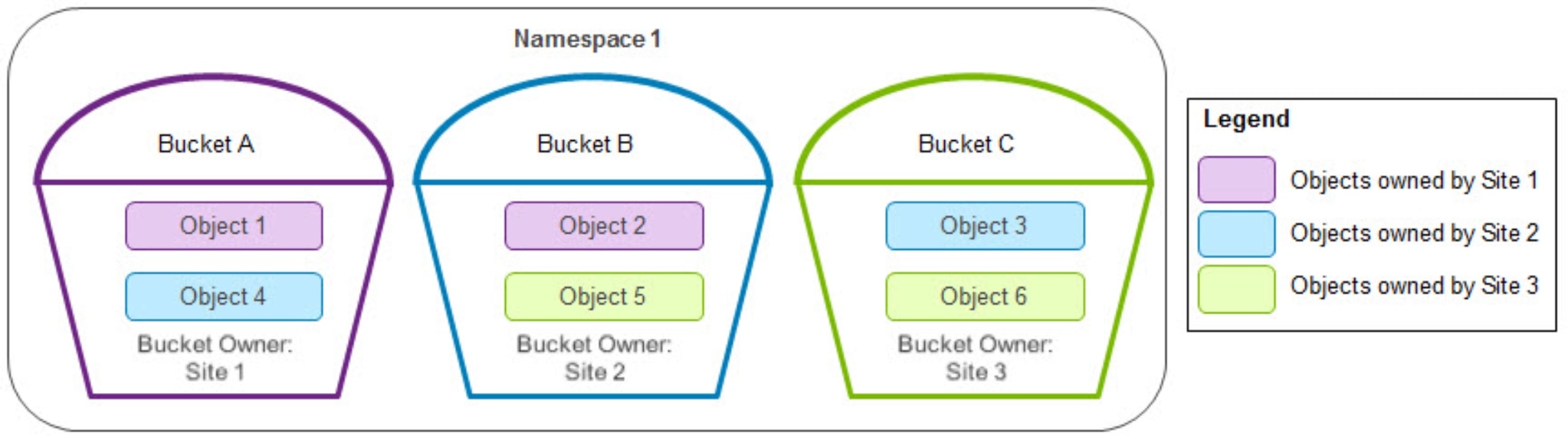
Figure 12. Bucket and object ownership for namespace 1
Table 20 shows an example in this three-site configuration if all three of these conditions are met:
- Access During Outage is enabled.
- Read-Only Access During Outage is disabled.
- Site 1 is marked as failed.
|
Operation |
Bucket/object |
Request sent to |
|
|
Site 1 (marked as failed) |
Site 2 or Site 3 (online) |
||
|
Create objects in |
Bucket A |
Success |
Success |
|
Bucket B |
Fail Failed site can only create objects in locally owned buckets |
Success
|
|
|
Bucket C |
Fail Failed site can only create objects in locally owned buckets |
Success |
|
|
List objects in |
Bucket A |
Fail Although the bucket is owned locally, it contains remotely owned objects |
Success Will not include objects owned by failed site that have not been replicated |
|
Bucket B |
Fail Failed site can only list objects in locally owned buckets |
Success
|
|
|
Bucket C |
Fail Failed site can only list objects in locally owned buckets |
Success
|
|
|
Read or update object |
Object 1 |
Success, both object and bucket are owned locally |
Success Requires object to have completed replication before TSO Update acquires object ownership |
|
Object 2 |
Fail, bucket is not owned locally |
||
|
Object 3 Object 4 Object 5 Object 6 |
Fail Failed site can only read and update locally owned objects in locally owned buckets |
Success
|
|
Once the heartbeat is reestablished between sites, the system marks the site as online, and access to this data continues as it did before the failure. The rejoin operation:
- Updates the bucket listing tables
- Updates object ownerships where necessary
- Resumes processing the previously failed sites’ replication queue
Note: ObjectScale only supports access during the temporary failure of a single site.
In the following two-site example, both sites think they are online and mark the other site as failed when a TSO happens. All create, list, read, and update operations succeed.
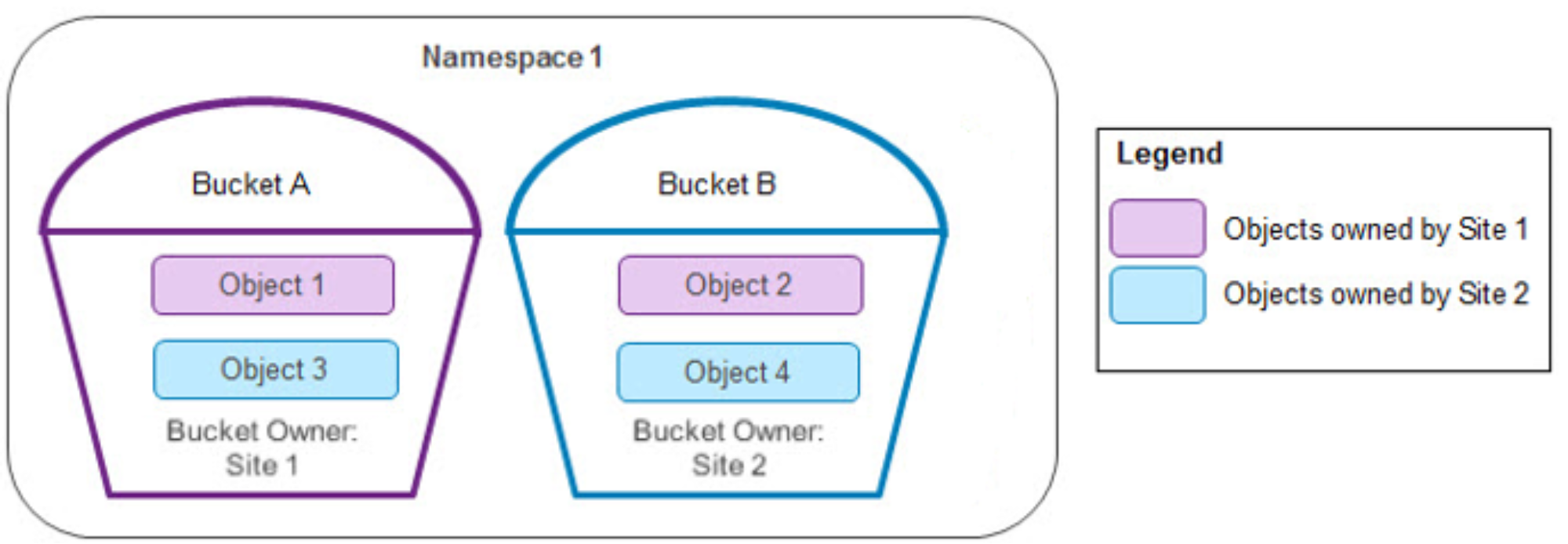
Figure 13. Bucket and object ownership in two sites
During the TSO, all the objects are updated in each site. The following table shows the final data in the site once the heartbeat is reestablished between sites.
Table 21. Winning site after two sites reestablished
|
Object |
Bucket name |
Bucket owner |
Object owner |
“Winning” site |
|
Object 1 |
Bucket A |
Site 1 |
Site 1 |
Site 2 |
|
Object 2 |
Bucket B |
Site 2 |
Site 1 |
Random |
|
Object 3 |
Bucket A |
Site 1 |
Site 2 |
Random |
|
Object 4 |
Bucket B |
Site 2 |
Site 2 |
Site 1 |
Note: In this example, from ECS 3.7, for Object 2 and Object 3, the winning site was changed from the site with the latest timestamp to Random.
XOR decoding with three or more sites.
As described in XOR encoding, ObjectScale maximizes storage efficiency of data that is configured with a replication group containing three or more sites. The data in secondary copies of chunks might be replaced by data in a parity chunk after an XOR operation.
Requests for data in a chunk that has been encoded are serviced by the site containing the primary copy. If this site fails, the request goes to the site with the secondary copy of the object. However, because this copy was encoded, the secondary site must first retrieve the copy of the chunks that were used for encoding from the online primary sites. Then it will perform an XOR operation to reconstruct the requested object and respond to the request. After the chunks are reconstructed, they are also cached so that the site can respond more quickly to subsequent requests.
The following table shows an example of a portion of a chunk manager table on Site 4 in a four-site configuration.
Table 22. Site 4 chunk manager table after completing XOR encoding
|
Chunk ID |
Primary site |
Secondary site |
Type |
|
C1 |
Site 1 |
Site 4 |
Encoded |
|
C2 |
Site 2 |
Site 4 |
Encoded |
|
C3 |
Site 3 |
Site 4 |
Encoded |
|
C4 |
Site 4 |
|
Parity (C1, C2 & C3) |
The following figure illustrates the requests involved in re-creating a chunk to service a read request during a TSO.
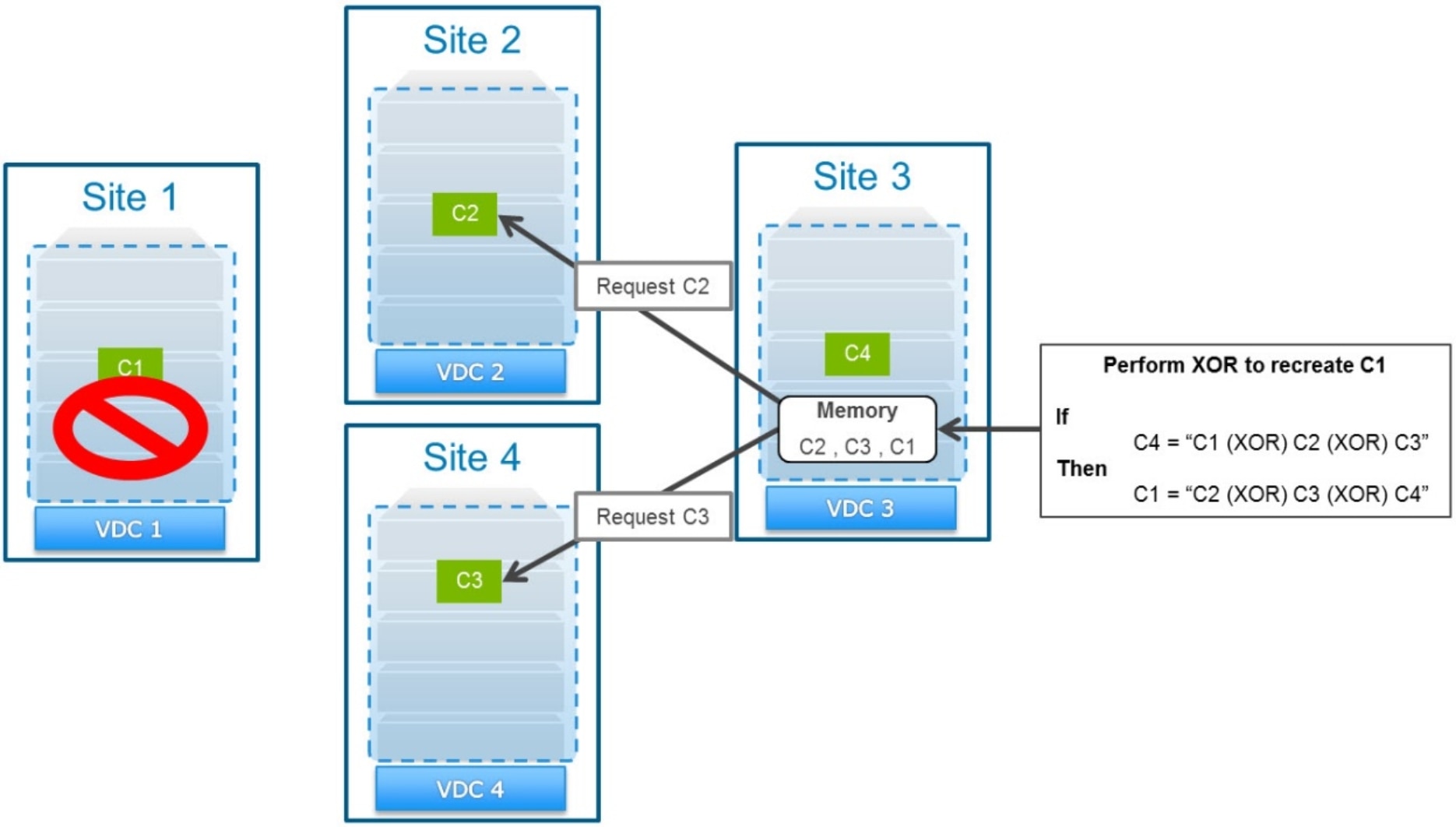
Figure 14. Servicing a read request by reconstructing an XOR-ed chunk
In this example, a read request for an object in chunk C1 when Site 1 is marked as failed initiates the following process:
- Because Site 1 failed, the request is sent to chunk C1’s secondary site, Site 4.
Site 4 has already performed XORs on chunks C1, C2, and C3. It has replaced its local copy of the data from these chunks with data in parity chunk C4.
- Site 4 requests a copy of chunk C2 from its primary site (Site 2) and caches this copy locally.
- Site 4 requests a copy of chunk C3 from its primary site (Site 3) and caches this copy locally.
- Site 4 performs an XOR operation between the cached chunks C2 and C3 with the parity chunk C4 to re-create chunk C1 and store it locally in cache.
- Site 4 responds to the read request for the object in chunk C1.
Note: The time for reconstruction operations to complete increases linearly based on the number of sites in a replication group.
With passive geo-replication
Any data in a bucket configured with passive geo-replication has between two and four source sites and one or two dedicated replication targets. Data written to the replication targets might be replaced by data in a parity chunk after an XOR operation. Requests for passively geo-replicated data are serviced by the site containing the primary copy. If this site is inaccessible to the requesting site, the data must be recovered from one of the replication target sites.
With passive geo-replication, the source sites are always the object and bucket owners. If a replication target site is marked as temporarily failed, all I/O operations will continue as usual. The only exception is replication, which will continue to queue until the replication target site rejoins the federation.
If one of the source sites fails, requests to the online source site must recover non-locally owned data from one of the replication target sites. In the following example, Site 1 and Site 2 are the source sites, and Site 3 is the replication target site. An object’s primary copy exists in chunk C1, which is owned by Site 1, and the chunk has been replicated to the target destination, Site 3.
If Site 1 fails and Site 2 gets a request to read that object, Site 2 will have to get a copy from Site 3. If the copy was encoded, the secondary site must first retrieve the copy of the other chunk that was used for encoding from the online primary site. Then it performs an XOR operation to reconstruct the requested object and respond to the request. After the chunks are reconstructed, they are also cached so that the site can respond more quickly to subsequent requests.
The following table shows an example of a portion of a chunk manager table on the passive geo-replication target.
Table 23. Passive geo-replication target chunk manager table after completed XOR encoding
|
Chunk ID |
Primary site |
Secondary site |
Type |
|
C1 |
Site 1 |
Site 3 |
Encoded |
|
C2 |
Site 2 |
Site 3 |
Encoded |
|
C3 |
Site 3 |
|
Parity (C1 and C2) |
The following figure illustrates the requests involved in re-creating a chunk to service a read request during a TSO.
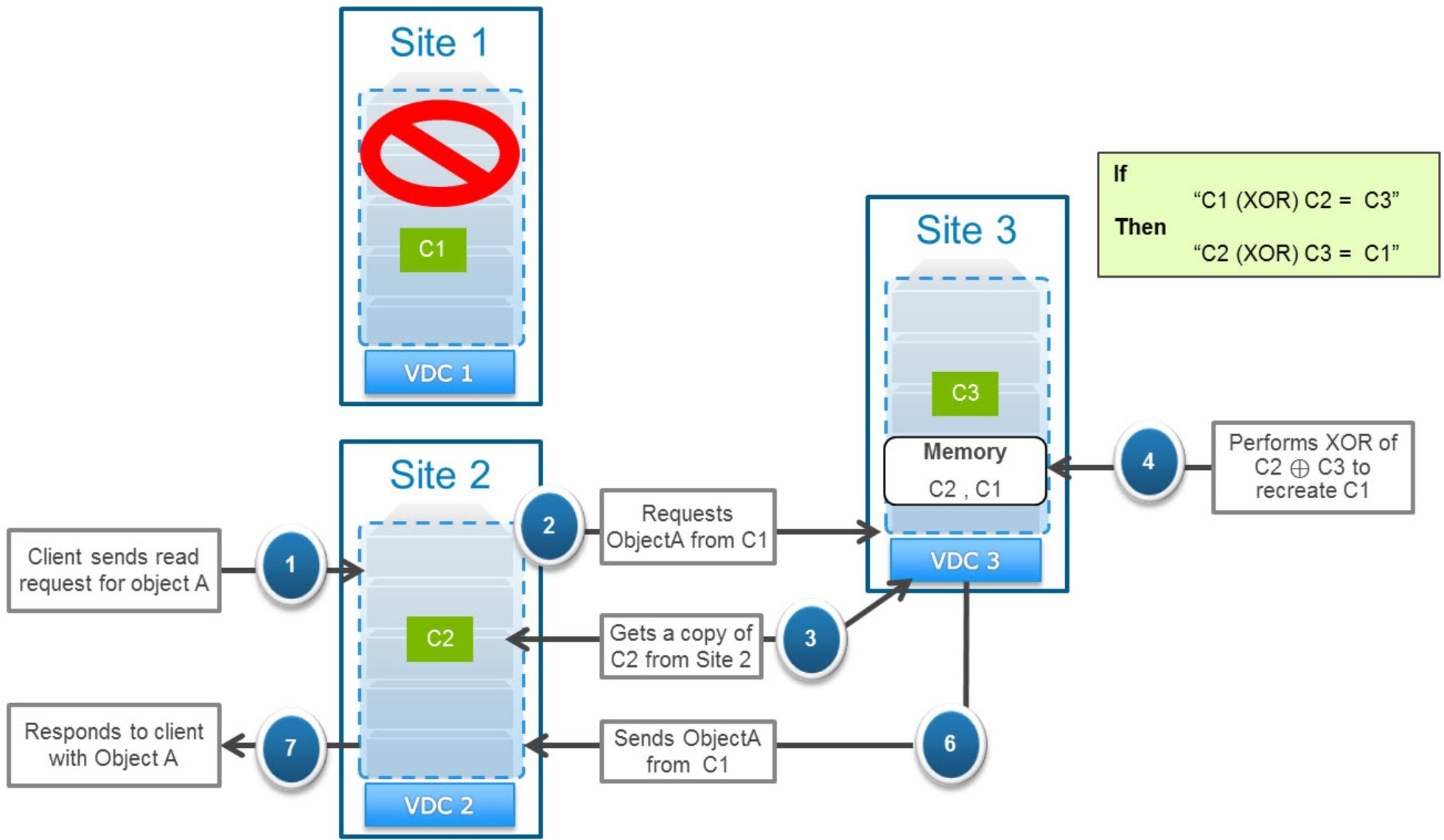
Figure 15. Servicing a read request by reconstructing an XOR-ed chunk
In this example, if a read came in for an object in chunk C1 when Site 1 is marked as temporarily failed, the following process occurs:
- Because Site 1 failed, the request is sent to chunk C1’s secondary site, Site 3.
Site 3 has already performed XORs on chunks C1 and C2, meaning it has replaced its local copy of the data from these chunks with data in parity chunk C3.
- Site 3 requests a copy of chunk C2 from chunk C2’s primary site (Site 2) and caches this copy locally.
- Site 3 performs an XOR operation between the cached chunk C2 with the parity chunk C3 to re-create chunk C1 and store it locally in cache.
- Site 3 responds to the read request for the object in chunk C1.
With Replicate to All Sites enabled
Buckets configured with the options of Replicate to All Sites and Access During Outage can provide faster read performance. The faster read performance comes not only during a time when all sites are online but during a temporary site outage. No XOR decoding operation is required, and there is a greater chance that the data will be read locally.
Data in buckets with Replicate to All Sites enabled is replicated to each site. Create and update objects are handled the same as if Replicate to All Sites was disabled. However, read and list objects are handled slightly differently because some data might have only completed replication to some sites, but not all, before the primary site failed.
During a read operation, the node servicing the request first checks the latest version of the metadata from the object owner.
If the requesting node Is not the object owner:
- If it has a local copy of the data being requested, it uses the local copy to service the request.
- If the object has been updated by another site that failed before it replicated the data, it returns the version that it has locally.
- If the object owner site is online and replication of the object data was completed to this site, it services the request with its local copy of the data.
- If the object owner site is online and replication of the object data was completed to this site, it requests a copy from the object owner and uses that copy to service the request.
- If the object owner is down and replication of the object was not completed to this site, it uses its local copy of the data, which might not be the latest version.
- If the object owner is down and replication of the object data to the requesting site was not completed, the requesting site requests a copy from the secondary site listed first in the chunk manager table. If that secondary site is the requesting site, the read operation will fail.
During a list objects in a bucket operation, the node requires information from the bucket owner and head information for each object in the bucket. If the site that is the object owner or the bucket owner is down and Access During Outage is also enabled, the node can still service the request if all the remaining sites in the replication group are online. It will list the latest version of the bucket listing that it has; it might be slightly outdated and can vary between sites.
Multiple site failures
ObjectScale only supports access during a temporary failure of a single site within a replication group; furthermore, only one site can be marked as failed. Thus, if more than one site within a replication group fails concurrently, some operations will fail. The first site determined to fail (due to sustained loss of heartbeat) is marked as failed in the UI. Any remaining sites that also have a sustained loss of heartbeat are not marked as failed and so are considered online.
As an example, in a replication group of five sites, if Site 1 is identified as having a sustained loss of heartbeat, it is marked as failed. If site 2 is also identified as having a sustained loss of heartbeat, it remains listed as online. In that case:
- If Access During Outage is enabled and the bucket owner is Site 2, reads, creates, or updates sent to other sites will fail regardless of the object owner. This result occurs because ObjectScale first checks with the bucket owner to determine the object owner. Unless the bucket owner is marked as failed, the requestor will send the request to Site 2, and the request will fail.
- Read and update requests sent to Site 2 will only succeed if Site 2 is the object owner (and the bucket owner if Access During Outage is enabled).
- Read and update requests sent to sites other than Site 2 will succeed only if the object owner (and bucket owner if Access During Outage is enabled) is not Site 2.
- Create object will fail if the bucket owner is either Site 1 or Site 2. This result occurs because creating an object requires updating the bucket listing with the new object name. Because it cannot succeed in performing this action on all sites marked as online, the create operation will fail.
- Requests to listing objects in a bucket will only succeed if the requesting site can access the bucket owner and all the objects.
- If the request is sent to Site 2, it will only succeed if Site 2 owns the bucket and all the objects in the bucket.
- If the request is sent to another site, it will only succeed if neither the bucket nor any objects within the bucket are owned by Site 2.
Permanent site outage (PSO)
If a disaster occurs at a site and the administrator determines the site is unrecoverable, the administrator can initiate a permanent site failover (remove the VDC from the federation). When a permanent site failover is initiated, all chunks from the failed site are recovered on the remaining sites to reestablish data durability.
The recovery process involves the remaining sites scanning their local chunk manager table to look for references to sites that include the failed site.
Any that are found with a chunk type of:
- Encoded:
For chunks whose type is Encoded and whose primary site is online, ObjectScale re-creates the data locally using the data from the primary site. When re-creation is complete, it marks this chunk as a Copy type.
ObjectScale re-creates the Encoded chunk whose primary site is the failed site by performing an XOR operation of the previously re-created Copy types with the Parity chunk. This site becomes the chunk’s primary site, and the chunk is marked as Local type.
These chunks are added to the replication queue to be replicated to other sites listed within the replication group.
- Copy: If a primary site is listed as the failed site, it becomes the new primary site. It then adds the chunk to its replication queue to be replicated to a new secondary site.
- Local: If its secondary site is the failed site, a task is inserted to replicate the chunk to a new secondary site.
Once permanent site failover starts, access to the data owned by the failed site will not be available until after the permanent site failover process is complete. Replication of data is separate from failover operations; as such, replication does not have to be complete for access to the data owned by the failed site to be restored.
This example is of a three-site configuration where Site 1 fails. Table 24 and Table 25 are the chunk manager tables for the remaining sites.
Table 24. Site 2 chunk manager table
|
Chunk ID |
Primary site |
Secondary site |
Type |
|
C1 |
Site 1 |
Site 2 |
Copy |
|
C2 |
Site 2 |
Site 3 |
Local |
|
C3 |
Site 1 |
Site 3 |
Remote |
|
C4 |
Site 2 |
Site 1 |
Local |
In this example, Site 2 acts as follows:
- Adds chunk C1 to the replication queue to be replicated. Site 2 becomes the new primary site, and the site with the new chunk becomes the new secondary site.
- Adds chunk C4 to the replication queue to be replicated and updates the secondary site in the table.
Table 25. Site 3 chunk manager table
|
Chunk ID |
Primary site |
Secondary site |
Type |
|
C1 |
Site 1 |
Site 2 |
Remote |
|
C2 |
Site 2 |
Site 3 |
Encoded |
|
C3 |
Site 1 |
Site 3 |
Encoded |
|
C4 |
Site 2 |
Site 1 |
Remote |
|
C5 |
Site 3 |
|
Parity (C2 and C3) |
Site 3 acts as follows:
- Re-creates chunk C2 data locally using the data from the primary site (Site 2) and changes chunk type to Copy.
- Reconstructs chunk C3 using C2 data and the C5 parity data using the XOR operation C2 ⊕ C5.
Site 3 becomes the new primary site.
- Deletes chunk C5.
- Adds chunk C3 to the replication queue to be re-replicated.
The site with the new chunk becomes the new secondary site.
Table 26 and Table 27 are the chunk manager tables for the two remaining sites after permanent site failover is complete.
Table 26. Site 2 chunk manager table after PSO is complete
|
Chunk ID |
Primary site |
Secondary site |
Type |
|
C1 |
Site 2 |
Site 3 |
Local |
|
C2 |
Site 2 |
Site 3 |
Local |
|
C3 |
Site 3 |
Site 2 |
Copy |
|
C4 |
Site 2 |
Site 3 |
Local |
Table 27. Site 3 chunk manager table after PSO is complete
|
Chunk ID |
Primary site |
Secondary site |
Type |
|
C1 |
Site 2 |
Site 3 |
Copy |
|
C2 |
Site 2 |
Site 3 |
Copy |
|
C3 |
Site 3 |
Site 2 |
Local |
|
C4 |
Site 2 |
Site 3 |
Copy |
PSO with passive geo-replication
Permanent site outage is handled slightly differently for data that is replicated using passive geo-replication. Passively geo-replicated data will not reestablish data durability during a PSO; instead, data durability is reestablished after a new third site is added to the replication group. The PSO operations are different, based on whether the site that has permanently failed is one of the source sites or the replication target site.
The recovery process still involves the remaining sites scanning their local chunk manager table looking for references to sites that include the failed site.
Any that a site finds with a chunk type of:
- Encoded (exists on the replication target site):
For chunks whose type is Encoded and whose primary site is online, ObjectScale re-creates the data locally using the data from the primary site. When the re-creation is complete, it marks this chunk as a Copy type.
ObjectScale re-creates the Encoded chunk whose primary site is the failed source site by performing an XOR operation of the previously re-created Copy types with the Parity chunk. This site now becomes the chunk’s primary site, and the chunk is marked as Local type.
No secondary sites are created until after a third site is added to the replication group.
- Copy: If a primary site is listed as the failed site, it becomes the new primary site, and its type is changed to Local. No secondary sites are created until after a third site is added to the replication group.
- Local: If its secondary site (the replication target) is the failed site, no new secondary sites are created until after a third site is added to the replication group.
Post-PSO, a third site can be added to reestablish data durability and protect against site-wide failures. After a third site is added to the passive geo-replication group, the previous two sites scan their local chunk manager table looking for chunks with no secondary chunk listed. The following activities occur:
- Local chunks on a source site with no secondary chunk listed initiate the replication of a secondary chunk to the new replication target site. The chunk manager table is updated to include the new secondary chunk location.
- Local chunks on the replication target site initiate a replication of the chunk to a new source site. After replication is complete, the replication target site type changes from Local to Copy, and the source site type changes from Copy to Local. XOR operations continue on the destination as normal.
Once PSO starts on a source site, access to the data owned by the failed site is not available until after the permanent site failover process is complete. Once PSO is complete, access to the data is restored. Until a third site is added to the replication group, any new writes to the online source site are replicated to the replication target. However, XOR operations will not occur because XOR only runs on chunks from two different source sites. Because all new source sites are the same, XOR cannot run.
After PSO is complete, a third site can be added to the replication group to restore data durability and protect against site-wide failures. Also, the replication target can resume running XOR operations on any two chunks from different source sites marked as type Copy.
In the next example, Site 1 and Site 2 are the source sites, and Site 3 is the target destination site. Table 28 and Table 29 are the chunk manager tables of the two source sites. Table 30 is the chunk manager table of the replication target site.
Table 28. Site 1 source site chunk manager table
|
Chunk ID |
Primary site |
Secondary site |
Type |
|
C1 |
Site 1 |
Site 3 |
Local |
|
C2 |
Site 2 |
Site 3 |
Remote |
|
C3 |
Site 1 |
Site 3 |
Local |
Table 29. Site 2 source site chunk manager table
|
Chunk ID |
Primary site |
Secondary site |
Type |
|
C1 |
Site 1 |
Site 3 |
Remote |
|
C2 |
Site 2 |
Site 3 |
Local |
|
C3 |
Site 1 |
Site 3 |
Remote |
Table 30. Site 3 replication target chunk manager table
|
Chunk ID |
Primary site |
Secondary site |
Type |
|
C1 |
Site 1 |
Site 3 |
Encoded |
|
C2 |
Site 2 |
Site 3 |
Encoded |
|
C3 |
Site 1 |
Site 3 |
Copy |
|
C4 |
Site 3 |
|
Parity (C1 & C2) |
Example 1: If Site 3 is removed because of a PSO, the secondary sites would become empty, but the primary sites and types would remain. Until a new replication target is added, any new writes would have a primary site listed but no secondary site.
Example 2: If Site1 is removed because of a PSO, the following activities would occur:
- Site 3 becomes the new primary site with a type of Local for chunk C3; no site is listed as the secondary site.
- Site 3 re-creates chunk C2 data using the data from the primary site (Site 2) and changes its chunk type to Copy.
- Site 3 reconstructs chunk C1 using C2 data and the C4 parity data using the XOR operation C2 ⊕ C4. Site 3 becomes the new primary site; no secondary site is listed.
- Site 3 deletes chunk C4.
After a permanent site failover of Site 1 is complete, the chunk manager tables of the two remaining sites would be like those shown in the following two tables.
Table 31 and Table 32 are the chunk manager tables for the two remaining sites after permanent site failover of Site 1 is complete.
Table 31. Site 2, source site chunk manager table after PSO is complete
|
Chunk ID |
Primary site |
Secondary site |
Type |
|
C1 |
Site 3 |
|
Remote |
|
C2 |
Site 2 |
Site 3 |
Local |
|
C3 |
Site 3 |
|
Remote |
Table 32. Site 3, replication target site chunk manager table after PSO is complete
|
Chunk ID |
Primary site |
Secondary site |
Type |
|
C1 |
Site 3 |
|
Local |
|
C2 |
Site 2 |
Site 3 |
Copy |
|
C3 |
Site 3 |
|
Local |
Until a new source site is added, any new writes will have a primary site of Site 2 with a type of Local and a secondary site of Site 3 with a type of Copy.
After a new source site is added to the replication group, data durability to protect against site-wide failure will be reestablished by adding a secondary site and replicating the data to it. XOR operations will also resume on the replication target. Table 33, Table 34, and Table 35 show the new chunk manager tables.
- Chunks C1 and C3 are replicated to the new source site, Site 1. After replication is complete, the primary site is listed as Site 1 and the secondary site as Site 3.
- Site 3 performs XOR encoding on chunks C1 and C2, resulting in a new C4 chunk with a type of Parity. Chunks C1 and C2 types change to Encoded.
Table 33. New Site 1 chunk manager table after data durability is reestablished
|
Chunk ID |
Primary site |
Secondary site |
Type |
|
C1 |
Site 1 |
Site 3 |
Local |
|
C2 |
Site 2 |
Site 3 |
Remote |
|
C3 |
Site 1 |
Site 3 |
Local |
Table 34. Site 2 chunk manager table after new Site 1 is added and data durability is reestablished
|
Chunk ID |
Primary site |
Secondary site |
Type |
|
C1 |
Site 1 |
Site 3 |
Remote |
|
C2 |
Site 2 |
Site 3 |
Local |
|
C3 |
Site 1 |
Site 3 |
Remote |
|
Chunk ID |
Primary site |
Secondary site |
Type |
|
C1 |
Site 1 |
Site 3 |
Encoded |
|
C2 |
Site 2 |
Site 3 |
Encoded |
|
C3 |
Site 1 |
Site 3 |
Copy |
|
C4 |
Site 3 |
|
Parity (C1 & C2) |
Recoverability from multiple site failures
ObjectScale can recover from multiple site failures if both PSO and data recovery operations are complete between the site outages. If the second site fails before recovery is complete:
- For permanent site outage recovery operations to run, all other sites in the system must be online. If multiple sites fail concurrently, all but one must recover from the TSO before a PSO can be run on a site.
- If a second site failure occurs after PSO is complete but before data recovery is complete, some data might be lost.
In a four-site scenario, successful recovery from the loss of all but one site occurs as follows (assumes sufficient space exists to store all the data in the remaining site):
- Site 4 fails.
Administrator initiates a PSO operation to remove Site 4.
Data is recovered on the remaining sites to reestablish data durability.
A three-site federation, containing Site 1, Site 2, and Site 3, remains.
- A second site (Site 2) fails sometime after PSO, and data recovery is complete.
The administrator initiates a PSO operation to remove Site 2.
Data is recovered on the remaining sites to reestablish data durability.
A two-site federation, containing Site 1 and Site 3, remains.
- A third site (Site 1) fails sometime after PSO, and data recovery is complete.
- Administrator initiates a PSO operation to remove Site 1
A single-site federation, containing Site 3, remains.
This example walked through multiple site failures. However, this example is not a normal scenario; permanent site failures are caused by disaster scenarios such as earthquakes and fires and do not commonly occur in multiple locations in short succession. Typically, after a single site permanently fails, a new site is added before a subsequent site fails.
Beginning with version 3.7, ObjectScale supports recovery from multiple (N-1) simultaneous site failures. This procedure, which can shorten recovery time, only supports the replication group setting with replication to all sites. To get support for this operation, contact your Dell representative.
Process about the PSO
As we introduce the TSO and PSO in the former chapters, now let us go through the entire process from a site down to recovery.
Below is an example of unplanned PSO from site 1 down to data recovery.
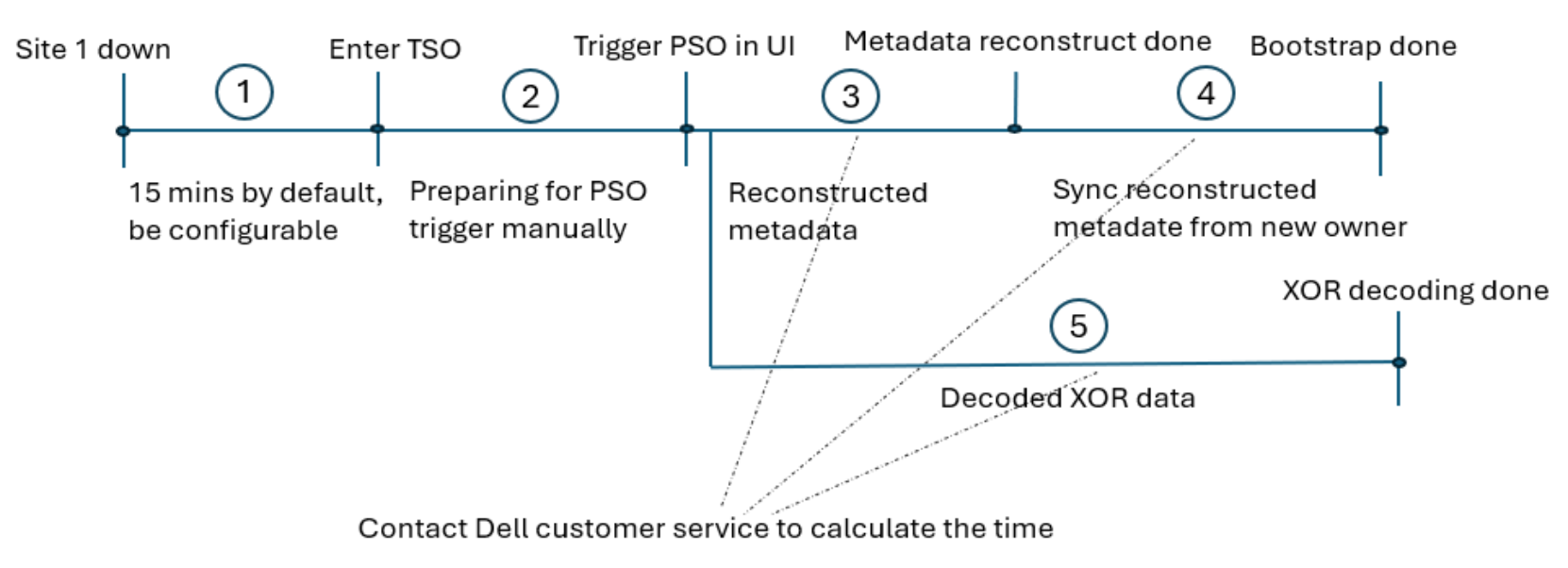
Figure 16. Process about the PSO
According to the picture above, below are the highlight steps:
- When site 1 is down, the other remaining sites will continue detect site 1. Site 1 will be marked as failed when the heartbeat is lost between sites for a sustained period of 15 minutes by default.
Note: The sustained period time can be changed in the system.
- In the TSO, system admins can contact the Dell customer service team to collect the data what they need like the PSO time estimating since the objects owner by site 1 cannot be accessed in the PSO period. We will list the data accessibility information in a table later. After everything is ready, system admin can trigger the PSO progress in ObjectScale portal.
Below are the two steps in the ObjectScale portal. For more details, please refer to the ObjectScale Administration guide.
- In the ObjectScale Portal, select Manage > Virtual Data Center. Click Edit and select Fail this VDC. Wait for a few minutes to ensure the VDC status shows Permanent Site Outage. This option will remove the site 1 in the federation system
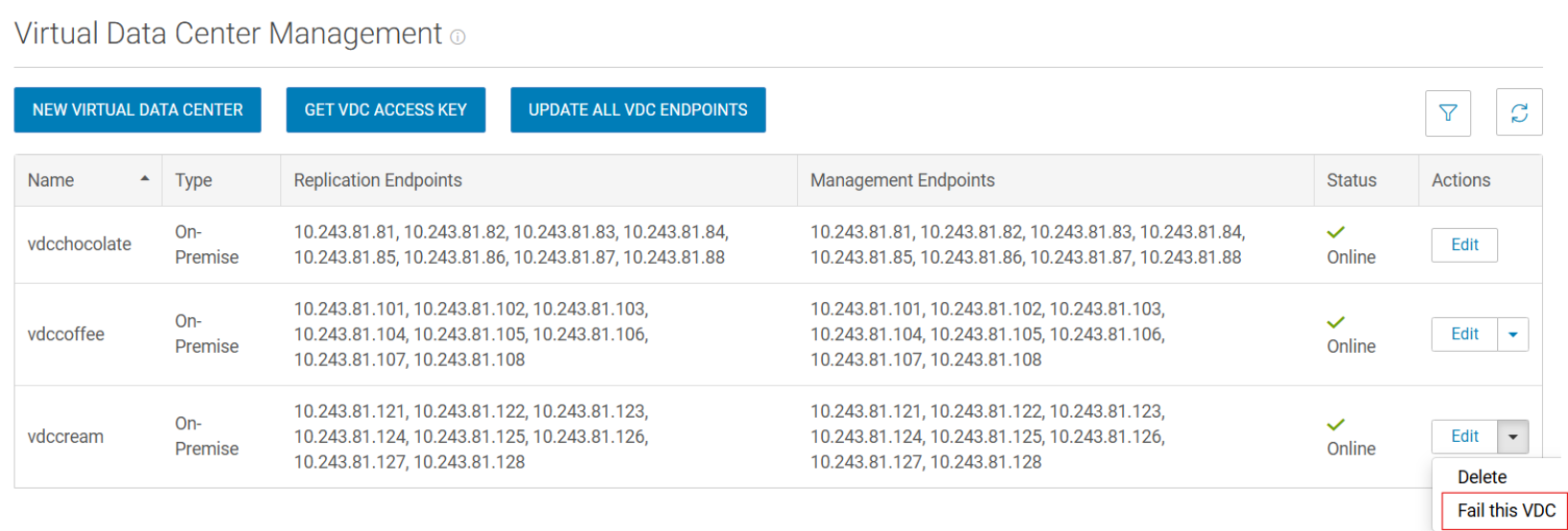
Figure 17. Fail site 1
- Select Manage > Replication Group, click Edit, and Remove the failed VDC from each related replication group.
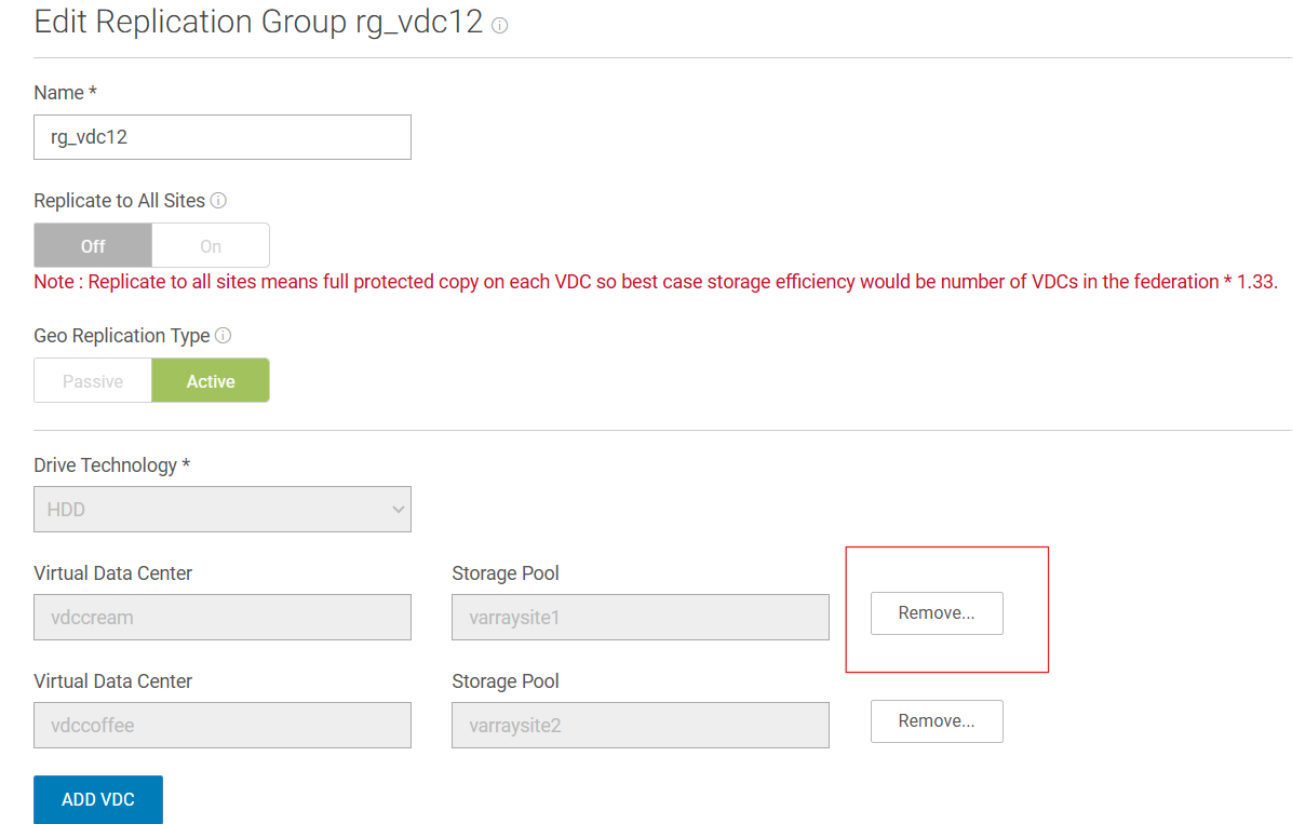
Figure 18. Remove site 1 in replication group
- In the back group, the remaining sites will apply the replicated metadata to the directory tables and do a consistency check of metadata and data. The amount of time this takes depends on pending metadata to apply to the directory tables. This does not depend on total capacity or number of objects but depends on pending replicated metadata that needs to be applied and validated.
- In three or more sites, based on several factors like network speed and various failures, each replicated site might have different amounts of metadata from the failed zone. The site which includes the most and latest replicated metadata will be the new owner. After the owner is selected, the reconstructed metadata will be replicated from the new owner to other sites, the process after the owner selection is named bootstrap.
- In a three and more than three sites, if replication groups with replicate to all sites disabled. XOR encoding will be used to maximize storage efficiency without affecting fault tolerance.
When PSO is triggered against such replication groups, there will be parallel process to decode XOR data. The process time depends on the data that had been XOR encoded and the number of sites in the replication group.
Note: For a two-site environment, there is no bootstrap and XOR decoding process. It is recommended to contact the Dell customer service team to estimate the time of process 3, 4 and 5 by internal tools.
PSO time duration does not depend on total capacity or number of objects in the system but rather this is proportional to amount of data replicated but not applied to the system and verified. The goal is to recover and make as much data as available.
Below are the data availability of the owner, which is site 1 for each process we introduced in Figure 16.
Table 36. Data availability in PSO process
|
|
Period 1 |
Period 2 |
Period 3 |
Period 4 |
Period 5 |
|
|
Before TSO /site down |
In TSO |
Metadate reconstruct |
Bootstrap |
XOR decoding |
||
|
Read |
No |
Yes |
No |
Yes* |
Yes* |
|
|
Write |
No |
Yes |
No |
Yes |
Yes |
|
|
ADO RO enabled |
Read |
No |
Yes |
No |
Yes* |
Yes* |
|
Write |
No |
No |
No |
Yes |
Yes |
|
|
ADO disabled |
Read |
No |
No |
No |
Yes* |
Yes* |
|
Write |
No |
No |
No |
Yes |
Yes |
|
*In the period 4 bootstrap process, it works parallel with period 5 XOR decoding process, the read accessible depends on when the XOR decoding process finished. The bootstrap process will not impact the data read and write itself.
*In Period 5 XOR decoding process, this happens in background and does not impact write access but read may be impacted due to limited XOR decoding bandwidth. Read timeout is expected sometimes.
Capacity Requirements for PSO Recovery
In a federation of three or more VDCs (prior to PSO), where cross-site replication is disabled, additional free capacity is needed on the remaining sites to support bootstrap and XOR decoding. This is due to the following reasons:
- Metadata reconstructed during recovery must be replicated across sites for protection.
- When a site is removed, some data may be lost and must be replicated to the remaining sites.
- Data recovered via XOR decoding requires temporary space before it can be re-encoded.
To determine whether the remaining VDCs have sufficient capacity after removing a VDC via PSO, the following formula can be used.
Note: This approach applies to environments where all Replication Groups (RGs) cross all VDCs in the system. For RGs do not include all VDCs, it is recommended to contact Dell Customer Service to assist in estimating the required capacity for PSO.
Let’s denote VDC1, VDC2, ..., VDCn as the VDCs in the federation (i.e., an n-VDC federation, where n ≥ 3). For each VDC, we gather the following metrics from Capacity Utilization in the GUI.
- Total: Total capacity of VDC
- UserData: User data capacity of VDC
- Metadata: System metadata capacity of VDC
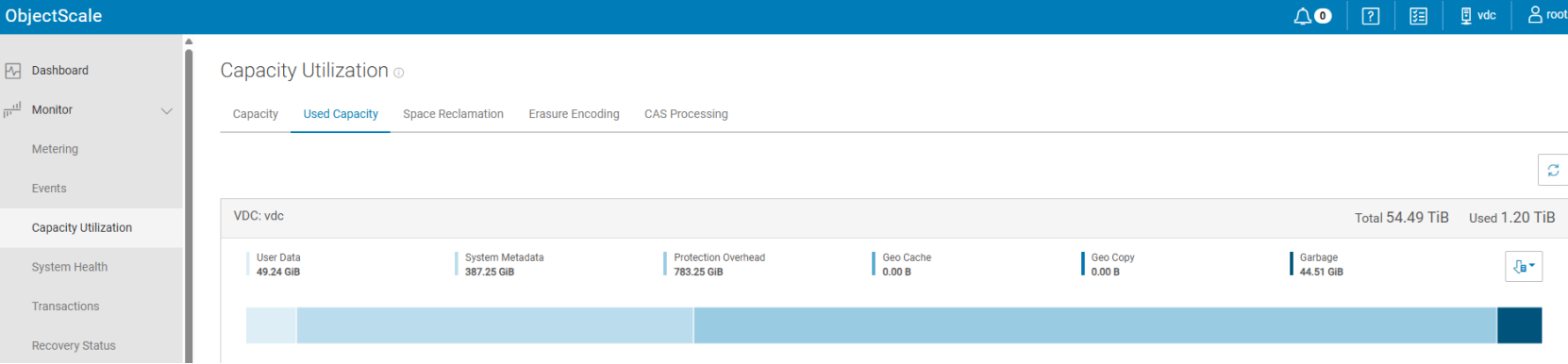
Figure 19. Capacity utilization
The condition for sufficient remaining capacity after PSO of VDCj is:

Where:
 is the critical level threshold for storage pool capacity warning, 80% as usual.
  is the Erasure Coding (EC) protection coefficient. It is 1.33 for EC 12+4 and 1.2 for EC 10+2.
The left side of the equation represents the total available capacity in the remaining VDCs (excluding the one being PSO-ed).
The right side represents the total capacity required for all existing data and metadata, including protection overhead.
Let us have an example to explain the formular above.
Suppose there is a 3-site VDC, which is 12+4 protection and the  is 0.8.
From each site’s VDC, we can get the used capacity from GUI like below.
|
VDC |
Totali |
UserDatai |
Metadatai |
|
VDC1 |
400 TiB |
100 TiB |
4 TiB |
|
VDC2 |
400 TiB |
100 TiB |
4 TiB |
|
VDC3 |
400 TiB |
50 TiB |
3 TiB |
Before we start PSO VDC1, the total amount of capacity available after PSO will be:

The total amount of capacity needed will be:

As a result, we need at least 731TiB capacity in the VDC2 and VDC3. It is not recommended to start PSO without adding additional capacity on VDC2 or VDC3.
Note that this formula requires UserDataⱼ and Metadataⱼ values from the VDC being PSO-ed. Therefore, this method is most suitable for planned PSO operations where these statistics can be collected and validated before the site is taken offline.
For unplanned PSO situations (where the failed VDC’s stats are unavailable) or when Replication Groups do not include all VDCs, it is recommended to contact Dell Customer Service to assist in estimating the required capacity for PSO.