Dell ObjectScale IAM Introduction
Executive summary
Overview
Revisions
We value your feedback
ObjectScale IAM Introduction
ObjectScale IAM Introduction
IAM Overview
IAM Overview
Identity Access Management (IAM) is a web service that performs identification, authorization, and authentication to ObjectScale resources for an IAM element. The goal of IAM is to assess if a given user or device has the right to access data within an ObjectScale bucket. ObjectScale IAM validates credentials/signatures for each transaction performed. It sits in the data path as part of authv2 or authv4 signature requirements.
IAM allows ObjectScale to enforce high levels of granular permissions implemented as policies within a tenancy, allowing cross tenancy access of buckets with Roles and integration points for external identity managers, such as Microsoft Active Directory. IAM will allow our enterprise customers to integrate ObjectScale into their existing identity and access practice, and to maintain corporate security standards. Connecting ObjectScale to external identity managers requires a process called federation. Federation is facilitated by the SAML protocol which establishes a two-way trust between ObjectScale and the external identity manager.
For customers who do not require such complex integration, IAM enhances their security posture and protects their data from modern threats through authorization and authentication. IAM provides password management that meets password best practices, such as minimum character lengths and complex passwords. IT administrators can use IAM granted access rights based on user roles. This reduces the chances of granting authorized access rights to users who should not have them.
ObjectScale IAM owns a dedicated database instance. This ObjectScale IAM instance supports multiple-tenancy and allows each tenant owner to create their users, policies, and roles. These IAM elements are unique to that tenancy and cannot be shared across neighboring tenancies. IAM allows, if required, multiple tenancies within ObjectScale to share resources. This can be achieved by using IAM Roles. Roles are special IAM elements that accept users authenticating from alternate identity providers like Active Directory or across ObjectScale tenancies. The Role allows the external identity manager to identify and authorize the user, so that ObjectScale IAM can authenticate the user against an attached policy.
ObjectScale IAM conforms to the AWS S3 standard and accepts the common identification method of AccessKey and SecretKey. This means that ObjectScale IAM provides IAM users the ability to generate S3 specific AccessKey and SecretKey type credentials, as defined by AWS S3. The IAM authentication process is secured and facilitated by the AWS Signature v2 or v4.
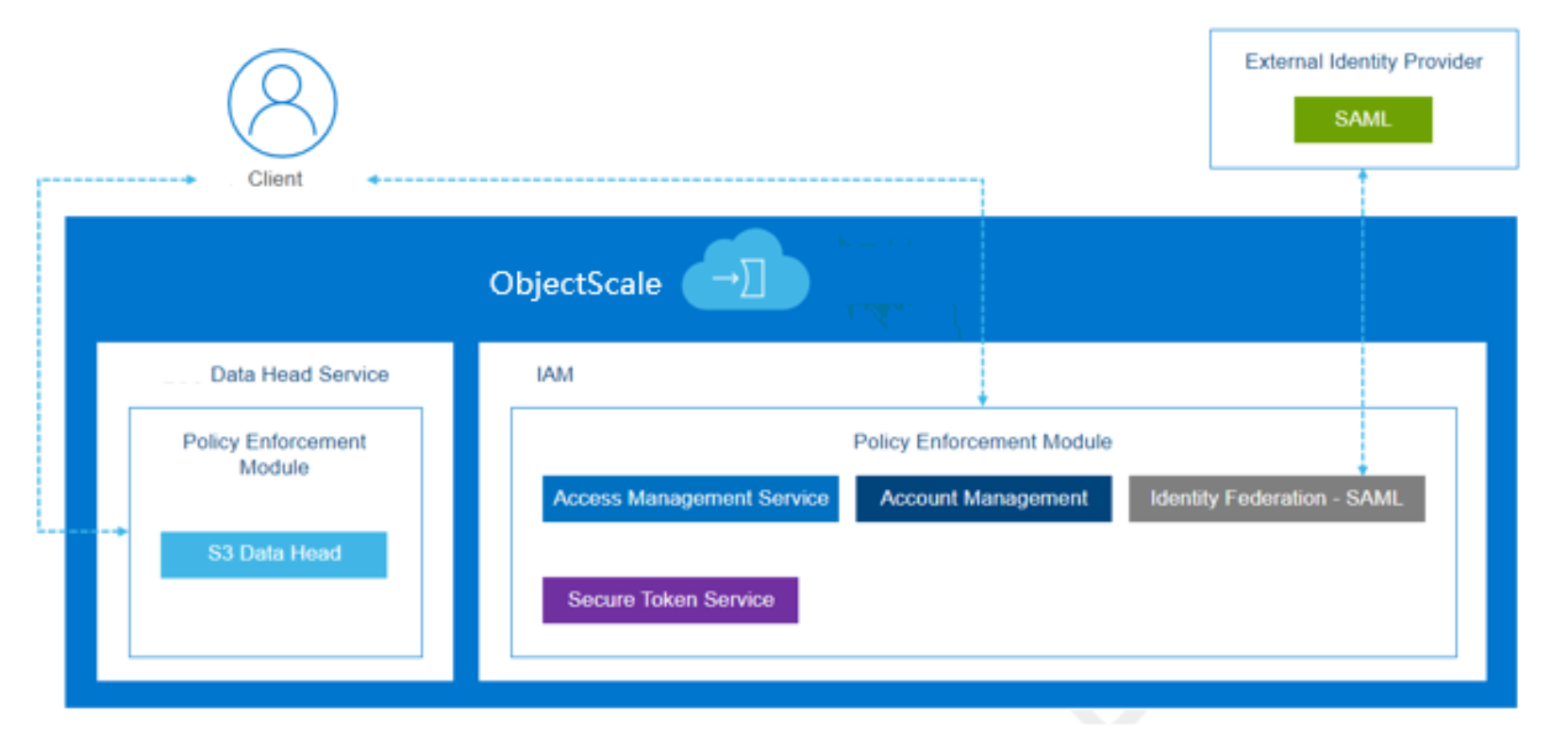
Figure 1. IAM architecture
IAM consists of the following components:
- Account Management (Managing Identities - Users, Groups, and Roles and tagging IAM entities)
- Access Management (Policies, Permissions, and ACLs)
- Secure Token Service (Temporary Credentials)
Account Management
Account Management
The service enables managing IAM identities within each namespace, such as Users, Groups, and Roles. With IAM, we will introduce a new namespace root user which will be an admin user for the namespace. All IAM entities will have a unique ID associated with it. Deleting and recreating an entity with the same name will create unique ID for the new entity.
Note: A namespace is conceptually the same as a tenant in ObjectScale. Namespaces are global resources created and assigned to a Replication Group.A key characteristic of a namespace is that users from one namespace cannot access objects in another namespace.
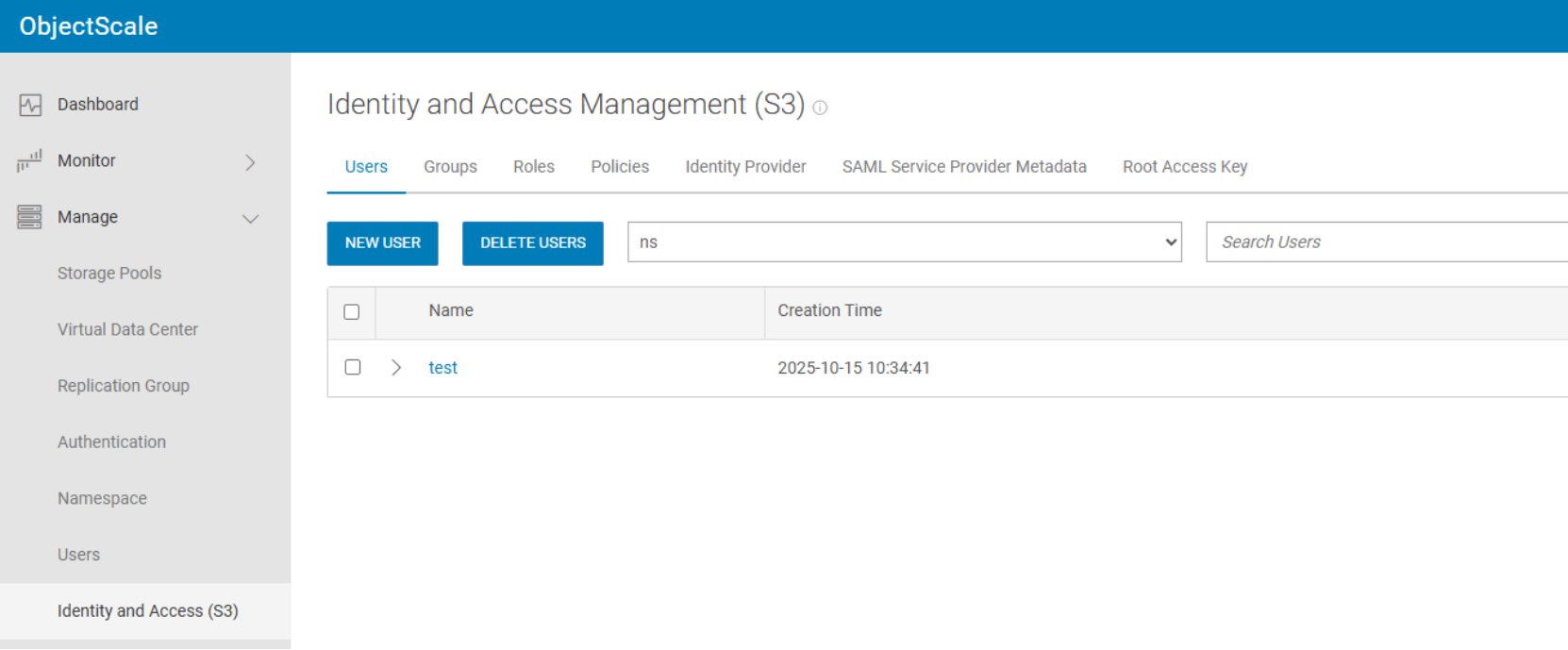
Figure 2. Identities of IAM
Identities
Tagging IAM Entities (Users and Role)
Custom attributes can be added to users and roles using a tag key-value pair. These tags can be used to control an entity's access to resources or to control what tags can be attached to an entity. Groups and policies cannot be tagged. You can apply the same tag to multiple entities but multiple tags on one entity cannot have the same key. ObjectScale will allow up to fifty tags per IAM entity.
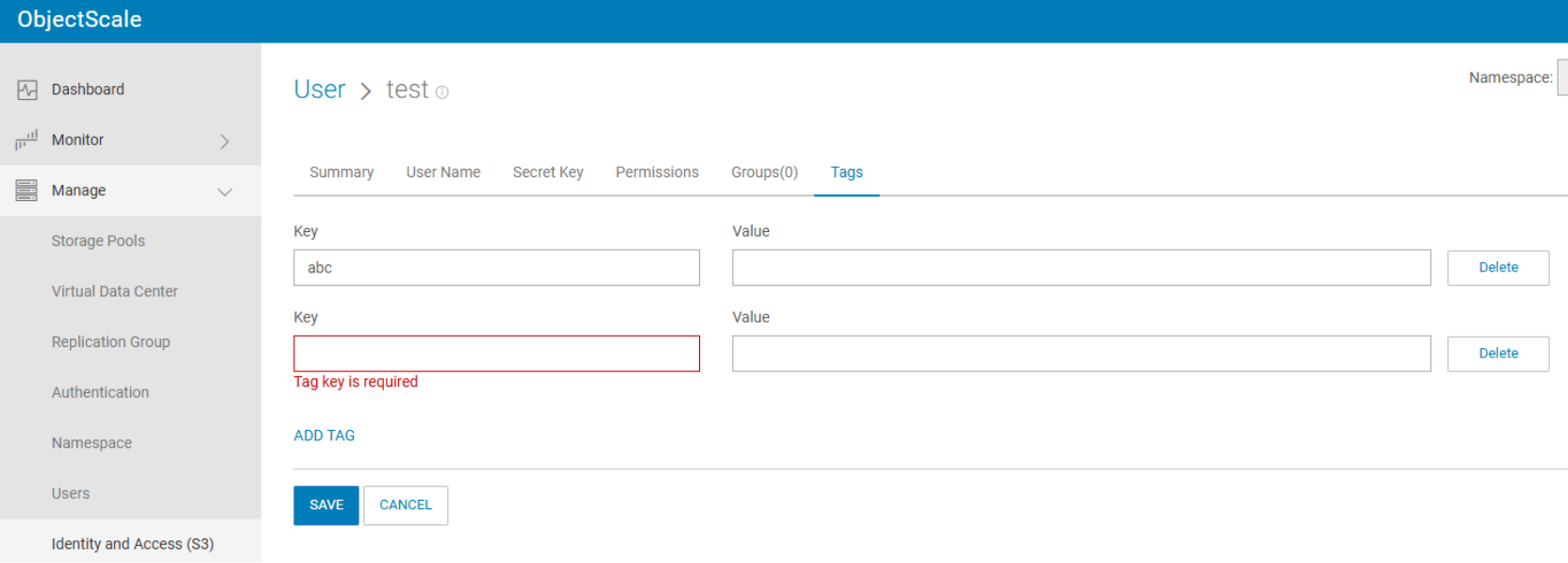
Figure 3. Tags on user account
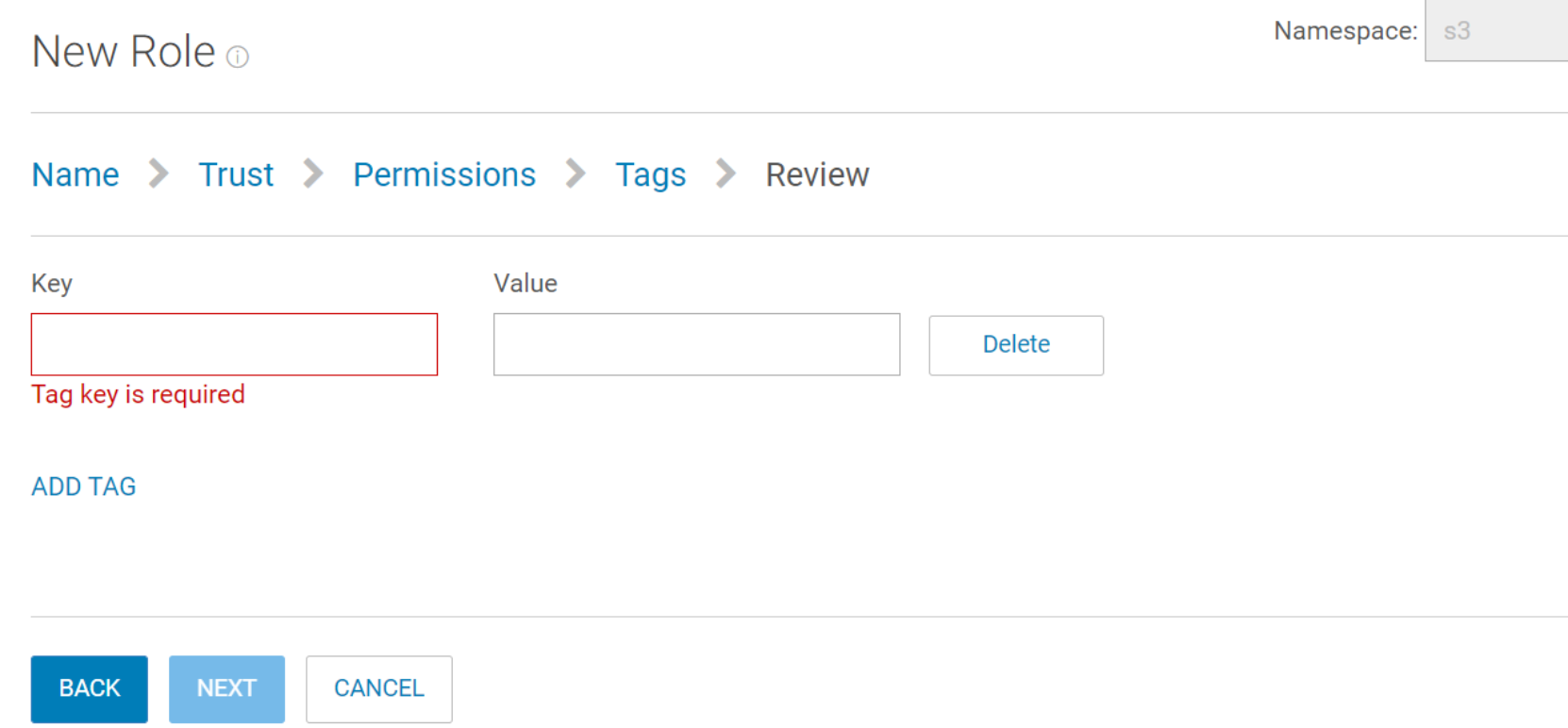
Figure 4. Tags on a role
Data Access Management
Data Access Management
Request Authorization
ObjectScale IAM will protect the following resources using the Policy Enforcement Module (PEM).
- Object Head API
- S3 (buckets and objects)
- STS API
- AssumeRole (Provides temporary credentials for cross account access)
- AssumeRoleWithSAML (Provides temporary credentials for SAML authenticated users)
- Management API
- IAM API
Request Authorization for an S3 Bucket Operation
For bucket or bucket sub-resource operation requests, the system evaluates permission in user (user policy or resource-level policy), bucket context (bucket policy or ACL), and authorization process, as shown in the following figure.
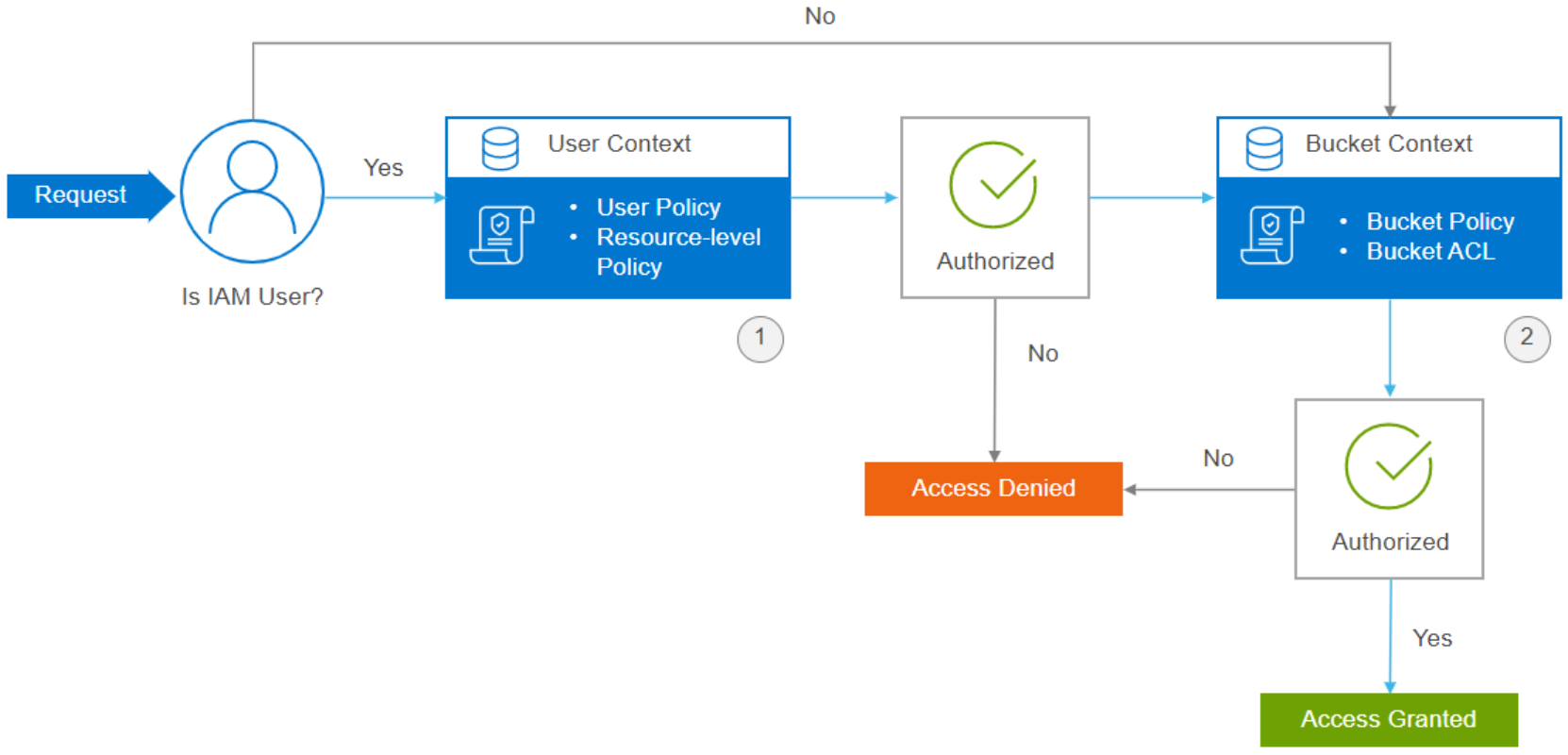
Figure 5. Request authorization for a S3 bucket
- User context: When there is a request from the IAM user, the system evaluates a subset of policies (bucket permissions in user policy) owned by the parent account (namespace admin). This subset of policies includes the user policy that the parent account attaches to the user.
- Bucket context: In this step, the system evaluates policies owned by the namespace admin account who owns the bucket. The bucket owner can grant permission by using a bucket policy or bucket ACL. The requester must have permissions from the bucket owner to perform a specific bucket operation.
|
Bucket owner (account) |
Requestor |
Bucket owner (account) |
|
U1 |
The user or the bucket policy determines the access. There is no bucket ACL check. |
|
|
A1 |
U2 |
U2 needs IAM policy from A2, if A1 bucket policy does not make a determination, then the system checks the bucket ACL. |
|
A1 |
R1 |
IAM policy is not relevant for root user (R1). If A1 bucket policy does not make a determination, then the system checks the bucket ACL. |
|
A1 |
R2 |
IAM policy is not relevant for root user (R2). If A1 bucket policy does not make a determination, then the system checks the bucket ACL. |
Key: A1 = first account, A2 = second account, U1 = user from the first account, U2 = user from the second account, R1 = root user from the first account, and R2 = root user from the second account.
The default bucket ACL within an account for a bucket is accessed. The default bucket ACL across accounts for a bucket is not set. It will be denied if you do not set any ACL in the bucket.
Request Authorization for a S3 Object Operation
For object operation requests, system will evaluate permission in user, bucket and object context, authorization process as below diagram shows.
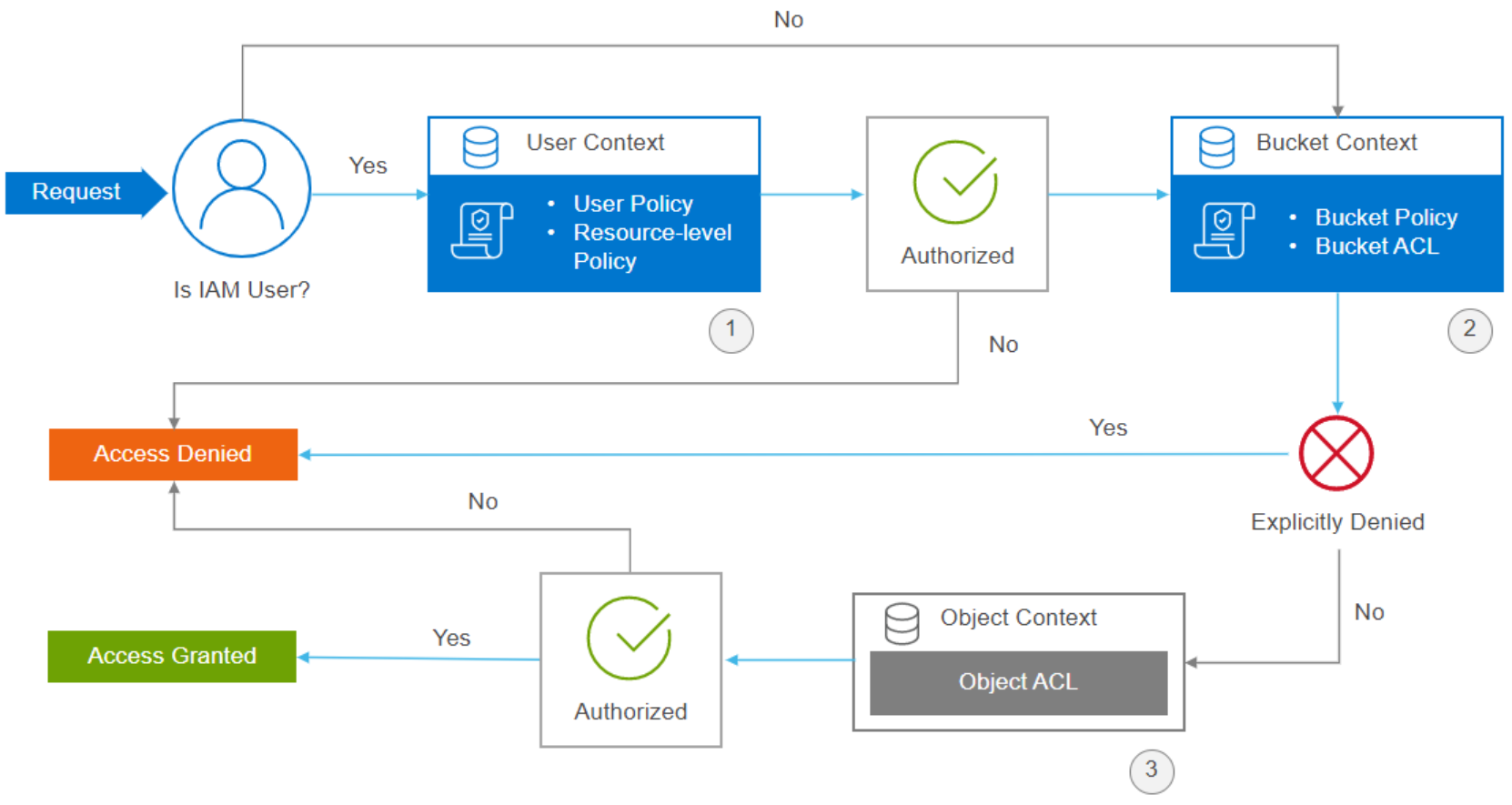
Figure 6. Request authorization for S3 object
- User context: When there is a request from the IAM user, the system evaluates a subset of policies owned by the parent account (namespace admin). This subset of policies includes the user policy that the parent account attaches to the user.
- Bucket context: System evaluates bucket policies. If the account (namespace admin) that owns the object in the request is not same as the bucket owner, in the bucket context, the system checks the policies if the bucket owner has explicitly denied access to the object. If there is an explicit deny set on the object, the system will reject request directly.
- Object context: If the bucket policy evaluation result is ALLOWED, object ACL could be skipped. If the bucket policy evaluation result is unknown, the system continues to evaluate the object ACL. The requester must have permissions from the object owner to perform a specific object operation.
|
Bucket owner (account) |
Object owner (account) |
Requestor (account, user) |
Comments |
|
A1 |
U1 |
Access determined by user/bucket policy. No object ACL check. |
|
|
A1 |
A1 |
U2 |
U2 needs IAM policy, if A1 bucket policy does not make a determination, then object ACL check. |
|
A1 |
R1 |
IAM policy not relevant. If A1 bucket policy does not make a determination, then object ACL check. |
|
|
A1 |
A1 |
R2 |
IAM policy not relevant. If A1 bucket policy does not make a determination, then object ACL check |
|
A1 |
A2 |
U1 |
U1 needs IAM policy or bucket policy allow. Object ACL needs to allow A1 access. |
|
A1 |
A2 |
U2 |
U2 needs IAM policy allow. Bucket policy should not be denied (it cannot allow). |
|
A1 |
A2 |
U3 |
U3 needs IAM policy allow. Bucket policy should not be denied (it cannot allow). Object ACL needs to allow A3 access. |
|
A1 |
A2 |
R1 |
IAM policy not relevant. Bucket policy should not be denied (it cannot allow). Object ACL needs to allow A1 access. |
|
A1 |
A2 |
R2 |
IAM policy not relevant. Bucket policy should not be denied (it cannot allow). Object ACL needs to allow A2 access. |
|
A1 |
A2 |
R3 |
IAM policy not relevant. Bucket policy should not be denied (it cannot allow). Object ACL need to allow A3 access. |
Note: A1 = first account, A2 = second account, A3 = third account, U1 = user from the first account, U2 = user from the second account, U3 = user from the third account, R1 = root user from the first account, R2 = root user from the second account, R3 = root user from the third account.
ObjectScale IAM limitations
ObjectScale IAM limitations
Secure Token Service (temporary credentials)
Secure Token Service (Temporary credentials)
Same account access with AssumeRole
Cross account access with AssumeRole
By default, an ObjectScale IAM user in one namespace has no access to buckets in another namespace. However, you can access different accounts using the role trust policy through AssumeRole.
Your account must be trusted by the role to assume a role from a different account. The trust relationship is defined in the role trust policy when the role is created. That trust policy states which accounts are allowed to delegate that access to users in the account. Also, ensure that you have permissions that are delegated from the user account administrator. The administrator must attach a policy that allows you to call AssumeRole for the Amazon Resource Name (ARN) of the role in the other account.
For example, your organization has multiple namespaces, in which, you separate a staging environment from a production environment. Certain users such as developers from the staging namespace may also want to access the production namespace when you move the staging environment to the production.
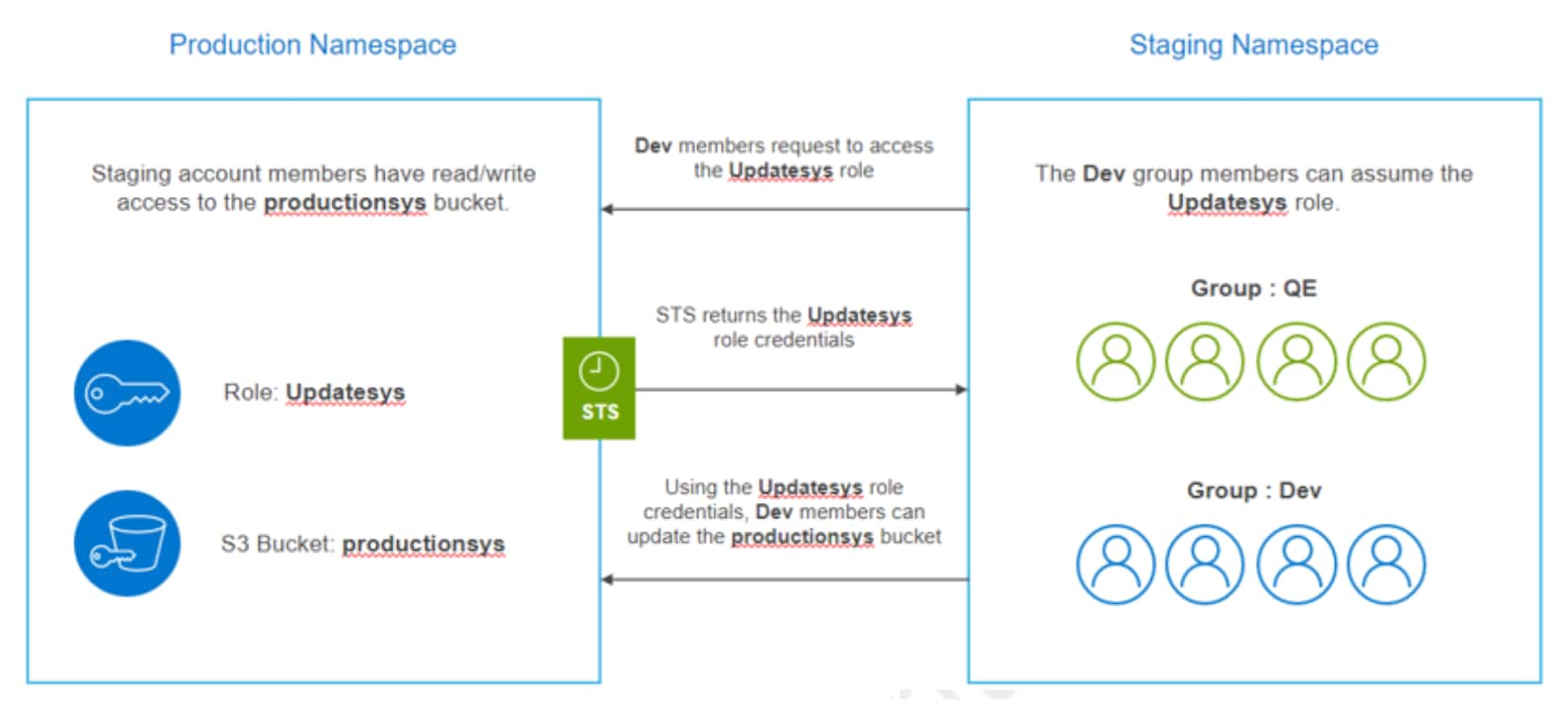
Figure 7. ObjectScale IAM cross-namespace access
For this scenario, the admin creates two groups for the staging account namely Dev and QE, and each group has its own policy.
In the production namespace, the administrator performs the following:
- Specifies a trust policy to the role to state that the staging account as a Principal. So that the authorized users from the staging account can use that role.
- Specifies which role users have read and write permissions to the productionsys bucket through a permissions policy.
- Shares the namespace and role information with the users who need to assume the role.
In the staging namespace, the administrator grants permission to the Dev group to assume the UpdateSys role. By doing this, the Dev group members can switch their role to the required and permitted role. For example, the Dev group members can switch their role to the UpdateSys role in the production namespace. Other users such as QE group members cannot switch their role. Hence, they cannot access the productionsys bucket.
In this process, STS verifies whether the requester is a trusted entity. After verifying, it returns temporary credentials to the authorized users to perform the required actions.
Trust policy for Role in ns1:
{
"Version": "2012-10-17",
"Statement": [
{
"Effect": "Allow",
"Principal": {
"AWS": "urn:ecs:iam::ns2:root"
},
"Action": "sts:AssumeRole"
}
]
}
Policy that is attached to the user in ns2 to AssumeRole:
{
"Version": "2012-10-17",
"Statement": [
{
"Action": [
"sts:AssumeRole"
],
"Resource": "urn:ecs:iam::ns1:role/assumeRoleCrossAccount",
"Effect": "Allow",
"Sid": "VisualEditor0"
}
]
}
ObjectScale IAM SAML support
Security Assertion Markup Language (SAML) is an open standard for exchanging authentication and authorization data between parties, in particular, between an identity provider (IdP) and a service provider.
ObjectScale supports Federated users SAML-compliant identity provider (IdP) like ADFS. This establishment enables the federated users to access ObjectScale resources.
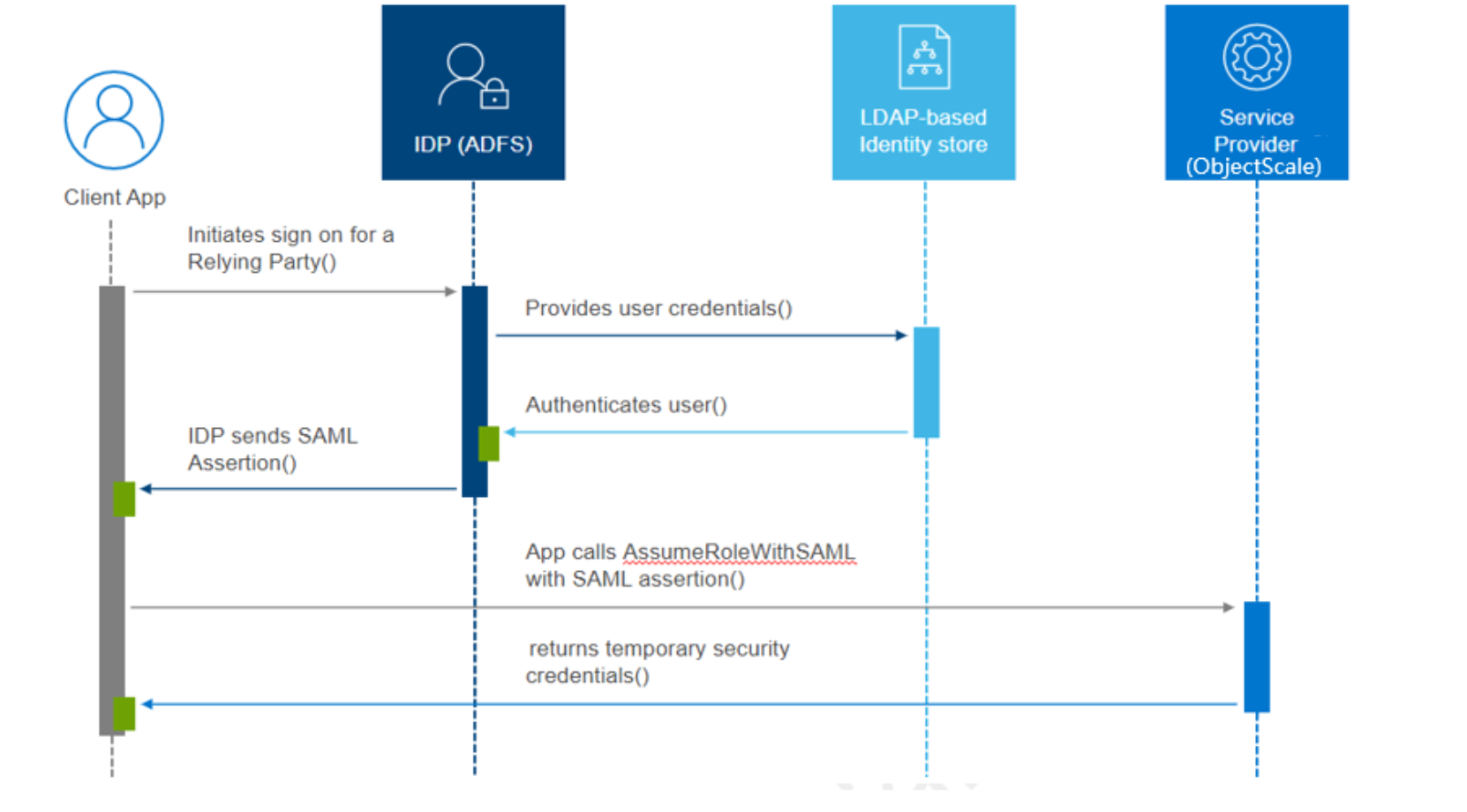
Figure 8. SAML based federation support
SAML-compliant provider setup
- Perform the following steps to use ADFS as a SAML-compliant Identity Provider. ObjectScale will be the service provider.
- Download the Identity Provider (ADFS) metadata file. The default URL to download ADFS metadata is https://[servername]/FederationMetadata/2007-06/FederationMetadata.xml.
- Upload the downloaded metadata xml file when creating Identity provider for a namespace.
- To create Identity provider in the ObjectScale Portal, perform the following:
- Go to Manage > Identity and Access (S3) > Identity Provider.
- Select a namespace.
- Click NEW IDENTITY PROVIDER.
- In order to establish trust relationship between ObjectScale and ADFS, ObjectScale metadata xml file is required.
- To create ObjectScale metadata file, base64 encoded Java keystore, alias that is used for the key and password is required.
- To create ObjectScale metadata file, go to Manage > Identity and Access (S3) > SAML Service Provider Metadata. Provide the required information as mentioned above and download the metadata file.
- Establish trust relationship between ObjectScale and ADFS using the downloaded ObjectScale metadata file.
- Add claim rules in ADFS to add the required elements such as NameId, RoleSessionName, and Roles to the SAML authentication process.
AssumeRoleWithSAML
AssumeRoleWithSAML which provides a set of temporary credentials for users authenticated with SAML authentication from an enterprise identity provider or directory service. The following figure shows the workflow for the AssumeRoleWithSAML.
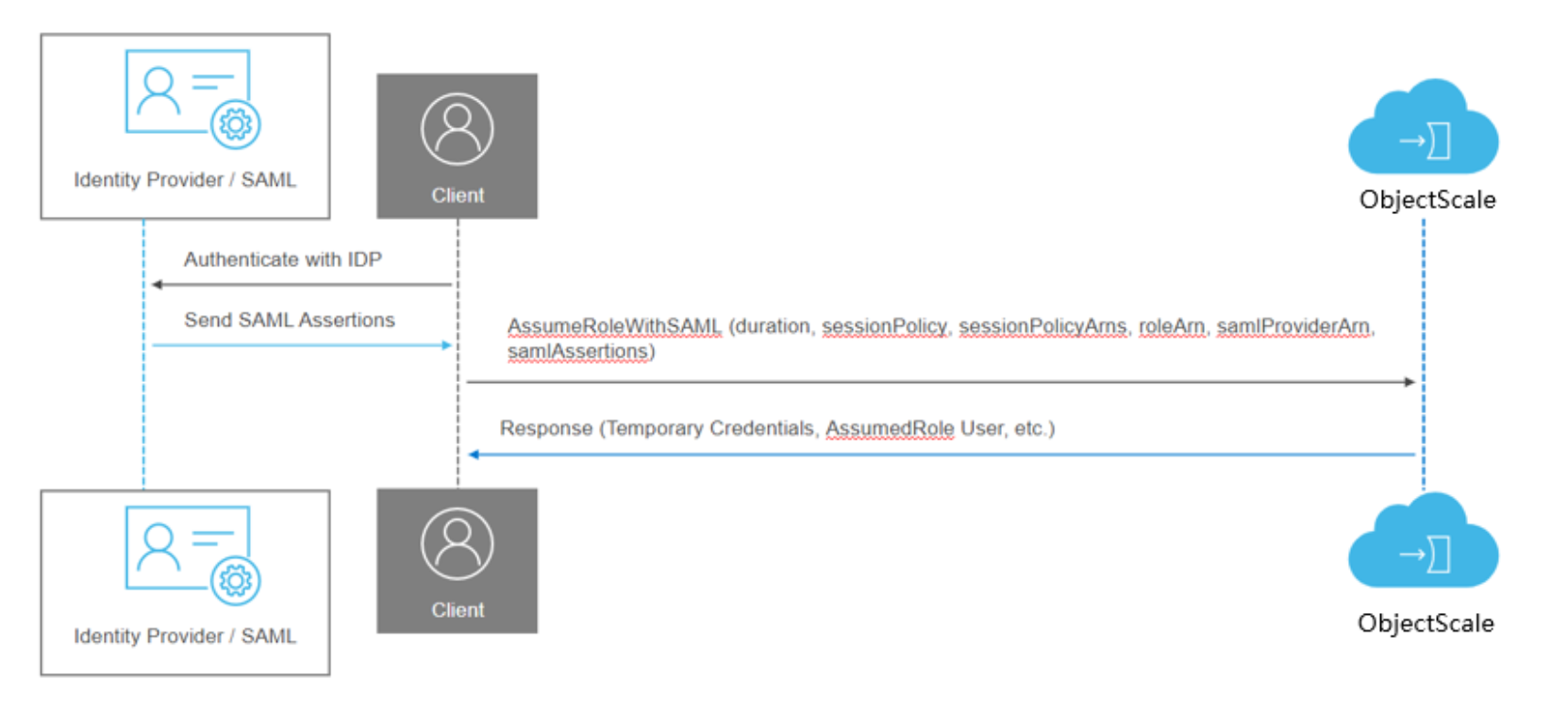
Figure 9. Workflow of AssumeRoleWithSAML
Before using AssumeRoleWithSAML, you must configure your SAML identity provider (IdP) like ADFS to issue the claims required by ObjectScale.
- IAM role must be created that specifies this SAML Provider in the trust policy.
- AssumeRoleWithSAML returns a set of temporary security credentials for users who have been authenticated through a SAML authentication response.
- This operation provides a mechanism for tying an enterprise identity store or directory to role-based access without user-specific credentials or configuration.
- Calling AssumeRoleWithSAML does not require the use of ObjectScale security credentials. The identity of the caller is validated by the claims that are provided in the SAML Assertions by the identity provider.
- Temporary credentials consist of an access key ID, a secret access key, and a security token.
- Following condition keys are supported in the AssumeRolePolicyDocument.
- saml:aud
- saml:iss
- saml:sub
- saml:sub_type
- saml:edupersonorgdn
- saml:namequalifier