
Dell PowerFlex Certification for MEDITECH

Dell PowerFlex Certification for MEDITECH This technical document presents the performance test results, which serve as a certification of compatibility between Dell PowerFlex and MEDITECH, based on the 80,000 IOPs test.

Executive summary

Executive summary

The performance testing conducted for MEDITECH on Dell PowerFlex using the 80,000 IOPs test has yielded valuable insights into the capabilities and efficiency of the system. This comprehensive examination focused on assessing the ability of the platform to manage the demanding workload requirements of MEDITECH applications. Through rigorous testing procedures and analysis, key performance metrics were evaluated to ensure optimal performance and reliability.

The results demonstrate the robustness and scalability of Dell PowerFlex in meeting the high-performance demands of MEDITECH, reaffirming its suitability for healthcare IT environments. This white paper summarizes the findings and implications of the performance testing providing readers with essential information to make informed decisions regarding infrastructure deployment and optimization strategies for all MEDITECH workloads.

Introduction

Revisions

Date

Description

June 2024

Initial release

Audience

This white paper is intended for storage administrators, database administrators, field consultants, sales engineers, and partners who are interested in Dell PowerFlex for MEDITECH.

Readers are expected to have an understanding and working knowledge of VMware vSphere, virtual machines, MEDITECH, and PowerFlex software-defined storage.

Terminology

The following table provides definitions for some of the terms that are used in this document.

Table 1.      Terminology

Term

Definition

DDVE

Data Domain Virtual Edition

EHR

Electronic Health Record

FG

Fine Granularity

IDRs

Integrated Disaster Recovery

IOPs

Input Output Operations Per Second

ISB/CISB

Integrated Serverless Backup/Cascaded ISB

MBF

MEDITECH Backup Facilitator

MG

Medium Granularity

SDC

Storage Data Client for PowerFlex

SDS

Storage Data Server for PowerFlex

SLA

Service Level Agreement

We value your feedback

Dell Technologies and the authors of this document welcome your feedback on the solution and the solution documentation. Contact the Dell Technologies Solutions team by email.

Author: Duane Fafard

Contributors: Sean Flaherty, Ananthakrishnan Saji, Yaron Dar, Sridhar Subramanian

Note: For links to additional documentation and other solutions, see Dell Technologies Solutions Info Hub.

Product overview

PowerFlex family

PowerFlex software-defined infrastructure enables broad consolidation across the data center, encompassing almost any type of workload and architecture. The software-defined architecture offers automation and programmability of the complete infrastructure and provides scalability, performance, and resiliency to enable effortless adherence to stringent workload SLAs. 

The PowerFlex family provides a foundation that combines compute and high-performance storage resources in a managed unified fabric. PowerFlex comes in flexible deployment options (rack, appliance, or custom nodes and in the public cloud) that enable independent (two-layer), HCI (single-layer), or mixed architectures. PowerFlex is ideal for high-performance applications and databases, building an agile private/hybrid cloud, or consolidating resources in heterogeneous environments. 
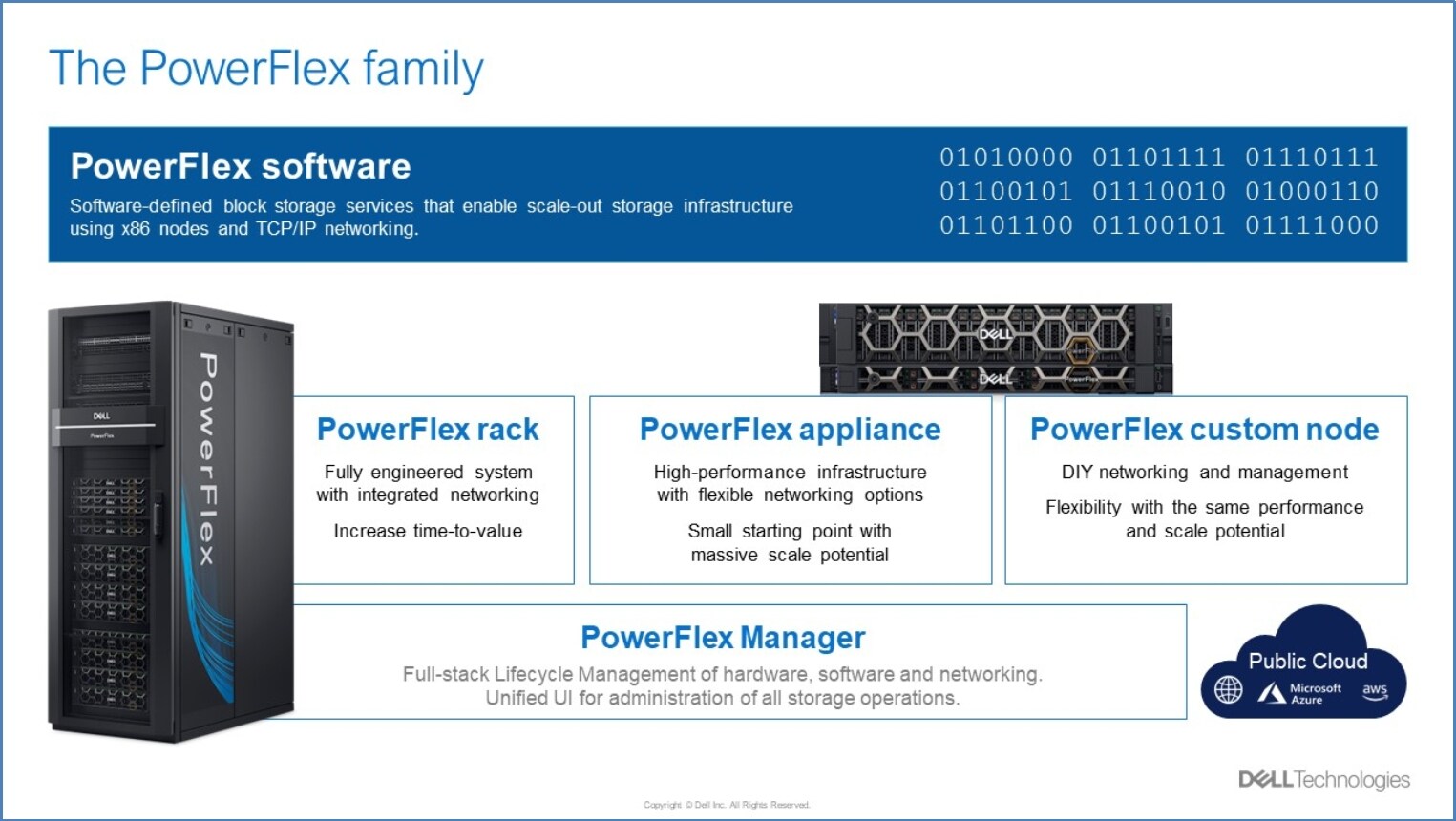
This is a screenshot of the PowerFlex family components.

Figure 1.       PowerFlex Family

PowerFlex software components

Software is the key differentiation in the PowerFlex offering. PowerFlex software components not only provide software-defined storage services, but also help simplify infrastructure management and orchestration. This software enables comprehensive IT Operational Management (ITOM) and Life Cycle Management (LCM) capabilities that span compute as well as storage infrastructure, from BIOS and Firmware to nodes, software, and networking. 

PowerFlex 

PowerFlex is the software foundation of PowerFlex software-defined infrastructure. It is a scale-out block storage service that is designed to deliver flexibility, elasticity, and simplicity with predictable high performance and resiliency at scale.  

PowerFlex Manager 

PowerFlex Manager is the software component in the PowerFlex family that enables ITOM automation and LCM capabilities for PowerFlex systems. Starting with PowerFlex 4.0, the unified PowerFlex Manager brings together three separate components used in previous releases – PowerFlex Manager, the core PowerFlex UI, and the PowerFlex gateway. The new PowerFlex UI runs in Kubernetes and embraces a modern development framework.  

PowerFlex with NVMe over TCP (NVMe/TCP) 

NVMe is a family of open specifications that defines an industry standard for both a logical interface and a communication protocol for accessing block storage across an internal PCIe fabric or through external fabrics such as TCP/IP and FC. NVMe is designed to take advantage of the internal parallelism and low latency inherent in flash-based media SSDs. 

NVMe/TCP is an extension of the NVMe base specification that defines the binding of the NVMe protocol to message-based fabrics using TCP. By binding the NVMe protocol to TCP, NVMe/TCP enables the efficient end-to-end transfer of commands and data between NVMe hosts and NVMe controller devices by any standard Ethernet-based TCP/IP networks. 

From PowerFlex release 4.x onwards, support for NVMe/TCP has been added for on-premises deployment with the introduction of a new Storage Data Target (SDT) component installed in the storage layer. The NVMe initiator in the operating system or hypervisor communicates with the SDT, which then communicates with the Storage Data Server (SDS). The NVMe initiator is part of the kernel of the application host operating system or hypervisor.
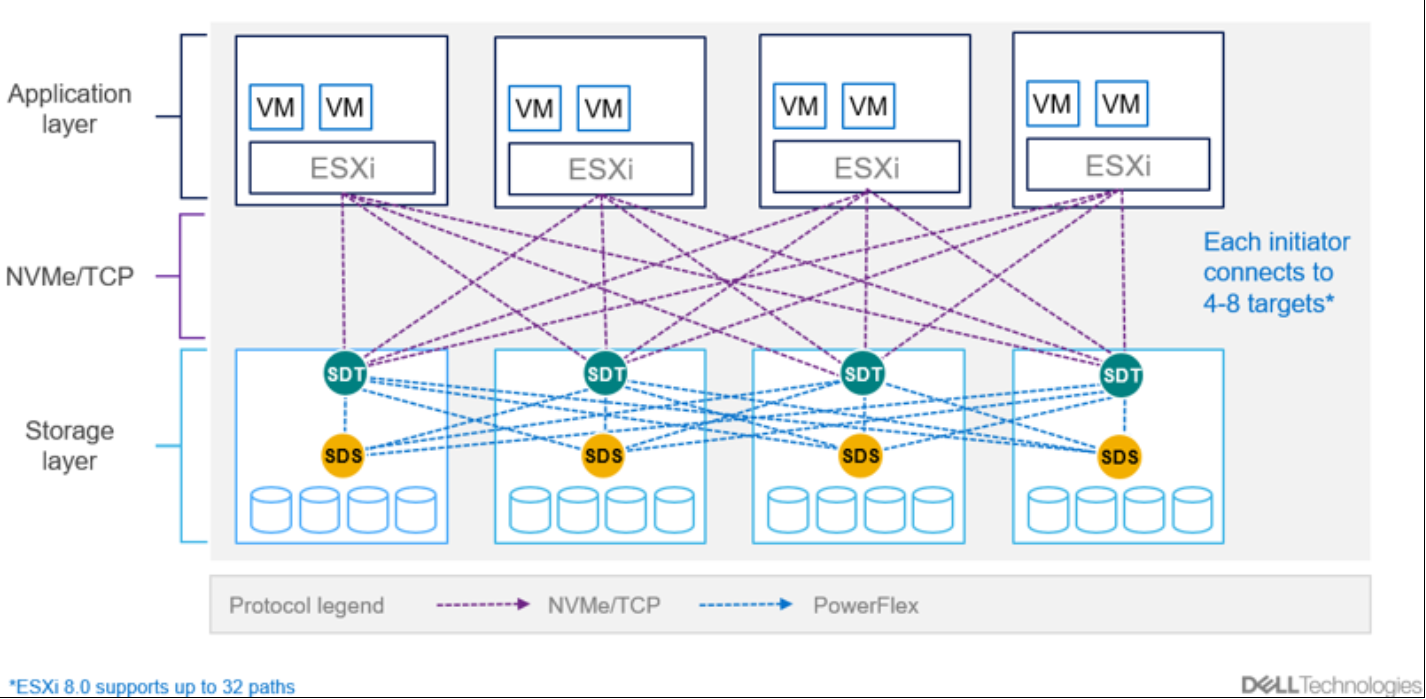
This is a screenshot of the Powerflex withNVMe/TCP architecture.

Figure 2.      PowerFlex with NVMe/TCP 

For more information, see PowerFlex with NVMe over TCP.

PowerFlex deployment architectures

PowerFlex software-defined storage offers flexibility of deployment architecture to help best meet the specific deployment and architectural requirements. PowerFlex can be deployed in a two-layer (Independent), single-layer (Hyperconverged/HCI), or a mixture of the two architectures (Mixed). OpenShift environments on PowerFlex use a two-layer (independent) architecture.
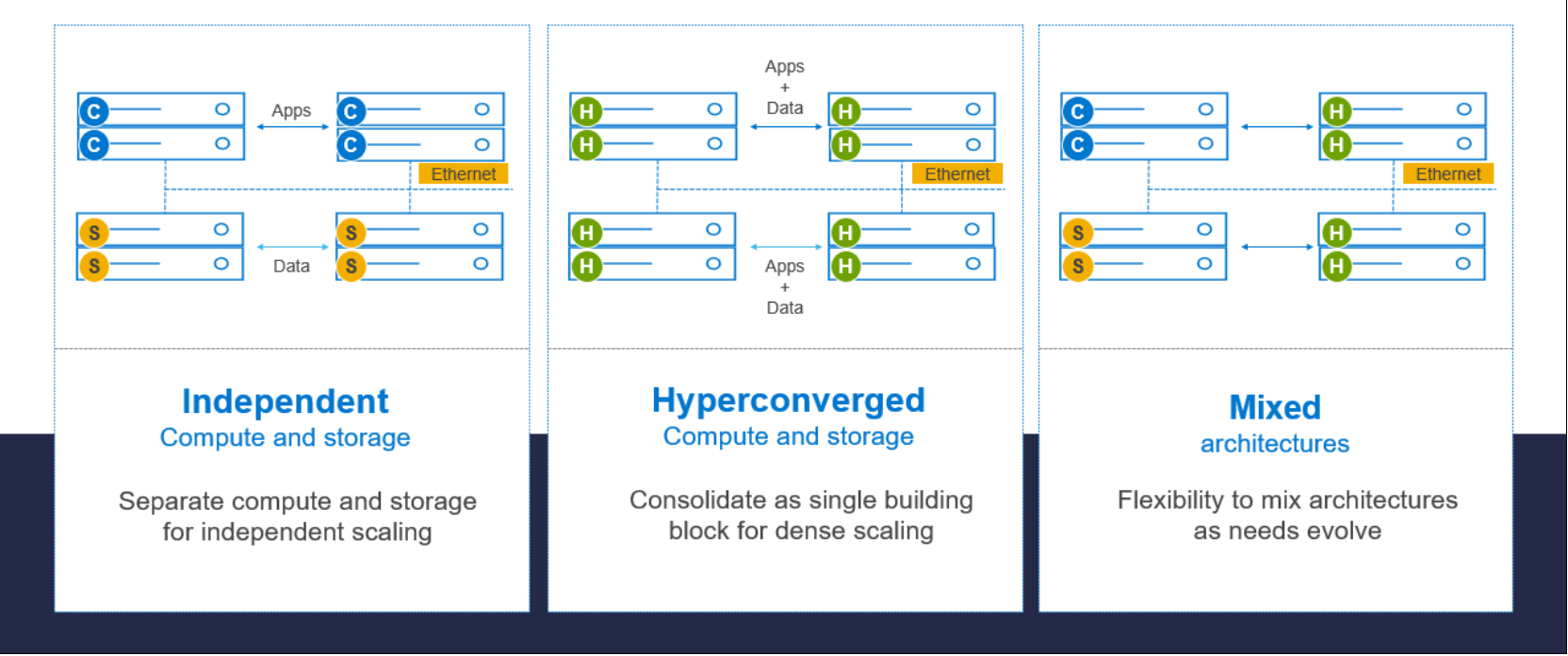
This image shows the PowerFlex deployment architectures.

Figure 3.       PowerFlex deployment architectures 

Independent architecture 

In an independent architecture, or two-layer architecture, some nodes provide storage capacity and host datasets while other, separate, and independent nodes, host applications and workloads. Compute and storage resources can be scaled independently by adding nodes to the cluster. This separation of compute and storage resources can also help minimize software licensing costs in certain situations. And this architecture can be ideal for hosting high-performance high-value databases and application workloads. 

Hyperconverged architecture 

In an HCI architecture, each node in the cluster contributes storage resources and hosts applications and workloads. This architecture allows you to scale your infrastructure uniformly and with a predefined building block that adds both storage and compute resources. This architecture is appropriate for data center and workload consolidation. 

Mixed architecture 

A mixed architecture is a combination of both the HCI and Independent architectures. As shown in Figure 3 there are some storage only nodes, compute only nodes, and HCI nodes as a part of the same PowerFlex cluster. This is a desirable architecture when working with an existing compute infrastructure and adding high-performance software-defined infrastructure. This can also be a starting point for a two-layer deployment design as external workloads are migrated to PowerFlex. 

PowerFlex consumption options

PowerFlex rack 

PowerFlex rack is a software-defined storage platform that delivers flexibility, elasticity, and simplicity with predictable performance and resiliency at scale by combining compute as well as high-performance storage resources in a managed unified network. This rack-scale engineered system, with integrated networking, enables customers to achieve the scalability and management requirements of a modern data center.  

PowerFlex appliance 

PowerFlex appliance is a PowerEdge server which has been configured to be a node in a software-defined storage deployment. This offering allows customers the flexibility and savings to bring their own compatible networking. 

PowerFlex custom nodes 

PowerFlex Custom Nodes are validated server building-blocks configured for use with PowerFlex. They are available with thousands of configuration options and are available for customers who prefer to build their own environments. 

Dell APEX Block Storage for Public Cloud  

PowerFlex software is also available in the public cloud as Dell APEX Block Storage for Public Cloud. It offers the same on-premises benefits of high-performance, linear scalability, and high resilience as in cloud. It also adds cloud-specific benefits, such as large volume sizes, extreme performance based on NVMe drives, and predictable scalability. The Dell APEX Block Storage self-healing architecture simplifies and increases the availability of infrastructure. It is designed to remain running even when it encounters failures. With fast rebuilds, Dell APEX Block Storage recovers rapidly from failures and keeps operating, without degrading performance or compromising availability. You can also extend this availability and configure it to protect your application availability across multiple availability zones.

Note: Dell APEX Block Storage for Public Cloud is a consumption option for PowerFlex. However, MEDITECH is certified to run only with PowerFlex on-premises deployments.

BridgeHead

BridgeHead Software has consistently worked in close collaboration with MEDITECH and co-designed the Integrated Serverless Backup (ISB) API and later Integrated Disaster Recovery (IDR) API, to produce a market-leading backup solution for the MEDITECH EHR. Bridgehead’s backup solution offers a comprehensive, tried and tested solution that is used by over 1,000 hospitals worldwide. Their software helps healthcare facilities overcome challenges arising from ever increasing data volumes and storage costs while helping to consolidate, store, protect, and share clinical and administrative information. BridgeHead Healthcare Data Management solutions are vendor neutral and designed to work with applications and storage hardware from any hospital, providing greater choice, flexibility, and control over the way data is managed. For more information, see the BridgeHead website.

MEDITECH

MEDITECH empowers healthcare organizations around the globe to expand their vision of what is possible with Expanse, the most intelligent EHR platform in the world. Expanse answers the demands of an overburdened workforce - personalized workflows, intuitive functionality, interoperable systems, and innovative AI applications, all working together to drive better outcomes. For more information, see the MEDITECH website.

Test infrastructure

Solution architecture

The architecture consists of a single PowerFlex cluster in a two-layer configuration. The cluster consists of six storage-only nodes. PowerFlex supports two types of storage pool data layouts: Medium Granularity and Fine Granularity. Fine granularity data layout is used here as it offers little to no performance impact on application workloads during the creation of snapshots. Fine Granularity also supports inline compression and persistent checksums. 
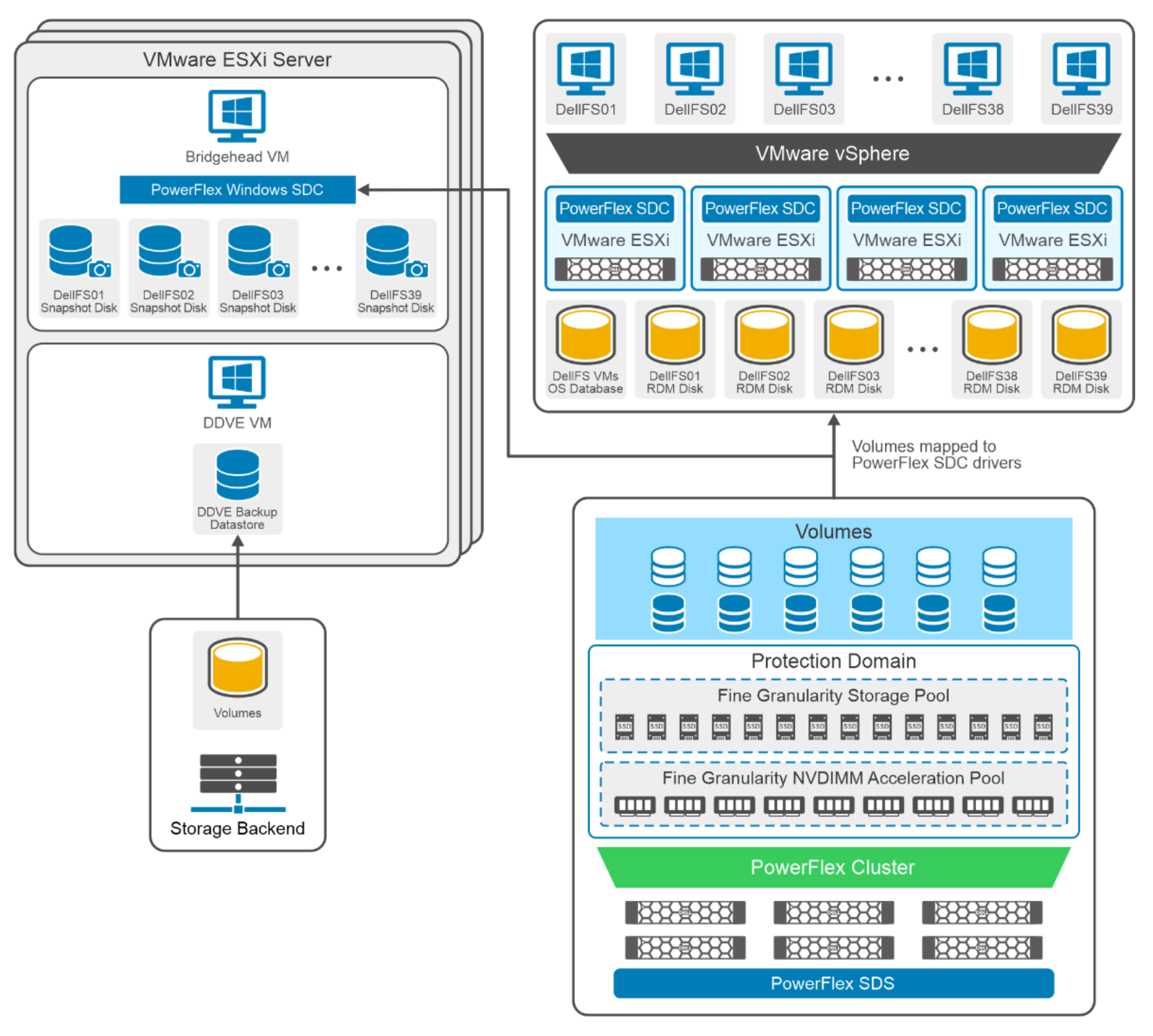
This figure shows a PowerFlex two layer architecture.

Figure 4.   Solution architecture

Network architecture

The following figure shows the networking diagram for the PowerFlex cluster:
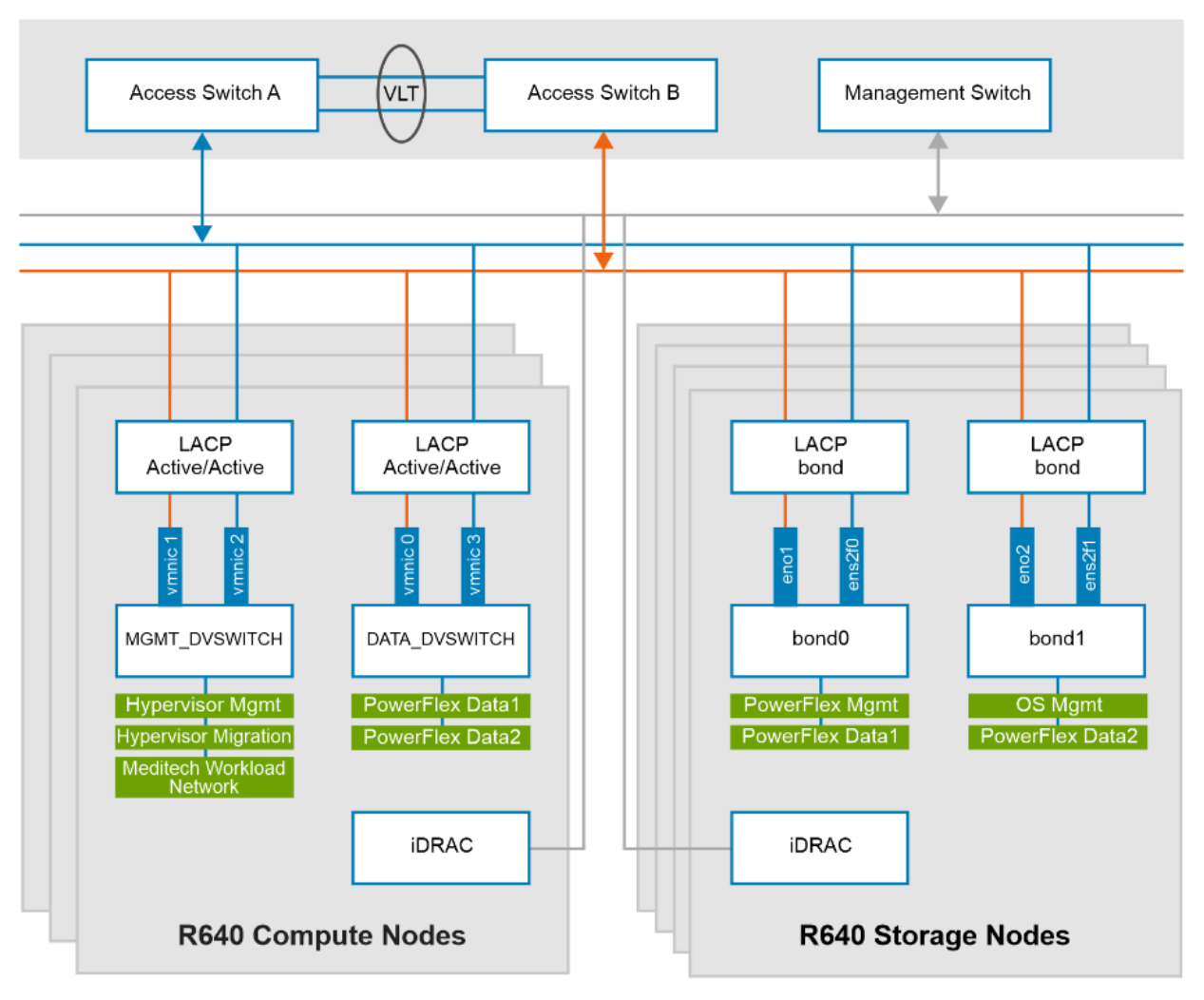
This figure shows the PowerFlex network architecture with storage and compute nodes.

Figure 5.   Network architecture

The following table shows the VLAN ID details of the network architecture:

Table 2.      Network IDs

Network type

VLAN ID

Hypervisor Management 

405

Hypervisor Migration

406

PowerFlex Management

450

PowerFlex Data 1

451

PowerFlex Data 2

452

MEDITECH Workload Network

196

Software and hardware configuration

Dell PowerFlex configuration

The two-layer PowerFlex cluster is set up with a single protection domain and a storage pool that is configured for Fine Granularity. An NVDIMM acceleration pool was established, as a prerequisite for achieving a Fine Granularity data layout. 

The following tables show the configuration of the storage only and compute only nodes:

Table 3.      Storage node details

Component

Storage Only Nodes

Server model

R640

No. of nodes

6

CPU

2 x Intel Xeon Gold 5215 CPU @ 2.50 GHz (Core Count 10)

Memory

224 GB (12 x 16 GB + 2 NVDIMM x 16 GB, 2666 MHz)

Storage

10 x 1788.5 GB SAS SSD

Network Card

2 x Mellanox 25 GbE 2 P ConnectX-4 LX

Operating system

SLES 15 SP3

Dell PowerFlex

4.5

Table 4.      Compute node details

Component

Compute Only Nodes

Server model

R640

No. of nodes

4

CPU

2 x Intel Xeon Gold 5218 CPU @ 2.30 GHz (Core Count 16)

Memory

224 GB (12 x 16 GB + 2 NVDIMM x 16 GB, 2666 MHz)

Storage

2 x 223.57 GB SATA SSD, 

1x 447.13 GB SATA SSD

Network Card

2 x Mellanox 25 GbE 2 P ConnectX-4 LX

Operating system

VMware ESXi 7.0.3

Dell PowerFlex

4.5

Switch hardware

The following table shows the switch hardware configuration:

Table 5.      Switch details

Component

Switch Model

TOR Switch A

Dell PowerSwitch S5248F-ON

TOR Switch B

Dell PowerSwitch S5248F-ON

BridgeHead backup

As part of the certification, it is essential to ensure that MEDITECH databases are backed up within a specific time frame. To fulfill this requirement, we have collaborated with BridgeHead software. BridgeHead Software version 24A, which is compatible with PowerFlex, was deployed on a VMware virtual machine running Windows Server 2019.

This VM was configured with 8 virtual CPUs and 16 GB of RAM to support optimal performance. Additionally, PowerFlex Windows SDC was installed on this VM to enable snapshot access and backup functionalities. To facilitate secure REST API calls, an SSL connection was established between the VM and the PowerFlex Manager Gateway.

The testing schedule was as follows:

  • IDRs: 00:00. 04:00, 08:00, 12:00, 16:00, 20:00
  • Maintained five generations of IDRs
  • ISBs: 06:30 (to DDVE device)
  • 12 active streams, backup completed in approximately 4 hours and 51 minutes.
  • CISBs: 00:30 (to NULL device)
  • Ten active streams, backup completed in approximately 2 hours and 8 minutes.
  • VMs: 21:00

Dell PowerProtect DDVE

PowerProtect DDVE was deployed to serve as a backup target for the BridgeHead software.

The following table shows the DDVE configuration details:

Table 6.      DDVE configuration

Configuration detail

Value

DDVE version

7.12.0.0-1053185

VM Config

8 vCPUs (1 socket), 48 GB RAM

This configuration offers up to 32 TB of storage capacity.

Networking: Default 2 NIC configuration with MTU 9000

ESXi version

VMware ESXi 7.0.3

File system size

24.2 TiB

Test VM configuration

Thirty-nine Windows Server test VMs were deployed to run the MEDITECH test workload. Each VM had the specifications as shown in the following table:

Table 7.      VM configuration

VM configuration

Value

vCPU

4

Memory

4 GB

Hard disk

OS Disk: 100 GB VMDK disk

Test volume: 304 GB RDM Disk

Note: Disks are connected to dedicated SCSI controllers.

Operating system

Windows Server 2019 Standard

Apart from the above VMs, other VMs such as Active directory VM, background job VMs, and jump VM required for accessing the test environment were also deployed.

MEDITECH specific settings

PowerFlex

Throughout the testing phase, it came to our attention that Medium Granularity (MG) failed to deliver the required performance levels, considering the number of storage nodes within our test environment. This performance inadequacy was specifically linked to the utilization of snapshots. Conversely, when Fine Granularity (FG) was implemented, there was no noticeable escalation in latency even when snapshots were incorporated. As a result, it is required to configure Fine Granularity (FG) for MEDITECH solutions.

VMware

The PowerFlex SDC behavior for the length of SCSI unit product serial number value needs to be configured. The default value of this parameter is "0" (with trailing zeros) and to align with MEDITECH backup functionality (MBF) it needs to be set to "1" (no trailing zeros).

To do this, run the following command from the ESXi command line:

esxcli system module parameters set -m scini -p "blkScsiUnitSerialLenByStandard=1"

BridgeHead

BridgeHead software version 24A or newer supports PowerFlex and is required for the MEDITECH backup functionality (MBF).

Test results – 80,000 IOPs test

Overview

MEDITECH imposes stringent requirements on hardware vendors, necessitating them to confirm that their storage solutions can effectively deliver the required performance benchmarks. To evaluate this, a comprehensive test was conducted using MEDITECH’s proprietary load generation tool. This tool was configured to replicate the intense I/O workload characteristic of MEDITECH Expanse EMR software. Some supplementary operations were also introduced such as IDRs (snapshots) and ISBs (backups) to simulate real-world usage scenarios.

The evaluation process of the PowerFlex storage platform for integration with the MEDITECH system requires to conduct a baseline throughput assessment. Subsequently, the impact on this throughput was examined through the creation of multiple point-in-time copies (IDRs) and the execution of a complete physical backup (ISB or CISB) of one of these point-in-time copies.

These assessments were conducted under MEDITECH’s most stringent requirement for their M-AT platform, which necessitates an average workload distribution of 80% writes and 20% reads. To meet these criteria, PowerFlex must achieve the following workload volume throughput while maintaining acceptable latency levels:

  • Writes: Nominal latency of 1 ms, maximum latency of 2 ms
  • Reads: Nominal latency of 1 ms, maximum latency of 2 ms

One crucial aspect to measure is the duration that the database must remain inactive (quiesced) while the backup software accesses the point-in-time copies for all LUNs. Following the establishment of a baseline performance profile, the test must gather consistent metrics over a minimum 4-day period, incorporating the creation of four point-in-time copies and an external backup of one of these copies. The amount of time that the database is quiesced needs to be less than 10 seconds which is also known as the Copy Creation Time.

To achieve the 80,000 Input Output Operations Per Second (IOPs) the workload was spread across 39 test VMs.

Table 8.      Host server details

Host Count

IOPs

Read/Write %

I/O Profile

9

3300

20/80

File Server

12

2000

20/80

File Server

12

1100

20/80

File Server

1

6000

100/0

Data Repository Server

1

2000

50/50

Scanning and Archive Server

4

100

0/100

Transaction Server

PowerFlex IOPs

The goal of this test was to attain a minimum of 80,000 IOPs. As shown in the chart below, the average total IOPs recorded during the test was 2,288 per MEDITECH host, resulting in a cumulative IOPs of 89,232 on the PowerFlex storage.
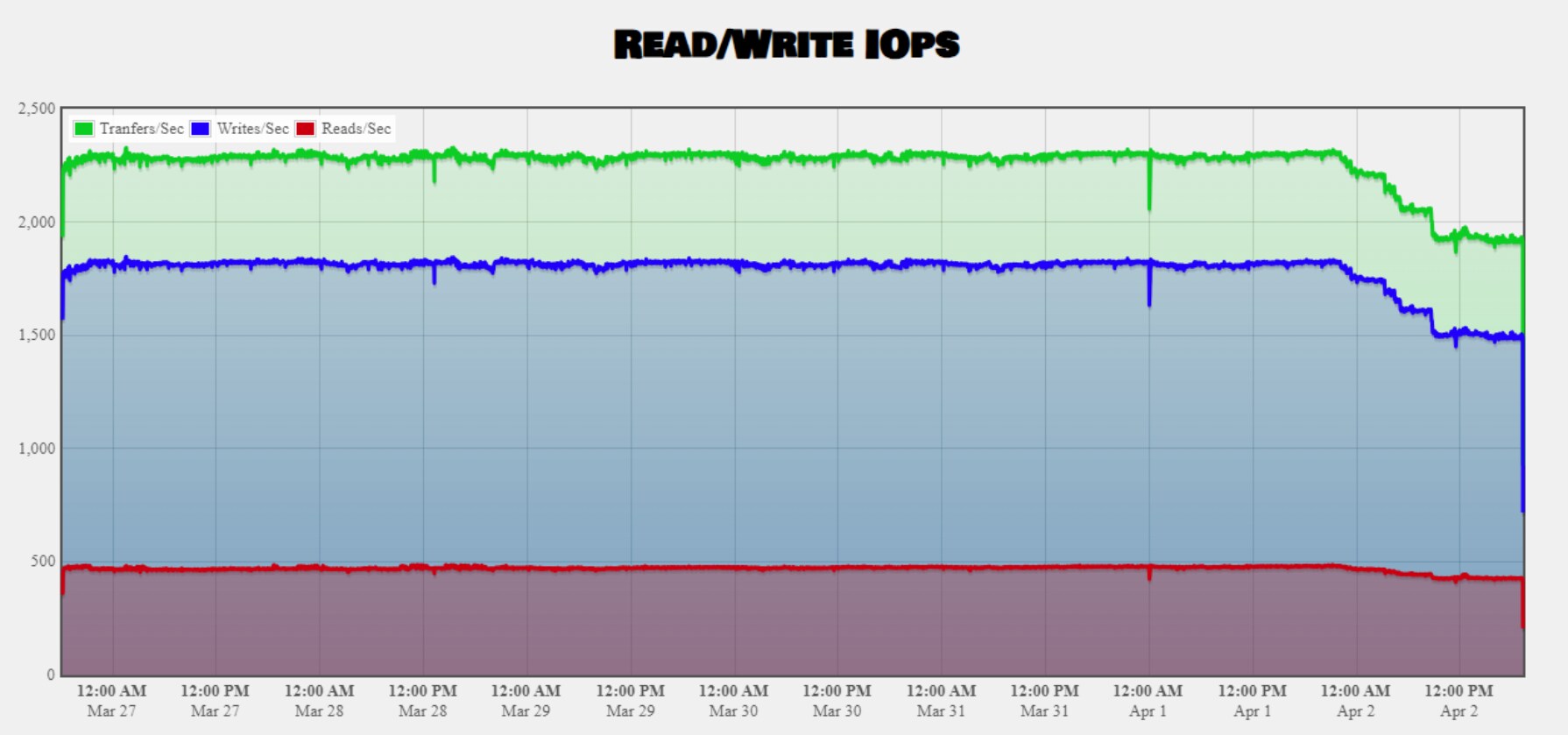
This figure describes the PowerFlex read/write operations.

Figure 6.   PowerFlex read/write operations

PowerFlex latency

Latency must consistently remain under 1 ms for both reads and writes, with spikes not surpassing 2 ms. The PowerFlex storage managed to maintain an average read latency of 0.53 ms and a write latency of 0.39 ms. The highest recorded read spike was 0.84 ms, while the maximum write spike reached 0.55 ms as shown in the following chart:
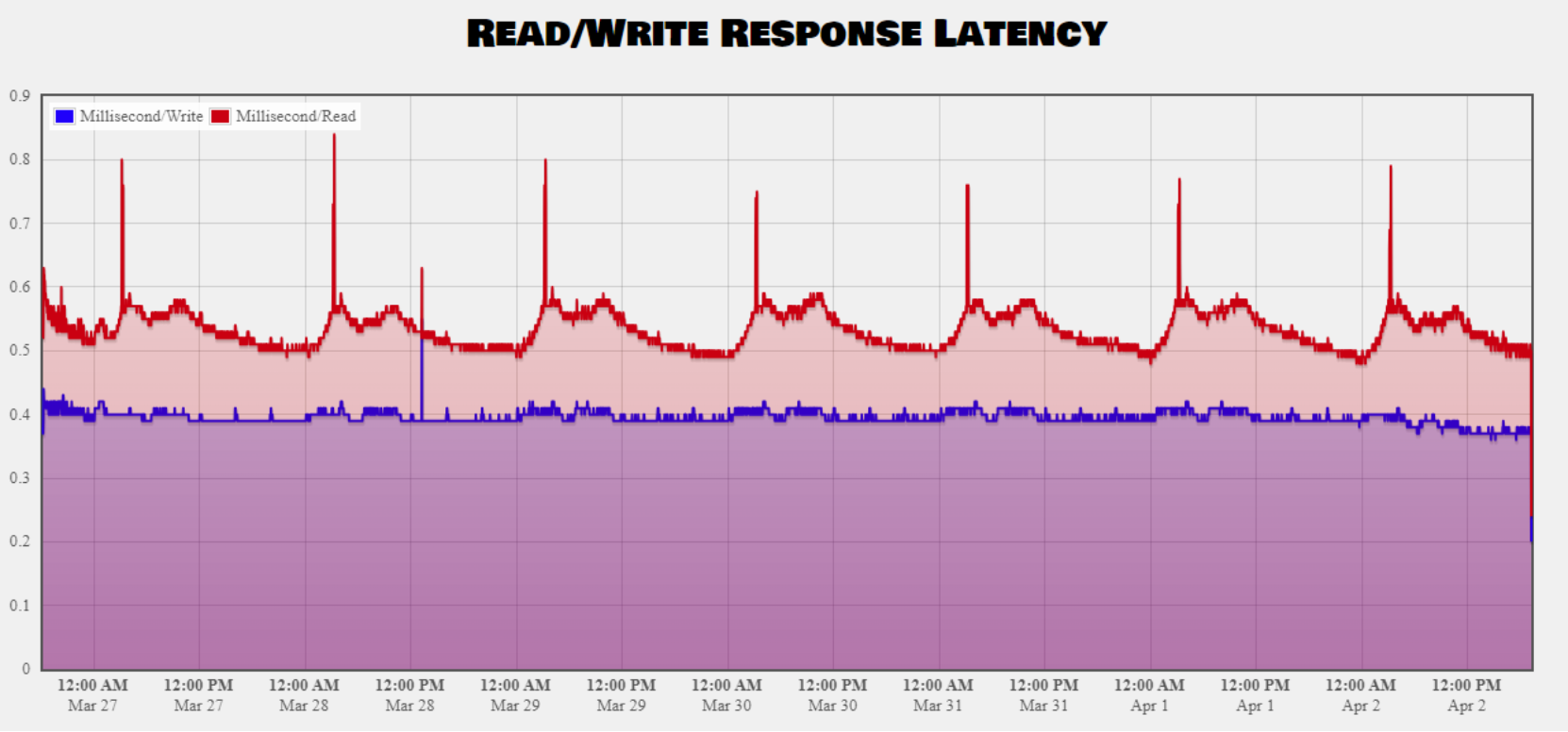
This figure describes the PowerFlex read/write response latency.

Figure 7.   Read/write response chart

PowerFlex database quiesce times

The PowerFlex storage surpassed the 10-second acceptable threshold for Copy Creation Time. Over the course of the 5-day test period, the maximum duration for which the databases were quiesced was 0.672 seconds, as documented in the mbi.log file generated by the MEDITECH application suite.

Conclusion

Conclusion

The performance testing of Dell PowerFlex for MEDITECH applications established its efficacy and reliability in handling high-demand healthcare IT environments. The key findings from the 80,000 IOPs test are:

  • Robust performance: PowerFlex demonstrated exceptional performance, with average total IOPs of 89,232, surpassing the 80,000 IOPs goal.
  • Low latency: The system maintained low latency levels, with average read and write latencies well below the 1ms threshold.
  • Efficient backup: Database quiesce times were lower than the acceptable 10-second threshold, ensuring minimal disruption during backups.
  • Optimal configuration: Fine Granularity (FG) settings and specific VMware adjustments were crucial for achieving the desired performance levels, particularly for MEDITECH solutions.

These results highlight the suitability of Dell PowerFlex for MEDITECH workloads, providing a scalable and resilient infrastructure that meets the stringent requirements of healthcare IT systems.

References

References

Note: The Dell Technologies Global Alliances team is accessible through MEDITECH@Dell.com.

BridgeHead documentation

The following BridgeHead documentation provides relevant information:

MEDITECH documentation

The following MEDITECH documentation provides relevant information:

Tags: