Dell PowerFlex: Maintenance Modes
Executive summary
Introduction
Revisions
We value your feedback
Overview
PowerFlex Overview
PowerFlex is a software-defined infrastructure designed to reduce operational and infrastructure complexity. It empowers organizations to move faster by delivering flexibility, elasticity, and simplicity with predictable performance and resiliency at scale. The PowerFlex family of software-defined infrastructure provides a foundation that combines compute and high-performance storage resources in a managed unified fabric. Flexibility is offered as it comes in multiple hardware deployment options, such as integrated rack, appliance, or ready nodes, all of which provide Server SAN, HCI, and storage only architectures.

Figure 1. PowerFlex Software-defined infrastructure
PowerFlex provides the flexibility and scale demanded by a range of application deployments, whether they are on bare metal, virtualized, or containerized.
It provides the performance and resiliency required by the most demanding enterprises, demonstrating six 9’s, or greater of mission-critical availability with stable and predictable latency[1].
Providing millions of IOPs at sub millisecond latency, PowerFlex is ideal for both high-performance applications and for private clouds. PowerFlex is a flexible foundation with synergies into public and hybrid cloud. It is also great for organizations consolidating heterogeneous assets into a single system with a flexible, scalable architecture that provides the automation to manage both storage and compute infrastructure.
Architecture
Software-defined infrastructure
To understand how Storage Data Server (SDS) system maintenance is performed, we must first consider the basic architecture of PowerFlex itself.
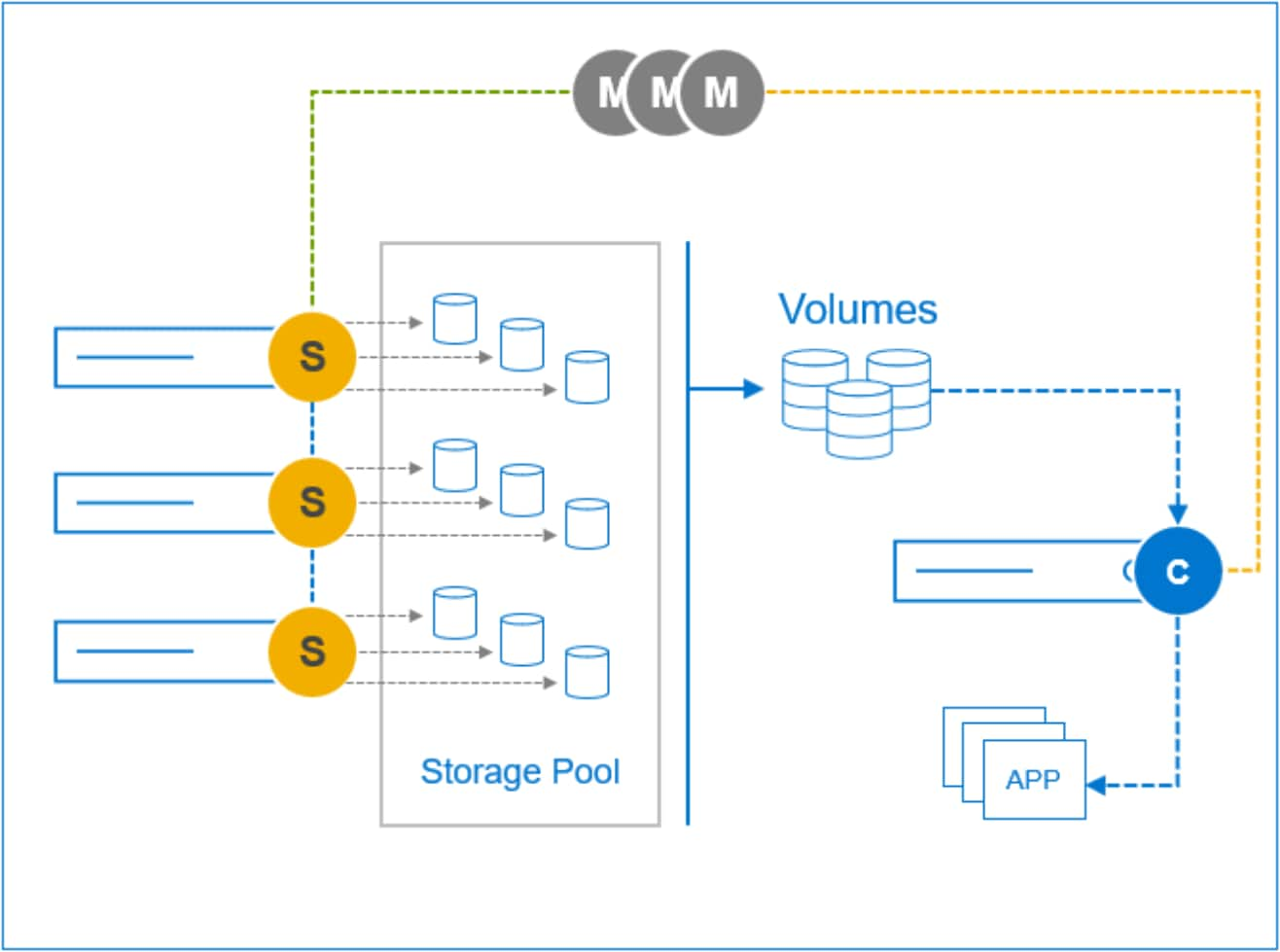
Figure 2. PowerFlex Software-defined architecture
Servers contributing media to a storage cluster run the Storage Data Server (SDS) software element. The SDSs enable PowerFlex to aggregate the internal media while sharing these resources as one or more unified storage pools out of which logical volumes are created.
Servers consuming storage volumes leverage the Storage Data Client (SDC) which provides access to the logical volumes using the host’s SCSI layer.
Note: iSCSI is not used but is instead, a proprietary, resilient load-managing, load-balancing storage protocol that runs over TCP/IP storage networks.
The Meta Data Manager (MDM) controls the flow of data through the system but is not in the data path. It maintains volume mapping across the SDS cluster, distributes it to the SDCs, informing them where to place and retrieve data for each part of the volume address space.
These three base elements are the foundation of this unparalleled software-defined storage solution, one that scales linearly to hundreds of SDS nodes.
Maintenance options
Sometimes nodes need to be taken offline for planned maintenance. If a PowerFlex node goes offline in an unplanned event, the system will alert the error, and initiate a rebuild of the data. The rebuild process redistributes the user data on the remaining nodes. When undergoing planned maintenance or performing a nondisruptive system upgrade, however, we want to avoid a rebuild and control the process without being in an error state.
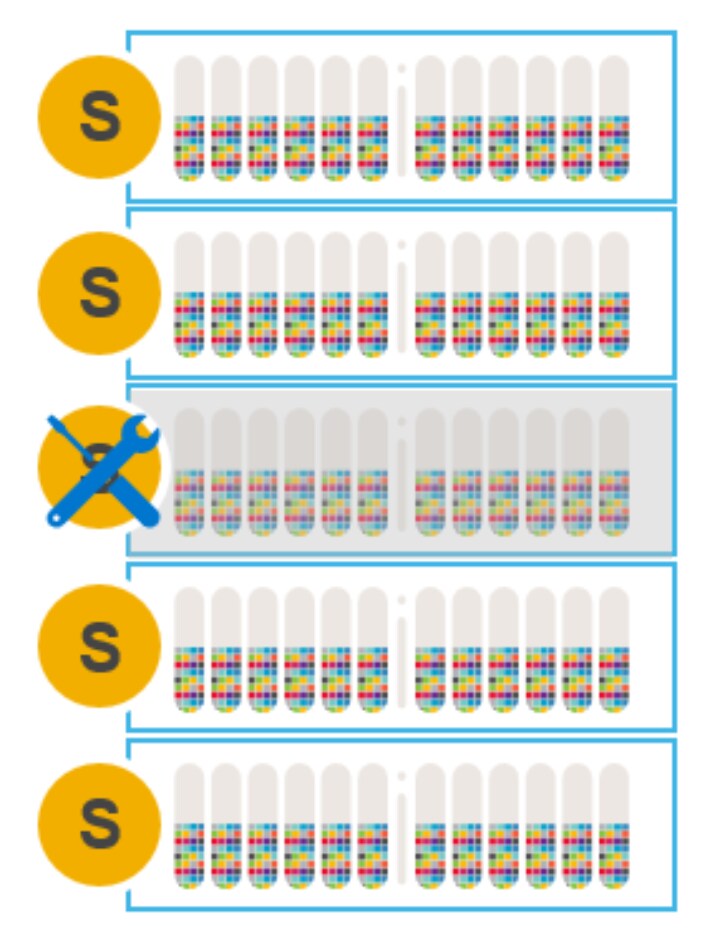
Figure 3. Node requiring maintenance
There are four options for doing maintenance on SDS nodes that are participating in and contributing storage to a PowerFlex storage cluster:
- Remove an SDS node from the cluster and add it back later, after finishing maintenance
- Add a new SDS node and remove the node requiring maintenance
- Instant Maintenance Mode
- Protected Maintenance Mode
The following sections describe these options, examining the pros and cons of each.
Remove a node and add after maintenance
In this scenario, when a node is gracefully removed using PowerFlex Manager or CLI, a many-to-many rebalance operation begins among the remaining nodes.
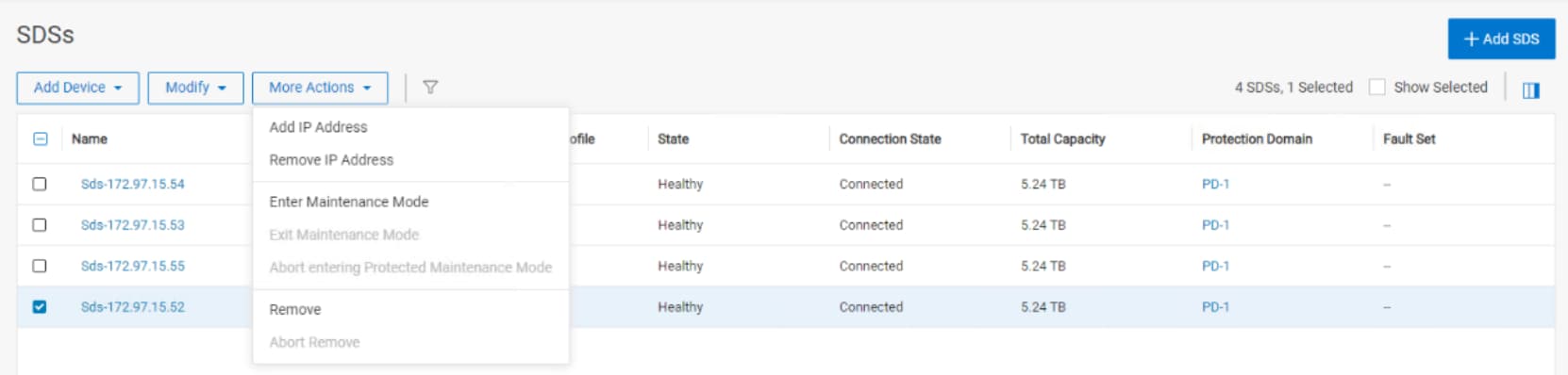
Figure 4. Graceful removal of a node using PowerFlex Manager
The many-to-many rebalance ensures that there are two copies of all data on all the other nodes before dropping the node-to-be-maintained from the cluster.
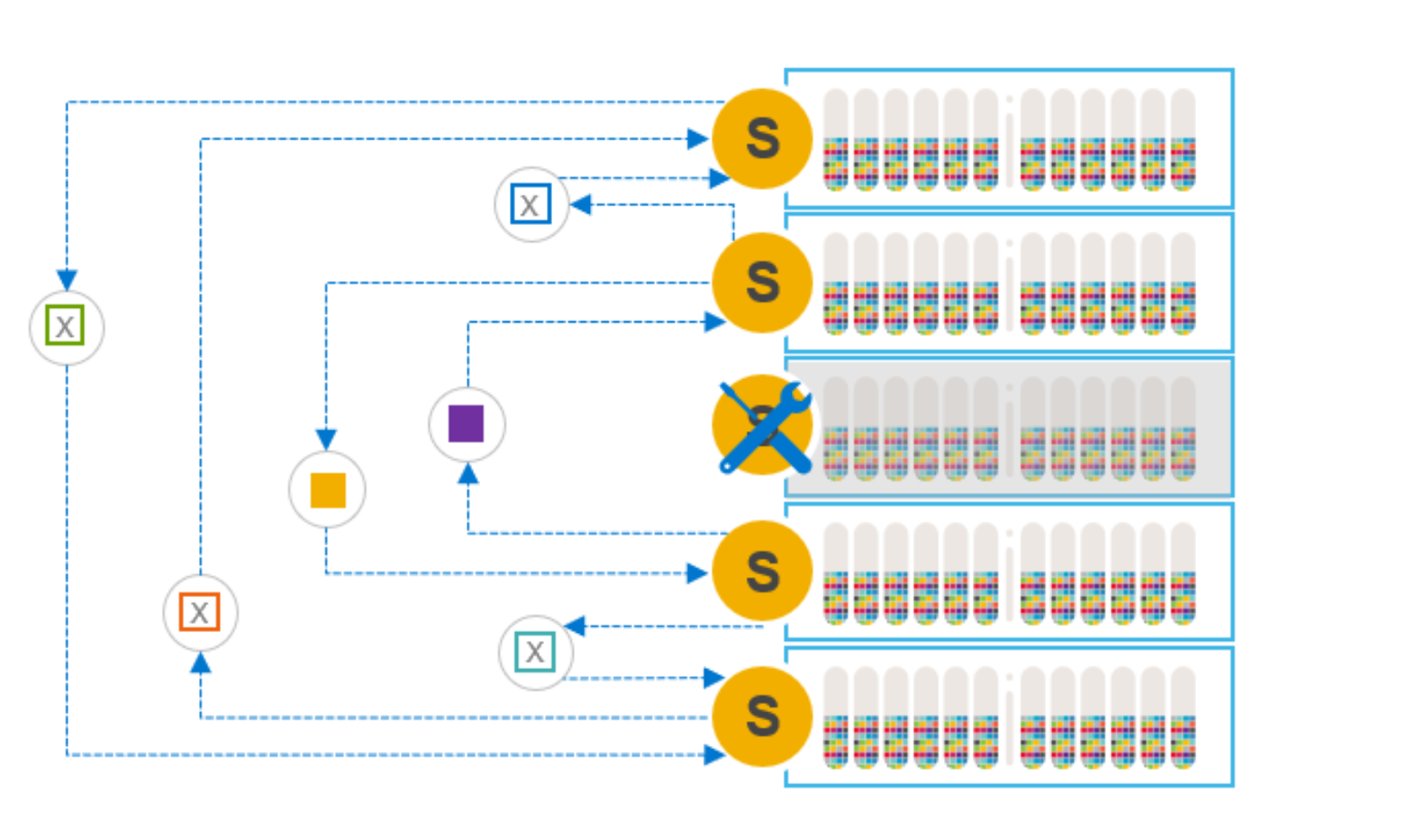
Figure 5. Many-to-many rebuild
Note: Because rebalancing the data consumes free capacity on the other nodes, users may need to adjust the spare capacity assigned to the cluster overall. For example, a 10-node cluster with 10% spare capacity will require 12% spare capacity after removing a node. Having adequate spare capacity avoids triggering an insufficient spare capacity alert. Spare capacity in the system must always be equal to or greater than the capacity of the smallest fault unit (node).
During maintenance, the cluster still functions but with one less node, and therefore less capacity and lower performance. Writes are sent to, and mirrored on, the other nodes in the system.
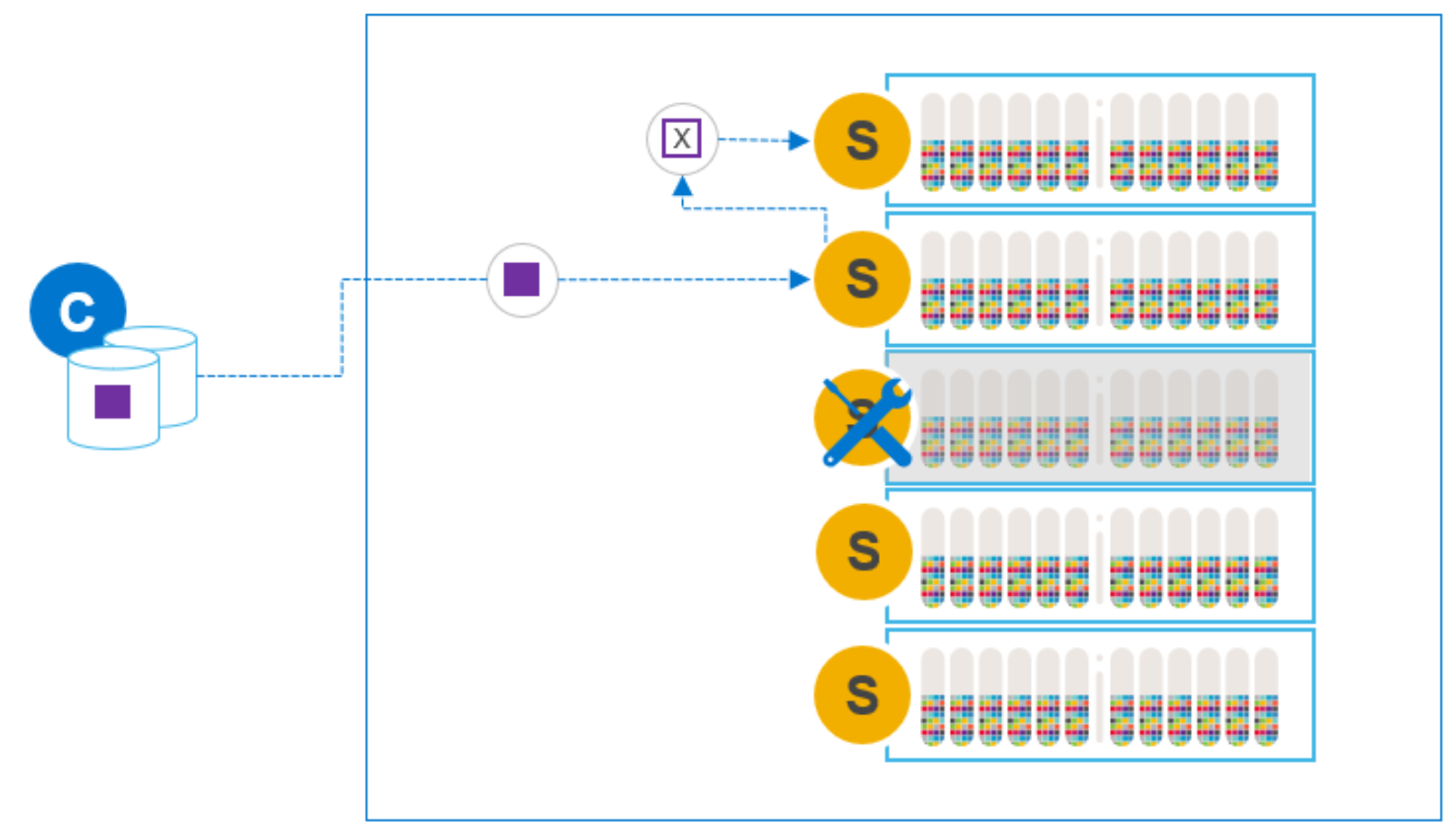
Figure 6. Writes during SDS node maintenance
The data is fully protected: we always have two available copies of the data. And it does not matter how long the maintained node is offline, because it is no longer a part of the cluster. Should the maintenance reveal a problem that prohibits the node from being added, there is no exposure or risk of data unavailability.
When maintenance is complete, we can add the node to the cluster and a many-to-one rebalance will take place, evenly redistributing the data. Because we are rehydrating a single node, this many-to-one rebalance is slower than other steps. The slower rebalance is the primary disadvantage of this maintenance option.
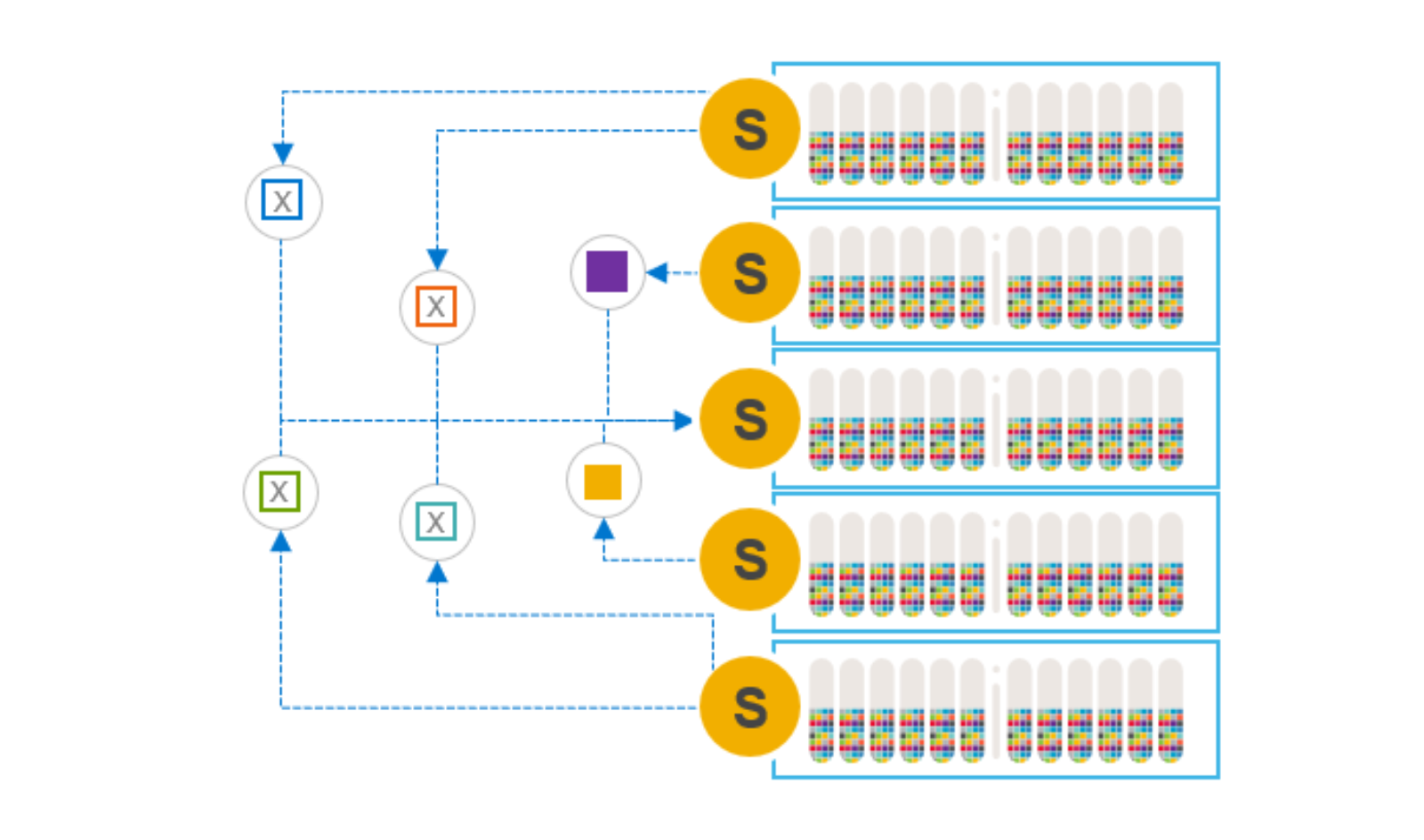
Figure 7. Re-adding the node and rehydrating the data
The rebalance that occurs when adding a node back into the system is the same mechanism employed when elastically scaling a system by adding nodes, one-by-one. The default I/O priority for rebalance activity is lower than the I/O priority for rebuild and reprotection activity. The I/O priorities are, however, user-configurable at the storage pool level. In general, and as a best practice, we do not want rebalancing activity to interfere with application I/O.
After adding the node back into the cluster, the user can again readjust the spare capacity percentage.
Note: When removing an SDS node from a cluster, the SDS’s configuration (the network assignments, node and device naming conventions, and so on) is removed from the MDM. It is recommended to record the SDS configuration so it can be added easily after the maintenance period.
Add new node before removing node for maintenance
If you expect the node requiring maintenance to be offline for an extended duration, and you have the luxury of owning a spare node, you can swap the two. The spare node should be identical, or at least very similar, to the node requiring maintenance. It is possible to add the spare node to the cluster before removing the node requiring maintenance. This operation will take longer, as the system tries to both hydrate the new node and rebalance the data from the node being removed. But PowerFlex can perform these steps simultaneously.
Although adding a node before removing an existing node is a small variation on the preceding option, it allows users to maintain the premaintenance capacity and performance profile during the maintenance period. In this case, the overall system spare capacity does not need to be modified if the spare node’s capacity is roughly equivalent to the maintained node’s capacity.
Instant Maintenance Mode (IMM)
Instant Maintenance Mode, or IMM, is designed for quick entry into and exit from a state of maintenance. It is well suited for cases such as nondisruptive, rolling upgrades, where the maintenance window is only a few minutes (for example, a reboot) and there are no known hardware issues. If the maintenance window is expected to be longer than 30 minutes, an alternative maintenance option is preferred.

Figure 8. Initiating IMM using the CLI
In Instant Maintenance Mode, the data on the node undergoing maintenance is not evacuated from it. While in IMM, data on the node is not available for use. During this time, application read operations are directed to the other nodes that contain the mirror copy of the data.
You can use the PowerFlex Manager or the CLI to check the state of the SDS node.

Figure 9. Using the CLI to query the state of the SDS nodes
When entering IMM, the data on the node is unavailable to application I/O operations and a rebuild is not triggered. The MDM provides an updated map to the SDCs for IO operations while the node is in maintenance. The updated map instructs the SDCs to use another SDS for read and write I/O’s that would otherwise have been directed at the node in maintenance.
New writes and their mirror copies are directed to other nodes. Any changes that would have affected the node in IMM are tracked. This process ensures that all new writes are mirrored on two operational nodes and protects against a data unavailability (DU) condition if the node in maintenance mode fails.
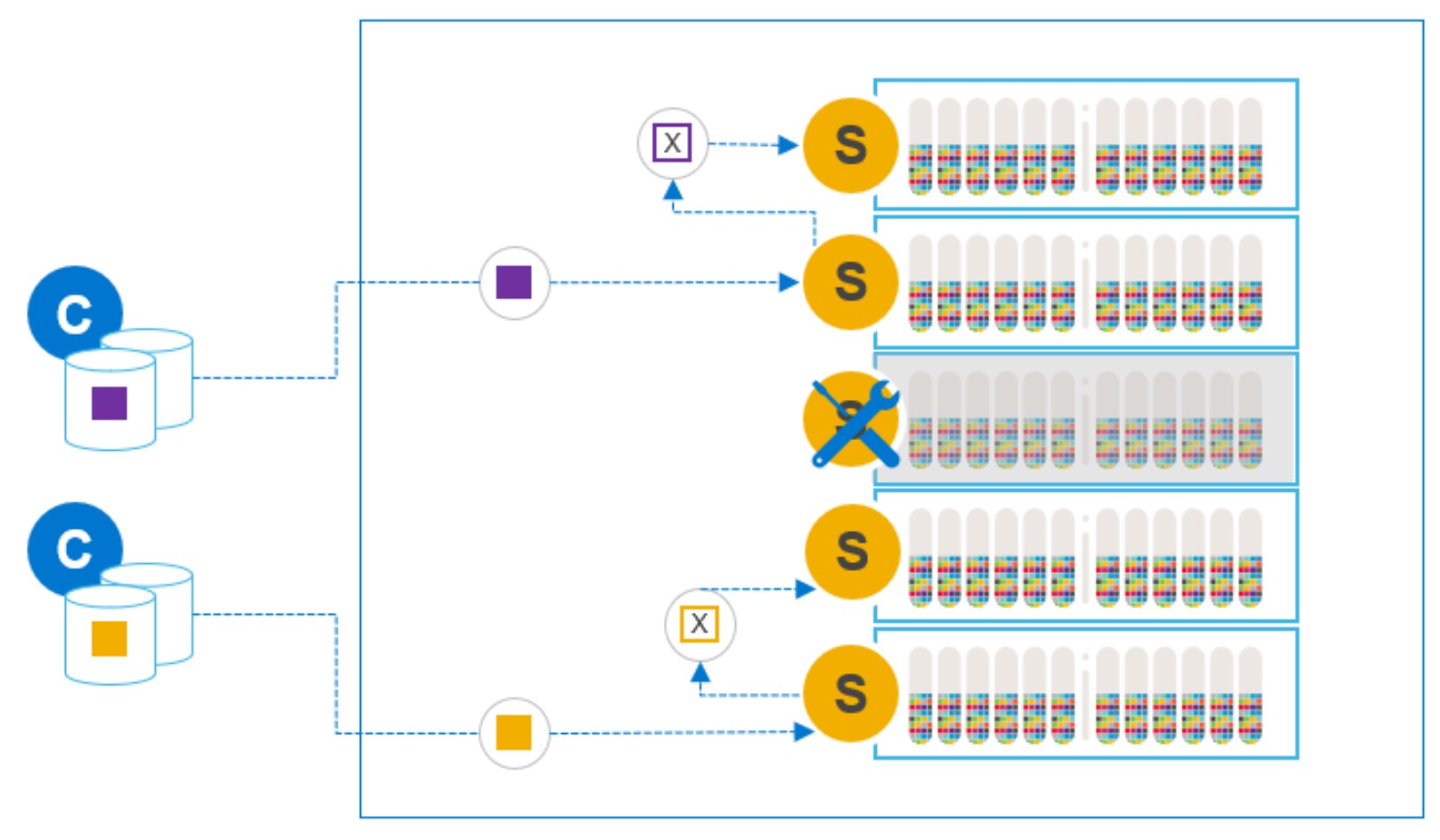
Figure 10. New writes during IMM
When exiting Instant Maintenance Mode, we do not need to rehydrate the node completely, because the original data is intact. Rather, we need only sync back the relevant changes that occurred during maintenance and reuse all unchanged data still residing on the node. This process allows a fast exit from maintenance and a quick return to full capacity and performance.
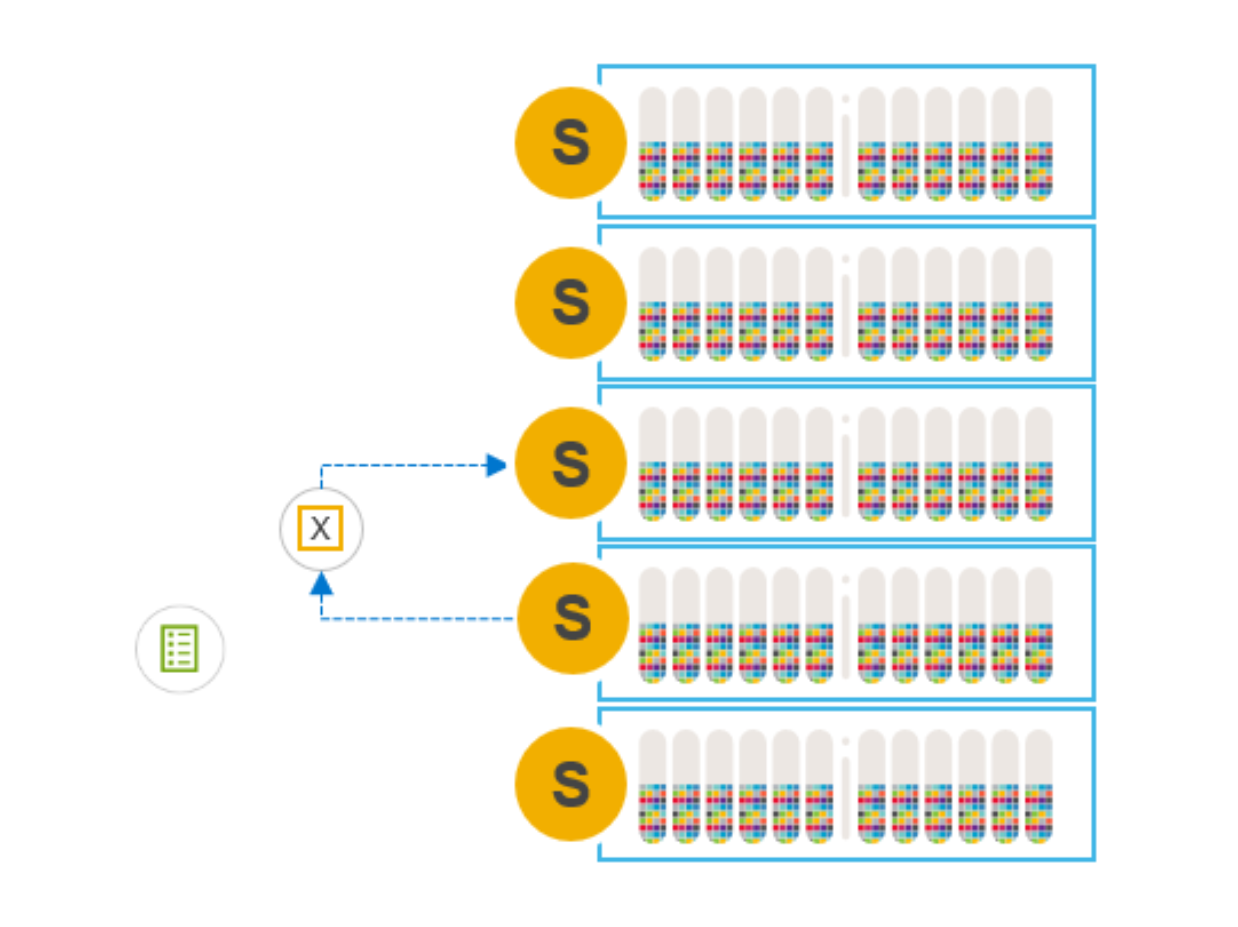
Figure 11. Only deltas synced back to maintained node
If the node being maintained does fail, a rebuild is triggered to reestablish protection of production data. There must be enough spare capacity in the system to re-create the data mirror copies from the node-in-maintenance elsewhere in the cluster.
During normal operation, we always have two available copies of our data, but any copies residing on the node in maintenance are unavailable while in IMM. Having a temporary single-available-copy of data is the primary disadvantage of the IMM option.
If a drive or a node elsewhere in the cluster fails while a node is in IMM, we may have data unavailability (DU). One copy may be on the failed component, and the other may be temporarily unavailable on the node in IMM. When the node exits IMM, the MDM uses the data on the node leaving maintenance and creates the mirror copies again. In the unlikely event that an operational node fails simultaneously when the node in IMM fails, there is a potential for data loss (DL). In that case, both mirror copies are lost.
IMM should only be used for short maintenance windows where there are no known or suspected issues with the node undergoing maintenance. In cases where the health of the node is in question, or the expected duration of maintenance exceeds 30 minutes, another option should be used.
Protected Maintenance Mode (PMM)
Protected Maintenance Mode (PMM) is designed to provide the data availability advantages of the first two options, some of the speed of IMM, and none of the single-copy exposure risk.
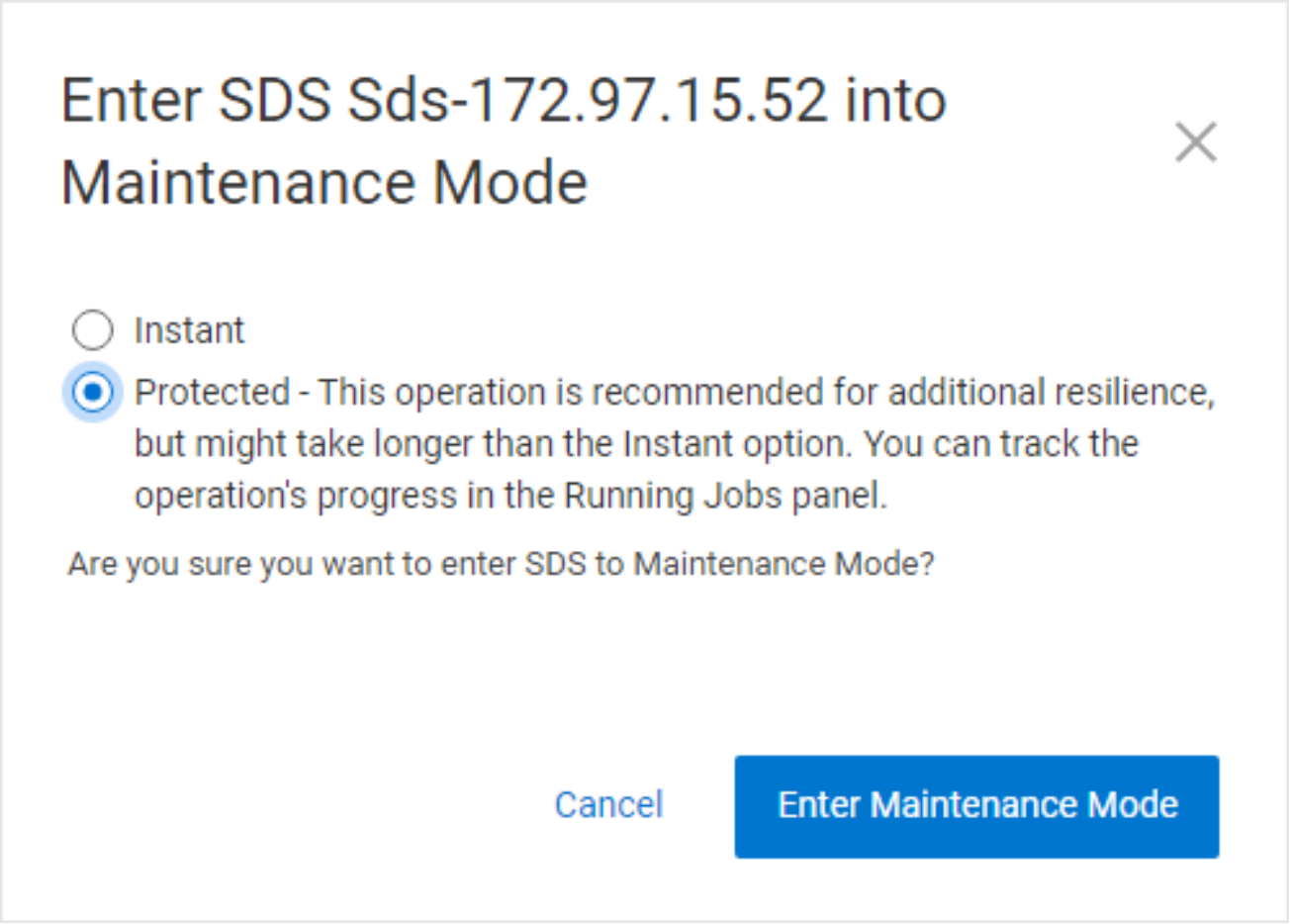
Figure 12. Entering PMM using PowerFlex Manager
Entering PMM initiates the same many-to-many rebalancing process as when removing a node from the system, but with a significant difference. In the earlier case, we create copies elsewhere in the system so that the node in maintenance, and the data on it, can be removed. When entering PMM, the data on the node is preserved.
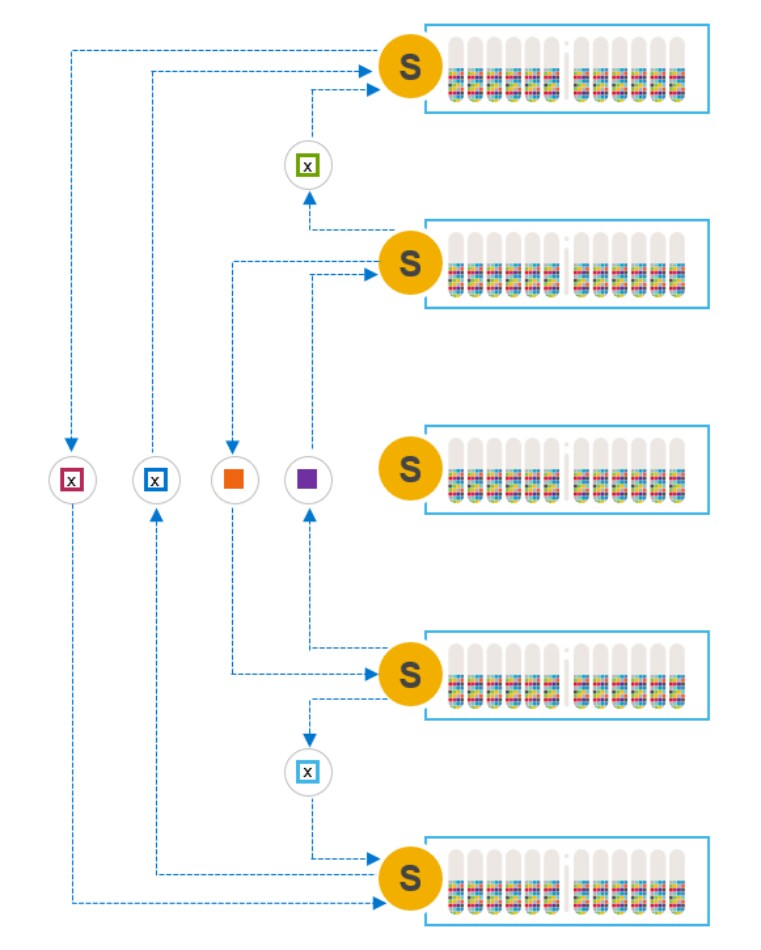
Figure 13. Many-to-many operation to create temporary third copy
Like IMM, data on the node in maintenance is made unavailable to SDCs during maintenance. But unlike IMM, we have created a temporary third copy on the other nodes in the system. PMM guarantees the availability of two data copies and thus avoids the risks described in IMM with a single available copy.
During maintenance (such as Instant Maintenance Mode), any new writes or updates that would have affected the node in maintenance are tracked. These writes and their mirror copies are made on the other nodes in the cluster.
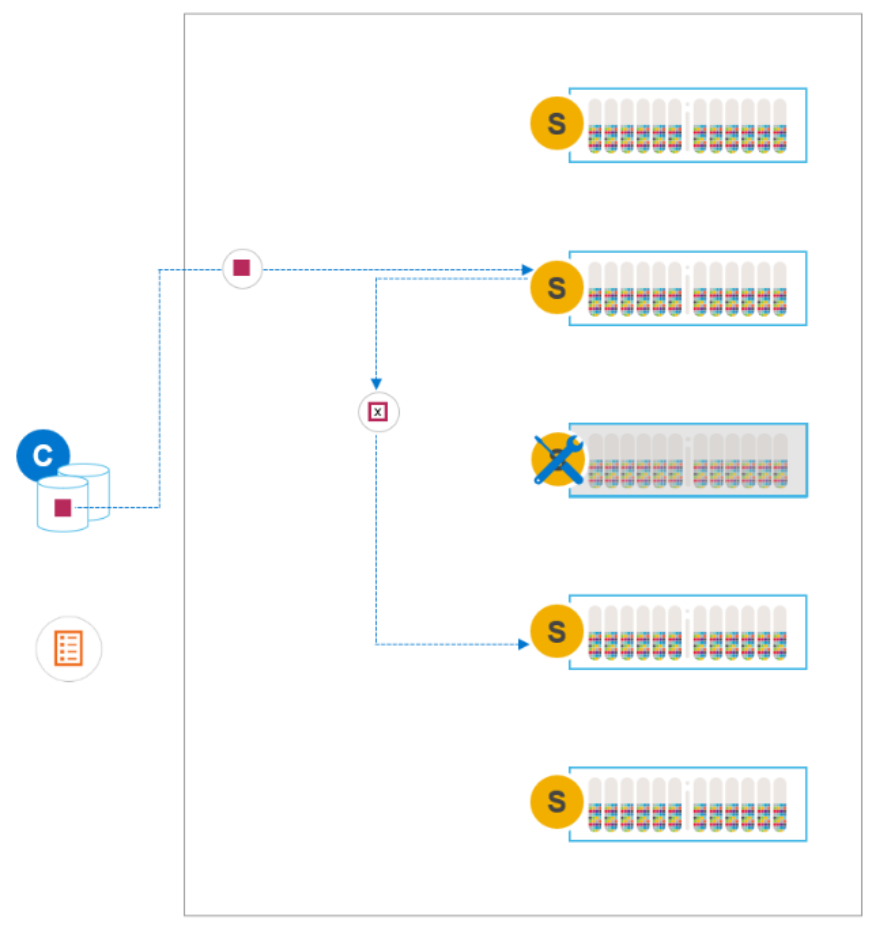
Figure 14. Writes during PMM
When maintenance is complete and we exit PMM, we need only sync the changes back to the maintained node. The third, temporary, copies of data that were created on the other nodes when entering PMM are removed after the change deltas are synced back to the original.
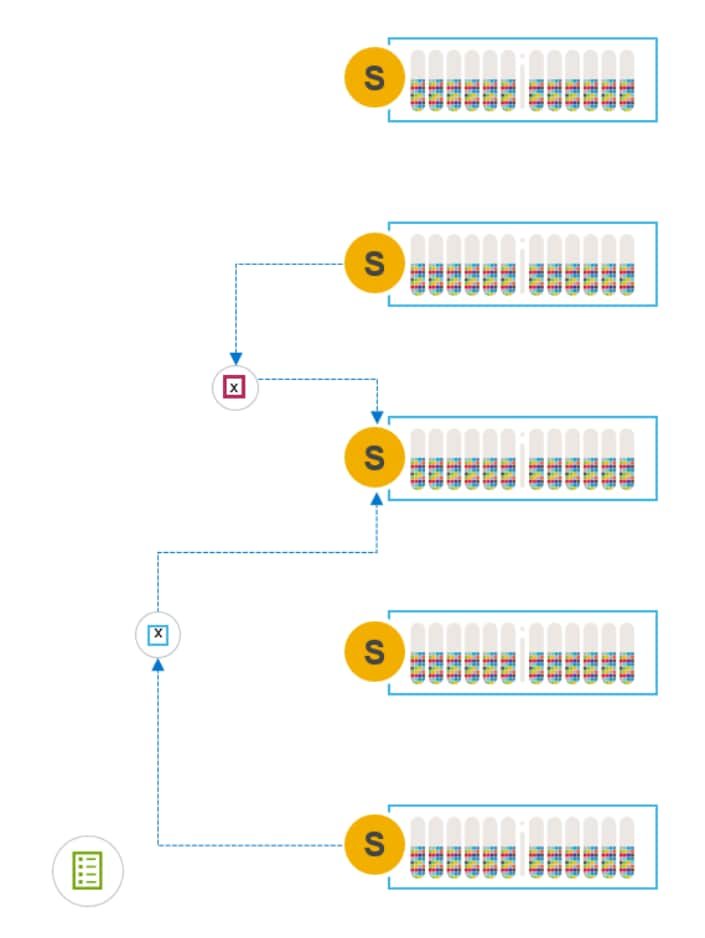
Figure 15. Exiting PMM, syncing changes back to the node
In effect, PMM combines the entrance phase of the remove/add option and the exit phase of IMM while always maintaining two available copies of the data. This means that it is slower to enter maintenance than IMM, but as fast to exit.
It is possible for the user to manually abort entering PMM for any reason. The extra data copies are cleaned up, and the SDS returns to its normal state. To abort the process of entering PMM, select the option from the menu while the SDS is still entering PMM.
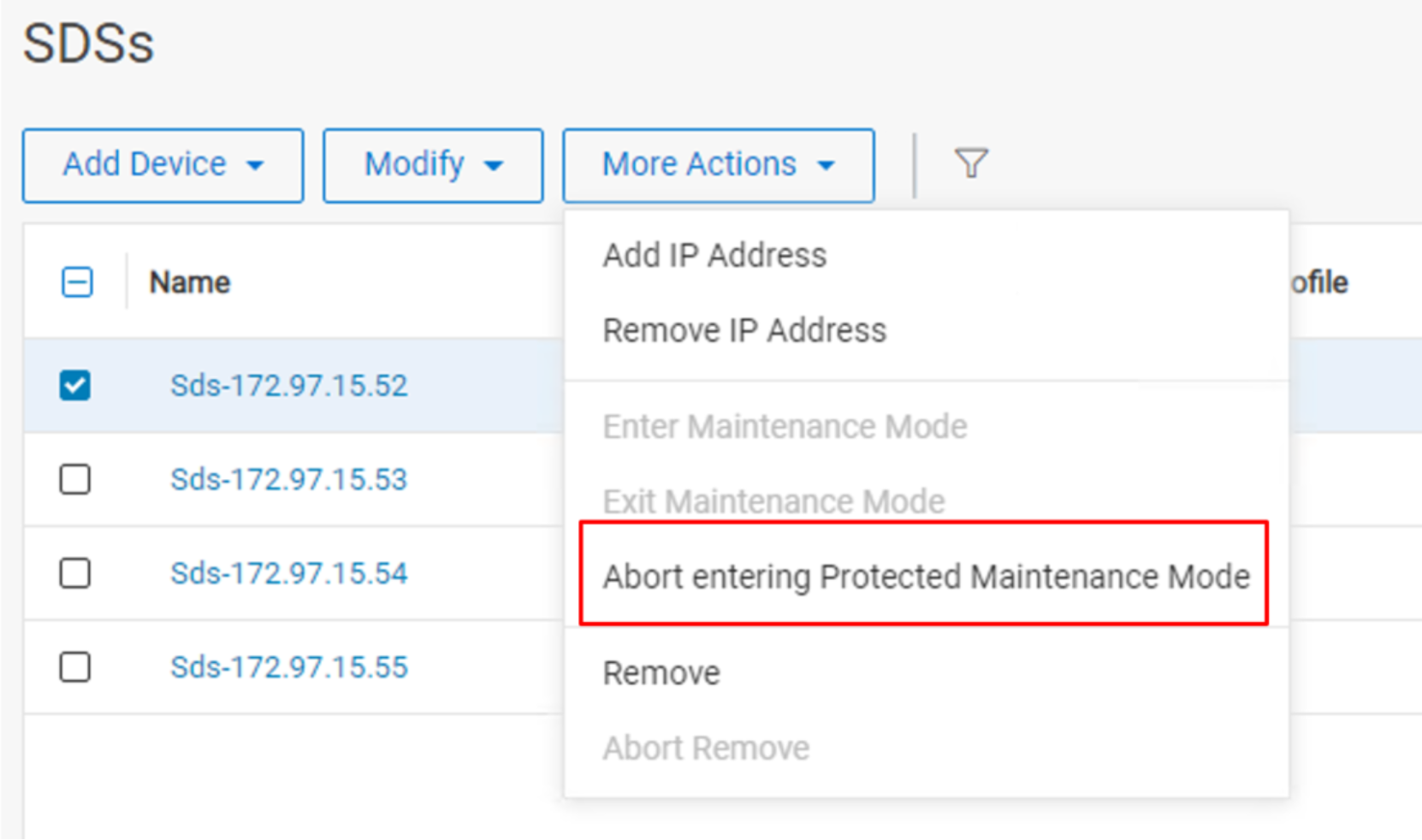
Figure 16. Manual abort entering PMM
Auto abort Entering PMM
Starting with PowerFlex version 3.6, the MDM checks for conditions that could impact data availability or operations of the PowerFlex system during the process of entering PMM. If the MDM detects any of the following conditions, the system automatically aborts entering PMM.
- A storage pool is (or is on track to be) overallocated, and the free capacity is in use by other processes such as a rebuild. Note, the system will abort PMM when the problem is detected and not when the system runs out of capacity.
- A storage pool is not at capacity, but a device in the pool is nearing capacity because of a rebuild, preventing the fully distributed placement of the rebalanced data.
- Any reduction in system level resources causing a temporary imbalance that would prevent PMM from evenly distributing data across all devices.
In addition to the scenarios mentioned above, the MDM monitors for hardware failures that would prevent having three copies of data. In this case, the MDM checks for this condition more frequently than the one-minute interval because the failure may result in I/O errors. Another exception to the 1-minute interval checking occurs if another node goes down while entering PMM, triggering a rebuild. For example, someone may have inadvertently rebooted a node. If the other capacity conditions are not triggered, the MDM waits up to 15 minutes for the node to return to an operational state before aborting PMM.
From a process perspective, the system-initiated auto abort is identical to a user-initiated abort. However, an alert is generated to indicate that the system aborted the process of entering PMM. The alert is cleared when a new maintenance operation is started (PMM or IMM) or using the exit_protected_maintenance_mode CLI command.
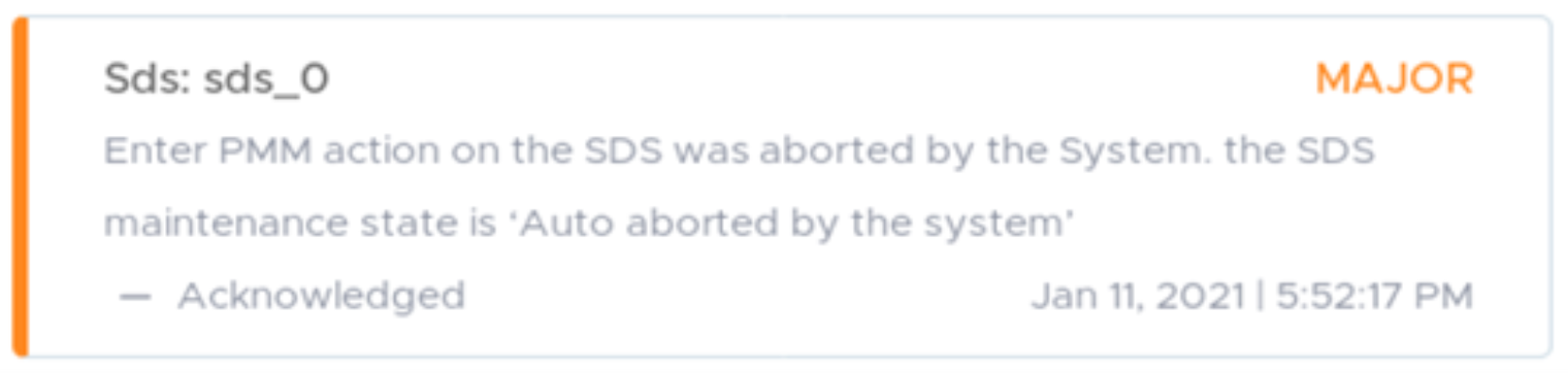
Figure 17. PMM auto abort Alert
The state of the SDS is also set to “Maintenance Aborted By System.”

Figure 18. New maintenance mode state
When the process of entering PMM is complete, the system no longer monitors and auto aborts for the stated conditions. The node is now in maintenance, and the data is fully protected. Also, the system administrator may already be performing maintenance on the node. The system administrator can exit PMM using the PowerFlex Manager, API, or CLI.
NOTE: The PMM auto abort feature is available starting in PowerFlex v3.6.
Maintenance modes and the Storage Data Replicator
The Storage Data Replicator (SDR) does not leverage PMM, even though it resides on the same node as the SDS service in a PowerFlex cluster. Putting an SDR into maintenance is a manual process that allows the cluster to migrate the SDR operations to a peer SDR within the source system.
When maintenance is required on an SDS node with SDR the order of operations is:
- The SDS should be put into maintenance first (either PMM or IMM).
- The SDR is put into maintenance next, transferring replication responsibilities to other SDRs.
- When exiting maintenance, both the SDS and the SDR can resume their functions in parallel.
Ensure there is enough remaining bandwidth and overhead to accommodate expected replication operations while the SDR is in maintenance. For more information, see PowerFlex Networking Best Practices and Design Considerations.