Dell PowerFlex: Snapshots
Executive summary
Overview
Revisions
We value your feedback
PowerFlex
Introduction
PowerFlex is a software-defined storage platform designed to reduce operational and infrastructure complexity. It empowers organizations to move faster by delivering flexibility, elasticity, and simplicity with predictable performance and resiliency at scale. The PowerFlex family of software-defined infrastructure provides a foundation that combines compute and high-performance storage resources in a managed unified fabric. Flexibility is offered as it comes in multiple hardware deployment options such as integrated rack, appliance, or ready nodes, all of which provide Server SAN, HCI, and storage only architectures.
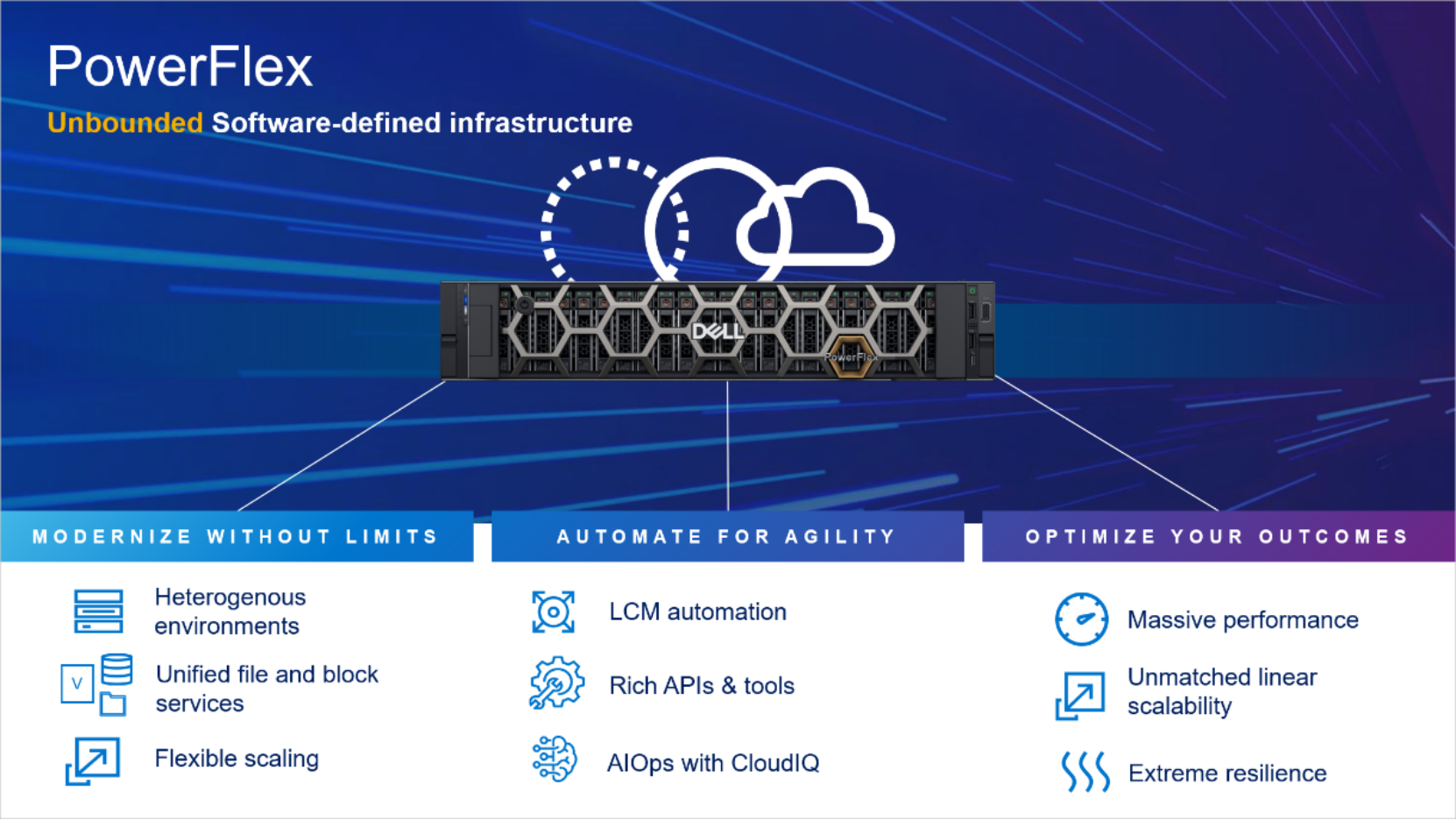
Figure 1. PowerFlex overview
PowerFlex provides the flexibility and scale demanded by a range of application deployments, whether they are on bare metal, virtualized, or containerized.
It provides the performance and resiliency required by the most demanding enterprises, demonstrating six nines or greater of mission-critical availability with stable and predictable latency.
Providing millions of IOPs at sub-millisecond latency, PowerFlex is ideal for high-performance applications. It works well in organizations with private clouds that want a flexible foundation with synergies into public and hybrid cloud. It is also great for organizations consolidating heterogeneous assets into a single system with a flexible, scalable architecture that provides the automation to manage both storage and compute infrastructure.
PowerFlex snapshots
Volume tree
Snapshots are a block image in the form of a storage volume or LUN used to instantaneously capture the state of a volume at a specific point in time. PowerFlex snapshots are thin-provisioned and writable. Once a snapshot is taken, it becomes a new unmapped volume in the system. It can be manipulated like any other volume exposed by the storage system: mapped, unmapped, renamed, resized, and so on.
PowerFlex snapshots can be initiated manually through any of the clients including PowerFlex Manager UI, CLI, or REST API. This includes the ability to create snapshot policies, which automate the creation and deletion of snapshots according to a predefined schedule of your own choosing.
Snapshots and their source volume are organized into a Volume Tree, or V-Tree. Stated differently, a V-Tree includes the root volume and all the descendant snapshots resulting from that volume. A Volume Tree includes not only snapshots taken of the root volume at different points in time, but also descendants that are snapshots of snapshots. The following diagram depicts a small V-Tree with both types of descendants.
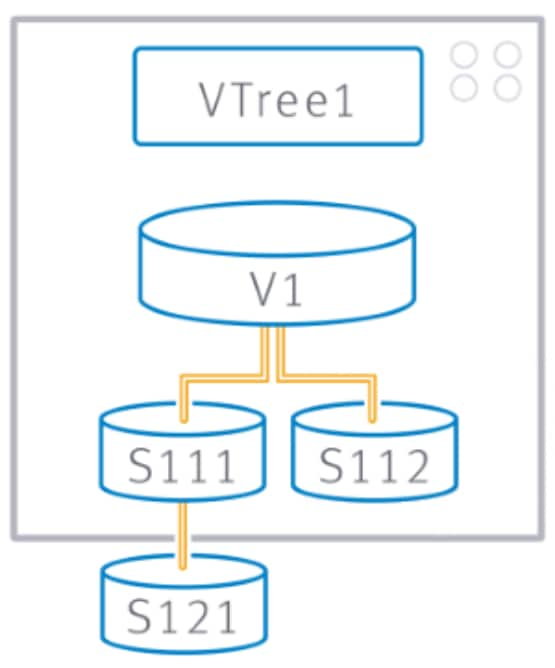
Figure 2. V-Tree where S111 and S112 are snapshots of volume V1 at different times, and S121 is a snapshot of another snapshot (S111)
Max snapshot count
Snapshot consistency groups
PowerFlex Snapshots can also have relationships across different V-Trees. When you take a snapshot, multiple volumes can be selected simultaneously. All snapshots taken together this way form a Consistency Group.
The snapshots in a consistency group are guaranteed to be from precisely the same point in time. They can be used to capture a crash-consistent snapshot-based backup across multiple volumes.
In PowerFlex Manager, select the checkbox next to the volumes you want to create a snapshot, click More Actions, and click Create Snapshot.
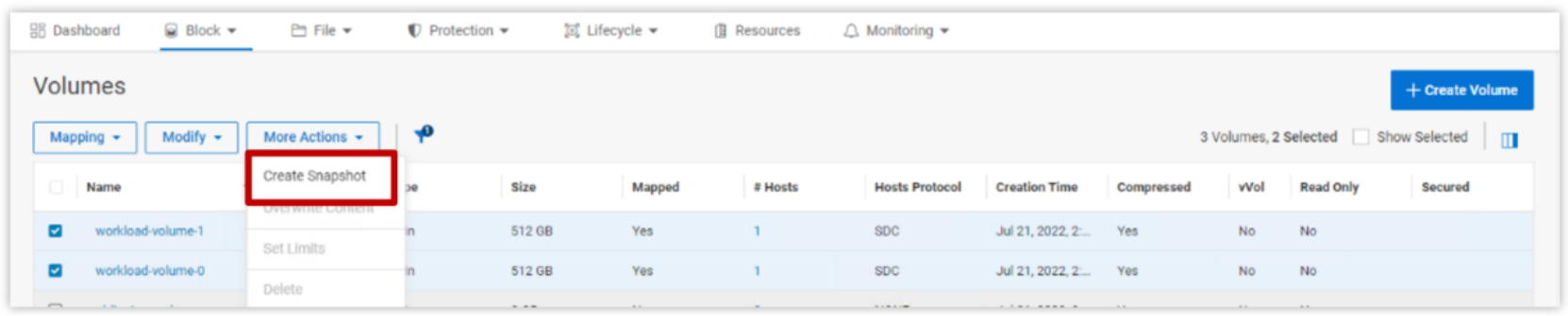
Figure 3. Creating snapshot of multiple volumes for snapshot consistency group
Once created, all the members of the consistency group will appear in the Details for any single member. Simply select the volume of type Snapshot and the View Details button.

Figure 4. Detail view of a Snapshot Consistency Group
Because they were all taken simultaneously there is a contextual relationship among the members, and the consistency group can be manipulated together as a set. For example, the entire consistency group can be deleted as a single action.
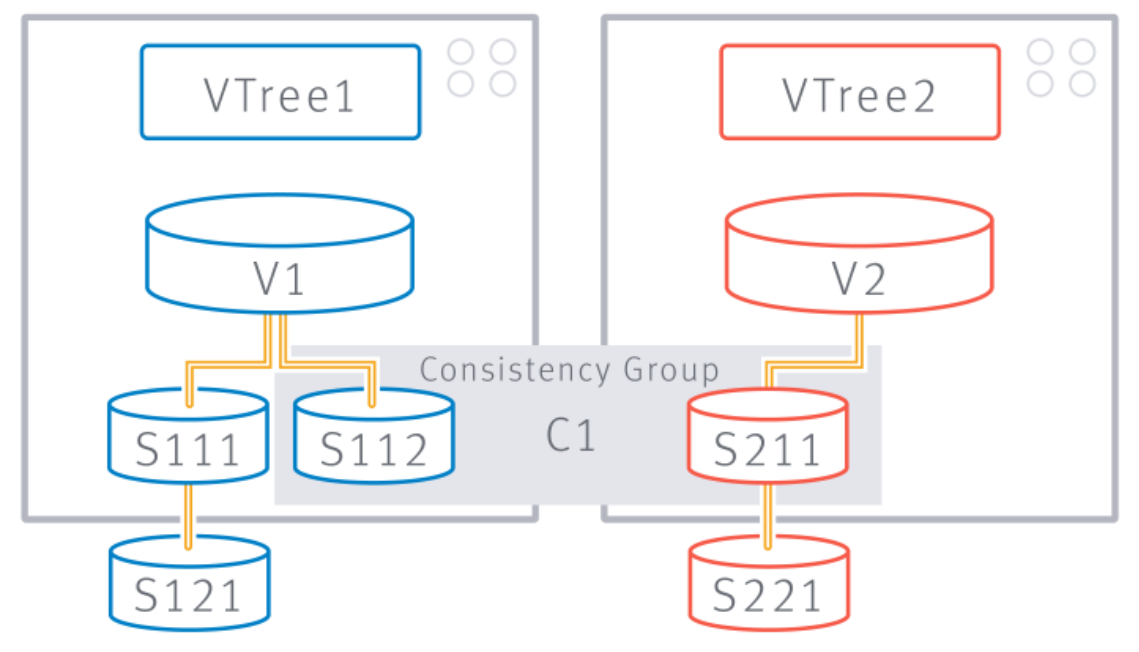
Figure 5. Snapshots S112 and S211 are taken together to form Consistency Group, C1
However, PowerFlex does not enforce the relationship, and does not try to preserve it as originally created. A user can remove a member of a consistency group, resize it, overwrite its contents, or otherwise alter it. Snapshot consistency groups are for convenience purposes only.
Snapshot independence
PowerFlex does not rigidly enforce the parent-child relationships in a V-Tree. It is possible to overwrite the contents of one snapshot with the contents from any other snapshot. In the following example, we have a root volume, a snapshot of the root volume, and a snapshot of the snapshot.
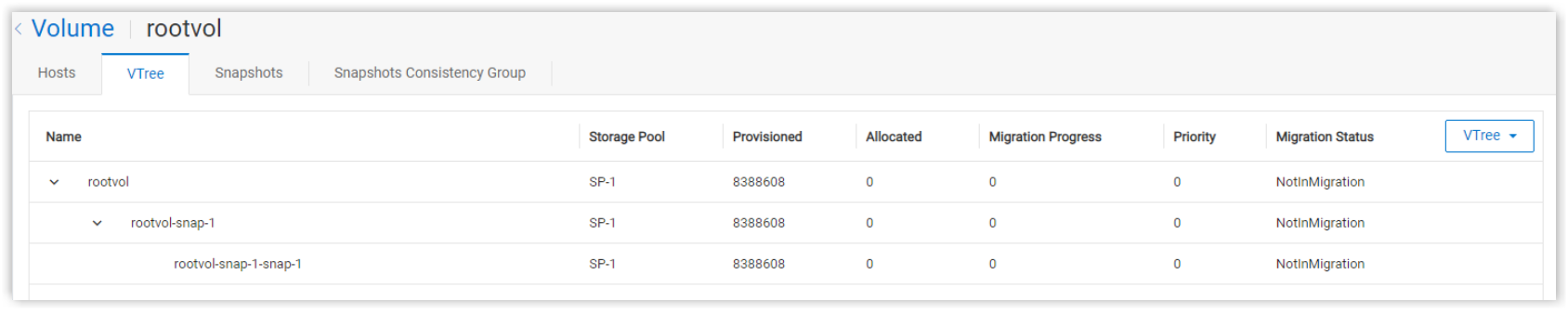
Figure 6. Base volume, snapshot, and a snapshot of a snapshot
We can remove the root (or source) volume and choose whether we want to delete the descendent snapshots.
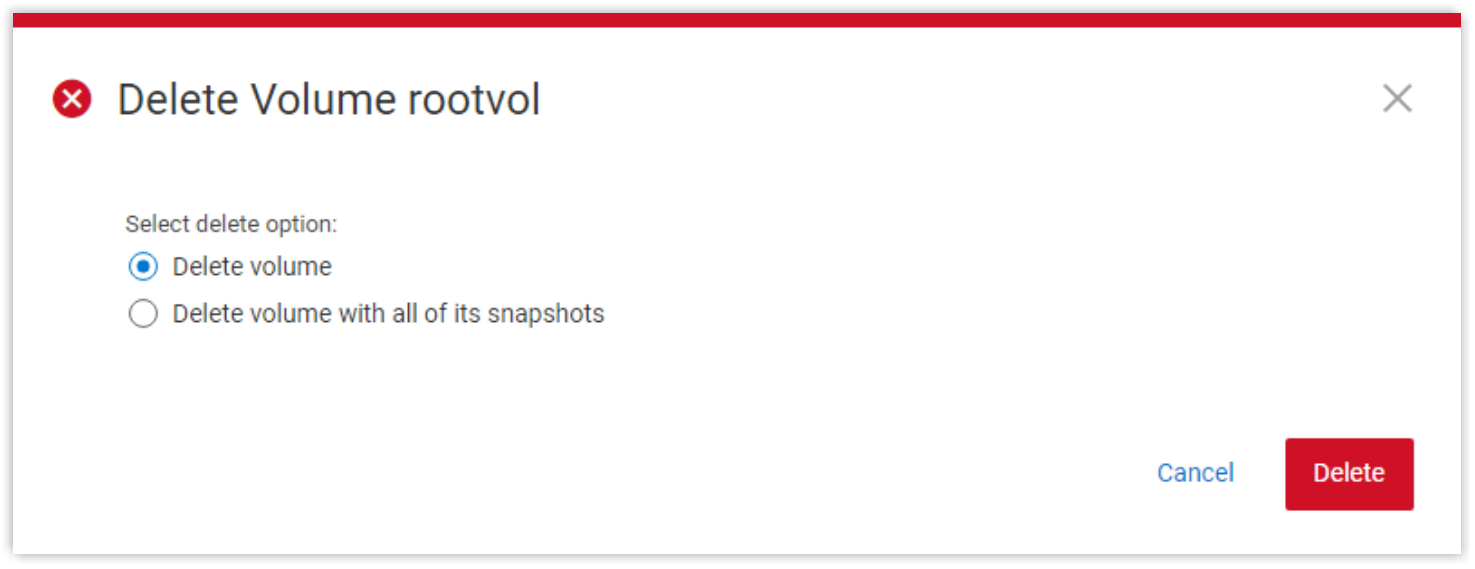
Figure 7. Detail of the volume deletion action
Alternatively, we might choose to overwrite the contents of the root volume with the contents of a child or ‘grandchild’ snapshot. Select the root volume as our target.
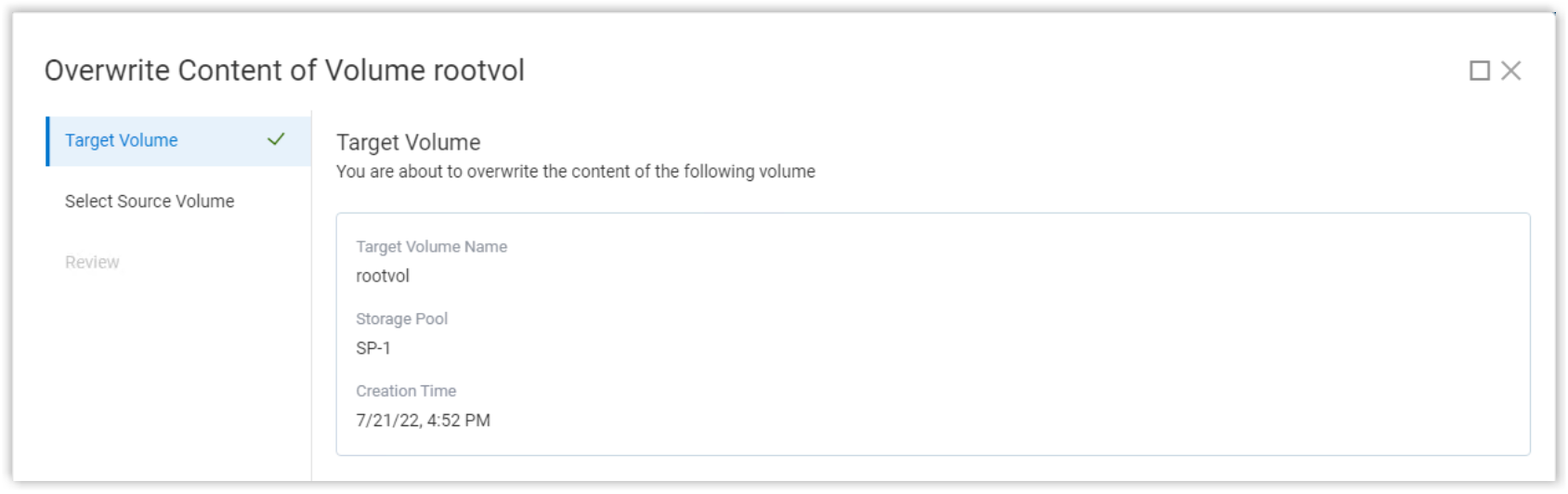
Figure 8. Select volume to overwrite
Then select the volume whose contents you want to use for the overwrite. You can select the time range in which to search for the snapshot you want. In this case, we will use the snapshot of a snapshot.
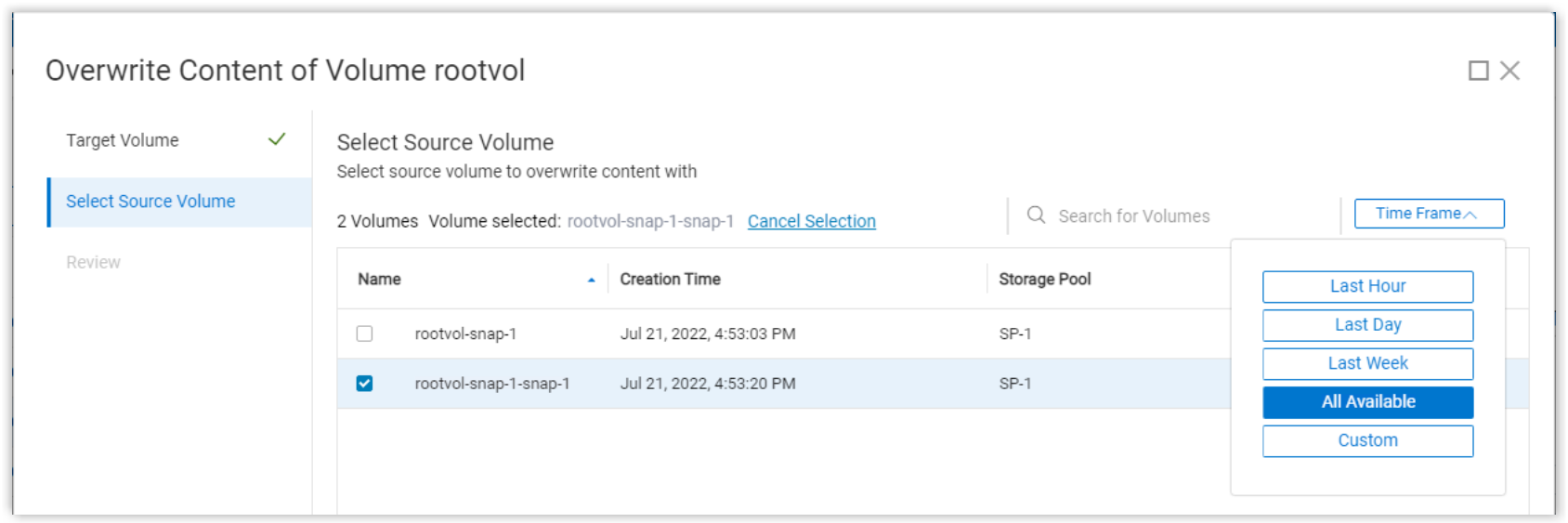
Figure 9. Select the source volume
Click the Overwrite Content button to start the overwrite process. PowerFlex Manager will warn of the destructiveness of the process.
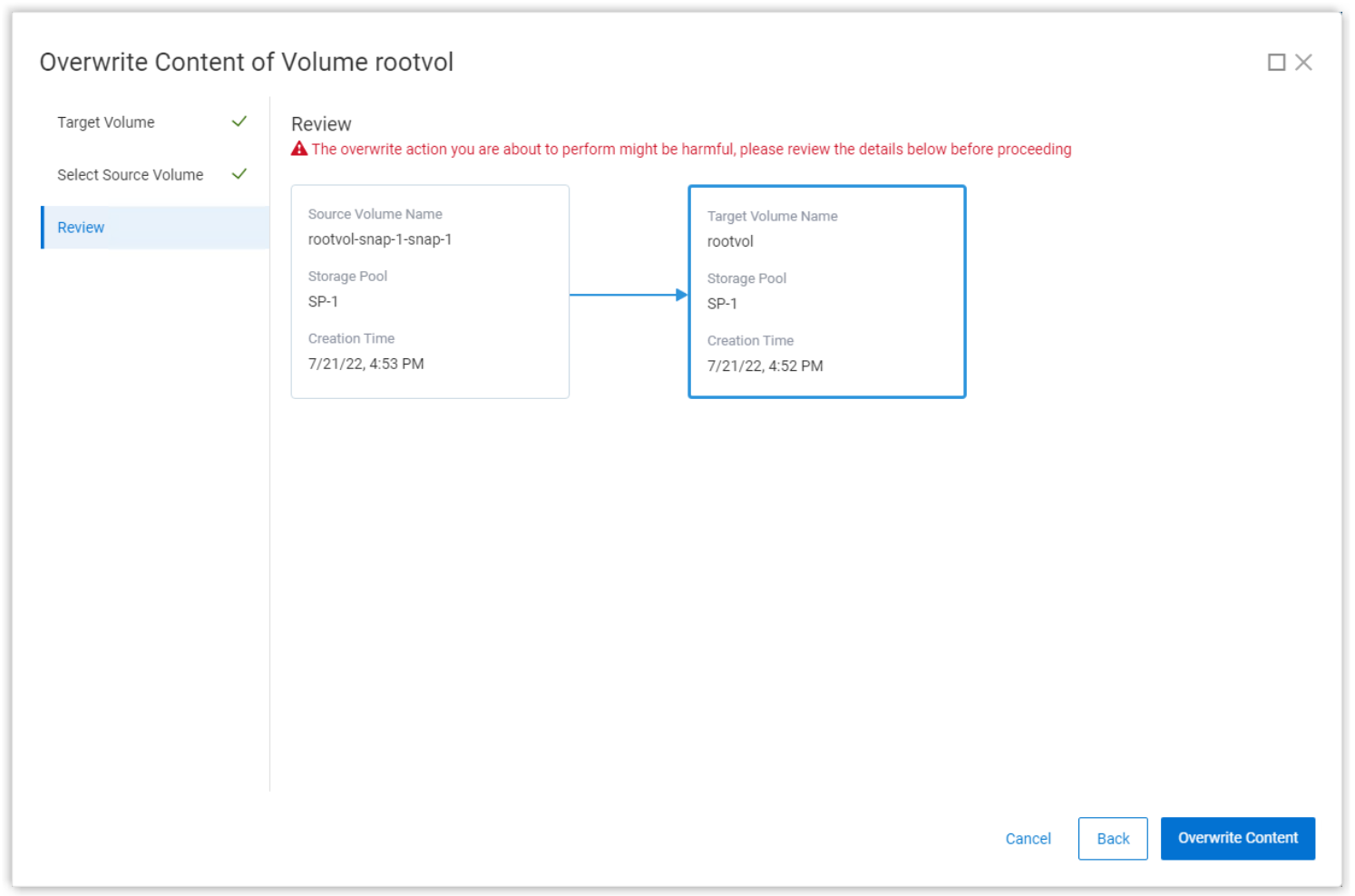
Figure 10. Overwrite volume review
In general, there are few if any limits on the possible manipulations of members of a V-Tree. This sort of flexibility is useful in development scenarios wherein a gold copy might be used to develop and test many iterations and versions.
Snapshot policies
Of the 126 user-available snapshots per volume, sixty (60) can be used for policy-based snapshot scheduling. Any given root volume can only participate in one snapshot policy, but a policy can apply to multiple source volumes simultaneously.
First a rule is created and then source volumes are attached to the rule. The rule itself defines the interval between snapshots and the number of them to keep. For example, take a snapshot every 60 minutes and keep 24 of them, ensuring you have a snapshot for every hour of the past 24 hours. The rule can also be created in a multilevel retention structure (up to six levels), where the intervals build upon one another as minutes/hours/days/weeks. For example, set the base interval to 60 minutes and another retention level to keep one snapshot for 7 days will result in keeping one daily copy for a week.
If we set another retention level to keep one of the daily copies for 4 weeks, we ensure that the system maintains (on a rotating basis):
- Hourly snapshots for a day (24)
- A daily snapshot for a week (7)
- And a weekly snapshot for a month (4)
To create the policy described above, use the following CLI command:
scli --add_snapshot_policy --snapshot_policy_name snap_policy_hourly --snapshot_creation_cadence 60 --number_of_snapshots_per_retention_level 24,7,4
Note: The snapshot_creation_cadence is set in minutes.
To add a source volume to this policy we would use, for example:
scli --add_source_volume_to_snapshot_policy --snapshot_policy_name snap_policy_hourly --source_vol_id 5d046acb00000003
To create a snapshot policy in the PowerFlex Manager UI, click Protection > Snapshot Policies, then click Create Snapshot Policy. Provide a policy name, interval, and desired retention periods, then click Create And Activate or Create. The Create button creates the policy but the state will be “Paused”. The following example shows the creation of a snapshot policy identical to the one created in the CLI example but using PowerFlex Manager.
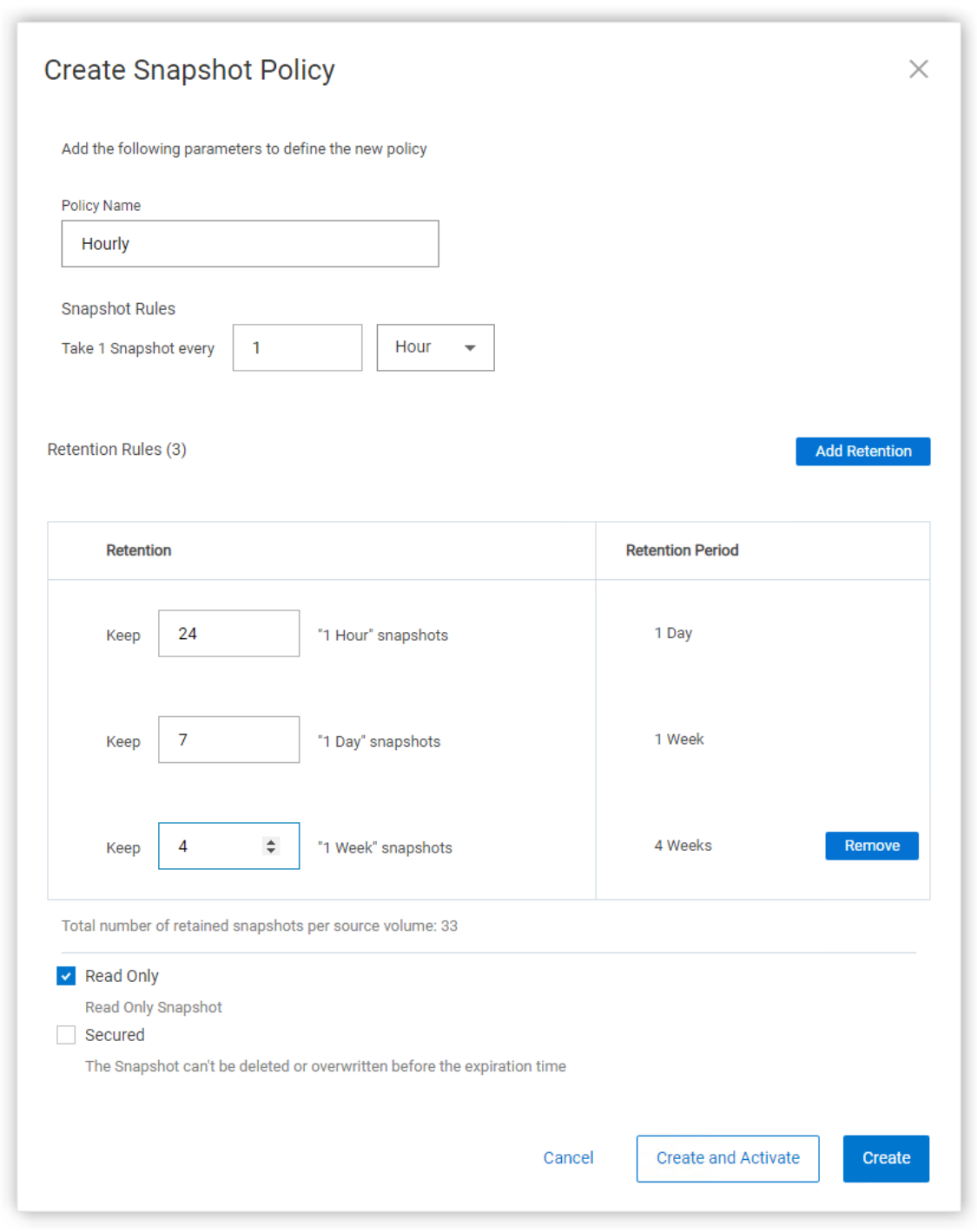
Figure 11. Add Snapshot Policy
After creating the policy, to add the source volumes, select the policy, then click More Actions and Assign Volumes. In the snapshot policies view, you can view the policy configuration, and modify, activate, or pause the selected policy.

Figure 12. Snapshot Policies
Select the desired volumes and click Assign Policy.
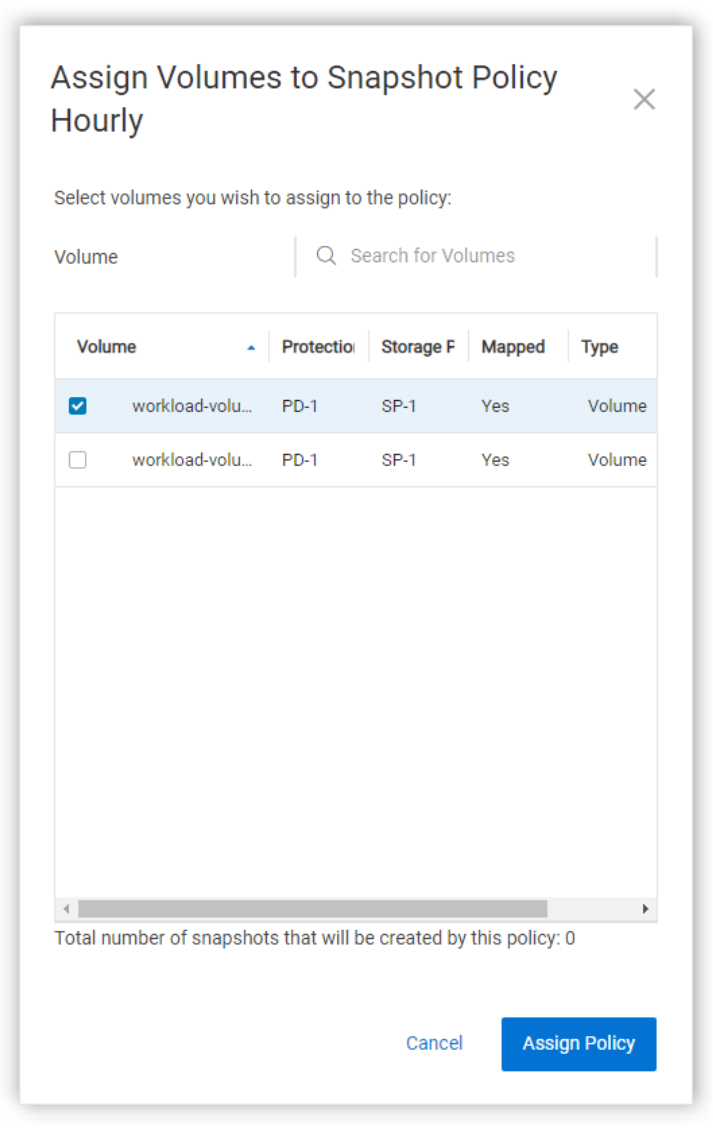
Figure 13. Assign volumes to the snapshot policy
And here we see the newly created snapshot policy in a paused state.

Figure 14. Snapshot policy state
Secure snapshots
General behavior
When creating a volume snapshot, the user can mark snapshots as “secure,” enabling customers to meet business and statutory requirements for data retention. Securing snapshots is especially important in the financial sector.
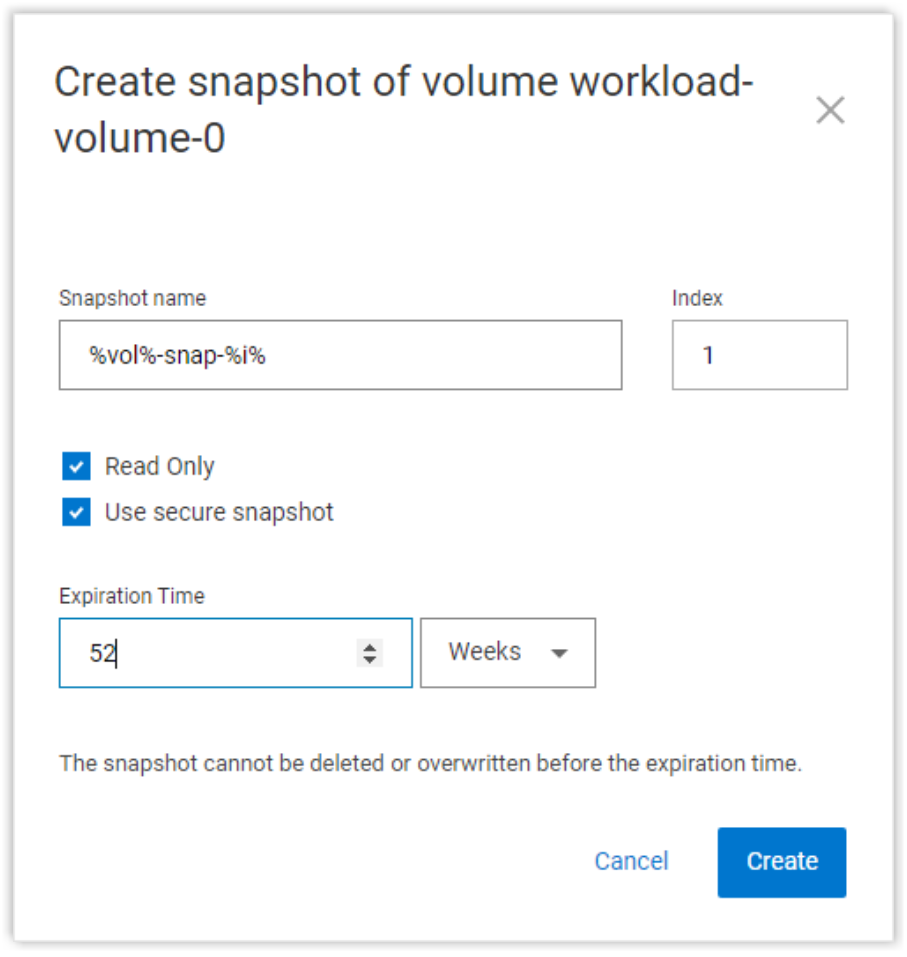
Figure 15. A secure snapshot with a one-year expiration time
When a snapshot is created with the secure option, it cannot be deleted until the assigned expiration time is reached. A formal process exists to delete secure snapshots. Contact Dell support for more information.
Note: Secure Snapshots are, by default, Read Only.
A snapshot can be created initially with or without the secure flag and expiration time. If it is initially created without the secure flag, the expiration time can be added later with the set_snapshot_security CLI command. (The REST API can also be used to add this marker.)
Secure snapshots cannot be altered before their expiration time. When a secure snapshot is mapped to an SDC, regardless of how it is mounted, it will be forced into the read-only option. We saw above that PowerFlex snapshots can be deleted or overwritten with the contents of another V-Tree member. These operations are not possible for secure snapshots.
It is possible to mark snapshots created through a scheduling policy as secure. However, any secure snapshots that exist in a policy-generated set will remain in place regardless of what is done to the snapshot policy. Pausing, altering, or deleting the policy will not delete the snapshots marked as secure.
The snapshot policy engine itself has been enhanced to enable the automatic creation of secure snapshots using the secure_snapshots flag. In this case, the snapshots created for and during each interval cannot be manually deleted until the normal intervals have occurred. At that point, the policy engine will remove the snapshots per the defined rule.
Creating a secure snapshot
Secure Snapshots can be created:
- Using PowerFlex Manager
- Using the PowerFlex command-line interface
- With the REST API
- With a predefined snapshot policy
- By issuing a CLI or REST command to secure a previously created snapshot
The easiest approach is with the PowerFlex Manager. We go to the Block > Volumes menu, select the volume, and click the More Actions menu.

Figure 16. Volume selection in PowerFlex Manager
The create snapshot window opens, which allows us to name the snapshot and to set its properties (read-only; secure):
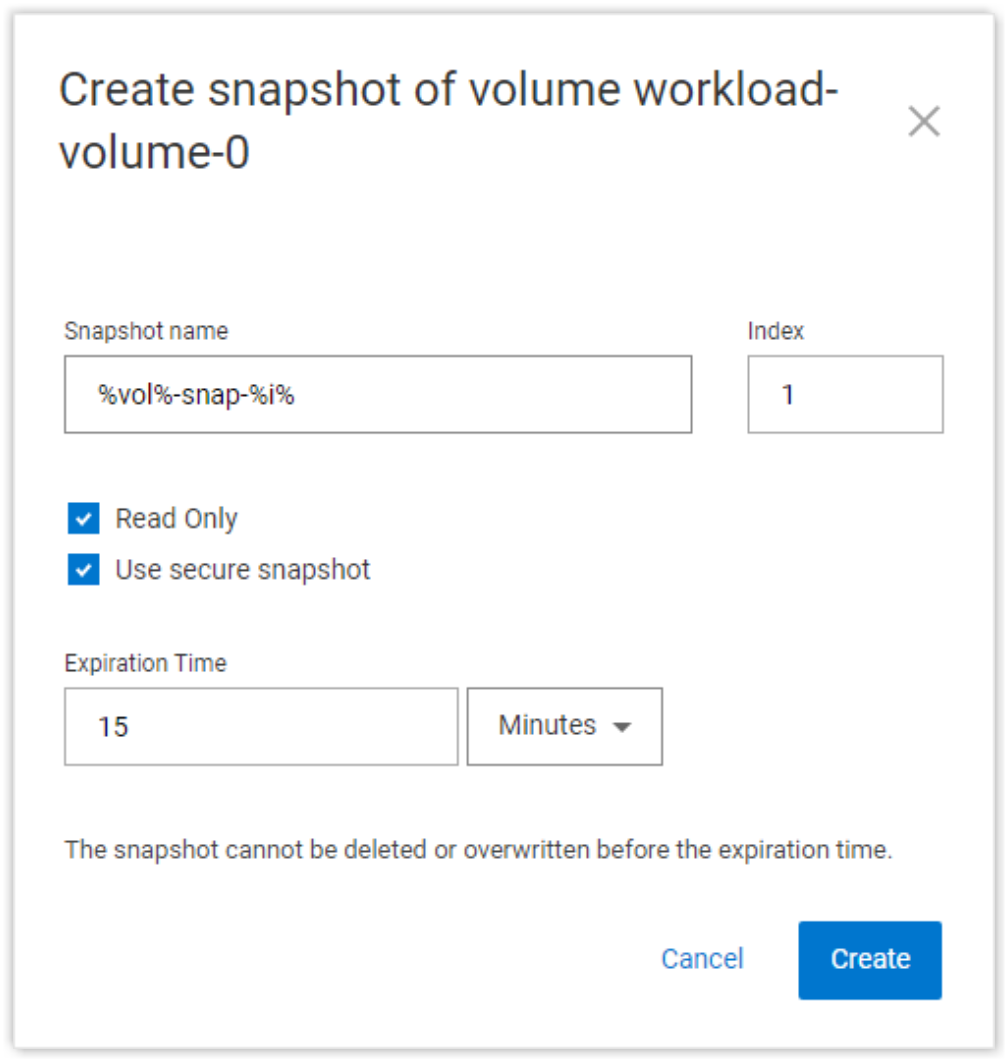
Figure 17. Create secure snapshot
For this example, we will set the expiration time to 15 minutes. But the interval can be set in PowerFlex Manager to minutes, hours, days, or weeks.
After creating the snapshot of our source volume, it appears and is marked both secure and read-only.

Figure 18. Secure snapshot properties
From the CLI, we would do something like the following to create a secure snapshot:
scli --snapshot_volume --volume_name workload-volume-0 \
--snapshot_name workload-volume-0-snap-1 --retention_period 15m
You are prompted to confirm the decision to create a secure snapshot:

Figure 19. Example creating a secure snapshot using scli
Alternatively, users can preemptively approve the creation by adding the --i_am_sure flag to the command.
Specifying a retention period denotes the snapshot as secure and includes the read-only attribute. The time period is specified using m | h | D | W | M | Y respectively indicating minutes, hours, days, weeks, months, or years. Examples: 30m (thirty minutes), 5D (five days), 1M (one month, which equals 31 days).
Extend retention period of secure snapshot
While it is not possible to reduce the retention period of a secure snapshot, it is possible to use the CLI to extend the retention period. This operation cannot be performed from PowerFlex Manager.
scli --set_snapshot_security \
--volume_name workload-volume-0-snap-1 \
--retention_period 30m –i_am_sure
This command will alter the retention period and resets the expiration time to 30 minutes from the time the command is run.
Attempting to set a retention period shorter than the remaining time already defined will receive an error:

Figure 20. Example of error trying to reduce the secure snapshot retention period