Dell PowerMax Data at Rest Encryption
This document describes how Dell PowerMax Data at Rest Encryption securely protects data on PowerMax 2500/8500 systems by applying at-rest encryption to the entire array.
Securing sensitive data is one of the greatest challenges faced by many enterprises. Increasing regulatory and legislative demands and the constantly changing threat landscape have brought data security to the forefront of IT issues. Several of the most important data security threats are related to protection of the user data in storage environments, where drive loss and theft are primary risk factors. Dell PowerMax Data at Rest Encryption (D@RE) protects data confidentiality by adding back-end encryption to the entire array.
D@RE for PowerMax 2500/8500 provides full on-array, back-end encryption using Dell qualified, industry-standard self-encrypting drives (SEDs). These SEDs are FIPS 140-2 validated and NVMe/TCG standard compliant. The SED is configured in secure mode when D@RE is enabled. This mode ensures that the data on the drive is protected from unauthorized access even when the physical drives are removed from the array.
Data at Rest Encryption (D@RE) provides full on-array, back-end encryption for PowerMax 2500/8500 systems. Full on-array encryption protects information from unauthorized access when physical drives are removed from the system. D@RE provides full on-array encryption using Dell qualified, industry-standard self-encrypting drives that are FIPS 140-2 validated.
All user data written to the self-encrypting drive (SED) is encrypted with a data encryption key (DEK) internal to the drive.
D@RE can also be deployed with an external key manager using Key Management Interoperability Protocol (KMIP). KMIP provides external centralized key storage and management, which simplifies key generation and recovery management for PowerMax and other KMIP-compatible encryption solutions.
By securing data on PowerMax systems, D@RE ensures that the potential exposure of sensitive data on discarded, misplaced, or stolen media is reduced or eliminated. D@RE supports crypto shredding, which allows for the media in the system to be readily repurposed if needed.
D@RE is compatible with all PowerMax system features and delivers powerful encryption without performance degradation or disruption to existing applications or infrastructure.
Terminology
The following table provides definitions for some of the terms that are used in this document.
Table 1.Terminology
Term
Definition
Advanced Encryption Standard (AES)
A FIPS-approved cryptographic algorithm that uses a symmetric block cipher to encrypt and decrypt data.
Audit log
An immutable log that tracks security events on a PowerMax array. The audit log allows administrators to identify any breaches in the array and prove compliance with data-protection policies.
Authentication key (AK)
A key generated and managed by PowerMaxOS for authentication and access to self-encrypting drives.
Control station (CS)
A component that monitors the array environment, provides remote notification and remote support capabilities, and allows authorized Dell personnel to access the array locally or remotely.
Data encryption key (DEK)
A key used for encryption algorithms to encrypt and decrypt data.
Key encryption key (KEK)
A key that uses an AES Key Wrap algorithm to keep AKs secure during storage and transmission.
A function of Key Trust Platform that allows for separation of key management between PowerMax systems and an OASIS KMIP-based key management server.
Key Trust Platform (KTP)
An integrated component that provides KMIP client and embedded key management capabilities to support Data at Rest Encryption.
PowerMaxOS
The PowerMax operating environment that runs on PowerMax systems.
Self-encrypting drive (SED)
A drive designed to automatically encrypt and decrypt data with self-managing data encryption keys.
Key management
Introduction
D@RE is a powerful solution for securing and protecting data that resides at rest on PowerMax systems. The data security provided by encryption is only as good as the generation, protection, and management of the keys used in the encryption process. PowerMax 2500/8500 systems use SEDs, which are self-encrypting and contain their own data encryption keys (DEKs) that are managed internally within the drives. Since the keys on SEDs are self-managed, D@RE key management infrastructure generates and manages authentication keys (AKs), which are used to unlock the drives for reads and writes to the media.
Embedded key management
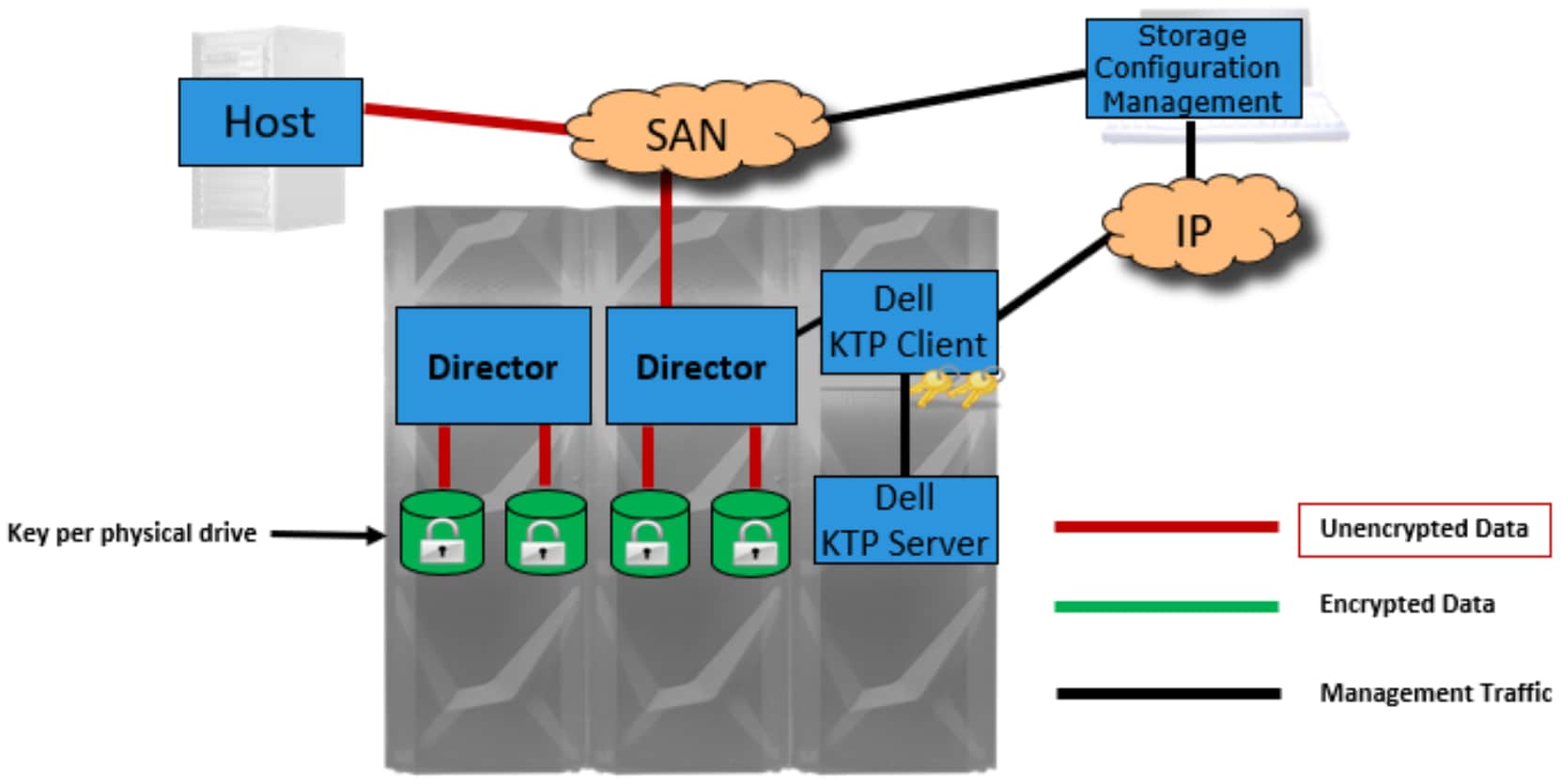
Because of the critical importance of key management in encryption solutions, D@RE was designed to be integrated with Dell Key Trust Platform (KTP). Dell KTP provides enterprise key management for a broad range of security products, establishing a pervasive and secure infrastructure for this essential component of data security. KTP provides all key generation, distribution, and management capabilities required for D@RE, according to the best practices defined by industry standards such as NIST 800-57 and ISO 11770.
Figure 1.Embedded key management architecture
External key management
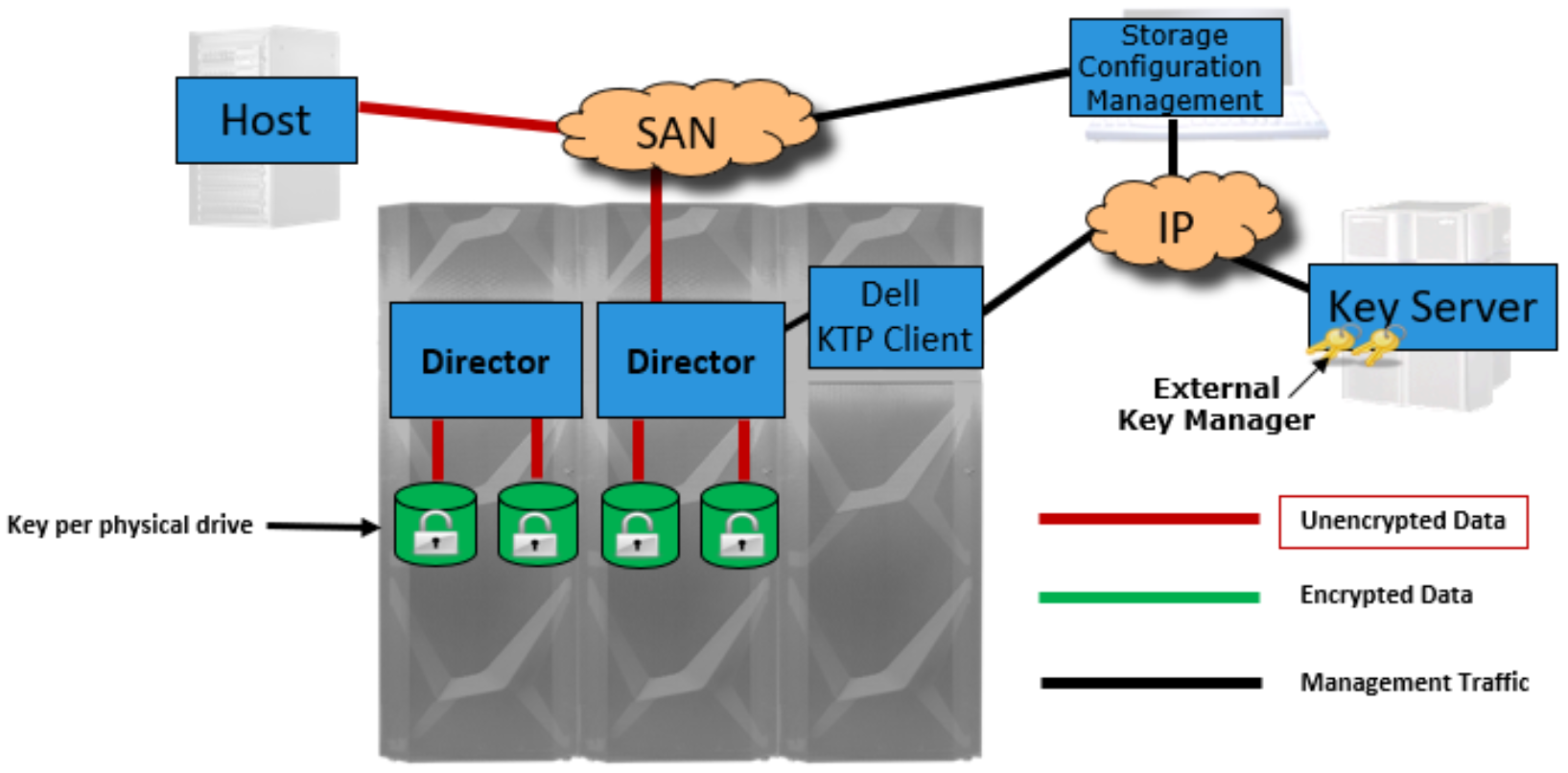
D@RE can also be deployed with external key managers using the OASIS Key Management Interoperability Protocol (KMIP), which allows for a separation of key management from PowerMax arrays. KMIP is an industry standard that defines message formats for the manipulation of cryptographic keys on a key management server. External key managers provide support for consolidated key management and allows integration between PowerMax arrays with an existing key management infrastructure. They also provide the ability to non-disruptively migrate keys from an embedded key manager. External key management can cluster multiple key server appliances and separate key ownership and management individually while providing a centralized audit log.
Figure 2.External key management architecture
Key management components
Embedded key management components
Embedded key management uses the following components, which reside on the primary control station (CS):
KTP server: An embedded key manager that provides authentication key (AK) management capabilities such as generation, storage, and audit
KTP client: Client software that handles communication with the KTP server
Dell BSAFEcryptographic library: A component that provides foundational security functionality for the KTP server and client
Lockbox: An encrypted repository that securely stores sensitive key manager configuration information
External key management components
External key management uses the following components:
KTP client: Client software that runs securely on the Control Station (CS) and facilitates communication between the external key manager and PowerMax
Dell BSAFE cryptographic library: A component that provides foundational security functionality for the external key management server and KTP client
Lockbox: An encrypted repository that securely stores sensitive key manager configuration information
PowerMax 2500/8500 systems can interoperate with the following products:
Thales Cipher Trust 2.4
IBM Guardium Key Lifecycle Manager 4.1.1
Note: These external key managers are offered as of the publication date of this document. For up-to-date information, see the PowerMax Support Matrix.
Ignition Key
Ignition Key
Ignition key eliminates data exposure on D@RE enabled PowerMax arrays where physical security of the array is not guaranteed. The ignition key functionality requires authorization from an external key manager to gain access to the array. This prevents usage of the array unless the ignition key is retrievable from the external key manager during a power cycle.
During each power cycle, with ignition key enabled, a handshake occurs between the PowerMax array and the external key manager to bring the array online. Without this handshake, the array remains offline.
Supported on:
PowerMax 2500 and 8500
PowerMax 2000 and 8000
Requirements:
D@RE must be enabled
HashiCorp Vault must be the external key manager
Note: Ignition key is enabled and disabled by RPQ only.
D@RE components
SED data encryption keys
Data encryption keys (DEKs) for SEDs reside within the drive. DEKs are generated when the drive is initialized in secure mode and cannot be accessed externally.
Authentication keys
Authentication keys (AKs) are keys that are generated and managed using the D@RE key management infrastructure within the system or by an external key manager. AKs are generated as part of system initialization on D@RE-enabled systems and are used to unlock the drives for reads and writes.
Authentication key protection
The following functionality ensures the protection of AKs:
For embedded D@RE, the local key repository is encrypted with 256-bit AES.
The lockbox is protected by PKCS#12 using primary CS-specific system fingerprint.
If a CS is removed, file access is not allowed without valid SSC credentials.
For D@RE with external key management, the lockbox contains the PKCS#12 password that protects the Transport Layer Security (TLS) authentication private key of PowerMax clients.
All persistent AK storage locations contain wrapped or encrypted keys.
There are no backdoor keys or passwords to bypass security.
Authentication key recovery
The following information applies to the recovery of AKs:
External key managers only need to be available during initial installation, back-end maintenance, and upgrades, or in the unlikely system-recovery event.
The array can come online without the CS being available using AKs persistently cached on the array itself.
CS key management components can restore the D@RE configuration and AKs directly from the array, in most cases.
Authentication key integrity
AKs include a unique keytag identity alias along with the key metadata that is appended to key data during the key wrap process. The keytag identity alias is used to check the integrity of the AK during unlock operation.
Key rotation
D@RE for PowerMax 2500/8500 supports key rotation. The key rotation process is the ability to rotate AKs. Key rotation must be performed by authorized Dell support personnel.
Operational examples
Introduction
This section describes how D@RE works during common PowerMax operations.
Installing a PowerMax system
Enabling D@RE on a PowerMax system is done at system installation/initialization. Once the PowerMax system has been properly sized, D@RE can be enabled in the BIN file from Dell Manufacturing or onsite prior to installation.
Note: If a currently installed system is being upgraded, the Dell account team must submit a Request for Product Qualification (RPQ).
Installation with embedded key manager
Installation with an embedded key manager occurs as follows:
Once the PowerMax system is at the site, Dell field personnel begin the installation process.
The installation script automatically installs the KTP software on the primary CS.
The Dell KTP server generates AKs for each drive that is installed in the system.
PowerMaxOS generates an entry in the PowerMax audit log for every key generation event.
The Dell KTP encrypts the keys and stores them in the local encrypted key repository file as nonvolatile copies.
The Dell KTP client wraps each AK, and PowerMaxOS stores all the keys on the system as encrypted, persistent backup copies.
PowerMaxOS initializes the SEDs. Any user data written to the drive media is encrypted using the DEK, which is internal to the drive.
Migrating to external key manager
Existing D@RE-enabled systems can be migrated from embedded key management to an external key manager as follows:
Dell personnel begin the key migration script. Dell field personnel or the customer provide the IP address, port number, certificate authentication information, and application registration name.
The migration script performs the following:
Verifies the supplied server configuration information.
Verifies that the external key manager is correctly configured.
Moves the AKs from the embedded key store to the external key manager.
Backs up the KTP client configuration details to the system for use during a CS replacement or during a PowerMaxOS nondisruptive upgrade.
Populates the PowerMax audit log with D@RE security events pertaining to the migration.
Replacing a drive
In the event of a failed drive, the drive is replaced as follows:
Dell field personnel remove the failed drive from the system.
The Dell KTP server securely deletes the AK from the key repository on the CS. If the system uses an external key manager, the KTP client requests the KMIP server to securely delete the AK.
When a new drive is installed, PowerMaxOS verifies that it is functional, and the Dell KTP server generates a new AK for the drive. For external key manager configurations, the KMIP server generates a new AK and returns it to the system.
PowerMaxOS generates an entry in the audit log for the deletion of the old AK and the creation of the new AK.
PowerMaxOS caches the new AK, which replaces the previous AK.
PowerMaxOS rebuilds the drive data.
Vaulting with D@RE
PowerMax arrays can encrypt data in cache during the vault process if the system is powered down. The vault image is saved and encrypted on a vault SED. Each vault SED has a unique AK, which is managed much like a normal drive AK.
Decommission of a PowerMax system
This section describes how a PowerMax system is decommissioned by Dell field personnel.
Decommission with an embedded key manager
Dell field personnel start the D@RE system decommission script.
The Dell KTP server securely deletes all persistent copies of the keys in the key repository.
PowerMaxOS securely deletes the cached keys that are stored within the system, making the audit log irretrievable.
A certificate file is produced. The file details the deletion of all keys during the decommissioning of the system.
Decommission with an external key manager
Dell field personnel start the D@RE system decommission script.
The KTP client instructs the KMIP external key manager server to securely delete each of the systems keys.
The system is taken offline.
All keys and authentication credentials are zeroed within the system.
A certificate file detailing the decommission results is produced.
D@RE considerations
D@RE considerations
The following considerations apply to D@RE for PowerMax systems:
Because D@RE can only be configured during initial installation, the system needs to be properly sized.
The D@RE configuration flag must be set by Dell manufacturing or authorized Dell field personnel prior to installation.
Once the D@RE flag is set and the system is installed, D@RE cannot be disabled without PowerMax system reinitialization, which erases all the data on the system.
Mixing encrypted and unencrypted data on the system is not supported.
Summary
Summary
Data at Rest Encryption is an easy-to-use solution that keeps sensitive data safe from drive theft or loss by providing back-end encryption for the entire system. PowerMax 2500 and 8500 systems can use either embedded or external key management. Embedded key management allows the system to self-manage authentication keys; external key management uses the standard OASIS KMIP protocol, allowing the end user to manage keys on an external management server for centralized key storage.
D@RE incorporates other important key management components such as the Key Trust Platform, Dell BSAFE cryptographic library, and the lockbox. The PowerMax systems also offer encryption during a vaulting operation in the event of a system power down, securing all cached data. Through these components, D@RE offers key protection, recovery, and integrity to ensure the security of all sensitive data.