
Dell PowerMax: Reliability, Availability, and Serviceability

Oct 19, 2026
Dell PowerMax: Reliability, Availability, and Serviceability This document describes the reliability, availability, and serviceability hardware and software features of Dell PowerMax storage arrays.

Executive summary

Overview

Today’s mission-critical environments demand more than redundancy. They require non-disruptive operations, non-disruptive upgrades and being “always online.” They require high-end performance, handling all workloads, predictable or not, under all conditions. They require the added protection of increased data availability provided by local snapshot replication and continuous remote replication.

Dell PowerMax storage arrays deliver these needs. The introduction of NVMe drives raises the performance expectations and possibilities of high-end arrays. A simple, service level-based provisioning model simplifies the way users consume storage, taking the focus away from the back-end configuration steps and allowing them to concentrate on other key roles.

While performance and simplification of storage consumption are critical, other features also create a powerful platform. Redundant hardware components and intelligent software architecture deliver extreme performance while also providing high availability. This combination provides exceptional reliability, while also leveraging components in ways that decrease the total cost of ownership of each system. Important functionality such as local and remote replication of data, used to deliver business continuity, must cope with more data than ever before without impacting production activities. Furthermore, these challenges must be met while continually improving data center economics.

Reliability, availability, and serviceability (RAS) features are crucial for enterprise environments requiring always-on availability. PowerMax arrays are architected for six-nines (99.9999%) availability. The many redundant features discussed in this document are factored into the calculation of overall system availability. This includes redundancy in the back-end, cache memory, front-end, and fabric, and the types of RAID protections given to volumes on the back-end. Calculations may also include time to replace failed or failing FRUs (field replaceable units). In turn, this also considers customer service levels, replacement rates of the various FRUs and hot sparing capability in the case of drives.
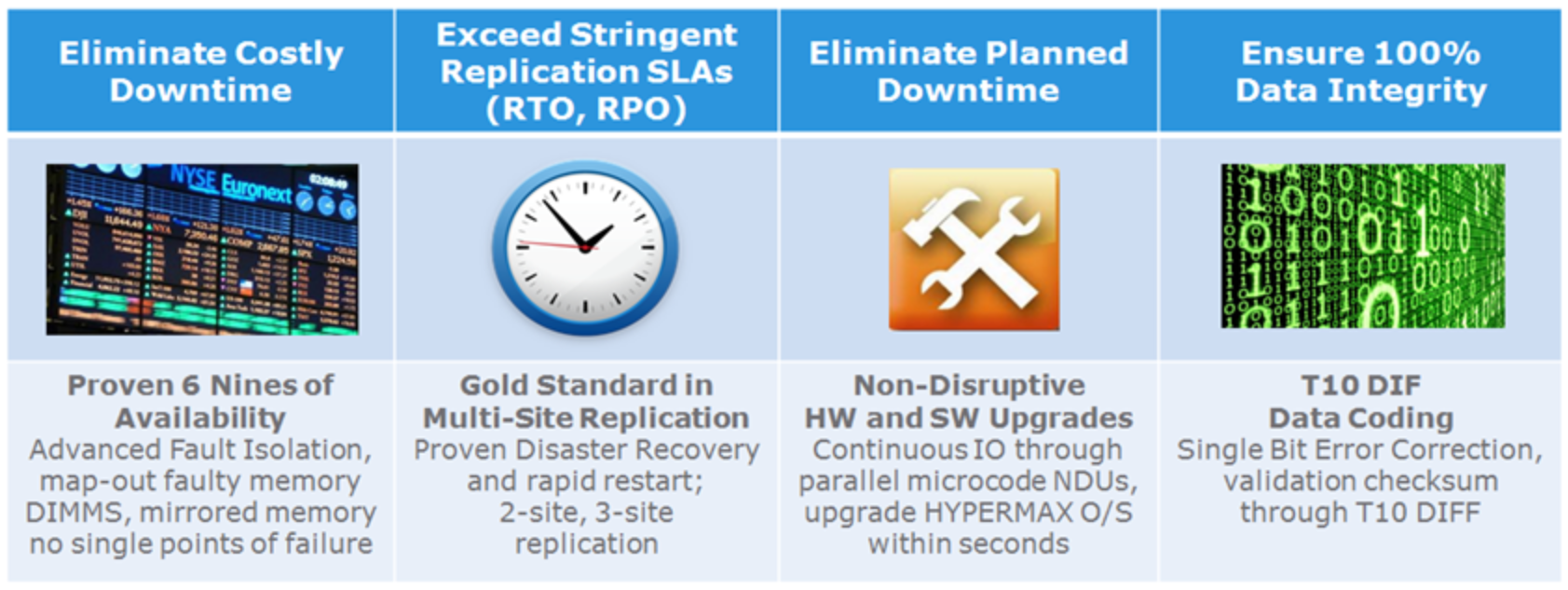
Figure 1.   PowerMax RAS highlights

Revisions

Date

Description

May 2018

Initial release

October 2018

Update

September 2019

PowerMaxOS 5978 Q3 2019 release updates

September 2020

PowerMaxOS 5978 Q3 2020 release updates

December 2020

Updates to address frequent questions

July 2021

Section 4.2: Data Protection Schemes

November 2022

Document template update

Introduction

Introduction

PowerMax arrays include enhancements that improve reliability, availability, and serviceability. This makes PowerMax arrays ideal choices for critical applications and 24x7 environments demanding uninterrupted access to information.

PowerMax array components have a mean time between failure (MTBF) of several hundred thousand to millions of hours for a minimal component failure rate. A redundant design allows systems to remain online and operational during component replacement. All critical components are fully redundant, including director boards, global memory, internal data paths, power supplies, battery backup, and all NVMe back-end components. Periodically, the system tests all components. PowerMaxOS reports errors and environmental conditions to the host system and to the Customer Support Center.

PowerMaxOS validates the integrity of data at every possible point during the lifetime of the data. From the point at which data enters an array, the data is continuously protected by error detection metadata, data redundancy, and data persistence. This protection metadata is checked by hardware and software mechanisms anytime data is moved within the subsystem, allowing the array to provide true end-to-end integrity checking and protection against hardware or software faults. Data redundancy and persistence allows recovery of data where the integrity checks fail.

The protection metadata is appended to the data stream and contains information describing the expected data location and CRC representation of the actual data contents. The expected values found in protection metadata are stored persistently in an area separate from the data stream. The protection metadata is used to validate the logical correctness of data being moved within the array anytime the data transitions between protocol chips, internal buffers, internal data fabric endpoints, system cache, and system disks.

PowerMaxOS supports industry standard T10 Data Integrity Field (DIF) block cyclic redundancy code (CRC) for track formats. For open systems, this enables a host generated DIF CRC to be stored with user data and used for end-to-end data integrity validation. Additional protections for address or control fault modes provide increased levels of protection against faults. These protections are defined in user-definable blocks supported by the T10 standard. Address and write status information is stored in the extra bytes in the application tag and reference tag portion of the block CRC.

The objective of this technical note is to provide an overview of the architecture of PowerMax arrays and the reliability, availability, and serviceability (RAS) features within PowerMaxOS.

Dell PowerMax system family overview

Dell PowerMax system family overview

The Dell PowerMax 2000 and Dell PowerMax 8000 are the first Dell Technologies hardware platforms with end-to-end Non-Volatile Memory Express (NVMe): from servers to PowerMax drives (SCM/Flash). PowerMax end-to-end NVMe delivers the best response times for high demand applications of today and tomorrow.

NVMe is the protocol that runs on the PCI Express (PCIe) transport interface, used to efficiently access storage devices based on Non-Volatile Memory (NVM) media, including today’s NAND-based flash along with future, higher-performing, Storage Class Memory (SCM) media technologies such as 3D XPoint and Resistive RAM (ReRAM). NVMe also contains a streamlined command set used to communicate with NVM media, replacing SCSI and ATA. NVMe was specifically created to fully unlock the bandwidth, IOPS, and latency performance benefits that NVMe offers to host-based applications which are currently unattainable using the SAS and SATA storage interfaces.

32 Gb/s FC-NVMe I/O modules for host connectivity accelerate network bandwidth for massive consolidation. The NVMe back-end consists of a 24-slot NVMe DAE using 2.5” form factor drives connected to the Brick through dual-ported NVMe PCIe Gen3 (eight lane) back-end I/O interface modules, delivering up to 8 GB/sec of bandwidth per module.

SCM drives based on Intel® Optane™ dual port technology are available for open systems and mainframe applications. Dell and Intel combine forces to define enterprise storage media for the next decade. SCM technology delivers unmatched levels of performance and consolidation for high value, high demand workloads of today and tomorrow.

In addition to the all-NVMe storage density and scale which provide high back-end IOPS and low latency, the Dell PowerMax arrays also introduce a more powerful data reduction module capable of performing inline hardware data compression, deduplication, and adaptive tiering to lower TCO by using auto data placement.

Highlights of the PowerMax 2000 system include:

  • 1 to 2 engines per system
  • 12-core Intel Broadwell CPUs yielding 48 cores per engine
  • Up to 2 TB of DDR4 cache per engine
  • Up to 64 FE ports per system
  • Up to 1 PBe per system of PCIe Gen3 NVMe storage

Highlights of the PowerMax 8000 system include:

  • 1 to 8 engines per system
  • 18-core Intel Broadwell CPUs yielding 72 cores per engine
  • Up to 2 TB DDR4 cache per engine
  • Up to 256 FE ports per system
  • Up to 4 PBe per system of PCIe Gen3 NVMe storage

The primary benefits that the PowerMax platforms offer Dell customers are:

  • Massive scale with low latency NVMe design
  • More storage IOPS density per system in a much smaller footprint
  • Applied machine learning to lower TCO by using intelligent data placement
  • Data efficiency and data reduction capabilities with inline dedupe and compression

Active-Active Architecture

PowerMax systems aggregate up to sixteen directors with fully shared connectivity, processing, memory, and storage capacity resources. Each pair of highly available directors is contained within a common shell as an engine. The directors operate in a truly symmetric active-active fashion delivering sub-controller fault isolation and component-level redundancy. Each director contains hot-pluggable I/O modules that provide frontend host connectivity, SRDF connectivity, and backend connectivity. Management modules on each director provide environmental monitoring and system management intercommunications to all other directors in the system. Each director also has its own redundant power and cooling subsystems.

Redundant internal fabric I/O modules on each director provide communication interconnection between all directors. This technology connects all directors in the system to provide a powerful form of redundancy and performance by allowing the directors to share resources and act as a single entity. Data behind one director can be accessed by any other director without performance considerations.

The memory modules on each director are collectively distributed as a unified global cache. Global cache/memory is accessible by all directors in the array. When a new write operation is committed to memory, the new data is immediately available to all processors within every engine. While the data is protected in memory, the processors on all directors can work autonomously on the new data to update a mirrored pair, send the update over an SRDF link, update a TimeFinder copy, report the current status of all events to the management software, and handle error detection and correction of a failed component. All tasks can occur simultaneously, without de-staging to the drives and re-staging to a separate region in memory.
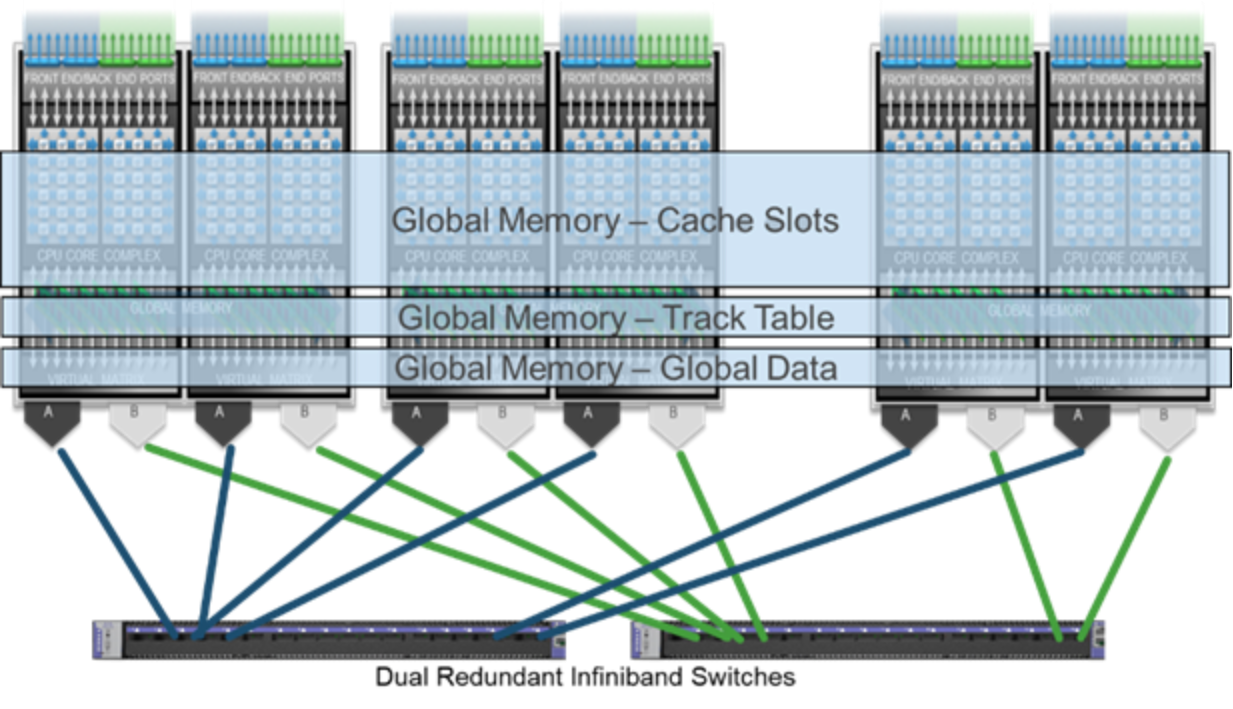
Figure 2.   Globally shared resources

PowerMax engine and director components

PowerMax engine and director components

The engine is the critical building block of PowerMax systems. It primarily consists of two redundant director boards that house global memory, front-end connectivity, back-end connectivity, internal network communications and environmental monitoring components. Each director board has a dedicated power and cooling system. Even single-engine configurations are fully redundant. A PowerMax system may have between one and eight engines depending on model and configuration.

Table 1 lists the components within an engine, count per director, and defines their purposes.

Table 1.      PowerMax engine and director components

Director Component

Count (per director)

Purpose

Power Supply

2

Provide redundant power to a director

Fan

5

Provide cooling for a director

Management Module

1

Manage environmental functionality

NVMe Flash I/O Module

Up to 4

Safely store data from cache during the vaulting sequence.

Front-end I/O Module

Up to 4

Provide front-end connectivity to the array. There are different types of front-end I/O modules that allow connectivity to various interfaces, including Fibre Channel SCSI, Fibre Channel NVMe, iSCSI, FICON, SRDF, and embedded NAS (eNAS).

PCIe Back-end I/O Module

2

Connect the director boards to the back-end of the system, allowing I/O to the system’s drives.

Compression and Deduplication I/O Module

1

Perform inline data compression and deduplication

Fabric I/O module

1

Provides connectivity between directors. In multi-engine PowerMax 8000 systems, the fabric I/O modules are connected to an internal InfiniBand switch.

Memory module

16

Global memory component

Figure 3 displays the front view of a PowerMax engine.
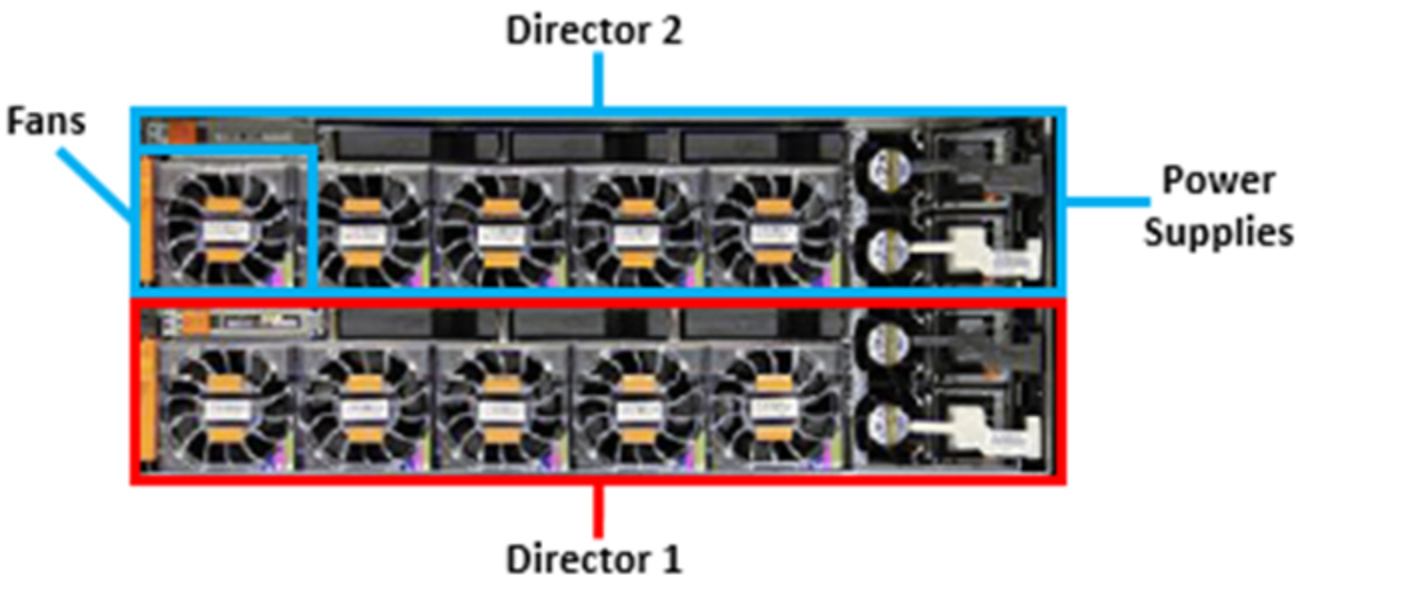
Figure 3.   Front view of PowerMax 2000 and PowerMax 8000 engine

The following figures display back views of engine components, with logical port numbering.
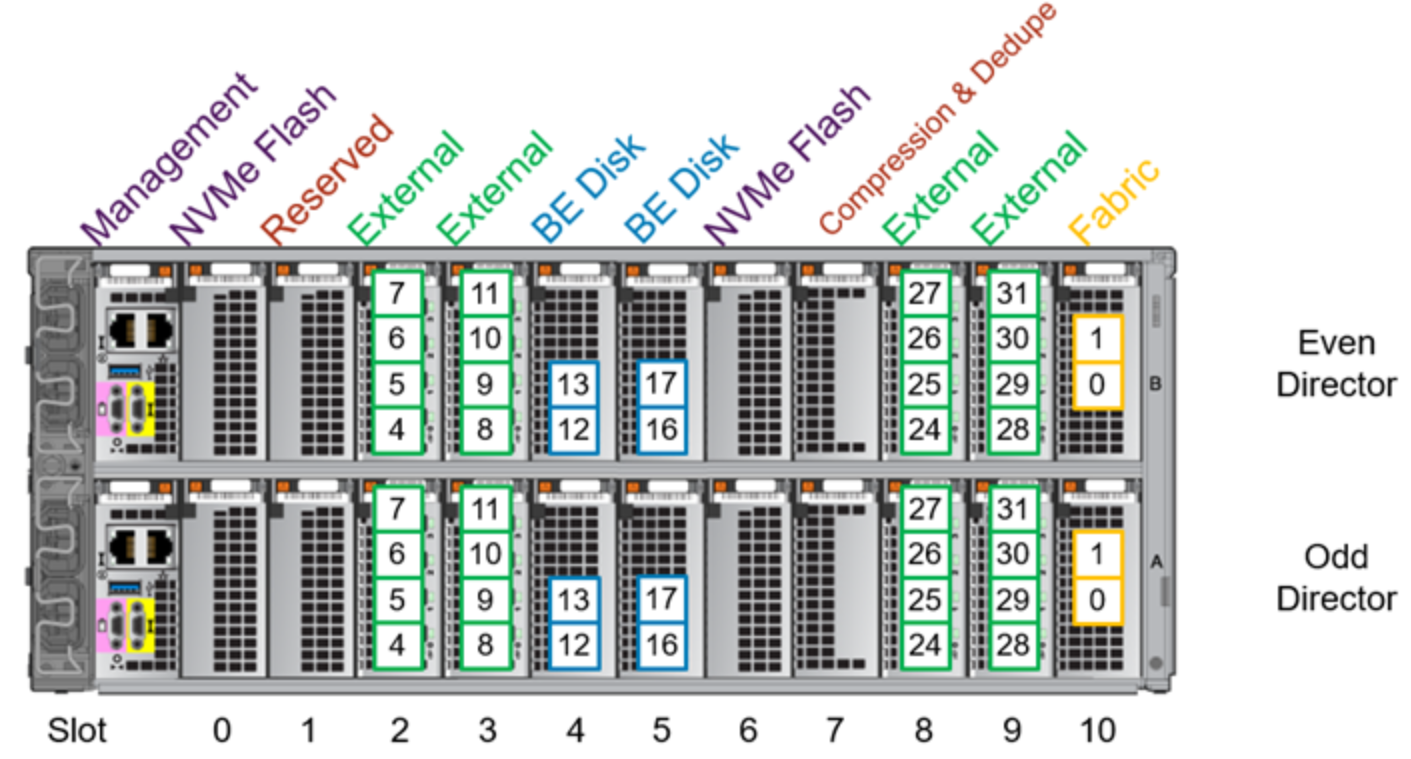
Figure 4.   Back view of PowerMax 2000 engine with logical port numbering
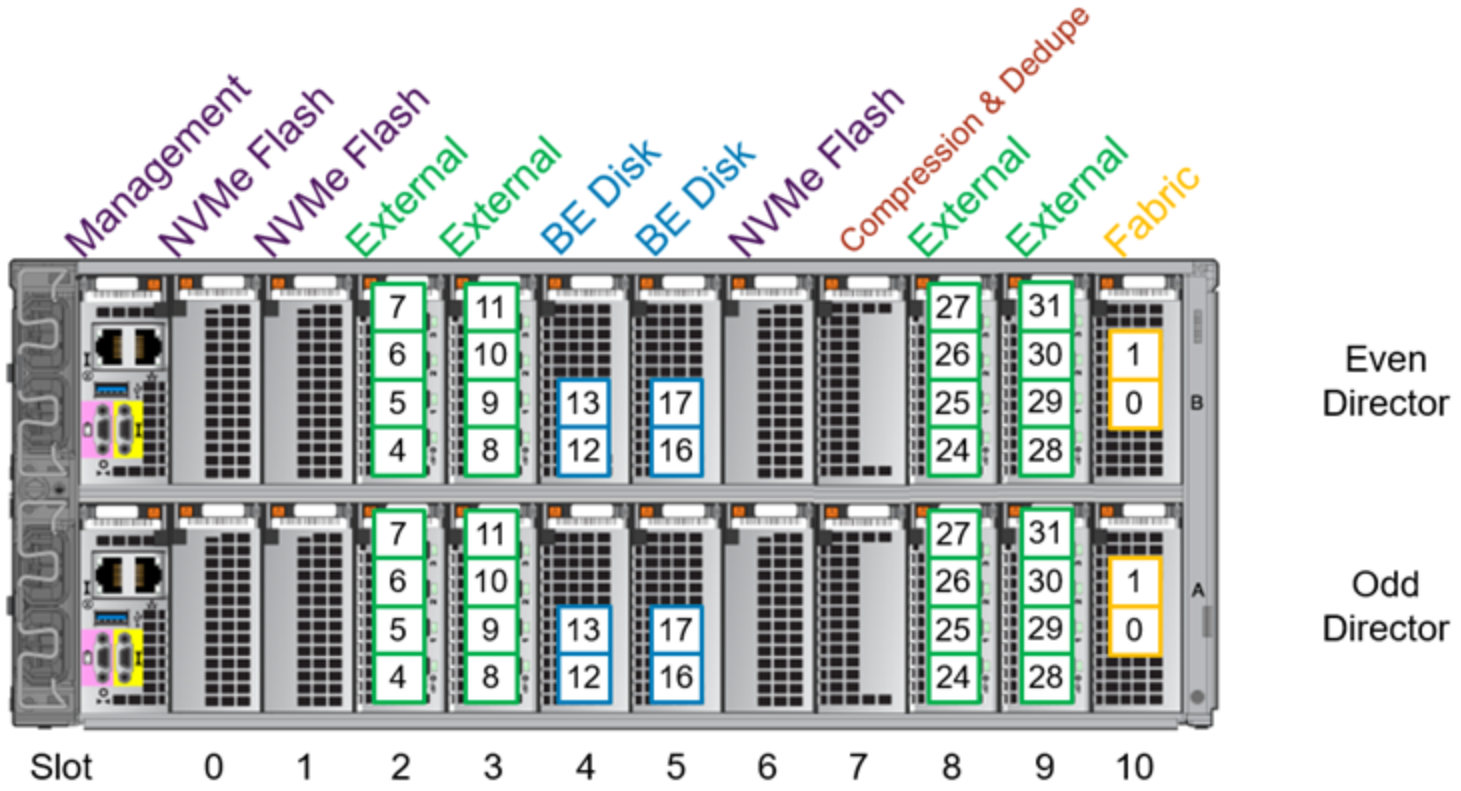
Figure 5.   Back view of PowerMax 8000 multi-engine with logical port numbering
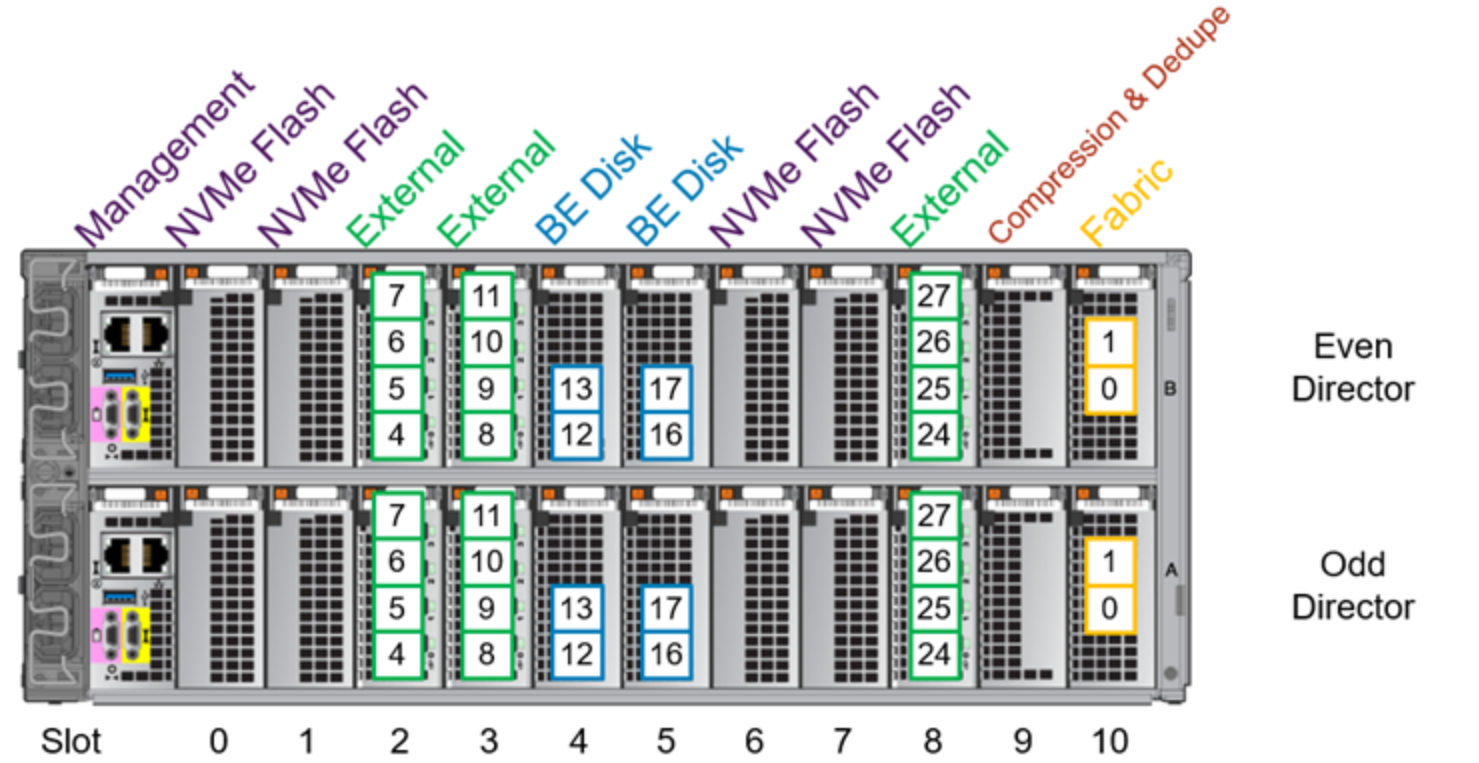
Figure 6.   Back view of PowerMax 8000 single-engine with logical port numbering

Note that a single-engine PowerMax 8000 system requires four NVMe Flash I/O modules per director compared to a multi-engine PowerMax 8000 which requires three NVMe Flash I/O modules per director. The four NVMe Flash I/O modules per director configuration will remain even if additional engines are added to the system. This must be considered when ordering new systems as the additional NVMe Flash I/O module reduces the number of external I/O modules, thus reducing the total number of external ports.

Channel front-end redundancy

Channel redundancy is provided by configuring multiple connections from the host servers (direct connect) or Fibre Channel switch (SAN connect) to the system. SAN connectivity allows each front-end port on the array to support multiple host attachments, which increases path redundancy and enables storage consolidation across many host platforms. A minimum of two connections per server or SAN to different directors is necessary to provide basic redundancy.

The highest level of protection is delivered by configuring at least 2 or 4 front-end paths in the port group for masking and zones to the host. Single initiator zoning is recommended. Multiple ports from each server should be connected to redundant fabrics.

On the array, distributing the host paths and fabric connections across the physical array components increases fabric redundancy and spreads the load for performance. The relevant array components include directors, front-end I/O modules, and ports.

The following two examples show the options for selecting the array ports for each fabric path. The fabrics can either share I/O modules or be connected to separate I/O modules. If both redundant fabrics connect to the same I/O module, one fabric should be connected to the high ports and the other fabric should be connected to the low ports.

Both are examples of a pair of servers connected through redundant fabrics to a single-engine PowerMax array with a pair of front-end I/O modules on each director. A multi-engine system has more directors and modules to spread across for redundancy. Each fabric has multiple connections to each director in the PowerMax. If a server loses connection to one fabric, it will have access to the PowerMax through the remaining fabric. Redundancy can be increased further if additional paths are configured from the servers to the fabrics and/or from the fabrics to the PowerMax.

In the first example, each fabric connects to each front-end I/O module. If one of the front-end I/O modules were to fail, each server will have an equal number of paths remaining to each director and to each of the remaining I/O modules. If a director failure occurs, host connectivity remains available through the other director’s front-end I/O modules. Fabric A connects to the two high ports on each I/O modules, and Fabric B is connected to the two low ports.
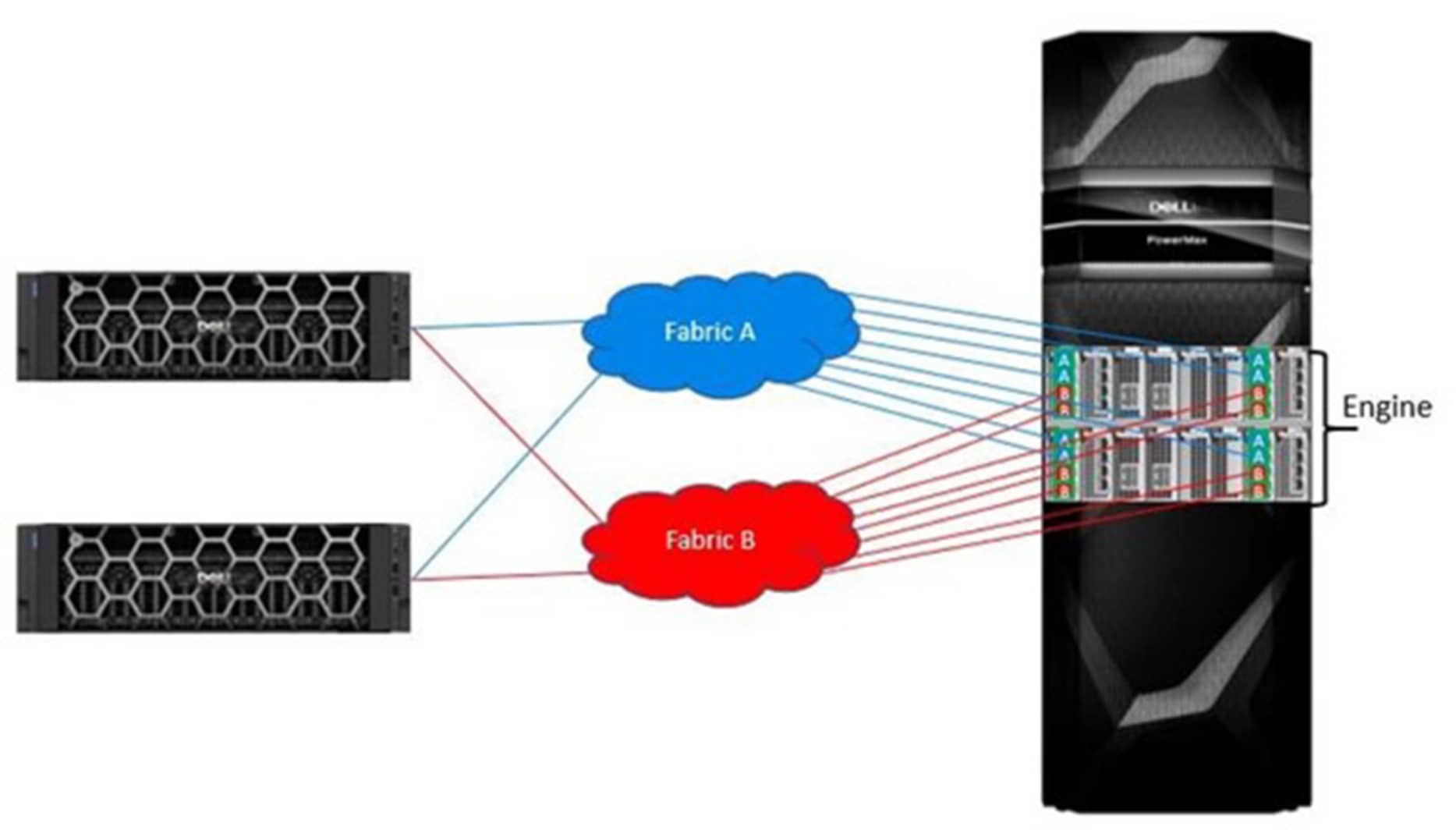
Figure 7.   Each fabric connected to each I/O module

In the following example, each front-end I/O module is dedicated to one fabric. A front-end I/O module failure will only affect one fabric. And like the previous example, a director failure will affect 4 paths from each fabric.
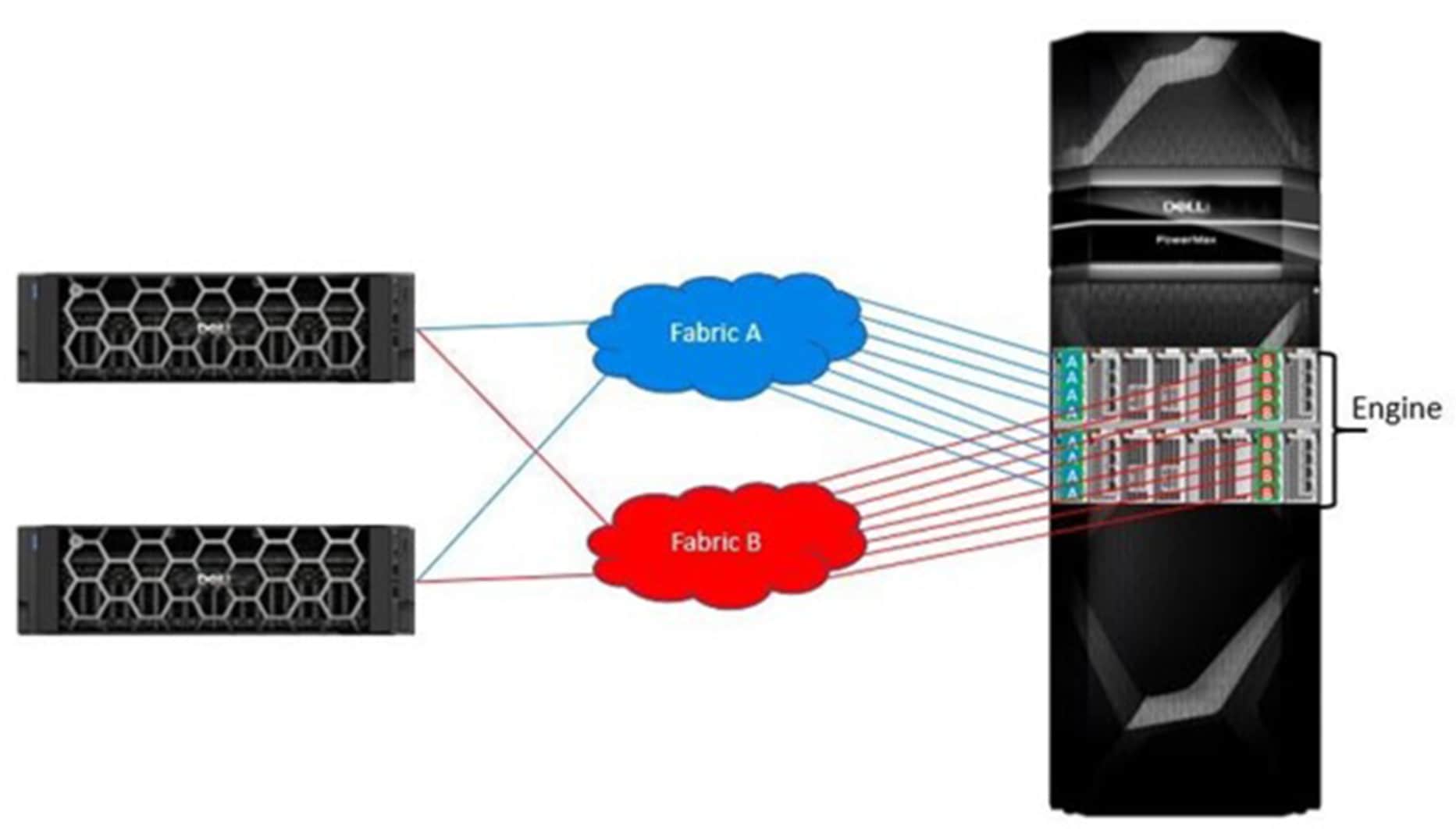
Figure 8.   Each I/O module dedicated to one fabric

FC-NVMe front-end redundancy

NVMe devices are supported with PowerPath 7.0 releases providing enhance multi-pathing with flake path and congestion controls that yield higher IOPS over native operating-system multipathing.

The guidelines outlined for previously supported protocols apply to FC-NVMe connectivity. Redundant fabrics along with a PowerMax array with multiple engines and multiple front-end I/O modules provide the most opportunities for redundancy.

  • Redundant connections from each server to each fabric
  • Redundant connections from each fabric to each PowerMax director
  • If each director has multiple I/O modules, there are two connection options:
  • Connect each fabric to each I/O module
  • Dedicate each I/O module to one fabric
  • If the redundant fabrics connect to the same I/O module, one fabric should be connected to the high ports and the other fabric should be connected to the low ports.
  • For example, if Fabric A is connected to port 4 and/or port 5, then Fabric B should be connected to port 6 and/or port 7.

Dell PowerPath Intelligent Multipathing Software

Dell PowerPath is a family of software products that ensures consistent application availability and performance across I/O paths on physical and virtual platforms.

It provides automated path management and tools that enable you to satisfy aggressive service-level agreements without investing in additional infrastructure. PowerPath includes PowerPath Migration Enabler for non-disruptive data migrations and PowerPath Viewer for monitoring and troubleshooting I/O paths.

Dell PowerPath/VE is compatible with VMware vSphere and Microsoft Hyper-V-based virtual environments. It can be used together with Dell PowerPath to perform the following functions in both physical and virtual environments:

  • Standardize Path Management: Optimize I/O paths in physical and virtual environments (PowerPath/VE) and cloud deployments.
  • Optimize Load Balancing: Adjust I/O paths to dynamically rebalance your application environment for peak performance.
  • Increase Performance: Leverage your investment in physical and virtual environment by increasing headroom and scalability.
  • Automate Failover and Recovery: Define failover and recovery rules that route application requests to alternative resources if component failures or user errors occur.

For more information about PowerPath, see the Dell PowerPath Family Product Guide.

Global memory technology overview

Global memory is a crucial component in the architecture. All read and write operations are transferred to and from global memory. Transfers between the host processor and channel directors can be processed at much greater speeds than transfers involved with hard drives. PowerMaxOS uses complex statistical prefetch algorithms which can adjust to proximate conditions on the array. Intelligent algorithms adjust to the workload by constantly monitoring, evaluating, and optimizing cache decisions.

PowerMax arrays can have up to 2 TB of mirrored DDR4 memory per engine and up to 16 TB mirrored per array. Global memory within an engine is accessible by any director within the array.

Dual-write technology is maintained by the array. Front-end writes are acknowledged when the data is written to mirrored locations in the cache. In the event of a director or memory failure, the data continues to be available from the redundant copy. If an array has a single engine, physical memory mirrored pairs are internal to the engine. Physical memory is paired across engines in multi-engine PowerMax 8000 arrays.

Physical memory error verification and error correction

PowerMaxOS can correct single-bit errors and report an error code once the single-bit errors reach a predefined threshold. To protect against possible future multi-bit errors, if single-bit error rates exceed a predefined threshold, the physical memory module is marked for replacement. When a multi-bit error occurs, PowerMaxOS initiates director failover and calls out the appropriate memory module for replacement.

When a memory module needs to be replaced, the array notifies Dell Support, and a replacement is ordered. The failed module is then sent back to Dell Support for failure analysis.

PowerMax NVMe back end

PowerMax NVMe back end

The PowerMax architecture incorporates an NVMe back end that reduces command latency and increases data throughput while maintaining full redundancy. NVMe is an interface that allows host software to communicate with a nonvolatile memory subsystem. This interface is optimized for Enterprise and Client solid-state drives (SSDs), typically attached as a register-level interface to the PCI Express interface. 

The NVMe back-end subsystem provides redundant paths to the data stored on solid-state drives. This provides seamless access to information, even in the event of a component failure or replacement.

Each PowerMax Drive Array Enclosure (DAE) can hold 24 x 2.5” NVMe SSDs. The DAE also houses redundant Canister Modules (Link Control Cards) and redundant AC/DC power supplies with integrated cooling fans. Figure 9 and Figure 10 show the front and back views of the PowerMax DAE.

Figure 9.   PowerMax DAE (front)
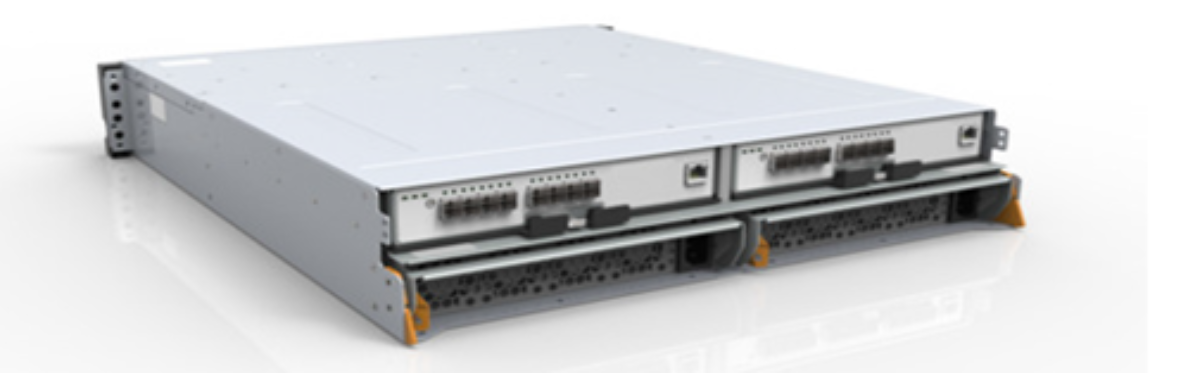
Figure 10.    PowerMax DAE (back)

The directors are connected to each DAE through a pair of redundant back-end I/O modules. The back-end I/O modules connect to the DAEs at redundant LCCs. Each connection between a back-end I/O module and an LCC uses a completely independent cable assembly. Within the DAE, each NVMe drive has two ports, each of which connects to one of the redundant LCCs.

The dual-initiator feature ensures continuous availability of data in the unlikely event of a drive management hardware failure. Both directors within an engine connect to the same drives using redundant paths. If the sophisticated fencing mechanisms of PowerMaxOS detect a failure of the back-end director, the system can process reads and writes to the drives from the other director within the engine without interruption.

Smart RAID

Smart RAID provides active/active shared RAID support for PowerMax arrays. Smart RAID allows RAID groups to be shared between back-end directors within the same engine. Each back-end director has access to every hard drive within the DAE but each TDAT on that hard drive will be primary to only one back-end director.

Smart RAID helps in cost reduction by allowing a smaller number of RAID groups while improving performance by allowing two directors to run I/O concurrently to the same set of drives.

Figure 11 illustrates Smart RAID connectivity between directors, spindles, and TDATs.
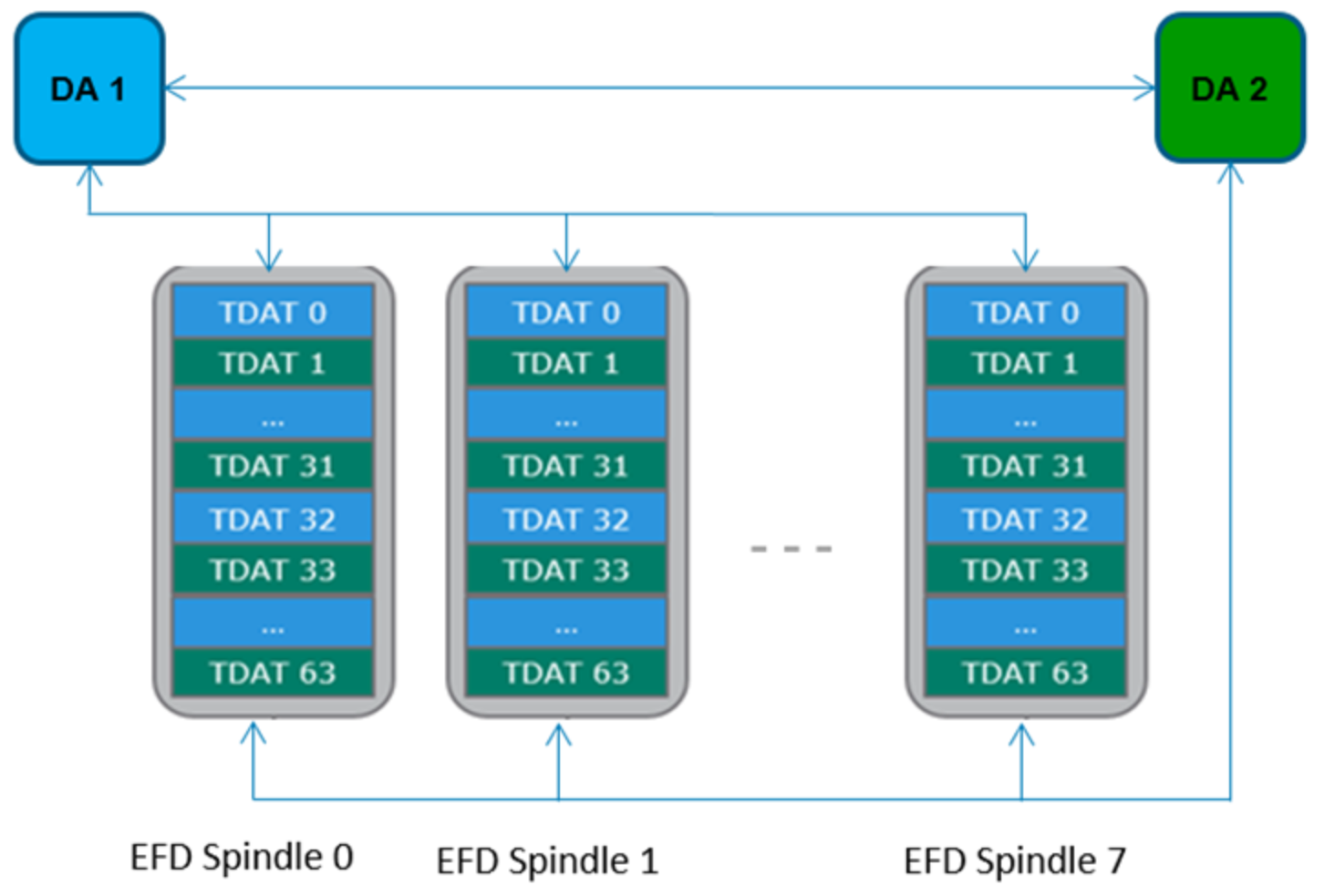
Figure 11.    Smart RAID connectivity

Data Protection Schemes

PowerMax systems offer various underlying RAID options: RAID 5 (single parity), RAID 6 (dual parity) and RAID 1 (dual drives). These options are described in the following section.

All data on PowerMax arrays is also managed as thin provisioned (128k) tracks within one (or more) Storage Resource Pools (SRPs). Each RAID group is divided into 64 logical blocks (TDATs), and each TDAT is configured to hold data at a given data reduction level, from 1:1 uncompressed data all the way to 16:1. The fixed, post-data reduction track size on a TDAT ranges from 8k to 128k, using every 8k increment except 120k.

As tracks are written to the array, the data reduction code will decide what size is needed to store the resulting track information, and then it selects a TDAT to store that data within (assuming it did not deduplicate). When the resulting size of a track changes or when snaps need to preserve the older version of a track, PowerMax writes the data to a new location rather than overwriting a prior version of the same data.

Due to SRP data management, there is no sequential mapping of host LUN data to tracks on TDATs. All data within a PowerMax is thin (single track) striped across all RAID groups in the SRP. As a result, PowerMax RAID types are all essentially “+0” with striping across RAID groups.

RAID 5

RAID 5 is an industry-standard data protection mechanism with rotating parity across all members of the RAID 5 set. If a hard drive failure occurs, the missing data is rebuilt by reading the remaining drives in the RAID group and performing XOR calculations.

PowerMax systems support two RAID 5 configurations:

  • RAID 5 (3+1) – Data striped across 4 drives (3 data, 1 parity)
  • RAID 5 (7+1) – Data striped across 8 drives (7 data, 1 parity)

RAID 6

RAID 6 enables the rebuilding of data if two drives fail within a RAID group. Our implementation of RAID 6 calculates two types of parity. This is important during events when two drives within the same RAID group fail, as it still allows the data in this scenario to be reconstructed. Horizontal parity is identical to RAID 5 parity, which is calculated from the data across all disks in the RAID group. Diagonal parity is calculated on a diagonal subset of data members. For applications without demanding performance needs, RAID 6 provides the highest data availability.

PowerMax systems support RAID 6 (6+2) with data striped across 8 drives (6 data, 2 parity).

RAID 1

RAID 1 is an industry-standard data protection consisting of two drives containing exact copies, or mirrors, of the data. There is no parity required as both RAID members have full copies of the data allowing the system to retrieve data from either disk. Dell PowerMax implements RAID 1 (1 + 1) mirroring the data across two drives.

RAID 1 is available on PowerMax arrays with the PowerMaxOS Q3 2020 release and later.

Drive monitoring and error correction

PowerMaxOS monitors media defects by both examining the result of each data transfer and proactively scanning the entire drive during idle time. If a block is determined to be bad, the director:

  • Rebuilds the data in physical memory if necessary.
  • Remaps the defective block to another area on the drive set aside for this purpose.
  • Rewrites the data from physical memory back to the remapped block on the drive.

The director maps around any bad block(s) detected, thereby avoiding defects in the media. The director also keeps track of each bad block detected. If the number of bad blocks exceeds a predefined threshold, the primary MMCS invokes a sparing operation to replace the defective drive and then automatically alerts Customer Support to arrange for corrective action.

Drive sparing

PowerMaxOS supports Universal Sparing to automatically protect a failing drive with a spare drive. Universal Sparing increases data availability of all volumes in use without loss of any data capacity, transparently to the host, and without user intervention.

Drive health is monitored proactively for any indication that they may be trending toward failure. Drive-dependent codes detect and report indications of failing health. For example, conditions such as errors on blocks of NAND media, errors in DRAM buffer media, and controller check errors.

When PowerMaxOS detects a drive is failing, the data on the faulty drive is copied directly to a spare drive attached to the same engine. The failing drive is set as read-only while data is copied and written to the spare. The failing drive is made not ready after the spare is synchronized.

If the faulty drive stops responding to valid commands prior to spare synchronization, the drive is made not ready and the data is rebuilt onto the spare drive through the remaining RAID members. When the faulty drive is replaced, data is copied from the spare to the new drive. The spare drive becomes an available spare again after the new drive is synchronized.

Spare drive count

PowerMax systems have one spare drive behind each engine. The spare drives reside in dedicated drive locations. The spare drive type is the same as the highest capacity and performance class as the other drives behind the engine.

Modern, solid-state drives have a longer life than spinning disks of the past and have advanced feedback mechanisms that allow for proactive sparing and replacement before a failure occurs. The PowerMax spare drive count requirement was determined after thorough analysis. There is no need to configure additional spare drives.

Solutions Enabler commands

Solutions Enabler provides tools to view information related to spare drives in PowerMax arrays.

The symcfg list –v output reports total values for Configured Actual Disks, Configured Spare Disks and Available Spare Disks in the system.

The Number of Configured Actual Disks field reports only non-spare configured disks, and Number of Configured Spare Disks field reports only configured spare disks.

The following shows the command symcfg -sid <sid> list -v:

Symmetrix ID: 000197600XYZ (Local)

Time Zone   : Eastern Standard Time

    Product Model                        : PowerMax_8000

    Symmetrix ID                         : 000197600XYZ

    Microcode Version (Number)           : 5978 (175A0000)

--------------------< TRUNCATED >-------------------------

    Number of Configured Actual Disks    :    64

    Number of Configured Spare Disks     :     2

    Number of Available Spare Disks      :     2

The symdisk list –dskgrp_summary –by_engine reports spare coverage information per Disk Group per Engine. The -detail and -v options will provide additional information.

The Total and Available spare disk counts for each Disk Group include both spare disks that are in the same Disk Group in the same Engine, as well as shared spare disks in another Disk Group in the same Engine that provide acceptable spare coverage. These shared spares are also included in the total disk count for each Disk Group in each Engine. Therefore, the cumulative values of all Disk Groups in all Engines in this output should not be expected to match the values reported by the symcfg list –v command that were described in the previous example.

Total Disk Spare Coverage percentage for a Disk Group is the spare capacity in comparison to usable capacity shown in the output.

The following shows the command symdisk -sid <sid> list –dskgrp_summary –by_engine:

         Disk             Hyper    Usable Capacity    Spare Coverage

------------------------ ------- ------------------- -----------------

              Flgs Speed  Size         Total          Total    Avail

Grp  Eng Cnt   LT  (RPM)  (MB)   Disk (%)    (MB)    Disk (%) Disk (%)

---- --- ---- ---- ----- ------- ---- --- ---------- ---- --- ---- ---

   1   1    9  IE      0   29063    8  89   14880255    1  12    1 100

   2   1   25  IE      0   29063   24  96   44640765    1   4    1 100

   2   2   33  IE      0   29063   32  97   59521020    1   3    1 100

                                 ---- --- ----------

Total                              64  97  119042040

Legend:

  Disk (L)ocation:

    I = Internal, X = External, - = N/A

  (T)echnology:

    S = SATA, F = Fibre Channel, E = Enterprise Flash Drive, - = N/A

Spare Coverage as reported by the symdisk list –v and symdisk show commands indicates whether the disk currently has at least one available spare; that is, a spare disk that is not in a failed state or already invoked to another disk.

The following shows the command symdisk -sid <sid> list –v:

Symmetrix ID                 : 000197600XYZ

Disks Selected               : 66

  Director                   : DF-1C

  Interface                  : C

  Target ID                  : 0

  Spindle ID                 : 0

--------------------< TRUNCATED >-------------------------

  Spare Disk                 : N/A

  Spare Coverage             : True

Data at Rest Encryption

Data at Rest Encryption (D@RE) protects data confidentiality by adding back-end encryption to the entire array. D@RE provides hardware-based, on-array, back-end encryption. Back-end encryption protects information from unauthorized access when drives are removed from the system.

D@RE provides encryption on the back-end that incorporate XTS-AES 256-bit data-at-rest encryption. These I/O modules encrypt and decrypt data as it is being written to or read from a drive. All configured drives are encrypted, including data drives, spares, and drives with no provisioned volumes.

D@RE incorporates RSA Embedded Key Manager for key management. With D@RE, keys are self-managed, and there is no need to replicate keys across volume snapshots or remote sites. RSA Embedded Key Manager provides a separate, unique Data Encryption Key (DEK) for each drive in the array, including spare drives.

By securing data on enterprise storage, D@RE ensures that the potential exposure of sensitive data on discarded, misplaced, or stolen media is reduced or eliminated. If the key used to encrypt the data is secured, encrypted data cannot be read. In addition to protecting against threats related to physical removal of media, media can readily be repurposed by destroying the encryption key used for securing the data previously stored on that media.

D@RE:

  • Is compatible with all PowerMaxOS features.
  • Allows for encryption of any supported local drive types or volume emulations.
  • Delivers powerful encryption without performance degradation or disruption to existing applications or infrastructure.

D@RE can also be deployed with external key managers using Key Management Interoperability Protocol (KMIP) that allow for a separation of key management from PowerMax arrays. KMIP is an industry standard that defines message formats for the manipulation of cryptographic keys on a key management server. External key manager provides support for consolidated key management and allows integration between a PowerMax array with an existing key management infrastructure.

For more information about D@RE, see the following documents:

  • Dell PowerMax Family Security Configuration Guide
  • Dell VMAX3 and VMAX All Flash Data at Rest Encryption White Paper

T10 Data Integrity Field

PowerMaxOS supports industry standard T10 Data Integrity Field (DIF) block cyclic redundancy code (CRC) for track formats. For open systems, this enables a host-generated DIF CRC to be stored with user data and used for end-to-end data integrity validation. Additional protections for address and control fault modes provide increased levels of protection against faults. These protections are defined in user-definable blocks supported by the T10 standard. Address and write status information is stored in the extra bytes in the application tag and reference tag portion of the block CRC.

PowerMaxOS further increases data integrity with T10-DIF+ which has additional bits for detecting stale data address faults, control faults and sector signature faults that are not detected in a standard T10-DIF. T10-DIF+ is performed every time data is moved; across the internal fabric, to or from drives, and on the way back to the host on reads.

On the backend, the T10-DIF codes for the expected data is stored and the checksums are verified when the data is read from the host. In addition, a one-byte checksum for each 8 K of data is kept in the track table (not stored with the data) that is used for independent validation of the data against the last version written to the array. This provides protection against situations such as:

  • Detecting reads from the wrong block: The data and checksum stored together are fine, but it was from the wrong address. In this case, the additional checksum will not match.
  • RAID disagreement: Each data block and the parity block of the RAID group have valid checksums and no errors, but the parity does not match with the data. In this case, each of the data blocks can be validated to determine if a data block or the parity block are stale.

End-to-end efficient encryption

The PowerMaxOS Q3 2020 release introduced the availability of end-to-end efficient encryption which increases security by encrypting data at the host level while also looking for maximum data reduction on the PowerMax array.

The functionality is provided by integration with the following Thales Security software:

  • Vormetric Transparent Encryption (VTE) – Agent or driver which runs on the customers’ hosts.
  • Data Security Manager (DSM) – Key Manager available as an appliance and in a software version that can be run on the customer’s server.

Thales Security software can be obtained directly from Thales Security (https://www.thalesesecurity.com/) or through Dell.

End-to-end efficient encryption also requires a specific type of front-end I/O module per PowerMax director.

End-to-end efficient encryption can be added to pre-existing PowerMax arrays that are D@RE enabled and have a free front-end I/O slot per director to accommodate the addition of the dedicated I/O module.

Configuring end-to-end efficient encryption on an array allows encryption to be set on selective volumes at the volume level, including selective volumes within a Storage Group.

The encryption-capable attribute is set during volume creation. This attribute cannot be set or unset on existing volumes. However, setting this attribute does not require the volume to participate in encryption. Volumes with the attribute set then need to be guarded to participate in encryption.

Guarding a volume requires a VTE enabled host and access to set policy on the DSM. Guarding an encryption capable volume activates encryption for all I/O and will encrypt all new data written to the volume, not data that already resides on the volume.

A guarded volume can later be unguarded. Any new I/O will not be encrypted. Existing data on the volume is not unencrypted. Any encrypted data read back to the host will remain in its encrypted state.

Figure 12 is an overview of the end-to-end efficient encryption operational flow.
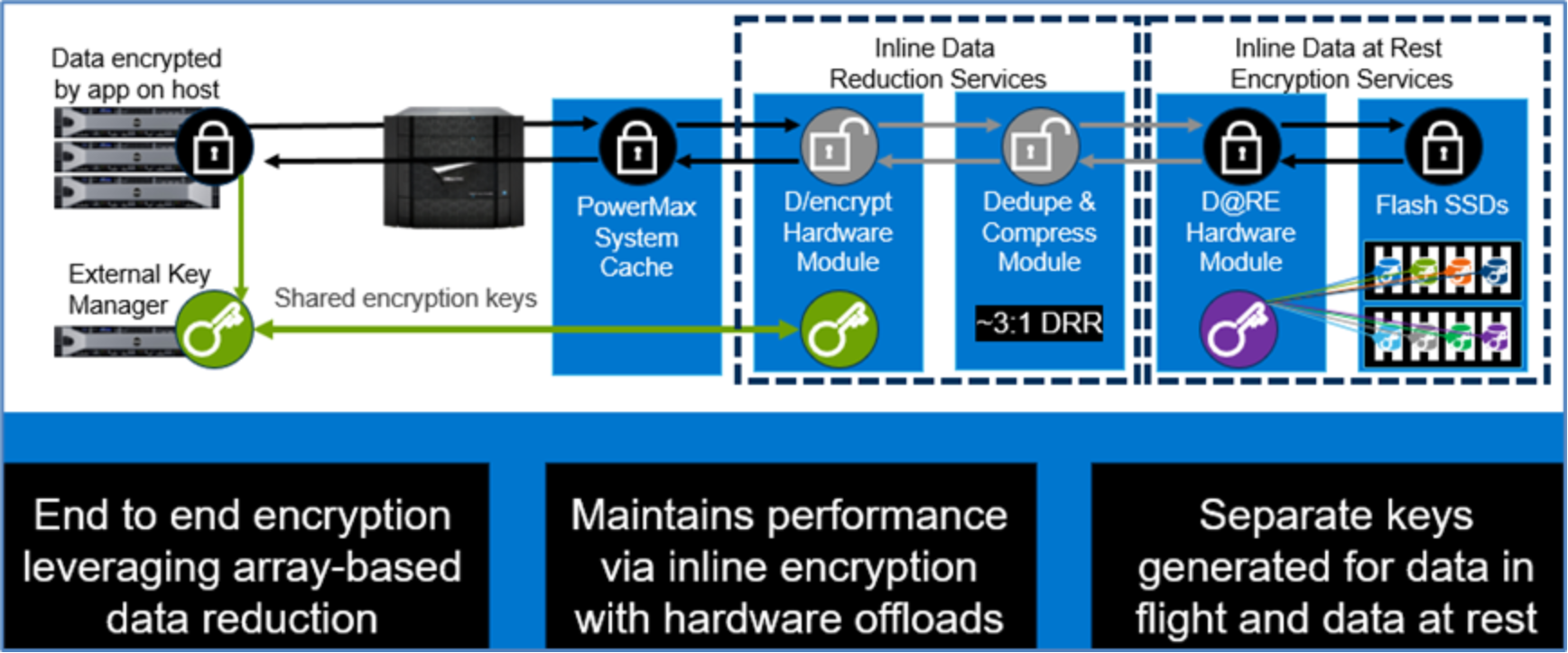
Figure 12.    End-to-end efficient encryption

For more information about PowerMax end-to-end efficient encryption, see the DSM Deployment Guide.

InfiniBand fabric switch

InfiniBand fabric switch

The virtual matrix creates a communication interconnection between all directors in multi-engine PowerMax 8000 systems. Redundant 18-port InfiniBand fabric switches carry control, metadata, and user data through the system. This technology connects all directors in the system to provide a powerful form of redundancy and performance, allowing all directors to share resources and act as a single entity while communicating.

For redundancy, each director has a connection to each switch. Each switch has redundant, hot pluggable power supplies. Figure 13 and Figure 14 show the front and back views of the InfiniBand switches.

Figure 13.    Front view of InfiniBand switch

Figure 14.    Back view of InfiniBand switch

Note: Single-engine systems and dual-engine PowerMax 2000 systems do not require a fabric switch.

Redundant power subsystem

Redundant power subsystem

A modular power subsystem features a redundant architecture that facilitates field replacement of any of its components without any interruption in processing.

The power subsystem has two power zones for redundancy. Each power zone connects to a separate dedicated or isolated AC power line. If AC power fails on one zone, the power subsystem continues to operate through the other power zone. If any single power supply module fails, the remaining power supplies continue to share the load. PowerMaxOS senses the fault and reports it as an environmental error.

Each director is configured with a management module that provides low-level, system-wide communications and environmental control for running application software, monitoring, and diagnosing the system. The management modules are responsible for monitoring and reporting any environmental issues, such as power, cooling, or connectivity problems.

Environmental information is carried through two redundant Ethernet switches. Each management module connects to one switch, except for the MMCS modules in Engine 1 which connect to both Ethernet switches. Management module A connects to Ethernet switch A, and management module B connects to Ethernet switch B. Each management module also monitors one of the system standby power supplies (SPS) through an RS232 connection. Standard PowerMax 8000 racks have LED bars that are connected to the management modules and are used for system or bay identification during service activities.

Figure 15 illustrates management module connectivity.
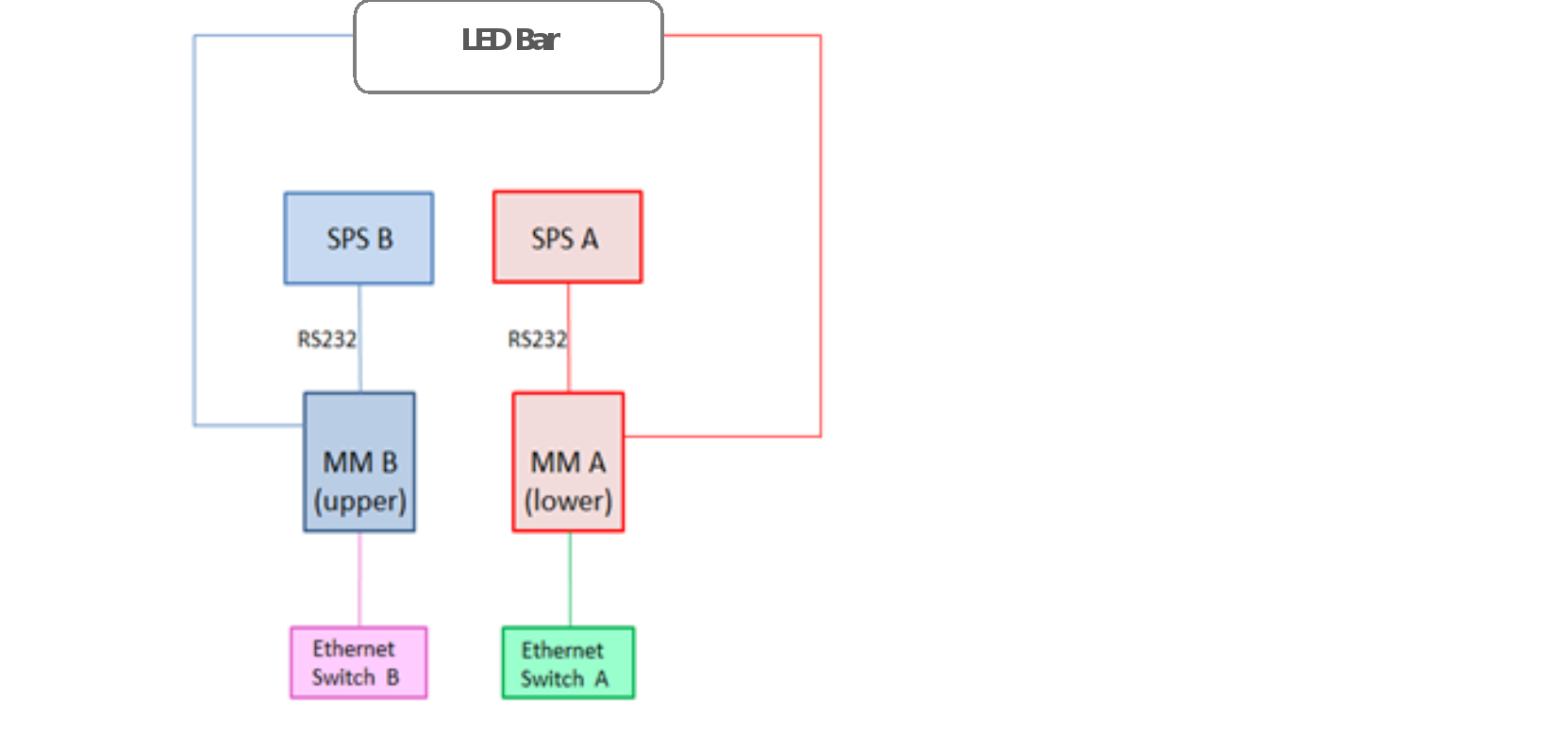
Figure 15.    Management module connectivity

The internal Ethernet connectivity network monitors and logs environmental events across all critical components and reports any operational problems. Critical components include director boards, global memory, power supplies, power line input modules, fans, and various power switches. The network’s environmental control capability can monitor each component’s local voltages, ensuring optimum power delivery. Temperature of director boards and memory are also continuously monitored. Failing components can be detected and replaced before a failure occurs.

The AC power main is checked for the following:

  • AC failures
  • Power loss to a single power zone
  • DC failures
  • Current sharing between DC supplies
  • DC output voltage
  • Specific notification of overvoltage condition
  • Current from each DC supply
  • Voltage drops across major connectors

Figure 16 illustrates the internal Ethernet connectivity.
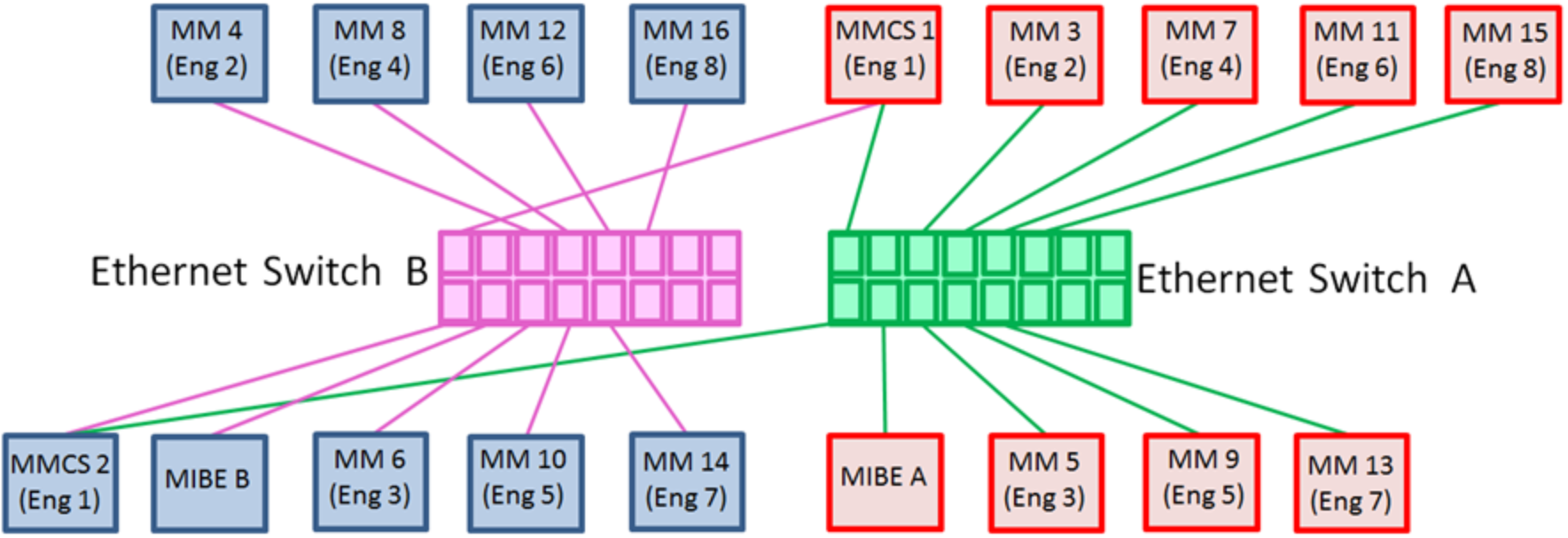
Figure 16.    Internal Ethernet connectivity

Vaulting

As cache size has grown, the time required to move all cached data to a persistent state has also increased. Vaulting is designed to limit the time needed to power off the system if it needs to switch to a battery supply. Upon complete system power loss or transitioning a system to an offline state, PowerMaxOS performs a vault of cache memory to dedicated I/O modules known as flash I/O modules. The flash I/O modules use NVMe technology to safely store data in cache during the vaulting sequence.

Lithium-ion standby power supply (Li-ion SPS) modules provide battery backup functionality during the vault operation. Two SPS modules are configured per engine. The SPS modules also provide back-up power to the InfiniBand switches in applicable configurations.

Vault triggers

State changes that require the system to vault are referred to as vault triggers. There are two types of vault triggers: internal availability triggers and external availability triggers.

Internal availability triggers

Internal availability triggers are initiated when global memory data becomes compromised due to component unavailability. Once these components become unavailable, the system triggers the Need to Vault (NTV) state, and vaulting occurs. There are three internal triggers:

Vault flash availability: The NVMe flash I/O modules are used for storage of metadata under normal conditions, and for storing any data that is being saved during the vaulting process. PowerMax systems can withstand failure and replacement of flash I/O modules without impact to processing. However, if the overall available flash space in the system is reduced to the minimum to be able to store the required copies of global memory, the NTV process triggers. This is to ensure that all data is saved before a potential further loss of vault flash space occurs.

Global memory (GM) availability: When any of the mirrored director pairs are both unhealthy either logically or environmentally, NTV triggers because of GM unavailability.

Fabric availability: When both the fabric switches are environmentally unhealthy, NTV triggers because of fabric unavailability.

External availability triggers

External availability triggers are initiated under circumstances when global memory data is not compromised, but it is determined that the system preservation is improved by vaulting. There are three external triggers:

Input power: If power is lost to both power zones, the system vaults.

Engine trigger: If an entire engine fails, the system vaults.

DAE trigger: If the system has lost access to the whole DAE or DAEs, including dual-initiator failure, and loss of access causes configured RAID members to become non-accessible, the system vaults.

Power-down operation

When a system is powered down or transitioned to offline, or when environmental conditions trigger a vault situation, a vaulting procedure occurs. First, the part of global memory that is saved reaches a consistent image (no more writes). The directors then write the appropriate sections of global memory to the flash I/O modules, saving multiple copies of the logical data. The SPS modules maintain power to the system during the vaulting process for up to 5 minutes.

Power-up operation

During power-up, the data is written back to global memory to restore the system. When the system is powered-on, the startup program does the following:

  • Initializes the hardware and the environmental system
  • Restores the global memory from the saved data while checking the integrity of the data. This is accomplished by taking sections from each copy of global memory that was saved during the power-down operation and combining them into a single complete copy of global memory. If there are any data integrity issues in a section of the first copy that was saved, then that section is extracted from the second copy during this process.
  • Performs a cleanup, data structure integrity, and initialization of needed global memory data structures

At the end of the startup program, the system resumes normal operation when the SPS modules are recharged enough to support another vault operation. If any condition is not safe, the system does not resume operation and calls Customer Support for diagnosis and repair. In this state, Dell Support can communicate with the system and find out the reason for not resuming normal operation.

Remote support

Remote support

Remote support is an important and integral part of Dell Technologies Customer Support. Every PowerMax system has two integrated Management Module Control Stations (MMCS) that continuously monitor the PowerMax environment. The MMCS modules can communicate with the Customer Support Center through a network connection to the Secure Remote Support Gateway.

Through the MMCS, the system actively monitors all I/O operations for errors and faults. By tracking these errors during normal operation, PowerMaxOS can recognize patterns of error activity and predict a potential hard failure before it occurs. This proactive error tracking capability can often prevent component failures by fencing off, or removing from service, a suspect component before a failure occurs.

To provide remote support capabilities, the system is configured to call home and alert Dell Support of a potential failure. An authorized Dell Support Engineer can run system diagnostics remotely for further troubleshooting and resolution. Configuring Dell products to allow inbound connectivity also enables Dell Support to proactively connect to the systems to gather needed diagnostic data or to attend to identified issues. The current connect-in support program for the system uses the latest digital key exchange technology for strong authentication, layered application security, and a centralized support infrastructure that places calls through an encrypted tunnel between Customer Support and the MMCS located inside the system.

Before anyone from Customer Support can initiate a connection to a system at the customer site, that person must be individually authenticated and determined to be an appropriate member of the Customer Support team. Field-based personnel who might be known to the customer must still be properly associated with the specific customer’s account.

An essential part of the design of the connectivity support program is that the connection must originate from one of several specifically designed Remote Support Networks at Dell Technologies. Within each of those Support Centers, the necessary networking and security infrastructure has been built to enable both the call-home and call-device functions.

Supportability through the management module control station

Each PowerMax system has two management module control stations (MMCS) in the first engine of each system (one per director). The MMCS combines the management module and control station (service processor) hardware into a single module. It provides environmental monitoring capabilities for power, cooling, and connectivity. Each MMCS monitors one of the system standby power supplies (SPS) through an RS232 connection. Each MMCS is also connected to both internal Ethernet switches within the system as part of the internal communications and environmental control system.

The MMCS also provides remote support functionality. Each MMCS connects to the customer’s local area network (LAN) to allow monitoring of the system, and remote connectivity for the Dell Customer Support team. Each MMCS can also be connected to an external laptop or KVM source.

The MMCS located in director 1 is known as the primary MMCS, and the MMCS located in director 2 is known as the secondary MMCS. The primary MMCS provides all control station functionality when it is operating normally, while the secondary MMCS provides a subset of this functionality. If the primary MMCS fails, the secondary MMCS is put in an elevated secondary state, which allows more functionality during this state. Both MMCS are connected to the customer network, giving the system the redundant ability to report any errors to Dell Support, and to allow Dell Support to connect to the system remotely.

The MMCS is used in the following support and maintenance tasks:

  • PowerMaxOS upgrade procedures
  • Hardware upgrade procedures
  • Internal scheduler tasks that monitor the health of the system
  • Error collection, logging, and reporting through the call-home feature
  • Remote connectivity and troubleshooting by Dell Customer Support
  • Component replacement procedures

The MMCS also controls the LED bars on the front and back of each standard PowerMax 8000 rack. These can be used for system identification purposes by remote and on-site Dell Technologies service personnel. Figure 17 illustrates MMCS connectivity.
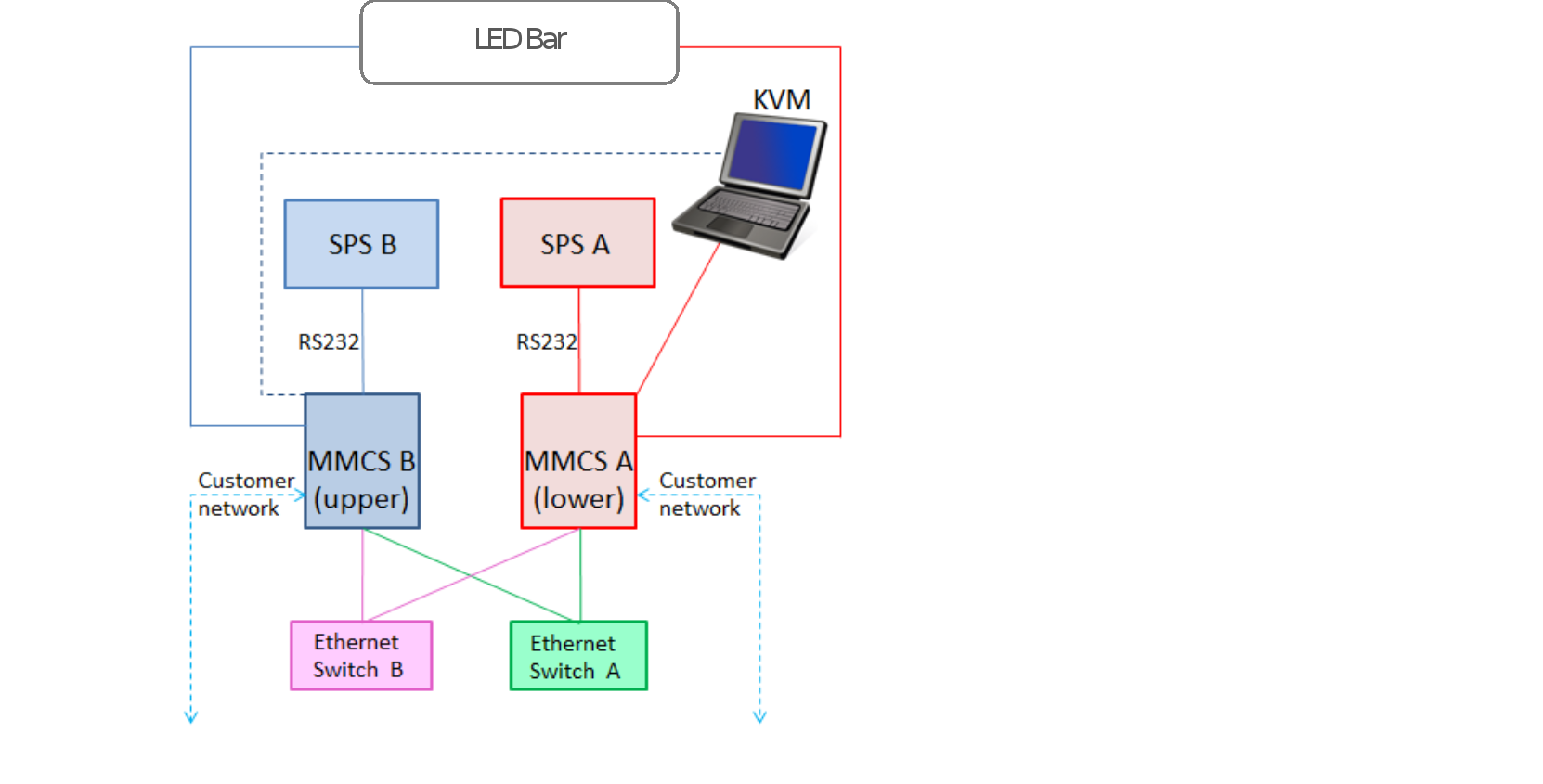
Figure 17.    MMCS connectivity

Secure Service Credential, secured by RSA

The Secure Service Credential (SSC) technology applies exclusively to service processor activities and not host-initiated actions on array devices. These service credentials describe who is logging in, the capabilities they have, a time period that the credential is good for, and the auditing of actions the service personnel performed which can be found in the symaudit logs. If these credentials are not validated, the user cannot log in to the MMCS or other internal functions. SSC covers both on-site and remote login.

Some of the security features are transparent to the customer, such as service access authentication and authorization by Dell Support and SC (user ID information) restricted access (MMCS and Dell Support internal functions). Access is definable at a user level, not just at a host level. All user ID information is encrypted for secure storage within the array.

MMCS-based functions honor Solutions Enabler Access Control settings per authenticated user to limit the view or control of non-owned devices in shared environments such as SRDF-connected systems.

Component-level serviceability

Component-level serviceability

PowerMax systems provide full component-level redundancy to protect against a component failure and ensure continuous and uninterrupted access to information. This non-disruptive replacement capability allows the Customer Support Engineer to install a new component, initialize it if necessary, and bring it online without stopping system operation, taking unaffected channel paths offline, or powering the unit down.

A modular design improves serviceability by allowing non-disruptive component replacements, should a failure occur. This low parts count minimizes the number of failure points.

PowerMax systems feature non-disruptive replacement of all major components, including:

  • Engine components:
  • Director boards and memory modules
  • I/O Modules:

        Fibre Channel SCSI

        Fibre Channel NVMe

        iSCSI

        FICON

        Embedded NAS (eNAS)

        PCIe (back-end)

        Flash (Vault)

        SRDF Compression

        Inline Compression and Deduplication

  • Management modules or management module control stations:
  • InfiniBand (IB) module
  • Power supplies
  • Fans
  • Drive Array Enclosure (DAE) components:
  • NVMe drives
  • Link Control Cards (LCC)
  • Power supplies
  • PCIe cables
  • Cabinet Components:
  • InfiniBand switches
  • Ethernet switches
  • Standby Power Supplies (SPS)
  • Power Distribution Units (PDU)

Dell Technologies internal QE testing

The Dell Technologies Quality Engineering (QE) teams perform thorough testing of all FRUs. Each FRU is tested multiple times for each code level with very specific pass or fail criteria.

Standard tests perform verification of the GUI-based scripted replacement procedures that are used by Dell Technologies field personnel. The tests are designed to verify the replaceability of each FRU without any adverse effects on the rest of the system, and to verify the functionality and ease-of-use of the scripted procedures. These tests are straightforward replacement procedures performed on operational components.

Non-standard tests are also performed on components that have failed either by error injection or hot removal of the component or its power source. These tests also incorporate negative testing by intentionally causing different failure scenarios during the replacement procedure. Note that removing a drive hot will not cause sparing to invoke. This behavior is optimal as the system knows the device has not gone bad. The correct course of action is to recover the drive rather than go through needless sparing and full rebuild processes.

Negative tests are designed to ensure that the replacement procedure properly detects the error and that the rest of the system is not affected.

Some examples of negative tests are:

  • Replacing the wrong component
  • Replacing component with an incompatible component
  • Replacing component with a faulty component
  • Replacing component with a new component that has lower code that needs to be upgraded
  • Replacing component with a new component that has higher code that needs to be downgraded
  • Replacing component with the same component and ensure script detects and alerts the user that the same component is being used
  • Improperly replacing a component (miscabled, unseated)
  • Initiating a system vault save (system power loss) operation during a replacement procedure
  • Create a RAID group failure in an SRDF R1 array and verify local hosts continue to operate by accessing data from the R2 array
  • Replace the drives and rebuild RAID data from remote R2 array
  • Test with two drives in a RAID 1 or RAID 5 group, and three drives in a RAID 6 group
  • Test with SRDF/Metro, SRDF/S, and SRDF/A (when not in a spillover state)

Both the standard and non-standard tests are performed on all system models and various configurations with customer-like workloads running on the array. Tests are also performed repeatedly to verify there are no residual issues left unresolved that could affect subsequent replacements of the same or different components. Components that are known to fail more frequently in the field, and complex component replacements, are typically tested more frequently.

Non-Disruptive Upgrades

PowerMaxOS upgrades

Interim updates of PowerMaxOS can be performed remotely by the Remote Change Management (RCM) team. These updates provide enhancements to performance algorithms, error recovery and reporting techniques, diagnostics, and PowerMaxOS fixes. They also provide new features and functionality for PowerMaxOS.

During an online PowerMaxOS code load, a member of the RCM team downloads the new PowerMaxOS code to the MMCS. The new PowerMaxOS code loads into the EEPROM areas within the directors and remains idle until requested for a hot load in the control store. The system loads executable PowerMaxOS code within each director hardware resource until all directors are loaded.

Once the executable PowerMaxOS code is loaded, the new code becomes operational in 6 seconds or less through an internal processing operation that is synchronized across all directors.

The system does not require customer action during the upgrade. All directors remain online to the host processor and maintain application access. There is no component downtime, no rolling outage upgrade, no failover or failback processes involved, and switching LUN ownership or trespass is not required. The Fibre Channel port never drops, and the servers never see a logout or login (no fabric RSCN).

This upgrade process, which has been transparent to applications for many years, is continually improved upon and provide the means to perform downgrades in the same, non-disruptive manner.

eNAS upgrades

PowerMaxOS supports adding Embedded NAS (eNAS) to existing arrays non-disruptively. The Dell upgrade planning process will determine if eNAS can simply be added to an existing configuration or if additional hardware will also be required to provide adequate capacity, cache, and processing power.

The PowerMaxOS Q3 2020 release introduces the ability for eNAS code to be upgraded independent of PowerMaxOS. eNAS-only upgrades are performed remotely by the RCM team.

Hardware upgrades

All upgrades to add hardware to a PowerMax array are non-disruptive, including:

  • Engines
  • Cache
  • I/O modules
  • Capacity

Capacity upgrades

Additional capacity is added to a system either by adding drives to available drive slots in existing DAEs or as part of adding an engine to a system.

No user action is required for the system to begin using the new capacity. New writes are distributed across the system with some bias towards drives which have the most available capacity, which in this case will be the new drives. Background rebalance activities take place to spread the TDATs on the newly added drives and existing data across the compression pools.

PowerMaxOS will bring each compression pool into a reasonable balance transparently to the host applications. Servicing host I/O takes priority over the background activities. Therefore, the total time to achieve a balance will depend on overall system activity and total system capacity, used capacity, and amount of newly added capacity.

TimeFinder and SRDF replication software

Local replication using TimeFinder

Dell TimeFinder software delivers point-in-time copies of volumes that can be used for backups, decision support, data warehouse refreshes, or any other process that requires parallel access to production data.

TimeFinder SnapVX is highly scalable, highly efficient, and easy to use.

SnapVX provides low impact snapshots and clones for data volumes. SnapVX supports up to 1024 automated snapshots per source volume, which are tracked as versions with less overhead and simple relationship tracking. Users can assign names to their snapshots and have the option of setting automatic expiration dates on each snapshot.

SnapVX provides the ability to manage consistent point-in-time copies for storage groups with a single operation. Up to 1024 target volumes can be linked per source volume, providing read/write access as pointer-based or full copies.

Users can also create secure snapshots that prevent a snapshot from being terminated until a specified retention time has been reached.

The following Dell products are integrated with SnapVX:

  • AppSync
  • PowerProtect Storage Direct
  • RecoverPoint
  • zDP

PowerMaxOS Q3 2020 release SnapVX updates

Snapshot policies

Automated scheduling of SnapVX snapshots using a highly available and flexible policy engine that runs internally on the storage array. Snapshot policies can be managed through Dell Unisphere for PowerMax, REST API, and Solutions Enabler.

Snapshot policies can be customized with rules that specify when to take snapshots, how many snapshots to take, and how long to keep each snapshot. Compliance requirements can also be specified to send alerts if the rules of a policy are not being met. Applications can be protected by multiple policies with differing schedules and retention parameters according to the requirements of the business. Each policy can protect many applications, even protecting a mix of open systems and mainframe applications.

Snapshot policies provide reliable protection for applications in an automated fashion that requires little to no maintenance by the business. Administrators can manually take snapshots of applications that are protected by snapshot policies to satisfy on-demand requirements.

Policy parameters are shown in Figure 18.
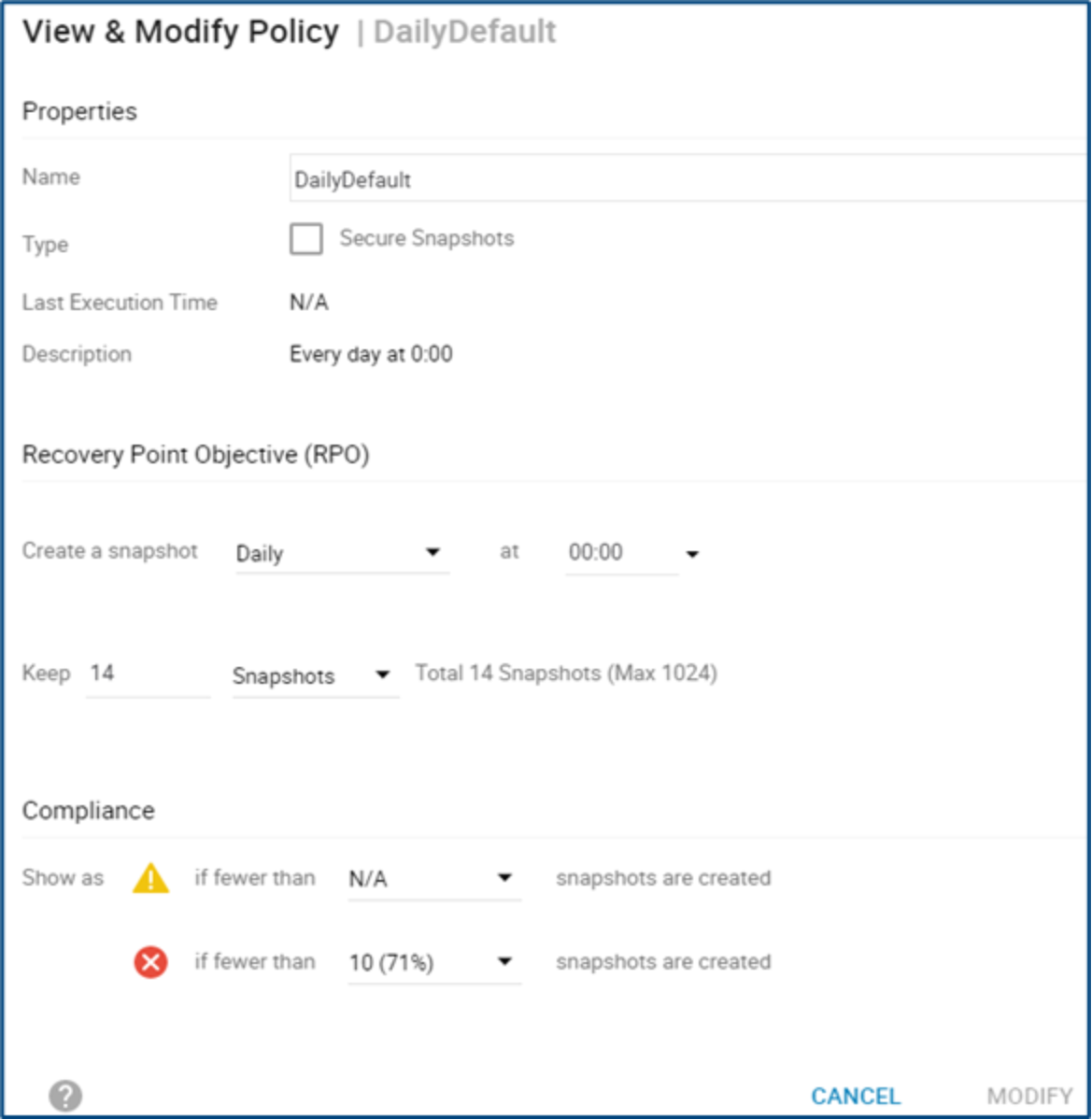
Figure 18.    Snapshot policy create / modify window

Cloud snapshots

Cloud Mobility for Dell PowerMax provides open-systems snapshot movement to and from private and public clouds (Dell ECS, AWS, Microsoft Azure) for recovering data back to the array and consumed it directly in AWS.

For more information about TimeFinder SnapVX, see the following documents:

  • Dell TimeFinder SnapVX Local Replication Technical Notes
  • Dell PowerMax and VMAX All Flash: Snapshot Policies Best Practices

Remote replication using SRDF

Symmetrix Remote Data Facility (SRDF) solutions provide industry-leading disaster recovery and data mobility solutions. SRDF replicates data between two, three, or four arrays located in the same room, on the same campus, or thousands of kilometers apart.

  • SRDF synchronous (SRDF/S)
  • Maintains a real-time copy at arrays located within 200 kilometers.
  • Writes from the production host are acknowledged from the local array when they are written to cache at the remote array.
  • SRDF asynchronous (SRDF/A)
  • Maintains a dependent-write, consistent copy at arrays located at unlimited distances.
  • Writes from the production host are acknowledged immediately by the local array. Thus, replication has no impact on host performance.
  • Data at the remote array is typically only seconds behind the primary site.

SRDF disaster recovery solutions use “active remote” mirroring and dependent-write logic to create consistent copies of data. Dependent-write consistency ensures transactional consistency when the applications are restarted at the remote location. SRDF can be tailored to meet various Recovery Point Objectives/Recovery Time Objectives.

SRDF can be used to create complete solutions to:

  • Create real-time (SRDF/S) or dependent-write-consistent (SRDF/A) copies at one, two, or three remote arrays.
  • Move data quickly over extended distances.
  • Provide three-site disaster recovery with the following:
  • Business continuity
  • Zero data loss
  • Disaster restart

SRDF integrates with other Dell Technologies products to create complete solutions to:

  • Restart operations after a disaster with:
  • Business continuity
  • Zero data loss
  • Restart operations in clustered environments.
  • For example, Microsoft Cluster Server with Microsoft Failover Clusters.
  • Monitor and automate restart operations on an alternate local or remote server.
  • Automate restart operations in VMware environments.

Cascaded SRDF and SRDF/Star support

Cascaded SRDF configurations use three-site remote replication with SRDF/A mirroring between sites B and C, delivering additional disaster restart flexibility.

Figure 19 shows an example of a Cascaded SRDF solution.
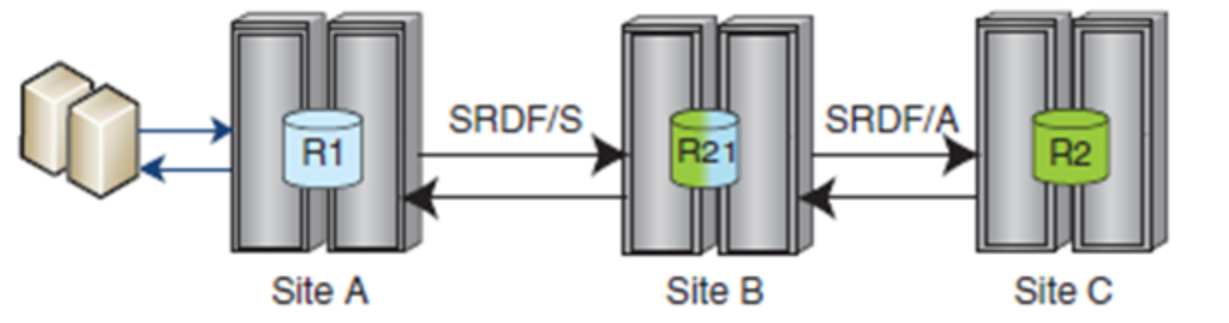
Figure 19.    Cascaded SRDF

SRDF/Star is commonly used to deliver the highest resiliency in disaster recovery. SRDF/Star is configured with three sites enabling resumption of SRDF/A with no data loss between the two remaining sites, providing continuous remote data mirroring and preserving disaster-restart capabilities.

Figure 20 shows examples of Cascaded and Concurrent SRDF/Star solutions.
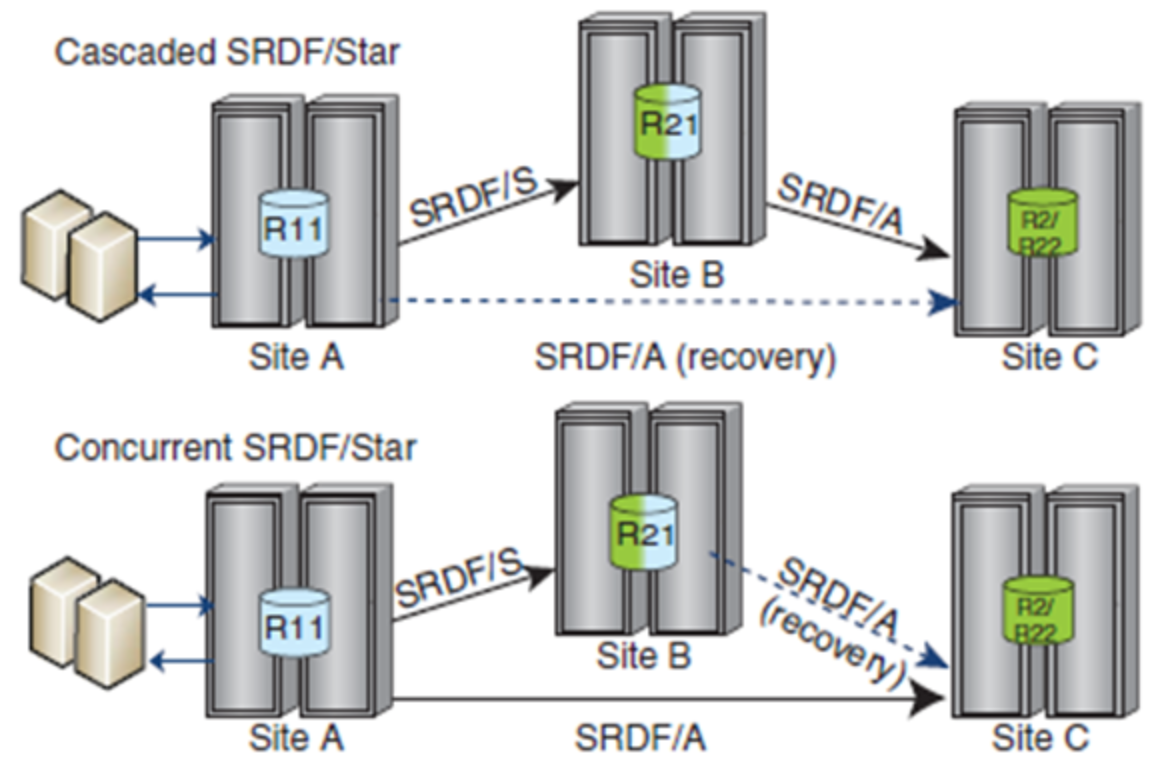
Figure 20.    SRDF/Star

SRDF/Metro support

SRDF/Metro significantly changes the traditional behavior of SRDF Synchronous mode with respect to the remote (R2) device availability to better support host applications in high-availability environments. With SRDF/Metro, the SRDF R2 device is read/write accessible to the host and takes on the federated (such as geometry and device WWN) personality of the primary R1 device. By providing this federated personality on the R2 device, both R1 and R2 devices then appear as a single virtual device to the host. With both the R1 and R2 devices being accessible, the host or hosts (in the case of a cluster) can read and write to both R1 and R2 devices with SRDF/Metro ensuring that each copy remains current, consistent, and addressing any write conflicts that may occur between the paired SRDF devices.

Figure 21 shows examples of SRDF/Metro solutions.
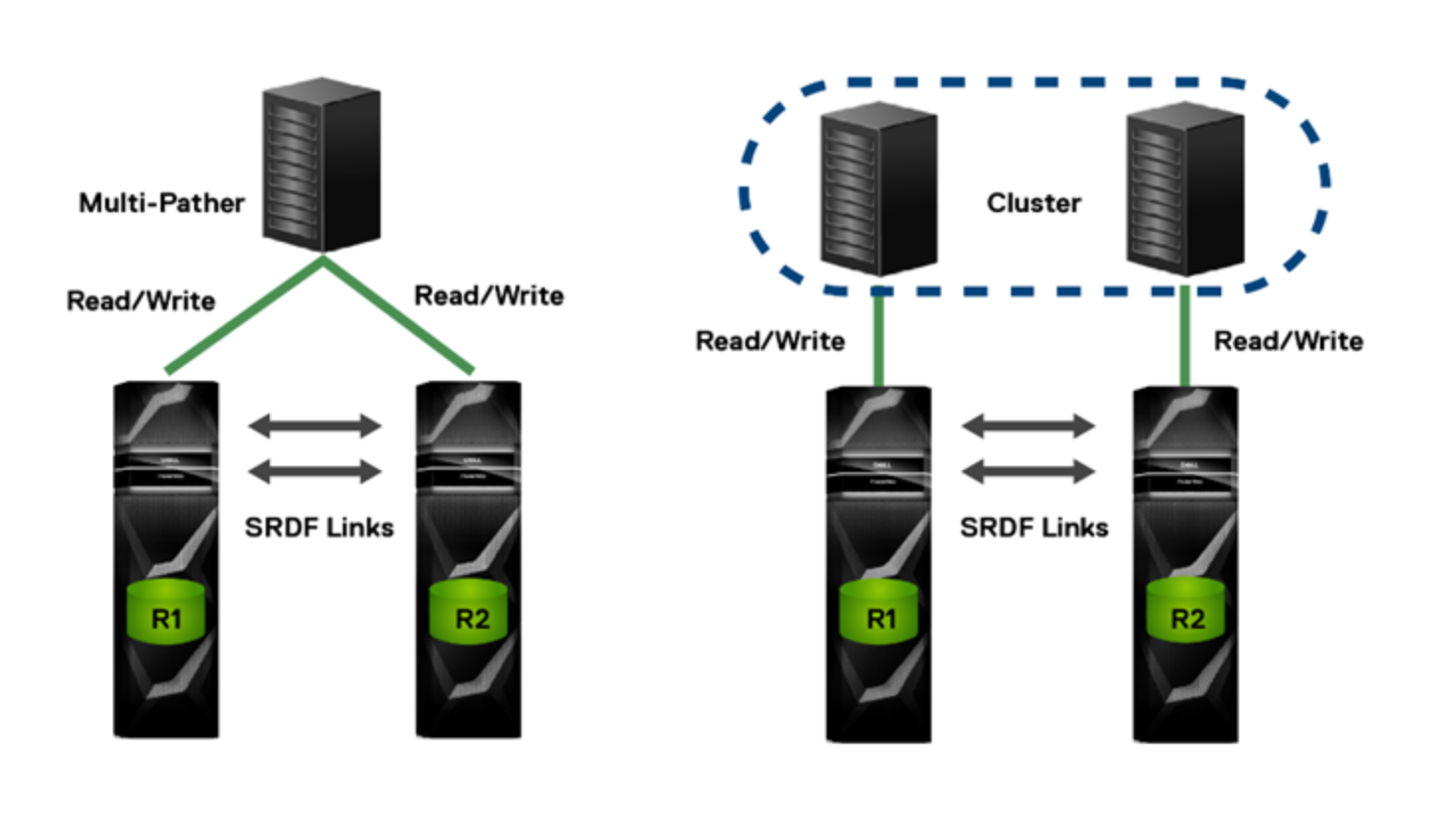
Figure 21.    SRDF/Metro

On the left is an SRDF/Metro configuration with a stand-alone host that has read/write access to both arrays (R1 and R2 devices) using multipathing software such as PowerPath. This is enabled by federating the personality of the R1 device to ensure that the paired R2 device appears, through additional paths to the host, as a single virtualized device.

On the right is a clustered host environment where each cluster node has dedicated access to an individual array. In either case, writes to the R1 or R2 devices are synchronously copied to its SRDF paired device. Should a conflict occur between writes to paired SRDF/Metro devices, the conflicts are internally resolved to ensure a consistent image between paired SRDF devices is maintained to the individual host or host cluster.

SRDF/Metro may be selected and managed through Solutions Enabler, Unisphere for PowerMax, and REST API. SRDF/Metro requires a separate license on both arrays to be managed.

Application I/O serviced by remote array

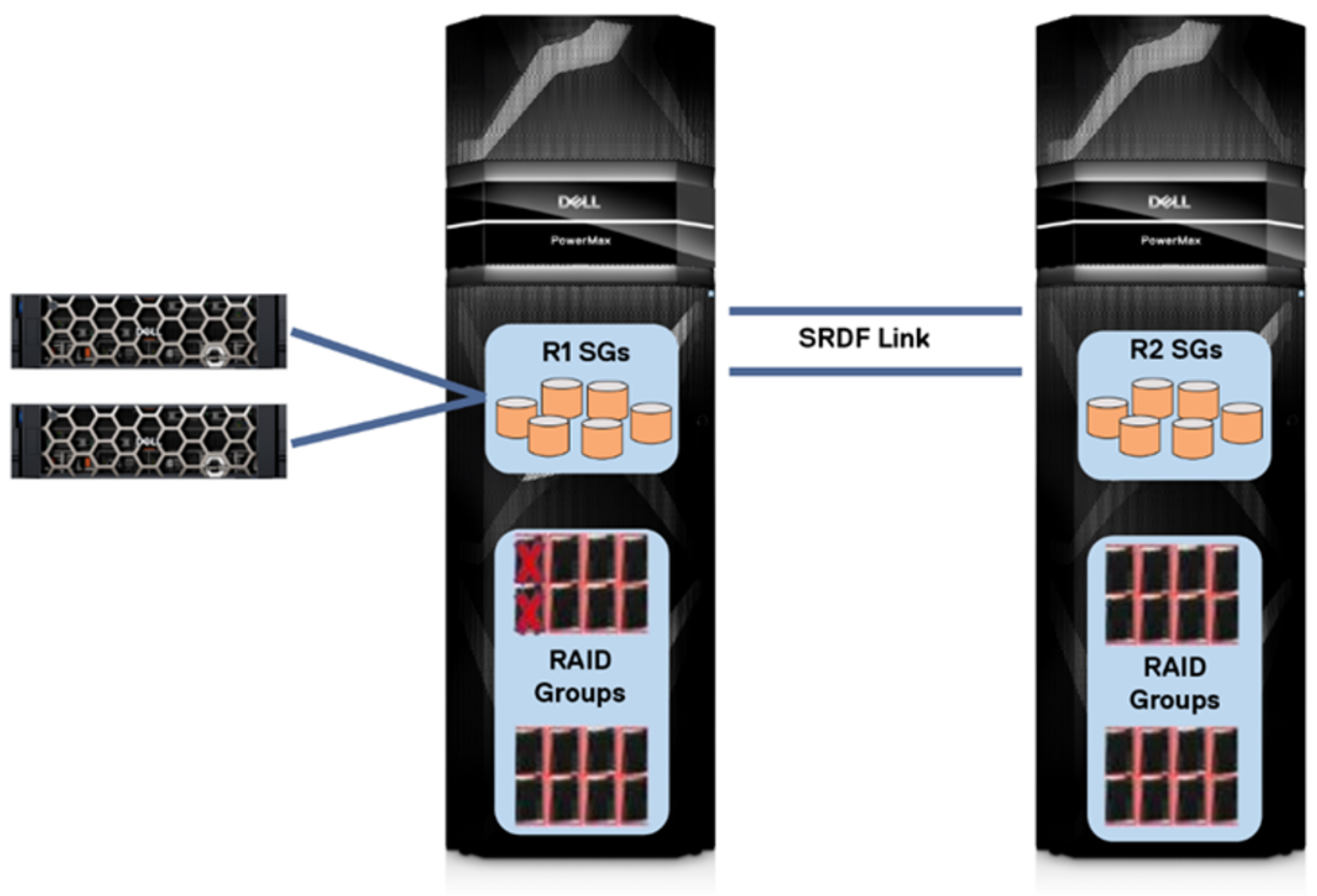
In the event of a redundant RAID failure on the R1 array, applications local to the R1 site will continue to access data through the remote R2 array. There may be some overhead on response time depending on distance, but the data remains available to the applications even though it cannot be read locally.
Graphical user interfaceDescription automatically generated

Figure 22.    Application I/O serviced by remote array

This core functionality has been an integral piece of SRDF for many years, originally providing the ability for the entire contents of a thick volume to be accessed from a remote array and rebuild data after a drive replacement even before local RAID schemes were implemented. In PowerMax arrays, which employ virtual provisioning, remote access is not required for an entire TDEV and is instead done on a per-track basis.

The local RAID group will be rebuilt from the remote array after replacement or recovery of the affected drives. An invoked spare drive can also participate in the rebuild in place of a RAID member. If the RAID members had failed simultaneously, both can be recovered and rebuilt concurrently. If the second drive failed while the first drive was rebuilding after being replaced, the remote data is used to finish rebuilding the data to the first drive, and the second drive will be rebuilt locally. Applications can remain online during the rebuild.

This functionality is available with SRDF/Metro, SRDF/S, and SRDF/A (when not in a spillover state). Being able to access data remotely, and rebuild RAID data from a remote array, enable SRDF configurations to take advantage of the efficiency and performance benefits of RAID 5 without incurring the performance penalties of RAID 6 protection. The Mean Time Between Part Replacement (MTBPR) of modern flash drives, and most replacements being proactive, make a dual failure very unlikely.

Dell VMAX All Flash Lab Validation Report, IDC 2017

IDC tested the continuous operations without data loss from a total local RAID group failure with SRDF/Synchronous during overall validation of Dell VMAX All Flash arrays. The following is from the previously published IDC Lab Validation Report Dell VMAX All Flash: Essential Capabilities for Large Enterprise Mixed Workload Consolidation:

IDC Opinion: The active volume worked flawlessly during these fault injection tests, both upon initial failure and after re-establishing the failed resource… I/O was not interrupted, no data was lost, and in this case (with a relatively light workload) there was no long-term impact to overall system performance… Throughout the entire fault injection test, the array(s) continued to meet its specified Diamond Service Level.

Exploration of I/O Impact on Dual Local Drive Failure in a RAID 5 Configuration:

  • An SRDF/Synchronous configuration was set up using a VMAX 950F and a VMAX 250F where the data was mirrored to both locations; SSDs in each array were separately protected by RAID 5
  • An artificial workload was generated to flow continuously against a volume that was mirrored to the two arrays with SRDF/Synchronous; this workload can be characterized as “light” as it was under 20% of each of the array’s rated performance capabilities
  • Two SSDs in a single RAID 5 Raid Group in the VMAX 950F were simultaneously failed to create a dual drive failure scenario; the “failure” was validated running the Solutions Enabler command symdisk –sid <sid> list –failed. In addition, the failure can generate an Alert in Unisphere and will generate a dial home
  • The impact on I/O was observed by continually watching the throughput and latency against the SRDF mirrored volume using IOmeter. Upon failure, I/O was not disrupted as I/O to the failed devices continued to be handled by the remote mirror (through reads across the SRDF Link) with no impact to storage latency or throughput during this failure, and throughout the test the volume continued to meet its Diamond Service level
  • This is significant because this type of dual failure in a stretched cluster configuration could lead to an outage whereas here the system just continues to access the data using the mirrored volume on the target array
  • The “failed” SSDs were turned back on, and with no impact to storage latency or throughput the system performed a background resync (quite short since there was less than 5MB of writes to the mirrored volume during the outage) and returned the volume to a fully synchronized state across the VMAX 950F and the VMAX 250F

PowerMaxOS Q3 2020 release SRDF updates

SRDF/A support for VMware vVols: Embedded VASA 3.0 Provider (EVASA) which supports SRDF/A replication for VMware vSphere Virtual Volumes (vVols) with an RPO of five minutes. EVASA is only supported on new PowerMax arrays and cannot be added to existing arrays.

SRDF/Metro Smart DR: SRDF/Metro and SRDF/A integration provides high-availability disaster recovery solution for SRDF/Metro active/active environments.

Smart DR provides SRDF/Metro with a single asynchronous target R22 volume which may be populated from either the R1 or R2 volume of an SRDF/Metro paired solution. Adding the capability for R1 and R2 to share a single asynchronous R22 volume simplifies setup, maintenance capabilities, system requirements, and reduces the amount of disk space required for a single target system.

Smart DR provides the ability to fail over or fail back to the DR site while retaining the metro environment. Smart DR can be implemented non-disruptively onto existing SRDF/Metro environments. 

Figure 23 depicts SRDF/Metro Smart DR:
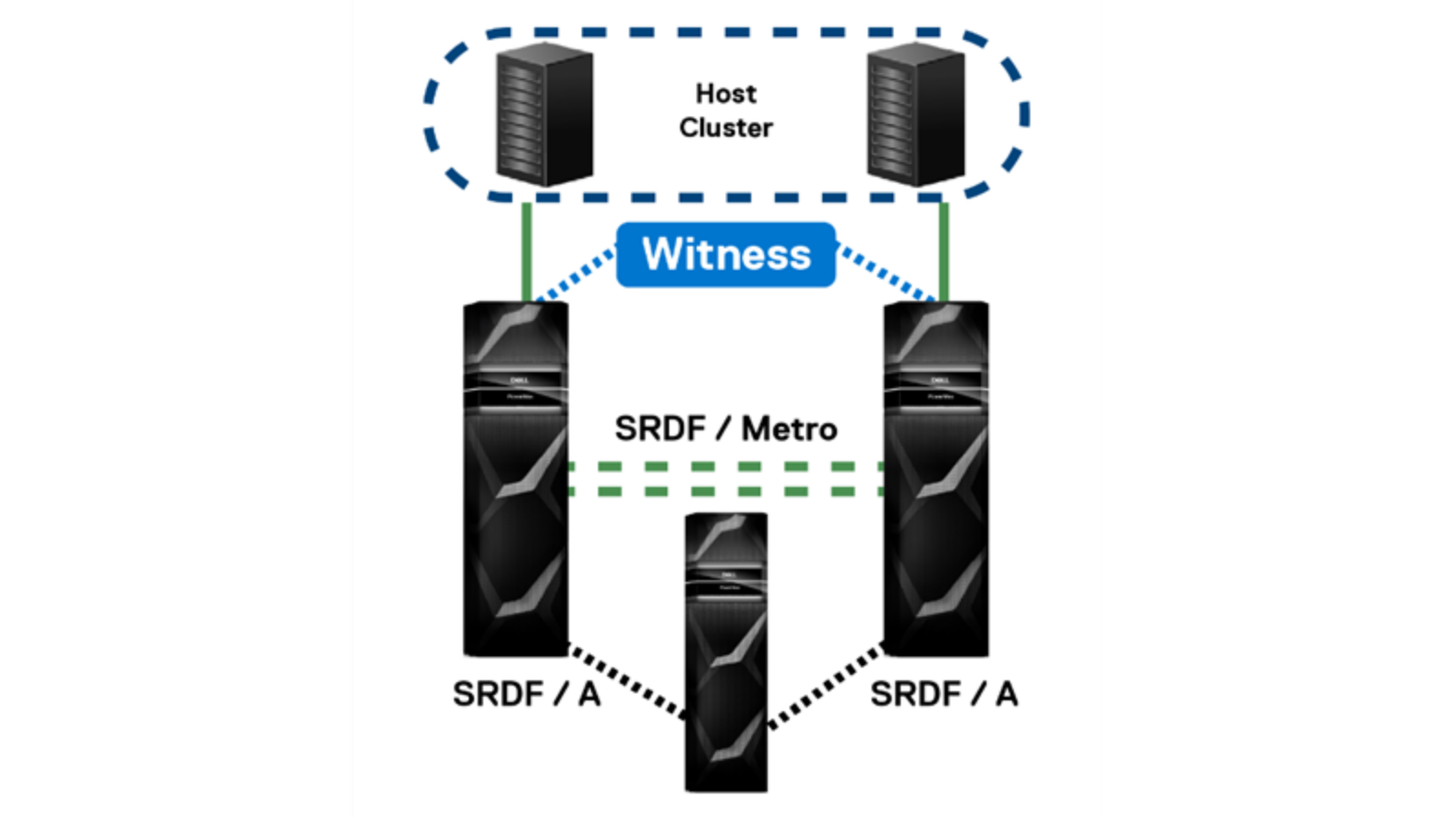
Figure 23.    SRDF/Metro Smart DR

For more information about SRDF, see the following documents:

  • Dell PowerMax Family Product Guide
  • Dell SRDF/Metro Overview and Best Practices Technical Note

Unisphere for PowerMax and Solutions Enabler

Unisphere for PowerMax and Solutions Enabler

System health and component status can be monitored with Unisphere for PowerMax and Solutions Enabler. The tools provided by the management software are designed to give the end user a high-level overview of the condition of the array. If these tools report any problems, and the user should contact Dell Support for proper, more in-depth investigation. Users should not try to perform any self-diagnostics or recovery. Dell Support Engineers have access to additional tools that allow for a thorough examination of the system. An investigation may already be underway as the array will send a call home to Dell Support for issues.

Unisphere for PowerMax system health check

Unisphere for PowerMax has a system health check procedure that interrogates the health of the array hardware. The procedure checks various aspects of the system and reports the results as either pass or fail. The results are reported at a high level with the intent of either telling the user that there are no hardware issues present or that issues were found, and the user should contact Dell Support for further investigation.

The health check procedure is accessed from the System Health Dashboard as Figure 24 shows.
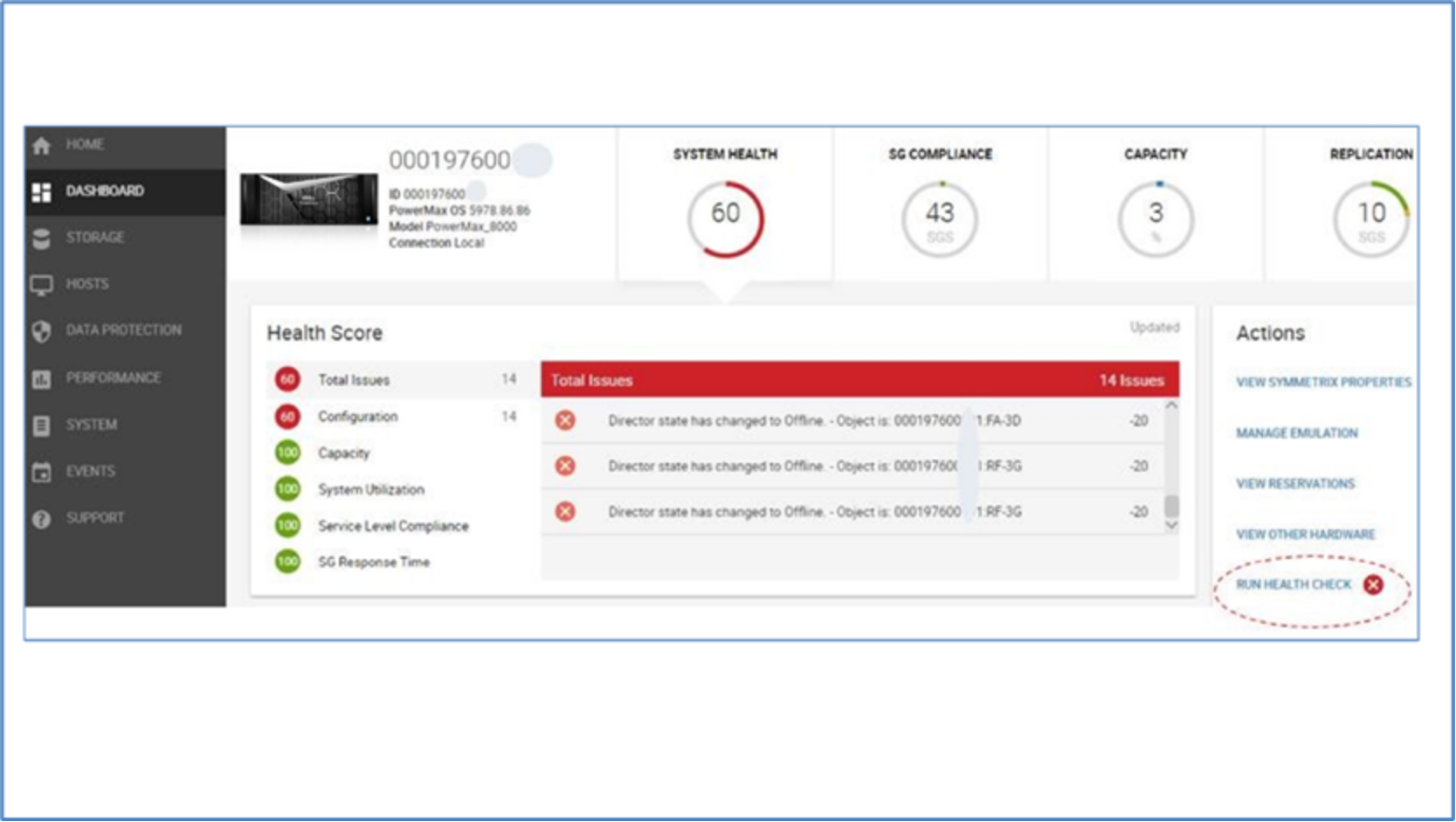
Figure 24.    Unisphere System Health dashboard

The test takes several minutes to complete. When complete, clicking the Run Health Check link displays test results in the format shown in Figure 25.
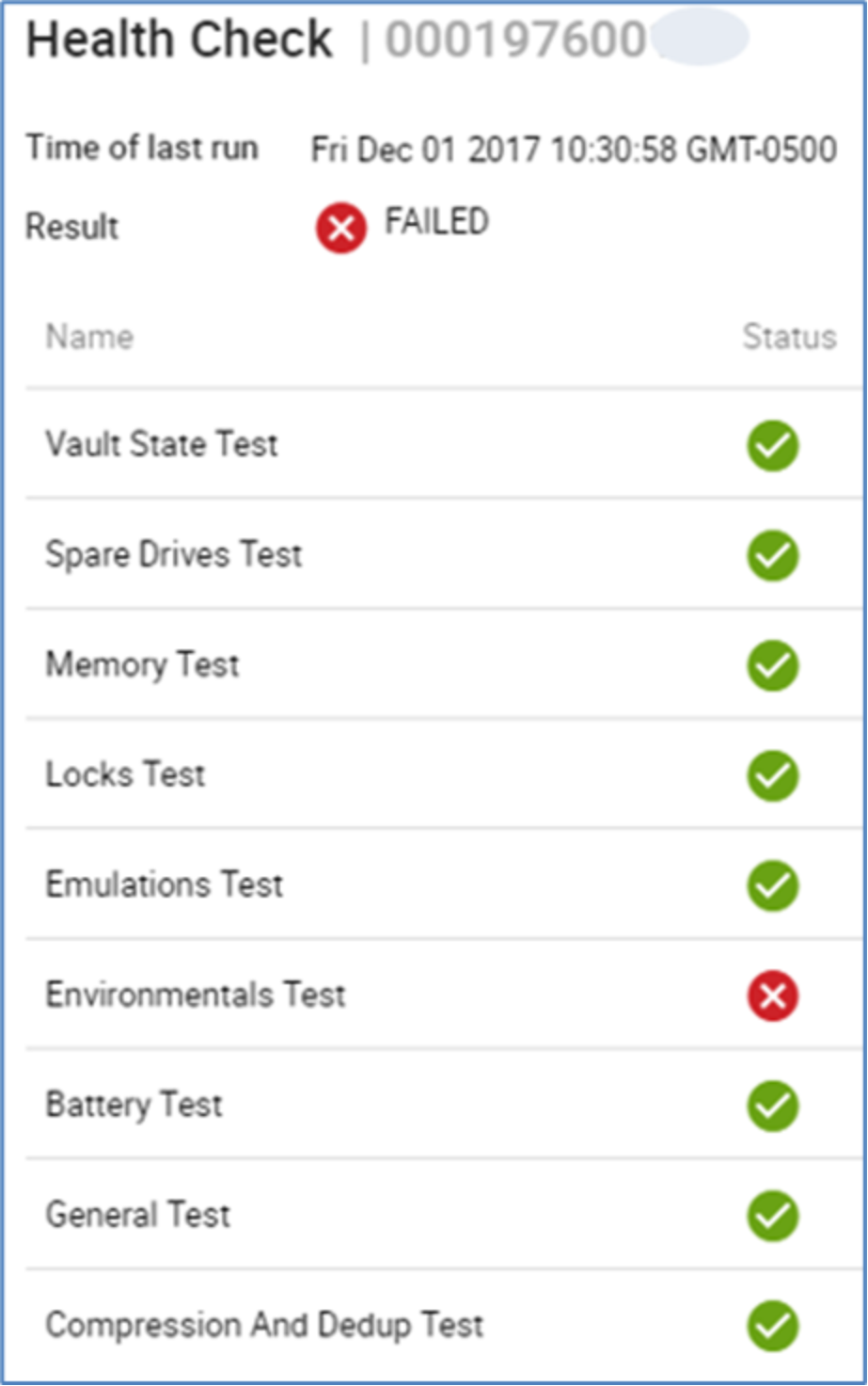
Figure 25.    Health Check results

Unisphere alerts

Unisphere for PowerMax has alerts for component failures. These alerts are optional and not set by default. The intent of these alerts is to inform the user of issues they may be affected by. For example, failure of a front-end I/O module will cause ports to go offline.

Alerts will not be sent for failure of an internal component such as a back-end I/O module because the failure is transparent to the user. The system will call home to alert Dell Customer Support of the failure.

Enable the following alerts for component failures:

  • Array Events
  • Array Component Events
  • Director Status
  • Disk Status
  • Environmental Alert

See the Dell Unisphere for PowerMax Installation Guide for more information.
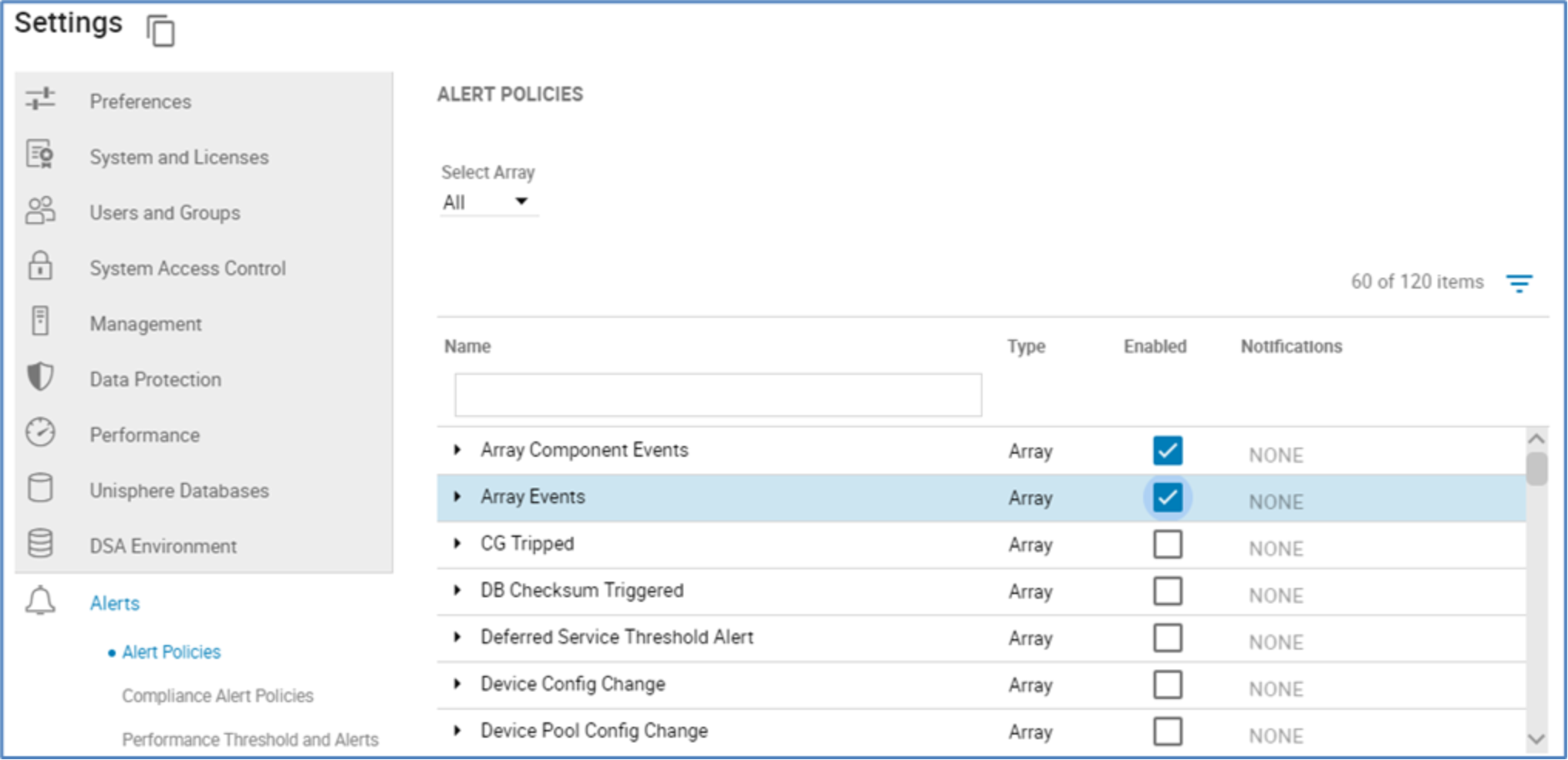
Figure 26.    Unisphere for PowerMax alert settings

Solutions Enabler commands

In addition to the spare drive commands mentioned in earlier, Solutions Enabler offers the following commands to report component status:

  • symcfg -sid <sid> list -env_data

Symmetrix ID               : 000197600XYZ

Timestamp of Status Data   : 08/14/2019 13:11:23

System Bay

      Bay Name                             :    SB-1

      Number of Standby Power Supplies     :    2

      Number of Drive Enclosures           :    1

      Number of Enclosure Slots            :    1

      Number of MIBE Enclosures            :    2

      Summary Status of Contained Modules

        All Standby Power Supplies         :    Normal

        All Enclosures                     :    Normal

        All Link Control Cards             :    Normal

        ALL Drive Enclosures Power Supplies:    Normal

        All Enclosure Slots                :    Normal

        ALL Enclosure Slots Power Supplies :    Normal

        All Fans                           :    Normal

        All Management Modules             :    Normal

        All IO Module Carriers             :    Normal

        All Directors                      :    Normal

        All MIBE Enclosures                :    Normal

        ALL MIBE Enclosures Power Supplies :    Normal

  • symcfg -sid <sid> list -env_data -v

      Bay Name                             :    SB-1

      Bay LED state                        :    Normal

      Front Door Bay LED state             :    Normal

      Number of Standby Power Supplies     :    2

      Number of Drive Enclosures           :    1

      Number of Enclosure Slots            :    1

      Number of MIBE Enclosures            :    2

      Status of Contained Modules

        Standby Power Supplies

          SPS-1A (Aggregate)               :    Normal

            SPS-TRAY-1A                    :    Normal

            -1A                            :    Normal

          SPS-1B (Aggregate)               :    Normal

            SPS-TRAY-1B                    :    Normal

            -1B                            :    Normal

        Drive Enclosure Number             :    1

          Drive Enclosure State            :    Normal

          LCC-A                            :    Normal

          LCC-B                            :    Normal

          PS-A                             :    Normal

          PS-B                             :    Normal

        Enclosure Slot Number              :    1

          Enclosure Slot State             :    Normal

          MM-1                             :    Normal

          MM-2                             :    Normal

          DIR-1                            :    Normal

            PS-A                           :    Normal

            PS-B                           :    Normal

            FAN-0                          :    Normal

            FAN-1                          :    Normal

            FAN-2                          :    Normal

            FAN-3                          :    Normal

            FAN-4                          :    Normal

            BOOT-DRIVE-0                   :    Normal

          DIR-2                            :    Normal

            PS-A                           :    Normal

            PS-B                           :    Normal

            FAN-0                          :    Normal

            FAN-1                          :    Normal

            FAN-2                          :    Normal

            FAN-3                          :    Normal

            FAN-4                          :    Normal

            BOOT-DRIVE-0                   :    Normal

        MIBE Name                          :    MIBE-A

          MIBE State                       :    Normal

          PS-A                             :    Normal

          PS-B                             :    Normal

          CM                               :    Normal

        MIBE Name                          :    MIBE-B

          MIBE State                       :    Normal

          PS-A                             :    Normal

          PS-B                             :    Normal

          CM                               :    Normal

Summary

Summary

PowerMax family platforms integrate a highly redundant architecture, creating a remarkably reliable environment in a configuration that minimizes carbon footprint in the data center and reduces total cost of ownership.

The introduction of PowerMaxOS enhances the customer’s experience through technologies such as service level-based provisioning, making storage management easier while also increasing availability of data through improvements to concepts such as vaulting, disk sparing, and RAID. The local and remote replication suites bring the system to an elevated level of availability, through TimeFinder SnapVX and SRDF, respectively. The serviceability aspects make the component replacement process quick and easy.

The key enhancements that improve the reliability, availability, and serviceability of the systems make PowerMax the ideal choice for critical applications and 24x7 environments that require uninterrupted access to information.

References

Dell Technologies documentation

The following Dell Technologies documentation provides other information related to this document. Access to these documents depends on your login credentials. If you do not have access to a document, contact your Dell Technologies representative.

  • Dell PowerMax Family Product Guide
  • Dell TimeFinder SnapVX Local Replication Technical Note
  • Dell SRDF/Metro Overview and Best Practices Technical Note
  • Dell PowerPath Family Product Guide
  • Dell PowerMax Family Security Configuration Guide
  • Dell VMAX3 and VMAX All Flash Data at Rest Encryption White Paper
Tags: