Dell PowerProtect Data Domain All-Flash Ready Node
Executive summary
Overview
Dell Technologies has introduced the Dell PowerProtect Data Domain All-Flash Ready Node to streamline the hardware, deployment, and configuration process. This document will focus on the Data Domain All-Flash Ready Node.
This solution provides an energy-efficient, cost-optimized, performant, and simplified approach to data deduplication, compression, backup, restore, and Cyber Recovery with the Data Domain All-Flash Virtual Edition.
The Data Domain All-Flash Ready Node provides customers with faster restore speeds and scan times for CyberSense in a small footprint. This solution solves problems like recovery time, scan time, or reducing excess hardware compared to an HDD based system. The Data Domain All-Flash Ready Node comes fully populated with all the disks with a maximum capacity of 220TBu.
The All-Flash Ready Node is a Dell PowerEdge R760 and is the orderable platform for this solution, simplifying the ordering experience and deployment with a pre-configured Dell PowerEdge R760 as well as promoting Dell Technologies qualification, validation, and design.
Audience
This white paper is intended for Dell Technologies’ customers, partners, and employees who would like to understand the Dell PowerProtect Data Domain All-Flash Ready Node.
Revisions
|
Date |
Part number/ |
Description |
|
April 2025 |
H04503 |
Initial release |
We value your feedback
Dell Technologies and the authors of this document welcome your feedback on this document. Contact the Dell Technologies team by email (subject line: Feedback for document: H04503).
Author: Michael Eaton
Note: For links to other documentation for this topic, see the PowerProtect Data Domain Info Hub.
Solution overview
Data Domain All-Flash journey
With the DD Operating System (DDOS) 8.1 release, the Data Domain All-Flash reference architecture was introduced to assist the Dell PowerProtect Cyber Recovery Solution by reducing cost while having the Data Domain in the Cyber Recovery vault. This was a software-only option and required the use of a Dell Technologies or third-party server with the required hardware configuration to support the Data Domain All-Flash architecture.
With the DDOS 8.3 release, the customer can now purchase the Data Domain All-Flash Ready Node, which is a Dell PowerEdge R760 server that is preconfigured and qualified for the Data Domain All-Flash software. This solution uses Data Domain Virtual Edition designed for the All-Flash hardware. ESXi 8.0 or later is required to be installed on the ready node.
Data Domain All-Flash summary
- Use cases: The Data Domain All-Flash solution supports all the generic use cases and features supported by a normal Data Domain on-prem. Cloud Tier is not supported with the Data Domain All-Flash platform.
- Supported Protocols:
- CIFS
- NFS
- DD Boost over IP
- DD Boost FS
- Support features:
- DD Boost managed file replication (MFR)
- Encryption
- DD System Manager
- Secure Multitenancy (SMT) with Network Isolation Support
- DD Active Tier
- Hadoop Application Agent
- KMIP
- More restricted Iptables settings
- Managed file replication and Mtree replication
- Instant access
- Retention Lock Governance Edition
- Auto Retention Lock (ARL) and Indefinite Retention Hold (IRH) for RLG MTrees
- Retention Lock Compliance Edition.
- Packaging and deployment: Data Domain All-Flash has its own separate DDOS software image to support the All-Flash hardware platform. The customer can order the Data Domain All-Flash Ready Node (PE R760 server) and download the required software from the Dell Technologies support site. There are two ways to deploy and configure the system—automatically with the use of automated scripts or manually using the user interface and CLI.
- Licensing: There is a special Data Domain All-Flash capacity license. It is an XML subscription license.
Solution architecture
The following shows the Dell PowerEdge R760 hardware platform for the Data Domain All-Flash solution. Dell Technologies provides an orderable and pre-configured All-Flash Ready Node.
Dell PowerEdge R760 platform:
- 2 x 40 Core Intel® SPR 8460Y+ CPUs
- 12 x 32GB DDR5 DIMMs = 384GB
- 2 x Dual-port 25Gbe NICs + 4 x 25Gbe SFPs
- BOSS-n1 480GB for ESXi boot disk
- 2 x PERC H965i – HW RAID6 for data drives
- 4 x 3.84TB NVMe 2.5in used for Cache Tier
- 2 x 10 x 15.36TB NVMe 2.5in used for Data
- DDOS boot disk uses one of the HW RAID6 volumes
- Active tier usable capacity is ~220TBu, no cloud tier
Table 1. Dell PowerEdge R760 platform configuration
|
PE R760 Disks |
Purpose |
RAID |
Virtual Disk |
|
2 x 480GB NVMe SSD on BOSS-N1 controller |
ESXi boot |
RAID 1 |
ESX-Boot |
|
4 x 3.84TB NVMe SSD |
DDFS Cache Tier |
None-RAID |
|
|
10 x 15.36TB NVMe SSD on PERC H965i in slot 1 |
DDFS Active Tier |
RAID 6 |
AF-Data-1 (DDFS Active Tier) |
|
10 x 15.36TB NVMe SSD on PERC H965i in slot 2 |
DDVE root/nvram disk |
RAID 6 |
AF-DDVE-Boot (1024GB) |
Data Domain All-Flash disks
The Data Domain All-Flash Ready Node has 26 physical disks and 4 virtual disks. The PERC/RAID/Virtual Disk configuration is done at the factory.
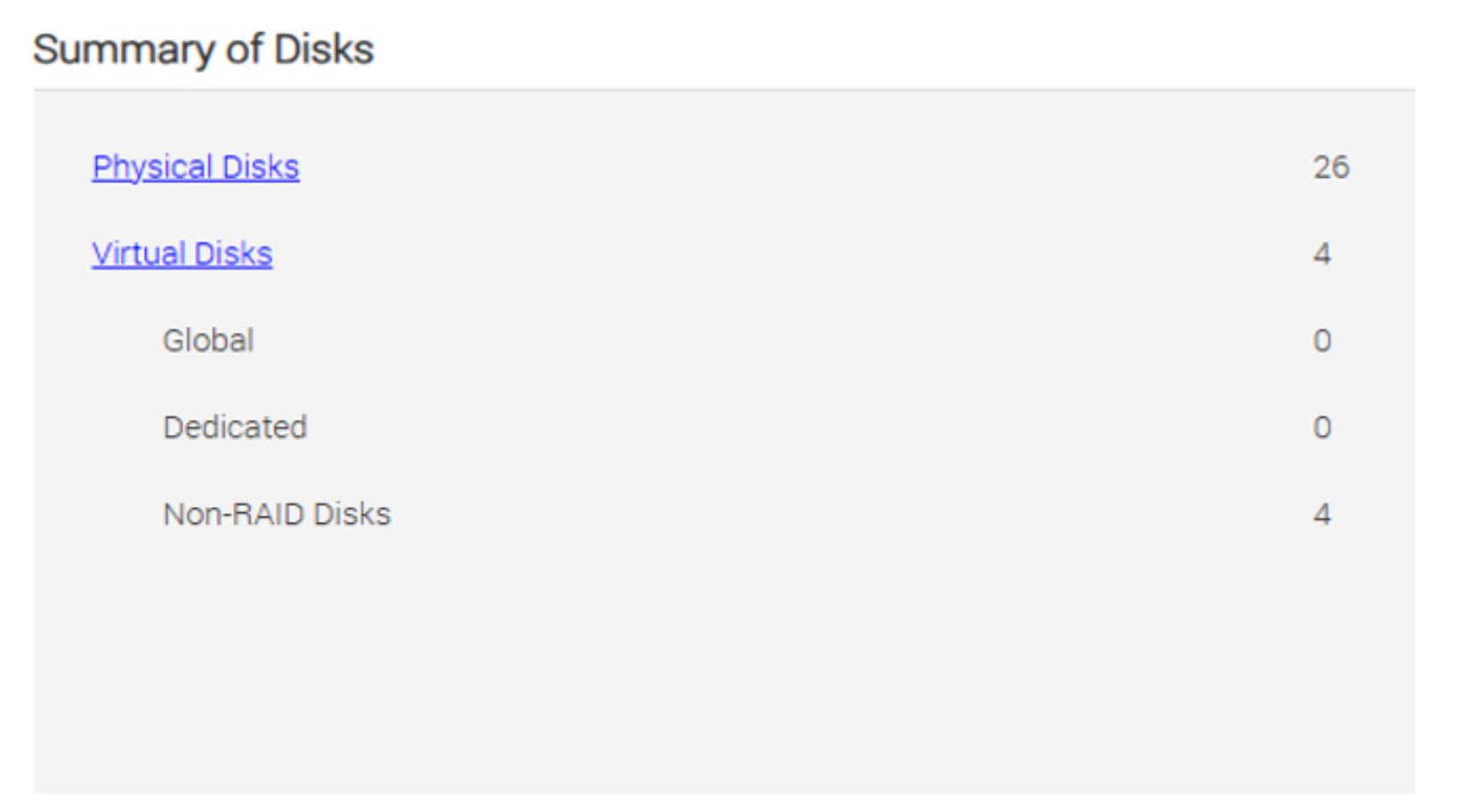
Figure 1. Summary of disks
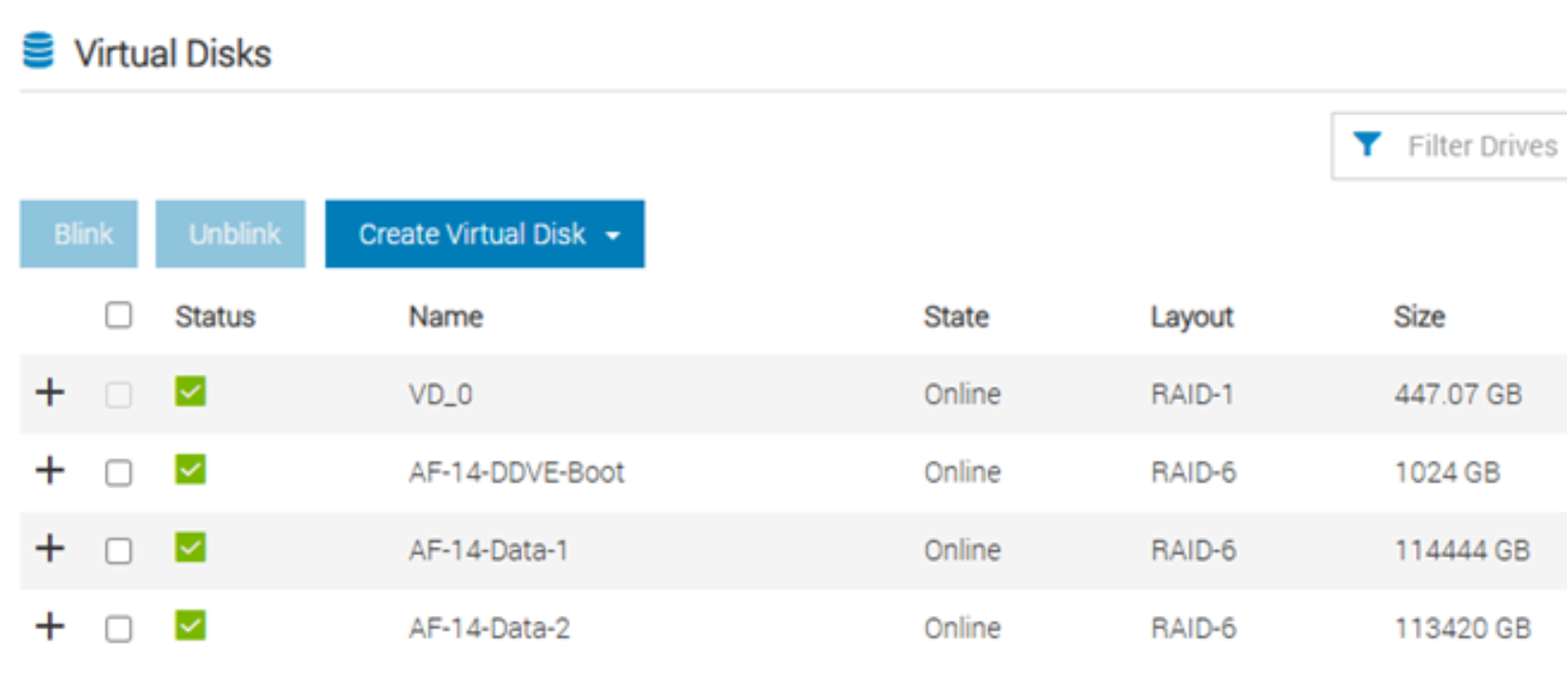
Figure 2. Virtual disks
Note: The preceding virtual disk names are purely for illustrative purposes.
Disk view & controller
- Front view: Fully configured 24 x 2.5-inch drives
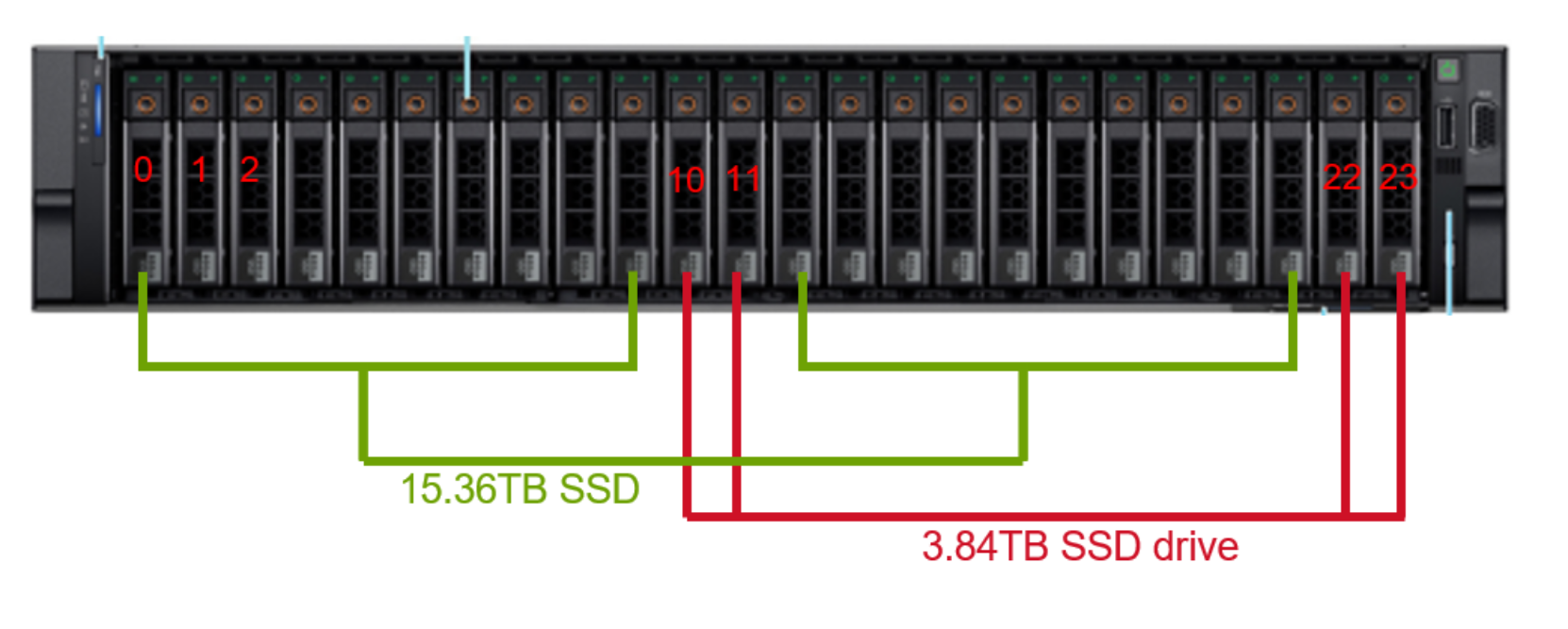
- Dual controller:
- 1st controller is for slots 0-11
Slots 0-9 – 15.36TB SSD data drives
Slots 10-11 – 3.84TB SSD Cache tier drives
- 2nd controller is for slots 12-23
Slots 12-21 – 15.36TB SSD data drives
Slots 22-23 – 3.84TB SSD Cache tier drives
ESXi & Data Domain Storage view
- ESXi: Datastores are created from storage devices.
- Data Domain: 26 virtual disks are created and attached to the Data Domain All-Flash.
Table 2. ESXi and Data Domain storage configuration
|
Disk |
ESXi DataStore |
ESXi SCSI Controller |
Size |
DDFS Tier |
Spindle Group |
|
Root |
AF-DDVE-Boot |
Controller 0 |
500GB |
NA |
NA |
|
NVRAM |
AF-DDVE-Boot |
Controller 0 |
10GB |
NA |
NA |
|
10 data disks |
AF-Data-1 |
Controller 1 |
10 x 11TB |
Active tier |
2 disks per spindle group: 1. 2. 3. 4. 5. |
|
10 data disks |
AF-Data-2 |
Controller 2 |
10 x 11TB |
Active tier |
2 disks per spindle group: 6. 7. 8. 9. 10. |
|
Cache |
AF-Cache-1 |
Controller 3 |
3.49TB |
Cache tier |
1 |
|
Cache |
AF-Cache-2 |
Controller 3 |
3.49TB |
Cache tier |
2 |
|
Cache |
AF-Cache-3 |
Controller 3 |
3.49TB |
Cache tier |
3 |
|
Cache |
AF-Cache-4 |
Controller 3 |
3.49TB |
Cache tier |
4 |
Note: The customer is responsible for installing and maintaining the required VMware ESXi and vCenter where the Data Domain All-Flash will be installed. VMware ESXi 8.0 and later is required.
Network requirements
The Data Domain All-Flash Ready Node comes with one dual port management LOM, and two dual port 25Gbe NICs and SFP28 transceivers. The table below shows the 4 x 25Gbe NIC ports with 1 to 1 mapping between the physical NIC, virtual switch and port group.
Table 3. Network requirements
|
Physical NICs |
Virtual Switches |
Port groups |
|
25Gbe NIC port #1 |
vSwitch1 |
VM Network1 |
|
25Gbe NIC port #2 |
vSwitch2 |
VM Network2 |
|
25Gbe NIC port #3 |
vSwitch3 |
VM Network3 |
|
25Gbe NIC port #4 |
vSwitch4 |
VM Network4 |
Note: The Data Domain All-Flash Ready Node must have four vNICs with DHCP or static IP Addresses. These vNICs connect to the four port groups.
Deployment & configuration options
There are two methods to deploy and configure the Data Domain All-Flash ready node. The first recommended method is using a standalone Linux host and scripts. The second method is the manual method using the ESXi GUI. With either method, the required files are located on the Dell Technologies support website for download. The customer is responsible for the ESXi and vCenter software and licenses.
Pre-requisites
- Customers will provide the following:
- ESXi – Vmware ESXi 8.0 or greater
- vCenter – Add the ESXi to a vCenter during the deployment and configuration process (Automated process with scripts)
- Data Domain All-Flash Ready Node
- Download the Data Domain All-Flash zip file from the Dell Technologies support website. The file name is “ddve-af-8.3.0.0-xxxx.zip”. There should be six files in the zip file, as shown here:
- ddve-af-xxxx-xxxx.ova
- ddve-af-deploy.py
- ddve-af-configure.py
- af-config.yaml
- ddve-af-config_cmd_sample.txt
- ddve-af-readme.txt
Deploy & config using a Linux VM and scripts
The following covers the deployment and configuration of the Data Domain All-Flash system using a Linux host and scripts.
Pre-requisites
Install and set up a Linux host on the same network as the Data Domain All-Flash, referring to the “ddve-af-readme.txt” file from the downloaded zip file for details.
Workflow
- Configure the Dell PowerEdge R760 server
- Install and configure ESXi on the R760 server
- Deploy the Data Domain All-Flash automatically with scripts
- Configure the Data Domain All-Flash automatically or manually
Note: Refer to the PowerProtect Data Domain All Flash Ready Node and Dell APEX Protection Storage All-Flash 8.3 Installation and Administration Guide for the detailed steps.
Deploy & config using the ESXi UI
The following covers the deployment and configuration of the Data Domain All-Flash ready node using the ESXi UI.
Pre-requisites
If using the automated script, install and set up a Linux host on the same network as the Data Domain All-Flash, referring to the “ddve-af-readme.txt” file from the downloaded zip file for details.
Workflow
- Configure the Dell PowerEdge R760 server
- Install and configure ESXi on the R760 server
- Deploy the Data Domain All-Flash manually
- Configure the Data Domain All-Flash automatically or manually
Note: Refer to the PowerProtect Data Domain All Flash Ready Node and Dell Apex Protection Storage All-Flash 8.3 Installation and Administration Guide for the detailed steps.
Licensing
Licensing
There is a special Data Domain All-Flash capacity-based license. It is an XML subscription license. A standard Data Domain Virtual Addition license is not applicable for the All-Flash system.
Note: For additional information about licensing, refer to the Dell PowerProtect Data Domain documentation.
Performance
Performance
The Data Domain All-Flash Ready Node supports 400 mixed streams and 128 configurable MTrees.
Table 4. Data Domain All-Flash Ready Node performance
|
Capacity |
Write Stream |
Read Stream |
Repl source |
Repl destination |
Mixed stream |
Supported concurrently active MTrees |
Supported configurable MTrees |
|
220 TB |
400 |
110 |
220 |
400 |
400 |
128 |
128 |
Note: For additional information about performance, refer to the Dell PowerProtect Data Domain documentation.
Upgrades
Upgrades
The Data Domain All-Flash ready node uses the same procedure for the DDOS upgrade. The existing DDOS RPM can be used to upgrade the Data Domain All-Flash system. The standard Data Domain Virtual Edition cannot be upgraded to the Data Domain All-Flash.
Note: For additional information about upgrades, refer to the DD OS Administration Guide.
References
References
Dell.com/support is focused on meeting customer needs with proven services and support.
Dell Technologies documentation
The following Dell Technologies documentation provides other information related to this document. Access to these documents depends on your login credentials. If you do not have access to a document, contact your Dell Technologies representative.
- The Data Protection Info Hub provides expertise to ensure customer success with Dell Technologies data protection products.
- The Dell PowerProtect Data Domain product documentation a comprehensive collection of guides that serve as additional resources to enhance your understanding of the overall solution
- The Dell PowerEdge R760 Installation and Service Manual