Dell PowerProtect Data Manager’s Syslog Server integration: A technical deep dive
Executive summary
Overview
This whitepaper offers technical insight into PPDM generated logs and their translation process to the syslog server. This document clarifies the process of integration by providing a comprehensive list of file paths for logs related to each component category for the syslog server supported in PowerProtect Data Manager today. This paper also covers examples of the original log format and the corresponding syslog format for each category. Additionally, the document will feature examples of various syslog types such as user-login, backup, and restore for each component category.
Audience
This paper is intended for all PowerProtect Data Manager users who would like to understand the technical details of the logs displayed in the syslog server registered with PowerProtectDataManager. This document is intended for the user who would like to know the origin of the logs in each component category and their mapping to the collected in syslog server. This document will cover the technical details of the logs and how to troubleshoot any issues that occur in syslog server.
Revisions
|
Date |
Part number/ |
Description |
|
May 2024 |
H20036 |
Initial release |
We value your feedback
Dell Technologies and the authors of this document welcome your feedback on this document. Contact the Dell Technologies team by email.
Author: Yongsheng Guo, Mengze Liao
Contributors: Jyothi Deranna
Note: For links to other documentation for this topic, specifically to configure syslog server with PowerProtect Data Manager see the PowerProtect Data Manager’s administrator guide, see the PowerProtect Info Hub.
Introduction to PowerProtect Data Manager syslog server integration
Dell's PowerProtect Data Manager is a comprehensive data protection and management solution designed to safeguard critical data across diverse environments. With its robust features and intuitive interface, PowerProtect Data Manager offers seamless backup, replication, and recovery capabilities, ensuring the resilience of organizational data assets.
One of the features of PPDM is its ability to work with syslog servers which helps users keep track of what the system is doing and any issues it encounters. This integration makes it easier to monitor data protection activities, troubleshoot problems, and meet compliance requirements. This whitepaper explains how the logs created by PowerProtect Data Manager are sent to the syslog server, simplifying the process for users for better data management and operational efficiency.
PowerProtect Data Manager (PPDM) offers four options for forwarding logs to the syslog server during the registration process. We will discuss about these 4 components and their corresponding log files.
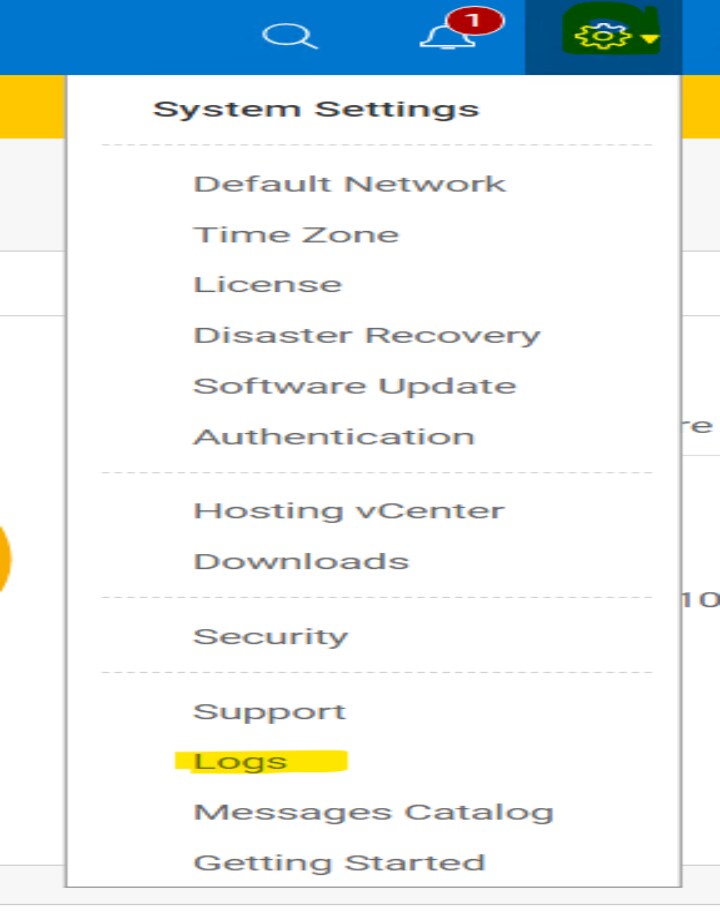
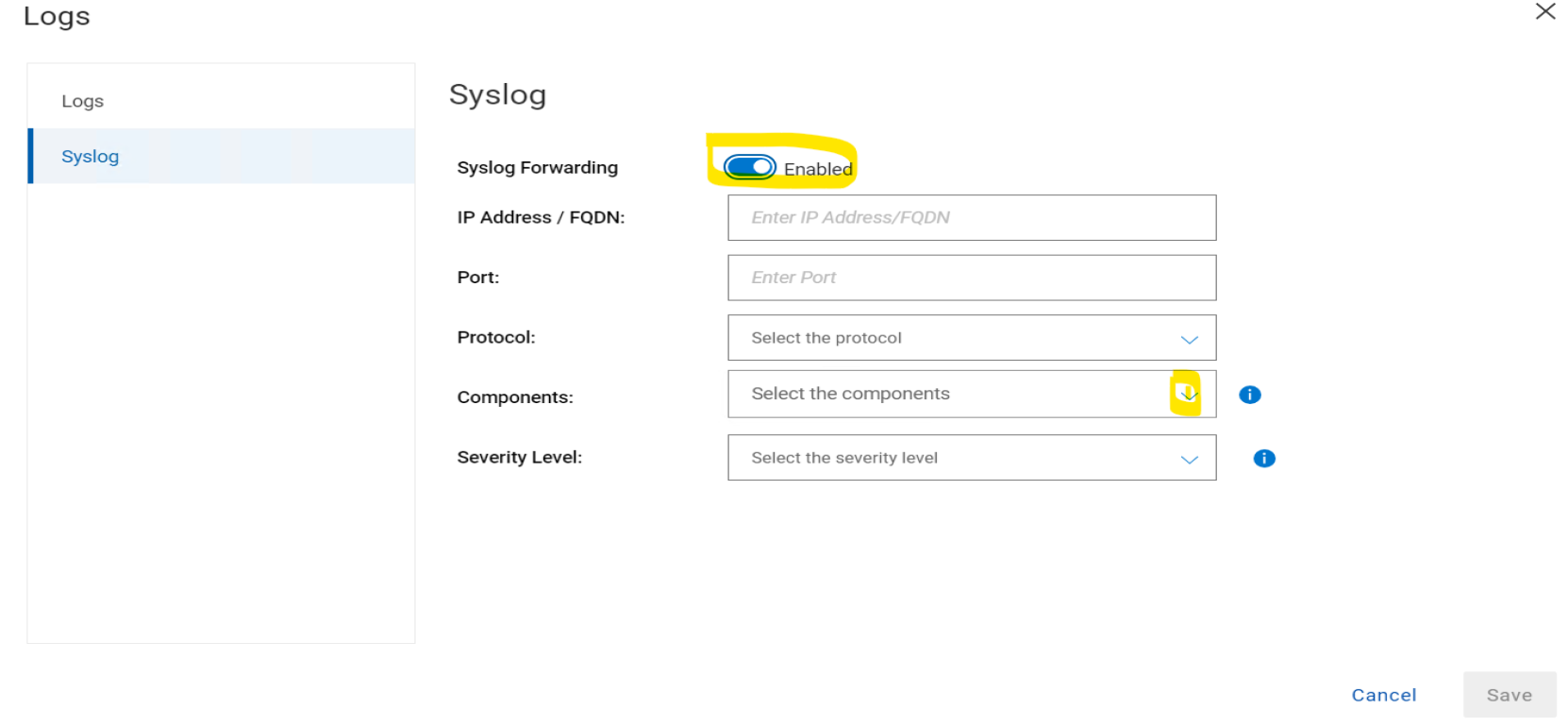
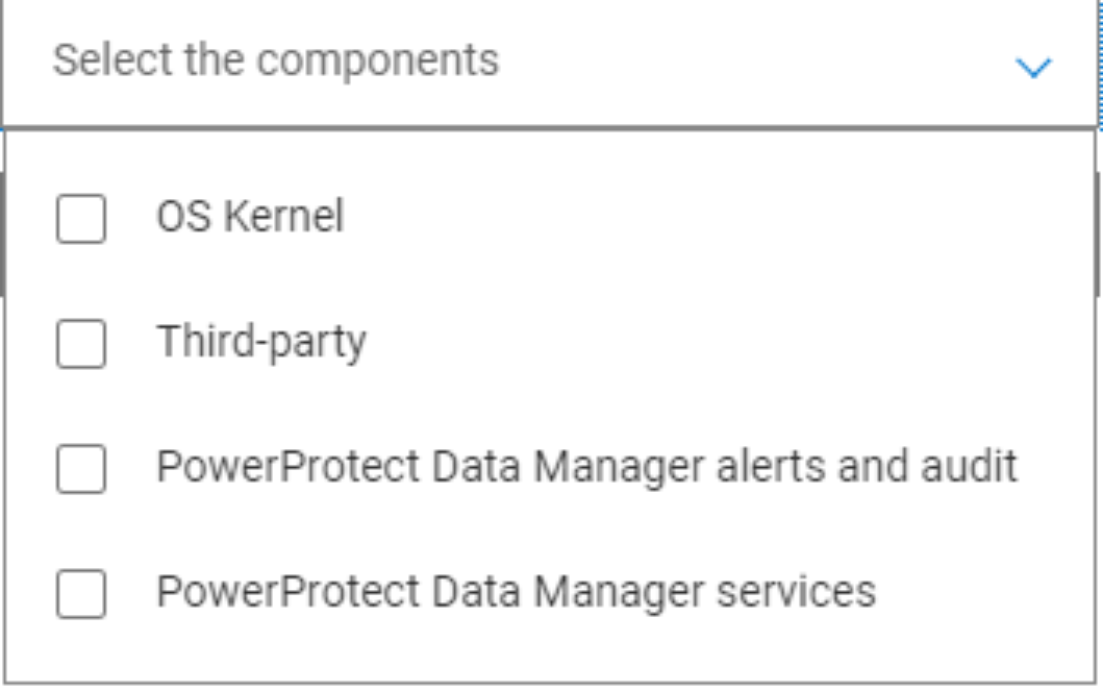
PPDM’s remote monitoring configuration details and key features
The syslog system logging feature collects system log messages and writes them to a designated log file. You can configure the PowerProtect Data Manager server to send event information in syslog format.
Note: For the configuration details of PowerProtect Data Manager and syslog servers please refer to the section ‘Server monitoring with syslog’ in PowerProtect Data Manager’s admin guide.
Syslog - OS Kernel
Syslog - OS Kernel
The OS kernel will output various logs to different files. This section will detail which log files will be used by PPDM as the source files for syslog. Also, this section will provide some examples to compare the original message format and the format that conforms to the syslog protocol after conversion. Furthermore, this section will also provide some examples of OS kernel syslog in different scenarios.
Log Files
/var/log/audit/audit.log
/var/log/firewalld
/var/log/messages
/var/log/warn
Log Format Examples
Original log and syslog format of OS Kernel audit logs
Examples of user-login log format in /var/log/audit/audit.log:
type=LOGIN msg=audit(1713148579.557:49191): pid=17047 uid=0 subj=unconfined old-auid=4294967295 auid=500 tty=(none) old-ses=4294967295 ses=27 res=1
type=USER_START msg=audit(1713148579.577:49192): pid=17047 uid=0 auid=500 ses=27 subj=unconfined msg='op=PAM:session_open grantors=pam_loginuid,pam_systemd,pam_limits,pam_unix,pam_umask,pam_env,pam_lastlog,pam_keyinit acct="admin" exe="/usr/sbin/sshd" hostname=10.84.83.92 addr=10.84.83.92 terminal=ssh res=success'
Examples of corresponding user-login syslog format
Facility kernel (0), Severity notice (5)
Msg: 1 2024-04-15T10:36:19.563418+08:00 dpswb175 kernel - - - type=LOGIN msg=audit(1713148579.557:49191): pid=17047 uid=0 subj=unconfined old-auid=4294967295 auid=500 tty=(none) old-ses=4294967295 ses=27 res=1
Facility kernel (0), Severity notice (5)
Msg: 1 2024-04-15T10:36:19.583324+08:00 dpswb175 kernel - - - type=USER_START msg=audit(1713148579.577:49192): pid=17047 uid=0 auid=500 ses=27 subj=unconfined msg='op=PAM:session_open grantors=pam_loginuid,pam_systemd,pam_limits,pam_unix,pam_umask,pam_env,pam_lastlog,pam_keyinit acct="admin" exe="/usr/sbin/sshd" hostname=10.84.83.92 addr=10.84.83.92 terminal=ssh res=success'
Syslog Type Examples
OS user login success
Facility kernel (0), Severity notice (5)
Msg: 1 2024-04-18T19:55:47.121525+08:00 dpswb175 kernel - - - type=USER_AUTH msg=audit(1713441347.117:21597): pid=40834 uid=0 auid=4294967295 ses=4294967295 subj=unconfined msg='op=PAM:authentication grantors=pam_unix,pam_tally2 acct="admin" exe="/usr/sbin/sshd" hostname=10.84.83.92 addr=10.84.83.92 terminal=ssh res=success'
Facility kernel (0), Severity notice (5)
Msg: 1 2024-04-18T19:55:47.123479+08:00 dpswb175 kernel - - - type=USER_ACCT msg=audit(1713441347.117:21598): pid=40834 uid=0 auid=4294967295 ses=4294967295 subj=unconfined msg='op=PAM:accounting grantors=pam_unix,pam_tally2 acct="admin" exe="/usr/sbin/sshd" hostname=10.84.83.92 addr=10.84.83.92 terminal=ssh res=success'
Facility kernel (0), Severity notice (5)
Msg: 1 2024-04-18T19:55:47.361637+08:00 dpswb175 kernel - - - type=CRYPTO_KEY_USER msg=audit(1713441347.357:21599): pid=40832 uid=0 auid=4294967295 ses=4294967295 subj=unconfined msg='op=destroy kind=session fp=? direction=both spid=40833 suid=475 rport=57028 laddr=10.198.26.175 lport=22 exe="/usr/sbin/sshd" hostname=? addr=10.84.83.92 terminal=? res=success'
Facility kernel (0), Severity notice (5)
Msg: 1 2024-04-18T19:55:47.363829+08:00 dpswb175 kernel - - - type=CRED_ACQ msg=audit(1713441347.357:21600): pid=40832 uid=0 auid=4294967295 ses=4294967295 subj=unconfined msg='op=PAM:setcred grantors=pam_env,pam_unix,pam_tally2 acct="admin" exe="/usr/sbin/sshd" hostname=10.84.83.92 addr=10.84.83.92 terminal=ssh res=success'^J
Facility kernel (0), Severity notice (5)
Msg: 1 2024-04-18T19:55:47.363962+08:00 dpswb175 kernel - - - type=LOGIN msg=audit(1713441347.357:21601): pid=40832 uid=0 subj=unconfined old-auid=4294967295 auid=500 tty=(none) old-ses=4294967295 ses=23 res=1
Facility kernel (0), Severity notice (5)
Msg: 1 2024-04-18T19:55:47.384138+08:00 dpswb175 kernel - - - type=USER_START msg=audit(1713441347.377:21602): pid=40832 uid=0 auid=500 ses=23 subj=unconfined msg='op=PAM:session_open grantors=pam_loginuid,pam_systemd,pam_limits,pam_unix,pam_umask,pam_env,pam_lastlog,pam_keyinit acct="admin" exe="/usr/sbin/sshd" hostname=10.84.83.92 addr=10.84.83.92 terminal=ssh res=success
OS user login failed
Facility kernel (0), Severity notice (5)
Msg: 1 2024-04-18T19:11:07.416610+08:00 dpswb175 kernel - - - type=USER_AUTH msg=audit(1713438667.410:21208): pid=117639 uid=0 auid=4294967295 ses=4294967295 subj=unconfined msg='op=PAM:authentication grantors=? acct="admin" exe="/usr/sbin/sshd" hostname=10.84.83.92 addr=10.84.83.92 terminal=ssh res=failed'
Facility kernel (0), Severity notice (5)
Msg: 1 2024-04-18T19:11:12.250023+08:00 dpswb175 kernel - - - type=USER_AUTH msg=audit(1713438672.246:21209): pid=117534 uid=0 auid=4294967295 ses=4294967295 subj=unconfined msg='op=challenge-response acct="admin" exe="/usr/sbin/sshd" hostname=? addr=10.84.83.92 terminal=ssh res=failed'
OS user execute sudo command
Facility kernel (0), Severity notice (5)
Msg: 1 2024-04-18T19:52:26.000025+08:00 dpswb175 kernel - - - type=USER_CMD msg=audit(1713441145.995:21546): pid=17835 uid=500 auid=500 ses=22 subj=unconfined msg='cwd="/home/admin" cmd=63617420616263 exe="/usr/bin/sudo" terminal=pts/1 res=success'\
Facility kernel (0), Severity notice (5)
Msg: 1 2024-04-18T19:52:26.000222+08:00 dpswb175 kernel - - - type=CRED_REFR msg=audit(1713441145.995:21547): pid=17835 uid=500 auid=500 ses=22 subj=unconfined msg='op=PAM:setcred grantors=pam_env,pam_unix,pam_tally2 acct="root" exe="/usr/bin/sudo" hostname=? addr=? terminal=/dev/pts/1 res=success'
Facility kernel (0), Severity notice (5)
Msg: 1 2024-04-18T19:52:26.003504+08:00 dpswb175 kernel - - - type=USER_START msg=audit(1713441145.999:21548): pid=17835 uid=500 auid=500 ses=22 subj=unconfined msg='op=PAM:session_open grantors=pam_keyinit,pam_systemd,pam_limits,pam_unix,pam_umask,pam_env acct="root" exe="/usr/bin/sudo" hostname=? addr=? terminal=/dev/pts/1 res=success'
Syslog - Third Party
PPDM has integrated many third-party tools internally. These third-party tools have their own log files. This section will detail which log files will be used by PPDM as the source files for syslog. Also, this section will provide some examples to compare the original message format and the format that conforms to the syslog protocol after conversion. Furthermore, this section will also provide some examples of third-party syslog in different scenarios.
Log Files
Although we have the capability to collect logs from various third-party sources, currently only ElasticSearch logs will be forwarded through syslog.
/var/log/elasticsearch/<cluster-id>.log
Log Format Examples
Examples of ElasticSearch log format in /var/log/audit/<cluster-id>.log:
[2024-04-23T02:19:55.642][ERROR][i.n.u.c.D.rejectedExecution] [5URSk1n] Failed to submit a listener notification task. Event loop shut down?
Examples of corresponding syslog format
Facility local1 (17), Severity error (3)
Msg: 1 2024-04-23T02:20:21.788875-07:00 idu051 local1-err - - - elasticsearch [2024-04-23T02:19:55.642][ERROR][i.n.u.c.D.rejectedExecution] [5URSk1n] Failed to submit a listener notification task. Event loop shut down?
Syslog Type Examples
ElasticSearch Error Log
Facility local1 (17), Severity error (3)
Msg: 1 2024-04-23T02:20:21.788875-07:00 idu051 local1-err - - - elasticsearch [2024-04-23T02:19:55.642][ERROR][i.n.u.c.D.rejectedExecution] [5URSk1n] Failed to submit a listener notification task. Event loop shut down?
Syslog - PowerProtect Data Manager alerts and audit
Like OS kernel, PPDM applications can also generate alerts and audit logs. These logs will be output to different files. This section will detail which log files will be used by PPDM as the source files for syslog. Also, this section will provide some examples to compare the original message format and the format that conforms to the syslog protocol after conversion. Furthermore, this section will also provide some examples of PPDM application alert and audit syslog in different scenarios.
Log Files
/var/log/brs/aaa/aaa.log
/var/log/brs/protection-policy/central-interpreter.log
/var/log/brs/protection-policy/execution-planner.log
/var/log/brs/protection-policy/protection-policy.log
/var/log/brs/eureka/eureka.log
/var/log/brs/logmgr/logmgr.log
/var/log/brs/discovery-service/discovery-service.log
/var/log/brs/compliance-verification/compliance-verification-copy-deletion.log
/var/log/brs/compliance-verification/compliance-verification-sla-check.log
/var/log/brs/compliance-verification/compliance-verification-metrics.log
/var/log/brs/compliance-verification/compliance-verification.log
/var/log/brs/compliance-verification/compliance-verification-analytics.log
/var/log/brs/compliance-verification/compliance-verification-upgrade.log
/var/log/brs/compliance-verification/compliance-verification-ddboost.log
/var/log/brs/scheduler/scheduler.log
/var/log/brs/vmware-service/vmware-service.log
/var/log/brs/vmware-service/vim25.log
/var/log/brs/vmware-service/vmware-service-rest-call.log
/var/log/brs/nasdm/nasdm.log
/var/log/brs/vmware-plugin/vmware-plugin.log
/var/log/brs/cndm/cndm.log
/var/log/brs/spbm/spbm.log
/var/log/brs/serverdr/serverdr.log
/var/log/brs/workflow/workflow.log
/var/log/brs/telmgr/telmgr.log
/var/log/brs/adm/adm.log
/var/log/brs/zuul/zuul-api-metrics.log
/var/log/brs/zuul/zuul.log
/var/log/brs/monitoring/monitoring.log
/var/log/brs/asset-storage/asset-storage.log
/var/log/brs/cdr/cdr.log
/var/log/brs/replmgr/datagen.log
/var/log/brs/replmgr/replmgr-cli.log
/var/log/brs/replmgr/ddboost.log
/var/log/brs/replmgr/replmgr-analytics.log
/var/log/brs/replmgr/sync.log
/var/log/brs/replmgr/replmgr.log
/var/log/brs/cbs/cbs.log
/var/log/brs/sdmng/sdmng.log
/var/log/brs/sysmgr/sysmgr.log
/var/log/brs/vmdm/vmdm.log
/var/log/brs/vmdm/vmdm-discovery.log
/var/log/brs/vmdm/vim25.log
/var/log/brs/cloudmgr/cloudmgr.log
/var/log/brs/cdvappdm/cdvappdm.log
/var/log/brs/cdvappdm/cdvappdm-discovery.log
/var/log/brs/cdvappdm/cdvappdm-plugin.log
/var/log/brs/secretsmgr/secretsmgr.log
Log Format Examples
Original log and syslog format of PPDM application alerts
UI:
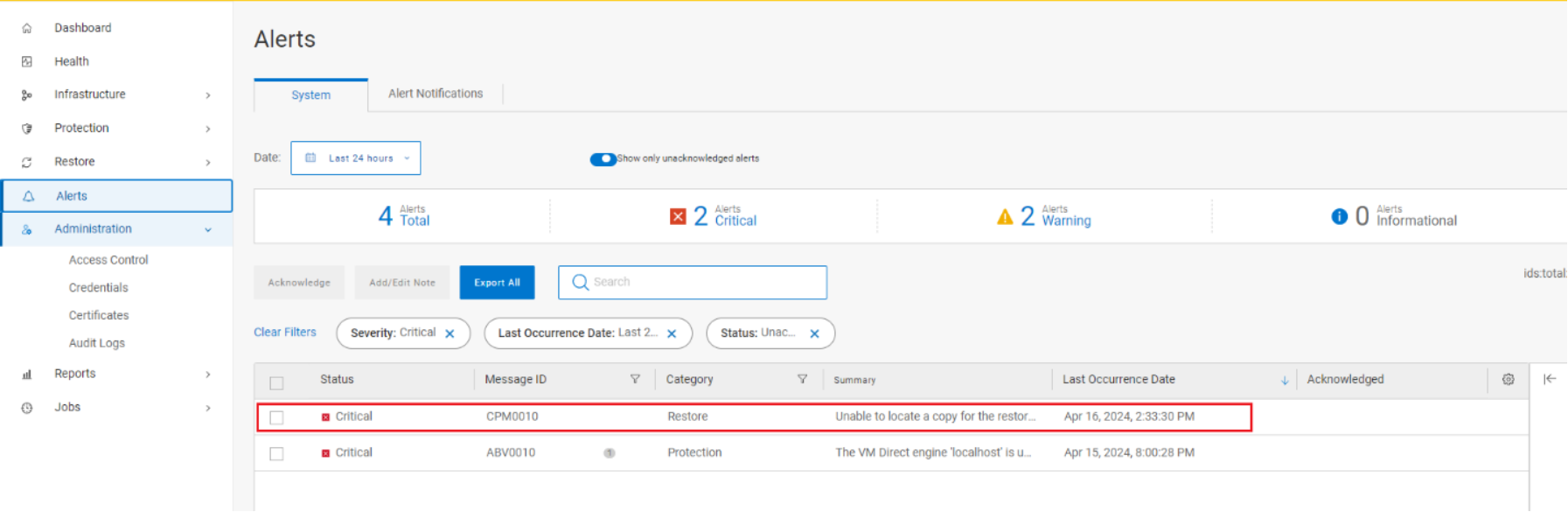
Examples of original log format in /var/log/brs/monitoring/monitoring.log:
2024-04-16T06:33:30.866Z ERROR [] [https-jsse-nio-8449-exec-3] [][ALERT:CPM0010][][TRACE_ID:9a83d0f19471f71d][] [c.e.d.e.c.s.m.DefaultMessageResourceModifier.printAlertLog(143)] - Date: Apr 16, 2024 14:33:30 PM; Summary: Unable to locate a copy for the restore plan TestRestorePlan.; Details: A copy cannot be detected for this restore plan because a restore group does not exist.; Recommended Action: To troubleshoot this issue: 1) If there is no restore group for this restore plan, create a restore group. 2) Verify that the restore plan is ready. If the issue persists, contact Dell Customer Support.; Detail Summaries: null; Status: UNACKNOWLEDGED
Examples of corresponding syslog format:
Facility user (1), Severity critical (2)
Msg: 1 2024-04-16T14:33:30.868580+08:00 dpswb175 user-crit - - - monitoring 2024-04-16T06:33:30.866Z ERROR [] [https-jsse-nio-8449-exec-3] [][ALERT:CPM0010][][TRACE_ID:9a83d0f19471f71d][] [c.e.d.e.c.s.m.DefaultMessageResourceModifier.printAlertLog(143)] - Date: Apr 16, 2024 14:33:30 PM; Summary: Unable to locate a copy for the restore plan TestRestorePlan.; Details: A copy cannot be detected for this restore plan because a restore group does not exist.; Recommended Action: To troubleshoot this issue: 1) If there is no restore group for this restore plan, create a restore group. 2) Verify that the restore plan is ready. If the issue persists, contact Dell Customer Support.; Detail Summaries: null; Status: UNACKNOWLEDGED
Original log and syslog format of PPDM application audit logs
UI:
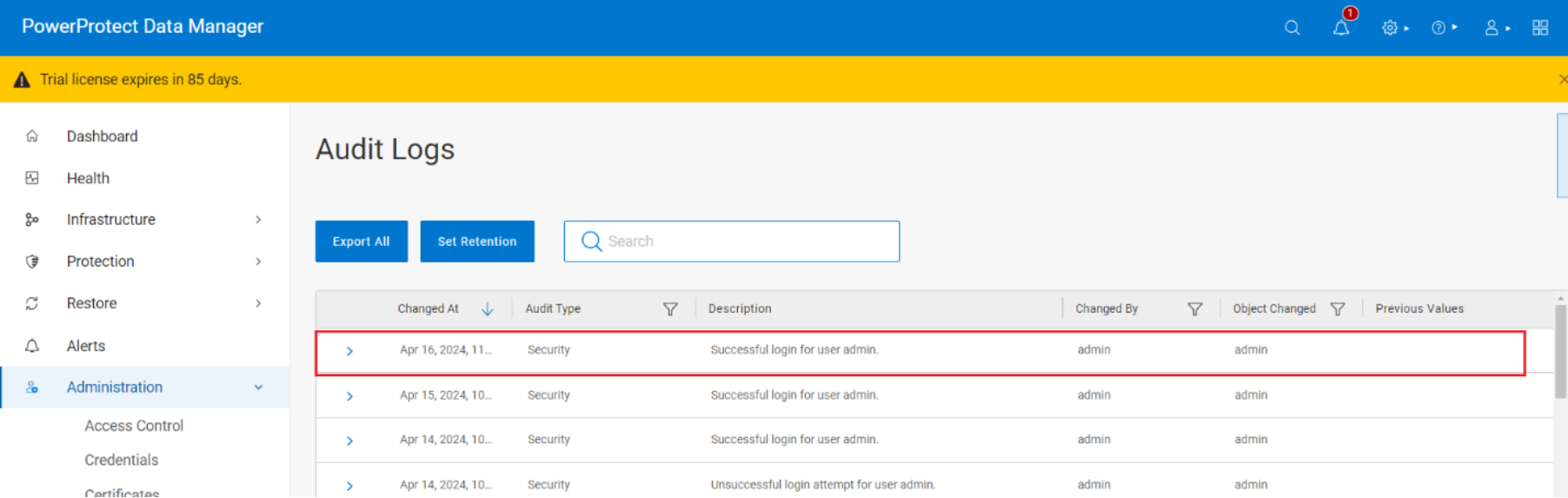
Examples of original log format in /var/log/brs/aaa/aaa.log:
2024-04-16T03:14:17.459Z INFO [] [https-jsse-nio-9090-exec-13] [][AUDIT][][TRACE_ID:bfaeb994b4e22b95][] [c.e.d.e.c.s.a.DefaultAuditLogResourceModifierAndDecorator.printAuditLog(251)] - Source: null; Audit Type: SECURITY; Details: Successful login for user admin.; Changed By: admin; Changed At: Apr 16, 2024 11:14:17 AM; Object Changed: admin; Previous Value: null; New Values: null; Note: null
Examples of corresponding syslog format:
Facility user (1), Severity info (6)
Msg: 1 2024-04-16T11:14:17.461905+08:00 dpswb175 user-info - - - aaa 2024-04-16T03:14:17.459Z INFO [] [https-jsse-nio-9090-exec-13] [][AUDIT][][TRACE_ID:bfaeb994b4e22b95][] [c.e.d.e.c.s.a.DefaultAuditLogResourceModifierAndDecorator.printAuditLog(251)] - Source: null; Audit Type: SECURITY; Details: Successful login for user admin.; Changed By: admin; Changed At: Apr 16, 2024 11:14:17 AM; Object Changed: admin; Previous Value: null; New Values: null; Note: null
Syslog Type Examples
PPDM Alert for VM backup failure
Msg: 1 2024-04-18T03:48:20.822614-07:00 idu051 user-crit - - - vmdm 2024-04-18T10:48:20.821Z ERROR [] [https-jsse-nio-8449-exec-6] [][ALERT:ABV0006][][TRACE_ID:893bbd204374d2b6][] [c.e.d.e.c.s.m.DefaultMessageResourceModifier.printAlertLog(143)] - Date: Apr 18, 2024 03:48:20 AM; Summary: VM Direct engine 'TestProxy' is unable to back up the virtual machine 'TestVM' on vCenter 'TestvCenter'.; Details: Protection of this virtual machine by the VM Direct engine cannot be completed because the backup was unsuccessful.; Recommended Action: Review the error details and summary log in the Jobs window, or export the job logs and review the log files for more information. If the issue persists, contact Dell Customer Support.; Detail Summaries: null; Status: UNACKNOWLEDGED
PPDM Audit log for creating Policy
Facility user (1), Severity info (6)
Msg: 1 2024-04-18T03:21:42.559507-07:00 idu051 user-info - - - protection-policy 2024-04-18T10:21:42.540Z INFO [] [not.a.Spring.bean-3] [][AUDIT][][TRACE_ID:862fd8c5bc40cffe][] [c.e.d.e.c.s.a.DefaultAuditLogResourceModifierAndDecorator.printAuditLog(251)] - Source: null; Audit Type: PROTECTION_POLICY; Details: Protection Policy 'test' has been created.; Changed By: admin; Changed At: Apr 18, 2024 03:21:42 AM; Object Changed: test; Previous Value: ; New Values: test; Note: null
PPDM Audit log for creating new user
Facility user (1), Severity info (6)
Msg: 1 2024-04-18T03:54:31.946498-07:00 idu051 user-info - - - aaa 2024-04-18T10:54:31.945Z INFO [] [https-jsse-nio-9090-exec-1] [][AUDIT][][TRACE_ID:a1008a14e38914f4][] [c.e.d.e.c.s.a.DefaultAuditLogResourceModifierAndDecorator.printAuditLog(251)] - Source: null; Audit Type: SECURITY; Details: New user test created.; Changed By: admin; Changed At: Apr 18, 2024 03:54:31 AM; Object Changed: test; Previous Value: ; New Values: test; Note: null
PPDM Audit log for deleting Copy
Facility user (1), Severity info (6)
Msg: 1 2024-04-18T03:28:48.756134-07:00 idu051 user-info - - - compliance-verification 2024-04-18T10:28:48.749Z INFO [] [https-jsse-nio-8458-exec-8] [][AUDIT][][TRACE_ID:bfe94c4ff2ab0212][] [c.e.d.e.c.s.a.DefaultAuditLogResourceModifierAndDecorator.printAuditLog(251)] - Source: null; Audit Type: PROTECTION_COPY; Details: 1 copy(s) deletion initiated for asset D:\ by user. Options:forceRemoveLatestBackup.; Changed By: admin; Changed At: Apr 18, 2024 10:28:48 AM; Object Changed: D:\; Previous Value: FULL created at 2024-04-17T12:02:00.994Z with retention time 2024-04-19T00:00:00Z ; New Values: ; Note: null
Syslog - PowerProtect Data Manager services
Besides alerts and audit messages, PPDM applications will also generate execution logs to track service runtime behavior. These logs will be output to different files. This section will detail which log files will be used by PPDM as the source files for syslog. Also, this section will provide some examples to compare the original message format and the format that conforms to the syslog protocol after conversion. Furthermore, this section will also provide some examples of PPDM service syslog in different scenarios.
Log Files
PPDM Services logs will be output to the same files listed in section 0. If “PowerProtect Data Manager services” component category is selected by user, the corresponding severity logs will be filtered from those files and sent to the syslog server.
Log Format Examples
Original log and syslog format of PPDM services
Examples of original log format in /var/log/brs/protection-policy/protection-policy.log:
2024-04-16T07:07:36.955Z ERROR [] [not.a.Spring.bean-4] [][][][TRACE_ID:a32878b8d3c5bbde][] [c.e.d.p.s.c.n.BaseNotificationHandler.handleMessage(136)] - The Notification Message is not valid for this handler
Examples of corresponding syslog format:
Facility local0 (16), Severity error (3)
Msg: 1 2024-04-16T15:07:36.957369+08:00 dpswb175 local0-err - - - protection-policy 2024-04-16T07:07:36.955Z ERROR [] [not.a.Spring.bean-4] [][][][TRACE_ID:a32878b8d3c5bbde][] [c.e.d.p.s.c.n.BaseNotificationHandler.handleMessage(136)] - The Notification Message is not valid for this handler
Syslog Type Examples
DD File System issue
Facility local0 (16), Severity error (3)
Msg: 1 2024-04-18T03:21:45.966927-07:00 idu051 local0-err - - - replmgr 2024-04-18T10:21:45.963Z ERROR [] [pool-1525-thread-1] [00000000-0000-4000-b000-000000000000][][][TRACE_ID:862fd8c5bc40cffe;JOB_ID:975ecae5ccaf4eee][plc.id:7ea7584b,asset.id:,pcs.id:] c.e.b.d.c.r.connection.DdRestClient.executeRestRequest(636) - Error url = https://dpswb258.drm.lab.emc.com:3009/rest/v1.0/dd-systems/ca29a267e9e97d3%3A98364bbbe7527cc7/protocols/ddboost/storage-units, details = "The filesystem is not running", code = 5040
Failed to connect with DD through DDBoost
Facility local0 (16), Severity error (3)
Msg: 1 2024-04-18T03:21:46.552443-07:00 idu051 local0-err - - - replmgr 2024-04-18T10:21:46.550Z ERROR [] [pool-1524-thread-1] [][][][][] ddboost.log(52) - severity:1 msg:[31304:140353483036416] ddp_connect_with_config_internal() failed, Hostname: dpswb258.drm.lab.emc.com, Err: 5037-Cannot resolve IP address from Host dpswb258-failover.drm.lab.emc.com for ip family 0
Reporting node is not stable
Facility local0 (16), Severity error (3)
Msg: 1 2024-04-18T05:14:34.010720-07:00 idu051 local0-err - - - monitoring 2024-04-18T12:14:33.977Z ERROR [] [Timer-1] [][][][][] [c.e.b.r.s.ReportNodeServiceImpl.checkReportNodeServiceStarted(883)] - Report node is not stable. Request to report node failed.
API gateway error
Facility local0 (16), Severity error (3)
Msg: 1 2024-04-18T05:24:35.761983-07:00 idu051 local0-err - - - zuul 2024-04-18T12:24:35.761Z ERROR [] [https-jsse-nio-8443-exec-19] [][][][TRACE_ID:b6c61264b992672f][] [c.e.b.z.f.e.ErrorFilter.run(82)] - Error during filtering, ctx={retryable=false, request=FirewalledRequest[ org.springframework.web.filter.ForwardedHeaderFilter$ForwardedHeaderExtractingRequest@1fa735a6], ignoredHeaders=[set-cookie, expires, x-content-type-options, x-xss-protection, cookie, x-frame-options, cache-control, pragma], originResponseHeaders=[com.netflix.util.Pair@d68f029f], zuulRequestHeaders={x-dell-log-trace=TRACE_ID:877912f9-eccd-4e41-b6c6-1264b992672f;, x-forwarded-host=localhost:8443, x-forwarded-proto=https, x-service-response-timeout=35000, x-forwarded-port=8443, xbrs_requestorigin=external_remote, x-forwarded-for=10.84.83.92, x-original-host=localhost}, throwable=com.netflix.zuul.exception.ZuulException: Filter threw Exception, zuulEngineRan=true, requestQueryParams={page=[1], pageSize=[1], filter=[state ne "DELETED"]}, requestURI=/api/v2/assets/83b15a07-6f3e-5c1e-8655-7001045e5d48/copies, isDispatcherServletRequest=false, proxy=assetsCopies, processStartTime=1713443075749, sendErrorFilter.ran=true, X-THROTTLING-REQUEST=Request(identify=10.84.83.92, uri=/api/v2/assets/83b15a07-6f3e-5c1e-8655-7001045e5d48/copies, method=GET, size=0, throttlingKey=10.84.83.92#-973872978, isInAllowList=false, reasonCode=0), response=com.netflix.zuul.http.HttpServletResponseWrapper@
Points to Note
Points to Note
The audit logs for the kernel and PPDM applications inherently lack severity levels. This means that when a user selects "OS Kernel" and/or "PowerProtect Data Manager alerts and audit", all audit logs will be sent to the syslog server, irrespective of the chosen severity level.
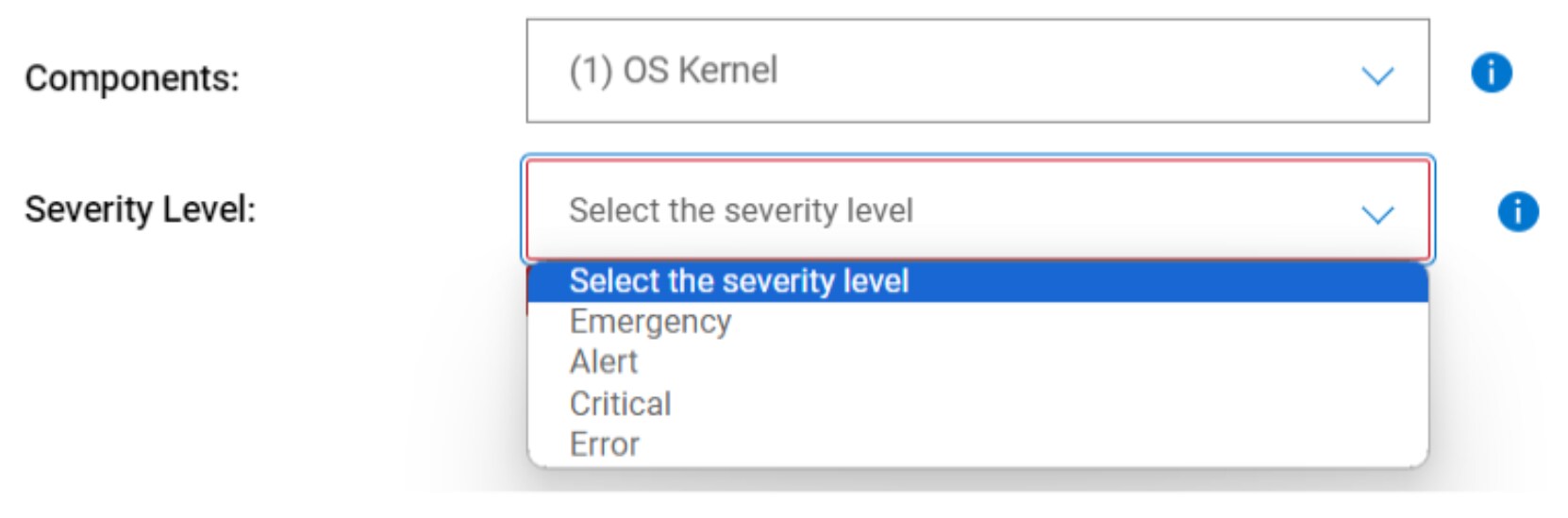
PPDM alerts are limited to two severity levels: "Critical" and "Error". If a user chooses the component "PowerProtect Data Manager alerts and audit" and selects "Emergency" or "Alert" as the severity level, no PPDM alerts will be forwarded to the syslog server.