
Dell PowerScale and NVIDIA GPUDirect Performance Report

Dell PowerScale and NVIDIA GPUDirect Performance Report This document captures details on the technologies, results, and environment used to perform functionality and performance tests to demonstrate compatibility between Dell PowerScale and NVIDIA GPUDirect Storage.

Executive summary

Overview

Data analytics is an ever-changing industry that ranges from pharma to manufacturing and a vast pool of industries in between. Predictive analysis and model training are not new concepts, but they are continuously being improved and tuned to reach faster results. As these algorithms improve, so must technology improve to keep pace and deliver the required results in a timely manner.

The massive demand on hardware, specifically memory and CPU, to train analytic models is mitigated when we introduce graphical processing units (GPUs). This demand is also reduced with technology advancements such as NVIDIA GPUDirect Storage (GDS). This document dives into GDS and how Dell Technologies has partnered with NVIDIA to enable GDS within the Dell PowerScale scale-out storage family.

The testing and results described in this paper demonstrate how PowerScale OneFS with NFSoRDMA is fully compatible and supported by NVIDIA GDS. The results also demonstrate how the linear scalability of the PowerScale F600 scale-out NAS powered by OneFS can meet the performance and growth demands of ever-changing analytic workloads.

Revisions

Date

Part number/
revision

Description

October 2021

H18931

Initial release

August 2023

H18931.1

Updated for OneFS 9.5 and NVIDIA A100

Introduction

Introduction

Dell PowerScale OneFS v9.2 provides expanded support for NFSv3 by introducing NFS over Remote Direct Memory Access (NFSoRDMA) into the OneFS codebase. In addition, PowerScale nodes include Mellanox ConnectX-based network interface cards (NICs) supporting RDMA over Converged Ethernet (RoCE). These technologies, in conjunction with NVIDIA GDS, allow a direct path for data from the GPU to network adapters and storage devices, allowing read/write operations to and from GPU memory. This direct I/O path eliminates unnecessary memory copies, decreases CPU overhead, and reduces latency, resulting in significant performance improvements.

Dell Technologies engineering conducted a series of tests to demonstrate the PowerScale NFSoRDMA support with GDS and documented the results and findings from these tests. The following information describes the test infrastructures and settings used for this effort.

Solution architecture

Architecture overview

Figure 1 illustrates the architecture, showing the key components that made up the solution as it was tested and benchmarked.
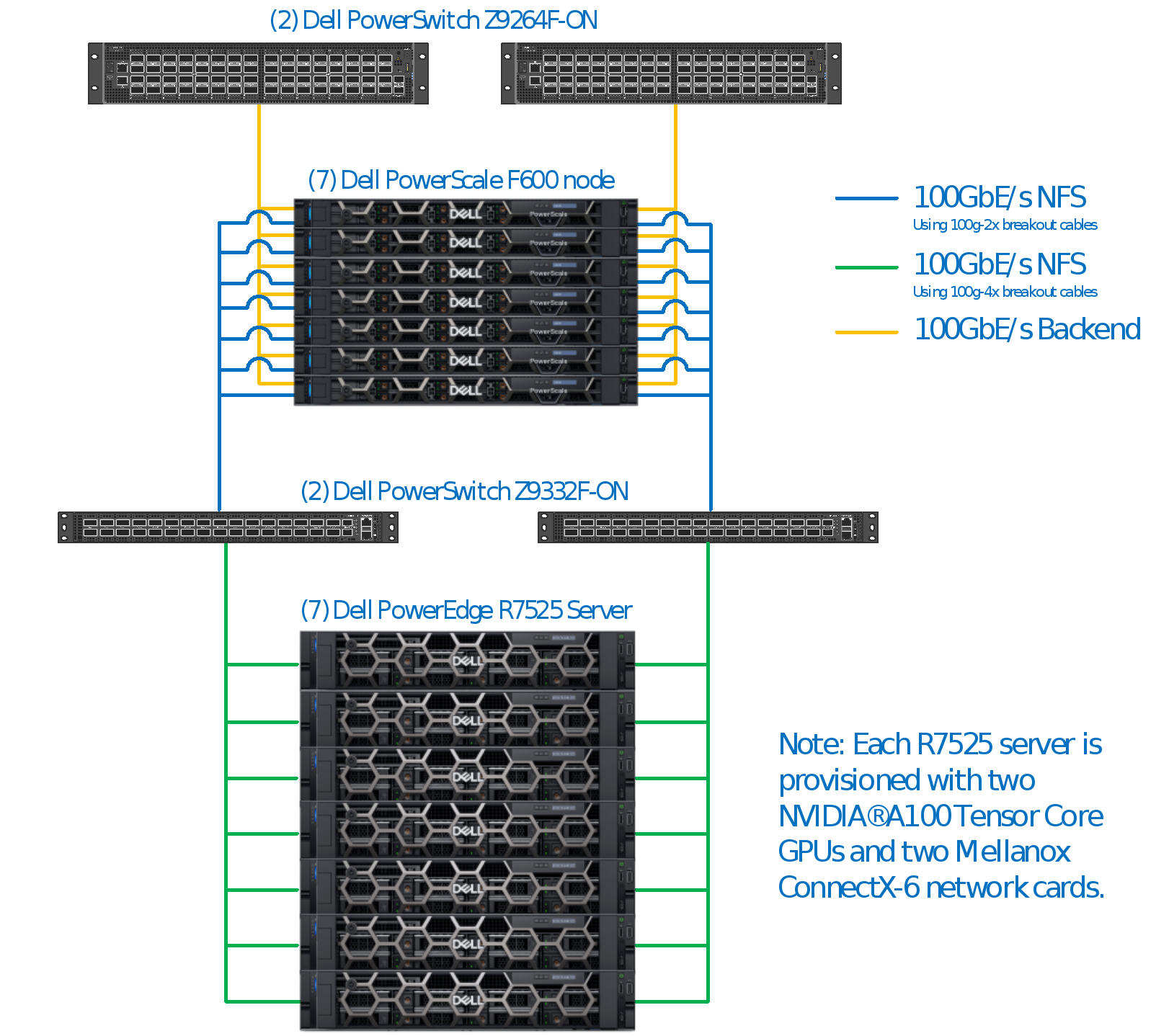
Figure 1.        Architecture overview 

Storage: Dell PowerScale scale-out NAS

PowerScale is the next evolution of OneFS—the operating system powering the industry’s leading scale-out NAS platform that enables you to innovate with your data. The PowerScale family includes Dell PowerScale platforms and the Dell Isilon platforms configured with the PowerScale OneFS operating system. OneFS provides the intelligence behind the highly scalable, high-performance modular storage solution that can grow with your business. A OneFS-powered cluster is composed of a flexible choice of storage platforms including all-flash, hybrid, and archive nodes. These solutions provide the performance, choice, efficiency, flexibility, scalability, security, and protection for you to store massive amounts of unstructured data within a cluster. The PowerScale all-flash platforms co-exist seamlessly in the same cluster with your existing Isilon nodes to drive your traditional and modern applications. Powered by the new OneFS 9.5 operating system that supports NFS Over Remote Direct Memory Access (NFSoRDMA), the platforms are available in several product lines.

During these tests, PowerScale F600 performance node platforms were used. With new NVMe drives, increased memory, and upgraded Intel Gold 6248R processors, the F600 provides larger capacity with massive performance, in a cost-effective compact form factor, to power the most demanding workloads. Each node allows you to scale raw storage capacity from 15.36 TB to 122.8 TB per node and up to 30.96 PB of raw storage per cluster. The F600 includes inline software data compression and deduplication. The minimum number of nodes per cluster is three while the maximum cluster size is 252 nodes.

Networking: Dell PowerSwitch data center switches

Dell Technologies offers switches built for building high-capacity network fabrics, and core/aggregation switches designed for building optimized data center leaf/spine fabrics of virtually any size. Dell PowerSwitch S- and Z-Series switches are tested and proven in Dell Technologies’ performance labs, top ranked in industry tests (by Tolly and IT Brand Pulse), and are currently deployed in customer data centers around the world.

For more information about PowerSwitch S- and Z-Series switches, see Dell PowerSwitch Data Center Switches and the Dell PowerSwitch Data Center Quick Reference Guide.

Bill of materials

Table 1 and Table 2 list all the materials and software that were used to conduct the testing.

Table 1.      Bill of materials

Component

Purpose

Quantity

Dell PowerScale F600 Performance Nodes

  • 736 GB RAM
  • Ten 1.92TB NVMe drives
  • Two 100 GbE interfaces for Frontend
  • Two 100 GbE interfaces for Backend

Shared Storage


7

Dell PowerSwitch Z9264F-ON

Backend Switch

2

Dell PowerSwitch Z9332F-ON

Frontend Switch

2

Dell PowerEdge R7525

  • 2 x AMD EPYC 7H12 CPU @ 2.6 GHz with 64 cores/128 threads)
  • BOSS-S2 controller card with 1x M.2 240 GB drive 
  • 1 x 960 GB SSD drive (unused) 
  • 2 x NVIDIA A100 GPU 80 GB PCIe 
  • 2 x 100 GbE Network (Mellanox MT2892 Family [ConnectX-6]) 
  • 2 x BCM57414 NetXtreme-E 10 Gb/25 Gb RDMA Ethernet Controller 
  • 2 x NetXtreme BCM5720 2-port Gigabit Ethernet PCIe

Compute server

8

Table 2.      Software Versions

Component

Version

Dell PowerScale OneFS

OneFS 9.5.0.0 (Build B_9_5_0_005)

Operating system (R7525)

Ubuntu 20.04.6 LTS

Kernel 5.4.0-150-generic

Mellanox OpenFabrics Enterprise Distribution for Linux (MLNX_OFED)

OFED-5.4-3.6.8

NVIDIA CUDA Toolkit

CUDA 12.1 / Drivers 530.30.02

GDS Release

1.6.1.9

nvidia_fs

2.15

libcufile

2.12

Benchmark

Benchmark methodology

To measure the performance of the solution, the gdsio utility from NVIDIA was used. This utility is similar to other benchmarking tools with varying degrees of features and functionality to generate various storage IO load characteristics. The gdsio tool is included in the NVIDIA GDS package.

Benchmark results

Figure 2 shows the results of the GDSIO tool with the following parameters:

  • Sequential READs
  • 512 KiB IO Size
  • 8 threads per GPU
  • 256 GB file size

Figure 2 also includes results numbers from previous GDSIO tests using OneFS 9.2 and NVIDIA V100 GPUs. 
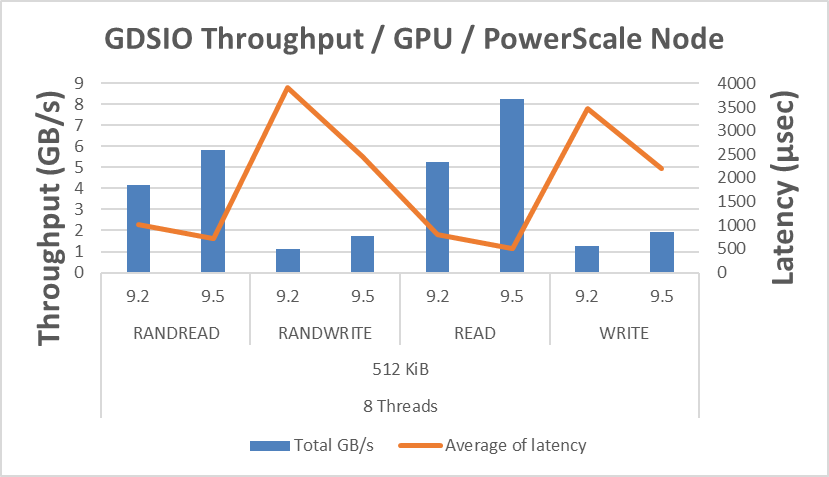
Figure 2.        GDSIO performance results comparison between OneFS 9.2 and OneFS 9.5

F600 performance nodes with upgraded Intel Gold 6248R processors, memory, and OneFS 9.5 showed a 36 percent performance improvement over previous GDSIO testing with standard F600 nodes. This significant increase in performance is the result of higher performant components within the F600, such as upgraded Intel processors, as well as performance improvements embedded into OneFS 9.5. 

This increase in node performance increases the overall performance density of a PowerScale cluster. A single F600 node is one rack unit or 1RU, and a minimum cluster size is three nodes or 3RU. This equates to over 24 GB/s per minimum cluster throughput, scaling linearly up to 252 nodes in a cluster. A fully populated F600 PowerScale cluster can serve over 2 TB/s of read throughput to a massive GPU farm. For companies looking to build supercomputers or extremely large generative AI models, PowerScale is an excellent platform choice.
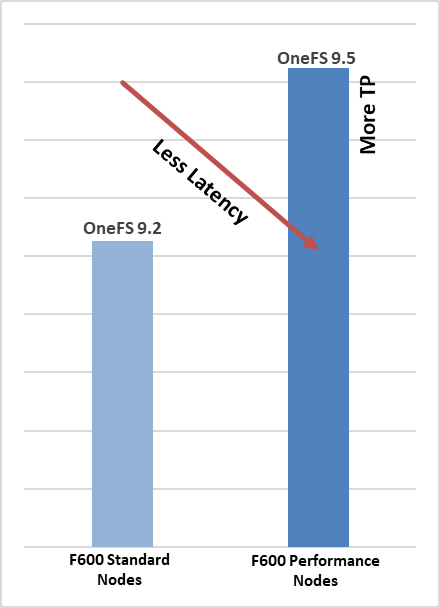
Figure 3.        Performance benefits with GDSIO and F600 performance nodes

Understanding NUMA node affinity and PCIe tree

PCIe topology

The PCIe topology, PCIe root complex, and the physical location of the GPU and network and storage devices are the most important things to understand with GPUDirect. The key is to limit the number of “hops” for a GPU to communicate with a NIC (and group GPUs and NICs based on their NUMA node affinity), also called CPU affinity. To retrieve this information, you could use some Linux commands like lspci or lstopo to identify PCIe devices, referred to as BDF notation (bus:device.func). However, the NVIDIA CUDA Toolkit package provides a command called nvidia-smi that can facilitate this task. See Figure 4 for details.
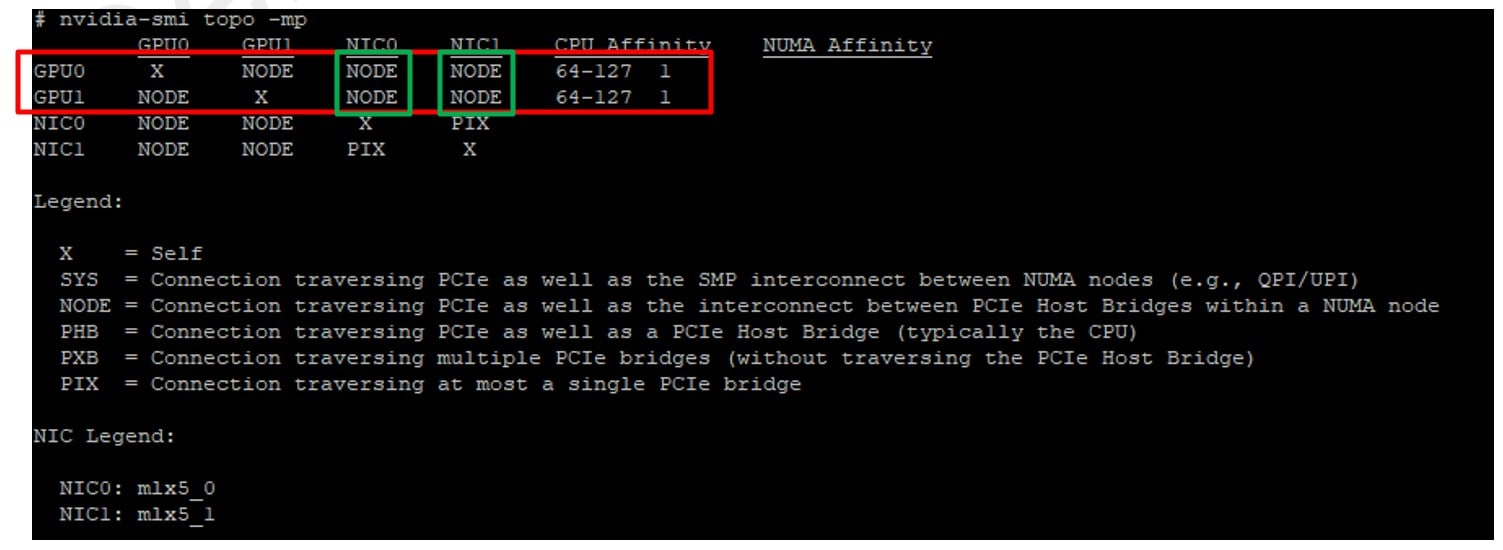
Figure 4.        PCIe topology

Based on nvidia-smi topo -mp command output (Figure 4), we can determine the following mapping for the R7525s used in this testing.

Table 3.      PCIe mapping

GPU ID

Mellanox card

Numa affinity

0

mlx5_0


1

1

mlx5_0

1

Note: You can use the ibdev2netdev command to see which interface names (mlx5_X) map to which device names (enpYsZ).

Example:

# ibdev2netdev

mlx5_0 port 1 ==> ens6f0 (Up)

mlx5_1 port 1 ==> ens6f1 (Up)

Configuration details

PowerScale configuration

Networking configuration

There are two subnets, each with one pool. One subnet is for 100gige-1 (ext-a) and the other is for 100gige-2 (ext-b). In total, fourteen (14) 100 GbE ports are used in the PowerScale cluster.

All 100gige-1 interfaces are connected to the first switch, and all 100gige-2 interfaces are connected to the second switch.

F600GDSBench-1# isi network interfaces list

LNN  Name      Status  VLAN ID  Owners                    Owner Type  IP Addresses

-----------------------------------------------------------------------------------

1    100gige-1 Up      -        groupnet0.subnet10.pool10 Static      10.100.10.101

1    100gige-2 Up      -        groupnet0.subnet20.pool20 Static      10.100.20.101

2    100gige-1 Up      -        groupnet0.subnet10.pool10 Static      10.100.10.102

2    100gige-2 Up      -        groupnet0.subnet20.pool20 Static      10.100.20.102

3    100gige-1 Up      -        groupnet0.subnet10.pool10 Static      10.100.10.103

3    100gige-2 Up      -        groupnet0.subnet20.pool20 Static      10.100.20.103

4    100gige-1 Up      -        groupnet0.subnet10.pool10 Static      10.100.10.104

4    100gige-2 Up      -        groupnet0.subnet20.pool20 Static      10.100.20.104

5    100gige-1 Up      -        groupnet0.subnet10.pool10 Static      10.100.10.105

5    100gige-2 Up      -        groupnet0.subnet20.pool20 Static      10.100.20.105

6    100gige-1 Up      -        groupnet0.subnet10.pool10 Static      10.100.10.106

6    100gige-2 Up      -        groupnet0.subnet20.pool20 Static      10.100.20.106

7    100gige-1 Up      -        groupnet0.subnet10.pool10 Static      10.100.10.107

7    100gige-2 Up      -        groupnet0.subnet20.pool20 Static      10.100.20.107

-----------------------------------------------------------------------------------

Total: 14

Disable compression

During tests, compression was disabled.

isi compression settings modify --enabled=0

Disable inline deduplication

During tests, inline deduplication was disabled.

isi dedupe inline settings modify --mode=disabled

Disable endurant cache (EC)

During tests, Endurant Cache was disabled.

isi_for_array sysctl efs.bam.ec.mode=0

Set file pool policy to streaming

F600GDSBench-1# cd /ifs/benchmark

F600GDSBench-1# ls

gdsio

F600GDSBench-1# isi set -l streaming gdsio

F600GDSBench-1# isi set -a streaming gdsio

F600GDSBench-1# isi get -d gdsio

POLICY    LEVEL PERFORMANCE COAL  FILE

default      4x streaming/@18 on    gdsio/

Enable jumbo frames on each subnet
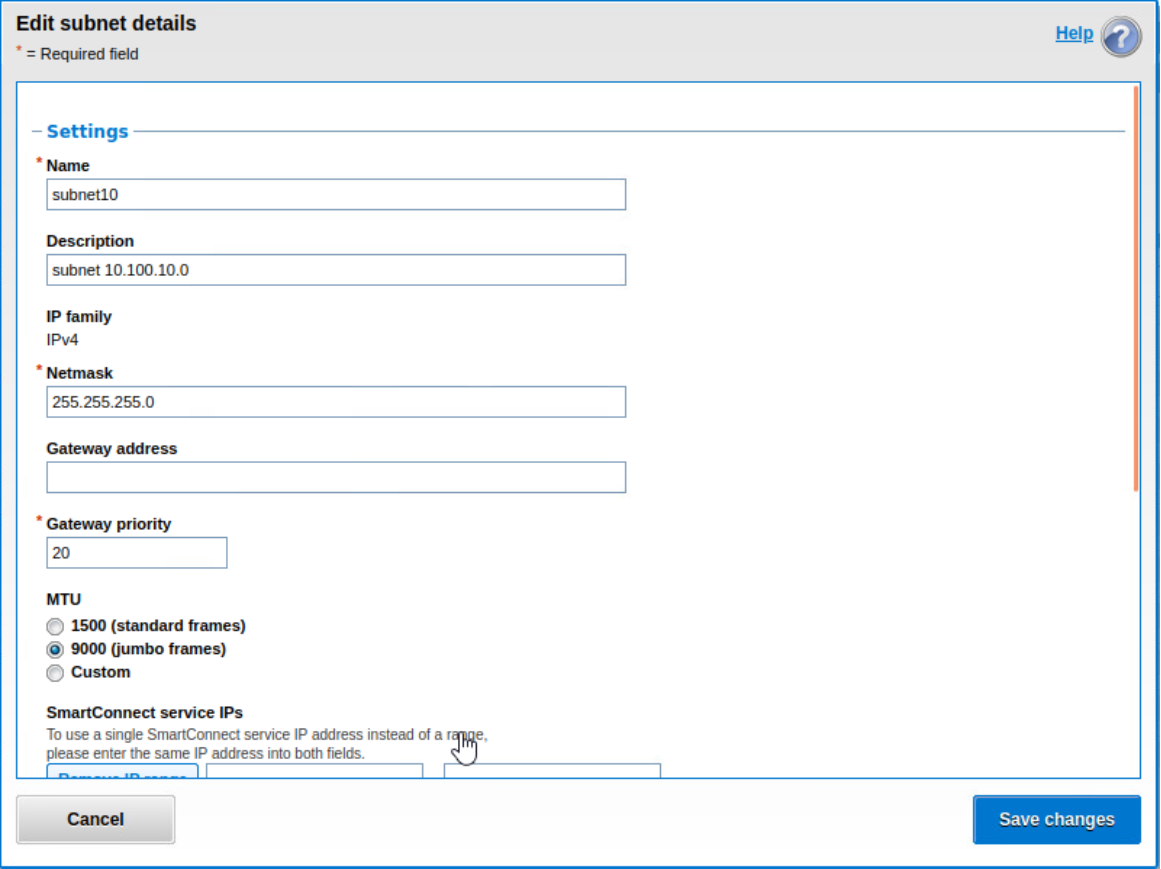
A screenshot of a computerDescription automatically generated with medium confidence

Figure 5.        Subnet configuration (10.100.10.0/24)
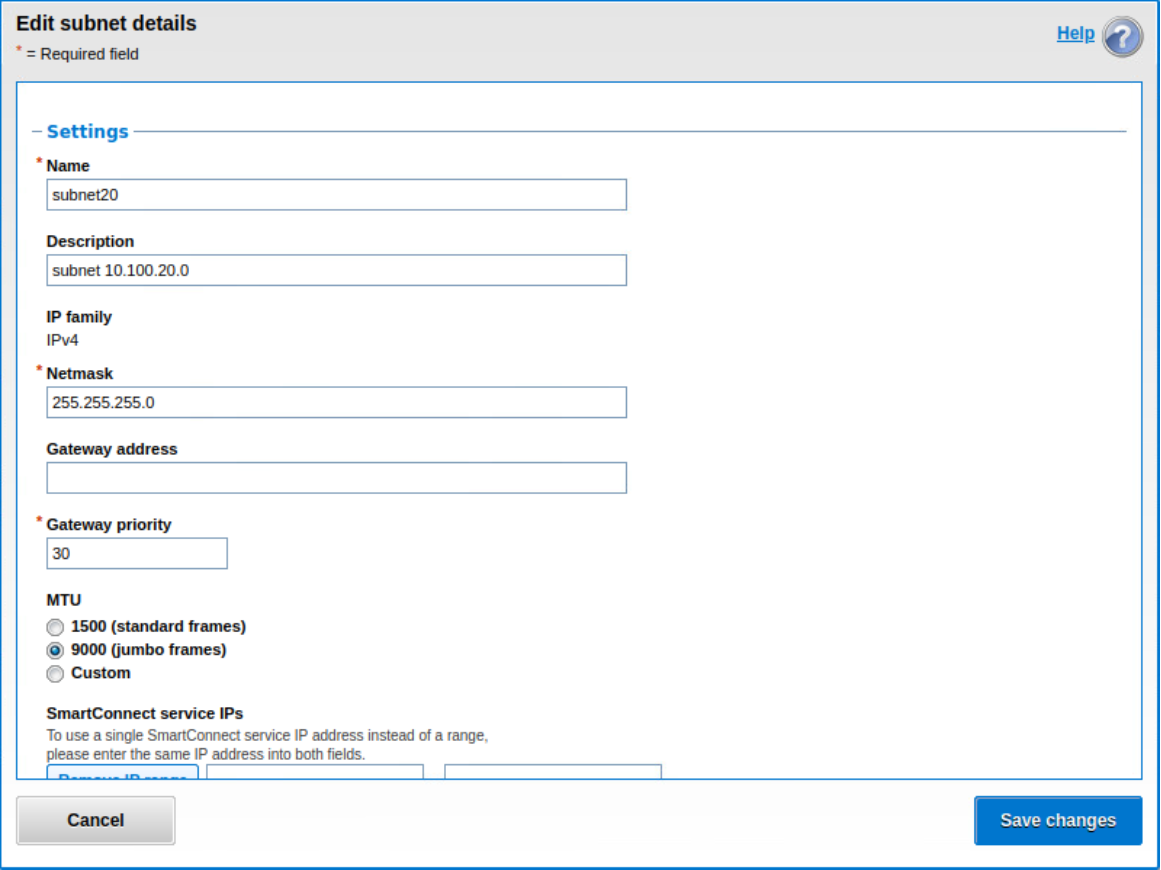

A screenshot of a computerDescription automatically generated
Figure 6.        Subnet configuration (10.100.20.0/24)

Enable NFS Over RDMA on each network pool
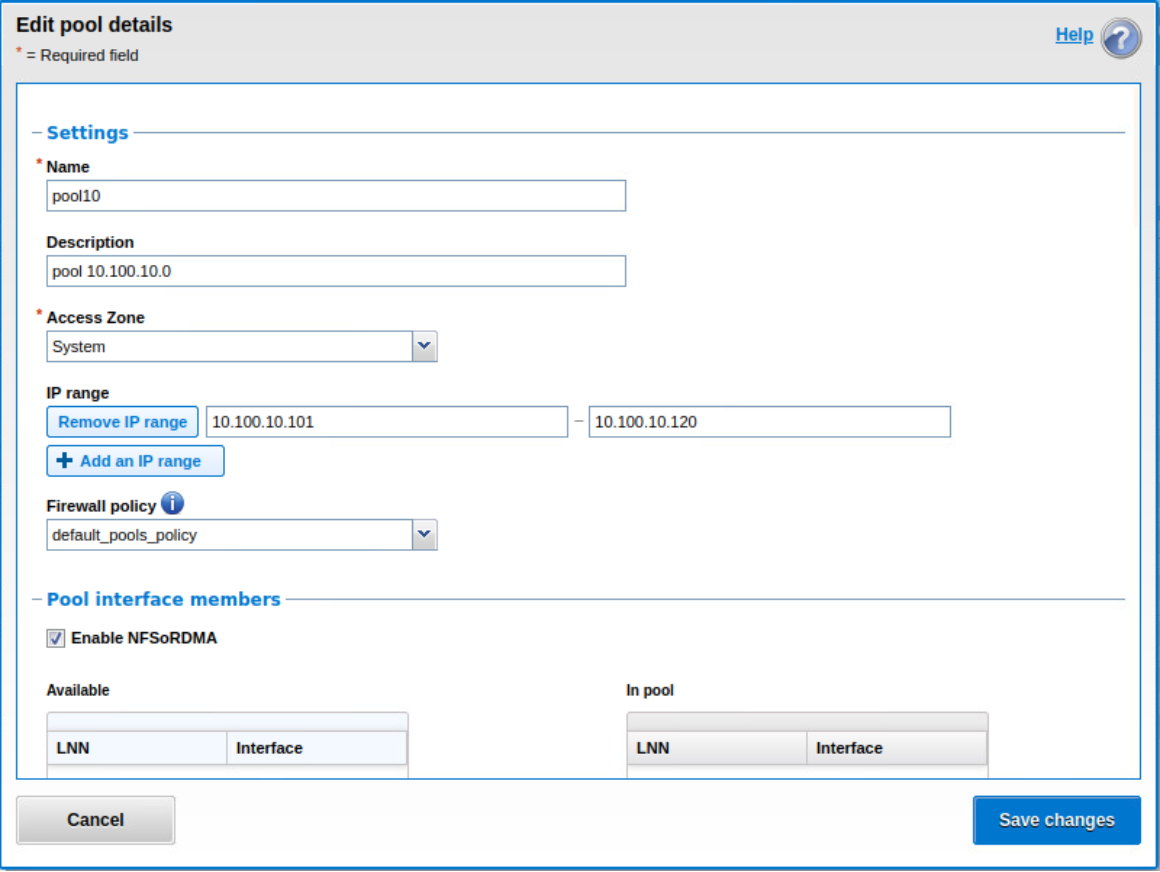
A screenshot of a computerDescription automatically generated
Figure 7.        Pool configuration for subnet 10.100.10.0/24
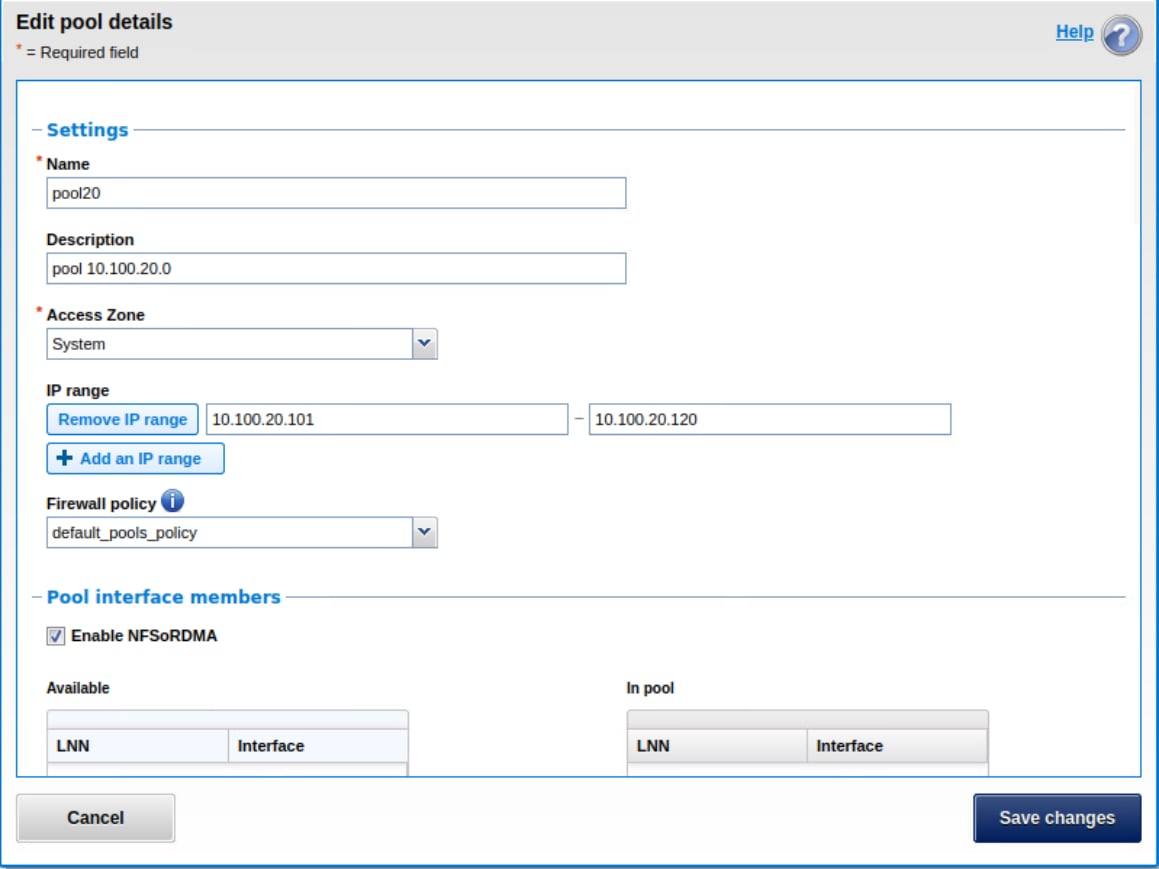

A screenshot of a computerDescription automatically generated
Figure 8.        Pool configuration for subnet 10.100.20.0/24


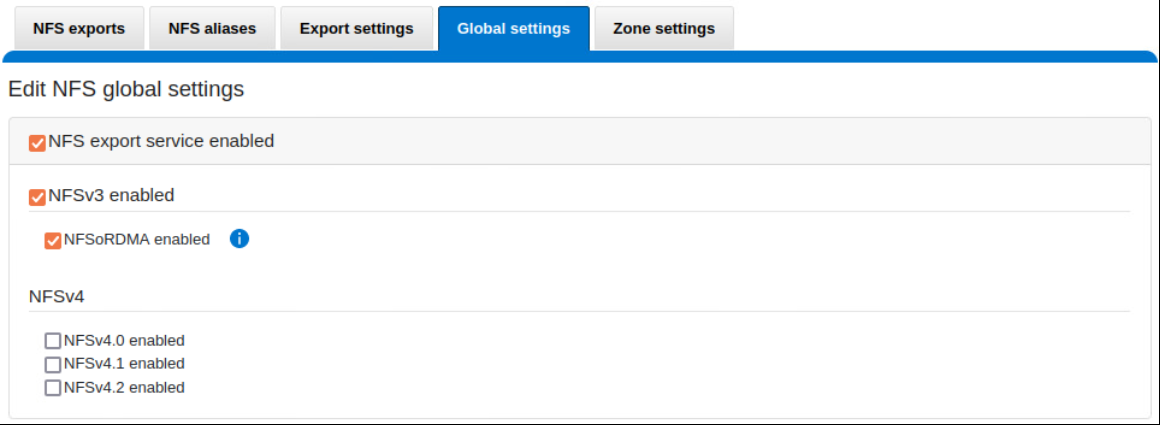
Enable NFS Over RDMA on NFS global settings
A screenshot of a computerDescription automatically generated with medium confidence
Figure 9.        NFS global settings

Server configuration

GDS installation

The servers have been configured following NVIDIA’s guidelines. For more details, see the NVIDIA GPUDirect Storage Installation and Troubleshooting Guide and additional documentation at GPUDirect Storage on the NVIDIA Docs Hub.

Network card configuration

Each server has two Mellanox ConnectX-6 network interface cards running at 100 Gbps with JUMBO Frame enabled. Each NIC is configured on its own subnet. A third card running at 1 Gbps is used for management purposes.

# cat /etc/netplan/00-installer-config.yaml

# This is the network config written by 'subiquity'

network:

  ethernets:

    eno1:

      addresses:

      - 192.168.1.11/24

      gateway4: 192.168.1.1

      nameservers:

        addresses:

        - 192.168.1.2

        - 192.168.1.2

        search:

        - lab.local

    ens6f0:

      addresses:

      - 10.100.10.11/24

      mtu: 9000

    ens6f1:

      addresses:

      - 10.100.20.11/24

      mtu: 9000

  version: 2

Mount point mapping

It has been observed during preliminary testing that each F600 node can deliver up to 8.2 GB/s of throughput for SEQUENTIAL READ IO with a single GPU. Based on that and knowing that each server has two 100Gbps NICs and two GPUs, we can map one GPU on a single NIC without forgetting to respect the NUMA node affinity collected in Understanding NUMA node affinity and PCIe tree section. We also need to make sure that each mount point is pointing to a unique and dedicated PowerScale front-end IP/NIC.

During our tests, we had access to seven servers with two GPUs each for a total of fourteen GPUs. We only had seven PowerScale nodes, which allowed us to only use a single GPU per server and do a one-to-one mapping between GPUs and F600 nodes.

Table 4.      Mount point mapping

Client Name

Client NIC name

Mount point

PowerScale IP address

PowerScale node name

PowerScale NIC name

worker001

worker002

worker003

worker004

worker005

worker006

worker007

mlx5_0

mlx5_0

mlx5_0

mlx5_0

mlx5_0

mlx5_0

mlx5_0

/mnt/f600_gdsio1

/mnt/f600_gdsio1

/mnt/f600_gdsio1

/mnt/f600_gdsio1

/mnt/f600_gdsio1

/mnt/f600_gdsio1

/mnt/f600_gdsio1

10.100.10.1

10.100.10.2

10.100.10.3

10.100.10.4

10.100.10.5

10.100.10.6

10.100.10.7

node1

node2

node3

node4

node5

node6

node7

100gige-1

100gige-1

100gige-1

100gige-1

100gige-1

100gige-1

100gige-1


The mount points have been mounted by script:

ssh -n root@${MGMT} "mount -o \ proto=rdma,port=20049,vers=3,rsize=${BLKS},wsize=${BLKS} \

${NODE}:/ifs/benchmark ${MNT}"

${MGMT} corresponds to the management IP of the server

${BLKS} corresponds to the block size in bytes (ex: 512*1024 = 524288)

${NODE} corresponds to the PowerScale frontend IP

${MNT}  corresponds to the local directory where to mount the NFS export share

GDS verification

# /usr/local/cuda/gds/tools/gdscheck -p

 GDS release version: 1.6.1.9

 nvidia_fs version:  2.15 libcufile version: 2.12

 Platform: x86_64

 ============

 ENVIRONMENT:

 ============

 =====================

 DRIVER CONFIGURATION:

 =====================

 NVMe               : Unsupported

 NVMeOF             : Unsupported

 SCSI               : Unsupported

 ScaleFlux CSD      : Unsupported

 NVMesh             : Unsupported

 DDN EXAScaler      : Unsupported

 IBM Spectrum Scale : Unsupported

 NFS                : Supported

 BeeGFS             : Unsupported

 WekaFS             : Unsupported

 Userspace RDMA     : Unsupported

 --Mellanox PeerDirect : Enabled

 --rdma library        : Not Loaded (libcufile_rdma.so)

 --rdma devices        : Not configured

 --rdma_device_status  : Up: 0 Down: 0

 =====================

 CUFILE CONFIGURATION:

 =====================

 properties.use_compat_mode : false

 properties.force_compat_mode : false

 properties.gds_rdma_write_support : true

 properties.use_poll_mode : false

 properties.poll_mode_max_size_kb : 4

 properties.max_batch_io_size : 128

 properties.max_batch_io_timeout_msecs : 5

 properties.max_direct_io_size_kb : 16384

 properties.max_device_cache_size_kb : 131072

 properties.max_device_pinned_mem_size_kb : 33554432

 properties.posix_pool_slab_size_kb : 4 1024 16384

 properties.posix_pool_slab_count : 128 64 32

 properties.rdma_peer_affinity_policy : RoundRobin

 properties.rdma_dynamic_routing : 1

 properties.rdma_dynamic_routing_order : GPU_MEM_NVLINKS GPU_MEM SYS_MEM P2P

 fs.generic.posix_unaligned_writes : false

 fs.lustre.posix_gds_min_kb: 0

 fs.beegfs.posix_gds_min_kb: 0

 fs.weka.rdma_write_support: false

 fs.gpfs.gds_write_support: false

 profile.nvtx : false

 profile.cufile_stats : 3

 miscellaneous.api_check_aggressive : false

 execution.max_io_threads : 0

 execution.max_io_queue_depth : 128

 execution.parallel_io : false

 execution.min_io_threshold_size_kb : 8192

 execution.max_request_parallelism : 0

 =========

 GPU INFO:

 =========

 GPU index 0 NVIDIA A100 80GB PCIe bar:1 bar size (MiB):131072 supports GDS, IOMMU State: Disabled

 GPU index 1 NVIDIA A100 80GB PCIe bar:1 bar size (MiB):131072 supports GDS, IOMMU State: Disabled

 ==============

 PLATFORM INFO:

 ==============

 Found ACS enabled for switch 0000:80:01.1

 Found ACS enabled for switch 0000:e0:03.1

 IOMMU: disabled

 Platform verification succeeded

Note: You can edit the file /etc/cufile.json to customize gdsio. During tests, only these two parameters have been modified:
"allow_compat_mode": false (default = true)
"rdma_dynamic_routing": true (default = false)
For more details, see GPUDirect Storage documentation.

References

Dell Support and documentation

Dell.com/support is focused on meeting customer needs with proven services and support.

The PowerScale InfoHub provides expertise to ensure customer success with PowerScale products.