Dell PowerScale: Ethernet Back-end Network Overview

Sep 25, 2026
Dell PowerScale: Ethernet Back-end Network Overview This white paper provides an introduction to the Ethernet back-end network for Dell PowerScale scale-out NAS.

Executive summary

Overview

This document provides design considerations for Dell PowerScale back-end (internal) networking. This back-end network, which is configured with redundant switches for high availability, acts as the backplane for the PowerScale cluster. This backplane enables each PowerScale node to act as a contributor in the cluster and provides node-to-node communication with a private, high-speed, low-latency network.

Revisions

Date

Part number/
revision

Description

June 2020

H16346

Content and template update

December 2021

H16346.1

Template update

April 2022

H16346.2

Content and template update

March 2023

H16346.3

PowerScale platform back-end network options update

December 2023

H16346.4

Minor update

February 2024

H16346.5

Update to include F210 and F710 node types

June 2024

H16346.6

Update to include F910 node type

December 2024

H16346.7

Update to include backend IB support and supported switch

March 2025

H16346.8

Include Arista 7308X3 and Dell Z9664 switch support

Legacy Isilon back-end network

Overview

Before the introduction of the latest generation of PowerScale scale-out NAS storage platforms, inter-node communication in a Dell Isilon cluster was performed using a proprietary, unicast (node-to-node) protocol known as Remote Block Manager (RBM). This inter-node communication uses a fast low-latency InfiniBand (IB) network. This back-end network, which is configured with redundant switches for high availability, acts as the backplane for the Isilon cluster. This backplane enables each Isilon node to act as a contributor in the cluster and provides node-to-node communication with a private, high-speed, low-latency network. This back-end network uses Internet Protocol (IP) over IB (IPoIB) to manage the cluster. Sockets Direct Protocol (SDP) is used for all data traffic between nodes in the cluster.

Isilon platform back-end network option

Overview

Isilon scale-out NAS platforms offer increased back-end networking flexibility. With PowerScale platforms, customers may choose to use either an InfiniBand or Ethernet switch on the back end. For customers electing to use an InfiniBand back-end network, the configuration and implementation will remain the same as previous generations of Isilon systems. Customers looking to add Isilon platforms (Isilon F800/F810, H600, H5600, H500, H400, A200, and A2000) to an existing Isilon IB cluster that consisted of earlier Isilon systems must configure the nodes with an InfiniBand back-end interface. The Ethernet back-end network option is only supported in clusters that consist entirely of Ethernet back-end nodes. In these configurations, only Ethernet back-end switches that are provided and managed by Dell are supported.

The PowerScale Ethernet back-end connection options are detailed in the following table:

Table 1.      Isilon Ethernet back-end options

Back-end option

Compute compatibility

10 GbE SFP+

Isilon H400, Isilon A200, or Isilon A2000

40 GbE QSFP+

Isilon F800/F810, Isilon H600, Isilon H5600, Isilon H500, Isilon H400, Isilon A200, or Isilon A2000

Note: Dell does not support connecting any other devices to the back-end switches.

PowerScale platform back-end network option

Overview

Dell PowerScale storage platforms, powered by the Dell PowerScale OneFS operating system, provide a powerful and simple scale-out storage architecture to speed up access to massive amounts of unstructured data. Powered by the OneFS 9.x operating system, the all-flash PowerScale platforms are available in these product lines:

  • PowerScale F200: Provides the performance of flash storage in a cost-effective form factor to address the needs of a wide variety of workloads.
  • PowerScale F600: With NVMe drives, the F600 provides larger capacity with massive performance in a cost-effective compact form factor to power demanding workloads.
  • PowerScale F900: Provides the maximum performance of all-NVMe drives in a cost-effective configuration to address the storage needs of demanding workloads. Each node is 2U in height and hosts 24 NVMe SSDs.

Recent additions to the all-flash storage platform include the PowerScale F910, F710, and F210.

  • PowerScale F910: Latest next-generation all-flash nodes lineup and provides AI-ready performance with the ultimate capacity in a highly dense 2U configuration. Each node hosts 24 NVMe SSDs. F910 allows raw capacity to scale from 92 TB to 736 TB per node and up to 186 PB per cluster.
  • PowerScale F710: Leveraging PowerEdge R660, delivering high performance and improved density in a 1U platform with 10 all-flash NVMe SSD drives per node. The F710 supports TLC or QLC drives and allows raw capacity to scale from 38 TB to 307 TB per node and up to 77 PB per cluster.
  • PowerScale F210: Part of the next-generation all-NVMe lineup that delivers significant performance gains over the previous generation in a cost-effective 1U form factor with 4 all-flash NVMe SSD drives per node. The F210 allows raw storage capacity to scale from 8 TB to 61 TB per node and up to 15 PB per cluster.

The PowerScale Hybrid NAS platforms are highly flexible and strike a balance between large capacity and high-performance storage to provide support for a broad range of enterprise file workloads.

  • PowerScale H700: Provides optimum performance and value to support demanding file workloads. The H700 provides capacity up to 1.2 PB per chassis.
  • PowerScale H7000: High performance, high-capacity hybrid platform with up to 1.6 PB per chassis. The deep-chassis-based H7000 is an ideal to consolidate a range of file workloads on a single platform.

PowerScale archive platforms provide the lowest cost approach to support both active and cold archives.

  • PowerScale A300: An ideal active archive storage solution that combines high performance, near-primary accessibility, value, and ease of use. The A300 provides between 120 TB and 1.2 PB per chassis and scales to 75 PB in a single cluster.
  • PowerScale A3000: An ideal solution for high-performance, high-density, deep-archive storage that safeguards data efficiently for long-term retention. The A3000 stores up to 1.6 PB per chassis and scales to 100 PB in a single cluster.

The PowerScale accelerator nodes include the PowerScale P100 performance accelerator and the PowerScale B100 backup accelerator. Both accelerator types offer a simple and flexible solution to provide incremental performance for specific compute-bound workflows and to meet defined backup windows.

  • PowerScale P100 performance accelerator is a node that adds performance to the workflows on a PowerScale cluster that is generally composed of nodes that are CPU-bound. Each node provides additional CPU horsepower for compute-bound applications and additional DRAM that can be used as L1 cache.
  • PowerScale B100 backup accelerator provides the ability to back up a PowerScale cluster using a two-way NDMP protocol. The B100 is delivered in a cost-effective form factor to address the SLA targets and tape backup needs of a wide variety of workloads.

The following table details the PowerScale Ethernet back-end connection options:

Table 2.      PowerScale Ethernet back-end connection options

Back-end card options

PowerScale nodes

200GbE (QSFP56)

F910, F710

40/100 GbE (QSFP56)

F910, F900, F710, F600, F210, F200

P100, B100

40/100 GbE (QSFP28)

F900, F600

H700, H7000

A300, A3000

10/25 GbE (SFP28)

F210, F200, F600

H700, H7000

A300, A3000

P100, B100

Notes:
The same NIC supports both 25 GbE and 10 GbE for the F210, F200, H700, H7000, A300, A3000, P100, and B100. The same NIC supports both 100 GbE and 40 GbE for the F210, F710, F910, F200, F600, F900, H700, H7000, A300, A3000, P100, and B100. The NIC speed change is achieved by using different transceivers or cables.
The F910, F710, F210, F200, P100, and B100 nodes do not support a 25 GbE back-end connection if they are configured with 100 GbE front-end connectivity.

New-generation PowerScale platforms with different back-end speeds can connect to the same switch with Isilon nodes (Isilon F800, H600, H5600, H500, H400, A200, and A2000) and not see performance issues. Consider the example of a mixed cluster of an archive node (such as A200 or A2000) with 10 GbE on the back end and PowerScale nodes with 40 GbE or 100 GbE on the back end. In such clusters, both node types can connect to a 100 GbE back-end switch without affecting the performance of other nodes on the switch. The 100 GbE back-end switch will provide 100 GbE to the ports servicing the high-performance PowerScale nodes and 10 GbE to the archive or lower performing nodes using breakout cables.

Ethernet back end

In legacy versions of Isilon OneFS, back-end data traffic uses SDP and IPoIB for management. SDP has fast failover and incorporates various InfiniBand-only features that ensure optimum performance. However, because SDP only works over InfiniBand, a new method was required to get optimal performance over the Ethernet back end. For this reason, the new generation of PowerScale platforms now uses RBM over TCP on the back-end switches.

RBM now uses TCP, and the TCP stack has been enhanced to provide the performance required to support the cluster communication. All the modifications of the TCP stack have been made while conforming to the industry standard specification of the stack. The back-end and front-end networks will use the same TCP stack and modifications to the performance of the back-end TCP stack should not affect TCP traffic on the front end. RBM over Ethernet will still provide fast failover.

Please note that starting from OneFS 9.10, PowerScale platforms also supports InfiniBand back end on F210, F710, F910.

Configuration and monitoring

When installing a new Isilon cluster, the Configuration Wizard has not changed. It still prompts you for int-a, int-b, and failover range. All configuration and setup steps will be the same regardless of InfiniBand or Ethernet option selected.

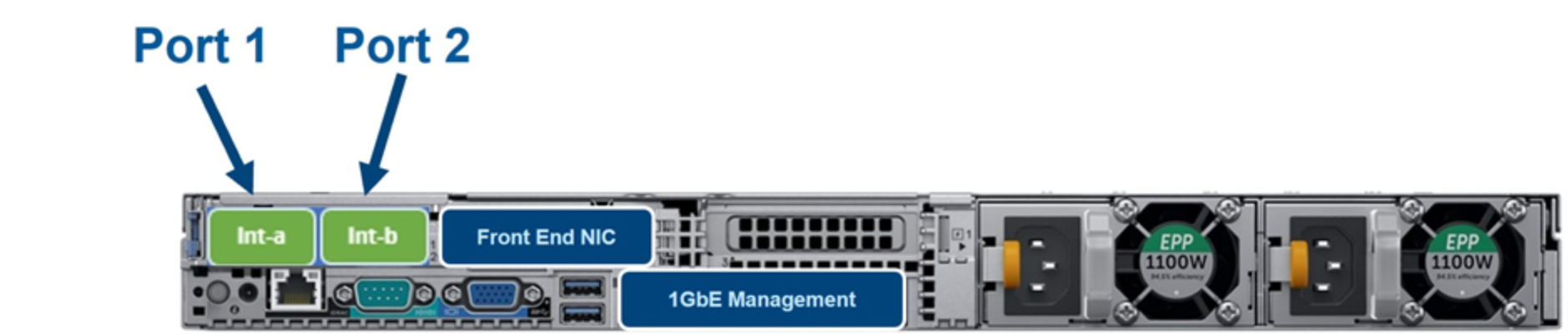
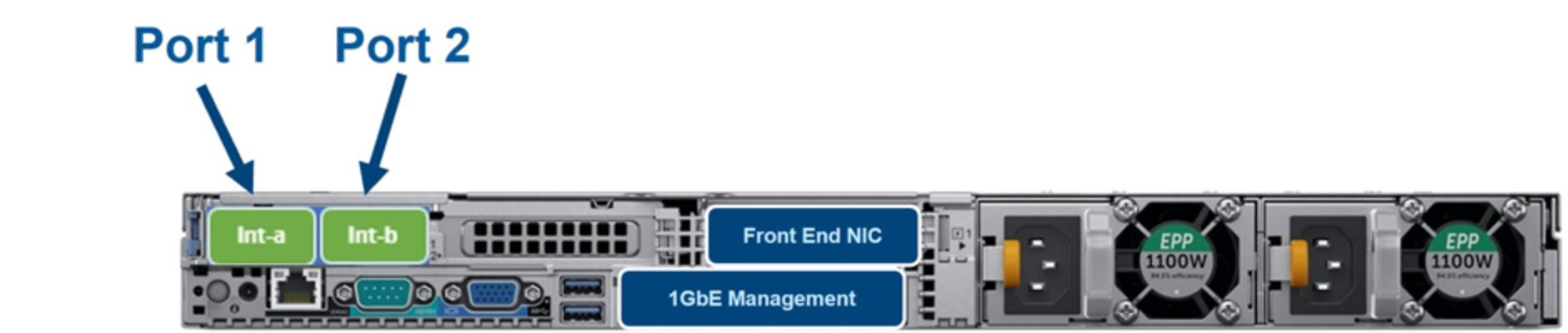
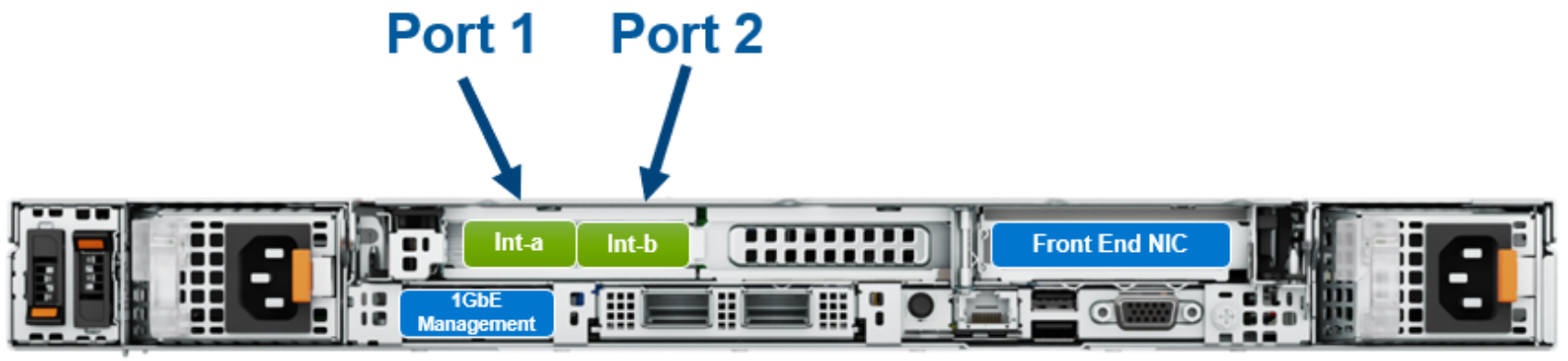
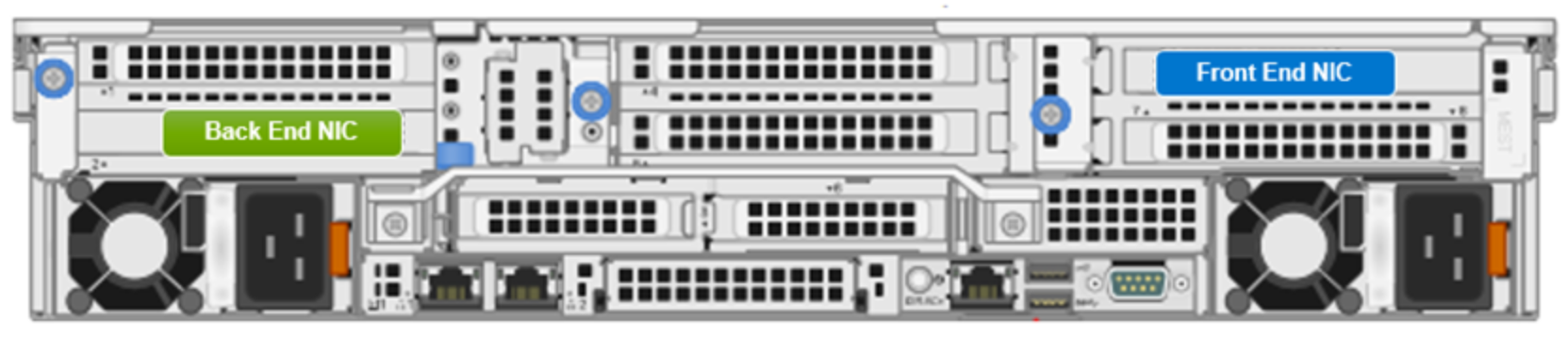
The following figures show the relative positioning of back-end ports provided in the Compute Assembly for each Dell PowerScale/Isilon platform node type.
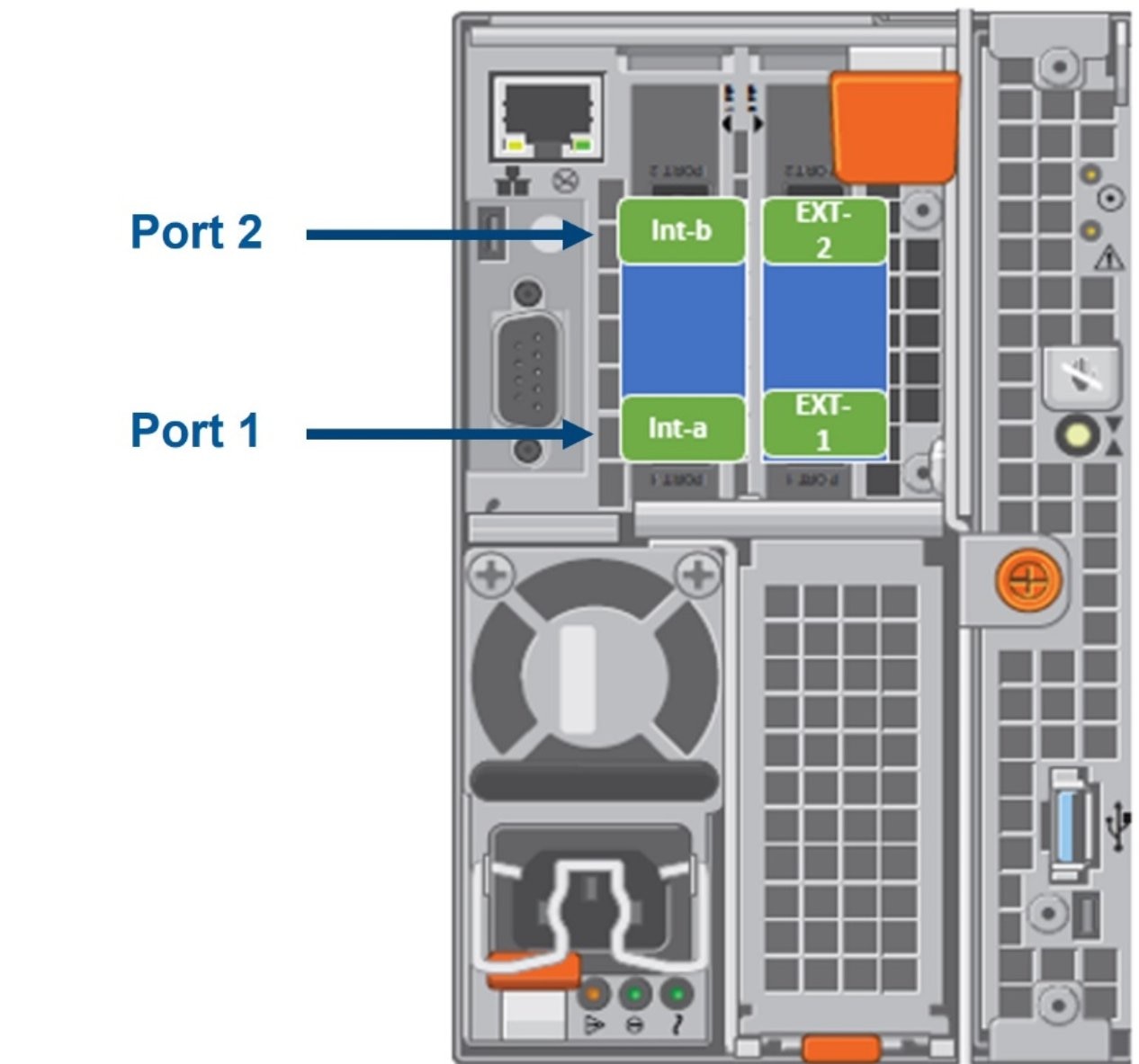
A diagram depicting the rear view highlighting the internal back-end and front-end NIC ports for the F800, F810, H600, H5600, H500, H400, A200, A2000, H700, H7000, A300, and A3000 node.

Figure 1.        F800, F810, H600, H5600, H500, H400, A200, and A2000. H700, H7000, A300, and A3000: Rear view
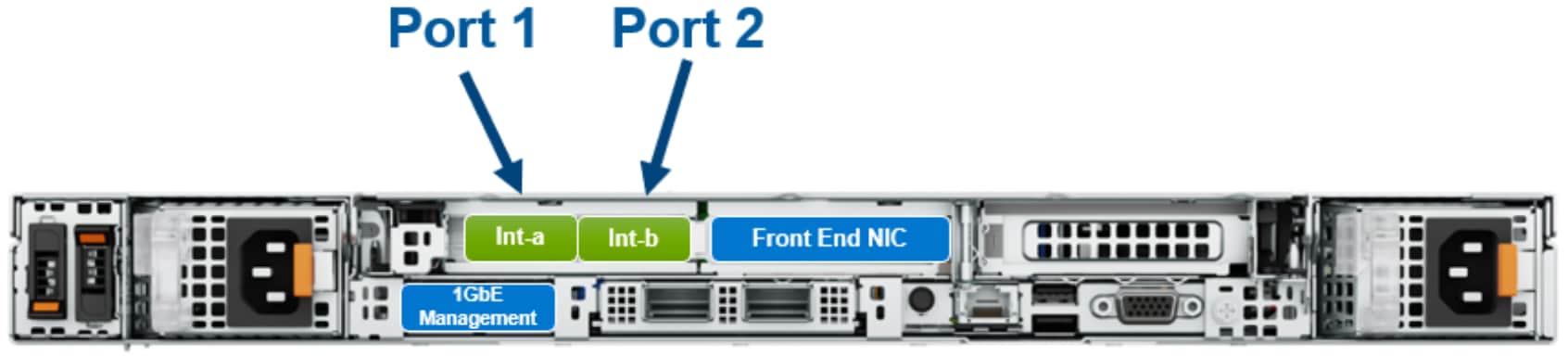
A diagram depicting the rear view highlighting the internal back-end and front-end NIC ports for the F210 node.

Figure 2.        F210: Rear view

A diagram depicting the rear view highlighting the internal back-end and front-end NIC ports for the F200 node.

Figure 3.        F200: Rear view

A diagram depicting the rear view highlighting the internal back-end and front-end NIC ports for the F600 node.

Figure 4.        F600: Rear view

A diagram depicting the rear view highlighting the internal back-end and front-end NIC ports for the F710 node.

Figure 5.        F710: Rear view

F710 with front end IB NIC: Rear view

Figure 6.        F710 with front end IB NIC: Rear view
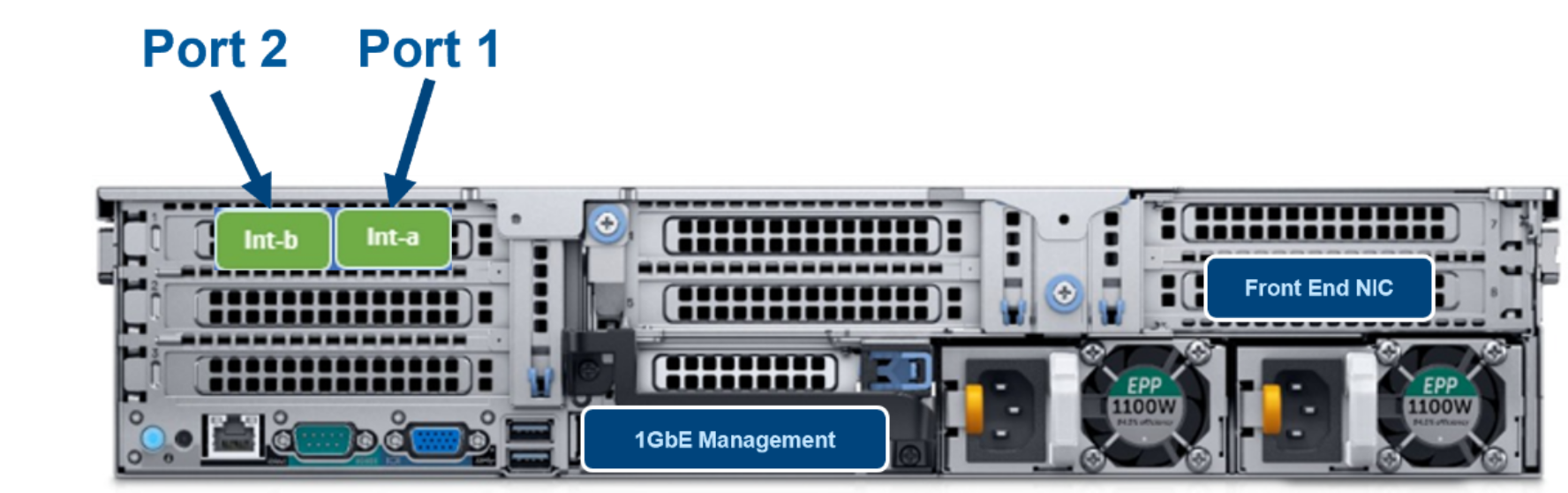
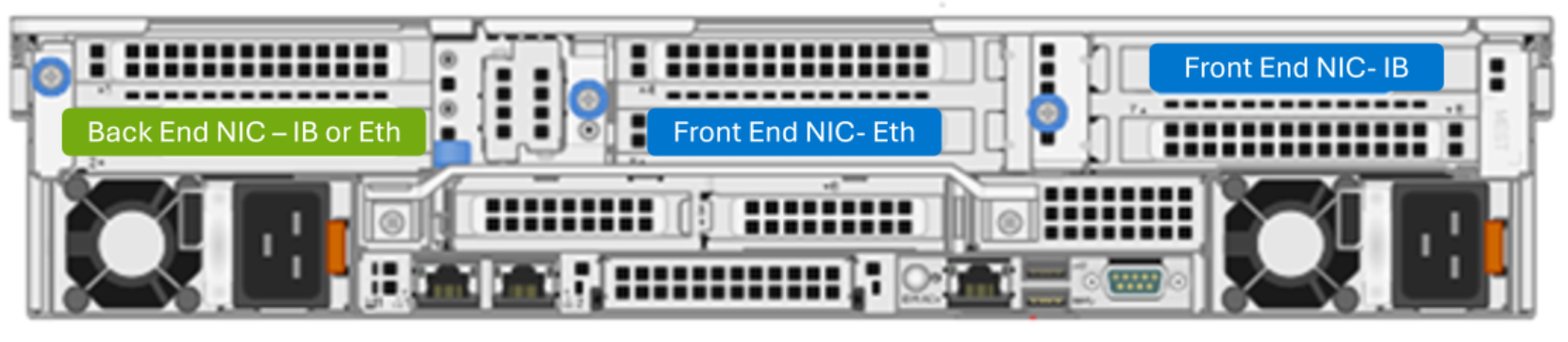
A diagram depicting the rear view highlighting the internal back-end and front-end NIC ports for the F900 node.

Figure 7.        F900: Rear view

A diagram depicting the rear view highlighting the internal back-end and front-end NIC ports for the F910 node.

Figure 8.        F910: Rear view

A close up of a computerDescription automatically generated

Figure 9.        F910 with front end IB NIC: Rear view
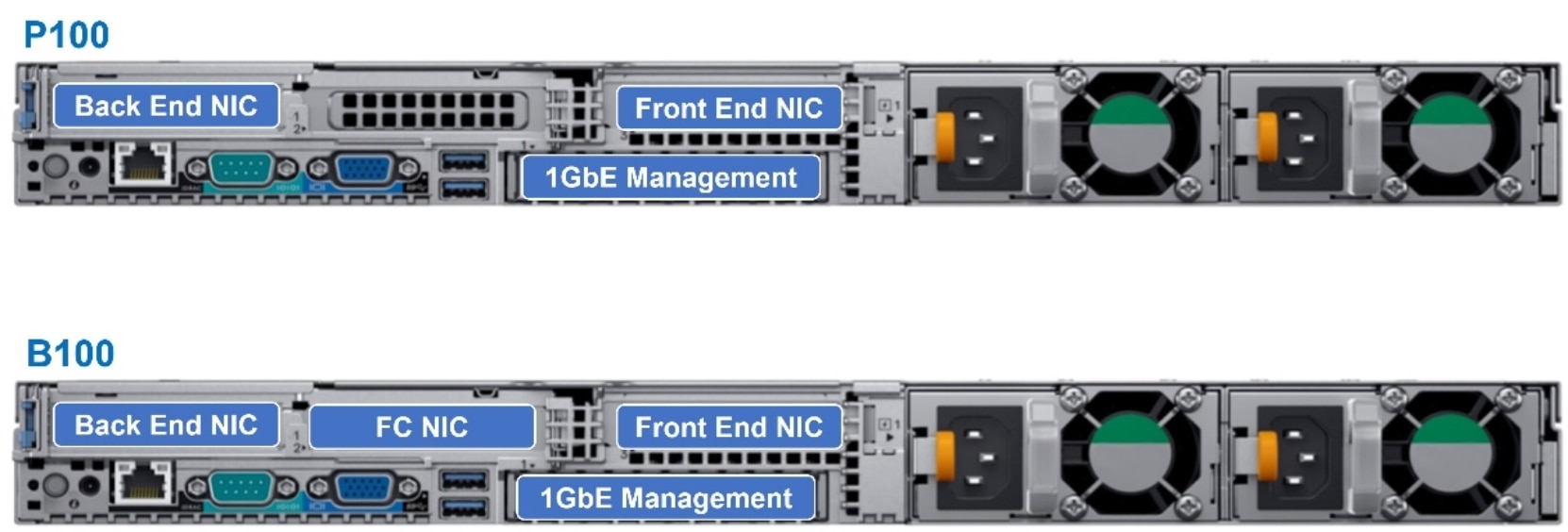
A diagram depicting the rear view highlighting the internal back-end and front-end NIC ports for the P100 and B100 nodes.

Figure 10.    P100 and B100 accelerator nodes: Rear view

The following table provides configuration information for the back-end ports in PowerScale platforms:

Table 3.      Configuration for int-a, int-b, and failover

Setting

Description

Int-a network setting

The network settings used by the int-a network. The int-a network is used for communication between nodes.

Netmask

The int-a network must be configured with IPv4.

IP range

The int-a network must be on a separate or distinct subnet from an int-b/failover network.

Int-b and failover network setting

The network settings used by the optional int-b/failover network.

Netmask

The int-b network is used for communication between nodes and provides redundancy with the int-a network.

IP range

The int-b network must be configured with IPv4.

Failover IP range

The int-a, int-b, and failover networks must be on separate or distinct subnets.

The monitoring capabilities on PowerScale/Isilon back-end switches correspond to the field replaceable unit (FRU) components such as power supply, the fan, or others. Protocol and performance monitoring capability is not provided.

Note: Customers should not attempt to alter the back-end network configurations provided by Dell. Any attempt to do so can result in a cluster-wide outage.

For SNMP capabilities, a customer may send an SNMP alert through the CELOG system. In today’s back-end Ethernet world, we no longer have opensm topology files to view all connected devices on the back-end network. If you want to know what is connected to the fabric of back-end Ethernet (int-a or int-b), you can use the isi_dump_fabric int-a (or int-b) command.

Sample configurations

Following are examples of cluster configurations with varying node types and the corresponding back-end connectivity infrastructure.

Example 1: All-performance Dell PowerScale 100 GbE back end

When using performance nodes (for example, F910), the back end must be 100/40 GbE (10 GbE and 25 GbE are not supported). 
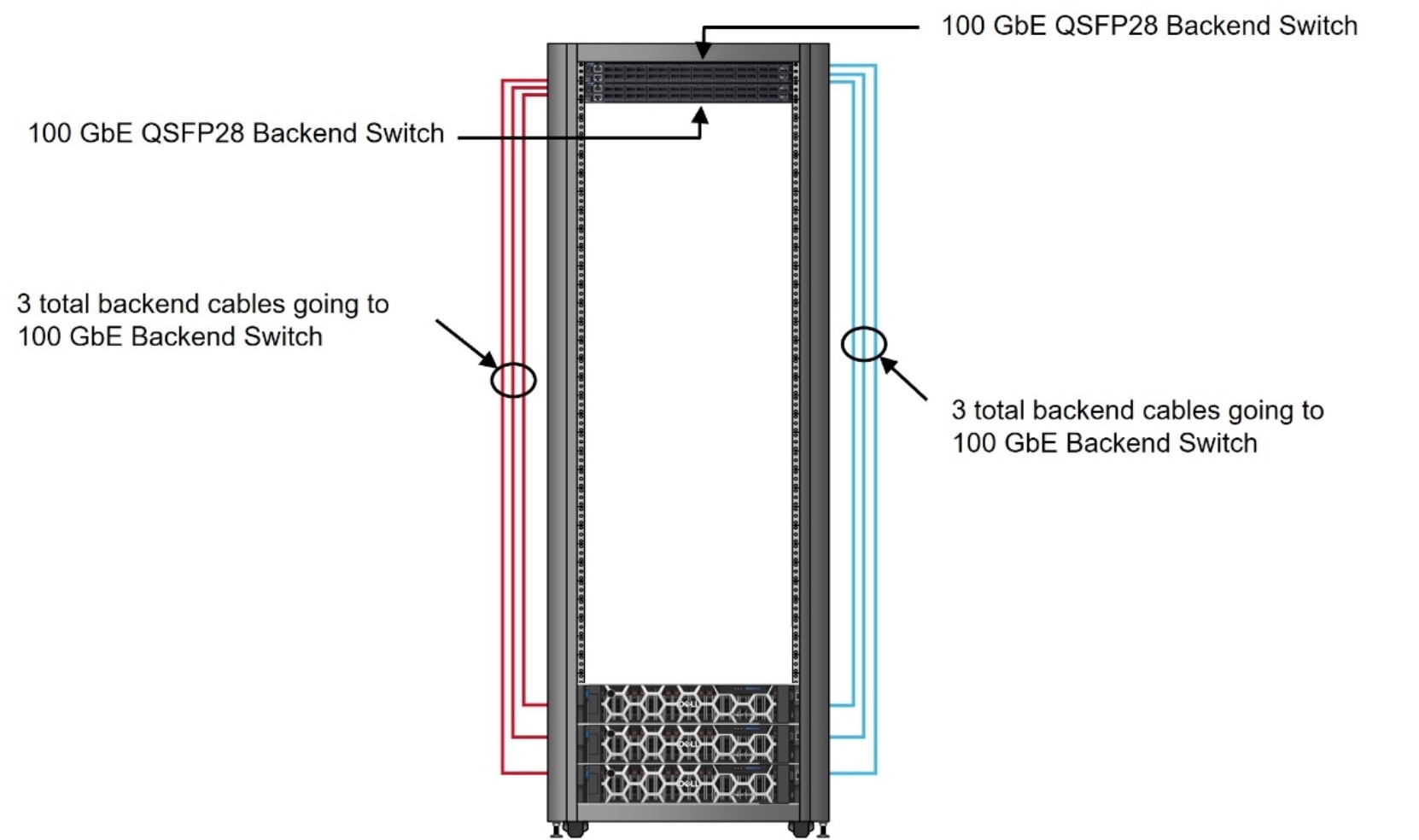
A diagram depicting a sample back-end connectivity between the back-end switches and PowerScale nodes.

Figure 11.    Sample configuration with 100 GbE back end

In this example, your configuration will include:

  • (2) 100 GbE back-end switches
  • (6) QSFP+/MPO back-end cables
  • (6) Optics (If MPO cables used)

Example 2: Mixed environment of PowerScale 100 GbE and 25/10 GbE back end

When mixing performance and archive nodes, use a 100 GbE infrastructure with 100 GbE connections to the performance nodes. Also, use 8 x 10 GbE or 4 x 25 GbE breakout cables (depending on switch support) to the archive nodes.
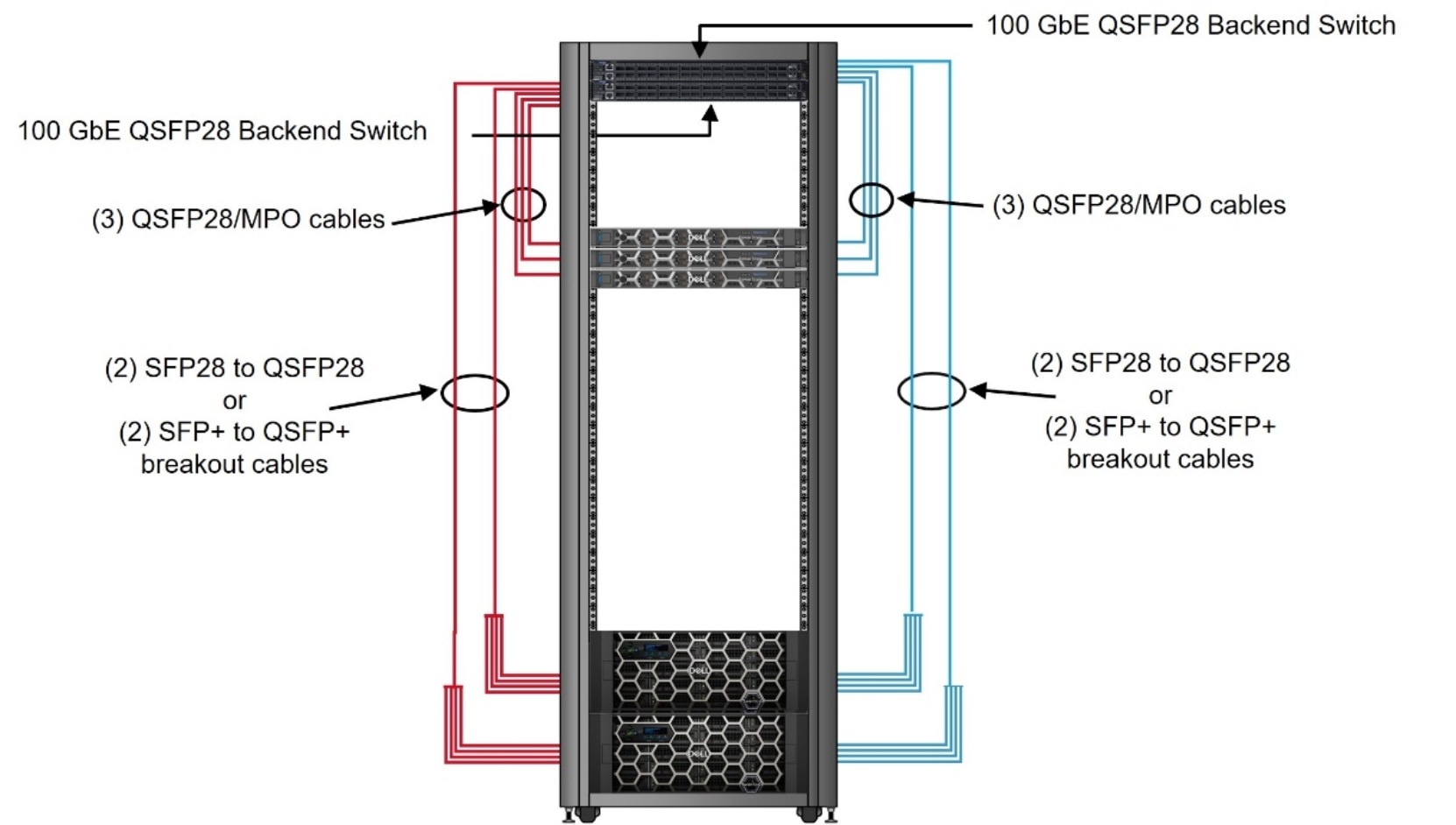
A diagram depicting a sample back-end connectivity between the back-end switches and PowerScale nodes.

Figure 12.    Sample configuration of mixed environment of 100 GbE and 25/10 GbE back end

In this example, your configuration will include:

  • Two 100/40 GbE back-end switches
  • Six QSFP+/MPO back-end cables
  • Six optics (If MPO cables used)
  • Four SFP28 to QSFP28 or 4 SFP+ to QSFP+ breakout cables

Example 3: Mixed environment of PowerScale 100 GbE and 25/10 GbE back end

When mixing hybrid and archive nodes, use a 100 GbE infrastructure with 100 GbE connections to the hybrid nodes and 4 x 25 GbE or 4 x 10 GbE breakout cables (depending on node type) to the archive nodes.
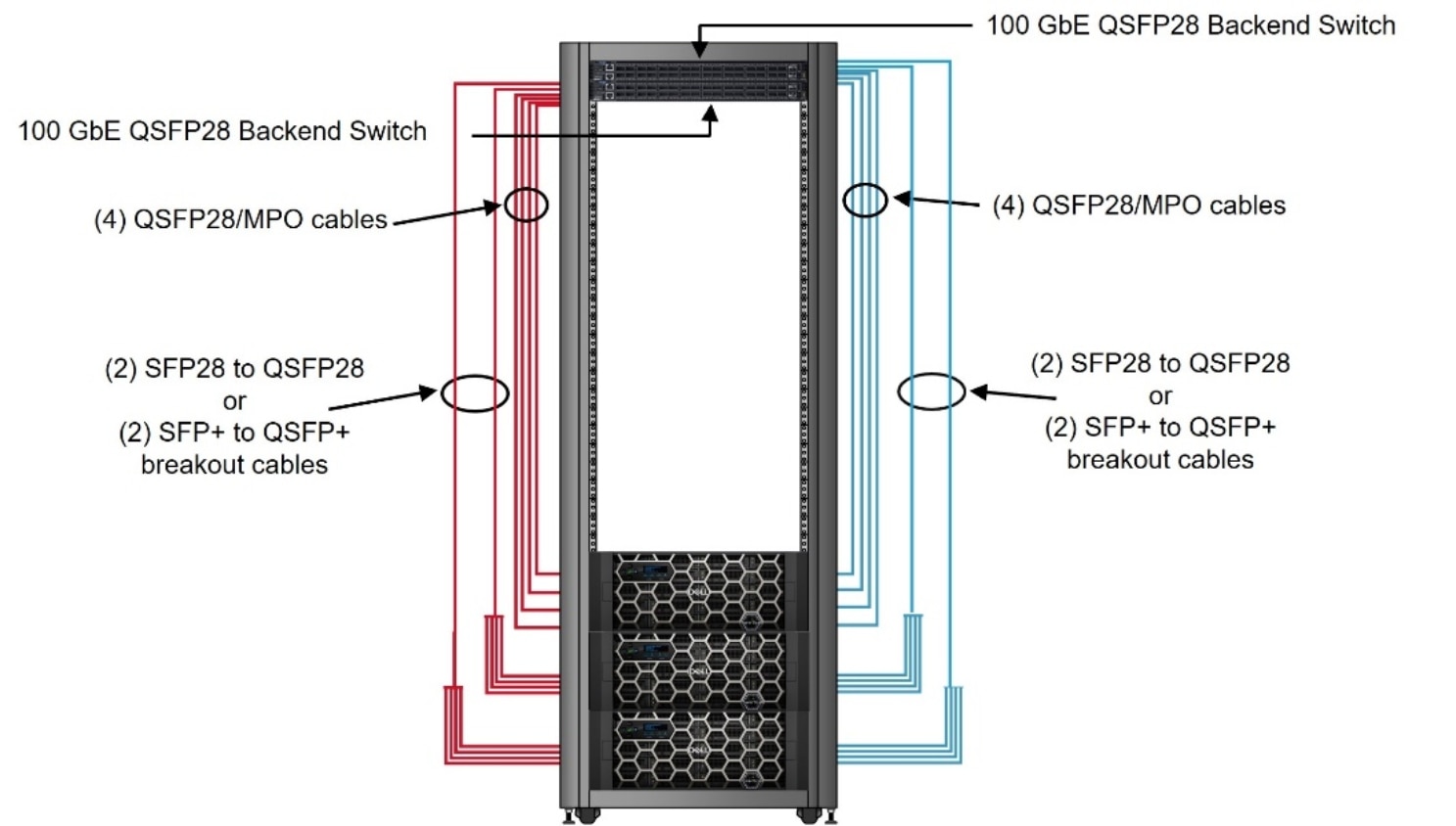
A diagram depicting a sample back-end connectivity between the back-end switches and PowerScale nodes.

Figure 13.    Sample configuration with backend connectivity of 100 GbE and 4 x 25 GbE breakout cables

In this example, your configuration will include:

  • Two 100/40 GbE back-end switches
  • Eight QSFP28/MPO back-end cables
  • Eight optics (If MPO cables used)
  • Four SFP28 to QSFP28 or four SFP+ to QSFP+ breakout cables

Supported Ethernet back-end switches

The following switches are supported for PowerScale back-end connectivity.

Table 4.      Supported back-end switches

Vendor

Model

Native Switch speed

Supported speeds

EOL date

Dell

Z9664

100GbE

25, 100 GbE


Arista

7308X3

100 GbE

25, 100 GbE


NVIDIA

Spectrum-4 SN5600*

800 GbE

200 GbE


Dell

S5232-ON

100 GbE

10, 25, 40, 100 GbE


Dell

Z9264-ON

100 GbE

10, 25, 40, 100 GbE


Dell

Z9100-ON

100 GbE

10, 25, 40, 100 GbE

1/31/2023

Dell

S4112F-ON

10/100 GbE

10, 25, 100 GbE


Dell

S4148F-ON

10 GbE

10/100 GbE

5/5/2023

Celestica

D4040

40 GbE

40 GbE

3/31/2021

Arista

DCS-7308

40 GbE

25, 40, 100 GbE

5/5/2023

Celestica

D2024

10 GbE

10, 40 GbE

5/5/2023

Celestica

D2060

10 GbE

10, 40 GbE

3/31/2021

Arista

DCS-7304

10 GbE

10, 40 GbE

5/5/2023

Note: Supported Ethernet back-end switches are listed in the  PowerScale OneFS Supportability and Compatibility Guide.
* Spectrum-4 SN5600 switch is supported via the Dell Technologies ETC program, please consult Dell Technologies account team for more details. You need to configure Spectrum-4 manually to set up for a PowerScale cluster. Refer to NVIDIA documentation for details about the installation instruction. And please ensure the Spectrum 4 switches are running the version Cumulus Linux 5.9.1. This is the version that Dell Technologies tested and qualified.

Technical support and resources

Technical support

Dell.com/support is focused on meeting customer needs with proven services and support.

The Dell Technologies Info Hub provides expertise that helps to ensure customer success on Dell storage platforms.