Dell PowerScale OneFS: Data Reduction and Storage Efficiency
Executive summary
Overview
Audience
Revisions
We value your feedback
Overview
Introduction
Data reduction comes in various forms and includes techniques such as compression and deduplication. These techniques can be applied to data at various points in their storage life cycle, such as in real time as files are written from a client to storage, or after data has already been stored on disk.
Compression typically uses a lossless algorithm both to reduce the physical size of data when it is written to disk and to decompress the data when it is read back, while retaining full fidelity. More specifically, lossless compression reduces the number of bits in each file by identifying and reducing or eliminating statistical redundancy. No information is lost in lossless compression, and a file can easily be decompressed to its original form.
Deduplication differs from data compression in that it eliminates duplicate copies of repeating data. Whereas compression algorithms identify redundant data inside individual files and encode the redundant data more efficiently, deduplication inspects data and identifies sections, or even entire files that are identical and replaces them with a shared copy.
Both compression and deduplication are transparent to all applications that sit on top of the file system, including protocol-based services such as NFS, SMB, HDFS, and S3. The primary purpose of OneFS inline data reduction is to reduce the storage requirements for data, resulting in a smaller storage footprint, reduced power and cooling requirements, and a reduction in the overall per-TB storage cost. Real time, inline data reduction also helps to shrink the total amount of physical data written to storage devices. This can be beneficial for solid state drives (SSDs) and other media with finite overwrite limits, by reducing flash drive wear rates.
There are three primary measures of storage capacity that are relevant here:
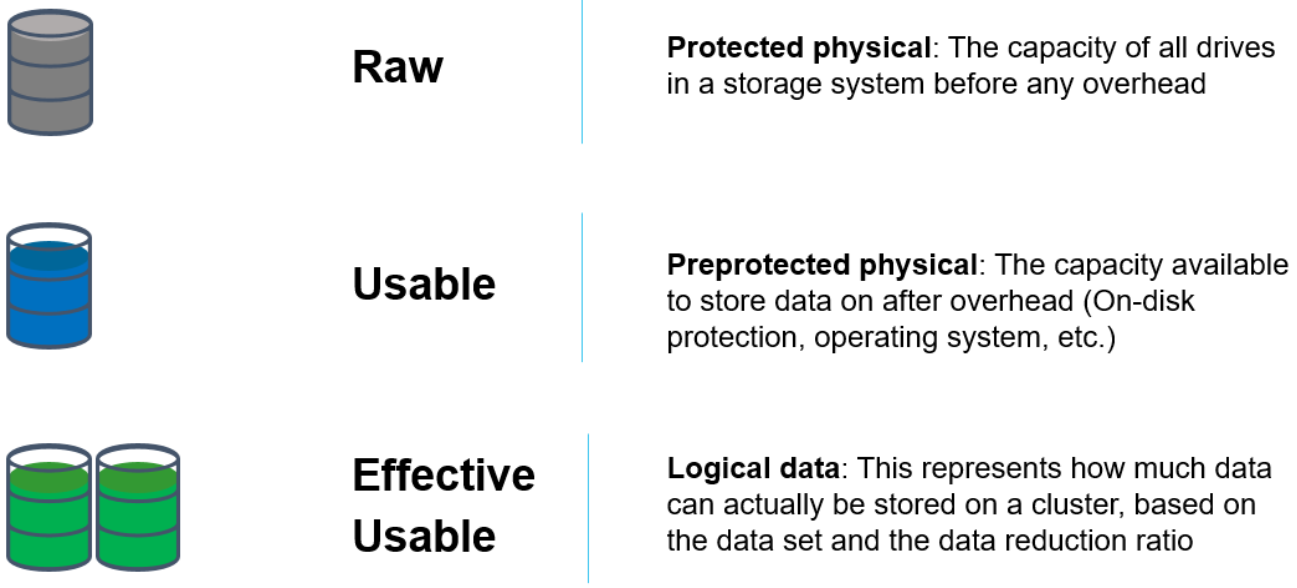
Figure 1. The primary measures of storage capacity
Note: Savings due to data reduction are highly dependent on the data itself and can vary considerably. This means that accurate rates of savings are not able to be predicted without comprehensive analysis of the actual data set. Any estimates provided in this document are for broad guidance only.
Terminology
OneFS data reduction suite
The OneFS data reduction portfolio consists of an array of several features, including compression, deduplication, and small file efficiency. While these components all coexist, they are not universally supported across the full hardware platform portfolio. The following table shows which features are available on each PowerScale hardware platform:
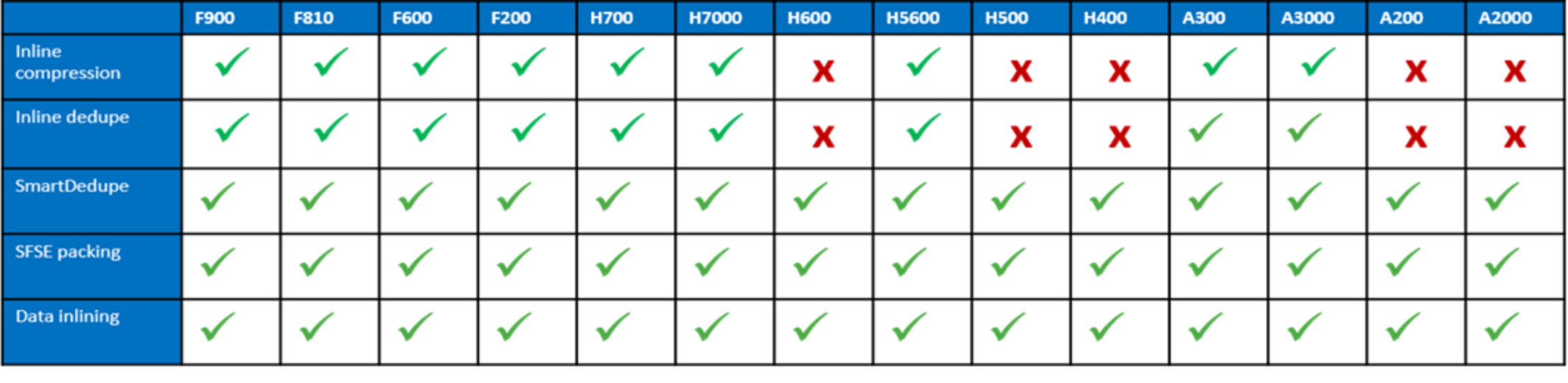
Figure 2. Data reduction feature and hardware platform compatibility matrix
Key:

Figure 3. Support status key
Furthermore, these OneFS data reduction features are individually licensed and have slightly differing use cases and performance profiles:
Table 2. Data reduction feature licensing requirements
|
Data Reduction Feature |
Licensing Requirement |
|
In-line compression |
No license required. |
|
In-line dedupe |
No license required. |
|
SmartDedupe |
Cluster-wide SmartDedupe License. |
|
SFSE packing |
No license required. |
|
Data in-lining |
No license required. |
The following decision tree can assist with identifying the available and appropriate data reduction features for particular cluster configurations, data sets, and workloads:
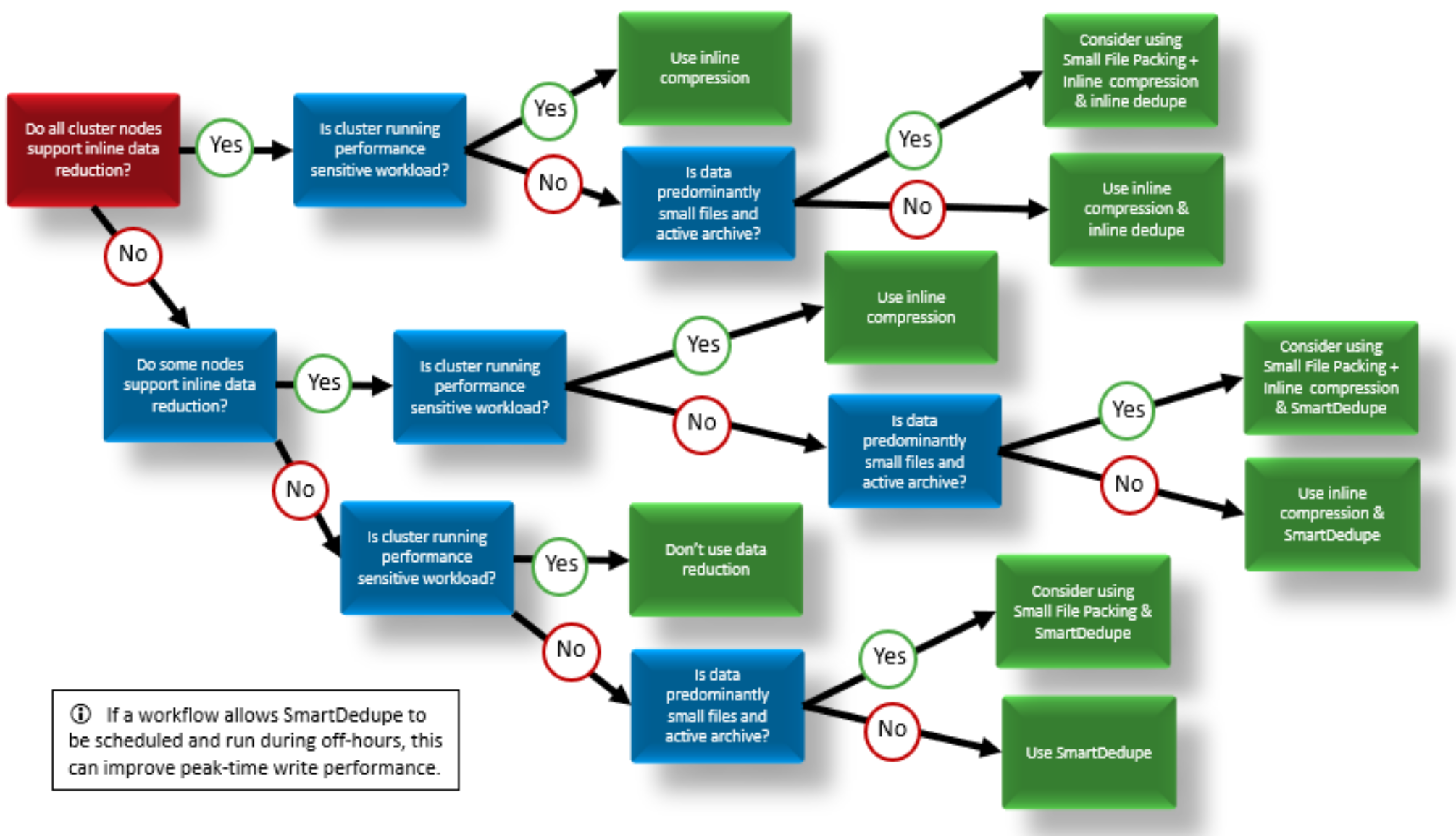
Figure 4. OneFS data reduction and storage efficiency feature decision tree
The following sections of this paper examine each of the OneFS data reduction and storage efficiency features in more detail:
- In-line Data Reduction, including single instancing, deduplication, and compression
- SmartDedupe post-process deduplication
- Small File Efficiency, including small file packing and inode data in-lining
Each section provides best practices and considerations and contains information about the available tools and strategies for estimating and assessing the efficiency and performance impact of each solution. The inline and post-process deduplication sections also discuss the interoperability between the two approaches.
In-line data reduction
Architecture
OneFS data reduction offers both inline data compression and inline deduplication, and the supporting OneFS architecture is consists of the following principal components:
- Data Reduction Platform
- Compression Engine and Chunk Map
- Zero block removal phase
- Deduplication In-memory Index and Shadow Store Infrastructure
- Data Reduction Alerting and Reporting Framework
- Data Reduction Control Path
The inline data reduction control path consists of the OneFS command line interface (CLI) and RESTful platform API and is responsible for managing the configuration and reporting of the feature.
In-line data reduction platform
In-line data reduction is supported on the Dell PowerScale F910, F900, F710, F600, F210, and F200 SSD nodes, PowerScale H700/7000 and A300/3000 node, and the Isilon F810 and H5600 platforms.
The specific OneFS versions required to support a cluster or node pool with the following characteristics include:
- OneFS 8.2.1 or later for an F810 node pool.
- OneFS 8.2.2 or later for an H5600 node pool.
- OneFS 9.0 or later for an F600 or F200 node pool.
- OneFS 9.2 or later for an F900 node pool.
- OneFS 9.2.1 or later for an H700, H7000, A300, or A3000 node pool.
- OneFS 9.3 or later for PowerScale P100 and B100 accelerator nodes.
- OneFS 9.7 or later for an F710 or F210 node pool.
- OneFS 9.8 or later for an F910 node pool.
Unlike the other platforms above, each F810 node includes a data reduction hardware off-load adapter. This adapter off-loads certain tasks from the CPU. Specifically, data compression and inflation are transparently performed by the off-load adapter with minimal latency, avoiding the need for consuming a node’s expensive CPU and memory resources.
Each F810 node’s data reduction off-load adapter contains an FPGA chip, which is dedicated to the compression of data received by means of client connections to the node. These cards reside in the backend PCI-e slot in each of the four nodes. The two Ethernet ports in each adapter are used for the node’s redundant backend network connectivity.
In-line data reduction workflow
Data from network clients is accepted as is and makes its way through the OneFS write path until it reaches the BSW engine, where it is broken up into individual chunks. The inline data reduction write path consists of three main phases:
- Zero Block Removal
- In-line Deduplication
- In-line Compression
If both inline compression and deduplication are enabled on a cluster, zero block removal is performed first, followed by dedupe, and then compression. This order allows each phase to reduce the scope of work each subsequent phase.

Figure 5. In-line data reduction workflow
Zero block removal
The inline data reduction zero block removal phase detects blocks that contain only zeros and prevents them from being written to disk. This both reduces disk space requirements and avoids unnecessary writes to SSD, resulting in increased drive longevity.
Zero block removal occurs first in the OneFS inline data reduction process. As such, it has the potential to reduce the amount of work that both inline deduplication and compression need to perform. The check for zero data does incur some overhead. However, for blocks that contain non-zero data the check is terminated on the first non-zero data found, which helps to minimize the impact.
The following characteristics are required for zero block removal to occur:
- A full 8KB block of zeroes
- A partial block of zeroes being written to a sparse or prealloc block
The write will convert the block to sparse if not already. A partial block of zeroes being written to a non-sparse, non-preallocated block will not be zero eliminated.
In-line deduplication
With inline data reduction, deduplication is performed in real time, as data is written to the cluster. Storage efficiency is achieved by scanning the data for identical blocks as it is received and then eliminating the duplicates.
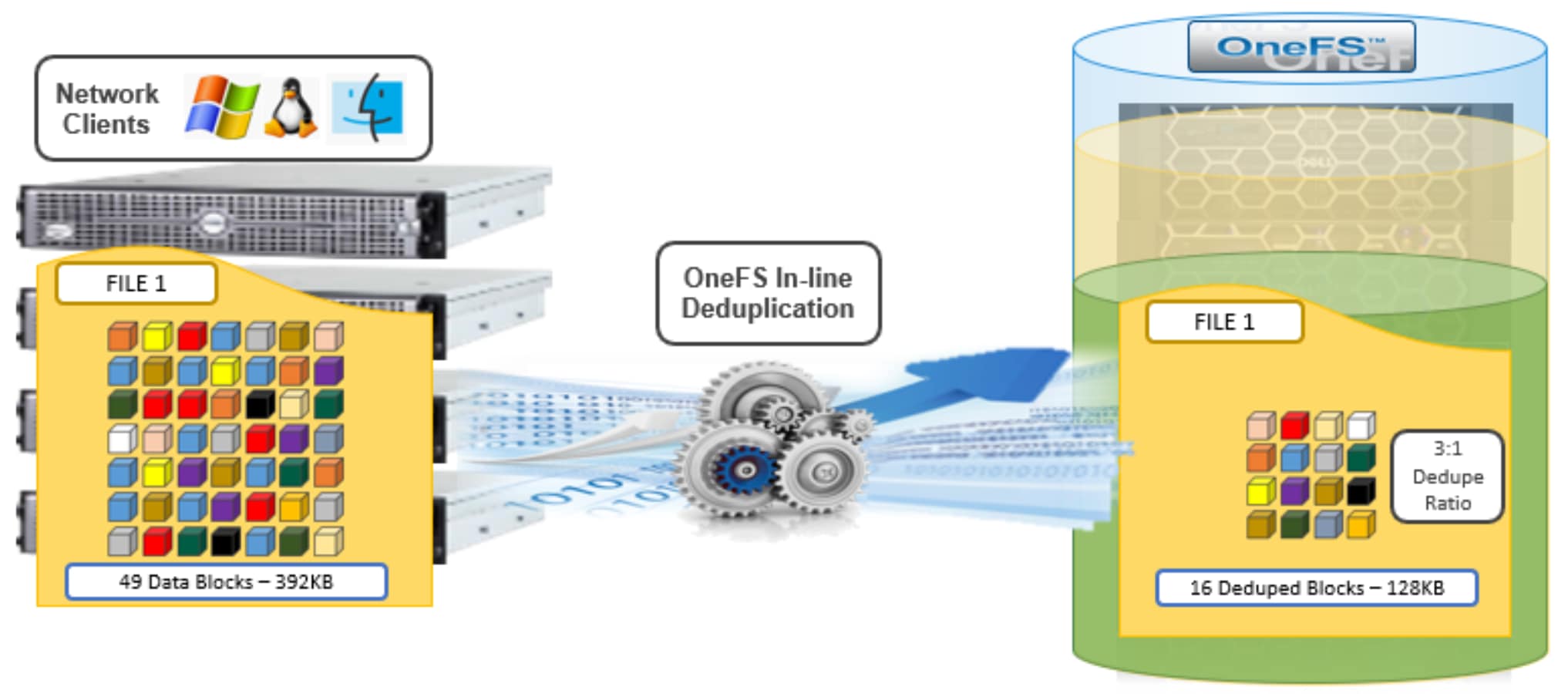
Figure 6. OneFS inline deduplication
When a duplicate block is discovered, inline deduplication moves a single copy of the block to a special set of files known as shadow stores. OneFS shadow stores are file system containers that allow data to be stored in a shareable manner. As such, files on OneFS can contain both physical data and pointers, or references, to shared blocks in shadow stores.
Shadow stores were initially introduced to support OneFS file clones, and there are many overlaps between cloning and deduplicating files. The other main consumer of shadow stores is OneFS Small File Storage Efficiency. This feature maximizes the space utilization of a cluster by decreasing the amount of physical storage required to house the small files that comprise a typical healthcare dataset.
Shadow stores are similar to regular files but are hidden from the file system namespace, so cannot be accessed using a pathname. A shadow store typically grows to a maximum size of 2GB, which is around 256K blocks, with each block able to be referenced by 32,000 files. If the reference count limit is reached, a new block is allocated, which may or may not be in the same shadow store. Also, shadow stores do not reference other shadow stores. And snapshots of shadow stores are not permitted because the data contained in shadow stores cannot be overwritten.
When a client writes a file to a node pool configured for inline deduplication on a cluster, the write operation is divided up into whole 8KB blocks. Each of these blocks is then hashed and its cryptographic ‘fingerprint’ compared against an in-memory index for a match. At this point, one of the following operations will occur:
- If a match is discovered with an existing shadow store block, a byte-by-byte comparison is performed. If the comparison is successful, the data is removed from the current write operation and replaced with a shadow reference.
- When a match is found with another LIN, the data is written to a shadow store instead and replaced with a shadow reference. Next, a work request is generated and queued that includes the location for the new shadow store block, the matching LIN and block, and the data hash. A byte-by-byte data comparison is performed to verify the match and the request is then processed.
- If no match is found, the data is written to the file natively and the hash for the block is added to the in-memory index.
In order for inline deduplication to be performed on a write operation, the following conditions need to be true:
- In-line dedupe must be globally enabled on the cluster.
- The current operation is writing data (that is, not a truncate or write zero operation).
- The ‘no_dedupe’ flag is not set on the file.
- The file is not a special file type, such as an alternate data stream (ADS) or an EC (endurant cache) file.
- Write data includes fully overwritten and aligned blocks.
- The write is not part of a ‘rehydrate’ operation.
- The file has not been packed (containerized) by SFSE (small file storage efficiency).
OneFS inline deduplication uses the 128-bit CityHash algorithm, which is both fast and cryptographically strong. This contrasts with OneFS’ post-process SmartDedupe, which uses SHA-1 hashing.
Each F910, F900, F810, F710, F600, F210, F200, F700/7000, H5600, or A300/3000 node in a cluster with inline dedupe enabled has its own in-memory hash index that it compares block ‘fingerprints’ against. The index lives in system RAM and is allocated using physically contiguous pages and accessed directly with physical addresses. This avoids the need to traverse virtual memory mappings and does not incur the cost of translation lookaside buffer (TLB) misses, minimizing deduplication performance impact.
The maximum size of the hash index is governed by a pair of sysctl settings, one of which caps the size at 16GB, and the other which limits the maximum size to 10% of total RAM. The strictest of these two constraints applies. While these settings are configurable, the recommended best practice is to use the default configuration. Any changes to these settings should only be performed under the supervision of Dell support.
Since inline dedupe and SmartDedupe use different hashing algorithms, the indexes for each are not shared directly. However, the work performed by each dedupe solution can be leveraged by each other. For instance, if SmartDedupe writes data to a shadow store, when those blocks are read, the read hashing component of inline dedupe will see those blocks and index them.
When a match is found, inline dedupe performs a byte-by-byte comparison of each block to be shared to avoid the potential for a hash collision. Data is prefetched prior to the byte-by-byte check and then compared against the L1 cache buffer directly, avoiding unnecessary data copies and adding minimal overhead. Once the matching blocks have been compared and verified as identical, they are then shared by writing the matching data to a common shadow store and creating references from the original files to this shadow store.
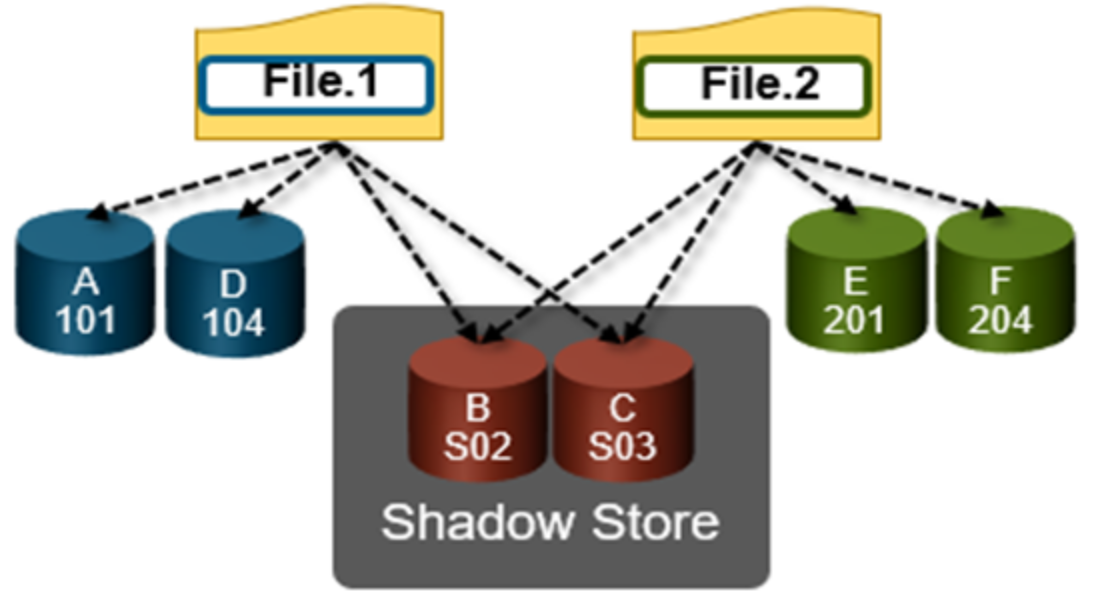
Figure 7. OneFS duplicate block sharing
In-line dedupe samples every whole block written and handles each block independently, so it can aggressively locate block duplicity. If a contiguous run of matching blocks is detected, inline dedupe will merge the results into regions and process them efficiently.
In-line dedupe also detects dedupe opportunities from the read path, and blocks are hashed as they are read into L1 cache and inserted into the index. If an existing entry exists for that hash, inline dedupe knows there is a block sharing opportunity between the block it just read and the one previously indexed. It combines that information and queues a request to an asynchronous dedupe worker thread. As such, it is possible to deduplicate a data set purely by reading it all. To help mitigate the performance impact, the hashing is performed out-of-band in the prefetch path, rather than in the latency-sensitive read path.
Inline deduplication durability
OneFS 9.15 introduces a set of enhancements that improve inline deduplication robustness and harden the interaction between the deduplication engine and the L1 read cache. Architecturally, the improvements center on how shadow store data is cached. Rather than each vnode holding a separate copy, cached pages are now shared (or “wired”) between a shadow store and the regular files that reference it, and data read from the shadow store L1 cache is promoted into the native file’s L1 cache. Operationally, this means that when a deduplicated block is first read, its pages become immediately available for subsequent reads of the referencing file, through a combination of a cache-miss callback and a prefetch from the shadow store, and valid cached data is no longer discarded when a file is cloned. In parallel, inline deduplication’s handling of lock contention has been made more resilient. Because both deduplication and prefetch can acquire locks over large data ranges, a previously disabled lock-acquisition timeout (efs.lk.lk_data_lock_timeout_sec) has been enabled with a 30-second default, allowing an inline deduplication operation to abort cleanly rather than stalling. The benefits include reduced memory consumption through the elimination of redundant cache copies, lower I/O, improved read performance for deduplicated and cloned data, and greater stability. These changes are entirely in-memory, so on-disk structures are unmodified and both rollback and mixed-mode operation are supported during upgrade, while new isi_cache_stats categories (l1_data_sstore and l1_meta_sstore) provide dedicated visibility into shadow store cache behavior.
In-line compression
Under the hood, the F810 nodes use an FPGA-based hardware offload engine resident on the backend PCI-e network adapter to perform real-time data compression. This occurs as files are written to from a node in the cluster over a connected client session. Similarly, files are reinflated on demand as they are read by clients.
On top of the FPGA, the OneFS hardware off-load engine uses a proprietary implementation of DEFLATE with the highest level of compression, while incurring minimal to no performance penalty for highly compressible datasets.
The compression engine consists of three main components:
Table 3. OneFS data reduction engine components
|
Engine component |
Description |
|
Search Module |
LZ77 search module analyzes inline file data chunks for repeated patterns. |
|
Encoding Module |
Performs data compression (Huffman encoding) on target chunks. |
|
Decompression Module |
Regenerates the original file from the compressed chunks. |
Note: Because they reside on the same card, the data compression engine shares PCI-e bandwidth with the node’s backend Ethernet interfaces. In general, there is plenty of bandwidth available. A best practice is to run highly compressible datasets through the F810 nodes with compression enabled. However, it is not advisable to run non-compressible datasets with compression enabled.
OneFS provides software-based compression for the F910, F900, F710, F600, F210, F200, F700/7000, H5600, and A300/3000 platforms. Compression in software is also used as fallback in the event of an F810 hardware failure, and in a mixed cluster for use in nodes without a hardware offload capability. Both hardware and software compression implementations are DEFLATE compatible.
Compression file chunking
When a file is written to OneFS using inline data compression, the file’s logical space is divided up into equal sized chunks called compression chunks. Compaction is used to create 128KB compression chunks, with each chunk consisting of sixteen 8KB data blocks. This is optimal since 128KB is the same chunk size that OneFS uses for its data protection stripe units, providing simplicity and efficiency, by avoiding the overhead of additional chunk packing.
For example, consider the following 128KB chunk:
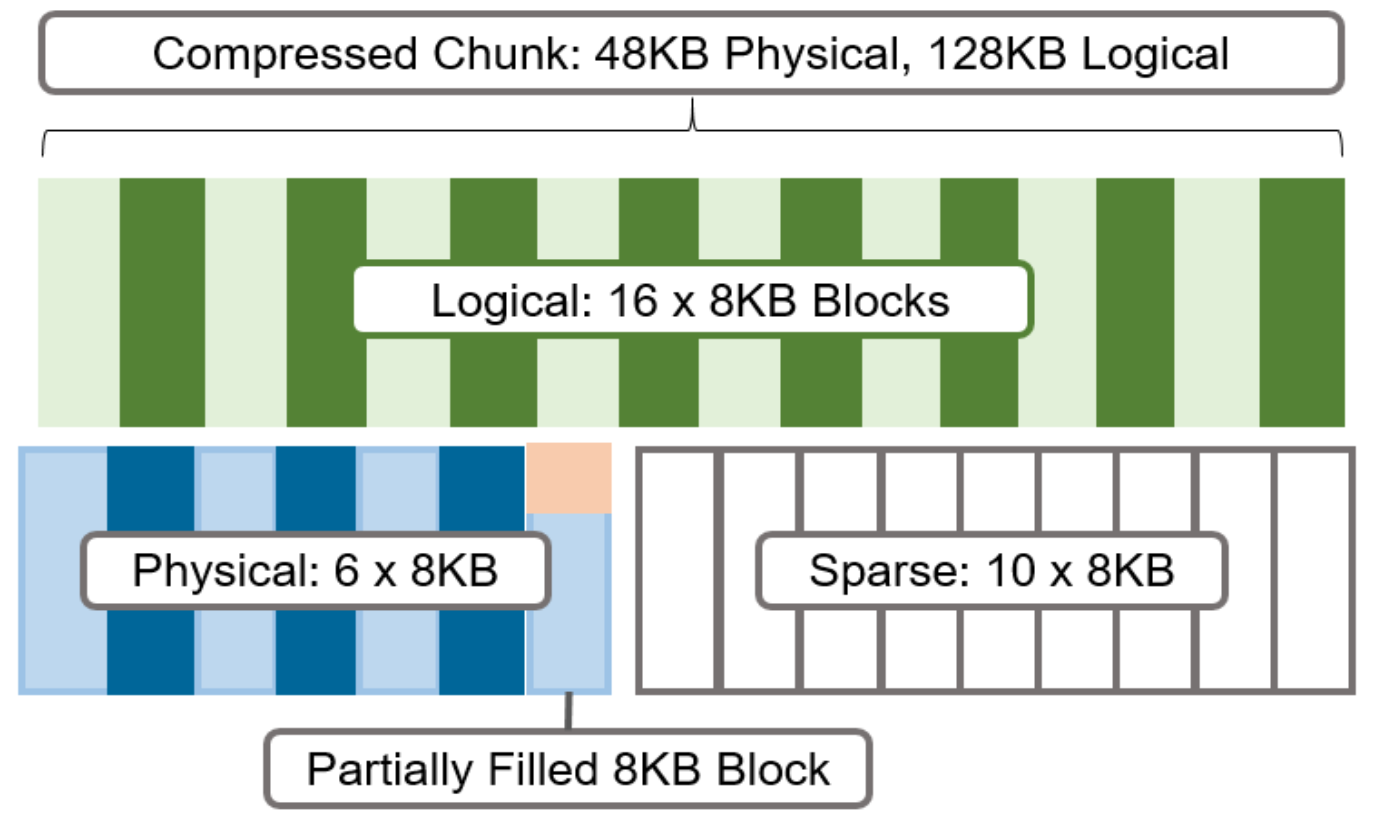
Figure 8. Compression chunks and OneFS transparent overlay
After compression, this chunk is reduced from sixteen to six 8KB blocks in size. This means that this chunk is now physically 48KB in size. OneFS provides a transparent logical overlay to the physical attributes. This overlay describes whether the backing data is compressed or not and which blocks in the chunk are physical or sparse, such that file system consumers are unaffected by compression. As such, the compressed chunk is logically represented as 128KB in size, regardless of its actual physical size. The orange sector in the figure above represents the trailing, partially filled 8KB block in the chunk. Depending on how each 128KB chunk compresses, the last block may be under-utilized by up to 7KB after compression.
Efficiency savings must be at least 8KB (one block) for compression to occur, otherwise that chunk or file will be passed over and remain in its original, uncompressed state. For example, a file of 16KB that yields 8KB (one block) of savings would be compressed. Once a file has been compressed, it is then protected with Forward Error Correction (FEC) parity blocks, reducing the number of FEC blocks and therefore providing further overall storage savings.
Compression chunks will never cross node pools. This avoids the need to decompress or recompress data to change protection levels, perform recovered writes, or otherwise shift protection-group boundaries.
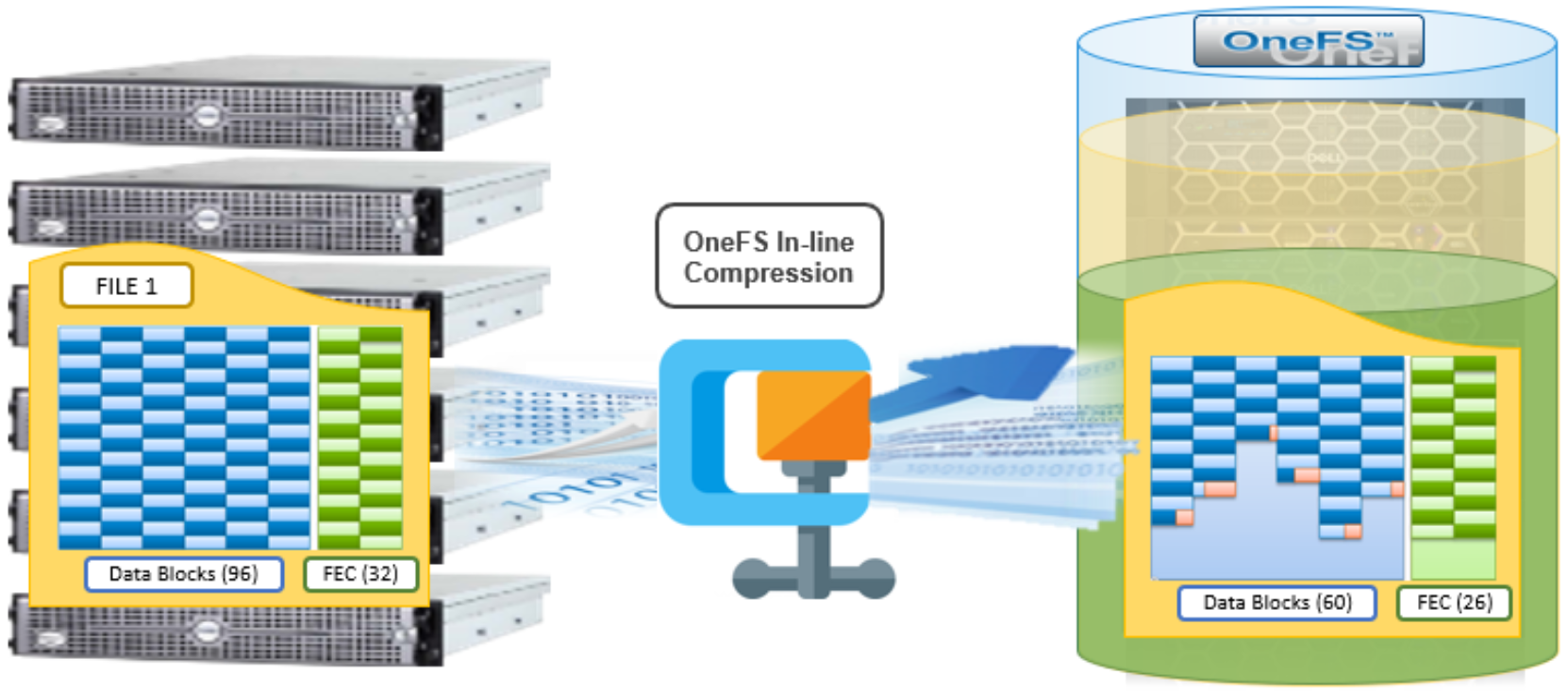
Figure 9. OneFS inline compression
In the figure above, a 768KB file (file1) is written from a Windows client to an F810 cluster. After passing through the OneFS inline compression engine, the logical data footprint of that file is reduced from ninety-six to sixty 8KB blocks, across six chunks. This is represented by the blue data blocks. The file is then FEC protected using twenty-six parity blocks, shown in green.
In-line data reduction write path
In a PowerScale cluster, data, metadata, and inodes are all distributed across multiple drives on multiple nodes. When reading or writing to the cluster, a client is directed by SmartConnect to the desired protocol head on a particular node, or initiator. This node then acts as the ‘captain’ for the operation, performing the chunking and data compression, orchestrating the layout of data and metadata, the creation of erasure codes, and the normal operations of lock management and permissions control.
Take for example a four node F810 cluster. A Windows client connects to the top half, or initiator, on node 1 to write a file. Once the SMB session is established and write request granted, the client begins to send the file data across the front-end network to the cluster where it is initially buffered in the coalescer, or OneFS write cache. The purpose of the coalescer is to build up a large contiguous range of data that will make the write operation more efficient.
When the coalescer is flushed, data chunks, typically sized on protection group boundaries, are passed through the data reduction pipeline. First, if inline dedupe is enabled, the incoming data is scanned for zero block removal and deduplication opportunities. When found, any zero blocks are stripped out and any matching blocks are deduplicated. Next, chunks that meet the ‘compressibility’ criteria described above are compressed by the FPGA. Finally, the initiator executes its ‘write plan’ for the file data, optimizing for layout efficiency and the selected protection policy, and the chunks/stripes are written to SSDs on the bottom half of the participant nodes.
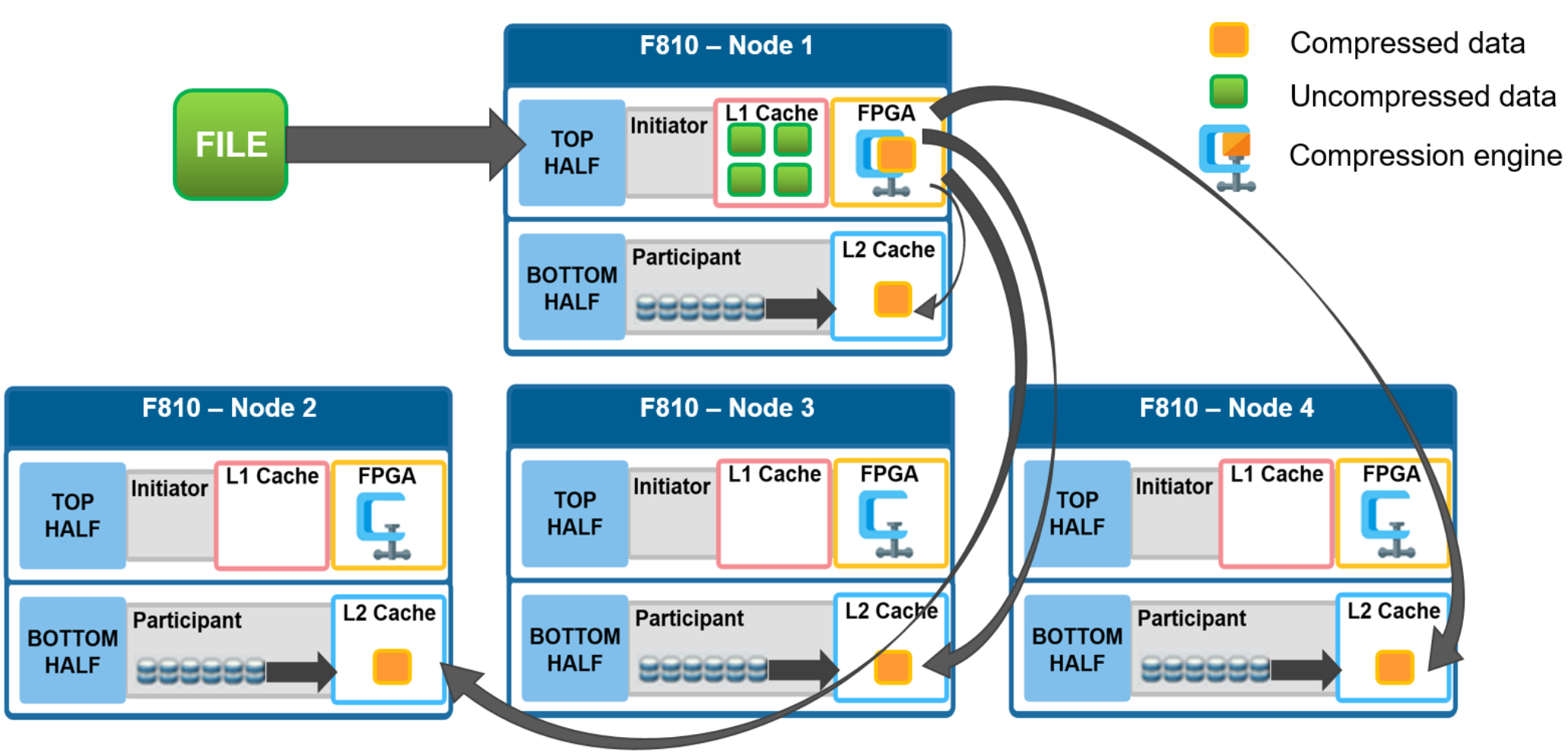
Figure 10. File writes with compression
OneFS stripes data across all nodes—and not simply across disks—and protects the files, directories, and associated metadata by software erasure-code or mirroring technology. Erasure coding can provide beyond 80% efficiency on raw disk with five nodes or more, and on large clusters can even do so while providing quadruple-level redundancy. For any given file, the stripe width is the number of nodes (not disks) that a file is written across. For example, on the 4-node F810 cluster above with the recommended +2d:1n protection level, OneFS will use a stripe width of 8 and protection level of 6+2, where each node is used twice, that is: two data stripe units are written to each of three nodes, and two FEC units to the remaining node.
For details about OneFS data protection, see the OneFS Technical Overview white paper.
In-line data reduction read path and caching integration
In the diagram below, an NFS client attaches to node 1 and issues a read request for a file. Node 1, the captain, gathers all the chunks of data from the various nodes in the cluster and presents it in a cohesive way to the requesting client. Since the file’s data has been stored in a compressed form on nodes’ SSDs, node 1 needs to gather all the constituent chunks and decompress the data so the file can be sent across the wire to the client in its original form.
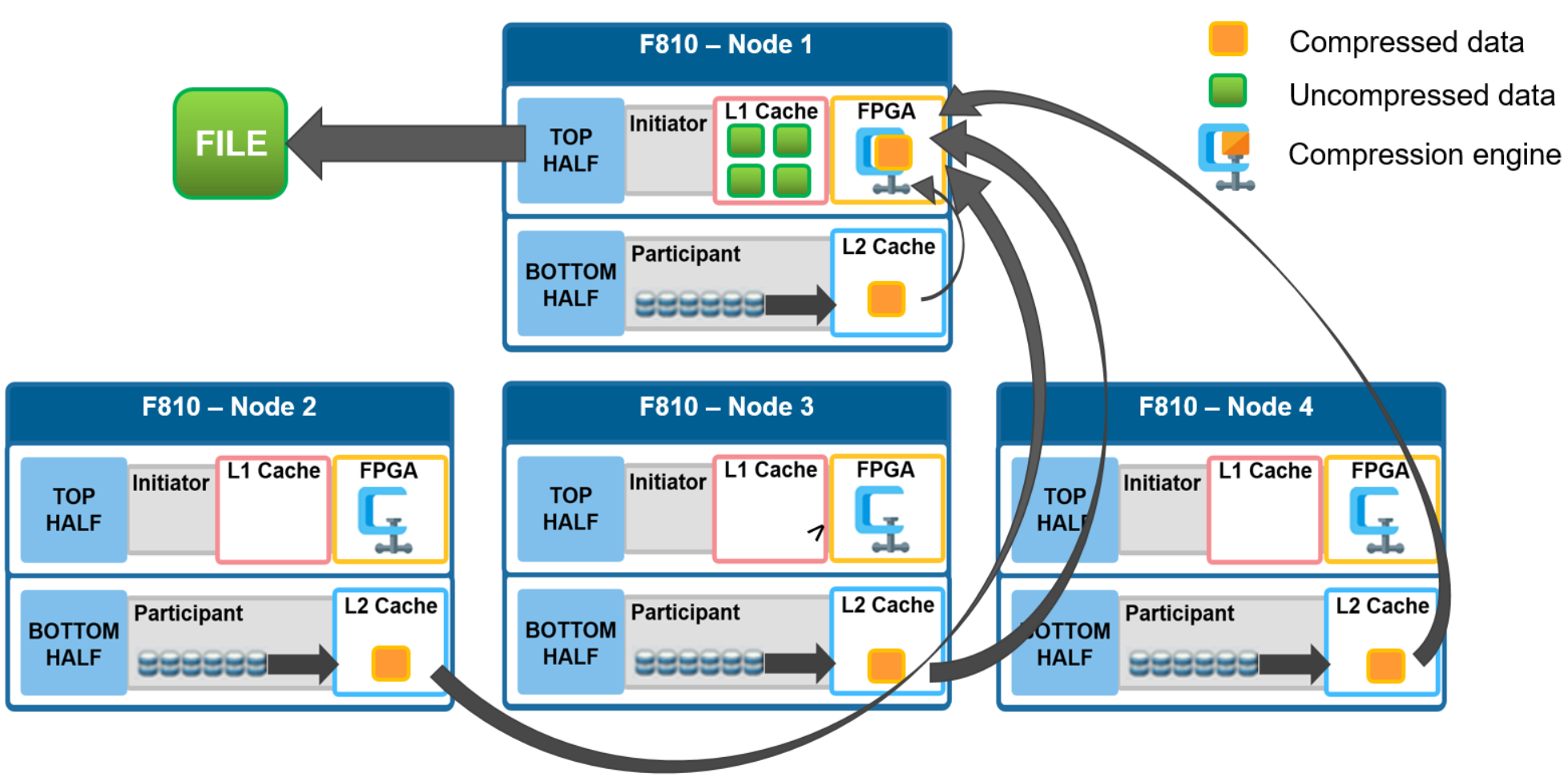
Figure 11. File reads with compression
During this read process, the L2 read cache on the participant nodes (nodes 2 through 4) is populated with the compressed data chunks that are sent to node 1. This means that any additional read requests for this file can be served straight from low latency cache, rather than reading again from the drives. This process both accelerates read performance and reduces wear on the SSDs.
To support OneFS inline compression, a node’s L1, or client-side, read cache is divided into separate address spaces so that both the on-disk compressed data and the logical uncompressed data can be cached. The address space for the L1 cache is already split for data and FEC blocks, so a similar technique is used to divide it again. Data in the uncompressed L1 cache is fed from data in the compressed L1 cache which, in turn, is fed from disk.
OneFS prefetch caching has also been enhanced to accommodate compressed data. Since reading part of a compressed chunk results in the entire compression chunk being cached, it will effectively mean that prefetch requests are rounded to compression chunk boundaries. Since a prefetch request is not complete until the uncompressed data is available in cache, the callback used for prefetch requests performs the decompression.
Inline data reduction in a mixed cluster
A mixed, or heterogeneous, cluster is one that consists of two or more different types or node. For compression, there are two main concepts in play in a mixed cluster:
- Reading compressed data to return the logical data (for client traffic, NDMP, or otherwise).
- Writing a previously compressed file to disk in uncompressed format (because the target tier does not support compression).
The former happens in L1 memory and not on-disk. As such, only F910, F900, F810, F710, F600, F210, F200, F700/7000, H5600, and A300/3000 storage pools may contain compressed data.
In general, OneFS does not allow deduplication across different disk pool policies. For inline dedupe, a deduplicated file that is moved to another tier will retain the shadow references to the shadow store on the original disk pool. While this behavior violates the rule for deduping across different disk pool policies, it is preferred to do this than rehydrate files that are moved. Further deduplication activity on that file will no longer be allowed to reference any blocks in the original shadow store. The file will need to be deduped against other files in its new node pool.
Writes to a mixed cluster
Figure 12 depicts a file write in a mixed cluster environment. A client connects to an H400 node and writes a file with a path-based file pool policy that directs the file to an F810 nodepool. In this scenario, the H400 node first scans the incoming data for zero block removal and/or deduplication opportunities.
Note: Zero block elimination and inline dedupe will only be enabled on nodes that have local drives in a disk pool with the data reduce flag set.
The data reduce flag will only be set on F910, F900, F810, F710, F600, F210, F200, H700/7000, H5600, and A300/3000 disk pools and therefore zero block elimination and inline dedupe will only be performed on those platforms. When found, any zero blocks are stripped out and any matching blocks are deduplicated.
Next, the data is divided into 128KB compression chunks as usual. However, since the H400 node does not have an FPGA offload card, it instead performs compression on the chunks in software.
Note: Unlike inline dedupe, compression does not require the initiator node to be a member of a disk pool with the data reduce flag set. If the target disk pool for the write has data reduce set and the cluster has inline compression enabled, compression will be performed.
A different compression algorithm is used to help minimize the performance impact. Each compressed chunk is then FEC protected, and the H400 uses its write plan to place blocks on the participant nodes. The chunks are written in compressed form over the back-end network to the appropriate F810 nodes.
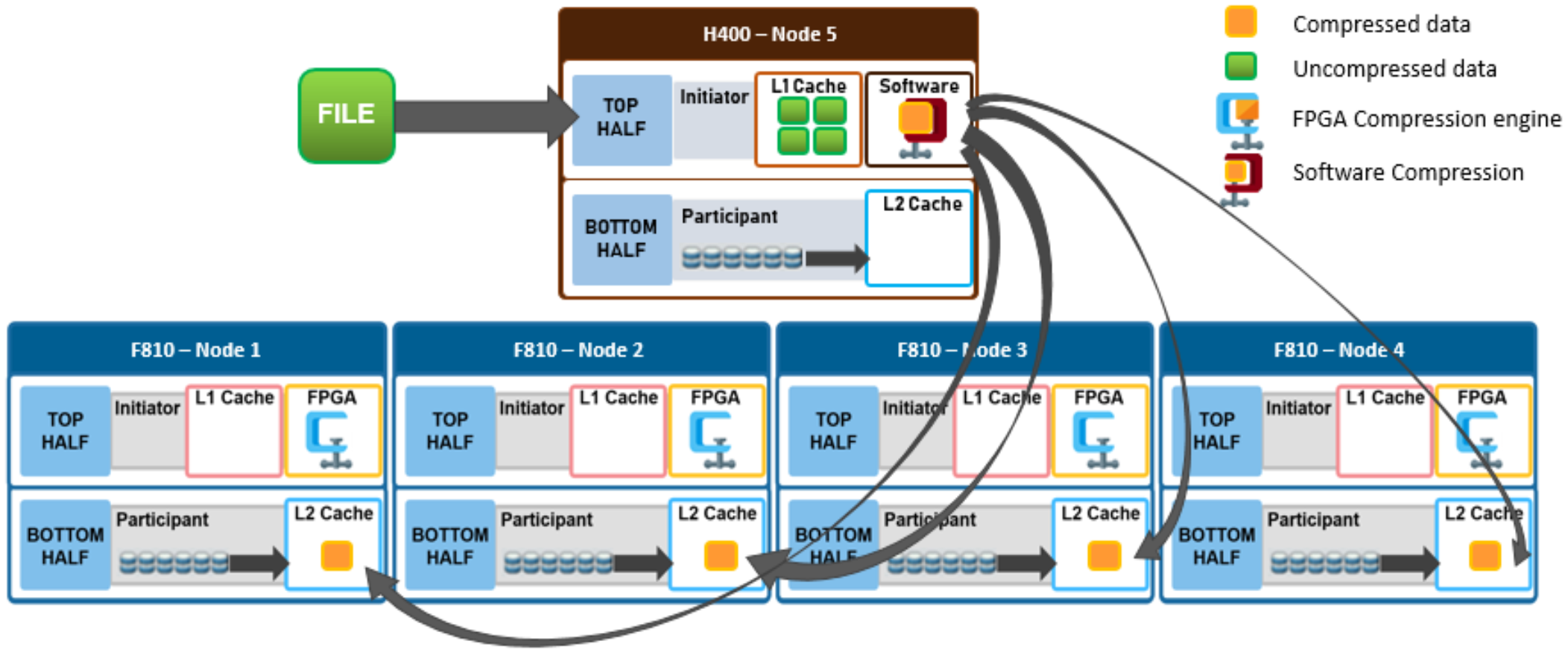
Figure 12. File write in a mixed cluster with software compression
Reading from a mixed cluster
In the following mixed cluster scenario, a client connects to an H400 node and issues a read request for a compressed file housed on an F810 nodepool. The H400 retrieves all the compressed chunks from the pertinent F810 nodes over the backend network. Since the H400 has no FPGA offload card, the decompression of the chunks is performed in software. Software compression uses a different DEFLATE-compatible algorithm to help minimize the performance impact of non-offloaded decompression. Once the chunks have been decompressed, the file is then reassembled and sent over Ethernet in uncompressed form to the requesting client.
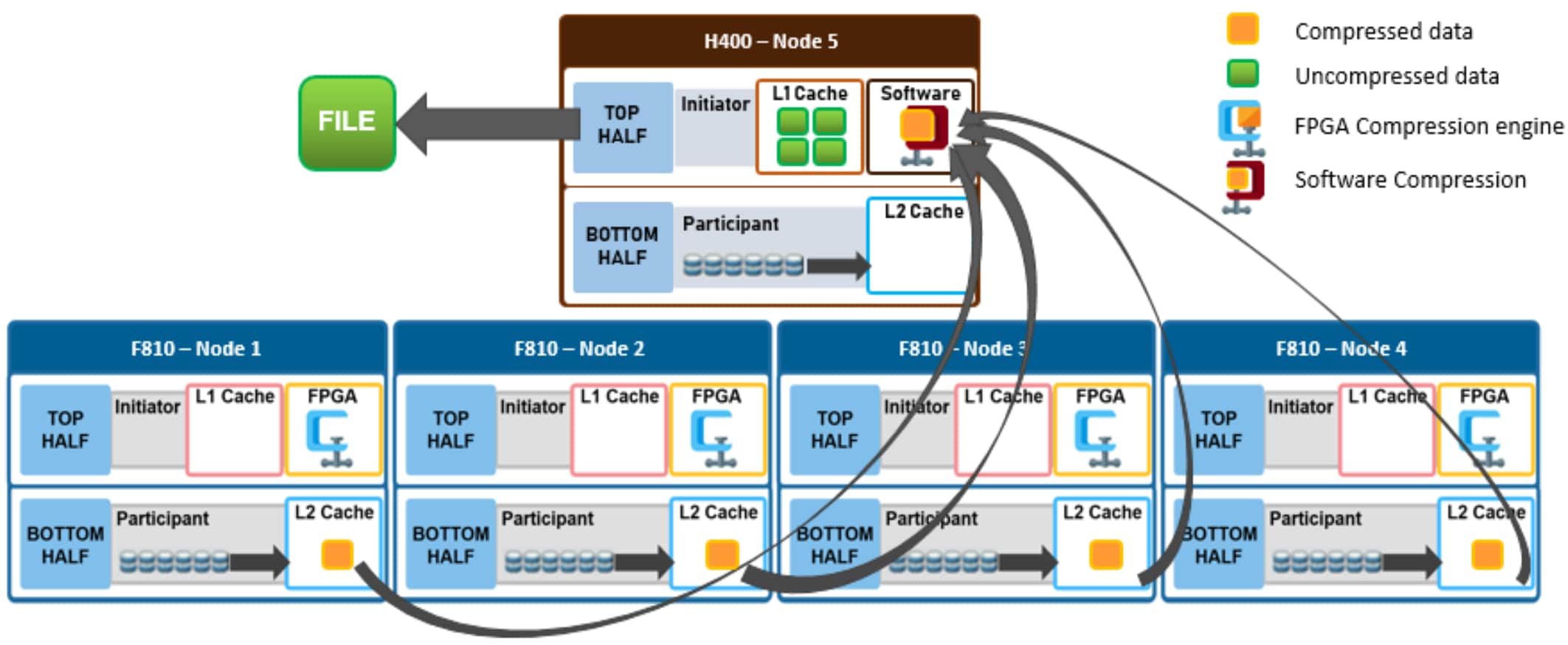
Figure 13. File read in a mixed cluster with software compression
Data reduction and tiering in a mixed cluster
Consider a mixed cluster that consists of an F810 flash performance tier and an A2000 archive tier. SmartPools is licensed, and a file pool policy is crafted to move data over three months old from the F810 flash tier to the archive tier. Files are stored in a compressed form on the F810 tier.
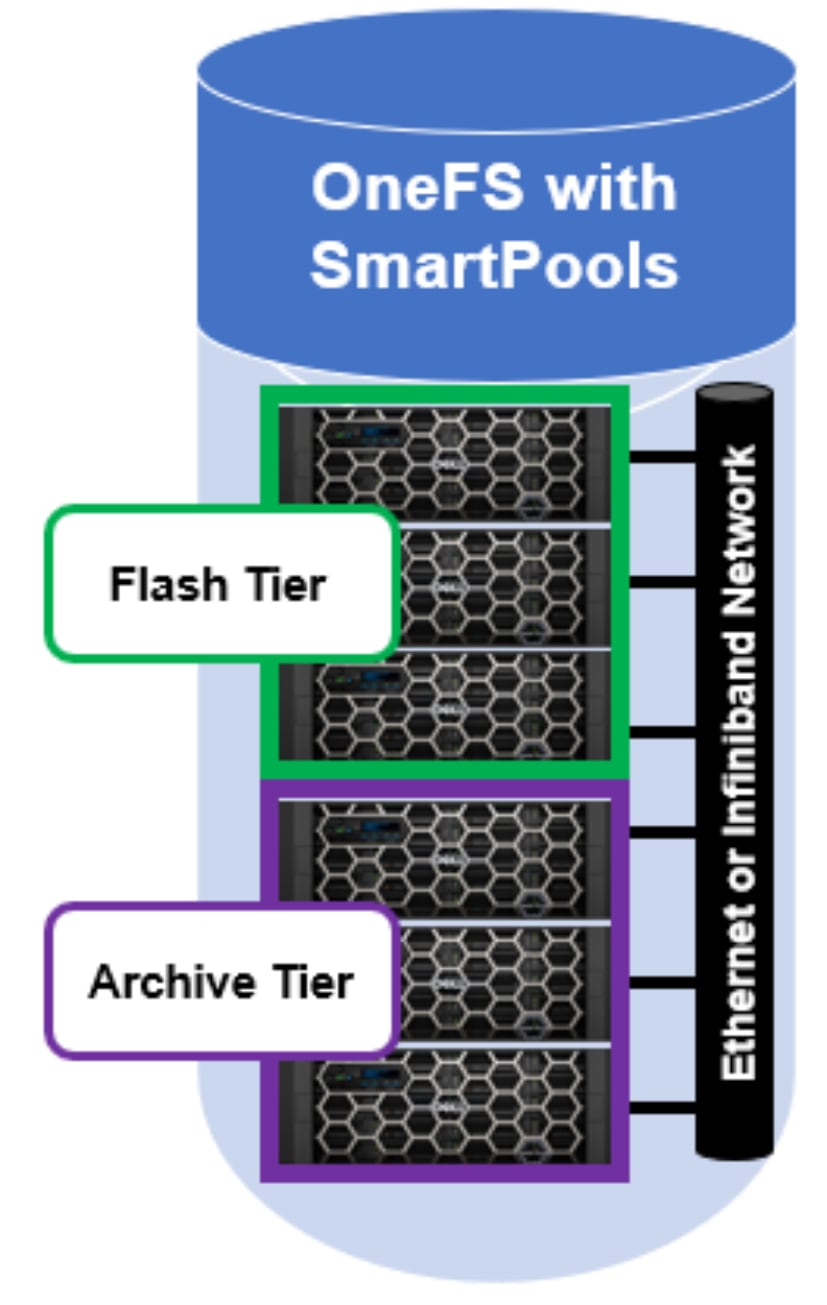
Figure 14. OneFS SmartPools running on a two tier cluster
When SmartPools runs, decompression occurs as the files targeted for down-tiering are restriped from the F810 tier to the A2000 tier inside the SmartPools job. The SmartPools job runs across all the nodes in the cluster - both F810 and A2000 - so whether hardware assisted decompression is available depends on which node(s) are running the job worker threads. Once on the A2000 tier, files will remain uncompressed.
If a file has been deduped, whether by inline or post process deduplication, the deduped state of the file will remain unchanged when tiered. This is true even if the file is moved from a disk pool that supports data reduce to a disk pool that does not.
If another file pool policy is created to up-tier files from the A2000 back up to the F810, the file chunks will be compressed when they are restriped onto the F810 nodes. Once again, all nodes in the cluster will participate in the SmartPools job.
As data moves between tiers in a mixed cluster, it must be rewritten from the old to new drives. If the target tier has a different ‘data-reduce’ setting than the source tier, data is compressed or decompressed as appropriate. The sizing of the F810 pool should be independent of whether it is participating in a mixed cluster or not. However, because up-tiering by the job-engine can run job tasks on the lower tier nodes, the achievable compression ratios may be slightly less efficient when software compression is used.
Data reduction and replication in a mixed cluster
SyncIQ is licensed on a mixed F810 and A2000 cluster and a SyncIQ policy is configured to replicate data to a target cluster. On the source cluster, replication traffic is isolated to just the A2000 nodes. When SyncIQ is run, worker threads on the A2000 nodes gather all the compressed chunks from the F810 nodes over the backend network (RBM). The A2000 nodes then perform decompression of the chunks in software. As discussed previously, software compression uses a different DEFLATE-compatible algorithm from hardware offload to help minimize the performance impact of non-offloaded decompression. Once the chunks have been decompressed, the data is then sent over Ethernet to the target cluster in uncompressed form.
Similarly, deduplicated data is always rehydrated when it exits a cluster. For a data service such as SyncIQ, data is replicated in its entirety and shadow stores and shadow links are not preserved on the target. This means that the target cluster must have sufficient space to house the full size of the replicated data set. If the target cluster happens to also be F810 hardware and inline data reduction is enabled, compression and/or deduplication will be performed as the replication data is ingested by each target node.
Compression and backup in a mixed cluster
A mixed F810 and A2000 cluster is configured for NDMP backup from the A2000 nodes. When a backup job runs, the A2000 nodes retrieve all the compressed chunks from the pertinent F810 nodes over the backend network (RBM). Since the A2000 has no FPGA offload card, the decompression of the chunks is performed in software. Once the chunks have been decompressed, each file is then reassembled and sent over Fibre Channel (2-way NDMP) or Ethernet (3-way NDMP) in uncompressed form to the backup device(s).
With NDMP, deduplicated data is rehydrated when it leaves the cluster, and shadow stores and shadow links are not preserved on the backup. The NDMP tape device or VTL will need to have sufficient space to house the full size of the data set.
Inline data reduction configuration and management
Events and alerts
Inline data reduction efficiency
Compression and deduplication can significantly increase the storage efficiency of data. However, the actual space savings will vary depending on the specific attributes of the data itself.
The following table illustrates the relationship between the effective to usable and effective to raw ratios for the F910, F900, F810, F710, F600, F210, F200, H700, H7000, H5600, A300, and A3000 platforms:
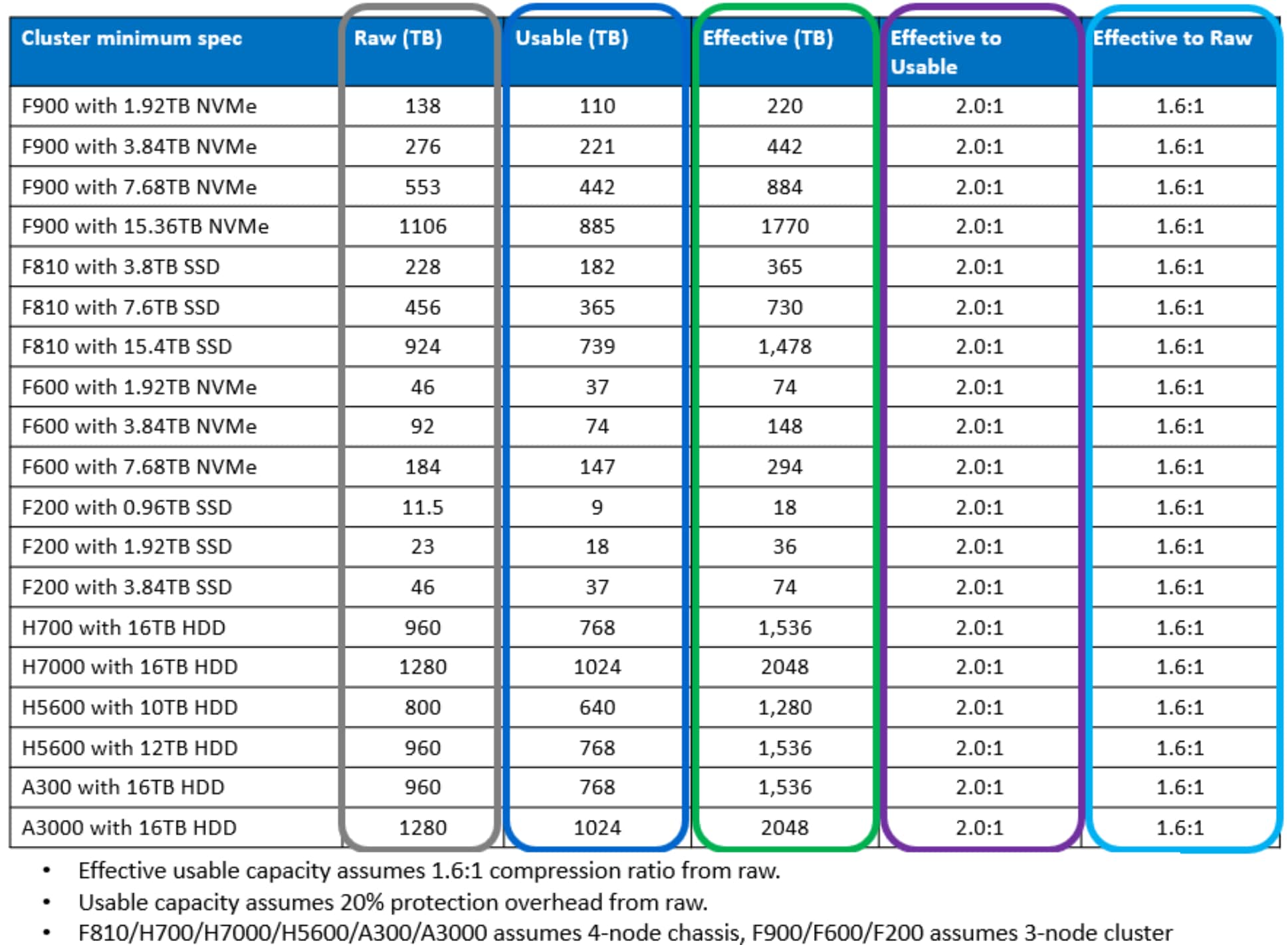
Figure 15. Effective to usable and raw relationships in various PowerScale configurations
The following table provides descriptions for the various OneFS reporting metrics, such as those returned by the ‘isi statistics data-reduction’ command described below. The table attempts, where appropriate, to equate the OneFS nomenclature with more general industry terminology:

Figure 16. OneFS data reduction reporting metrics
Note: The color scheme in this table is used throughout this paper to categorize and distinguish between the various data metrics.
The interrelation of the data capacity metrics described above can be illustrated in a graphical representation.

Figure 17. OneFS data capacity metrics interrelation
As we can see, the preprotected physical (usable) value is derived by subtracting the protection overhead from the protected physical (raw) metric. Similarly, the difference in size between preprotected physical (usable) and logical data (effective) is the efficiency savings. If OneFS SmartDedupe is also licensed and running on the cluster, this data reduction savings value will reflect a combination of compression, inline deduplication, and post-process deduplication savings.
Inline data reduction efficiency reporting
OneFS provides these principal reporting methods for obtaining efficiency information with inline data reduction.
- Using the ‘isi statistics data-reduction’ CLI command
- Via the ‘isi compression’ CLI command
- Via the ‘isi dedupe’ CLI command and WebUI chart
- From the ‘isi get -O’ CLI command
- Configuring SmartQuotas reporting
- Via the ‘isi status’ CLI command
- OneFS WebUI Cluster Dashboard Storage Efficiency Summary
Isi statistics data-reduction command
The most comprehensive of the data reduction reporting CLI utilities is the ‘isi statistics data-reduction’ command. For example:
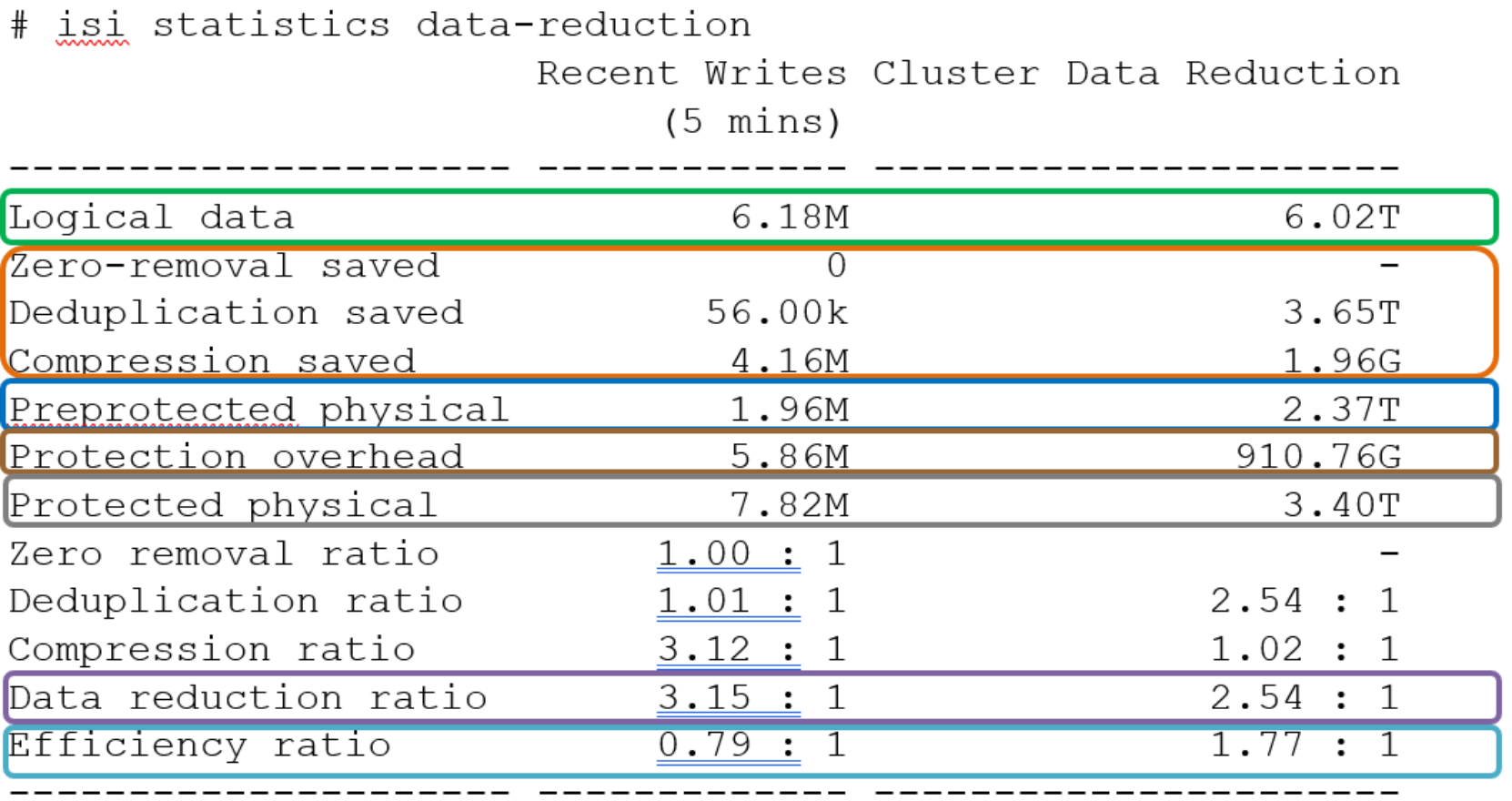
Figure 18. Example output from the ‘isi statistics data-reduction’ CLI command
The ‘recent writes’ data to the left of the output provides precise statistics for the five-minute period prior to running the command. By contrast, the ‘cluster data reduction’ metrics on the right of the output are slightly less real-time but reflect the overall data and efficiencies across the cluster.
Note: In OneFS 9.1 and earlier, the right-hand column metrics are designated by the ‘Est’ prefix, denoting an estimated value. However, in OneFS 9.2 and later, the ‘logical data’ and ‘preprotected physical’ metrics are now tracked and reported accurately, rather than estimated.
The ratio data in each column is calculated from the values above it. For instance, to calculate the data reduction ratio, the ‘logical data’ (effective) is divided by the ‘preprotected physical’ (usable) value. From the output above, this would be:
6.02 / 2.37 = 1.76 Or a Data Reduction ratio of 2.54:1
Similarly, the ‘efficiency ratio’ is calculated by dividing the ‘logical data’ (effective) by the ‘protected physical’ (raw) value. From the output above, this yields:
6.02 / 3.40= 0.97 Or an Efficiency ratio of 1.77:1
Isi compression stats command
From the OneFS CLI, the ‘isi compression stats’ command provides the option to either view or list compression statistics. When run in ‘view’ mode, the command returns the compression ratio for both compressed and all writes, plus the percentage of incompressible writes, for a prior five-minute (300 seconds) interval. For example:
# isi compression stats view
stats for 300 seconds at: 2021-04-14 15:46:04 (1618429564)
compression ratio for compressed writes: 3.12 : 1
compression ratio for all writes: 3.12 : 1
incompressible data percent: 6.25%
total logical blocks: 784
total physical blocks: 251
writes for which compression was not attempted: 0.00%
Note: If the ‘incompressible data’ percentage is high in a mixed cluster, there is a strong likelihood that the majority of the writes are going to a non-compression pool.
The ‘isi compression stats’ CLI command also accepts the ‘list’ argument, which consolidates a series of recent reports into a list of the compression activity across the file system. For example:

Figure 19. Example output from the ‘isi compression stats list’ CLI command.
The ‘isi compression stats’ data is used for calculating the right-hand side estimated ‘Cluster Data Reduction’ values in the ‘isi statistics data-reduction’ command described above. It also provides a count of logical and physical blocks and compression ratios, plus the percentage metrics for incompressible and skipped blocks.
The value in the ‘statistic’ column at the left of the table represents the epoch timestamp for each sample. This epoch value can be converted to a human readable form using the ‘date’ CLI command. For example:
# date -d 1618425636
Wed Apr 14 15:47:34 EDT 2021
Isi dedupe stats command and WebUI chart
From the OneFS CLI, the ‘isi dedupe stats’ command provides cluster deduplication data usage and savings statistics, in both logical and physical terms. For example:
# isi dedupe stats
Cluster Physical Size: 86.14T
Cluster Used Size: 3.43T
Logical Size Deduplicated: 4.01T
Logical Saving: 3.65T
Estimated Size Deduplicated: 5.42T
Estimated Physical Saving: 4.93T
In-line dedupe and post-process SmartDedupe both deliver similar results, just at different stages of data ingestion. Since both features use the same core components, the results are combined. As such, the isi dedupe stats output reflects the sum of both inline dedupe and SmartDedupe efficiency. Similarly, the OneFS WebUI’s deduplication savings histogram combines the efficiency savings from both inline dedupe and SmartDedupe.
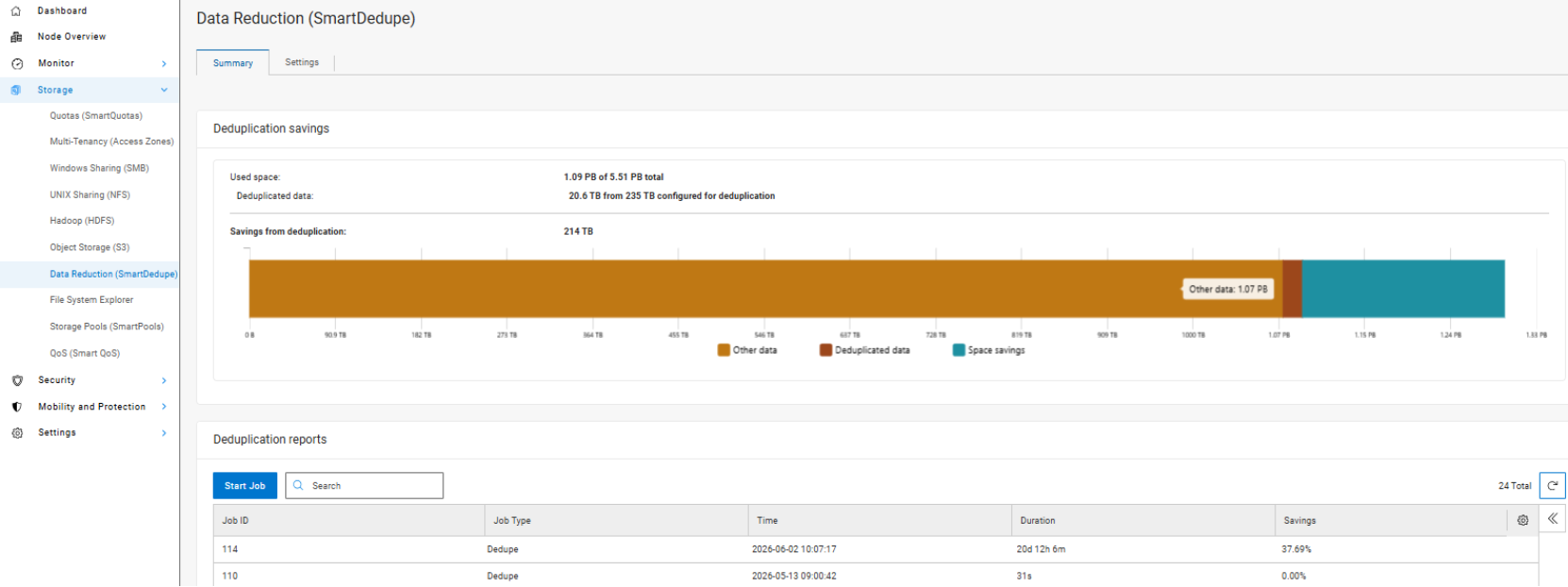
Figure 20. Deduplication cluster capacity savings WebUI chart
Note: The deduplication statistics do not include zero block removal savings. Because zero block removal is technically not due to data deduplication, it is tracked separately but included as part of the overall data reduction ratio.
Isi get statistics
OneFS includes a ‘-O’ logical overlay flag to ‘isi get’ CLI utility for viewing a file’s compression details.
For example:
# isi get –DDO file1
* Size: 167772160
* PhysicalBlocks: 10314
* LogicalSize: 167772160
PROTECTION GROUPS
lbn0: 6+2/2
2,11,589365248:8192[COMPRESSED]#6
0,0,0:8192[COMPRESSED]#10
2,4,691601408:8192[COMPRESSED]#6
0,0,0:8192[COMPRESSED]#10
Metatree logical blocks:
zero=32 shadow=0 ditto=0 prealloc=0 block=0 compressed=64000
The logical overlay information is described under the ‘protection groups’ output. This example shows a compressed file where the sixteen-block chunk is compressed down to six physical blocks (#6) and ten sparse blocks (#10). Under the ‘Metatree logical blocks’ section, a breakdown of the block types and their respective quantities in the file is displayed - including a count of compressed blocks.
When compression has occurred, the ‘df’ CLI command will report a reduction in used disk space and an increase in available space. The ‘du’ CLI command will also report less disk space used. A file that for whatever reason cannot be compressed will be reported as such:
4,6,900382720:8192[INCOMPRESSIBLE]#1
OneFS 9.2 and later releases use inode version 8, which includes a couple of additional inode delta attributes for storing data reduction metrics. These new attributes are displayed by the ‘isi get -D’ CLI command, and report a file’s physical data blocks, compressed size, and protection blocks. For example:
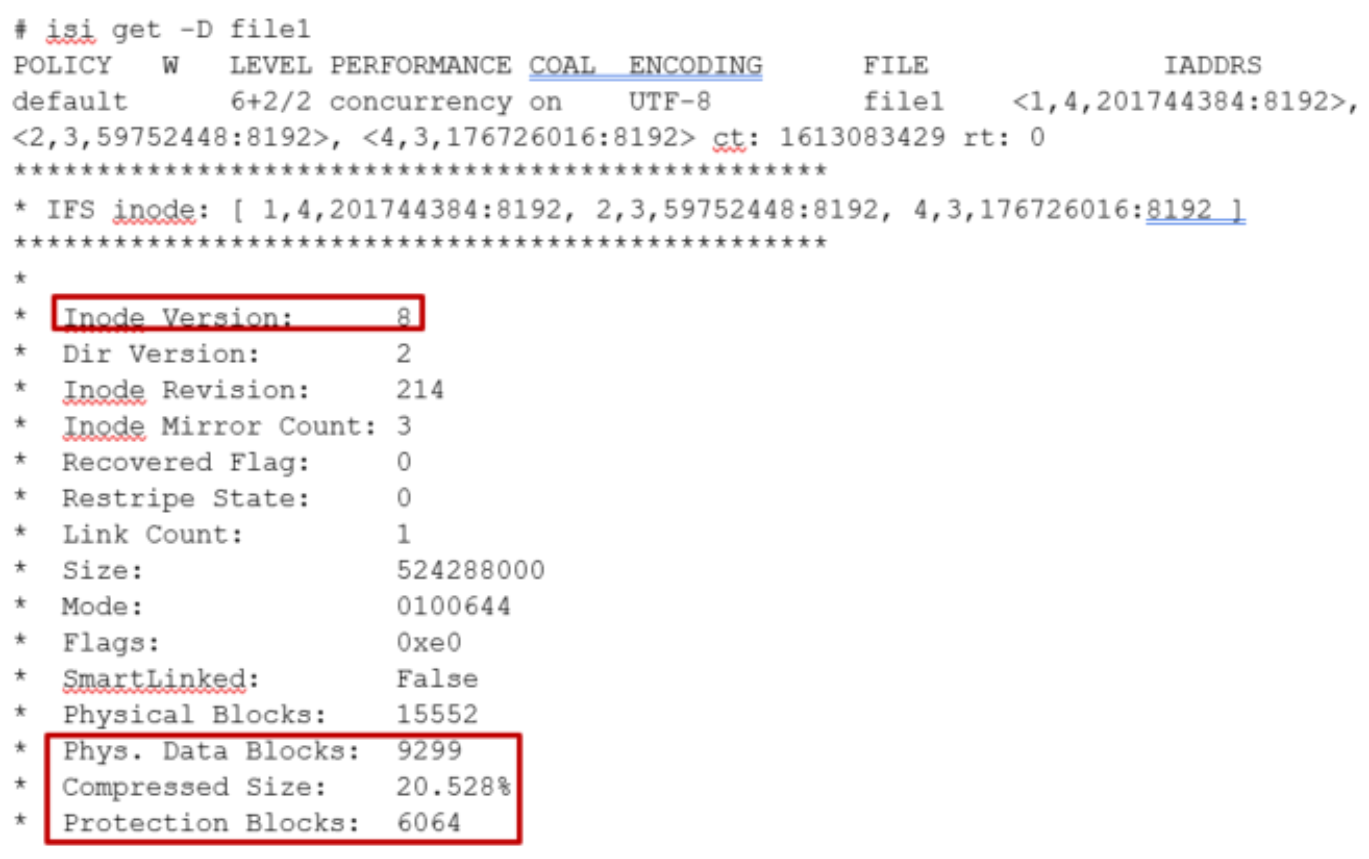
Figure 21. Example output from the ‘isi get’ CLI command.
SmartQuotas data reduction efficiency reporting
OneFS SmartQuotas reports the capacity saving from inline data reduction as a storage efficiency ratio. SmartQuotas reports efficiency as a ratio across the desired data set as specified in the quota path field. The efficiency ratio is for the full quota directory and its contents, including any overhead, and reflects the net efficiency of compression and deduplication. On a cluster with licensed and configured SmartQuotas, this efficiency ratio can be easily viewed from the WebUI by browsing to ‘Storage > Quotas’, or ‘File System > SmartQuotas > Quotas and Usage’ in OneFS 9.14 and earlier releases. In OneFS 9.2 and later, in addition to the storage efficiency ratio, the data reduction ratio is also displayed.
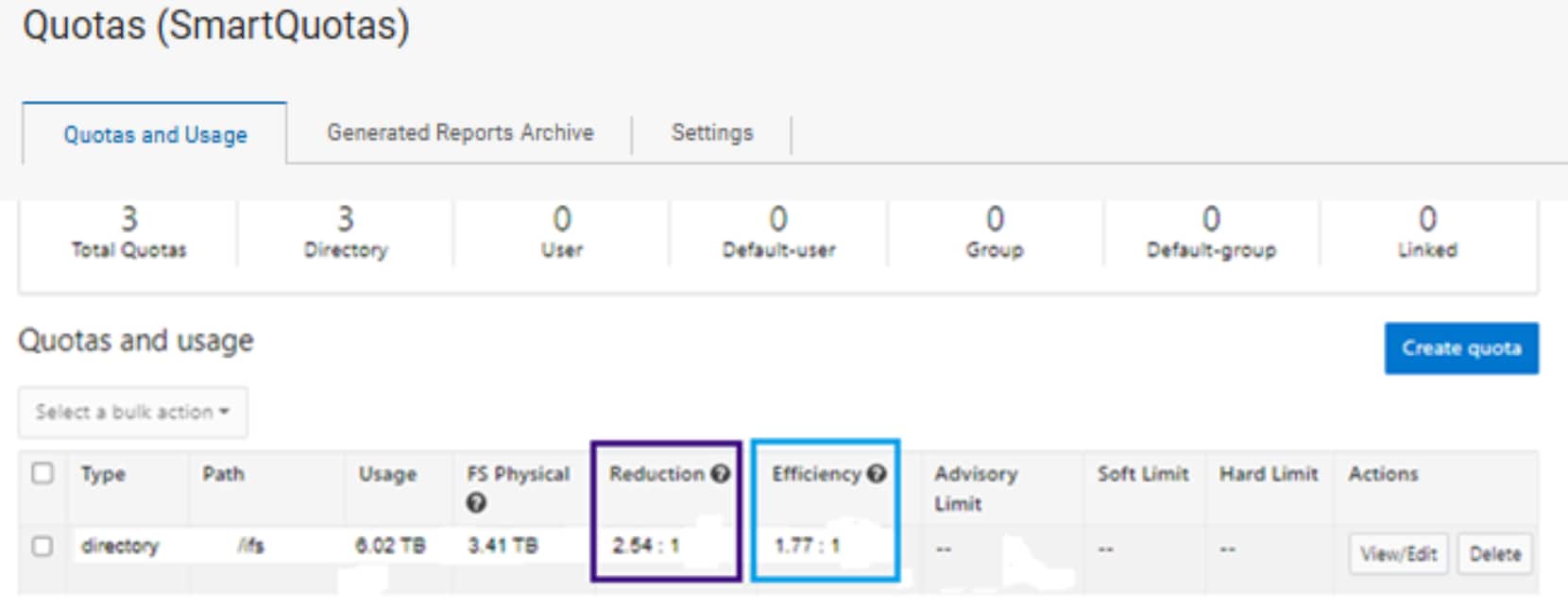
Figure 22. OneFS WebUI SmartQuotas quotas and usage status detailing data reduction and efficiency ratios
Similarly, the same data can be accessed from the OneFS command line by the ‘isi quota quotas list’ CLI command. For example:

Figure 23. Quota CLI Output Example
Example output from the ‘isi quota quotas list’ CLI command. More detail, including both the physical (raw) and logical (effective) data capacities, is also available using the ‘isi quota quotas view <path> <type>’ CLI command. For example:
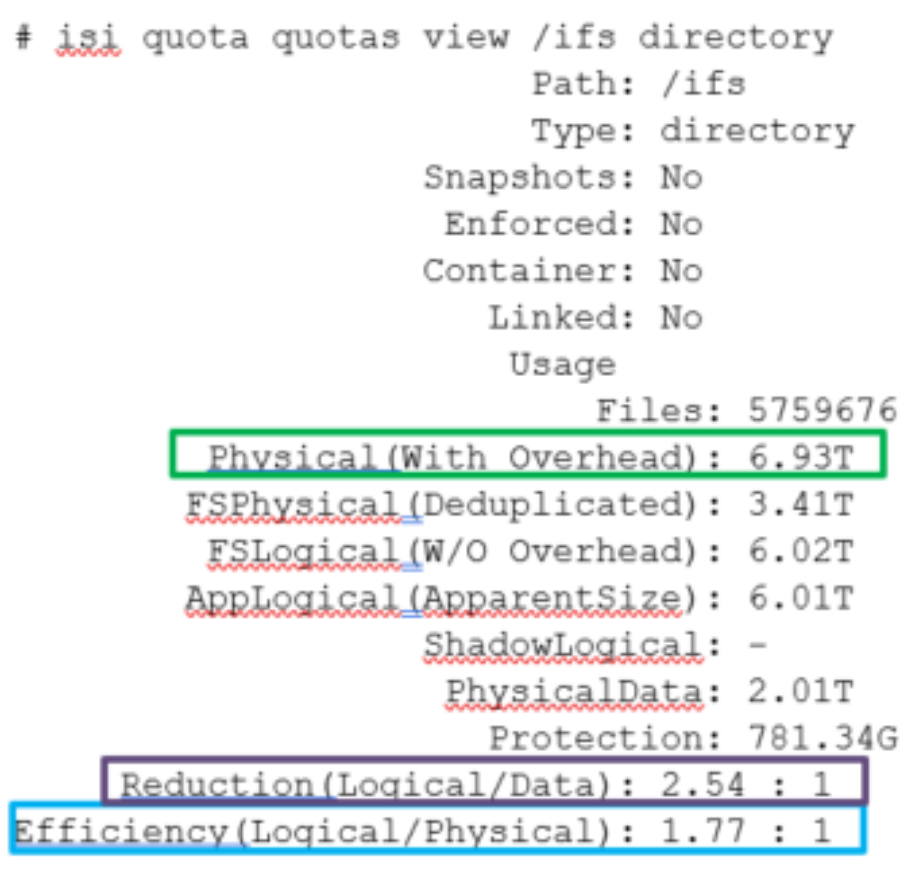
Figure 24. Quota View Example
Example output from the ‘isi quota quotas view’ CLI command. To configure SmartQuotas for inline data efficiency reporting, create a directory quota at the top-level file system directory of interest, for example /ifs. Creating and configuring a directory quota is a simple procedure and can be performed from the WebUI, as follows:
Browse to ‘Storage > Quotas’, or ‘File System > SmartQuotas > Quotas and Usage’ in OneFS 9.14 and earlier releases, and select ‘Create a Quota’. In the create pane, field, set the Quota type to ‘Directory quota’, add the preferred top-level path to report on, select ‘File system logical size’ for Quota Accounting, and set the Quota Limits to ‘Track storage without specifying a storage limit’. Finally, select the ‘Create Quota’ button to confirm the configuration and activate the new directory quota.
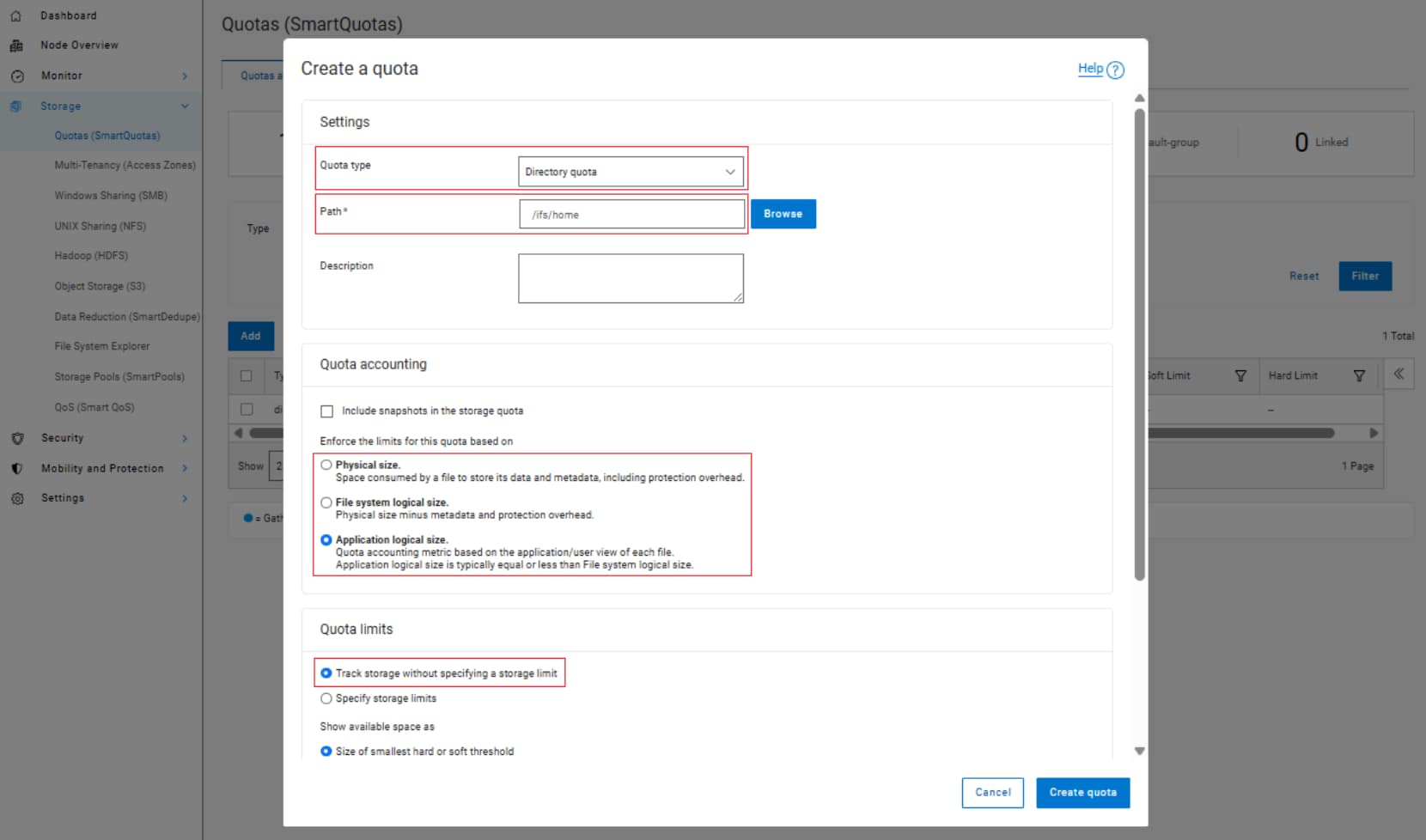
Figure 25. OneFS WebUI SmartQuotas directory quota configuration
The efficiency ratio is a single, current-in time efficiency metric that is calculated per quota directory and includes the sum of inline compression, zero block removal, inline dedupe and SmartDedupe. This is in contrast to a history of stats over time, as reported in the ‘isi statistics data-reduction’ CLI command output, described above. As such, the efficiency ratio for the entire quota directory will reflect what is actually there.
Note: The quota directory efficiency ratio and other statistics are not available through the platform API as of OneFS 9.0.
Isi status command
The ‘isi status’ CLI command output includes a ‘Data Reduction’ field:

Figure 26. Example output from the ‘isi status’ CLI command
OneFS WebUI cluster dashboard storage efficiency summary
The OneFS WebUI cluster dashboard displays a storage efficiency tile, which shows physical and logical space utilization histograms and reports the capacity saving from inline data reduction as a storage efficiency ratio. In OneFS 9.2 and later, a data reduction ratio is also included in the dashboard view. This cluster status view is displayed by default upon opening the OneFS WebUI in a browser and can be easily accessed by browsing to ‘Dashboard‘, or ‘File System > Dashboard > Cluster c.
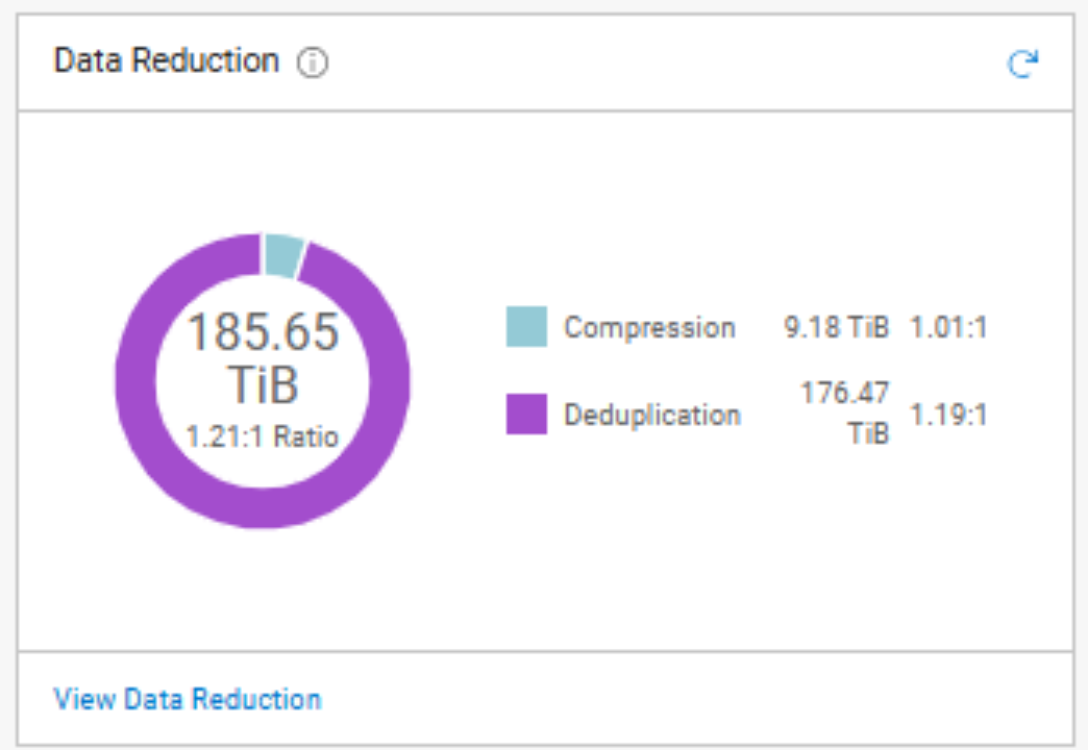
Figure 27. OneFS WebUI cluster status dashboard – storage efficiency summary tile
Note: All of the above storage efficiency tools are available on any cluster running OneFS 8.2.1 and later. However, the inline compression metrics are only relevant for clusters containing compression node pools.
Performance with inline data reduction
Inline data reduction licensing
Inline data reduction and workflows
Below are some examples of typical space reclamation levels that have been achieved with OneFS inline data efficiency.
Note: These data efficiency space savings values are provided solely as rough guidance. Because no two data sets are alike (unless they are replicated), actual results can and will vary considerably from these examples.
Table 6. Typical workload space savings with inline data reduction
|
Workflow/data type |
Typical efficiency ratio |
Typical space savings |
|
Home Directories / File Shares |
1.3:1 |
25% |
|
Engineering Source Code |
1.4:1 |
30% |
|
EDA Data |
2:1 |
50% |
|
Genomics data |
2.2:1 |
55% |
|
Oil and gas |
1.4:1 |
30% |
|
Pre-compressed data |
N/A |
No savings |
Note: Tests of various datasets have demonstrated that data efficiency ratios can easily range from 1:1 (no reduction) to over 3:1.
Inline compression estimation with Live Optics Dossier
The Dell Live Optics Dossier utility can be used to estimate the potential benefits of OneFS’ inline data reduction on a data set. Dossier is available for Windows and has no dependency on a Dell PowerScale cluster. This makes it useful for analyzing and estimating efficiency across real data in place, without the need for copying data onto a cluster.
Dossier operates in three phases:
Table 7. Live Optics Dossier phases
|
Dossier phase |
Description |
|
Discovery |
Users manually browse and select root folders on the local host to analyze. |
|
Collection |
Once the paths to folders have been selected, Dossier will begin walking the file system trees for the target folders. This process will likely take up to several hours for large file systems. Walking the filesystem has a similar impact to a malware/anti-virus scan in terms of the CPU, memory, and disk resources that will be used during the collection. A series of customizable options allows the user to deselect more invasive operations and governs the CPU and memory resources allocated to the Dossier collector. |
|
Reporting |
Users upload the resulting ‘.dossier’ file to create a PowerPoint report. |
To obtain a Live Optics Dossier report, first download, extract, and run the Dossier collector. Local and remote UNC paths can be added for scanning. Ensure that you are authenticated to the desired UNC path before adding it to Dossier’s ‘custom paths’ configuration.
Note: The Dossier compression option only processes the first 64KB of each file to determine its compressibility. Also, the default configuration samples only 5% of the dataset, but this is configurable with a slider. Increasing this value improves the accuracy of the estimation report, albeit at the expense of extended job execution time.
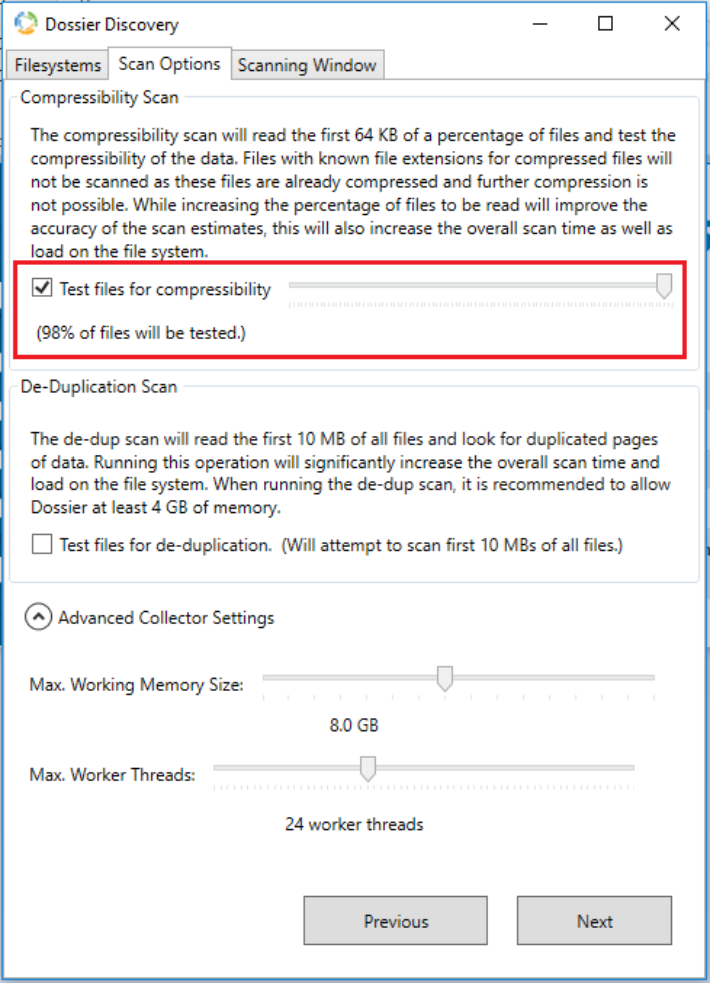
Figure 28. Dossier discovery configuration
The compressibility scan executes rapidly, with minimal CPU and memory resource consumption. It also provides thread and memory usage controls, progress reporting, and a scheduling option to allow throttling of scanning during heavy usage windows.
When the scan is complete, a ‘*.dossier’ file is generated. This file is then uploaded to the Live Optics website:
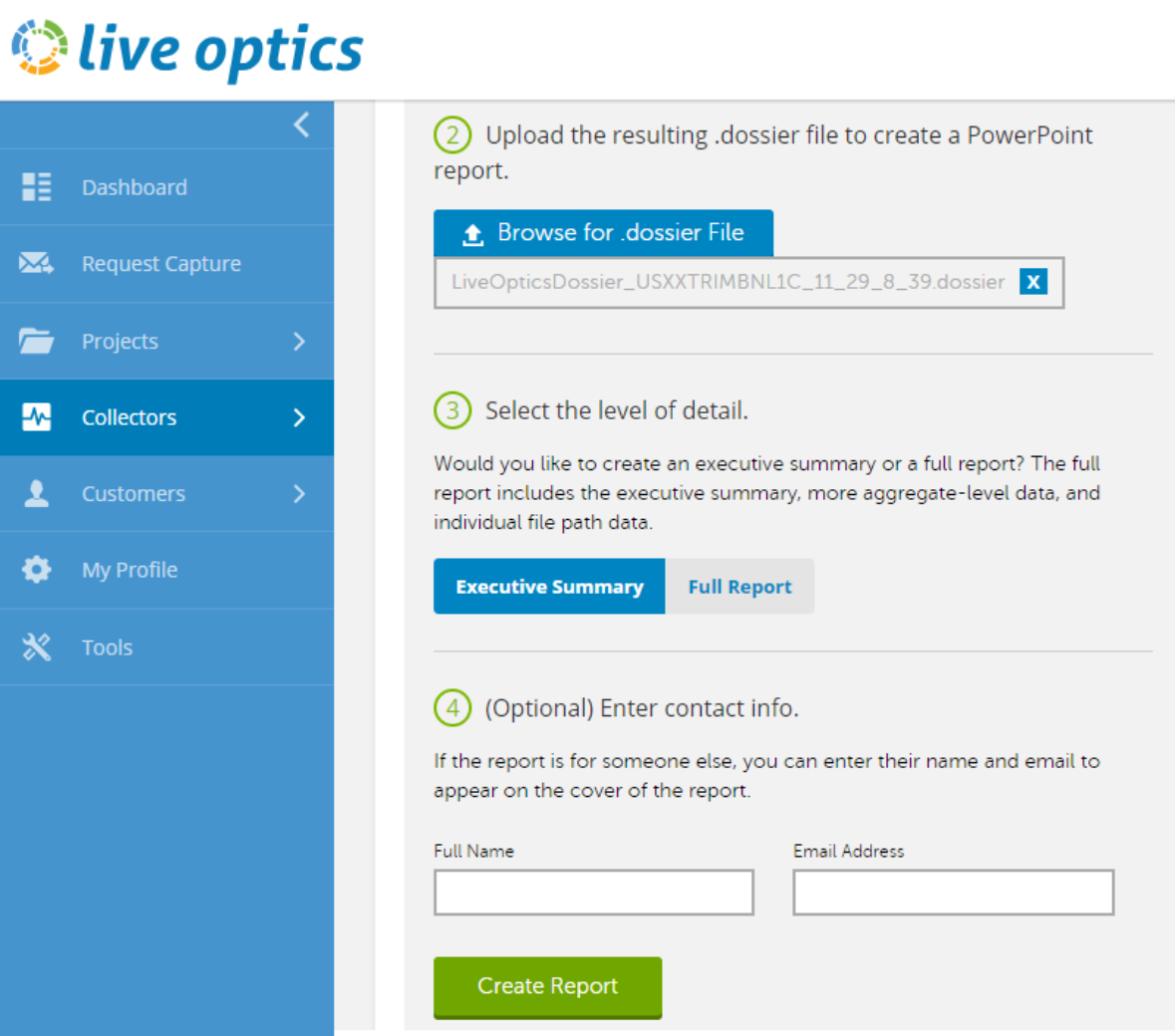
Figure 29. Live Optics Dossier data upload
Once uploaded and processed, a PowerPoint report is generated in real time and delivered by email.
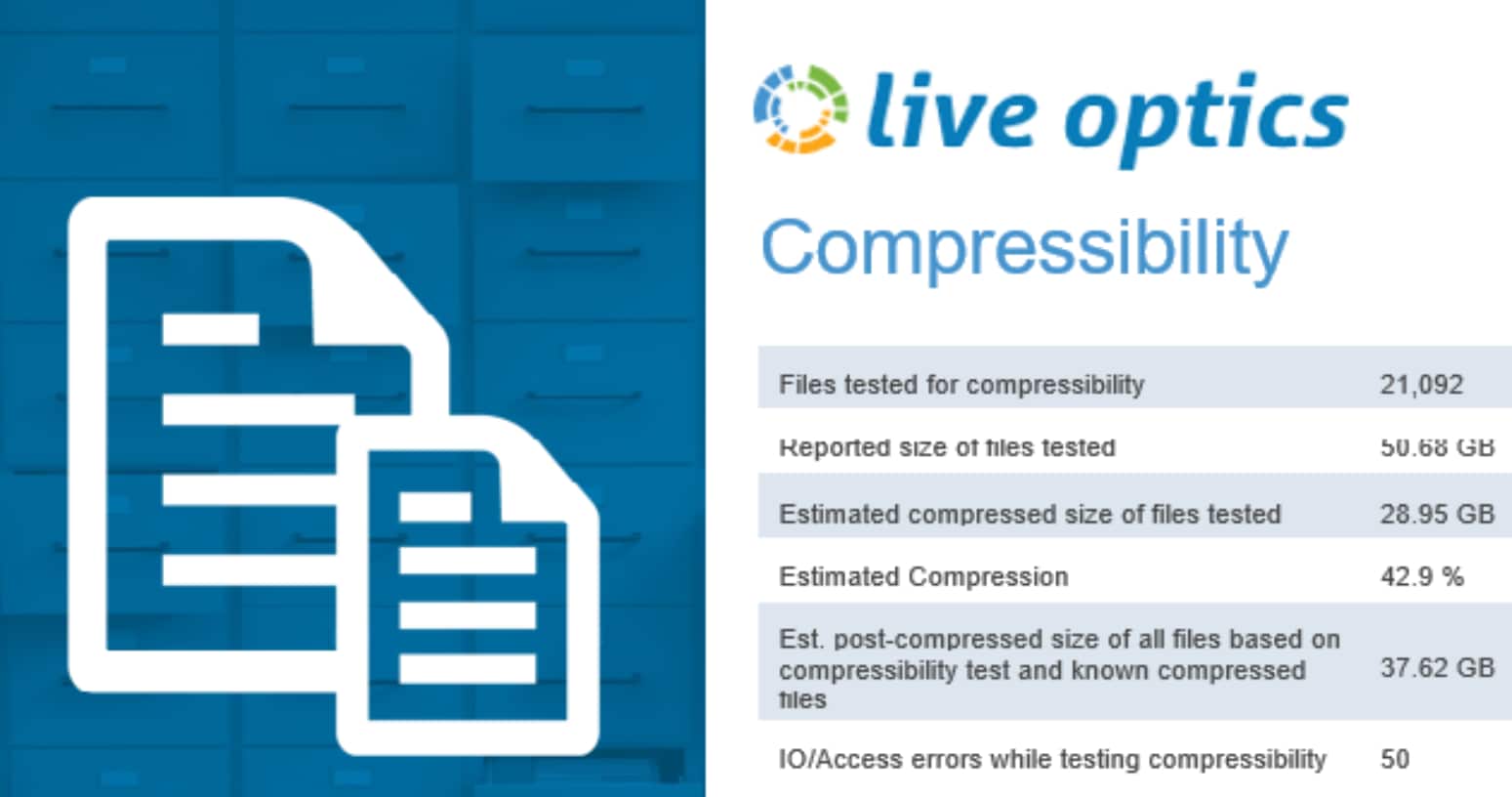
Figure 30. Dossier compressibility report
Compression reports are easy to comprehend. If multiple SMB shares or paths are scanned, a summary is generated at the beginning of the report, followed by the details of each individually selected path.
Live Optics Dossier can be found at URL https://app.liveoptics.com/tools/dossier.
Documentation is at: https://support.liveoptics.com/hc/en-us/articles/229590207-Dossier-User-Guide
When running the Live Optics Dossier tool, please keep the following considerations in mind:
- Does not provide the same algorithm as the OneFS hardware inline compression.
- Dossier looks at the software compression, not the hardware compression. So actual results will generally be better than Dossier report.
- There will be some data for which dossier overestimates compression, for example with files whose first blocks are significantly more compressible than later blocks.
- Intended to be run against any SMB shares on any storage array or DAS. No NFS export support.
- Dossier tool can take a significant amount of time to run against a large data set.
- By default, it only samples a portion (first 64KB) of the data, so results can be inaccurate.
- Dossier does not attempt to compress files with certain known extensions that are uncompressible.
- Dossier assessment tool only provides the size of the uncompressed and compressed data. It does not provide performance estimates of different compression algorithms.
Inline deduplication efficiency estimation
A dry run Dedupe Assessment job is provided to help estimate the amount of space savings that will be seen on a dataset. Run against a specific directory or set of directories on a cluster, the dedupe assessment job reports a total potential space savings. The assessment job uses a separate configuration. It also does not require a product license and can be run prior to purchasing F910, F900, F810, F710, F600, F210, F200, F700/7000, H5600, and A300/3000 hardware to determine whether deduplication is appropriate for a particular data set or environment.
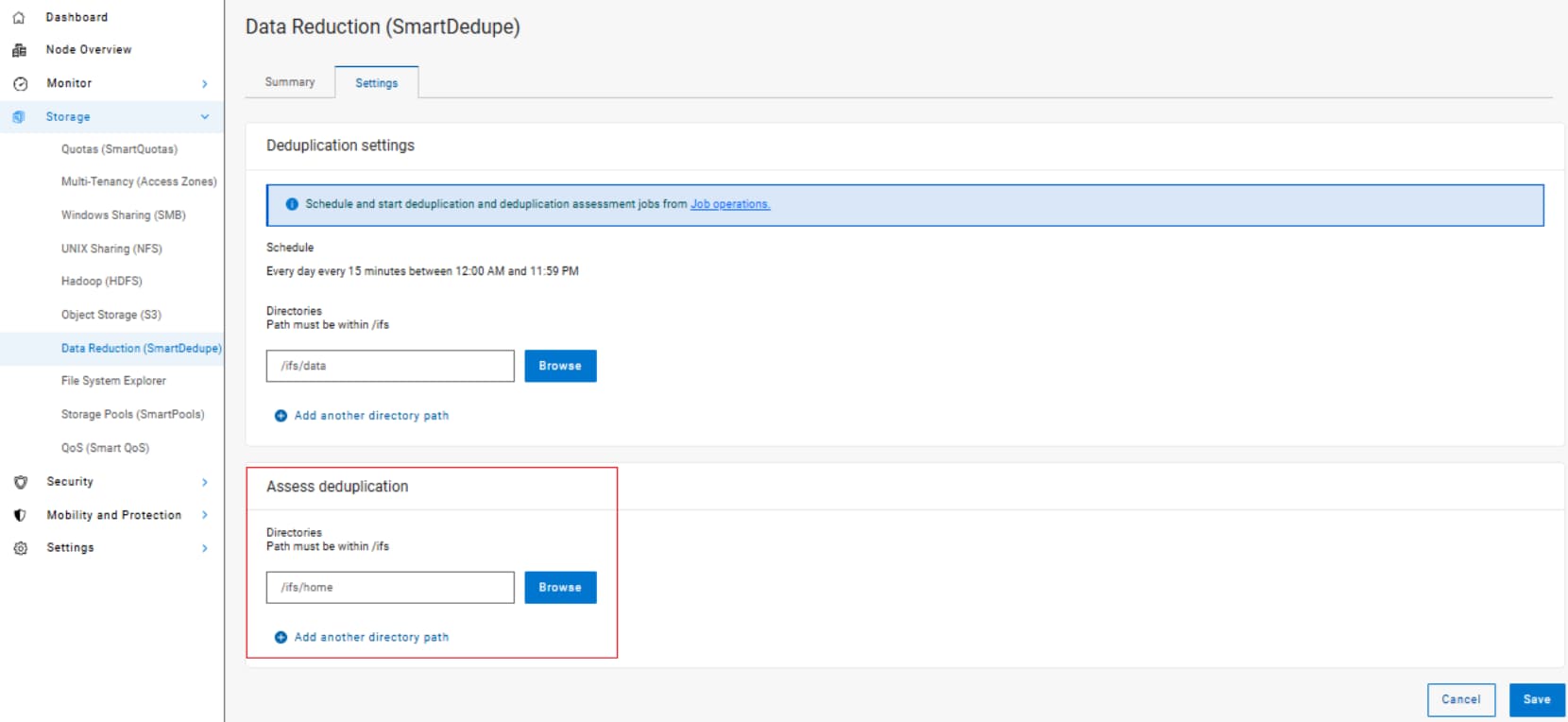
Figure 31. Deduplication assessment job configuration
The dedupe assessment job uses a separate index table to both inline dedupe and SmartDedupe. For efficiency, the assessment job also samples fewer candidate blocks and does not actually perform deduplication. Using the sampling and consolidation statistics, the job provides a report which estimates the total dedupe space savings in bytes.
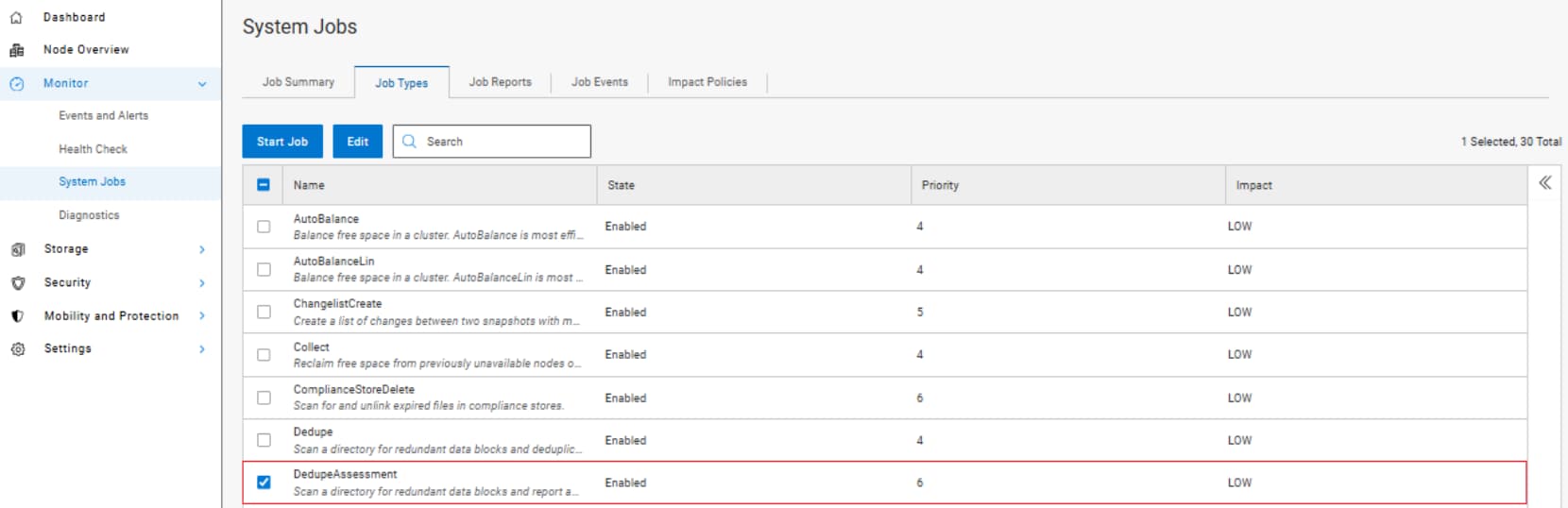
Figure 32. Dedupe assessment job control using the OneFS WebUI
The dedupe assessment job can also be run from the OneFS command line (CLI):
# isi job jobs start DedupeAssessment
Alternatively, inline deduplication can be enabled in assessment mode:
# isi dedupe inline settings modify –mode assess
When the job has finished, review the following three metrics from each node:
# sysctl efs.sfm.inline_dedupe.stats.zero_block
# sysctl efs.sfm.inline_dedupe.stats.dedupe_block
# sysctl efs.sfm.inline_dedupe.stats.write_block
The formula to calculate the estimated dedupe rate from these statistics is:
dedupe_block / write_block * 100 = dedupe%
The dedupe assessment does not differentiate the case of a fresh run from the case where a previous SmartDedupe job has already performed some sharing on the files in that directory. Dell Technologies recommends that the user should run the assessment job once on a specific directory, since it does not provide incremental differences between instances of the job.
Inline data reduction and OneFS feature integration
Inline data reduction best practices
Inline data reduction considerations
OneFS SmartDedupe
Overview
Dell PowerScale SmartDedupe maximizes the storage efficiency of a cluster by decreasing the amount of physical storage required to house an organization’s data. Efficiency is achieved by scanning the on-disk data for identical blocks and then eliminating the duplicates. This approach is commonly referred to as post-process, or asynchronous, deduplication.
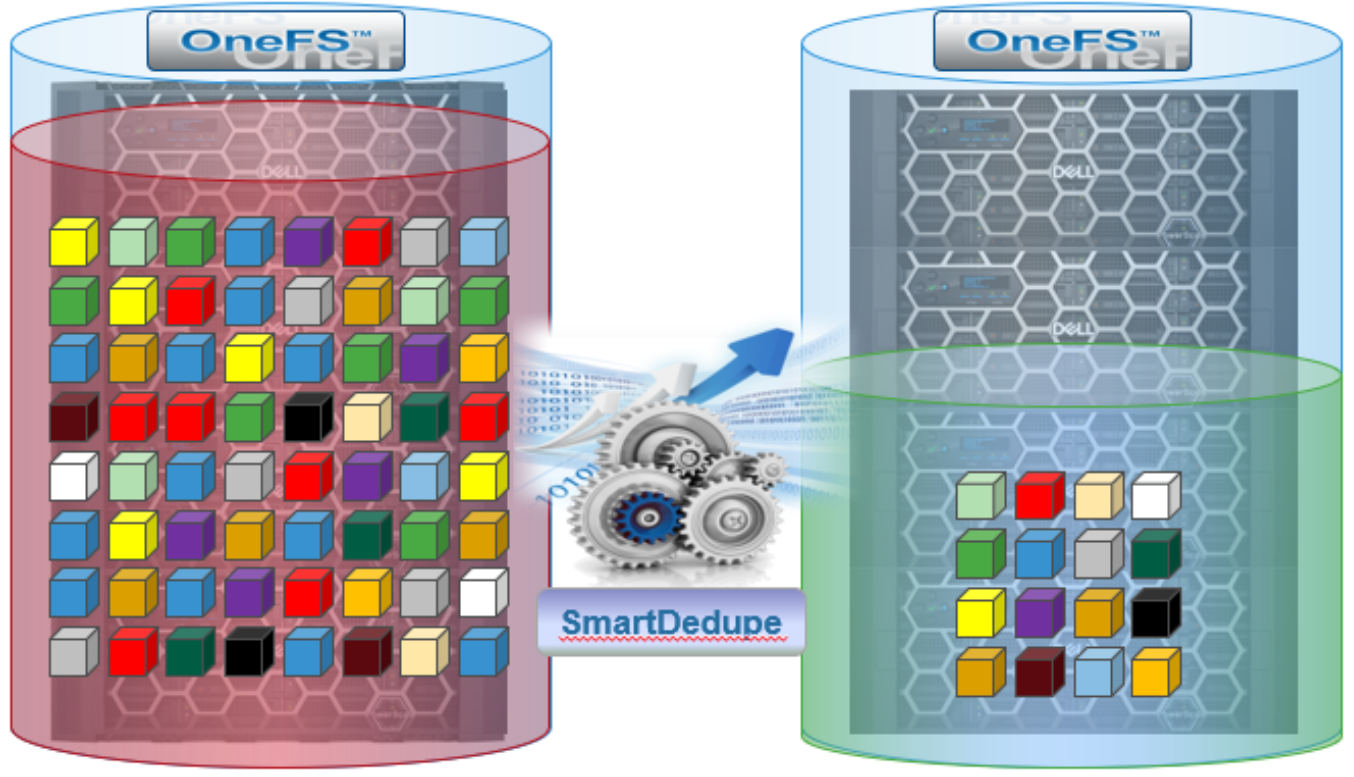
Figure 33. Storage efficiency with SmartDedupe
After duplicate blocks are discovered, SmartDedupe moves a single copy of those blocks to a special set of files known as shadow stores. During this process, duplicate blocks are removed from the actual files and replaced with pointers to the shadow stores.
With post-process deduplication, new data is first stored on the storage device and then a subsequent process analyzes the data looking for commonality. This means that the initial file-write or modify performance is not impacted, since no additional computation is required in the write path.
- SmartDedupe Architecture
- Architecturally, SmartDedupe consists of five principal modules:
- Deduplication Control Path
- Deduplication Job
- Deduplication Engine
- Shadow Store
- Deduplication Infrastructure
The SmartDedupe control path consists of the OneFS Web Management Interface (WebUI), command line interface (CLI), and RESTful platform API, and is responsible for managing the configuration, scheduling and control of the deduplication job. The job itself is a highly distributed background process that manages the orchestration of deduplication across all the nodes in the cluster. Job control encompasses file system scanning, detection and sharing of matching data blocks, in concert with the Deduplication Engine. The Deduplication Infrastructure layer is the kernel module that performs the consolidation of shared data blocks into shadow stores, the file system containers that hold both physical data blocks and references, or pointers, to shared blocks. These elements are described in more detail below.
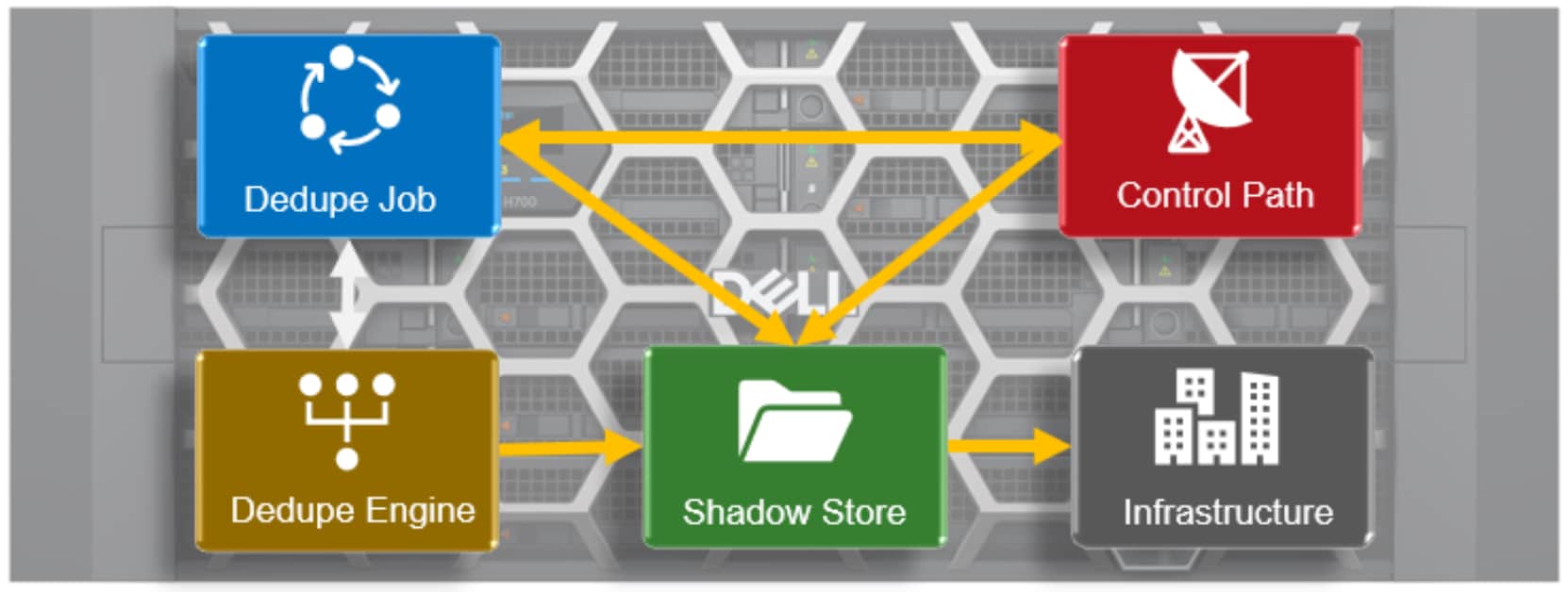
Figure 34. SmartDedupe modular architecture
Deduplication engine – sampling, fingerprinting, and matching
Shadow stores
OneFS shadow stores are file system containers that allow data to be stored in a shareable manner. As such, files on OneFS can contain both physical data and pointers, or references, to shared blocks in shadow stores. Shadow stores were introduced initially to support OneFS file clones, and there are many overlaps between cloning and deduplicating files. The other main consumer of shadow stores is OneFS Small File Storage Efficiency (SFSE) for archive. This feature maximizes the space utilization of a cluster by decreasing the amount of physical storage required to house a small file archive repository, such as a typical healthcare PACS dataset.
Shadow stores are similar to regular files but are hidden from the file system namespace, so cannot be accessed via a pathname. A shadow store typically grows to a maximum size of 2GB (or about 256K blocks), with each block able to be referenced by 32,000 files. If the reference count limit is reached, a new block is allocated, which may or may not be in the same shadow store. Additionally, shadow stores do not reference other shadow stores. And snapshots of shadow stores are not permitted because the data stored in shadow stores cannot be overwritten.
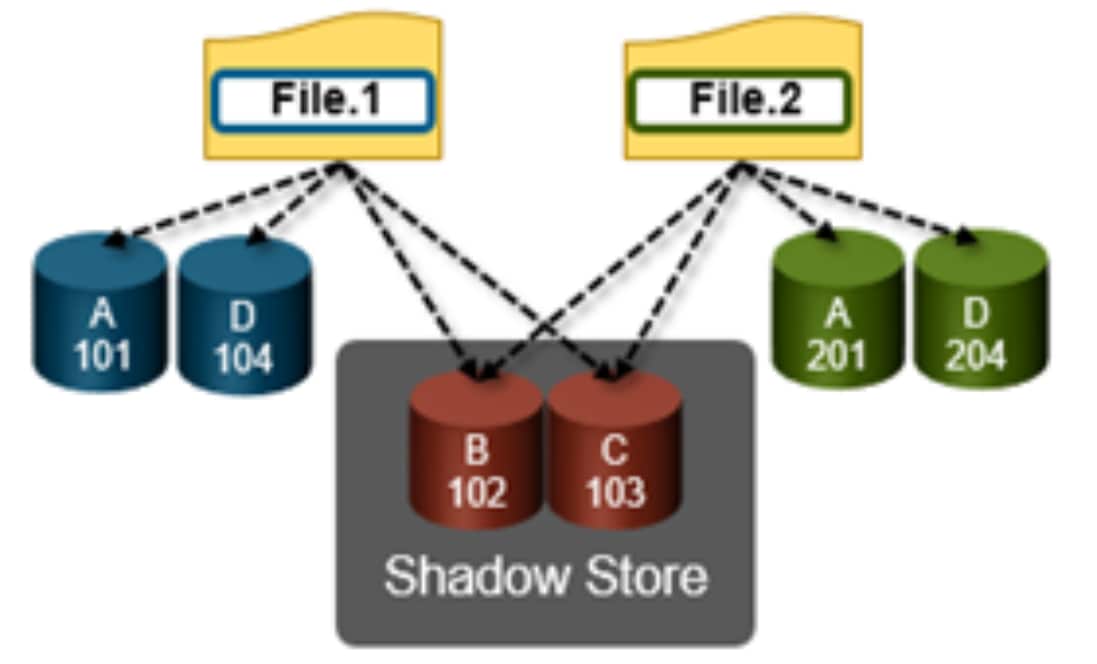
Figure 35. OneFS duplicate block sharing
Deduplication job and infrastructure
Deduplication is performed in parallel across the cluster by the OneFS Job Engine using a dedicated deduplication job, which distributes worker threads across all nodes. This distributed work allocation model allows SmartDedupe to scale linearly as a cluster grows and additional nodes are added.
The control, impact management, monitoring and reporting of the deduplication job is performed by the Job Engine in a similar manner to other storage management and maintenance jobs on the cluster.
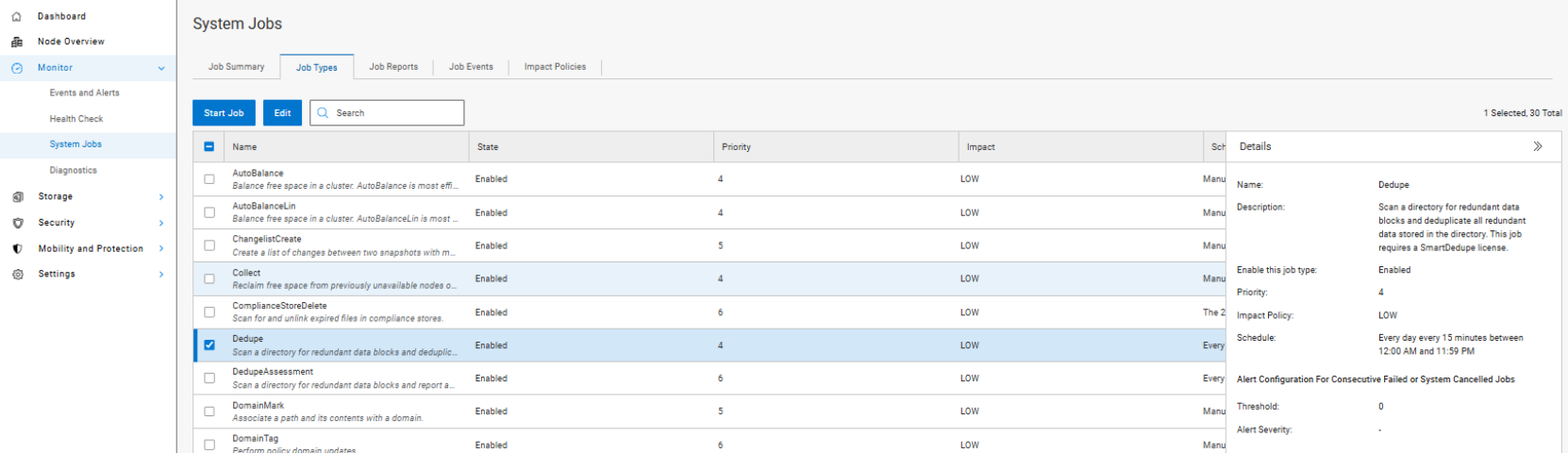
Figure 36. SmartDedupe job control using the OneFS WebUI
While deduplication can run concurrently with other cluster jobs, only a single instance of the deduplication job, albeit with multiple workers, can run at any one time. Although the overall performance impact on a cluster is relatively small, the deduplication job does consume CPU and memory resources.
The primary user facing component of SmartDedupe is the deduplication job. This job performs a file system tree-walk of the configured directory, or multiple directories, hierarchy.
Note: The deduplication job will automatically ignore (not deduplicate) the reserved cluster configuration information located under the /ifs/.ifsvar/ directory, and also any file system snapshots.
Architecturally, the duplication job, and supporting dedupe infrastructure, consist of the following four phases:
- Sampling
- Duplicate Detection
- Block Sharing
- Index Update
These four phases are described in more detail below.
Because the SmartDedupe job is typically long running, each of the phases is executed for a set time period, performing as much work as possible before yielding to the next phase. When all four phases have been run, the job returns to the first phase and continues from where it left off. Incremental dedupe job progress tracking is available from the OneFS Job Engine reporting infrastructure.
Sampling phase
In the sampling phase, SmartDedupe performs a tree-walk of the configured data set in order to collect deduplication candidates for each file.
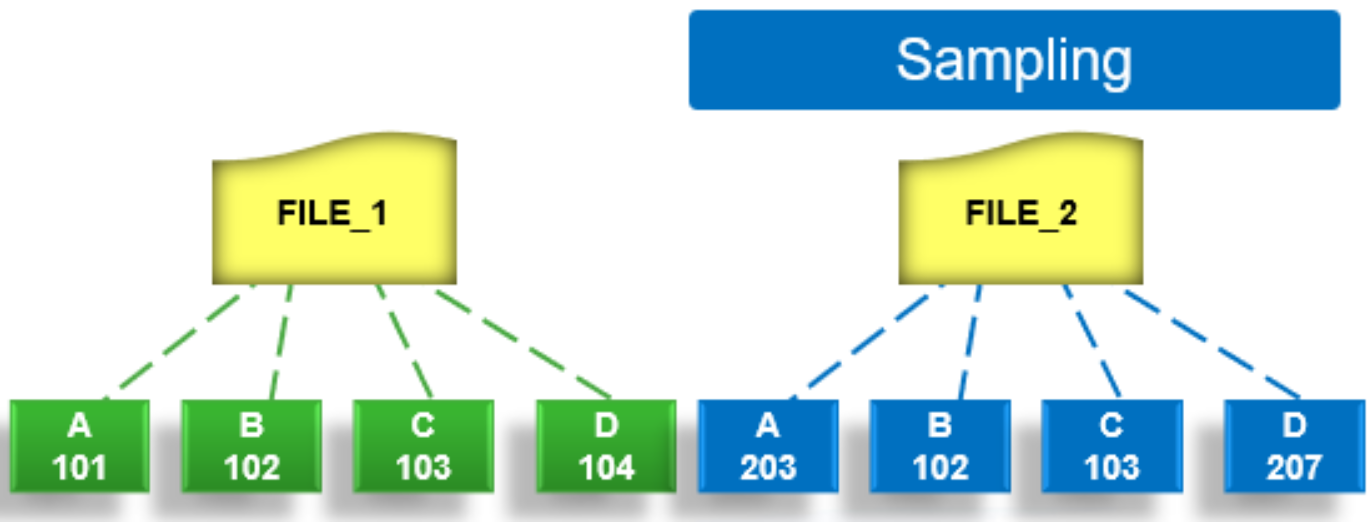
Figure 37. SmartDedupe job sampling phase
The rationale is that a large percentage of shared blocks can be detected with only a smaller sample of data blocks represented in the index table. By default, the sampling phase selects one block from every sixteen blocks of a file as a deduplication candidate. For each candidate, a key/value pair consisting of the block’s fingerprint (SHA-1 hash) and file system location (logical inode number and byte offset) is inserted into the index. Once a file has been sampled, the file is flagged and will not be re-scanned until it has been modified. This drastically improves the performance of subsequent deduplication jobs.
Duplicate detection phase
During the duplicate, or commonality, detection phase, the dedupe job scans the index table for fingerprints (or hashes) that match those of the candidate blocks.
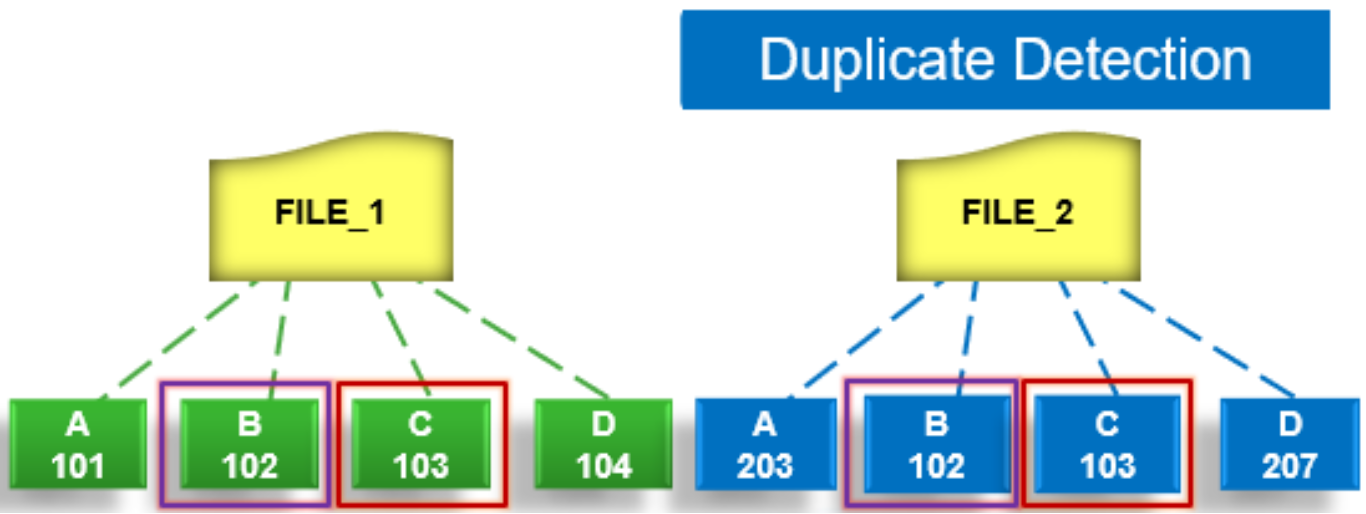
Figure 38. SmartDedupe job duplicate detection phase
If the index entries of two files match, a request entry is generated. In order to improve deduplication efficiency, a request entry also contains pre and post limit information. This information contains the number of blocks in front of and behind the matching block which the block sharing phase should search for a larger matching data chunk, and typically aligns to a OneFS protection group’s boundaries.
Block sharing phase
During the block sharing phase, the deduplication job calls into the shadow store library and dedupe infrastructure to perform the sharing of the blocks.
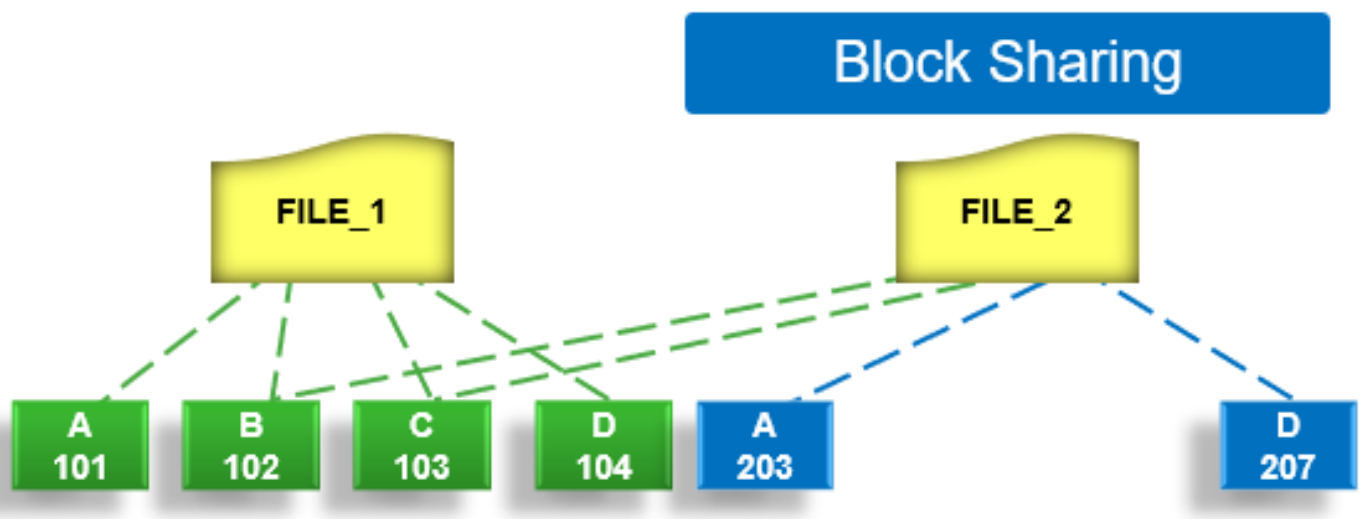
Figure 39. SmartDedupe job block sharing phase
Multiple request entries are consolidated into a single sharing request which is processed by the block sharing phase and ultimately results in the deduplication of the common blocks. The file system searches for contiguous matching regions before and after the matching blocks in the sharing request; if any such regions are found, they too will be shared. Blocks are shared by writing the matching data to a common shadow store and creating references from the original files to this shadow store.
Index update phase
This phase populates the index table with the sampled and matching block information gathered during the previous three phases. After a file has been scanned by the dedupe job, OneFS may not find any matching blocks in other files on the cluster. Once a number of other files have been scanned, if a file continues to not share any blocks with other files on the cluster, OneFS will remove the index entries for that file. This helps prevent OneFS from wasting cluster resources searching for unlikely matches. SmartDedupe scans each file in the specified data set once, after which the file is marked, preventing subsequent dedupe jobs from rescanning the file until it has been modified.
SmartDedupe management
There are two principal elements to managing deduplication in OneFS. The first is the configuration of the SmartDedupe process itself. The second involves the scheduling and execution of the Dedupe job. These are both described below.
Configuring SmartDedupe
SmartDedupe works on data sets which are configured at the directory level, targeting all files and directories under each specified root directory. Multiple directory paths can be specified as part of the overall deduplication job configuration and scheduling.
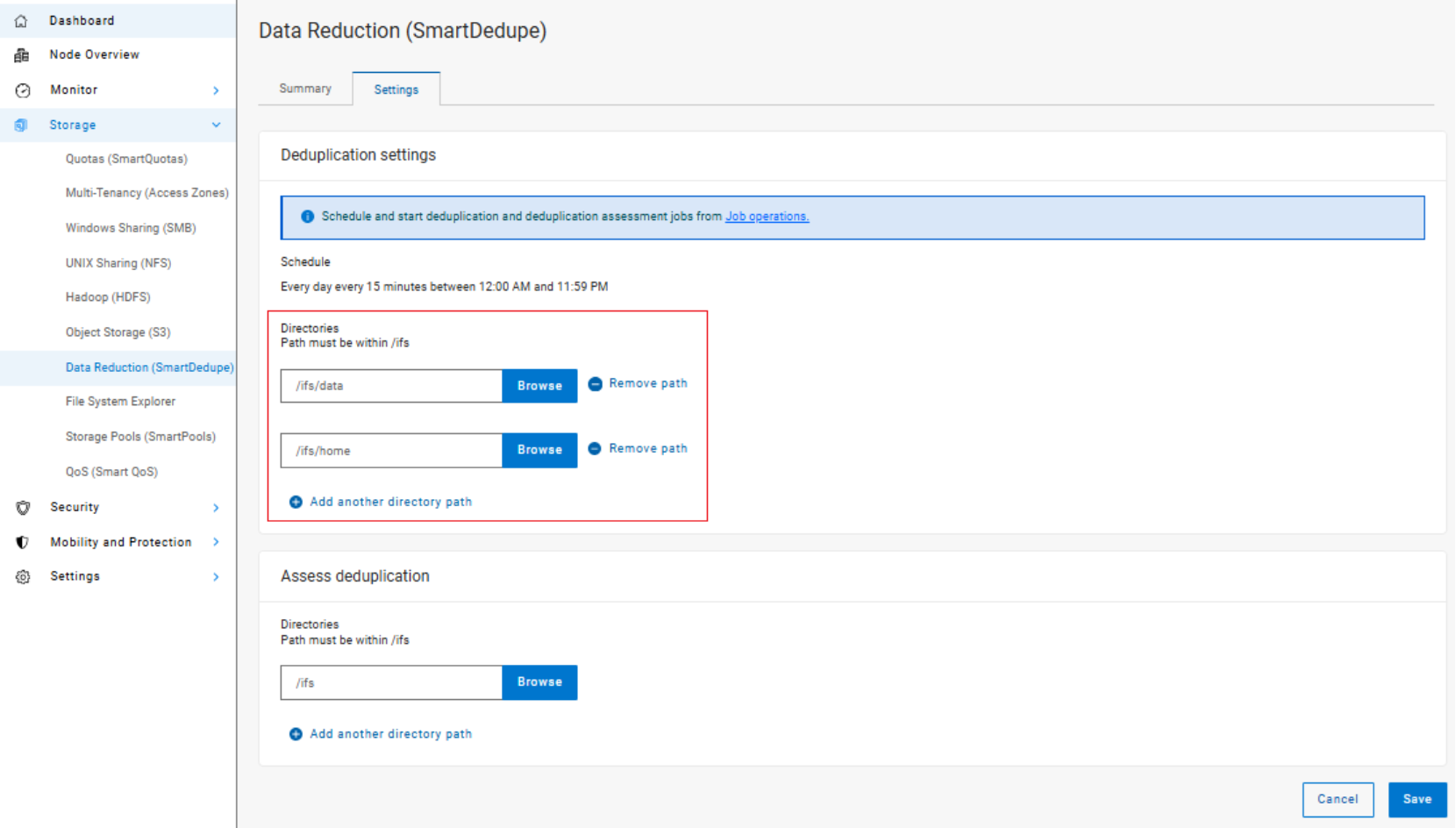
Figure 40. SmartDedupe configuration using the OneFS WebUI
Note: The permissions required to configure and modify deduplication settings are separate from those needed to run a deduplication job. For example, a user’s role must have job engine privileges to run a deduplication job. However, to configure and modify dedupe configuration settings, they must have the deduplication role privileges.
Running SmartDedupe
SmartDedupe can be run either on-demand (started manually) or according to a predefined schedule. This is configured in the cluster management ‘Job Operations’ section of the WebUI.
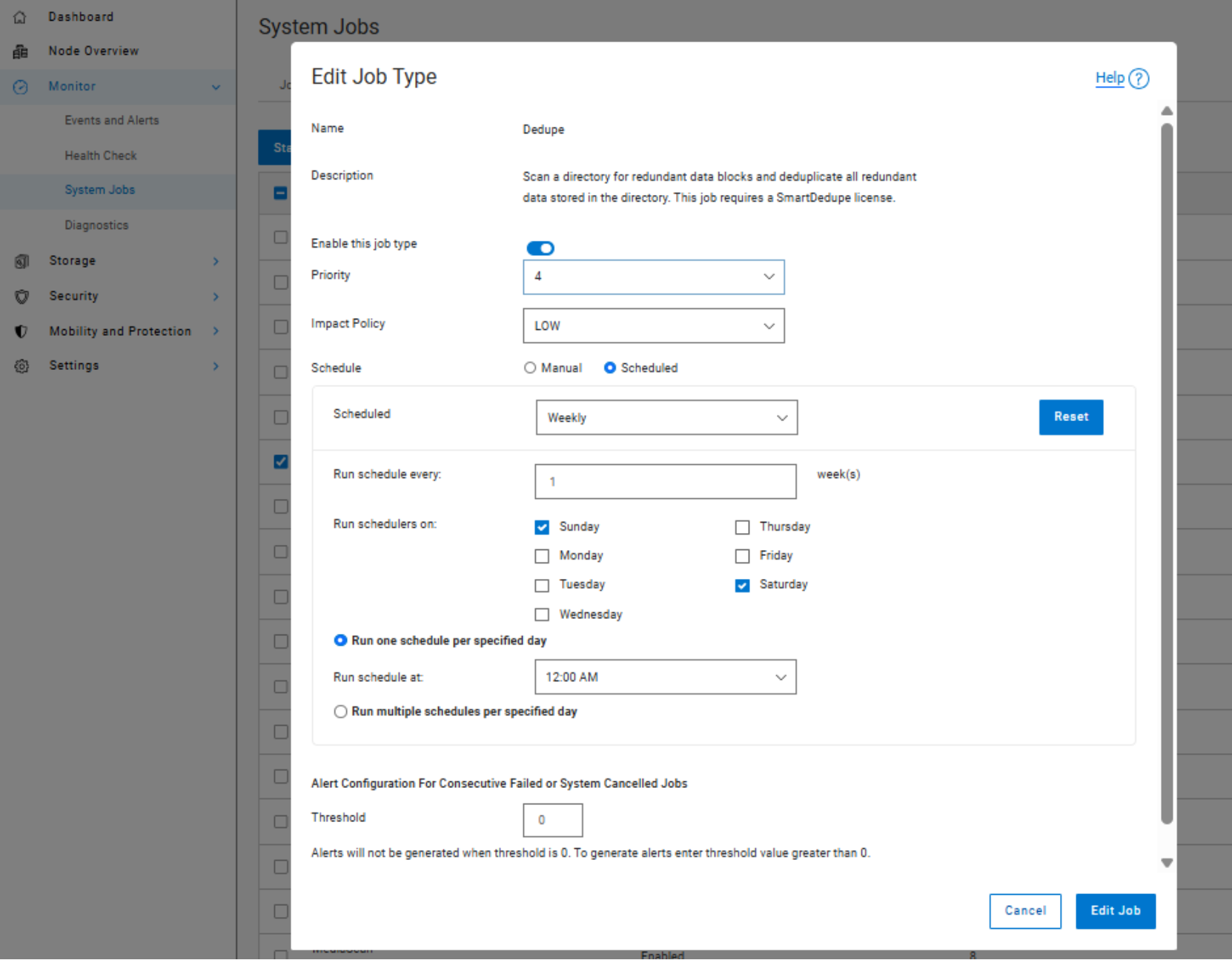
Figure 41. SmartDedupe job configuration and scheduling using the OneFS WebUI
Dell Technologies recommends scheduling and running deduplication during off-hours, when the rate of data change on the cluster is low. If clients are continually writing to files, the amount of space saved by deduplication will be minimal because the deduplicated blocks are constantly being removed from the shadow store.
For most clusters, after the initial deduplication job has completed, the recommendation is to run an incremental deduplication job once every two weeks.
SmartDedupe monitoring and reporting
Deduplication efficiency reporting
OneFS provides several command-line and WebUI tools to help assess the benefits of deduplication across a cluster:
- The amount of disk space saved by SmartDedupe can be determined by viewing the cluster capacity usage chart and deduplication reports summary table in the WebUI. The cluster capacity chart and deduplication reports can be found by browsing to ‘Storage > Data Reduction’ or ‘File System Management > Deduplication > Summary’ in OneFS 9.14 and earlier releases.
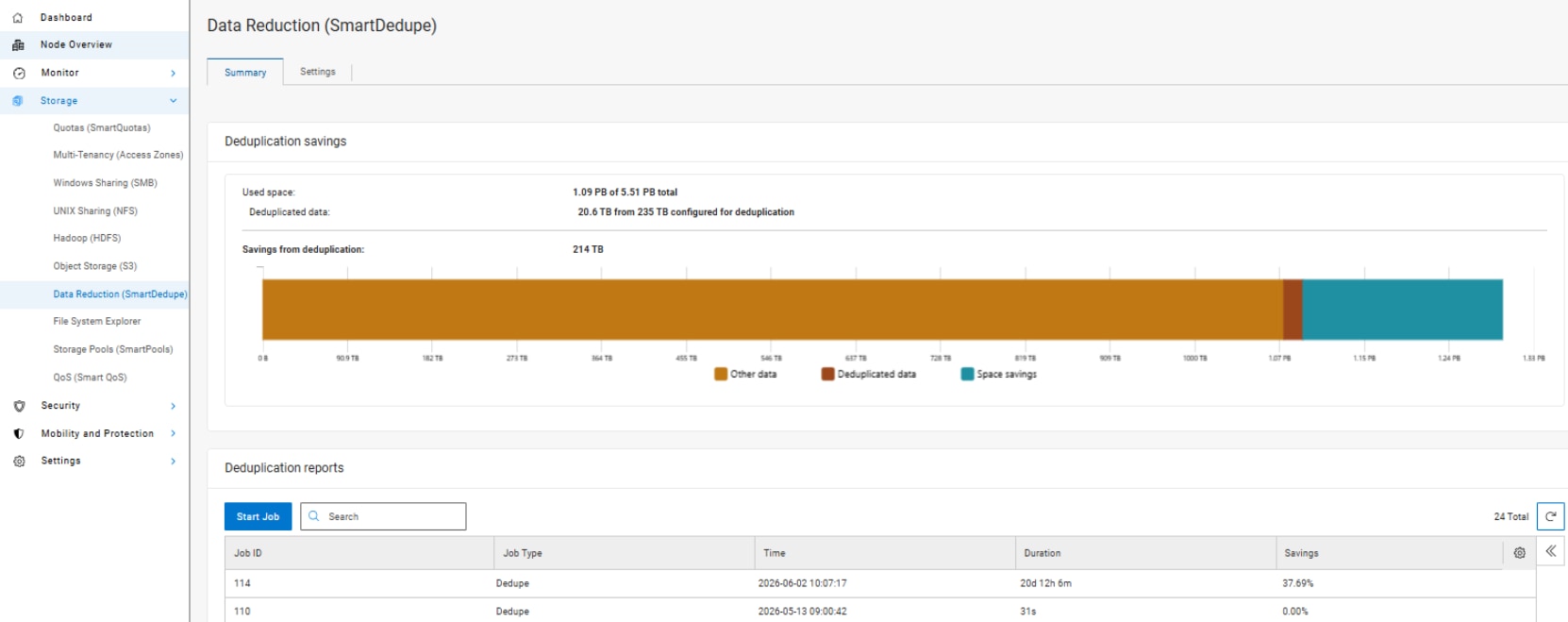
Figure 42. SmartDedupe cluster capacity savings WebUI chart
- In addition to the bar chart and accompanying statistics (above), which graphically represents the data set and space efficiency in actual capacity terms, the dedupe job report overview field also displays the SmartDedupe savings as a percentage.
SmartDedupe space efficiency metrics are also provided by the ‘isi dedupe stats’ CLI command:
# isi dedupe stats
Cluster Physical Size: 86.14T
Cluster Used Size: 3.43T
Logical Size Deduplicated: 4.01T
Logical Saving: 3.65T
Estimated Size Deduplicated: 5.42T
Estimated Physical Saving: 4.93T
SmartDedupe Efficiency Statistics from the CLI
- The most comprehensive of the data reduction reporting CLI utilities is the ‘isi statistics data-reduction’ command, which reports deduplication capacity savings and the deduplication ratio. For example:
# isi statistics data-reduction
Recent Writes Cluster Data Reduction
(5 mins)
--------------------- ------------- ----------------------
Logical data 6.18M 6.02T
Zero-removal saved 0 -
Deduplication saved 56.00k 3.65T
Compression saved 4.16M 1.96G
Preprotected physical 1.96M 2.37T
Protection overhead 5.86M 910.76G
Protected physical 7.82M 3.40T
Zero removal ratio 1.00 : 1 -
Deduplication ratio 1.01 : 1 2.54 : 1
Compression ratio 3.12 : 1 1.02 : 1
Data reduction ratio 3.15 : 1 2.54 : 1
Efficiency ratio 0.79 : 1 1.77 : 1
--------------------- ------------- ----------------------
The ‘recent writes’ data to the left of the output provides precise statistics for the five-minute period prior to running the command. By contrast, the ‘cluster data reduction’ metrics on the right of the output are slightly less real-time but reflect the overall data and efficiencies across the cluster.
- In OneFS 8.2.1 and later, SmartQuotas reports the capacity saving from deduplication, and data reduction in general, as a storage efficiency ratio. SmartQuotas reports efficiency as a ratio across the desired data set as specified in the quota path field. The efficiency ratio is for the full quota directory and its contents, including any overhead, and reflects the net efficiency of compression and deduplication. On a cluster with licensed and configured SmartQuotas, this efficiency ratio can be easily viewed from the WebUI by browsing to ‘Storage > Quotas’, or ‘File System > SmartQuotas > Quotas and Usage’ in OneFS 9.14 and earlier releases.
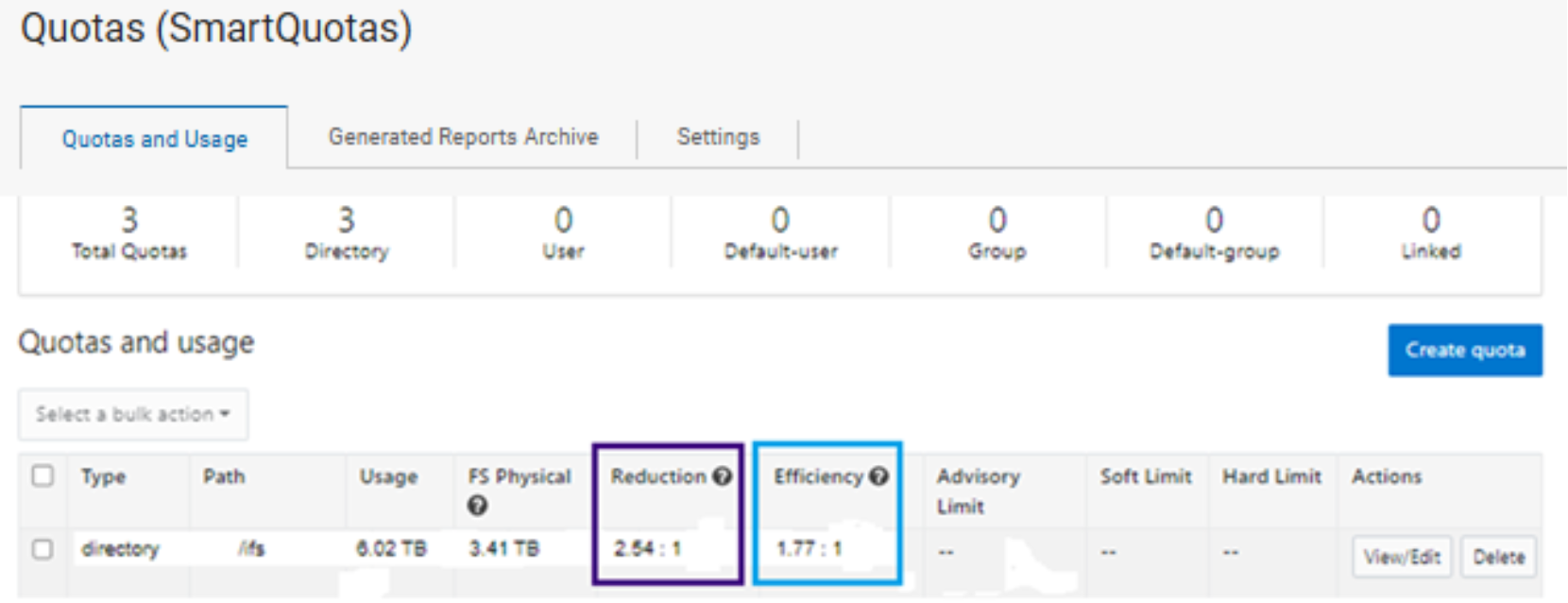
Figure 43. OneFS WebUI SmartQuotas quotas and usage status detailing efficiency and data reduction ratio
- Similarly, the same data can be accessed from the OneFS command line by the ‘isi quota quotas list’ CLI command. For example:

Figure 44. Sample isi quota quotas list Output
- Example output from the ‘isi quota quotas list’ CLI command.More detail, including both the physical (raw) and logical (effective) data capacities, is also available using the ‘isi quota quotas view <path> <type>’ CLI command. For example:
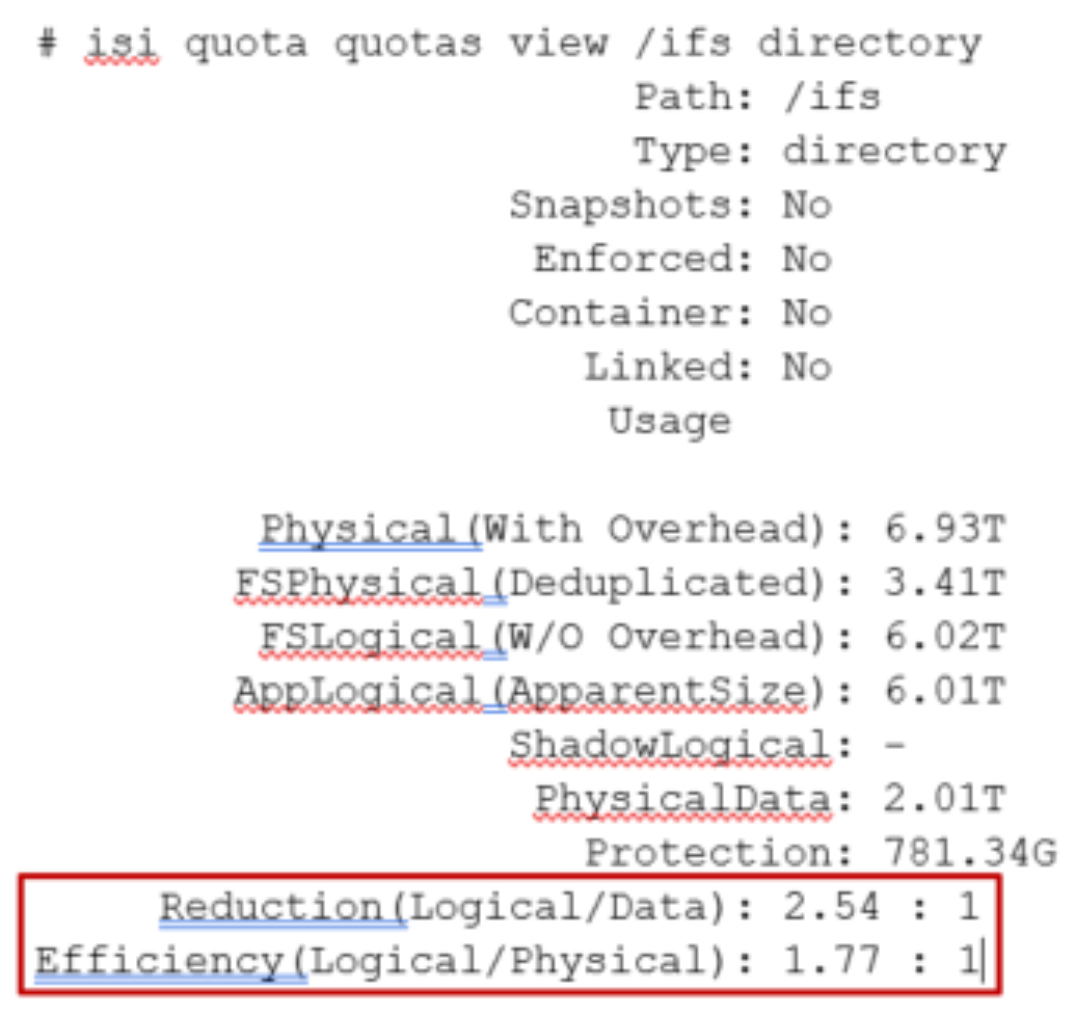
Figure 45. Example output from the ‘isi quota quotas view’ CLI command
To configure SmartQuotas for data efficiency reporting, create a directory quota at the top-level file system directory of interest, for example /ifs. Creating and configuring a directory quota is a simple procedure and can be performed from the WebUI, as follows:
Browse to ‘Storage > Quotas’, or ‘File System > SmartQuotas > Quotas and Usage’ in OneFS 9.14 and earlier releases,.and select ‘Create a Quota’. In the create pane, field, set the Quota type to ‘Directory quota’, add the preferred top-level path to report on, select ‘File system logical size’ for Quota Accounting, and set the Quota Limits to ‘Track storage without specifying a storage limit’. Finally, select the ‘Create Quota’ button to confirm the configuration and activate the new directory quota.
Figure 46. OneFS WebUI SmartQuotas directory quota configuration
The efficiency ratio is a single, current-in time efficiency metric that is calculated per quota directory and includes the sum of SmartDedupe plus inline data reduction. This is in contrast to a history of stats over time, as reported in the ‘isi statistics data-reduction’ CLI command output, described above. As such, the efficiency ratio for the entire quota directory will reflect what is there.
- The OneFS WebUI cluster dashboard also now displays a storage efficiency tile, which shows physical and logical space utilization histograms and reports the capacity saving from inline data reduction as a storage efficiency ratio. This dashboard view is displayed by default when opening the OneFS WebUI in a browser and can be easily accessed by browsing to ‘Dashboard‘, or ‘File System > Dashboard > Cluster Overview.
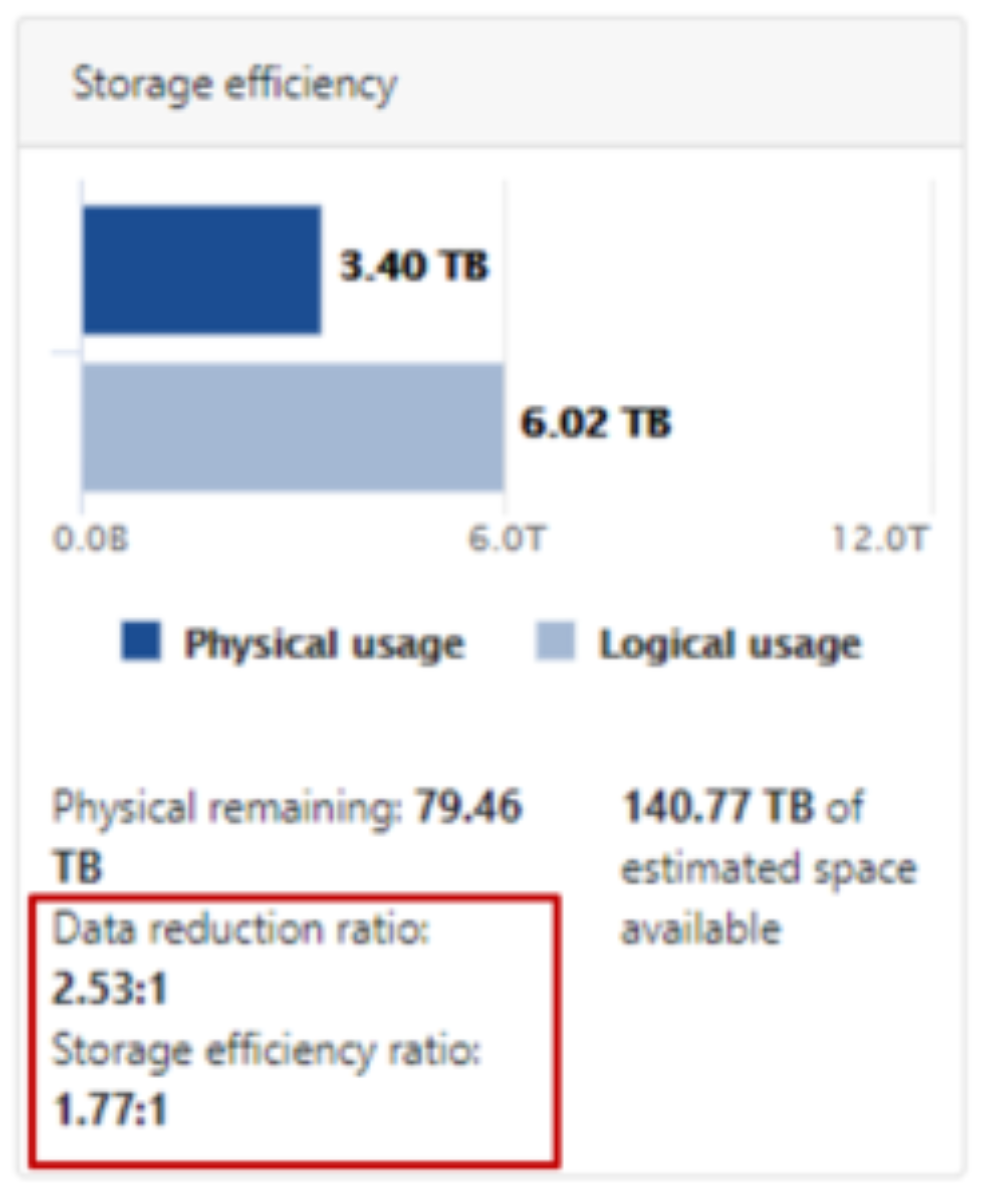
Figure 47. OneFS Storage Efficiency Dashboard
Figure 48. OneFS WebUI cluster status dashboard – storage efficiency summary tile
- Similarly, the ‘isi status’ CLI command output includes a ‘Data Reduction’ field:
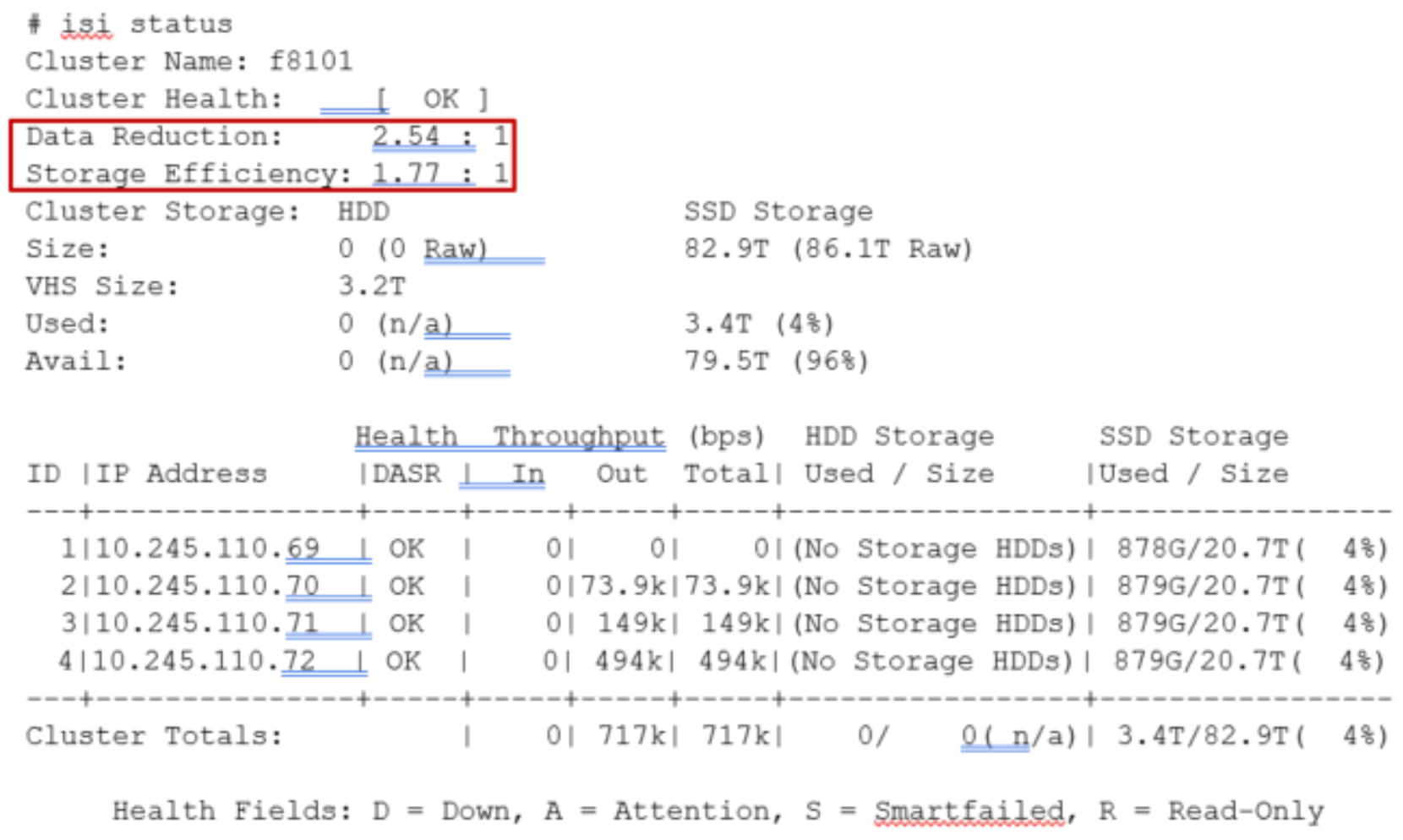
Figure 49. Example output from the ‘isi status’ CLI command showing data reduction and storage efficiency ratios.
SmartDedupe job progress
The Job Engine parallel execution framework provides comprehensive run time and completion reporting for the deduplication job.
While SmartDedupe is underway, job status is available at a glance in the progress column in the active jobs table. This information includes the number of files, directories, and blocks that have been scanned, skipped, and sampled, and any errors that may have been encountered.
Additional progress information is provided in an Active Job Details status update, which includes an estimated completion percentage based on the number of logical inodes (LINs) that have been counted and processed.
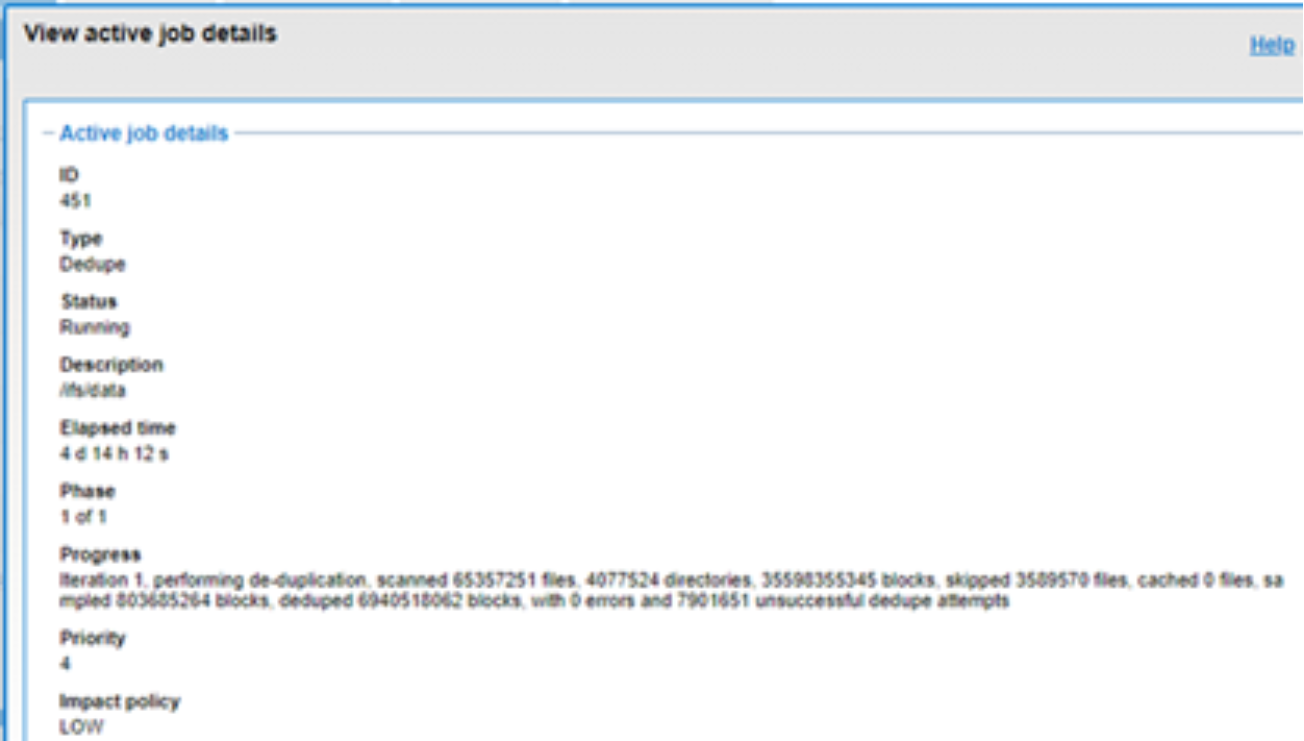
Figure 50. Example of active job status update
SmartDedupe job reports
After the SmartDedupe job has run to completion, or has been terminated, a full dedupe job report is available. This can be accessed from the WebUI by browsing to ‘Monitor > System Jobs > Job Reports’, or ‘Cluster Management > Job Operations > Job Reports' in OneFS 9.14 and earlier releases, and selecting ‘View Details’ action button on the desired Dedupe job line item.
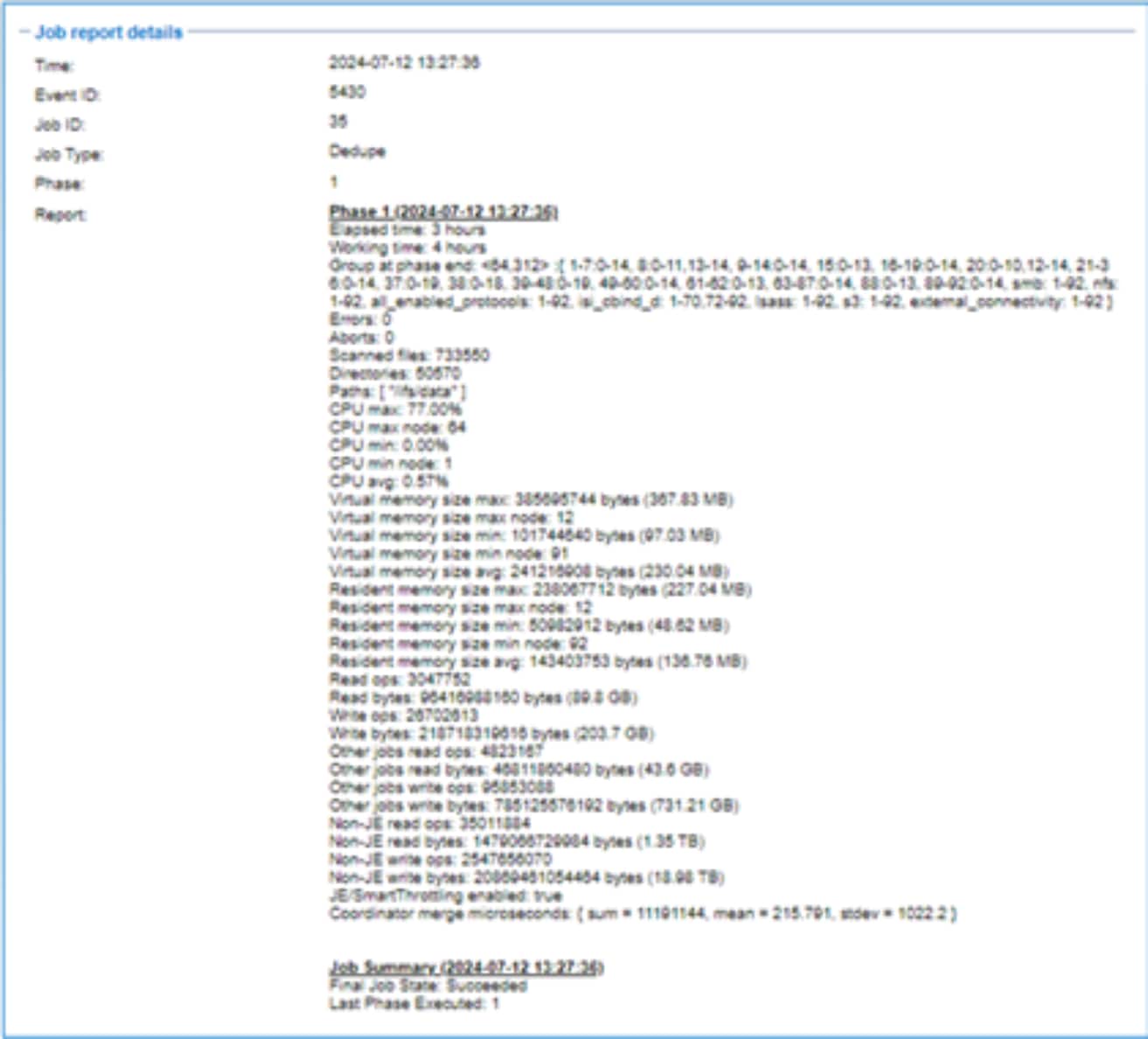
Figure 51. Example of WebUI dedupe job report
The job report contains the following relevant dedupe metrics.
Table 9. Dedupe job report statistics
|
Report field |
Description of metric |
|
Start time |
When the dedupe job started. |
|
End time |
When the dedupe job finished. |
|
Scanned blocks |
Total number of blocks scanned under configured path(s). |
|
Sampled blocks |
Number of blocks that OneFS created index entries for. |
|
Created dedupe requests |
Total number of dedupe requests created. A dedupe request gets created for each matching pair of data blocks. For example, three data blocks all match, two requests are created: One request to pair file1 and file2 together, the other request to pair file2 and file3 together. |
|
Successful dedupe requests |
Number of dedupe requests that completed successfully. |
|
Failed dedupe requests |
Number of dedupe requests that failed. If a dedupe request fails, it does not mean that the also job failed. A deduplication request can fail for any number of reasons. For example, the file might have been modified since it was sampled. |
|
Skipped files |
Number of files that were not scanned by the deduplication job. The primary reason is that the file has already been scanned and has not been modified since. Another reason for a file to be skipped is if it is less than 32KB in size. Such files are considered too small and do not provide enough space saving benefit to offset the fragmentation they will cause. |
|
Index entries |
Number of entries that exist in the index. |
|
Index lookup attempts |
Cumulative total number of lookups that have been done by prior and current deduplication jobs. A lookup is when the deduplication job attempts to match a block that has been indexed with a block that hasn’t been indexed. |
|
Index lookup hits |
Total number of lookup hits that have been done by earlier deduplication jobs plus the number of lookup hits done by this deduplication job. A hit is a match of a sampled block with a block in index. |
Dedupe job reports are also available from the CLI by the isi job reports view <job_id> command.
Note: From an execution and reporting stance, the Job Engine considers the ‘dedupe’ job to contain a single process or phase. The Job Engine events list will report that Dedupe Phase1 has ended and succeeded. This indicates that an entire SmartDedupe job, including all four internal dedupe phases (sampling, duplicate detection, block sharing, and index update), has successfully completed.
For example:
# isi job events list --job-type dedupe
Time Message
------------------------------------------------------
2020-02-01T13:39:32 Dedupe[1955] Running
2020-02-01T13:39:32 Dedupe[1955] Phase 1: begin dedupe
2020-02-01T14:20:32 Dedupe[1955] Phase 1: end dedupe
2020-02-01T14:20:32 Dedupe[1955] Phase 1: end dedupe
2020-02-01T14:20:32 Dedupe[1955] Succeeded
Example of command line (CLI) dedupe job events list
For deduplication reporting across multiple OneFS clusters, SmartDedupe is also integrated with InsightIQ cluster reporting and analysis product. A report detailing the space savings delivered by deduplication is available from InsightIQ’s File Systems Analytics module.
Space savings estimation with the SmartDedupe assessment job
To complement the actual Dedupe job, a dry run Dedupe Assessment job is also provided to help estimate the amount of space savings that will be seen by running deduplication on a particular directory or set of directories. The dedupe assessment job reports a total potential space savings. The dedupe assessment does not differentiate the case of a fresh run from the case where a previous dedupe job has already done some sharing on the files in that directory. The assessment job does not provide the incremental differences between instances of this job. Dell Technologies recommends that the user should run the assessment job once on a specific directory before starting an actual dedupe job on that directory.
The assessment job runs similarly to the actual dedupe job but uses a separate configuration. It also does not require a product license and can be run prior to purchasing SmartDedupe in order to determine whether deduplication is appropriate for a particular data set or environment.
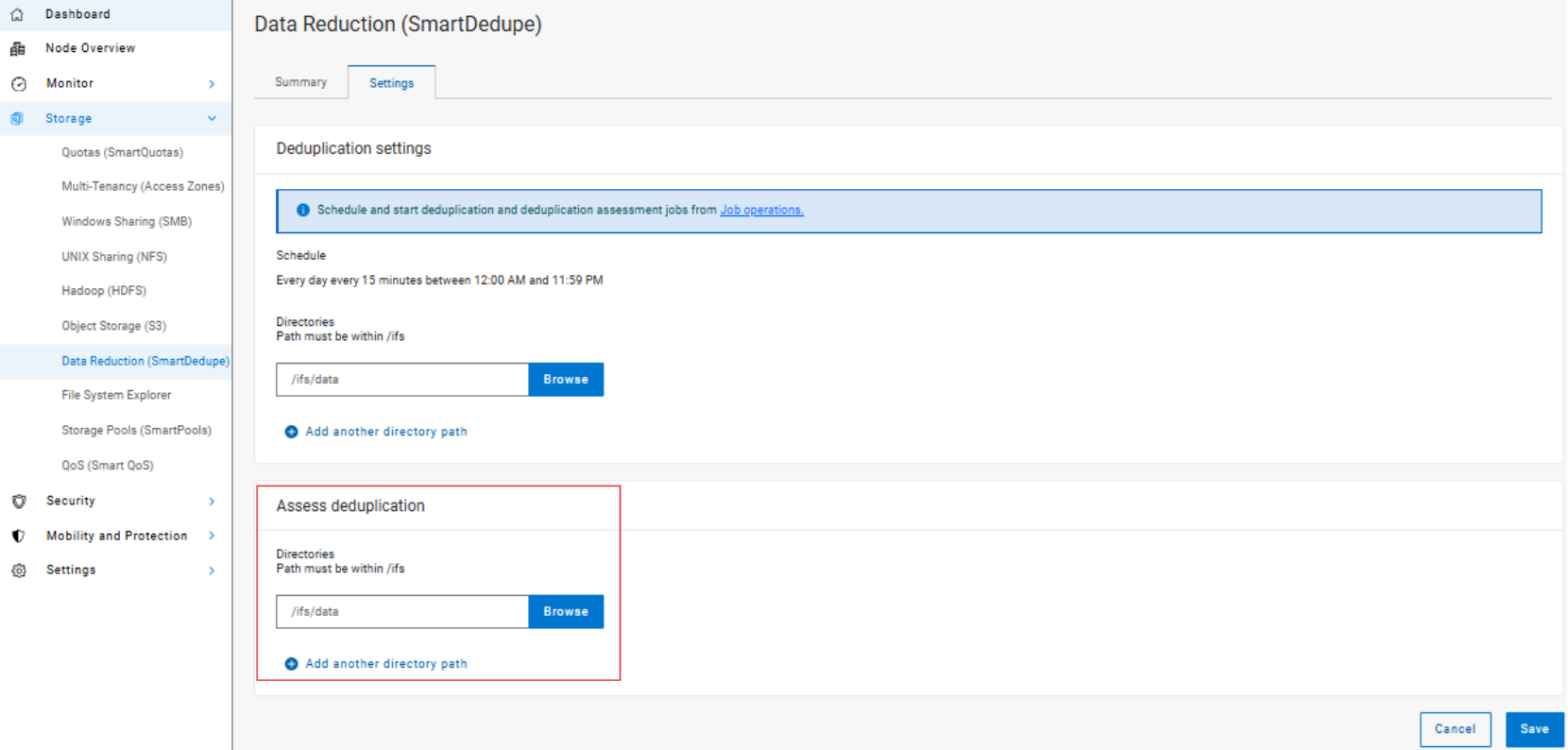
Figure 52. Deduplication assessment job configuration
The dedupe assessment job uses a separate index table. For efficiency, the assessment job also samples fewer candidate blocks than the main dedupe job and does not actually perform deduplication. Using the sampling and consolidation statistics, the job provides a report which estimates the total dedupe space savings in bytes.
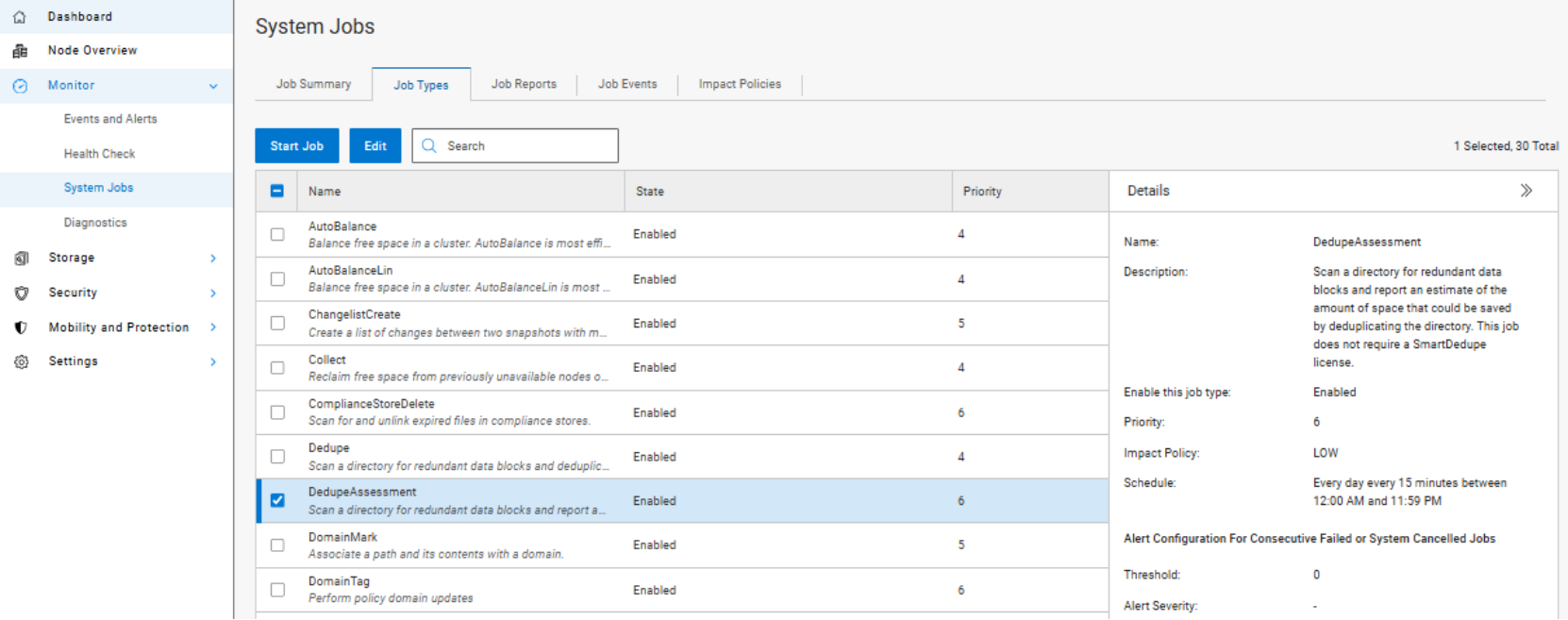
Figure 53. Dedupe assessment job control using the OneFS WebUI
Performance with SmartDedupe
As with most things in life, deduplication is a compromise. In order to gain increased levels of storage efficiency, additional cluster resources (CPU, memory, and disk IO) are used to find and execute the sharing of common data blocks.
Another important performance impact consideration with dedupe is the potential for data fragmentation. After deduplication, files that previously enjoyed contiguous on-disk layout will often have chunks spread across less optimal file system regions. This can lead to slightly increased latencies when accessing these files directly from disk, rather than from cache. To help reduce this risk, SmartDedupe will not share blocks across node pools or data tiers and will not attempt to deduplicate files smaller than 32KB in size. On the other end of the spectrum, the largest contiguous region that will be matched is 4MB.
Because deduplication is a data efficiency product rather than performance enhancing tool, in most cases the consideration will be around cluster impact management. This is from both the client data access performance front, since, by design, multiple files will be sharing common data blocks, and also from the dedupe job execution perspective, as additional cluster resources are consumed to detect and share commonality.
The first deduplication job run will often take a substantial amount of time to run, since it must scan all files under the specified directories to generate the initial index and then create the appropriate shadow stores. However, deduplication job performance will typically improve significantly on the second and subsequent job runs (incrementals), once the initial index and the bulk of the shadow stores have already been created.
If incremental deduplication jobs do take a long time to complete, this is most likely indicative of a data set with a high rate of change. If a deduplication job is paused or interrupted, it will automatically resume the scanning process from where it left off.
As mentioned previously, deduplication is a long running process that involves multiple job phases that are run iteratively. SmartDedupe typically processes around 1TB of data per day, per node.
SmartDedupe licensing
SmartDedupe is included as a core component of OneFS but requires a valid product license key in order to activate. This license key can be purchased through your Dell account team. An unlicensed cluster will show a SmartDedupe warning until a valid product license has been purchased and applied to the cluster.
License keys can be easily added in the ‘Activate License’ section of the OneFS WebUI, accessed by browsing to ‘Settings > Dynamic Licensing’, or ‘Cluster Management > Licensing’ in OneFS 9.14 and earlier releases.
The SmartDedupe dry-run estimation job can be run without any licensing requirements, allowing an assessment of the potential space savings that a dataset might yield before making the decision to purchase the full product.
Note: The PowerScale H700/7000 and A300/3000 nodes ship with a zero-cost SmartDedupe license and are supported on OneFS 9.2.1 and later. On addition of an H700/7000 or A300/3000 nodepool to an existing cluster without a SmartDedupe license, SmartDedupe will automatically be available for configuration and use across the entire cluster. An alert will be generated warning of unlicensed nodes, but this can be safely ignored and quiesced.
Deduplication efficiency
Deduplication can significantly increase the storage efficiency of data. However, the actual space savings will vary depending on the specific attributes of the data itself. As mentioned above, the deduplication assessment job can be run to help predict the likely space savings that deduplication would provide on a given data set.
Virtual machines files often contain duplicate data, much of which is rarely modified. Deduplicating similar OS type virtual machine images (such as VMware VMDK files that have been block-aligned) can significantly decrease the amount of storage space consumed. However, as noted previously, the potential for performance degradation as a result of block sharing and fragmentation should be carefully considered first.
SmartDedupe does not deduplicate across files that have different protection settings. For example, if two files share blocks, but file1 is parity protected at +2:1, and file2 has its protection set at +3, SmartDedupe will not attempt to deduplicate them. This ensures that all files and their constituent blocks are protected as configured. Also, SmartDedupe will not deduplicate files that are stored on different SmartPools storage tiers or node-pools. For example, if file1 and file2 are stored on tier 1 and tier 2 respectively, and tier1 and tier2 are both protected at 2:1, OneFS will not deduplicate them. This helps guard against performance asynchronicity, where some of a file’s blocks could live on a different tier, or class of storage, from the others.
Below are some examples of typical space reclamation levels that have been achieved with SmartDedupe.
Note: These dedupe space savings values are provided solely as rough guidance. Since no two data sets are alike (unless they are replicated), actual results can vary considerably from these examples.
Table 10. Typical workload space savings with SmartDedupe
|
Workflow/data type |
Typical space savings |
|
Virtual Machine Data |
35% |
|
Home Directories / File Shares |
25% |
|
Email Archive |
20% |
|
Engineering Source Code |
15% |
|
Media Files |
10% |
SmartDedupe and OneFS feature integration
SmartDedupe use cases
SmartDedupe and OneFS storage utilization
SmartDedupe best practices
SmartDedupe considerations
Small file storage efficiency
Introduction
Architecture
OneFS Small File Storage Efficiency is predicated on the notion of containerization of files, and consists of six main components:
- File pool configuration policy
- SmartPools Job
- Shadow Store
- Configuration control path
- File packing and data layout infrastructure
- Defragmenter
The way data is laid out across the nodes and their respective disks is fundamental to a cluster’s functionality. OneFS is a single file system providing one vast, scalable namespace—free from multiple volume concatenations or single points of failure. As such, a OneFS powered cluster can support data sets with hundreds of billions of small files all within the same file system.
OneFS lays data out across multiple nodes allowing files to benefit from the resources (spindles and cache) of up to twenty nodes. Reed-Solomon erasure coding is used to protecting at the file-level, enabling the cluster to recover data quickly and efficiently, and providing exceptional levels storage utilization. OneFS provides protection against up to four simultaneous component failures respectively. A single failure can be as little as an individual disk or an entire node.
Various mirroring options are also available, and OneFS typically uses these to protect metadata and small files. Striped, distributed metadata coupled with continuous auto-balancing affords OneFS near linear performance characteristics, regardless of the capacity utilization of the system. Both metadata and file data are spread across the entire cluster keeping the cluster balanced at all times.
The OneFS file system employs a native block size of 8KB, and sixteen of these blocks are combined to create a 128KB stripe unit. Files larger than 128K are protected with error-correcting code parity blocks (FEC) and striped across nodes. This allows files to use the combined resources of up to twenty nodes, based on per-file policies.
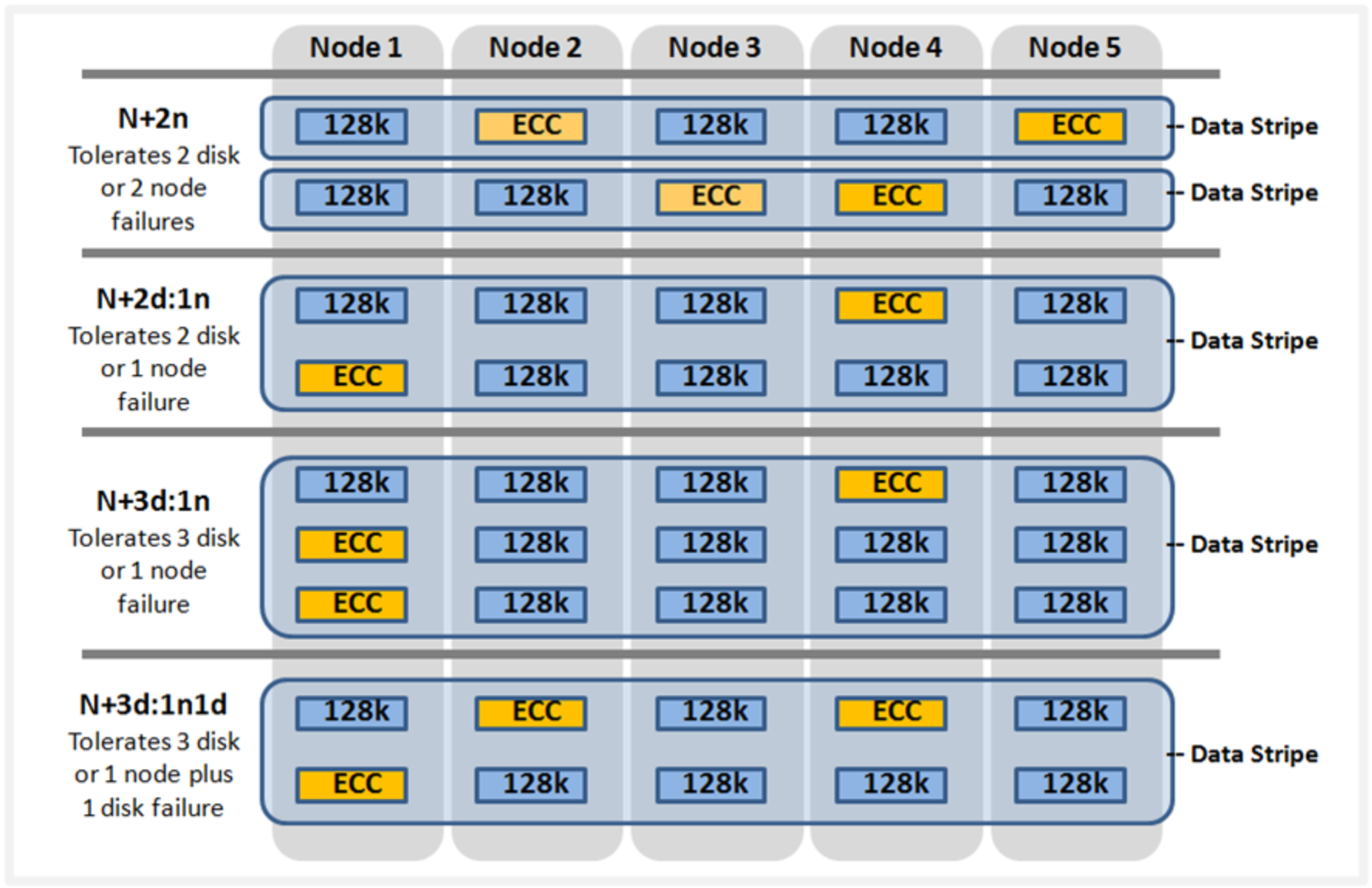
Figure 54. OneFS on-disk FEC protection
Files smaller than 128KB are unable to fill a stripe unit, so are mirrored rather than FEC protected, resulting in a less efficient on-disk footprint. For most data sets, this is rarely an issue, since the presence of a smaller number of larger FEC protected files offsets the mirroring of the small files.
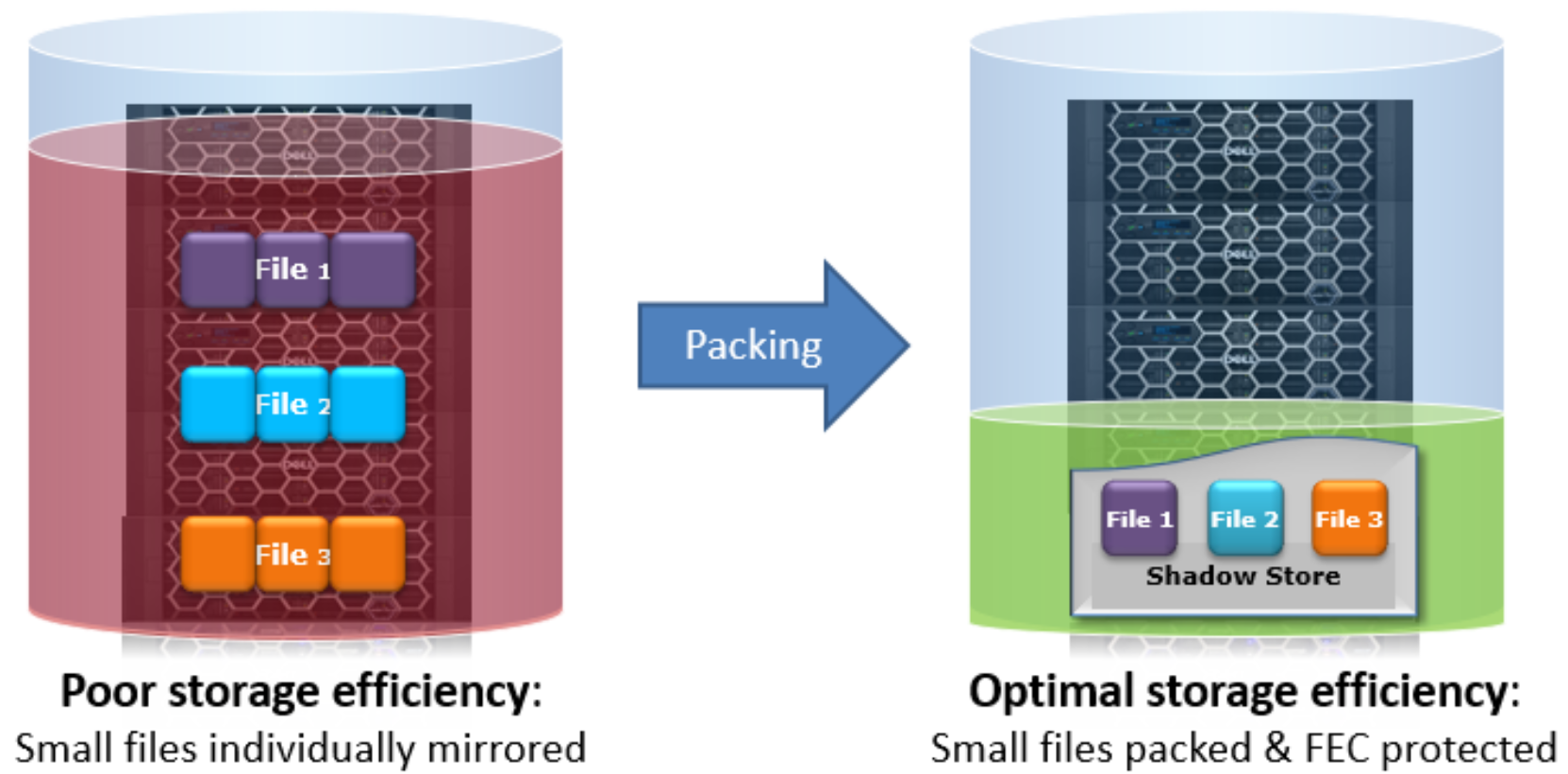
Figure 55. OneFS small file containerization
For example, if a file is 24KB in size, it will occupy three 8KB blocks. If it has two mirrors for protection, there will be a total of nine 8KB blocks, or 72KB, that will be needed to protect and store it on disk. Clearly, being able to pack several of these small files into a larger, striped, and parity protected container will provide a great space benefit.
Also, files in the 150KB to 300KB range typically see utilization of around 50%, as compared to 80% or better when containerized with the OneFS Small File Storage Efficiency feature.
Under the hood, the small file packing has similarities to the OneFS file cloning process, and both operations use the same underlying infrastructure – the shadow store.
Shadow stores are similar to regular files, but do not contain all the metadata typically associated with regular file inodes. In particular, time-based attributes (creation time, modification time, and so on) are explicitly not maintained. The shadow stores for storage efficiency differ from existing shadow stores in a few ways in order to isolate fragmentation, to support tiering, and to support future optimizations which will be specific to single-reference stores.
Containerization is managed by the SmartPools job. This job typically runs by default on a cluster with a 10pm nightly schedule and a low impact management setting but can also be run manually on-demand. Also, the SetProtectPlus, SmartPoolsTree job, isi filepool apply, and the isi set command are also able to perform file packing.
File attributes indicate each file's pack state:
- packing_policy: container or native. This indicates whether the file meets the criteria set by your file pool policies and is eligible for packing. Container indicates that the file is eligible to be packed; native indicates that the file is not eligible to be packed. Your file pool policies determine this value. The value is updated by the SmartPools job.
- packing_target: container or native. This is how the system evaluates a file's eligibility for packing based on additional criteria such as file size, type, and age. Container indicates that the file should reside in a container shadow store. Native indicates that the file should not be containerized.
- packing_complete: complete or incomplete. This field establishes whether or not the target is satisfied. Complete indicates that the target is satisfied, and the file is packed. Incomplete indicates that the target is not satisfied, and the packing operation is not finished. It is worth noting that several healthcare archive applications can natively perform file containerization. In these cases, the benefits of OneFS small file efficiency will be negated.
Configuration and use
Monitoring and reporting
Defragmentation
When containerized files with shadow references are deleted, truncated, or overwritten it can leave unreferenced blocks in shadow stores. These blocks are later freed and can result in holes, which reduce the storage efficiency.
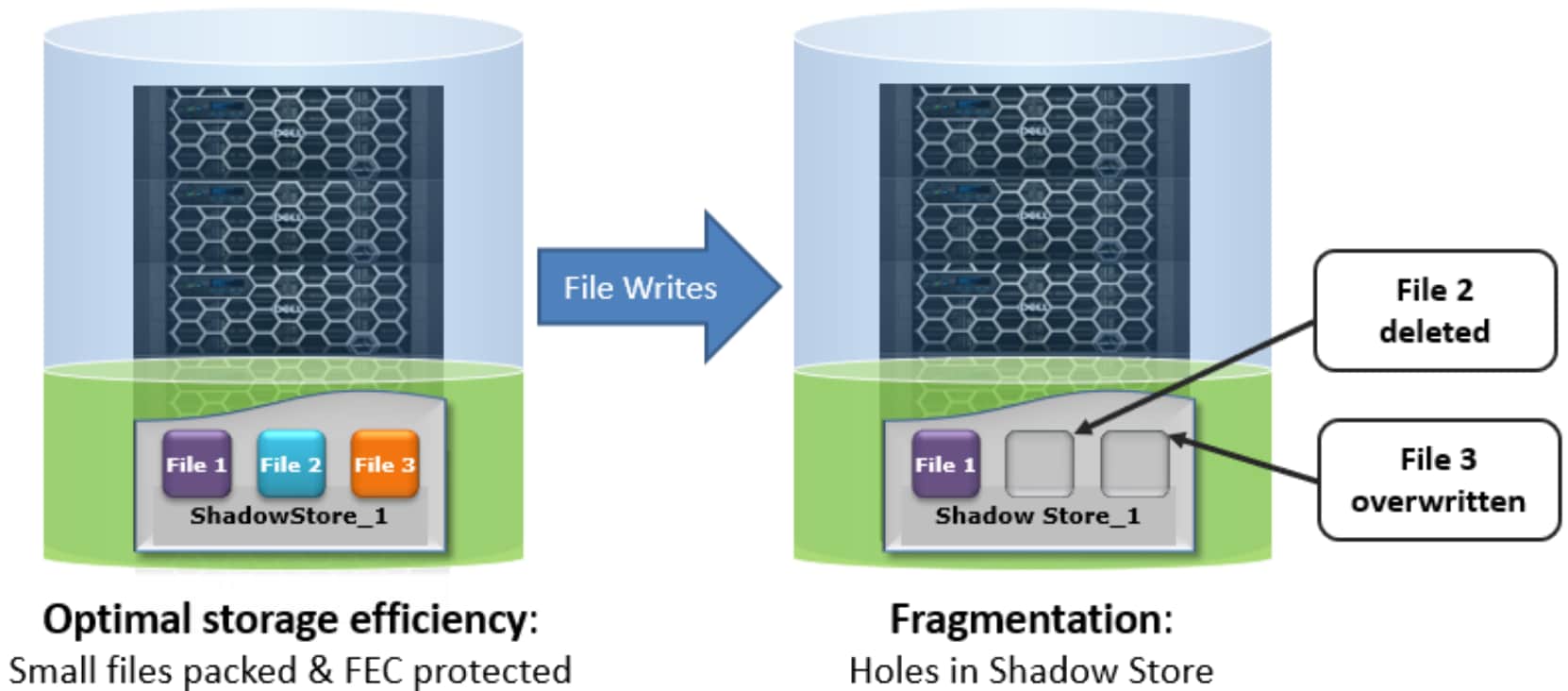
Figure 56. OneFS containerization with fragmentation
The actual efficiency loss depends on the protection level layout used by the shadow store. Smaller protection group sizes are more susceptible, as are containerized files, since all the blocks in containers have at most one referring file and the packed sizes (file size) are small.
In OneFS 8.2 and later, a shadow store defragmenter helps reduce fragmentation resulting of overwrites and deletes of files. This defragmenter is integrated into the ShadowStoreDelete job. The defragmentation process works by dividing each containerized file into logical chunks (~32MB each) and assessing each chunk for fragmentation.
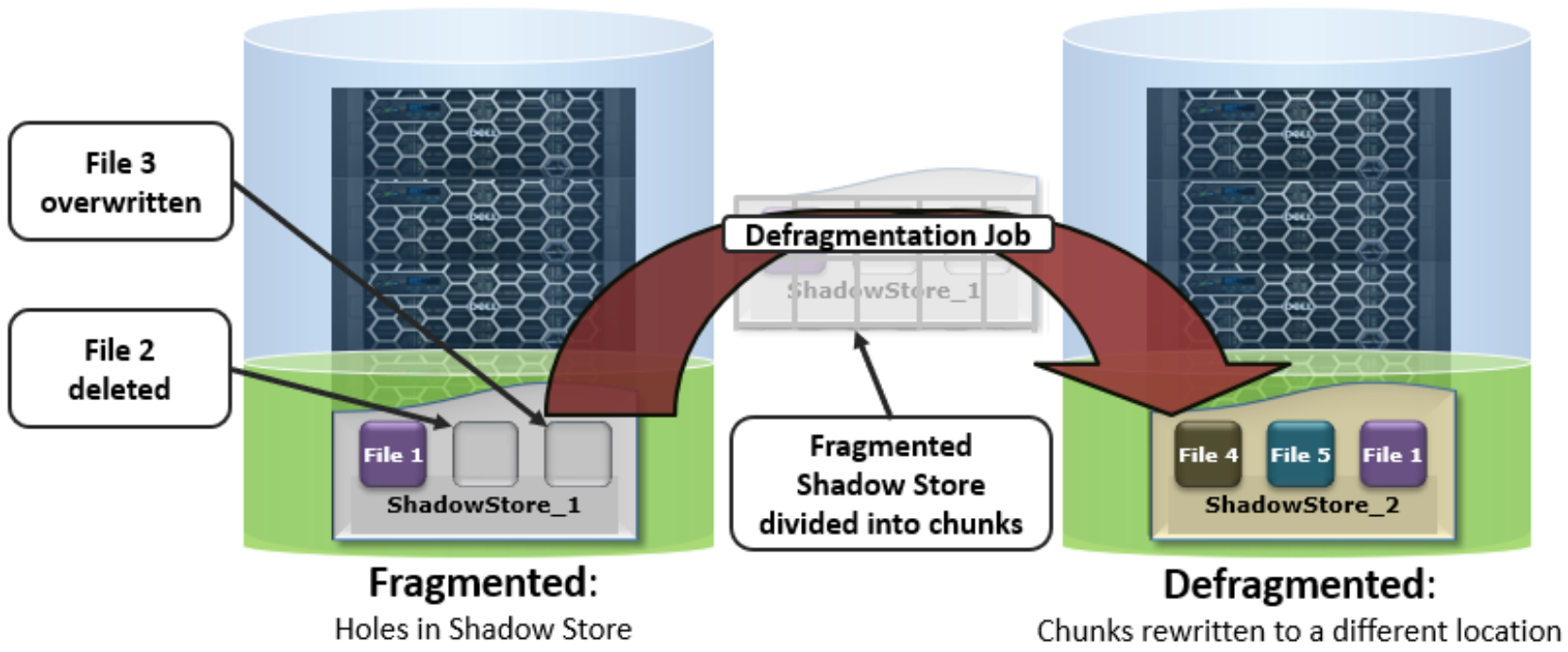
Figure 57. OneFS defragmentation
If the storage efficiency of a fragmented chunk is below target, that chunk is processed by evacuating the data to another location. The default target efficiency is 90% of the maximum storage efficiency available with the protection level used by the shadow store. Larger protection group sizes can tolerate a higher level of fragmentation before the storage efficiency drops below this threshold.
The ‘isi_sstore list’ CLI command can be run to report fragmentation and efficiency scores. For example:

Figure 58. Example output from the ‘isi_sstore list’ CLI command, showing an efficiency value and a fragmentation score
The fragmentation score is the ratio of holes in the data where FEC is still required, whereas the efficiency value is a ratio of logical data blocks to total physical blocks used by the shadow store. Fully sparse stripes do not need FEC so are not included. The guideline is that lower fragmentation scores and higher efficiency scores are better.
The defragmenter does not require a license to run and is disabled by default. It can be easily activated using the following CLI commands:
# isi_gconfig -t defrag-config defrag_enabled=true
Once enabled, the defragmenter can be started by the job engine’s ShadowStoreDelete job, either from the OneFS WebUI or by the following CLI command:
# isi job jobs start ShadowStoreDelete
The defragmenter can also be run in an assessment mode. This reports on and helps to determine the amount of disk space that will be reclaimed, without moving any actual data. The ShadowStoreDelete job can run the defragmenter in assessment mode but the statistics generated are not reported by the job. The isi_sstore CLI command has a ‘defrag’ option and can be run with the following syntax to generate a defragmentation assessment:
# isi_sstore defrag -d -a -c -p -v
…
Processed 1 of 1 (100.00%) shadow stores, space reclaimed 31M
Summary:
Shadows stores total: 1
Shadows stores processed: 1
Shadows stores skipped: 0
Shadows stores with error: 0
Chunks needing defrag: 4
Estimated space savings: 31M
Best practices
Considerations
Inode data inlining
Introduction
Architecture
Data inlining explicitly avoids allocation during write operations since small files do not require any data or protection blocks for their storage. Instead, the file content is stored directly in unused space within the file’s inode. This approach is also highly flash media friendly since it significantly reduces the quantity of writes to SSD drives.
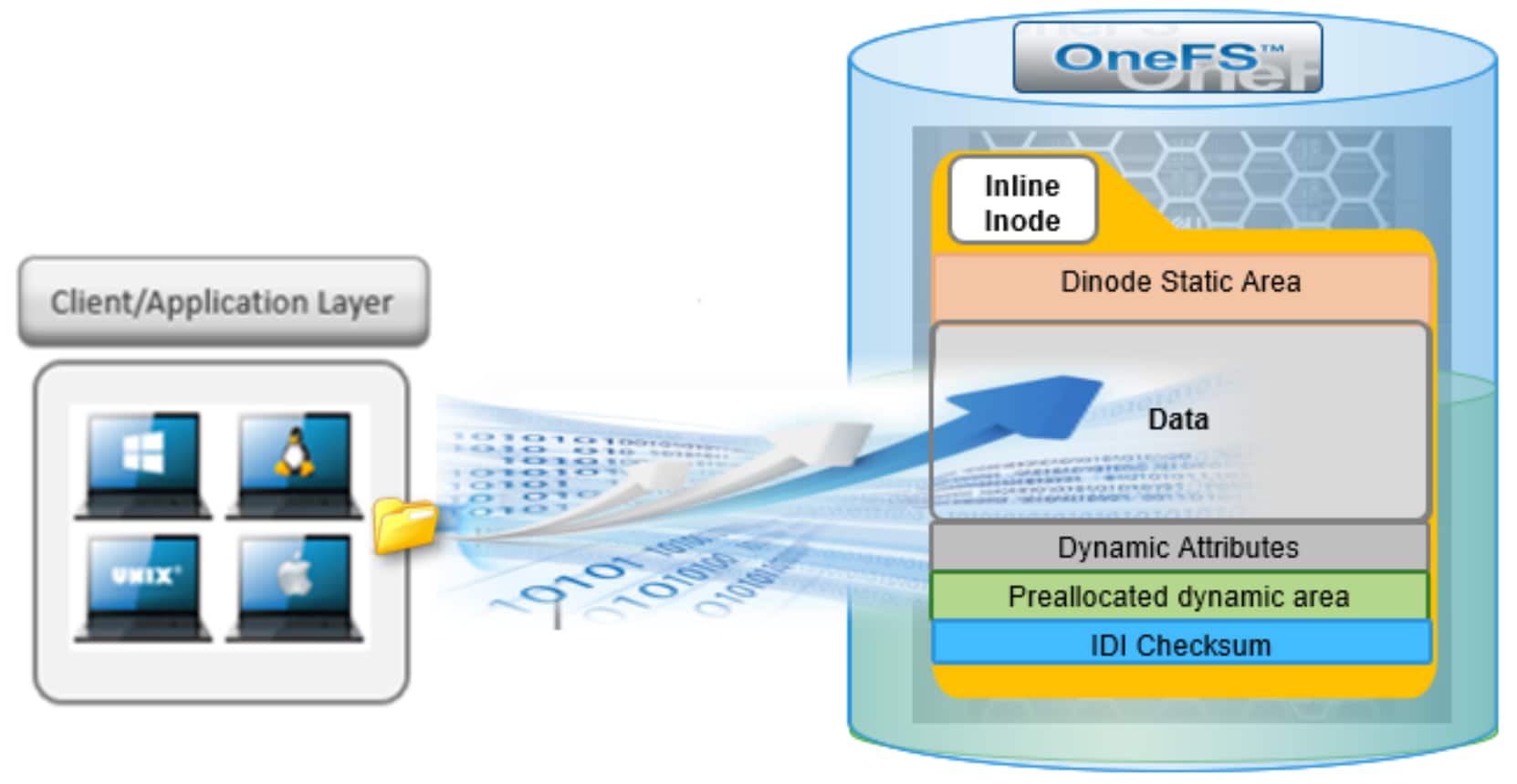
Figure 59. OneFS data inlining within an 8KB inode
OneFS inodes, or index nodes, are a special class of data structure that store file attributes and pointers to file data locations on disk. They serve a similar purpose to traditional UNIX file system inodes, but also have some additional, unique properties. Each file system object, whether it be a file, directory, symbolic link, alternate data stream container, shadow store, and so on, is represented by an inode.
Within OneFS, SSD node pools in F series all-flash nodes always use 8KB inodes. For hybrid and archive platforms, the HDD node pools are either 512 bytes or 8KB in size, and this is determined by the physical and logical block size of the hard drives or SSDs in a node pool. There are three different styles of drive formatting used in OneFS nodes, depending on the manufacturer’s specifications:
Table 11. Drive formatting characteristics
|
Drive formatting |
Characteristics |
|
Native 4Kn (native) |
A native 4Kn drive has both a physical and logical block size of 4096B. |
|
512n (native) |
A drive that has both physical and logical size of 512 is a native 512B drive. |
|
512e (emulated) |
A 512e (512 byte-emulated) drive has a physical block size of 4096, but a logical block size of 512B. |
If the drives in a cluster’s nodepool are native 4Kn formatted, by default the inodes on this nodepool will be 8KB in size. Alternatively, if the drives are 512e formatted, then inodes by default will be 512B in size. However, they can also be reconfigured to 8KB in size if the ‘force-8k-inodes’ setting is set to true.
A OneFS inode is composed of several sections. These include a static area, which is typically 134 bytes in size and contains fixed-width, commonly used attributes like POSIX mode bits, owner, and file size. Next, the regular inode contains a metatree cache, which is used to translate a file operation directly into the appropriate protection group. However, for inline inodes, the metatree is no longer required, so data is stored directly in this area instead. Following this is a preallocated dynamic inode area where the primary attributes, such as OneFS ACLs, protection policies, embedded B+ Tree roots, timestamps, and so on, are cached. And lastly a sector where the IDI checksum code is stored.
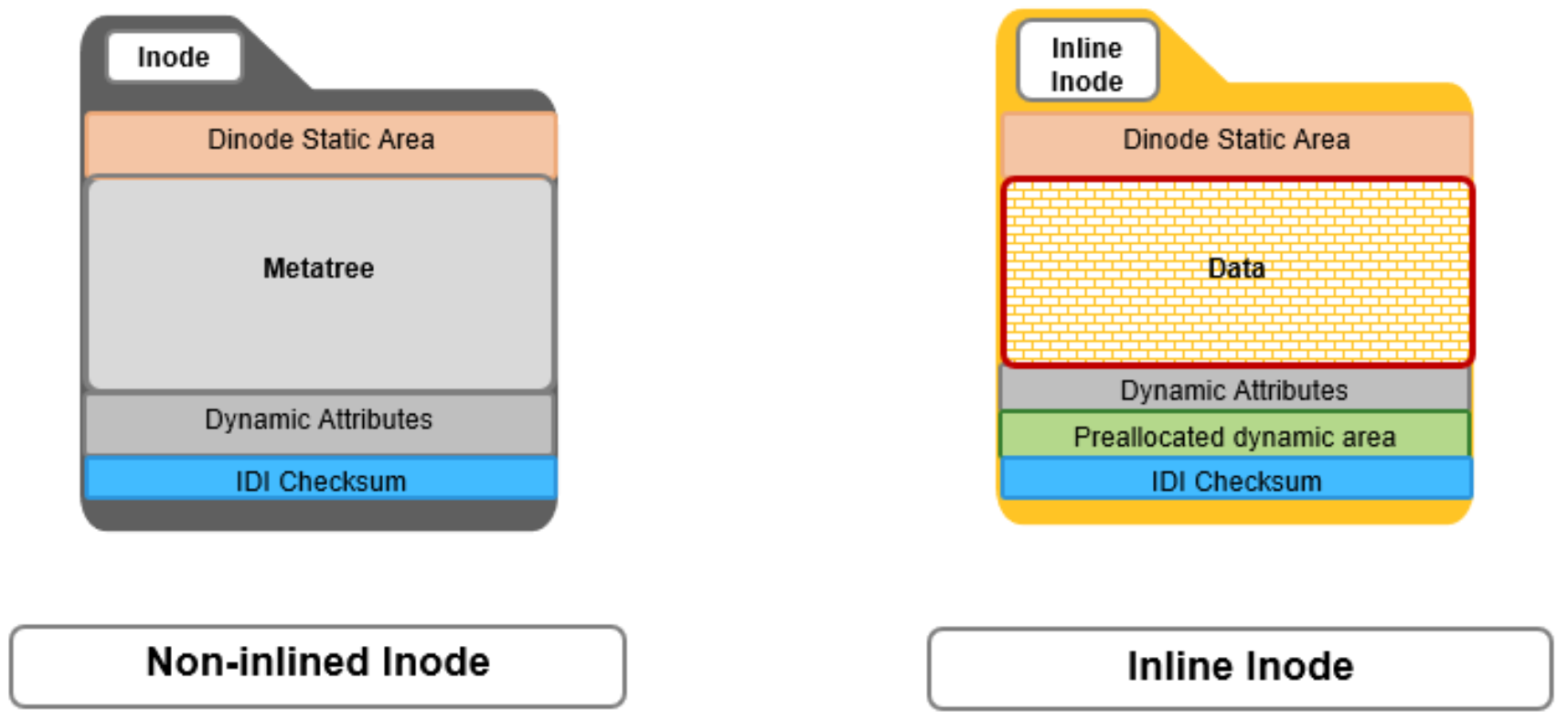
Figure 60. OneFS inode on-disk structure
Inline reads and writes
When a file write coming from the writeback cache, or coalescer, is determined to be a candidate for data inlining, it goes through a fast write path in BSW. Compression will be applied, if appropriate, before the inline data is written to storage.

Figure 61. Inline inode write path
The read path for inlined files is similar to that for regular files. However, if the file data is not already available in the caching layers, it is read directly from the inode, rather than from separate disk blocks as with regular files.

Figure 62. Inline inode read path
Inode protection
Operation and management
Monitoring and reporting
Feature integration
Efficiency reporting
OneFS 9.3 and later releases provide three CLI tools for validating and reporting the presence and benefits of data inlining, namely:
- The ‘isi statistics data-reduction’ CLI command has been enhanced to report inlined data metrics, including both a capacity saved and an inlined data efficiency ratio:
# isi statistics data-reduction
Recent Writes Cluster Data Reduction
(5 mins)
--------------------- ------------- ----------------------
Logical data 90.16G 18.05T
Zero-removal saved 0 -
Deduplication saved 5.25G 624.51G
Compression saved 2.08G 303.46G
Inlined data saved 1.35G 2.83T
Preprotected physical 82.83G 14.32T
Protection overhead 13.92G 2.13T
Protected physical 96.74G 26.28T
Zero removal ratio 1.00 : 1 -
Deduplication ratio 1.06 : 1 1.03 : 1
Compression ratio 1.03 : 1 1.02 : 1
Data reduction ratio 1.09 : 1 1.05 : 1
Inlined data ratio 1.02 : 1 1.20 : 1
Efficiency ratio 0.93 : 1 0.69 : 1
--------------------- ------------- ----------------------
Note: The effect of data inlining is not included in the data reduction ratio because it is not actually reducing the data in any way - just relocating it and protecting it more efficiently. However, data inlining is included in the overall storage efficiency ratio.
The ‘inline data saved’ value represents the count of files which have been inlined multiplied by 8KB (inode size). This value is required to make the compression ratio and data reduction ratio correct.
- The ‘isi_cstats’ CLI command now includes the accounted number of inlined files within /ifs, which is displayed by default in its console output.
# isi_cstats
Total files : 397234451
Total inlined files : 379948336
Total directories : 32380092
Total logical data : 18471 GB
Total shadowed data : 624 GB
Total physical data : 26890 GB
Total reduced data : 14645 GB
Total protection data : 2181 GB
Total inode data : 9748 GB
Current logical data : 18471 GB
Current shadowed data : 624 GB
Current physical data : 26878 GB
Snapshot logical data : 0 B
Snapshot shadowed data : 0 B
Snapshot physical data : 32768 B
Total inlined data savings : 2899 GB
Total inlined data ratio : 1.1979 : 1
Total compression savings : 303 GB
Total compression ratio : 1.0173 : 1
Total deduplication savings : 624 GB
Total deduplication ratio : 1.0350 : 1
Total containerized data : 0 B
Total container efficiency : 1.0000 : 1
Total data reduction ratio : 1.0529 : 1
Total storage efficiency : 0.6869 : 1
Raw counts
{ type=bsin files=3889 lsize=314023936 pblk=1596633 refs=81840315 data=18449 prot=25474 ibyte=23381504 fsize=8351563907072 iblocks=0 }
{ type=csin files=0 lsize=0 pblk=0 refs=0 data=0 prot=0 ibyte=0 fsize=0 iblocks=0 }
{ type=hdir files=32380091 lsize=0 pblk=35537884 refs=0 data=0 prot=0 ibyte=1020737587200 fsize=0 iblocks=0 }
{ type=hfile files=397230562 lsize=19832702476288 pblk=2209730024 refs=81801976 data=1919481750 prot=285828971 ibyte=9446188553728 fsize=17202141701528 iblocks=379948336 }
{ type=sdir files=1 lsize=0 pblk=0 refs=0 data=0 prot=0 ibyte=32768 fsize=0 iblocks=0 }
{ type=sfile files=0 lsize=0 pblk=0 refs=0 data=0 prot=0 ibyte=0 fsize=0 iblocks=0 }
- The ‘isi get’ CLI command can be used to determine whether a file has been inlined. The output reports a file’s logical ‘size’, but indicates that it consumes zero physical, data, and protection blocks. There is also an ‘inlined data’ attribute further down in the output that also confirms that the file is inlined.
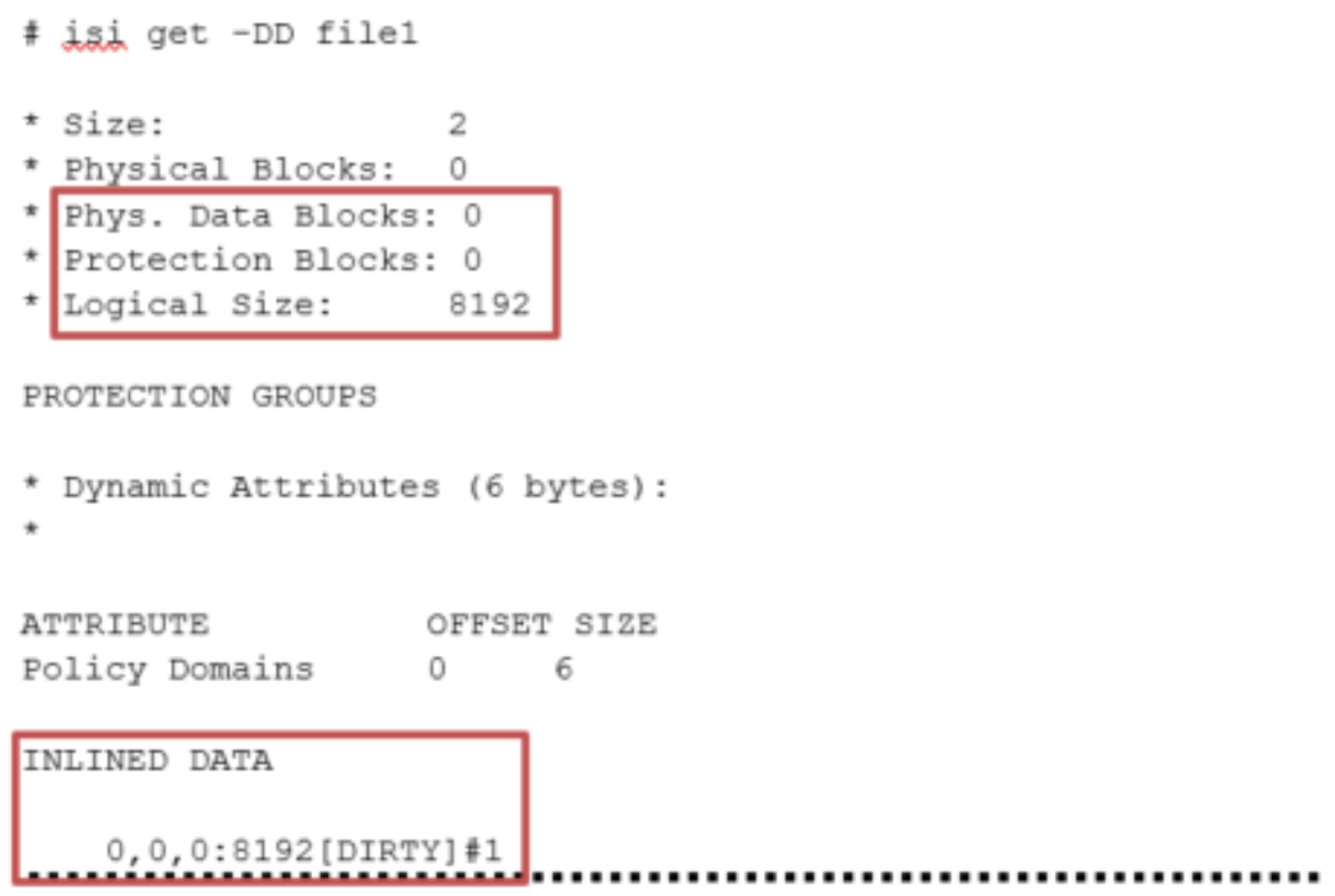
Figure 63. Example output from the ‘isi get’ CLI command, showing logical size and inlined data layout
Performance
The storage efficiency potential of inode inlining can be significant for data sets consisting of large numbers of small files, which would have required a separate inode and data blocks for housing these files prior to OneFS 9.3.
Latency-wise, the write performance for inlined file writes is typically comparable or slightly better as compared to regular files, because OneFS does not have to allocate extra blocks and protect them. This is also true for reads, too, since OneFS does not have to search for and retrieve any blocks beyond the inode itself. This also frees up space in the OneFS read caching layers, as well as on disk, in addition to requiring fewer CPU cycles.
The following diagram illustrates the levels of indirection a file access request takes to get to its data. Unlike a standard file, an inline file will skip the later stages of the path which involve the inode metatree redirection to the remote data blocks.
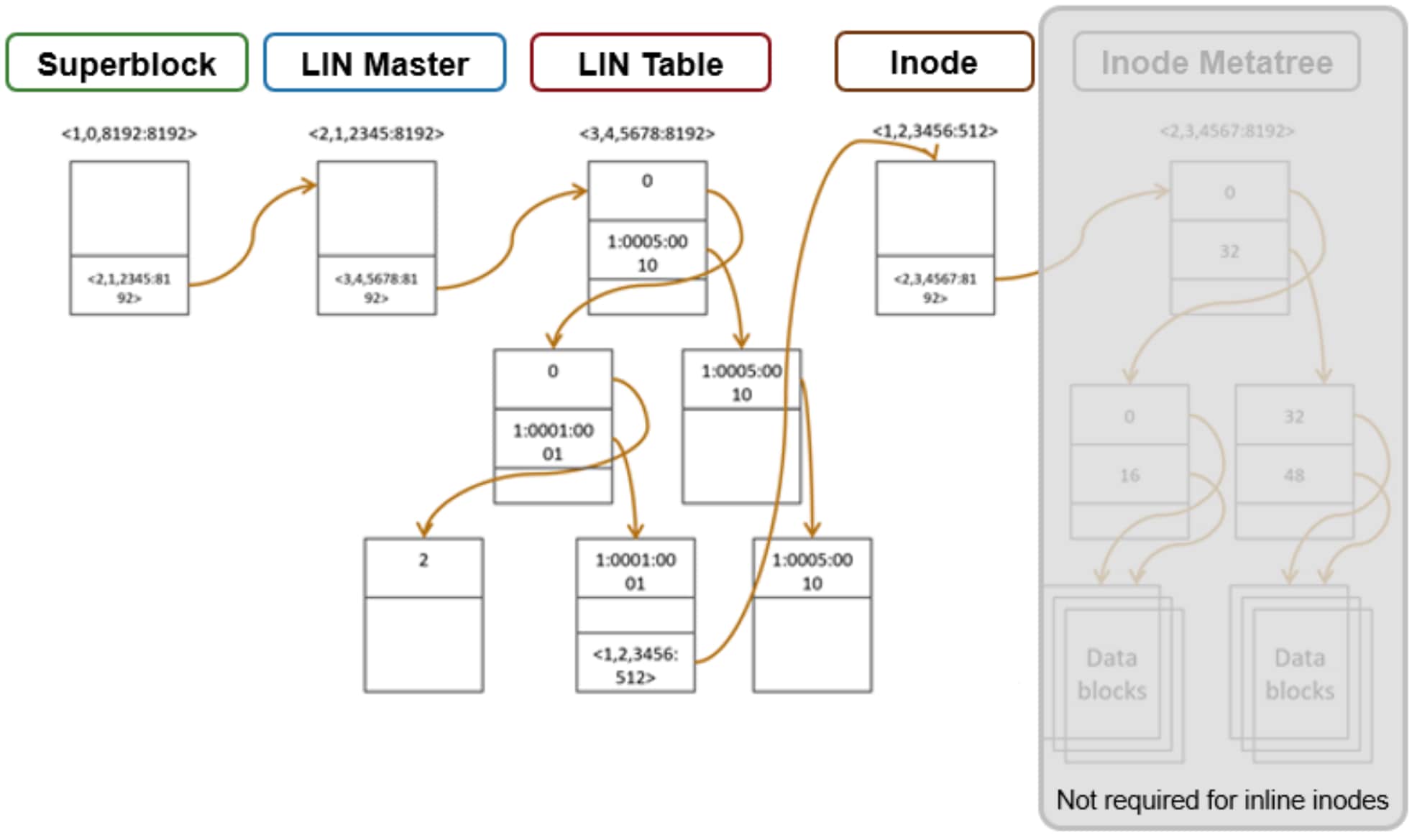
Figure 64. OneFS file access levels of indirection
Access starts with the Superblock, which is located at multiple fixed block addresses on every drive in the cluster. The Superblock contains the address locations of the LIN Master block, which contains the root of the LIN B+ Tree (LIN table). The LIN B+Tree maps logical inode numbers to the actual inode addresses on disk, which, in the case of an inlined file, also contains the data. This saves the overhead of finding the address locations of the file’s data blocks and retrieving data from them.
For hybrid nodes with sufficient SSD capacity, using the metadata-write SSD strategy will automatically place inlined small files on flash media. However, since the SSDs on hybrid nodes default to 512byte formatting, when using metadata read/write strategies, these SSD metadata pools will need to have the ‘--force-8k-inodes’ flag set in order for files to be inlined. This can be a useful performance configuration for small file HPC workloads, such as EDA, for data that is not residing on an all-flash tier.
Note: Keep in mind that forcing 8KB inodes on a hybrid pool’s SSDs will result in a considerable reduction in available inode capacity than would be available with the default 512 byte inode configuration.