Dell PowerScale OneFS Operating System
Executive summary
Introduction
Revisions
We value your feedback
Dell PowerScale OneFS operating system
Overview
The most important design choice and fundamental difference of Dell PowerScale scale-out NAS is that with OneFS the storage system does not rely on hardware as a critical part of the storage architecture. Rather, OneFS combines the three functions of traditional storage architectures—file system, volume manager, and data protection—into one unified software layer. This combination creates a single, intelligent file system that spans all nodes within a storage system.
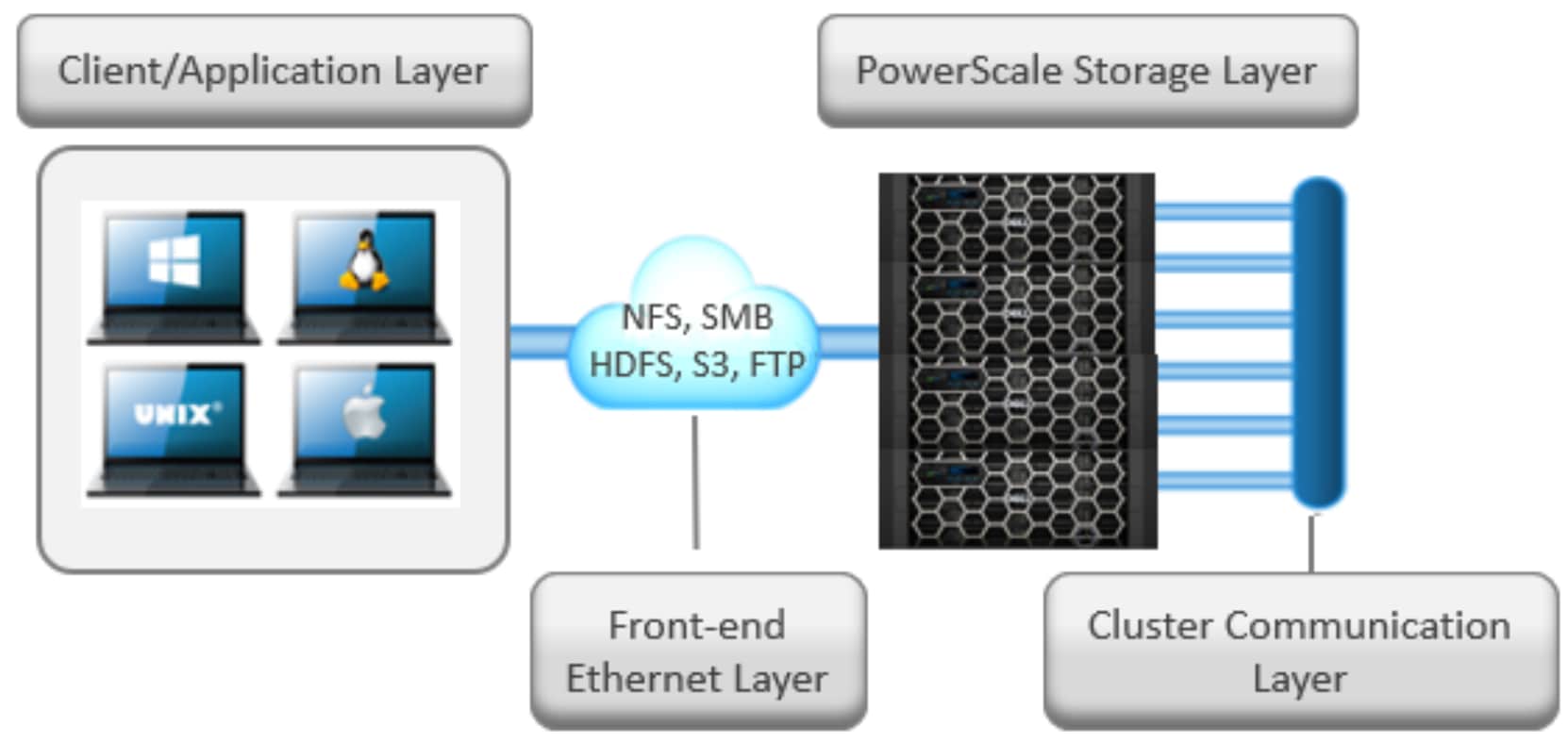
Figure 1. Dell PowerScale scale-out NAS architecture
The Dell PowerScale storage nodes provide the appliance hardware base on which OneFS runs.
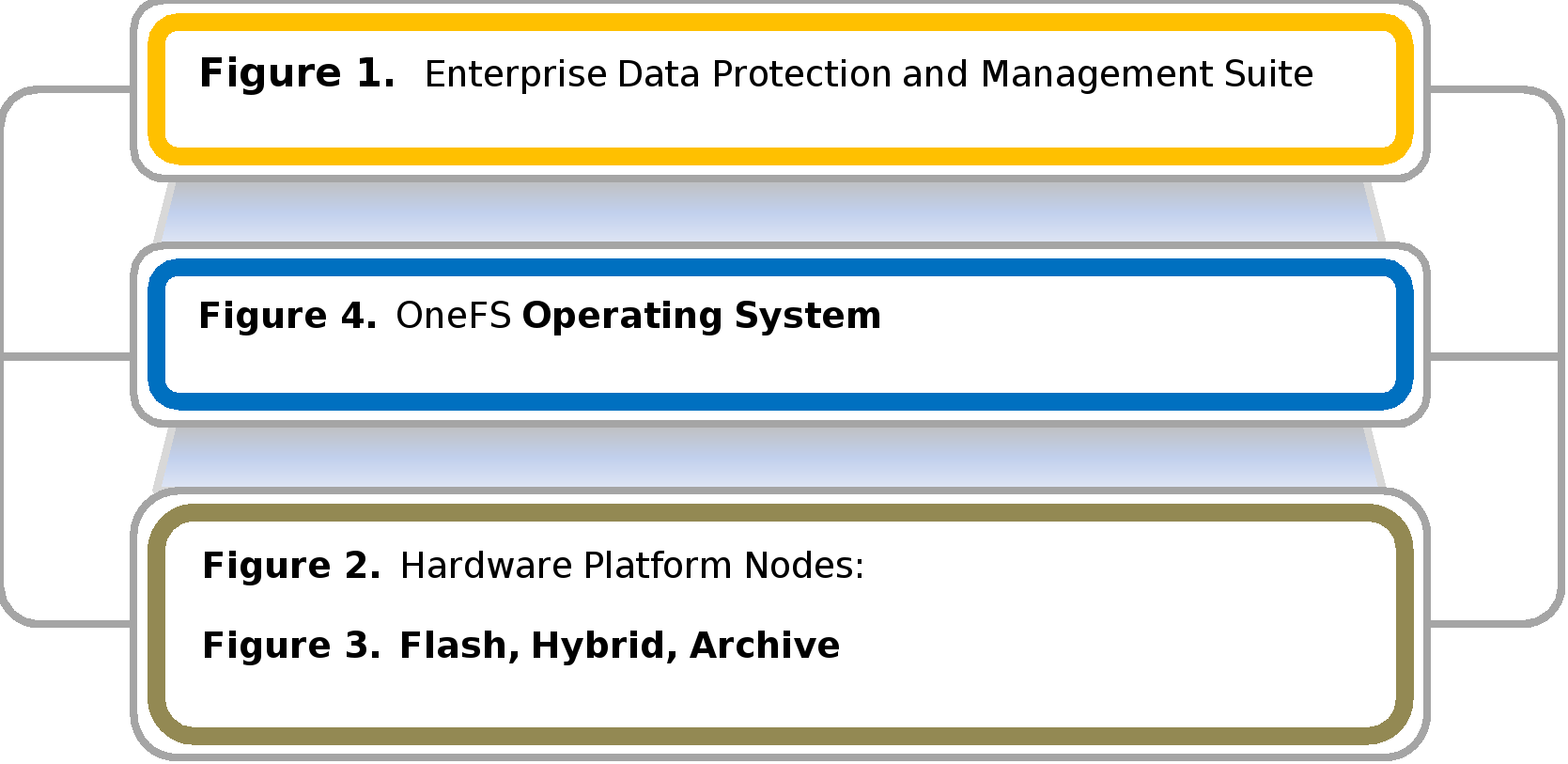
Figure 2. OneFS operating system: Running the Dell PowerScale scale-out NAS cluster
While the hardware consists of industry-standard, enterprise-quality components produced by manufacturers, such as Intel, Seagate, and Mellanox, nearly all distinctive aspects of the storage system are provided in OneFS software. On this commodity hardware base, OneFS enables data protection and automated data balancing and migration, and the ability to seamlessly add storage and performance capabilities without system downtime.
Dell PowerScale OneFS clusters can be architected with a wide variety of node styles and capacities, in order to meet the needs of a varied dataset and wide spectrum of workloads. These node styles encompass several hardware generations and fall loosely into four main categories or tiers. The following table illustrates these tiers, and the associated hardware generations and models:
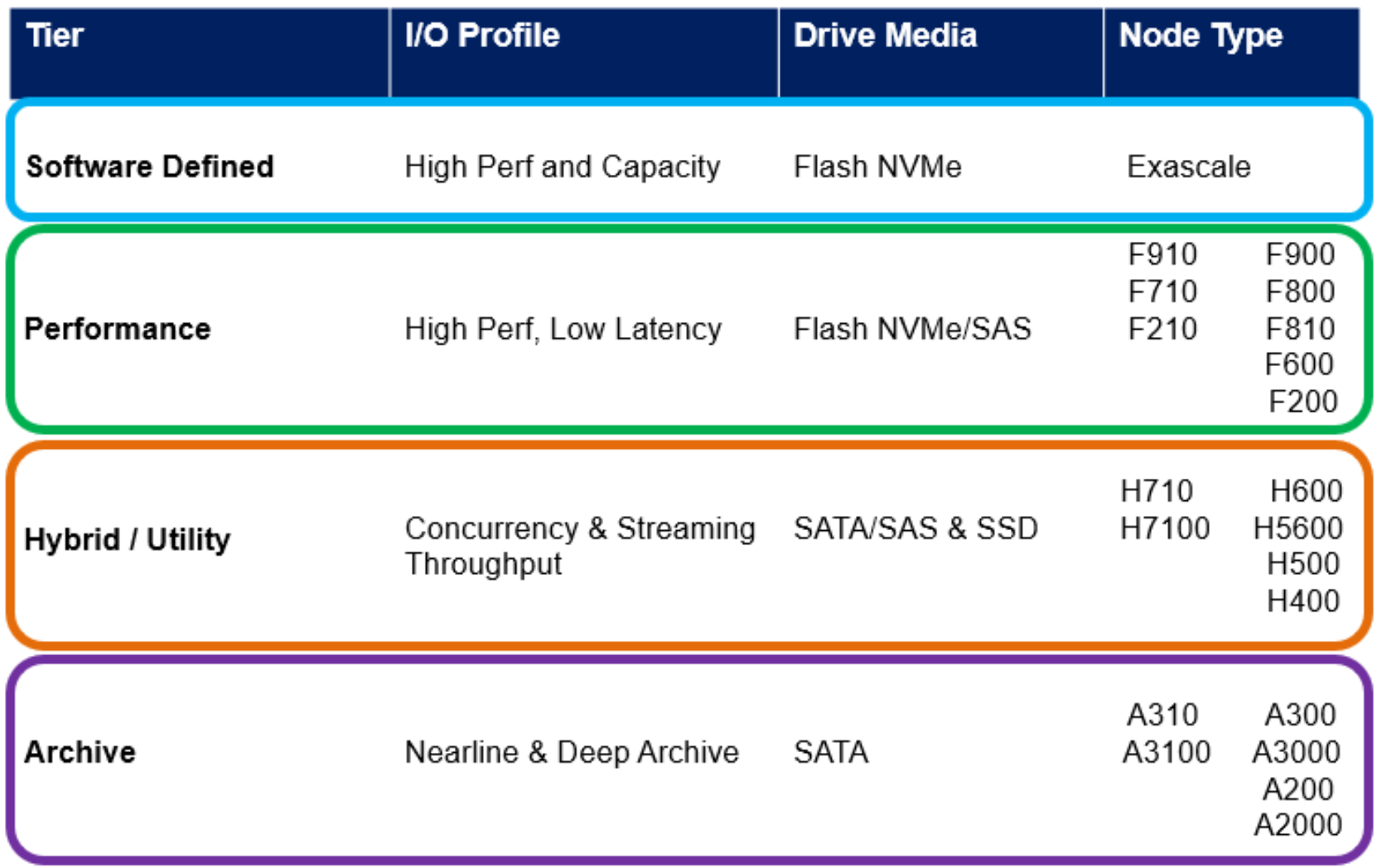
Figure 3. Hardware tiers and node generations
OneFS works exclusively with the Dell PowerScale and Isilon storage system, referred to as a “cluster.” A cluster comprises a minimum of three F-series nodes, or one or more H and A-series chassis, each containing multiple storage nodes. The nodes are constructed as rack-mountable enterprise appliances containing memory, CPU, networking, Ethernet or InfiniBand interconnects, and storage media. The cluster can scale out as high as 252 nodes.
In addition to the modular architecture, such as the PowerScale H700, where four nodes reside in a 4RU chassis, OneFS also supports the stand-alone all-flash PowerScale F910 NVMe, F900 NVMe, F710 NVMe, F600 NVMe, F210 NVMe, and PowerScale F200 nodes. Both the chassis-based platforms and the stand-alone nodes happily co-exist within the same cluster.
The OneFS total single file system capacity easily spans from 10’s of terabytes to 100’s of petabytes, supporting individual files up to 16 TB in size. Each node added to a cluster increases aggregate disk, cache, CPU, and network capacity. As a result of this aggregate increase, a 252-node cluster can access as much as 181 TB of globally coherent, shared cache. The cluster can also support up to 720 PB of raw storage capacity—before any data-reduction savings. With capacity and performance delivered in a single storage system, a single file system, and a single volume, the complexity of the system and management time for the storage administrator does not increase as the system scales.
OneFS stripes data across all the storage nodes in a cluster. As data is sent from client machines to the cluster (using industry-standard protocols, such as NFS, SMB, S3, HTTP, and HDFS), OneFS automatically divides the content and allocates it to different storage nodes in parallel. This occurs on the private Ethernet or InfiniBand network, which eliminates unnecessary network traffic. The cluster is managed as a single file system and the coordination and data distribution are completely transparent to end-user clients. When a client wants to read a file, OneFS will retrieve the appropriate blocks from multiple storage nodes in parallel, automatically recombining the file, and the initiating client sees exactly what was originally written. This ability to automatically distribute data across multiple nodes in a transparent manner is fundamental for the ability of OneFS to enable growth, next-generation data protection, and extreme performance.
Scalability
Traditional storage systems that have a finite maximum size and must be replaced by a bigger storage array when the maximum performance or capacity is reached. In contrast, a OneFS powered cluster can linearly expand, or scale out, performance, capacity, or both, seamlessly increasing the existing file system or volume into petabytes of capacity. In addition, with the flexibility of OneFS, different node types can be mixed in a single cluster or pool by using OneFS SmartPools software. The automated tiered storage capability of SmartPools provides added flexibility and eliminates the need for “forklift” upgrades when different capacity or performance levels are needed. SmartPools (see 0) enables businesses and storage administrators to easily deploy a single file system to span multiple tiers of performance and capacity. This single file system automatically adapts to business data and application workflows over time.
As well as tiering data automatically across different nodes, SmartPools can also use solid state drives (SSDs) to accelerate metadata and file-based storage workflows. SSDs as a tier can be used within a pool to improve metadata or data access performance. Alternately, the SSDs in one tier are used to hold the metadata of files on other tiers—boosting the performance of the entire cluster, including nodes that have no SSDs.
OneFS also allows data to be moved to lower-cost cloud storage with the CloudPools functionality. CloudPools can seamlessly connect to Dell-based cloud storage and third-party providers, including Amazon S3, Alibaba, Google Cloud, and Microsoft Azure. CloudPools expands the SmartPools framework by treating a cloud repository as an additional tier. This enables older or data to be stored in a cold or frozen data tier or archive, thereby taking advantage of lower-cost, off-premises storage.
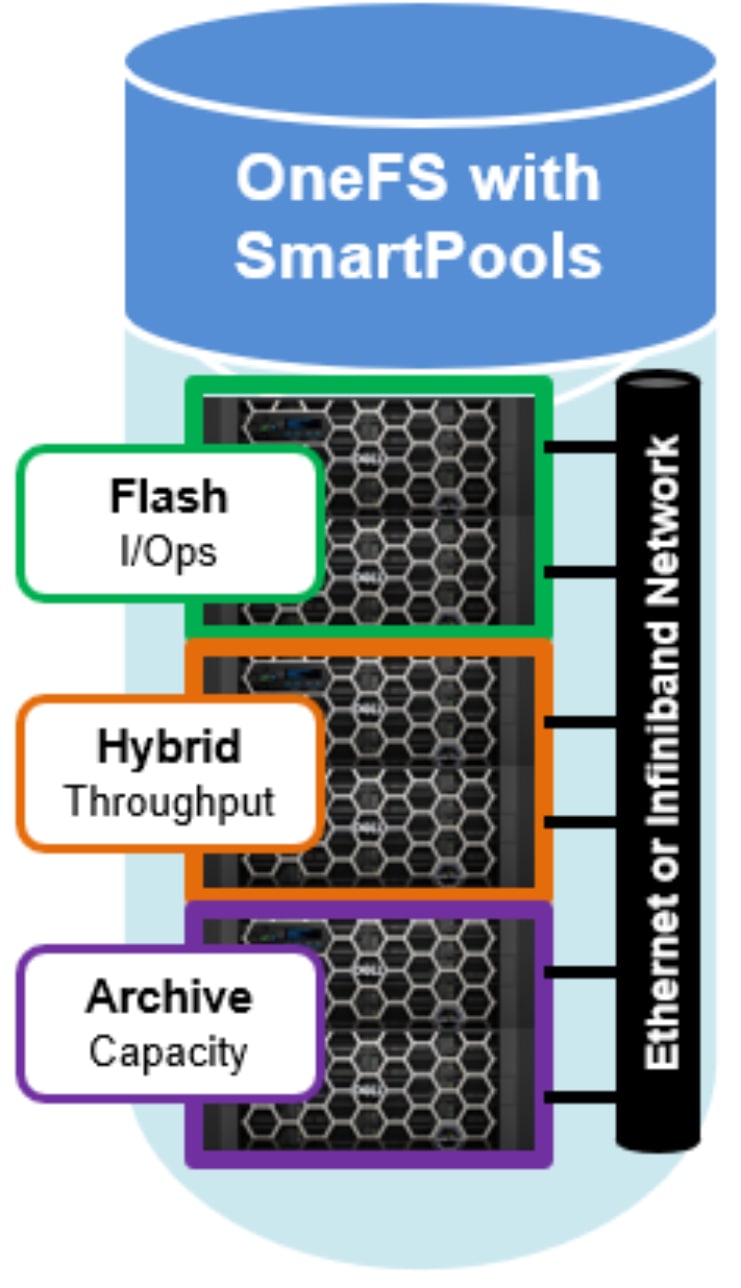
Figure 4. SmartPools single file system for multiple tiers with automated, transparent data movemen
In addition to the F-series all-flash nodes and using SSDs with SmartPools as part of the file system, OneFS can also use SSDs as an integral part of its caching hierarchy. As such, an optional third tier of read cache, SmartFlash, is configurable on nodes that contain SSDs. SmartFlash is a persistent eviction cache that is populated from system memory (DRAM) as it ages out.
There are significant benefits to using SSDs for caching rather than as traditional file system storage devices. For example, when allocated for caching, the entire SSD will be used, and writes will occur in a very linear and predictable way. This provides far better utilization and also results in considerably reduced wear and increased durability over regular file system usage, particularly with random write workloads. The non-volatile nature of SSDs means that data cached by SmartFlash with persist even during node reboots. Using SSD for cache also makes sizing SSD capacity a much simpler prospect compared to using SSDs as a storage tier. SmartFlash is ideal for workloads such as rendering, HPC, CAD, and software design.
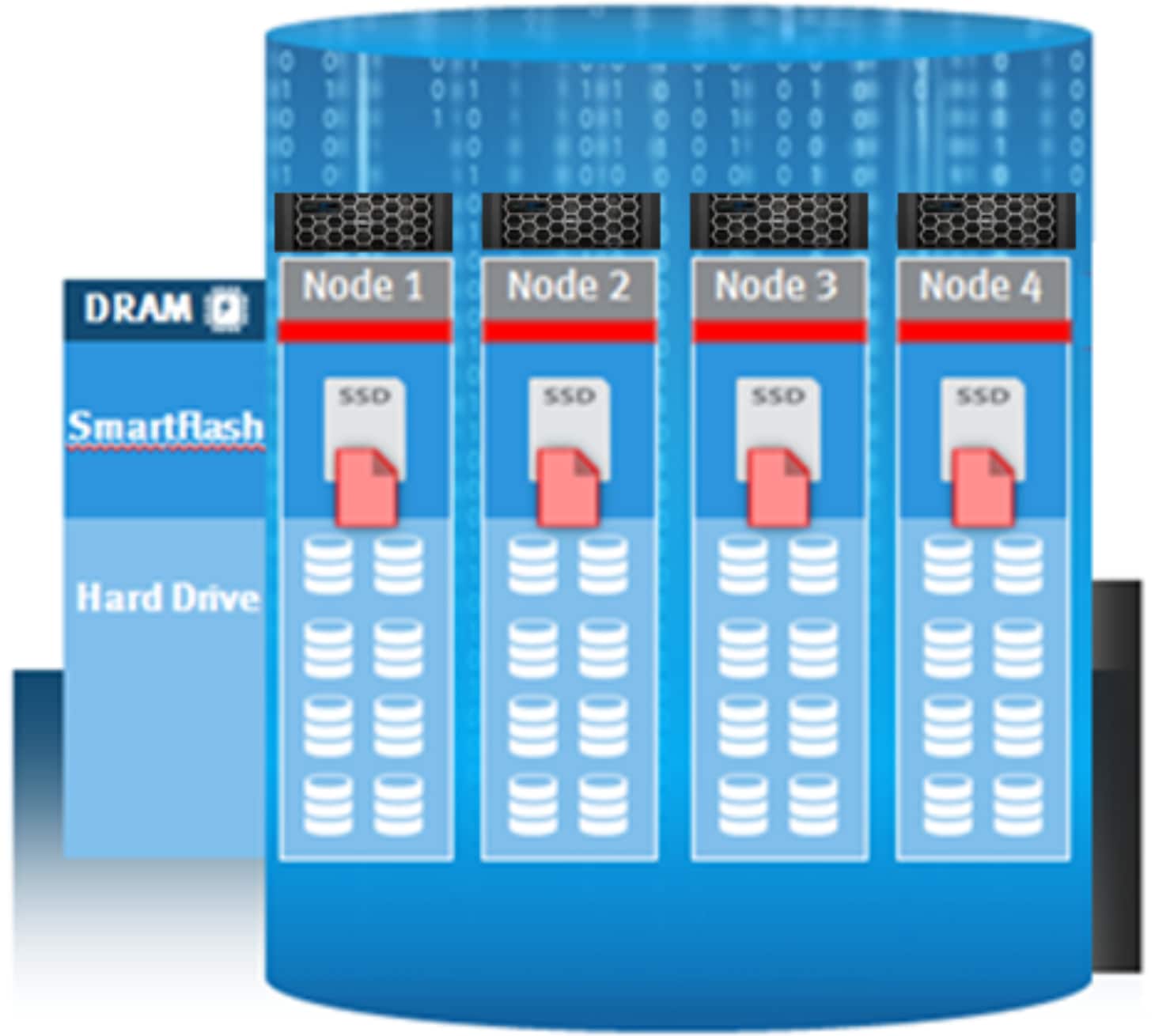
Figure 5. SmartFlash SSD-backed read caching
Adding capacity and performance capabilities to a cluster is significantly easier than with other storage systems—requiring only three simple steps for the storage administrator: adding another node into the rack, attaching the node to the InfiniBand network, and instructing the cluster to add the additional node. The new node provides additional capacity and performance since each node includes CPU, memory, and network. The Autobalance feature of OneFS will automatically move data across the InfiniBand network in an automatic, coherent manner so existing data that resides on the cluster moves onto this new storage node. This automatic rebalancing ensures the new node will not become a hot spot for new data and that existing data is able to gain the benefits of a more powerful storage system. The Autobalance feature of OneFS is also completely transparent to the end user and can be adjusted to minimize impact on high-performance workloads. This capability alone allows OneFS to scale transparently, on-the-fly, from 10s of terabytes to 10s of petabytes with no added management time for the administrator, or increased complexity within the storage system.
Allocating data with a single, scalable pool of storage is an often-understated benefit and added efficiency found in a single file system. Managing and selecting volumes that have the requisite amount of free space or manually moving data is time-consuming and inefficient. If chosen incorrectly, the performance demands of a particular workflow may not be satisfied by a particular volume. Also, if the organization cannot address a particular volume, or if the storage administrator cannot move data transparently and quickly, then storage efficiency will be sub-optimal. A OneFS powered cluster operates with storage utilization typically more than 80 percent and is, therefore, highly efficient.
`
Efficiency
Performance
A large-scale storage system must provide the performance required for a variety of workflows, whether they be sequential, concurrent, or random. Different workflows will exist between applications and within individual applications. OneFS provides for all of these needs simultaneously with intelligent software. More importantly, with OneFS (see 0), throughput and IOPS scale linearly with the number of nodes present in a single system. Due to balanced data distribution, automatic rebalancing, and distributed processing, OneFS is able to leverage additional CPUs, network ports, and memory as the system scales.
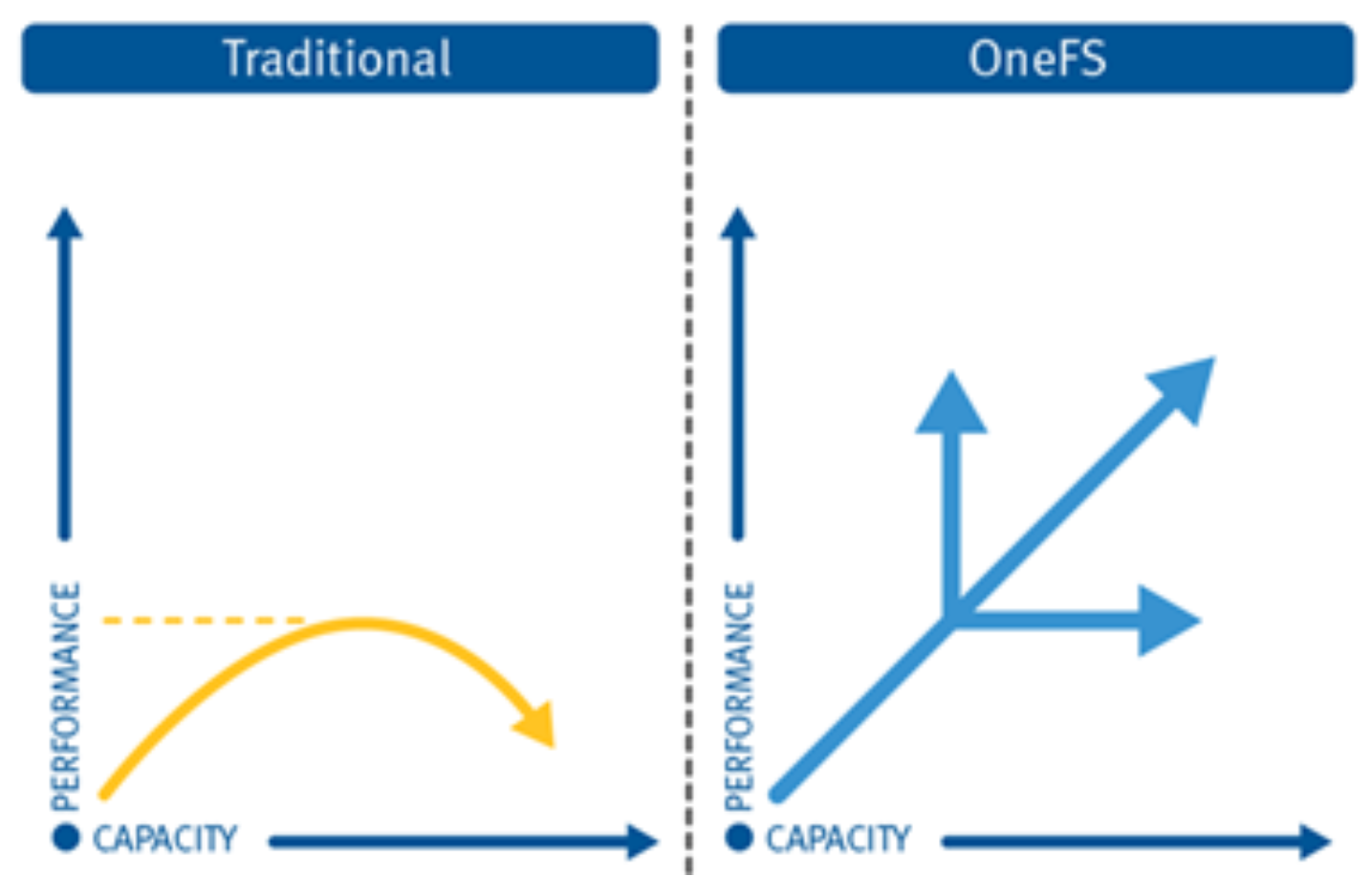
Figure 6. OneFS linear scalability
To fully exploit locality and meet the needs of various workflows, OneFS provides a globally accessible and coherent cache across all nodes. Storage nodes can currently utilize up to 736 GB of RAM each, allowing a OneFS powered cluster to contain up to 181 TB of system memory (252 nodes). This memory is primarily used to cache data that has been placed on that particular storage node and is actively being accessed. This cache grows as more nodes are added to a cluster, allowing an increasing working set to continually remain in cache. In addition, various SSD configurations are also available for additional read caching. OneFS also allows the storage system administrator to specify the type of workload on a per-file or per-directory basis. It also indicates whether the access pattern to a particular file or directory is random, concurrent, or sequential. This unique capability allows OneFS to tailor on-disk layout decisions, cache-retention policies, and data prefetch policies to maximize performance of individual workflows.
Management
Data protection
As traditional storage systems scale, techniques that were appropriate at a small size become inadequate at a larger size, and there is no better example of this than RAID. RAID can be effective only if the data can be reconstructed before another failure can occur. However, as the amount of data increases, the speed to access that data does not and the probability of additional failures continues to increase. OneFS does not depend on hardware-based RAID technologies to provide data protection. Instead, OneFS includes a core technology, FlexProtect, which is built on solid mathematical constructs and uses Reed-Solomon encodings to provide redundancy and availability. FlexProtect provides protection for up to four simultaneous failures of either full nodes or individual drives. As the cluster scales in size, FlexProtect delivers on the need to ensure minimal reconstruction time for an individual failure.
FlexProtect is a key innovation in OneFS and takes a file-specific approach toward data protection, storing protection information for each file independently. This independent protection allows protection data to be dispersed throughout the cluster (see 0) along with the file data—dramatically increasing the potential parallelism for access and reconstruction when required. When there is a failure of a node or drive in a cluster, FlexProtect can identify which portions of files are affected by the failure. It then employs multiple nodes to participate in the reconstruction of only the affected files. Since the Autobalance feature in OneFS spreads files out across the cluster, the number of spindles and CPUs available for reconstruction exceeds what is found in a typical hardware RAID implementation. Also, FlexProtect does not need to reconstruct data back to a single spare drive (which with RAID, creates an unavoidable bottleneck). Instead, the file data is reconstructed in available space, providing a virtual hot spare.
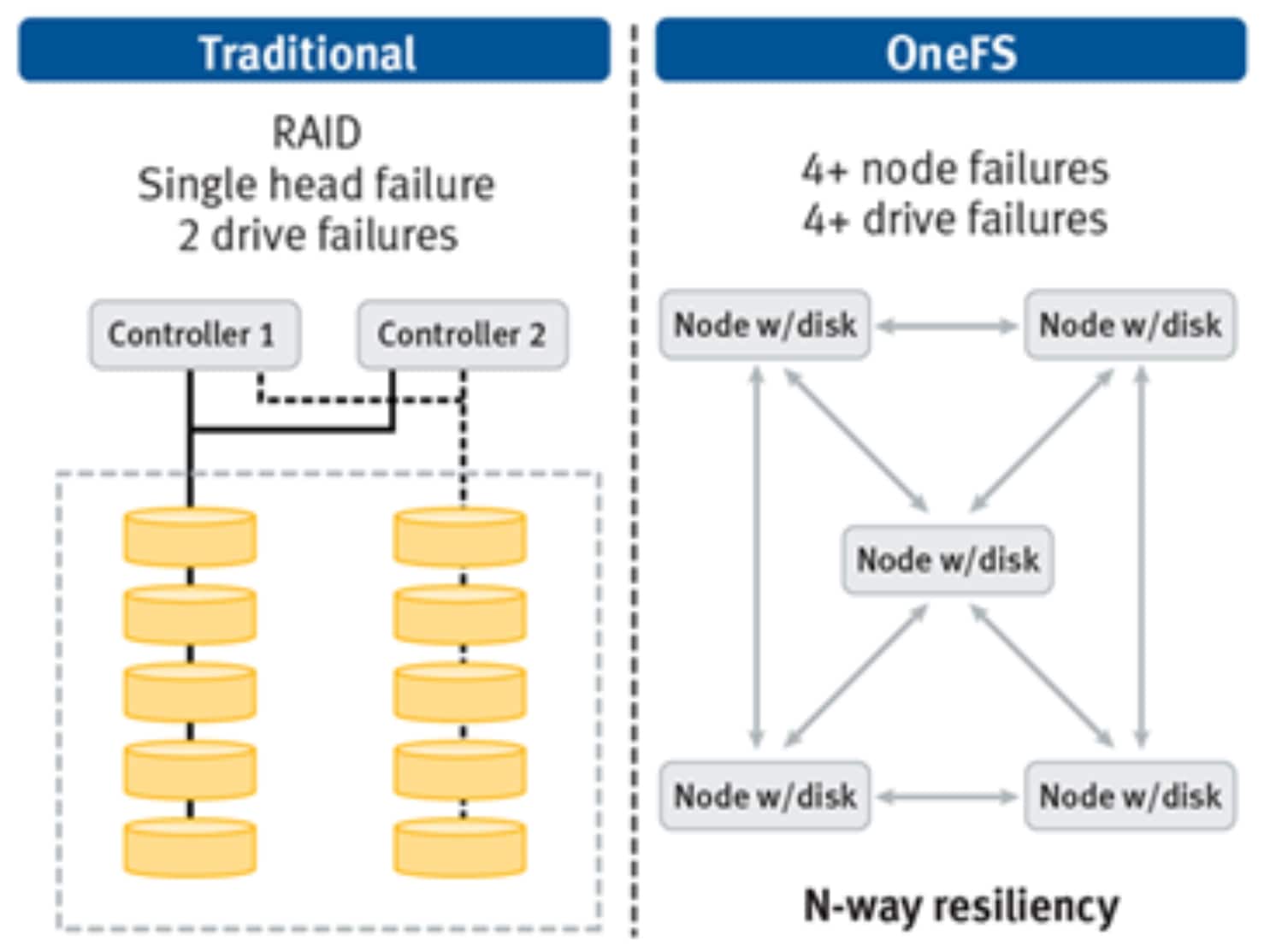
Figure 7. OneFS +4n data protection
OneFS constantly monitors the health of all files and disks within the cluster. If components are at risk, the file system automatically flags the problem components for replacement, transparently reallocating those files to healthy components. OneFS also ensures data integrity if the file system has an unexpected failure during a write operation. Each write operation is transactionally committed to a mirrored file system journal to protect against node or cluster failure. In the case of a write failure, the journal enables a node to rejoin the cluster quickly, without the need for a file system consistency check. With no single point of failure, the file system is also transactionally safe in the event of a journal failure.
Since the FlexProtect feature in OneFS is file-aware, it also provides file-specific protection capabilities. An individual file (or more typically, a directory) can be given a specific protection level. Also, different portions of the file system can be protected at levels aligned to the importance of the data or workflow. Critical data can be protected at a higher level whereas less critical data can be protected at a lower level. This provides storage administrators with a very granular protection or capacity trade-off that can be adjusted dynamically as a cluster scales and a workflow ages.
To effectively protect a file system that is hundreds of terabytes or petabytes in size, an extensive use of multiple data availability and data protection technologies is required. OneFS incorporates several strategies for data protection including data replication, synchronization, and snapshot capabilities.
OneFS Snapshots are highly scalable and typically take less than one second to create. They create little performance overhead, regardless of the level of activity of the file system, the size of the file system, or the size of the directory being copied. Also, only the changed blocks of a file are stored when updating the snapshots, thereby ensuring highly efficient snapshot storage utilization.
OneFS, combined with OneFS SnapshotIQ software, can be used to create up to 20,000 snapshots on a cluster. This ability provides a substantial benefit over most other snapshot implementations because the snapshot intervals can be far more granular and thereby offer significantly improved recovery point objectives (RPO) time frames. OneFS also provides near-immediate restoration of snapshot data backups to recover data quickly. With OneFS, snapshot restores are fast, efficient, and simple.
OneFS writable snapshots enable the creation and management of space and time efficient, modifiable copies of a regular read-only snapshot. As such, they present a writable copy of a source snapshot. This copy is accessible at a directory path within the /ifs namespace, which can be accessed and edited through any of the cluster’s file and object protocols, including NFS, SMB, and S3.
While snapshots provide an ideal solution for infrequent or smaller-scale data loss occurrences, when it comes to catastrophic failures or natural disasters, a second, geographically separate copy of a dataset is clearly beneficial.
OneFS and SyncIQ software combine to deliver high-performance, asynchronous replication of data to address a broad range of RPO and recovery time objectives (RTO). They are easily optimized for either LAN or WAN connectivity to replicate over short or long distances, providing protection from both site-specific and regional disasters. SyncIQ also offers encryption for secure replication across untrusted networks.
Complementary to the manual and scheduled replication policies, SyncIQ also offers a continuous mode, or replicate on change, option. SyncIQ will continuously monitor the replication dataset and automatically replicate any changes to the target cluster.
OneFS further simplifies and accelerates disaster recovery and business continuity at scale with integrated, push-button simple failover and failback. With faster, easier failover and failback capabilities, most workflows will realize dramatic improvements in synchronization times. The same workflow will also be able to perform multiple syncs in the same time for ‘fresher’ target data.
OneFS also enables performing large-scale backup and restore functions across massive, single-volume datasets—while using an enterprise’s existing, SAN-based tape and VTL infrastructure. This ability is enabled by a Fibre Channel backup accelerator card, in concert with OneFS NDMP support and SnapshotIQ.
OneFS is certified with a wide range of leading enterprise backup applications, including:
- Symantec NetBackup and Backup Exec
- Dell Avamar and Networker
- IBM Tivoli Storage Manager
- CommVault Simpana
- Dell NetVault
- ASG Time Navigator
Each of the OneFS enhanced data protection capabilities – FlexProtect, SmartLock, SnapshotIQ, SyncIQ, NDMP will help enterprises reduce both RPO and RTO for mission critical applications and big data environments.
Security
To help enterprises meet their corporate governance and compliance requirements, OneFS includes robust security options that offer unprecedented levels of scale-out NAS security.
OneFS and SmartLock software combine to provide Write Once Read Many (WORM) data protection to prevent accidental, premature, or malicious alteration or deletion of your critical data. With OneFS, we also help you meet regulatory and governance needs – including stringent SEC 17a-4 requirements - by providing tamper proof data retention and protection of your business-critical data.
You can further enhance security by using the role-based administration capabilities of OneFS. This feature enables you to establish a secure role separation between storage administration and file system access, improving security and preventing malicious or accidental changes to your data.
OneFS also enables you to create Multi-tenant Access Zones to provide secure, isolated storage pools for specific departments within your organization. This also allows you to consolidate storage resources for increased operating efficiency without compromising organizational security.
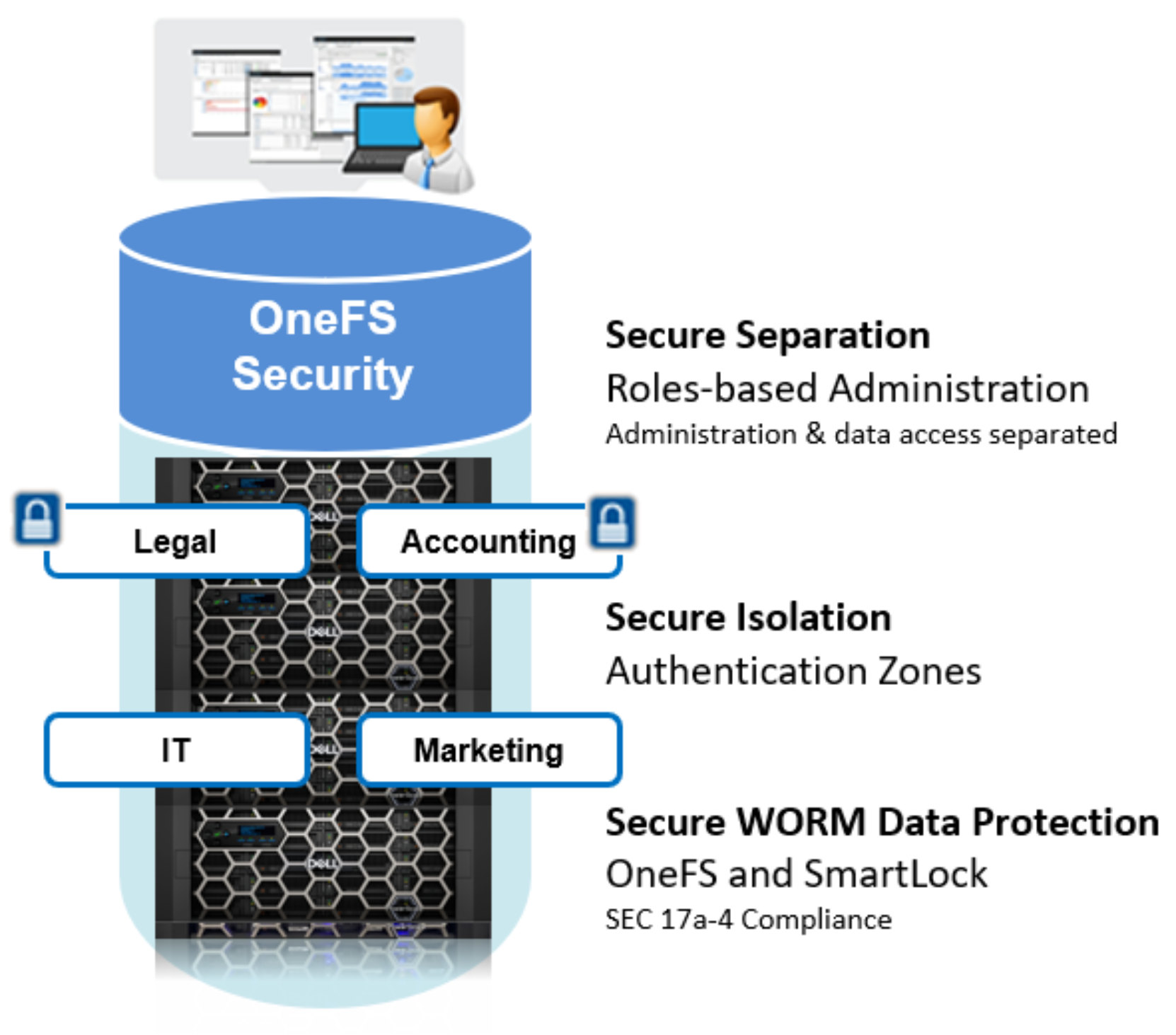
Figure 8. OneFS security options
To complement this, OneFS auditing can detect potential sources of data loss, fraud, inappropriate entitlements, access attempts that should not occur, and a range of other anomalies that are indicators of risk - especially when the audit associate’s data access with specific user identities.
In the interests of data security, OneFS provides ‘chain of custody’ auditing by logging specific activity on the cluster. This activity includes OneFS configuration changes and SMB client protocol activity, both of which are required for organizational IT security compliance, as mandated by regulatory bodies like HIPAA, SOX, FISMA, and MPAA.
OneFS auditing uses the Dell Common Event Enabler (CEE) to provide compatibility with external, third-party audit applications like Varonis DatAdvantage. This feature allows OneFS to deliver an end-to-end, enterprise-grade audit solution.
OneFS also provides a solution for the security of data at rest. This solution involves dedicated storage nodes containing self-encrypting drives (SEDs), in combination with the OneFS KMIP-compliant encryption key management system. This means that the data on any SED which is removed from its source node cannot be unlocked and read, guarding against the data security risks of hard drive theft. SED drives can also be securely wiped before being repurposed or retired using cryptographic erasure.
OneFS encryption of data at rest satisfies several industry regulatory compliance requirements, including US Federal FIPS 104-2 Level 2 and PCI-DSS v2.0 section 3.4.
To further increase the protection and security of in-flight data, OneFS provides encryption for clients that support the SMBv3 protocol version. This can be configured on a per-share, zone, or cluster-wide basis. Encryption is also provided for SyncIQ replication over untrusted networks.
Also, OneFS provides a hardened profile that can be enabled for sites that are looking for additional security or need to comply with the US Department of Defense’s Security Technical Implementation Guide (STIG).
Finally, OneFS supports anti-virus detection and remediation by integration with most common AV software vendors, including Symantec, TrendMicro, Kaspersky, McAfee, and Sophos.