Dell PowerScale: OneFS S3 API Guide
Executive summary
Overview
Amazon Simple Storage Service (Amazon S3) provides a set of APIs that enable applications to access object storage. With the popularity of S3 object storage, more storage vendors are implementing their own object-storage engines with S3-compatible APIs. However, some Amazon S3 APIs are designed specifically for Amazon Web Services (AWS), with example services including life cycle management, charging, and analytics. Third-party S3-compatible storage usually implements a subset of Amazon S3 official APIs to enable object access.
Starting with Dell EMC™ OneFS™ version 9.0, Dell PowerScale™ introduces the capability of data access by exposing the compatible S3 APIs. To facilitate administration and application deployment with the OneFS S3 implementation, this document shows how OneFS S3 API compatibility compares with the latest version of the Amazon S3 API.
Revisions
|
Date |
Part number/ |
Description |
|
June 2020 |
H18293 |
Initial release |
|
May 2021 |
H18293.1 |
Update with OneFS S3 ETag implementation |
|
October 2021 |
H18293.2 |
Update with OneFS 9.3.0 S3 enhancements: MPU, DeleteObjects, Chunked Upload and non-slash delimiter support for ListObjects/ ListObjectsV2 |
|
April 2024 |
H18293.3 |
Update for minor enhancements: partnumber=1 support for get/head object, inter-level directory |
|
April 2025 |
H18293.4 |
Update for OneFS 9.11 |
|
May 2025 |
H18293.5 |
Update for S3A support and S3 cluster status API feature |
|
August 2025 |
H18293.6 |
Update for OneFS 9.12, including S3 object lock, S3 server access logging |
|
December 2025 |
H18293.7 |
Update for OneFS 9.13, including GetMPUCompletionProgress |
| August 2026 | H18293.8 |
Updated for OneFS 9.15 |
We value your feedback
Dell Technologies and the authors of this document welcome your feedback on this document. Contact the Dell Technologies team by email.
Author: Lieven Lin
Contributors: Miles Ohlrich, Takafumi Yonekura
Note: For links to other documentation for this topic, see the PowerScale Info Hub.
OneFS S3 API compatibility overview
Overview
The Amazon S3 API was originally developed as the data-access interface of Amazon S3. As applications were developed using the S3 API, it became a common standard for object storage. This document refers to the S3 API for object storage as the S3 protocol. This provides a consistent nomenclature along with other NAS protocols regarding the OneFS file service.
Starting with OneFS 9.0, PowerScale OneFS supports the Amazon S3 protocol with OneFS S3, an object-storage interface that is compatible with the Amazon S3 API. OneFS S3 enables access to file-based data that is stored on OneFS clusters as objects.
This section compares OneFS S3 API compatibility with the Amazon S3 official APIs. OneFS supports both path-style requests and virtual hosted-style requests. It uses port 9020 for HTTP and port 9021 for HTTPS by default.
Table 1 lists the latest versions of AWS S3 APIs (sourced from Amazon S3 API documentation), and shows the compatibility with OneFS S3. See section 2 and section 3 for details about each OneFS supported S3 API. The APIs are sorted alphabetically as in the Amazon S3 API documentation.
Table 1. OneFS AWS S3 API compatibility
|
API names |
Apply to |
Supported by OneFS |
|
Object |
Yes |
|
|
Object |
Yes |
|
|
Object |
Yes |
|
|
Bucket |
Yes |
|
|
Object |
Yes |
|
|
Bucket |
Yes |
|
|
Bucket |
No |
|
|
Bucket |
No |
|
|
Bucket |
No |
|
|
Bucket |
No |
|
|
Bucket |
No |
|
|
Bucket |
No |
|
|
Bucket |
No |
|
|
Bucket |
No |
|
|
Bucket |
No |
|
|
Bucket |
No |
|
|
Object |
Yes |
|
|
Object |
Yes |
|
|
Object |
No |
|
|
Bucket |
No |
|
|
Bucket |
No |
|
|
Bucket |
Yes |
|
|
Bucket |
No |
|
|
Bucket |
No |
|
|
Bucket |
No |
|
|
Bucket |
No |
|
|
Bucket |
No |
|
|
Bucket |
No |
|
|
Bucket |
Yes |
|
|
Bucket |
Yes |
|
|
Bucket |
No |
|
|
Bucket |
No |
|
|
Bucket |
No |
|
|
Bucket |
No |
|
|
Bucket |
No |
|
|
Bucket |
No |
|
|
Bucket |
No |
|
|
Bucket |
No |
|
|
Bucket |
No |
|
|
Bucket |
No |
|
|
Object |
Yes |
|
|
Object |
Yes |
|
|
Object |
No |
|
|
Bucket |
Yes |
|
|
Object |
Yes |
|
|
Object |
No |
|
|
Object |
No |
|
|
Bucket |
No |
|
|
Bucket |
Yes |
|
|
Object |
Yes |
|
|
Bucket |
No |
|
|
Bucket |
No |
|
|
Bucket |
No |
|
|
Bucket |
Yes |
|
|
Bucket |
Yes |
|
|
Bucket |
Yes |
|
|
Bucket |
Yes |
|
|
Bucket |
No |
|
|
Object |
Yes |
|
|
Bucket |
No |
|
|
Bucket |
Yes |
|
|
Bucket |
No |
|
|
Bucket |
No |
|
|
Bucket |
No |
|
|
Bucket |
No |
|
|
Bucket |
No |
|
|
Bucket |
No |
|
|
Bucket |
Yes |
|
|
Bucket |
No |
|
|
Bucket |
No |
|
|
Bucket |
No |
|
|
Bucket |
No |
|
|
Bucket |
No |
|
|
Bucket |
No |
|
|
Bucket |
No |
|
|
Bucket |
No |
|
|
Bucket |
No |
|
|
Object |
Yes |
|
|
Object |
Yes |
|
|
Object |
No |
|
|
Bucket |
Yes |
|
|
Object |
Yes |
|
|
Object |
No |
|
|
Bucket |
No |
|
|
Object |
No |
|
|
Object |
No |
|
|
Object |
Yes |
|
|
Object |
Yes |
OneFS S3 supported bucket APIs
Overview
Many request parameters of Amazon S3 APIs are designed for Amazon S3 features, and OneFS does not support these parameters in its supported APIs. This section introduces the request parameters of bucket S3 APIs that are supported by OneFS. For more information about request and response examples, see the documentation AWS S3 API Reference. OneFS supports the following bucket APIs:
- CreateBucket
- DeleteBucket
- GetBucketAcl
- GetBucketLocation
- GetBucketLogging
- GetObjectLockConfiguration
- HeadBucket
- ListBuckets
- ListMultipartUploads
- ListObjects
- ListObjectsV2
- PutBucketAcl
- PutBucketLogging
- PutObjectLockConfiguration
CreateBucket
Table 2 shows the details about the OneFS S3 CreateBucket API request parameters and request body. If not specified, all unsupported request parameters and the request body are silently ignored by OneFS without an error code being returned to client.
Table 2. OneFS S3 CreateBucket API request parameters
|
Request parameters/body |
Supported |
Description |
|
Bucket |
Yes |
Required: Yes This is the name of the bucket to create. Bucket names must consist of characters, including lowercase letters (a-z), numbers (0-9), or dashes (-). Bucket names must start or end with a lowercase letter (a-z) or number (0-9). Bucket names must be 3–63 characters in length. |
|
x-isi-path |
Yes |
This is an optional OneFS extended header where a OneFS directory can be specified as the bucket path. OneFS creates the directory implicitly if the directory does not exist. See appendix Error! Reference source not found. for an example. |
|
x-amz-acl |
Yes |
This is the canned ACL to apply to the bucket. Valid values: private, public-read, public-read-write, authenticated-read |
|
x-amz-bucket-object-lock-enabled |
Yes |
If the header parameter x-amz-bucket-object-lock-enabled is present, bucket is object lock enabled. |
|
isi-lock-protection-mode |
Yes |
If the header parameter isi-lock-protection-mode (ObjectLock | BucketLock) is present, the header specifies the lock mode type. |
|
x-amz-grant-full-control |
Yes |
This allows the grantee the read, write, read ACP, and write ACP permissions on the bucket. |
|
x-amz-grant-read |
Yes |
This allows the grantee to list the objects in the bucket. |
|
x-amz-grant-read-acp |
Yes |
This allows the grantee to read the bucket ACL. |
|
x-amz-grant-write |
Yes |
This allows the grantee to create, overwrite, and delete any object in the bucket. |
|
x-amz-grant-write-acp |
Yes |
This allows the grantee to write the ACL for the applicable bucket. |
|
CreateBucketConfiguration |
No |
N/A |
|
LocationConstraint |
No |
N/A. OneFS sets the bucket location to empty string. |
Note: Amazon S3 allows specifying a grantee using the following headers: email address, id, uri in the x-amz-grant-read, x-amz-grant-write, x-amz-grant-read-acp, x-amz-grant-write-acp, and x-amz-grant-full-control. OneFS does not support the email address to specify a grantee, and 501 NotImplemented code is returned.
DeleteBucket
Table 3 shows the details about the OneFS S3 DeleteBucket API request parameters and request body. When a bucket is deleted, OneFS only removes the bucket information while preserving the data under the bucket. If not specified, all unsupported request parameters and the request body are silently ignored by OneFS without an error code being returned to client.
Table 3. OneFS S3 DeleteBucket API request parameters
|
Request parameters/body |
Supported |
Description |
|
Bucket |
Yes |
Required: Yes This specifies the bucket being deleted. |
|
x-isi-force-delete |
Yes |
This is an optional OneFS extended header. By default, all objects (including all OneFS files and directories) in the bucket must be deleted before the bucket itself can be deleted. With the x-isi-force-delete extension, users can delete the bucket while preserving the data under the bucket. See appendix Error! Reference source not found. for an example. |
GetBucketAcl
Table 4 shows the details about the OneFS S3 GetBucketAcl API request parameters and request body. If not specified, all unsupported request parameters and request body are silently ignored by OneFS without an error code being returned to client.
Table 4. OneFS S3 GetBucketAcl API request parameters
|
Request parameters/body |
Supported |
Description |
|
Bucket |
Yes |
Required: Yes This specifies the S3 bucket whose ACL is being requested. |
GetBucketLocation
Table 5 shows the details about the OneFS S3 GetBucketLocation API request parameters and request body. If not specified, all unsupported request parameters and request body are silently ignored by OneFS without an error code being returned to client.
Table 5. OneFS S3 GetBucketLocation API request parameters
|
Request parameters/body |
Supported |
Description |
|
Bucket |
Yes |
Required: Yes This is the name of the bucket location being requested. OneFS always returns an empty string. |
GetBucketLogging
Table 6 shows the details about the OneFS S3 GetBucketLogging API request parameters and request body.
Table 6. OneFS S3 GetBucketLogging API request parameters
|
Request parameters/body |
Supported |
Description |
|
Bucket |
Yes |
Required: Yes The bucket name for which to get the logging information. |
GetObjectLockConfiguration
Table 7 shows the details about the OneFS S3 GetObjectLockConfiguration API request parameters and request body, return a 404 Not Found error if the bucket is not locked.
Table 7. OneFS S3 GetObjectLockConfiguration API request parameters
|
Request parameters/body |
Supported |
Description |
|
Bucket |
Yes |
Required: Yes The bucket whose Object Lock configuration you want to retrieve. |
HeadBucket
This API determines if a bucket exists and if permission is granted to access it. Table 8 shows the details about the OneFS S3 HeadBucket API request parameters and request body.
Table 8. OneFS S3 HeadBucket API request parameters
|
Supported |
Description |
|
|
Bucket |
Yes |
Required: Yes This is the name of the bucket. |
ListBuckets
This API returns a list of all buckets that are owned by the authenticated sender of the request. There are no request parameters and request body required for this API.
ListMultipartUploads
This API lists in-progress multipart uploads of a OneFS bucket. Table 9 shows the details about the OneFS S3 ListMultipartUploads API request parameters and request body. If not specified, all unsupported request parameters and request body are silently ignored by OneFS without an error code being returned to client.
Table 9. OneFS S3 ListMultipartUploads API request parameters
|
Request parameters/body |
Supported |
Description |
|
Bucket |
Yes |
Required: Yes This is the name of the bucket to which the multipart upload is initiated. |
|
delimiter |
No |
N/A |
|
encoding-type |
No |
N/A |
|
key-marker |
No |
N/A |
|
max-uploads |
Yes |
This sets the maximum number of multipart uploads in the response, ranging from 1–1,000. |
|
prefix |
Partial support |
This returns entries that match with given prefix. |
|
upload-id-marker |
Yes |
This specifies the multipart upload after which the listing should begin. When a response is truncated, set this parameter value to the value of NextUploadIdMarker in the response to continue listing the rest of multipart uploads. |
ListObjects
This API returns some or all (up to 1,000) of the objects in a bucket. Table 10 shows the details about the OneFS S3 ListObjects API request parameters and request body. If not specified, all unsupported request parameters and request body are silently ignored by OneFS without an error code being returned to client.
Table 10. OneFS S3 ListObjects API request parameters
|
Request parameters/body |
Supported |
Description |
|
Bucket |
Yes |
Required: Yes This is the name of the bucket that contains the objects. |
|
delimiter |
Yes |
A delimiter is a character used to group keys. Starting from OneFS 9.3.0, OneFS supports the non-slash characters as delimiter. Note that only delimiters ending with '/' or without '/' are supported. |
|
encoding-type |
Yes |
Supports encoding-type=url |
|
marker |
Yes |
This specifies the key to start with when listing objects in a bucket. When a response is truncated, set this parameter value to the value of NextMarker, in the response to continue listing the rest of objects. |
|
max-keys |
Yes |
This sets the maximum number of keys returned in the response, ranging from 1–1,000. |
|
prefix |
Yes |
This limits the response to keys that begin with the specified prefix. |
|
x-amz-request-payer |
No |
N/A |
ListObjectsV2
This API returns some or all (up to 1,000) of the objects in a bucket. Table 11 shows the details about the OneFS S3 ListObjectsV2 API request parameters and request body. If not specified, all unsupported request parameters and request body are silently ignored by OneFS without an error code being returned to client.
Table 11. OneFS S3 ListObjectsV2 API request parameters
|
Supported |
Description |
|
|
Bucket |
Yes |
Required: Yes This is the name of the bucket containing the objects. |
|
continuation-token |
Yes |
This specifies that the list is being continued on this bucket with this token. |
|
delimiter |
Yes |
The delimiter is a character that is used to group keys. Starting from OneFS 9.3.0, OneFS supports the non-slash characters as delimiter. Note that only delimiters ending with '/' or without '/' are supported. |
|
encoding-type |
Yes |
Supports encoding-type=url |
|
fetch-owner |
Yes |
The owner field is not present in listV2 by default. If needing to return the owner field with each key in the result, set the fetch owner field to true. |
|
max-keys |
Yes |
This sets the maximum number of keys that are returned in the response, ranging from 1–1,000. |
|
prefix |
Yes |
This limits the response to keys that begin with the specified prefix. |
|
start-after |
Yes |
This key specifies where OneFS starts the listing from. It can be any key in the bucket. |
|
x-amz-request-payer |
No |
N/A |
PutBucketAcl
This API sets the permissions on an existing bucket using access control lists (ACLs). Table 12 shows the details about the OneFS S3 PutBucketACL API request parameters and request body. If not specified, all unsupported request parameters and request body are silently ignored by OneFS without an error code being returned to client.
Table 12. OneFS S3 PutBucketACL API request parameters
|
Request parameters/body |
Supported |
Description |
|
Bucket |
Yes |
Required: Yes This is the name of the bucket containing the objects. |
|
Content-MD5 |
Yes |
This is the base64-encoded, 128-bit MD5 digest of the data. |
|
x-amz-acl |
Yes |
This is the canned ACL to apply to the bucket. Valid values: private | public-read | public-read-write | authenticated-read |
|
x-amz-grant-full-control |
Yes |
This allows the grantee the read, write, read ACP, and write ACP permissions on the bucket. |
|
x-amz-grant-read |
Yes |
This allows the grantee to list the objects in the bucket. |
|
x-amz-grant-read-acp |
Yes |
This allows the grantee to read the bucket ACL. |
|
x-amz-grant-write |
Yes |
This allows the grantee to create, overwrite, and delete any object in the bucket. |
|
x-amz-grant-write-acp |
Yes |
This allows the grantee to write the ACL for the applicable bucket. |
Note: Amazon S3 allows specifying a grantee using the following headers: email address, id, uri in the x-amz-grant-read, x-amz-grant-write, x-amz-grant-read-acp, x-amz-grant-write-acp, and x-amz-grant-full-control. OneFS does not support an email address to specify a grantee, and a 501 NotImplemented code is returned.
PutBucketLogging
Table 13 shows the details about the OneFS S3 PutBucketLogging API request parameters and request body.
Table 13. OneFS S3 PutBucketLogging API request parameters
|
Request parameters/body |
Supported |
Description |
|
Bucket |
Yes |
Required: Yes The name of the bucket for which to set the logging parameters. |
|
TargetBucket |
Yes |
Specify the bucket where you want to store server access logs. If TargetBucket is not provided, the operation disables bucket logging for the bucket. |
|
TargetPrefix |
Yes |
A prefix for all log object keys. |
PutObjectLockConfiguration
Places an Object Lock configuration on the specified bucket. Table 14 shows the details about the OneFS S3 PutObjectLockConfiguration API request parameters and request body. If not specified, OneFS silently ignores all unsupported request parameters and the request body, without returning an error code to the client.
Table 14. OneFS S3 PutObjectLockConfiguration API request parameters
|
Request parameters/body |
Supported |
Description |
|
Bucket |
Yes |
Required: Yes The bucket whose Object Lock configuration you want to create or replace. |
|
ObjectLockConfiguration |
Yes |
Required: Yes Root level tag for the ObjectLockConfiguration parameters. |
|
ObjectLockEnabled |
Yes |
Required: No Valid Values: Enabled Indicates whether this bucket has an Object Lock configuration enabled. Enable ObjectLockEnabled when you apply ObjectLockConfiguration to a bucket. |
|
Rule |
Yes |
Specifies the Object Lock rule for the specified object. Enable the rule when you apply ObjectLockConfiguration to a bucket. Bucket settings require both a mode and a period. OneFS only supports GOVERNANCE mode, and does not support COMPLIANCE mode. The period can be either Days or Years but you must select one. You cannot specify Days and Years at the same time. |
|
x-amz-bypass-governance-retention |
Yes |
This is a OneFS specific parameter. It indicates whether this action should bypass Governance-mode restrictions when you try to lower the retention period. This requires the ISI_IFS_PRIV_BYPASS_RETENTION OneFS RBAC privilege, and the header is only supported for bucket lock. |
|
isi-lock-protection-mode |
Yes |
This is a OneFS specific parameter. If the header parameter isi-lock-protection-mode (ObjectLock | BucketLock) is present, the header specifies the lock mode type. |
OneFS S3 supported object APIs
Overview
Many request parameters of Amazon S3 APIs are designed for Amazon S3 features, and OneFS does not support these parameters in its supported APIs. This section introduces the request parameters of supported OneFS S3 APIs on objects. For the request and response examples, see the Amazon S3 API Reference. OneFS supports the following bucket APIs:
- AbortMultipartUpload
- CompleteMultipartUpload
- CopyObject
- CreateMultipartUpload
- DeleteObject
- DeleteObjects
- GetObject
- GetObjectAcl
- GetObjectRetention
- HeadObject
- ListParts
- PutObject
- PutObjectAcl
- PutObjectRetention
- UploadPart
- UploadPartCopy
AbortMultipartUpload
Table 15 shows the details about the OneFS S3 AbortMultipartUpload API request parameters and request body. If not specified, OneFS silently ignores all unsupported request parameters and the request body, without returning an error code to the client.
Table 15. OneFS S3 AbortMultipartUpload API request parameters
|
Request parameters/body |
Supported |
Description |
|
Bucket |
Yes |
Required: Yes This is the bucket name to which the multipart upload was taking place. |
|
Key |
Yes |
Required: Yes This is the key of the object for which the multipart upload was initiated. |
|
uploadId |
Yes |
Required: Yes This is the upload ID that identifies the multipart upload. |
|
x-amz-request-payer |
No |
N/A |
CompleteMultipartUpload
This API completes a multipart upload by assembling previously uploaded parts. Table 16 shows the details about the OneFS S3 CompleteMultipartUpload API request parameters and request body. If not specified, OneFS silently ignores all unsupported request parameters and the request body, without returning an error code to the client.
Table 16. OneFS S3 CompleteMultipartUpload API request parameters
|
Request parameters/body |
Supported |
Description |
|
Bucket |
Yes |
Required: Yes This is the bucket name to which the multipart upload was initiated. |
|
If-None-Match |
Yes |
Uploads the object only if the object key name does not already exist in the bucket specified. Otherwise, Amazon S3 returns a 412 Precondition Failed error. |
|
Key |
Yes |
Required: Yes This is the key of the object for which the multipart upload was initiated. |
|
uploadId |
Yes |
Required: Yes This is the upload ID that identifies the multipart upload. |
|
x-amz-request-payer |
No |
N/A |
CopyObject
This API creates a copy of an object that is already stored in OneFS. Table 17 shows the details about the OneFS S3 CopyObject API request parameters and request body. If not specified, OneFS silently ignores all unsupported request parameters and the request body, without returning an error code to the client.
Table 17. OneFS S3 CopyObject API request parameters
|
Request parameters/body |
Supported |
Description |
|
Bucket |
Yes |
Required: Yes This is the name of the destination bucket. |
|
Cache-Control |
No |
N/A |
|
Content-Disposition |
No |
N/A |
|
Content-Encoding |
No |
N/A |
|
Content-Language |
No |
N/A |
|
Content-Type |
No |
N/A. OneFS ignores it and set to binary/octet-stream only. |
|
Expires |
No |
N/A |
|
Key |
Yes |
Required: Yes This is the key of the destination object. |
|
x-amz-acl |
Yes |
This is the canned ACL to apply to the object. OneFS does not support aws-exec-read and log-delivery-write. Valid values: private | public-read | public-read-write | authenticated-read | bucket-owner-read | bucket-owner-full-control |
|
x-amz-copy-source |
Yes |
Required: Yes This is the name of the source bucket and key name of the source object |
|
x-amz-copy-source-if-match |
Yes |
This copies the object if its ETag matches the specified tag. |
|
x-amz-copy-source-if-modified-since |
Yes |
This copies the object if it has been modified since the specified time. |
|
x-amz-copy-source-if-none-match |
Yes |
This copies the object if its ETag is different than the specified ETag. |
|
x-amz-copy-source-if-unmodified-since |
Yes |
This copies the object if it has not been modified since the specified time. |
|
x-amz-copy-source-server-side-encryption-customer-algorithm |
No |
N/A |
|
x-amz-copy-source-server-side-encryption-customer-key |
No |
N/A |
|
x-amz-copy-source-server-side-encryption-customer-key-MD5 |
No |
N/A |
|
x-amz-grant-full-control |
Yes |
This gives the grantee READ, READ_ACP, and WRITE_ACP permissions on the object. |
|
x-amz-grant-read |
Yes |
This allows the grantee to read the object data and its metadata. |
|
x-amz-grant-read-acp |
Yes |
This allows the grantee to read the object ACL. |
|
x-amz-grant-write-acp |
Yes |
This allows the grantee to write the ACL for the applicable object. |
|
x-amz-metadata-directive |
Yes |
This specifies whether the metadata is copied from the source object or replaced with metadata that is provided in the request. Valid values: COPY | REPLACE |
|
x-amz-object-lock-legal-hold |
No |
N/A |
|
x-amz-object-lock-mode |
No |
N/A |
|
x-amz-object-lock-retain-until-date |
Yes |
The date and time when you want this object's Object Lock to expire. Must be formatted as a timestamp parameter. The header is not supported with Bucket Lock. |
|
x-amz-request-payer |
No |
N/A |
|
x-amz-server-side-encryption |
No |
N/A |
|
x-amz-server-side-encryption-aws-kms-key-id |
No |
N/A |
|
x-amz-server-side-encryption-context |
No |
N/A |
|
x-amz-server-side-encryption-customer-algorithm |
No |
N/A |
|
x-amz-server-side-encryption-customer-key |
No |
N/A |
|
x-amz-server-side-encryption-customer-key-MD5 |
No |
N/A |
|
x-amz-storage-class |
No |
N/A. OneFS ignores it and sets it to STANDARD only. |
|
x-amz-tagging |
No |
N/A |
|
x-amz-tagging-directive |
No |
N/A |
|
x-amz-website-redirect-location |
No |
N/A |
Note: Amazon S3 allows specifying a grantee using the following headers: email address, id, uri in the x-amz-grant-read, x-amz-grant-read-acp, x-amz-grant-write-acp, and x-amz-grant-full-control. OneFS does not support an email address to specify a grantee, and a 501 NotImplemented code is returned.
CreateMultipartUpload
This API Initiates a multipart upload and returns an upload ID. Table 18 shows the details about the OneFS S3 CreateMultipartUpload API request parameters and request body. If not specified, OneFS silently ignores all unsupported request parameters and the request body, without returning an error code to the client.
Table 18. OneFS S3 CreateMultipartUpload API request parameters
|
Request parameters/body |
Supported |
Description |
||
|
Bucket |
Yes |
Required: Yes This is the name of the destination bucket. |
||
|
Cache-Control |
No |
N/A |
||
|
Content-Disposition |
No |
N/A |
||
|
Content-Encoding |
No |
N/A |
||
|
Content-Language |
No |
N/A |
||
|
Content-Type |
No |
N/A. OneFS ignores it and sets it to binary/octet-stream only. |
||
|
Expires |
No |
N/A |
||
|
Key |
Yes |
Required: Yes This is the key of the destination object. |
||
|
x-amz-acl |
Yes |
This is the standard ACL to apply to the object. OneFS does not support aws-exec-read and log-delivery-write. Valid values: private | public-read | public-read-write | authenticated-read | bucket-owner-read | bucket-owner-full-control |
||
|
x-amz-grant-full-control |
Yes |
This gives the grantee READ, READ_ACP, and WRITE_ACP permissions on the object. |
||
|
x-amz-grant-read |
Yes |
This allows the grantee to read the object data and its metadata. |
||
|
x-amz-grant-read-acp |
Yes |
This allows the grantee to read the object ACL. |
||
|
x-amz-grant-write-acp |
Yes |
This allows the grantee to write the ACL for the applicable object. |
||
|
x-amz-object-lock-legal-hold |
No |
N/A |
||
|
x-amz-object-lock-mode |
No |
N/A |
||
|
x-amz-object-lock-retain-until-date |
Yes |
The date and time when you want this object's Object Lock to expire. Must be formatted as a timestamp parameter. The header is not supported with Bucket Lock. |
||
|
x-amz-request-payer |
No |
N/A |
||
|
x-amz-server-side-encryption |
No |
N/A |
||
|
x-amz-server-side-encryption-aws-kms-key-id |
No |
N/A |
||
|
x-amz-server-side-encryption-context |
No |
N/A |
||
|
x-amz-server-side-encryption-customer-algorithm |
No |
N/A |
||
|
x-amz-server-side-encryption-customer-key |
No |
N/A |
||
|
x-amz-server-side-encryption-customer-key-MD5 |
No |
N/A |
||
|
x-amz-storage-class |
No |
N/A. OneFS ignores it and sets it to STANDARD only. |
||
|
x-amz-tagging |
No |
N/A |
||
|
x-amz-website-redirect-location |
No |
N/A |
||
Note: Amazon S3 allows specifying a grantee using the following headers: email address, id, uri in the x-amz-grant-read, x-amz-grant-read-acp, x-amz-grant-write-acp, and x-amz-grant-full-control. OneFS does not support an email address to specify a grantee, and a 501 NotImplemented code is returned.
DeleteObject
This API deletes a specific object in a bucket. Table 19 shows the details about the OneFS S3 DeleteObject API request parameters and request body. If not specified, OneFS silently ignores all unsupported request parameters and the request body, without returning an error code to the client.
Table 19. OneFS S3 DeleteObject API request parameters
|
Request parameters/body |
Supported |
Description |
|
Bucket |
Yes |
Required: Yes This is the name of the bucket containing the object. |
|
Key |
Yes |
Required: Yes This is the key name of the object to delete. |
|
versionId |
No |
N/A |
|
x-amz-bypass-governance-retention |
Yes |
Indicates whether S3 Object Lock should bypass Governance-mode restrictions to process this operation. In this case, users must also have ISI_PRIV_IFS_BYPASS_RETENTION OneFS RBAC privilege. And the operation can still be denied if object’s retention does not expire when using bucket lock. |
|
x-amz-mfa |
No |
N/A |
|
x-amz-request-payer |
No |
N/A |
DeleteObjects
This API allows you to delete multiple objects from a bucket using a single HTTP request. Table 20 shows the details about the OneFS S3 DeleteObjects API request parameters and request body. If not specified, OneFS silently ignores all unsupported request parameters and the request body, without returning an error code to the client.
Table 20. OneFS S3 DeleteObjects API request parameters
|
Request parameters/body |
Supported |
Description |
|
Bucket |
Yes |
Required: Yes This is the name of the bucket containing the object. |
|
x-amz-expected-bucket-owner |
No |
N/A |
|
x-amz-bypass-governance-retention |
Yes |
Indicates whether S3 Object Lock should bypass Governance-mode restrictions to process this operation. In this case, users must also have ISI_PRIV_IFS_BYPASS_RETENTION OneFS RBAC privilege. And the operation can still be denied if object’s retention does not expire when using bucket lock. |
|
x-amz-mfa |
No |
N/A |
|
x-amz-request-payer |
No |
N/A |
GetObject
This API retrieves objects from OneFS through the S3 protocol. If read permission is granted to the nobody user in OneFS, a client can retrieve the object without using an authorization header. Table 21 shows the details about the OneFS S3 GetObject API request parameters and request body. If not specified, OneFS silently ignores all unsupported request parameters and the request body, without returning an error code to the client.
Table 21. OneFS S3 GetObject API request parameters
|
Request parameters/body |
Supported |
Description |
|
Bucket |
Yes |
Required: Yes This is the bucket name containing the object. |
|
If-Match |
Yes |
This returns the object only if its ETag is the same as the one specified. Otherwise, it returns a 412 code (precondition failed). |
|
If-Modified-Since |
Yes |
This returns the object only if it has been modified since the specified time. Otherwise, it returns a 304 code (not modified). |
|
If-None-Match |
Yes |
This returns the object only if its ETag is different from the one specified. Otherwise, it returns a 304 code (not modified). |
|
If-Unmodified-Since |
Yes |
This returns the object only if it has not been modified since the specified time. Otherwise, it returns a 412 code (precondition failed). |
|
Key |
Yes |
Required: Yes This is the key of the object to get. |
|
partNumber |
Yes |
Before OneFS 9.5.0, a 510 NotImplemented code is returned. Starting from OneFS 9.5.0, partNumber=1 is supported. Starting from OneFS 9.11.0, if a file was uploaded using MPU with the fast path, where all parts (except the last one) are of equal size, part numbers start at 1 and follow consecutive numbering. The GetObject request can use a part number to access the corresponding part’s data. Otherwise, specifying part number 1 returns the entire file. |
|
Range |
Yes |
This gets the specified range bytes of an object. See article RFC2616 for more information about the HTTP Range header. |
|
response-cache-control |
No |
N/A |
|
response-content-disposition |
No |
N/A |
|
response-content-encoding |
No |
N/A |
|
response-content-language |
No |
N/A |
|
response-content-type |
No |
N/A. OneFS ignores it and sets it to binary/octet-stream only. |
|
response-expires |
No |
N/A |
|
versionId |
No |
N/A |
|
x-amz-request-payer |
No |
N/A |
|
x-amz-server-side-encryption-customer-algorithm |
No |
N/A |
|
x-amz-server-side-encryption-customer-key |
No |
N/A |
|
x-amz-server-side-encryption-customer-key-MD5 |
No |
N/A |
GetObjectAcl
This API returns the access control list (ACL) of an object. Table 22 shows the details about the OneFS S3 GetObjectAcl API request parameters and request body. If not specified, OneFS silently ignores all unsupported request parameters and the request body, without returning an error code to the client.
Table 22. OneFS S3 GetObjectAcl API request parameters
|
Request parameters/body |
Supported |
Description |
|
Bucket |
Yes |
Required: Yes This is the bucket name that contains the object for which to get the ACL information. |
|
Key |
Yes |
Required: Yes This is the key of the object for which to get the ACL information. |
|
versionId |
No |
N/A |
|
x-amz-request-payer |
No |
N/A |
GetObjectRetention
Retrieves an object's retention settings. Table 23 shows the details about the OneFS S3 GetObjectRetention API request parameters and request body.
Table 23. OneFS S3 GetObjectRetention API request parameters
|
Request parameters/body |
Supported |
Description |
|
Bucket |
Yes |
Required: Yes The bucket name contains the object whose retention settings you want to retrieve. |
|
Key |
Yes |
Required: Yes The key name for the object whose retention settings you want to retrieve. |
HeadObject
This API retrieves metadata from an object without returning the object data. Table 24 shows the details about the OneFS S3 HeadObject API request parameters and request body. If not specified, OneFS silently ignores all unsupported request parameters and the request body, without returning an error code to the client.
Table 24. OneFS S3 HeadObject API request parameters
|
Request parameters/body |
Supported |
Description |
|
Bucket |
Yes |
Required: Yes This is the bucket name containing the object. |
|
If-Match |
Yes |
This returns the object only if its ETag is the same as the one specified. Otherwise, this returns a 412 code (precondition failed). |
|
If-Modified-Since |
Yes |
This returns the object only if it has been modified since the specified time. Otherwise, this returns a 304 code (not modified). |
|
If-None-Match |
Yes |
This returns the object only if its ETag is different from the one specified. Otherwise, this returns a 304 (not modified) error. |
|
If-Unmodified-Since |
Yes |
This returns the object only if it has not been modified since the specified time. Otherwise, this returns a 412 code (precondition failed). |
|
Key |
Yes |
Required: Yes This is the key of the object to get. |
|
partNumber |
Yes |
Before OneFS 9.5.0, a 510 NotImplemented code is returned. Starting from OneFS 9.5.0, partNumber=1 is supported. Starting from OneFS 9.11.0, if a file was uploaded using MPU with the fast path, where all parts (except the last one) are of equal size, part numbers start at 1 and follow consecutive numbering. The HeadObject request can support part number. Otherwise, specifying part number 1 is supported. |
|
Range |
Yes |
This gets the specified range bytes of an object. See article RFC2616 for more information about the HTTP Range header. |
|
versionId |
No |
N/A |
|
x-amz-request-payer |
No |
N/A |
|
x-amz-server-side-encryption-customer-algorithm |
No |
N/A |
|
x-amz-server-side-encryption-customer-key |
No |
N/A |
|
x-amz-server-side-encryption-customer-key-MD5 |
No |
N/A |
ListParts
This API lists the parts that have been uploaded for a specific multipart upload. Table 25 shows the details about the OneFS S3 ListParts API request parameters and request body. If not specified, OneFS silently ignores all unsupported request parameters and the request body, without returning an error code to the client.
Table 25. OneFS S3 ListParts API request parameters
|
Request parameters/body |
Supported |
Description |
|
Bucket |
Yes |
Required: Yes This is the name of the bucket to which the parts are being uploaded. |
|
Key |
Yes |
Required: Yes This is the object key for which the multipart upload was initiated. |
|
max-parts |
|
This sets the maximum number of parts to return, from 1–1,000. |
|
part-number-marker |
Yes |
This specifies the part after which listing should begin. Only parts with higher part numbers are listed. While the response is truncated, the value can be set to the value of NextPartNumberMarker from response. |
|
uploadId |
Yes |
Required: Yes This is the upload ID that identifies the multipart upload whose parts are being listed. |
|
x-amz-request-payer |
No |
N/A |
PutObject
Table 26 shows the details about the OneFS S3 PutObject API request parameters and request body. If not specified, OneFS silently ignores all unsupported request parameters and the request body, without returning an error code to the client.
Table 26. OneFS S3 PutObject API request parameters
|
Request parameters/body |
Supported |
Description |
|
Bucket |
Yes |
Required: Yes This is the name of the destination bucket. |
|
If-None-Match |
Yes |
Uploads the object only if the object key name does not already exist in the bucket specified. Otherwise, Amazon S3 returns a 412 Precondition Failed error. |
|
Cache-Control |
No |
N/A |
|
Content-Disposition |
No |
N/A |
|
Content-Encoding |
No |
N/A |
|
Content-Language |
No |
N/A |
|
Content-Length |
Yes |
This is the size of the body in bytes. |
|
Content-MD5 |
Yes |
This is the base64-encoded, 128-bit MD5 digest of the data. Please refer to section Error! Reference source not found. for details. |
|
Content-Type |
No |
OneFS ignores it and sets it to binary/octet-stream only by default. |
|
Expires |
No |
N/A |
|
Key |
|
Required: Yes This is the key of the destination object. |
|
x-amz-acl |
Yes |
This is the standard ACL to apply to the object. OneFS does not support aws-exec-read and log-delivery-write. Valid values: private | public-read | public-read-write | authenticated-read | bucket-owner-read | bucket-owner-full-control |
|
x-amz-grant-full-control |
Yes |
This gives the grantee READ, READ_ACP, and WRITE_ACP permissions on the object. |
|
x-amz-grant-read |
Yes |
This allows the grantee to read the object data and its metadata. |
|
x-amz-grant-read-acp |
Yes |
This allows the grantee to read the object ACL. |
|
x-amz-grant-write-acp |
Yes |
This allows the grantee to write the ACL for the applicable object. |
|
x-amz-object-lock-legal-hold |
No |
N/A |
|
x-amz-object-lock-mode |
No |
N/A |
|
x-amz-object-lock-retain-until-date |
Yes |
The date and time when you want this object's Object Lock to expire. Must be formatted as a timestamp parameter. The header is not supported with Bucket Lock. |
|
x-amz-request-payer |
No |
N/A |
|
x-amz-server-side-encryption |
No |
N/A |
|
x-amz-server-side-encryption-aws-kms-key-id |
No |
N/A |
|
x-amz-server-side-encryption-context |
No |
N/A |
|
x-amz-server-side-encryption-customer-algorithm |
No |
N/A |
|
x-amz-server-side-encryption-customer-key |
No |
N/A |
|
x-amz-server-side-encryption-customer-key-MD5 |
No |
N/A |
|
x-amz-storage-class |
No |
N/A. OneFS ignores it and sets it to STANDARD only. |
|
x-amz-tagging |
No |
N/A |
|
x-amz-website-redirect-location |
No |
N/A |
Note: Amazon S3 allows specifying a grantee using the following headers: email address, id, uri in the x-amz-grant-read, x-amz-grant-read-acp, x-amz-grant-write-acp, and x-amz-grant-full-control. OneFS does not support an email address to specify a grantee, and a 501 NotImplemented code is returned.
PutObjectAcl
This API sets the permissions on an existing object using ACLs. Table 27 shows the details about the OneFS S3 PutObjectACL API request parameters and request body. If not specified, OneFS silently ignores all unsupported request parameters and the request body, without returning an error code to the client.
Table 27. OneFS S3 PutObjectACL API request parameters
|
Request parameters/body |
Supported |
Description |
|
Bucket |
Yes |
Required: Yes This is the name of the bucket containing the objects. |
|
Content-MD5 |
Yes |
This is the base64-encoded 128-bit MD5 digest of the data. Please refer to section Error! Reference source not found. for details. |
|
Key |
Yes |
Required: Yes This is the key name of the object to set the ACL. |
|
versionId |
No |
N/A |
|
x-amz-acl |
Yes |
This is the standard ACL to apply to the object. OneFS does not support aws-exec-read and log-delivery-write. Valid values: private | public-read | public-read-write | authenticated-read | bucket-owner-read | bucket-owner-full-control |
|
x-amz-grant-full-control |
Yes |
This gives the grantee READ, READ_ACP, and WRITE_ACP permissions on the object. |
|
x-amz-grant-read |
Yes |
This allows the grantee to read the object data and its metadata. |
|
x-amz-grant-read-acp |
Yes |
This allows the grantee to read the object ACL. |
|
x-amz-grant-write-acp |
Yes |
This allows the grantee to write the ACL for the applicable object. |
Note: Amazon S3 allows specifying a grantee using the following headers: email address, id, uri in the x-amz-grant-readx-amz-grant-read-acp, x-amz-grant-write-acp, and x-amz-grant-full-control. OneFS does not support an email address to specify a grantee, and a 501 NotImplemented code is returned.
PutObjectRetention
Places an Object Retention configuration on an object. Table 28 shows the details about the OneFS S3 PutObjectRetention API request parameters and request body. If not specified, OneFS silently ignores all unsupported request parameters and the request body, without returning an error code to the client.
Table 28. OneFS S3 PutObjectRetention API request parameters
|
Request parameters/body |
Supported |
Description |
|
Bucket |
Yes |
Required: Yes This is the name of the bucket location being requested. OneFS always returns an empty string. |
|
Key |
Yes |
Required: Yes The key name for the object that you want to apply this Object Retention configuration to. |
|
x-amz-bypass-governance-retention |
Yes |
Indicates whether this action should bypass Governance-mode restrictions when you try to lower the retention period. This requires the ISI_IFS_PRIV_BYPASS_RETENTION Onefs RBAC privilege and the header is not supported for bucket lock. |
|
Retention |
Yes |
Required: Yes Root level tag for the Retention parameters. |
|
Mode |
Yes |
Required: No Indicates the Retention mode for the specified object. OneFS only supports GOVERNANCE mode, and does not support COMPLIANCE mode. |
|
RetainUntilDate |
Yes |
The date on which this Object Lock Retention will expire. |
UploadPart
This API uploads a part in a multipart upload. Each part must be at least 5 MB in size, except for the last part. The maximum size of each part is 5 GB. Table 29 shows the details about the OneFS S3 UploadPart API request parameters and request body. If not specified, OneFS silently ignores all unsupported request parameters and the request body, without returning an error code to the client.OneFS S3 UploadPart API request parameters
Table 29. OneFS S3 UploadPart API request parameters
|
Request parameters/body |
Supported |
Description |
|
Bucket |
Yes |
Required: Yes This is the name of the bucket containing the objects. |
|
Content-Length |
Yes |
This is the size of the body in bytes. |
|
Content-MD5 |
Yes |
This is the base64-encoded, 128-bit MD5 digest of the data. See section Error! Reference source not found. for details. |
|
Key |
Yes |
Required: Yes This is the object key for which the multipart upload is initiated. |
|
partNumber |
Yes |
Required: Yes This is the part number of the part being uploaded. This is a positive integer between 1–10,000. |
|
uploadId |
Yes |
Required: Yes This is the upload ID that identifies the multipart upload whose part is being uploaded. |
|
x-amz-request-payer |
No |
N/A |
|
x-amz-server-side-encryption-customer-algorithm |
No |
N/A |
|
x-amz-server-side-encryption-customer-key |
No |
N/A |
|
x-amz-server-side-encryption-customer-key-MD5 |
No |
N/A |
UploadPartCopy
This API uploads a part by copying data from an existing object as the data source. Each part must be at least 5 MB in size, except for the last part. The maximum size of each part is 5 GB. Table 30 shows the details about the OneFS S3 UploadPartCopy API request parameters and request body. If not specified, OneFS silently ignores all unsupported request parameters and the request body, without returning an error code to the client.
Table 30. OneFS S3 UploadPartCopy API request parameters
|
Request parameters/body |
Supported |
Description |
|
Bucket |
Yes |
Required: Yes This is the name of the bucket containing the objects. |
|
Key |
Yes |
Required: Yes This is the object key for which the multipart upload is initiated. |
|
partNumber |
Yes |
Required: Yes This is the part number of the part being uploaded. This is a positive integer between 1– 10,000. |
|
uploadId |
Yes |
Required: Yes This is the upload ID that identifies the multipart upload whose part is being copied. |
|
x-amz-copy-source |
Yes |
Required: Yes This is the name of the source bucket and key name of the source object. |
|
x-amz-copy-source-if-match |
Yes |
This copies the object if its ETag matches the specified tag. |
|
x-amz-copy-source-if-modified-since |
Yes |
This copies the object if it has been modified since the specified time. |
|
x-amz-copy-source-if-none-match |
Yes |
This copies the object if its ETag is different than the specified ETag. |
|
x-amz-copy-source-if-unmodified-since |
Yes |
This copies the object if it has not been modified since the specified time. |
|
x-amz-copy-source-range |
Yes |
This is the range of bytes to copy from the source object. |
|
x-amz-copy-source-server-side-encryption-customer-algorithm |
No |
N/A |
|
x-amz-copy-source-server-side-encryption-customer-key |
No |
N/A |
|
x-amz-copy-source-server-side-encryption-customer-key-MD5 |
No |
N/A |
|
x-amz-request-payer |
No |
N/A |
|
x-amz-server-side-encryption-customer-algorithm |
No |
N/A |
|
x-amz-server-side-encryption-customer-key |
No |
N/A |
|
x-amz-server-side-encryption-customer-key-MD5 |
No |
N/A |
Additional features
OneFS S3 Object Lock
Amazon S3 Object Lock helps prevent objects from being deleted or overwritten for a specified retention period or indefinitely using a write-once-read-many (WORM) storage model. This feature is commonly used to meet regulatory compliance requirements that mandate WORM storage, or to provide an additional layer of protection against accidental or malicious data modification or deletion. For more information about S3 Object Lock, refer to AWS S3 Object Lock documentation.
Starting with OneFS 9.12, the OneFS S3 service introduces support for S3 Object Lock, implemented on top of the OneFS SmartLock feature within the file system. OneFS S3 Object Lock supports both object-level (Object Lock) and bucket-level (Bucket Lock) locking semantics.
Bucket-Level Locking (Bucket Lock)
- Bucket-level locking enables all objects within the bucket to inherit a default retention policy.
- Once enabled, bucket lock mode cannot be disabled.
- The retention period (in days or years) is applied dynamically to each object, starting from the time it is committed to the file system.
- Modifying the bucket’s retention policy updates the retention settings for all objects in the bucket.
- Reducing the retention period of the bucket is a privileged operation and requires the ISI_PRIV_IFS_WORM_DELETE permission.
- In a Bucket Lock configuration, all objects are locked, and objects can only be deleted after their retention period has expired.
- The S3 Bucket Lock feature is only supported through S3 protocol. Other protocols such as SMB, NFS, or SSH are not supported and the files will not be automatically locked when they are added inside a bucket with ‘BucketLock’ enabled.
Object-Level Locking (Object Lock)
- Object-level locking allows setting individual retention periods at the time an object is committed.
- The Default retention can be specified in days or years from the object’s commit time.
- The retention date of individual objects within the bucket can be modified. Modifying the retention date to a shorter value requires the IFSI_PRIV_IFS_WORM_DELETE privilege.
- A privileged deletion is allowed for locked objects before their expiry date. This requires the ISI_PRIV_IFS_WORM_DELETE privilege.
By integrating S3 Object Lock with OneFS SmartLock, OneFS provides a robust, compliant storage solution for customers requiring WORM capabilities using S3, either for regulatory adherence or for enhanced data protection.
Note: OneFS S3 Object Lock does not support legal hold and compliance retention mode.
OneFS S3 server access logging
Server access logging provides detailed records for the requests that are made to a bucket. Server access logs are useful for many applications. For example, accessing log information can be useful in security and access audits. Please refer to AWS S3 Server Access Logging documentation for more details.
Starting with OneFS 9.12, the OneFS S3 service introduces support for S3 server access logging. When you enable access logging on a bucket, you need to specify a target bucket to store the logs file along with a log file prefix.
OneFS supports to use object lock enabled bucket as the server access log target bucket. The target bucket must have the WRITE ACL/ FULL_CONTROL permission granted to the source bucket owner. Additionally, the source bucket owner should ensure that the OneFS ACL permissions are appropriately configured for the target bucket directory. Failure to properly configure these permissions causes the logging configuration to fail.
Log object key format
The log object key format supports date-based partitioning, offering a more hierarchical and structured layout that simplifies troubleshooting and significantly reduces the risk of exceeding S3’s object limits under a single prefix. Compared to non-date-based partitioning, this approach improves both operational scalability and data manageability. Please refer to AWS S3 Log Object Key Format documentation for more information. The OneFS log object key format follows the structure:
[DestinationPrefix][ZoneId]/[UserId]/[SourceBucket]/[YYYY]/[MM]/[DD]/[YYYY]-[MM]-[DD]-[hh]-[mm]-[ss]-[UniqueString]
An example log object shown below, where DestinationPrefix=bkt01-log, ZoneId=1, and UserId=user01.
bkt01-log1/user01/bkt01/2025/07/08/2025-07-08-07-40-35-DB64FAC840EC564B
This format is largely aligned with the standard AWS S3 date-based partitioning approach. However, key differences include the replacement of:
- SourceAccountId → ZoneId
- SourceRegion → UserId
These substitutions map more directly to PowerScale S3 concepts, providing better contextual alignment within the PowerScale environment.
Log record format
The log format follows the AWS S3 server access log format, ensuring familiarity and consistency for users accustomed to S3 logging standards. For fields that are either not applicable to specific operations or not currently supported by PowerScale S3, the log record will display a placeholder value of '-', examples include:
- Version ID: Shown as '-' since PowerScale S3 does not currently support S3 versioning.
- Access Point ARN: Replaced with '-' as this field is specific to AWS infrastructure.
Below is an example of the access log content:
vonefs-1# cat 2025-07-08-07-40-35-DB64FAC840EC564B
root bkt01 [08/Jul/2025:07:49:10 +0000] 192.168.1.10 1_root_accid 564950498 REST.GET.LOGGING_STATUS - "GET /bkt01 HTTP/1.1" 200 - 188 - 1 1 "-" "Boto3/1.39.3 md/Botocore#1.39.3 ua/2.1 os/windows#11 md/arch#amd64 lang/python#3.12.6 md/pyimpl#CPython m/b,Z,D,N cfg/retry-mode#legacy Botocore/1.39.3" - 192.168.1.20 SigV4 - AuthHeader "192.168.1.20:9020" - - Yes
root bkt01 [08/Jul/2025:21:08:54 +0000] 192.168.1.25 1_root_accid 564950502 REST.GET.BUCKET - "GET /bkt01/ HTTP/1.1" 200 - 213 - 2 2 "-" "S3 Browser/12.2.9 (https://s3browser.com)" - 192.168.1.20 SigV4 TLS_AES_256_GCM_SHA384 AuthHeader "192.168.1.20:9021" TLSv1.3 - Yes
root bkt01 [08/Jul/2025:21:08:59 +0000] 192.168.1.25 1_root_accid 564950504 REST.GET.BUCKET - "GET /bkt01/ HTTP/1.1" 200 - 213 - 1 1 "-" "S3 Browser/12.2.9 (https://s3browser.com)" - 192.168.1.20 SigV4 TLS_AES_256_GCM_SHA384 AuthHeader "192.168.1.20:9021" TLSv1.3 - Yes
root bkt01 [08/Jul/2025:21:09:02 +0000] 192.168.1.25 1_root_accid 564950506 REST.GET.BUCKET - "GET /bkt01/ HTTP/1.1" 200 - 213 - 1 2 "-" "S3 Browser/12.2.9 (https://s3browser.com)" - 192.168.1.20 SigV4 TLS_AES_256_GCM_SHA384 AuthHeader "192.168.1.20:9021" TLSv1.3 - Yes
root bkt01 [08/Jul/2025:21:20:02 +0000] 192.168.1.25 1_root_accid 564950509 REST.GET.BUCKET - "GET /bkt01/ HTTP/1.1" 200 - 189 - 2 2 "-" "S3 Browser/12.2.9 (https://s3browser.com)" - 192.168.1.20 SigV4 TLS_AES_256_GCM_SHA384 AuthHeader "192.168.1.20:9021" TLSv1.3 - Yes
root bkt01 [08/Jul/2025:21:20:02 +0000] 192.168.1.25 1_root_accid 564950510 REST.PUT.OBJECT /h14071-dell-objectscale-overview-and-architecture.pdf "PUT /bkt01/h14071-dell-objectscale-overview-and-architecture.pdf HTTP/1.1" 200 - 0 2784536 2015 2015 "-" "S3 Browser/12.2.9 (https://s3browser.com)" - 192.168.1.20 SigV4 TLS_AES_256_GCM_SHA384 AuthHeader "192.168.1.20:9021" TLSv1.3 - Yes
root bkt01 [08/Jul/2025:21:20:05 +0000] 192.168.1.25 1_root_accid 564950511 REST.GET.BUCKET - "GET /bkt01/ HTTP/1.1" 200 - 524 - 12 12 "-" "S3 Browser/12.2.9 (https://s3browser.com)" - 192.168.1.20 SigV4 TLS_AES_256_GCM_SHA384 AuthHeader "192.168.1.20:9021" TLSv1.3 - Yes
root bkt01 [08/Jul/2025:21:20:20 +0000] 192.168.1.25 1_root_accid 564950512 REST.HEAD.OBJECT /h14071-dell-objectscale-overview-and-architecture.pdf "HEAD /bkt01/h14071-dell-objectscale-overview-and-architecture.pdf HTTP/1.1" 200 - 0 - 4 4 "-" "S3 Browser/12.2.9 (https://s3browser.com)" - 192.168.1.20 SigV4 TLS_AES_256_GCM_SHA384 AuthHeader "192.168.1.20:9021" TLSv1.3 - Yes
root bkt01 [08/Jul/2025:21:20:20 +0000] 192.168.1.25 1_root_accid 564950513 REST.GET.OBJECT /h14071-dell-objectscale-overview-and-architecture.pdf "GET /bkt01/h14071-dell-objectscale-overview-and-architecture.pdf HTTP/1.1" 200 - 0 2784536 6 6 "-" "S3 Browser/12.2.9 (https://s3browser.com)" - 192.168.1.20 SigV4 TLS_AES_256_GCM_SHA384 AuthHeader "192.168.1.20:9021" TLSv1.3 - Yes
OneFS S3 ETag
AWS S3 may use an MD5 Checksum as an ETag value for objects. This value may be specified in the HTTP Header “Content-MD5”. In OneFS 9.0 and OneFS 9.1, OneFS uses the MD5 value from client as an ETag directly instead of calculating it by itself. If the MD5 is not specified in client request, OneFS generates a unique string for that file as an ETag in response. This behavior is different from AWS S3.
Most S3 applications do not send the MD5 value in their requests, thus, OneFS generates a unique string for that file as an ETag in response. This behavior causes many issues with applications that rely on the ETag value. Therefore, starting from OneFS 9.2, OneFS introduces two new options to allow administrators to specify if the MD5 should be calculated and verified.
These two options are under the S3 zone settings. You can configure them using CLI isi s3 settings zone modify --use-md5-for-etag=true/false --validate-content-md5=true/false or WebUI, shown as Figure 1.
# isi s3 settings zone view
Root Path: /ifs
Base Domain:
Object ACL Policy: replace
Bucket Directory Create Mode: 0777
Use Md5 For Etag: No
Validate Content Md5: No
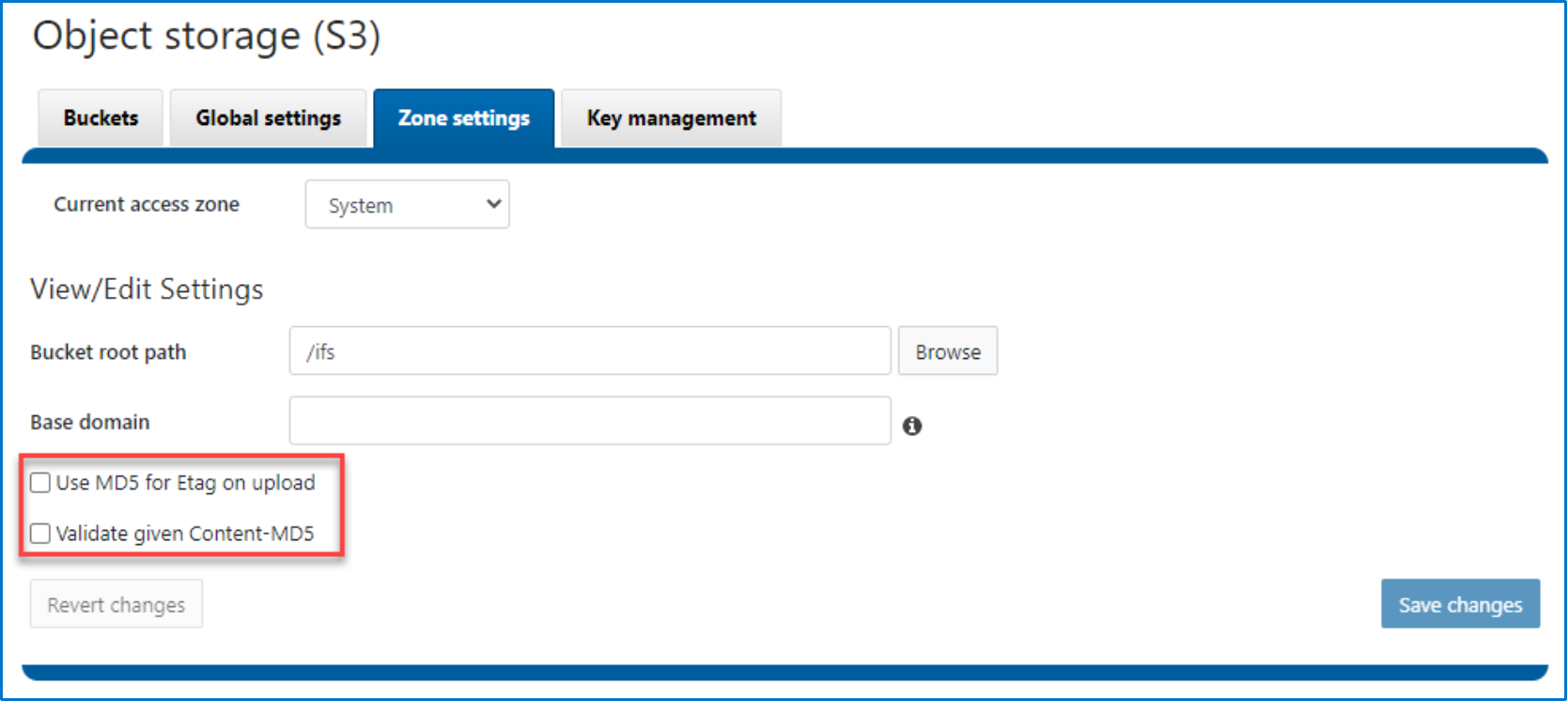
Figure 1. S3 ETag options
Table 31 shows the different behaviors by using the two new options.
Table 31. OneFS S3 ETag behavior
|
|
--use-md5-for-etag=false |
--use-md5-for-etag=true |
|
--validate-content-md5=false |
This is the default value. If “Content-MD5” exists in client request, OneFS uses it directly as the ETag without validation and checking the BASE64 encoding format. If “Content-MD5” does not exist in client request, OneFS generates a unique string for that file as the ETag. |
If “Content-MD5” exists in client request and its value is properly encoded as BASE64 format, OneFS uses it as the ETag without validation. If “Content-MD5” does not exist in client request, OneFS calculates the MD5 value as the ETag. |
|
--validate-content-md5=true |
If “Content-MD5” exists in client request and its value is properly encoded as BASE64 format, OneFS calculates the MD5 value and compare with the MD5 value from client request, if matched, uses it as the ETag. Otherwise, an error is returned to client. If “Content-MD5” does not exist in client request, OneFS generates a unique string for that file as the ETag. |
If “Content-MD5” exists in client request, OneFS calculates the MD5 value and compare with the MD5 value from client request, if matched, uses it as the ETag. Otherwise, an error is returned to client. If “Content-MD5” does not exist in client request, OneFS calculates the MD5 value as the ETag. |
Note: Objects created with a multipart upload request do not use MD5 value as ETag.
Presigned URLs
A presigned URL gives you access to the object identified in the URL, OneFS supports presigned URLs to allow users to access objects without needing credentials. Please refer to AWS S3 Presigned URLs for more details.
Chunked upload
There are two types of uploading options when authenticating requests using the Authorization header of AWS Signature Version 4:
- Transfer payload in a single chunk
- Transfer payload in multiple chunks (chunked upload)
Starting with OneFS 9.3.0, the chunked upload is introduced. With chunked upload, you can break up your payload into chunks. These can be fixed or variable-size chunks. By uploading data in chunks, you avoid reading the entire payload to calculate the signature. Instead, for the first chunk, you calculate a seed signature that uses only the request headers. The second chunk contains the signature for the first chunk, and each subsequent chunk contains the signature for the chunk that precedes it. At the end of the upload, you send a final chunk with 0 bytes of data that contains the signature of the last chunk of the payload. You can refer to AWS S3 Chunked Upload for more details.
Inter-level directory
Starting from OneFS 9.3.0, the concept of "inter-level directory" is introduced. An inter-level directory in OneFS refers to directories within an S3 bucket that contain the .isi_s3_dir file.
When uploading an object that requires a parent directory, such as uploading an object with the key "a/b/c" and directories "a/" and "b/" do not exist in OneFS, OneFS will automatically create these directories to store the file "c". Additionally, OneFS will create a file named .isi_s3_dir in each newly created directory.
The introduction of inter-level directories changes the OneFS behavior of the delete bucket and list objects S3 API.
Table 32. Delete bucket and list objects behavior
|
|
Before OneFS 9.3.0 |
OneFS 9.3.0 and above |
|
Delete bucket |
Bucket can be deleted only if the bucket path does not contain any directories and files. |
Bucket can be deleted if the bucket path is empty or only contains the inter-level directories. The empty inter-level directories are deleted as well. |
|
List objects |
List objects API lists empty directories as object. For example, “a/b/c/” is returned as object where “c/” is a OneFS directory. |
List objects ignores empty inter-level directories without specify delimiter "/" . |
Delete bucket examples
- Empty bucket path
- Bucket path: /ifs/data/s3-bkt, the bucket path is empty, see below:
# tree -a /ifs/data/s3-bkt/
/ifs/data/s3-bkt/
0 directory, 0 files
- Before OneFS 9.3.0: delete bucket successfully using DeleteBucket S3 API.
- OneFS 9.3.0 and above: delete bucket successfully using DeleteBucket S3 API.
- Bucket path contains directories or files
- Bucket path: /ifs/data/s3-bkt, the bucket path contains a normal directory, see below:
# tree -a /ifs/data/s3-bkt/
/ifs/data/s3-bkt/
└── dir01
1 directory, 0 files
- Before OneFS 9.3.0: delete bucket failed using DeleteBucket S3 API.
- OneFS 9.3.0 and above: delete bucket failed using DeleteBucket S3 API.
- Bucket path contains inter-level directories
- Bucket path: /ifs/data/s3-bkt, the bucket path contains an inter-level directory, see below:
# tree -a /ifs/data/s3-bkt/
/ifs/data/s3-bkt/
└── dir01
└── .isi_s3_dir
1 directory, 1 file
- Before OneFS 9.3.0: delete bucket failed using DeleteBucket S3 API.
- OneFS 9.3.0 and above: delete bucket successfully using DeleteBucket S3 API.
Enhanced compatibility with directory objects
In AWS S3, the object keys "a/" and "a/b" represent distinct data entities. AWS S3 permits users to delete the object "a/" while retaining the object "a/b".
However, within OneFS, if you explicitly upload two objects "a/" and "a/b", the object "a/" functions as a directory in OneFS, while "a/b" is recognized as a file nested under the directory "a/". Attempting to delete the object "a/" in OneFS fails with HTTP error 200 because the directory "a/" is not empty.
To align OneFS S3 behavior more closely with AWS S3, starting from OneFS 9.7.0, when deleting a directory object, the directory transitions into an inter-level directory with the creation of a .isi_s3_dir file. This transition occurs seamlessly without triggering any error prompts for clients. Below is an example:
- Assume there is a bucket using bucket path /ifs/data/s3-bkt/
- Put object “dir01/” to OneFS cluster, OneFS will create a directory /ifs/data/s3-bkt/dir01/
- Put object “dir01/file01” to OneFS cluster, OneFS will create a file /ifs/data/s3-bkt/dir01/file01
- Try to delete the object “dir01/” with S3 DeleteObject API,
- Before OneFS 9.3.0: delete object “dir01/” failed using S3 DeleteObject API.
- OneFS 9.3.0 and above: delete object “dir01/” successfully using S3 DeleteObject API, and OneFS creates a .isi_s3_dir file under directory /ifs/data/s3-bkt/dir01/.
S3A connector support
S3A is an open-source connector that allows big data applications like Apache Hadoop, Spark, and Hive to efficiently access and interact with data stored in Amazon S3 and S3 compatible storage. It uses the s3a:// URI scheme. Starting from OneFS 9.11, S3A is officially supported. To access OneFS data using S3A, the following configuration should be done:
- Enable OneFS S3 service and create an S3 bucket.
- Generate S3 user ID and access key.
- Configure your application to use OneFS S3 service, for example of Hadoop, you can refer to Apache Hadoop Amazon Web Services support – Connecting to an Amazon S3 Bucket through the S3A Connector.
Note: Some of S3A clients only work if OneFS uses MD5 as etag.
By default, S3A uploads files as a temporary file first, then copy it to target file name to mimic rename. This is unnecessary because S3 provides atomicity guarantee. Consider using the direct upload option. For example, hadoop fs has -d option and distcp has --direct option.
S3 cluster status API
Starting from OneFS 9.11, OneFS S3 provides the ability to query cluster health and performance status via a special S3-compatible API, making it easy to integrate system telemetry directly into existing S3 workflows or monitoring pipelines.
By performing a GET request on a virtual bucket/object pair, authenticated S3 users can get the following cluster status information:
- Total capacity and free space (in TB and TiB)
- Cluster health (overall state, percentage health score)
- Network status (Full, Half, Critical, Unknown)
- Read/write bandwidth (15-minute average)
How it Works
The OneFS S3 Cluster Status API provides a simple way to retrieve infrastructure insights by targeting a specific virtual bucket and object (by default: cluster_status/s3_cluster_status_v1). It supports only HEAD and GET operations, while all other S3 methods (such as PUT or DELETE) will return a 405 Method Not Allowed error. The API is enabled and configured using the isi_gconfig tool. Once activated, it allows tools like s5cmd or custom S3 clients to access cluster status data easily, eliminating the need for SSH access or separate monitoring APIs.
Figure 2 is an example using s5cmd:
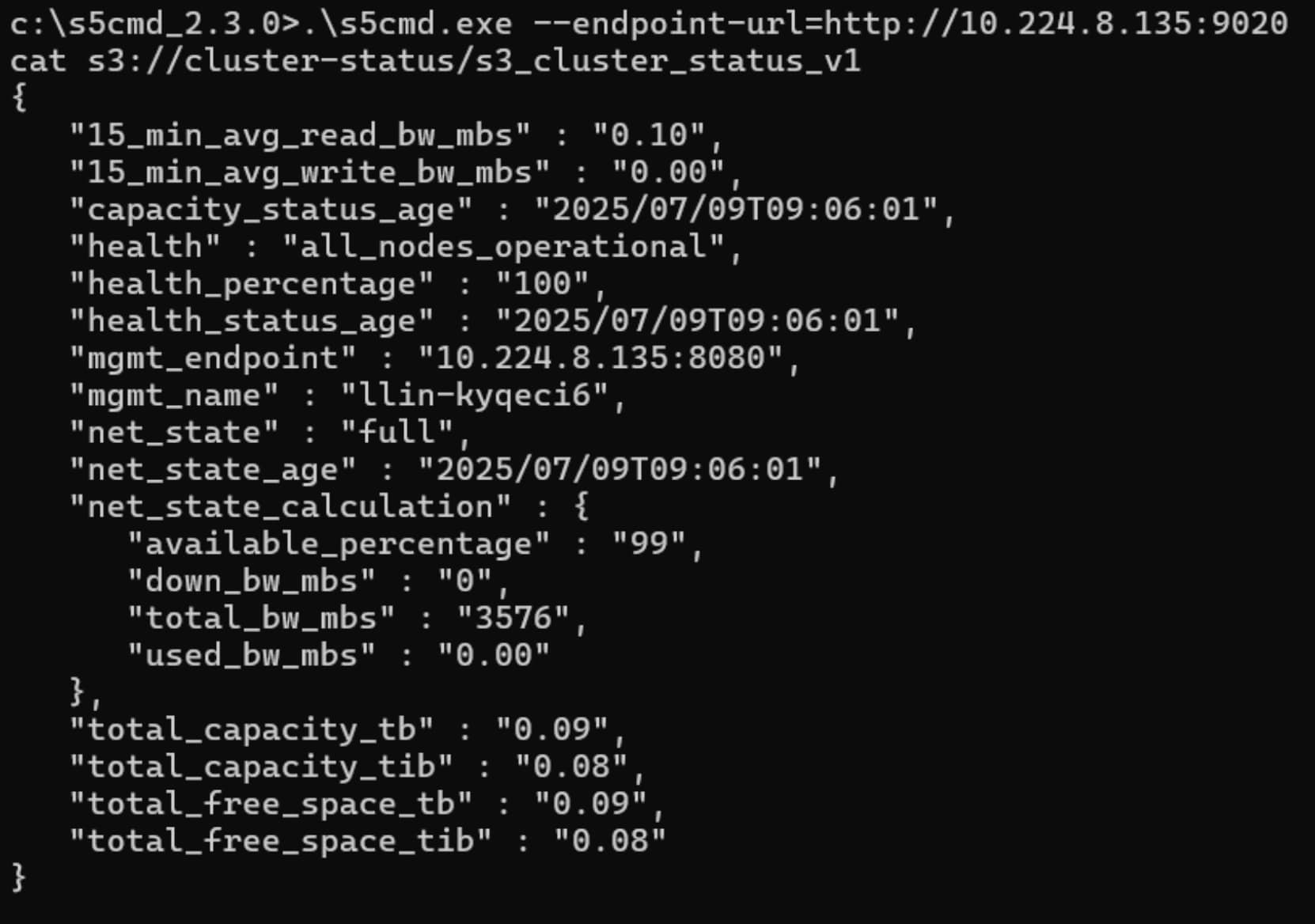
Figure 2. S3 cluster status API using s5cmd
Table 33 shows the details of returned information.
Table 33. Cluster status fields
|
Requested Field |
Description |
|
mgmt_name |
Name of the cluster |
|
mgmt_endpoint |
Management endpoint |
|
total_capacity_tb |
Cluster's total "current" capacity in base 10 terabytes with estimated efficiency. The total capacity may be less than total raw capacity due to protection overhead.. |
|
total_capacity_tib |
Cluster's total "current" capacity in base 2 terabytes with estimated efficiency. The total capacity may be less than total raw capacity due to protection overhead. |
|
total_free_space_tb |
Cluster's total "current" free space in base 10 terabytes with protection overhead. |
|
total_free_space_tib |
Cluster's total "current" free space in base 2 terabytes with protection overhead. |
|
capacity_status_age |
Number of seconds between the time of issuance and the proper calculation of capacity status. |
|
health |
Calculated status based on per node health status: either all_nodes_operational or some_nodes_nonoperational or non_operational. |
|
health_percentage |
Vendor specific number from 0-100% where the vendor's judgement should be used has to what level of the systems normal load it can take. |
|
health_status_age |
Number of seconds between the time of issuance and the proper calculation of health status. |
|
15_min_avg_read_bw_mbs |
Read bandwidth in use, measured in megabytes per second, averaged over a 15-minute period. |
|
15_min_avg_write_bw_mbs |
Write bandwidth in use, measured in megabytes per second, averaged over a 15-minute period. |
|
net_state |
Networking status to S3 clusters. Divided into “Full”, “Half”, “Critical”, and “Unknown” |
|
net_state_age |
Number of seconds between the time of issuance and the proper calculation of network status. |
How to configure?
The S3 cluster status API can be enabled and configured using the isi_gconfig tool. The Table 34 shows the available options and the default settings. Please note that the S3 service must be restarted to make the S3 cluster status API option changes effective.
Table 34. S3 cluster status API options
|
Configuration name |
Default Value |
Description |
|
S3ClusterStatusBucketName |
"cluster-status" |
Name of the bucket used to access cluster status. |
|
S3ClusterStatusCacheExpirationInSec |
300 |
Expiration time in seconds for cluster status cache in memory. Once reached, the next request for cluster status will result in a new fetch of fresh data. |
|
S3ClusterStatusEnabled |
0 |
Whether the feature is enabled or not. |
|
S3ClusterStatusObjectName |
"s3_cluster_status_v1" |
Name of the object used to access cluster status. |
Below is a default settings example:
llin-x2ystz3-1# isi_gconfig | grep s3.S3ClusterStatus
registry.Services.lwio.Parameters.Drivers.s3.S3ClusterStatusBucketName (char*) = cluster-status
registry.Services.lwio.Parameters.Drivers.s3.S3ClusterStatusCacheExpirationInSec (uint32) = 300
registry.Services.lwio.Parameters.Drivers.s3.S3ClusterStatusEnabled (uint32) = 0
registry.Services.lwio.Parameters.Drivers.s3.S3ClusterStatusObjectName (char*) = s3_cluster_status_v1
Get multipart upload (MPU) completion progress
Multipart upload (MPU)
OneFS S3 provides the option to upload large files as multiple parts, rather than as a single request. To initiate a multipart upload, the client sends a POST request with the `uploads` query parameter and the object key, along with any optional metadata attributes and ACL for the file. A unique `uploadId` is generated and returned to the client, and a directory named `.s3_parts_<uploadId>` is created in the target directory to store the parts. Each part is uploaded with a part number and stored in this directory, with a maximum size of 5GB and a minimum size of 5MB (except for the last part).
Fast path and slow path
As mentioned above, OneFS S3 Multipart Upload (MPU) allows clients to increase upload throughput and reduce the cost of failed transmissions by splitting objects into equal-sized parts. The typical MPU workflow involves uploading parts, with only failed parts being re-uploaded. To optimize completion times, PowerScale's MPU completion process follows a fast path if the following conditions are met:
- Parts are equal-sized (except for the final part)
- Parts are only re-uploaded in case of failure; the re-uploaded part will have the same size as the original
- All uploaded parts are included in the final object at completion time
- Part numbers start from 1
- There are no gaps in the part number sequence
If any of these conditions are not met, the system falls back to a slow path, which may result in longer completion time. Additionally, even if the fast path is initially followed, if any recovered part fails validation or processing, the process will also revert to the slow path.
As of OneFS version 9.13.0.0, the S3 API has been enhanced with the introduction of the GetMPUCompletionProgress API. This new API enables clients to monitor the progress of the Multipart Upload (MPU) completion process, providing greater visibility and control over the upload process.
To support the GetMPUCompletionProgress API, the CompleteMultipartUpload API response header has been extended to include three additional fields when MPU completion progress is enabled:
- Completion-Id: An identifier used by the GetMPUCompletionProgress call to retrieve the progress of the MPU completion process.
- Fast-Path: A boolean value indicating whether the MPU completion is using the fast path optimization.
- Completion-State-Info: A field providing detailed information about the completion state, as outlined in Table 35:
Table 35. Completion-State-Info details
|
Scenario |
Message |
Progress |
|
Super fast path |
Super fast path with parts 1..N sequential, will finish quickly and completionID will be useless. |
No need to check |
|
Fast path |
Fast path with parts 1..N sequential, but x parts need to be recovered. May fallback to slow path in case of errors. |
To check recovery progress |
|
Slow path: only one part |
Not a fast path due to only one part in total and this part needs to be recovered. |
To check slow path progress |
|
Slow path: part number not contiguous |
Not a fast path due to non-contiguous part numbers. Please verify intent, or abort and restart the session. |
To check slow path progress |
|
Slow path: part number not from 1 |
Not a fast path due to part numbers not starting from 1. Please verify intent, or abort and restart the session. |
To check slow path progress |
|
Slow path: different part size |
Not a fast path due to the size of non-last parts differs from the 1st part size. Please verify intent, or abort and restart the session. |
To check slow path progress |
GetMPUCompletionProgress API Request Pattern
The GetMPUCompletionProgress API is invoked using the following HTTP GET request pattern:
- GET http://{endpoint}/{bucket_name}/{object_key}?completionId={completion_id}&uploadId={upload_id}
For example, the client would send a GET request to:
GetMPUCompletionProgress API Response
The response from the GetMPUCompletionProgress API includes the following information:
- Fast Path : Indicates whether the MPU completion is using the fast path optimization.
- Total Parts : The total number of parts in the multipart upload.
- Total Recovery Parts : The total number of parts that require recovery.
- Completed Parts : The number of parts that have been successfully completed.
- Recovered Parts : The number of parts that have been successfully recovered.
OneFS S3 limitations
Overview
This section addresses the limitations of the OneFS S3 implementation. It is recommended to take these limitations into consideration when designing an application to work with OneFS S3.
Table 36 shows the details about OneFS S3 limitations.
Table 36. OneFS S3 limitations
|
Feature |
Limitation |
|
Object versioning |
OneFS does not support Amazon S3 object versioning. It is recommended to use OneFS SnapshotIQ as an alternative method. |
|
Object key delimiter |
Starting from OneFS 9.3.0, OneFS supports the following delimiter format:
Delimiter does not contain any slash(“/”), such as “abcd”. Therefore, “/abcd” and “ab/cd” are not valid delimiters. |
|
Number of buckets |
There are 1,000 buckets per user and 40,000 per cluster. |
|
User-defined metadata |
|
|
Bucket traversal |
An S3 user must traverse or execute permissions on all elements of the path to reach an object in the OneFS directory hierarchy. |
|
Object size |
An object may not exceed 16 TiB, which is aligned with the OneFS file system. |
Appendix A: OneFS S3 extended-request parameter examples
x-isi-path extended header
When creating a bucket through S3, OneFS provides an optional S3 extension to specify a OneFS directory as a bucket path. The following is an example of adding the extended header through boto3.
import boto3
HOST=<ip/fqdn> # Your SmartConnect name or cluster IP goes here
USERNAME='1_local_user01_accid' # Your access ID
USERKEY='mWQbXkadl2CR_x2_WRj4tYu_d11j' # Your secret key
URL = 'http://{}:9020'.format(HOST)
s3 = boto3.resource('s3')
session = boto3.Session()
s3client = session.client(service_name='s3',aws_access_key_id=USERNAME,aws_secret_access_key=USERKEY,endpoint_url=URL,use_ssl=False,verify=False)
bucket_name='bucket01'
bucket _path = "/ifs/data/s3buckets/{}".format(bucket_name)
headers = {'x-isi-path': bucket_path}
# pass in custom headers before CreateBucket call
add_headers = (lambda **kwargs: kwargs['params']['headers'].update(headers))
s3client.meta.events.register('before-call.s3.CreateBucket', add_headers)
s3client.create_bucket(Bucket=bkt_name)
x-isi-force-delete extended header
By default, a bucket cannot be deleted if it is not empty. With the x-isi-force-delete extension, a bucket can be deleted from OneFS while preserving the data under the bucket. This option is effective if it is contained in a request. A value does not have to be assigned for this header, and an empty string is acceptable. The following is an example of adding the extended header through boto3.
import boto3
HOST=<ip/fqdn> # Your SmartConnect name or cluster IP goes here
USERNAME='1_local_user01_accid' # Your access ID
USERKEY='mWQbXkadl2CR_x2_WRj4tYu_d11j' # Your secret key
URL = 'http://{}:9020'.format(HOST)
s3 = boto3.resource('s3')
session = boto3.Session()
s3client = session.client(service_name='s3',aws_access_key_id=USERNAME,aws_secret_access_key=USERKEY,endpoint_url=URL,use_ssl=False,verify=False)
bucket_name='bucket01'
headers = {'x-isi-force-delete': ''}
# pass in custom headers before DeleteBucket call
add_headers = (lambda **kwargs: kwargs['params']['headers'].update(headers))
s3client.meta.events.register('before-call.s3.DeleteBucket', add_headers)
s3client.delete_bucket(Bucket=bkt_name)
Appendix B: Technical support and resources
Dell Technologies resources
Dell.com/support is focused on meeting customer needs with proven services and support.
Storage technical documents and videos provide expertise that helps to ensure customer success on Dell Technologies storage platforms.