Dell PowerScale™ OneFS™ supports the native S3 protocol. With this capability, clients can access OneFS cluster file-based data as objects. PowerScale combines the benefits of traditional NAS storage and emerging object storage to provide an enhanced data-lake capability and cost-effective unstructured data storage solution. OneFS S3 is designed as a first-class protocol, including features for bucket and object operations, security implementation, and management interface.
This document introduces how the S3 API is implemented in OneFS to provide high-performance data access. It introduces the benefits of OneFS S3 and provides applicable use cases. This document also details bucket and object operations, authentication, and the authorization process.
Revisions
Revision history. The table outlines the document revision history, including date, part number, and description of each release.
Date
Part number/ revision
Description
June 2020
H18292
Initial Release
May 2021
H18292.2
Update with One FS S3 ETag implementation
October 2021
H18292.3
Update with OneFS 9.3.0 S3 enhancements: MPU, DeleteObjects, Chunked Upload, non-slash delimiter support for ListObjects/ List objectsV2
June 2024
H18292.4
Updated formatting
August 2025
H18292.5
Updated for OneFS 9.12, including S3 object lock and access logging
December 2025
H18292.6
Updated for OneFS 9.13
August 2026
H18292.7
Updated for OneFS 9.15
November 2026
H18292.8
Updated for OneFS 9.16
We value your feedback
Dell Technologies and the authors of this document welcome your feedback on this document. Contact the Dell Technologies team by email.
NOTE:For links to other documentation for this topic, see the PowerScale Info Hub.
Introduction
Data is now a new form of capital. It provides the insights that facilitate your organization’s digital transformation, and 80% of the information is represented as unstructured data. Organizations in every industry generate an exponentially larger number of unstructured data volumes than ever before, from edge to core to cloud. The way of storing and managing unstructured data is evolving. Its goal is to unlock the value of your data by using both the traditional network attached storage (NAS) system and emerging object storage.
Many organizations run their critical applications on traditional NAS storage, and develop new modern applications using object storage. There are some challenges under the heterogeneous storage platforms for unstructured data:
Applications running on different storage platforms may need to access the same set of data. In this case, data migration is required between NAS storage and object storage, and the extra copy of the data consumes additional storage capacity.
There is an inability to access object storage through the NAS protocol, like NFS and SMB. Many object-storage systems provide access to the NAS protocol using a gateway-like architecture which does not perform adequately when combined with the object storage stack.
In contrast to NAS storage, object storage is not intended for transactional data where operations-per-second and latency are critical.
Designed to address these challenges, Dell PowerScale is ideal for demanding enterprise file workloads and can store, manage, and protect unstructured data with efficiency and massive scalability. It supports multiple NAS protocols natively for applications.
Starting with OneFS version 9.0, PowerScale enables accessing data through the Amazon Simple Storage Service (Amazon S3) application programing interface (API) natively. PowerScale implements the S3 API as a first-class protocol along with other NAS protocols on top of its distributed OneFS file system. Whether your application is based on traditional NAS storage or on the emerging object storage, the application can access data in a single scale-out storage platform through NAS protocols or the S3 API as needed. This document introduces how S3 API is implemented in OneFS and how it can provide high-performance data access.
OneFS S3 overview
The Amazon S3 API was originally developed as the data-access interface of Amazon S3. As applications were developed using the S3 API, it became a common standard for object storage. This document refers to the S3 API for object storage as the S3 protocol. This provides consistent nomenclature along with other NAS protocols regarding the OneFS file service.
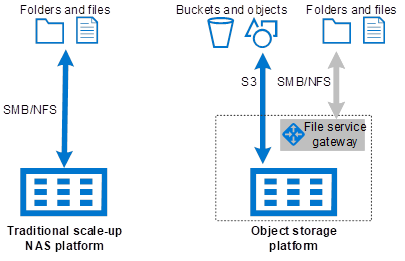
Figure 1 shows the traditional scale-up NAS platform and the emerging object-storage architecture. The traditional scale-up NAS platform is only accessible through file protocols and is not easy to scale as the performance requirement increases. The object storage allows both file and object access, but the file access is achieved through a gateway, with either a software daemon or additional dedicated hardware. This limits file-access performance compared to a traditional NAS platform.
Scale-up NAS platform and object storage platform architecture
This is where PowerScale scale-out storage comes in. With the introduction of the OneFS S3 protocol, PowerScale combines the advantages of both platform types into a single storage system while providing performance for file and object access.
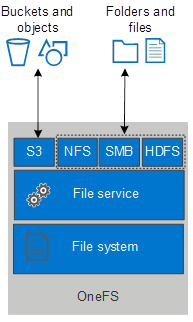
Starting with OneFS version 9.0, PowerScale OneFS supports the native S3 protocol. OneFS implements S3 as a first-class protocol along with other protocols, including NFS, SMB, and HDFS. The S3 protocol is implemented over HTTP and secure HTTP (HTTPS). Through OneFS S3, you can access file-based data stored on your OneFS cluster as objects. Since the S3 API is considered to be a protocol, content and metadata can be ingested using S3 and concurrently accessed through other protocols that are configured on the cluster.
NOTE:The OneFS S3 service is disabled by default. If the service is enabled, it only listens on port 9021 for HTTPS. Port 9020 for HTTP is disabled by default. These ports are configurable through the OneFS WebUI and CLI.
In OneFS, each S3 bucket is mapped to a directory under a multi-tenant access zone base path, each S3 object is mapped to a file, and the associated object prefix is mapped to directories. A directory for a bucket is created under the multi-tenant access zone base path by default. See the AWS S3 documentation regarding S3 bucket and object definition.
OneFS provides the following S3 features:
Create, list, update, and delete buckets
Create, list, read, and delete objects
Support for both AWS Signature Version 2 and Version 4
Support both path-style requests and virtual hosted-style requests
Multipart upload of large content for better performance
Access ID and secret key management through WebUI, CLI, and PAPI
Bucket ACL and Object ACL for access control
Support multi-tenant access zone
Support object lock feature
Support server access logging
Use cases
By implementing the S3 protocol, OneFS enhances its data-lake capability by supporting both the traditional NAS protocol and object storage protocol. You can unify your file and object data access in a single storage namespace. The S3 protocol on a OneFS cluster provides following benefits:
Consolidate storage for applications regardless of data-access protocols
Store data with the S3 protocol and then seamlessly access the data as files with SMB, NFS, HTTPS, FTP, and HDFS
Store files with SMB, NFS, and other protocols and then access the files as objects through the S3 protocol
Eliminate data migration when a same set of data is accessed through NAS protocols and the S3 protocol
Multitenancy support for better storage-as-a-service abilities through S3
Increased return on investment for the OneFS cluster by supporting object access
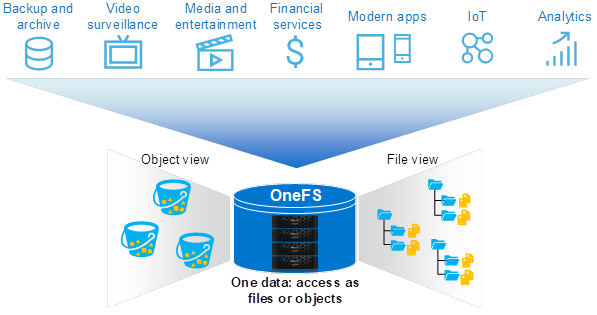
As the Figure 2 shows, OneFS seamless interoperates between file-based and object-based data access in a single NAS platform for various workloads.
Access data as file and object in a single storage
OneFS can now extend its use cases with the benefits of OneFS S3. The following list includes general use cases for OneFS S3:
Back up and archive: It is possible to make OneFS as an ideal target for S3-compatible data backup and archive software.
File service: Data access for files and data access for objects are easily consolidated in a single scale-out storage. This provides faster service than cloud and more cost-effective service than traditional NAS platforms.
Enhanced multiprotocol data access: The data in a OneFS cluster can be accessed as files or objects.
OneFS S3 implementation
OneFS implements the S3 protocol on top of the file-service engine like other protocols. Clients that connect to a OneFS cluster with S3 gain access to the single volume of the distributed OneFS file system and take advantage of the entire cluster’s performance. To work with OneFS S3, clients connect to the S3 service over HTTP or HTTPS and use standard REST calls such as PUT, GET, and POST to perform bucket and object operations.
OneFS S3 architecture overview
Making an analogy with an SMB share which is associated with a path, a OneFS S3 bucket is also created based on a specific path within the multi-tenant access zone base path. OneFS S3 maps an object to a file and maps the object prefix to directories correspondingly. For example, assume a file is stored in OneFS with a full path of /ifs/data/docs/finance/sample.pdf. To access the file with S3, create a bucket bkt01 in OneFS and associate the bucket with a path /ifs/data/docs/. The object key of /finance/sample.pdf is used to represent the file.
OneFS support two types of requests when resolving buckets and objects. See the Amazon S3 documentation Virtual Hosting of Buckets for more details about the following:
Virtual hosted-style requests: Specify a bucket in a request by using the HTTP Host header
Path-style requests: Specify a bucket by using the first slash-delimited component of the Request-URI path
With OneFS S3, you can access the file as an object by using GET and PUT operations with the following URLs (for example) which contain the SmartConnect zone name:
Configure the S3 base domain to your SmartConnect zone name using the WebUI or CLI.
# isi s3 settings zone modify --base-domain=<smartconnect> --zone=<name>
Buckets
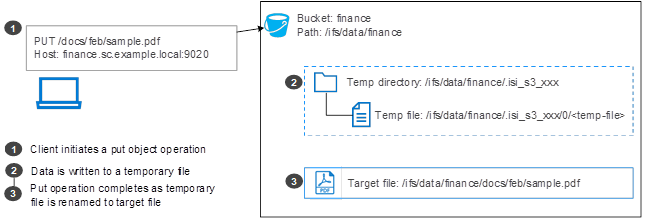
OneFS requires a bucket to map to a specific directory in a multi-tenant access zone. This directory is called the bucket path. If the bucket path is not specified, a default path is used, which is configurable at a multi-tenant access zone level through the WebUI or CLI. When creating a bucket, OneFS creates a directory with a prefix of .isi_s3_ under the bucket path, and creates 16 other subdirectories named 0 through 15 under the .isi_s3_ directory. An example of this name is .isi_s3_ 1_1000000010001. The 16 subdirectories are used to store temporary files for the PUT operation. OneFS automatically balances different temporary files between the directories for better performance. Figure 4 shows the process of putting an object to the OneFS cluster which uses the temporary directory under the bucket.
OneFS S3 put object
Bucket naming rules
OneFS S3 bucket names comply with DNS naming conventions. The following rules are required for naming S3 buckets in OneFS:
Bucket names must be unique at the OneFS multi-tenant access zone level.
Bucket names cannot be changed after the bucket is created.
Bucket names must consist of characters including lowercase letters (a-z), numbers (0-9), or
dashes (-).
Bucket names must start or end with a lowercase letter (a-z) or number (0-9).
Bucket names must be 3 to 63 characters in length.
Bucket operations
The following table shows the supported S3 bucket operations in OneFS. See the document Dell PowerScale: OneFS S3 API Guide for details about each supported API.
OneFS S3 bucket operations. The table summarizes supported S3 bucket operations and their functions in OneFS.
PUT operation to create a bucket. Anonymous requests are never allowed to create buckets. By creating the bucket, the authenticated user becomes the bucket owner.
Places an Object Lock configuration on the specified bucket.
HeadBucket
Determine if a bucket exists and if you have permission to access it. The operation returns a 200 OK if the bucket exists and if you have permissions to access it. Otherwise, the operation might return responses such as 404 Not Found and 403 Forbidden.
ListBuckets
Get a list of all buckets owned by the authenticated user of the request.
ListMultipartUploads
List in-progress multipart uploads. An in-progress multipart upload is a multipart upload that has been initiated using the Initiate Multipart Upload request but has not yet been completed or aborted.
OneFS S3 server access logging
Server access logging provides detailed records for the requests that are made to a bucket. Server access logs are useful for many applications. For example, accessing log information can be useful in security and access audits. Please refer to AWS S3 Server Access Logging documentation for more details.
Starting with OneFS 9.12, the OneFS S3 service introduces support for S3 server access logging. When you enable access logging on a bucket, you need to specify a target bucket to store the logs file along with a log file prefix.
OneFS supports to use object lock enabled bucket as the server access log target bucket. The target bucket must have the WRITE ACL/ FULL_CONTROL permission granted to the source bucket owner. Additionally, the source bucket owner should ensure that the OneFS ACL permissions are appropriately configured for the target bucket directory. Failure to properly configure these permissions causes the logging configuration to fail. Below are OneFS specific behavior:
Log object key format
The log object key format supports date-based partitioning, offering a more hierarchical and structured layout that simplifies troubleshooting and significantly reduces the risk of exceeding S3’s object limits under a single prefix. Compared to non-date-based partitioning, this approach improves both operational scalability and data manageability. Please refer to AWS S3 Log Object Key Format documentation for more information. The OneFS log object key format follows the structure:
This format is largely aligned with the standard AWS S3 date-based partitioning approach. However, key differences include the replacement of:
SourceAccountId → ZoneId
SourceRegion → UserId
These substitutions map more directly to PowerScale S3 concepts, providing better contextual alignment within the PowerScale environment.
Log format
The log format follows the AWS S3 server access log format, ensuring familiarity and consistency for users accustomed to S3 logging standards. For fields that are either not applicable to specific operations or not currently supported by PowerScale S3, the log record will display a placeholder value of '-', examples include:
Version ID: Shown as '-' since PowerScale S3 does not currently support S3 versioning.
Access Point ARN: Replaced with '-' as this field is specific to AWS infrastructure.
The AWS S3 data model is a flat structure—you create a bucket, and the bucket stores objects. There is no hierarchy of subbuckets or subfolders. However, AWS S3 provides a logical hierarchy using object key name prefixes and delimiters to support a concept of folders. For example, instead of naming an object sample.jpg in the bucket named examplebucket, you can name it photos/samples/sample.jpg. The photos/samples/ becomes the object key name prefix using the slash (/) as delimiter.
OneFS maps objects to files and creates directories as object key name prefixes implicitly. The OneFS file system requires the following rules for object naming:
The object can only use ASCII or UTF-8 characters.
When uploading objects, only the slash (/) is supported as an object-key-name delimiter. The slash cannot be part of the object key name; it is automatically treated as a delimiter.
Starting from OneFS 9.3.0, OneFS supports the following delimiter format or list objects in a bucket (ListObjects and ListObjectsV2):
Delimiter contains only one single slash(“/”) character by default.
Delimiter contains only one single slash(“/”) at the end, such as “abc/”.
Delimiter does not contain any slash(“/”), such as “abcd”. Therefore, “/abcd” and “ab/cd” are not valid delimiters.
Objects cannot contain a prefix that conflicts with an existing object key name in its path. For example, creating the object /document and /document/sample.docx is not allowed within the same bucket.
You cannot use a period (.) or double period (..) as object key name or part of object key name prefix. For example, you can create the object /.sample.jpg but not the object /./sample.jpg.
You cannot use .snapshot as the object key name or part of an object key name prefix; this is reserved for OneFS SnapshotIQ.
Object operations
The following table shows the supported S3 object operations in OneFS 9.0. See the document Dell PowerScale: OneFS S3 API Guide for details about each supported API.
OneFS S3 object operations. The table summarizes supported S3 object operations, including object management, ACLs, retention settings, and multipart upload functions.
HEAD operation retrieves metadata from an object without returning the object itself. This operation is useful if you are only interested in an object's metadata. The operation returns a 200 OK if the object exists and if you have permission to access it. Otherwise, the operation might return responses such as 404 Not Found and 403 Forbidden.
PutObject
Add an object to a bucket.
CopyObject
Create a copy of an object that is already stored in OneFS. You can treat it as server-side-copy which reduces the network traffic between the clients and OneFS.
PutObjectAcl
Set the ACL permissions for an object that exists in a bucket.
Places an Object Retention configuration on an object.
CreateMultipartUpload
Initiate a multipart upload and return an upload ID. This upload ID is used to associate with all the parts in the specific multipart upload. You can specify this upload ID in each of your subsequent upload part requests. You also include this upload ID in the final request to either complete or cancel the multipart upload request.
UploadPart
Upload a part in a multipart upload. Each part must be at least 5 MiB, except the last part. The maximum size of each part is 5 GiB.
UploadPartCopy
Upload a part by copying data from an existing object in OneFS as the data source. Each part must be at least 5 MiB in size, except the last part. The maximum size of each part is 5 GiB.
CompleteMultipartUpload
Complete a multipart upload by assembling previously uploaded parts.
ListParts
List the parts that have been uploaded for a specific multipart upload.
AbortMultipartUpload
Cancel a multipart upload. After a multipart upload is aborted, no additional parts can be uploaded using that upload ID. The storage consumed by any previously uploaded parts is freed. However, if any uploads of parts are in progress, those uploads might or might not succeed. As a result, it might be necessary to cancel a given multipart upload multiple times to free all storage consumed by all parts.
OneFS S3 ETag
AWS S3 may use an MD5 Checksum as an ETag value for objects. This value may be specified in the HTTP Header “Content-MD5”. In OneFS 9.0 and OneFS 9.1, OneFS uses the MD5 value from client as an ETag directly instead of calculating it by itself. If the MD5 is not specified in client request, OneFS generates a unique string for that file as an ETag in response. This behavior is different from AWS S3.
Most S3 applications do not send the MD5 value in their requests, thus, OneFS generates a unique string for that file as an ETag in response. This behavior causes many issues with applications that rely on the ETag value. Starting from OneFS 9.2, OneFS introduces two new options to allow administrators to specify if the MD5 should be calculated and verified.
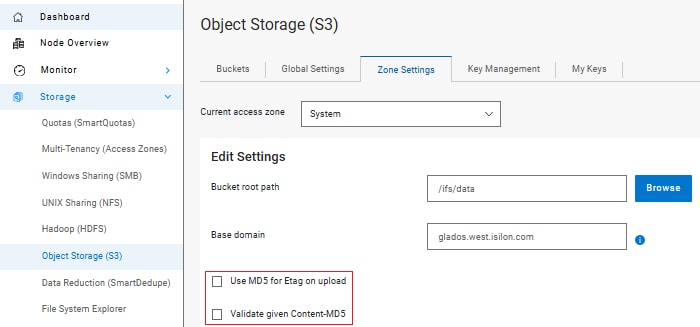
These two options are under the S3 zone settings. You can configure them using CLI isi s3 settings zone modify --use-md5-for-etag=true/false --validate-content-md5=true/false or WebUI, shown in Figure 5.
# isi s3 settings zone view
                   Root Path: /ifs
                 Base Domain:
           Object ACL Policy: replace
Bucket Directory Create Mode: 0777
            Use Md5 For Etag: No
        Validate Content Md5: No
S3 ETag options
ETag generation and content-MD5 validation. The table shows how ETags are generated and validated based on the --use-md5-for-etag and --validate-content-md5 settings.
-
--use-md5-for-etag=false
--use-md5-for-etag=true
--validate-content-md5=false
This is the default value.
If “Content-MD5” exists in client request, OneFS uses it directly as the ETag without validation and checking the BASE64 encoding format.
If “Content-MD5” does not exist in client request, OneFS generates a unique string for that file as the ETag.
If “Content-MD5” exists in client request and its value is properly encoded as BASE64 format, OneFS uses it as the ETag without validation.
If “Content-MD5” does not exist in client request, OneFS calculates the MD5 value as the ETag.
--validate-content-md5=true
If “Content-MD5” exists in client request and its value is properly encoded as BASE64 format, OneFS calculates the MD5 value and compare with the MD5 value from client request, if matched, uses it as the ETag. Otherwise, an error is returned to client.
If “Content-MD5” does not exist in client request, OneFS generates a unique string for that file as the ETag.
If “Content-MD5” exists in client request, OneFS calculates the MD5 value and compare with the MD5 value from client request, if matched, uses it as the ETag. Otherwise, an error is returned to client.
If “Content-MD5” does not exist in client request, OneFS calculates the MD5 value as the ETag.
NOTE:Objects created with a multipart upload request do not use MD5 value as ETag.
OneFS S3 Object Lock
Amazon S3 Object Lock helps prevent objects from being deleted or overwritten for a specified retention period or indefinitely using a write-once-read-many (WORM) storage model. This feature is commonly used to meet regulatory compliance requirements that mandate WORM storage, or to provide an additional layer of protection against accidental or malicious data modification or deletion. For more information about S3 Object Lock, refer to AWS S3 Object Lock documentation.
Starting with OneFS 9.12, the OneFS S3 service introduces support for S3 Object Lock, implemented on top of the OneFS SmartLock feature within the file system. OneFS S3 Object Lock supports both object-level (Object Lock) and bucket-level (Bucket Lock) locking semantics.
Bucket-Level Locking (Bucket Lock)
Bucket-level locking enables all objects within the bucket to inherit a default retention policy.
Once enabled, bucket lock mode cannot be disabled.
The retention period (in days or years) is applied dynamically to each object, starting from the time it is committed to the file system.
Modifying the bucket’s retention policy updates the retention settings for all objects in the bucket.
Reducing the retention period of the bucket is a privileged operation and requires the IFS_PRIV_WORM_DELETE permission.
In a Bucket Lock configuration, all objects are locked, and objects can only be deleted after their retention period has expired.
Object-Level Locking (Object Lock)
Object-level locking allows setting individual retention periods at the time an object is committed.
The Default retention can be specified in days or years from the object’s commit time.
The retention date of individual objects within the bucket can be modified. Modifying the retention date to a shorter value requires the IFS_PRIV_WORM_DELETE privilege.
A privileged deletion is allowed for locked objects before their expiry date. This requires the IFS_PRIV_WORM_DELETE privilege.
By integrating S3 Object Lock with OneFS SmartLock, OneFS provides a robust, compliant storage solution for customers requiring WORM capabilities using S3, either for regulatory adherence or for enhanced data protection.
NOTE:OneFS S3 Object Lock does not support legal hold and compliance retention mode.
OneFS S3 authentication and authorization
The S3 protocol enables accessing OneFS file-system data as objects. Every interaction with OneFS S3 is either authenticated or anonymous. Authentication verifies the identity of the requester trying to access OneFS data. After OneFS authenticates the requesting user or anonymous user, authorization is required to control which permissions the requester has for the required data. This section introduces how OneFS authenticates and authorizes each S3 request.
There are two types of uploading options when authenticating requests using the Authorization header of AWS Signature Version 4:
Transfer payload in a single chunk
Transfer payload in multiple chunks (chunked upload)
Some applications are using the chunked upload option by default, like AWS S3 Java SDK. Starting with OneFS 9.3.0, the chunked upload is introduced to enable these applications to work with OneFS S3 service seamlessly.
With chunked upload, you can break up your payload into chunks. These can be fixed or variable-size chunks. By uploading data in chunks, you avoid reading the entire payload to calculate the signature. Instead, for the first chunk, you calculate a seed signature that uses only the request headers. The second chunk contains the signature for the first chunk, and each subsequent chunk contains the signature for the chunk that precedes it. At the end of the upload, you send a final chunk with 0 bytes of data that contains the signature of the last chunk of the payload. You can refer to AWS S3 Chunked Upload for more details.
OneFS S3 request authentication
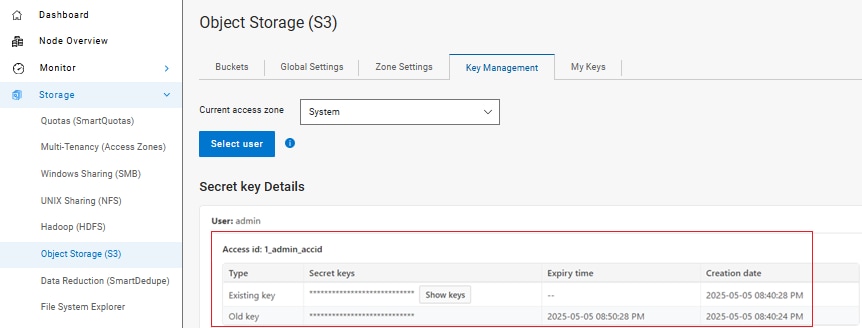
OneFS S3 authenticates requests with a signing mechanism, either AWS Signature Version 2 or AWS Signature Version 4. Authenticated requests must include a signature value that authenticates the request sender. Each of these requires the user to have an access ID and a secret key. The user must get these credentials through the OneFS WebUI or CLI before performing signed S3 requests. Figure 6 shows a result of generating the access ID and secret key for the admin user through the WebUI.
Generate access ID and secret key using the WebUI
The access ID indicates who the user is. OneFS generates one access ID per user. For example, OneFS may generate access ID 1_joe_accid for user joe. The prefix number represents the user’s multi-tenant access zone ID. Each access ID would have a latest secret key without an expiry time set and an old secret key that has an expiry time set.
The secret key is used to generate the signature value along with several request-header values. After receiving the signed request, OneFS uses the access ID to retrieve a copy of the secret key internally, recompute the signature value of the request, and compare it against the received signature. If they match, the requester is authenticated, and any header value that was used in the signature is now verified to be untampered as well.
OneFS treats unauthenticated requests as anonymous requests made by the nobody user (UID 65534). If an object is uploaded to a bucket through an unauthenticated request, the nobody user owns the object and has FULL_CONTROL to the object. To prevent an anonymous request from modifying OneFS buckets and objects, we recommend not to use ACLs that give the nobody user write access to your bucket.
For example, use the following OneFS CLI to grant or revoke write permissions on the bucket for the nobody user.
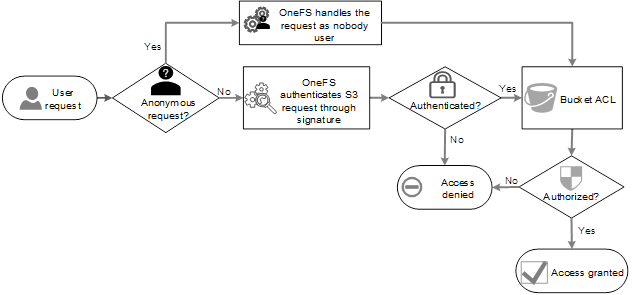
OneFS supports the bucket ACL to control whether a user has permission for a bucket. When receiving a S3 request for a bucket operation, OneFS parses the user access ID from request header and evaluates the request according to the target bucket ACL. Figure 7 shows the authentication and authorization-evaluation-for-bucket operation.
Authentication and authorization for bucket operations
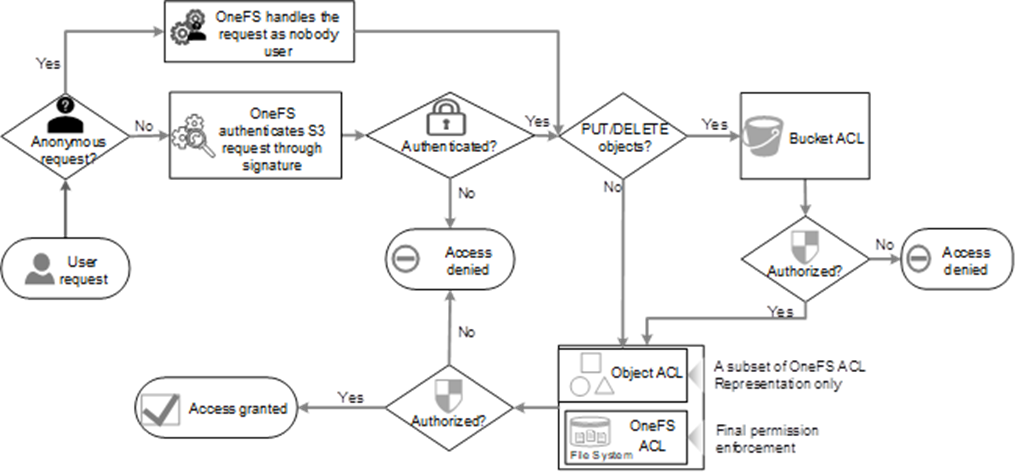
To access OneFS S3 objects, the S3 request must be authorized in both the bucket and object level. When receiving an S3 request for an object operation, OneFS parses the username from the request header. If the request is to PUT or DELETE an object, OneFS evaluates the request according to the target bucket ACL. If authorized, OneFS evaluates the request against the OneFS file system ACL. Otherwise, OneFS evaluates the request against OneFS ACL directly. The Object ACL is derived from OneFS file system ACL and for representation only. See section 4.3.2 for more details about object the ACL and OneFS ACL.
Figure 8 shows the authentication and authorization evaluation for the object operation.
Authentication and authorization for object operations
ACL
OneFS implements both the bucket ACL and object ACL to control user access. Every bucket and object has an associated ACL. The ACL defines which OneFS users or groups are granted access and the type of access.
Bucket ACL
The following list includes the set of permissions that OneFS S3 supports in a bucket ACL. The bucket owner always has FULL_CONTROL on the bucket.
READ: Allows users to list the objects in the bucket.
WRITE: Allows users to create, overwrite, and delete objects in the bucket.
READ_ACP: Allows users to read the bucket ACL.
WRITE_ACP: Allows users to write the ACL for the applicable bucket.
FULL_CONTROL: Allows users the READ, WRITE, READ_ACP, and WRITE_ACP permissions on the bucket.
Object ACL
The following list includes the set of permissions that OneFS S3 supports in an object ACL.
READ: Allows users to read the object data and its metadata.
WRITE: Not applicable but can be set on an object. When updating an object, S3 overwrites the entire object instead of modifying existing data. Overwriting an object requires the WRITE permission at the bucket level. It also requires the WRITE permission on the directory containing the object at the OneFS level, where the directory is the largest prefix of the object (for example, if the object is /a/b/c.txt, the directory is /a/b/). When this permission is set on an object, OneFS assigns the corresponding OneFS ACL permission on disk so that the object data can be modified through other protocols.
READ_ACP: Allows users to read the object ACL.
WRITE_ACP: Allows users to write the ACL for the applicable object.
FULL_CONTROL: Allows grantee the READ, WRITE, READ_ACP, and WRITE_ACP permissions on the object. Also includes additional execute and std_write_owner OneFS permissions to provide consistent multiprotocol access.
OneFS always handles permission enforcement based on the OneFS ACL. The object ACL is for representation only. The object ACL only defines ALLOW ACL, whereas OneFS ACL also defines DENY ACL. When viewing the object ACL through S3, it is possible that only a subset of the actual ACL is shown.
To reconcile the S3 object ACL and OneFS ACL, OneFS provides the following object ACL policy along with the mapping relationship shown as Table 4:
Replace: When S3 modifies a OneFS ACL, OneFS removes the existing ACL (including both ALLOW and DENY settings) and replaces it with the new S3 ACL. This is the default setting.
Deny: OneFS ACL modification by S3 is not allowed. The S3 client receives a permission-denied error when trying to modify ACL.
Use the following command to modify object ACL policy on a bucket:
The object ACL permissions are mapped to the following OneFS ACL permissions respectively in Table 4. See the white paper Access Control Lists on Dell PowerScale OneFS for more details about OneFS ACL permissions.
Object ACL and OneFS ACL mapping. The table maps S3 object ACL permissions to their corresponding OneFS ACL permissions.
file_gen_all (this permission includes execute, std_write_owner permission, and all the above permissions)
Canned ACL
S3 has a set of predefined ACLs, known as canned ACLs. Each canned ACL has predefined grantees and permissions. Table 5 lists the canned ACLs supported by OneFS, and the associated predefined grants.
OneFS S3 supported canned ACL. The table summarizes the predefined S3 canned ACLs, their scope, and the permissions granted to owners, users, and groups.
Canned ACL
Applies to
Grantees and permissions added to ACL
private
Bucket and object
Owner gets FULL_CONTROL. No one else has access rights (default).
public-read
Bucket and object
Owner gets FULL_CONTROL. The AllUsers group gets READ access.
public-read-write
Bucket and object
Owner gets FULL_CONTROL. The AllUsers group gets READ and WRITE access. We do not recommend granting this on a bucket.
authenticated-read
Bucket and object
Owner gets FULL_CONTROL. The AuthenticatedUsers group gets READ access.
Both the object owner and the bucket owner get FULL_CONTROL over the object.
S3 predefined groups
S3 has the following predefined groups in Table 6. OneFS maps some groups with OneFS predefined groups.
S3 predefined groups. The table maps S3 predefined groups to their corresponding OneFS predefined groups and describes the access scope or support status of each group.
S3 predefined Group
OneFS predefined Group
Note
Authenticated Users group
Authenticated Users
Only authenticated request is allowed in this group
All Users group
Everyone
Both authenticated request and unauthenticated request are allowed in this group
Log Delivery group
Not supported
OneFS does not support this group
S3 bucket policy
OneFS 9.16 introduces S3 bucket policy support, bringing OneFS S3's authorization model into alignment with current AWS standards, which have deprecated ACL-based access control in favor of policy-based access management. A bucket policy is implemented as a JSON-based, AWS-standard policy document that can be applied at two levels:
Bucket policy scoped to a specific bucket.
Zone (Bucket) policy scoped to the S3 zone settings that applies cluster-wide to every bucket in that zone.
Architecturally, policy evaluation is inserted directly into the existing S3 request-processing path, immediately after SigV2/SigV4 authentication establishes the security context. The zone policy is loaded from the zone's gconfig path and evaluated first.
An explicit ‘Deny’ results in unconditional access denial without exception, an explicit ‘Allow’ grants zone-level access, and the absence of a matching statement allows evaluation to proceed to the bucket policy and Bucket ACL layer, whose precise evaluation logic depends on the bucket's configured object ownership mode.
The final access decision is the logical ‘OR’ of the zone-level and bucket-level allow results, provided neither layer issued an explicit deny. A narrow exception permits a bucket's owner to perform ‘PutBucketPolicy’, ‘GetBucketPolicy’, and ‘DeleteBucketPolicy’ against their own bucket even if the current bucket policy would otherwise deny it. However, this override does not apply if the zone policy itself denies the request.
This layered evaluation model gives cluster administrators both fine-grained, per-bucket control and a cluster-wide enforcement mechanism capable of governing operations, such as ‘CreateBucket’ that a bucket-scoped policy alone cannot address.
Bucket Policy API Operations. The table lists the API endpoints, HTTP methods, and functions for managing S3 bucket policies.
API Endpoint
HTTP Method
Description
PutBucketPolicy
PUT
Applies or replaces the JSON bucket policy for the specified bucket.
GetBucketPolicy
GET
Returns the current bucket policy for the specified bucket; returns a 404 Not Found response if no policy is configured.
DeleteBucketPolicy
DELETE
Removes the bucket policy from the specified bucket; does not affect the bucket's zone policy, object ownership setting, or ACL.
OneFS S3 checksum support
S3 checksum support
Data integrity is a core requirement for object storage. AWS S3 originally relied on an MD5-based checksum, carried in the Content-MD5 header and surfaced as an object’s ETag, to let clients verify that an object was stored exactly as it was sent. To strengthen end-to-end integrity, AWS S3 later added support for a set of additional checksum algorithms that a client can request when it uploads, copies, or reads an object. The S3 service in OneFS 9.15 and later releases includes support for these additional checksum algorithms, extending data-integrity verification beyond MD5.
With checksum support enabled, a client can supply a checksum value when it uploads an object, or OneFS can calculate one on the fly. OneFS validates the value, persists both the algorithm type and the checksum on the file, and returns the stored checksum in the responses of the relevant S3 operations. Because the checksum is stored with the object, it is available for verification on subsequent reads, copies, and listings, and it works across the individual parts of a multipart upload so that integrity is preserved for large objects.
OneFS S3 checksum support provides the following capabilities:
Support for the SHA-1, SHA-256, CRC-32, CRC-32C, and CRC-64/NVME checksum algorithms, in addition to the existing MD5-based ETag.
Client-supplied or OneFS-calculated checksums for object uploads.
Checksum values returned in the responses of the relevant S3 operations for end-to-end verification.
Full-object and composite checksums for multipart uploads.
Per-access zone configuration, so checksum support and the set of permitted algorithms can be tailored to each zone.
Checksum algorithms and checksum types
OneFS S3 supports five checksum algorithms: SHA-1, SHA-256, CRC-32, CRC-32C, and CRC-64/NVME. Each stored checksum also has a checksum type that describes how the value is calculated. A full-object checksum is calculated over the entire content of the upload. A composite checksum is calculated by concatenating the checksums of the individual parts of a multipart upload and then calculating a checksum over that concatenated value. The checksum type is most relevant to multipart uploads, and not every algorithm supports both types. Table 7 shows the checksum types that are supported for multipart uploads.
Multipart upload checksum type support. The table shows which checksum algorithms support full-object and composite checksum validation.
Checksum algorithm
Full object
Composite
CRC-64/NVME
Yes
No
CRC-32
Yes
Yes
CRC-32C
Yes
Yes
SHA-1
No
Yes
SHA-256
No
Yes
Using S3 checksums
A client supplies a checksum on an object upload by including checksum headers in the request. The x-amz-sdk-checksum-algorithm header specifies the algorithm, and the matching x-amz-checksum-<algorithm> header carries the base64-encoded checksum value. For uploads that use aws-chunked content encoding, the checksum is declared with the x-amz-trailer header and sent as a trailer chunk after the final chunk. OneFS then validates the supplied algorithm and value before committing the object. If the algorithm in the header is mismatched, OneFS returns a BadRequest error; if the supplied value does not match the value that OneFS calculates, OneFS returns a BadDigest error. When checksum support is enabled for the zone and an object is uploaded without any checksum headers, OneFS calculates a default checksum, using CRC-32, so that every object still carries an integrity value.
To retrieve a stored checksum, a client sets the x-amz-checksum-mode header to ENABLED on a GetObject or HeadObject request; OneFS then returns the stored checksum and checksum type in the response. For the list and multipart operations, the checksum algorithm and type are returned as elements in the XML response body. Table 8 summarizes the headers used to supply and retrieve checksums.
OneFS S3 checksum headers. The table describes S3 checksum-related request headers, their allowed values, and their usage in object upload and retrieval operations.
Header
Allowed values
Description
x-amz-sdk-checksum-algorithm
CRC32 | CRC32C | CRC64NVME | SHA1 | SHA256
Specifies the checksum algorithm used to compute the value supplied on upload.
x-amz-checksum-<algorithm>
Base64-encoded hash
Carries the checksum value, where <algorithm> is crc32, crc32c, crc64nvme, sha1, or sha256.
x-amz-checksum-type
FULL_OBJECT | COMPOSITE
Indicates how the checksum is calculated, primarily for multipart uploads.
x-amz-checksum-mode
ENABLED
Set on a GetObject or HeadObject request to return the stored checksum in the response.
x-amz-trailer
x-amz-checksum-<algorithm>
Declares the trailing checksum header sent as a trailer chunk with aws-chunked content encoding.
In a direct (non-chunked) upload, the algorithm and value are supplied as request headers, and OneFS echoes the stored checksum and checksum type in the response:
NOTE:If checksum support is disabled for an access zone, all checksum elements that a client provides are silently ignored.
Updated S3 operations
Checksum support augments the request and response handling of a number of existing OneFS S3 bucket and object operations. Table 9 lists the operations that are updated by this capability and the checksum behavior that each one gains.
OneFS S3 operations updated for checksum support. The table summarizes S3 operations that support checksum configuration, validation, storage, and retrieval.
S3 operation
Description
PutObject
Accepts checksum headers on upload, including the aws-chunked trailer, and returns the stored checksum and checksum type.
CopyObject
Accepts a checksum algorithm and returns the checksum type and value in CopyObjectResult.
GetObject
Returns the stored checksum when the request includes x-amz-checksum-mode: ENABLED.
HeadObject
Returns the stored checksum when the request includes x-amz-checksum-mode: ENABLED.
ListObjects
Returns the checksum algorithm and type for each object.
PutBucketCors
Accepts a checksum algorithm on the request.
CreateMultipartUpload
Accepts a checksum algorithm and checksum type for the multipart upload.
UploadPart
Accepts per-part checksum headers and returns the part checksum.
UploadPartCopy
Returns the checksum value in CopyPartResult.
CompleteMultipartUpload
Accepts the checksum type and, for composite uploads, the per-part checksums; for a full-object upload accepts the object-level checksum.
ListParts
Returns the per-part checksum, plus the algorithm and type for the upload.
ListMultipartUploads
Returns the checksum algorithm and type for each in-progress upload.
PutObjectLockConfiguration
Accepts a checksum algorithm on the request.
Configuration
S3 checksum support is configured on a per-access zone basis through the OneFS WebUI, the CLI, or the platform API. The capability becomes available after the OneFS upgrade is committed and requires no separate installation or feature license. The current zone settings, including whether checksum support is enabled and which algorithms are permitted, can be viewed with the isi s3 settings zone view command:
# isi s3 settings zone view
                   Root Path: /ifs
                 Base Domain:
           Object ACL Policy: replace
Bucket Directory Create Mode: 0777
            Use Md5 For Etag: No
        Validate Content Md5: No
         Object Lock Support: No
       Syslog Access Logging: No
Default Lock Protection Mode: Object Lock
            Checksum Support: Yes
         Checksum Algorithms: SHA1, SHA256, CRC32, CRC32C, CRC64NVME
Checksum support and the set of permitted algorithms are managed with the following options of the isi s3 settings zone modify command:
--checksum-support enables or disables checksum support for the zone.
--checksum-algorithms sets the permitted algorithms; --add-checksum-algorithms and --remove-checksum-algorithms adjust the set incrementally.
--clear-checksum-algorithms clears the permitted-algorithms value, and --revert-checksum-algorithms resets it to the system default.
By integrating these additional checksum algorithms into the S3 data path, OneFS gives applications a stronger, AWS-compatible mechanism for verifying object integrity end to end—on upload, copy, read, and across the parts of a multipart upload—while leaving the choice of algorithm and the scope of enablement under per-zone administrative control. S3 operations, including checksum validation activity, are recorded in the OneFS S3 log file at /var/log/s3.log.
S3 CORS Support
CORS Web browsers enforce a same-origin policy that, by default, prevents a web application served from one origin—a combination of scheme, host, and port—from reading resources served from a different origin. Cross-Origin Resource Sharing (CORS) is the standard mechanism that relaxes this policy in a controlled way: by using a defined set of HTTP headers, a resource can declare which other origins, HTTP methods, and request headers are permitted to access it. AWS S3 implements CORS at the bucket level, so that a bucket can serve content directly to browser-based applications hosted on other domains. Starting with OneFS 9.14, the OneFS S3 service introduces support for bucket-level CORS, allowing web applications from specific domains to access objects in a PowerScale S3 bucket while preserving the bucket’s underlying access controls.
A CORS configuration is attached to an individual bucket and defines one or more rules. Each rule declares the origins that are allowed, the HTTP methods they may use, the request headers they may send, the response headers that may be exposed to the client application, and how long a browser may cache the result of a preflight check. When a cross-origin request matches a rule, OneFS returns the appropriate CORS response headers so that the browser permits the application to read the response.
OneFS S3 CORS support provides the following capabilities:
Bucket-level CORS configuration through the new PutBucketCors, GetBucketCors, and DeleteBucketCors operations.
Handling of the HTTP OPTIONS preflight request that browsers issue before a cross-origin request.
CORS response headers returned on the successful responses of the existing bucket and object operations.
Per-rule control over allowed origins, methods, and headers, exposed response headers, and preflight cache duration.
Use cases
CORS support extends OneFS S3 to browser-based workloads that would otherwise be blocked by the same-origin policy. Typical use cases include:
Web applications accessing S3 data: A website hosted at one origin, such as https://example.com, needs to load images and other assets from a PowerScale S3 bucket. Without a CORS configuration the browser blocks these requests; once CORS is configured to allow the application’s origin, the assets are retrieved and displayed successfully.
Direct file uploads from web browsers: Users upload files directly to a PowerScale S3 bucket from a front-end application, with no backend proxy server in the request path. Once the bucket permits the application’s origin, the uploads succeed and the browser receives a valid response with no CORS errors.
CORS configuration operations
A bucket’s CORS configuration is managed with three new bucket sub-resource operations. PutBucketCors sets the CORS configuration on a bucket; if a configuration already exists, it is replaced with the one supplied in the request. GetBucketCors returns the configuration currently set on the bucket, and DeleteBucketCors removes it. Setting or deleting a configuration requires the user to be the bucket owner or to hold the FULL_CONTROL ACL on the bucket; retrieving a configuration requires the bucket owner or the READ ACL.
The CORS configuration is supplied as an XML document. Each CORSRule element defines the allowed origins, methods, and headers for one class of cross-origin request. Table 10 describes the elements of a CORS rule.
CORS rule elements. The table describes the elements used in an S3 CORS configuration and their purposes.
Element
Description
AllowedOrigin
One or more origins from which cross-origin requests are allowed. A single wildcard (*) is permitted.
AllowedMethod
An HTTP method the origin is allowed to use. Valid values: GET, PUT, HEAD, POST, DELETE.
AllowedHeader
A request header allowed in a preflight request through the Access-Control-Request-Headers header. A trailing wildcard (*) is permitted.
ExposeHeader
A response header that the browser is allowed to expose to the client application.
ID
An optional unique identifier for the rule.
MaxAgeSeconds
The time, in seconds, that the browser may cache the preflight response for the requested resource.
A CORS configuration document has the following structure:
Before sending certain cross-origin requests, a browser issues an HTTP OPTIONS preflight request to determine whether it may send the actual request with the intended origin, method, and headers. The OPTIONS preflight is a newly added operation for OneFS S3. No authentication or permission is required for the preflight: OneFS bypasses authentication and returns the expected CORS response headers based on the bucket’s configuration. A preflight request carries the Origin and Access-Control-Request-Method headers, and optionally Access-Control-Request-Headers, as shown below:
OPTIONS /<bucket>/<object> HTTP/1.1
Origin: <string>                          # origin url, including ip/domain and port
Access-Control-Request-Method: <string>   # http method
Access-Control-Request-Headers: <string>  # request header
CORS response headers
CORS support does not change the request parameters of the existing OneFS S3 operations. The HeadBucket, PutBucket (CreateBucket), and DeleteBucket operations do not require CORS headers in their responses and are unchanged. For all other bucket-level and object-level operations, when the bucket has a CORS configuration and the request matches a rule, OneFS adds the CORS response headers to the successful (200 OK) response. These are the same headers returned for the OPTIONS preflight request. Table 11 describes the CORS response headers.
CORS response headers. The table describes the HTTP headers returned in S3 CORS responses and their functions.
Header
Description
Access-Control-Allow-Origin
The origin that is permitted to access the resource, echoed from the matched rule, or a wildcard (*).
Access-Control-Allow-Methods
The HTTP methods permitted for the matched origin.
Access-Control-Allow-Headers
The request headers permitted in the actual cross-origin request.
Access-Control-Expose-Headers
The response headers that the browser is allowed to expose to the client application.
Access-Control-Max-Age
The time, in seconds, that the browser may cache the preflight response.
Access-Control-Allow-Credentials
Indicates whether the response may be exposed when the request’s credentials mode is set.
Configuration and use
CORS support requires no additional cluster-level configuration. The feature becomes effective once the S3 service is enabled; on upgrade it is applied after the upgrade is committed, and after uninstallation the feature no longer functions. A CORS rule applies to a bucket only after a client sets a configuration on that bucket with the PutBucketCors operation; until then, the bucket continues to enforce the browser’s default same-origin behavior.
The following table summarizes the most common error responses returned by the CORS operations, together with their likely causes and resolutions.
CORS error responses. The table lists common S3 CORS-related errors, their causes, and recommended resolutions.
Status
Description
Resolution
400 Bad Request
Incorrect CORS configuration.
Check the error message and fix the configuration issue.
403 Forbidden
The user does not have permission to perform the operation.
The user must be the bucket owner or hold the required ACL (FULL_CONTROL for Put/Delete, READ for Get).
404 NoSuchCORSConfiguration
No CORS configuration exists for the bucket.
Set a CORS configuration with PutBucketCors first.
400 InvalidRequest
A preflight request is missing the Origin or Access-Control-Request-Method header.
Add the required fields to the request header.
403 CorsNotEnabled
CORS is not enabled for the bucket.
Enable CORS by setting a configuration with PutBucketCors.
403 CorsNotAllowed
The cross-origin request is not allowed, because the origin, method, or headers are not permitted by the bucket’s CORS configuration.
Review and update the CORS rule configuration accordingly.
Technical support and resources
Dell.com/support is focused on meeting customer needs with proven services and support.