Dell PowerScale OneFS: Writable Snapshots
Executive summary
Overview
Audience
Revisions
We value your feedback
Overview
Introduction
Architecture
OneFS writable snapshots enable the creation and management of a space- and time-efficient, modifiable copy of a regular OneFS snapshot. As such, the snapshots present a writable copy of a source snapshot that is accessible at a directory path within the /ifs namespace. You can access and edit the snapshot through any of the cluster’s file and object protocols, including NFS, SMB, and S3.
The writable snapshot architecture provides an overlay to a read-only source snapshot. This overlay allows a cluster administrator to create a lightweight copy of a production dataset using a simple CLI command, and present and use it as a separate writable namespace.
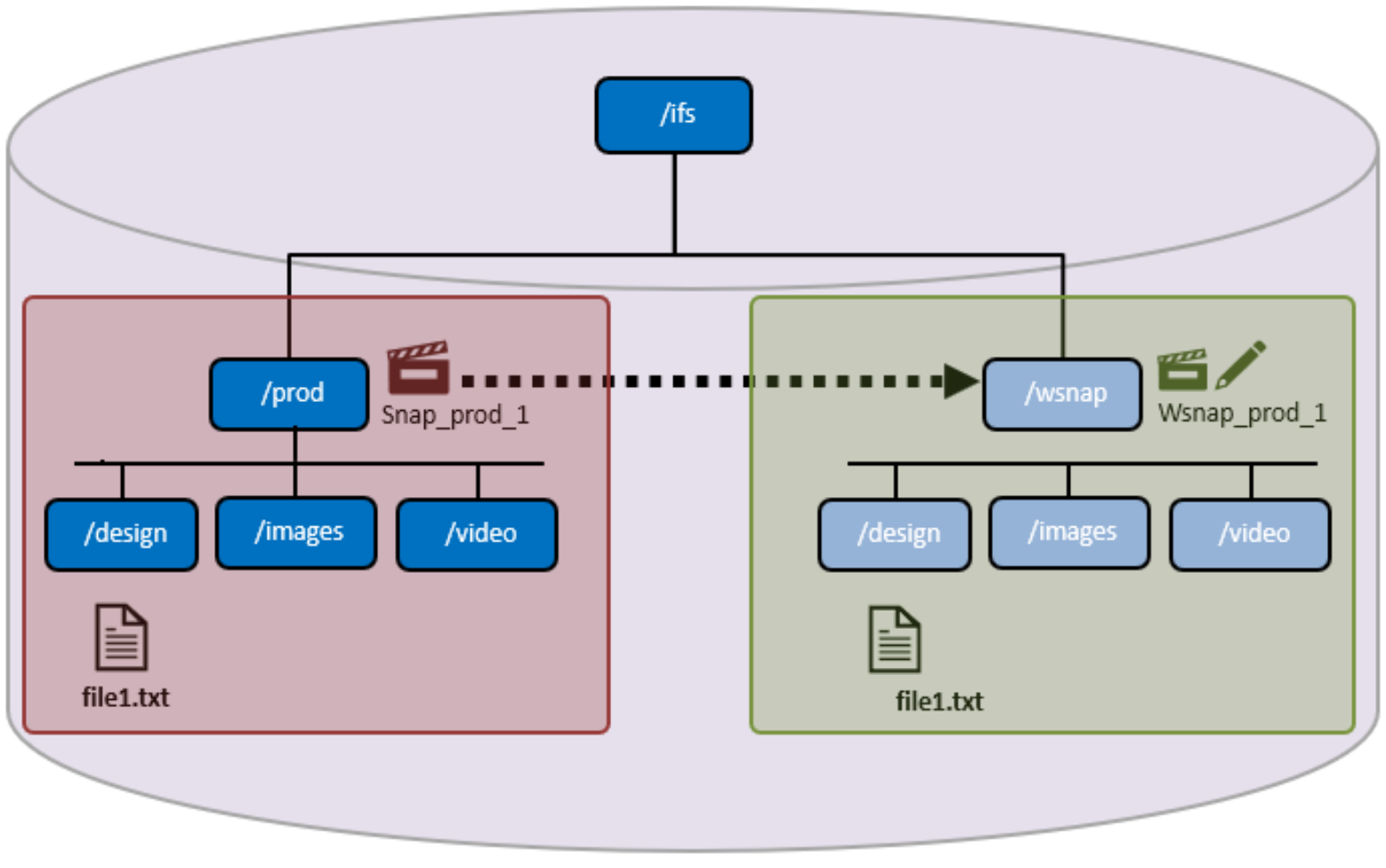
Figure 1. OneFS writable snapshot architecture
In the scenario above, a SnapshotIQ snapshot (snap_prod_1) is taken of the /ifs/prod directory. The read-only ‘snap_prod_1’ snapshot is then used as the backing for a writable snapshot created at /ifs/wsnap. This writable snapshot contains the same subdirectory and file structure as the original ‘prod’ directory, but without the added data capacity footprint.
Internally, OneFS 9.3 and later support a new protection group data structure, ‘PG_WSNAP’. This structure provides an overlay that allows unmodified file data to be read directly from the source snapshot, while storing only the changes in the writable snapshot tree.
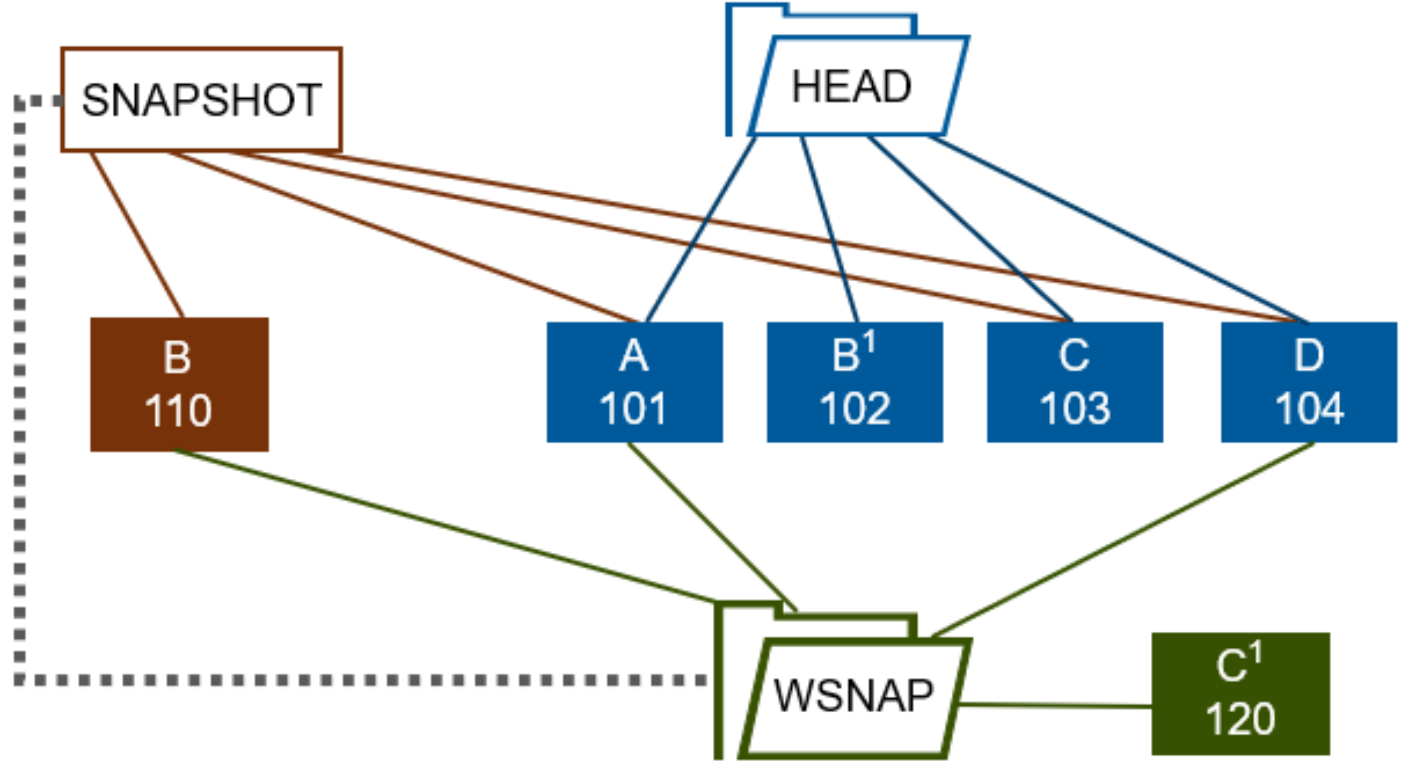
Figure 2. OneFS writable snapshot block overlay and redirection
In this example, a file (Head) consists of four data blocks, A through D. A read-only snapshot is taken of the directory containing the Head file. This file is then modified through a copy-on-write operation. As a result, the new Head data, B1, is written to block 102, and the original data block ‘B’ is copied to a new physical block (110). The snapshot pointer now references block 110 and the new location for the original data ‘B’, so the snapshot has its own copy of that block.
Next, a writable snapshot is created using the read-only snapshot as its source. This writable snapshot is then modified, so its updated version of block C is stored in its own protection group (PG_WSNAP). A client then issues a read request for the writable snapshot version of the file. This read request is directed, through the read-only snapshot, to the Head versions of blocks A and D, the read-only snapshot version for block B, and the writable snapshot file’s own version of block C (C1 in block 120).
OneFS directory quotas provide the writable snapshots accounting and reporting infrastructure, allowing users to easily view the space utilization of a writable snapshot. Also, IFS domains are also used to bound and manage writable snapshot membership. In OneFS, a domain defines a set of behaviors for a collection of files under a specified directory tree. If a directory has a protection domain applied to it, that domain will also affect all the files and subdirectories under that top-level directory.
When files within a newly created writable snapshot are first accessed, data is read from the source snapshot, populating the files’ metadata, in a process known as copy-on-read (CoR). Unmodified data is read from the source snapshot and any changes are stored in the writable snapshot’s namespace data structure (PG_WSNAP).
On accessing a writable snapshot file for the first time, a read is triggered from the source snapshot and the file’s data is accessed directly from the read-only snapshot. At this point, the MD5 checksums for both the source file and writable snapshot file are identical. If, for example, the first block of file is overwritten, only that single block is written to the writable snapshot. Then, the remaining unmodified blocks are still read from the source snapshot. At this point, the source and writable snapshot files are now different, so their MD5 checksums will also differ.
Writable snapshots prerequisite
Overview
Configuring and managing writable snapshots
Overview
Creating a writable snapshot
Deleting a writable snapshot
Monitoring and reporting
Overview
In general, the ‘isi writable snapshots’ CLI syntax looks and feels similar to regular, read-only snapshots under OneFS. The currently available writable snapshots on a cluster can be easily viewed from the CLI with the ‘isi snapshot writable list’ command. For example:
# isi snapshot writable list
Path Src Path Src Snapshot
----------------------------------------------
/ifs/test/wsnap1 /ifs/test/prod prod1
/ifs/test/wsnap2 /ifs/test/snap2 s73736
----------------------------------------------
The properties of a particular writable snapshot, including both its logical and physical size, can be viewed using the ‘isi snapshot writable view’ CLI command. For example:
# isi snapshot writable view /ifs/test/wsnap1
Path: /ifs/test/wsnap1
Src Path: /ifs/test/prod
Src Snapshot: s73735
Created: 2021-06-11T19:10:25
Logical Size: 100.00
Physical Size: 32.00k
State: active
OneFS SmartQuotas provides the capacity resource accounting for writable snapshots. The physical, logical, and application logical-space usage is retrieved from a directory quota on the writable snapshot’s root. This usage can be viewed directly from the OneFS CLI as follows:
# isi quota quotas list
Type AppliesTo Path Snap Hard Soft Adv Used Reduction Efficiency
-----------------------------------------------------------------------------------------
directory DEFAULT /ifs/test/wsnap1 No - - - 76.00 - 0.00 : 1
-----------------------------------------------------------------------------------------
Or from the OneFS WebUI by going to Storage > Quotas > Quotas and Usage, or File system > SmartQuotas > Quotas and usage in OneFS 9.14 and earlier releases:
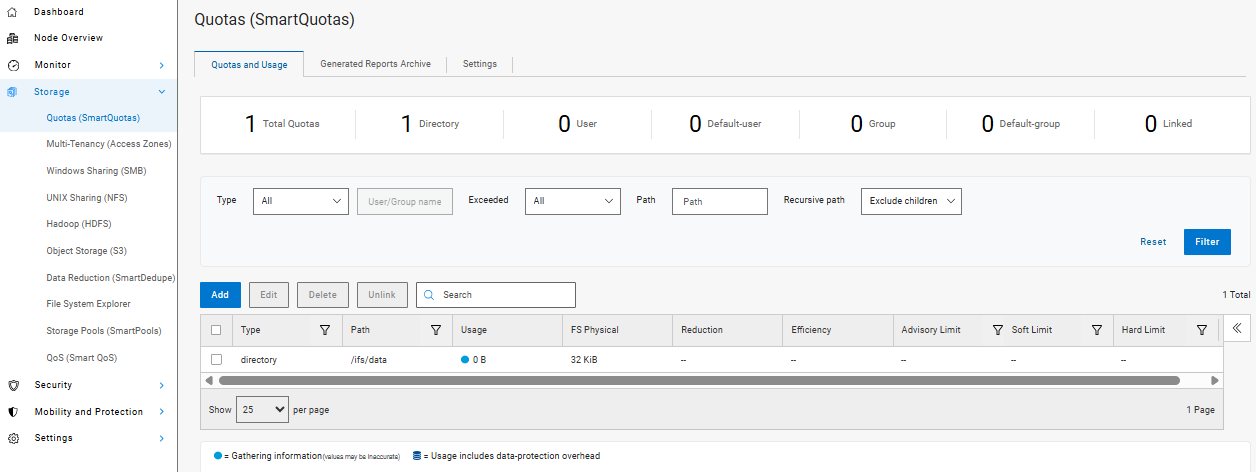
Figure 3. OneFS SmartQuotas WebUI usage dashboard
Verifying space efficiency on a writable snapshot
For more detail, the ‘isi quota quotas view’ CLI command provides a thorough appraisal of a writable snapshot’s directory quota domain. This information includes physical, logical, and storage efficiency metrics plus a file count. For example:
# isi quota quotas view /ifs/test/wsnap1 directory
Path: /ifs/test/wsnap1
Type: directory
Snapshots: No
Enforced: Yes
Container: No
Linked: No
Usage
Files: 10
Physical(With Overhead): 32.00k
FSPhysical(Deduplicated): 32.00k
FSLogical(W/O Overhead): 76.00
AppLogical(ApparentSize): 0.00
ShadowLogical: -
PhysicalData: 0.00
Protection: 0.00
Reduction(Logical/Data): None : 1
Efficiency(Logical/Physical): 0.00 : 1
Over: -
Thresholds On: fslogicalsize
ReadyToEnforce: Yes
Thresholds
Hard Threshold: -
Hard Exceeded: No
Hard Last Exceeded: -
Advisory: -
Advisory Threshold Percentage: -
Advisory Exceeded: No
Advisory Last Exceeded: -
Soft Threshold: -
Soft Threshold Percentage: -
Soft Exceeded: No
Soft Last Exceeded: -
Soft Grace: -
This information is also available from the OneFS WebUI by going to Storage > Quotas Generated Reports Archive, or File system > SmartQuotas > Generated reports archive > View report details in OneFS 9.14 and earlier releases. For example:
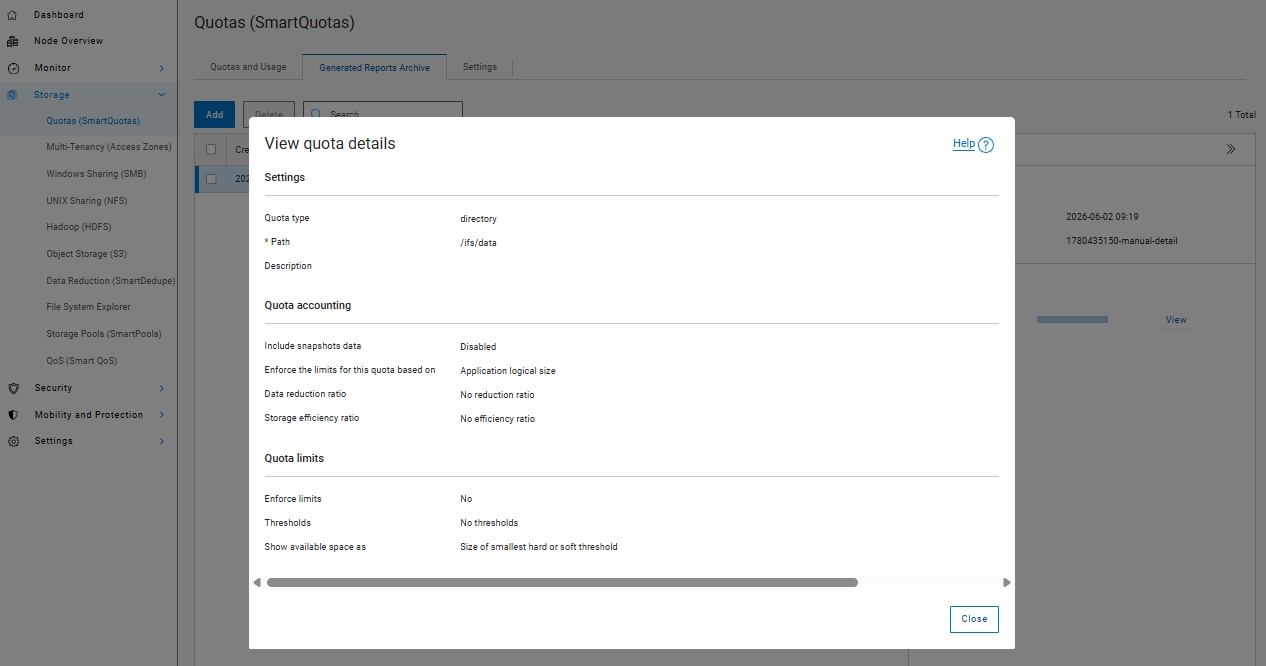
Figure 4. OneFS SmartQuotas WebUI usage report
Also, the ‘isi get’ CLI command can be used to inspect the efficiency of individual writable snapshot files. First, run the following command syntax on the chosen file in the source snapshot path (in this case /ifs/test/source).
Note: In the example below, the source file, /ifs//test/prod/testfile1, is reported as 147 MB in size and occupying 18019 physical blocks:
# isi get -D /ifs/test/prod/testfile1.zip
POLICY W LEVEL PERFORMANCE COAL ENCODING FILE IADDRS
default 16+2/2 concurrency on UTF-8 testfile1.txt <1,9,92028928:8192>
*************************************************
* IFS inode: [ 1,9,1054720:512 ]
*************************************************
*
* Inode Version: 8
* Dir Version: 2
* Inode Revision: 145
* Inode Mirror Count: 1
* Recovered Flag: 0
* Restripe State: 0
* Link Count: 1
* Size: 147451414
* Mode: 0100700
* Flags: 0x110000e0
* SmartLinked: False
* Physical Blocks: 18019
However, when running the ‘isi get’ CLI command on the same file within the writable snapshot tree (/ifs/test/wsnap1/testfile1), the writable, space-efficient copy now only consumes five physical blocks, as compared with 18019 blocks in the original file:
# isi get -D /ifs/test/wsnap1/testfile1.zip
POLICY W LEVEL PERFORMANCE COAL ENCODING FILE IADDRS
default 16+2/2 concurrency on UTF-8 testfile1.txt <1,9,92028928:8192>
*************************************************
* IFS inode: [ 1,9,1054720:512 ]
*************************************************
*
* Inode Version: 8
* Dir Version: 2
* Inode Revision: 145
* Inode Mirror Count: 1
* Recovered Flag: 0
* Restripe State: 0
* Link Count: 1
* Size: 147451414
* Mode: 0100700
* Flags: 0x110000e0
* SmartLinked: False
* Physical Blocks: 5
Timestamp inheritance
Writable snapshots and OneFS domains
Overview
Nested writable snapshots
Overview
Symbolic and hard links with writable snapshots
Overview
When a writable snapshot is created, any existing hard links and symbolic links (symlinks) that reference files within the snapshot’s namespace will continue to work as expected. However, existing hard links with a file external to the snapshot’s domain will disappear from the writable snapshot, including the link count.
|
Link type |
Supported |
Details |
|
Existing external hard link |
No |
Old external hard links will fail. |
|
Existing internal hard link |
Yes |
Existing hard links within the snapshot domain will work as expected. |
|
External hard link |
No |
New external hard links will fail. |
|
New internal hard link |
Yes |
Existing hard links will work as expected. |
|
External symbolic link |
Yes |
External symbolic links will work as expected. |
|
Internal symbolic link |
Yes |
Internal symbolic links will work as expected. |
Be aware that any attempt to create a hard link to another file outside of the writable snapshot boundary will fail.
# ln /ifs/test/file1 /ifs/test/wsnap1/file1
ln: /ifs/test/wsnap1/file1: Operation not permitted
However, symbolic links will work as expected. OneFS hard-link and symbolic-link actions and expectations regarding writable snapshots are illustrated in the following diagram:
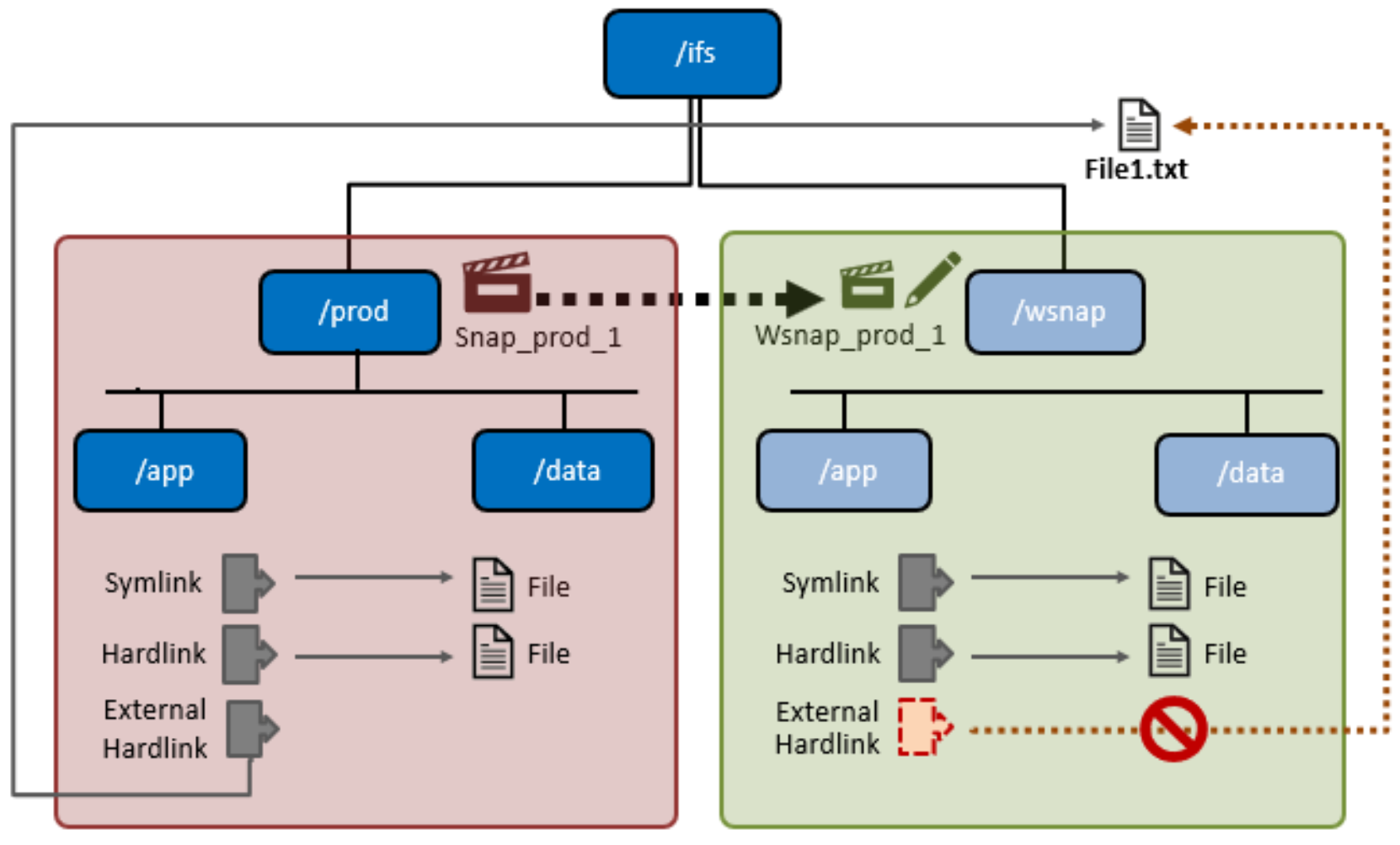
Figure 5. Writable snapshots, hard links, and symbolic links
Licensing requirements
Overview
Writable snapshots performance
Overview
Writable snapshots and OneFS data services
Overview
Writable snapshots in OneFS 9.3 and later releases co-exist with most other OneFS data services, although there are several caveats to bear in mind. The following table describes the integration, influence, and compatibility between writable snapshots and the various OneFS data services.
Table 1. OneFS writable snapshots and data services integration
|
OneFS feature |
Detail |
||||||||||
|
SyncIQ |
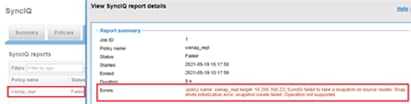
SyncIQ is unable to replicate the data within a writable snapshot in OneFS 9.3 and later. Specifically:
Attempts to replicate the files within a writable snapshot with fail with a SyncIQ job error of the form: policy name <policy_name> target <x.x.x.x> SyncIQ faild to take a snapshot on source cluster. Snapshots initialization error snapshot create failed. Operation not supported.
OneFS cannot create writable snapshots based on SyncIQ-generated snapshots, since SyncIQ does not allow its snapshots to be locked. This scenario includes all read-only snapshots with a ‘SIQ-*’ naming prefix. Any attempts to use snapshots with an SIQ* prefix will fail with the following error: # isi snapshot writable create SIQ-4b9c0e85e99e4bcfbcf2cf30a3381117-latest /ifs/rwsnap Source SnapID(62356) is a SyncIQ related snapshot: Invalid argument |
||||||||||
|
SnapshotIQ |
Taking a SnapshotIQ read-only snapshot of a writable snapshot is not permitted and will fail with the following error message: # isi snapshot snapshots create /ifs/wsnap2 snapshot create failed: Operation not supported Similarly, creating a writable snapshot of an existing writable snapshot is also not supported. Writable snapshots cannot be nested in the namespace under other writable snapshots. Such operations will return ENOTSUP. Only IFS domains-based snapshots are permitted as the source of a writable snapshot. Any snapshots taken on a cluster prior to OneFS 8.2 cannot be used as the source for a writable snapshot. Snapshot aliases cannot be used as the source of a writable snapshot, even if using the alias target ID instead of the alias target name. The full name of the snapshot must be specified. # isi snapshot snapshots view snapalias1 ID: 134340 Name: snapalias1 Path: /ifs/test/rwsnap2 Has Locks: Yes Schedule: - Alias Target ID: 106976 Alias Target Name: s106976 Created: 2021-08-16T22:18:40 Expires: - Size: 90.00k Shadow Bytes: 0.00 % Reserve: 0.00% % Filesystem: 0.00% State: active # isi snapshot writable create 134340 /ifs/testwsnap1 Source SnapID(134340) is an alias: Operation not supported The creation of SnapRevert domain is not permitted at or above a writable snapshot. Similarly, the creation of a writable snapshot inside a directory with a SnapRevert domain is not supported. Such operations will return ENOTSUP. The SnapshotDelete job has no interaction with writable snapshots. Instead, the TreeDelete job handles writable snapshot deletion. |
||||||||||
|
SmartLock |
A SmartLock WORM domain cannot be created at or above a writable snapshot. # isi snapshot writable list Path Src Path Src Snapshot ----------------------------------------------------- /ifs/test/rw-head /ifs/test/head1 s159776 ----------------------------------------------------- Total: 1 # isi worm domain create -d forever /ifs/test/rw-head/worm Are you sure? (yes/[no]): yes Failed to enable SmartLock: Operation not supported Creating a writable snapshot inside a directory with a WORM domain is not permitted. # isi worm domains list ID Path Type --------------------------------- 2228992 /ifs/test/worm enterprise --------------------------------- Total: 1 # isi snapshot writable create s32106 /ifs/test/worm/wsnap Writable Snapshot cannot be nested under WORM domain 22.0300: Operation not supported |
||||||||||
|
SED Encryption |
Clusters using data encryption with SED drives are fully compatible with writable snapshots. |
||||||||||
|
SmartQuotas |
Writable snapshots capacity reporting uses directory quotas to track both physical and logical space utilization. This same information is reported using the `isi quota` CLI command. |
||||||||||
|
SmartPools |
Writable snapshots co-exist with SmartPools tiering, and configuring SmartPools above writable snapshots is supported. In OneFS 9.3 and later, SmartPools file-pool tiering policies will not apply to a writable snapshot path. Instead, the writable snapshot data will follow the tiering policies which apply to the source of the writable snapshot. SmartPools is frequently used to house snapshots on a slower tier of storage. In this case, the performance of a writable snapshot will likely be negatively impacted. |
||||||||||
|
CloudPools |
In OneFS 9.3 and later, CloudPools is incompatible with writable snapshots. CloudPools on a writable snapshot destination is not supported. |
||||||||||
|
Non-disruptive Upgrade |
Writable snapshot support is introduced in OneFS 9.3, and writable snapshot functionality is enabled after committing an upgrade to OneFS 9.3 and later releases. Non-disruptive upgrade to OneFS 9.3 and to later releases is fully supported. |
||||||||||
|
File Clones |
Cloning of a file within a writable snapshot (cp -c) is not permitted and will fail with the following error: # isi snapshot writable list Path Src Path Src Snapshot ----------------------------------------------------- /ifs/wsnap1 /ifs/test1 s32106 ----------------------------------------------------- Total: 31 # cp -c /ifs/wsnap1/file1 /ifs/wsnap1/file1.clone cp: file1.clone: cannot clone from 1:83e1:002b::HEAD to 2:705c:0053: Invalid argument |
||||||||||
|
In-line Data Reduction |
While OneFS in-line compression works with writable snapshots data, deduplication is not supported, and existing files under writable snapshots will be ignored by in-line deduplication. However, inline deduplication can occur on any new files created fresh on the writable snapshot. |
||||||||||
|
SmartDedupe |
Deduplication of writable snapshot data is not supported. SmartDedupe will ignore the files under writable snapshots. |
||||||||||
|
Small File Storage Efficiency (SFSE) |
Small file storage efficiency file packing is not supported by writable snapshots and the files under a writable snapshot will be ignored by SFSE. There is also no support for data inode inlining within a writable snapshot domain. |
||||||||||
|
Job Engine |
The job engine and restriping jobs support writable snapshots and, in general, most jobs can be run from inside a writable snapshot’s path. However: JE jobs involving tree-walks will not perform copy-on-read for LINs under writable snapshots. The PermissionsRepair job is unable to fix the files under a writable snapshot which have yet to be copy-on-read. Before you start the PermissionsRepair job, run the `find` CLI command (which searches for files in directory hierarchy) on the writable snapshot’s root directory to populate the writable snapshot’s namespace. The TreeDelete job works for subdirectories under writable snapshot. TreeDelete, run on or above a writable snapshot, will not remove the root, or head, directory of the writable snapshot (unless scheduled through writable snapshot library). The ChangeList, FileSystemAnalyze, and IndexUpdate jobs are unable to see files in a writable snapshot. As such, the FilePolicy job, which relies on index update, cannot manage files in writable snapshot. |
||||||||||
|
Multi-tenant Access Zones |
Writable snapshots work as expected with OneFS multi-tenant access zones. # isi zone zones list Name Path ------------------------ System /ifs zone1 /ifs/data/zone1 zone2 /ifs/data/zone2 ------------------------ Total: 2 # isi snapshot snapshots list 118224 s118224 /ifs/data/zone1 # isi snapshot writable create s118224 /ifs/data/zone2/wsnap1 # isi snapshot writable list Path Src Path Src Snapshot ------------------------------------------------------ /ifs/data/zone2/wsnap1 /ifs/data/zone1 s118224 ------------------------------------------------------ Total: 1 |
||||||||||
|
InsightIQ |
InsightIQ supports and accurately reports on writable snapshots as expected. |
||||||||||
|
NDMP |
Writable snapshots in OneFS 9.3 and later are positioned for use as temporary data repositories which are discarded after testing, and are not intended to be archived or backed up. NDMP is incompatible with writable snapshots. Since NDMP uses read-only snapshots for checkpointing, it is unable to backup writable snapshot data. |
Note: Most of the abovementioned services each require a product license or specific hardware. Licensed data services are not enabled, configured, and activated by default on a cluster.
Writable snapshots and data replication
Overview
A common use case for writable snapshots is in disaster recovery testing. For DR purposes, an enterprise typically has two PowerScale clusters configured in a source/target SyncIQ replication relationship. Many organizations have a requirement to conduct periodic DR tests to verify the functionality of their processes and tools in the event of a business continuity interruption or disaster recovery event.
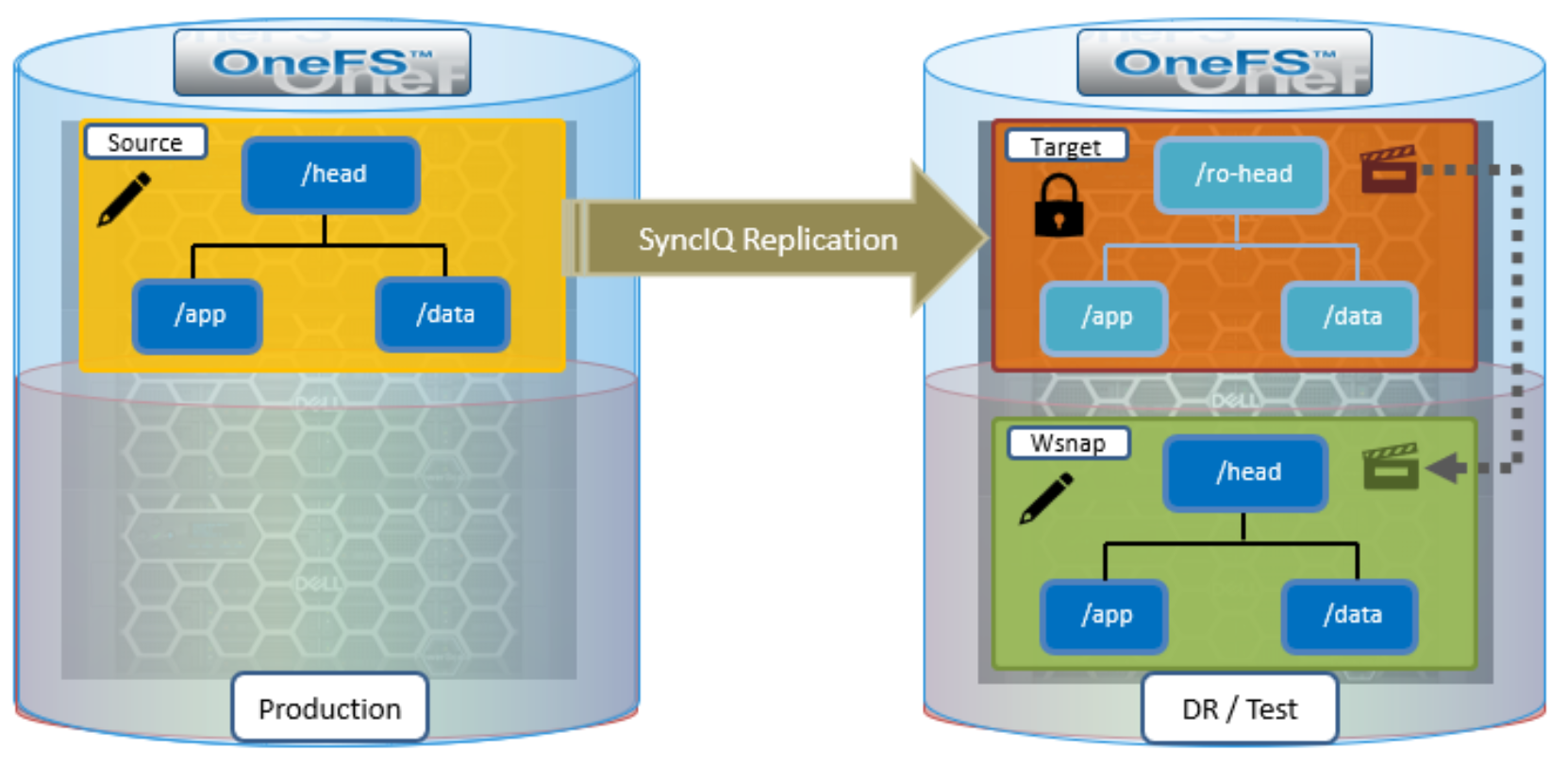
Figure 6. Writable snapshots and SyncIQ DR test workflow
Given the writable snapshots compatibility with SyncIQ caveats described in the previous table, a writable snapshot of a production dataset replicated to a target DR cluster can be created as follows:
- On the source cluster, create a SyncIQ policy to replicate the source directory (/ifs/test/head) to the target cluster:
# isi sync policies create --name=ro-head sync --source-rootpath=/ifs/prod/head --target-host=10.224.127.5 --targetpath=/ifs/test/ro-head
# isi sync policies list
Name Path Action Enabled Target
---------------------------------------------------
ro-head /ifs/prod/head sync Yes 10.224.127.5
---------------------------------------------------
Total: 1
- Run the SyncIQ policy to replicate the source directory to /ifs/test/ro-head on the target cluster:
# isi sync jobs start ro-head --source-snapshot s14
# isi sync jobs list
Policy Name ID State Action Duration
-------------------------------------------
ro-head 1 running run 22s
-------------------------------------------
Total: 1
# isi sync jobs view ro-head
Policy Name: ro-head
ID: 1
State: running
Action: run
Duration: 47s
Start Time: 2021-06-22T20:30:53
Target:
- Take a read-only snapshot of the replicated dataset on the target cluster:
# isi snapshot snapshots create /ifs/test/ro-head
# isi snapshot snapshots list
ID Name Path
-----------------------------------------------------------------
2 SIQ_HAL_ro-head_2021-07-22_20-23-initial /ifs/test/ro-head
3 SIQ_HAL_ro-head /ifs/test/ro-head
5 SIQ_HAL_ro-head_2021-07-22_20-25 /ifs/test/ro-head
8 SIQ-Failover-ro-head-2021-07-22_20-26-17 /ifs/test/ro-head
9 s106976 /ifs/test/ro-head
-----------------------------------------------------------------
- Using the (non SIQ_*) snapshot of the replicated dataset above as the source, create a writable snapshot on the target cluster at /ifs/test/head:
# isi snapshot writable create s106976 /ifs/test/head
- Confirm the writable snapshot has been created on the target cluster:
# isi snapshot writable list
Path Src Path Src Snapshot
----------------------------------------------------------------------
/ifs/test/head /ifs/test/ro-head s106976
----------------------------------------------------------------------
Total: 1
# du -sh /ifs/test/ro-head
21M /ifs/test/ro-head
- Export or share the writable snapshot data under /ifs/test/head on the target cluster using the protocol or protocols of choice. Mount the export or share on the client systems and perform DR testing and verification as appropriate.
- When DR testing is complete, delete the writable snapshot on the target cluster:
# isi snapshot writable delete /ifs/test/head
Writable snapshots cannot be refreshed from a newer read-only source snapshot. A new writable snapshot would need to be created using the newer snapshot source in order to reflect and subsequent updates to the production dataset on the target cluster.
More information about OneFS SyncIQ replication configuration and management is available in the SyncIQ best practices guide.