Dell PowerScale SmartSync
Executive summary
Overview
This document describes the data replication functions of Dell PowerScale SmartSync. The SmartSync feature takes data mobility beyond the data center, combining data replication for file and object targets. It also provides administrators with a centralized architecture to manage replication for PowerScale clusters and cloud targets.
Note to readers
Proceed with caution if you intend to make changes on a production cluster. Ensure that you understand the concepts explained in this paper in their entirety before implementing data replication. As with any significant infrastructure update, testing changes in a lab environment is best practice. After you confirm the updates in a lab environment, you can commence with a gradual roll-out to a production cluster.
Revisions
|
Date |
Part number/ |
Description |
|
April 2022 |
H19109 |
Initial release |
|
January 2023 |
H19109.1 |
Updated for OneFS release 9.5.0.0 |
|
April 2023 |
H19109.2 |
Updated file to include object replication configuration and CPU throttling. |
|
October 2023 |
H19109.3 |
Minor updates to OneFS features and SmartSync section |
|
February 2024 |
H19109.4 |
Updated for OneFS release 9.7.0.0 |
|
June 2024 |
H19109.5 |
Minor update to local and remote pools. |
|
July 2024 |
H19109.6 |
Updated steps for service activation in file to object copy clusters. |
|
April 2025 |
H19109.7 |
Updated backup to object replication configuration |
|
June 2025 |
H19109.8 |
Updated SmartSync operations workflow and configurations |
|
December 2025 |
H19109.9 |
Updated for OneFS release 9.13.0.0 |
|
February 2026 |
H19019.10 |
Minor update for max sparks consideration |
|
August 2026 |
H19019.11 |
Updated for OneFS 9.15 release |
We value your feedback
Dell Technologies and the authors of this document welcome your feedback on this document. Contact the Dell Technologies team by email.
Note: For links to other documentation for this topic, see the PowerScale Info Hub.
SmartSync
Overview
In today's era of tremendous unstructured data growth, efficient, fast, and secure data mobility capabilities are essential. PowerScale SmartSync stands out by offering robust replication of data across clusters, ensuring seamless data continuity and accessibility. Additionally, SmartSync extends its capabilities to object storage, providing versatile and scalable solutions for data protection and burst to cloud. This powerful combination allows organizations to maintain high performance and reliability while adapting to evolving data protection and replication needs.
To address the requirements of the modern enterprise, PowerScale introduced SmartSync. This feature replicates file-to-file data between PowerScale clusters. SmartSync cloud copy replicates file-to-object data from PowerScale clusters to Dell ECS and cloud providers. Having multiple target destinations allows administrators to store multiple copies of a dataset across locations, providing further disaster recovery (DR) readiness.
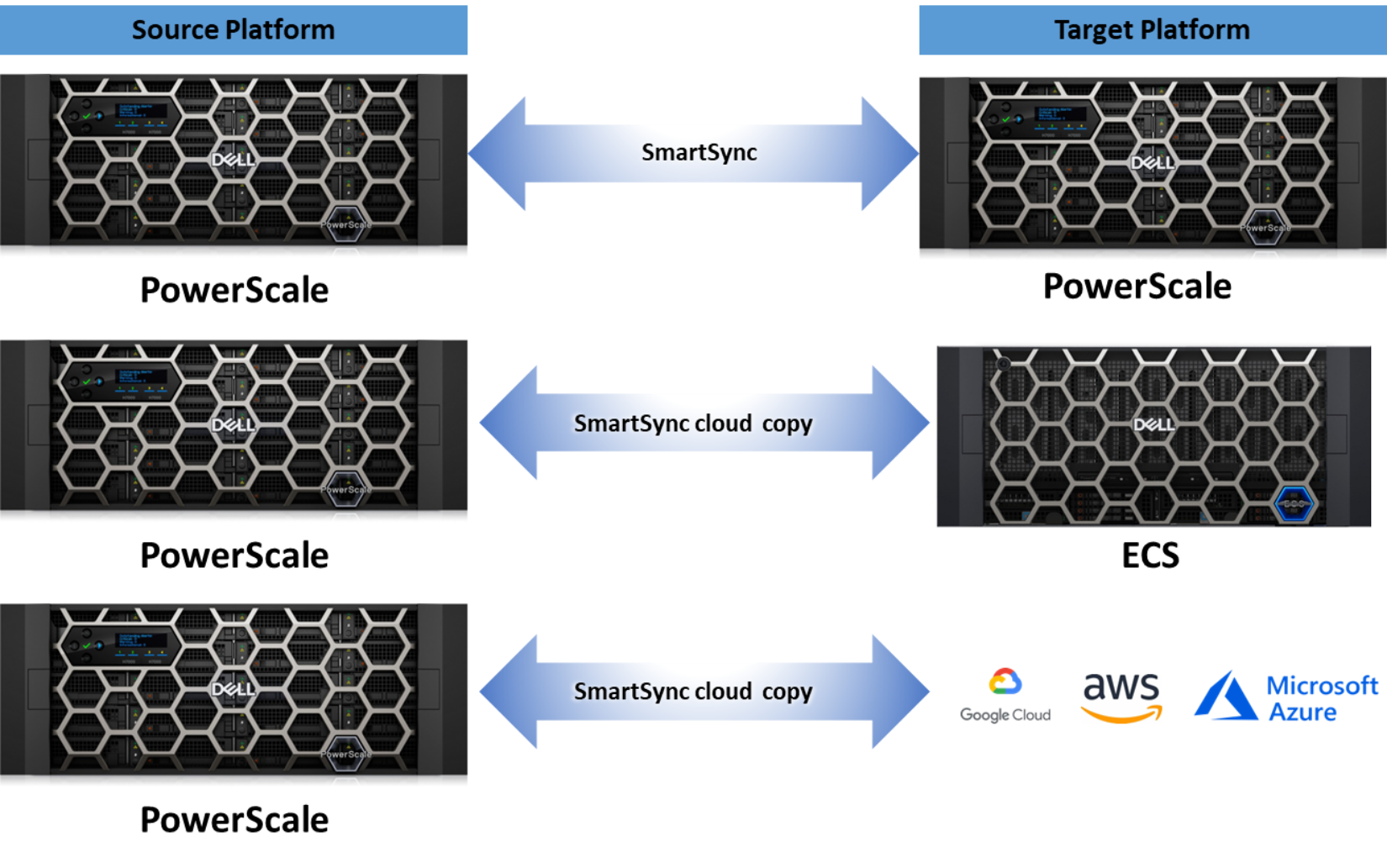
Figure 1. Cross-platform data mobility
SmartSync is designed to address the growing needs of data beyond the data center by using a powerful transport layer with robust error handling that uses a proprietary messaging system through RPC (file-to-file replication) over TLS and S3 REST API calls (file-to-object replication). Cloud copy supports HTTP/HTTPS protocol for secure data replication. It is recommended to use HTTPS to replicate data to cloud providers, which ensures encryption in transit.
The following key benefits of SmartSync are outlined in the following sections.
- Eliminate re-baselining
- Efficient resource consumption
- Replication resiliency
- Decoupled snapshots
- Base and concrete policies
- File attributes
Eliminate re-baselining
SmartSync data replication includes the following two replication types:
- Initial full or baseline replication: The SmartSync replication policy replicates the entire dataset from the source cluster to the target platform.
- Incremental replication: The SmartSync replication policy only replicates the changed data blocks from the source cluster to the target platform. The new and previous datasets are compared on the source cluster, and only changed blocks are transferred to the target platform.
SmartSync eliminates the lock-in of source-target relationships. Re-baselining is not required for source-target clusters containing an earlier dataset version. For example, a typical DR topology includes three PowerScale clusters—A, B, and C in a cascade. Cluster A replicates to B, and B replicates to C. If cluster B is unavailable, the cluster A to C policy would not require a new baseline, as shown in Figure 2. The need for baselining is eliminated by introducing parent-child relationships in the dataset. A handshake compares the datasets of clusters A and C, allowing only the changed data blocks to be transferred, minimizing replication overhead. For environments with large datasets, eliminating re-baselining minimizes RPO and RTO times and further strengthens DR readiness.
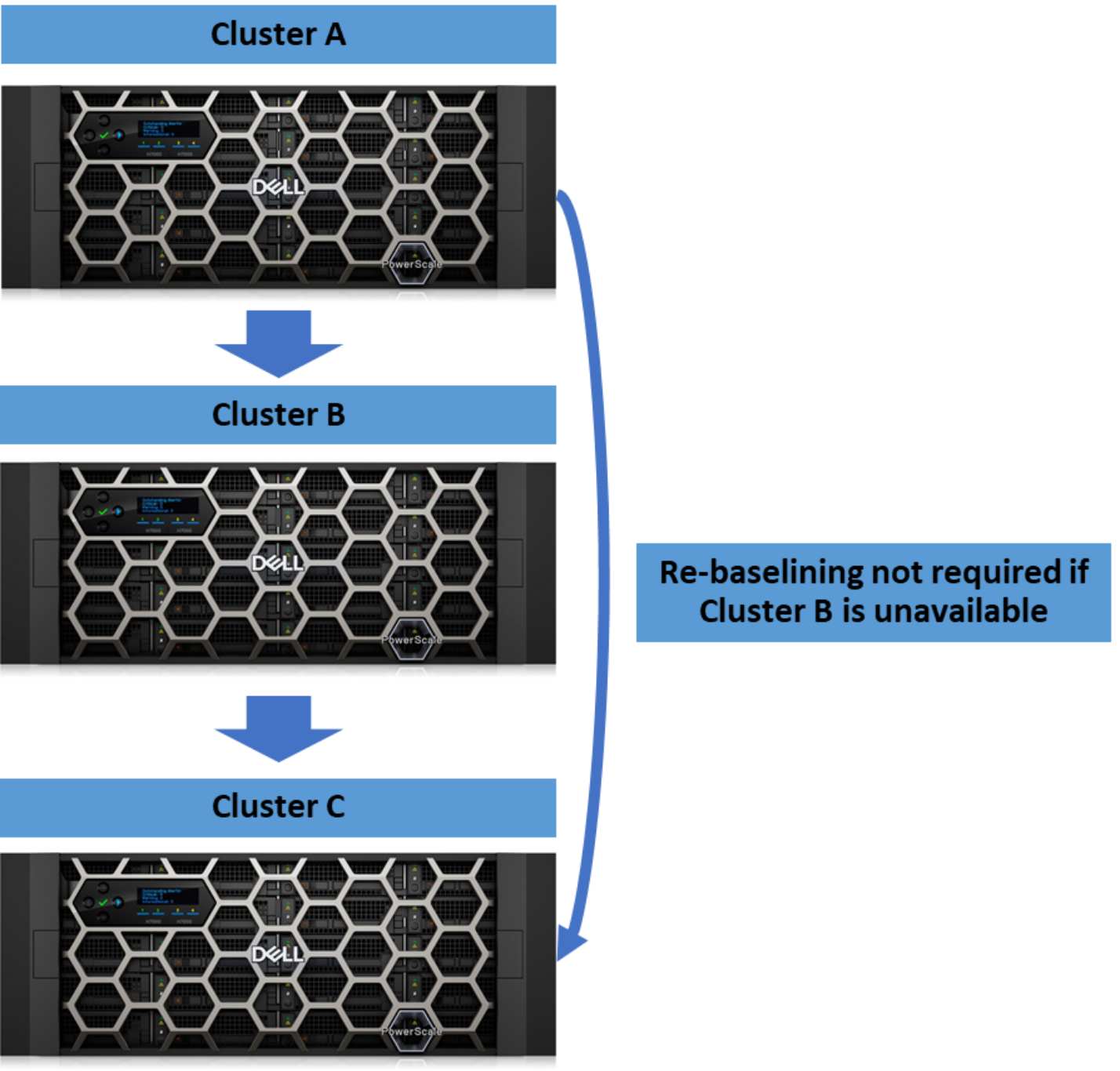
Figure 2. Re-baselining eliminated
Efficient resource consumption
As the demands for data replication increase, the extra strain on a source cluster must be considered. Multiple targets create an immense resource strain on the source cluster, affecting client workloads as the source cluster pushes data to the target. SmartSync allows administrators to use the target cluster’s resources to pull the dataset, minimizing the system resource impacts on the source cluster, as shown in the following figure. In environments with a single-source dataset and numerous targets, this is useful because the source cluster’s resources can focus on the production workload.
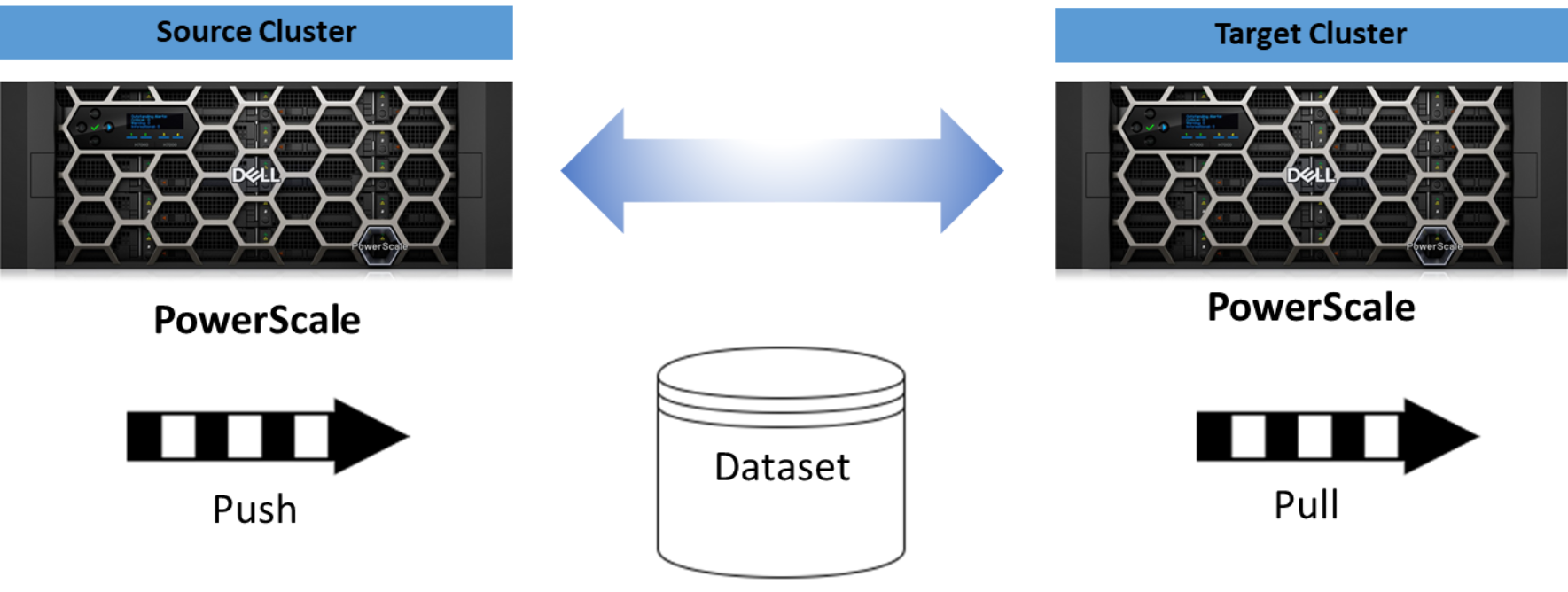
Figure 3. Dataset push and pull
Replication resiliency
Resiliency to replication failures is enhanced with SmartSync, minimizing replication times even when a job runs into an error. Traditionally, if a replication job encounters an error, the entire policy would fail, requiring an administrator to start over on the next replication attempt. With SmartSync jobs, if a critical error (e.g., intermittent network issue) occurs, the job goes into a paused state. For each error, use the isi dm job view command with the job ID from isi dm jobs list or isi dm reports list. A log snippet containing the error is generated under /ifs/data/Isilon_Support/datamover/transfer_failure.
Once a job is in the pause state, an administrator has three options, as illustrated in Figure 4. The options are:
- Resolve the errors and resume the job
- Complete a partial replication, retaining the portion of the dataset already transferred to the target platform and minimizing the following job's run time
- Cancel the job
Note: If a running or paused job is canceled, you need to create a new replication policy and ensure the target directory is empty, then run the job again using the updated policy since a re-baseline copy job is required.
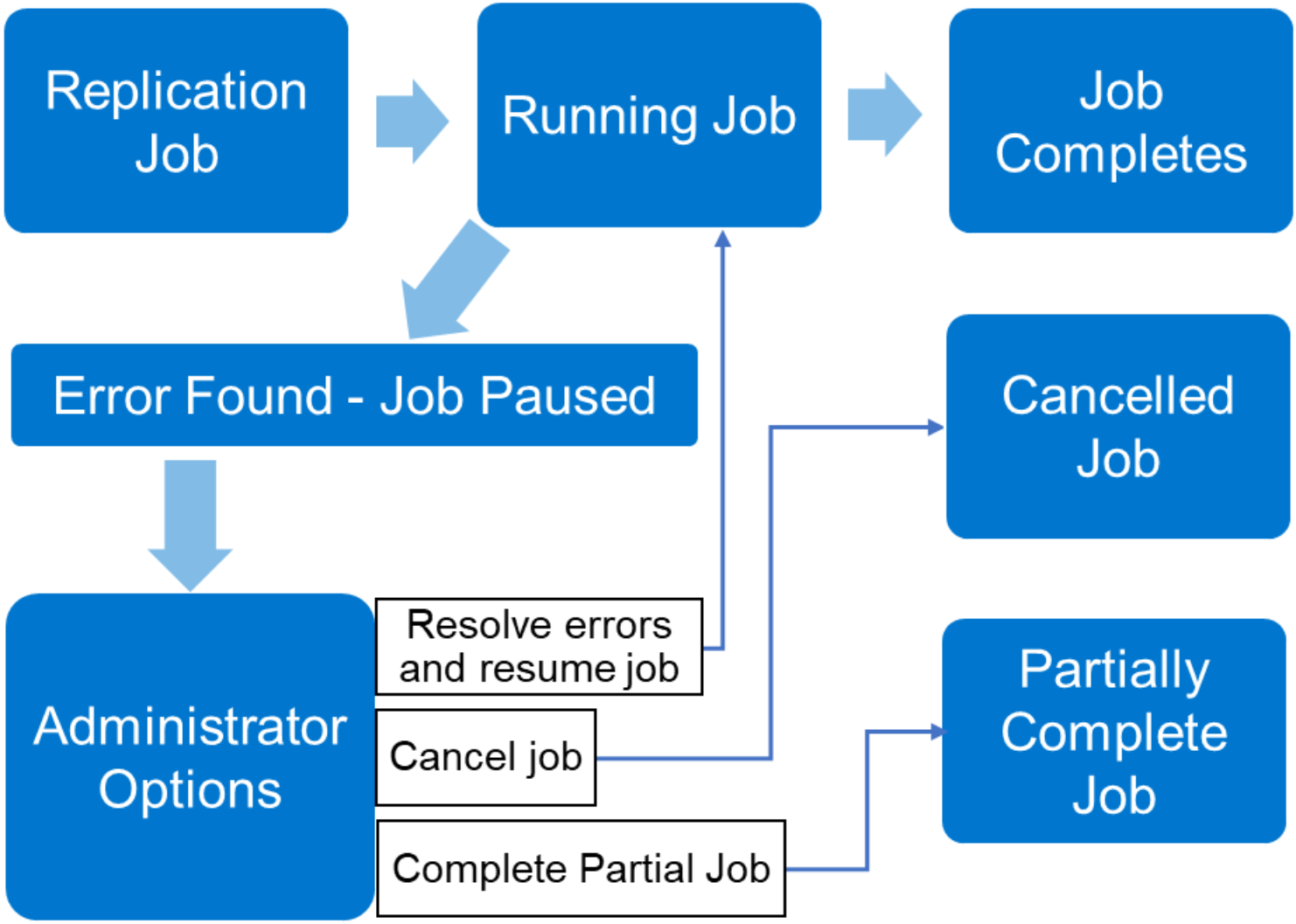
Figure 4. Replication resiliency
Decoupled snapshots
SmartSync decouples the snapshot creation process on the source cluster from the data replication to the target cluster. Separate policies are configured for snapshot creation and data replication. SmartSync refers to the snapshot creation as the dataset creation. The decoupling of snapshots and data replication allows each policy job to run independently, which further reduces the chain effect of a failure during the snapshot process early in the policy job state.
SmartSync also introduces parent-child relationships to launch a data-replication job only after the snapshot creation is complete, as described in Parent-child policies.
Base and concrete policies
In a typical environment, administrators manage several data replication policies. The number of replication policies could range from one to many on a cluster, creating an overhead of policy management. SmartSync introduces a concept of base and concrete policies. The base policy is a set of fields that applies to concrete policies. The concrete policy uses the predefined set of fields from the base policy. For examples of linking a base policy to a concrete policy, see the CLI Administration Guide on Dell Support.
File attributes
SmartSync copies file metadata to the target platform. Files on the target platform can be read-only or read and write. Refer to the Replication policies for more details. Suppose the target platform requires read/write access. Clients and applications must have the file metadata resemble the source platform. SmartSync maintains common file attributes, including:
- POSIX attributes (stat structure)
- Create time
- NT ACLs
- POSIX ACLs
- Alternate Data Streams (does not apply to one-time copy to object replication)
- Extended Attributes (does not apply to one-time copy to object replication)
SmartSync operations workflow
This section describes the workflow of SmartSync operations:
- One-time copy
- Repeat-copy
- Cloud-to-Cluster restore
- Dataset expiration
One-time copy
The SmartSync one-time copy is the operation of a one-time single copy of the entire dataset from the local PowerScale cluster to the target platform, including a remote PowerScale cluster, Dell ECS, AWS, Microsoft Azure and GCP.
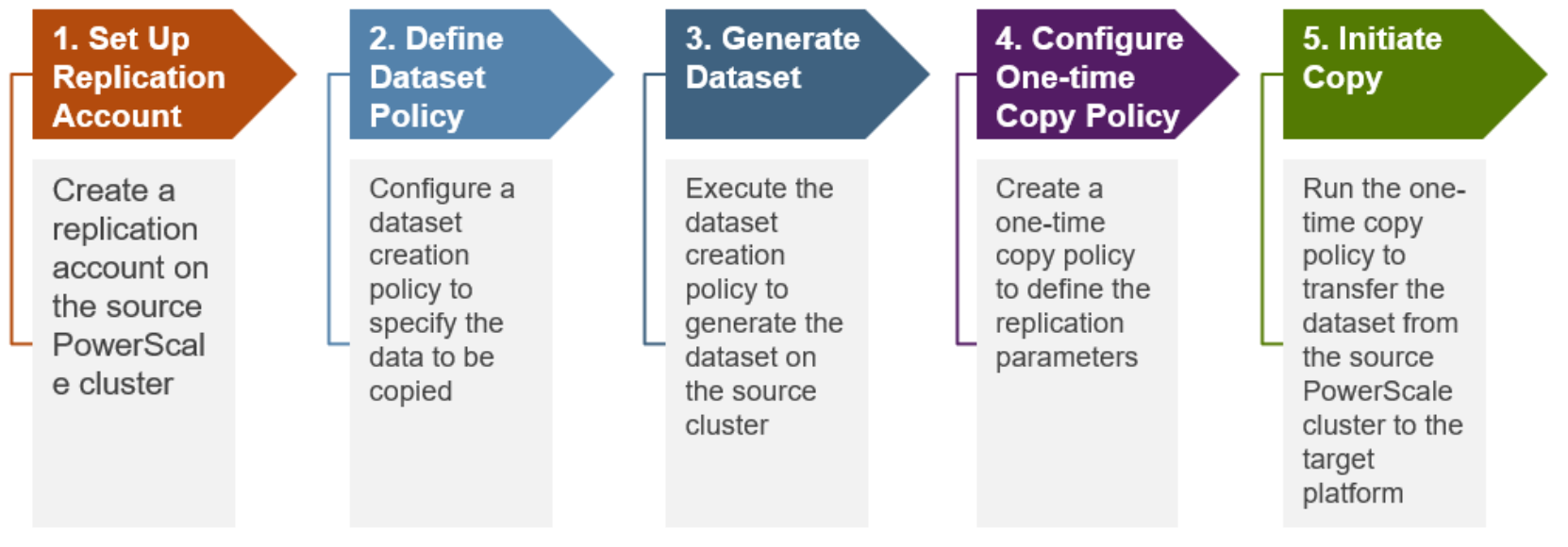
Figure 5 shows the workflow of the SmartSync one-time copy replication.
Repeat-copy
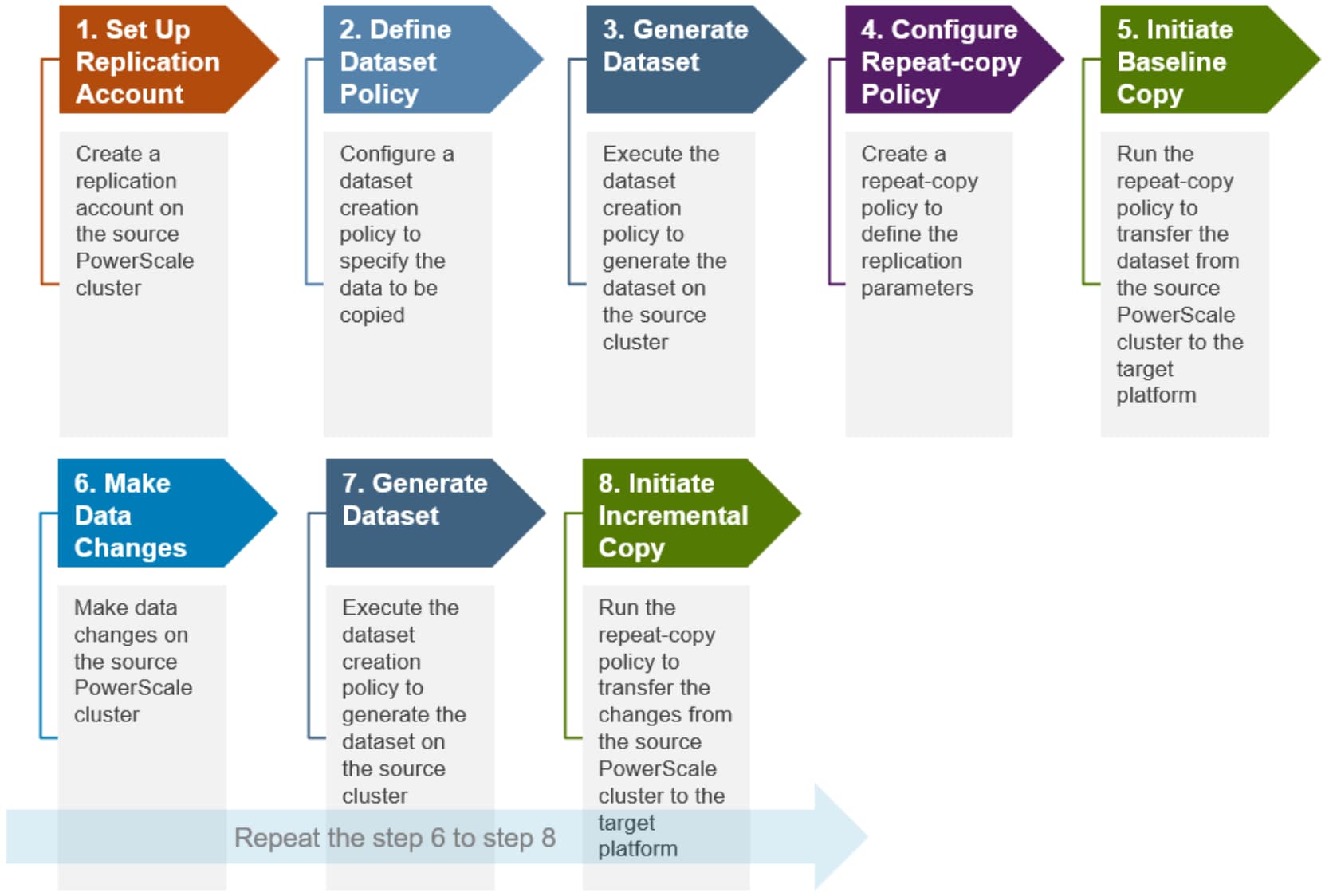
The SmartSync repeat-copy is the operation of an incremental copy of a dataset from the local PowerScale cluster to the target platform, including a remote PowerScale cluster, Dell ECS and AWS. The dataset is constantly changing. In a repeat-copy replication, the initial run copies the entire dataset, and the subsequent repeat-copy policy runs only copy the changed data blocks. The new and previous datasets are compared on the source cluster, and only changed blocks are transferred to the target platform.
Figure 6 shows the workflow of the SmartSync repeat-copy replication.
Cloud-to-Cluster restore
The SmartSync Cloud-to-Cluster restore is the operation of restoring either a subset of the dataset or the entire dataset from the cloud to the original PowerScale cluster or a new PowerScale cluster.
Figure 7 shows the workflow of Cloud-to-Cluster restore operation.

Dataset expiration
The SmartSync datasets expiration is the operation of deleting expired datasets on the source cluster and target platform by executing the expiration policy.
Figure 8 shows the workflow of dataset expiration operation.
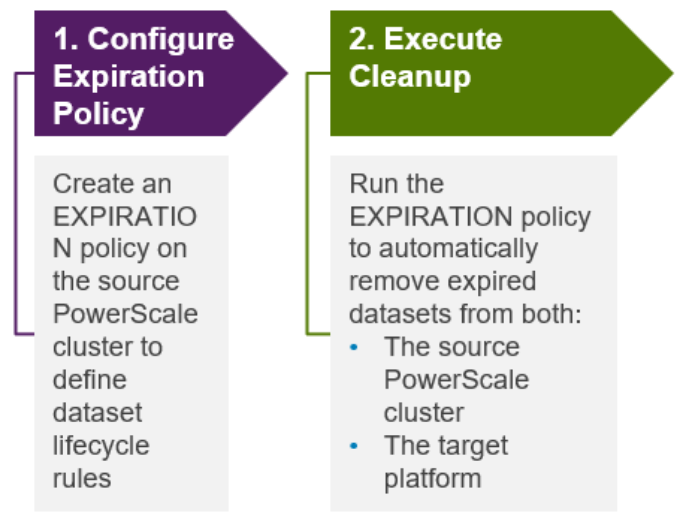
Figure 8. SmartSync dataset expiration workflow
Configuration
Overview
A policy is required to replicate a dataset from a source PowerScale cluster to a target platform. A license is required before policy configuration, and the service must be activated. This section provides the steps to configure replication from a PowerScale source cluster.
SmartSync uses the OneFS Datamover service. Although the references in this section use SmartSync, the CLI refers to SmartSync as Datamover.
Note: This section's configuration examples and options are based on the CLI. SmartSync may also be configured using PAPI. The configuration steps may be used as a template by replacing the CLI commands with PAPI commands. For more information, see the PowerScale OneFS API Reference Guide on Dell Support.
OneFS privilege
Users must have the ISI_PRIV_DATAMOVER privilege to configure SmartSync.
Command interfaces
SmartSync can be configured and managed via the OneFS CLI using the ‘isi dm’ command syntax:
Usage:
isi dm <subcommand>
Subcommands:
accounts Manage Datamover accounts.
base-policies Manage Datamover base-policy
certificates Manage Datamover certificates.
config Show Datamover Manual Configuration
datasets Show Datamover Dataset Information.
jobs Manage Datamover jobs.
network Show Datamover Network Information
policies Manage Datamover policy
reports Manage Datamover reports.
setup-dir Manage Datamover dataset directory settings
throttling Manage Datamover throttling.
To enhance the SmartSync administrative experience, OneFS 9.15 introduces the ‘isi replication’ CLI command set for SmartSync alongside the legacy ‘isi dm’ syntax. This provides a streamlined command-line interface built on the same proven Datamover architecture.
Usage:
isi replication <subcommand>
Subcommands:
accounts Manage SmartSync Replication Data Storage Accounts.
certs Manage SmartSync Replication Certificates.
jobs Manage SmartSync Replication Jobs.
policies Manage SmartSync Replication Policies.
reports Manage SmartSync Replication Reports.
The ‘isi replication’ CLI commands offer:
- Guided ‘policy creation wizard’ interactive operation mode when executed without arguments, simplifying configuration through clear prompts and sensible defaults.
- Direct argument support to enable automation and scripting.
- Full compatibility with existing services and APIs, ensuring continuity without changes to the underlying architecture.
The SmartSync policy creation wizard interactively gathers mandatory and common optional fields, including name, policy type, type-specific fields, retention, and schedule. Before calling the API, the following review summary is shown with all chosen values.
# isi replication policies create
=== Policy Creation Wizard ===
Enter policy name: <user input>
Select policy type:
[1] Global Snapshot - Creates a global snapshot on storage account
[2] COPY - One-time dataset copy between accounts
[3] REPEAT_COPY - Recurring replication (scheduled backup)
[4] EXPIRATION - Automatic dataset expiration/cleanup
[q] Cancel
Selection: <1-4>
Additional optional fields (priority, RPO alert, reconnect, base_path_readonly, etc.) can be configured via ‘isi replication policies modify’ after creation.
WebUI
In OneFS 9.15 and later releases, SmartSync can also be configured and managed via the OneFS WebUI under Mobility and protection > Replication (SmartSync):
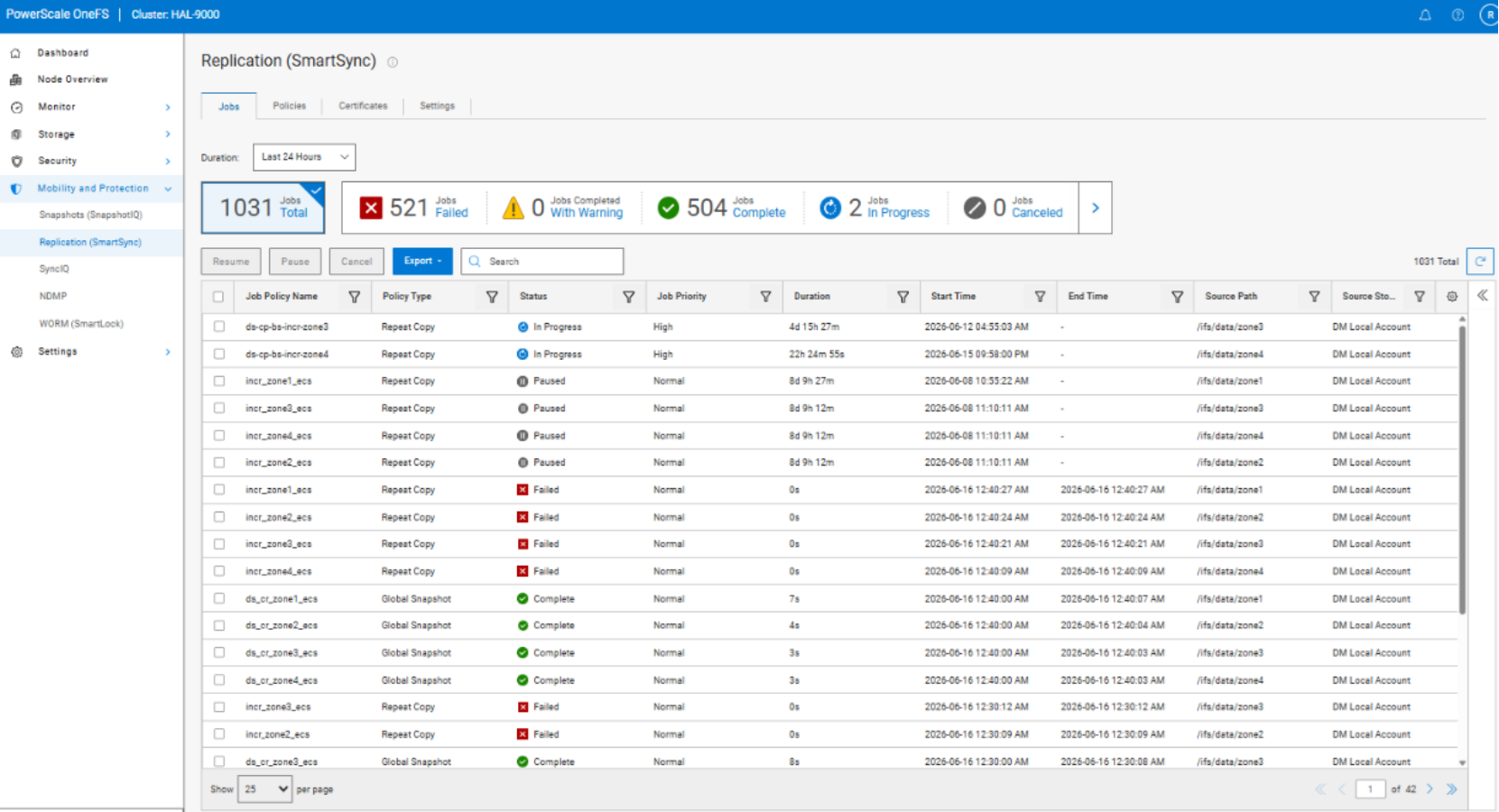
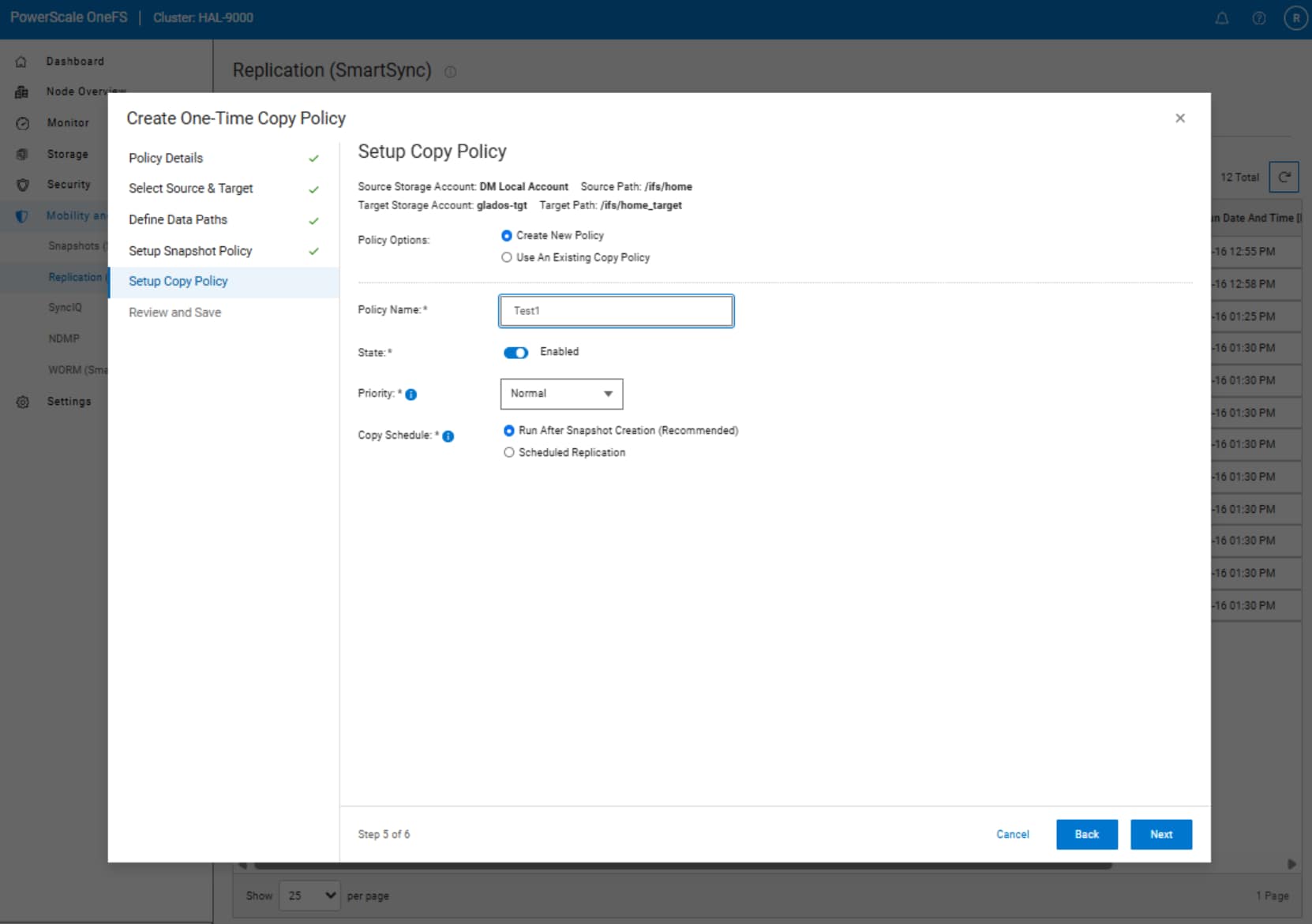
Similar to the CLI, the SmartSync WebUI also provides an interactive, wizard-based policy creation workflow under Mobility and protection > Replication (SmartSync) > Policies > Create Policy:
License
SmartSync requires an active SyncIQ and SnapshotIQ license. Before you continue with the following sections, ensure that both licenses are activated. Additionally, a user must have the ‘ISI_PRIV_DATAMOVER’ RBAC privilege in order to configure and manage SmartSync.
Enable service
By default, the SmartSync service is disabled and must be enabled to start the configuration process. To enable the service, from the OneFS CLI, run the following command:
isi services -a isi_dm_d enable
Encryption
For SmartSync policies to run, trust must be established between the source and target cluster. Transport Layer Security (TLS) provides the authorization, authentication, and encryption, resulting in a mutual handshake. Each cluster requires configuration of a Certificate Authority (CA) and Identity Certificate (IC). SmartSync requires that encryption be configured for policies to run. The SmartSync daemon only runs after a CA and IC are configured.
Note: The source and target clusters establish trust by installing the CA that signed the other cluster’s IC. In a scenario of replication to multiple clusters, the CA of each cluster is installed on every cluster. SmartSync establishes a mutual TLS handshake, disallowing unidirectional trust.
Further enhancing SmartSync security, PowerScale OneFS release 9.5.0.0 provides SmartSync support for the Online Certificate Status Protocol (OCSP). This section provides encryption configuration steps without an OCSP. For more information about using an OCSP, see OCSP.
As a best practice, use a local CA to sign an IC per cluster.
- If a local CA is available, go to the Local Certificate Authority section.
- If a local CA is not available, go to the Self-signed certificates section.
Note: The SmartSync daemon does not start until a CA and IC is configured. For an example of log file output when a CA is not configured, see Unconfigured CA. The SmartSync daemon is required for SmartSync and Cloud Copy policies. Even if a cluster is only performing Cloud Copy, a CA and IC are still required for the SmartSync daemon to start. For deployments where a cluster is only performing Cloud Copy, a minimal CA and IC configuration is required, as explained in Minimum certificate configuration for Cloud Copy only clusters.
Local Certificate Authority
If a local CA is available, create the CA and IC bundles for the source and target clusters. The bundles must be X.509 public key infrastructure (PKI) certificates. The certificate formats supported are PEM, DEM, and PKCS #12 format.
If intermediates are required for the CA bundle, the order of the bundle begins with the CA certificate and ends with the root. This order includes any intermediates in between, excluding the CI. Each certificate must certify the certificate before it. For example, a certificate bundle could be in the following format:
- Intermediate certificate 3
- Intermediate certificate 2
- Intermediate certificate 1
- Root certificate
The IC bundle consists of the X.509 certificate followed by the private key. Optionally, the private key may also be encrypted and password protected in the IC bundle. If the private key is password protected, note the password for use in the steps that follow.
Once the CA and IC bundles are complete for the source and target clusters, transfer them to each cluster through any protocol, and retain the file location for use in the steps that follow. Next, go to Install Certificate Authority and Identity Certificate.
Self-signed certificates
If a local CA is not available, self-signed certificates may be used.
Note: Using a local CA is the best practice for an optimal security posture. Only use the self-signed certificate option if a local CA is unavailable.
The same CA could be used on the source and target cluster with the self-signed certificates option. However, this section provides steps to configure a CA on each cluster, and the CA signs its local IC for a more secure option.
To configure encryption with self-signed certificates, perform the following steps.
Note: In the following steps, the naming conventions and expiration of the certificates may be updated for site requirements. Customize the information as required. The output shown is a working example.
Note: This section follows a naming convention of -s to notate the source cluster and -t to notate the target cluster. Replace the notations as required.
- Log in to the source cluster CLI. On the source cluster, generate a CA:
source-cluster# openssl genrsa -out ca-s.key 4096
source-cluster# openssl req -x509 -new -nodes -key ca-s.key -sha256 -days 1825 -out ca-s.pem
- Copy the source cluster CA to the target cluster:
source-cluster# scp ca-s.pem [Target Cluster IP]:/root
- Generate the IC on the source cluster:
source-cluster# openssl genrsa -out identity-s.key 4096
source-cluster# openssl req -new -key identity-s.key -out identity-s.csr
- Create the source cluster IC on the source cluster:
source-cluster# cat << EOF > identity-s.ext
authorityKeyIdentifier=keyid,issuer
basicConstraints=CA:FALSE
keyUsage=digitalSignature,nonRepudiation,keyEncipherment,dataEncipherment
EOF
- On the source cluster, sign the source cluster’s IC with the source cluster’s CA:
source-cluster# openssl x509 -req -in identity-s.csr -CA ca-s.pem -CAkey ca-s.key -CAcreateserial -out identity-s.crt -days 825 -sha256 -extfile identity-s.ext
- Log in to the target cluster CLI. On the target cluster, generate a CA:
target-cluster# openssl genrsa -out ca-t.key 4096
target-cluster# openssl req -x509 -new -nodes -key ca-t.key -sha256 -days 1825 -out ca-t.pem
- Copy the target cluster CA to the source cluster:
target-cluster# scp ca-t.pem [Source Cluster IP]:/root
- Generate the IC on the target cluster:
target-cluster# openssl genrsa -out identity-t.key 4096
target-cluster# openssl req -new -key identity-t.key -out identity-t.csr
- Create the target cluster IC on the target cluster:
target-cluster# cat << EOF > identity-t.ext
authorityKeyIdentifier=keyid,issuer
basicConstraints=CA:FALSE
keyUsage=digitalSignature,nonRepudiation,keyEncipherment,dataEncipherment
EOF
- On the target cluster, sign the target cluster’s IC with the target cluster’s CA:
target-cluster# openssl x509 -req -in identity-t.csr -CA ca-t.pem -CAkey ca-t.key -CAcreateserial -out identity-t.crt -days 825 -sha256 -extfile identity-t.ext
The self-signed certificates for the source and target clusters are now generated. Continue with Install Certificate Authority and Identity Certificate.
Install Certificate Authority and Identity Certificate
The CAs and CIs for each cluster are generated and copied to the appropriate cluster. Before you continue with this section, ensure that the location of all certificates is under the /ifs tree and make note of the location. The examples below do not list a certificate location, but the location must be under the /ifs tree.
The steps that follow assume a naming convention of -s to notate the source cluster and -t to notate the target cluster. If a local CA generated the bundles, replace the naming convention in the following steps with the actual name and location of the bundles. The example assumes that a unique CA is installed on each cluster. If the same CA is installed on each cluster, skip the step for a second CA.
To install the CA and CI, perform the following steps:
- On the source cluster, install the source cluster’s CA:
source-cluster# isi dm certificates ca create "$PWD"/ca-s.pem --name cluster-s-ca
- On the source cluster, install the target cluster’s CA:
source-cluster# isi dm certificates ca create "$PWD"/ca-t.pem --name cluster-t-ca
- On the source cluster, install the source cluster’s CI:
source-cluster# isi dm certificates identity create "$PWD"/identity-s.crt --certificate-key-path "$PWD"/identity-s.key --name cluster-s-identity
Note: If the identity has a password configured, use the --certificate-key-password option to specify the password.
- On the target cluster, install the target cluster’s CA:
target-cluster# isi dm certificates ca create "$PWD"/ca-t.pem --name cluster-t-ca
- On the target cluster, install the source cluster’s CA:
target-cluster# isi dm certificates ca create "$PWD"/ca-s.pem --name cluster-s-ca
- On the target cluster, install the target cluster’s CI:
target-cluster# isi dm certificates identity create "$PWD"/identity-t.crt --certificate-key-path "$PWD"/identity-t.key --name cluster-t-identity
Note: If the identity has a password configured, use the --certificate-key-password option to specify the password.
Encryption is now configured on the source and target clusters. The SmartSync daemon is now active. To confirm if the daemon is active, check if it has a PID by running pgrep isi_dm_d. Proceed with the replication account creation in the Replication accounts Section.
OCSP
OneFS release 9.5.0.0 provides SmartSync support for OCSP, as required for federal FIPS and STIG requirements. To configure OCSP, run the isi dm certificates settings modify command. The following options are available:
- Enable-encryption: This option enables traffic encryption. If the option is disabled, an initial successful TLS handshake is required, but SmartSync replication traffic is not encrypted.
- Strict-hostname-check: This option requires the CN/ASN found in the certificate to match the account URI; otherwise, the handshake fails.
- OCSP-URI: If the certificate does not already contain the OCSP URI, it may be provided with this option.
- Revocation-setting: This option specifies the level of OCSP checking. The following options are available:
- Strict: Requires all handshakes to pass OCSP. All OCSP check failures are considered fatal.
- Allow revoke data unavailable: Requires the OCSP checks to pass, but if an OCSP responder is unavailable, the check is successful.
- Allow no revoke SRC: Requires the OCSP checks to pass even if a certificate does not contain a URI.
- None: Bypasses all OCSP checks.
Minimum certificate configuration for Cloud Copy only clusters
For clusters that are only performing file-to-object copy through Cloud Copy, a minimum certification configuration is required to activate the SmartSync daemon. If a cluster is performing a file replication between PowerScale clusters, the full certification configuration must be implemented, as explained in the previous section. The steps in this section provided the minimum level of certificates to activate the SmartSync daemon. To activate the SmartSync daemon for Cloud Copy, perform the following:
- Log in to the source cluster CLI. On the source cluster, generate a CA:
source-cluster# openssl genrsa -out ca-s.key 4096
source-cluster# openssl req -x509 -new -nodes -key ca-s.key -sha256 -days 1825 -out ca-s.pem
- Generate the IC on the source cluster:
source-cluster# openssl genrsa -out identity-s.key 4096
source-cluster# openssl req -new -key identity-s.key -out identity-s.csr
- Create the source cluster IC on the source cluster:
source-cluster# cat << EOF > identity-s.ext
authorityKeyIdentifier=keyid,issuer
basicConstraints=CA:FALSE
keyUsage=digitalSignature,nonRepudiation,keyEncipherment,dataEncipherment
EOF
- On the source cluster, sign the source cluster’s IC with the source cluster’s CA:
source-cluster# openssl x509 -req -in identity-s.csr -CA ca-s.pem -CAkey ca-s.key -CAcreateserial -out identity-s.crt -days 825 -sha256 -extfile identity-s.ext
- On the source cluster, install the source cluster’s CA:
source-cluster# isi dm certificates ca create "$PWD"/ca-s.pem --name cluster-s-ca
- On the source cluster, install the source cluster’s CI:
source-cluster# isi dm certificates identity create "$PWD"/identity-s.crt --certificate-key-path "$PWD"/identity-s.key --name cluster-s-identity
The SmartSync daemon is now active. To confirm if the daemon is active, check if it has a PID by running pgrep isi_dm_d. Proceed with the replication account creation in the Replication accounts Section.
Certification configuration on the cloud for Cloud Copy
For cloud copy, it is recommended to use HTTPS protocol to replicate data to cloud providers. The certification configuration is ready for GCP, AWS, AZURE and replicate data using HTTPS protocol. In a Dell ECS private cloud environment, object certificates must be configured on ECS nodes for HTTPS port 9021. The ECS self-signed certificates are required to be included in the system certificate stores by running isi certificate authority or isi dm certificates ca install. For more information about object certificates creation, see the admin guide from ECS Documentation – Dell Support or ObjectScale Documentation – Dell Support.
Replication accounts
By default, a local account for the source cluster is already configured. Run the isi dm accounts list command, and the output displays the DM Local Account.
SmartSync account
The steps in this section assume a traditional push policy that is defined and initiated from the source cluster. After reviewing this information in this section, see Pull policy to define an account for a pull policy on the target cluster.
Note: Although the steps in this section reference specific sections for push and pull policies, you may use a single account for a push and pull policy depending on the data-replication topology. The steps in this section reference the push and pull to provide an example.
After encryption is configured, the next step is to add a replication account to the source cluster, pointing replication to a target cluster.
On the source cluster, add a replication account by running the following command:
source-cluster# isi dm accounts create DM dm://[Target Cluster IP]:7722 [Account name: For example ‘target-acc’]
Note: The target cluster IP address may be a hostname, IPv4, or IPv6 address. As a best practice, use a SmartConnect round-robin DNS name for the target cluster IP address.
SmartSync supports NANON (Not All Nodes On Network) configuration. Optionally, now you can specify the local and remote SmartConnect pools for the source and target clusters respectively with the --local-network-pool and --remote-network-pool fields. The fields are specified with the isi dm accounts modify command and the associated account –-access-id found under isi dm accounts list.
Note: The local and remote pool options only apply to PowerScale-to-PowerScale replication. They are not applicable to cloud copy replication.
Pull policy
To perform a pull policy from the target cluster, add the replication account on the target cluster and enter the source cluster’s IP address.
The command is now issued on the target cluster and is updated as follows:
target-cluster# isi dm accounts create DM dm://[Source Cluster IP]:7722 [Account name: For example ‘source-acc’]
Cloud copy account
To replicate object data to GCP, AWS, Azure, or ECS using SmartSync cloud copy, add the bucket information with the isi dm accounts create command and specify the following:
- Object store type: GCP, AWS_S3, AZURE, or ECS_S3. The S3 bucket for GCP and Azure must exist in the default region.
- Storage class: STANDARD, GLACIER_IR and INTELLIGENT_TIERING. The storage class only applies to AWS_S3 object store type.
- URI: {http,https}://hostname:port/bucketname. For the AWS_S3 object store type, the URI is region-specific. For example, the URI for region us-west-1 is https://s3.us-west-1.amazonaws.com. The mapping region needs to be set when configuring the SmartSync on the PowerScale cluster. For more details about AWS Regions and Endpoints, see the document AWS Regions and Endpoints on the AWS website. For SmartSync with AWS Virtual Private Cloud (VPC) endpoints, the bucket is required to be included in the account URL. For example, VPC endpoint DNS is *.vpce-0e25b8cdd720f900e-argc85vg.s3.us-east-1.vpce.amazonaws.com, the correct account URL is https://bucket.vpce-0e25b8cdd720f900e-argc85vg.s3.us-east-1.vpce.amazonaws.com. For more information, see AWS user guide Accessing buckets, access points, and Amazon S3 Control API operations from S3 interface endpoints.
- Access ID, Secret Key
- Optional proxy information
As an example, to add an AWS S3 bucket as a cloud copy account: isi dm account create AWS_S3 https://s3.amazonaws.com/[bucket-name] <Account Name> --access-id [access-id] --uri --auth-mode CLOUD --secret-key [secret-key] --storage-class [storage-class]
When the account is added, the bucket name may be a new or existing bucket. If the bucket is new, it is created when the data replication job is issued. Otherwise, the existing bucket is used. SmartSync supports multiple policies targeting the same bucket. SmartSync does not support Amazon S3 Object Lock.
SmartSync supports object sizes up to the cloud provider’s maximum object size limit. For example, AWS allows a maximum object size of 5TB, as documented in the Amazon S3 FAQs.
Confirm account creation
Run the isi dm accounts list command to verify that the account has been created. The new account and the local account are listed, as shown in the following figure:

Figure 9. isi dm accounts list
The output in this example lists the DM Local Account, which is the source cluster’s account. demo-acc is the target cluster’s account and IP address. However, the isi dm accounts list is run on the target cluster for a pull policy account; the DM Local Account would be the target cluster, while demo-acc would be the source cluster.
Dataset creation policy
A dataset must be available before a copy or repeat-copy data replication policy runs, as shown in Figure 10. The dataset creation step is required for SmartSync cluster replication and for cloud copy. If a dataset is unavailable, the copy or repeat-copy replication policy fails. For more information about the copy and repeat-copy policies, see Replication policies.
The steps in this section assume a traditional push dataset creation that is defined and initiated on the source cluster. After reviewing this section, see Pull dataset creation policy to define a pull dataset.
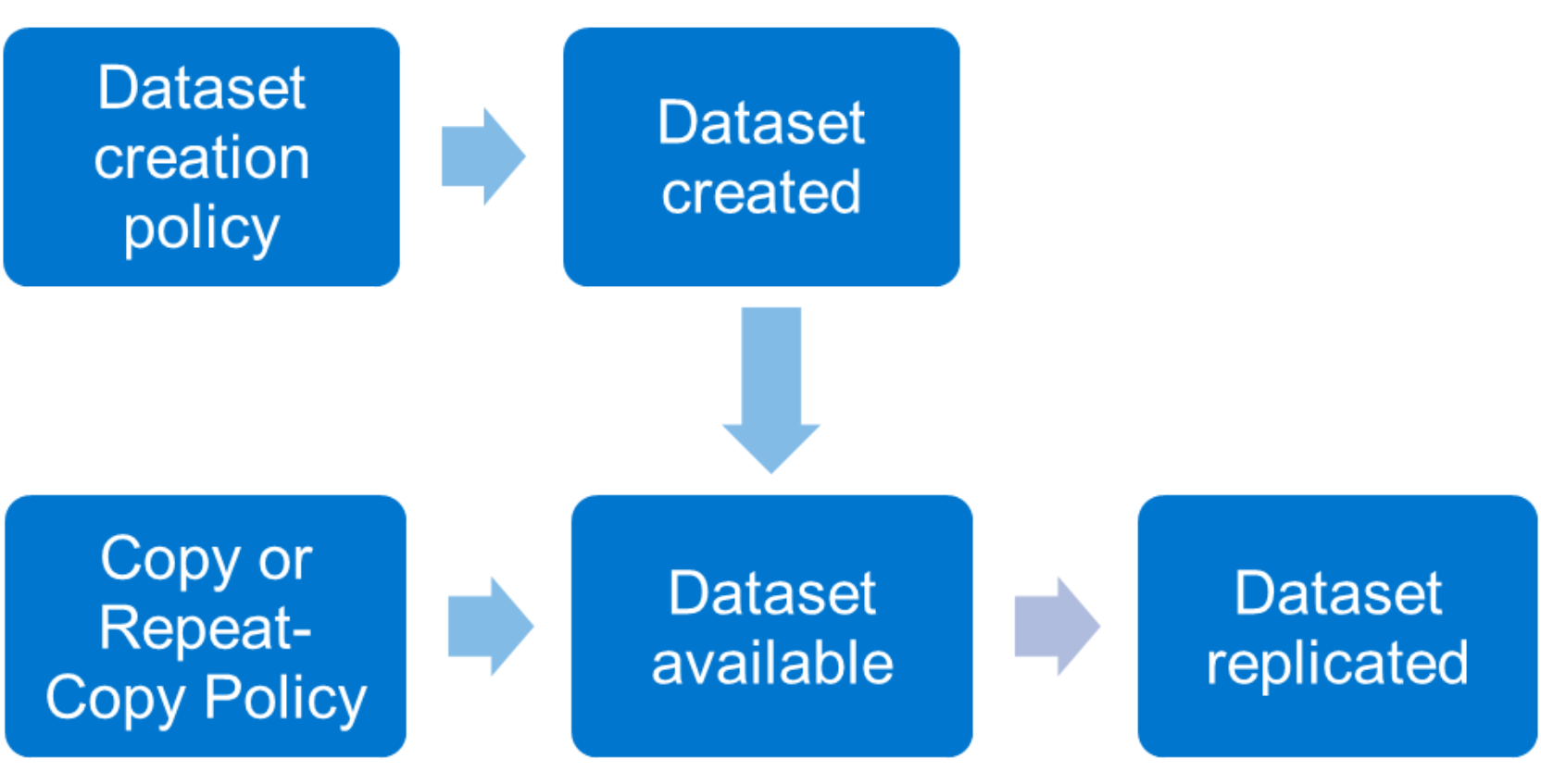
Figure 10. Datasets and replication policies
To create a dataset, run the isi dm policies create command with the CREATION policy option. For example:
isi dm policies create <Policy Name> CREATION --priority='NORMAL' -–enabled='true' --creation-account-id=[DM local account] --creation-base-path=[Source Dataset Path] --creation-dataset-retention-period=[Dataset Retention] --creation-dataset-reserve=[Number of Datasets] --creation-dataset-expiry-action=DELETE ––recurrence=”cron expression” --start-time="YYYY-MM-DD HH:MM:SS"
In this example:
- The CREATION option specifies the policy is only to create the dataset. For data replication policies, see Replication policies.
- The NORMAL option assigns a normal priority to this policy. The other options are Low and High.
- The true field specifies that the policy is enabled.
- In the creation-account-id field, enter the DM local account ID specified in the isi dm accounts list command.
- In the creation-base-path field, for SmartSync specify the directory path or file for the dataset. For cloud copy, this field specifies the object store key prefix.
- In the creation-dataset-retention-period field, specify in seconds how long the dataset is retained before expiration.
- In the creation-dataset-reserve field, specify how many datasets to keep in reserve and protected from expiration, irrespective of the creation-dataset-retention-period specified.
- In the creation-dataset-expiry-action, specify what happens with the dataset after expiration. In the current release, the only expiration option is DELETE.
- In the recurrence field, optionally specify a cron expression within the quotation marks to specify how often the policy runs. For example, --recurrence ="30 * 1 * 7", the dataset creation policy runs at minute 30 of every hour, but only on the first day of the month and only on Sunday (7).
- Minute: 30, it triggers at the 30th minute.
- Hour: *, it means every hour.
- Day of Month: 1, it means only on the first day of the month.
- Month: *, it means every month.
- Day of Week: 7, it means only on Sunday (where 0 or 7 = Sunday).
- In the start-time field, specify a date and time when the policy runs. If you specify a past date, the policy runs immediately after the command runs.
For more options on dataset creation, see the CLI Administration Guide on Dell Support.
Check the dataset creation policy's status by running isi dm jobs list and isi dm reports list. For more information about options for a running policy, see Troubleshooting. Once the dataset is created, it is listed under isi dm datasets list. The dataset creation uses a SnapshotIQ snapshot. It is displayed under isi snapshot list, with an isi_dm preceding the snapshot name.
Pull dataset creation policy
A pull dataset creation policy is defined and initiated on the target cluster. To perform a pull dataset creation on the source cluster, run the isi dm policies create command on the target cluster. However, the --creation-account-id is updated to the source cluster’s account, found under isi dm accounts list on the target cluster. All other fields in the command remain as previously described.
Replication policies
Once the dataset is created, the next step is to replicate the dataset to the target platform. The dataset is replicated through either a copy or repeat-copy policy.
Note: Before running a copy or repeat-copy policy, ensure that a dataset creation policy is completed for the source base path. Otherwise, the copy or repeat-copy policy will remain in a paused state.
The steps in this section assume a traditional push replication that is defined and initiated on the source cluster. For pull replication, see the Pull replication policy.
Copy replication policy
The copy policy is a one-time single copy of the entire dataset to the target platform.
File-to-file replication policy
The file-to-file copy replication policy replicates a one-time single copy of datasets from the source PowerScale cluster to the target PowerScale cluster.
As an example, run the following command to create a copy policy for a file-to-file replication policy:
isi dm policies create <Policy Name> COPY --priority='NORMAL' –enabled='true' --copy-source-base-path=[Source Dataset Path] --copy-create-dataset-on-target=true --copy-base-base-account-id=[Source DM Account] --copy-base-source-account-id=[Source DM Account] --copy-base-target-account-id=[Target DM Account] --copy-base-target-base-path=[Target directory path] --copy-base-target-dataset-type='FILE' --copy-base-dataset-retention-period=[Dataset retention] --copy-base-dataset-reserve=[Number of datasets] --copy-base-policy-dataset-expiry-action=DELETE --start-time="YYYY-MM-DD HH:MM:SS"
In this example, some of the options are the same as those of the dataset creation policy. For more information about those options, see Dataset creation policy. You can specify additional options as follows:
- In the copy-create-dataset-on-target field, specify if a new dataset will be created on the target cluster. If this field is set to true, the new dataset is displayed under isi dm datasets list (and isi snapshot list, preceded by an isi_dm_snap) on the target cluster, and the data remains read-only. If the field is set to false, a dataset is not created, but the data is available for read and write.
- In the --copy-base-base-account-id and --copy-base-source-account-id fields, specify the source cluster’s account ID from the isi dm accounts list command.
- In the --copy-base-target-account-id field, specify the target cluster’s account ID from the isi dm accounts list command.
- In the --copy-base-target-dataset-type field, specify the target platform. The FILE option is for copying to a PowerScale cluster.
- Optionally, use the --copy-source-sub-paths option to select only a subset of the directory structure that was specified under the --copy-source-base-path.
- Optionally, specify a dataset ID, which is found under isi dm datasets list, directly for replication using the --copy-dataset-id option. If a --copy-dataset-ID is not specified, the most current dataset for the subpath is used for the policy by default.
File-to-object replication policy
The file-to-object copy replication policy replicates a one-time single copy of datasets from the source PowerScale cluster to ECS, GCP, AWS, or Azure. For the file-to-object copy replication, SmartSync organizes cloud objects in a file system-like structure, with each file mapped to a single object. These objects are browsable and accessible for use.
As an example, run the following command to create a copy policy for a file-to-object replication policy:
isi dm policies create <Policy Name> COPY --priority='NORMAL' –enabled='true' --copy-source-base-path=[Source Dataset Path] --copy-create-dataset-on-target=true --copy-base-base-account-id=[Source DM Account] --copy-base-source-account-id=[Source DM Account] --copy-base-target-account-id=[Target DM Account] --copy-base-target-base-path=[Target directory path] --copy-base-target-dataset-type=[FILE_ON_OBJECT_BACKUP or FILE_ON_OBJECT_COPY] --copy-base-dataset-retention-period=[Dataset retention] --copy-base-dataset-reserve=[Number of datasets] --copy-base-policy-dataset-expiry-action=DELETE --start-time="YYYY-MM-DD HH:MM:SS"
In this example, some of the options are the same as those of the dataset creation policy. For more information about those options, see Dataset creation policy. You can specify additional options as follows:
- The --copy-create-dataset-on-target field is set to true to store a copy of the dataset in the S3 bucket.
- In the --copy-base-base-account-id and --copy-base-source-account-id fields, specify the source cluster’s account ID from the isi dm accounts list command.
- In the --copy-base-target-account-id field, specify the S3 bucket’s account ID from the isi dm accounts list command.
- In the --copy-base-target-base-path field, specify a folder where the dataset will be copied. The folder will be created under the S3 bucket. The dataset is copied to the S3 bucket under [s3 bucket]/.datamover/dsr/[copy-base-target-base-path folder]. In the S3 bucket, a folder is created under [s3 bucket]/.datamover/dsr/. The dsr-latest file is metadata associated with the bucket contents.
- In the --copy-base-target-dataset-type field, specify the target platform. The following are the considerations for the FILE_ON_OBJECT_BACKUP and FILE_ON_OBJECT_COPY.
- The FILE_ON_OBJECT_BACKUP type: This type is a full-fidelity file system baseline & incremental replication to object. It supports ADS, special files, symlinks, hardlinks, sparseness, POSIX/NT attributes, and encoding. As an example, the following is the object representation from cloud browsing:
bucket_name/target_base_path
└─chunks
dsid_HEAD ├─gfid_005056AD378D6A85DA67AD16DEA8DC5977F41025 └─gfid_005056AD378D6A85DA67AD16DEA8DC5977F42
- The FILE_ON_OBJECT_COPY type: This type is one-time file system copy to object and has limited attribute/metadata support. As an example, the following is the object representation from cloud browsing:
bucket_name/target_base_path
└─file_name
└─foder_name
└─file_name
For cloud copy replication, the copy policy is also used to restore either a subset of the dataset or the entire dataset from the cloud to the original PowerScale cluster or a new PowerScale cluster. SmartSync enables data restoration to a new PowerScale cluster even when the source PowerScale cluster is offline or unavailable.
As an example, run the following command to create a copy policy to restore either a subset of the dataset or the entire dataset from the cloud to the PowerScale cluster:
isi dm policies create <Policy Name> COPY --priority='NORMAL' –enabled='true' --copy-source-base-path=[Source Dataset Path From Cloud] --copy-create-dataset-on-target=[true or false] --copy-base-source-account-id=[Cloud’s DM Account] --copy-base-target-account-id=[Cluster’s DM Account] --copy-base-target-base-path=[Target directory path] --copy-base-target-dataset-type=[FILE] --start-time="YYYY-MM-DD HH:MM:SS"
In this example, some of the options are the same as those of the dataset creation policy. For more information about those options, see Dataset creation policy. You can specify additional options as follows:
- In the --copy-base-source-account-id fields, specify the S3 bucket’s account ID from the isi dm accounts list command.
- In the --copy-base-target-account-id field, specify the PowerScale cluster’s account ID from the isi dm accounts list command.
- The --copy-source-base-path filed, specify the folder name where the datasets are stored in the S3 bucket.
- The --copy-create-dataset-on-target field is set to true or false to restore the entire dataset to the PowerScale cluster and create the dataset on the PowerScale cluster. However, the --copy-create-dataset-on-target field is set to false for restoring a subset of the dataset from the cloud to the PowerScale cluster and not creating the dataset on the PowerScale cluster.
- In the --copy-base-target-base-path field, specify a folder where the dataset is restored to the PowerScale cluster. The target base directory must be empty for data restoration to proceed, non-empty directories will result in restoration operation failure.
- In the --copy-base-target-dataset-type field, specify the target platform. The FILE option is for restoring data from cloud to a PowerScale cluster.
- In the --copy-dataset-id field, specify the dataset id that is used to restore from the cloud to the PowerScale cluster. As an example, run the following isi_dm browse, list-accounts, connect-account, and list-datasets commands to get the dataset id. The --copy-dataset-id is specified in the dataset id from the list-datasets command. To restore a particular file from cloud to the original PowerScale cluster or a new PowerScale cluster by running the download command.
target-cluster# isi_dm browse
<no account>:<no dataset> $ list-accounts
000000000000000108000000000000000000000000000000 (demoaws)
005056ad0a874fbdbf67211d3e2230ce3b2b000000000000 (DM Local Account)
fd0000000000000000000000000000000000000000000000 (DM Loopback Account)
<no account>:<no dataset> $ connect-account 000000000000000108000000000000000000000000000000
demoaws:<no dataset> $ list-datasets
1 2025-02-19T08:54:35+0000 testdata
2 2025-02-20T06:38:38+0000 testdata
3 2025-03-03T08:47:50+0000 testdata
4 2025-03-03T08:52:08+0000 testdata
demoaws:<no dataset> $ connect-dataset 3
demoaws:3 <testdata:> $ ls
test.file 1 [file]
test.file2 [file]
dir1 [dir]
demoaws:3 <testdata:> $ cd dir1
demoaws:3 <testdata:dir1/> $ ls
file1 [file]
file2 [file]
demoaws:3 <testdata:dir1/> download file1 /ifs/data/restore/file1
- Optionally, use the --copy-source-subpaths field to specify a sub path relative to the base path of the dataset. The --copy-source-subpaths field is used to restore a subset of the dataset from the cloud to the PowerScale cluster. For multiple files and directories restoration in a single policy, this option is set as a list of files or directories. For example, the --copy-source-subpaths=”File or Directory Name1”,” File or Directory Name2” is used to restore FileName1 and FileName2 in a single replication policy.
Repeat-copy replication policy
The repeat-copy policy option is an incremental copy of a dataset that is constantly changing. In a repeat-copy policy, the initial run copies the entire dataset, and the subsequent repeat-copy policy runs only copy the changed data blocks. The new and previous datasets are compared on the source cluster, and only changed blocks are transferred to the target cluster.
File-to-file replication policy
The file-to-file repeat-copy replication policy replicates baseline and incremental of datasets from the source PowerScale cluster to the target PowerScale cluster.
As an example, run the following command to create a repeat-copy policy for a file-to-file replication policy:
isi dm policies create <Policy Name> REPEAT_COPY --priority='NORMAL' –enabled='true' --repeat-copy-source-base-path=[Source Dataset Path] --repeat-copy-base-base-account-id=[Source DM Account] --repeat-copy-base-source-account-id=[Source DM Account] --repeat-copy-base-new-tasks-account=[Source DM Account] --repeat-copy-base-target-account-id=[Target DM Account] --repeat-copy-base-target-base-path=[Target directory path] --repeat-copy-base-target-dataset-type='FILE' --repeat-copy-base-dataset-retention-period=[Dataset retention] --repeat-copy-base-dataset-reserve=[Number of datasets] --repeat-copy-base-policy-dataset-expiry-action=DELETE --repeat-copy-rpo-alert=[Duration] --start-time="YYYY-MM-DD HH:MM:SS"
In this example, some of the options are the same as those of the dataset creation policy. For more information about those options, see Dataset creation policy. You can specify additional options as follows:
- In the --repeat-copy-base-base-account-id, --repeat-copy-base-source-account-id and --repeat-copy-base-new-tasks-account fields, specify the source cluster’s account ID from the isi dm accounts list command.
- In the --repeat-copy-base-target-account-id field, specify the target cluster’s account ID from the isi dm accounts list command.
- In the --repeat-copy-base-target-dataset-type field, specify the target platform. The FILE option is for copying to a PowerScale cluster.
- In the --repeat-copy-rpo-alert field, specify the RPO alert setting for this policy. An alert is created if the specified RPO for this policy is exceeded. The default value is 0, which will not generate RPO alerts.
- Optionally, use the recurrence and stagger the copy or repeat-copy policy with the dataset creation recurrence.
- Optionally, use the reconnect flag on a repeat-copy policy to specify that the target platform already has the baseline copy, allowing only the incremental updates to be replicated.
File-to-object replication policy
The file-to-object repeat-copy replication policy replicates baseline and incremental datasets from the source PowerScale cluster to ECS and AWS. For the file-to-object repeat-copy replication, SmartSync organizes cloud objects in Dell format. These objects are not used by simply browsing and are not accessible for use. To view objects on the PowerScale cluster, use the isi_dm browse commands, see Replication policies for more details.
As an example, run the following command to create a repeat-copy policy for a file-to-object replication policy:
isi dm policies create <Policy Name> REPEAT_COPY --priority='NORMAL' –enabled='true' --repeat-copy-source-base-path=[Source Dataset Path] --repeat-copy-base-base-account-id=[Source DM Account] --repeat-copy-base-source-account-id=[Source DM Account] --repeat-copy-base-new-tasks-account=[Source DM Account] --repeat-copy-base-target-account-id=[Target DM Account] --repeat-copy-base-target-base-path=[Target directory path] --repeat-copy-base-target-dataset-type='FILE_ON_OBJECT_BACKUP' --repeat-copy-base-dataset-retention-period=[Dataset retention] --repeat-copy-base-dataset-reserve=[Number of datasets] --repeat-copy-base-policy-dataset-expiry-action=DELETE --repeat-copy-rpo-alert=[Duration] --start-time="YYYY-MM-DD HH:MM:SS"
In this example, some of the options are the same as those of the dataset creation policy. For more information about those options, see Dataset creation policy. You can specify additional options as follows:
- In the --repeat-copy-base-base-account-id, --repeat-copy-base-source-account-id and --repeat-copy-base-new-tasks-account fields, specify the source cluster’s account ID from the isi dm accounts list command.
- In the --repeat-copy-base-target-account-id field, specify the S3 bucket’s account ID from the isi dm accounts list command.
- In the --repeat-copy-base-target-dataset-type field, specify the target platform. The FILE_ON_OBJECT_BACKUP option is for copying to ECS and AWS.
- In the --repeat-copy-rpo-alert field, specify the RPO alert setting for this policy. An alert is created if the specified RPO for this policy is exceeded. The default value is 0, which will not generate RPO alerts.
- Optionally, use the recurrence and stagger the copy or repeat-copy policy with the dataset creation recurrence.
- Optionally, use the reconnect flag on a repeat-copy policy to specify that the target platform already has the baseline copy, allowing only the incremental updates to be replicated.
For more replication policy options, see the CLI Administration Guide on Dell Support.
Pull replication policy
PowerScale to PowerScale replication
A pull replication policy is defined and initiated on the target cluster. To perform a pull replication policy from the target cluster, the isi dm policies create command is issued on the target cluster. However, the --copy-base-base-account-id= and --copy-base-source-account-id are updated to the source cluster’s account, found under isi dm accounts list on the target cluster. All other fields in the command remain as previously described.
Cloud copy
A pull replication policy is supported for a file-to-object copy. Both FILE_ON_OBJECT_BACKUP and FILE_ON_OBJECT_COPY backup types are supported, see Replication policies for more details. If a dataset is copied to an S3 bucket with a push policy, as explained in the previous file-to-object sections, it may be retrieved from the S3 bucket with a pull policy. From the PowerScale cluster, issue the isi dm policies create command but update the --copy-base-base-account-id and --copy-base-source-account-id fields with the S3 bucket account ID from the isi dm accounts list command. Next, update the --copy-base-target-account-id field with the source cluster’s account ID from the isi dm accounts list command.
Expiration policy
An expiration policy checks for expired datasets and runs the associated expiration action. Currently, the only option is to delete.
SmartSync automatically deletes expired datasets on the source cluster and target platform by executing the expiration policy. Additionally, it verifies the dataset count to ensure it meets or exceeds the configured dataset reserve threshold.
As an example, run the following command to create a repeat-copy policy for a file-to-object replication policy:
isi dm policies create <Policy Name> EXPIRATION --priority='NORMAL' –enabled='true' --expiration-account-id=[DM local account] ––recurrence=”cron expression” --start-time="YYYY-MM-DD HH:MM:SS"
In this example:
- The EXPIRATION option specifies the policy is only to check and delete the expired dataset.
- The NORMAL option assigns a normal priority to this policy. The other options are Low and High.
- The true field specifies that the policy is enabled.
- In the creation-account-id field, enter the DM local account ID specified in the isi dm accounts list command.
- In the recurrence field, optionally specify a cron expression within the quotation marks to specify how often the policy runs. For example, --recurrence ="30 * 1 * 7", the dataset creation policy runs at minute 30 of every hour, but only on the first day of the month and only on Sunday (7).
- Minute: 30, it triggers at the 30th minute.
- Hour: *, it means every hour.
- Day of Month: 1, it means only on the first day of the month.
- Month: *, it means every month.
- Day of Week: 7, it means only on Sunday (where 0 or 7 = Sunday).
- In the start-time field, specify a date and time when the policy runs. If you specify a past date, the policy runs immediately after the command runs.
Note: the --creation-dataset-reserve field specifies how many datasets to keep in reserve and protected from expiration, irrespective of the --creation-dataset-retention-period field specified.
Base and concrete policies
SmartSync uses a concept of base and concrete policies. The base policy defines a common set of options that apply to concrete policies. The predefined fields are applied from the base policy when a concrete policy is defined. To define a base policy, run the isi dm base-policies create command. To define an associated concrete policy, run isi dm policies create and use the –-base-policy-id option.
Parent-child policies
SmartSync uses a concept of parent-child relationships for policies. As a result, policies only start after the parent job policy, using the parent-exec-policy-id option, is complete. The parent-child policies provide an alternative to recurrence if it is unknown how long a previous policy might take to complete.
Recurrence
Dataset creation policy and Replication policies explain that policies may be configured with recurrence. A replication policy requires a dataset to be created before starting. If recurrence is scheduled for the policies, ensure that the recurrence schedule for the dataset creation and replication policy do not conflict. Allow adequate time for the dataset creation to complete before the replication policy starts to ensure that the dataset is available when the replication policy starts. As described in Parent-child policies, an alternative to the recurrence option is to create parent-child relationships for the policies.
Snapshots
Source and target cluster snapshots use SnapshotIQ snapshots. Source cluster snapshots are enabled by default, as required by the dataset creation policy. Target cluster snapshots are created if the copy-create-dataset-on-target option is set to true for a copy policy. The copy-create-dataset-on-target option is only appliable to copy policies. Target snapshots are always created for a repeat-copy policy. It is recommended to view the snapshots on the source and target clusters under isi dm datasets list. Manage snapshots by using the dataset retention period and reserve options, as explained in Dataset creation policy and Replication policies. Alternatively, run an expiration policy, as described in Expiration policy.
Push and pull policies
PowerScale to PowerScale replication
A push policy is initiated and defined on the source cluster, pushing data to a target cluster and using the resources available on the source cluster. Alternately, a pull policy is initiated and defined on the target cluster, pulling data to the target cluster and using the resources available on the target cluster. Consider workflow requirements for services other than data replication for the source and target clusters. Define and initiate policies on the cluster with the most available resources. Configuring push and pull policies is based on where the policy is defined and initiated.
Cloud copy replication
File-to-object copy replication policies are initiated and defined on the source cluster for push and pull policies. The source and target account IDs are flipped in the isi dm policies create command. For more information, see the Replication policies section.
Throttling
SmartSync policies may be throttled to limit system and network impacts. Depending on the workflow requirements of the source and target platforms, consider using the throttling options. For PowerScale-to-PowerScale replication, before you apply additional throttling, consider using a pull policy rather than the traditional push since policy offloads impact to the target cluster.
Bandwidth
Bandwidth throttling is specified for a specific subnet netmask, and a per-node bandwidth limit is specified in bytes using the following command:
isi dm throttling bw-rules create NETMASK –[subnet] --bw-limit=
Max sparks
While SmartSync is designed to maximize throughput for large-scale data transfers by opening multiple concurrent connections to the target, administrators must carefully manage concurrency to avoid exceeding the connection limits enforced by the target systems, such as Dell ObjectScale. Since these limits are applied at the ObjectScale node level, scaling SmartSync tasks across multiple nodes can unintentionally amplify connection pressure when the connections initiated by SmartSync exceed the limit of the ObjectScale nodes. To mitigate the connection pressure, administrators can tune the SmartSync max sparks parameter to a lower value instead of the default unlimited tasks. Note this does not mean that the SmartSync will not achieve the maximum throughput, it is ensuring that the target ObjectScale nodes are used optimally.
Max sparks throttling manages the number of concurrent tasks running per node at the SmartSync account level, to define a per-node task limit using the following command:
isi dm accounts modify <account id> --max-sparks=
CPU
SmartSync’s CPU usage is controlled by two parameters, the “Allowed CPU threshold” and the “System CPU load threshold.” The “Allowed CPU threshold” is the percentage of CPU that SmartSync policies can consume. The “System CPU load threshold” is the node’s CPU usage. If the “System CPU load threshold” is reached and the “Allowed CPU threshold” is reached, then SmartSync throttles CPU usage to stay at or below the “Allowed CPU threshold.”
By default, the “Allowed CPU threshold” is 30 percent, and the “System CPU load threshold” is 90 percent. Therefore, if the node’s total CPU reaches 90 percent and if the SmartSync consumption reaches 30 percent of the total CPU, SmartSync throttles its CPU consumption.
Define CPU throttling with the isi dm throttling settings modify command. Use the isi dm throttling settings view command to view the current CPU throttling setting.
To specify the “Allowed CPU threshold,” use the –-allowed-cpu-threshold option. To specify the “System CPU load threshold,” use the --system-cpu-load-threshold command. For each option, specify the new threshold without the percentage sign.
Failover and Failback
OneFS 9.15 introduces SmartSync failover and failback capabilities to ensure uninterrupted operations and fast recovery when a primary PowerScale cluster becomes unavailable. Rather than relying on time‑consuming restores from traditional backups, SmartSync enables rapid redirection of client access to a secondary cluster. By keeping data and metadata immediately available, it significantly reduces Recovery Time Objectives (RTO).
This method reduces service interruptions, maintains user productivity, and eliminates the performance impact and data lag often associated with restoring large datasets from backup media. When the primary cluster is restored, SmartSync efficiently performs failback by syncing only the incremental changes generated during the failover period, preserving data integrity and enabling a seamless return to normal replication operations.
Together, these capabilities deliver a robust, high‑availability data mobility solution that strengthens business continuity and lowers operational risk.
SmartSync Failover/Failback provides the following capabilities:
- Converts a read‑only SmartSync target path into a writeable path.
- Switches a writeable SmartSync source path to read‑only.
- Restores a SmartSync base path to a previous dataset state.
- Enables reverse incremental synchronization to transfer client‑written data from a failover cluster back to the original source.
These functions allow clusters to safely alternate client access while maintaining consistent and reliable datasets.
The high-level failover and failback workflow is as follows:
|
Step |
Action |
Details |
|
1 |
Failover (part i) |
Make target writeable; optionally revert. |
|
2 |
Failover (part ii) |
Client writes occur; create dataset. |
|
3 |
Failback (part i) |
Rewind original source using dataset revert. |
|
4 |
Failback (part ii) |
Perform reverse incremental sync. |
|
5 |
Failback (part iii) |
Make original source writeable, create dataset. |
|
6 |
Reset (part i) |
Prepare original target for original direction sync. |
|
7 |
Reset (part ii) |
Resume original direction sync. |
Prerequisites
- The prerequisites for SmartSync failover and failback operation include ensuring that:
- Replication storage accounts exist on both source and target clusters.
- Baseline repeat copy job has completed.
- Dataset creation policies are configured.
At this point, there's a normal Replication (SmartSync) incremental relationship between the two clusters. The source is writeable and generates new datasets via a dataset creation policy that are incrementally copied to the target via a repeat copy policy
Step 1 – Make Target Writeable and Revert Dataset
Use isi dm setup-dir client-access to make the base path writeable. Revert to a specific dataset to guarantee consistency.
For example, reverting the original target path to an older dataset (id 1):
target-1# isi dm setup-dir client-access --base-path /ifs/tgt --dataset-revert 1
Are you sure you would like to revert base path /ifs/tgt to dataset ID 1? (yes/[no]): yes
Created job : 1.
Dataset will revert and path will become writable.
target-1# isi dm reports list
ID Job Type Job Priority Job Policy ID Job Control Request Job Start Time Job End Time Job State Job State Flags
---------------------------------------------------------------------------------------------------------------------------------------------
1 DATASET_REVERT_JOB HIGH 0 NONE 2026-01-08T21:03:00 2026-01-08T21:03:18 finished No failure
---------------------------------------------------------------------------------------------------------------------------------------------
Total: 1
target-1# ls /ifs/tgt
file1 file2
target-1# isi dm datasets list
ID Dataset State Dataset Type Dataset Base Path Base Path Readonly Dataset Subpaths Dataset Creation Time Dataset Expiry Action Dataset Retention Period
--------------------------------------------------------------------------------------------------------------------------------------------------------
2 COMPLETE FILE /ifs/tgt NO - 2026-01-08T21:00:36 DELETE 2027-01-08T21:00:53
4 COMPLETE FILE /ifs/tgt NO - 2026-01-08T21:03:17 DELETE 2027-01-08T21:03:20
--------------------------------------------------------------------------------------------------------------------------------------------------------
Total: 2
target-1# isi dm dataset view 4
ID: 4
Dataset State: COMPLETE
Dataset Type: FILE
Dataset Base Path: /ifs/tgt
Dataset Subpaths: -
Dataset Creation Time: 2026-01-08T21:03:17
Dataset Expiry Action: DELETE
Dataset Global ID
Dataset Revision
Local Unid: 2
System GUID: 005056a019104b016069d5184039799db7b8
Dataset Tree ID
Local Unid: 1
System GUID: 005056a019104b016069d5184039799db7b8
Dataset Retention Period: 2027-01-08T21:03:20
Snapshot Path: /ifs/.snapshot/isi_dm_snap_dsr_4_1767906197/tgt
Base Path Readonly: NO
Dataset Version: 2
After the revert is completed, the target dataset of the revert operation is no longer listed, and it appears that a new dataset has been created. By viewing the details of the dataset, we can see that the revision/tree id match those of the dataset we were reverting to, and the contents of the base path are what we expect.
Step 2 – Modify Target Data and Create a Dataset
Client writes occur on the target. A dataset creation policy is used to capture these changes. For example:
target-1# touch /ifs/tgt/tgtfile1
target-1# ls /ifs/tgt
file1 file2 tgtfile1
target-1# isi dm policies create focreation CREATION --priority NORMAL --run-now true --creation-account-id local --creation-base-path /ifs/tgt
Created policy : 1.
target-1# isi dm datasets list
ID Dataset State Dataset Type Dataset Base Path Base Path Readonly Dataset Subpaths Dataset Creation Time Dataset Expiry Action Dataset Retention Period
---------------------------------------------------------------------------------------------------------------------------------------------------------------
2 COMPLETE FILE /ifs/tgt NO - 2026-01-08T21:00:36 DELETE 2027-01-08T21:00:53
4 COMPLETE FILE /ifs/tgt NO - 2026-01-08T21:03:17 DELETE 2027-01-08T21:03:20
5 COMPLETE FILE /ifs/tgt NO - 2026-01-08T21:04:18 DELETE 2027-01-08T21:04:18
---------------------------------------------------------------------------------------------------------------------------------------------------------------
Total: 3
Stopping at this point is equivalent to decommissioning the original source. The original target is writeable and can be treated like a source cluster in all ways, including configuring a new repeat copy policy pointed at a new target cluster.
Step 3 – Prepare Original Source for Failback
Revert the source to the dataset revision/tree ID matching the target.
In this scenario, because we reverted the target system to an older dataset, the original source must also be rolled back to the same point in time. If the original source contains datasets under the base path that do not exist on the original target, a failback synchronization cannot proceed. In this case, the original source needs to be reverted to dataset ID 2, which corresponds to the dataset ID 1 that the original target was reverted to.
Dataset IDs may differ between clusters, as shown in the dataset listing. This is expected—because the original source created an additional dataset before the baseline sync, its dataset numbering is ahead of the target’s. By inspecting the dataset details, we can confirm that the dataset revision and dataset tree ID for the source’s dataset ID 2 match those of the target’s dataset ID 1/4. This ensures we are reverting the source to the correct dataset.
The replication-target command always requires a dataset revert. This safeguard ensures that no data was written to the source path after the last successful sync to the original target. If additional data had been written, the reverse-direction sync from the target would not be able to reconcile those changes with updates made on the target while it was writable.
As an alternative to using the replication-target command—particularly helpful in planned failover/failback workflows—you can use the dataset creation policy option --creation-dataset-make-read-only. When the last dataset created prior to the final successful incremental job from source to target is created with this option enabled, the source is automatically made read‑only before the target becomes read‑write. This prepares the environment for failback before the failover occurs. The end result is the same as in the example above, but this approach requires advance planning and awareness of the upcoming failover. For example:
source-1# isi dm dataset view 2
ID: 2
Dataset State: COMPLETE
Dataset Type: FILE
Dataset Base Path: /ifs/src
Dataset Subpaths: -
Dataset Creation Time: 2026-01-08T20:18:56
Dataset Expiry Action: DELETE
Dataset Global ID
Dataset Revision
Local Unid: 2
System GUID: 005056a019104b016069d5184039799db7b8
Dataset Tree ID
Local Unid: 1
System GUID: 005056a019104b016069d5184039799db7b8
Dataset Retention Period: 2027-01-08T20:18:56
Snapshot Path: /ifs/.snapshot/isi_dm_snap_dsr_2_1767903536/src
Base Path Readonly: YES
Dataset Version: 2
source-1# isi dm setup-dir replication-target --base-path /ifs/src --dataset-revert 2
Are you sure you would like to revert base path /ifs/src to dataset ID 2? (yes/[no]): yes
Created job : 1025.
Dataset will revert and path will become read-only.
source-1# isi dm reports list
ID Job Type Job Priority Job Policy ID Job Control Request Job Start Time Job End Time Job State Job State Flags
-------------------------------------------------------------------------------------------------------------------------------------------------------
1025 DATASET_REVERT_JOB HIGH 0 NONE 2026-01-08T21:18:06 2026-01-08T21:18:28 finished No failure
5 DATASET_INCREMENTAL_COPY_JOB NORMAL 1025 NONE 2026-01-08T21:00:33 2026-01-08T21:00:55 finished No failure
4 DATASET_CREATION_JOB NORMAL 1 NONE 2026-01-08T20:20:38 2026-01-08T20:20:41 finished No failure
3 DATASET_BASELINE_COPY_JOB NORMAL 1025 NONE 2026-01-08T20:19:56 2026-01-08T20:20:04 finished No failure
2 DATASET_CREATION_JOB NORMAL 1 NONE 2026-01-08T20:18:55 2026-01-08T20:18:58 finished No failure
1 DATASET_CREATION_JOB NORMAL 1 NONE 2026-01-08T19:44:22 2026-01-08T19:44:30 finished No failure
-------------------------------------------------------------------------------------------------------------------------------------------------------
Total: 6
source-1# ls /ifs/src
file1 file2
Once the revert is completed, we can see that the contents of the base path match the state the original target was at right after it was made writeable. This means that a failback sync to repatriate modifications made on the original target while it was writeable can succeed.
Step 4 – Perform Failback Sync
Create a reverse‑direction repeat copy policy with reconnect enabled.
The ‘repeatcopy’ policy that will transfer the dataset created on the original target back to the original source can now be configured with the ‘--reconnect true’ option enabled. This ensures that the first run of the policy does not initiate a new baseline copy. Instead, it resumes synchronization using incremental updates, continuing from the last shared dataset between the two paths. For example:
target-1# isi dm policies create failbackrepeatcopy REPEAT_COPY --priority NORMAL --run-now true --repeat-copy-source-base-path /ifs/tgt --repeat-copy-base-source-account-id local --repeat-copy-base-target-account-id 000000000000000100000000000000000000000000000000 --repeat-copy-base-target-base-path /ifs/src --reconnect true --repeat-copy-base-target-dataset-type FILE
Created policy : 1025.
target-1# isi dm reports list
ID Job Type Job Priority Job Policy ID Job Control Request Job Start Time Job End Time Job State Job State Flags
-------------------------------------------------------------------------------------------------------------------------------------------------------
1026 DATASET_INCREMENTAL_COPY_JOB NORMAL 1025 NONE 2026-01-08T21:20:21 2026-01-08T21:20:42 finished No failure
1025 DATASET_CREATION_JOB NORMAL 1 NONE 2026-01-08T21:04:13 2026-01-08T21:04:19 finished No failure
1 DATASET_REVERT_JOB HIGH 0 NONE 2026-01-08T21:03:00 2026-01-08T21:03:18 finished No failure
-------------------------------------------------------------------------------------------------------------------------------------------------------
Total: 3
Step 5 – Make Original Source Writeable
Enable client access without dataset revert when appropriate.
The repeat copy policy can now be crafted in order to bring the dataset created on the original target back to the original source. A key point here is that the reconnect argument is true, indicating that the first run of this policy should not attempt a baseline copy but instead attempt to resume incremental transfers. For example:
target-1# isi dm policies create failbackrepeatcopy REPEAT_COPY --priority NORMAL --run-now true --repeat-copy-source-base-path /ifs/tgt --repeat-copy-base-source-account-id local --repeat-copy-base-target-account-id 000000000000000100000000000000000000000000000000 --repeat-copy-base-target-base-path /ifs/src --reconnect true --repeat-copy-base-target-dataset-type FILE
Created policy : 1025.
target-1# isi dm reports list
ID Job Type Job Priority Job Policy ID Job Control Request Job Start Time Job End Time Job State Job State Flags
-------------------------------------------------------------------------------------------------------------------------------------------------------
1026 DATASET_INCREMENTAL_COPY_JOB NORMAL 1025 NONE 2026-01-08T21:20:21 2026-01-08T21:20:42 finished No failure
1025 DATASET_CREATION_JOB NORMAL 1 NONE 2026-01-08T21:04:13 2026-01-08T21:04:19 finished No failure
1 DATASET_REVERT_JOB HIGH 0 NONE 2026-01-08T21:03:00 2026-01-08T21:03:18 finished No failure
-------------------------------------------------------------------------------------------------------------------------------------------------------
Total: 3
The job is created as an incremental, not a baseline, despite this being the first run of the repeat copy policy. It successfully performed an incremental update against the original source.
Step 6 – Prepare Target for Resuming Forward Replication
Target is reverted and made read‑only.
Before resuming the original direction of synchronization, the original target must be set to read‑only. In addition, any changes made on the target since the last successful reverse‑direction incremental sync need to be reverted. This follows the same principle described earlier: an incremental sync cannot proceed if the target contains data that does not exist on the source. Ensuring the target is reverted to the correct dataset state guarantees that both sides are aligned and that the next incremental sync can run successfully. For example:
target-1# isi dm datasets list
ID Dataset State Dataset Type Dataset Base Path Base Path Readonly Dataset Subpaths Dataset Creation Time Dataset Expiry Action Dataset Retention Period
------------------------------------------------------------------------------------------------------------------------------------------------------------------
2 COMPLETE FILE /ifs/tgt NO - 2026-01-08T21:00:36 DELETE 2027-01-08T21:00:53
4 COMPLETE FILE /ifs/tgt NO - 2026-01-08T21:03:17 DELETE 2027-01-08T21:03:20
5 COMPLETE FILE /ifs/tgt NO - 2026-01-08T21:04:18 DELETE 2027-01-08T21:04:18
------------------------------------------------------------------------------------------------------------------------------------------------------------------
Total: 3
target-1# isi dm setup-dir replication-target --base-path /ifs/tgt --dataset-revert 5
Are you sure you would like to revert base path /ifs/tgt to dataset ID 5? (yes/[no]): yes
Created job : 2049.
Dataset will revert and path will become read-only.
target-1# isi dm reports list
ID Job Type Job Priority Job Policy ID Job Control Request Job Start Time Job End Time Job State Job State Flags
-------------------------------------------------------------------------------------------------------------------------------------------------------
2049 DATASET_REVERT_JOB HIGH 0 NONE 2026-01-08T21:36:23 2026-01-08T21:36:41 finished No failure
1026 DATASET_INCREMENTAL_COPY_JOB NORMAL 1025 NONE 2026-01-08T21:20:21 2026-01-08T21:20:42 finished No failure
1025 DATASET_CREATION_JOB NORMAL 1 NONE 2026-01-08T21:04:13 2026-01-08T21:04:19 finished No failure
1 DATASET_REVERT_JOB HIGH 0 NONE 2026-01-08T21:03:00 2026-01-08T21:03:18 finished No failure
-------------------------------------------------------------------------------------------------------------------------------------------------------
Total: 4
target-1# touch /ifs/tgt/foo
touch: /ifs/tgt/foo: Read-only file system
Run the original repeat copy policy. For example:
source-1# isi dm policies modify 1025 --run-now=true
source-1# isi dm reports list
ID Job Type Job Priority Job Policy ID Job Control Request Job Start Time Job End Time Job State Job State Flags
-------------------------------------------------------------------------------------------------------------------------------------------------------
7 DATASET_INCREMENTAL_COPY_JOB NORMAL 1025 NONE 2026-01-08T21:37:32 2026-01-08T21:37:53 finished No failure
6 DATASET_CREATION_JOB NORMAL 1 NONE 2026-01-08T21:34:39 2026-01-08T21:34:42 finished No failure
2049 DATASET_REVERT_JOB HIGH 0 NONE 2026-01-08T21:32:49 2026-01-08T21:32:52 finished No failure
1025 DATASET_REVERT_JOB HIGH 0 NONE 2026-01-08T21:18:06 2026-01-08T21:18:28 finished No failure
5 DATASET_INCREMENTAL_COPY_JOB NORMAL 1025 NONE 2026-01-08T21:00:33 2026-01-08T21:00:55 finished No failure
4 DATASET_CREATION_JOB NORMAL 1 NONE 2026-01-08T20:20:38 2026-01-08T20:20:41 finished No failure
3 DATASET_BASELINE_COPY_JOB NORMAL 1025 NONE 2026-01-08T20:19:56 2026-01-08T20:20:04 finished No failure
2 DATASET_CREATION_JOB NORMAL 1 NONE 2026-01-08T20:18:55 2026-01-08T20:18:58 finished No failure
1 DATASET_CREATION_JOB NORMAL 1 NONE 2026-01-08T19:44:22 2026-01-08T19:44:30 finished No failure
-------------------------------------------------------------------------------------------------------------------------------------------------------
Total: 10
On the target, note that the base path is read-only and has the latest modifications from the source. At this point, the relationship between the two clusters is the same as prior to any failover or failback steps were performed.
target-1# ls /ifs/tgt
file1 file2 file4 tgtfile1
target-1# isi dm datasets list
ID Dataset State Dataset Type Dataset Base Path Base Path Readonly Dataset Subpaths Dataset Creation Time Dataset Expiry Action Dataset Retention Period
------------------------------------------------------------------------------------------------------------------------------------------------------------------
2 COMPLETE FILE /ifs/tgt YES - 2026-01-08T21:00:36 DELETE 2027-01-08T21:00:53
4 COMPLETE FILE /ifs/tgt YES - 2026-01-08T21:03:17 DELETE 2027-01-08T21:03:20
6 COMPLETE FILE /ifs/tgt YES - 2026-01-08T21:36:25 DELETE 2027-01-08T21:36:25
8 COMPLETE FILE /ifs/tgt YES - 2026-01-08T21:36:40 DELETE 2027-01-08T21:36:40
9 COMPLETE FILE /ifs/tgt YES - 2026-01-08T21:37:36 DELETE 2027-01-08T21:37:52
------------------------------------------------------------------------------------------------------------------------------------------------------------------
Total: 5
target-1# touch /ifs/tgt/foo
touch: /ifs/tgt/foo: Read-only file system
Restoring from Object Storage (FILE_ON_OBJECT) Scenario
After restoring a dataset from object storage and making it writeable, the same failover/failback workflow applies. For example:
source-1# isi dm accounts view 000000000000000104000000000000000000000000000000
ID: 000000000000000104000000000000000000000000000000
Name: aws
URI: https://s3.amazonaws.com/example
Account Type: AWS_S3
Storage Class: STANDARD
Credentials
Auth Mode: CLOUD
Cloud
Access ID: example
Proxy
Local Network Pool:
Remote Network Pool:
Enforce Sse: No
Max Sparks: 0
source-1# isi dm policies create awsrc REPEAT_COPY --priority NORMAL --run-now=true --repeat-copy-source-base-path /ifs/src --repeat-copy-base-source-account-id local --repeat-copy-base-target-account-id 000000000000000104000000000000000000000000000000 --repeat-copy-base-target-dataset-type FILE_ON_OBJECT_BACKUP --repeat-copy-base-target-base-path ellerb11326
Created policy : 2049.
source-1# isi dm reports list
ID Job Type Job Priority Job Policy ID Job Control Request Job Start Time Job End Time Job State Job State Flags
----------------------------------------------------------------------------------------------------------------------------------------------------
9 DATASET_BASELINE_COPY_JOB NORMAL 2049 NONE 2026-01-13T19:10:02 2026-01-13T19:10:21 finished No failure
----------------------------------------------------------------------------------------------------------------------------------------------------
Total: 1
source-1# isi dm policies create restore COPY --priority NORMAL --run-now=true --copy-source-base-path ellerb11326 --copy-create-dataset-on-target true --copy-base-source-account-id 000000000000000104000000000000000000000000000000 --copy-base-target-account-id local --copy-base-target-base-path /ifs/restore --copy-base-target-dataset-type FILE
Created policy : 3073.
source-1# isi dm rep l
ID Job Type Job Priority Job Policy ID Job Control Request Job Start Time Job End Time Job State Job State Flags
----------------------------------------------------------------------------------------------------------------------------------------------------
10 DATASET_BASELINE_COPY_JOB NORMAL 3073 NONE 2026-01-13T20:05:22 2026-01-13T20:05:32 finished No failure
9 DATASET_BASELINE_COPY_JOB NORMAL 2049 NONE 2026-01-13T19:10:02 2026-01-13T19:10:21 finished No failure
----------------------------------------------------------------------------------------------------------------------------------------------------
Total: 2
source-1# touch /ifs/restore/foo
touch: /ifs/restore/foo: Read-only file system
source-1# isi dm setup-dir client-access --base-path /ifs/restore --no-dataset-revert
Skipping the dataset revert will remove an INPROGRESS dataset on this base path, but will not clean up any incomplete files or directories left by a running repeat copy job. Additionally, when failing back to the original source, a dataset revert must be performed to roll the path back to the last dataset that was successfully replicated to the target. Are you sure you would like to not perform a dataset revert? (yes/[no]): yes
Created job : 3073.
Dataset path will be cleaned up and become writable.
source-1# touch /ifs/restore/foo
source-1# ls /ifs/restore/foo
/ifs/restore/foo
Migration from SyncIQ
This section outlines the process for migrating existing SyncIQ replication configurations to OneFS Replication (SmartSync). The migration capability enables a seamless transition without requiring data re‑baselining, while preserving recovery points and providing a controlled rollback option to SyncIQ if necessary.
Overview and Objectives
The SyncIQ‑to‑SmartSync migration process converts eligible SyncIQ synchronization policies into equivalent OneFS Replication (SmartSync) policies. Migration is performed on a per‑policy basis, creating native replication constructs that continue incremental replication from the last known good (LKG) SyncIQ snapshot. This approach eliminates the need for a full data copy.
Key objectives include:
- Enabling seamless migration without requiring re‑baselining
- Reusing existing SyncIQ snapshots as Global Snapshots
- Providing early validation and safeguards to prevent data inconsistencies
- Supporting an explicit rollback path to SyncIQ
Migration Scope
Only SyncIQ ‘sync’ type policies of type are eligible for migration. ‘Copy’ type policies, or those configured with unsupported options, are either rejected or require explicit user acknowledgment before proceeding.
For each migrated SyncIQ policy, SmartSync creates:
- A Global Snapshot creation policy (CREATION) to generate Global Snapshots from the source path.
- A Repeat Copy policy (REPEAT_COPY) to incrementally replicate Global Snapshots to the existing target path.
The resulting policies inherit core attributes such as source and target paths, priority, and scheduling (where supported). Any unsupported or incompatible settings generate warnings and are not applied.
Prerequisites
Before initiating migration, the following conditions must be met:
- Both source and target clusters are upgraded and committed to a OneFS version that supports SyncIQ‑to‑SmartSync migration (OneFS 9.15 or later).
- Required licenses (SyncIQ and SnapshotIQ) are installed.
- OneFS Replication (SmartSync) is enabled, and TLS trust is configured.
- Replication accounts for both source and target clusters are already established.
- The SyncIQ policy has no active or paused jobs.
If any prerequisite is not satisfied, the migration process will exit without making changes.
Migration Workflow (High Level)
- Pre‑checks and validation
- Validate the SyncIQ policy type and last job state.
- Verify OneFS Replication source and target accounts.
- Identify unsupported or ignored SyncIQ configuration options.
- Disable the SyncIQ policy
- The policy is marked as ‘disable_by_dm’ and cannot be re‑enabled through the SyncIQ CLI or API.
- Create migration Global Snapshots
- Global Snapshots are generated on both source and target clusters using the last successful SyncIQ snapshot.
- Snapshot lineage is preserved to support incremental continuation.
- Create OneFS Replication (SmartSync) policies
- A Global Snapshot creation policy (gs-creation-<policy>) is created.
- A Repeat Copy policy (<policy>) is created with the ‘--reconnect=true’ command flag option.
- Start incremental replication
- OneFS Replication continues replication from the SyncIQ LKG snapshot using incremental updates
This process enables a smooth transition to SmartSync while maintaining data integrity, operational continuity, and flexibility for rollback if required.
Migration is initiated using the following CLI command:
isi dm policies import-synciq <policy> \
--target-account-id <replication-target-account> \
[--source-account-id <replication-source-account>] \
[--prechecks-only] \
[--acknowledge-warnings] \
[--skip-gs-create-policy] \
--rollback-retention-period <seconds|never>
Key options:
- ‘--prechecks-only’ performs a dry run and reports errors or warnings.
- ‘--acknowledge-warnings’ proceeds despite non‑fatal warnings.
- ‘--rollback-retention-period’ controls how long migration Global Snapshots are retained to allow rollback.
Upon successful execution, a SyncIQ‑to‑SmartSync migration job is initiated, and which can be monitored using standard OneFS Replication job commands.
Schedule Conversion
SyncIQ schedules are translated into OneFS Replication cron‑based schedules wherever possible. Human‑readable schedules (for example, “every day at 5 PM”) are converted into equivalent cron expressions.
Event‑driven schedules, such as When Source Modified or When Snapshot Taken, are not supported. When encountered, the migrated OneFS Replication policy is created without an associated schedule, and a warning is generated. Administrators must manually define a schedule after migration if one is required.
Ignored and Unsupported Options
Certain SyncIQ configuration options do not have direct equivalents in OneFS Replication and are therefore omitted during migration. These include:
Include or exclude directory lists
Per‑policy bandwidth reservations
Target snapshot naming conventions or aliases
SyncIQ‑specific encryption and OCSP configurations
CloudPools‑specific settings
All unsupported or ignored options are reported as warnings during the pre‑validation phase, ensuring visibility and informed decision‑making before migration proceeds.
Rollback to SyncIQ
If issues occur following migration, administrators can perform a rollback to SyncIQ using a defined rollback procedure. This restores the environment to a compatible SyncIQ state by:
- Reverting the target base path to the original SyncIQ last known good Global Snapshot
- Removing OneFS Replication (SmartSync) policies
- Retaining or deleting migration Global Snapshots based on configured retention policies
- Re‑enabling the original SyncIQ policy
Rollback is a deliberate, manual process designed to prevent unintended data loss. Migration Global Snapshots are retained for a configurable duration specifically to support rollback if needed.
Best Practices and Considerations
- Migrate one SyncIQ policy per source base path at a time
- Carefully review migration warnings, as ignored options may affect runtime behavior
- Ensure migration Global Snapshots are not allowed to expire until rollback is no longer required
- After confirming successful migration, disable or decommission any unused SyncIQ schedules and monitoring configurations
Troubleshooting
Overview
Once a policy is running, the status is displayed in isi dm jobs list. Completed jobs are shown in isi dm reports list.
To view more information about a specific job, use the isi dm job view command with the job ID from isi dm jobs list or isi dm reports list.
To view more detailed information about a specific job, use the isi_datamover_job_status command with the job ID.
Starting with OneFS 9.13.0.0, to view cloud statistics about a specific job, use the isi dm job view command with the job ID.
To modify the status of a running job, use the isi dm jobs modify command. Specify the ID from the isi dm jobs list command and specify an action. The available actions for a running job are to cancel, complete it partially, pause, or resume. The pause operation is not instantaneous. Any in-progress retries must complete before the pause request will take effect.
Logs
Information about SmartSync jobs is in /var/log/isi_dm.log and /var/log/messages. Jobs with transfer failures create a log specific to the job ID under /ifs/data/Isilon_Support/datamover/transfer_failures.
Unconfigured CA
If a CA is not configured on a PowerScale cluster, the SmartSync daemon does not start. An account and policy might be configured, but none of the policies run until a CA is configured. The failed policies are not displayed under isi dm jobs list or isi dm reports list because they never started. If a CA is not configured, the /var/log/isi_dm.log states that a CA is not installed, as shown in the following excerpt:
Certificates not correctly installed, Data Mover service sleeping: At least one CA must be installed: No such file or directory from dm_load_certs_from_store (/b/mnt/src/isilon/lib/isi_dm/isi_dm_remote/src/rpc/dm_tls.cpp:197) from dm_tls_init (/b/mnt/src/isilon/lib/isi_dm/isi_dm_remote/src/rpc/dm_tls.cpp:279): Unable to load certificate information
Authentication failure
After you configure CA and identity, the SmartSync service is activated, and SmartSync attempts a handshake with the target cluster. If the CA or identity is misconfigured, the handshake process fails. To view and test account connectivity, use the isi dm network ping --account-id=<DM account id> command. In this case, the /var/log/isi_dm.log contains the following information:
2021-11-30T08:59:06.864181+00:00 <3.7> GEN-HOP-NOCL-RR-1(id1) isi_dm_d[52758]: [0x828c0a110]: /b/mnt/src/isilon/lib/isi_dm/isi_dm_remote/src/acct_mon.cpp:dm_acctmon_try_ping:459: [Fiber 4229] ping for account guid: 0000000000000000c4000000000000000000000000000000, result: dead
Alternatively, the full handshake error is logged if the SmartSync daemon is set to a LOG_INFO level using isi_ilog.
Dataset creation or base path mismatch
A copy or repeat-copy policy requires an available dataset for replication before running. If a dataset is not created before the copy or repeat-copy policy job is launched for the same base path, the job is paused. In the example shown in the following figure, the base path of the copy policy does not match the base path of the dataset policy. As discussed in Replication policies, a copy or repeat-copy policy requires a dataset creation in the same base path before the copy or repeat-copy policy runs.
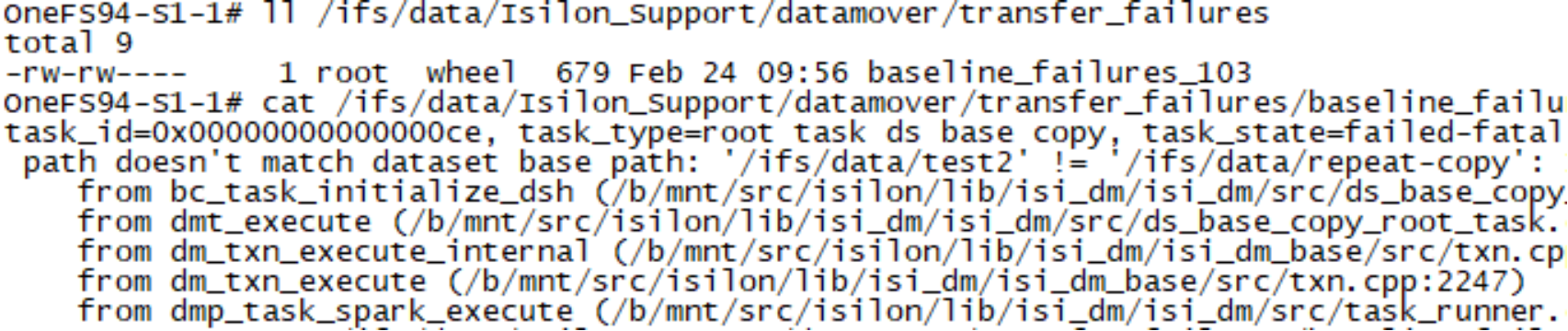
Figure 11. Transfer failure example
Once any errors for a policy are resolved, use the isi dm jobs modify command to resume the job.
Limitations
Limitations
Current limitations of the SmartSync feature include:
- For OneFS 9.14 and earlier releases, the dataset is available for read and write on copy policies once the replication to the target platform is complete if the --copy-create-dataset-on-target=false option is specified.
Note: Workflows with constantly changing data require a large dataset transfer with a copy policy. Consider using a pull policy as an alternative which offloads the resource consumption to the target cluster, assuming network bandwidth is available.
For repeat-copy policies, enabling read and write on the target platform will be available in a future release. However, SmartSync for OneFS uses SnapshotIQ for creating the dataset snapshot. If required, the files on the target platform may be copied out of the snapshot for access.
For example, run the isi snapshot list command on the target cluster to find the required dataset name. Next, use ls to list the contents of the snapshot, and copy the required file out of the snapshot, as shown in the following snippet:
OneFS94-S2-1# isi snapshot snapshots list
ID Name Path
------------------------------------------------------------
2 isi_dm_snap_dsr_1_1645112651 /ifs/data/test2
.
.
38 isi_dm_snap_dsr_19_1645538704 /ifs/data/repeat-copy
------------------------------------------------------------
Total: 23
OneFS94-S2-1# ls /ifs/.snapshot/isi_dm_snap_dsr_19m_1645538704/data/repeat-copy
hello-repea1t.txt
OneFS94-S2-1# cp -c /ifs/.snapshot/isi_dm_snap_dsr_19_1645538704/data/repeat-copy/hello-repea1t.txt /ifs/data/test.txt
- A failover and failback option, plus the ability to allow writes on the target cluster, is available in OneFS 9.15 and later releases.
- OneFS 9.14 and earlier releases do not have a SmartSync WebUI interface. For these releases, configuration is via the OneFS CLI and platform API only.
- SmartSync does not support SmartLock Compliance mode. When operating in SmartLock Enterprise mode, files within an Enterprise directory are copied by SmartSync as regular files, without any WORM (write once, read many) restrictions. Files stored on the S3 target are not locked and can therefore be deleted. When a WORM file is transferred using SmartSync, its SmartLock attributes (e.g. WORM state, retention expiration, and WORM domain association) are not retained. If the file is restored to a new directory or PowerScale cluster, the file will need to be locked again, which requires manual intervention.
OneFS features and SmartSync
Role Based Access Control
Role Based Access Control (RBAC) divides the powers of the root and administrator users into more granular privileges and allows the assignment of these privileges to specific roles. For example, data protection administrators can be assigned full access to SmartSync configuration and control but only read-only access to other cluster functionality. SmartSync administrative access is assigned through the ISI_PRIV_DATAMOVER privilege. RBAC is fully integrated with the CLI and platform API.
Small File Storage Efficiency
OneFS Small File Storage Efficiency (SFSE) provides a feature for small files in OneFS, packing them into larger files and resulting in increased storage efficiency. If a SmartSync policy is configured for an SFSE directory, the data is replicated to the target cluster. However, the SFSE data is unpacked on the source cluster before replication. If the target cluster has SFSE enabled, the data is packed when the next SmartPools job runs on the target cluster if the dataset is in read/write. The data remains unpacked if the target cluster does not have SFSE enabled. For more information about SFSE, see the PowerScale OneFS Small File Storage Efficiency for Archive white paper.
SmartDedupe
When deduplicated files are replicated to another PowerScale cluster through SmartSync, the deduplicated files are rehydrated back to their original size because they no longer share blocks on the target PowerScale cluster. When replication is complete, SmartDedupe can run on the target cluster, providing the same space efficiency benefits as the source cluster.
Shadow stores are not transferred to target clusters. Hence, deduplicated files do not consume less space than non-deduplicated files when they are replicated. To avoid running out of space on target clusters, verify that the total amount of storage space saved and storage space consumed do not exceed the available space on the target cluster. To reduce the amount of storage space consumed on a target PowerScale cluster, configure deduplication for the target directories of the replication policies. Although this approach deduplicates data on the target directory, it does not allow SmartSync to transfer shadow stores. Deduplication is still performed post-replication through a deduplication job running on the target cluster.
Inline compression and deduplication
For source clusters that contain PowerScale and Isilon nodes that support inline compression and deduplication, during the dataset creation the source data is rehydrated, decompressed, and transferred uncompressed to the target cluster. Suppose the target cluster consists of nodes that support inline compression and deduplication. In that case, the replication data goes through the same inline compression and deduplication as any other data that is written to these platforms.
16 TiB large file support
The large file support feature permits the maximum allowable file size in a PowerScale cluster to increase four-fold, from 4 tebibytes previously to 16 tebibytes. For more information about the large file support feature for 16 TiB, see the PowerScale OneFS Best Practices white paper.
If large file support is enabled for 16 TiB on a source cluster, all new and existing SmartSync policies only connect with target clusters that also have large file support enabled, as illustrated in the following figure.
Furthermore, workflow impacts for existing SmartSync policies are possible if for any reason the target cluster does not have resources for the 16 TiB feature.
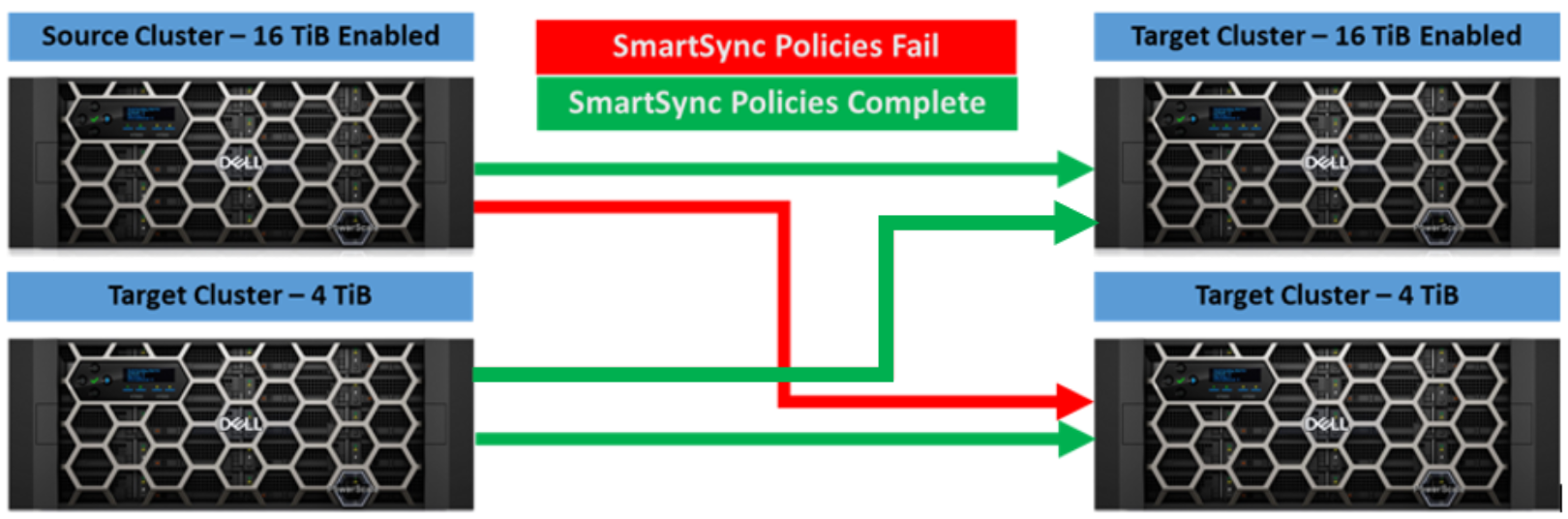
Figure 12. Large file support and SmartSync
CloudPools
PowerScale clusters that are using OneFS CloudPools to tier data to a cloud provider have a stub file known as a SmartLink. The file is retained on the cluster with the relevant metadata to retrieve the file at a later point. Without the SmartLink, a file that is tiered to the cloud cannot be retrieved.
If a SmartLink is replicated to a target cluster, the target cluster must have CloudPools active with the same configuration as the source cluster to be able to retrieve files tiered to the cloud. SyncIQ allows the user to replicate the SmartLinks from the source cluster to the target cluster. For more information about SyncIQ, see the PowerScale SyncIQ: Architecture, Configuration, and Considerations white paper.
SmartSync always performs a deep copy for dataset creation of data tiered with CloudPools. Deep copy is a process that retrieves all data that is tiered to a cloud provider on the source cluster, allowing all the data to be replicated to the target cluster. Data retrieved by SmartSync during a deep copy operation does not get cached on the PowerScale cluster.
Hadoop Transparent Data Encryption
Apache Hadoop Distributed File System (HDFS) Transparent Data Encryption (TDE) provides end-to-end encryption between HDFS clients and a PowerScale cluster. HDFS TDE is configured in OneFS through encryption zones where data is transparently encrypted and decrypted as data is read and written. For more information about HDFS TDE for OneFS, see the Using Transparent Data Encryption with Isilon HDFS white paper.
SmartSync does not support the replication of the TDE domain and keys. On the source cluster, if a SmartSync policy is configured to include an HDFS TDE directory, the encrypted data is replicated to the target cluster. However, on the target cluster, the encrypted data is not accessible because the target cluster is missing the metadata that is stored in the IFS domain for clients to decrypt the data. TDE ensures that the data is encrypted before it is stored on the source cluster. Also, TDE stores the mapping to the keys required to decrypt the data but not the actual keys, making the encrypted data on the target cluster inaccessible.
OneFS version compatibility
For SmartSync file-to-file replication, having the same OneFS version and patches on both the source and target cluster is recommended but is not always possible in some environments due to various factors.
Note: As a best practice, upgrade the target cluster before upgrading the source cluster to ensure that no interruptions to replication jobs occur as part of the upgrade process.
If the source and target cluster are running different versions of OneFS, confirm SmartSync compatibility with the following table.
Table 1. SmartSync OneFS version compatibility
|
Source Cluster OneFS Version |
Target Cluster OneFS Version |
|
|
From 9.4.x to 9.7.x |
9.8.x+ |
|
|
From 9.4.x to 9.7.x |
✔ |
✔ |
|
9.8.x+ |
X |
✔ |
Conclusion
Conclusion
Meeting modern data replication requirements means replicating data beyond the traditional data center and multiple cloud targets. SmartSync provides a unified approach to data replication, including cloud targets and PowerScale clusters and allowing administrators to design effective RPO and RTO solutions.
References
Dell Technologies documentation
The following Dell Technologies resources provide additional information related to this document. Access to some documents depends on your login credentials. If you do not have access to a document, contact your Dell Technologies representative.
- PowerScale Info Hub
- Using Transparent Data Encryption with Isilon HDFS
- Dell PowerScale OneFS Best Practices
- ECS Documentation – Dell Support
- ObjectScale Documentation – Dell Support
- PowerScale OneFS Documentation – Dell Support
- PowerScale Network Design Considerations
- High Availability and Data Protection with Dell PowerScale Scale-Out NAS
- Dell PowerScale SyncIQ: Architecture, Configuration, and Considerations
- PowerScale OneFS CloudPools Administration Guide
- PowerScale: CloudPools and ECS