Dell PowerStore: Elastic Stack
Executive summary
Overview
As technology and IT systems continue to evolve, so do the classification and meaning of data they produce. Regardless of its origin, data is produced in massive amounts, and every IT infrastructure has its own distinct data footprint. This data is composed of structured, unstructured, timestamped, real-time, machine, dark, and other data classifications. Whatever the composition, it is either big data that is primary to the business, or data that is classified as digital exhaust. This secondary type of data is a byproduct of IT systems and consumers.
This byproduct is usually unstructured machine data that is produced from servers, software, network logs, system logs, application logs, online activities, web browsers, Internet of Things (IoT) devices, and more. Even though machine data is secondary to big data, machine data exists in greater volume and has an unknown value. Unfortunately, because of its unknown value, machine data and other digital exhaust are rarely used and are purged. Insight engines, however, remove the obfuscation and bring clarity and value to the data.
This paper discusses using Elasticsearch and Elastic Stack with Dell PowerStore arrays to make the secondary type of data useful. This paper was developed with Elastic Stack deployed on Linux with storage served by a PowerStore 5200T single-appliance cluster. The information in this paper is applicable to other PowerStore models.
The Linux operating system used for this paper was Oracle Linux (OL) 8.5 with the Unbreakable Enterprise Kernel (UEK). The operating system information is applicable to OL7 UEK, and Red Hat Enterprise Linux 7 and 8 versions, but commands, specific processes, and compatible Elastic Stack versions may differ.
Some recommendations in the paper may not apply to all environments and may not be strictly required. For questions about the applicability of these guidelines in your environment, contact your Dell Technologies representative.
While the options for design and deployment of Elastic Stack are numerous and specific to each environment, this document discusses Elastic Stack design and deployment on PowerStore T models. This paper also covers Elastic Stack components and how they work together which will help the reader develop a more robust design and deployment strategy and configuration of their infrastructure.
Audience
This document is intended for IT administrators, storage architects, partners, and Dell Technologies employees. This audience also includes individuals who may evaluate, acquire, manage, operate, or design a Dell networked storage environment for Elastic Stack using PowerStore systems.
Prerequisites
Readers of this document should have experience with or training in the following areas:
- Dell PowerStore Host Configuration Guide
- Linux operating environment
- Native Linux device-mapper multipath software
- Elastic Stack (Elasticsearch, Logstash, Kibana, Beets)
- Fibre Channel (FC) and Ethernet network administration
Revisions
Table 1. Revisions
|
Date |
Description |
|
July 2022 |
Initial release of Elasticsearch and PowerStore |
Note: This document may contain language from third-party content that is not under Dell Technologies’ control and is not consistent with current guidelines for Dell Technologies’ own content. When such third-party content is updated by the relevant third parties, this document will be revised accordingly.
We value your feedback
Dell Technologies welcomes your feedback on this document. Contact the Dell Technologies team by email.
Author: Mark Tomczik
Introduction
Overview
PowerStore is a robust and feature-rich storage solution, while Elastic Stack is a powerful and flexible insight engine. Together, they create a diversified set of configurations and solutions to store, manage, describe, discover, organize, and analyze structured, semistructured, and unstructured data. Their union allows data to be delivered in real time or near real time, enabling organizations to take immediate action on data-analysis results and constantly changing business requirements. Also, combining PowerStore and Elastic Stack provides organizations with efficient use of storage, workload optimization and performance, and data resiliency.
Focus of paper
This paper discusses several features of PowerStore and Elasticsearch, and discusses a strategy for deploying and configuring an Elasticsearch environment.
Terminology
The following tables provide definitions for some terms that are used in this document.
Table 2. PowerStore terminology
|
Term |
Definition |
|
2-port card |
PowerStore 1000 and higher models require two 100 GbE optical QSFP port card to support NVMe expansion shelves. |
|
4-port card |
Card for each node that provides four ports. Options include 25 GbE optical and 10 GbE Base-T. The PowerStore 500 requires the 25 GbE card to support NVMe expansion shelf. The four-port mezzanine card supports federate storage (to cluster multiple PowerStore appliances) and file storage. PowerStore 3.0 models support a new 100 GbE four port card in I/O module for slot 0 in PowerStore x000 and x200 models. |
|
Appliance |
The appliance is the base enclosure plus all expansion enclosures connected to the base enclosure. |
|
Base enclosure |
A hardware chassis that consists of two nodes, two or four NVMe NVRAM drives, and up to 21 NVMe SSD or NVMe SCM drives. |
|
Cluster |
A group of one to four PowerStore appliances. PowerStore X 2.0 models could not be clustered with multiple appliances. However, PowerStore T 2.0 and PowerStore 3.0 models are expandable by adding more appliances (up to four total). |
|
Node |
Component within the base enclosure that contains processors and memory. |
|
Expansion enclosure |
Enclosures that can be attached to a base enclosure to provide extra storage in the form of either NVMe or SAS drives. A maximum of three 25-drive expansion shelves are supported. Depending on the PowerStore model, the expansion enclosure must either be a NVMe expansion enclosure, or a SAS expansion enclosure. Mixing expansion enclosure types is not supported. PowerStore 3.0 models x200 support only NVMe expansion shelves. PowerStore 2.0 models x000 support only SAS expansion shelves. |
|
Embedded module |
With PowerStore 3.0 x200 models, an improved-embedded module v2 is embedded on each node providing:
The PowerStore 3.0 500 model does not have an embedded module. It uses a four-port 25 GbE optical mezzanine card. Ports 0 and 1 are used for the system bond. The bonded ports are used for federation and NAS. Ports 2 and 3 of the four mezzanine ports are required and reserved for back-end connectivity to support NVMe expansion shelves. With PowerStore 2.0 x000 models, the embedded module v1 is needed for management and service, and SAS expansion (SAS BE-ports) and only available and required on PowerStore x000 models. For PowerStore 2.0 500 model, the four-port 25 GbE optical mezzanine card on embedded module v1 is not required. It is only required if the system will be configured for:
|
|
Node |
The component within the base enclosure that contains processors and memory. Each appliance consists of two nodes. |
|
PowerStore Manager |
PowerStore Manager is a web-based user interface (UI) for storage management. |
|
NVMe over Fibre Channel (NVMe/FC) |
NVMe/FC allow hosts to access storage systems across a network fabric with the NVMe protocol using Fibre Channel as the underlying transport. |
|
Dynamic Resiliency Engine |
System functionality that manages the hard drives to provide capacity, performance, and fault tolerance. |
|
Storage resource |
A storage resource and be a volume, file system, NAS server, or virtual volume. |
|
Hypervisor |
Computer software, firmware, or hardware that creates, manages, and runs the virtual machine. |
|
Scale-out |
The ability to cluster multiple PowerStore appliances together. |
|
Scale-up |
The ability to add additional disk enclosures, up to a maximum of three, to a PowerStore appliance. |
Table 3. Non-PowerStore terminology
|
Term |
Definition |
|
ELK |
Elasticsearch, Logstash, and Kibana |
|
DSL |
Domain-specific language |
|
ECS |
Elastic Common Schema |
|
Insight engine |
Applies relevancy methods to describe, discover, organize, and analyze data. |
|
Rally |
Elasticsearch benchmarking tool developed by elastic.co and initially released in April 2016. |
|
ETL |
Extract-transform-load. An integration process that takes data from multiple sources, transforms the data, and loads it into a target system. |
|
SLA |
Service level agreement. |
PowerStore overview
PowerStore achieves new levels of operational simplicity and agility. It uses a container-based microservices architecture, advanced storage technologies, and integrated machine learning to unlock the power of your data. PowerStore is a versatile platform with a performance-centric design that delivers multidimensional scale, always-on data reduction, and support for next-generation media.
PowerStore brings the simplicity of public cloud to on-premises infrastructure, streamlining operations with an integrated machine-learning engine and seamless automation. It also offers predictive analytics to easily monitor, analyze, and troubleshoot the environment. PowerStore is highly adaptable, providing the flexibility to host specialized workloads directly on the appliance and modernize infrastructure without disruption. It also offers investment protection through flexible payment solutions and data-in-place upgrades.
This section provides a brief overview of PowerStore. To learn more about specific PowerStore models and features, see the resources at PowerStore Product Documentation and Videos.
Management tools
PowerStore provides several tools for managing and configuring a single- or multiple-appliance PowerStore system known as a cluster. Available management tools are:
- PowerStore Manager UI
- PowerStore CLI
- RESTful API
PowerStore Manager UI
PowerStore Manager UI provides a single pane of glass into the PowerStore system. It is the primary management and configuration tool for PowerStore and offers the following benefits:
- PowerStore Manager UI is HTML5-based, so there is no Java requirement.
- Multiple web browsers are supported.
- A client installation is not required.
- All PowerStore appliances are managed through PowerStore Manager UI.
Figure 1. PowerStore Manager UI and a single-appliance cluster
PowerStore CLI
The PowerStore Manager CLI is intended for users who want to interactively manage a PowerStore system from an operating system command prompt. Users can also use CLI commands in scripts for automating routine tasks. Some task examples are:
- Configuring and monitoring the system
- Managing users
- Provisioning storage
- Scheduling snapshots to protect data
- Deleting snapshots
- Managing hosts and host groups
- Controlling host access to storage
For more information, see CLI User Guide and CLI Reference Guide on the PowerStore Info Hub.
RESTful API
Every PowerStore platform also has a RESTful API available for administrators who want to automate management tasks. The REST API interface is accessible by using a web browser and going to the following address:
https://<management_IP_of_the_PowerStore_appliance>/swaggerui
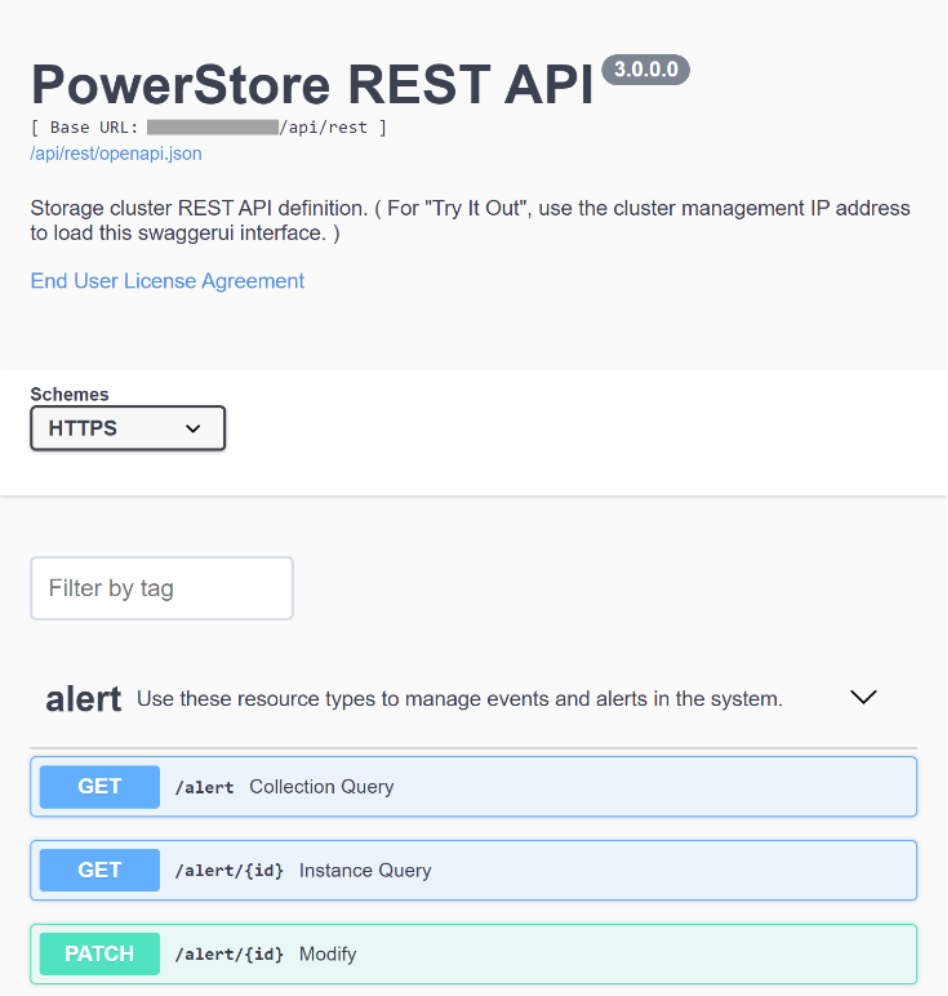
Figure 2. Swaggerui
For additional information about Swagger, see swagger.io.
PowerStore models
PowerStore models are 2U rack-mountable enclosures and are configured at the factory in one of two base-model appliance configurations: PowerStore T or PowerStore X. Each base model is available in multiple physical hardware configurations with different CPU and memory capacities to provide different storage options:
- PowerStore T models: Run PowerStore as a storage array in either unified (file and block) or block-optimized (block only) modes.
- PowerStore X models: Run PowerStore as a virtual machine on a VMware ESXi based hypervisor for storage and guest workloads. PowerStore X models can run VMware guest VMs directly on the PowerStore hardware through the AppsOn capability. PowerStore X models reserve half of the PowerStore system resources (CPU and memory) for hosting and servicing the guest VMs.
With the initial PowerStore 1.0 release and continuing into release 2.0, the following models were available:
- PowerStore 1000, 8 core @ 1.8 GHz with 192 GB memory
- PowerStore 3000, 12 core @ 2.1 GHz with 384 GB memory
- PowerStore 5000, 16 core @ 2.1 GHz with 576 GB memory
- PowerStore 7000, 20 core @ 2.4 GHz with 768 GB memory
- PowerStore 9000, 28 core @ 2.1 GHz with 1280 GB memory
Four additional models with dual CPU sockets are now available with PowerStore 3.0:
- PowerStore 1200, 10 core @ 2.4 GHz with 192 GB memory
- PowerStore 3200, 16 core @ 2.1 GHz with 384 GB memory
- PowerStore 5200, 24 core @ 2.2 GHz with 576 GB memory
- PowerStore 9200, 28 core @ 2.2 GHz with 1280 GB memory
PowerStore 2.X and PowerStore 3.0 also offer the PowerStore 500, a single CPU socket, 12 core @ 2.2 GHz with 96 GB memory that supports unified storage only.
Note: This paper discusses PowerStore T models with Elastic Stack. Configuring Elastic Stack on PowerStore X models is also possible. However, when deploying Elasticsearch on PowerStore X, a larger PowerStore X model may be required than what would be required in a PowerStore T model. Larger PowerStore X models may be required because half of the PowerStore X resources are reserved for the PowerStore operating system. The larger PowerStore X model is needed so there are sufficient PowerStore resources available for deploying and hosting an Elastic Stack environment. On average, Elasticsearch data nodes tend to require 8 to 16 CPU cores with 64 GB memory.
PowerStore cluster
One 2U PowerStore appliance is also known as a single-appliance cluster. PowerStore 2.0 supported a scale-out configuration for both PowerStore T and PowerStore X and allowed a maximum of four single-clustered appliances. PowerStore 1.0 supported scaling-out PowerStore T models.
On the main dashboard of PowerStore Manager, an icon is displayed indicating the number of appliances in the cluster.
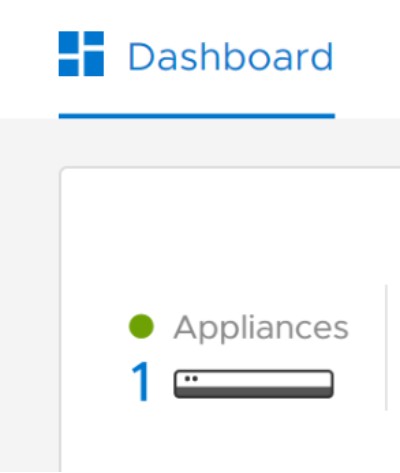
Figure 3. PowerStore Manager indicating a single-appliance cluster
Dynamic Resiliency Engine
PowerStore automatically manages the underlying storage for maximum performance and capacity, eliminating the need for administrators to configure the storage pool. Manually setting or configuring these options is unnecessary in PowerStore. The underlying drive configuration and management are automatic and require no management.
PowerStore storage pools
You can configure storage pools with a minimum of six drives in the base enclosure. If required, you can expand storage pools up to 100 drives through the remaining slots in the base enclosure and extra expansion enclosures. The total disk capacity does not automatically guarantee disk performance. There must be enough drives to meet I/O and capacity demands.
NVMe drives
PowerStoreOS 2.0 introduced support for NVMe drives. NVMe drives provide higher bandwidth and lower latency when compared to SAS drives. NVMe NVRAM drives are reserved for system write cache in PowerStore x200 T models. User and system metadata are written to the other drive types (NVMe SCM, NVMe SSD, SAS SSD).
With PowerStore 2.0, NVMe drives were only available in the base enclosure. If scaling-up a PowerStore 2.0 was a requirement, SAS expansion shelves would be needed. A maximum of three 25-drive SAS expansion shelves are supported in a scale-up configuration in PowerStore 2.0.
Starting with PowerStore 3.0, only NVMe expansion shelves are available for scaling-up PowerStore. Using NVMe expansion shelves is a major improvement over PowerStore 2.0. NVMe expansion shelves eliminate the SAS-to-NVMe performance bottleneck experienced when SAS expansion shelves were used to scale up a NVMe base enclosure in PowerStore 2.x. Using NVMe expansion shelves provides a complete, end-to-end NVMe model for improved performance in PowerStore 3.0.
To achieve the end-to-end NVMe model, NVMe over Fibre Channel (NVMe/FC) is used. The NVMe/FC protocol does not require much protocol translation, making it lightweight in terms of overhead. It also inherits all NVMe features.
Expansion shelves in a PowerStore appliance must either be all NVMe or SAS. Mixing NVMe and SAS expansion shelves is not supported. Also, NVMe SCM SSDs are not supported in NVMe expansion shelves.
PowerStore 3.0 prioritizes the NVMe drives in the base enclosure as the first choice for metadata, providing the best possible performance for internal metadata. NVMe drives can also be:
- Added to NVMe expansion shelves one drive at a time
- Moved between base enclosure and NVMe expansion shelf
- Moved between different NVMe expansion shelves
For the PowerStore 500, a 4-port 25 GbE optical mezzanine card is required to support NVMe expansion shelves using reserved ports 3 and 4.
For the new PowerStore 3.0 models, the embedded module v2 comes with the system. A two-port 100 GbE card on the embedded module v2 is optional and is only required if NVMe expansion shelves will be used. Embedded module v1 only ships with PowerStore x000 models and is required for SAS expansion shelves.
For more information, see the document Dell PowerStore: Technical Primer.
When deploying PowerStore for large Elasticsearch solutions demanding greater performance requirements, consider using PowerStore models x200 since they support NVMe expansion shelves.
PowerStore data efficiency
PowerStore inline data reduction (compression and deduplication) includes the core features of zero detection, compression, and deduplication. While the amount of reduction varies depending on the type of data, the system automatically selects the best option for reducing the data footprint. Data reduction works seamlessly in the background with PowerStore, is always enabled, and cannot be disabled.
Data encryption
A top concern for many businesses is application data security, including drive encryption requirements like data at rest encryption. Data at Rest Encryption (D@RE), a feature of PowerStore, is enabled by default. No configuration steps are necessary to protect the drives. Lost or stolen data can critically damage a business to the point it may not survive. Dell Technologies engineered PowerStore with D@RE by using self-encrypting drives and array-based, self-managed keys. When activated, data are written to disk using the 256-bit Advanced Encryption Standard (AES). This security feature is provided without adding overhead to administrative tasks or to the application. It also avoids potential performance impact to the application and has no performance impact on the array.
Documentation and support
PowerStore Manager provides online support, context-sensitive help, and general support, which make up the primary reference material for optimal configuration of PowerStore. This white paper provides extra guidance beyond these resources. For supplemental information, see the section References. 

Figure 4. PowerStore support and documentation
Note: For links to other PowerStore documentation including a hands-on lab, see the PowerStore Info Hub. For PowerStore product documentation, see www.dell.com/powerstoredocs.
Elastic Stack overview
This section provides a brief overview of Elastic Stack and the components that reside in the stack. To learn more about Elastic Stack, see Elastic Docs library.
ELK stack components
Before 2015, Elastic Stack was known as the ELK Stack. ELK is an acronym for a group of three free and open-source products: Elasticsearch, Logstash, and Kibana:
- Elasticsearch is the heart of Elastic Stack and is a search and analytics engine that can work with all types of structured, semi structured, and unstructured data.
- Logstash is a server-side data processing pipeline that can ingest and transform data from various sources simultaneously, and then stash the data away in a destination like Elasticsearch.
- Kibana is a data analytics and visualization platform that allows users to see data in ways that help them to understand the data. Kibana can visualize the data in graphs and charts like line graphs, histograms, heat maps, and pie charts.
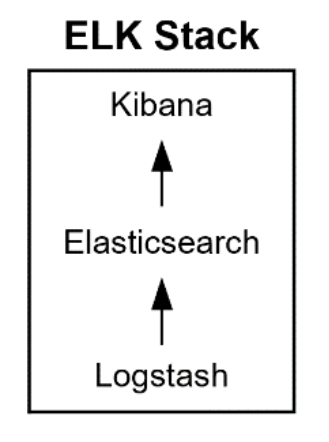
Figure 5. ELK Stack
Elastic Stack components
Since 2015, a fourth product called Beats (lightweight open-platform data shipper agents) was added to the ELK stack and began a new evolution of the ELK stack. Adding Beats to the ELK stack is the reason the stack is now called Elastic Stack.
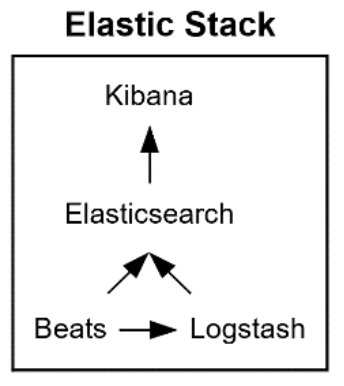
Figure 6. Elastic Stack
In 2016, with the release of Elastic Stack 5.0.0, X-Pack was released which was a replacement for the stand-alone plug-ins Shield, Marvel, Watcher, Graph, and Reporting.
X-Pack further augments Elastic Stack’s capabilities. Also, a newly added management UI was introduced in Kibana for X-Pack.
Elastic Stack has grown and matured over the years and is now sometimes referred to as an Insight Engine. Gartner defines Insight Engines as data engines that “apply relevancy methods to describe, discover, organize and analyze data.” In 2021, Gartner added Elastic to the Magic Quadrant for Insight Engines.
Elasticsearch
Elasticsearch is at the heart of Elastic Stack and is a distributed open-source analytics, full-text and RESTful search engine that is used to store and search copious amounts of data. Elasticsearch is often used for search capabilities by applications and users for an increasing number of use cases. The distributed capability of Elasticsearch, when configured, provides fault tolerance and enables high scalability through a collection of servers clustered together and is referred to the Elasticsearch cluster. Each server in the cluster is referred to as a node and contains the entirety of the data.
The search function and capabilities can be basic or complex like search capabilities found in Internet search engines. Elasticsearch can query, analyze, and aggregate structured data, textual and numeric, which can be used to generate charts and graphs. Elasticsearch can also process semistructured and unstructured data in the same manner.
Elasticsearch also provides the functionality of document stores or document-oriented databases. Elasticsearch documents are stored in JSON format, and with a query DSL, any document can be found. In Elasticsearch, there are several terms used to describe the logical data structures and are sometimes compared to logical data structures from relational database theory:
Table 4. Elasticsearch and Relational database terms
|
Elasticsearch |
Relational database |
|
Index |
Database |
|
Type |
Table |
|
Document |
Row |
|
Fields |
Columns |
Indexes are where data (documents) are stored. The number of indexes defined in an Elasticsearch cluster depends on business requirements. There can be one or multiple indexes in an Elasticsearch cluster. Indexes are typically made up of one or multiple shards.
Document sharding is also possible with Elasticsearch. A use case for shards is when processing large amounts of data increases elapsed times. Sharding in this case can increase the read/write throughput, reducing elapsed times. Shards, considered indexes themselves, are portions of an index and separate data horizontally across clustered nodes.
There are two types of shards: primary or replica. Primary shards are mainly responsible for operations involving indexes (creating, reindexing, delete indexes), but they can also be used for reads. Replica shards are responsible for throughput and providing high availability.
Mappings control how JSON documents and fields are processed. Mappings can have an impact on the amount data stored on disk and query performance. Mappings can inform Elasticsearch many different things, such as but not limited to:
- If the documents are structured or unstructured
- If fields (and how many fields) should be indexed
- The type of data in the fields
- Data patterns that describe the data content of fields
Elasticsearch cluster and node roles
An Elasticsearch cluster consists of one or multiple nodes. A node is a single running instance of Elasticsearch. For simplicity, the discussion in this paper focuses on running a single node on a single physical server. However, running multiple nodes on a single or multiple physical servers is also possible. See Elastic documentation for more information.
When Elasticsearch starts, an elastic cluster is started. Regardless of the number of nodes in the cluster, all nodes know about the other nodes. Communication between nodes is through the transport layer.
Each node in the cluster assumes one or multiple node roles. If node roles are not explicitly set for a node, the node is assigned all roles. The following roles are available:
- master: Master nodes control the cluster. For resiliency and high availability, a minimum of three master nodes are needed. Only one master node is active at a time.
- data: Data nodes are the data repository for Elasticsearch. The nodes can be classified for different tiers of data storage: frozen, cold, warm, and hot data. The data stored in the tiers can remain indefinitely or can move between data tiers by configuring index lifecycle management (ILM) policies. To learn more about data tiers and ILM, see the following documentation: Data tiers and ILM: Manage the index lifecycle.
- data_content: data_content nodes generally hold items with values that remain relatively constant over time and have long retention requirements. data_content allows the data to remain in the same tier as it ages.
- data_hot: This tier of data is for hot data. data_hot is the entry point for all time-series data ingested into Elasticsearch, and is the repository of most-recent searched time series data.
- data_warm: This role is for warm data. Data that is less frequently queried can move to this tier. Data_warm nodes generally do not need the same compute power as data_content or data_hot nodes.
- data_cold: data_cold nodes are used for time-series data that is queried less frequently than data_warm nodes. These nodes are generally optimized for lower storage costs rather than search speed.
- data_frozen: When data is rarely searched, it can be moved to a node with the data_frozen role. Data remains in data_frozen nodes for the rest of its life.
- ingest: Ingest nodes are used to transform and enrich data before indexing
- ml: ml are machine learning nodes.
- remote_cluster_client: This role allows the node to connect to remote clusters.
- transform: Transformations are processed on nodes with this role.
At a minimum, every cluster requires the master and data (or data_content and data_hot) roles. See Node for more information about role definitions and helpful tips to select the number of nodes and role type for the environment. Multiple nodes for some roles may be necessary if the cluster grows and contains heavy data transformations and machine learning tasks. For example, separating master, data, transformation, and machine learning nodes may help with performance and provide more flexible and possible scaling options.
Adoption of Elasticsearch
enlyft.com reports that 36,655 companies use Elasticsearch. Stackshare.io also reports that many organizations use Elasticsearch. According to enlyft.com, smaller companies often use Elasticsearch. However, larger sized companies use Elasticsearch too. Several sources indicated that Accenture, Adobe, Facebook, Firefox, Fujitsu, LinkedIn, Netflix, Quora, Slack, Stack Exchange, Stack Overflow, Tripwire, Uber, Udemy, Wikimedia, and Yelp use Elasticsearch. Starting in 2015, Wikimedia has made available weekly dumps of indexes for each wiki. The current weekly dumps can be found here. A discussion of how to load Elasticsearch with the dumps is found here.
Logstash
Logstash is a free and open-source pipeline that collects data from multiple sources and in many formats. After collecting data, Logstash processes the data and forwards events and log messages along with the data to a stash—in this case, to Elasticsearch. Logstash is a server-side data collector and processor in Elastic Stack and provides greater flexibility in terms of processing and transforming events than what Elasticsearch ingest nodes can do. Logstash, with its rich feature set and over 200 available plugins, can be considered a data ETL tool for Elasticsearch. If a wanted plug-in does not exist, a powerful API is available to develop the plug-in.
An advanced use case for Logstash is that Logstash, along with the grok plug-in, can dynamically transform unstructured to structured data. While another use case can be the deciphering of geo coordinates from IP addresses. Logstash’s wide variety of output types provide the data to be routed where it is needed. Data transformation possibilities and use cases are too many to enumerate.
Logstash uses a persistent queue feature with the main goal of avoiding data loss during abnormal failures. The use of the persistent queue feature gives Logstash the ability to provide what it calls the At-Least-Once delivery guarantee. At-Least-Once delivery guarantees that upon a failure, any unacknowledged event will be replayed once Logstash is restarted. The persistent queue also provides Logstash with the ability to take in small load spikes without holding up connections and using an external queue layer.
Kibana
Kibana is an open-source web interface that interacts with Elasticsearch and is the analytics and visualization plug-in used by Elastic Stack. Kibana provides the user with several different ways to view and analyze the data. Some options include: charts, graphs, tables, and maps. The data that Kibana presents is from real-time Elasticsearch queries. Kibana can also apply machine learning, when enabled with X-Pack, to data to learn data behavior and trends. The advanced machine learning of Kibana can detect data anomalies as soon as possible.
Beats
Beats are free, lightweight open-platform data shipper agents. There are different types of Beats data shippers, each designed to collect specific data and for a specific purpose. Of the available Beats agents, Filebeats and Metricbeats are the most used data shippers. Beats can be installed on a stand-alone or multipurpose server, from which the data shippers will fetch and send data directly to Elasticsearch or to Logstash (see Figure 6). Beats also provide integrated default dashboards that can be configured in Kibana to visualize the data.
Beats packages data using the open-source ECS specification and should be sufficient for most use cases. However, if additional data transformation and parsing is needed before storing in Elasticsearch, Beats can forward data to Logstash.
Two Beats data shippers are discussed below. For the full list of Beats provided by Elastic, see Beats: Data Shippers for Elasticsearch.
Filebeat
Filebeat, a lightweight data shipper, can collect an assortment of files, including log files, and send the file content to Elasticsearch or to Logstash. Once data are in Elasticsearch, Kibana can be used to analyze and visually present findings.
Filebeat provides modules for common log files. The modules reduce the amount of effort and simplify the process of getting logs in to Elasticsearch, including how to process a multiline log entry. The modules are well suited for simple use cases as there is no additional configuration needed.
Two commonly monitored logs are web access and error logs. Web access logs can be mined to determine how long a web server took to process each request. If response times spike, it could be an indication that an infrastructure issue has occurred. Web error logs can be mined to detect faulty code that passed through testing without being detected. Application logs can also be mined for specific needs. Filebeat provides many modules for various applications including: Apache web server, Elasticsearch, Iptables, Kibana, Logstash, MongoDB, MSSQL, MySQL, Oracle, and Linux system. For a full list of Filebeat modules, see Filebeat Reference.
When processing a file, Filebeats remembers its current location within the file. If an interruption occurs, Filebeats resumes from its last known location within the file.
The data shipping protocol used by Filebeats incorporates a backpressure scheme. Should either Elasticsearch or Logstash be overwhelmed with other processing while Filebeats is sending data, Filebeats will be notified to slow down. When there is no more congestion, Filebeat will pick up speed in shipping data to its original pace.
Metricbeat
Metricbeat is designed to collect system level metrics like CPU and memory usage, or to collect service type metrics like which services are running on the system. Metricbeat can also monitor specific processes or components within an application.
When configuring Metricbeat, Metricbeat can be instructed to create and configure a default dashboard automatically in Kibana. This default dashboard could be considered a template dashboard and can be customized. Since Metricbeat does not communicate with Kibana, this default dashboard is configured in Kibana by way of Kibana storing its configuration data in Elasticsearch. Kibana refers to this configuration information in Elasticsearch to create the necessary dashboard for Metricbeat.
Once Metricbeat is configured in Kibana, Kibana can present visualizations of how a system or application is performing. Alerts can be configured in Kibana to instruct Kibana to send notification when specific thresholds have been reached. For example, Kibana can send notification when CPU or memory usage thresholds have been reached.
Metricbeat can monitor various services or applications through its internal modules. Some examples of Metricbeat modules are: Apache, Elasticsearch, Kibana, Linux, Logstash, MongoDB, Oracle, and System. For a complete list of Metricbeat modules, see Metricbeat Modules.
Other Elastic Stack components
More free or subscription-based Elastic products and components are available to add to and enhance the Elastic Stack experience. Some examples are:
Elastic Enterprise Search is a set of specialized tools and APIs that assist the user in building solutions and is part of Elasticsearch. The tools provide analytics to monitor performance and provide ways to adjust data scale and relevance. For more information, see Elastic Enterprise Search.
Elastic Observability monitors and becomes more aware of and understand distributed data within a stack. Elastic Observability can also collapse data silos and bring data together in a unified solution. For more information, see Elastic Observability.
Elastic Fleet Agent is a single unified agent that resides on each host where data needs to be collected. The agent can get the data into the Elastic stack more easily through the centralized management of the unified Elastic Agent. For more information, see Fleet and Elastic Agent Guide.
Application Performance Monitoring (APM) accelerates the development of and improves application code. APM can be used to quickly determine root cause issues and gain deeper visibility into correlated data. For more information, see Application Performance Monitoring (APM).
Elastic security can be enhanced with Security Information Event Monitory (SIEM) and security analytics for the modern Security Operation Center (SOC). Elastic security detects, investigates, and responds to security threats. SIEM can also increase host visibility and control. Elastic security also provides endpoint security and prevents ransomware and malware, detects advanced threats, and arms responders with vital context. For more information, see Elastic Security.
Elastic Stack use cases
Elastic Stack can be used in a vast range of simple to complex use cases. A use case could be as simple as basic log or system monitoring and analysis and extends to whatever the imagination can conceive. Elastic Stack can be used for, but is not limited to, logging, data transformation, searching, data analysis, machine learning, and event monitoring. Here are two simple use cases:
Resource monitoring
System resource statistics can be ingested and analyzed to determine if resource consumption is reaching a threshold. If thresholds are reached, it could be an indication that the business has outgrown the current environment or that something has gone wrong. In either case, necessary steps could be taken to avoid performance issues from overcommitted resources. This type of use case can extend to other type of objects. Two examples of additional objects are applications and specific processes.
Log management
Logs, whether system logs like /var/log or application logs, can be monitored for anomalies or specific events. The data could be pushed to Elasticsearch from either Logstash or Beats. Once the data are in Elasticsearch, the data can be queried and analyzed. Kibana can be used to present the analysis in graphical form giving the user a better understanding of the anomalies or events.
Elasticsearch data compression with PowerStore
Elasticsearch also provides data compression on stored fields which are part of an Elastic index that stores the id of documents and the source data. Since Elasticsearch compresses data before PowerStore, there may not be large savings in data reduction in PowerStore. We do not recommend enabling Elasticsearch data compression in a production environment without first testing it in a nonproduction Elasticsearch environment.
Starting in Elasticsearch 7.10, stored fields are split into blocks that are compressed independently. Compressing data at the block level helps keep fast random access to the data. Compressing all the data at once would require that all data would have to be decompressed at read time. Elasticsearch offers two compression options:
- index.codec: default instructs Elasticsearch to use blocks of 16 kB compressed with LZ4
- index.codec: best_compression Instructs Elasticsearch to use blocks of 60 kB compressed with DEFLATE.
Both options include an algorithm for string deduplication. The algorithm detects for strings that have already occurred earlier in a stream. When a matching string is found, the string is replaced with a reference to the previous occurrence.
With DEFLATE, data are further compressed using Huffman coding.
Elasticsearch 7.10 and beyond further increases the compression algorithm by using a dictionary of strings. If Elasticsearch finds many duplicate strings between the stream of data and the string keys in the dictionary, compression ratios could be better.
For more Elasticsearch data compression information, see Save space and money with improved storage efficiency in Elasticsearch 7.10 | Elastic Blog.
PowerStore sizing considerations
Overview
Regardless of the underlying storage array, understand the requirements of the entire application stack before deployment. This knowledge helps ensure that a proper PowerStore T model is selected and sized to deliver the expected performance and capacity. In addition to selecting and sizing a PowerStore T model, changes to the infrastructure components like the storage fabric may also be required. If Elasticsearch is new to the environment, Elasticsearch design factors and expected performance metrics must be determined before sizing the array and supporting infrastructure. See Elastic Stack sizing for more information.
With a well-designed system, all components within the stack work together to provide the maximum I/O performance metrics:
Latency: The amount of time an I/O operation takes to complete. High latencies typically indicate an I/O bottleneck.
IOPS: The number of reads and writes occurring each second. IOPS is key for determining the number of required disks in an array while maintaining accepted response times. If the array uses SSDs, the array typically provides enough IOPS once capacity and throughput are met.
Throughput: The amount of data in bytes per second transferred between the server and storage array. Throughput is primarily used to define the path between the server and array and the number of required drives. A few SSDs can often meet IOPS requirements but may not meet throughput requirements. Throughput can be calculated as follows using IOPS and the average I/O size: Throughput MBs = IOPS x I/O size.
When sizing, assume all I/O will be random. Assuming random I/O will yield best results.
Some points to consider when selecting and sizing PowerStore include the following:
- Understand the CPU and memory requirements of the servers that will host the application. This point is mostly relevant to PowerStore X models as it will help to ensure PowerStore X model resources are not overprovisioned.
- Understand the performance requirements as specified by the business units. Knowing the performance requirements will help ensure PowerStore is designed properly to meet the expected performance as specified in SLAs defined by business units.
- Understand all the workload types and their I/O characteristics of all applications having their data hosted by PowerStore. Workload types will have I/O characteristics such as mostly read, mostly update, or some combination of workload types.
More points to consider are listed in Elastic Stack sizing:
I/O bandwidth and IOPS should be tested on dedicated components of the I/O path to ensure expected performance is achieved before creating an Elastic Stack environment and deploying to production. Before releasing any storage system to production, use Dell LiveOptics (formally DPACK) and CloudIQ on a simulated production system for an extended period that includes the peak workload. The simulation will help to define the I/O requirements. The account team can use the PowerStore sizer to estimate the storage needs.
It is recommended to repeat this test and validate the process on the production server immediately after go-live to validate and establish a benchmark of initial performance metrics.
Note: Use caution if the test is run on a live system after a period post go-live as the test could cause significant performance issues.
Once a design can deliver the expected throughput requirement, additional disks can be added to the storage solution to meet capacity requirements. However, the converse is not necessarily true. If a design meets the expected capacity requirements, adding disks to the storage solution may not make the design meet the required throughput requirements. For example, consider the following. Since disk drive capacity is growing faster than disk I/O throughput rates, a situation can occur where fewer disks can store a large volume of data. However, the small number of disks cannot provide the same I/O throughput as a larger number of smaller disks.
After validating throughput of I/O paths between the PowerStore array and the server, and meeting capacity requirements, test the disk I/O capabilities for the designed workload of the PowerStore array. Successful tests will validate that the storage design provides the required IOPS and throughput with acceptable latencies.
Plan for growth
A plan should exist for future growth of storage of an Elasticsearch environment. Several key considerations for growth are to be able to:
- Grow the I/O system without compromising the I/O bandwidth, and
- When adding additional VMs for Elasticsearch to PowerStore X, ensure not to overprovision PowerStore X resources.
PowerStore installation and configuration best practices
Introduction
PowerStore T models support a unified (block and file) or block-optimized (block only) configuration. For a multi-appliance PowerStore T model cluster, only the first appliance in the cluster (the primary appliance) can be configured to support unified storage. Extra appliances added to a cluster are configured automatically as block-optimized during the initial configuration.
For this paper, a PowerStore T model 5200 single appliance cluster was configured using unified block storage.
For PowerStore X models, Dell Technologies recommends following the PowerStore X configuration settings in Dell article number 000110933 during the initial installation and configuration of PowerStore X. The article discusses creating additional iSCSI targets, increasing PowerStore iSCSI queue depths, and setting jumbo frames in PowerStore. These changes should be performed during the initial configuration of the PowerStore system but can be configured afterwards. For additional information and best practices for PowerStore, see Storage (general) and Dell PowerStore: Best Practices Guide at Dell PowerStore Info Hub.
Unified or block-optimized
If file services (NAS) are or may be needed later, select Unified during initial configuration. With unified storage configurations, some PowerStore compute and storage resources on the appliances are reserved for NAS.
If file services will never be required, choose block-optimized during the initial configuration of the PowerStore system.
Once PowerStore T is configured to support a particular storage configuration (Unified or Block Optimized), a reinitialization is required to change the configuration to the other storage configuration. For this reason, if it is uncertain that NAS will be needed, consider configuring Unified storage.
Note: If Unified storage is configured, some internal PowerStore resources are used for file services, limiting the amount of block activity that can be performed in unified storage. However, if block-optimized mode is used, the amount of block activity that the system can provide is greater than unified block. With block optimized, PowerStore can devote the additional CPU and memory that Is no longer needed for file to block activity.
When initially defining a cluster, specify the cluster name and select the required storage configuration:
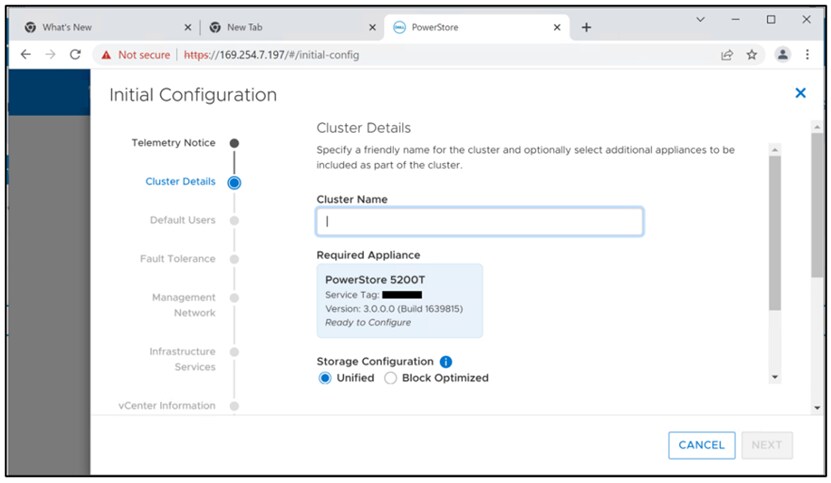
Single or multiple-appliance cluster
If horizontal scaling, or scale-out, is required within the PowerStore T model cluster, during the initial configuration, select EDIT APPLIANCE SELECTION (see the following figure). In a multiple-appliance cluster, only the first appliance (primary) can support unified storage. Extra appliances are automatically configured as block-optimized.
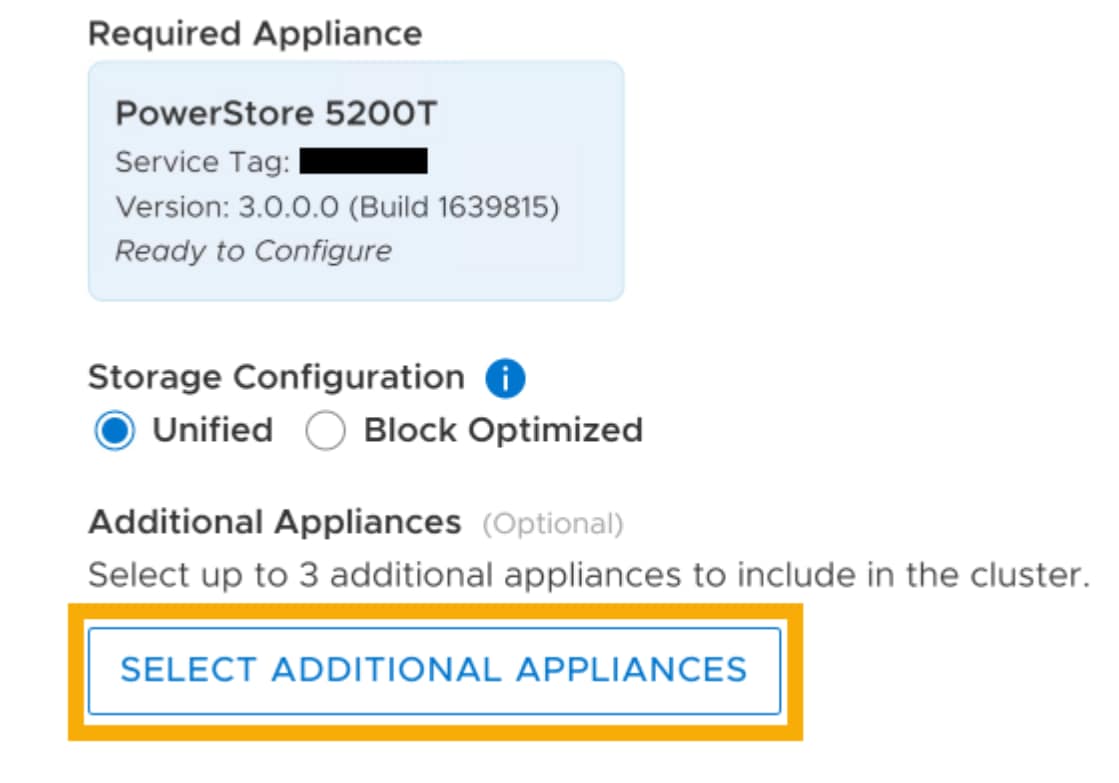
Figure 8. Selecting appliances for a cluster
Provisioning storage
To provision PowerStore storage, host objects and volumes must be created in PowerStore.
PowerStore host objects
Physical servers that will use PowerStore storage, must be defined in PowerStore as a host object. For optimal performance of Linux hosts when using PowerStore storage, verify that the appropriate configuration settings have been applied to all hosts that will be connected to PowerStore. See the following guides for additional information:
- Dell Host Connectivity Guide for Linux (delltechnologies.com)
- Dell PowerStore Host Configuration Guide
Ensure that the following steps are performed before creating the host object in PowerStore:
- Rack and cable the server targeted for Elastic Stack
- Zone the server into the fabric
- Power on the server
- On the physical server, configure and enable the HBAs
It is recommended that at least two 32Gb dual-port HBAs are installed in the physical server. Two dual-port HBAs provide redundancy of initiator ports and HBAs. More HBAs or HBA ports may be necessary to provide the bandwidth necessary to support the expected Elastic Stack I/O performance requirements.
Provisioning host objects
The following process creates a host object in PowerStore T:
- In PowerStore Manager, click Compute > Hosts Information.
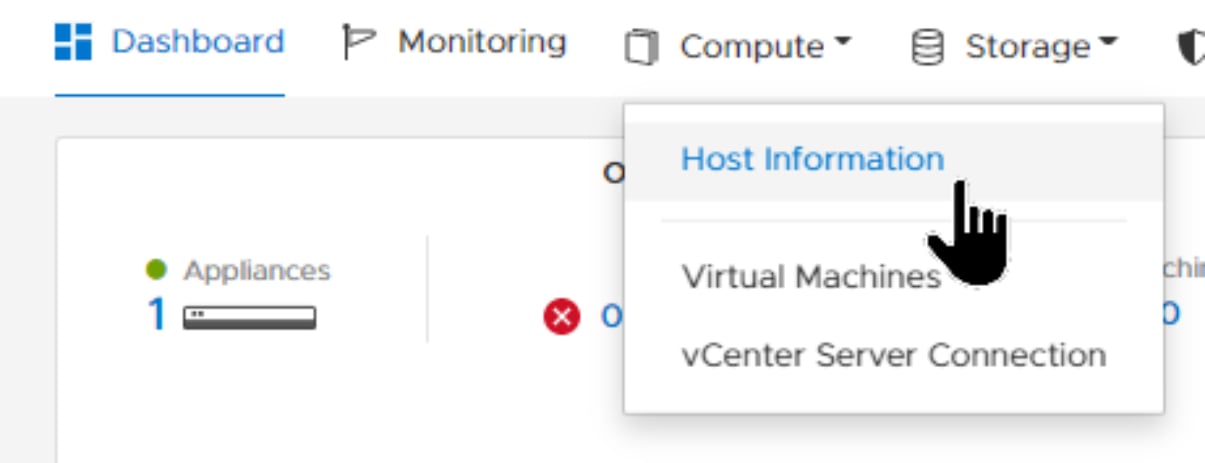
- Click ADD HOST.
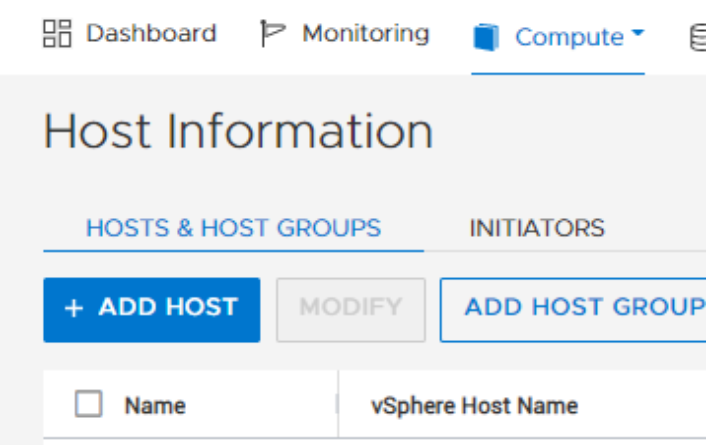
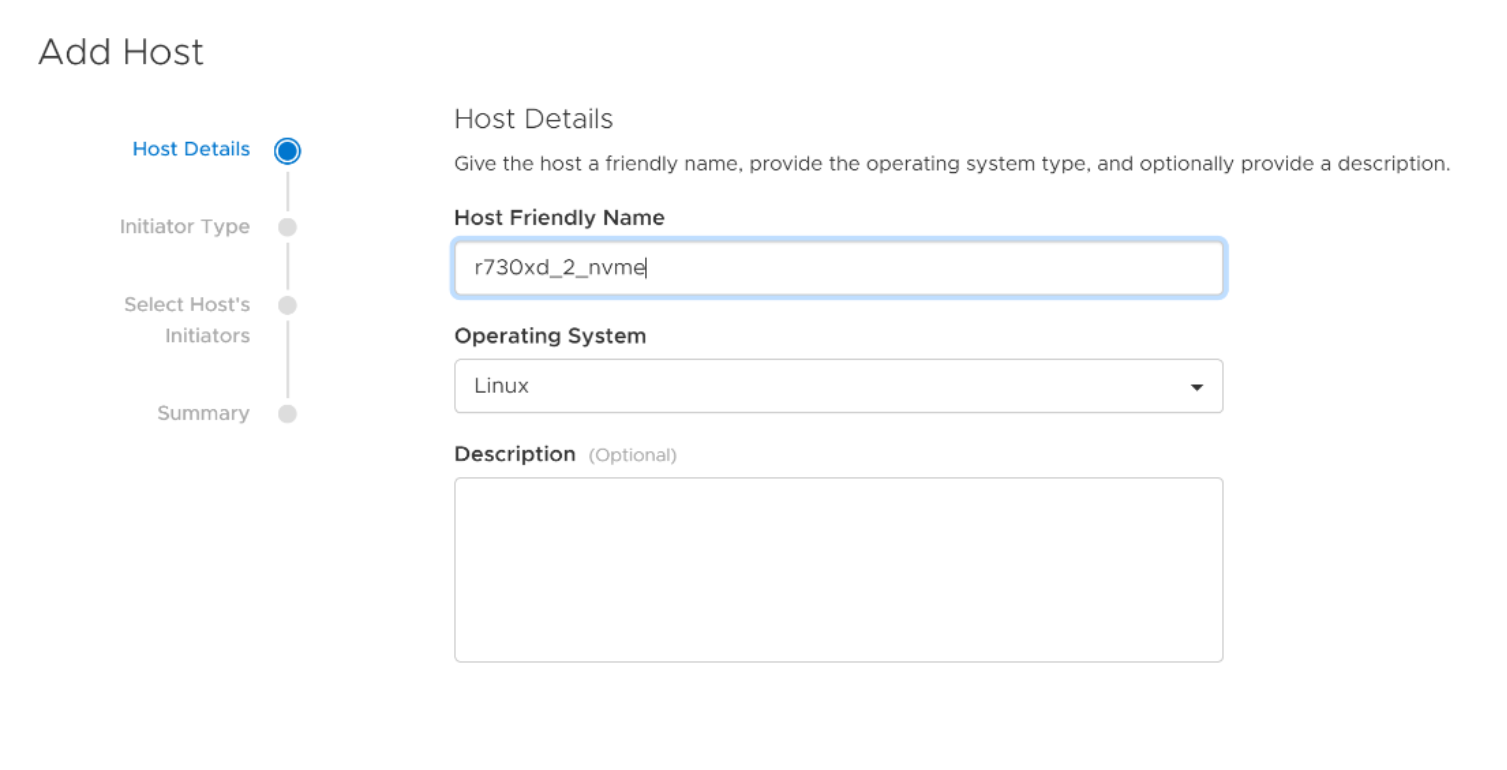
- In the Add Host wizard, enter the Host Friendly Name and Operating System. Click NEXT.
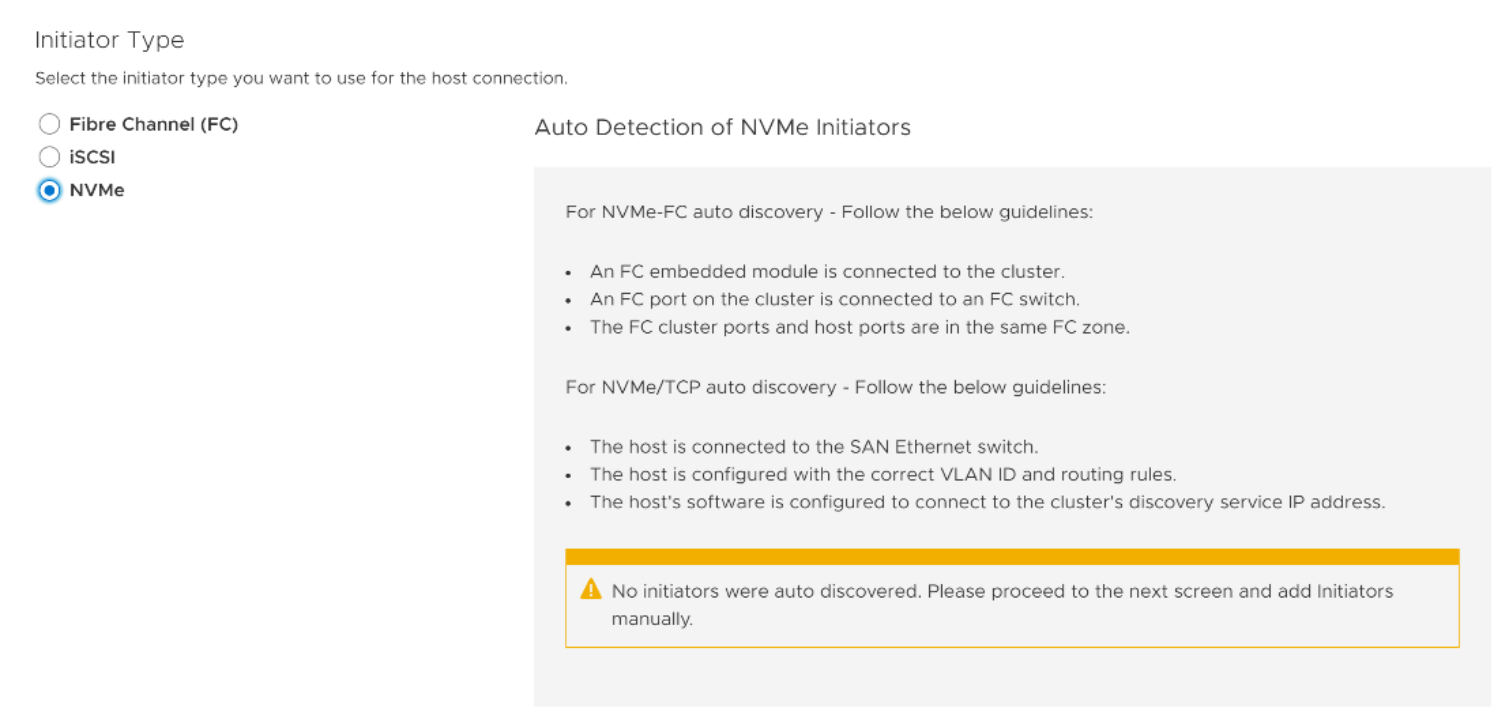
- Click the appropriate initiator type, and click NEXT. If NVMe was selected, go to step 8. If Fibre Channel (FC) is selected rather than NVMe, go to step 5.
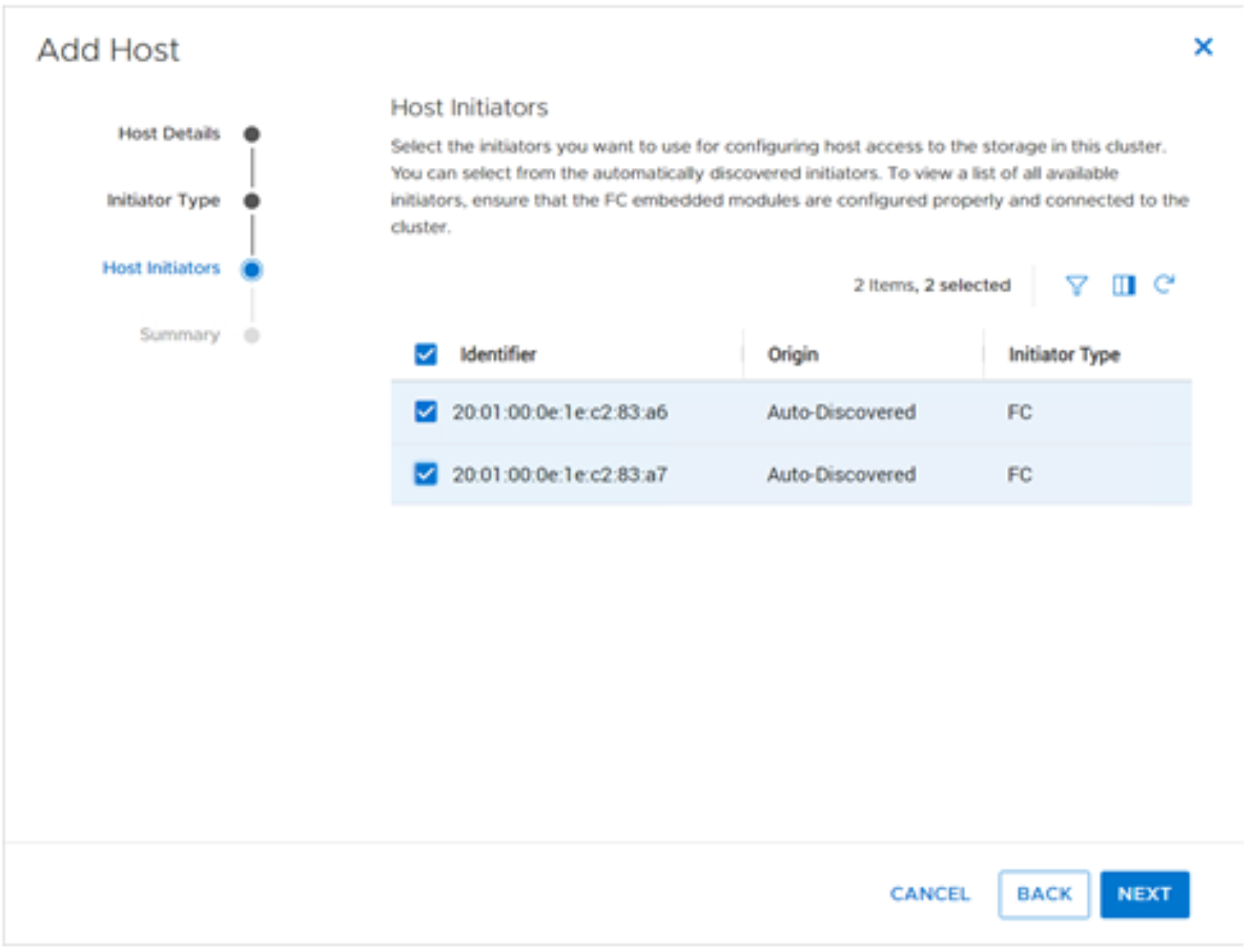
- Select the host initiators belonging to the physical server, and click NEXT.
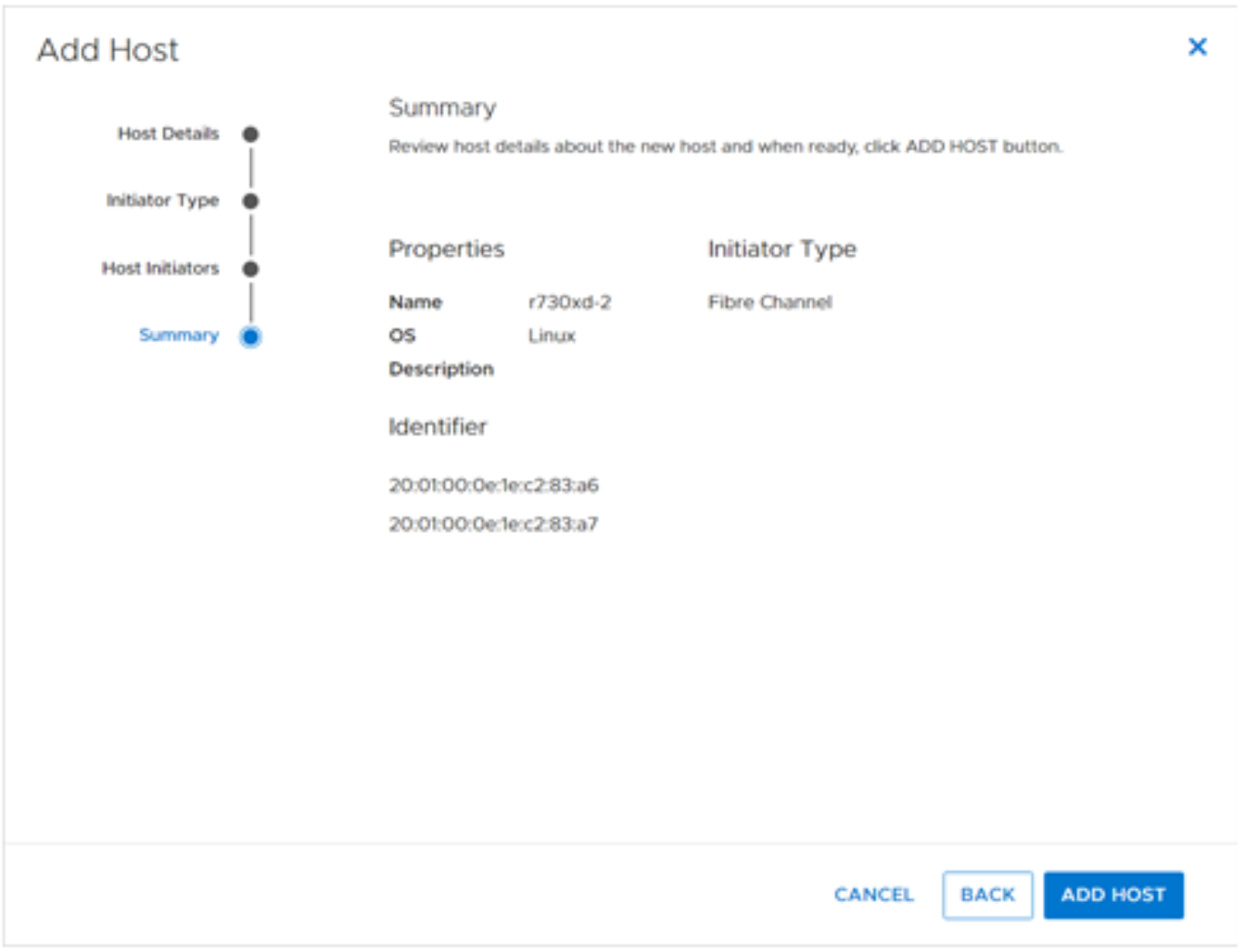
- Review the host properties, and click ADD HOST.
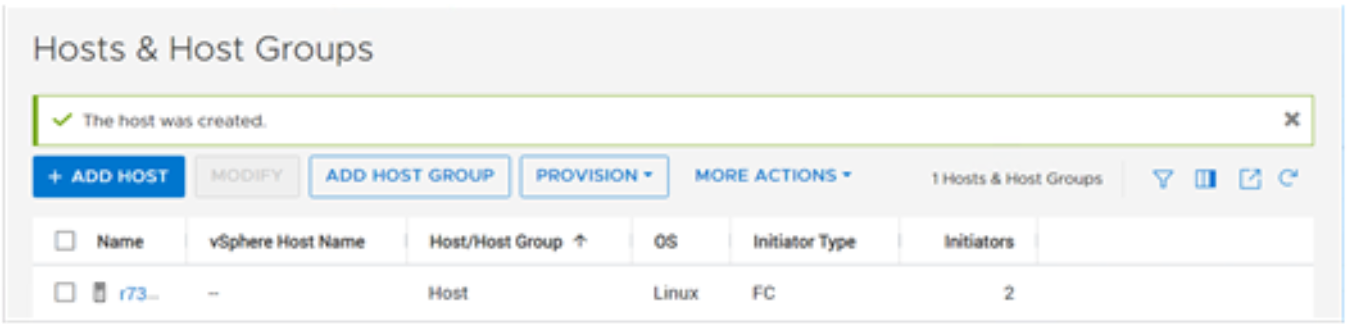
- PowerStore Manager displays the newly added host object.
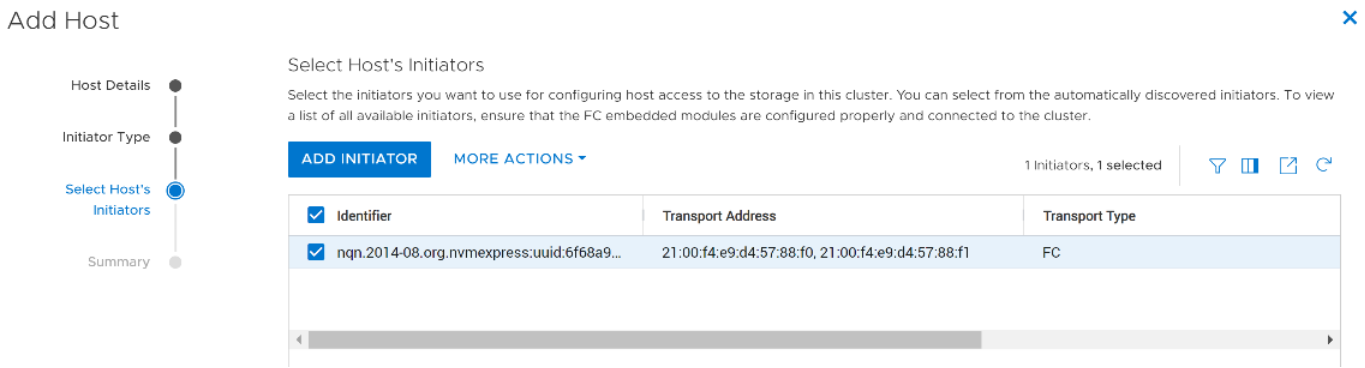
- When using Linux 8, auto discovery of host NVMe/FC initiators is automatically done. Select the initiator that has an Identifier value matching the database server’s nqn. Click NEXT.
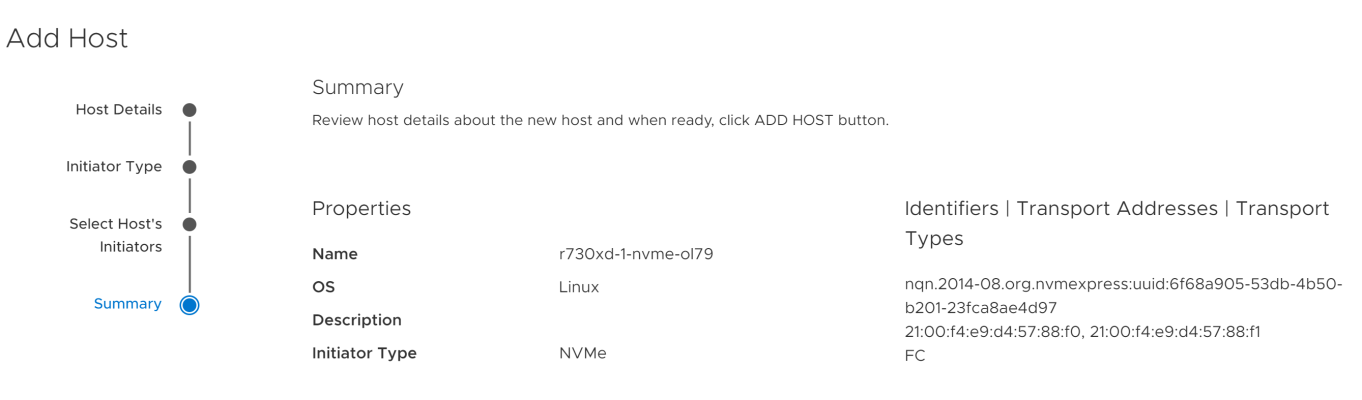
- Review the request to create the host object. If the request is correct, click ADD HOST.
Repeat this process for each host that belongs to the Elastic Stack cluster.
Provisioning volumes
This section illustrates creating a volume on PowerStore T that uses FC and NVMe over the FC transport layer.
Perform the following steps to create a volume:
- In PowerStore Manager, click Storage > Volumes. Click + CREATE.
- PowerStore Manager will display the Create Volumes wizard. Complete the form. Select an appropriate volume name and size. Set Category to Big data & Analytics and Application to ElasticSearch.
Note: Volume Performance Policy specifies the I/O performance requirements that PowerStore uses for the volume. PowerStore uses share-based QoS. When there is contention at the system level, a high-performance policy handles more IOPS than other performance policies. For critical Elastic Stack applications, an option is to consider using the High performance policy so Elastic Stack does not compete for I/O against less-critical applications.
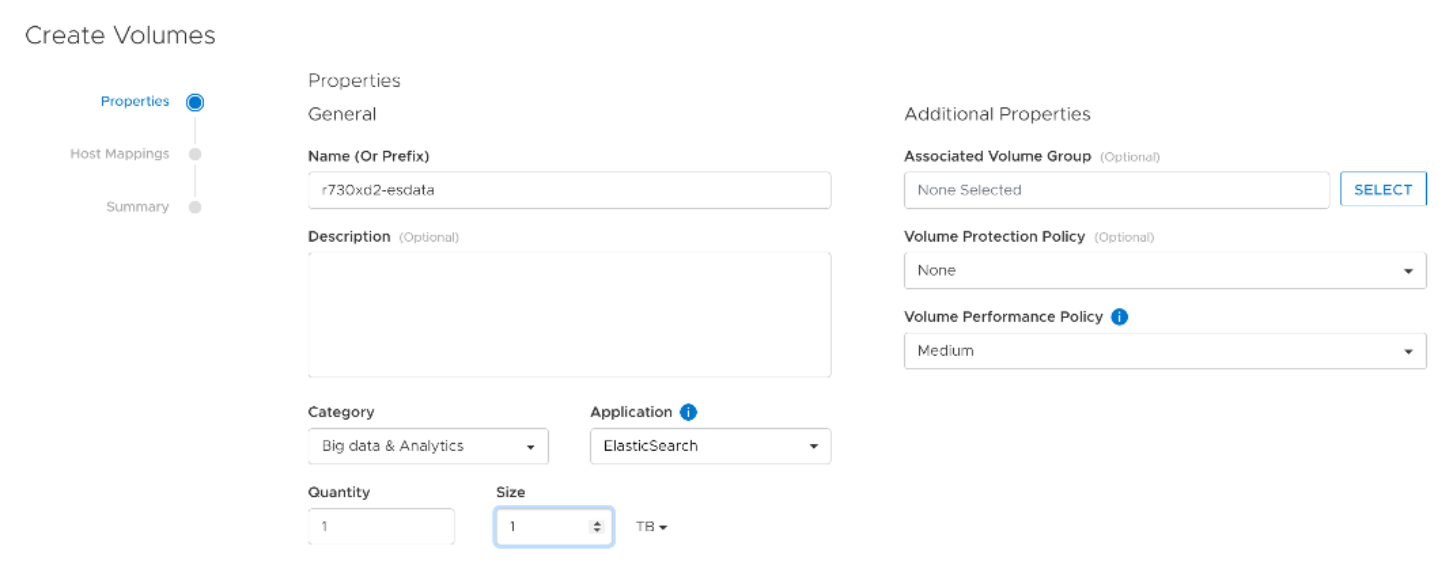
- Click NEXT.
- To use NVMe of FC transport layer, click NVMe, and click the check box of the target host. Otherwise, if using FC transport layer, click SCSI and go to step 8.

- Click NEXT.
- Review the summary information for correctness, and click CREATE.
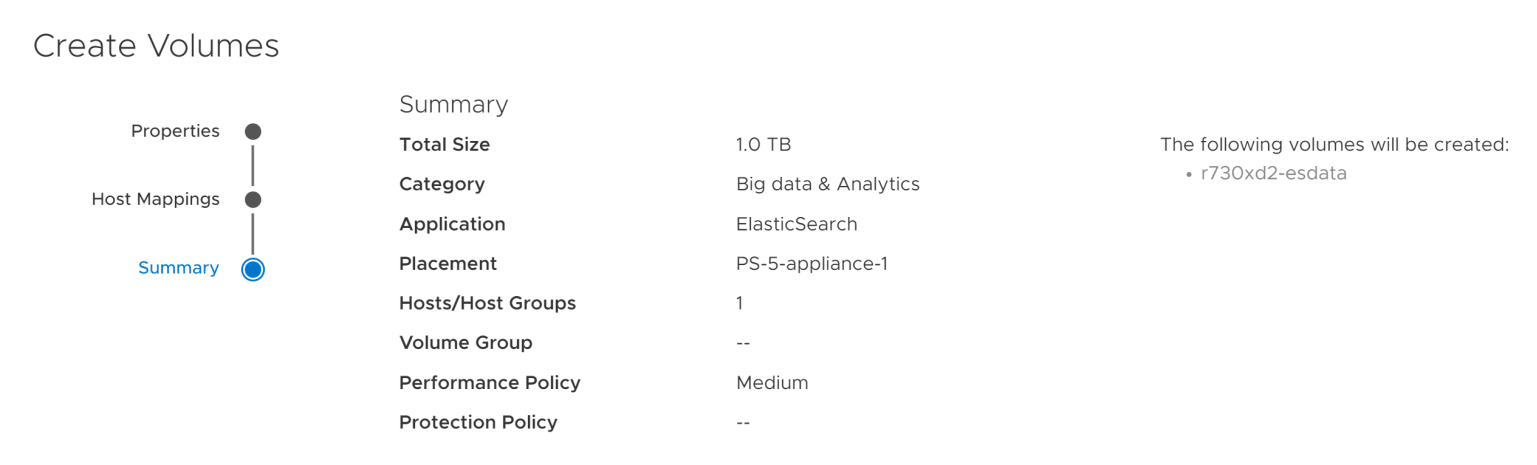
- Log in to the target host where the storage was provisioned and perform a nvme list to verify the volume was provisioned.
[root@r730xd-2 ~]# nvme list
Node SN Model Namespace Usage Format FW Rev
--------------------- -------------------- ---------------------------------------- --------- -------------------------- ---------------- --------
/dev/nvme0n1 84JYX23 dellemc-powerstore 47 0.00 B / 1.10 TB 512 B + 0 B 3.0.0.0
[root@r730xd-2 ~]#
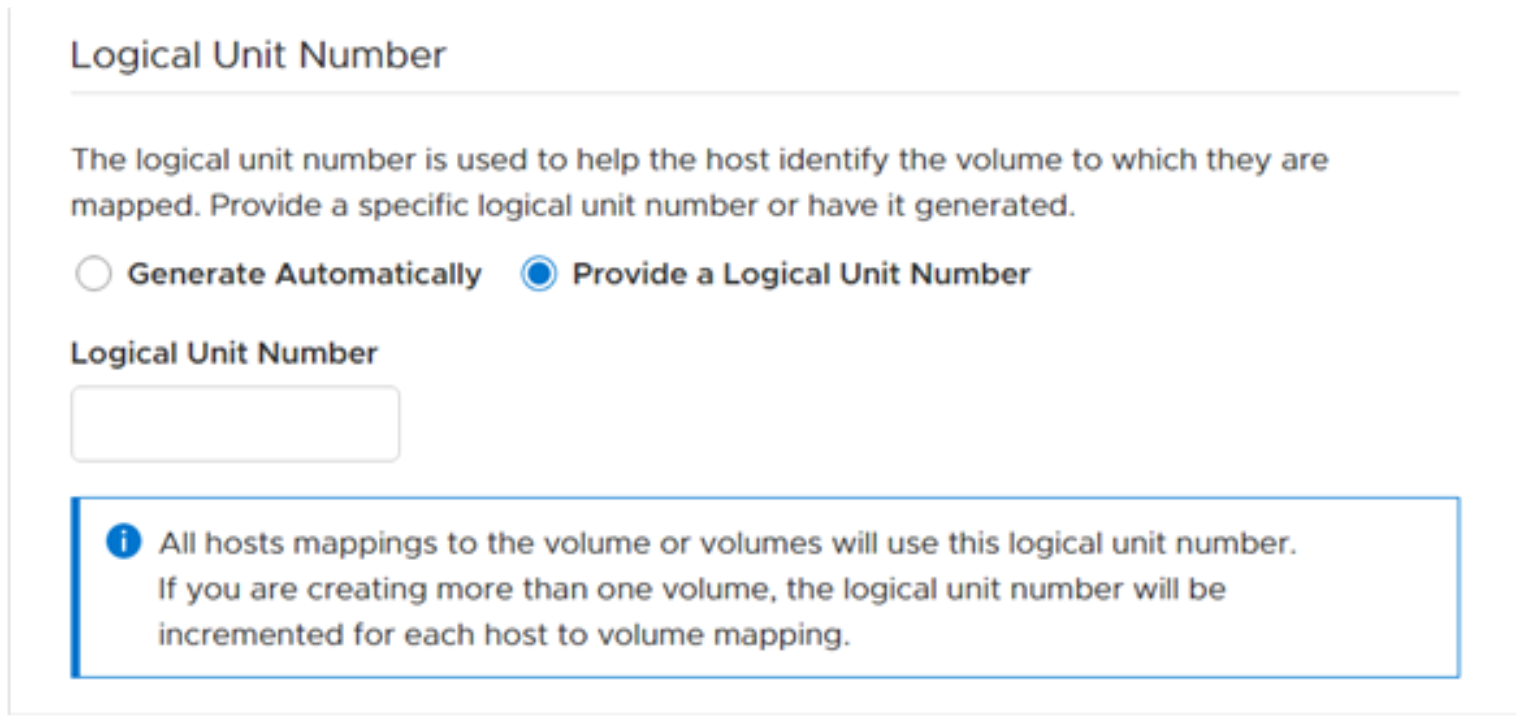
- Click NEXT and set the Logical Unit Number.
- Click Provide a Logical Unit Number.
- Enter the LUN ID in field Logical Unit Number. Consider using the same LUN ID for all Elastic Stack like volumes in all Elastic Stack nodes. Consistent LUN ID assignments help create an environment that is easier to manage.
- Click NEXT.
- Review the summary information, and click CREATE.
Host and Linux configuration
Introduction
Server nodes in Elastic Stack can either be physical or virtual, so both PowerStore T and PowerStore X models provide an excellent storage option for Elastic Stack.
While most settings in Linux can remain at the defaults, some changes are recommended for stability and efficiency with PowerStore arrays. The remainder of this section discusses best practices when working with Linux systems hosted by PowerStore. See Dell PowerStore Host Configuration Guide on www.dell.com/powerstoredocs for additional information of specific changes.
Server FC HBA driver settings: timeouts and queue depth
Queue depth is the number of disk transactions that are in flight between an initiator (HBA port on a Linux server) and a target (port on PowerStore appliance). The initiators are one or more FC or iSCSI ports on the host server which are paired with corresponding target ports of the same protocol type on PowerStore. Any given target port can be paired with multiple initiator ports. To address this issue, the initiator queue depth throttles the number of transactions that any given initiator can send to a target port from a host. This throttling helps to prevent the target ports from becoming flooded. With flooding, transactions are queued which causes higher latency and degraded performance for the affected workloads.
The default queue depth value of 32 may be adequate for Elastic Stack, but other values may work too. These values should be determined as directed in the section Elastic Stack sizing.
Scanning for and identifying LUNs
We recommend installing packages sg3_utils and lsscsi on the Linux servers. These packages provide useful capacities for managing and listing LUNs.
Scanning LUNs
To scan for LUNs, perform the following:
/usr/bin/rescan-scsi-bus.sh -a
Querying WWNs using scsi_id command
To query the WWN on a Linux operating system, run the following commands against the device.
Oracle Linux or Red Hat Enterprise Linux 7.x and 8.x:
# /usr/lib/udev/scsi_id --page=0x83 --whitelisted --device=<device>
Querying WWNs using multipath command
If the system has Linux device-mapper multipath software enabled, command
multipath -ll displays the multipath device properties including the WWN. For example:
# multipath -ll
mpatha (36006016010e0420093a88859586140a5) dm-0 DellEMC ,PowerStore
Identifying volume WWNs and LUN IDs in PowerStore
Perform the following to view the WWN and LUN ID information in PowerStore Manager:
- In PowerStore Manager, click Compute > Hosts Information.
- Select the link of the host.
- Select MAPPED VOLUMES. The WWN and Logical Unit Number (LUN ID) appear in the list of volumes that PowerStore Manager returns.
If columns WWN and Logical Unit Number are not displayed, use the field selector to add them to the displayed data.
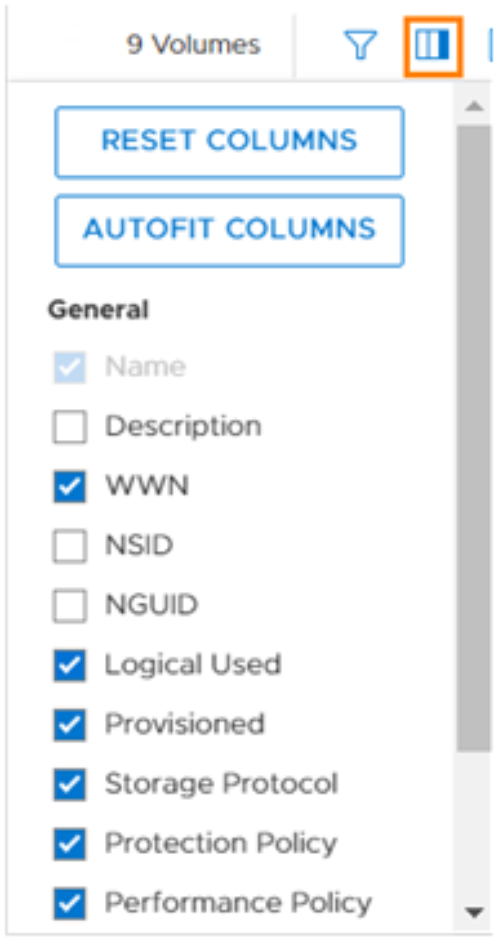
Figure 9. Select WWN and Logical Unit Number columns
Discovery and connection of NVMe end-points
With OL 8 or Red Hat Enterprise Linux 8 and PowerStore 3.0, the discovery and connection of NVMe/FC end-points is performed automatically during the creation of the PowerStore host object. After the end-point connections have been made, any volume created in PowerStore and exposed to the host object will immediately be seen on the server. For more information, see section Management and configuration best practices.
Multipathing
Multipathing is a software solution that is implemented at the host-operating-system level. While multipathing is optional, it provides path redundancy, failover, and performance-enhancing capabilities. We recommend deploying the solution in any environment where availability and performance are critical.
The following list includes the main benefits of using an MPIO solution:
- Increase database availability by providing automatic path failover and failback.
- Enhance database I/O performance by providing automatic load balancing and capabilities for multiple parallel I/O paths.
- Ease administration by providing persistent, intuitive names for the storage devices across cluster nodes.
Multipath software solutions
The native Linux multipath solution is supported and bundled with most popular Linux distributions in use today. Because the software is widely and readily available at no additional cost, many administrators prefer it to other third-party solutions.
Only one multipath software solution should be enabled on the host.
Connectivity guidelines
The following list provides a summary of array-to-host connectivity best practices:
- Have at least two FC/iSCSI HBAs or ports to provide path redundancy.
- Connect the same port on both PowerStore nodes to the same switch. PowerStore matches the physical port assignment on both nodes.
- Use multiple switches to provide switch redundancy.
For more information, see the following documents:
Configuration file
To simplify deployment, the native Linux multipath software comes with default settings for an extensive list of storage models from different vendors including PowerStore. The default settings allow the software to work with PowerStore immediately. However, these settings might not be optimal for all situations and should be reviewed and modified if necessary.
The multipath daemon configuration file must be created on newly installed systems. A basic template can be copied from /usr/share/doc/device-mapper-multipath-<version>/multipath.conf to /etc/multipath.conf as a starting point. Any settings that are not defined explicitly in /etc/multipath.conf would assume the default values. The full list of settings (explicitly set and default values) can be obtained using the following command. The default settings generally work without any issues.
# multipathd –k"show config"
For more information, see www.dell.com/powerstoredocs and the document Dell PowerStore: Clustering and High Availability.
Creating device-mapper aliases
For ease of management, assign meaningful names (aliases) to the multipath devices. For example, create aliases that are based on the application type and environment that the device is in. The following snippet assigns an alias of esdata to the PowerStore LUN with WWN 368ccf09800f1fc382938798ae1a00ad2.
multipaths {
multipath {
wwid "368ccf09800f1fc382938798ae1a00ad2"
alias esdata
}
}
For more information, see www.dell.com/powerstoredocs and the document Dell PowerStore: Clustering and High Availability.
Asymmetric Logic Unit Access
PowerStore supports Asymmetric Logic Unit Access (ALUA) for host access. This feature allows the host operating system to differentiate between optimized paths and nonoptimized paths.
LUN partitioning
On the volumes intended for Elastic Stack, it is recommended to create a single partition.
Partition alignment
When partitioning a LUN, it is recommended to align the partition on the 1M boundary. Use either fdisk or parted to create the partition. However, only parted can create partitions larger than 2 TB.
Creating partition using parted
Before creating the partition, label the device as GPT. Then, specify the partition offset at 2048 sector (1M). The following command creates a single partition that takes up the entire LUN. Once the partition is created, the partition file should be used for creating the file system that Elastic Stack will use.
parted /dev/mapper/esdata mklabel gpt mkpart primary 2048s 100%
File systems
A local ext4 or xfs file system defined on block storage is preferred to store Elastic Stack software, data, and logs.
Partitioned devices and file systems
When creating a file system, create the file system on a properly aligned partition.
Space reclamation
Deleting a file in Linux removes the file pointer that pointed to the old data, but it does not remove any of the old data from the storage array. So even though Linux views the space occupied by the delete data as free and available to use, the storage array does not. The storage array will show the deleted data as being consumed and does not release the space back to the pool of available storage on the storage array. For the storage array to release the space of deleted data back to the storage pool, several conditions must be met:
- Both the Linux operating system and storage array must support SCSI trim/unmap,
- The storage array must be able to create thinly provisioned volumes using SSDs,
- The Linux operating system must pass a SCSI trim/unmap command the storage array, and
- If a third-party logical volume manager is used, the volume manager must also support SCSI trim/unmap. The fourth option does not apply to Elastic Stack in the paper as Elastic Stack resides on volumes that are formatted with a file system and managed by Linux.
Being able to perform space reclamation is a major benefit with thinly provisioned volumes. Space reclamation helps reduce total cost of ownership by being able to reuse space as opposed to procuring additional storage arrays or scaling up an existing storage array.
The remainder of this section discusses the top three conditions listed above. The fourth condition will not be discussed as it does not apply to Elastic Stack in this paper.
With Oracle Linux 8.5 and PowerStore, the top two conditions are met. Both Oracle Linux 8.5 and PowerStore support SCSI trim/unmap, and all PowerStore volumes are thinly provisioned.
The third condition requires a little more explanation than a sentence or two.
With SSDs, data can only be written to new or erased cells on the SSD. If there is not enough available free space to support the file write, unused cells that once contained data must first be erased. Performing an erase when the file is being written can affect performance negatively. However, if data were erased from cells before data were attempted to be written, performance could improve. The SCSI trim command allows this to happen.
Linux uses a discard operation command to inform PowerStore which data are no longer being used so that the Storage array can erase the data from the SSD cells. Separating the erase from when the file is being written increases the performance of future writes as the erase operation is separated from the data write operation.
If there is a need to verify if the block device supports SCSI trim/unmap, view the value in /sys/block/<device>/queue/discard_max_bytes. A nonzero value indicates the block device supports SCSI trim/unmap.
[root@r730xd-2 ~]# cat /sys/block/sdh/queue/discard_max_bytes
268435456
[root@r730xd-2 ~]#
lsblk -D can also be used to determine if a particular block device or multipath block device supports the trim/unmap operation. If a device supports trim/unmap, lsblk will report nonzero values in columns DISC-GRAN and DISC-MAX. The below snippet reports device sde and multipath device mpatha as supporting SCSI trim/unmap.
[root@r730xd-2 ~]# lsblk -D
NAME DISC-ALN DISC-GRAN DISC-MAX DISC-ZERO
sdc 0 0B 0
sde 0 512K 256M 0
└─mpatha 0 512K 256M 0
In Linux 8, both ext4 and XFS support discard operations. Discard operations can be run using several different methods:
- Online discard
- Batch discard
- Periodic discard
The method chosen will depend on infrastructure requirements, but the general recommendation is to use either batch or periodic discards and to only use the online discard option if one of the following is true:
- The online discard operation is necessary to maintain performance
- The system’s workload is not conducive to the batch discard operation
To perform a batch or periodic discard operation in Linux, the fstrim command must be run against the device supporting the mounted ext4 or xfs file system. Using a batch or periodic discard operation can extend the life of the SSD.
Online discard
Online discard operations are specified when a file system is mounted. Discard operations run in real time without user interaction and only discard blocks that are transitioning from used to free. To enable online discard, specify the discard option (-o discard) when mounting a file system:
mount -t xfs -o discard /dev/mapper/esdata1 /opt/elasticsearch/data
mount -t xfs -o discard /dev/mapper/eslog1 /opt/elasticsearch/log
The discard option can also reside in /etc/fstab.
# cat /etc/fstab
UUID=13725bd7-d909-4f49-8854-433f84aa6870 /opt/elasticsearch/data xfs defaults 0 0
UUID=bc63eef2-99a0-4afe-8dd5-6e67bcc24209 /opt/elasticsearch/log xfs defaults 0 0
The UUID of a block device that is used to support a mounted file system can be determined by performing either of the following:
lsblk -o 'NAME,UUID'
blkid | grep <device>
# blkid | grep esdata1
/dev/mapper/esdata1: UUID="13725bd7-d909-4f49-8854-433f84aa6870" BLOCK_SIZE="512" TYPE="xfs" PARTLABEL="primary" PARTUUID="40fe0319-3ce3-45c6-a84b-e3e9070e1d40"
#
Batch discard
A batch discard operation discards all unused blocks in a mounted file system. If the file system is not mounted, an error will be reported. To perform a batch discard operation (SCSI trim), perform the following as a privileged user:
fstrim <file system> -v
# fstrim /opt/elasticsearch/log -v
/opt/elasticsearch/log: 6 GiB (6429634560 bytes) trimmed
When fstrim runs, it scans the mounted file system and sends SCSI unmap commands for each unused block it finds to PowerStore. PowerStore returns the unused blocks of storage to the storage pool.
If batch discard is used, it is recommended to create a cron schedule so the process is executed routinely:
# crontab -l
0 0 * * * /usr/bin/trim
For a list of fstrim arguments, see the Linux man page for fstrim.
Periodic discard
Periodic discard operations are batch discard operations performed by a system service called fstrim. By default, the service is loaded in the Linux 8 kernel, but it is not enabled, nor is it running.
[root@r730xd-2 ~]# systemctl status fstrim
● fstrim.service - Discard unused blocks
Loaded: loaded (/usr/lib/systemd/system/fstrim.service; static; vendor preset: disabled)
Active: inactive (dead)
[root@r730xd-2 ~]#
The corresponding fstrim scheduler service, fstrim.timer, is also loaded in the Linux 8 kernel. It too is not enabled nor is it running:
[root@r730xd-2 ~]# systemctl status fstrim.timer
● fstrim.timer - Discard unused blocks once a week
Loaded: loaded (/usr/lib/systemd/system/fstrim.timer; disabled; vendor preset: disabled)
Active: inactive (dead)
Trigger: n/a
Docs: man:fstrim
[root@r730xd-2 ~]#
fstrim.timer triggers a fstrim operation weekly, every Monday at 00:00:00. The schedule can be verified by viewing the fstrim.timer definition with either command:
- cat /usr/lib/systemd/system/fstrim.timer
- systemctl cat fstrim.time
[root@r730xd-2 ~]# systemctl cat fstrim.timer
# /usr/lib/systemd/system/fstrim.timer
[Unit]
Description=Discard unused blocks once a week
Documentation=man:fstrim
[Timer]
OnCalendar=weekly
AccuracySec=1h
Persistent=true
[Install]
WantedBy=timers.target
[root@r730xd-2 ~]#
To enable the fstrim timer and verify that systemd knows about the timer schedule, perform:
[root@r730xd-2 ~]# systemctl enable fstrim.timer
Created symlink /etc/systemd/system/timers.target.wants/fstrim.timer → /usr/lib/systemd/system/fstrim.timer.
[root@r730xd-2 ~]# systemctl list-timers --all
NEXT LEFT LAST PASSED UNIT ACTIVATES
Tue 2022-05-10 12:20:11 CDT 19min left Tue 2022-05-10 10:50:39 CDT 1h 9min ago dnf-makecache.timer dnf-makecache.service
Wed 2022-05-11 00:00:00 CDT 11h left Tue 2022-05-10 00:00:39 CDT 11h ago mlocate-updatedb.timer mlocate-updatedb.service
Wed 2022-05-11 00:00:00 CDT 11h left Tue 2022-05-10 00:00:39 CDT 11h ago unbound-anchor.timer unbound-anchor.service
Wed 2022-05-11 06:03:39 CDT 18h left Tue 2022-05-10 06:03:39 CDT 5h 56min ago systemd-tmpfiles-clean.timer systemd-tmpfiles-clean.service
n/a n/a n/a n/a fstrim.timer fstrim.service
5 timers listed.
[root@r730xd-2 ~]#
To start the fstrim.timer schedule, perform:
[root@r730xd-2 ~]# systemctl start fstrim.timer
[root@r730xd-2 ~]# systemctl status fstrim.timer
● fstrim.timer - Discard unused blocks once a week
Loaded: loaded (/usr/lib/systemd/system/fstrim.timer; enabled; vendor preset: disabled)
Active: active (waiting) since Tue 2022-05-10 12:01:10 CDT; 6s ago
Trigger: Mon 2022-05-16 00:00:00 CDT; 5 days left
Docs: man:fstrim
May 10 12:01:10 r730xd-2.techsol.local systemd[1]: Started Discard unused blocks once a week.
[root@r730xd-2 ~]# systemctl list-timers
NEXT LEFT LAST PASSED UNIT ACTIVATES
Tue 2022-05-10 12:20:11 CDT 18min left Tue 2022-05-10 10:50:39 CDT 1h 11min ago dnf-makecache.timer dnf-makecache.service
Wed 2022-05-11 00:00:00 CDT 11h left Tue 2022-05-10 00:00:39 CDT 12h ago mlocate-updatedb.timer mlocate-updatedb.service
Wed 2022-05-11 00:00:00 CDT 11h left Tue 2022-05-10 00:00:39 CDT 12h ago unbound-anchor.timer unbound-anchor.service
Wed 2022-05-11 06:03:39 CDT 18h left Tue 2022-05-10 06:03:39 CDT 5h 58min ago systemd-tmpfiles-clean.timer systemd-tmpfiles-clean.service
Mon 2022-05-16 00:00:00 CDT 5 days left n/a n/a fstrim.timer fstrim.service
5 timers listed.
Pass --all to see loaded but inactive timers, too.
[root@r730xd-2 ~]#
Elastic Stack sizing
Introduction
Once PowerStore has been tested to ensure performance requirements are met, Elastic Stack can be tested and sized appropriately for the expected workload and expected performance requirements. Testing should be done with real data from the environment where Elastic Stack will be deployed. If real data is not available, synthetic data can be used to simulate the production use case. Testing also provides some insight into the amount of RAM and number of CPUs that will be needed on each Elastic Stack node (master and data). A tool that can be used for testing is Elasticsearch’s benchmarking tool Rally available on GitHub. Rally can deploy an Elasticsearch environment for testing and then tear it down once the testing is complete. For more information about Rally, see this blog.
With a well-designed Elastic Stack system, all Elastic Stack components work together to maximize I/O performance metrics.
When testing Elastic Stack, use Dell LiveOptics and CloudIQ to measure PowerStore performance against the Elastic Stack workloads. It is recommended to repeat this test in production immediately after go-live to establish a baseline of initial performance metrics that can be used to compare against future performance measurements.
Note: Use caution if the test is run on a live system after go-live as the test could cause significant performance issues.
Once a design can deliver the expected performance requirement, scaling out Elastic Stack can be considered to meet future storage capacity and compute requirements.
Dell Technologies recommends using a consistent and proven methodology to test and size any Elastic Stack environment. Elastic.co offers a sound testing and sizing methodology which is recommended to be used for all Elastic environments. Using the methodology will show some insights into how the Elastic Stack environment should be designed to meet the expected performance requirements. Elastic.co has recorded a video describing the sizing and testing methodology. Click here to view the Elastic video. It is also recommended to review the architecture-best practices document from Elastic.co.
Data protection and recovery
PowerStore snapshots
PowerStore can create point-in-time snapshots of one or more volumes. Snapshots are space-efficient since they consist of pointers to frozen data blocks and use redirect-on-write technology. They consume no extra space unless, for example, a thin clone is created from a snapshot, mapped to a host, and new data are written to the thin clone.
Snapshots can be created manually or automatically using snapshot rules within protection policies. For snapshot cleanup, a service runs hourly in the background in PowerStore and removes any expired snapshots.
To use data within a snapshot, a thin clone copy must be created from the snapshot and presented to a host. The host can be the same host from which the snapshot was taken or a different host. Changes made to the thin clone to not affect other thin clone copies of the same volume or the parent volume. See Dell PowerStore: Snapshots and Thin Clones for more information.
Snapshots and recoveries with Elastic Stack
Elasticsearch has consistency requirements that span the entire cluster. The only reliable method for creating snapshots of an Elastic environment is to create snapshots from within Elastic. Elastic documentation states “You cannot back up an Elasticsearch cluster by making copies of the data directories of its nodes. There are no supported methods to restore any data from a filesystem-level backup.”1 If snapshots created outside of Elastic are used to restore a cluster, the system may report corruption, missing files, other inconsistencies, or may have restored the system with missing data. Elastic Stack snapshots are automatically deduplicated so storage overhead is minimized. See the following references for more information about snapshot and restore capabilities in Elasticsearch:
- Work with snapshots
- Elasticsearch snapshot and restore
- Create an Elasticsearch snapshot.
- Important Elasticsearch configuration
Elasticsearch Guide 8.2, Snapshot and restore, May 2022, https://www.elastic.co/guide/en/elasticsearch/reference/current/snapshot-restore.html
References
Dell Technologies documentation
The following Dell Technologies documentation provides other information related to this document. Access to these documents may depend on login credentials. If you do not have access to a document, contact your Dell Technologies representative.
- Dell PowerStore Info Hub
- PowerStore Product Documentation and Videos
- Storage (general) at Dell Technologies Info Hub
- Dell Host Connectivity Guide for Linux
- Dell PowerStore: Best Practices Guide
- Dell PowerStore: Technical Primer
- Dell PowerStore: Best Practices Guide
- Dell PowerStore: PowerStore X Performance Best Practice Tuning
- Dell PowerStore X Series Storage
- Dell PowerStore Host Configuration Guide
- Dell PowerStore: Data Efficiencies
- Dell PowerStore: Snapshots and Thin Clones
- Dell PowerStore CLI Reference Guide
- Dell PowerStore CLI User Guide
Elastic Stack documentation, blogs, videos
See the following referenced or recommended Elastic Stack resources:
- Elastic Videos
- Architecture best practices
- Overview of the Elastic Stack (formerly ELK stack) - YouTube
- Logstash: Collect, Parse, Transform Logs | Elastic
- Filebeat Reference
- X-Pack 5.0.0 Released | Elastic Blog
- We Opened X-Pack | Elastic
- Download X-Pack: Extend Elasticsearch and Kibana | Elastic
- Elasticsearch - Reviews, Pros & Cons | Companies using Elasticsearch (stackshare.io)
- Elasticsearch Reviews, Ratings, and Features - Gartner 2022
- Important Elasticsearch configuration
- Snapshot and restore
- Work with snapshots
- Create a snapshot
- Save space and money with improved storage efficiency in Elasticsearch 7.10 | Elastic Blog
- Quantitative Cluster Sizing
- Index of /other/cirrussearch/current/ (wikimedia.org)
- xml - Loading Wikipedia Dump into Elasticsearch - Stack Overflow
- How Elastic delivers an innovative approach to insight engines
- Rally 2.4.0 — Rally 2.4.0 documentation (esrally.readthedocs.io)
- Releases · elastic/rally · GitHub
Other documentation
Other assets that are referenced in the paper include the following:
- Gartner Magic Quadrant for Insight Engines 2021 | Elastic
- Companies using Elasticsearch and its marketshare (enlyft.com)
- Definition of Insight Engines - Gartner Information Technology Glossary
- Huffman coding - Wikipedia
- Chapter 37. Discarding unused blocks Red Hat Enterprise Linux 8 | Red Hat Customer Portal
- How to schedule tasks with systemd timers in Linux - Linux Tutorials - Learn Linux Configuration
- API Documentation & Design Tools for Teams | Swagger