Dell PowerStore: MongoDB Solution Guide
Executive summary
Overview
As data becomes abundantly available and inexpensive to obtain in this data era, new opportunities emerge. Businesses and organizations make new discoveries and create new business models that are based on these valuable data. New analytic applications such as MongoDB are designed to be flexible and scalable, and with the help of Dell PowerStore, can harness this data growth and unlock the power of data.
This paper offers a high-level overview of the PowerStore appliance and focuses on the PowerStore capabilities in support of MongoDB. The document provides insights about using various MongoDB compression libraries and the integrated PowerStore advanced data reduction feature. This paper is not a performance-focused study.
Audience
This document is intended for IT administrators, storage architects, partners, and Dell Technologies employees. This audience also includes individuals who may evaluate, acquire, manage, operate, or design a Dell networked storage environment using PowerStore systems.
Revisions
|
Date |
Part number/ |
Description |
|
February 2020 |
|
Initial release |
|
August 2020 |
|
Solution guide with data reduction comparison |
|
May 2021 |
|
PowerStoreOS 2.0 updates |
|
October 2022 |
H18460.3 |
PowerStoreOS 3.0 and 3.2 updates |
|
May 2023 |
H18460.4 |
PowerStoreOS 3.5 updates |
We value your feedback
Dell Technologies and the authors of this document welcome your feedback on this document. Contact the Dell Technologies team by email.
Author: Henry Wong
Note: For links to other documentation for this topic, see the PowerStore Info Hub and Dell Technologies Support.
Introduction
PowerStore overview
PowerStore achieves new levels of operational simplicity and agility. It uses a container-based microservices architecture, advanced storage technologies, and integrated machine learning to unlock the power of your data. PowerStore is a versatile platform with a performance-centric design that delivers multidimensional scale, always-on data reduction, and support for next-generation media.
PowerStore brings the simplicity of public cloud to on-premises infrastructure, streamlining operations with an integrated machine-learning engine and seamless automation. It also offers predictive analytics to easily monitor, analyze, and troubleshoot the environment. PowerStore is highly adaptable, providing the flexibility to host specialized workloads directly on the appliance and modernize infrastructure without disruption. It also offers investment protection through flexible payment solutions and data-in-place upgrades.
PowerStore Models and PowerStoreOS
The PowerStore platform is available in two different models:
PowerStore T model appliances are block only or unified storage arrays which can service block, file, and VMware vSphere Virtual Volumes (vVols) resources.
PowerStore X model appliances embed a native VMware ESXi layer that lets users run virtualized workloads directly on the appliance. The PowerStore X model also provides block and vVol storage capability to external servers.
PowerStoreOS is the container-based operating system that powers all PowerStore models. The following table lists the supported models for each release.
Table 1. PowerStoreOS model series support
|
PowerStoreOS release |
Hardware models |
|
PowerStoreOS 1.0 |
1000T through 9000T |
|
PowerStoreOS 2.0 |
500T 1000T through 9000T 1000X through 9000X |
|
PowerStoreOS 3.0 |
500T 1200T through 9200T |
|
PowerStoreOS 3.2 |
500T 1000X through 9000X 1200T through 9200T |
|
PowerStoreOS 3.5 |
All T models |
For more information about PowerStore models, see the documents Dell PowerStore: Introduction to the Platform and Dell PowerStore Virtualization Infrastructure Guide.
MongoDB overview
MongoDB is a modern NoSQL database that uses a document-based data model to store both structured and unstructured data. It is highly scalable and can process massive amounts of data efficiently. A MongoDB database can scale up to hundreds of systems with petabytes of data distributed across them. With a modern database architecture comes the need for modern storage and application-driven infrastructure that is engineered to optimize and consolidate existing and new business use cases. The PowerStore storage platform is an ideal choice for MongoDB, offering advanced capabilities and scalability.
MongoDB is engineered with replica sets to increase data availability and fault tolerance of the MongoDB servers. Full copies of the data are replicated to multiple secondary members. A single replica set supports up to 50 members. Using a larger number of replicas increases data availability and protection. It also provides automatic failover of the primary member during planned or unplanned events such as server updates, server failures, rack failures, data-center failures, or network partitions. Replicating the data to a different server in a different data center further increases data availability and data locality for distributed clients. However, having too many replica members can lead to lower storage efficiencies, higher network-bandwidth usage, and increased management complexities. PowerStore can alleviate these challenges with its integrated data reduction feature, the embedded hypervisor on PowerStore X brings applications closer to storage, and tight integration of the storage platform and VMware virtualization environment.
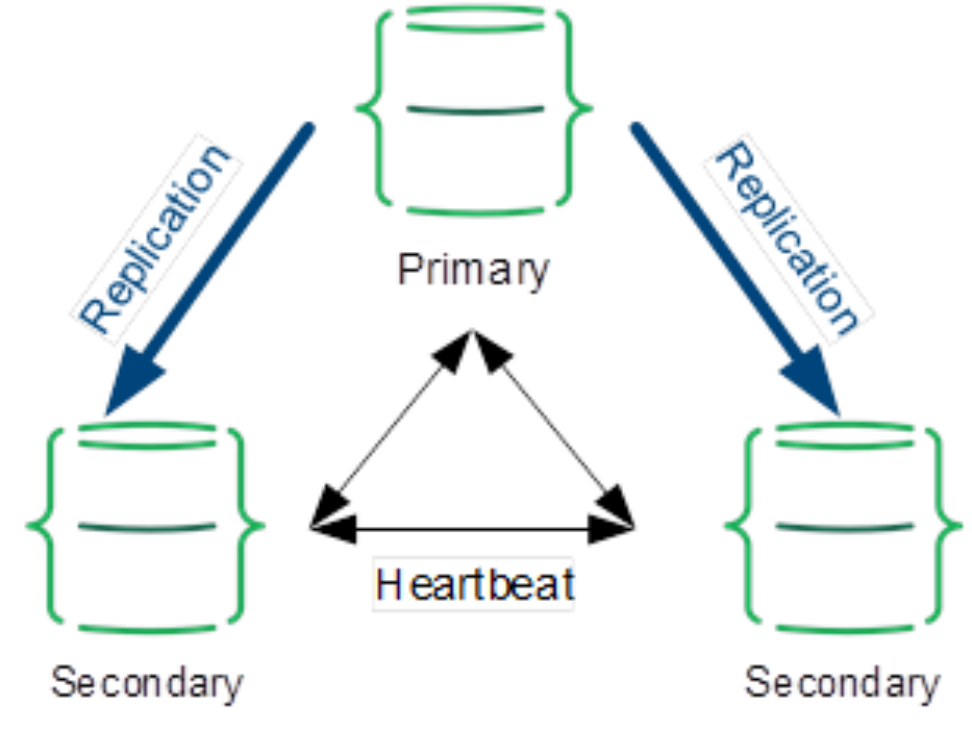
Figure 1. A three-member MongoDB replica set
By default, the primary member is responsible for the write and read operations for the replica set. The clients can specify a read preference to send read operations to the closest secondaries also. You can also configure a data-bearing member (a primary or secondary member but not an arbiter) to be hidden and serve as a backup copy if needed.
As the workload grows, the primary or secondary members must be able to scale their processing capacity by adding CPU, memory, or storage. In a read-oriented workload, more secondaries, each with a full copy of data, might be required. To increase the data durability and to avoid data from being rolled back when a primary member fails over, you can specify a write concern with a value of majority and enable journaling on all voting members. The write concern specifies how many members must acknowledge the write operations before it is considered to be successful. Starting in MongoDB 5.0, the implicit default write concern is ‘majority’ for most configurations. MongoDB determines the default write concern using a specific formula. See the MongoDB documentation for details. When the write concern is set to ‘majority’, MongoDB calculates the required number of received acknowledgments from the data-bearing voting members. WiredTiger journaling preserves all data modifications on disk between checkpoints to guarantee write operation durability. When MongoDB fails between checkpoints, it uses the journal logs to replay the changes since the last checkpoint. Journaling is required for replica set members that use the WiredTiger storage engine starting in MongoDB 4.0.
Building a flexible scale-out distributed database architecture
With large datasets and high-throughput environments, MongoDB uses the sharding process to distribute data across multiple systems to increase storage capacity, throughput, and performance. A sharded cluster consists of three components:
Shards hold a subset of the data and are deployed as a replica set.
Mongos process communications with the config servers and route the client requests to the appropriate shards.
Config servers store the metadata for the cluster configuration settings.
The config servers are deployed as a replica set. In a non-sharded database, there is only one primary member in a replica set that is responsible for write operations. However, in a sharded cluster, each shard can perform write operations respective to its dataset.
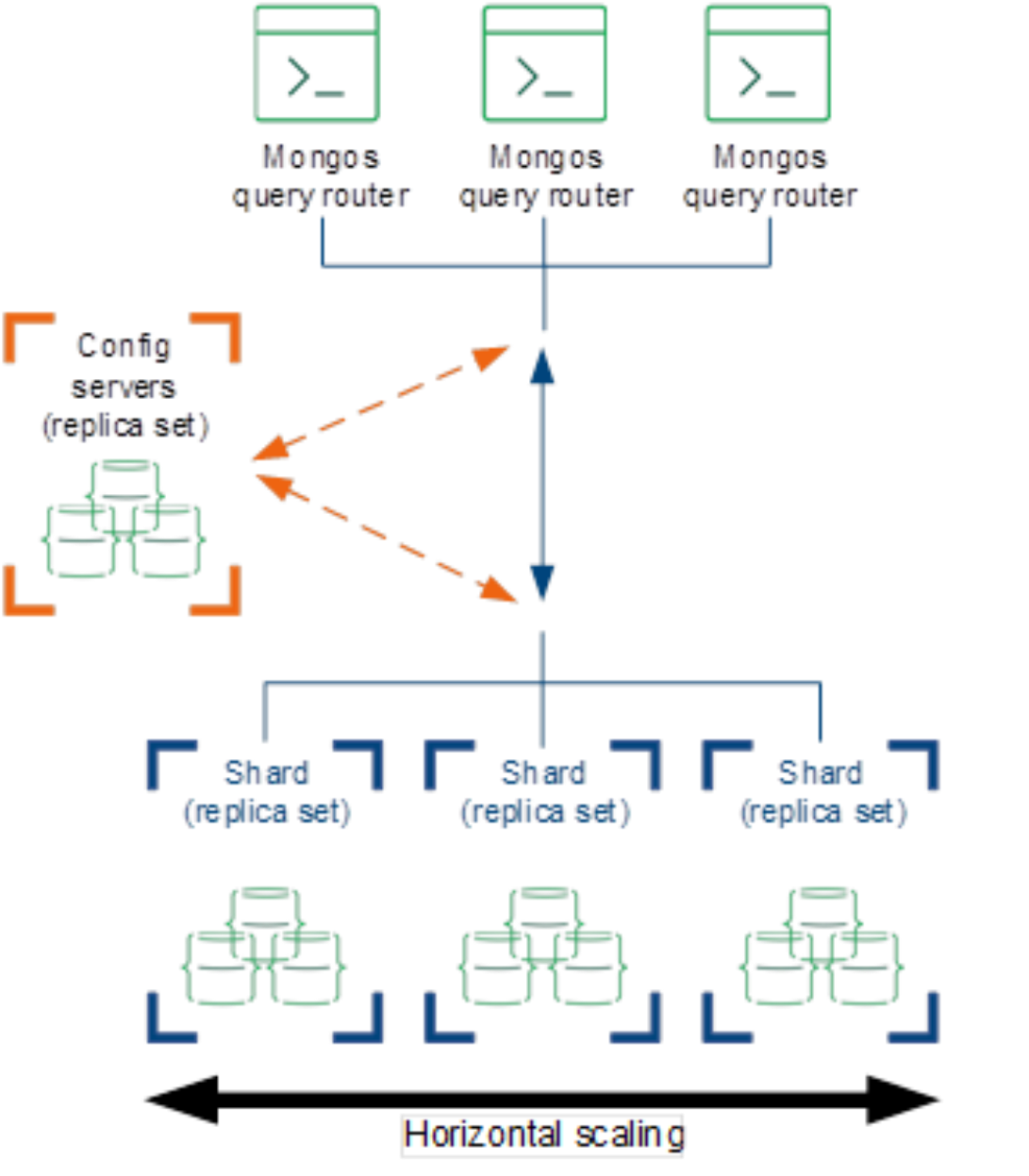
Figure 2. A MongoDB sharded cluster
Modern pluggable storage platform engines
MongoDB supports a wide variety of traditional and business-critical workloads including both operational and real-time analytics workloads. The MongoDB pluggable storage architecture extends new capabilities to the storage platform depending on the different workloads. These storage engines are responsible for storing the data and specify how the data is stored. Starting with version 4.2, MongoDB supports various storage engines including the WiredTiger storage engine, the in-memory engine, and the encrypted storage engine. The MMAPv1 storage engine was deprecated in version 4.2.
The WiredTiger storage engine is the default and preferred storage engine for most workloads. It persists data on disk and provides features such as a document-level concurrent model, journaling, checkpoints, and compression.
The in-memory storage engine stores the dataset in the memory to reduce data-access latency but does not persist data on disk. It is available only in the MongoDB Enterprise Edition.
The encrypted storage engine is the native encryption option for the WiredTiger storage engine. It provides encryption at rest and is only available in the MongoDB Enterprise Edition.
It is possible to mix the different engines based on the use case in the same replica set. This capability allows you to optimize and meet the needs of specific application requirements in a way that benefits the specific engines. For example, you can combine the in-memory engine for ultralow latency operations with the WiredTiger engine for on-disk persistence.
The advantage of MongoDB on PowerStore
MongoDB is a modern distributed database that requires a powerful, highly scalable, and flexible infrastructure. PowerStore is performance-optimized for any workload, and its adaptable platform complements modern distributed databases such as MongoDB. This section highlights the PowerStore features that benefit and extend the MongoDB environment.
Maximizing MongoDB efficiency by bringing it closer to the infrastructure and storage
Bringing applications closer to the data increases density and simplifies infrastructure operations. The unique PowerStore capability integrates with VMware vSphere, resulting in streamlined management in which storage resources plug directly into the virtualization layer. Using VMware as the onboard application environment results in unmatched simplicity, since support is inherently available for any standard VM-based applications. When a new PowerStore X model is deployed, the VASA provider is automatically registered, and the datastore is created, eliminating manual steps and saving time. PowerStore seamlessly integrates the VMware ESXi software into the same hardware. Two ESXi nodes are embedded inside the appliance which has direct access to the same storage resources. This close integration allows applications such as MongoDB to take full advantage of server and storage virtualization with simplified deployment and management. This feature is available on the PowerStore X model exclusively.
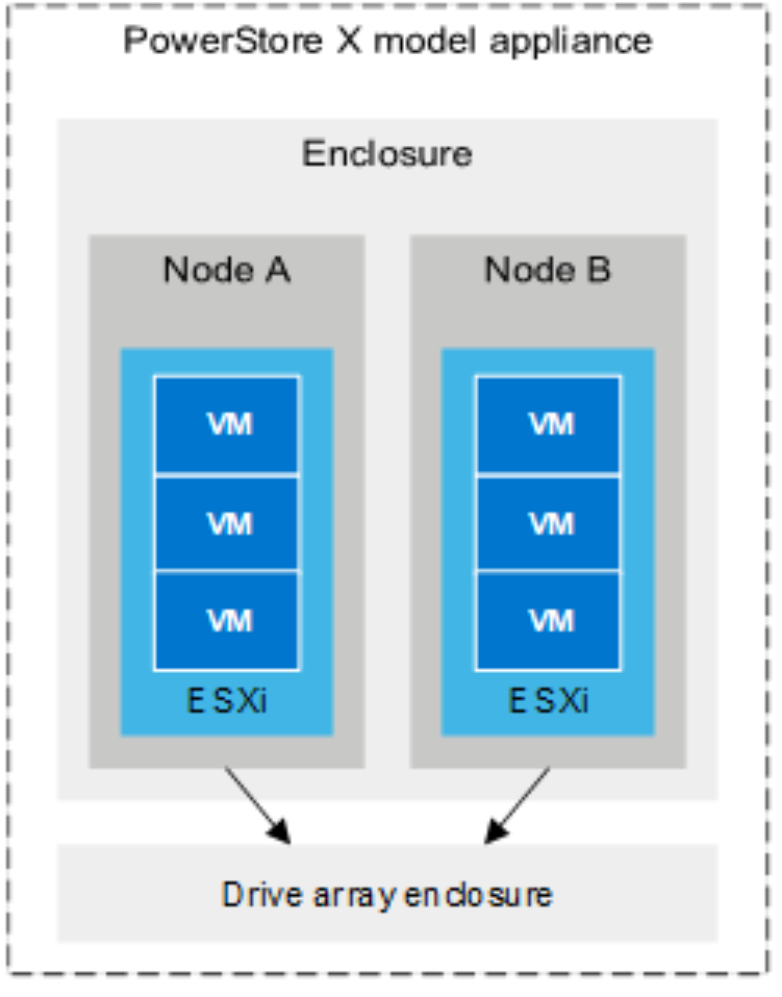
Figure 3. Embedded ESXi in the PowerStore X model appliance
Agile infrastructure, flexible scaling on a high-performing storage and compute platform
PowerStore provides flexible scaling with ease of management that compliments the MongoDB scale-up and scale-out distribution model. The integrated hypervisor dynamically scales up the MongoDB nodes when the workload requires it, while new replica sets, or shards, can be provisioned rapidly on the same or on additional appliances at a local or remote location.
When the application grows and requires more storage from a PowerStore appliance, administrators can scale up the storage capacity by adding disk expansion enclosures without service interruption at any time. The NVMe architecture is designed for the next-generation NVMe-based storage and takes advantage of low-overhead NVRAM cache. PowerStore is engineered to handle the most demanding MongoDB mixed workloads.
Mission-critical high availability and fault-tolerant MongoDB platform
PowerStore is designed for high availability and fault tolerance by incorporating redundant hardware components. Its active/active controller configuration enables both nodes to service I/O concurrently. The system monitors the storage devices continuously and automatically relocates data from failing devices to avoid data loss. The PowerStore X model appliance includes two ESXi nodes and redundant hardware components. The non-disruptive upgrade (NDU) feature further increases overall PowerStore availability. The updates are performed on the nodes in a rolling fashion. NDU supports PowerStore software releases, hotfixes, and hardware and disk firmware.
To support high-value business workloads and service requirements at the application level, it is essential to protect and ensure the availability of the primary member of a replica set. When the primary member of a replica set becomes inaccessible, the replica set cannot process any write operations until the primary member recovers, or a new primary is elected. Furthermore, the election requires most of the members to be available.
With standard VMware vSphere High Availability (HA) integrated into PowerStore, the embedded VMware ESXi hypervisor automatically restarts or migrates failed MongoDB servers to a different ESXi node to resume operations. This helps to restore MongoDB to its full operation capacity and minimizes the chance of the database going offline or read-only.
To achieve an even higher level of redundancy and application availability, you can deploy the MongoDB replica set and sharded cluster across multiple PowerStore appliances in different data centers. PowerStore improves MongoDB availability and provides unparalleled flexibility and mobility to relocate and move across data centers and appliances.
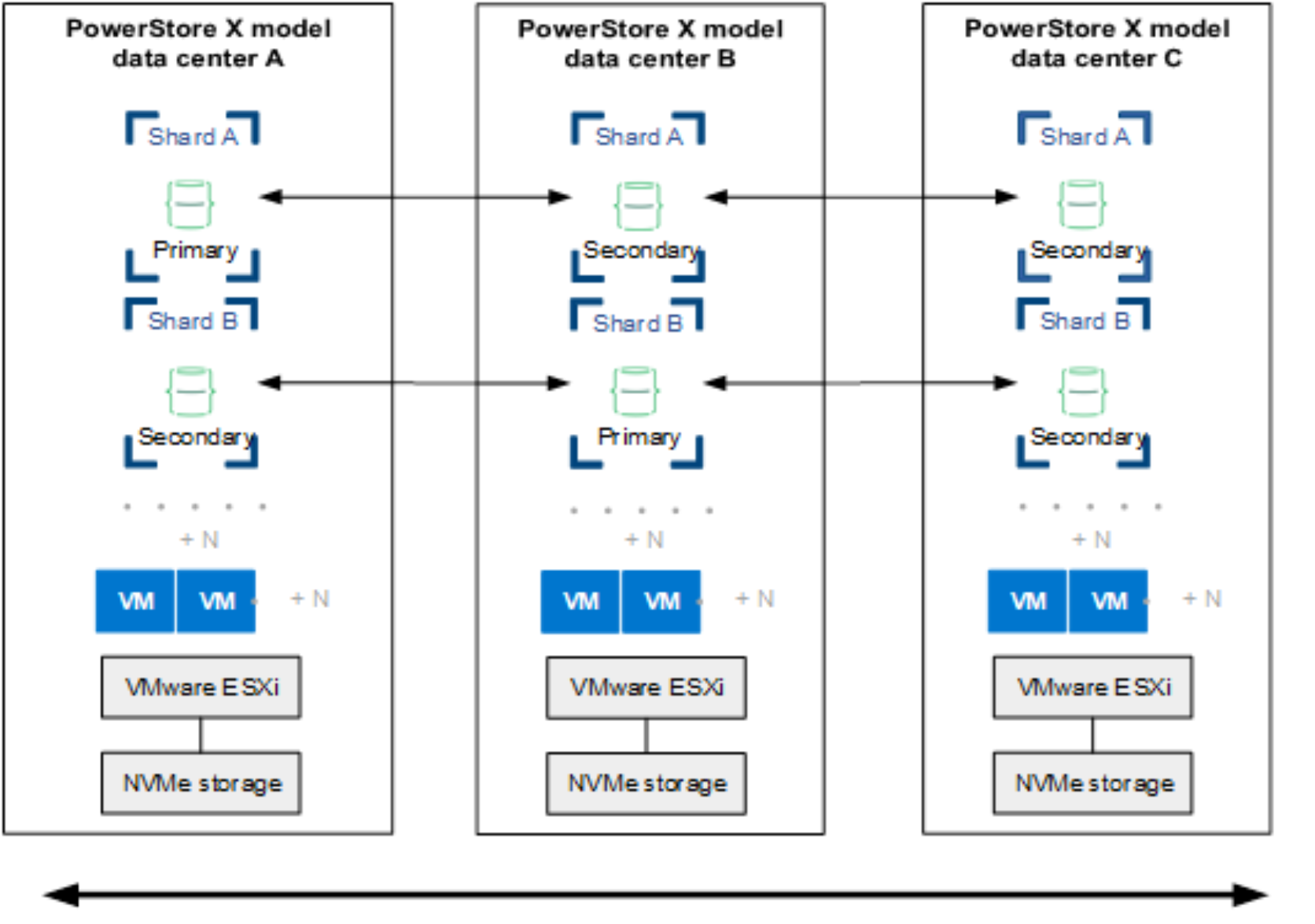
Figure 4. Geographically distributed MongoDB sharded cluster on multiple PowerStore X model appliances
PowerStore inline data reduction reduces storage consumption and cost
As business data continues to grow, big data has become a critical component in the business analytics world. A tremendous amount of data is pulled from all kinds of sources continuously and run through cloud-scale applications such as MongoDB to gain insights into customers and businesses. When putting MongoDB replica sets on PowerStore, the always-on inline data reduction feature greatly reduces the actual storage used but still maintains the application data availability and protection that is expected from MongoDB.
Efficient and convenient snapshot data backup
PowerStore provides MongoDB with additional data protection through array-based snapshots. A PowerStore snapshot is a point-in-time copy of the data. The snapshots are space efficient and require seconds to create. Snapshot data are exact copies of the target data and can be used for application testing, backup, or DevOps. Because of the tight integration with VMware vSphere, vVol-based VM snapshots can be taken in vSphere through the storage policy using Storage Policy Based Management. When taking the VM snapshots from vSphere, it passes the request to PowerStore to create the vVol-based VM snapshots which have no performance impact on the VMs. You can view the VM snapshot information in PowerStore and vCenter.
Secure data protection with ease of mind
With high-value data driving business applications, data security is a top concern for all organizations. Lost or stolen data can seriously damage the reputation of an organization and result in huge financial costs and loss of customer trust. Dell Technologies engineered PowerStore with Data at Rest Encryption (D@RE) which uses self-encrypting drives. Once activated, data is encrypted as it is written to disk using the 256-bit Advanced Encryption Standard (AES). PowerStore D@RE provides this data security benefit to MongoDB while eliminating application overhead, performance penalties, and administrative overhead that is typically associated with software-based solutions. PowerStoreOS 3.0 introduces support for external key managers in addition to the array-based, self-managed keys.
PowerStoreOS 3.5 introduces a new Secure Snapshot feature that provides extra protection from accidental or malicious data deletion. Secure Snapshot is a special type of snapshot that users cannot delete manually.
Unified infrastructure and services management (Deep virtualization integration)
PowerStore provides deep integration with VMware management tools and services with Dell Virtual Storage Integrator (VSI), VMware vRealize Operations Manager (vROps), VMware vRealize Orchestrator (vRO), and VMware Storage Replication Adapter (SRA). For PowerStore X models, the built-in ESXi nodes can be seamlessly integrated into your existing vCenter infrastructure, enabling you to manage all VMware infrastructure and services from a unified management platform.
MongoDB value and future expansion
New business analytics applications like MongoDB are fundamentally changing the way data is used to support the business. Massive amounts of data and technology innovation together provide the opportunity for organizations to transform. As the value and scale of this data grows, it is critical to have a future-proof platform that is easy to manage, provides technical innovation for future growth, and can support the application architecture. MongoDB on PowerStore brings IT organizations the ability to be agile, efficient, and responsive to business demands.
Terminology
The following table provides common terms used with PowerStore and VMware.
Table 2. Terminology
|
Term |
Definition |
|
Appliance |
Solution containing a base enclosure and attached expansion enclosures. The size of an appliance could be only the base enclosure or the base enclosure plus expansion enclosures. |
|
Base enclosure |
Enclosure containing both nodes (node A and node B) and 25 NVMe drive slots. |
|
Expansion enclosure |
Enclosures that can be attached to a base enclosure to provide additional storage. |
|
NDU |
A non-disruptive upgrade (NDU) updates PowerStore and maximizes its availability by performing rolling updates. This includes updates for PowerStore software releases, hotfixes, and hardware and disk firmware. |
|
NVMe |
Non-Volatile Memory Express is a communication interface and driver for accessing non-volatile storage media such as solid-state drives (SSD) and SCM drives through the PCIe bus. |
|
NVRAM |
Non-volatile random-access memory is persistent random-access memory that retains data without an electrical charge. NVRAM drives are used in a PowerStore appliance as additional system write caching. |
|
PowerStore Manager |
An HTML5 management interface for creating storage resources and configuring and scheduling protection of stored data on PowerStore. PowerStore Manager can be used for all management of PowerStore native replication. |
|
PowerStore node |
Storage controller that provides the processing resources for performing storage operations and servicing I/O between storage and hosts. Each PowerStore appliance contains two nodes. |
|
PowerStoreOS |
The PowerStore Operating System |
|
PowerStore T model |
Container-based storage system that is running on purpose-built hardware. This storage system supports unified (block and file) workloads, or block-optimized workloads. |
|
PowerStore X model |
Container-based storage system that runs inside a virtual machine that is deployed on a VMware hypervisor. Besides offering block-optimized workloads, PowerStore also allows you to deploy applications directly on the array. |
|
SCM |
Storage-class memory, also known as persistent memory, is an extremely fast storage technology supported by the PowerStore appliance. |
|
Snapshot |
A point-in-time view of data that is stored on a storage resource. You can recover files from a snapshot, restore a storage resource from a snapshot, or provide access to a host. |
|
Storage container |
A VMware term for a logical entity that consists of one or more capability profiles and their storage limits. This entity is known as a vVol datastore when it is mounted in vSphere. |
|
Storage Policy Based Management (SPBM) |
Using policies to control storage-related capabilities for a VM and ensure compliance throughout its life cycle. |
|
Thin clone |
A read/write copy of a thin block storage resource (volume, volume group, or vSphere VMFS datastore) that shares blocks with the parent resource. |
|
User snapshot |
Snapshot that is created manually by the user or by a protection policy with an associated snapshot rule. This snapshot type is different than an internal snapshot, which is taken automatically by the system with asynchronous replication. |
|
Secure Snapshot |
A special type of snapshot that users cannot delete manually. |
|
VMware vSphere Virtual Volumes (vVols) |
A VMware storage framework which allows VM data to be stored on individual vVols. This ability allows for data services to be applied at a VM-level of granularity and according to SPBM. vVols can also refer to the individual storage objects that are used to enable this functionality. |
|
Volume |
A PowerStore block-level storage device that can be shared using various storage protocols. |
Considerations
Choosing the right model
PowerStore provides various deployment options for MongoDB, including deploying it on the PowerStore T appliance or on the PowerStore X appliance. This flexibility enables you to choose the best configuration for your needs.
When deploying MongoDB on external hosts connected to the PowerStore T appliance, the appliance can focus exclusively on performing storage operations, allowing it to dedicate 100% of its resources to this task. The external hosts can run any operating systems supported by MongoDB. You can also add them as external VMware ESXi nodes to your existing VMware infrastructure, allowing you to create MongoDB VMs within the VMware environment.
Alternatively, deploying MongoDB virtual machines within a PowerStore X appliance allows the application to execute directly on the storage appliance, resulting in a seamless, all-in-one experience. The PowerStore T and PowerStore X appliances share many hardware components, which means that they have access to many of the same hardware features, including high availability, fault tolerance, non-disruptive upgrades, data reduction, and data protection capabilities, just to name a few. However, it is important to note that certain features, specifically with PowerStoreOS 3.0 and PowerStoreOS 3.5, are exclusively available on the PowerStore T models. For details, see the white paper Dell PowerStore: Introduction to the Platform and the blog What’s New in PowerStoreOS 3.5 on the Dell Technologies Info Hub.
Workload considerations
Before you select the PowerStore model, storage media and capacity, and connectivity options, you must first understand the target MongoDB environment. There are many factors to consider that are not limited to the following:
- Understand the performance that is required by the database servers in terms of IOPS, latencies, and bandwidth.
- Know the expected workload types, such as a read-mostly workload, update-intensive workload, or a combination of several workload types.
- Consider the amount of data to keep and future data growth. After you perform a careful analysis against the dataset, you may factor the data-reduction savings into the calculated storage capacity requirements. The actual savings might vary because the type of data stored can dramatically affect the effectiveness of the data-reduction ratio. For example, the binary datatype is less compressible than the text datatype.
- Account for the number of database servers in a replica set. MongoDB uses replica sets to provide data redundancy and availability. Having multiple copies of data also increases the read capacity to clients in some cases.
- Plan to have extra copies of data for reporting, backup, or disaster recovery.
When deploying MongoDB directly on the PowerStore X appliance, it is important to consider the additional resources required for the application virtual machines. Depending on the scale of the MongoDB cluster, multiple appliances may be required for the virtual machines, even if a single appliance has sufficient storage capacity.
- It is recommended to distribute the servers evenly across all ESXi nodes on the appliances. Additionally, it is important to prepare for the possibility of an ESXi node failure and decide whether CPU and memory resources should be reserved on an ESXi node to maintain optimal performance for all hosts.
- It is not advisable to overcommit CPU and memory resources on PowerStore ESXi nodes in production or mission-critical environments. However, in test or development environments where performance guarantees are not a concern, this practice may be acceptable.
Review the MongoDB documentation to learn about other software and hardware requirements.
For sizing questions and planning for the PowerStore appliances, contact your Dell Technologies representative to discuss the requirements and access to a suite of analytic tools, such as LiveOptics and CloudIQ, that are designed to help gather and analyze workload and performance data in an existing environment.
Preparing PowerStore appliance for MongoDB deployment
PowerStore T appliance
If external hosts are configured and connected to the PowerStore T appliance on a storage area network (SAN), it is recommended to configure multiple connections of the same protocol between the hosts and the appliance to ensure redundancy and to optimize performance. PowerStore supports several protocols, including Fibre Channel, iSCSI, NVMe/FC, or NVMe/TCP.
PowerStore can also present vVol based storage containers to external ESXi hosts using Fibre Channel, iSCSI, or NVMe protocols. Support of storage containers with the NVMe protocol was introduced in PowerStoreOS 3.0. However, you must manually register the VASA provider and mount the storage containers manually on the external ESXi hosts.
It is important to note that the NVMe protocols are relatively new to Linux, and therefore, only the latest operating system versions support these protocols. Additionally, some vendors may consider them to be technology previews or beta features, making them unsuitable for use in a production environment. Check with your operating system vendor to confirm the latest support status of this feature before deploying it in your environment.
For more information about configuring FC, iSCSI, and NVMe for Linux, see the Dell PowerStore Host Configuration Guide at Dell Technologies Support.
For information about MongoDB compatible Linux operating systems, see https://www.mongodb.com/compatibility.
PowerStore X appliance
Post initialization configuration
During the initial setup of the PowerStore X appliance, the initial configuration wizard (ICW) configures the appliance and registers the VASA provider with the specified vCenter. After ICW is completed, the appliance appears in vCenter as a new Datacenter and the vVol based PowerStore storage container is mounted automatically on the internal ESXi nodes through the iSCSI protocol. See Figure 5 and Figure 6. The PRIVATE datastores are reserved for PowerStore internal controller VM use only and should never be used for user VMs.

Figure 5. vVol based PowerStore Storage Container automatically mounted in vCenter

Figure 6. Default storage container on the PowerStore X model appliance
PowerStore also creates a vSphere distributed switch (VDS) and a set of preconfigured distributed port groups for internal communications during the initial configuration process. These preconfigured port groups should not be used with the user virtual machines. A new port group should be set up to connect user virtual machines on the network.
In vCenter, go to Networking > your PowerStore Distributed Virtual Switch. Right click on the DVS and select Distributed Port Group and New Distributed Port Group. Follow the wizard to complete the port group creation. See Figure 7.
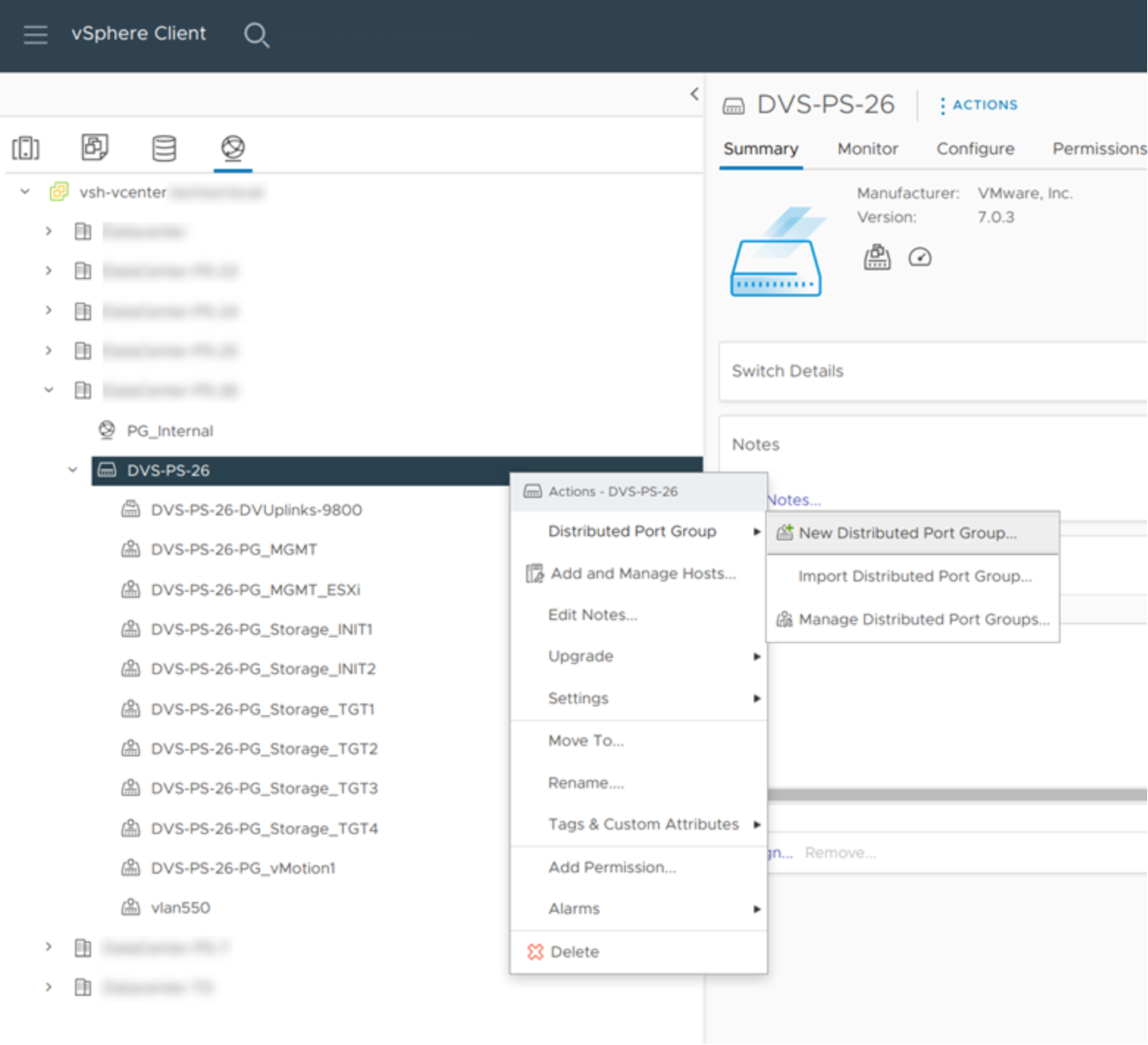
Figure 7. Create a new distributed port group
PowerStore X optimization
To ensure the optimal performance of PowerStore X appliance, the appliance is optimized according to the best practices in the following documents. These changes include adding additional iSCSI networks, increasing the ESXi queue depth and enabling Jumbo Frames for the iSCSI storage network. For details about the performance best practices, see the following documents.
- PowerStore: PowerStore X Performance Best Practice Tuning
- Dell PowerStore Virtualization Infrastructure Guide
Starting in PowerStoreOS 1.0.3, the ICW includes the optimization tasks for PowerStore X appliances.
Provision virtual machines for MongoDB nodes
In VMware vCenter, create the virtual machines in the PowerStore Datacenter. Ensure the non-private PowerStore datastore is used for the user virtual machine virtual disks. Install a MongoDB compatible Linux operating system on the virtual machines or use an existing VM template to create the virtual machines. For more information about MongoDB compatible operating systems, see https://www.mongodb.com/compatibility.
PowerStore automatically tracks the vVols that belong to each VM. The PowerStore Manager UI shows these vVols objects under the Virtual Machines view. See Figure 8.
For more information about vVols, storage containers, and vSphere VASA, see the Dell PowerStore Virtualization Infrastructure Guide.
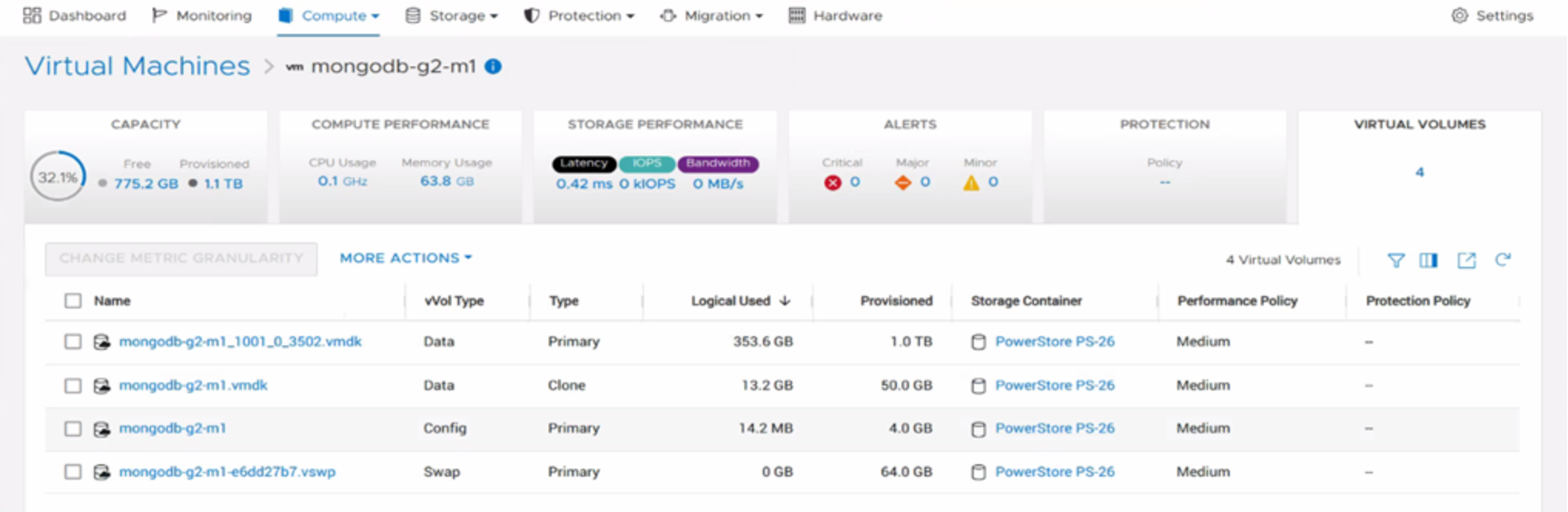
Figure 8. Listing vVols objects that are associated with a VM
MongoDB installation and configuration
Operating system tuning
This paper focuses on Red Hat based operating systems. MongoDB recommends adjusting the following configuration on the Linux operating system.
- Modify the operating system user limits for the mongod user. Create the /etc/security/limits.d/99-mongod.conf file with the following lines.
mongod soft nofile 64000
mongod hard nofile 64000
mongod soft nproc 64000
mongod hard nproc 64000
mongod soft memlock unlimited
mongod hard memlock unlimited
- To disable transparent hugepages, append the following to the GRUB_CMDLINE_LINUX line in the /etc/default/grub file.
transparent_hugepage=never
- Reboot the system.
- To disable NUMA, use one of the following methods.
- Disable NUMA on the BIOS on a physical server. This method does not apply to the PowerStore X model internal ESXi nodes.
- Disable vNUMA on a VM.
- If hot-add CPU is enabled on a VM, it automatically disables the vNUMA feature for that VM.
- If NUMA is not disabled, start the mongod process with the following numactl command that would achieve similar effect of turning off numa.
# numactl --interleave=all mongod -f /etc/mongod.conf
- Depending on your MongoDB settings, you might also need to adjust the Linux parameters. The following lists a few of these parameters.
- fs.file-max
- kernel.pid_max
- kernel.threads-max
- vm.map_map_count
- vm.zone_reclaim_mode
- vm.swappiness
- net.ipv4.tcp_keepalive_time
To review and adjust Linux kernel parameters, run sysctl -p to list all current values. To override any parameter, define the new value in /etc/sysctl.conf or /etc/sysctl.d/${parameter file}. Reload the sysctl file or reboot the system. For more information about MongoDB settings, see the MongoDB documentation.
Multipath I/O
Multipath I/O is a software solution implemented at the host operating system level, providing path redundancy, failover, and performance-enhancing capabilities. While it is an optional solution, it is highly recommended to deploy it on hosts connected to the PowerStore appliance. Device Mapper Multipath (DM-Multipath) is a free native Linux multipath I/O solution supported by all Linux distributions. Red Hat Enterprise Linux includes the multipath software in the device-mapper-multipath package. SUSE Linux Enterprise Server includes it in the multipath-tools package.
DM-Multipath has a set of default settings for an extensive list of storage models from different vendors. The default settings allow the software to work with PowerStore right out of the box. However, these settings might not be optimal for all situations and should be reviewed and modified if necessary. For example, although PowerStore is ALUA-capable, the default settings may not activate ALUA by default. For the most up-to-date and accurate configuration settings for PowerStore, it is highly recommended to consult the Dell PowerStore Host Configuration Guide at Dell Technologies Support.
File system
A separate file system is created for MongoDB database files to isolate the database from the operating system. MongoDB recommends using the XFS file system because it generally performs better than ext4 file system. Also, consider using the noatime mount option with the file system. It might improve overall performance in some situations.
Space reclamation
PowerStore supports the SCSI UNMAP/TRIM command to release storage space on PowerStore. To reclaim space on the PowerStore appliance, use one of the following procedures:
- Mount the file system using the discard mount option. With this option, the operating system issues the discard command to the PowerStore to release the storage space after files are deleted on the file system automatically. However, this may have a performance impact and therefore Dell Technologies recommends using the fstrim command instead.
/dev/mapper/sdb /data xfs discard,noatime,defaults 0 0
- Issue the fstrim command on a mounted file system to discard the unused blocks in the file system. The administrator can schedule a system cron job to perform the operation outside of busy hours.
# fstrim -v /data
MongoDB installation
The installation steps are well documented on the MongoDB portal. There are several ways to install the MongoDB on a self-managed platform. The following summarizes the installation of MongoDB Enterprise edition version 6.0 on a Red Hat based system.
- Configure the MongoDB YUM repository.
Save the following entry in the /etc/yum.repos.d/ directory.
[mongodb-enterprise-6.0]
name=MongoDB Enterprise Repository
baseurl="https://repo.mongodb.com/yum/redhat/$releasever/mongodb-enterprise/6.0/$basearch/"
gpgcheck=1
enabled=1
gpgkey=https://www.mongodb.org/static/pgp/server-6.0.asc
- Install the MongoDB packages.
# yum install mongodb-enterprise
- Exclude MongoDB packages in /etc/yum.conf – optional.
Besides disabling the MongoDB YUM repository, you can explicitly exclude the packages from future yum updates by adding the following line in the /etc/yum.conf file.
exclude=mongodb-enterprise-database,mongodb-enterprise-server,mongodb-enterprise,mongodb-mongosh,mongodb-database-tools,mongodb-enterprise-tools,mongodb-enterprise-cryptd,mongodb-enterprise-mongos,mongodb-enterprise-database-tools-extra
MongoDB Replica Set configuration
A MongoDB configuration file based on the following template is installed on each MongoDB replica set member node. It represents a basic replica set configuration. To see all available configuration options, see the MongoDB documentation on configuration options.
The storage.dbPath option specifies the file system path for the datafile.
The systemLog.path option specifies the location of the MongoDB log.
The net option specifies the node DNS hostname and port on which the mongod process listens for client connections.
The replication.replSetName option specifies the replica set that the node belongs to.
The replication.oplogSizeMB option specifies the maximum size for the replication operation log. The default is 5% of available space when this option is not specified.
storage:
dbPath: <string>
journal:
enabled: true
directoryPerDB: true
wiredTiger:
engineConfig:
journalCompressor: <string>
directoryForIndexes: true
collectionConfig:
blockCompressor: <string>
indexConfig:
prefixCompression: true
systemLog:
destination: file
logAppend: true
path: <string>
net:
port: 27017
bindIp: <string>,127.0.0.1"
processManagement:
timeZoneInfo: /usr/share/zoneinfo
fork: true
replication:
replSetName: <string>
oplogSizeMB: <int>
WiredTiger storage engine
The WiredTiger storage engine has been the default storage engine since MongoDB version 3.2. The MMAPv1 storage engine is obsolete and is no longer available in MongoDB. Among other features such as journaling, document-level concurrent model, checkpointing, WiredTiger also provides several compression algorithms to use with document collections, journals, and prefix compression for indexes. The benefit of using MongoDB compression is to save both memory and disk consumption on the database hosts.
MongoDB provides four different compressor settings:
- none – turn off compression
- snappy – this is the default compression
- zlib
- zstd – new in version 4.2
To change the compression algorithm, edit and set the storage.wiredTiger options in /etc/mongod.conf. If the options are not explicitly set, the snappy compression is used implicitly.
storage:
wiredTiger:
engineConfig:
journalCompressor: <snappy(default)|zlib|zstd|none>
collectionConfig:
blockCompressor: <snappy(default)|zlib|zstd|none>
indexConfig:
prefixCompression: <true(default)|false>
Data reduction study of PowerStore and MongoDB
Overview
The PowerStore inline data reduction feature provides maximum space savings by combining both software data deduplication and hardware compression. Data reduction is always active and works seamlessly in the background with PowerStore. MongoDB also includes several compression options to help reduce the amount of space that is consumed by the operating system.
This section reviews the compression options that MongoDB offers and explains the effects of combining PowerStore data reduction with MongoDB compression. A test environment was set up on a PowerStore X model to run a series of tests with the different MongoDB compressions. Both logical and physical space consumptions were recorded and compared.
Test environment
The test environment consists of a MongoDB replica set that consists of three database-host virtual machines. The VMs are installed on the PowerStore X appliance. Another VM is configured to host the YCSB benchmark tool. The YCSB VM resides on a different VMware cluster that uses a different storage appliance.
Since the last publication, the test environment has been updated to PowerStoreOS 3.2, vSphere 7.0.3, Rocky Linux 8.3, and MongoDB Enterprise Edition 6.0.
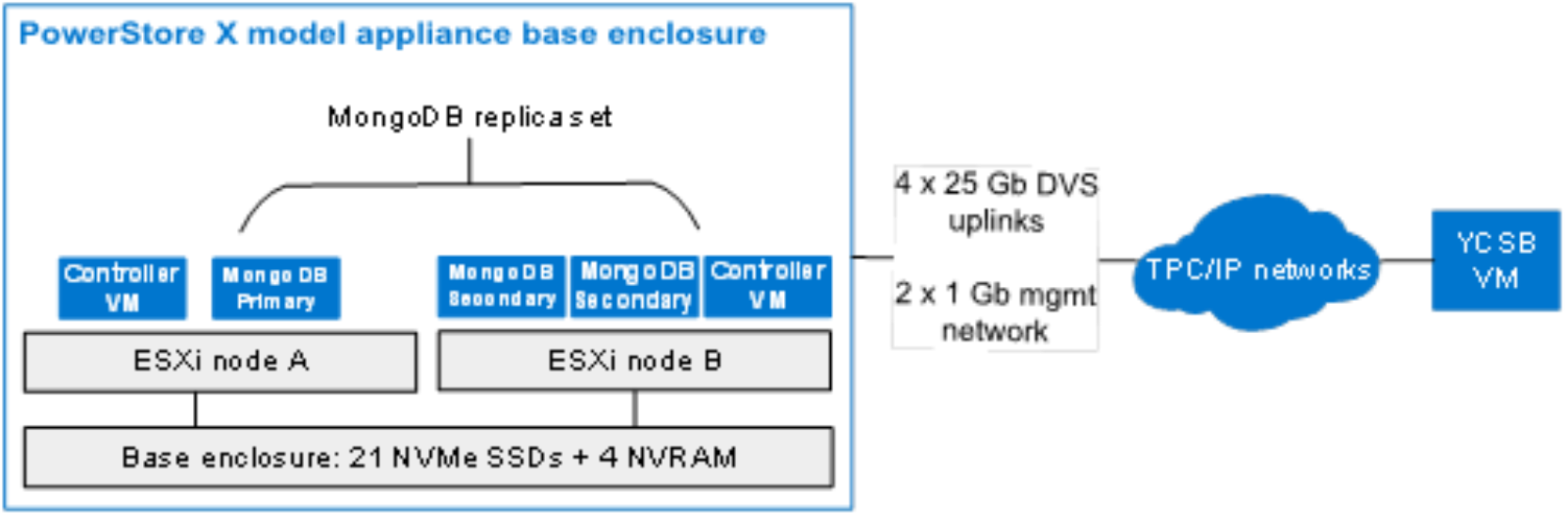
Figure 9. Test environment
PowerStore X appliance
Table 3 summarizes the PowerStore X appliance hardware specification that is used in this paper.
Table 3. PowerStore X specification used in the test
|
Specification |
Detail |
|
Model |
PowerStore X model |
|
NVMe SSD configured |
21 x 1.9 TB drives in the base enclosure |
|
System memory |
2.6 TB |
|
Mezzanine cards |
2 |
|
I/O modules |
4 |
|
25 Gb iSCSI ports |
8 total; 4 active |
Networking
On the PowerStore X model in the test, each node has two 25 Gb connections for vDS uplinks and one 1 Gb connection for the management network. A new distributed port group is created on the vDS and assigned a different VLAN to allow guest VMs network communication. All MongoDB database host VMs are assigned to the same distributed port group in the test. The PowerStore X appliance is connected to a Dell Networking 5148F-ON series switch.
MongoDB database hosts
For our tests, we installed three Rocky Linux database host VMs directly on the PowerStore X model appliance. This unique feature allowed us to consolidate infrastructure and bring applications closer to storage resources. Table 4 summarizes the database host VM specification.
Table 4. Database host VM specification
|
Specs |
Value |
|
vCPUs |
16 |
|
Memory |
128 GB |
|
Virtual NICs |
1 x 10 Gb |
|
Virtual SCSI controllers |
2 |
|
Virtual disks |
|
|
Guest operating system |
Rocky Linux 8.6 |
YCSB host
Another Rocky Linux VM is configured to host the YCSB software. This VM resides on a vSphere infrastructure cluster that is separate from the PowerStore X model appliance. Table 5 shows the YCSB host VM specification.
Table 5. YCSB host VM specification
|
Specification |
Value |
|
vCPUs |
32 |
|
Memory |
128 GB |
|
Virtual NICs |
1 x 10 Gb |
|
Virtual SCSI controllers |
2 |
|
Virtual disks |
1 x 50 GB for the operating-system drive |
|
Guest operating system |
Rocky Linux 8.6 |
YCSB installation
YCSB is an open-source benchmark tool used for testing the performance of various databases, including MongoDB, Cassandra, HBase, and many more. The tool is used to generate the test data in the MongoDB database and to run various workloads against the database. You can download the software from https://github.com/brianfrankcooper/YCSB.
YCSB requires Apache Maven, Java, and Python. You can download Apache Maven software from https://maven.apache.org/. You can install Java jdk and Python directly from the operating system repository.
The following steps outline the process to install the YCSB software on the YCSB host VM. Perform the following steps as root user on the YCSB VM.
- Install Java JDK.
# yum install java-1.8.0-openjdk*
- Install Python 2 and set the default python link to python2.
# yum install python2
# alternatives --set python /usr/bin/python2
Note: YCSB does not support Python 3 yet.
- Install Apache Maven software.
# cd /usr/local
# curl -O --location http://mirrors.advancedhosters.com/apache/maven/maven-3/3.6.3/binaries/apache-maven-3.6.3-bin.tar.gz
# tar xfz apache-maven-3.6.3-bin.tar.gz
# ln -s /usr/local/apache-maven-3.6.3 /usr/local/maven
- Create a Maven profile with the following lines in /etc/profile.d/maven.sh.
export M2_HOME=/usr/local/maven
export PATH=${M2_HOME}/bin:${PATH}
- Log off and log in to the system.
- Verify that Maven is installed properly.
# mvn -v
Apache Maven 3.6.3 (cecedd343002696d0abb50b32b541b8a6ba2883f)
Maven home: /usr/local/maven
Java version: 1.8.0_342, vendor: Red Hat, Inc., runtime: /usr/lib/jvm/java-1.8.0-openjdk-1.8.0.342.b07-2.el8_6.x86_64/jre
Default locale: en_US, platform encoding: UTF-8
OS name: "linux", version: "4.18.0-372.19.1.el8_6.x86_64", arch: "amd64", family: "unix"
- Install the YCSB software.
# cd /usr/local
# curl -O --location https://github.com/brianfrankcooper/YCSB/releases/download/0.17.0/ycsb-0.17.0.tar.gz
# tar xfz ycsb-0.17.0.tar.gz
# ln -s /usr/local/ycsb-0.17.0 /usr/local/ycsb
For more information about YCSB, read the wiki articles on https://github.com/brianfrankcooper/YCSB/wiki.
Note: The mongodb binding files are already in this archive. There is no need to install the binding files separately.
Test methodology and results
Overview
Several tests are performed to invoke YCSB processes to insert a fixed number of records into the database. Each test cycle consists of the following steps:
- Reboot the database VMs to clear out memory cache.
- Delete the data previously loaded to clear out the operating system and PowerStore data reduction saving information from the previous test.
- Start YCSB processes to insert 200,000,000 records into the replica set.
- After each test, the following information is collected:
- Guest operating system statistics: CPU and memory utilization
- Guest operating system disk space: File system usage
- PowerStore data reduction statistics: Physical and logical used
- YCSB results: Operations per second, average latencies, and thread counts
After completing all the tests using different compressions, the results collected are analyzed and compared based on the following metrics:
- Runtime of the data load reported by YCSB
- Total disk consumption reported by MongoDB and the operating system
- Data reduction saving reported by PowerStore X appliance
- Guest operating system CPU and memory utilization reported by atop
Loading data with YCSB
YCSB provides six predefined core workloads. You can also add custom workloads if the predefined workloads do not meet the testing criteria. All six workloads have a similar dataset. For our compression tests, the workloada dataset is used to populate the data in the database.
The following command shows an example of a YCSB process that ingests the data.
./bin/ycsb load mongodb -s -P workloads/workloada -p mongodb.url=mongodb://${replica_member1}:27017,${replica_member2}:27017,${replica_member3}:27017/ycsb?w=1 -threads 32 -p batchsize=100
For more information about YCSB and the core workloads, see the GitHub article Core Workloads.
Data ingestion rate
Figure 10 summarizes the results for insert operations per second when ingesting the data into the database. The numbers indicate that using software compression imposes a certain amount of overhead as the data needs to go through additional processing. The amount of overhead varies depending on the compression algorithms used. For better insert performance, turn off compression or use the default snappy compression in MongoDB. The zstd or zlib, which compresses better than the snappy algorithm, have slower insert performance.
Note: The insert ops/sec numbers provided are intended to show the impact of using different compression in the context of data reduction. This allows us to compare the relative effects to each compression algorithm. They are not meant to be the indicator of the absolute best performance numbers.
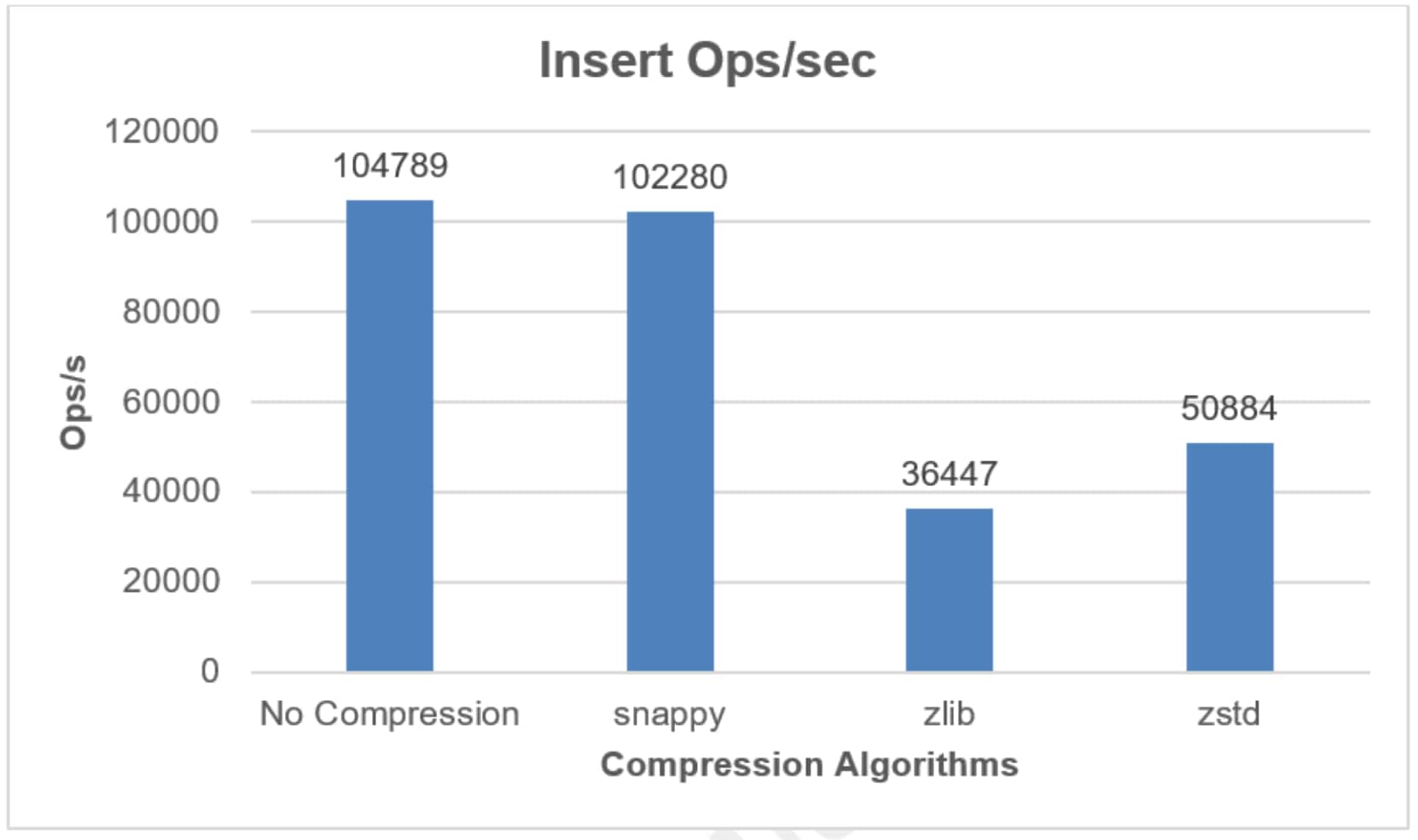
Figure 10. Insert performance comparison on different compression algorithms
Data reduction savings
Figure 11 shows the space savings on the operating system and the extra savings on the PowerStore appliance.
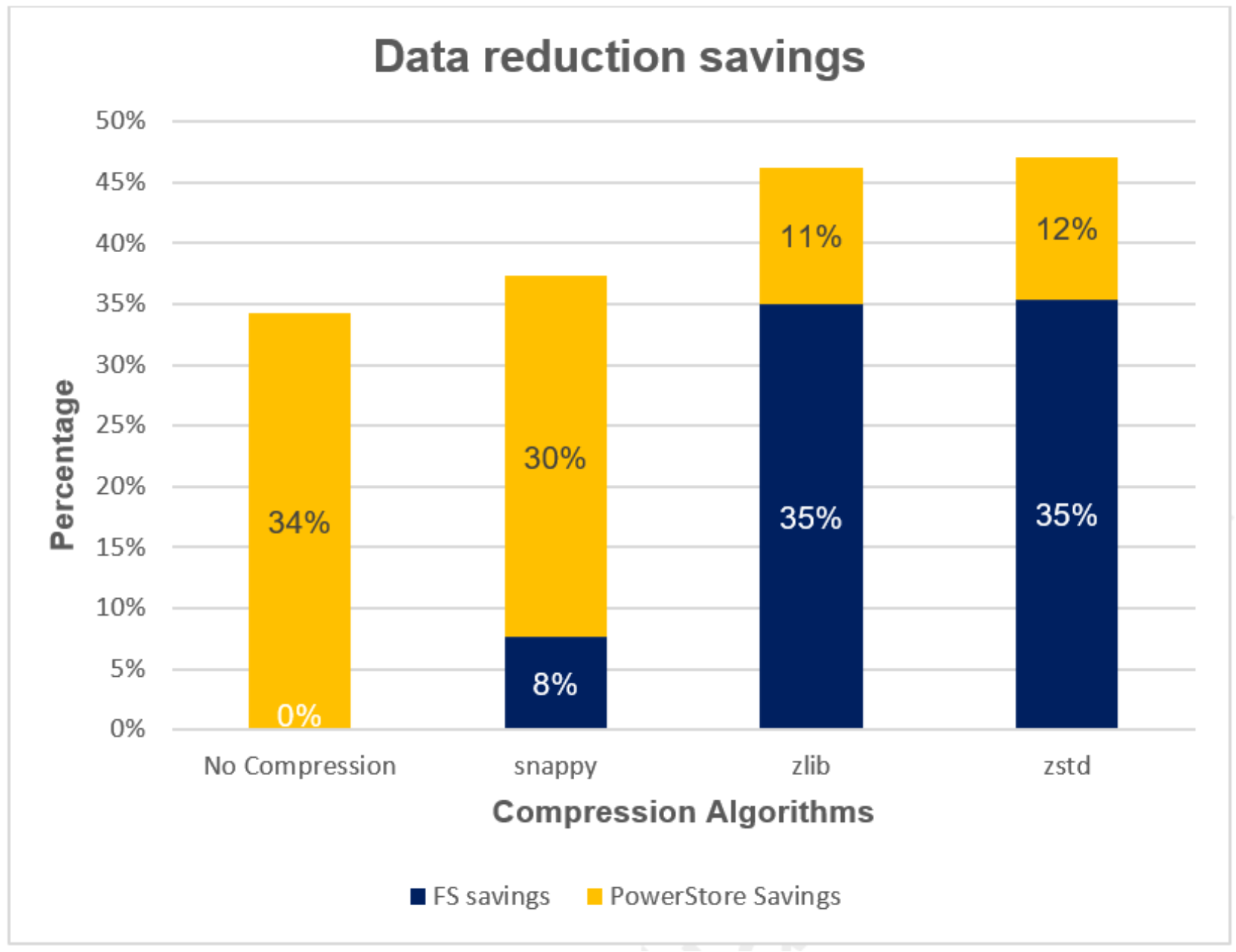
Figure 11. MongoDB compression and PowerStore data reduction savings different compression algorithms
Blue column: Represents the space reduction on the operating system level
Yellow column: Represents the additional reduction saving on the PowerStore appliance
Without MongoDB compression enabled, the total file system space consumed by all three replica set members would be around 1 TB including the operating system. It is represented as 0% savings on the operating system. However, the actual physical space consumed on the PowerStore appliance is much less than 1 TB. PowerStore alone reduced the total physical space consumption by 34%.
With the snappy compression, which is the default in MongoDB, an 8% reduction is realized on the file system. However, PowerStore provided an additional 30% reduction savings.
Both zlib and zstd compression algorithms do a better job of saving space on the file system with 35% reduction. It is worth noting that even with the more efficient compression algorithms like zstd and zlib, PowerStore can further reduce the total physical space consumption by 11% and 12% respectively.
Note: The amount of reduction varies depending on the type of data.
Data ingestion time
Using YCSB, 200 million documents are inserted into the database using different compression algorithms. Figure 12 compares the total data ingestion time of these compression algorithms.
With zlib and zstd compression algorithms, the time spent writing the dataset to the database is longer than using the default snappy compression or no compression. The zstd algorithm appears to perform better than the zlib algorithm as it achieved a similar reduction saving but shorter ingestion time.
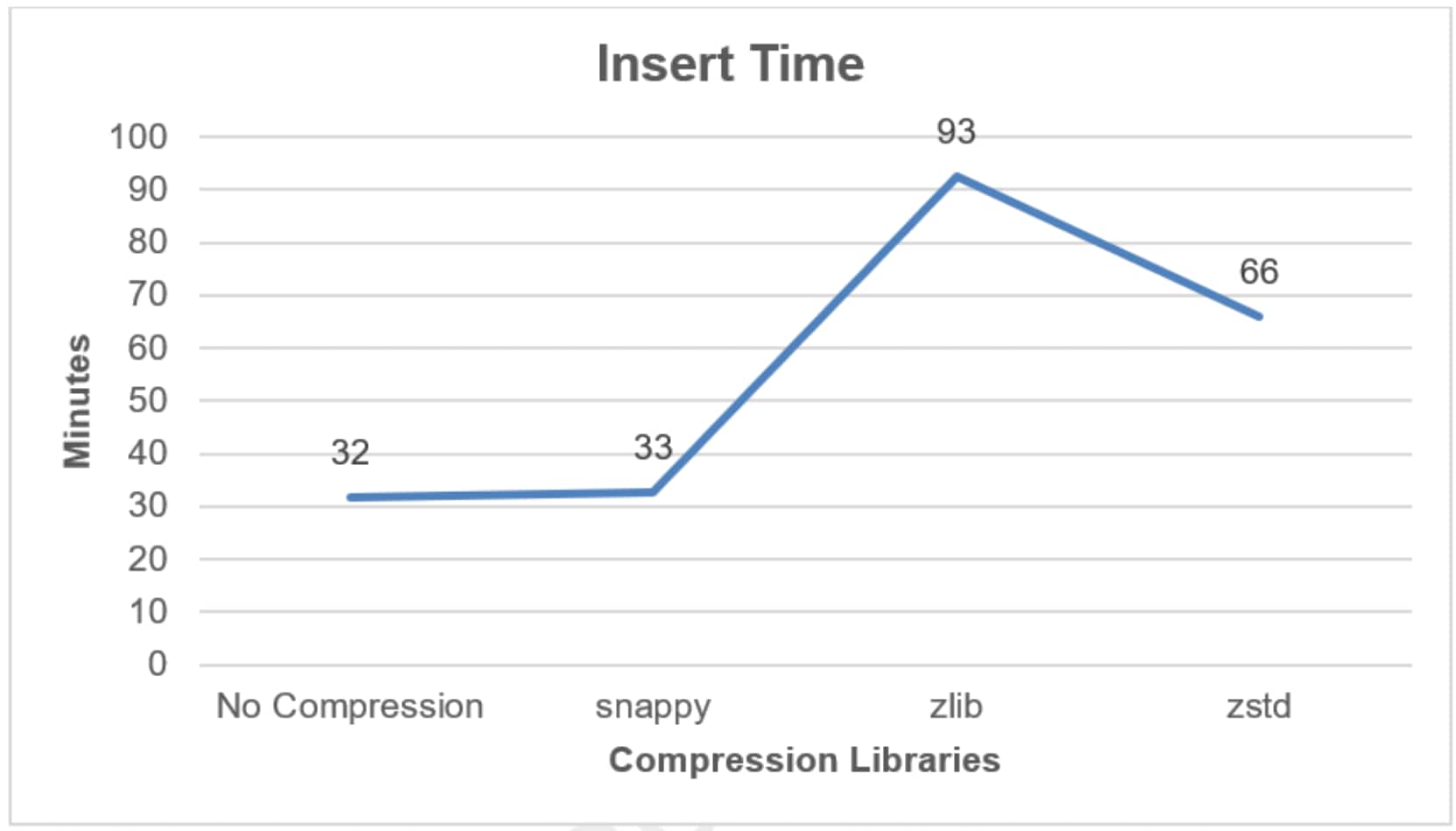
Figure 12. Data load time comparison
MongoDB system resources consumption
MongoDB uses both the internal WiredTiger cache and the file system cache when WiredTiger storage engine is used. The default internal cache takes up to a minimum of 256 MB and caps at 50% of (MEM – 1 GB). With file system cache, MongoDB automatically uses up the rest of the free memory available on the system.
WiredTiger compression can reduce the amount of memory consumed by keeping the data in the file system cache the same format as the compressed data on disk. The indexes in the internal cache can also benefit from the index prefix compression. However, the data in the internal cache is uncompressed.
In all test cases, MongoDB processes and file system cache consumed most of the system memory (over 92%). The average memory consumption of the virtual machines is lowest when using the zlib or zstd algorithm, which ranges between 92% to 95%. Conversely, the average memory consumption is higher with the snappy compression or no compression is used, which is close to 99%.
For CPU consumptions, all virtual machines consumed similar amount of CPUs, which ranges between 42% to 48% in all test cases.
Conclusion
This study is not a definitive benchmark of data reduction, but it offers a glimpse of MongoDB compression offerings and effects of the different compression algorithms. It is important to test the impacts of compression in your own environment.
The default snappy compression offers a good balance between compression savings, system resource utilization, and ingestion performance. The zlib and zstd algorithms are better at reducing the data but at a cost of higher overhead. Regardless of which software compression you choose, PowerStore advanced hardware-based data reduction offers additional space savings to the MongoDB environment without any performance overhead.
Data protection
Overview
PowerStore includes native data protection features with the snapshot and thin clone technologies. Also, Dell Technologies has a wide range of products to enhance data protection and enable disaster recovery beyond a local storage system.
Snapshots and thin clones
PowerStore snapshot is a point-in-time copy of data of a storage resource such as a volume, volume group, virtual machine, or file system. You can take manual snapshots in the PowerStore Manager UI or create snapshot policies within protection policies to automatically take snapshots on a predefined schedule or frequency. Snapshots are inaccessible to the hosts directly.
To access the data in a snapshot for a storage resource, except for VM, you can create a read-writable thin clone from the snapshot and map it to the same host or to a different host. A thin clone is a space-efficient copy that shares the data blocks with its parent object. Multiple thin clones are allowed from a snapshot. Changes to one thin clone do not affect the parent object or other associated thin clones and conversely.
For VMs, PowerStore creates snapshots at the VM level, and the snapshot information reflects in the vCenter automatically. Use PowerStore snapshots as short-term temporary protection for MongoDB. It is not intended to replace the official MongoDB backup solution. PowerStore snapshots are crash consistent. To ensure the snapshot is application-consistent, we recommend quiescing any running MongoDB instance before taking a snapshot.
Some of the snapshot and thin clone use cases are as follows:
- Provide quick and easy rollback on operating system or application updates
- Clone the production environment to development or test environments with ease and without a full-size copy of the data.
- Reduce the complexity and time to refresh the data in a clone environment from the latest snapshot or thin clone
PowerStore also offers PowerStore command-line interface (CLI) and REST APIs that can be used to automate operations in scripts and other programming languages.
For more information about snapshots and thin-clones, see the document Dell PowerStore Protecting Your Data.
Secure Snapshots
A Secure Snapshot is a feature introduced in PowerStoreOS 3.5 that creates a special type of snapshot, specifically for volumes and volume groups (block storage). Unlike regular snapshots, Secure Snapshots cannot be manually deleted by users, adding another layer of protection for your data. Secure Snapshots are automatically deleted when the retention period specified in the snapshot rule expires.
Secure Snapshots offer two main benefits:
- Safeguard against malicious or unintentional deletion: By preventing manual deletion, Secure Snapshots ensure the safety of both the snapshot and its parent resource. This effectively reduces the risk of data loss regardless of the intention.
- Protection from ransomware attacks: Secure Snapshots serve as an affordable defense against ransomware attacks. If unauthorized users gain access to the system, they will be unable to delete or modify the data in the Secure Snapshots. Although the most recent data might be lost, the impact of such attacks is significantly reduced. You can promptly restore data from a Secure Snapshot to mitigate the attack and minimize downtime.
For more information about Secure Snapshots, see the document Dell PowerStore: Snapshots and Thin Clones on the Dell Technologies Info Hub.
PowerStore replication
PowerStore supports asynchronous replication for block volumes, volume groups, NAS servers and virtual volumes between two PowerStore clusters. Protection policies define snapshot rules and replication rules and assign them to the storage resources. For more information about replication, see the document Dell PowerStore Protecting Your Data.
Virtual volumes replication
PowerStoreOS 3.0 introduces vVol asynchronous replication with VMware Site Recovery Manager (SRM). SRM is a VMware disaster recovery solution that provides virtual machine protection and automates recovery or migration of virtual machines across sites.
For more information about vVol replication, see the document Dell PowerStore Protecting Your Data.
Metro protection
PowerStoreOS 3.0 introduces native metro volume. Metro provides bi-directional synchronous replication of block storage across two PowerStore appliances in an active/active configuration. This feature is for disaster avoidance, application load balancing, and migration.
Users can configure metro volumes with either non-uniform or uniform host connectivity. In the non-uniform configuration, hosts are only connected to the local appliance, while in the uniform configuration, hosts can access both local and remote appliances. Hosts in a uniform configuration can select the optimal path to access the metro volumes but require host multipath software that supports ALUA. This protocol enables hosts to identify and choose the best path, to optimize performance and minimize the risk of downtime.
Metro volume is available on PowerStore T models only. For more information about Metro protection, see the document Dell PowerStore: Replication Technologies and Dell PowerStore: Metro Volume.
.
AppSync
Dell AppSync is an optional software that enhances the overall application protection supported by the software. You can create application consistent snapshots of a block volume or volume group using AppSync for the supported applications such as Oracle databases and Microsoft SQL Server. With its deep integration of PowerStore and applications, AppSync uses the native PowerStore asynchronous replication, snapshot, and thin clone technologies to create and manage local and remote copies of applications. AppSync supports only block storage resources on PowerStore. For vVols storage resources, see RecoverPoint for VMs
For more information about PowerStore AppSync integration, see the document Dell PowerStore: AppSync.
RecoverPoint for VMs
Dell RecoverPoint for Virtual Machines is an optional software that extends data protection and enables disaster recovery for VMware virtualized environment to on-premises or cloud environment. RecoverPoint for Virtual Machines is a software-only solution that protects VMs with local and remote replication. It is storage and application agnostic and supports both synchronous and asynchronous replication on all storage types supported by VMware. It also allows replicating multiple VMs in a consistency group.
Using RecoverPoint, all MongoDB replica set members can be protected and replicated collectively in a consistency group.
For more information about RecoverPoint for VMs, see RecoverPoint Data Protection Software Resources on Dell.com.
Integration with PowerProtect DD series appliance
With the release of PowerStoreOS 3.5, users can now back up volumes or volume groups directly to a PowerProtect DD appliance (physical or virtual edition), eliminating the need for a separate backup host. This approach offloads the backup traffic to the storage appliance, resulting in a more efficient and streamlined process. The backups take the form of remote snapshots on the PowerProtect DD appliance, which can be retrieved for recovery purposes. Users can also enable host access to the remote snapshots using the Instant Access feature. Instant Access provides a convenient and flexible way to view and access data without restoring the snapshot.
To create remote backups, users can create a Remote Backup Rule in a Protection Policy and assign the policy to a supported storage resource. Using Remote Backup Rule, backups are scheduled and executed automatically according to the desired backup schedule. Users can also initiate a manual backup directly from the PowerStore Manager UI.
It is important to note that this feature does not support Secure Snapshots. For more information, see the documentation on the Dell Technologies PowerStore Info Hub.
References
Dell Technologies documentation
The following Dell Technologies documentation provides other information related to this document. Access to these documents depends on your login credentials. If you do not have access to a document, contact your Dell Technologies representative.
MongoDB documentation
For MongoDB documentation and support forum, see the following resources: