Dell Private Cloud: Tech Book
Executive summary
Overview
Revisions
We value your feedback
Dell Private Cloud
Dell Private Cloud
Customer problem
Market trends
Benefits of Dell Private Cloud
Architectural Overview
Disaggregated infrastructure
Dell Private Cloud employs disaggregated infrastructure as the design of choice. Disaggregated infrastructure is a combination of traditional 3-tier architecture with software to deliver simplicity in how infrastructure can be deployed and managed. Disaggregated infrastructure benefits from both the flexibility that 3-tier architecture offers and the seamless automation and easy management with minimal specialized skills that typical hyperconverged infrastructure enjoys. By leveraging the strengths of each architecture, disaggregated infrastructure empowers IT organizations to achieve both flexibility and simplicity without compromise.
With a 3-tier architecture, IT organizations can mix and match best-of-breed components and easily tailor them to specific workloads such as scaling compute and storage independently or supporting multiple hypervisor ecosystems with shared storage. This level of customization leads to better resource utilization. However, the deployment and configuration of a 3-tier architecture can be complex, especially when managing compute, storage, and networking separately. Upgrades can also be time-consuming. Each tier may require its own separate lifecycle management and significant interoperability testing to upgrade each component.
Alternatively, with hyperconverged infrastructure, IT organizations can benefit from its management simplicity. Hyperconverged infrastructure uses purpose-built servers and software-defined storage and does not require specialized hardware or SAN hardware. The hypervisor integration allows for built-in automation, full stack updates, quick deployment, and simple scaling without the need for specialized skills. However, scaling out may be less efficient given that compute and storage may need to be added together, which can result in stranded capacity or under-utilization of resources. There is also less flexibility as purpose-built appliances typically offer less variety than common servers. Additionally, purpose-built appliances are tied to the hypervisor vendor for the life of the appliances, which can hinder an organization’s ability to pivot their strategy. Disaggregated infrastructure provides flexibility as well as seamless and easy automation with minimal specialized skillsets.
Dell Automation Platform
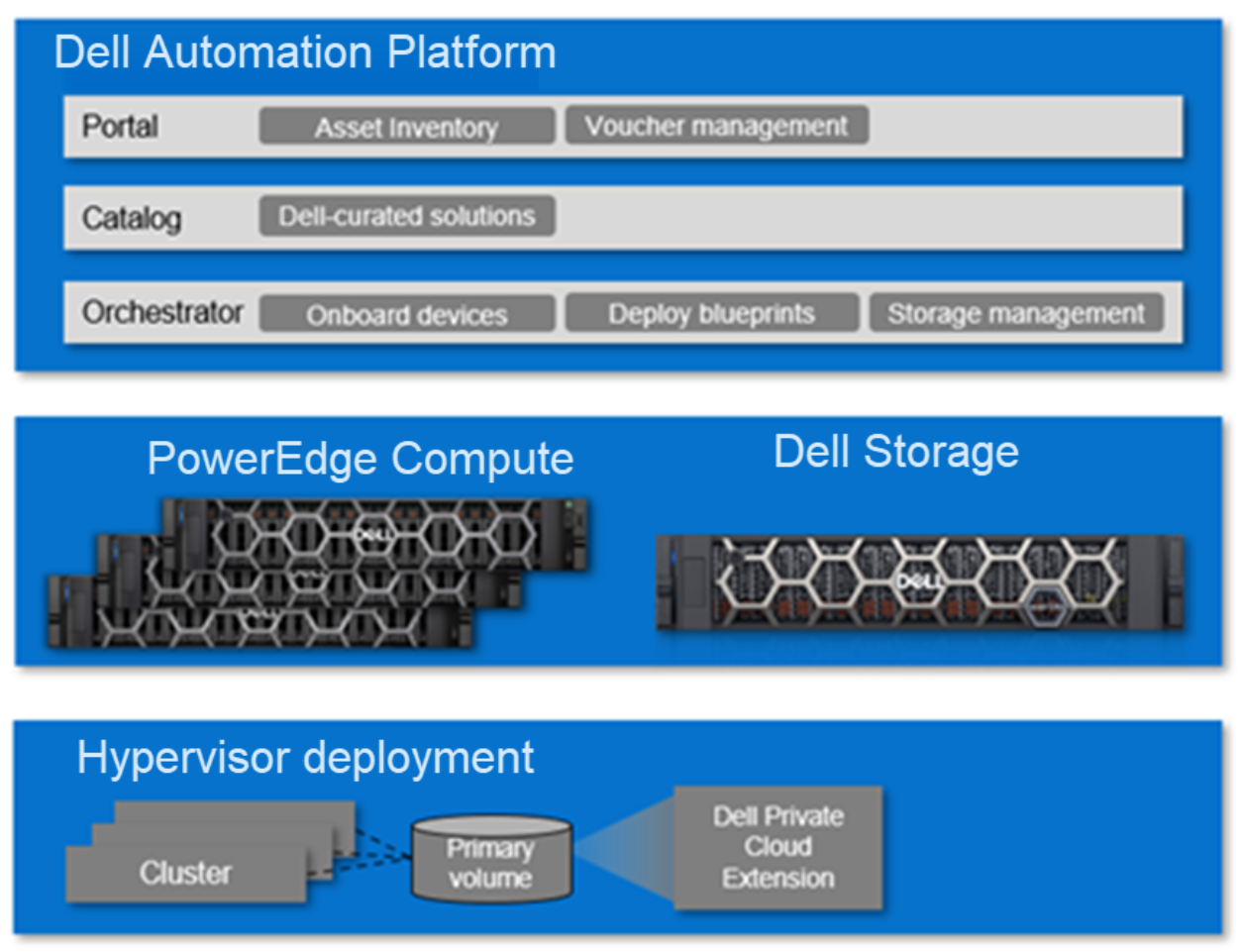
Figure 1. Dell Private Cloud enabled by Dell Automation Platform
Dell Private Cloud is enabled by Dell Automation Platform. Dell Automation Platform is the control plane for all the Dell infrastructure assets used to deploy a cluster in Dell Private Cloud. The Dell Automation Platform portal provides IT organizations with a central control point to have global visualization of all their Dell infrastructure assets and deploy these assets into solutions such as clusters in Dell Private Cloud. The portal facilitates license management such as vouchers used for secure zero-touch onboarding of PowerEdge servers. Software license entitlements can be seamlessly retrieved from the customer’s Dell MyAccount Portal for more secure, efficient IT operations.
Dell Automation Platform catalog is a public catalog of supported solutions enabled by Dell Automation Platform. These solutions are curated and validated by Dell Technologies to drive secure and successful outcomes. Users can browse the catalog to find solutions for Dell Private Cloud, NativeEdge, and AI Factory solutions. In selecting one of the offers, a set of blueprints can be downloaded into the Dell Automation Platform orchestrator.
The Dell Automation Platform orchestrator is the management plane and orchestration engine used to deploy Dell infrastructure assets into outcomes with blueprints, such as Dell Private Cloud blueprints. The orchestrator provides an intuitive interface for users to run and monitor the deployment of blueprints.
An additional capability in Dell Automation Platform is storage management. For select Dell storage platforms, users can perform lifecycle management from the Dell Automation Platform orchestrator UI, which can help consolidate management interfaces needed to manage a cluster in Dell Private Cloud.
Dell Private Cloud
Dell Private Cloud is one of the solutions that can be deployed with Dell Automation Platform. A Dell Private Cloud offer includes the following set of blueprints:
- Cluster deployment
- Cluster expansion
- Node reclaim
- Node restore
Each blueprint defines a series of configuration steps that must be performed to achieve the desired outcome. Depending on the operation, the blueprint may include defining the hardware components needed, the hardware configuration type required, and the software required to complete the operation.
To deploy a Dell Private Cloud offer, a user selects the associated offer in the catalog which results in the blueprints being stored in the Dell Automation Platform orchestrator. Once there are PowerEdge servers onboarded into orchestrator, users can run a cluster deployment blueprint to build a cluster. A wizard will then guide the user through the necessary inputs to provide the orchestrator in order to successfully execute the blueprint. In the case of a cluster deployment blueprint, settings such as IP settings for the nodes and iDRAC credentials need to be provided.
Beyond infrastructure management from the Dell Automation Platform, Dell Private Cloud provides its value-differentiating Day 2 management through its Dell Private Cloud Extension service that is installed for every cluster at cluster deployment. The Dell Private Cloud Extension provides a plugin to the hypervisor management console so that users have a familiar interface to manage the Dell Private Cloud cluster. Management operations such as lifecycle management, full stack updates, node/cluster shutdown, consolidated alerting and logging, and security settings configuration are available for users to manage a Dell Private Cloud cluster.
What makes up a Dell Private Cloud?
Dell Private Cloud ecosystem options
Customer Journey
Dell Private Cloud, built on disaggregated infrastructure, is a unique customer journey that combines the experience of a build-your-own model with appliance-like simplicity.
Use cases and hypervisors
Dell Private Cloud supports a broad range of use cases, including enterprise applications, databases, big data, and Kubernetes. Many of the use cases in which customers have deployed hyperconverged infrastructure are also suitable for Dell Private Cloud. In addition, Dell Private Cloud is hypervisor neutral. PowerEdge servers can be deployed in one hypervisor ecosystem and redeployed into another hypervisor ecosystem.
Ordering and license acquisition
A Dell Private Cloud solution requires:
- Hardware
- Compute – PowerEdge servers
- iDRAC Datacenter or Enterprise license
- Option to use secure zero-touch onboarding
- Storage – Dell storage
- No additional licensing required for Dell Private Cloud use
- Software
- Dell Automation Platform orchestrator license
- Dell Private Cloud software license
PowerEdge servers used for Dell Private Cloud are configured no differently than any common PowerEdge servers. There is no special factory integration performed prior to being shipped to the customer.
There is an option in the ordering system to enable secure zero-touch onboarding. Choosing it will enable the iDRAC plugin for Dell Secure Onboarding Client so that PowerEdge servers use the key-based authentication method to seamlessly add the devices into Dell Automation Platform’s management realm once they are connected and powered on in the customer’s network. Not choosing this option means that the customer will add the device into Dell Automation Platform using the iDRAC IP and credentials once the device is connected and powered on in the customer’s network.
Dell Private Cloud also supports scenarios where a customer has existing hardware and can be used to deploy a Dell Private Cloud cluster, provided that the minimum specifications are met. If a customer already has PowerEdge servers deployed in their environment, they can be re-imaged back to factory settings and deployed into a Dell Private Cloud cluster.
A customer can also use an existing Dell storage appliance that they have in their environment.
If a customer already has Dell Automation Platform, they do not need to order another orchestrator license. At the very least, a customer must order Dell Private Cloud software licenses to deploy a Dell Private Cloud cluster or to expand it.
The value-added management capabilities along with the validated blueprints are provided with the Dell Private Cloud subscription license. Each PowerEdge server that is provisioned into a Dell Private Cloud cluster requires a license. The Dell Private Cloud license has 1-, 3-, 4-, and 5-year subscription terms. The licenses are transferable across the PowerEdge servers such that if a PowerEdge server is removed from a cluster and decommissioned, the server is placed into a free pool for future provisioning and the license is also placed into a free pool. If another PowerEdge server is provisioned later on, that license can be used for it.
The customer is responsible for procuring the hypervisor software license. Dell Private Cloud employs a bring-your-own licensing model for the hypervisor. This method offers maximum flexibility for the customer to purchase any licenses from a seller of their choice.
Dell secure onboarding voucher management
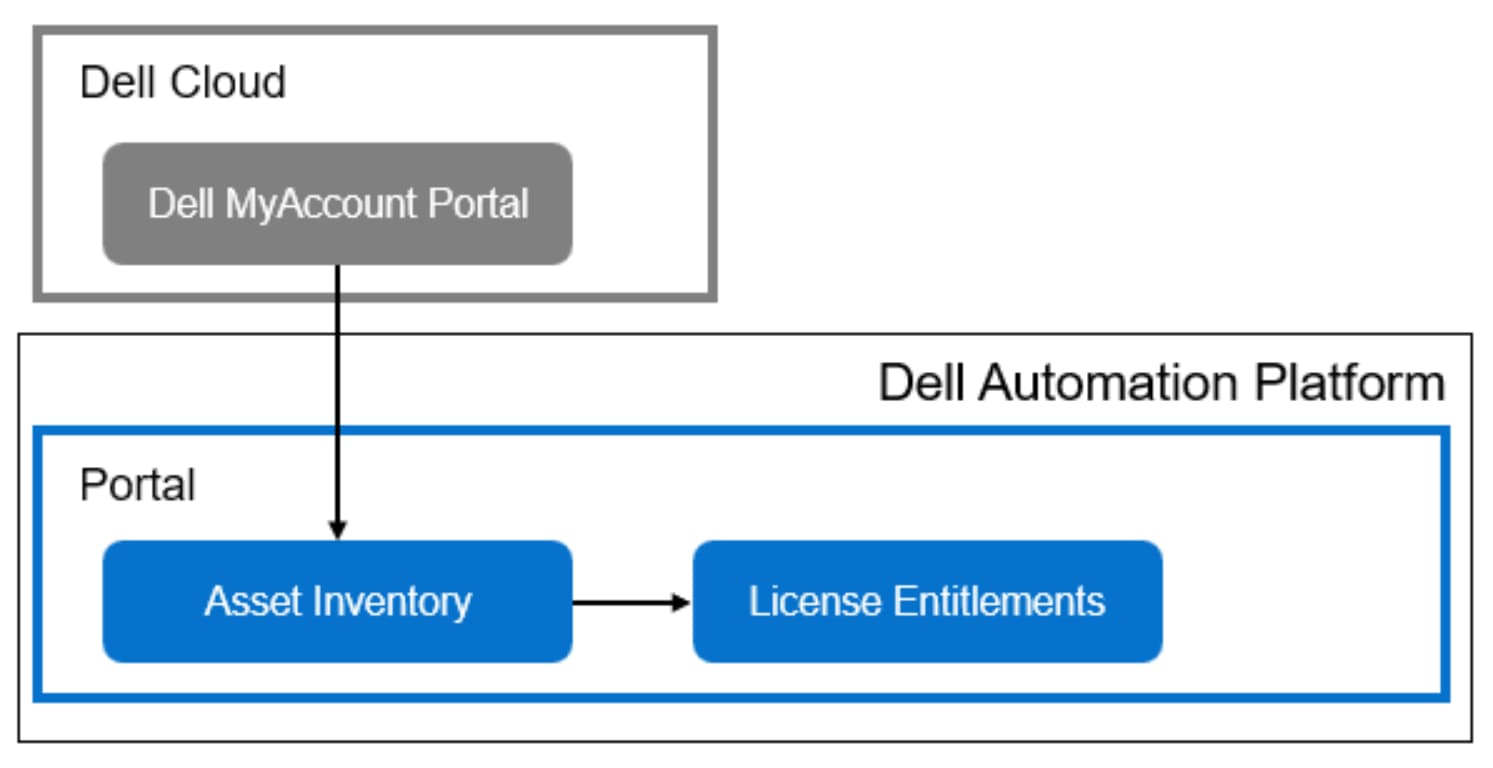
Figure 2. Dell Automation Platform portal retrieving vouchers from Dell MyAccount portal
Once the purchase order for PowerEdge servers with Dell Secure Onboarding Client enabled is processed, the vouchers are added to the customer’s Dell MyAccount portal. These vouchers are generated after unique, cryptographic keys are generated for the PowerEdge servers during the manufacturing process.
For customers that are using a SaaS-based or on-premises connected Dell Automation Platform, the vouchers can be automatically added to the Dell Automation Platform portal asset inventory. For on-premises unconnected Dell Automation Platform, the customer must log into their Dell MyAccount Portal and download the voucher files. Then, they can upload them into the Dell Automation Platform portal.
The vouchers can be viewed on the License Entitlements page on the Dell Automation Platform Portal UI.
Dell Private Cloud license management
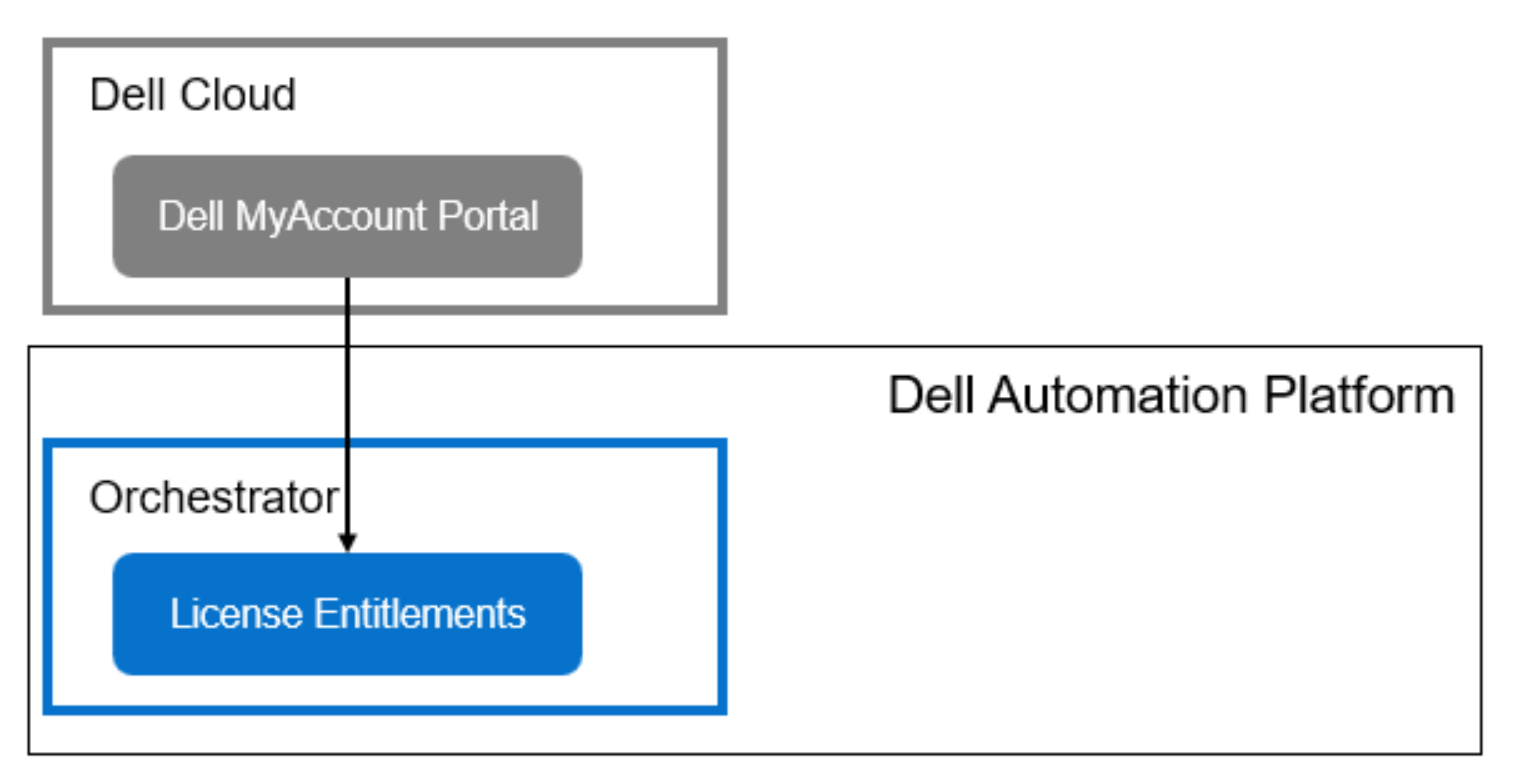
Figure 3. Dell Automation Platform orchestrator retrieving Dell Private Cloud license entitlements from Dell MyAccount portal
Once the purchase order for Dell Private Cloud subscription licenses is processed, the license entitlements are added to the customer’s Dell MyAccount Portal. Historically, customers use the Dell MyAccount portal to activate the license entitlements for use and generate a license file that can be uploaded to deploy a solution. Users continue to use this method for on-premises unconnected Dell Automation Platform.
For customers that are using a SaaS-based or on-premises connected Dell Automation Platform, they benefit from a new and simpler licensing management method which is called Dynamic Licensing. This new method introduces an API used by the Dell MyAccount Portal with which a software platform, like Dell Automation Platform, can interface to update license entitlement usage. As a result, instead of logging into the Dell MyAccount Portal to activate and update license entitlements, a user can run a Dell Private Cloud blueprint and activate the license entitlements for their PowerEdge servers from the Dell Automation Platform orchestrator. Usage of the entitlements are automatically updated into their Dell MyAccount Portal for consistency.
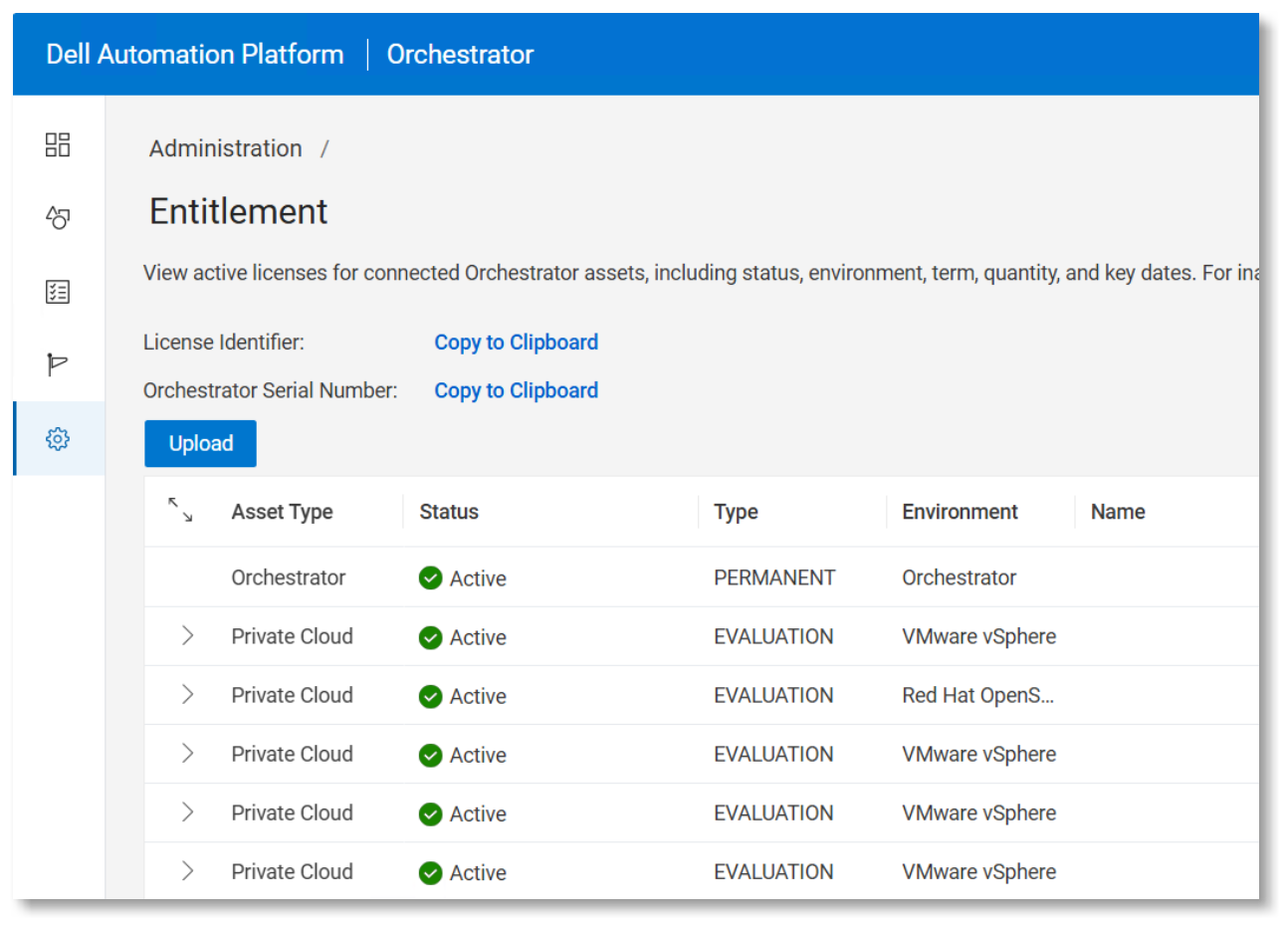
Figure 4. Software license entitlements page on Dell Automation Platform orchestrator UI
The inventory of Dell Private Cloud license entitlements can also be viewed from the Orchestrator UI which reduces the need to frequently access the Dell MyAccount Portal.
Onboarding infrastructure upon delivery
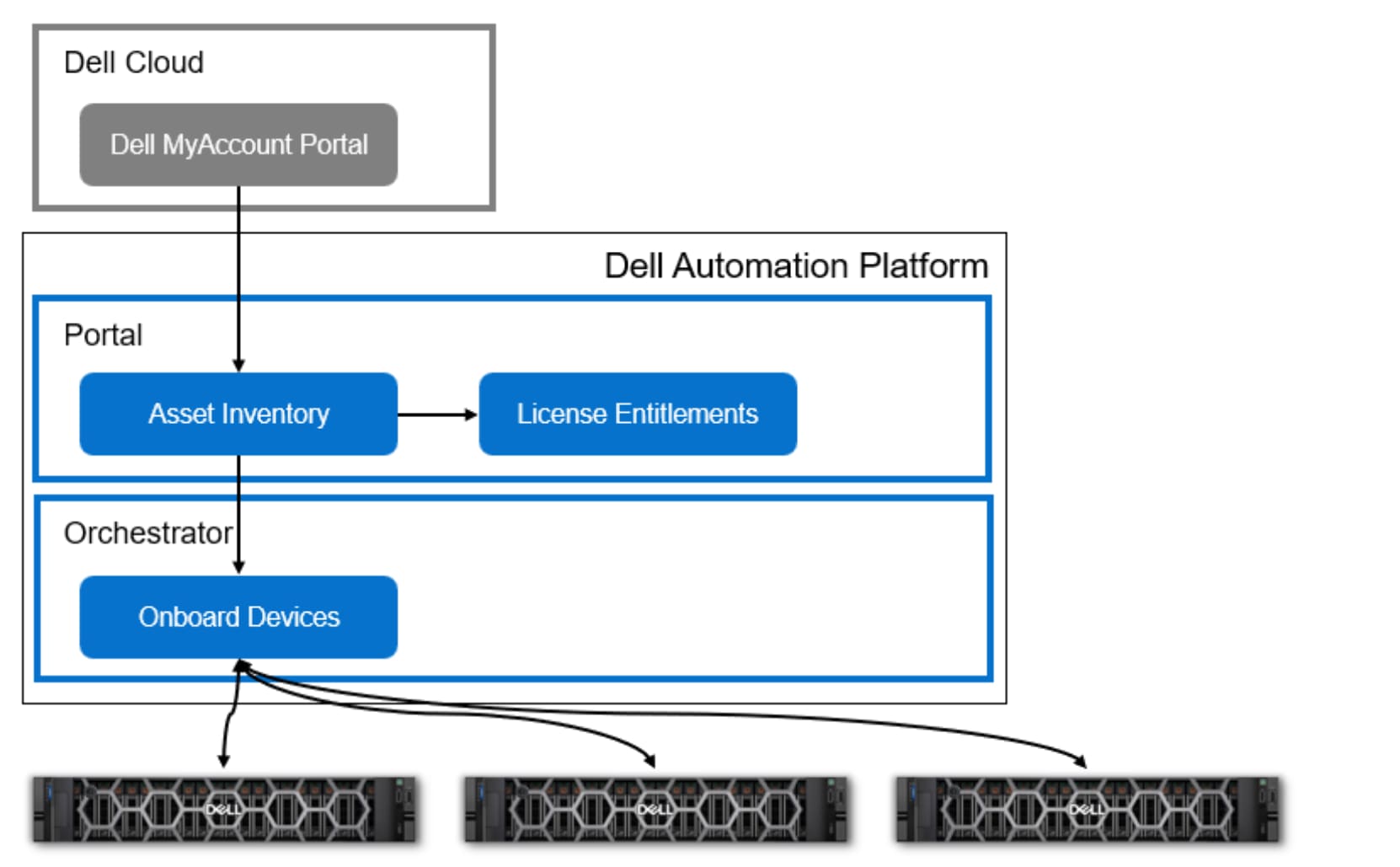
Figure 5. Onboarding PowerEdge devices into Dell Automation Platform orchestrator
Secure Zero-Touch Onboarding
For PowerEdge servers with Dell Secure Onboarding Client enabled, vouchers can be added into the Dell Automation Platform portal’s asset inventory as the hardware is en route to the customer site. Once in the Dell Automation Platform portal’s asset inventory, the customer can assign it to the Dell Automation Platform orchestrator so that it is responsible for onboarding the PowerEdge servers.
Upon assigning the PowerEdge servers and vouchers to the orchestrator, the orchestrator will register with the global or local rendezvous servers (depending on the customer’s choice). Rendezvous servers are used by PowerEdge servers to find out with which system they should communicate for onboarding. Rendezvous servers have set IP addresses that are pre-configured in the Dell Secure Onboarding Client of the PowerEdge server so they can automatically connect the rendezvous servers for further instruction.
Once the PowerEdge server communicates with the Dell Automation Platform orchestrator, the voucher and unique key are verified to complete the onboarding process. Once successful, the orchestrator now manages the PowerEdge server and can deploy it into an outcome.
Onboarding devices not enabled for secure zero-touch onboarding
For PowerEdge servers without Dell Secure Onboarding Client enabled, the devices should be added to the Dell Automation Platform’s portal’s asset inventory only when they are connected to the customer’s network and powered on. Adding the devices requires Dell Automation Platform to connect to the devices and authenticate with it. Once successfully authenticated, the PowerEdge servers are now managed by the orchestrator and can be used to deploy into an outcome.
Use of blueprints
PowerEdge servers in a Dell Private Cloud do not require special integration from factory, like a purpose-built appliance does. All the software integration and configuration are performed through a Dell Private Cloud blueprint once they have been onboarded to the Dell Automation Platform orchestrator.
Customers are responsible for acquiring the Dell Private Cloud blueprints for the respective private cloud ecosystem that they wish to deploy. They are responsible for supplying the installation bundles for the orchestrator to run the blueprint:
- Dell PowerEdge hardware bundle – Installation package that includes the firmware and drivers for the PowerEdge server. Bundles are posted on the Dell Support website.
- Dell Private Cloud Extension bundle – Installation package for the value-added Day 2 management capabilities in Dell Private Cloud. Bundles are also posted on the Dell Support website.
- Hypervisor software bundle – Installation package for the hypervisor which the customer is responsible for acquiring separately.
Customers are to store all three installation bundles in the orchestrator’s repository so that the orchestration engine can access them when executing a cluster deployment blueprint. However, for customers using Dell Automation Platform deployed as SaaS, the hypervisor bundle needs to be stored in a separate repository/registry external to the orchestrator.
Once the blueprints are downloaded and the installation bundles have been acquired, the customer can run the cluster deployment blueprint to provision the desired cluster and use the catalog to browse for and acquire blueprints
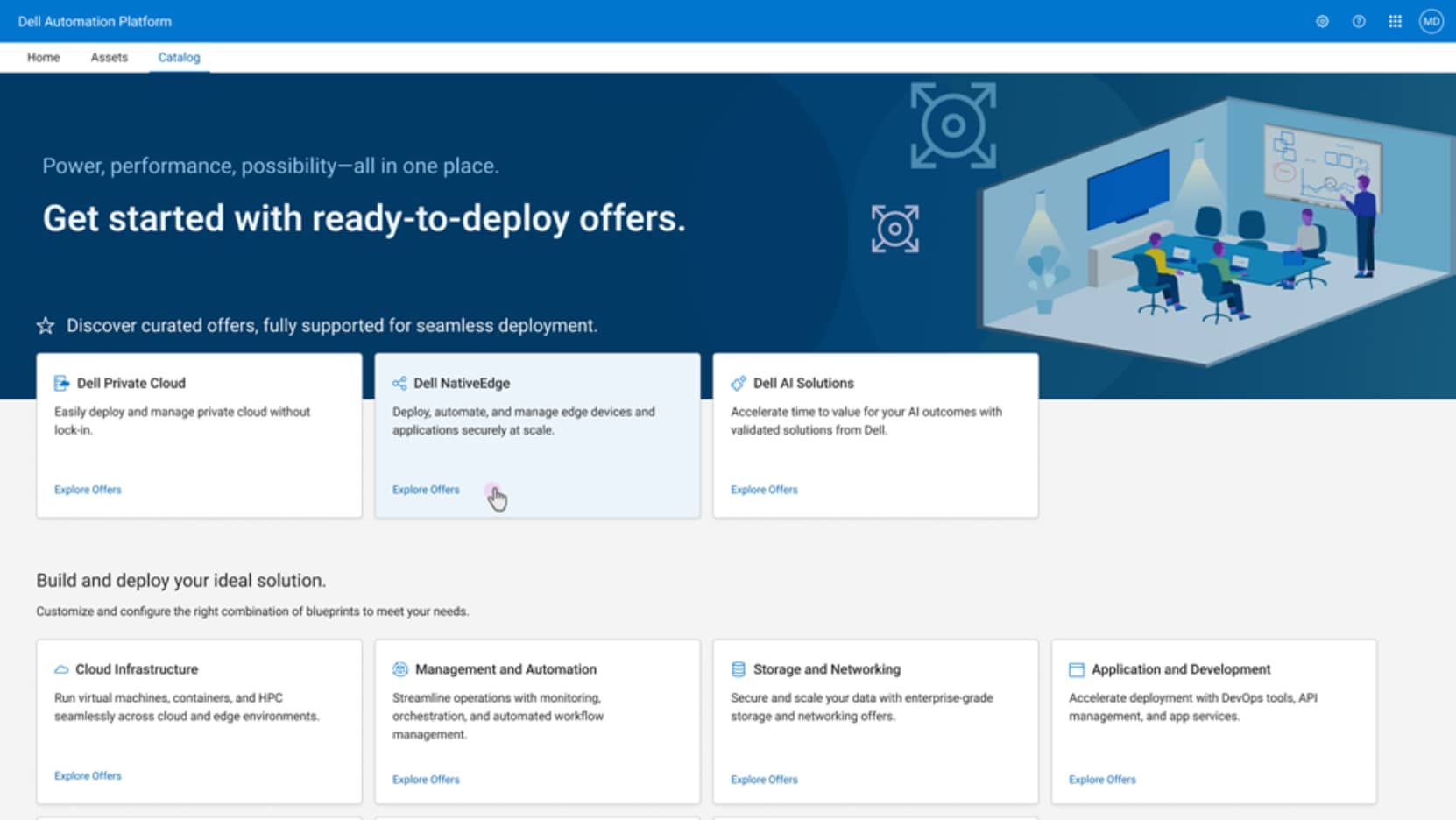
Figure 6. Dell Automation Platform catalog home page
Each solution supported by Dell Automation Platform has its own set of blueprints. These solutions are listed in the Dell Automation Platform catalog. The catalog serves as a marketing tool to inform customers and prospects of the solutions enabled by Dell Automation Platform. Each solution is considered an offer. For each offer, it provides a description of the solution along with version set details that are important for a user to make an informed decision. Each version of the offer is fully tested and validated by Dell to ensure a secure and stable outcome. Each offer is packaged with a set of corresponding blueprints and plugins. Plugins are modular extensions used by the Orchestrator to interact with external systems, services, and tools that the orchestration engine requires to execute on a blueprint.
The Dell Automation Platform Catalog is publicly available. As such, the offer details can be seen by anyone. However, downloading the offer package requires a login with the Dell Identity account credentials.
Depending on the deployment model chosen for the Dell Automation Platform, the offer package can either be directly downloaded into the orchestrator or downloaded into a local client and then uploaded into the orchestrator.
Cluster deployment
Once the Dell PowerEdge servers and, if supported, the storage array have been onboarded to the Orchestrator and the licenses, blueprints, and installation bundles have been acquired, the customer is ready to deploy a cluster in Dell Private Cloud.
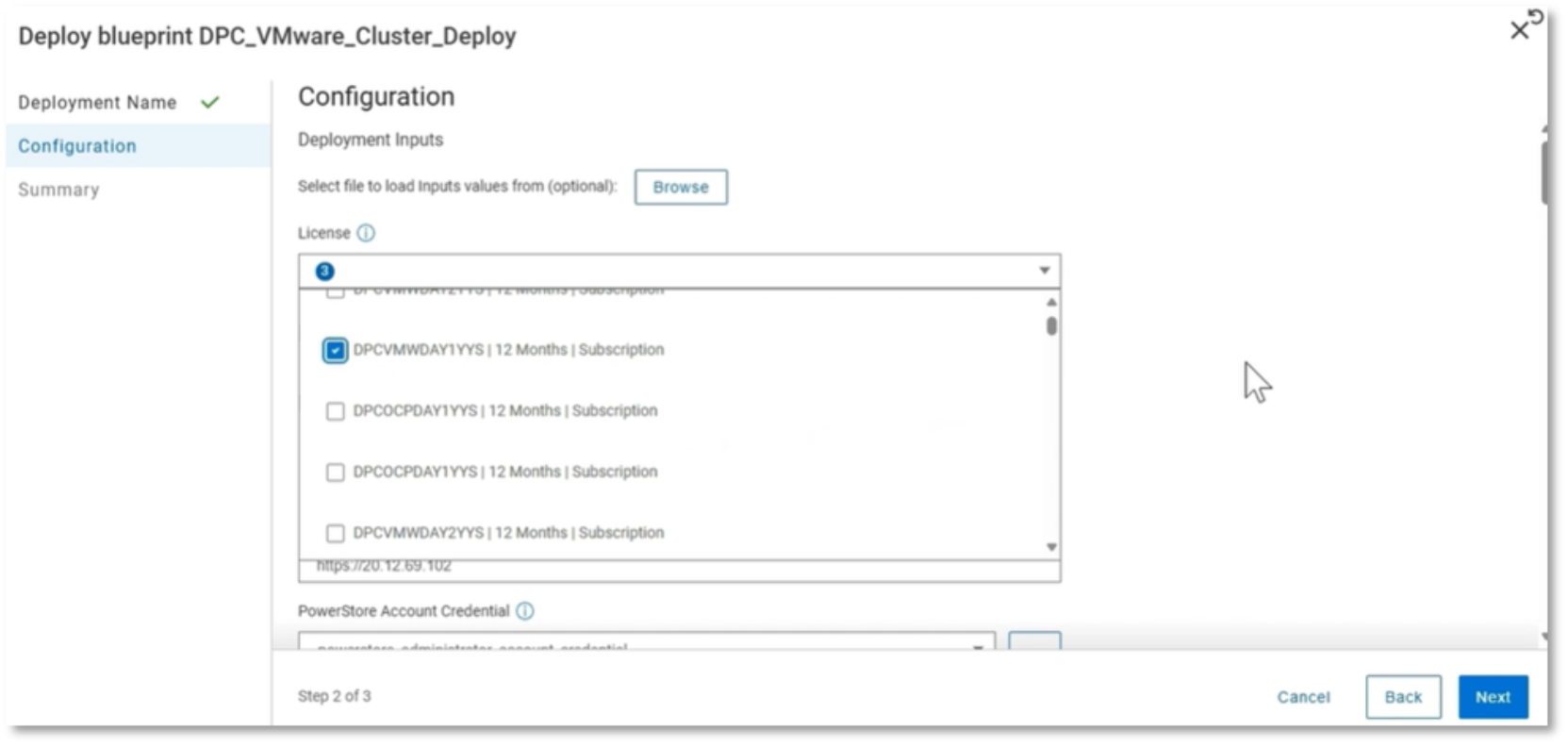
Figure 7. Initiating a cluster deployment blueprint
From the Blueprints page in the Orchestrator UI, a customer can select the cluster deployment blueprint to initiate the operation. For the cluster deployment blueprint, it requires some information be input before the orchestrator can automate the execution of the blueprint. Here is a sample set of the inputs requested.
- Deployment name – Name the job for monitoring and tracking purposes
- Input file – Tt is common to record all inputs ahead of time in a JSON file so that it can be uploaded here to auto-populate the input fields. A JSON file can also be used to capture a template configuration that can be re-used for future cluster deployments.
Otherwise, the following fields must be added manually:
- Licenses – Dell Private Cloud entitlement for each node
- Storage target – IP settings, account credentials, connectivity information, storage device name
- Hosts – IP settings, management account credentials
- Network settings to configure the cluster
- Paths to access the installation bundles stored in the Orchestrator repository
- Additional ecosystem settings
The orchestrator will then confirm the inputs before it runs the blueprint.
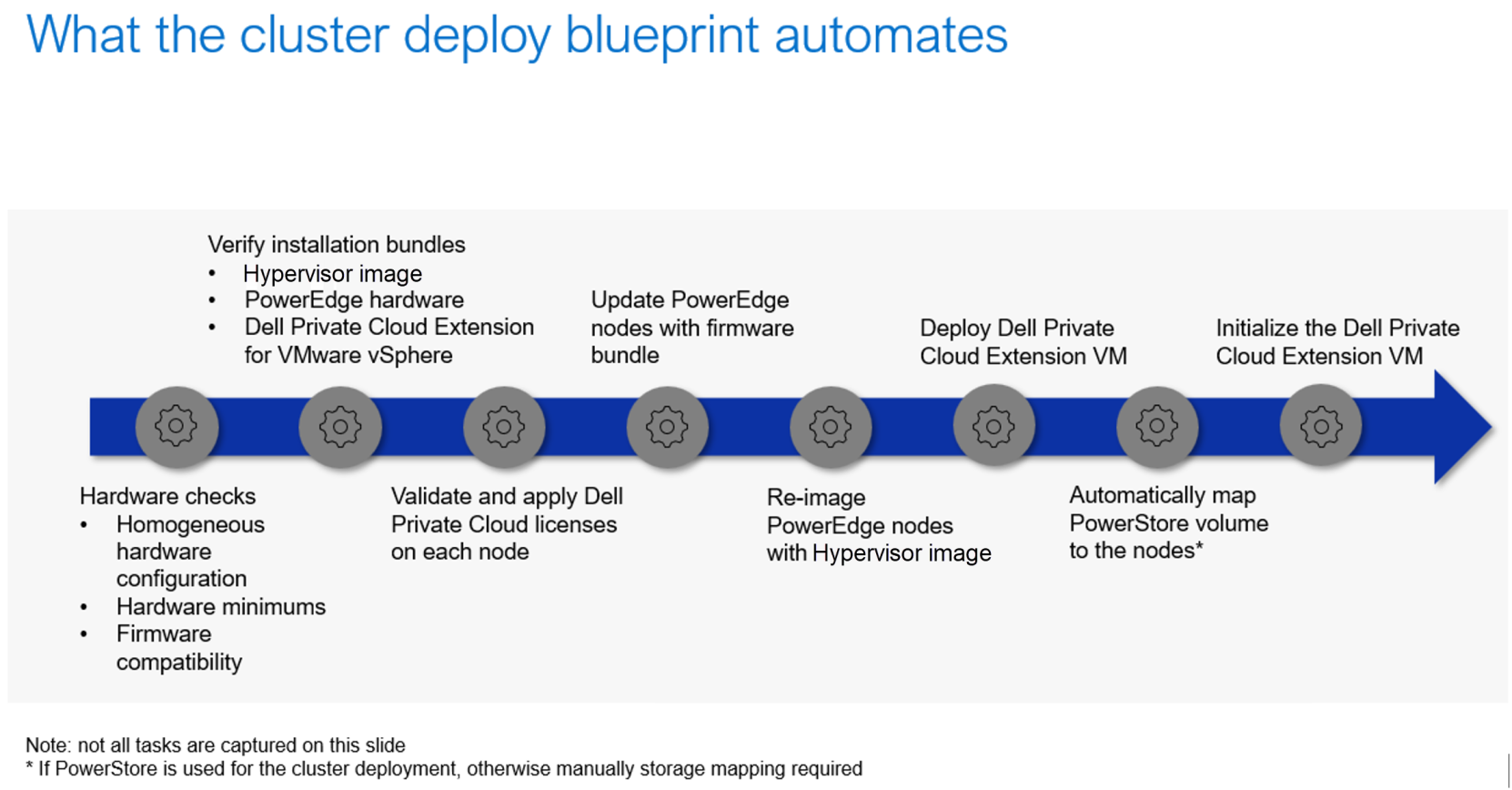
Figure 8. Highlighting key tasks that the cluster deployment blueprint automates
The figure provides an overview of the sequence of tasks that the blueprint collates and automates in an intricate sequence so that the orchestration engine can output a product-ready cluster that is running on a fully tested and validated disaggregated infrastructure stack.
To start, the blueprint includes numerous hardware checks to ensure the minimum specifications have been met by the PowerEdge servers chosen for the cluster deployment. The specific requirements for each private cloud ecosystem option have been detailed in later sections.
The blueprint goes on to verify the integrity of the installation bundles provided.
Then, the blueprint instructs the orchestration engine to validate the license entitlements selected before applying the licenses on each node.
The blueprint moves on to applying the PowerEdge hardware bundle on each node. The PowerEdge hardware bundle is a standard bundle published by the PowerEdge organization.
The next step is to re-image each node with the hypervisor image provided by the customer. Each node will be added to the Hypervisor Management inventory so that a cluster can be built with them.
The Dell Private Cloud Extension is then deployed onto the cluster. For VMware vSphere and Nutanix AHV clusters, the Extension is a VM. For a RedHat OpenShift cluster, the Extension is delivered via containers.
If the storage target for the storage volume used to store the Dell Private Cloud Extension is a PowerStore, the cluster deployment blueprint includes instructions to automate the mapping of the storage to the hosts. Otherwise, the orchestration engine will safely stop at this point and instruct the user to manually map the storage to the hosts before resuming the blueprint execution. Note that for all storage targets, the storage volume needs to be manually provisioned before running the cluster deployment blueprint.
One of the final tasks in the blueprint is to then transfer the Dell Private Cloud Extension VM or container onto the storage volume(s) before the cluster can be production-ready.
The figure above does not convey all the tasks in the cluster deployment blueprint but does illustrate the complexity of a cluster deployment job and the benefits that Dell Automation Platform and Dell Private Cloud provide to customers through the extensive testing and validation work performed by Dell’s engineering team as well as the end-to-end automation that Dell Automation Platform orchestrates to realize operational savings and efficiencies.
Private Cloud management
As part of the cluster deployment operation, the Dell Private Cloud Extension is installed. For VMware vSphere and Nutanix AHV clusters, it is a virtual machine stored in the primary datastore. For a RedHat OpenShift cluster, it is a container stored in multiple PVCs.
The Day 2 capabilities, such as Physical View of the infrastructure and lifecycle management, are accessible as an extension to the hypervisor’s management console. Note that since disaggregated infrastructure is fundamentally 3-tier architecture, the Dell Private Cloud Extension is responsible for the lifecycle management of the hosts in the cluster. Lifecycle management of the storage platform is performed separately.
For Dell storage that has an integration with Dell Automation Platform, lifecycle management operations can be performed from the Dell Automation Platform Orchestrator UI. Currently, only PowerStore has this integration.
All other Dell storage products that are supported with Dell Private Cloud require lifecycle management to be performed in their respective element managers.
Note that Dell Cloud AI Operations can be used for telemetry monitoring and reporting for Dell Private Cloud clusters.
Support
Dell Private Cloud licenses come with system-level support for both the hardware and system software deployed in a Dell Private Cloud cluster. This service is comparable to an HCI appliance where customers benefit from a single source of support covering issues with the hypervisor. Dell Support teams have robust expertise in VMware vSphere and Red Hat OpenShift which allows them to resolve most cases without involving partner support teams.
Dell Private Cloud deploying VMware
Dell Private Cloud deploying VMware
Solution Specifications
Supported deployment scenarios
VMware licensing support
Managing VMware vSphere clusters in Dell Private Cloud
Managing a VMware vSphere cluster in Dell Private Cloud is generally performed from two management consoles: Dell Automation Platform orchestrator UI and the vSphere Client UI with the Dell Private Cloud Extension plugin.
Whenever physical infrastructure is involved in a management operation, a Dell Private Cloud blueprint is required and must be run from the Orchestrator UI.
Cluster management operations are done from the vSphere Client UI.
The following is a table of the major management areas for a vSphere cluster in Dell Private Cloud. Note that a cluster deployment operation is covered in the Dell Private Cloud section and that currently Dell Professional Deployment Services is required to deploy a vSphere cluster.
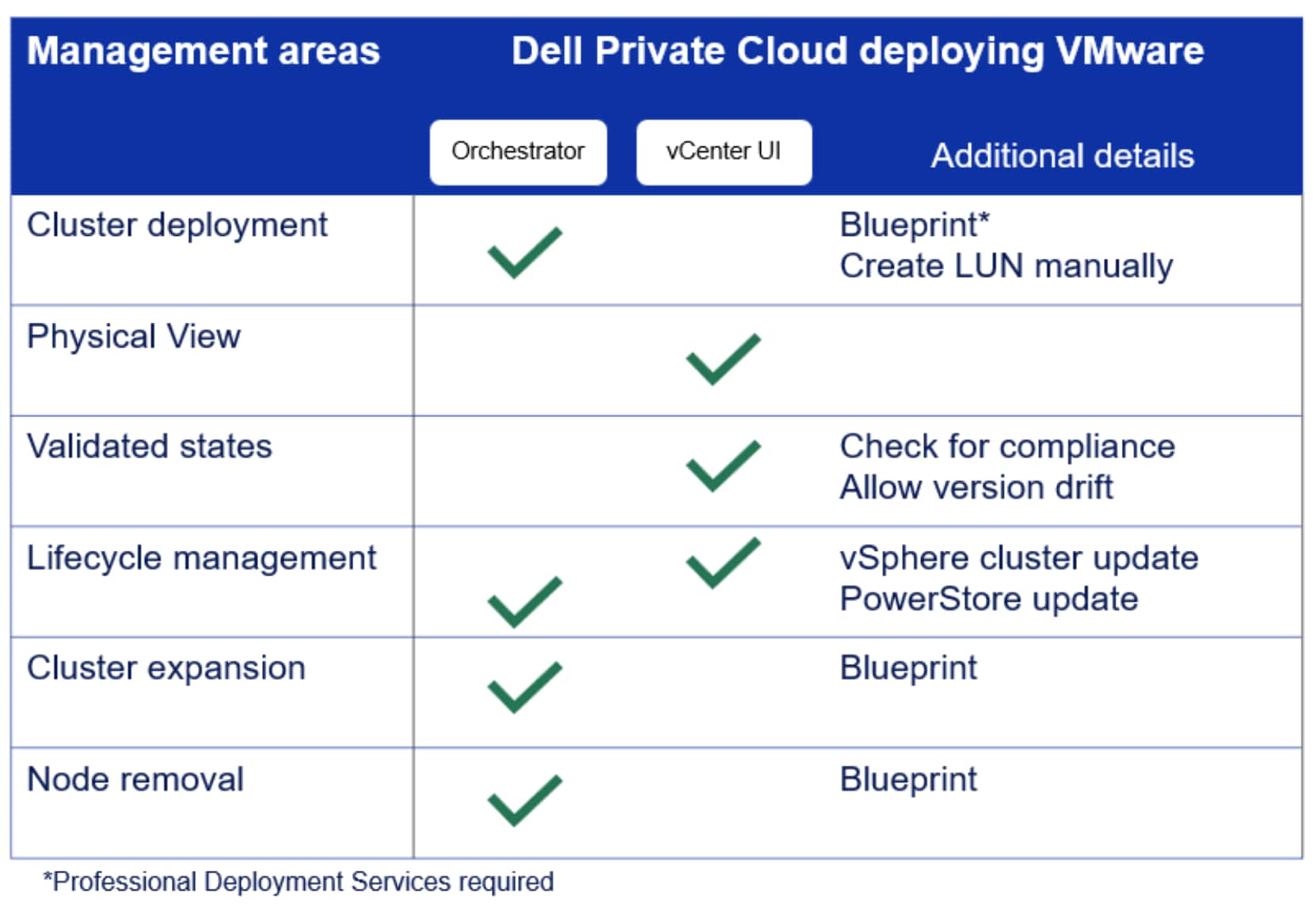
Figure 9. Showing from where the management functions can be performed for a vSphere cluster in Dell Private Cloud
Dell Private Cloud Extension plugin to vCenter
The Dell Private Cloud Extension VM includes a vCenter plugin to the vSphere Client so that customers can seamlessly manage the hardware and software components of their vSphere cluster like they would if the cluster was composed of purpose-built appliances.
The Dell Private Cloud Extension plugin to vCenter provides additional cluster management capabilities to customers, including the following:
- Physical view – Inventory information about the cluster and the nodes and view alerts
- Lifecycle management – Compliance status and report, available update paths, generating update advisor reports, and performing a cluster update
- Serviceability – Create Service Request, generate log bundle
- Cluster shutdown
- Node shutdown
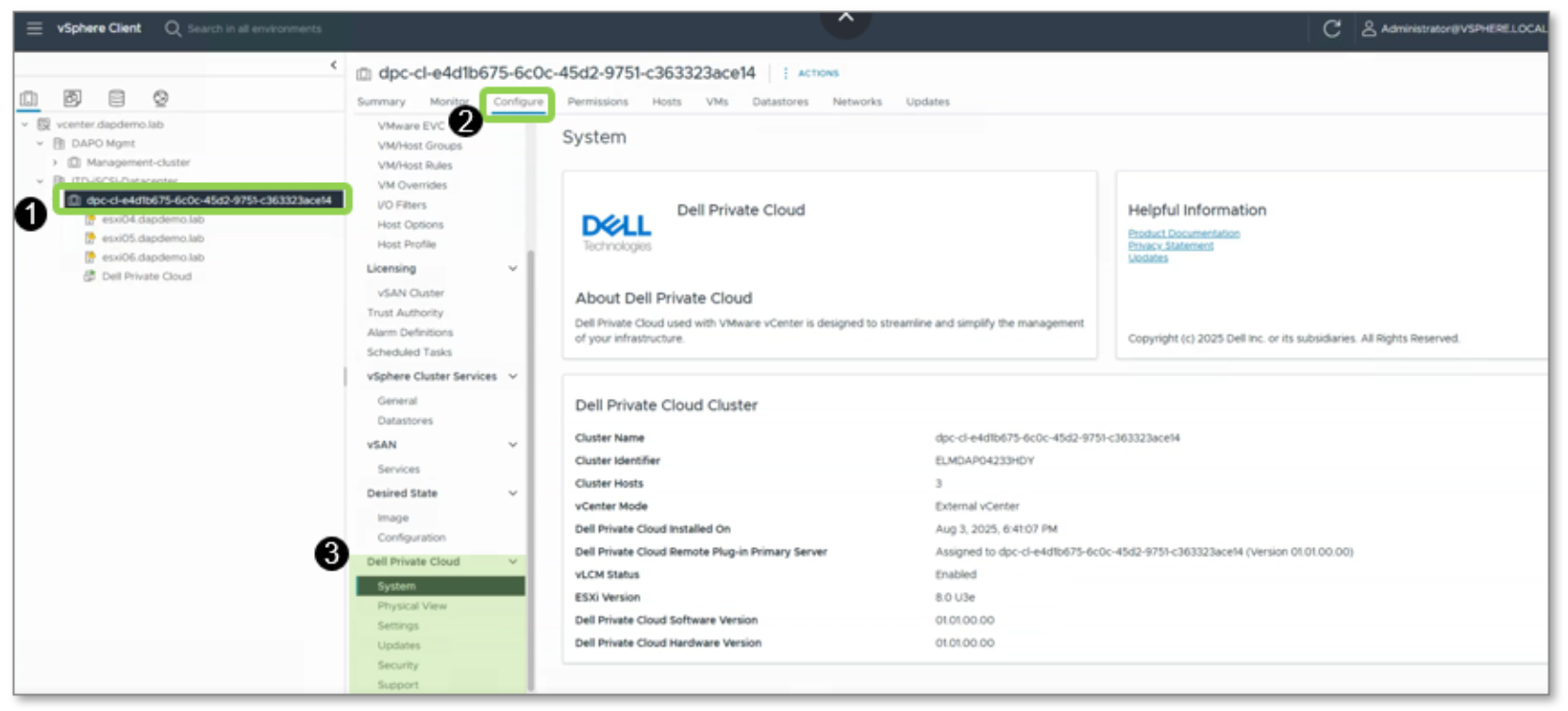
Figure 10. Cluster management capabilities provided by Dell Private Cloud Extension plugin to vCenter
Physical View
The Physical View feature provides a cluster level view that shows the nodes in the cluster. Customer can view the individual node for added visibility into the hardware components in the node, such as the Network Interface Controller, power supply, and boot devices along with the firmware and driver versions installed in the node.
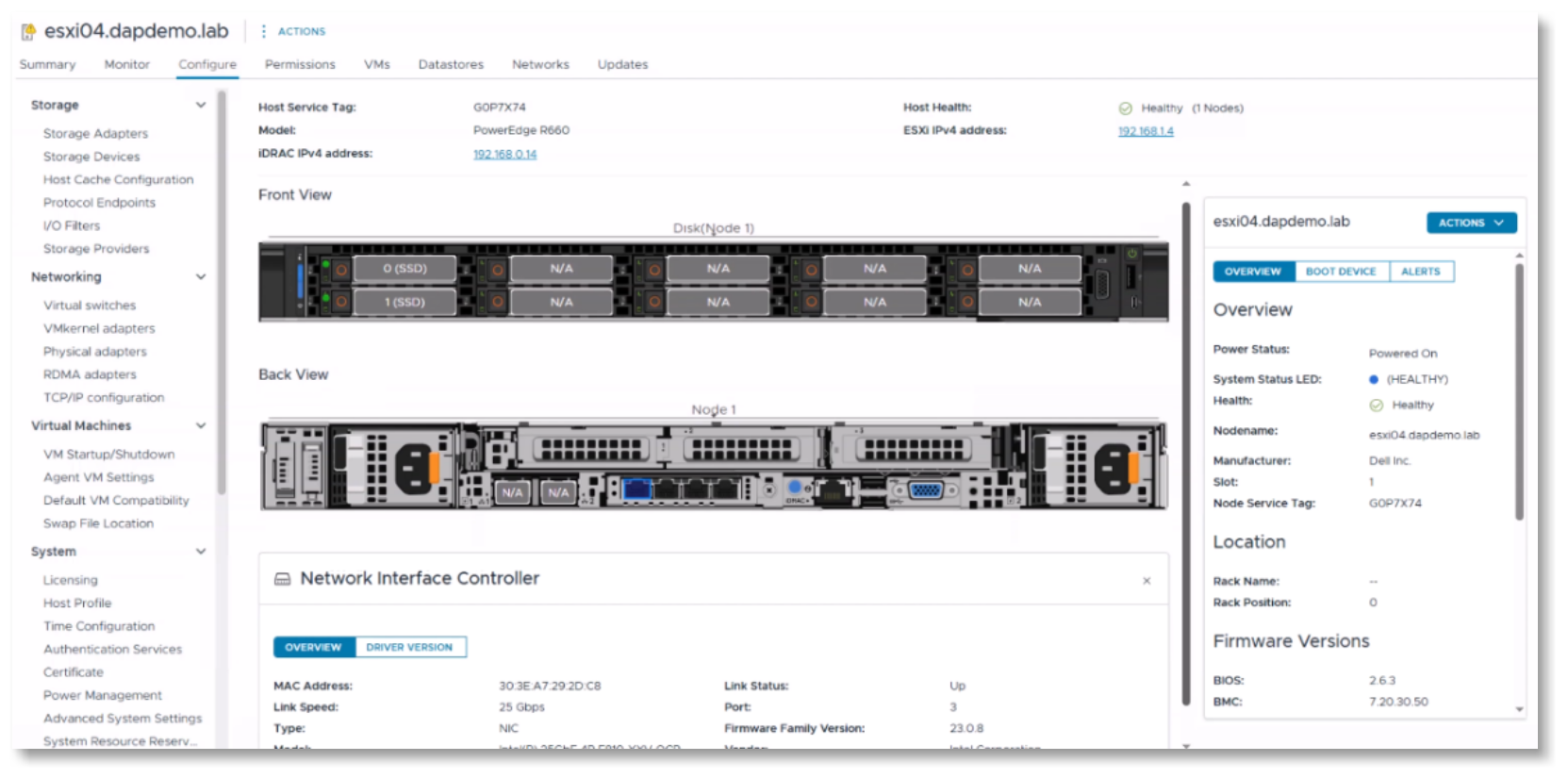
Figure 11. Physical View provided by Dell Private Cloud Extension plugin to vCenter
Cluster update workflow
The cluster update workflow has four important areas:
- Using the recommendation file for compliance checks and identifying available update paths.
- Composing a desired state for a cluster update.
- Running the update advisor report to confirm changes and cluster readiness for a cluster update.
- Staging the update bundles in the Dell Private Cloud Extension VM and initiating a cluster update.
A recommendation file is a Dell-published digital support matrix file that defines the continuously validated states for a vSphere cluster in Dell Private Cloud. The recommendation file is used to check for cluster compliance and to determine available update paths for the cluster. The file is regularly updated by Dell engineering. For a connected cluster, the Dell Private Cloud Extension periodically checks for an updated recommendation file using its connection to Dell Secure Remote Services.
For an unconnected cluster, the customer can manually download the file from the Dell Support website and upload it into Dell Private Cloud Extension VM via the Updates page provided by the Dell Private Cloud Extension to vCenter. It is recommended to upload the latest version of the recommendation file before preparing for a cluster update.
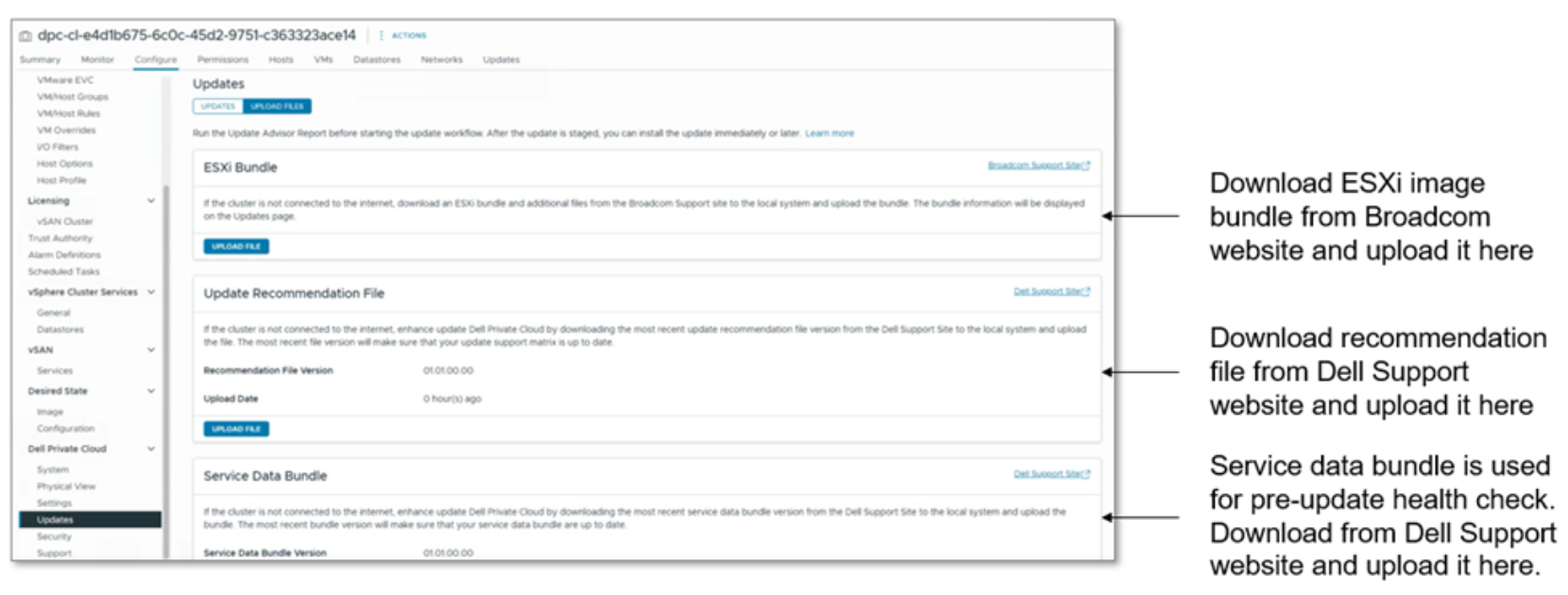
Figure 12. Where customers can upload the recommendation file into the Dell Private Cloud Extension
A desired state is comprised of three components: the ESXi image, the PowerEdge firmware, and the Dell Private Cloud Extension software. A customer composes the desired state on their own with the recommendation file providing guidance to ensure the composed desired state is a validated state. This flexibility allows customers to only update components that they require while still running a validated state.
Once the desired state is confirmed, customer can proceed to run an update advisor report.
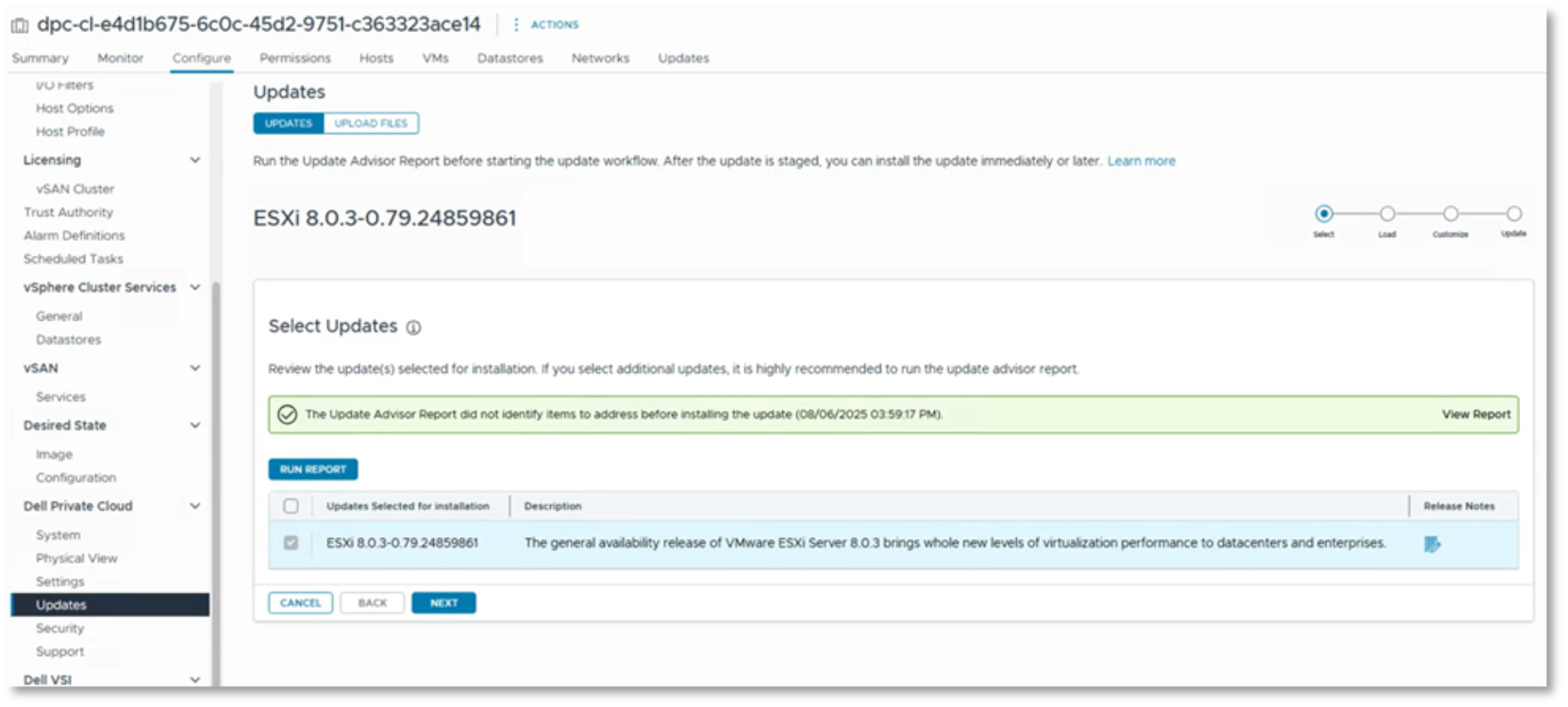
Figure 13. Building a desired state
While optional, running an update advisor report can help customers create the IT change ticket often needed to update a cluster and surface potential issues with the cluster before a scheduled maintenance window. An update advisor report provides a summary of the cluster update operation (including current state, desired state, and estimated time to complete the update), pre-update health check report, change report, and customer-managed components report. It is highly advisable to run the latest pre-check file so all the latest health checks can be performed against the cluster. A pre-check file is automatically downloaded for a connected cluster. For an unconnected cluster, the file is part of the Service Data bundle which can be downloaded and parsed so that the pre-check file can be uploaded from the Updates tab (shown in the following figure).
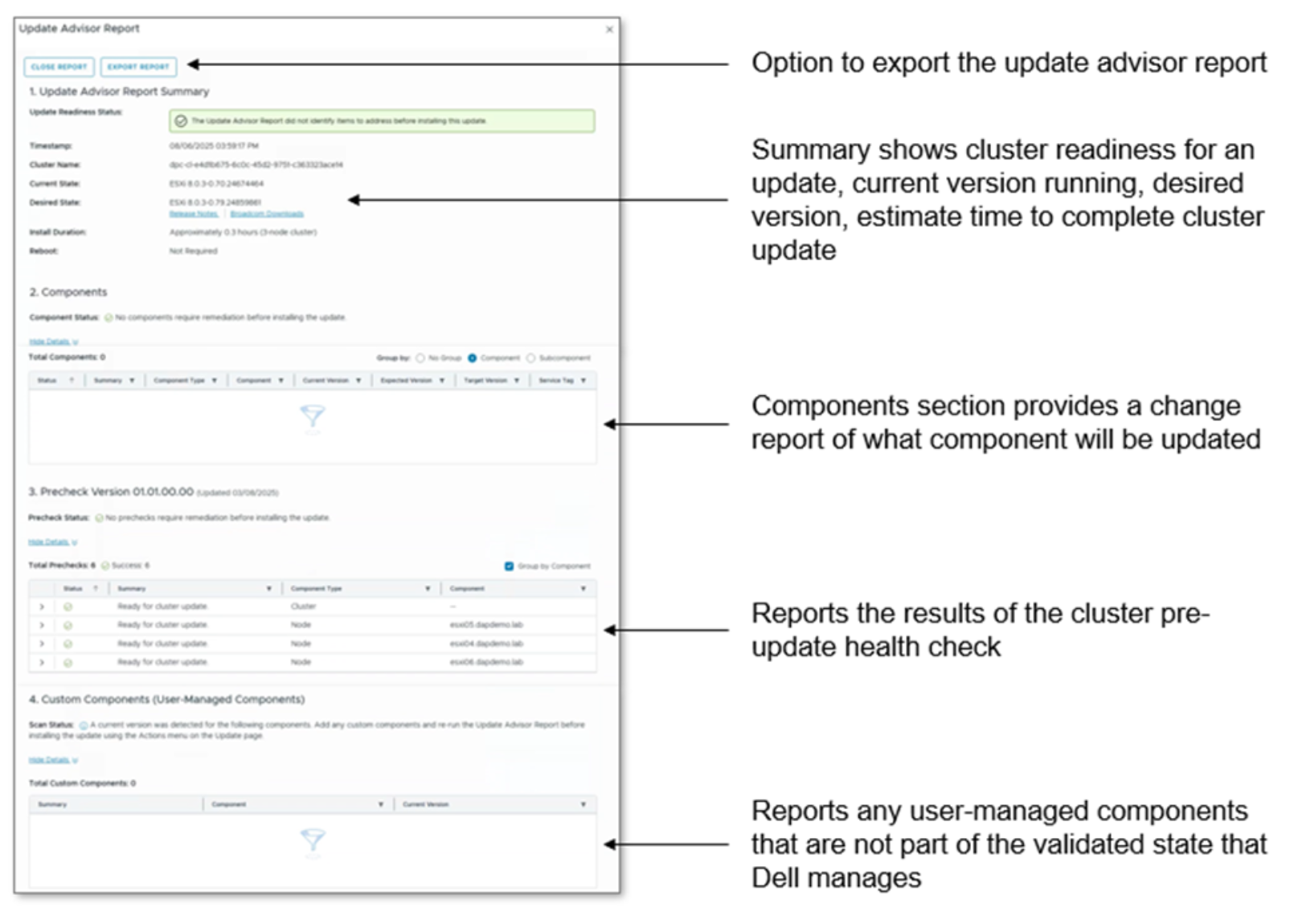
Figure 14. Update advisor report
Once the desired state is confirmed and the update advisor report has been reviewed, customers can then have the update bundles loaded into the Dell Private Cloud Extension VM. For connected clusters, the bundles are automatically downloaded from the respective sources:
- Broadcom website for ESXi image
- Dell Support website for the PowerEdge hardware and Dell Private Cloud Extension software bundles
For unconnected clusters, the customer must manually download them from the websites and upload them into the Dell Private Cloud Extension VM.
A final change report is generated before the customer can proceed with initiating the cluster update.
Note that this cluster update workflow covers the compute layer only. Storage lifecycle management can be performed from the Dell Automation Platform orchestrator UI for platform-integrated storage appliances or from the element manager of the platform-compatible storage appliance.
Drifting from validated states
With Dell Private Cloud, there is the option for the vSphere cluster to drift from a validated state. For example, if a critical ESXi security patch needs to be applied expeditiously before Dell has published a validated state against it, a customer can compose a desired state with it. The vSphere Client UI, per the Dell Private Cloud Extension plugin, will warn that while it is an allowed operation, the desired state is out of compliance. The UI will continue to report the non-compliance after a successful cluster update until an updated recommendation file with a validated state that includes this patch has been uploaded into the Dell Private Cloud Extension VM.
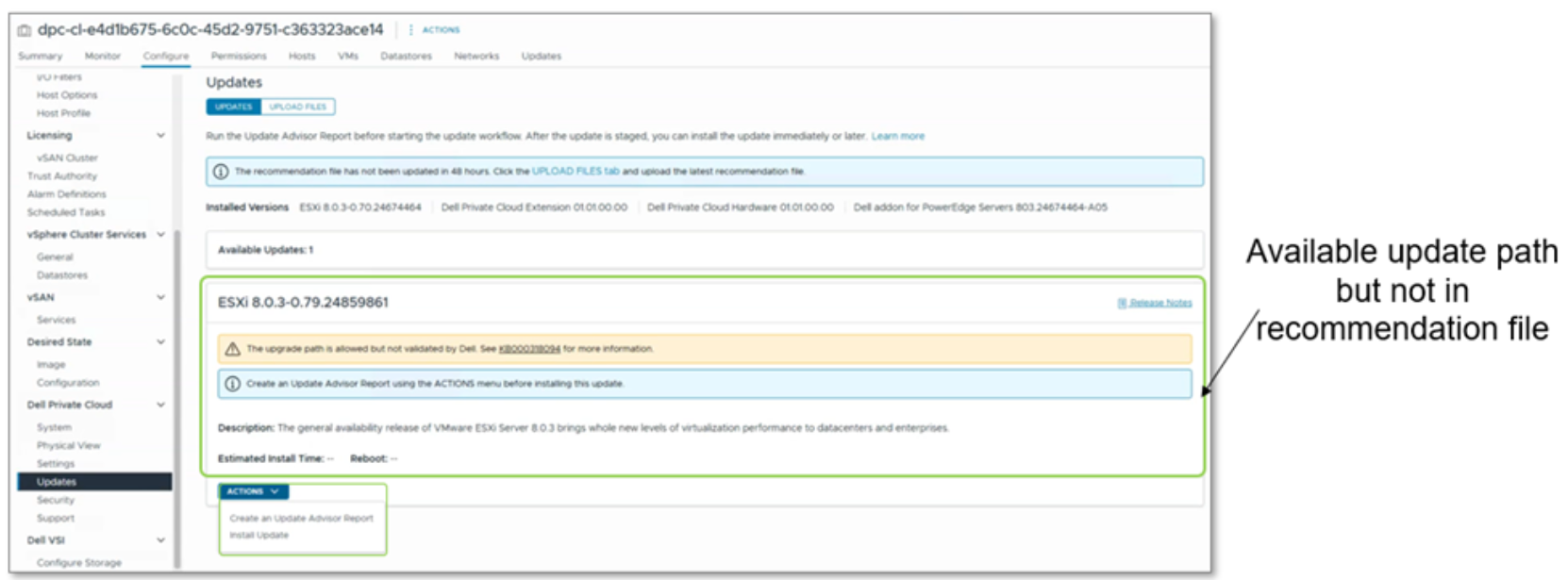
Figure 15. Update path that is not in a validated state
Dell Private Cloud deploying OpenShift
Dell Private Cloud deploying OpenShift
Solution Specifications
Supported deployment scenarios
OpenShift licensing support
Managing Red Hat OpenShift clusters in Dell Private Cloud
Managing a Red Hat OpenShift cluster in Dell Private Cloud is generally performed from two management consoles: Dell Automation Platform orchestrator UI and the OpenShift Web Console UI with the Dell Private Cloud Extension plugin.
Whenever physical infrastructure is involved in a management operation, a Dell Private Cloud blueprint is required and must be run from the Orchestrator UI.
Cluster management operations are done from the OpenShift Web Console Client UI.
The following is a table of the major management areas for an OpenShift cluster in Dell Private Cloud. Note that a cluster deployment operation is covered in the Dell Private Cloud section and that currently Dell Professional Deployment Services is required to deploy an OpenShift cluster.
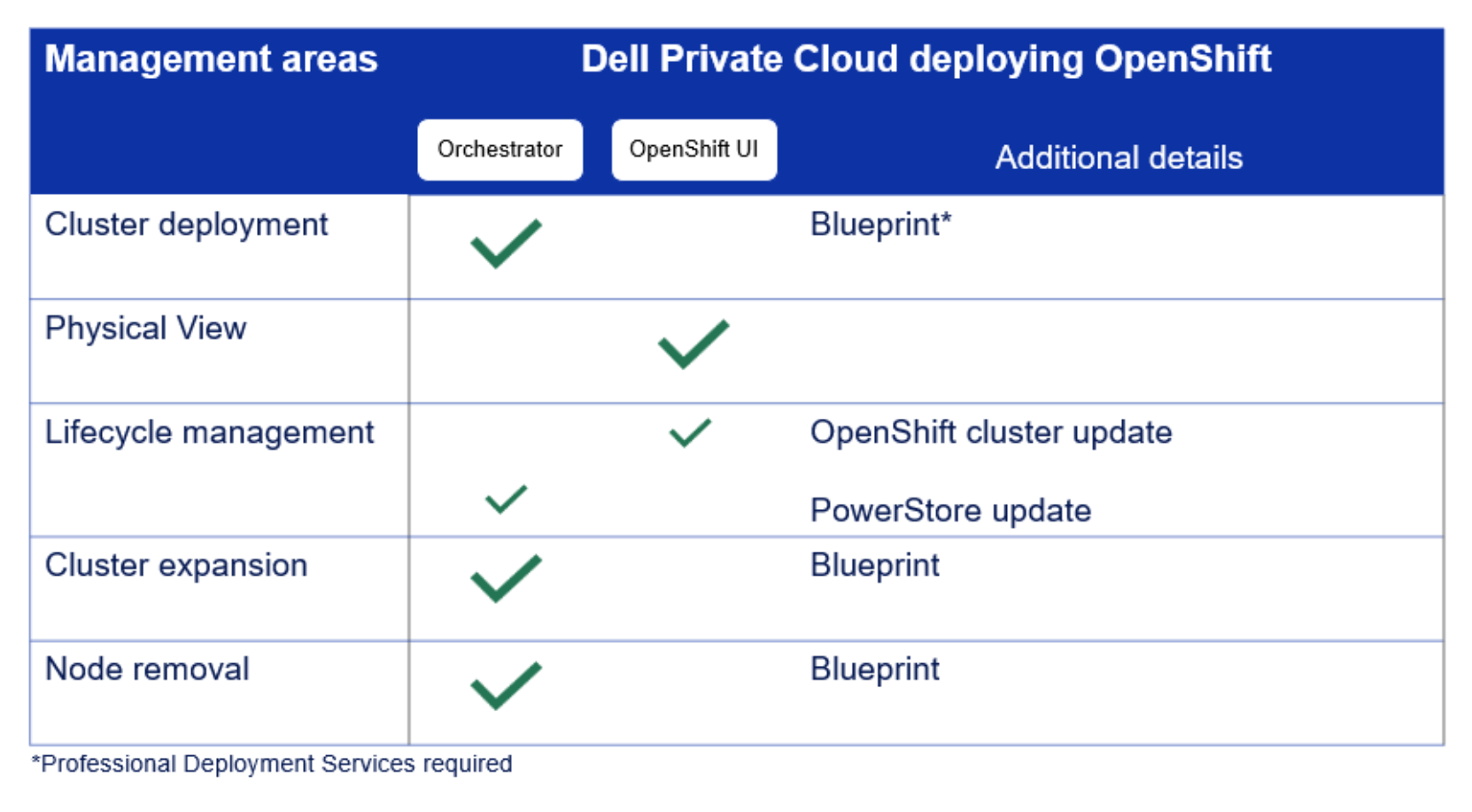
Figure 16. Showing from where the management functions can be performed for an OpenShift cluster in Dell Private Cloud
Dell Private Cloud Extension for OpenShift
The Dell Private Cloud Extension includes a plugin to the OpenShift Web Console so that customers can seamlessly manage the hardware and software components of their OpenShift cluster like they would if the cluster was composed of purpose-built appliances.
The Dell Private Cloud Extension provides additional cluster management capabilities to customers, including the following:
- Physical view – Inventory information about the cluster and the nodes, and view alerts
- Lifecycle management – Available update paths, generating update summary reports, and performing a cluster update
- Serviceability – Create Service Request, generate log bundle
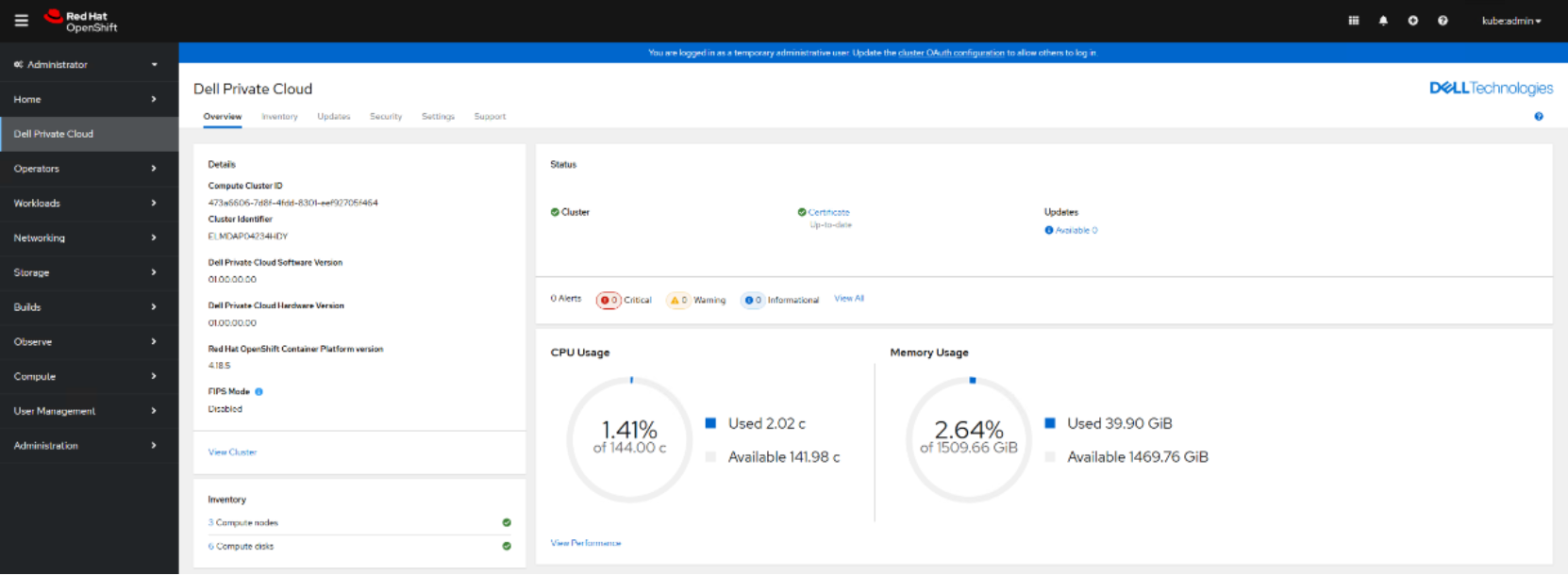
Figure 17. Cluster management capabilities provided by Dell Private Cloud Extension for OpenShift
Physical View
The Physical View feature provides a cluster level view that shows the nodes in the cluster. Customer can view the individual node for added visibility into the hardware components in the node such as the Network Interface Controller, power supply, and boot devices along with the firmware and driver versions installed in the node.
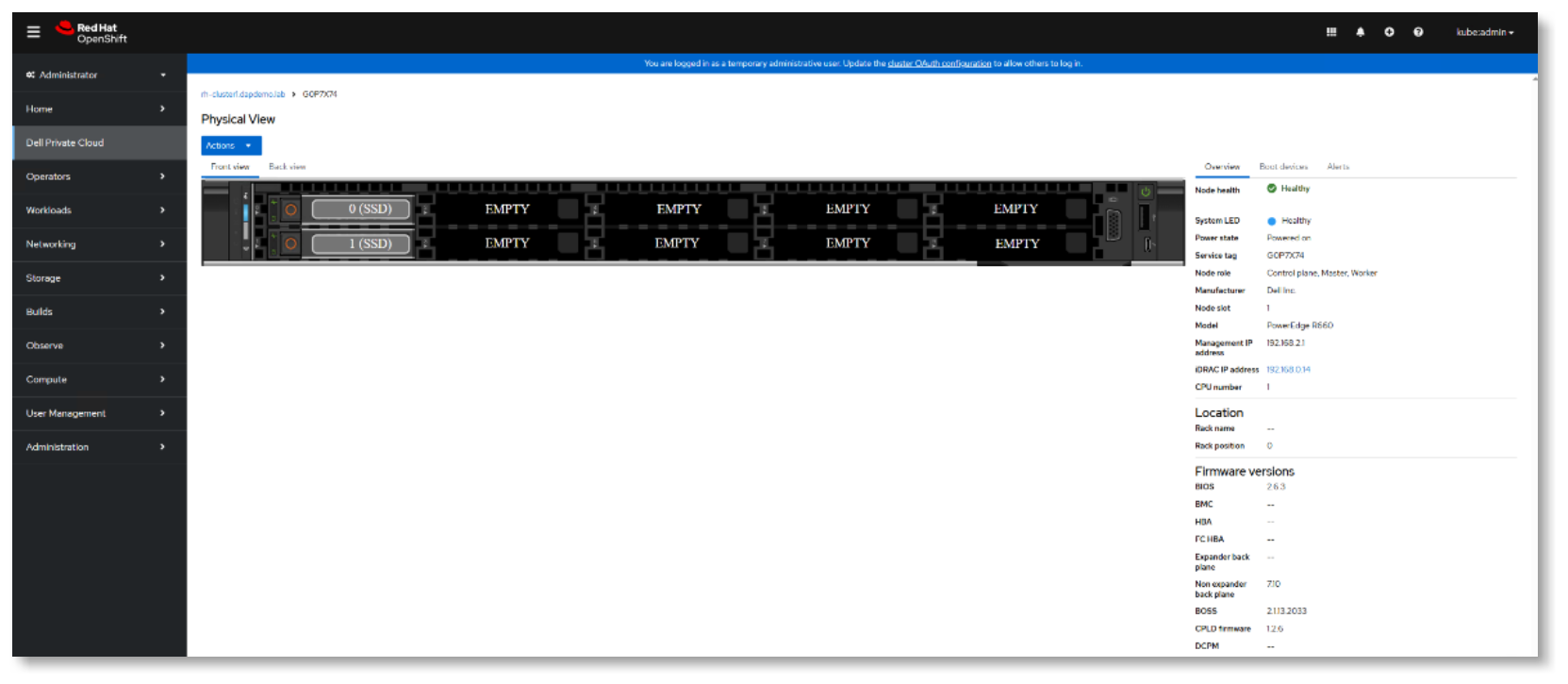
Figure 18. Physical View provided by Dell Private Cloud Extension for OpenShift
Cluster update workflow
The cluster update workflow has four important areas:
- Using the recommendation file for compliance checks and identifying available update paths.
- Selecting the update(s) to install.
- Running the update summary report to see which components will be updated during the cluster update.
- Staging the update bundles in the Dell Private Cloud Extension and initiating a cluster update.
A recommendation file is a Dell-published digital support matrix file that defines the continuously validated states for an OpenShift cluster in Dell Private Cloud. The recommendation file is used to check for cluster compliance and to determine available update paths for the cluster. The file is regularly updated by Dell engineering. For a connected cluster, the Dell Private Cloud Extension periodically checks for an updated recommendation file using its connection to Dell Secure Remote Services.
For an unconnected cluster, the customer can manually download the file from the Dell Support website and upload it into Dell Private Cloud Extension via the Updates page provided by the Dell Private Cloud Extension to OpenShift. It is recommended to upload the latest version of the recommendation file before preparing for a cluster update.
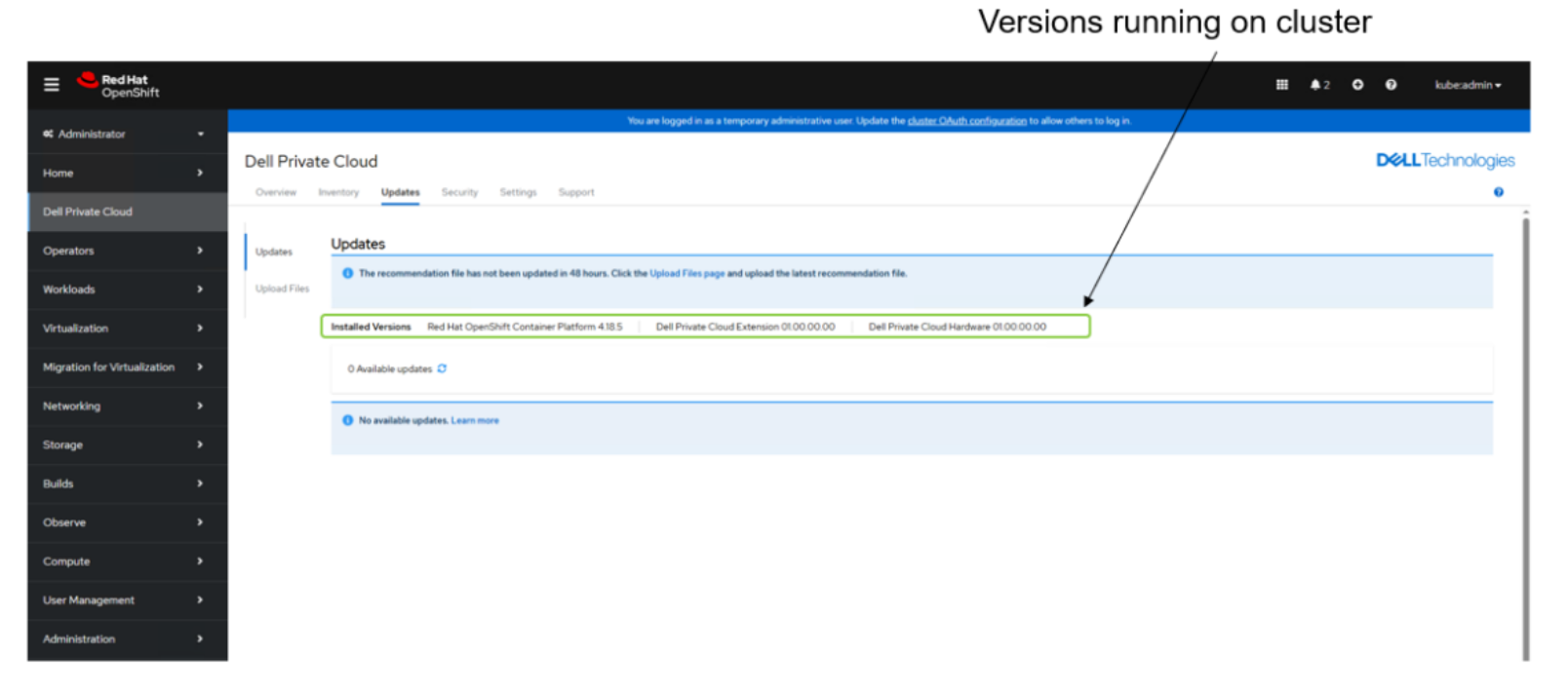
Figure 19. Where customers can the current component versions in the Dell Private Cloud Extension
Once the recommendation file has been updated, you will see a list of available updates for the version of OpenShift that you are currently running. You can then select one or more of the available updates to install. You can either download the update bundle(s) on an internet connected system or upload the bundle(s) on a disconnected system. The next step is to run the health check to ensure that the cluster is healthy enough to apply the update bundles. A final change report is generated before the customer can proceed with initiating the cluster update.
Note that this cluster update workflow covers the compute layer only. Storage lifecycle management can be performed from the Dell Automation Platform orchestrator UI for platform-integrated storage appliances or from the element manager of the platform-compatible storage appliance.
Drifting from validated states
With Dell Private Cloud deploying OpenShift, Dell allows users to apply z-stream updates directly from Red Hat as soon as they are available without impacting the supportability of the cluster. Y-stream updates should wait for an updated recommendation file that covers that minor version of OpenShift before the cluster is updated.
Dell Private Cloud deploying Nutanix
Dell Private Cloud deploying Nutanix
Solution Specifications
Supported deployment scenarios
Nutanix AHV licensing support
Managing Nutanix AHV clusters in Dell Private Cloud
Managing a Nutanix AHV cluster in Dell Private Cloud is generally performed from two management consoles: Dell Automation Platform orchestrator UI and the Nutanix Prism Element Web Console UI with the Dell Private Cloud Extension plugin.
Whenever physical infrastructure is involved in a management operation, a Dell Private Cloud blueprint is required and must be run from the Orchestrator UI.
Cluster management operations are done from the Nutanix Prism Element Web Console Client UI.
The following is a table of the major management areas for a Nutanix AHV cluster in Dell Private Cloud. Note that a cluster deployment operation is covered in the Dell Private Cloud section and that currently Dell Professional Deployment Services is required to deploy a Nutanix AHV cluster.
|
Dell Private Cloud deploying Nutanix AHV |
|||
|
Management Area |
Orchestrator |
Prism Element UI |
Details |
|
Cluster Deployment |
✅ |
|
Blueprint* |
|
Physical View |
|
✅ |
|
|
LCM - Compute Nodes |
|
✅ |
Prism Element LCM Update |
|
LCM - Storage |
|
|
PowerFlex Manager |
|
Cluster Expansion |
✅ |
|
Blueprint |
|
Node Removal |
✅ |
|
Blueprint |
|
*Professional Deployment Services Required |
|||
Figure 20. Showing where the management functions can be performed for a Nutanix AHV cluster in Dell Private Cloud
Dell Private Cloud Extension for Nutanix AHV
The Dell Private Cloud Extension includes a plugin to the Nutanix Prism Element Web Console so that customers can seamlessly manage the hardware and software components of their Nutanix AHV cluster like they would if the cluster was composed of purpose-built appliances.
The Dell Private Cloud Extension provides additional cluster management capabilities to customers, including the following:
- Physical view – Inventory information about the cluster and the nodes, and view alerts
- Lifecycle management – Available update paths, generating update summary reports, and performing a cluster update
- Serviceability – Create Service Request, generate log bundle
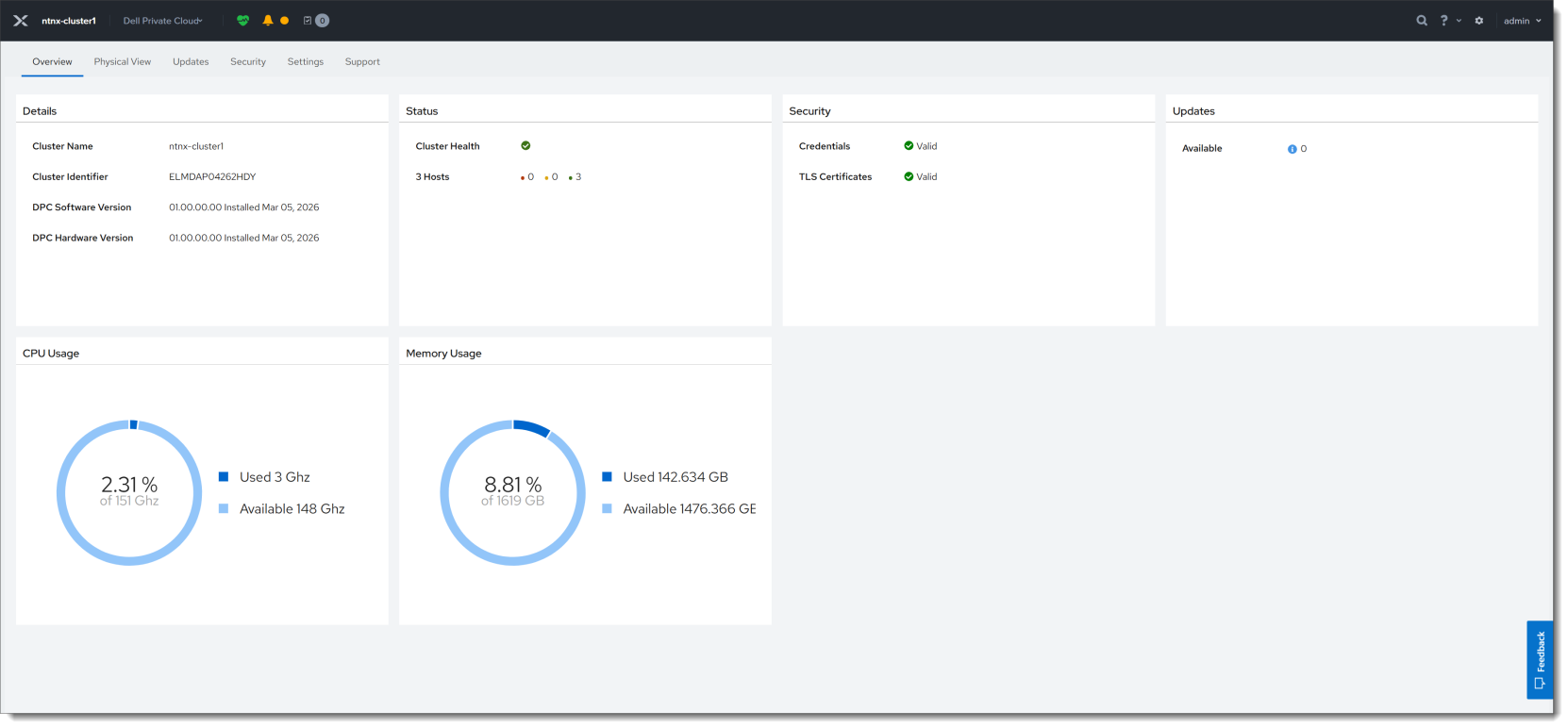
Figure 21. Cluster management capabilities provided by Dell Private Cloud Extension for Nutanix AHV
Physical View
The Physical View feature provides a cluster level view that shows the nodes in the cluster. Customer can view the individual node for added visibility into the hardware components in the node such as the Network Interface Controller, power supply, and boot devices along with firmware and driver versions installed in the node.
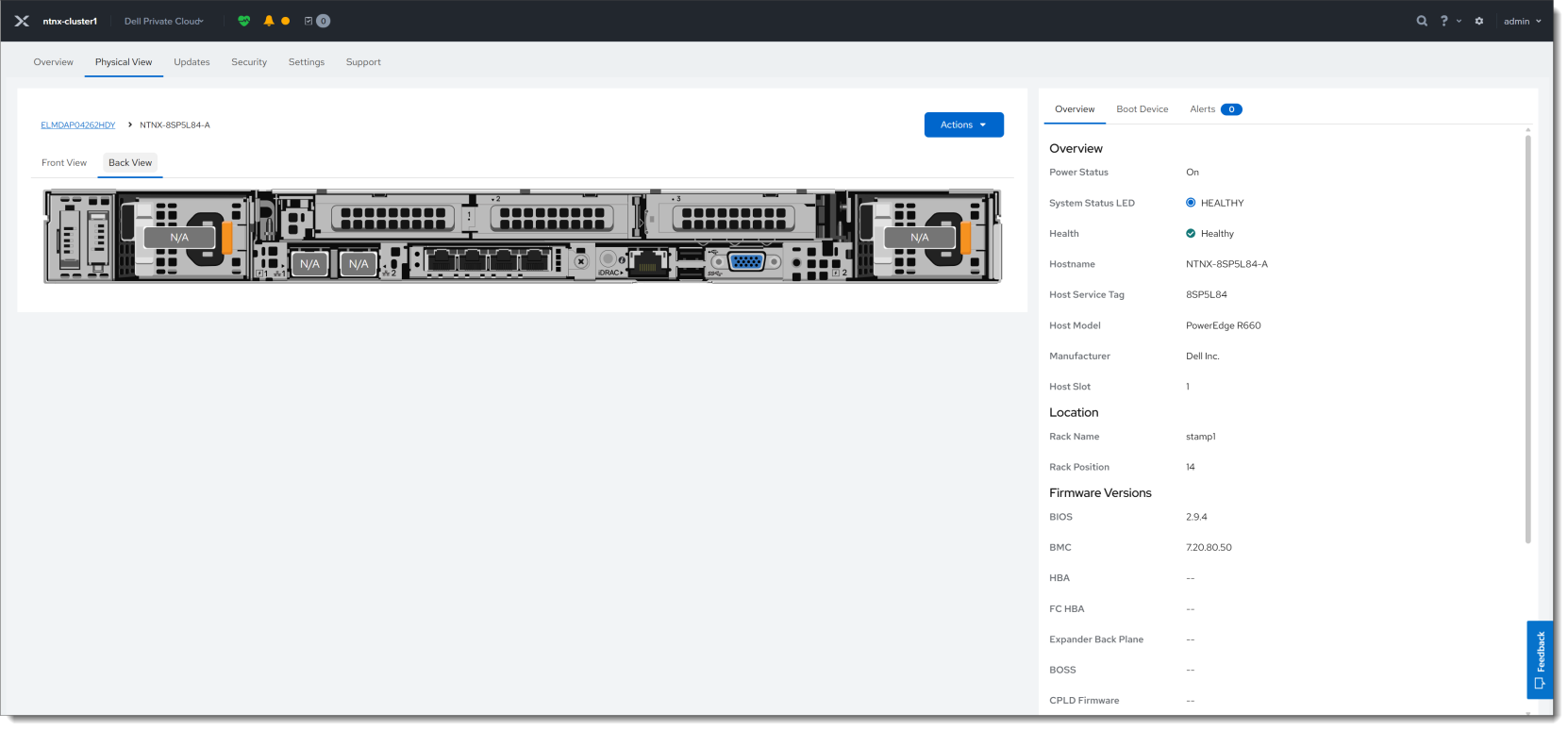
Figure 22. Physical View provided by Dell Private Cloud Extension for Nutanix Prism Element
Cluster update workflow
The cluster update workflow has four important areas:
- Using the recommendation file for compliance checks and identifying available update paths.
- Selecting the update(s) to install.
- Running the update summary report to see which components will be updated during the cluster update.
- Staging the update bundles in the Dell Private Cloud Extension and initiating a cluster update.
A recommendation file is a Dell-published digital support matrix file that defines the continuously validated states for an Nutanix AHV cluster in Dell Private Cloud. The recommendation file is used to check for cluster compliance and to determine available update paths for the cluster. The file is regularly updated by Dell engineering. For a connected cluster, the Dell Private Cloud Extension periodically checks for an updated recommendation file using its connection to Dell Secure Remote Services.
For an unconnected cluster, the customer can manually download the file from the Dell Support website and upload it into Dell Private Cloud Extension via the Updates page provided by the Dell Private Cloud Extension to Nutanix AHV. It is recommended to upload the latest version of the recommendation file before preparing for a cluster update.
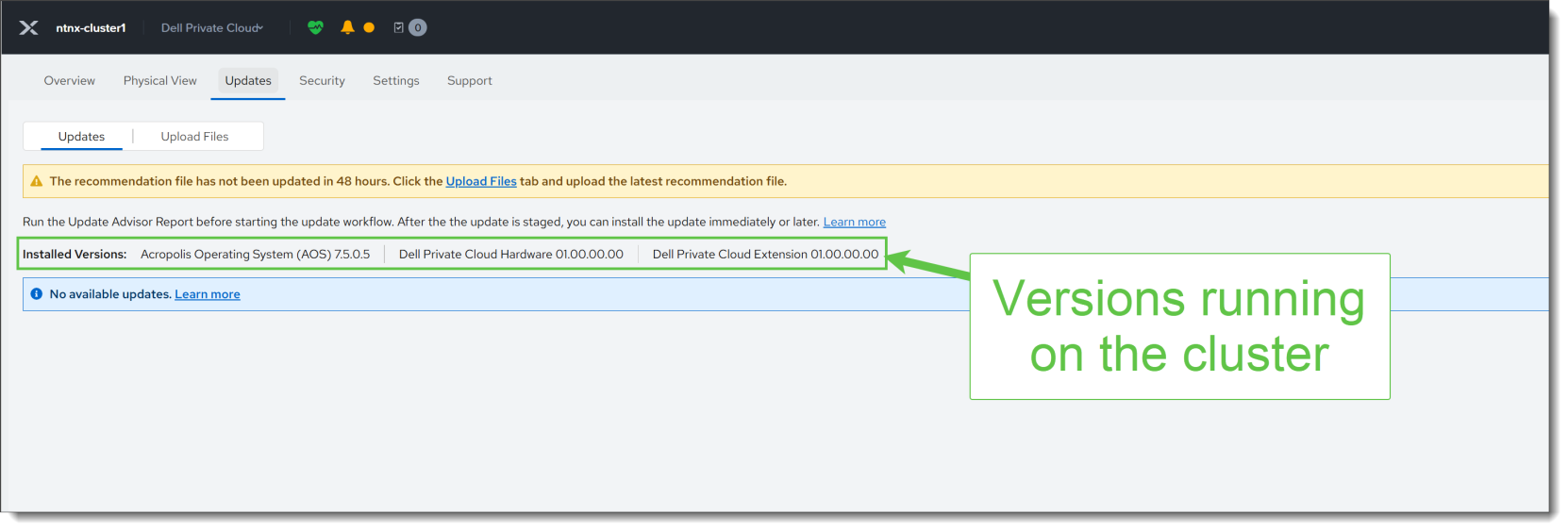
Figure 23. Where users can view the current component versions in the Dell Private Cloud Extension
Once the recommendation file has been updated, you will see a list of available updates for the version of Nutanix AHV that you are currently running. You can then select one or more of the available updates to install. You can either download the update bundle(s) on an internet connected system or upload the bundle(s) on a disconnected system. The next step is to run the health check to ensure that the cluster is healthy enough to apply the update bundles. A final change report is generated before the customer can proceed with initiating the cluster update.
Note that this cluster update workflow covers the compute layer only. Storage lifecycle management can be performed from the Dell Automation Platform orchestrator UI for platform-integrated storage appliances or from the element manager of the platform-compatible storage appliance.
Drifting from validated states
With Dell Private Cloud, there is the option for the Nutanix AHV cluster to drift from a validated state. For example, if a critical AHV security patch needs to be applied expeditiously before Dell has published a validated state against it, a customer can compose a desired state with it. The Prism Element UI, via the Dell Private Cloud Extension plugin, will warn that while it is an allowed operation, the desired state is out of compliance. The UI will continue to report the non-compliance after a successful cluster update until an updated recommendation file with a validated state that includes this patch has been uploaded into the Dell Private Cloud Extension VM.