Dell SRM Data Forwarder
Executive summary
Overview
Dell SRM data forwarder (Gate) is a proxy SRM collector server located in a demilitarized network zone (DMZ), in front of distributed collectors that are located in a secured internal network zone. It aggregates all traffic from the internal zone and forwards it towards the external network zone where central SRM server components (backend/frontend) are placed.
It also forwards traffic from the external zone (frontend admin UI) towards an internal zone (collectors) for management purposes. This kind of setup is required to avoid complex firewall rules that would need to be maintained for each collector in the internal zone. Instead, firewall rules, which are reachable from within the external zone, are needed for each SRM Gate server.
This architecture also allows customers to be compliant with the PCI (Payment Card Industry) Data Security Standard requirement named Installing and maintaining a firewall configuration to protect cardholder data. The purpose of a firewall is to scan all network traffic and block untrusted networks from accessing the system. In SRM architecture, the untrusted network is the external zone.
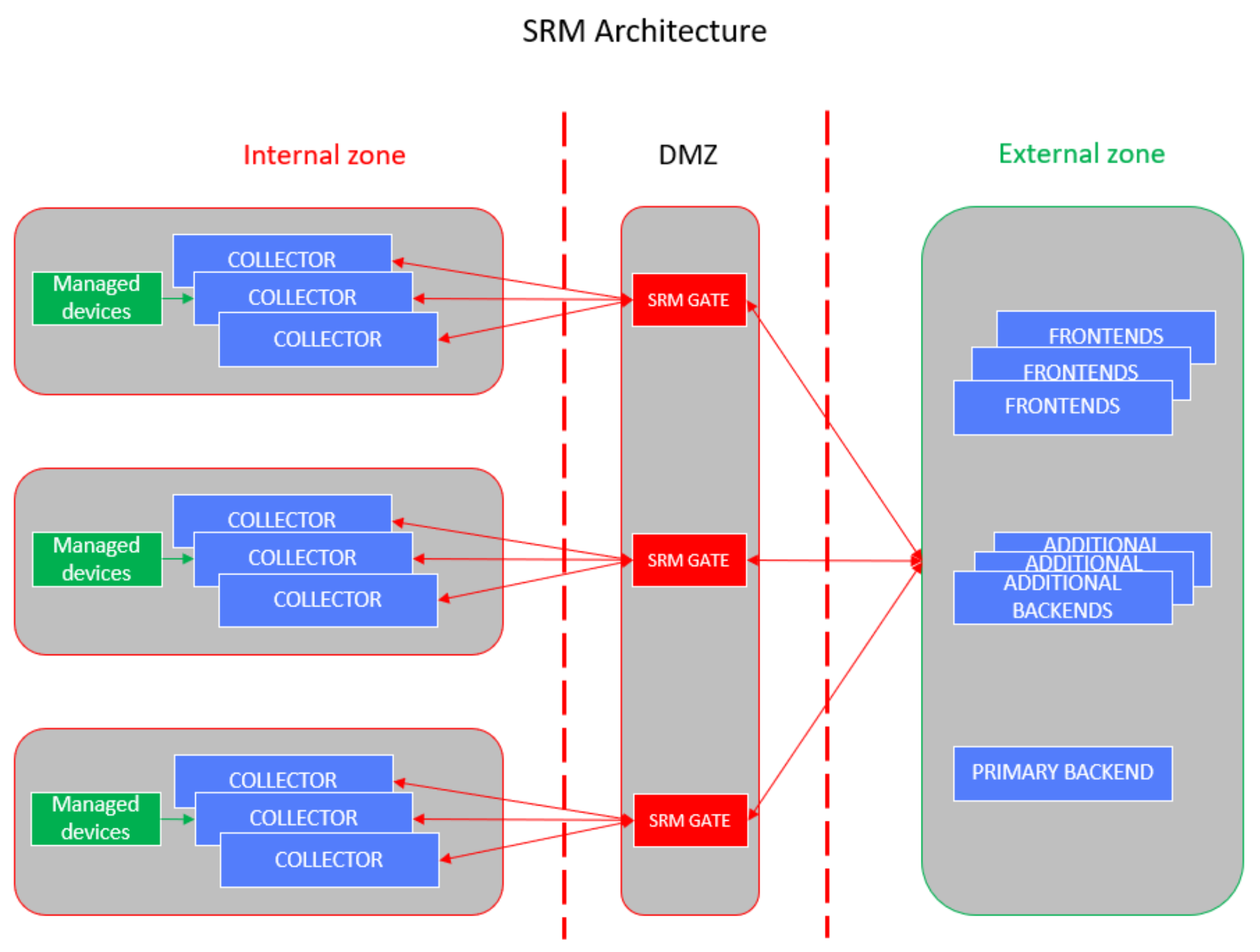
Figure 1. SRM deployment architecture
We value your feedback
Dell Technologies and the authors of this document welcome your feedback on this document. Contact the Dell Technologies team by email.
Author: Dejan Stojanovic
Architecture
Architecture
Deploy the SRM single VM vApp as a collector VM type and place it in front of the selected group of distributed SRM collectors located in the internal secured zone.
Such VM has the role of SRM Gate, and as such must have the following SRM components running:
- LBC (Load-Balancer-Connector)
- WSG (Webservice-Gateway)
- TMS (Topology-Mapping-Service)
- Health collector
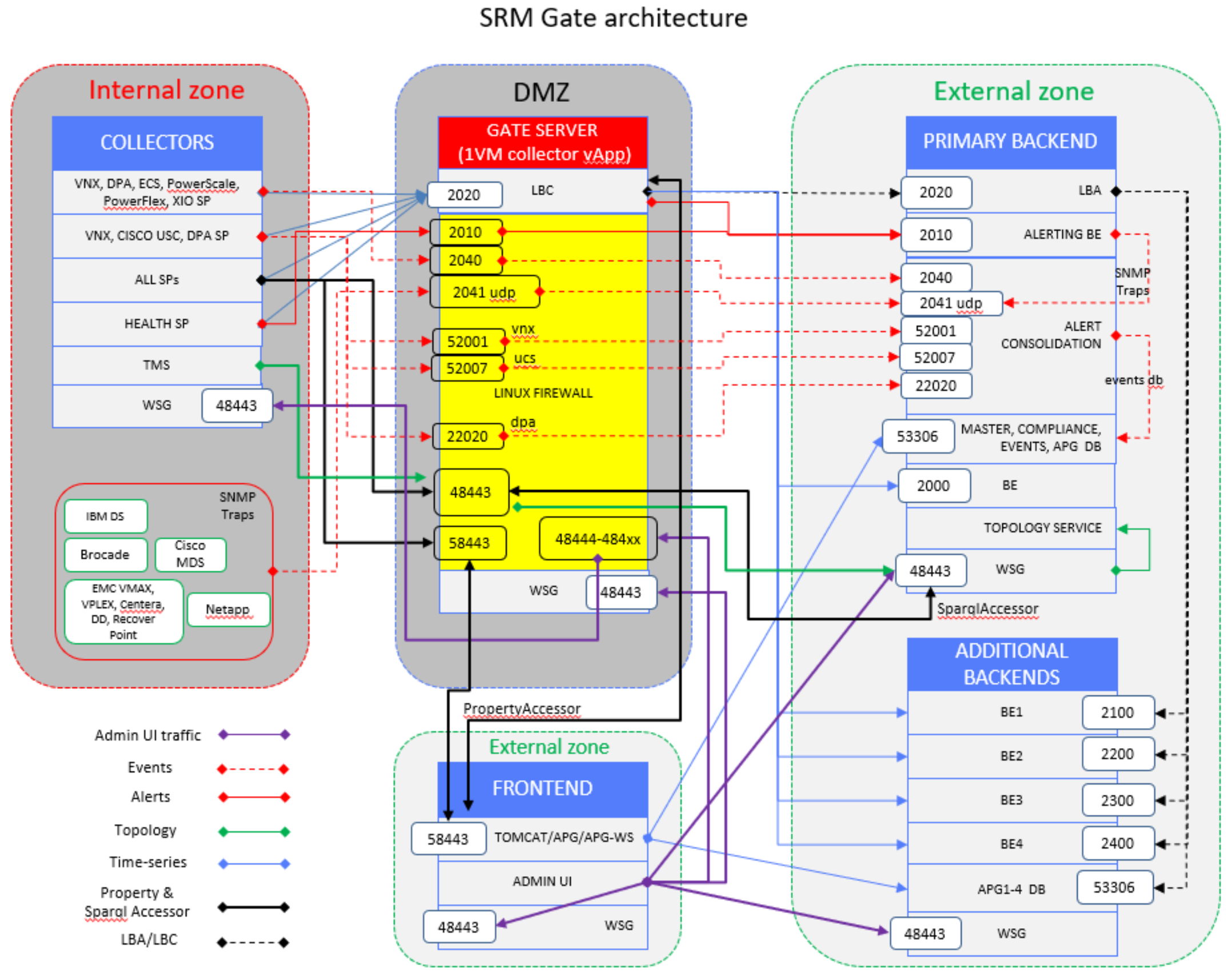
SRM Gate server firewall configuration (iptables)
The SRM Gate routes packets initiated by distributed collectors towards primary backend (PBE) and frontend (FE) servers, and routes packets initiated by FE towards distributed collectors for administration purposes (admin UI).
Besides time-series data, which is processed by the Gate’s LBC, the rest of the traffic initiated by collectors and the frontend must be processed by the Gate server firewall, which is configured with the iptables utility. Ports that need to be configured with iptables are shown in the yellow box in Figure 2.
Before configuring the iptables, check to see whether ip forwarding is enabled on the server. As root user, run the command:
# sysctl net.ipv4.ip_forward
net.ipv4.ip_forward = 0
If the result is 0 (as shown in the command output), enable ip forwarding by adding the following line to the /etc/sysctl.conf file:
net.ipv4.ip_forward=1
If this line is already present in the file, change the value of the parameter from 0 to 1.
Save the file and apply your changes:
# sysctl -p /etc/sysctl.conf
# sysctl –system
Here is the output of the configuration needed in iptables on the Gate server to enable network address translation and forwarding, so that packets received on the Gate’s specific port are forwarded to the respective PBE, FE, or REMOTE-COLLECTOR port.
gate-hostname:~ # iptables -S -t nat
-P PREROUTING ACCEPT
-P INPUT ACCEPT
-P OUTPUT ACCEPT
-P POSTROUTING ACCEPT
-A PREROUTING -i eth0 -p tcp -m tcp --dport 58443 -j DNAT --to-destination FRONTEND-IP:58443
-A PREROUTING -i eth0 -p tcp -m tcp --dport 48443 -d GATE-IP -j ACCEPT
-A PREROUTING -i eth0 -p tcp -m tcp --dport 48443 -j DNAT --to-destination PBE-IP:48443
-A PREROUTING -i eth0 -p tcp -m tcp --dport 52001 -j DNAT --to-destination PBE-IP:52001
-A PREROUTING -i eth0 -p tcp -m tcp --dport 52007 -j DNAT --to-destination PBE-IP:52007
-A PREROUTING -i eth0 -p tcp -m tcp --dport 22020 -j DNAT --to-destination PBE-IP:22020
-A PREROUTING -i eth0 -p tcp -m tcp --dport 2010 -j DNAT --to-destination PBE-IP:2010
-A PREROUTING -i eth0 -p tcp -m tcp --dport 2040 -j DNAT --to-destination PBE-IP:2040
-A PREROUTING -i eth0 -p udp -m udp --dport 162 -j DNAT --to-destination PBE-IP:2041
-A PREROUTING -i eth0 -p udp -m udp --dport 2041 -j DNAT --to-destination PBE-IP:2041
-A PREROUTING -i eth0 -p tcp -m tcp --dport 48444 -j DNAT --to-destination REMOTE-COLLECTOR-1-IP:48443
-A PREROUTING -i eth0 -p tcp -m tcp --dport 48445 -j DNAT --to-destination REMOTE-COLLECTOR-2-IP:48443
-A POSTROUTING -d FRONTEND-IP/32 -o eth0 -p tcp -m tcp --dport 58443 -j SNAT --to-source GATE-IP
-A POSTROUTING -d PBE-IP/32 -o eth0 -p tcp -m tcp --dport 48443 -j SNAT --to-source GATE-IP
-A POSTROUTING -d PBE-IP/32 -o eth0 -p tcp -m tcp --dport 52001 -j SNAT --to-source GATE-IP
-A POSTROUTING -d PBE-IP/32 -o eth0 -p tcp -m tcp --dport 52007 -j SNAT --to-source GATE-IP
-A POSTROUTING -d PBE-IP/32 -o eth0 -p tcp -m tcp --dport 22020 -j SNAT --to-source GATE-IP
-A POSTROUTING -d PBE-IP/32 -o eth0 -p tcp -m tcp --dport 2010 -j SNAT --to-source GATE-IP
-A POSTROUTING -d PBE-IP/32 -o eth0 -p tcp -m tcp --dport 2040 -j SNAT --to-source GATE-IP
-A POSTROUTING -d PBE-IP/32 -o eth0 -p udp -m udp --dport 2041 -j SNAT --to-source GATE-IP
-A POSTROUTING -d REMOTE-COLLECTOR-1-IP/32 -o eth0 -p tcp -m tcp --dport 48443 -j SNAT --to-source GATE-IP
-A POSTROUTING -d REMOTE-COLLECTOR-2-IP/32 -o eth0 -p tcp -m tcp --dport 48443 -j SNAT --to-source GATE-IP
gate-hostname:~ # iptables -S FORWARD
-P FORWARD DROP
-A FORWARD -m limit --limit 3/min -j LOG --log-prefix "SFW2-FWD-ILL-ROUTING " --log-tcp-options --log-ip-options
-A FORWARD -d FRONTEND-IP/32 -p tcp -m tcp --dport 58443 -m state --state NEW -j ACCEPT
-A FORWARD -d PBE-IP/32 -p tcp -m tcp --dport 48443 -m state --state NEW -j ACCEPT
-A FORWARD -d PBE-IP/32 -p tcp -m tcp --dport 52001 -m state --state NEW -j ACCEPT
-A FORWARD -d PBE-IP/32 -p tcp -m tcp --dport 52007 -m state --state NEW -j ACCEPT
-A FORWARD -d PBE-IP/32 -p tcp -m tcp --dport 22020 -m state --state NEW -j ACCEPT
-A FORWARD -d PBE-IP/32 -p tcp -m tcp --dport 2010 -m state --state NEW -j ACCEPT
-A FORWARD -d PBE-IP/32 -p tcp -m tcp --dport 2040 -m state --state NEW -j ACCEPT
-A FORWARD -d PBE-IP/32 -p udp -m udp --dport 2041 -m state --state NEW -j ACCEPT
-A FORWARD -d REMOTE-COLLECTOR-1-IP/32 -p tcp -m tcp --dport 48443 -m state --state NEW -j ACCEPT
-A FORWARD -d REMOTE-COLLECTOR-2-IP/32 -p tcp -m tcp --dport 48443 -m state --state NEW -j ACCEPT
-A FORWARD -m state --state RELATED,ESTABLISHED -j ACCEPT
To merge the above iptables rules with existing ones, run the following commands on the Gate server as root user:
- Save the current iptables configuration to a text file.
gate-hostname:~ # iptables-save > iptables-fw.rules
- Edit the saved iptables-fw.rules file: find the nat table section, and replace the configuration lines (shown in the iptables -S -t nat command’s output above) with the respective lines below (in red). The first line in red must be commented or removed because it redirects udp packets from target port 162 to 2041, which is applicable only on a PBE server. Replace FRONTEND-IP, PBE-IP, GATE-IP and REMOTE-COLLECTOR-*-IP with the actual IP addresses of the SRM servers:
*nat
:PREROUTING ACCEPT [153405:12619034]
:INPUT ACCEPT [22:1256]
:OUTPUT ACCEPT [9176:572712]
:POSTROUTING ACCEPT [5399:346092]
#-A PREROUTING -p udp -m udp --dport 162 -j REDIRECT --to-ports 2041
-A PREROUTING -i eth0 -p tcp -m tcp --dport 58443 -j DNAT --to-destination FRONTEND-IP:58443
-A PREROUTING -i eth0 -p tcp -m tcp --dport 48443 -d GATE-IP -j ACCEPT
-A PREROUTING -i eth0 -p tcp -m tcp --dport 48443 -j DNAT --to-destination PBE-IP:48443
-A PREROUTING -i eth0 -p tcp -m tcp --dport 52001 -j DNAT --to-destination PBE-IP:52001
-A PREROUTING -i eth0 -p tcp -m tcp --dport 52007 -j DNAT --to-destination PBE-IP:52007
-A PREROUTING -i eth0 -p tcp -m tcp --dport 22020 -j DNAT --to-destination PBE-IP:22020
-A PREROUTING -i eth0 -p tcp -m tcp --dport 2010 -j DNAT --to-destination PBE-IP:2010
-A PREROUTING -i eth0 -p tcp -m tcp --dport 2040 -j DNAT --to-destination PBE-IP:2040
-A PREROUTING -i eth0 -p udp -m udp --dport 162 -j DNAT --to-destination PBE-IP:2041
-A PREROUTING -i eth0 -p udp -m udp --dport 2041 -j DNAT --to-destination PBE-IP:2041
-A PREROUTING -i eth0 -p tcp -m tcp --dport 48444 -j DNAT --to-destination REMOTE-COLLECTOR-1-IP:48443
-A PREROUTING -i eth0 -p tcp -m tcp --dport 48445 -j DNAT --to-destination REMOTE-COLLECTOR-2-IP:48443
-A POSTROUTING -d FRONTEND-IP/32 -o eth0 -p tcp -m tcp --dport 58443 -j SNAT --to-source GATE-IP
-A POSTROUTING -d PBE-IP/32 -o eth0 -p tcp -m tcp --dport 48443 -j SNAT --to-source GATE-IP
-A POSTROUTING -d PBE-IP/32 -o eth0 -p tcp -m tcp --dport 52001 -j SNAT --to-source GATE-IP
-A POSTROUTING -d PBE-IP/32 -o eth0 -p tcp -m tcp --dport 52007 -j SNAT --to-source GATE-IP
-A POSTROUTING -d PBE-IP/32 -o eth0 -p tcp -m tcp --dport 22020 -j SNAT --to-source GATE-IP
-A POSTROUTING -d PBE-IP/32 -o eth0 -p tcp -m tcp --dport 2010 -j SNAT --to-source GATE-IP
-A POSTROUTING -d PBE-IP/32 -o eth0 -p tcp -m tcp --dport 2040 -j SNAT --to-source GATE-IP
-A POSTROUTING -d PBE-IP/32 -o eth0 -p udp -m udp --dport 2041 -j SNAT --to-source GATE-IP
-A POSTROUTING -d REMOTE-COLLECTOR-1-IP/32 -o eth0 -p tcp -m tcp --dport 48443 -j SNAT --to-source GATE-IP
-A POSTROUTING -d REMOTE-COLLECTOR-2-IP/32 -o eth0 -p tcp -m tcp --dport 48443 -j SNAT --to-source GATE-IP
- In the same file, find the filter table and insert new configuration lines from the above iptables -S FORWARD command after the last INPUT rule (in red):
*filter
:INPUT DROP [0:0]
:FORWARD DROP [0:0]
:OUTPUT ACCEPT [120471:100469695]
:forward_ext - [0:0]
:input_ext - [0:0]
:reject_func - [0:0]
-A INPUT -p icmp -m icmp --icmp-type 14 -j DROP
-A INPUT -p icmp -m icmp --icmp-type 13 -j DROP
-A INPUT -i lo -j ACCEPT
-A INPUT -m conntrack --ctstate ESTABLISHED -j ACCEPT
-A INPUT -p icmp -m conntrack --ctstate RELATED -j ACCEPT
-A INPUT -p udp -m udp --dport 5353 -m pkttype --pkt-type multicast -j ACCEPT
-A INPUT -j input_ext
-A INPUT -m limit --limit 3/min -j LOG --log-prefix "SFW2-IN-ILL-TARGET " --log-tcp-options --log-ip-options
-A INPUT -j DROP
-A FORWARD -m limit --limit 3/min -j LOG --log-prefix "SFW2-FWD-ILL-ROUTING " --log-tcp-options --log-ip-options
-A FORWARD -d FRONTEND-IP/32 -p tcp -m tcp --dport 58443 -m state --state NEW -j ACCEPT
-A FORWARD -d PBE-IP/32 -p tcp -m tcp --dport 48443 -m state --state NEW -j ACCEPT
-A FORWARD -d PBE-IP/32 -p tcp -m tcp --dport 52001 -m state --state NEW -j ACCEPT
-A FORWARD -d PBE-IP/32 -p tcp -m tcp --dport 52007 -m state --state NEW -j ACCEPT
-A FORWARD -d PBE-IP/32 -p tcp -m tcp --dport 22020 -m state --state NEW -j ACCEPT
-A FORWARD -d PBE-IP/32 -p tcp -m tcp --dport 2010 -m state --state NEW -j ACCEPT
-A FORWARD -d PBE-IP/32 -p tcp -m tcp --dport 2040 -m state --state NEW -j ACCEPT
-A FORWARD -d PBE-IP/32 -p udp -m udp --dport 2041 -m state --state NEW -j ACCEPT
-A FORWARD -d REMOTE-COLLECTOR-1-IP/32 -p tcp -m tcp --dport 48443 -m state --state NEW -j ACCEPT
-A FORWARD -d REMOTE-COLLECTOR-2-IP/32 -p tcp -m tcp --dport 48443 -m state --state NEW -j ACCEPT
-A FORWARD -m state --state RELATED,ESTABLISHED -j ACCEPT
- Save the file.
- Load the saved file into the iptables running configuration.
gate-hostname:~ # iptables-restore < iptables-fw.rules
Validate communication from collectors to pbe/fe servers
From command line interface of the REMOTE-COLLECTOR server, run the following tests as root user, using the netcat command, towards target servers FRONTEND-IP and PBE-IP. On the target server, use the tcpdump command as root user to confirm reception of the packets.
If the netcat and tcpdump commands are not available on the SRM servers, install them as root user, using the following utility:
srm-server#/opt/emc/vmutils/bin/vmutils-manager.sh
Replace FRONTEND-IP, PBE-IP, GATE-IP, and REMOTE-COLLECTOR-IP with the actual IP addresses of the SRM servers.
PropertyAccessor: REMOTE-COLLECTOR to communicate with FRONTEND-IP:58443 via GATE-IP:58443
REMOTE-COLLECTOR:~ # netcat -zvn GATE-IP 58443
Connection to GATE-IP 58443 port [tcp/*] succeeded!
FRONTEND:~ # tcpdump -i any '(dst FRONTEND-IP && dst port 58443) or (src FRONTEND-IP && src port 58443)' -n
23:46:49.822012 IP GATE-IP.36958 > FRONTEND-IP.58443: Flags [S], seq 3751257320, win 29200, options [mss 1460,sackOK,TS val 1685627322 ecr 0,nop,wscale 7], length 0
23:46:49.822110 IP FRONTEND-IP.58443 > GATE-IP.36958: Flags [S.], seq 3810488336, ack 3751257321, win 28960, options [mss 1460,sackOK,TS val 1508520352 ecr 1685627322,nop,wscale 7], length 0
SparqlAccessor, TMS update to TS: REMOTE-COLLECTOR to communicate with PBE-IP:48443 via GATE-IP:48443
REMOTE-COLLECTOR:~ # netcat -zvn GATE-IP 48443
Connection to GATE-IP 48443 port [tcp/*] succeeded!
PBE:~ # tcpdump -i any '(dst PBE-IP && dst port 48443) or (src PBE-IP && src port 48443)' -n
23:47:07.931030 IP GATE-IP.36992 > PBE-IP.48443: Flags [S], seq 3921572837, win 29200, options [mss 1460,sackOK,TS val 1685501329 ecr 0,nop,wscale 7], length 0
23:47:07.931127 IP PBE-IP.48443 > GATE-IP.36992: Flags [S.], seq 119706513, ack 3921572838, win 28960, options [mss 1460,sackOK,TS val 3466950085 ecr 1685501329,nop,wscale 7], length 0
Events (ports: 2041 udp, 2010, 2040, 52001, 52007, 22020): REMOTE-COLLECTOR to communicate with PBE-IP:port via GATE-IP:port
REMOTE-COLLECTOR:~ # netcat -zvun GATE-IP 2041
Connection to GATE-IP 2041 port [udp/*] succeeded!
PBE:~ # tcpdump -i any dst port 2041 -n
23:52:43.993286 IP GATE-IP.39099 > PBE-IP.2041: UDP, length 1
REMOTE-COLLECTOR:~ # netcat -zvn GATE-IP 2010
Connection to GATE-IP 2010 port [tcp/*] succeeded!
PBE:~ # tcpdump -i any '(dst PBE-IP && dst port 2010) or (src PBE-IP && src port 2010)' -n
23:57:37.325016 IP GATE-IP.34380 > PBE-IP.2010: Flags [S], seq 2968565486, win 29200, options [mss 1460,sackOK,TS val 1686130711 ecr 0,nop,wscale 7], length 0
23:57:37.325123 IP PBE-IP.2010 > GATE-IP.34380: Flags [S.], seq 2262706861, ack 2968565487, win 28960, options [mss 1460,sackOK,TS val 3467579478 ecr 1686130711,nop,wscale 7], length 0
REMOTE-COLLECTOR:~ # netcat -zvn GATE-IP 2040
Connection to GATE-IP 2040 port [tcp/*] succeeded!
PBE:~ # tcpdump -i any '(dst PBE-IP && dst port 2040) or (src PBE-IP && src port 2040)' -n
23:58:20.126114 IP GATE-IP.36142 > PBE-IP.2040: Flags [S], seq 3596835423, win 29200, options [mss 1460,sackOK,TS val 1686173511 ecr 0,nop,wscale 7], length 0
23:58:20.126211 IP PBE-IP.2040 > GATE-IP.36142: Flags [S.], seq 1159402138, ack 3596835424, win 28960, options [mss 1460,sackOK,TS val 3467622279 ecr 1686173511,nop,wscale 7], length 0
Target udp port 162 is redirected to udp port 2041 on PBE server:
REMOTE-COLLECTOR:~ # netcat -zvu GATE-IP 162
Connection to GATE-IP 162 port [udp/snmptrap] succeeded!
PBE:~ # tcpdump -i any dst port 2041 -n
00:00:08.432324 IP GATE-IP.59155 > PBE-IP.2041: UDP, length 1
REMOTE-COLLECTOR:~ # netcat -zvn GATE-IP 52001
Connection to GATE-IP 52001 port [tcp/*] succeeded!
PBE:~ # tcpdump -i any '(dst PBE-IP && dst port 52001) or (src PBE-IP && src port 52001)' -n
00:14:38.815614 IP GATE-IP.50986 > PBE-IP.52001: Flags [S], seq 466442469, win 29200, options [mss 1460,sackOK,TS val 1687152181 ecr 0,nop,wscale 7], length 0
00:14:38.815711 IP PBE-IP.52001 > GATE-IP.50986: Flags [R.], seq 0, ack 466442470, win 0, length 0
REMOTE-COLLECTOR:~ # netcat -zvn GATE-IP 52007
Connection to GATE-IP 52007 port [tcp/*] succeeded!
PBE:~ # tcpdump -i any '(dst PBE-IP && dst port 52007) or (src PBE-IP && src port 52007)' -n
00:16:00.786449 IP GATE-IP.47834 > PBE-IP.52007: Flags [S], seq 321760637, win 29200, options [mss 1460,sackOK,TS val 1687234151 ecr 0,nop,wscale 7], length 0
00:16:00.786532 IP PBE-IP.52007 > GATE-IP.47834: Flags [R.], seq 0, ack 321760638, win 0, length 0
REMOTE-COLLECTOR:~ # netcat -zvn GATE-IP 22020
Connection to GATE-IP 22020 port [tcp/*] succeeded!
PBE:~ # tcpdump -i any '(dst PBE-IP && dst port 22020) or (src PBE-IP && src port 22020)' -n
00:17:13.005035 IP GATE-IP.58080 > PBE-IP.22020: Flags [S], seq 1197119609, win 29200, options [mss 1460,sackOK,TS val 1687306368 ecr 0,nop,wscale 7], length 0
00:17:13.005112 IP PBE-IP.22020 > GATE-IP.58080: Flags [R.], seq 0, ack 1197119610, win 0, length 0
If all validation tests are successful, proceed with the collector servers’ configuration in the frontend admin UI.
If tests are not successful, check the iptables rules and whether they are in the order as specified in previous chapter.
Configuring servers for remote management
Use the frontend admin UI to manage all SRM servers belonging to a specific environment. Because collectors are located behind the firewall and their IP address is not reachable from the frontend server, the frontend needs to communicate with them through the Gate server.
- WSG traffic from the frontend’s admin UI webapp to distributed collectors is sent via the Gate’s set of sockets gate-hostname:port. For example, with 10 collectors behind the Gate: gate-hostname:48444, gate-hostname:48445,… gate-hostname:48453.
Note: None of the ports will be equal to 48443 because this port is already being used by the WSG service on the Gate (see the SRM Gate architecture figure).
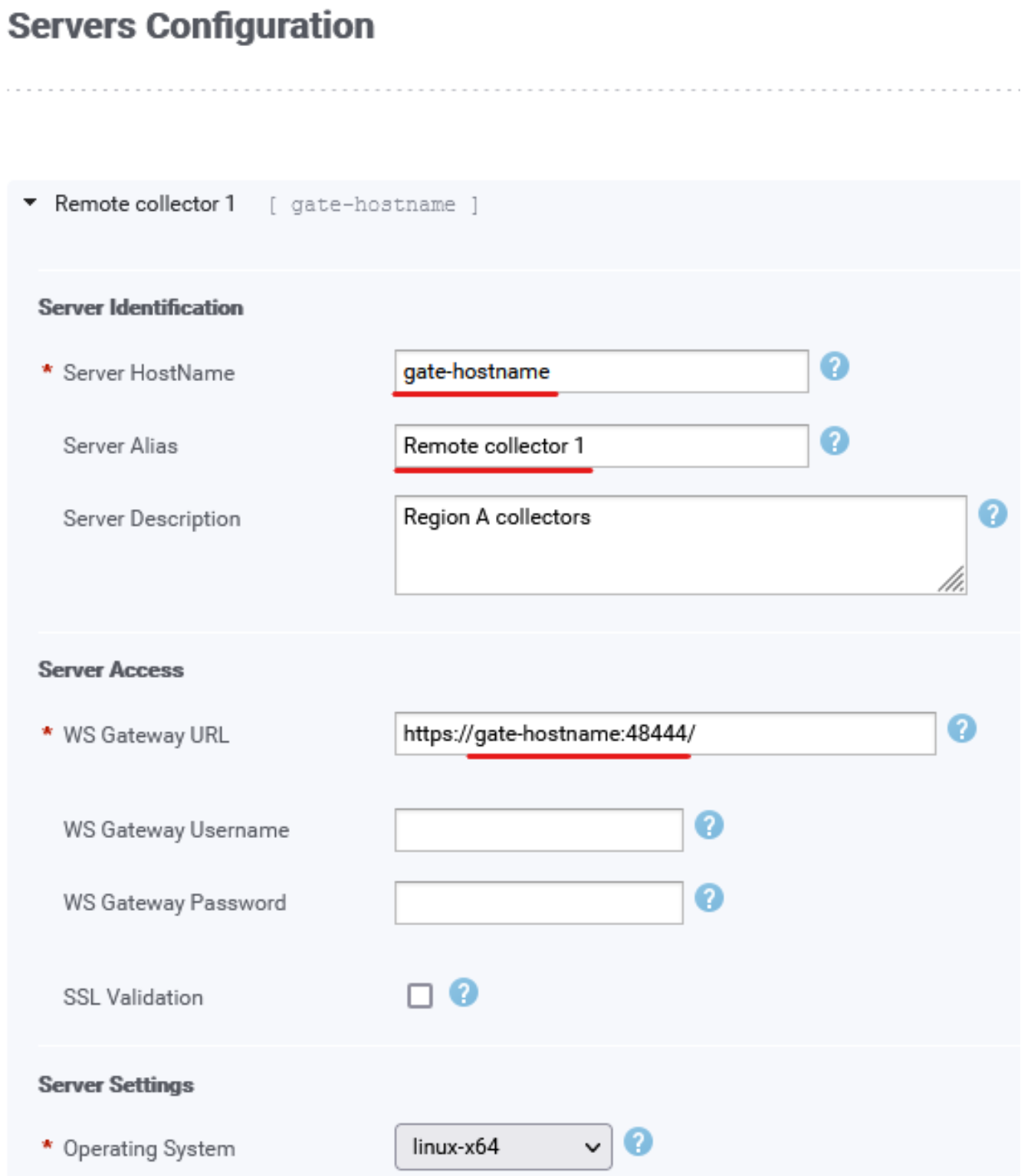
Figure 3. Server configuration
Validate communication from the frontend admin UI to the collector servers
In the frontend Admin UI, select /Config/Settings/Configure Servers and add the server configuration. Replace FRONTEND-IP, GATE-HOSTNAME, GATE-IP, and REMOTE-COLLECTOR-IP with the actual hostnames or IP addresses of the SRM servers.
- Click on Register a Server.
- Server HostName: GATE-HOSTNAME or GATE-IP
- Server Alias: REMOTE-COLLECTOR-1
- WS Gateway URL: https://GATE-HOSTNAME:48444/
- Click the Test Server Connectivity button on the top right corner of the server configuration area.
- If the test is green, communication is established.
- Save.
Validate incoming packets on the REMOTE-COLLECTOR server:
REMOTE-COLLECTOR:~ # tcpdump -i any '(dst REMOTE-COLLECTOR-IP && dst port 48443) or (src REMOTE-COLLECTOR-IP && src port 48443)' -n
00:47:04.476831 IP FRONTEND-IP.59418 > REMOTE-COLLECTOR-IP.48443: Flags [S], seq 937714845, win 29200, options [mss 1460,sackOK,TS val 1512083573 ecr 0,nop,wscale 7], length 0
00:47:04.476944 IP REMOTE-COLLECTOR-IP.48443 > FRONTEND-IP.59418: Flags [S.], seq 3936610070, ack 937714846, win 28960, options [mss 1460,sackOK,TS val 1689190571 ecr 1512083573,nop,wscale 7], length 0
Repeat the steps for each other remote collector by specifying same gate hostname and a different port number (48444-48453, if there are 10 collectors).
Configuring the solution pack data collection block
Management of solution packs (SP) on distributed collectors in the internal zone, and SRM Gate collectors in the DMZ, is performed from the frontend’s admin UI. A frontend server located in the external zone can access servers in the internal zone thanks to firewall rules implemented on SRM Gate servers. Servers in the DMZ are directly reachable by the servers in the external zone.
Install any relevant solution packs on distributed collectors if they are not already deployed.
Time-series data generated by solution packs on distributed collectors in the internal zone must be pushed towards SRM Gate’s LBC, which further pushes data to Load-Balancer-Arbiter (LBA), backend instances on PBE, and Additional Backends (ABE).
The LBC collector-manager on a Gate server must have its max-heap-size increased from the default 2048 MB to an initial value of 4096 MB. This can be done either in the unix-service.properties file, or by means of the admin UI Configure service button of the collector-manager Load-Balancer service.
Increase or decrease memory accordingly in case the number of underlying collector servers increases or decreases and based on cpu/memory utilization in health reports (Report Library/System Health/Workload/JVMs Sizing Recommendation, Collector Managers).
Gate’s LBC is configured as per default settings:
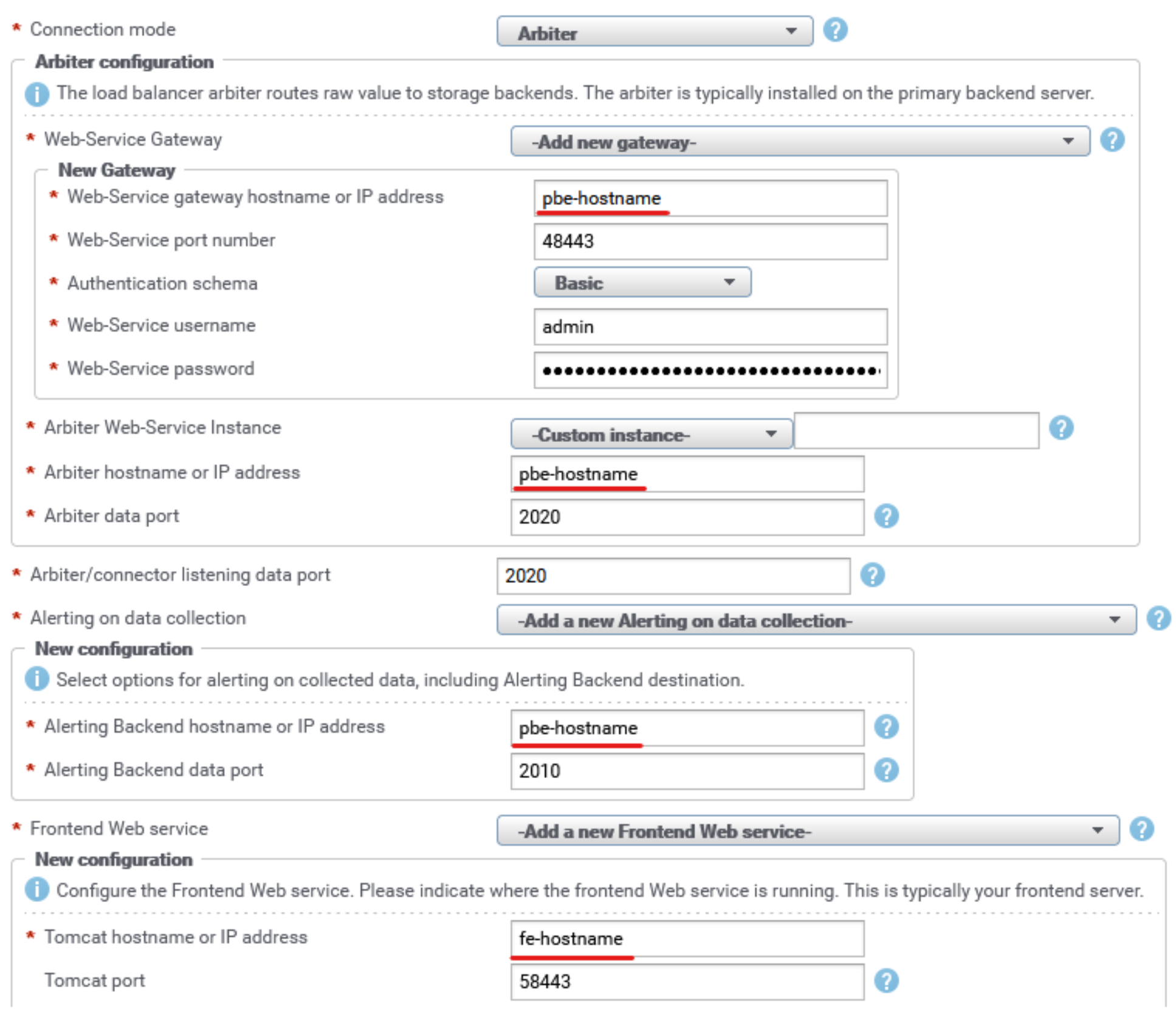
Figure 4. SRM Gate LBC configuration
Reconfigure the data collection block of all SPs hosted by distributed collectors as follows:
- Time-series data from collectors is sent to Gate’s LBC. Set Hostname or IP address to send data to to the respective Gate’s hostname/IP.
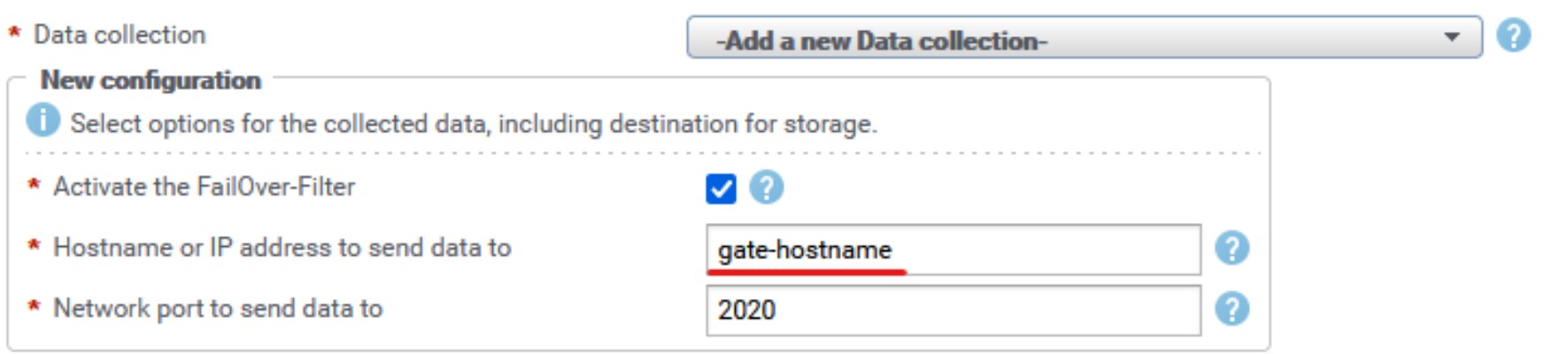
Figure 5. SP data collection configuration
- Frontend Web service: PropertyAccessor traffic for data enrichment from collectors is sent to the frontend via Gate’s listening tcp port 58443. Set Tomcat hostname or IP address to the respective Gate’s hostname/IP.
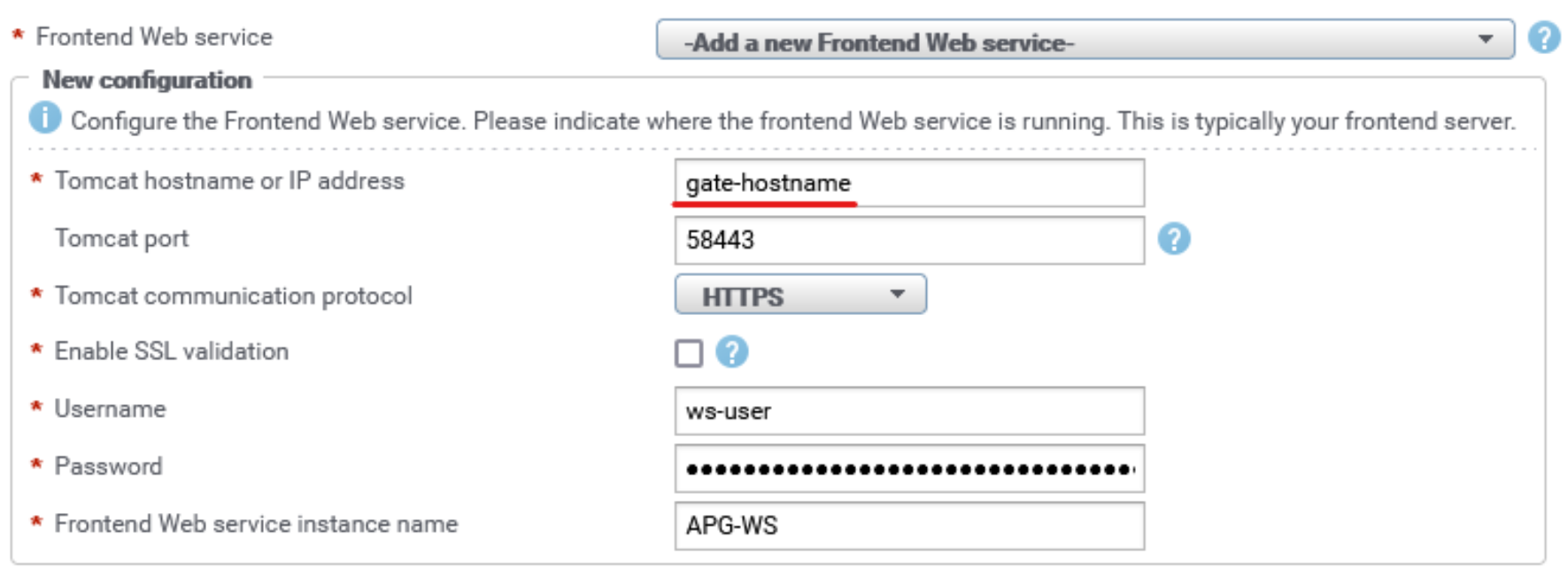
Figure 6. SP frontend web service configuration
- Topology Service: SparqlAccessor traffic for data enrichment from collectors is sent to the PBE Topology-Service via Gate’s listening tcp port 48443. Set Web-Service Gateway hostname or IP address to the respective Gate’s hostname/IP. The Topology-Mapping-Service (TMS) on collector servers communicates with PBE Topology-Service via Gate’s listening port 48443. Set Topology Service hostname or IP address to the respective Gate’s hostname/IP.
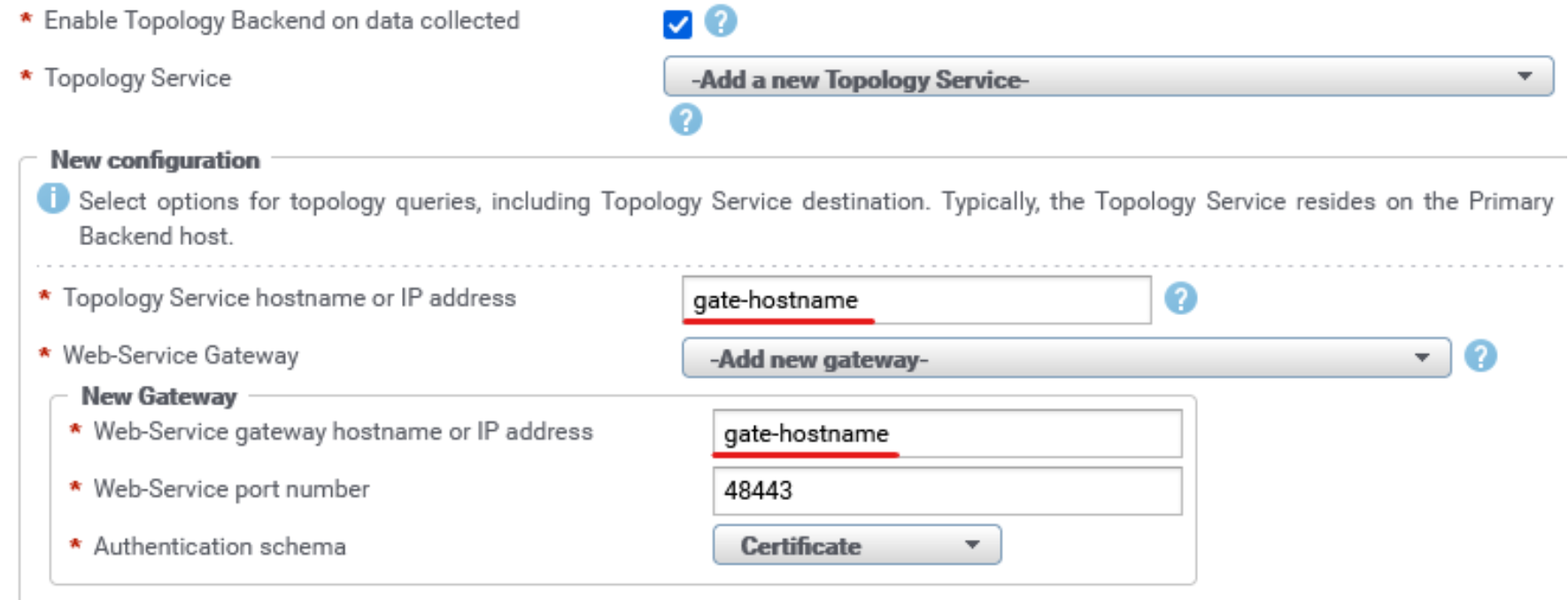
Figure 7. SP topology service configuration
- Events data (Dell Unity/VNX/VNXe, DPA, ECS, PowerScale, PowerFlex, XtremIO) collected by the respective solution packs’ collectors is sent to PBE alert consolidation via Gate’s listening tcp port 2040. Reconfigure the SP data collection block for relevant collectors and SPs (for Alert consolidation) and set Alert consolidation server hostname or IP address to the respective Gate’s hostname/IP.
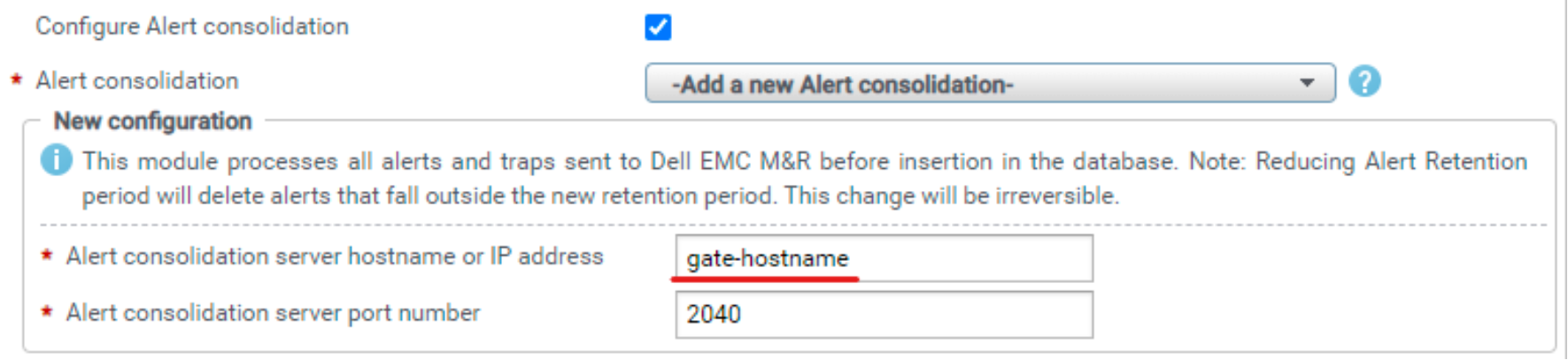
Figure 8. SP events configuration
- SNMP trap data from storage arrays and fabric switches is sent to a PBE snmp trap receiver via Gate’s listening udp ports 162 or 2041. Configure managed devices to send snmp traps to Gate’s hostname/IP, udp port 162 or 2041. Packets with target udp port 162 are redirected to udp port 2041 when they reach the PBE server.
- Events data for the Cisco UCS solution pack is sent from the collector to the PBE event listener via Gate’s listening tcp port 52007. Reconfigure the SP data collection block for Cisco UCS and set Event server hostname or IP address to Gate’s hostname/IP and Event server port number to 52007.
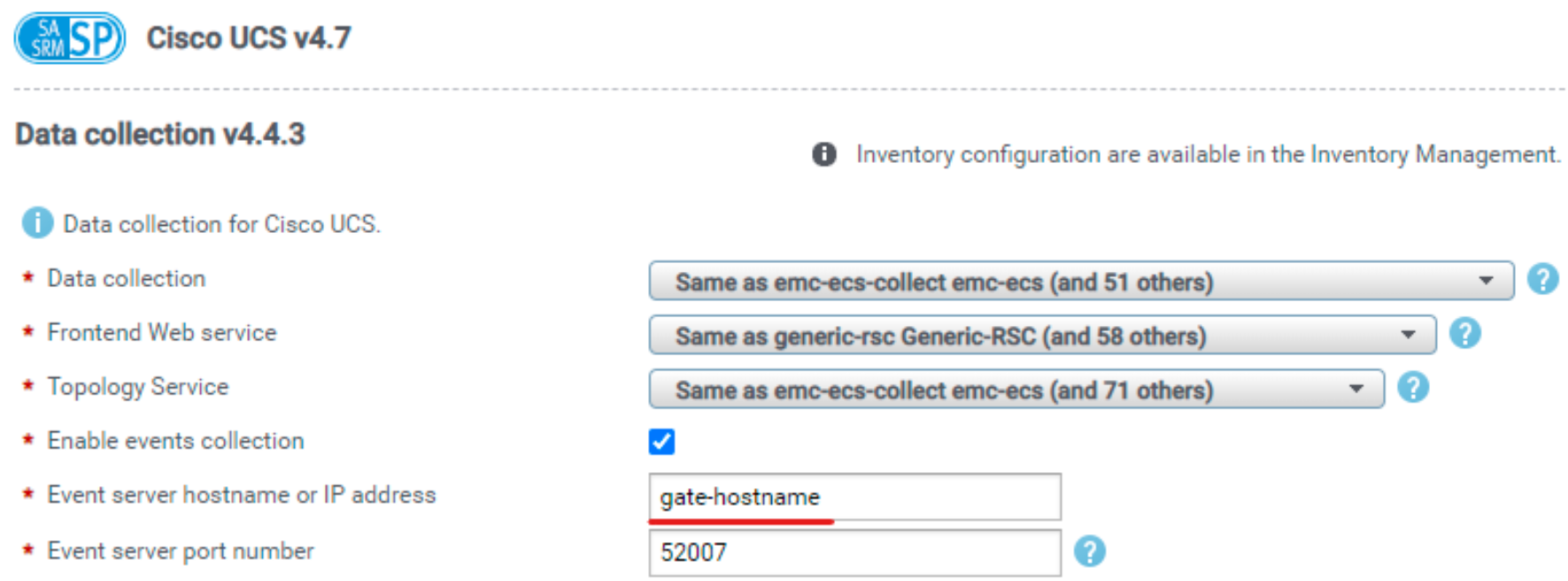
Figure 9. Cisco UCS SP events configuration
- Events data for the Dell Unity/VNX/VNXe solution pack is sent from the collector to the PBE event listener via Gate’s listening tcp port 52001. Reconfigure the SP data collection block for Dell Unity/VNX/VNXe and set Event server hostname or IP address to Gate’s hostname/IP and Event server port number to 52001.
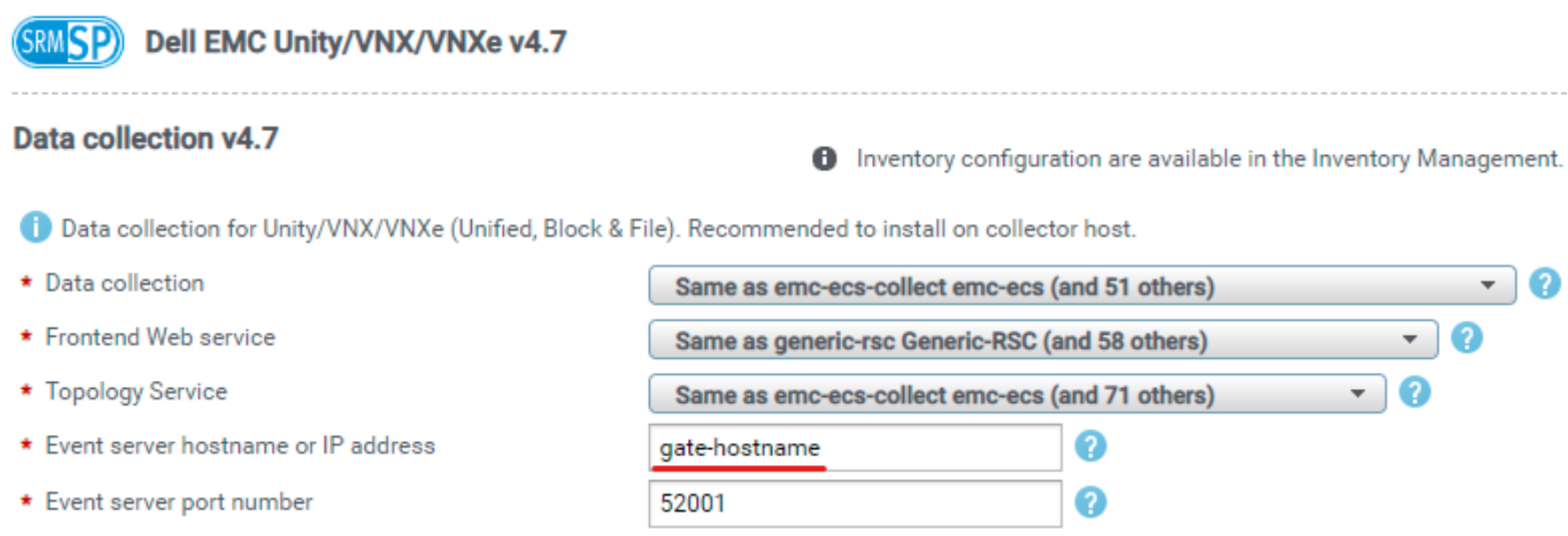
Figure 10. Dell Unity/VNX SP events configuration
- Events data for the Dell Data Protection Advisor (DPA) solution pack is sent from the collector to the PBE event listener via Gate’s listening tcp port 22020. Reconfigure the SP data collection block for DPA and set Event server hostname or IP address to Gate’s hostname/IP and Event server port number to 22020.
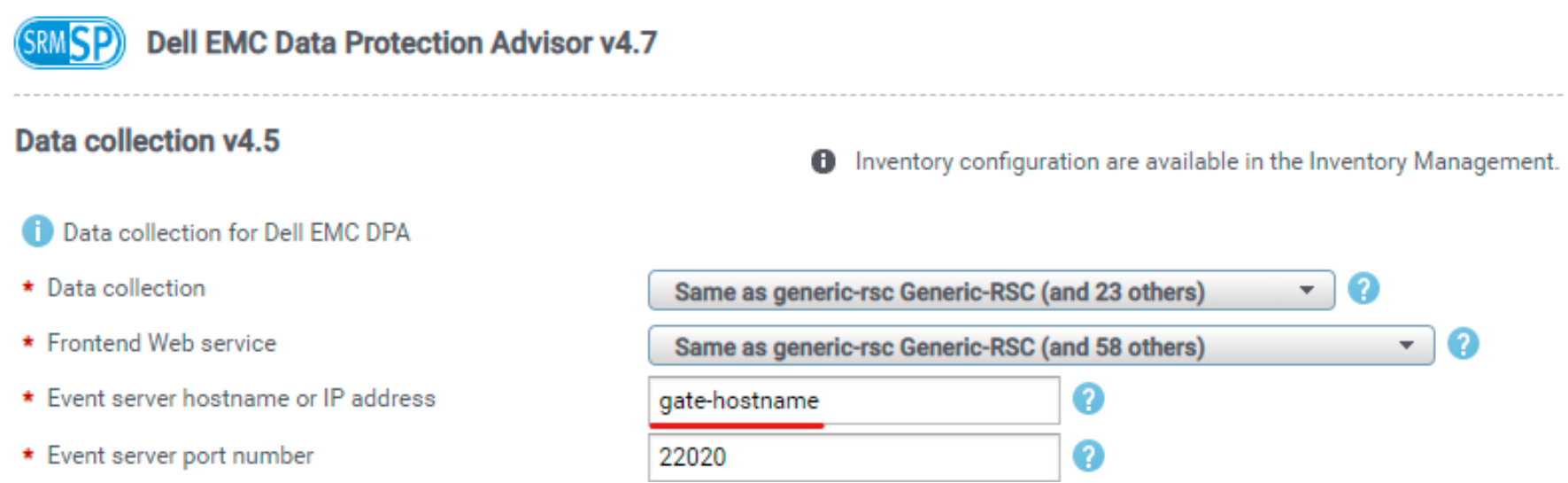
Figure 11. Dell DPA SP events configuration
- Alerting data flow for time-series data is initiated from the Gate LBC towards PBE, so there is nothing to be modified on SPs’ data collection blocks of distributed collectors. The only change needed is for the System Health solution pack’s Events block, which sends alerting data to PBE alerting backend via Gate’s listening tcp port 2010. Set Alerting Backend hostname or IP address to Gate’s hostname/IP.
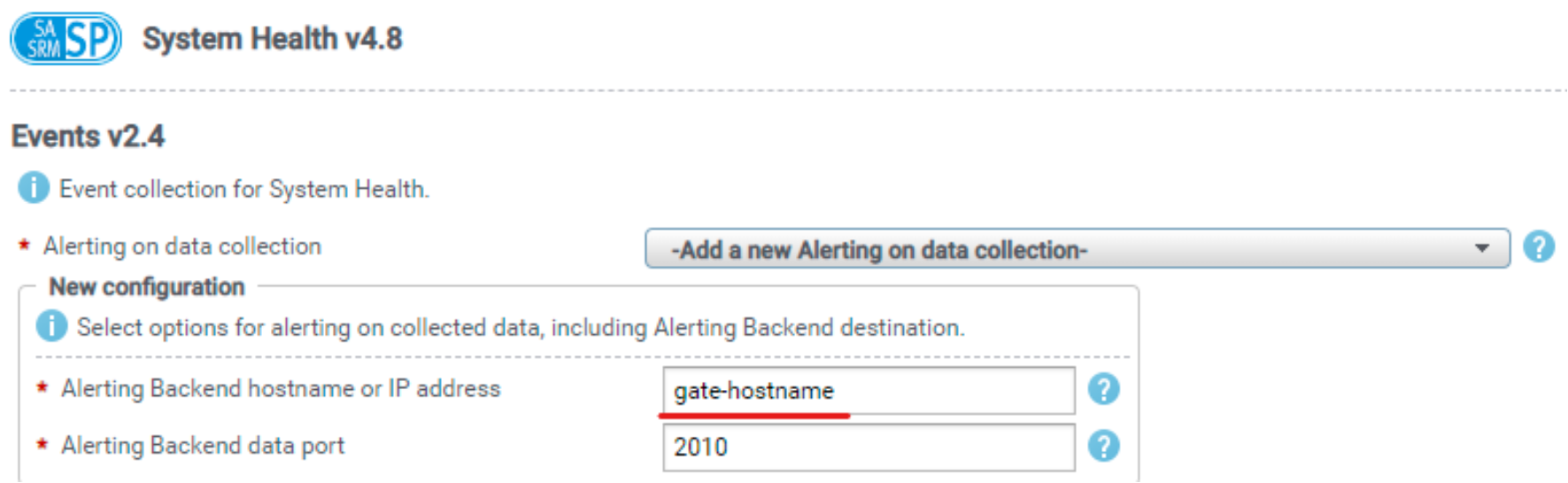
Figure 12. System Health SP alerting configuration
References
Dell Technologies documentation
The following Dell Technologies documentation provides other information related to this document. Access to these documents depends on your login credentials. If you do not have access to a document, contact your Dell Technologies representative.