Dell Technologies AI Solution: General FAQ
Executive summary
Executive summary
Overview
Audience
Revisions
We value your feedback
Dell Technologies AI Solution Overview
Dell Technologies AI Solution Overview
FAQs
Q: Does Dell Technologies offer an AI solution?
A: Yes. Dell Technologies offers a comprehensive AI solution that includes software, hardware, and partnerships with leading GPU vendors to create a complete ecosystem for customers.
Hardware: The hardware AI portfolio includes AI laptops, workstations, PowerEdge R-series, PowerEdge XE-series, PowerSwitch Z-series, PowerSwitch NVIDIA Spectrum SN-series, and PowerScale storage.

Software: Enterprise SONiC Distribution by Dell Technologies.

GPU ecosystem: The Dell AI solution includes GPUs from the following vendors:
- NVIDIA
- AMD
- Intel
Q: Where can I find more information about Dell Technologies and its AI solutions?
A: To learn more abut Dell Technologies and its AI solutions, visit: Dell AI Solutions.
This page provides a starting point for general information and an overview of Dell Technologies AI offerings.
Q: What kind of support can I expect from Dell Technologies if I decide to explore AI in my organization?
A: Customer support is a key pillar for every solution provided by Dell Technologies and Dell AI solutions is no different. Every AI engagement starts with a comprehensive discussion with the Dell sales team that extends into actual face-to-face support through either the AI deployment team or professional services.
Customers receive support throughout design, planning, deployment, and ongoing operations.
Q: Is Dell AI a closed or proprietary solution?
A: One of the key strengths of Dell Technologies is its open ecosystem approach to solutions. Dell AI is no different in this aspect. The solution is based on a choice of hardware and corresponding software components.
Dell Technologies offers AI solutions based on NVIDIA, AMD, and Intel GPUs.
Q: What do the different AI scale solutions look like?
A: Dell Technologies AI solutions scale from as small as 8 GPUs to several thousand GPUs clustered via a pure rail or rail-optimized AI fabric.
Q: Can I integrate Dell’s AI solution into my existing environment?
A: Yes. Integration is possible with proper planning for capacity and compatibility. Using the frontend converged fabric, integration can be achieved (see “Frontend AI fabric overview”).
Q: Does Dell Technologies offer both CPU- and GPU-based AI solutions?
A: Yes. Dell Technologies offers both CPU-based and GPU-based AI solutions.
Dell Technologies AI Components
Dell Technologies AI Components
FAQs
Dell Networking and AI
Dell Networking and AI
FAQs
Q: How complicated or easy is it to deploy Dell Networking to support my AI solutions?
A: Dell Networking solutions (hardware and software) are based on industry open-standards, allowing for interoperability with other vendors.
Deploying Dell Networking is not complicated. Configuration uses standard CLI commands for both AI and non-AI workloads.
Furthermore, Dell Technologies has Fabric Manager, an orchestration tool that automates the deployment of AI and non-AI fabrics through a single-pane-of-glass graphical user interface.
Q: Can we create multitenancy on the East-West GPU fabric (GPUaaS)?
A: Yes. Using BGP EVPN VXLAN, the GPU fabric can be configured to provide multitenancy.
Q: Does the East-West fabric offer redundancy for the GPU systems?
A: Yes. Using a pure rail or rail-optimized design, GPU communication redundancy can be implemented.
With a rail or rail-optimized design, a set of GPUs is connected to a dedicated switch rail. Each GPU has two connections:
- An internal proprietary high-speed connection implemented by the GPU vendor
- A network connection to the dedicated switch rail, typically 400GbE or 800GbE
The following figure shows the redundant connection highlighted by the purple line.
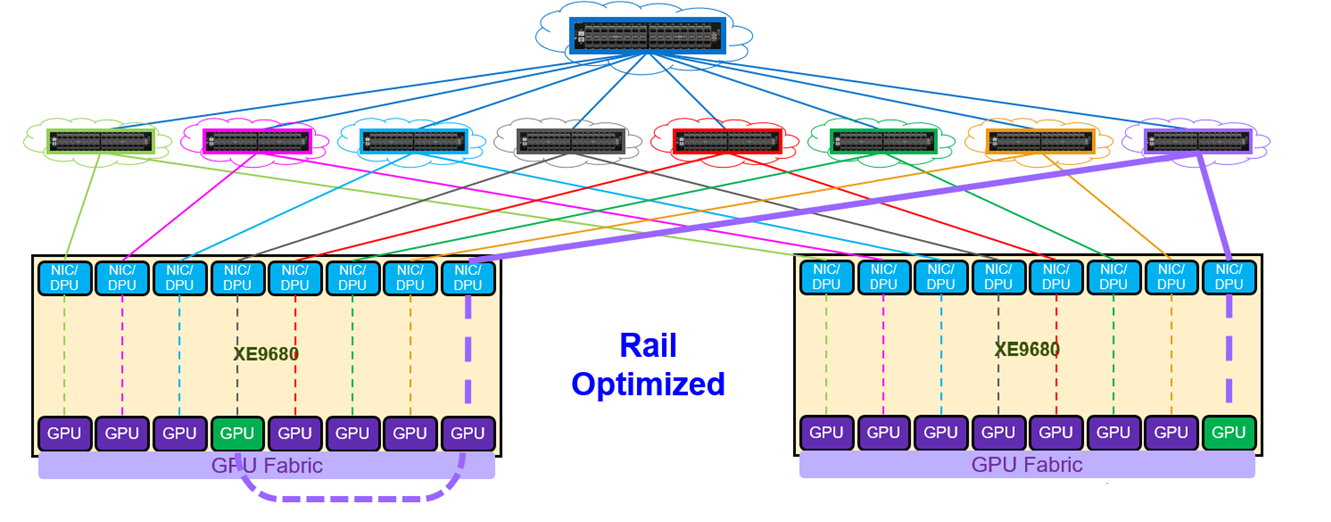
In this scenario, a GPU connected to the black switch rail communicates with a GPU connected to the purple switch rail. If the connection to the black switch rail fails, the internal connection is used to communicate with the GPU on the purple rail, ensuring redundancy.
Q: How can we create virtual environments for remote customers that connect to the N/S side of the host systems?
A: Every AI solution has three fabrics: out-of-band, frontend, and backend. The frontend fabric, with BGP EVPN VXLAN deployed, provides connectivity to the North-South side of the host system.
Q: Which technology is more suitable to offer multitenancy (IB or Ethernet)?
A: Both technologies provide multitenancy. Each has its own advantages and disadvantages.
In the end, the choice depends on the customer’s comfort level of the different technology. However, it is safe to say that Ethernet is often the most common technology used for multitenancy services.
Q: How does Dell Technologies incorporate flexibility in its offering with regard to multi-vendor GPUs in terms of its networking portfolio?
A: Dell Technologies provides flexibility in its AI offerings by supporting all major GPU vendors (NVIDIA, AMD, and Intel).
Dell Networking offers two portfolios:
- Dell PowerSwitch Z and S Series, offering 10GbE to 800GbE switches
- Dell PowerSwitch NVIDIA Spectrum SN series, offering 10GbE to 800GbE switches
Q: What is the preferred GPU link speed, and how does it influence workloads?
A: In most deployments, GPU link speeds are tailored based on the type of workload. For model training, faster GPU-to-GPU connectivity including the network fabric, improves performance.
Current speeds are typically 800GbE or 400GbE. For inference and fine tuning, speeds are usually below 400GbE, commonly around 200GbE.
Q: What load-balancing mechanisms exist on GPU backend fabric to prevent congestion?
A: Dell Networking provides advanced load balancing through several innovative quality of service features.
- Dynamic Load Balancing/adaptive routing and switching
- Advanced hashing
- RoCE
- Queue pair hashing
Q: Which design pattern guarantees lossless failover for AI workloads?
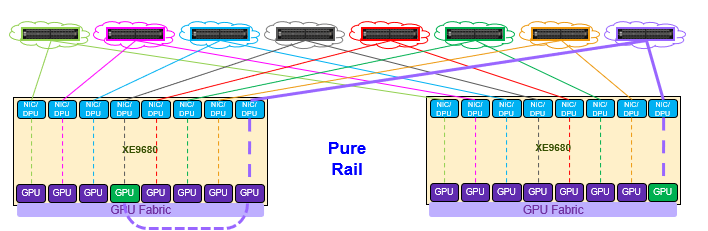
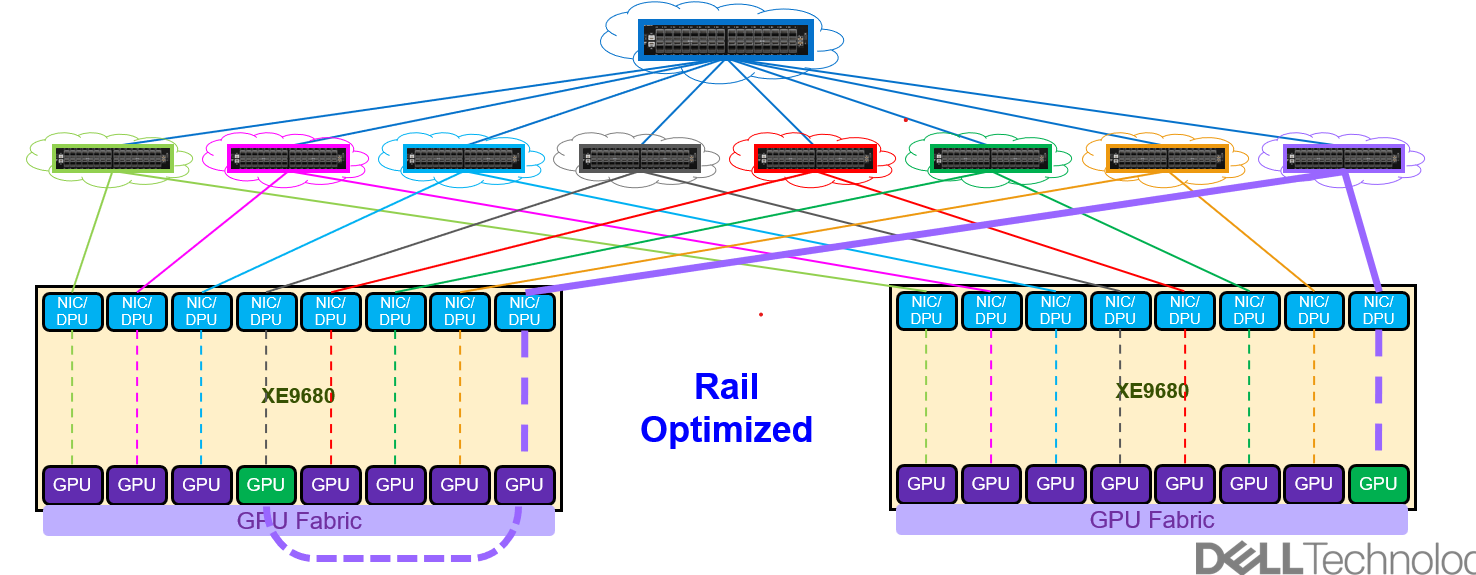
A: Two networking designs or topologies guarantee lossless failover for AI workloads.
- Pure Rail
- Rail-optimized
Q: What switching operating system features do I need for a multitenancy AI workload environment?
A: BGP EVPN VXLAN is the key feature to deliver multitenancy services for an AI environment. This feature allows the extension of Layer 2 networks (VLANs) across a scalable Layer 3 cloud.
For more information about Dell SONiC BGP EVPN VXLAN, refer to the Dell SONiC VXLAN user guide.
Q: How is network bandwidth scaled linearly as new NICs for GPU nodes are added?
A: There are two commonly used networking fabrics for GPU cluster deployments:
- Pure rail
- Rail-optimized
Both designs use dedicated switching fabric. As GPUs are added and the dedicated switching fabric runs out of ports, additional switches are added to the fabric to enable horizontal scalability.
Q: Can we use single GPU backend/Compute/E-W fabric for different use cases like training plus inferencing and for different GPU types?
A: Yes, the same backend fabric can be used for training, inference, and fine-tuning with proper job scheduling. However, training usually requires full GPU cluster access, while inference and fine-tuning do not.
Using a common backend fabric across different GPUs is not recommended, as each GPU architecture is different and each network fabric is purposely implemented based on the type of GPU (NVIDIA, AMD, Intel).
Q: What are the scaling considerations for AI Storage traffic?
A: Consider the following best practices when integrating or deploying storage for AI workloads:
- Provide line-rate access to storage traffic by maintaining 1:1 oversubscription to handle intermittent traffic spikes.
- Always use the maximum MTU (jumbo frames) across the network.
- Minimize latency by prioritizing storage traffic within the fabric providing storage services.
Q: Are there any guidelines for redundancy, scalability, and oversubscription in storage fabrics?
A: Yes. The following are recommended guidelines:
- Use redundant switching fabrics (for example, two leaf switches) whenever possible.
- Deploy dual-homed links from each storage appliance towards the switching fabric.
- Maintain 1:1 oversubscription where possible. Otherwise, 2:1 is the minimum recommended.
Q: Do you have benchmark reports for specific GPUs and switches that show network performance, latency values, and congestion prevention?
A: Yes. Dell Technologies has conducted benchmark testing using the Dell PowerSwitch Z9664F-ON, with results published in a Tolly Group report.
Q: What best practices ensure scalability and high availability for GPU backend/Compute/East-West fabrics?
A: To achieve scalability and high availability in backend GPU fabrics, consider the following best practices:
- Use pure rail or rail-optimized designs
- Enable:
- Jumbo frames
- Layer 3 routing for scalability
- RoCE, DLB, and queue pair hashing when using a rail-optimized design
- Use the highest available GPU-to-switch link speeds
Q: What optics are qualified?
A: Dell Technologies goes through a rigorous certification testing process to ensure all Dell optics and cables meet specifications. Refer to the following resources:
- Dell networking transceivers and cables
- Dell Cables and Optics for the AI Ethernet Fabrics
- GenAI Cables & Optics ONE Ordering Guide
Q: Can I use third-party optics?
A: Dell Technologies does not restrict the use of third-party optics; however, they are not validated. Therefore, their functionality and performance are not guaranteed.