Dell Technologies Solution: Distributed Deep Learning Infrastructure for Autonomous Driving
Executive summary
Overview
Revisions
We value your feedback
DL in ADAS Development
DL in ADAS Development
ADAS Development Cycle
Figure 1 illustrates the typical ADAS development life cycle for automotive OEMs and suppliers leveraging the Dell PowerScale scale-out NAS as the central data lake:
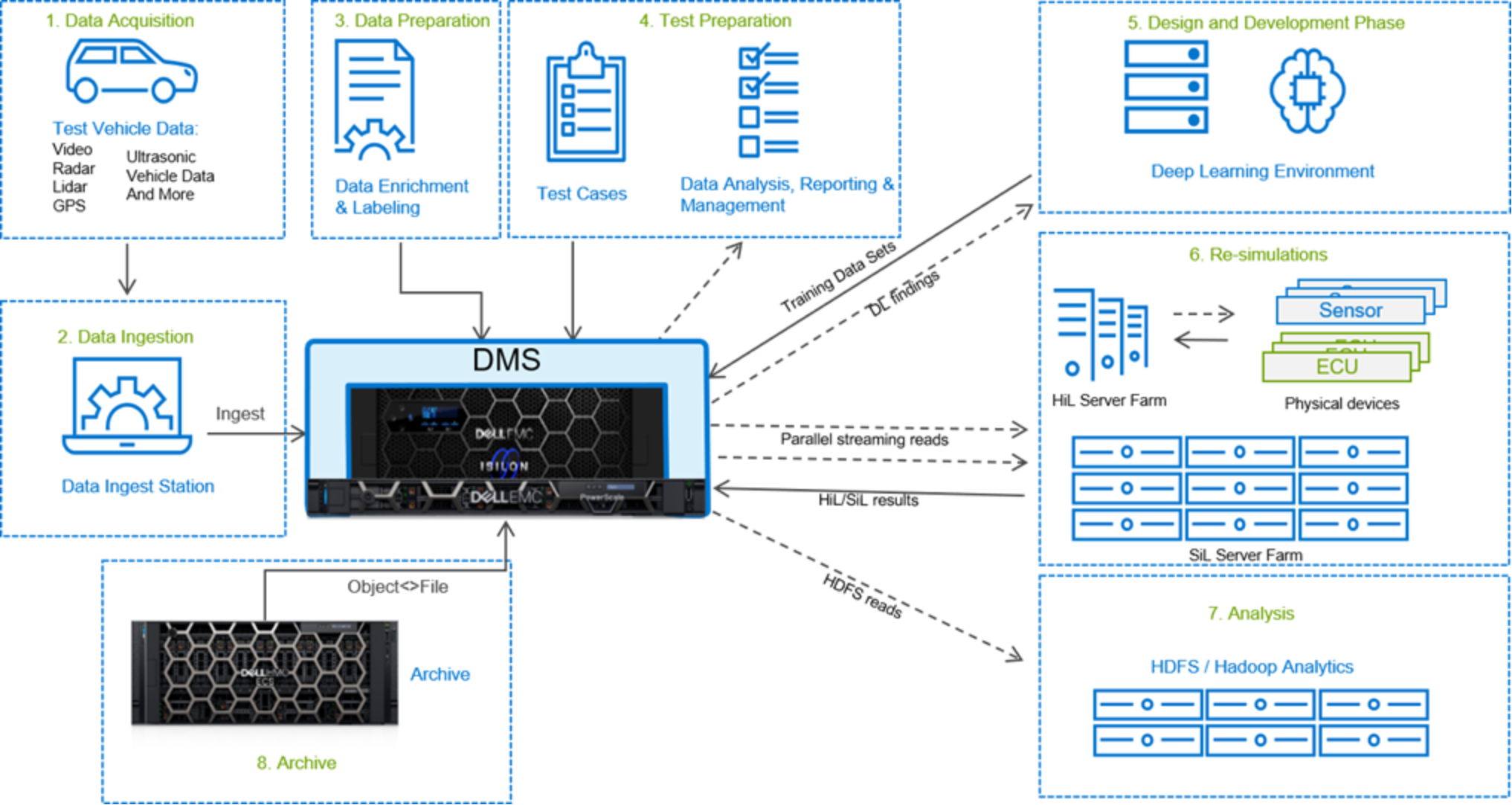
Figure 1. ADAS Development Lifecycle
- Data Acquisition: Huge volumes of sensor data are captured by a fleet of test vehicles, including camera video sequences, ultrasonic proximity, radar, Light Detection and Ranging (LiDAR), Global Positioning System (GPS), and other sensor data. Sensors with very high-resolution such as 4K (or greater) cameras are being adopted. Some of these sensors will be beta samples of the actual sensors planned for the production vehicle, while other sensors will be capturing high-resolution reference data (“ground truth”) around the test vehicle. Another important reference is the actions of the test driver – such as accelerator/brake/steering functions. Typically, we see ADAS developers generating real-world test data on the order of 2 TB per hour, or around 30 – 80 TB per car per day with some developers running test fleets with 50 or more vehicles. The data is stored with each vehicle in real-time using dedicated industrial data-logging hardware with removable solid-state storage disks. These drives are swapped out either daily or at the end of each shift – depending on the amount of data captured per shift. The drives are then either shipped directly to a centralized ingest server, transferred virtually through WAN lines, or transferred locally to tape, with the tapes then being shipped to a centralized ingest server for upload to the data lake (centralized storage).
- Data Ingestion: During the data ingest process, which includes moving data from the vehicle to the data lake, custom copy stations apply data cleaning and lossless data compression algorithms to reduce the final amount of required storage and, therefore, costs. Data cleansing can occur in-line to avoid multiple copies or move operations. Typically, 10% - 15% of the recorded data is used to train the ML/DL algorithms and over 50% of the recorded data is used to run re-simulations as well.
- Data Preparation: Once the data has been ingested, engineering teams will prepare the data, which may include trimming, decoding, data enrichment (labeling or ground truth generation), processing and adding metadata such as weather and traffic conditions. This requires a vast amount of compute and GPU resources in the high-performance computing (HPC) cluster to process the data, as well as fast storage - such as Dell PowerScale storage, which meets both high capacity and high sequential read and write performance needs.
- Test Preparation: Engineers can build test suites with various test use cases, as well as required closed-loop simulation and open-loop re-simulation (replay) validation jobs to verify ADAS models. With massive raw datasets, it is vital to be able to search through metadata quickly to find the corresponding sensor data for specific scenarios from within the vast data lake. Tests developed using captured sensor data tests against possible corner cases, with discrepancies between the ECU validation and test driver actions identified as potential bugs.
- Design and Development Phase: When the data is ready, the ADAS engineering teams can develop and build algorithms for smart cameras or ECU models through DL. ML models are created by training them on a huge amount of data (traffic signs, lanes, vehicles, and people). With huge amounts of data, it is strongly recommended to run multi-GPU training with data parallelism. Data parallelism allows a higher throughput of images during training, and therefore reduced training time.
- Re-simulations: After algorithms are developed, it is crucial to run iterative tests using data fusion of all the sensors, GPS, weather, and road/environment data. On small projects, individual sensors and ECUs may be tested independently. Then all subsystems are tested together at the system level (sensor fusion).It is important to test corner-cases and complex interaction of various ADAS functions, sophisticated scenarios involving various road environments, pedestrians, other vehicles, and driver behavior to ensure the safety of the system. With various test cases, the engineering teams can schedule re-simulation jobs on the hardware-in-the-loop (HiL) and software-in-the-loop (SiL) computer clusters. Re-sim involves “replaying” the captured raw sensor data back through the test farm – usually with hundreds or even thousands of iterations running in parallel. For HiL this will be replayed in real-time, and for SiL it is often replayed faster than real-time. This workload requires the inherent high-concurrency benefit of the Dell PowerScale scale-out NAS architecture.
- Analysis: Once testing is complete, engineers need to analyze the test results and determine whether additional validation is required. In-place analytics compare ECU operation to original test driver actions to quickly identify potential bugs. Algorithms are refined to achieve the expected output results, and the revised ECU version can be uploaded to the test vehicles adopting a continuous improvement process. All the results are sent to data center storage to provide the engineering teams with on-demand access.
- Archive: Following final validation, data used to develop the ECU algorithms can move to lower-cost archive storage. Archiving must meet regulatory and contractual commitments, which typically span multiple decades – the agreed “life of the vehicle.” Many OEMs stipulate service-level agreements (SLAs) of 1 to 30 days for simulation data restoration time – for example, in the event of a safety recall – to allow quick turn-around of updates. Dell strongly recommends an active archive solution such as ECS cloud neutral object storage, implementing the S3 API.
Note: The above steps are not time sequential. Steps are concurrent and continuous to ensure high-quality solution outcomes and efficiency.
Challenge of DL Training Workload for ADAS
Key Components
Key Components
PowerScale Storage for DL
Dell PowerScale all-flash storage platforms, powered by the PowerScale OneFS operating system, provide a powerful yet simple scale-out storage architecture to speed access to massive amounts of unstructured data, while dramatically reducing cost and complexity. With a highly dense design that contains four nodes within a single 4U chassis, PowerScale all-flash delivers extreme performance and efficiency for your most demanding unstructured data applications and workloads – including ADAS / AD. The Dell PowerScale family includes four all-flash nodes recommended for DL workloads:
- Dell PowerScale F200: Provides the performance of flash storage in a cost-effective form factor to address the needs of a wide variety of workloads. Each node allows you to scale raw storage capacity from 3.84 TB to 15.36 TB per node and up to 3.8 PB of raw capacity per cluster. The F200 includes in-line compression and deduplication. The minimum number of PowerScale nodes per cluster is three while the maximum cluster size is 252 nodes.
- Dell PowerScale F600: With new NVMe drives, the F600 provides larger capacity with massive performance in a cost-effective compact form factor to power the most demanding workloads. Each node allows you to scale raw storage capacity from 15.36 TB to 61.4 TB per node and up to 15.48 PB of raw storage per cluster. The F600 includes inline software data compression and deduplication. The minimum number of nodes per cluster is three while the maximum cluster size is 252 nodes.
- Dell PowerScale F800: Provides massive performance and capacity and delivers up to 250,000 IOPS and 15 GB/s aggregate throughput in a single chassis configuration and up to 15.75M IOPS and 945 GB/s of aggregate throughput in configurations of up to a 252-nodes cluster. Each chassis houses 60 SSDs with a capacity choice of 1.6 TB, 3.2 TB, 3.84 TB, 7.68 TB, or 15.36 TB per drive. This allows you to scale raw storage capacity from 96 TB to 924 TB in a single 4U chassis and up to 58 PB in a single cluster.
- Dell PowerScale F810: Provides massive performance and capacity along with inline data compression and deduplication capabilities to deliver extreme efficiency. The F810 delivers up to 250,000 IOPS and 15 GB/s aggregate throughput in a single chassis configuration and up to 15.75M IOPS and 945 GB/s of aggregate throughput in a 252-node cluster. Each F810 chassis houses 60 SSDs with a capacity choice of 3.84 TB, 7.68 TB or 15.36 TB per drive. This allows you to scale raw storage capacity from 230 TB to 924 TB in a 4U chassis and up to 58 PB of raw storage in a single cluster. Depending on your specific dataset and workload, F810 inline data compression and deduplication delivers up to a 3:1 reduction in storage requirements, this increasing the effective capacity up to 138 PB per cluster. For more information, see the document PowerScale All-Flash Scale-Out NAS Specification Sheet.
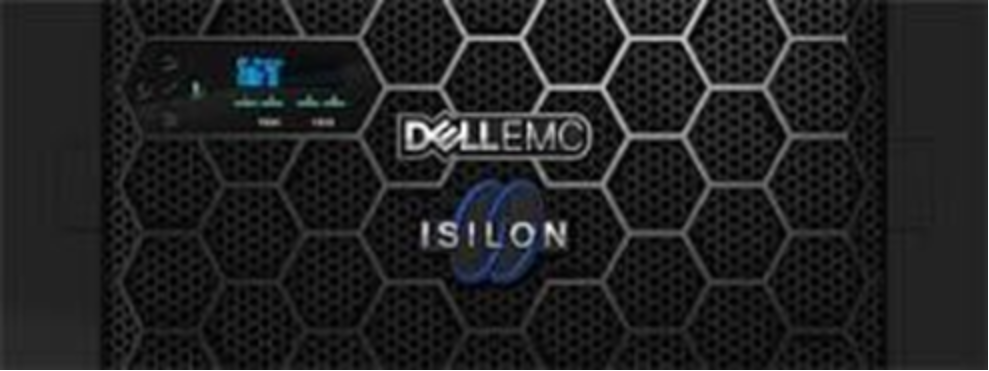
Figure 2. Dell Isilon F800/F810
Dell PowerScale families have the following features to benefit DL:
- Low latency, high throughput and massively parallel I/O for AI. This shortens time for training and testing analytical models on data sets from tens of TB to hundreds of PB on AI platforms such as TensorFlow, SparkML, Caffe, or proprietary AI platforms. Isilon F810/F800 performance characters are listed as below:
Up to 250,000 file IOPS per chassis, up to 15.75M IOPS per cluster
Up to 15 GB/s throughput per chassis, up to 945 GB/s per cluster
230 TB to 924 TB raw flash capacity per chassis; up to 58 PB per cluster (All-Flash)
- The ability to run AI in-place on data using multi-protocol access. Most data used for DL training is also used for other workloads, like HiL and SiL validation. These workloads, which use captured sensor data, typically require lower cost hybrid storage, such as Isilon H5600 but in one PowerScale cluster. This eliminates the need to migrate/copy data and results over to a separate AI stack. Organizations can perform DL and run other IT apps on same data already on PowerScale by adding PowerScale all-flash nodes to the existing cluster.
Multi-protocol support such as SMB, NFS, HTTP, and native HDFS to maximize operational flexibility
- Enterprise grade features out-of-box. This enables organizations to manage AI data throughout the lifecycle of the ADAS project with minimal cost and risk, while protecting data and meeting regulatory requirements.
Enterprise data protection and resiliency
Robust security options
Economical, long-term archival with fast recovery
Data Management System using a single pane of glass
Container Storage Interface (CSI) driver for provisioning of persistent storage
- Extreme scale support. Organizations can achieve AI at scale in a cost-effective manner by leveraging PowerScale for DL as well as other ADAS workflows. Enabling them to handle multi- petabyte data sets with high resolution content and high performance without the need to re-architect their data center, and/or performance degradation.
Seamlessly tier between all flash, hybrid, and archive nodes via SmartPools.
Grow-as-you-go scalability with up to 58 PB capacity per cluster
Up to 64 chassis (252 nodes) may be connected to form a single cluster with a single namespace and a single coherent cache
Depending on your specific dataset and workload, F810 inline data compression and deduplication delivers up to a 3:1 reduction in storage requirements, this increasing the effective capacity up to 138 PB per cluster
Dell PowerEdge C4140 Server
DL methods would not have gained success without the computational power to drive the iterative training process. Therefore, a key component of DL solutions is highly capable nodes that can support compute intensive workloads. State-of-the-art neural network models in DL have more than 100 layers which require computations to be able to scale across many compute nodes. The Dell PowerEdge C4140, an accelerator-optimized, high density 1U rack server, is used as the compute node unit in this solution. The PowerEdge C4140 server used is Configuration M, which supports four V100 SMX2 GPUs.
The PowerEdge C4140 is an incredibly dense rack server designed to handle the most demanding technical computing workloads in DL, ADAS development and HPC. The PowerEdge C4140 provides maximum density and outstanding thermal efficiency for scale-out performance. Speed up your DL development workloads with four GPUs/FPGAs in a 1U, 2-socket package.
The PowerEdge C4140 ML reference designs include:
- NVIDIA V100 SXM2 modules, each with 16 GB of memory
- Dual Intel Xeon Gold Scalable 6148 processors (Skylake/Purley generation)
- 384 GB of DDR4 memory at 2667 MHz
- Two 120GB M.2 SSDs
- Bright Computing’s Bright Cluster Manager

Figure 3. Dell PowerEdge C4140 Server
NVIDIA V100 GPU
The NVIDIA V100 GPU is the most advanced data center GPU ever built to accelerate AI, high performance computing (HPC), data science and graphics. Powered by NVIDIA Volta™ GPU architecture, V100 GPUs enable data scientists, researchers, and engineers to tackle challenges that were once difficult. With 640 Tensor Cores, the V100 GPU is the first GPU to break the 100 teraflops (TFLOPS) barrier of DL performance.
In the PCIe version of the V100 GPU, all GPUs communicate with each other over PCIe buses. With the V100-SXM2 model, all GPUs are connected by NVIDIA NVLink™ technology. In use-cases where multiple GPUs are required, the NVLink interconnect used by V100 cards provide the advantage of faster GPU-to- GPU communication when compared to PCIe. V100 GPUs provide six NVLink lanes per GPU for bi- directional communication. The bandwidth of each NVLink lane is 25 GB/s in uni-direction and all four GPUs within a node can communicate simultaneously, therefore the theoretical peak bandwidth is 6*25*4=600 GB/s in bi-direction. However, the theoretical peak bandwidth using PCIe is only 16*2=32 GB/s as the GPUs can only communicate serially, which means the communication cannot be done in parallel. In theory the data communication with NVLink lane could be up to 600/32=18x faster than PCIe. Because of this advantage, the PowerEdge C4140 compute node in the DL solution uses V100 GPUs instead of PCIe-based V100 GPUs. In this solution, both 16 GB and 32 GB V100 GPUs are supported.
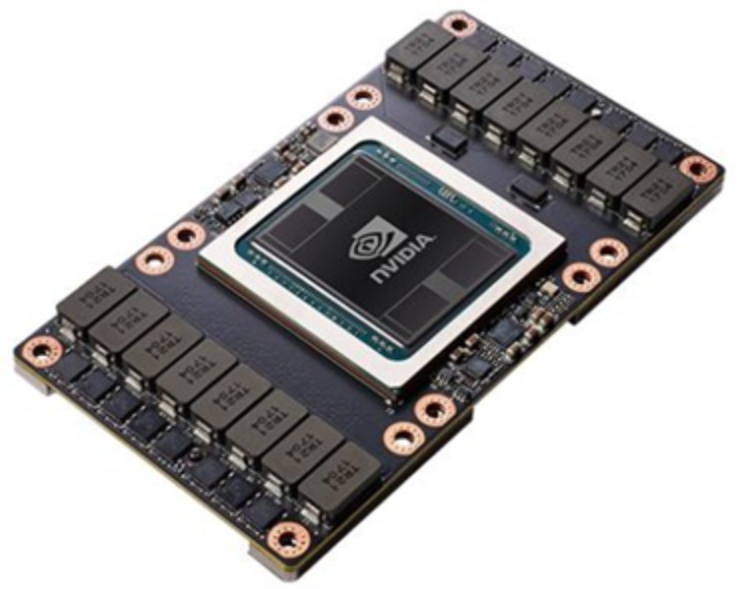
Figure 4. NVIDIA V100 GPU
Bright Cluster Manager
DL Frameworks
Reference Architecture
Reference Architecture
ADAS Deep Learning Reference Architecture
Note: In a customer deployment, the number of Dell PowerEdge compute servers and PowerScale storage nodes will vary and can be scaled independently to meet the requirements of the specific DL workloads.
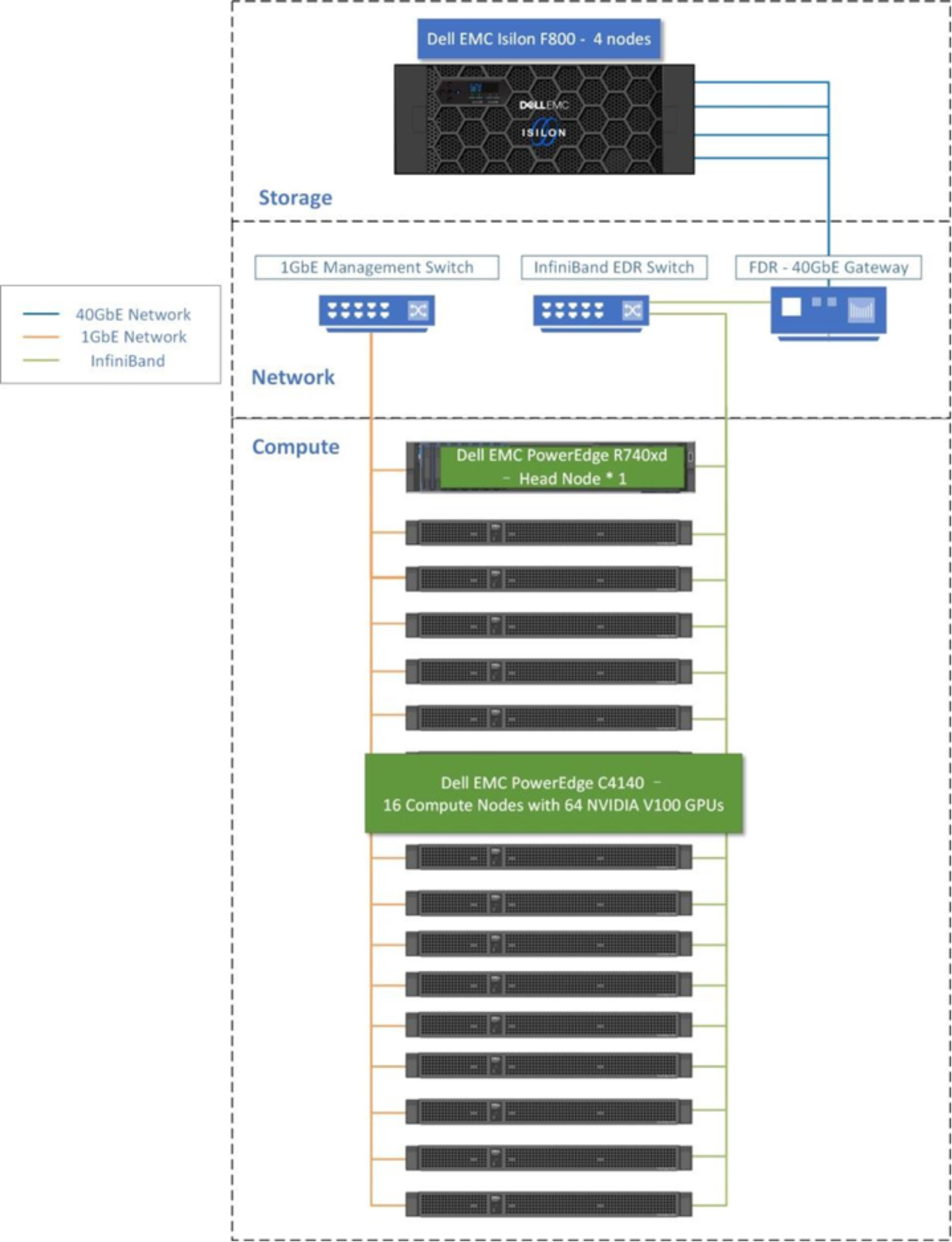
Figure 5. Dell ADAS / AD DL Reference Architecture
The hardware architectures include these key components:
- Compute: High performance GPU server nodes that can support compute intensive workloads are central for any DL solution. We used 16 PowerEdge C4140 servers with four V100 GPUs each (64 GPUs total) in this solution for the distributed DL training workload.
The Dell PowerEdge R740xd is used for the role of the head node. This is Dell ’s latest two socket, 2U rack server that can support the memory capacities, I/O needs and network options required of the head node. The head node will perform the cluster administration, cluster management, NFS server, user login node and compilation node roles.
- Storage: A critical component of DL solutions is high performance storage. It is uniquely suited for modern DL applications delivering the flexibility to deal with any data type, scalability for data sets ranging in the PBs, and concurrency to support the massive concurrent I/O request from the GPUs. This solution also mounted NFS share on either the head node or each compute node.
- Networking: The solution consists of three network fabrics. The head node and all compute nodes are connected with a 1 Gigabit Ethernet fabric. The Ethernet switch recommended is the Dell Networking S3048-ON which has 48 ports. This connection is primarily used by Bright Cluster Manager for deployment, maintenance and monitoring of the solution. The second fabric connects the head node and all compute nodes through 100 Gb/s EDR InfiniBand. The third switch in the solution is called a gateway switch and connects the Isilon F800 to EDR switch with Isilon’s front end 40 Gigabit Ethernet connection.
The software architectures include these key components
- Resource scheduler and management: Bright Cluster Manager is used in this solution to easily deploy and manage the clustered infrastructure and provides all cluster software including the operating system, GPU drivers and libraries, InfiniBand drivers and libraries, MPI middleware, the Slurm scheduler, and more.
- Docker containers or virtual machines: There has been a dramatic rise in the use of software containers for simplifying deployment of applications at scale. You can use either virtual machines or containers encapsulated by all the application’s dependencies to provide reliable execution of DL training jobs. A docker container is more widely used now for bunding an application with all its libraries, configuration files, and environment variables so that the execution environment is always the same. To enable of portability in Docker images that leverages GPUs, NVIDIA developed the Docker Engine Utility for NVIDIA GPUs which is also known as the NVIDIA Container Toolkit, an open-source project that provides a command-line tool. The publicly available CSI driver for the scale-out NAS PowerScale provides support for provisioning of persistent storage.
Autonomous Drive Ecosystem
Apart from the DL architecture, the development environment needs a rich ecosystem of open-source tools and partner-led solutions specific to the unique requirements of each customer, as shown in Figure 6. Dell Technologies has put together the following map of workflow and possible ecosystem solutions. More information can be collected from a blog “What DevOps for AD/ADAS looks like” here: Link.
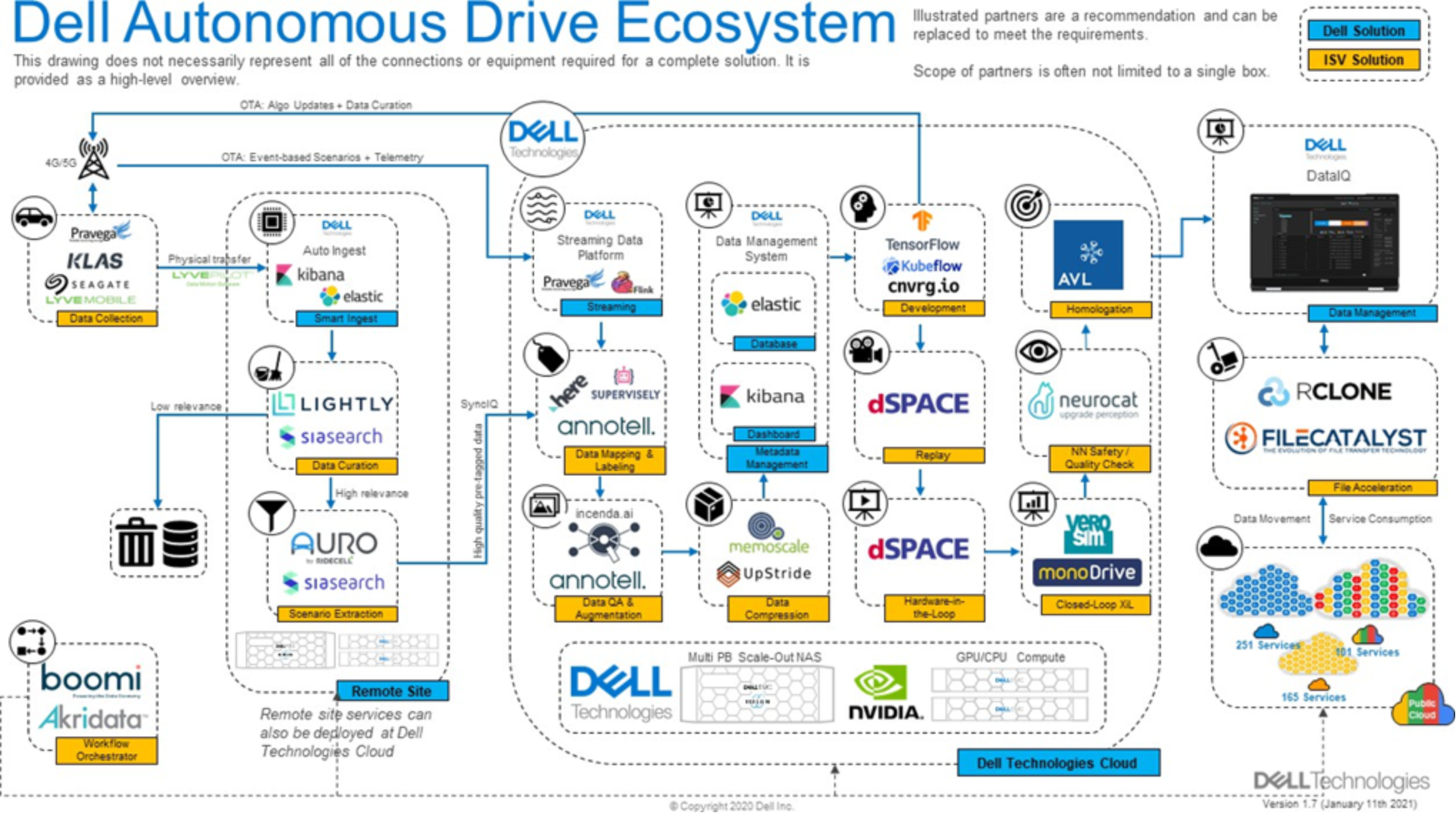
Figure 6. Dell Autonomous Drive Ecosystem
Design Considerations for Distributed ADAS / AD DL Training Solution
Design Considerations for Distributed ADAS / AD DL Training Solution
Datasets Preparation
Data Ingestion and Data Management
Here are some key design considerations for data ingestion and data management for ADAS DL workflow:
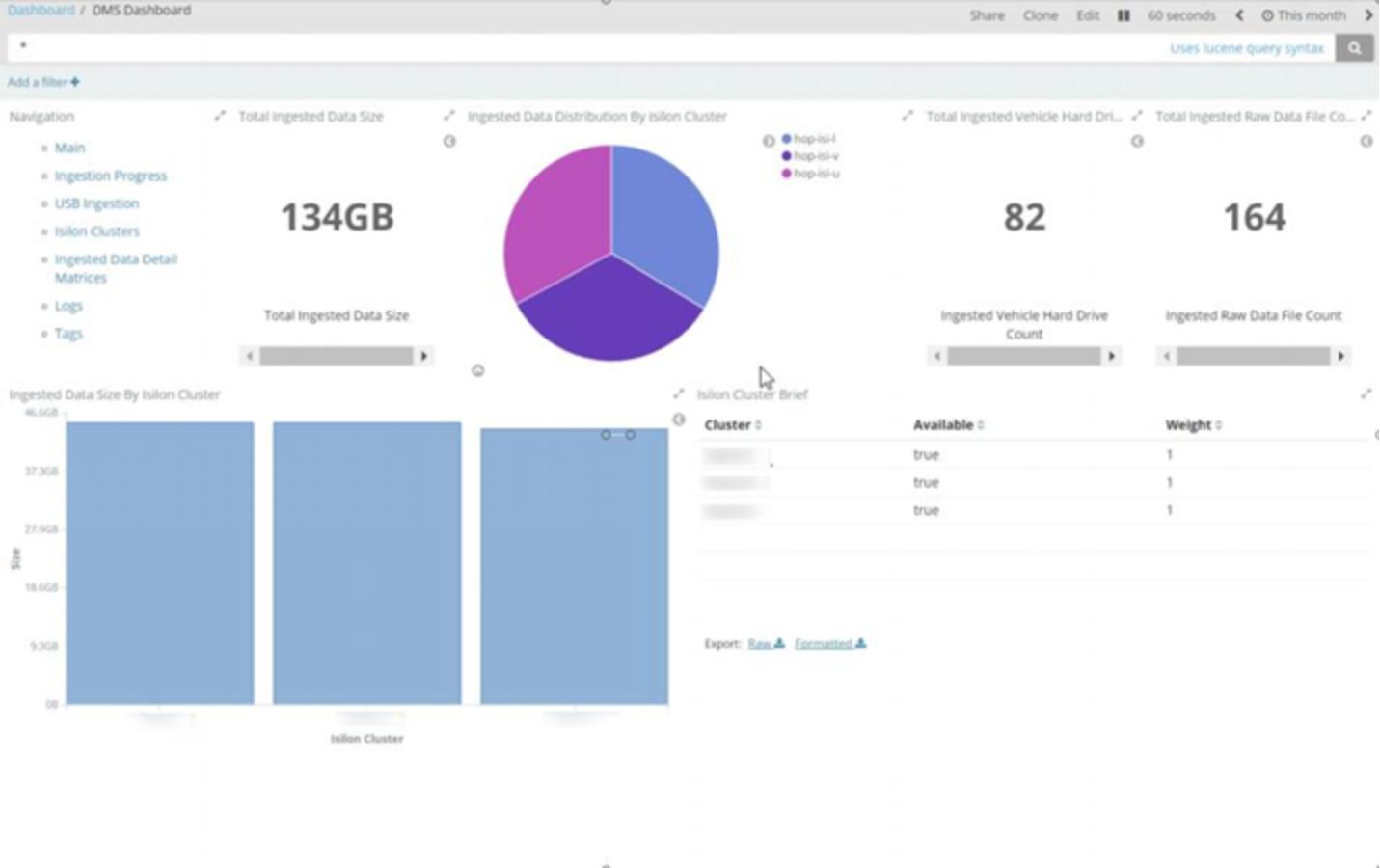
- Large scale sensor data and metadata management: Dealing with data access, data ingestion, and metadata management with HPC jobs can become a significant waste of time and effort for the data scientist. To alleviate this, Dell Technologies has created a custom-tailored Data Management System (DMS) that is available as part of our PowerScale-based ADAS solution offering, as shown in following diagram. DMS is integrated into the managed service offering for ingesting data from test vehicles in an automated fashion. Specific metadata types and tags are configurable and can be customized for each customer. The service provider can manage logistics to receive the storage media from the vehicles and insert them into ingestion stations. This will automatically initiate processes that dynamically decide which cluster/location to upload the raw data to – in such a fashion that all ingestion processes are well balanced across the storage environment. DMS then initiates the data transfer automatically while enriching the data with appropriate metadata tagging, resulting in all data and tags being logged in a global index that tracks the data sets across the namespace and clusters. At the completion of the data transfer and indexing, DMS can launch post-processing jobs within the DL and HPC server grid as preconfigured through the scheduling platform. Functions available can include accurately splitting and merging data files as required, decoding the data into
human readable form, automatically updating the index upon completion, and other functions as defined by the customer. These processes are wrapped within a series of real-time monitoring and status dashboards and logs to alert of any errors or anomalies.
Dell Data Management Solution Dashboard:
- Hybrid Cloud Solution for ADAS Development: Auto organizations are investing heavily in new technologies to develop advanced driver-assistance systems (ADAS). One of the key hurdles these companies face in this pursuit, is the fact that sensor data is often spread throughout the organization’s environment—across platforms and geographic locations. This results in large, disconnected data silos that many find it difficult to manage as these sensor files must be made available to a range of test environments and AI tools. In addition, sensor files are typically kept for multiple years or even decades after testing – the “life of the car” – and must brought online quickly (often within weeks) . With the new release of Dell DataIQ products as shown in Figure 7, it solves for these challenges with its ability to break down storage silos and unify the unstructured data environment. It provides a single UI to view sensor data across heterogenous storage environments including the public cloud.
DataIQ also equips organizations with the ability to rapidly search across billions of files and locate data, which can then be precisely moved or copied to on-prem or public cloud storage as needed, ensuring the right projects have access to pertinent data. This can help free up space on higher performance tiers and enables organizations to archive data as long as is required. The cost savings can be immense, and data can be retrieved easily from a well-curated, searchable archive for re- simulation and DL development in the future.
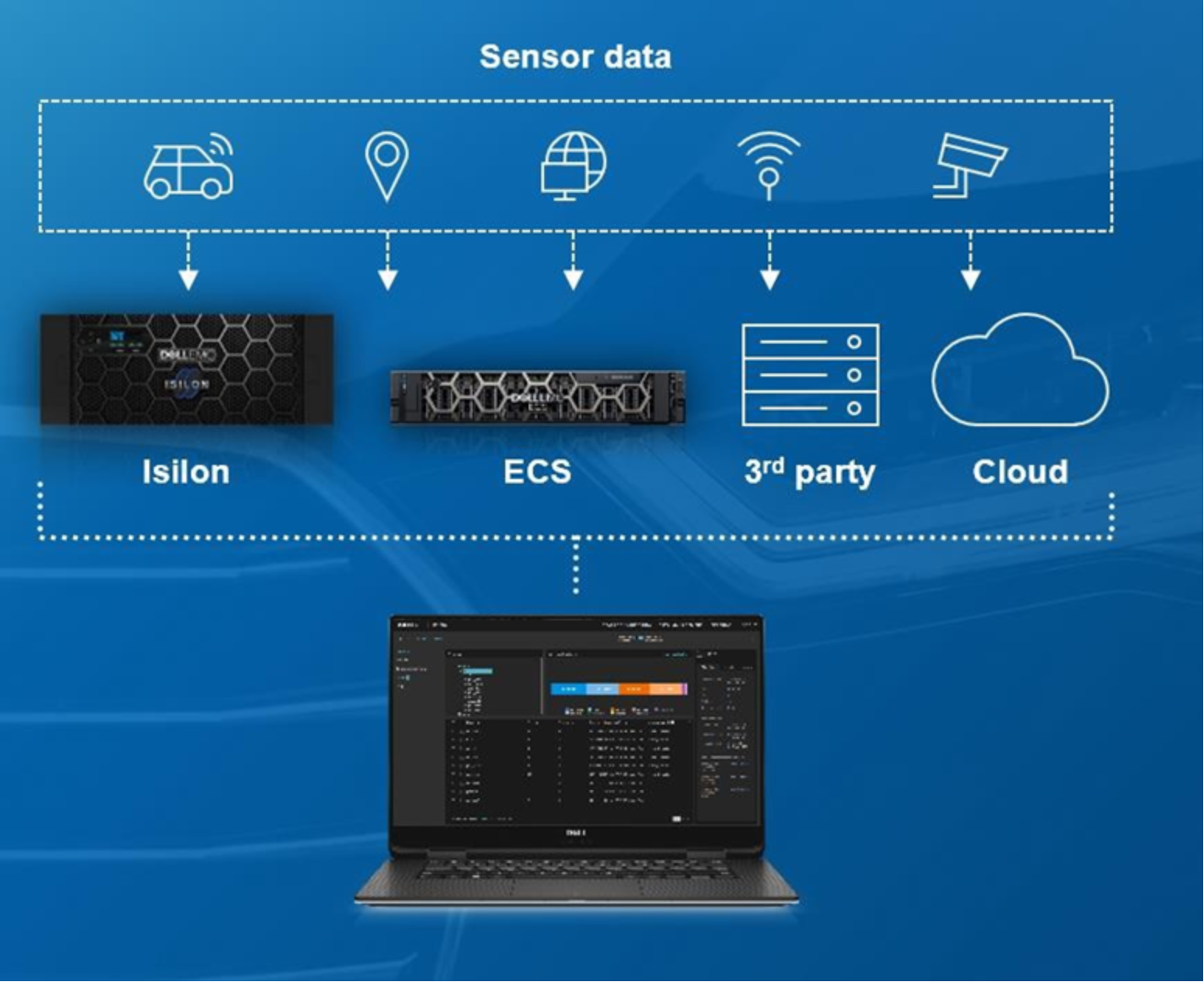
Figure 7. New Hybrid Cloud Solution for ADAS Development with Dell DataIQ
Data Transform
Training neural networks with images requires developers to first normalize those images. Moreover, images are often compressed to save storage. Developers have therefore built multi-stage data processing pipelines that include loading, decoding, cropping, resizing, and many other augmentation operators. Here are some key design considerations for data ingestion and data management for an ADAS DL workflow:
- Data augmentation strategy: Dataset augmentation applies transformations to training data. Transformations can be as simple as flipping an image, or as complicated as applying neural style transfer. By performing data augmentation, it is possible to increase training dataset size and diversity. This can help to prevent a neural network from learning irrelevant patterns (common with small datasets), essentially boosting overall performance quality. Here are two common methods for data augmentation:
Offline augmentation is to create a new augmented data which stored on storage. This can help effectively increasing the training sample size many times over with variety of different augmentation technologies.
Online augmentation is to apply augmentation to data in real time before the images are fed to the neural network. CPUs are used heavily in background / parallel for online augmentations during the training.
- Use NVIDIA Data Loading Library (DALI): The NVIDIA Data Loading Library (DALI) is a portable, open source library for decoding and augmenting images, videos, and speech to accelerate DL applications. As shown in Figure 8, DALI is a set of highly optimized building blocks plus an execution engine to accelerate input data pre-processing for DL applications. DALI provides performance and flexibility for accelerating different data pipelines. DALI reduces latency and training time, mitigating bottlenecks, by overlapping training and pre-processing. It provides a drop-in replacement for built in data loaders and data iterators in popular DL frameworks for easy integration or retargeting to different frameworks. Here are some key features:
Easy-to-use Python API
Transparent scaling across multiple GPUs
Accelerated image classification (ResNet-50), object detection (SSD) workloads and speech recognition models such as Jasper and RNN-T.
Flexible graphs let developers create custom pipelines
Supports multiple data formats - LMDB, RecordIO, TFRecord, COCO, JPEG, wav, flac, ogg,
H.264 and HEVC
Developers can add custom audio image and video processing operators For more information, refer to NVIDIA blog.
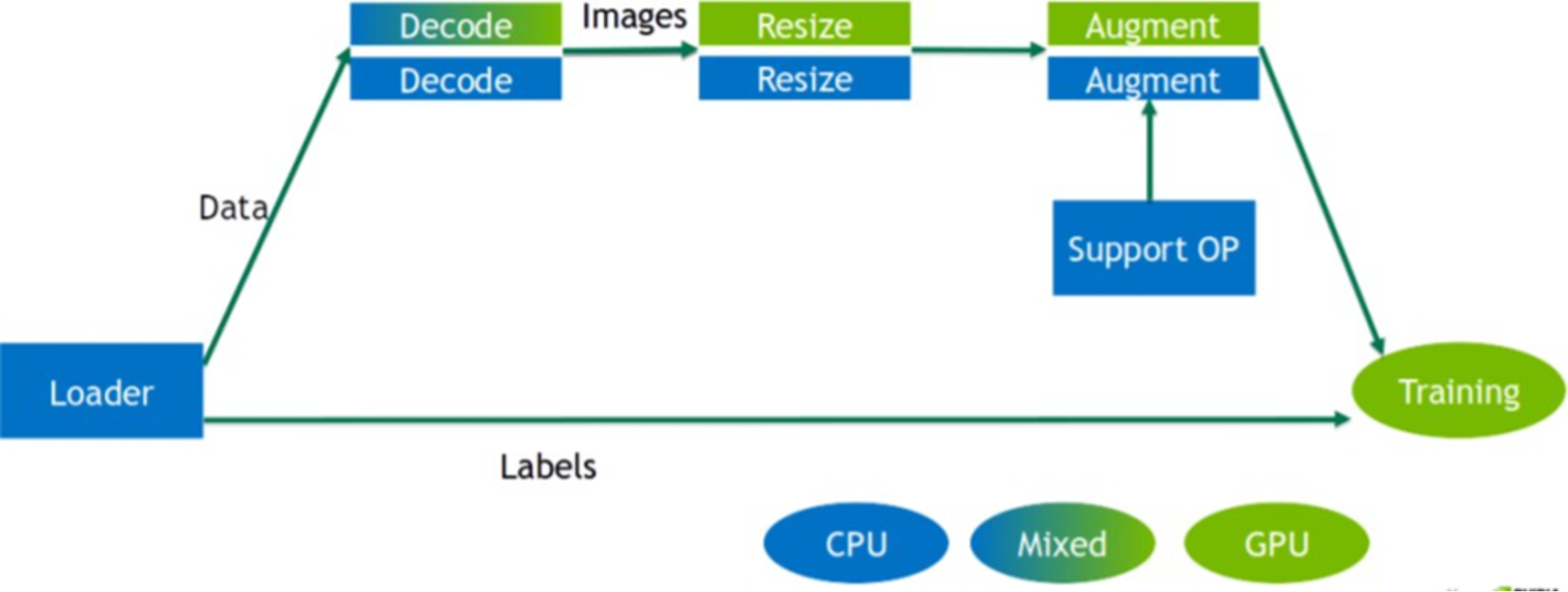
Figure 8. DALI inside architecture
Data Model Training
The ability to train neural network data models with many hidden layers, as well as the ability to train them with large datasets in a short amount of time at scale is critical to ADAS/AD development. To assure safety and reliability, the neural networks designed for driving operations will utilize many permutations of parameters which will generate more compute-intensive requirements for the underlying systems and hardware architecture. In distributed DL platforms, the model needs to be synchronized across all nodes. It also requires the careful management and distributed coordination of computation and communication across all nodes.
Here are some key considerations for designing scalable neural networks:
- Data parallelism vs model parallelism: Data parallelism, as shown below, is generally easier to implement. Each device works with a different part of the overall dataset and the devices collectively update a shared model. These devices can be located on a single machine or across multiple machines.
Data Parallelism:
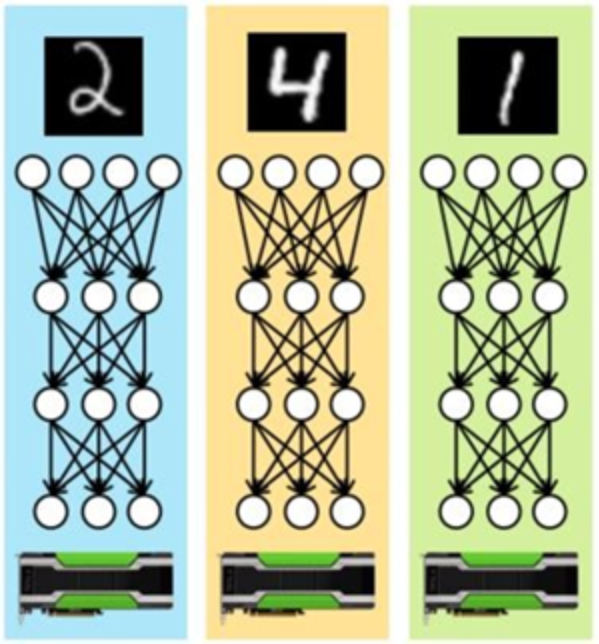
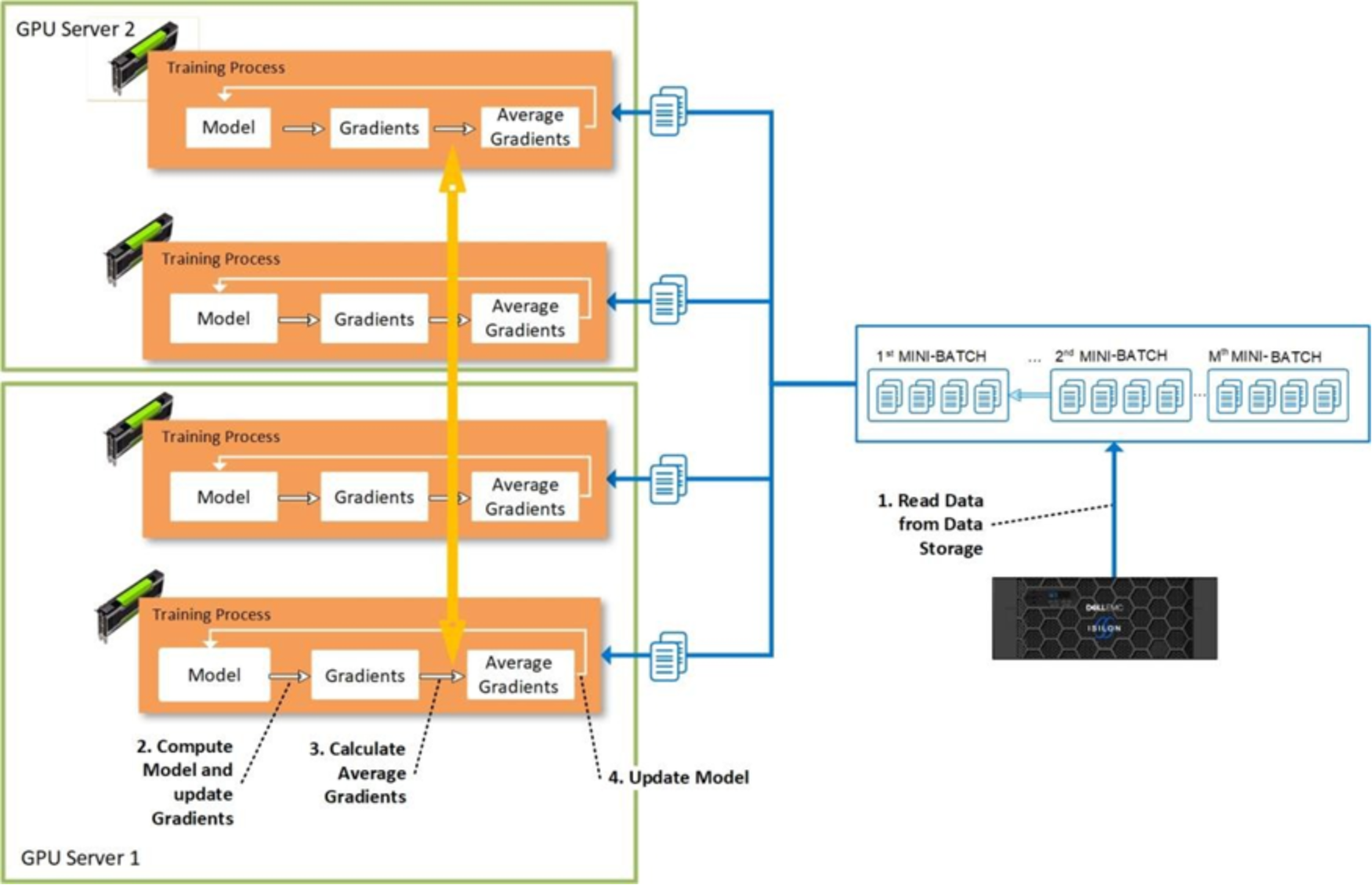
Most DL frameworks use data parallelism to partition the workload over multiple devices. Following picture shows the detail process of data parallelism approach to distribute training processes across the multiple GPU servers and devices. Data parallelism also requires less communication between nodes as it benefit from high amount of computations per weight. Assume for example, there are n devices, where each device receives a copy of the complete model and train it with 1/nth of the data. The results such as gradients and the updated model itself are communicated across these devices.
To ensure the efficient training, the network bandwidth across the nodes cannot become a bottleneck. Also note, it is inefficient – and bad practice - to store training data on the local disks of every worker node – this forces the copying of terabytes of data to each worker node before the actual training can be started.
parallelism approach to distribute training processes:
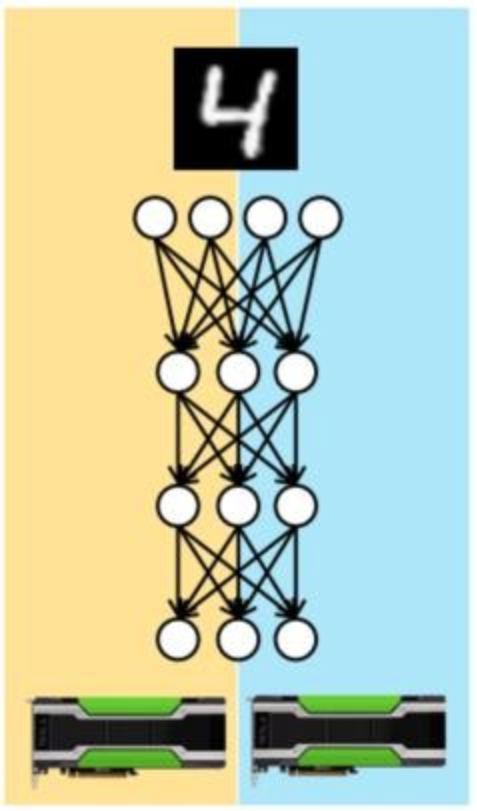
When models are so large that they don’t fit into device memory, then an alternative, called model parallelism shown as below. Different devices are assigned the task of learning different parts of the model. Model parallelism requires more careful consideration of dependences between the model parameters. Model parallelism may work well for GPUs in a single server that share a high-speed bus. It can be used with larger models as hardware constraints per node are no more a limitation.
Model Parallelism:
- Leverage open source DL toolkit like Horovod: Horovod is a distributed training framework for TensorFlow, Keras, PyTorch, and MXNet. The goal of Horovod is to make distributed DL fast and easy to use. Horovod use Message Passing Interface (MPI) model to be much more straightforward and require far less code changes than the Distributed TensorFlow with parameter servers. Horovod currently supports models that fit into one server but may span multiple GPUs.
- Use the latest DL framework: Leverage the latest DL framework and toolkit to avoid potential performance issue or bugs, and compatible cuDNN and NVIDIA Collective Communications Library (NCCL). The newer version always delivers great performance improvements and bug fixes.
Infrastructure
Infrastructure
Here are some key design considerations on designing infrastructure for distributed DL:
- Build high network bandwidth between nodes: Distributed DL is a very compute-intensive task. To accelerate computation, training can be distributed across multiple machines connected by a network. During the training, constant synchronization between GPUs within and across the servers is required. Limited network bandwidth is one of the key bottlenecks towards the scalability of distributed DNN training. Most important metrics for the interconnection network are low latency and high bandwidth. It is recommended to use InfiniBand or 100Gbps Ethernet Network to maximum the network bandwidth between nodes. With enough network bandwidth, GPU utilization across nodes performs similar of single GPU configurations.
- Choose high throughput, scale-out centralized storage: With scalable distributed DL, the distribution of the training data (batches) to the worker nodes is crucial. It is inefficient and expansive to store training data in the local disks or Non-volatile random-access memory (NVRAM) on every worker node and copy terabytes of data across each worker node before the actual training can be started. Using a centralized storage for the training data, like a high throughput, scale-out storage offers a more convenient and effective solution for ADAS / AD DL training.
GPU servers can have 20-30k cores and each one request its own read thread. Most file systems max out at between 2,000 – 6,0000 open read threads, but PowerScale OneFS operating system doesn’t have performance limit on open threads. Meanwhile, DL workloads require high throughput random read during the training and data processing, and sequential write during data ingest. With distributed DL on multiple GPUs, to full utilize GPUs a steady flow of data from centralized storage into multiple GPUs jobs is critical for obtaining optimal and timely results. Data preprocessing (CPU) and model execution of a training step (GPU) run in parallel during the training require high throughput data read from storage.
An ADAS high performance DL system requires equally high-performance storage with scalability to multiple petabyte within a single file system. For a typical SAE level 3 project, this requirement ranges between 50 to 100 PB of data. The storage scalability is crucial for ADAS DL project with high performance to meet different business requirement.
Dell PowerScale all-flash storage platforms, powered by the PowerScale OneFS operating system, provide a powerful yet simple scale-out storage architecture up to 33 petabytes per cluster. It allows DL workload to access massive amounts of unstructured data with high performance, while dramatically reducing cost and complexity.
- Use Bright Cluster Manager (BCM) to provide cluster management and monitoring: Dell and Bright Computing have had a long track record of working together with both companies’ missions aligning to speed customer time-to-value, discovery, and generating data-based insights. BCM will enable the deployment of complete clusters over bare metal and manage them effectively. It will provide the management for the entire compute cluster, including the hardware, operating system, and users. It also has the capability to manage select applications within the HPC and AI environments such as Hadoop, Spark, and other big data software elements. BCM is making DL more accessible by providing software that makes it easy to deploy and manage the tools and supporting infrastructure required to get the job done. Bright for DL provides a complete platform to scale DL across an AD/ADAS environment with confidence. For more information, refer to Bright Computing DL website.
- Use Slurm Scheduler for DL training jobs across HPC nodes: To use resources on multiple nodes, the user can use Slurm job scheduler. The Slurm scheduler is used to manage the resource allocation and job submissions for all users in a cluster. To use Slurm, the user needs to submit a script on the cluster head node that specifies what resources are required and what job should be executed on those resources once allocated.
- Leverage NVIDIA Container Toolkits on NVIDIA GPUs: NVIDIA offers ready-to-run GPU- accelerated containers with the top DL frameworks. NVIDIA also offers a variety of pre-built containers which allow users to build and run GPU accelerated Docker containers quickly. To deploy DL applications at scale, it is very easy to leverage containers encapsulating an application’s dependencies to provide reliable execution of application and services even without the overhead of a full virtual machine. For more detail information, refer to the NVIDIA Container Toolkit page.
- Use Kubernetes to manage containers for distributed DL: Kubernetes is an increasingly popular option for training deep neural networks at scale, as it offers flexibility to use different ML frameworks via containers as well as the agility to scale on demand. It allows researchers to automate and accelerate DL training with their own Kubernetes GPU cluster. For more information, refer to article How to automate DL training with Kubernetes GPU-cluster.
- Use NVIDIA DL GPU Training System™ (DIGITS) for user interface: DIGITS is a wrapper for NVCaffe™ and TensorFlow™ which provides a graphical web interface to those frameworks in Figure 9 rather than dealing with them directly on the command-line. DIGITS simplify common DL tasks such as managing data, designing and training neural networks on multi-GPU systems, monitoring performance in real time with advanced visualizations, and selecting the best performing model from the results browser for deployment. DIGITS is completely interactive so that data scientists can focus on designing and training networks rather than programming and debugging.
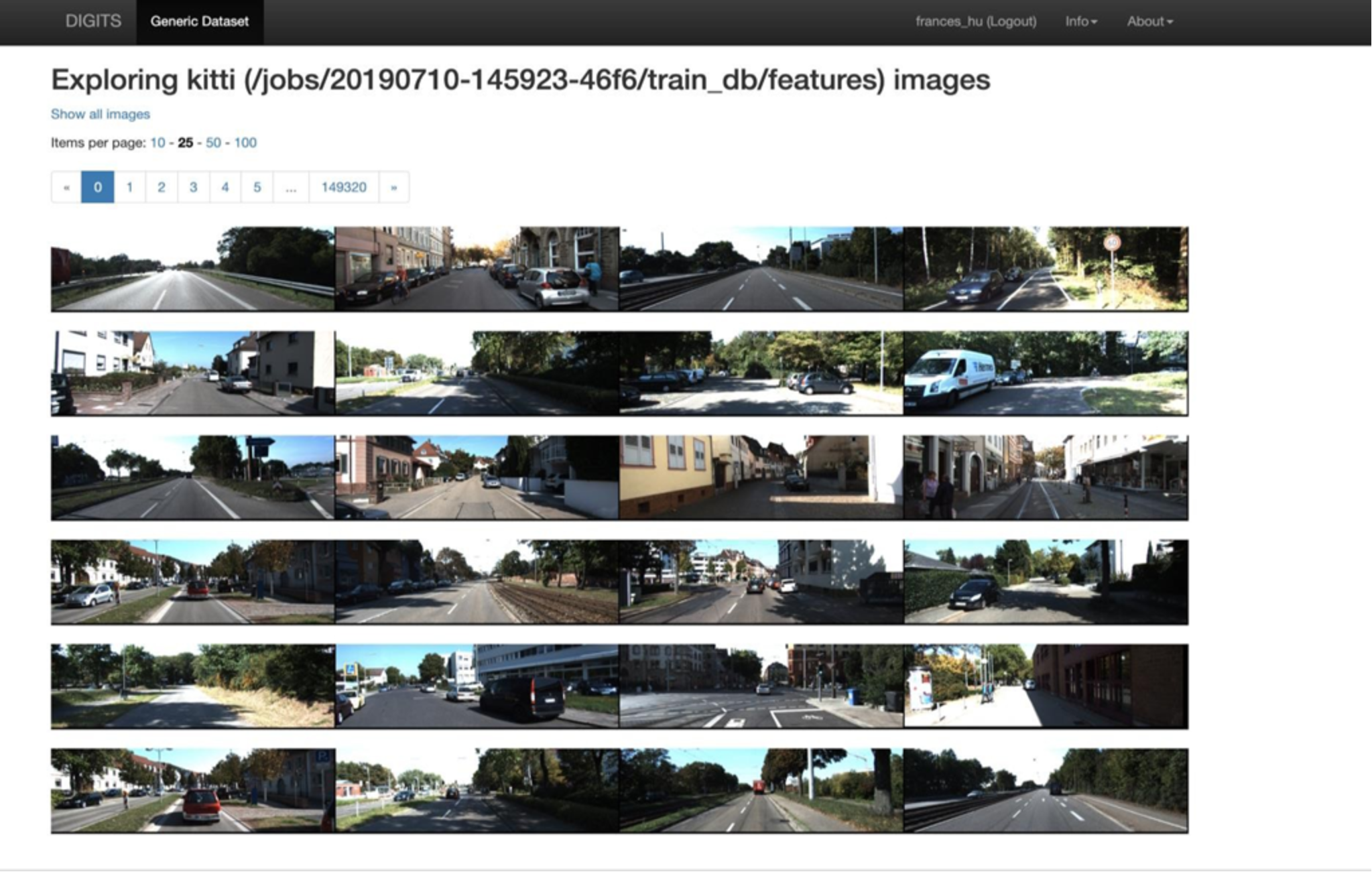
Figure 9. NVIDIA DIGITS for DL user interface platform
ADAS DL Training Performance and Analysis
ADAS DL Training Performance and Analysis
ADAS Dataset and CNN Models
Since the entire Cityscapes raw data including label data is only 11 GB and can easily fit into system memory, the size of the dataset was increased 557 times to exercise the storage system (Isilon F800) properly We did this by applying 557 random data augmentation techniques to each JPEG image in the dataset. This is standard practice in data analytics and DL to increase size of data sets. In total, this “557x” dataset contained 1,657,075 images and annotations with 5TB in total. The average PNG image pixel is 1024 x 2048 and average size is 2,193KB. Figure 10 shows DataIQ scan results of the training dataset stored on the Isilon F800.
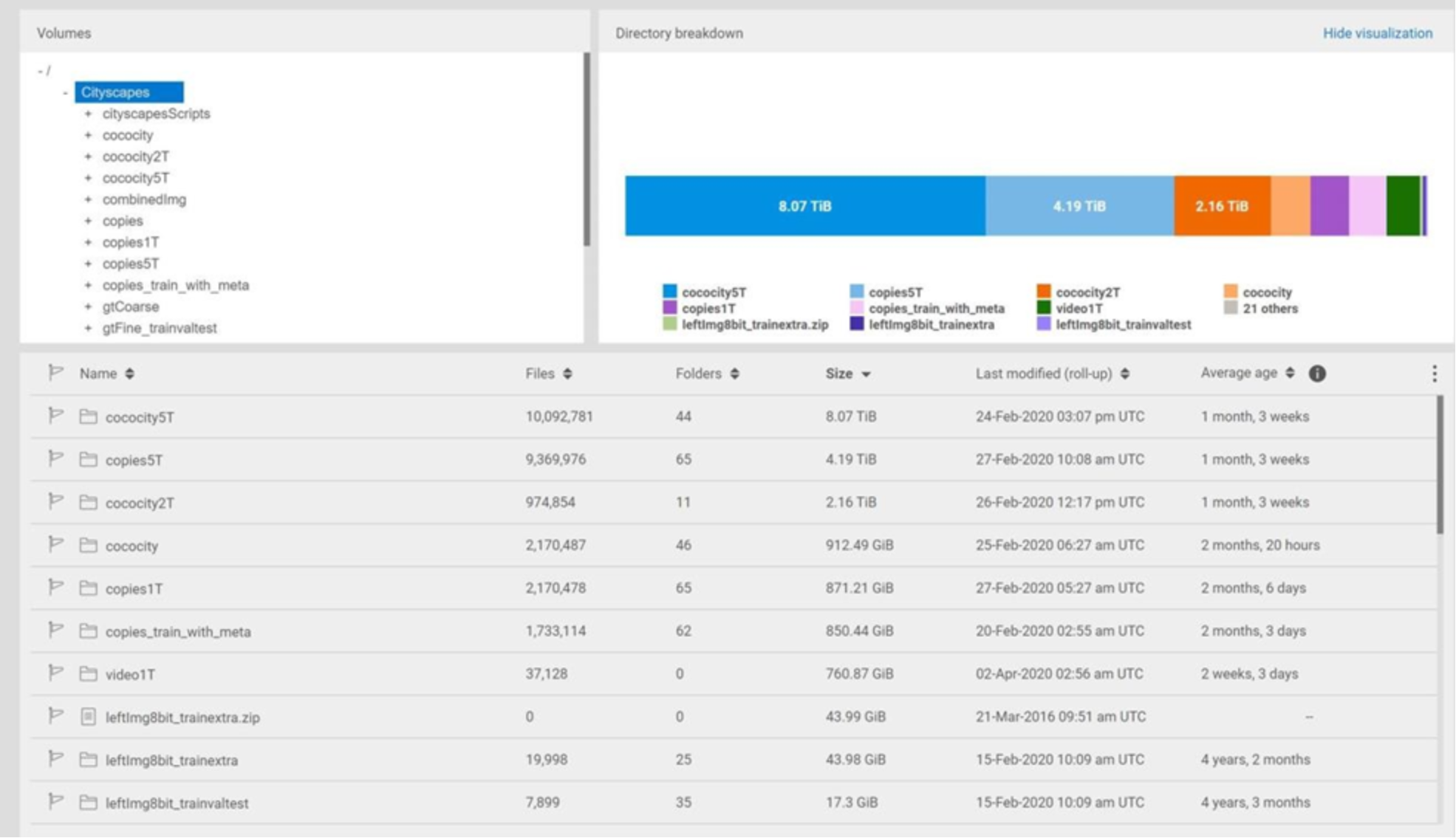
Figure 10. DataIQ scan results of the training datasets on Isilon F800
The performance test utilized in this document uses this data to train two different convolutional neural network (CNN) models, shown in Table 2 that are used for semantic image segmentation and object detection.
Table 2. Convolutional Neural Network models used in the tests
|
CNN Models |
Purpose |
Dataset |
DL Framework |
Distributed Framework |
|
DeepLabv3+ (backbone: ResNet-101) |
Semantic Image Segmentation |
Cityscapes Benchmark data with 1,657,075 training images and annotations (5TB in total) |
PyTorch 1.4 |
|
|
SSD: Single Shot MultiBox Detector (backbone: ResNet-50) |
Real-Time Object Detection |
Cityscapes Benchmark data with 972,825 training images (3TB in total) |
PyTorch 1.4 |
PyTorch Distributed Data Parallel |
Hardware and Software Configuration
Test Methodology
Test results and performance analysis
Training image throughput
The Single Shot MultiBox Detector model training benchmark performance results are shown in Figure 11. It is obvious from the results that image throughput scale linearly from four to 64 GPUs.
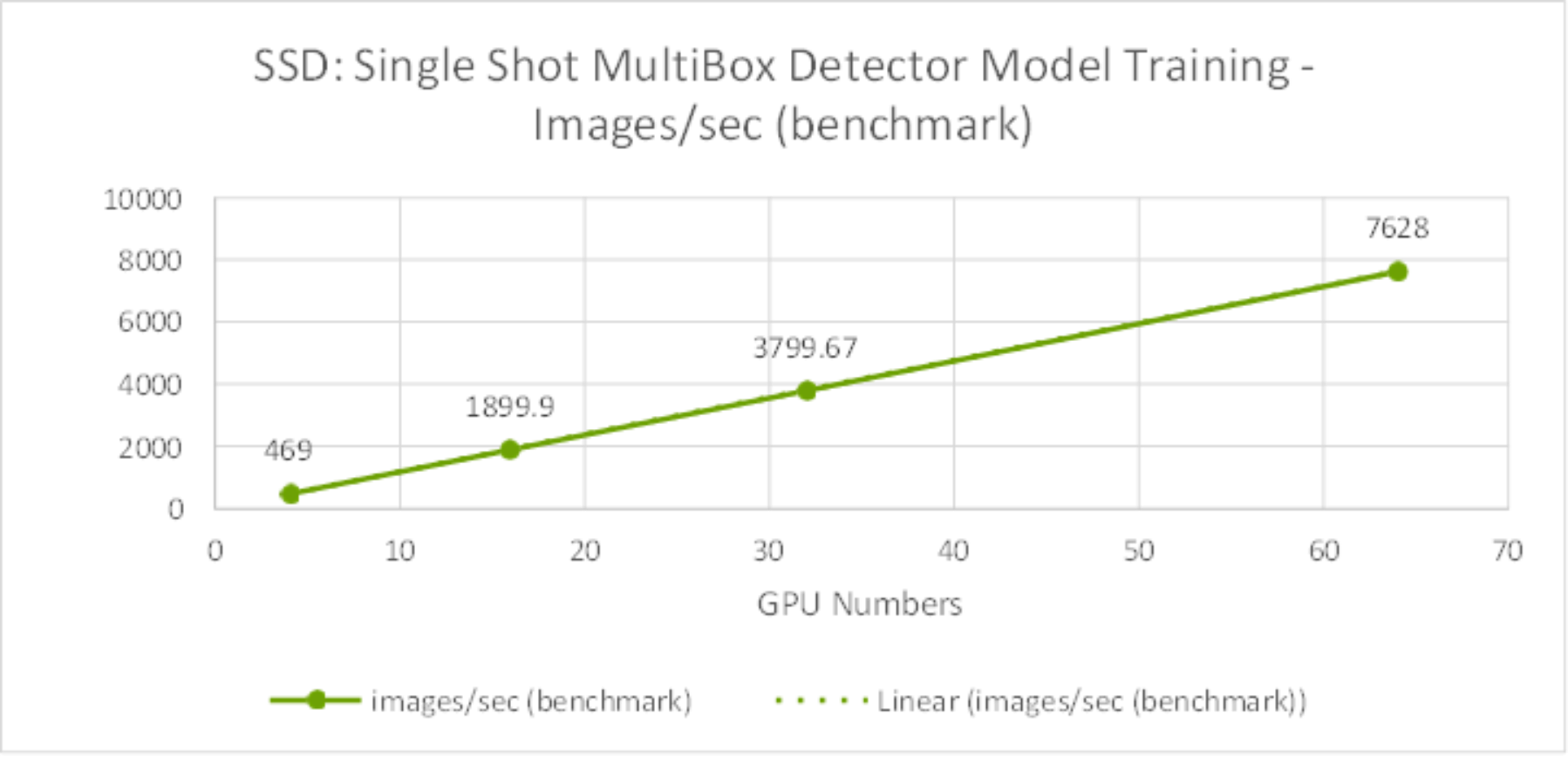
Figure 11. SSD Model Training Benchmark – Images/sec from 4 GPUs to 64GPUs
The DeepLabv3+ model training performance results are shown in Figure 12.The test results also show the training throughput grow linearly from 4 GPUs to 64 GPUs.
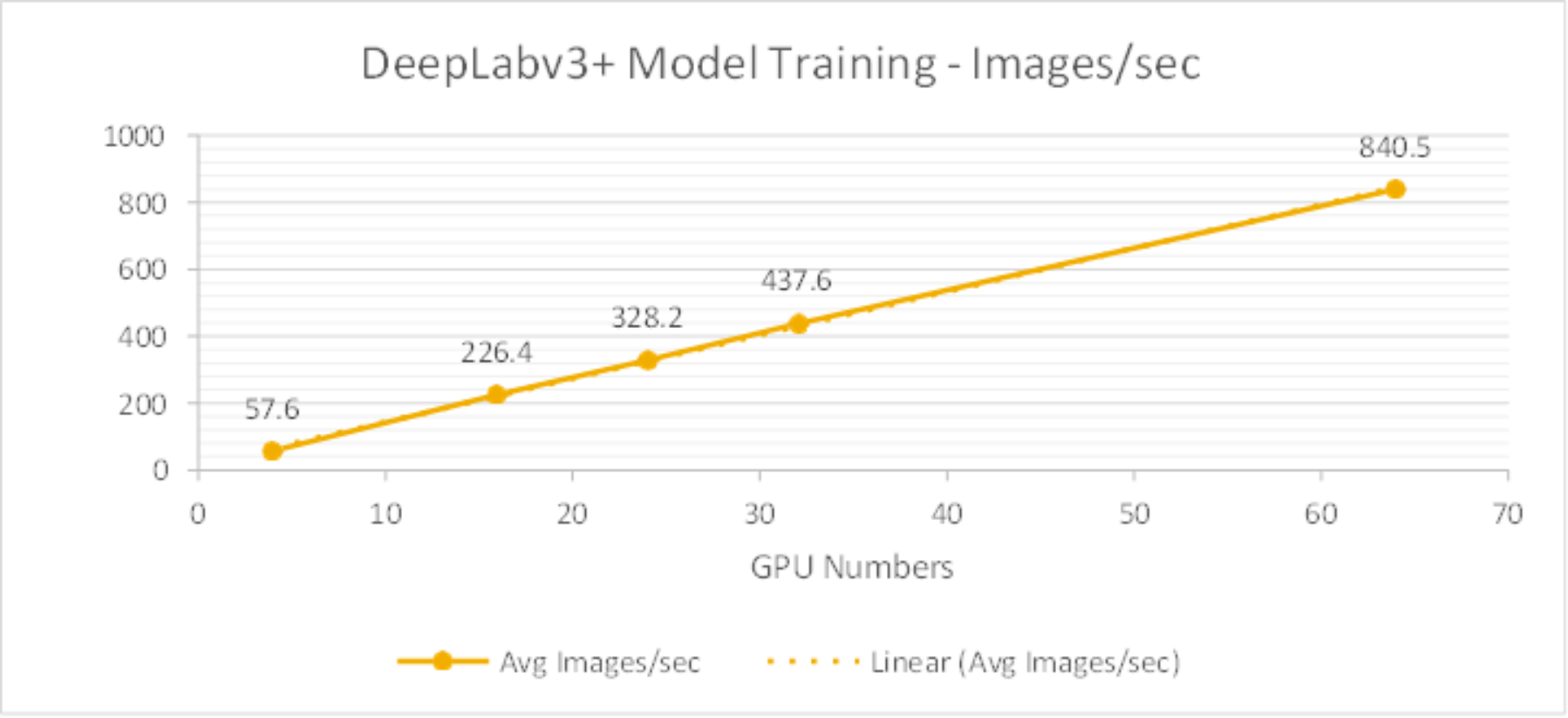
Figure 12. DeepLabv3+ Model Training Benchmark – Images/sec from 4GPUs to 64GPUs
Training time and system metrics
SSD model
Table 4 lists the test results about the SSD model training time and bandwidth for 1st epoch. As shown in Figure 13, the average throughput scale linearly from 4 to 64 GPUs and reduced training time as well.
Table 4. SSD Training Time and Training Bandwidth for each epoch with 3TB dataset
|
GPU Numbers |
Average Training Time for each epoch |
Average Training Bandwidth for 1st epoch |
Peak Training Bandwidth for 1st epoch |
|
4 |
42 minutes 47 seconds |
858 MB/s |
990 MB/s |
|
16 |
11 minutes 50 seconds |
2,904 MB/s |
4,503 MB/s |
|
32 |
6 minutes 40 seconds |
4,664 MB/s |
6,530 MB/s |
|
64 |
4 minutes 25 seconds |
7,489 MB/s |
10,017 MB/s |
Table 5 lists the system metrics during the training. This indicates that the GPUs were fully utilized by leveraging the NVIDIA DALI library.
Table 5. SSD Model Training System Metrics
|
System metrics |
Percentage |
|
Average GPU utilization |
96% |
|
Average GPU memory utilization |
42% |
|
Average compute node CPU utilization |
63% |
|
Average compute node memory utilization |
91% |
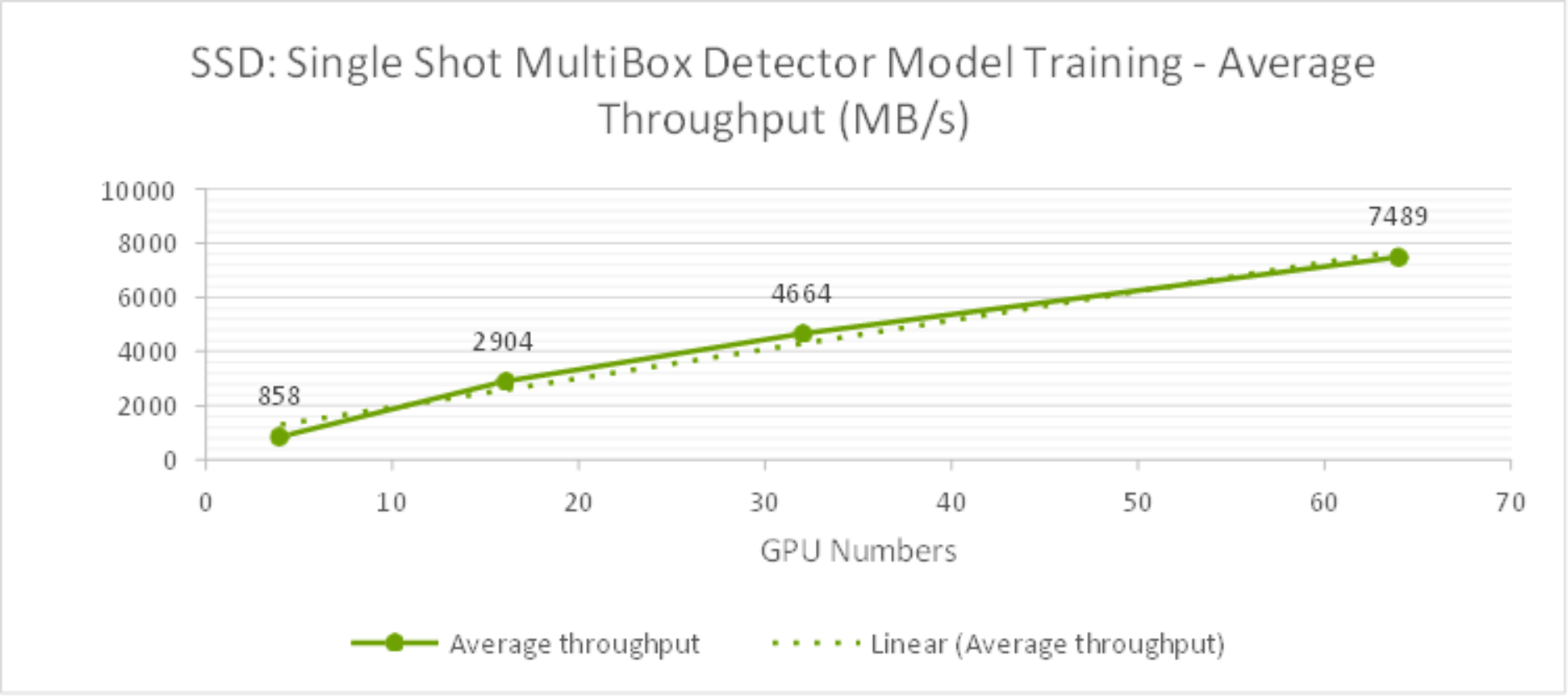
Figure 13. SSD Model Training Average Bandwidth (MB/s) from 4GPUs to 64GPUs
As shown in the Figure 14, during the training time, the peak storage throughput reached over 10GB/s with 64 GPUs. It was observed that the training is a heavily read intensive workload as it need to read entire dataset from storage for training. For storage configuration considerations, it is crucial to plan sizing for peak throughput on Isilon F800 storage during the training in order to minimize training times as required for the development business needs.
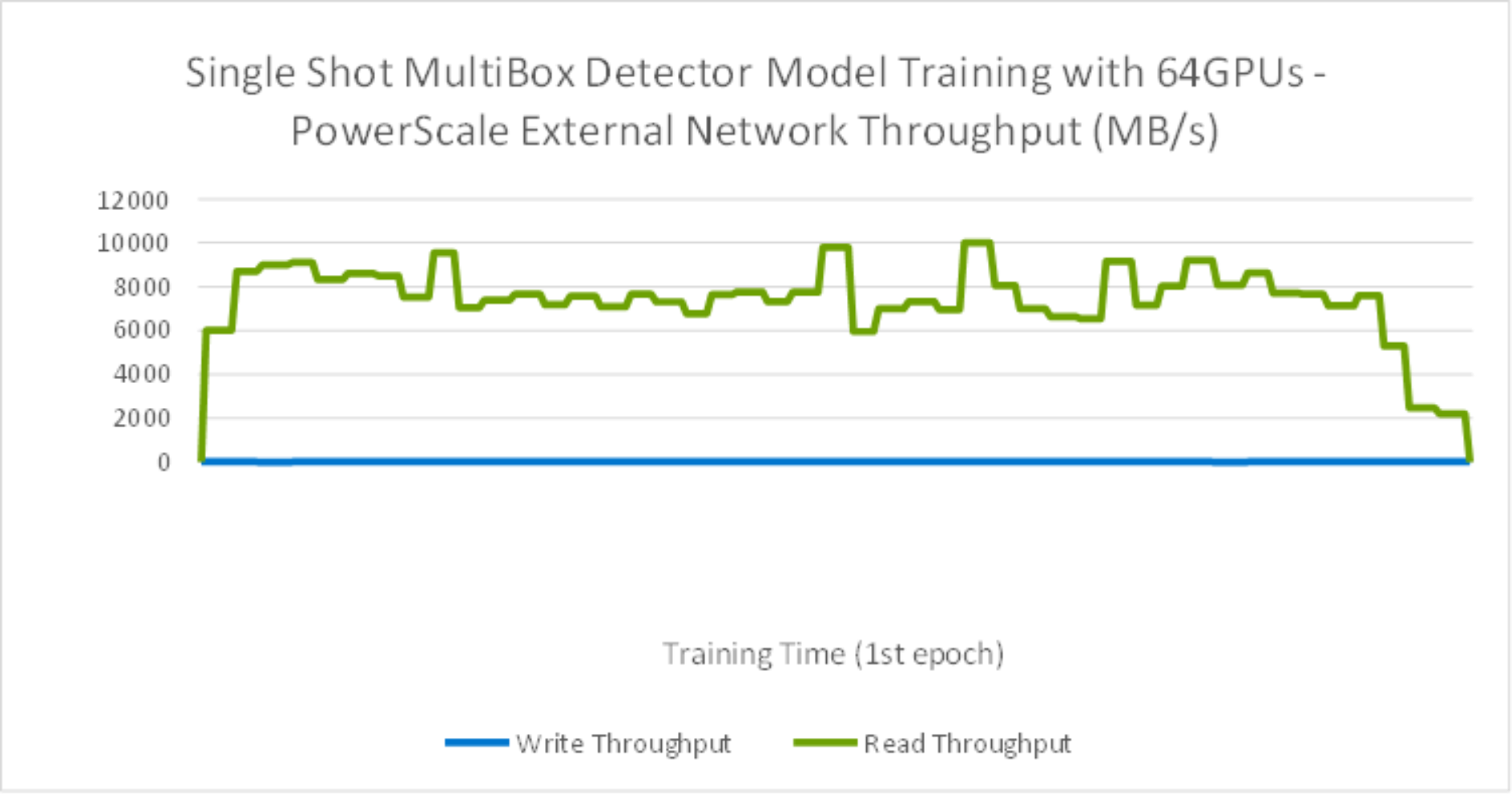
Figure 14. SSD Model Training with 64GPU storage throughput
As shown in the Figure 15, during the training time, GPUs are fully utilized.
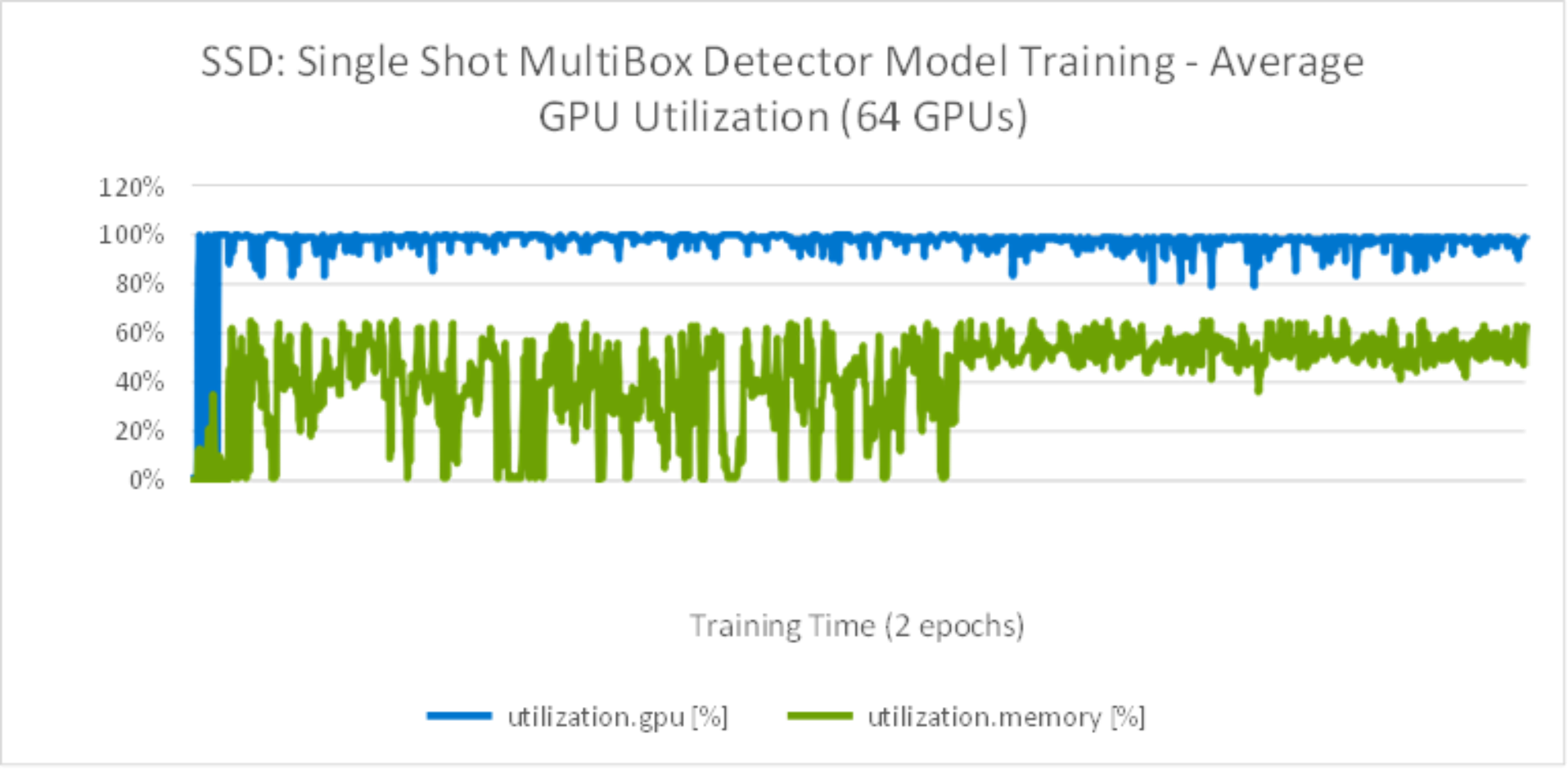
Figure 15. SSD Model Training with average 64GPU utilization
DeepLabv3+ model
Table 6 lists the test results about the DeepLabv3+ model training time and bandwidth for 1st epoch. As shown in Figure 16, the average throughput scaled linearly from 4 to 64 GPUs and reduced training time as well.
Table 6. DeepLabv3+ Training Time and Training Bandwidth for each epoch with 5TB dataset
|
GPU Numbers |
Training Time for each epoch |
Average Training Bandwidth for 1st epoch |
Peak Training Bandwidth for 1st epoch |
|
4 |
7 hours 59 minutes |
140.15 MB/s |
450 MB/s |
|
16 |
2 hours 1 minute |
497.69 MB/s |
920 MB/s |
|
24 |
1 hour 24 minutes |
726.19 MB/s |
1,607 MB/s |
|
32 |
1 hour 3 minutes |
964.03 MB/s |
2,262 MB/s |
|
64 |
38 minutes |
1741.04 MB/s |
3,018 MB/s |
Table 7 lists the system metrics during the training. This indicates that the GPUs were fully utilized by leverage NVIDIA DALI library.
Table 7. DeepLabv3+ Model Training System Metrics
|
System metrics |
Percentage |
|
Average GPU utilization |
91% |
|
Average GPU memory utilization |
41% |
|
Average compute node CPU utilization |
23.7% |
|
Average compute node memory utilization |
99% |
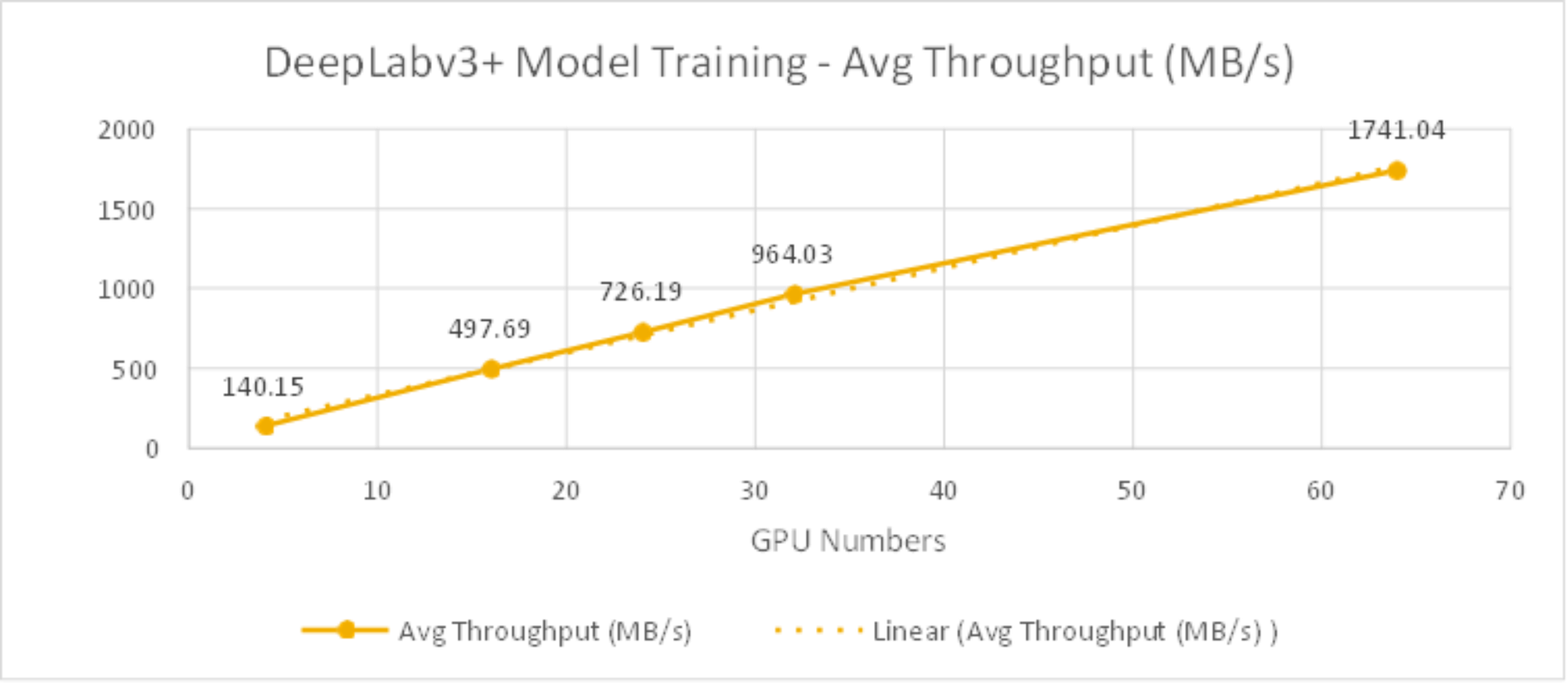
Figure 16. DeepLabv3+ Model Training Bandwidth (MB/s) from 4GPUs to 64GPUs
As shown in the Figure 17, during the training time, the peak storage throughput reached to over 2.2GB/s with read intensive.
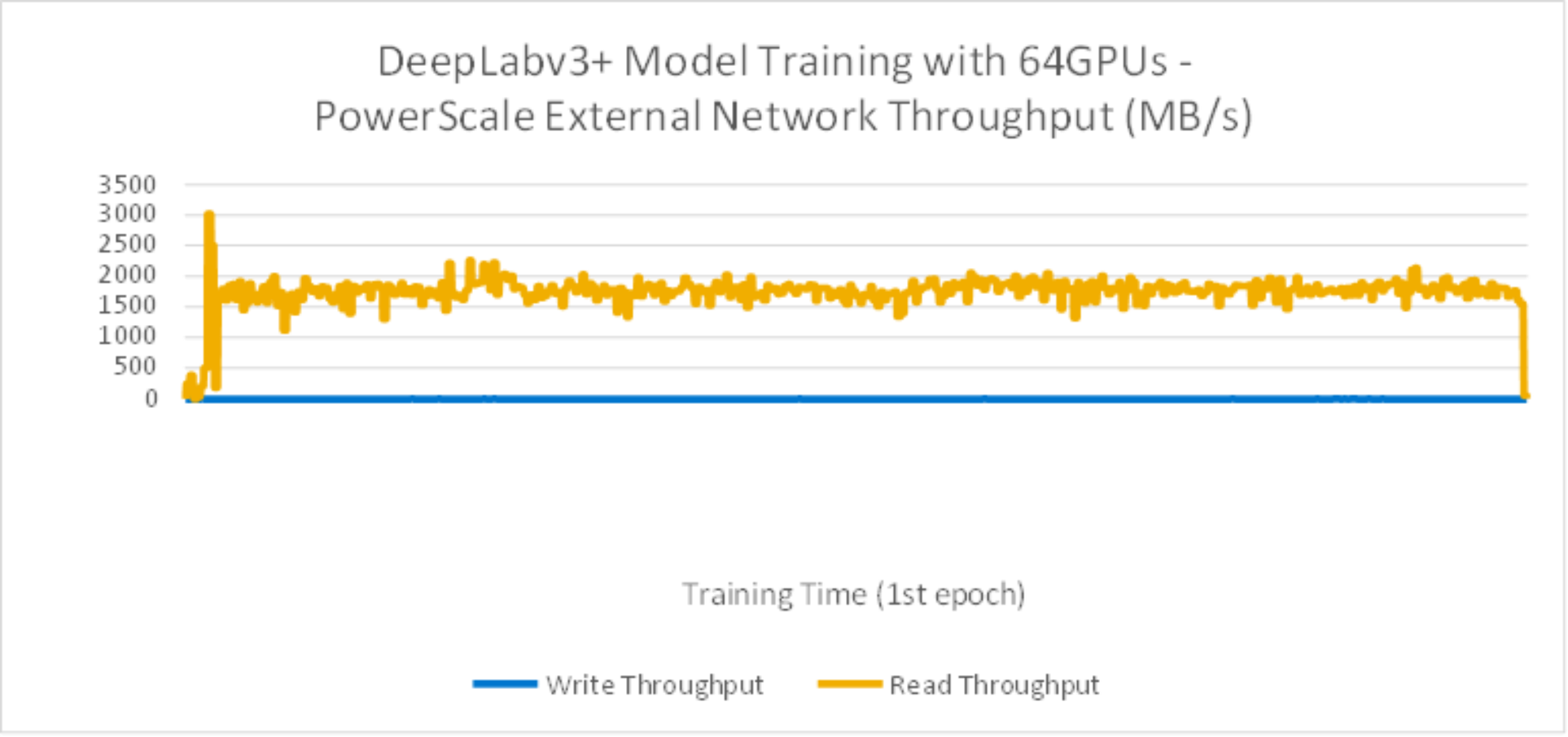
Figure 17. DeepLabv3+ Model Training with 64GPU storage throughput
From Figure 18 test results, during the training time, GPUs are fully utilized.
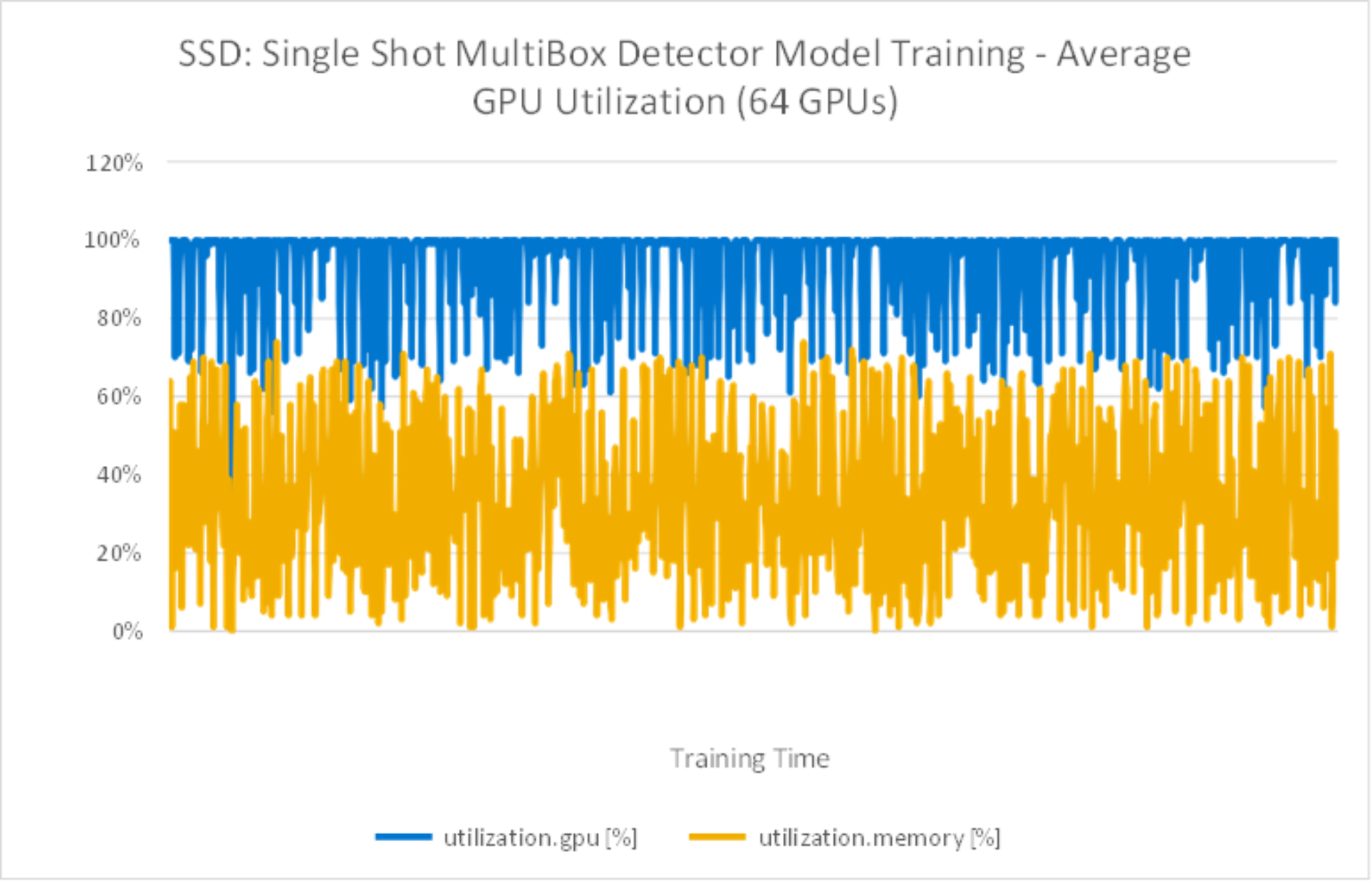
Figure 18. DeepLabv3+ Model Training with average 64GPU utilization
Image throughput with multiple epochs
We also ran SSD model training with multiple epochs to compare and contrast. Figure 19 compares test results by running 1 epoch versus multiple epochs. It is obvious that running 1 epoch or multiple epochs had no difference on the image/sec performance results.
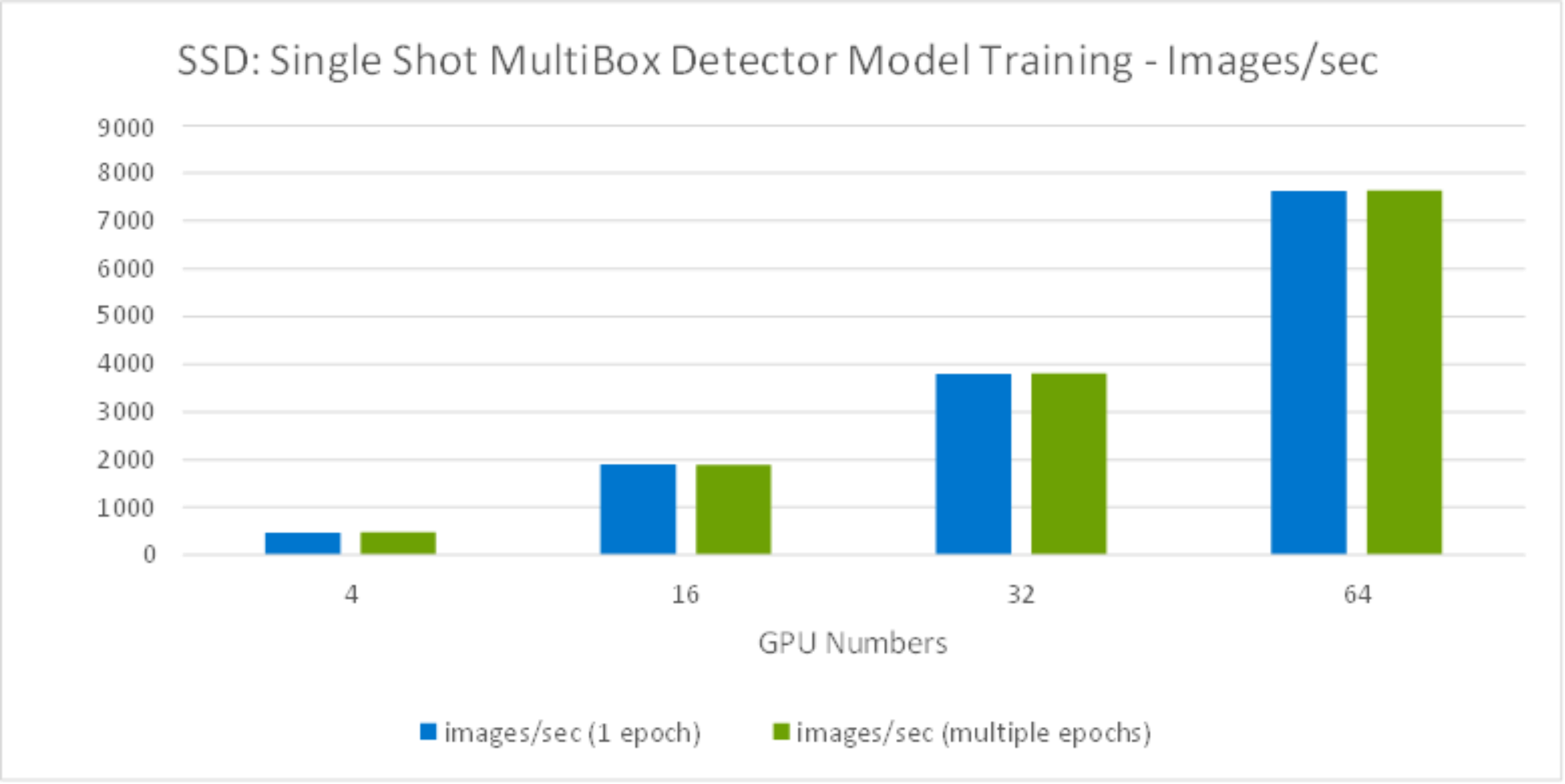
Figure 19. SSD Model training Images throughput comparison
Meanwhile, we observed the storage throughput dropped while running more than 32GPUs, as shown in Figure 20. This was because the dataset is only 3TB, while running more than 32GPUs with 8 compute nodes, the server cache exceeded the total dataset, enabling some of the data to cached on the server side - which reduced the storage throughput required during the training.
For training, the system memory is consumed by the following critical variables: parameters - including weights and bias, gradients, input data and intermediate data. Among them, the intermediate data is the most memory demanding. The intermediate data includes the workspace and feature map. The workspace is the memory consumed by the DL framework and varies with each framework developers choose. The feature map, sitting in the middle of two neighbor layers of a CNN model, is generated by one layer, and used as input to the next layer. With more system memory, it gives more cache for intermediate data which will reduce the storage throughput requirement during the training.
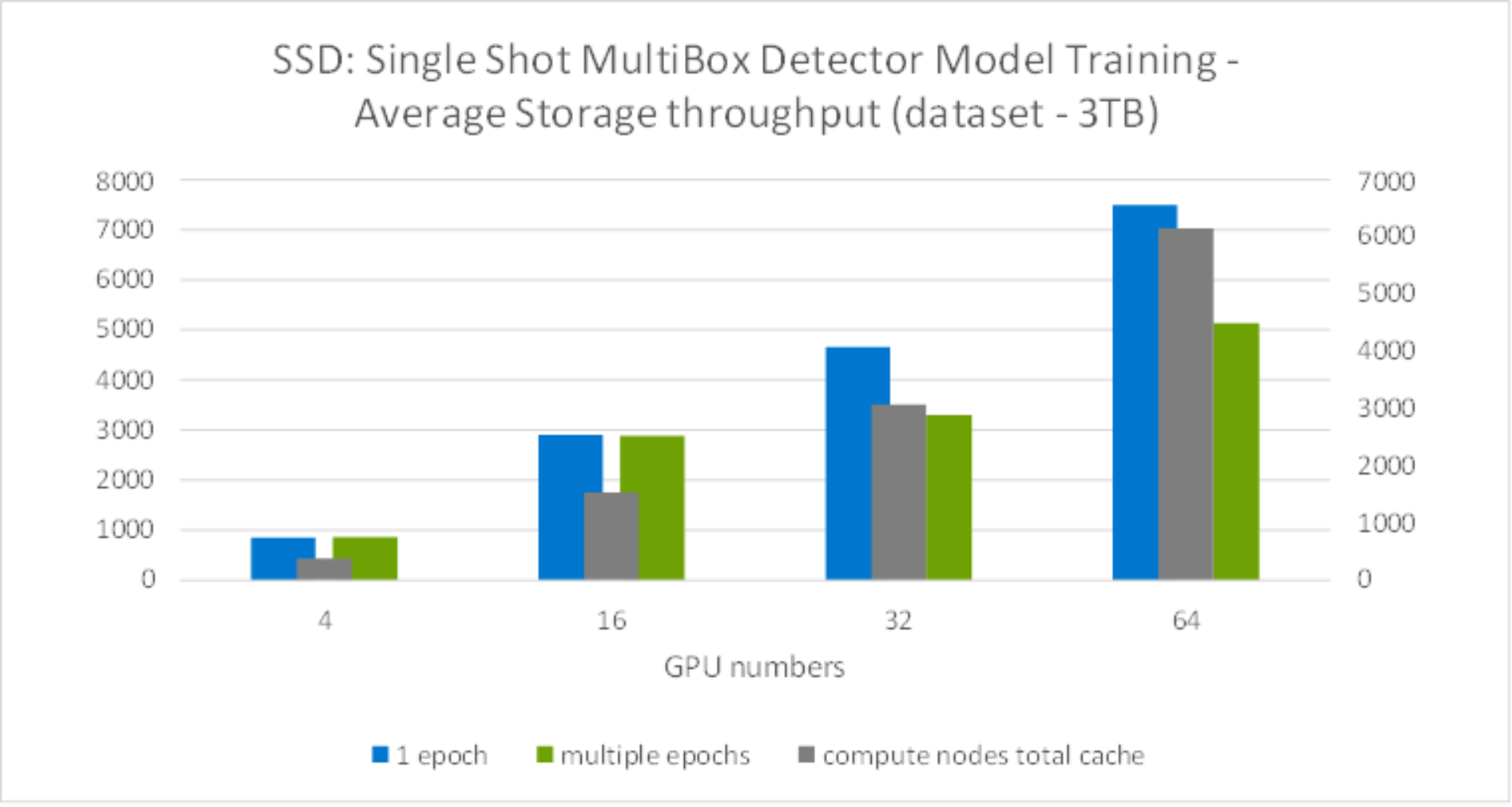
Figure 20. Model training storage throughput comparison