
Dell VxRail Performance Analysis

Oct 19, 2026
Dell VxRail Performance Analysis This analysis describes the performance differnetials of Dell VxRail with vSAN Express Storage Architecture using 25 GbE and 100 GbE networking. The intent is to provide a clear network selection recommendation and financial considerations.

Introduction

Overview

Dell Technologies, in partnership with Broadcom, has worked to determine the benefits of increased network connectivity for the new VMware vSAN 8.0 Express Storage Architecture (ESA) as delivered with VxRail.

In recent years, 25 GbE networking speed was considered more than sufficient for HCI networking. However, VMware has set the minimum networking speed requirements for vSAN ESA at 25 GbE with a recommendation for 100 GbE. Dell Technologies performed testing to compare 25 GbE to 100 GbE networking interfaces. The evidence discovered during testing confirms that 100 GbE is preferred for vSAN ESA deployments.

In addition to the benefits of 100 GbE, this paper highlights benefits afforded by vSAN ESA that make the combination of 100 GbE networking and VxRail with vSAN ESA an ideal option for customers demanding high storage performance. This combination allows customers to take full advantage of VxRail vSAN ESA-based deployments.

Note: The findings in this paper also apply to equivalently configured Dell vSAN Ready Nodes.

We value your feedback

Dell Technologies and the authors of this document welcome your feedback on the solution and the solution documentation. Contact the Dell Technologies Solutions team by email.

Author: David Glynn

Contributors: Bill Leslie, Nelson Fonseca, Russ Lewis

Note: For links to additional documentation for this solution, see the VxRail Info Hub.

vSAN Express Storage Architecture

Overview

This paper does not cover the topic of vSAN ESA. However, in order to describe the benefits of 100 GbE networking to ESA, it is important to highlight the changes ESA brings to vSAN.

vSAN ESA is not a replacement for the current vSAN architecture, now referred to as vSAN Original Storage Architecture (OSA). Instead, vSAN ESA is an alternative architecture that leverages existing vSAN architecture. In addition, vSAN ESA offers upgrades that enable vSAN to harness the latest server hardware and protocols to deliver new capabilities and faster performance.

VMware published several articles after the launch of vSAN ESA, many of which can be found on the VMware vSAN ESA website. One of the new recommendations in ESA is to use compression combined with RAID 5 or RAID 6 storage policies (even for performance workloads). Previously, only RAID 1 was used for these workloads. To learn more about vSAN ESA, see these specific articles by VMware:

Test environment and configuration

Hardware

The hardware in the table below shows that two VxRail with vSAN ESA clusters were created. Both clusters used identical hardware except for the networking cards and switches used for vSAN networking. For networking, one cluster used Broadcom 57414 25 GbE, while the other cluster used Broadcom 54508 100 GbE.

Table 2. Cluster configurations
VxRail 8.0.000 with vSAN Express Storage Architecture
Cluster Six nodes VxRail with vSAN ESA
Node type VxRail P670N
Processor Intel® Xeon® Gold 6330 with 28 cores at 2.00 GHz
RAM 1024 GB
Drive configuration

11x Intel P5600 3.2 TB

NVMe PCIe Gen 4.0 x4 interface

Intel 3D triple-level cell (TLC) NAND

vSAN networking

Broadcom 57414 25 GbE

Broadcom 57508 100 GbE

Software

VxRail release 8.0.010 was used throughout testing. This release contains VMware vSphere and vSAN 8.0 GA (Build 20513097).

vSAN ESA storage policy

vSphere and vSAN use storage policies to define specific storage placement rules and data service configuration rules. During virtual machine deployment, rather than individual rules, a predefined storage policy is selected, which simplifies deployment and ensures that suitable storage placement and data services are used.

Typically, when benchmarking a storage platform, a storage placement or protection method of mirroring or RAID 1 is selected. In addition, data services such as encryption or data reduction are disabled. However, with vSAN ESA, VMware are promoting "Performance without Compromise" and recommending the use of parity data protection methods (RAID 5 or RAID 6) and have included compression in the default storage policy.

Note: To review detailed findings on near-penalty free compression, RAID 5 or RAID 6 performance relative to vSAN OSA RAID 1, and further analysis on VxRail with vSAN OSA 7.x & 8.x performance, contact your Dell Technologies account team.
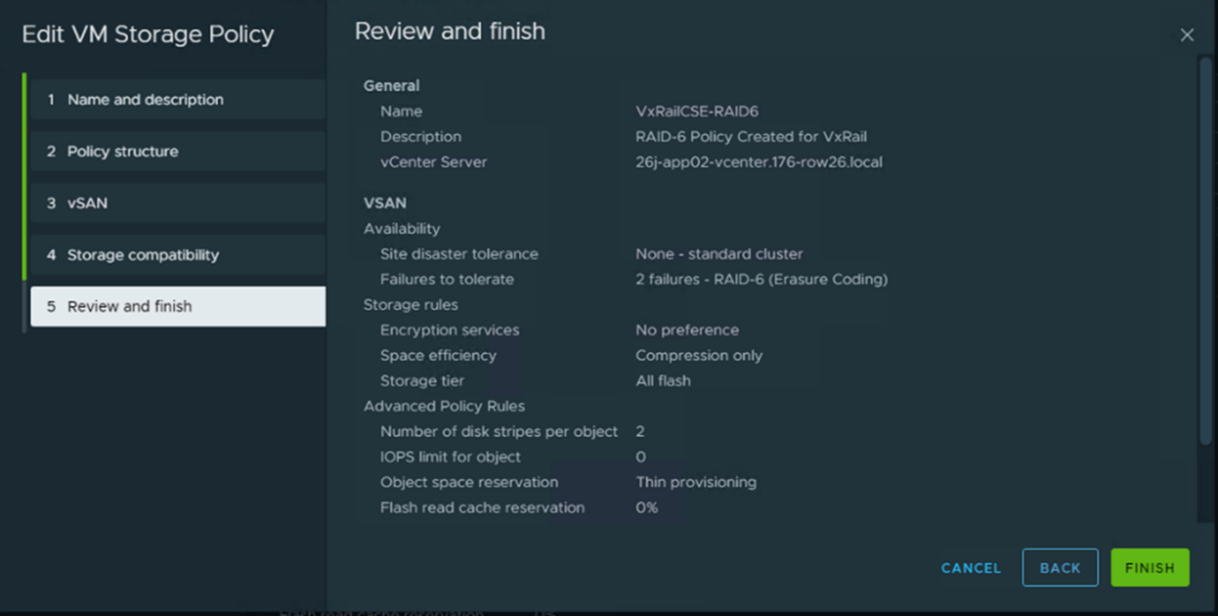
Figure 1. Creating vSAN storage policy
This graphic illustrates creating vSAN storage policy

Methods

VDBench and workload analysis

VDBench is a command-line utility created to help engineers and customers generate disk I/O workloads for validating storage performance and storage data integrity.

VDBench version 5.04.05 was used for all test scenarios. Each node in a cluster was configured with two virtual machines, each configured as:

  • Ubuntu 16.04.4 LTS
  • 8 vCPUs
  • 8 GB of RAM

    8 VMDKs (each of 200 GB storage space)

Descriptions of tests

OLTP is a 100 percent random workload that consists of 70 percent reads, 30 percent writes, and a particular block size. While OLTP with a 32 KB block size broadly reflects typical data center workloads, testing used additional block sizes including:

  • OLTP 4 KB – 70/30 4 KB 100 percent random workload
  • OLTP 8 KB – 70/30 8 KB 100 percent random workload
  • OLTP 16 KB – 70/30 16 KB 100 percent random workload
  • OLTP 32 KB – 70/30 32 KB 100 percent random workload

RDBMS 22 K is an 100 percent random workload that simulates a Relational Database Management System with 60 percent reads, 40 percent writes, and an average block size of 22 KB.

Peak performance benchmarks are short tests of 100 percent sequential read (SR), 100 percent sequential write (SW), 100 percent random read (RR), and 100 percent random writes (RW) workloads at particular block sizes. These tests are run with block sizes of 4 KB, 8 KB, 16 KB, 32 KB, 64 KB, 128 KB, 256 KB, and 512 KB.

SW64KB MAX 1hr is a peak performance test that is run for an hour and consists of a 100 percent sequential write workload with a 64KB block size. This type of test is used to stress write cache and write cache destaging operations.

All tests in this report were RAID 6 profile. Drives were pre-written to 100 percent their capacity with random data. A pause for 30 minutes was performed before each simulated workload run. The runs were then performed to capture IOPS compared with latency spanning 10 datapoints with five minutes duration each. VDBench automatically increases the threads during this process, for the various OLTP and RDBMS workloads.

An additional pause of 30 minutes was taken before peak performance tests. These are short 10 minute tests to capture the 100 percent for each of Random Reads, Random Writes Sequential Reads and Sequential Writes as stated above.

Another 30 minute pause was performed before a one hour 100 percent Random Write 4 KB workload.

Results

Introduction

The VxRail performance team performed several benchmark tests reflecting various workloads; however, this paper focuses on benchmark tests that best reflect real-world workloads.

VxRail used aggregated Live Optics data, a free, online software tool from Dell Technologies that visualizes and analyzes IT infrastructure and data center workloads. For more information about Live Optics, see the Live Optics website.

Using this tool, VxRail confirmed that OLTP 32 KB and RDBMS 22 K benchmark tests are reflective of typical data center workloads. VxRail also analyzed the results of the peak performance benchmark tests with a 512 KB block size as this test stresses networking bandwidth.

Since there was only a single difference between the two cluster configurations, the networking infrastructure was changed from 25 GbE to 100 GbE. Any change in performance can be attributed to this change in networking configuration.

OLTP 32 K

OLTP 32 K is an 100 percent random workload – consisting of 70 percent reads and 30 percent writes – that is reflective of real-world online transactional processing data center workloads. Rather than picking a singular application to get results, this test can apply to virtually any application workload that shares a similar workload profile.

The chart below shows that an OLTP 32 K workload benefits from the increase in available network bandwidth. Peak IOPS for the cluster increased 78 percent from 256 K to 455 K, with a substantial 49 percent drop in latency from 2.59 to 1.32 millisecond. However, few environments can run any resource at peak load by choice for a sustained period.

Note: CLM-007411 Disclaimer: Based on internal Dell Technologies testing of a P670N 6 node cluster running VxRail 8.0.000 with vSAN ESA with 25 GbE and 100 GbE networking. February 2022. Actual results will vary.
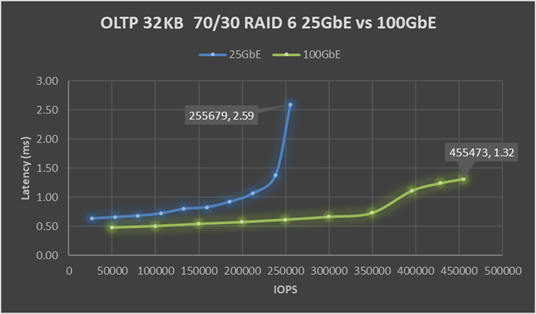
Figure 2. Results from OLTP 32 KB testing
This graphic illustrates the results from OLTP 32 KB testing

The blue 25 GbE line shows that once the workload goes above 212 K IOPS, latency increases sharply from 1.07 to 2.59 millisecond. While this final tail of performance delivers an additional 20 percent of performance or 44 K IOPS, it does come at the price of increased latency. As a best practice, when sizing a cluster for a workload, keep resources at 70 to 80 percent of maximum potential. This best practice allows headroom for unexpected spikes in demand, or a drop in resource availability during planned or unplanned node downtime.

Reviewing the performance at 70 to 80 percent of maximum potential, consider the performance results at these data points:

  • At 70 percent of maximum, IOPS for the cluster performance increased 88 percent from 186 K to 350 K with a 20 percent drop in latency from 0.92 to 0.73 millisecond.
    • On a per node basis, as performance scales nearly linear, approximately two nodes of similarly configured VxRail with ESA using 25 GbE perform as much output as the 100 GbE nodes.
  • At 80 percent of maximum, IOPS for the cluster performance increased 86 percent from 212 K to 395 K with a 4 percent increase in latency from 1.07 to 1.11 millisecond.

High performance must be delivered with consistent and predictable latency. The green 100 GbE line shows an almost flat latency of 0.48 millisecond at 50 K IOPS to 0.73 millisecond at 350 K IOPS, which starkly contrats the blue 25 GbE line that shows a sharp rise in latency.

As mentioned, the only difference between the two test environments was the network configuration. Deploying ESA with 25 GbE networking will only limit the performance potential of an ESA cluster. By using 100 GbE networking, the full potential of ESA can be delivered with high performance and with low, consistent, and predictable latency. If you choose to deploy 25 GbE networking in the future, high performance will be required. Thus, you must choose will between purchasing additional VxRail nodes or a disruptive upgrade to 100 GbE networking.

RDBMS 22 K

RDBMS 22 K is an 100 percent random workload – consisting of 60 percent reads and 40 percent writes – that is reflective of real-world relational database data center workloads. Rather than picking a singular application to get results, this test can apply to virtually any application workload that shares a similar workload profile.

The chart below shows that the RDBMS 22 K workload benefits from the increase in available network bandwidth. Peak IOPS for the cluster increased 49 percent from 237 K to 354 K with a 20 percent drop in latency from 2.16 to 1.73 millisecond. However, few environments can run any resource at peak load by choice for a sustained period.

Note: CLM-007409 Disclaimer: Based on internal Dell Technologies testing of a P670N 6 node cluster, running VxRail 8.0.000 with vSAN ESA with 25 GbE and 100 GbE networking. February 2022. Actual results will vary.
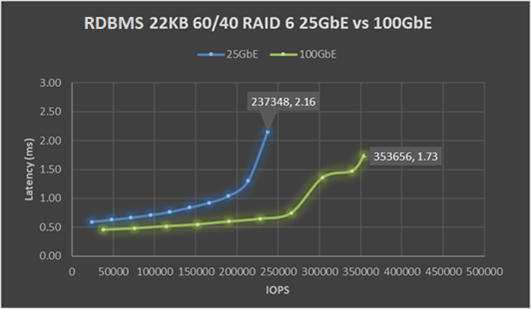
Figure 3. Results from RDBMS 22 KB testing
This graphic illustrates the results from RDBMS 22 KB testing

The blue 25 GbE line shows that once the workload goes above 190 K IOPS, latency increases sharply from 1.05 to 2.16 millisecond. While this tail of performance does deliver an additional 25 percent of performance or 47 K IOPS, it does come at the price of increased latency. As a best practice, when sizing a cluster for a workload, keep resources at 70 to 80 percent of maximum potential. This best practice allows headroom for unexpected spikes in demand, or a drop in resource availability during planned or unplanned node downtime.

Reviewing the performance at 70 to 80 percent of maximum potential, consider the performance results at these data points:

  • At 70 percent of maximum, IOPS for the cluster performance increased 60 percent from 166 K to 266 K with a 19 percent drop in latency from 0.931.05 to 1.36 millisecond 0.75.
  • At 80 percent of maximum, IOPS for the cluster performance increased 60 percent from 190 K to 304 K with a 29 percent increase in latency from 1.05 to 1.36 millisecond.

High performance must be delivered with consistent and predictable latency. The green 100 GbE line shows an almost flat latency line of 0.46 millisecond at 38 K IOPS to 0.75 millisecond at 266 K IOPS, which starkly contrasts the blue 25 GbE line that shows a sharp rise in latency.

As mentioned, the only difference between the two test environments was the network configuration. Deploying ESA with 25 GbE networking will only limit the performance potential of an ESA cluster. By using 100 GbE networking, the full potential of ESA can be delivered with high performance and with low, consistent, and predictable latency. If you choose to deploy 25 GbE networking in the future, high performance will be required. Thus, you will need to choose between purchasing additional VxRail nodes or a disruptive upgrade to 100 GbE networking.

512 K throughput

OLTP 32 K and RDBMS 22 K use benchmark tests that reflect real-world workloads. This benchmark test can provide a reasonable expectation of performance in daily production. Throughput benchmark tests do not reflect real-world workloads. Instead, throughput benchmarks are used to show the absolute maximum read or write performance that a particular configuration can achieve. In turn, the data from this benchmark can be used to help find the root cause of a resource bottleneck.

The chart below shows that in terms of performance, the 100 GbE configuration is delivering significant additional throughput over the 25 GbE configuration. In most cases, 100 GbE can achieve more than double the throughput achieved:

  • Random writes: 106.2 percent increase
  • Random reads: 138.6 percent increase
  • Sequential writes: 92.3 percent increase
  • Sequential reads: 126.4 percent increase
Note: CLM-007413; CLM-007414; CLM-007415; CLM-007416 Disclaimer: Based on internal Dell Technologies testing of a P670N 6 node cluster running VxRail 8.0.000 with vSAN ESA with 25 GbE and 100 GbE networking. February 2022. Actual results will vary.
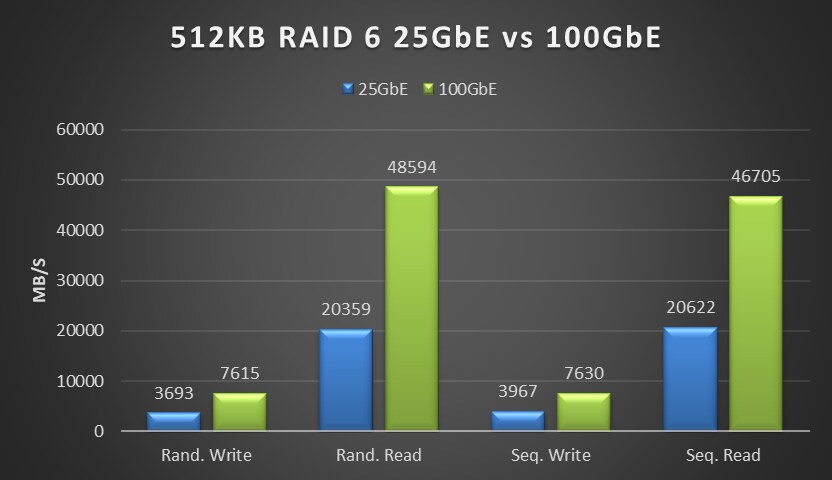
Figure 4. Results from 512 KB throughput testing
This graphic illustrates the results from 512 KB throughput testing

As a storage workload, reads are typically not CPU-bound but limited by the disk they are being read from. Also, when there is a hyperconverged infrastructure, the network those reads must travel over can limit read performance. In both test configurations, each cluster consists of six nodes, with each node running a pair of virtual machines that are generating the workload. As this workload is spread evenly across the cluster, the above throughput data can be divided by six (the number of nodes in the cluster) to obtain the throughput per node. As each node is configured with one active network port for vSAN, changes in cluster performance can be attributed to the hardware. That is the single network port on each node in the cluster in this case.

Sequential reads on the 25 GbE cluster provided 3437 MB/s of throughput per node. This achieved throughput is slightly above the theoretical max throughput of 3200 MB/s that a 25 GbE port can deliver. The higher than max theoretical throughput can be attributed to one-sixth of the reads being served by the local node, while the other five-sixths of the reads traverse the network. For the 100 GbE cluster, the per node sequential reads throughput is 7792 MB/s, or 64 percent of the max theoretical throughput of 12,800 MB/s that a 100 GbE port can deliver.

Testing conclusion

The limit of 25 GbE throughput was reached in the 512 K testing. This result was also visible in the steep upcurve in latency on both the OLTP 32 KB and RDBMS 22 K tests for the 25 GbE results. These tests demonstrate that limiting the VxRail with ESA nodes to 25 GbE leaves untapped storage performance potential. There is a clear advantage in potential storage performance for VxRail with ESA when using 100 GbE networking.

Price-performance analysis

Costs of 100 GbE networking compared to 25 GbE

The testing results shown in previous sections demonstrate that 25 GbE networking bottlenecks the performance of VxRail with vSAN Express Storage Architecture. Using 100 GbE networking within the rack unlocks the full performance potential of ESA.

When new technology is introduced, the initial cost of adoption is high, and this high cost often remains a customer concern long after the early adoption premium has passed. Today, however, there is no significant cost delta between 10 GbE and 25 GbE networking. Environments that do not require the bandwidth of 25 GbE are often built with 25 GbE in favor of 10 GbE. Several aspects drive this strategy, including standardizing a single network infrastructure or positioning for future growth in workload demands.

While there remains a price delta between 25 GbE and 100 GbE networking, it has narrowed significantly and may not have as high a premium as initially expected. When comparing costs, include all necessary components for a full end-to-end view and consider the increased bandwidth available. Less tangible benefits, such as easier cable management and improved cooling due to reduced cable clutter, are harder to quantify. While these benefits are not detailed here, they provide benefit to daily data center operations.

The table below compares the following networking configurations:

  • Dual 25 GbE – the typical rack default in many data centers
  • Dual 100 GbE – the growth engine for future rack deployments
Note: Pricing provided is based on Dell US list pricing at time of initial release. This pricing excludes any applicable taxes, shipping, discounting, or incentives. Switch pricing includes OS10 Enterprise and 3 years ProSupport next business day for hardware. Pricing also varies by region. Contact a Dell Technologies account team for details on the pricing available to you.

Table 3. Networking component pricing
Component Dell PN List price Per port 25 GbE 100 GbE
Broadcom 57414 dual 25 Gb 540-BBUJ $769 $385 $385 -
S5248F-ON 48 port 25 GbE 210-APEX $59,216 $1,234 $1,234 -
25 GbE Passive Copper DAC 470-BBCX $125 $125 $125 -
Broadcom 57508 dual 100 Gb 540-BDEF $2,484 $1,242 - $1,242
S5232F-ON 32 port 100 GbE 210-APHK $62,475 $1,952 - $1,952
100 GbE Passive Copper DAC 470-ABOX $360 $360 $360
Total per port cost - - - $1,743 $3,554

Table 2 shows the costs for delivering the various networking configurations. The 100 GbE solution is slightly more than twice as expensive as the 25 GbE solution; however, the following information details the benefits of this doubling in networking infrastructure investment:

  • OLTP 32 K
    • Peak IOPS increase of 78 percent with a substantial 49 percent drop in latency
    • At 70 percent of maximum, IOPS increased 88 percent with a 20 percent drop in latency
  • RDBMS 22 K
    • Peak IOPS increase of 49 percent with a 20 percent drop in latency
    • At 70 percent of maximum, IOPS increased 60 percent with a 19 percent drop in latency
  • 512 K throughput
    • Provides roughly two times the performance for dedicated workloads of Random Writes, Random Reads, Sequential Writes, and Sequential Reads
      • Random writes: 106.2 percent increase
      • Random reads: 138.6 percent increase
      • Sequential writes: 92.3 percent increase
      • Sequential reads: 126.4 percent increase

Savings potential of 100 GbE compared to 25 GbE

Examining the savings potential further, the 100 GbE networking is roughly two times the per port cost. With 25 GbE almost two times the number of nodes needed to deliver similar performance, and 25 GbE will require two times the number of ports. Regardless of whether you select 25 GbE or 100 GbE, the networking infrastructure costs are on a par with each other.

For storage performance bound environments, almost twice the number of nodes with 25 GbE networking are needed to achieve the same storage performance delivered by 100 GbE nodes when loading the environments at 70 percent.

To put this another way, half the number of 100 GbE nodes are needed to reach the same storage performance of 25 GbE nodes. The resulting savings show that a customer can use roughly half the number of nodes and half the amount of rack space, power, cooling, application licensing, and overall software licensing (such as VMware and VxRail).

The cost of upgrading to 100 GbE networking is less than the price of a single VxRail node. Using 100 GbE networking interface speed for VxRail with vSAN ESA offers significant overall savings for the environment. This speed also allows customers to use the full potential of the storage performance available while simultaneously allowing additional workload consolidation, as well as the savings noted in this section. For more information about VxRail with vSAN ESA node pricing, contact your Dell Technologies account team.

Conclusion

100 GbE networking unlocks

The findings from Dell Technologies are as clear and direct as was set out in this evaluation. The 100 GbE networking solution allows customers to take full advantage of all the performance available through VxRail with vSAN ESA. Investing in 100 GbE is a wise investment for workloads that benefit from high performance and low latency. Additionally, this solution allows customers to take full advantage of the new “Performance without Compromise” features and capabilities that VMware vSAN is building into its offering and that will continue to enhance VxRail with vSAN ESA.