Dell VxRail Tech Book
Executive summary
Overview
Audience
Revisions
We value your feedback
IT’s transformation challenge
Overview
Transforming to the private cloud
Hyperconverged infrastructure: Building block for modern infrastructure
Introduction
Enabling technologies for HCI
Drivers for HCI
Dell VxRail
Overview
Dell Technologies and VMware jointly develop VxRail systems, which are the first fully integrated, preconfigured, and tested HCI systems optimized for VMware vSAN technology for software-defined storage. Managed through the ubiquitous VMware vCenter Server interface, VxRail provides a familiar VMware vSphere experience that enables streamlined deployment and the ability to extend the use of existing IT tools and processes.
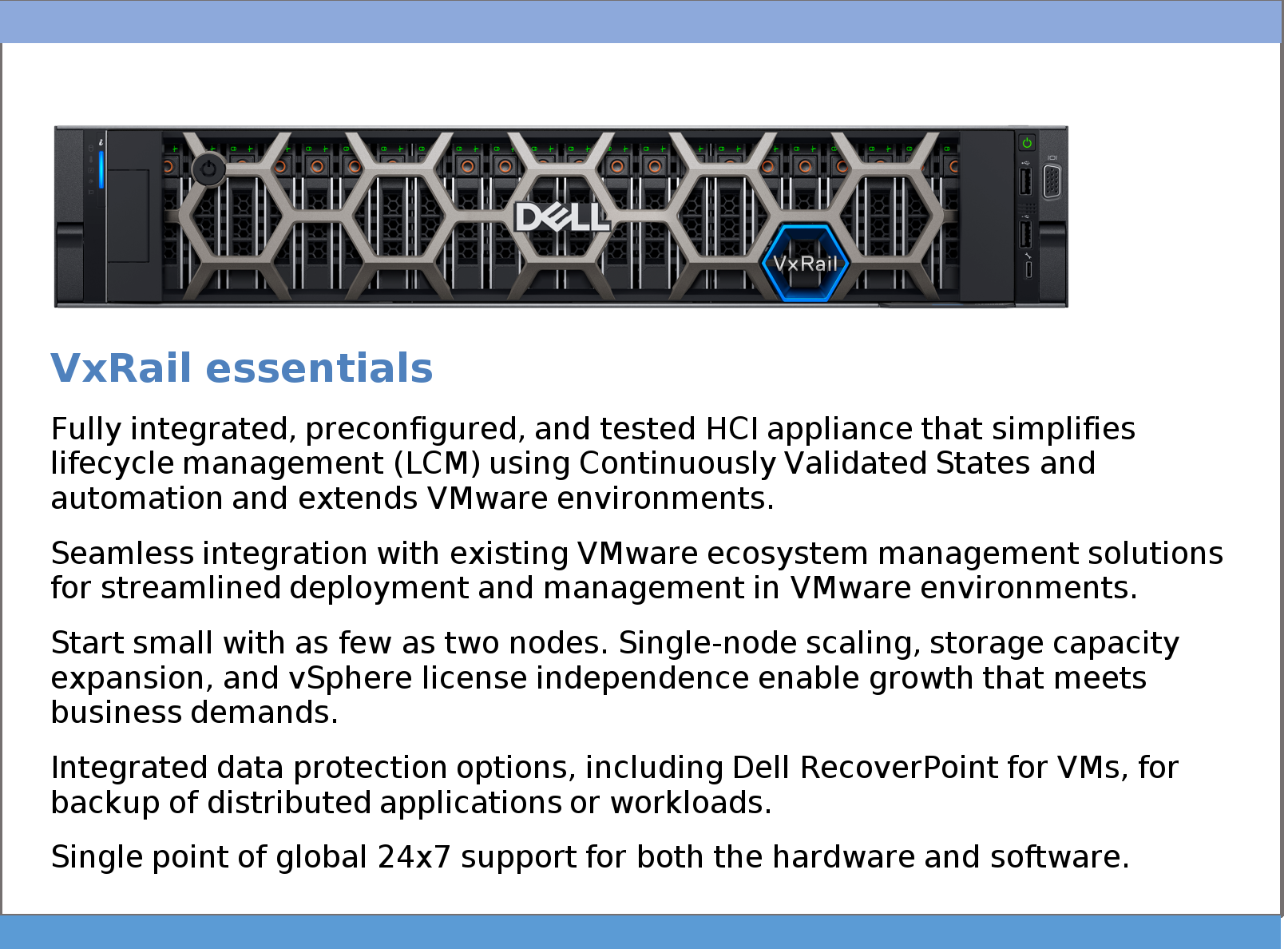
VxRail systems are fully loaded with integrated, mission-critical data services from Dell Technologies and VMware, including snapshots, compression, deduplication, replication, and backup. VxRail delivers resiliency and centralized management functionality, enabling faster, better, and simpler management of consolidated workloads, virtual desktops, business-critical applications, and remote-office infrastructure. As the first HCI system from Dell Technologies and VMware, VxRail delivers a simple and fast way to stand up a fully virtualized VMware environment.
VxRail is the only HCI system that fully integrates AMD and Intel-based Dell PowerEdge servers with VMware vSphere and VMware vSAN. VxRail is jointly engineered with VMware and supported as a single product, delivered by Dell Technologies. VxRail seamlessly integrates with existing (and optional) VMware ecosystem and cloud solutions, including VMware Cloud Foundation and any solution that is a part of the vast and robust vSphere ecosystem.
What is in a VxRail system?
Dell VxRail systems offer a choice of Dell PowerEdge servers, powered by Intel® Scalable or AMD EPYC processors, accelerated by NVIDIA and Intel® data center GPUs, and variable RAM and storage capacity. The VxRail system uses a modular, distributed system architecture that starts with as few as two nodes and scales near linearly up to 64 nodes. Single-node scaling and storage capacity expansion provide a predictable, “pay-as-you-grow” approach for future scale-up and scale-out as business and user requirements evolve.
Additional services that come with VxRail include Dell RecoverPoint for Virtual Machines (RP4VMs) replication and Dell Secure Connect Gateway (SCG).
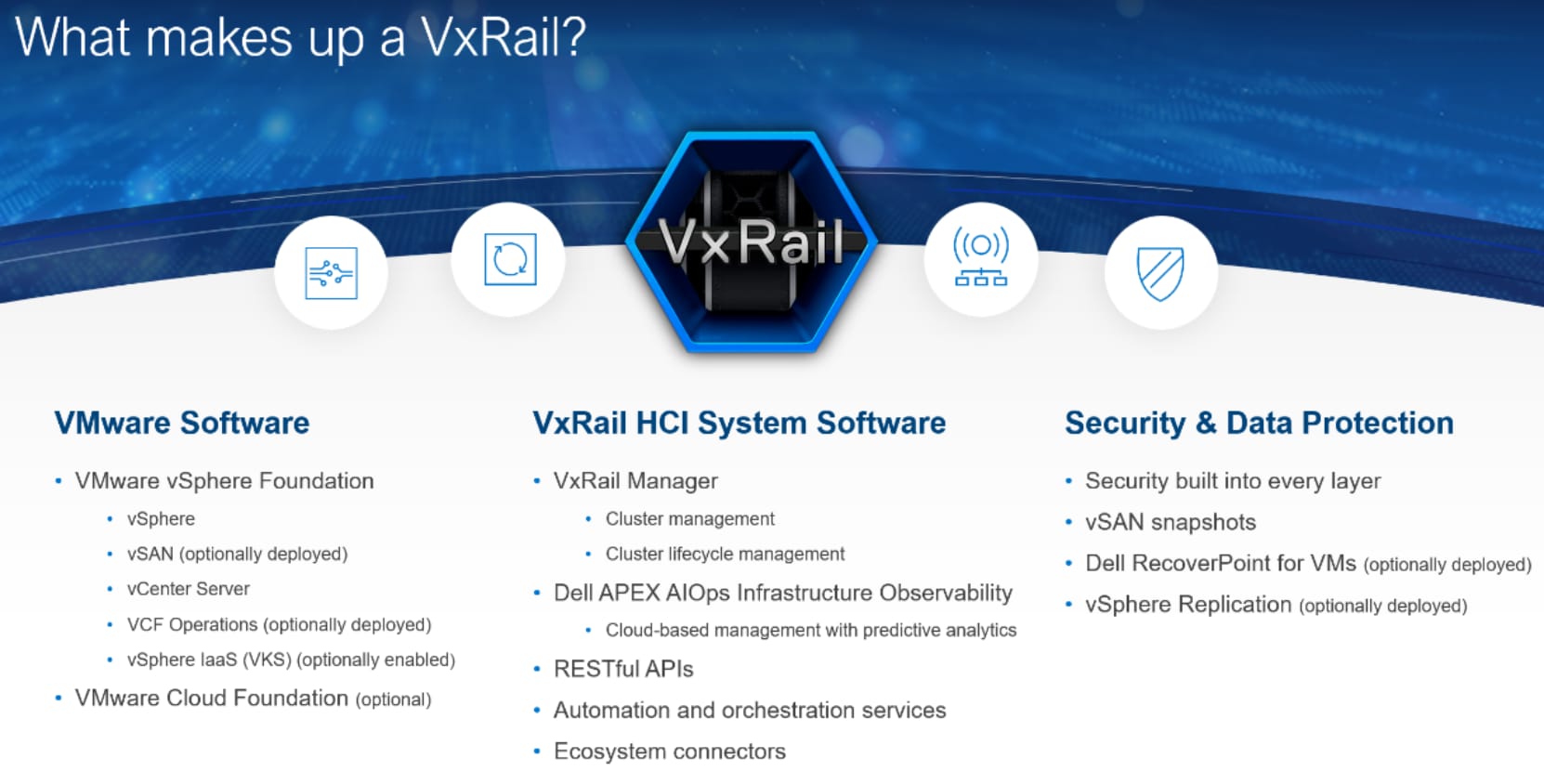
Figure 1. What makes up a VxRail
Benefits of VMware software for HCI
The VxRail software layers use VMware technology for server virtualization and software-defined storage. VxRail nodes are configured as VMware ESXi hosts. Virtual Machines and other services communicate using the vSphere virtual switches for logical networking.
VxRail systems are optimized for VMware vSAN software, which is fully integrated into the kernel of vSphere and provides full-featured and cost-effective software-defined storage. vSAN implements an efficient architecture, built directly into the hypervisor. This architecture distinguishes vSAN from solutions that typically install a virtual storage appliance (VSA) that runs as a guest VM on each host. Embedding vSAN into the ESXi kernel layer has advantages in performance and memory requirements. It has little impact on CPU utilization (less than 10 percent) and self-balances based on workload and resource availability. vSAN presents storage as a familiar datastore construct. It works seamlessly with other vSphere features, such as vSphere vMotion and Storage Policy Based Management, to provide the flexibility to easily configure the appropriate level of service for each VM.
vSphere is a well-established virtualization platform, a familiar usable entity in most data centers. Dell Technologies uses vSphere for ESXi-based virtualization and VM networking in multiple product offerings, which support a common set of VMware and Dell services. This common set of services enables a VxRail implementation to integrate smoothly into VMware centric data centers and to operate in concert with Dell converged, hyperconverged, and traditional storage offerings.
The VxRail advantage
VxRail HCI System Software is the VxRail management software, providing a strategic advantage for VxRail by further reducing operational complexity for IT teams. It is the software running atop the vSphere and vSAN stacks, encapsulating much of the key VxRail differentiation over other vSAN Ready Nodes and other HCI solutions on the market. VxRail HCI System Software provides out-of-the-box automation and orchestration for deployment of day-to-day, system-based operational and serviceability tasks, which reduces the overall IT OpEx required to manage the stack. No build-it-yourself HCI solution provides this level of lifecycle management (LCM), automation, serviceability, and operational simplicity.
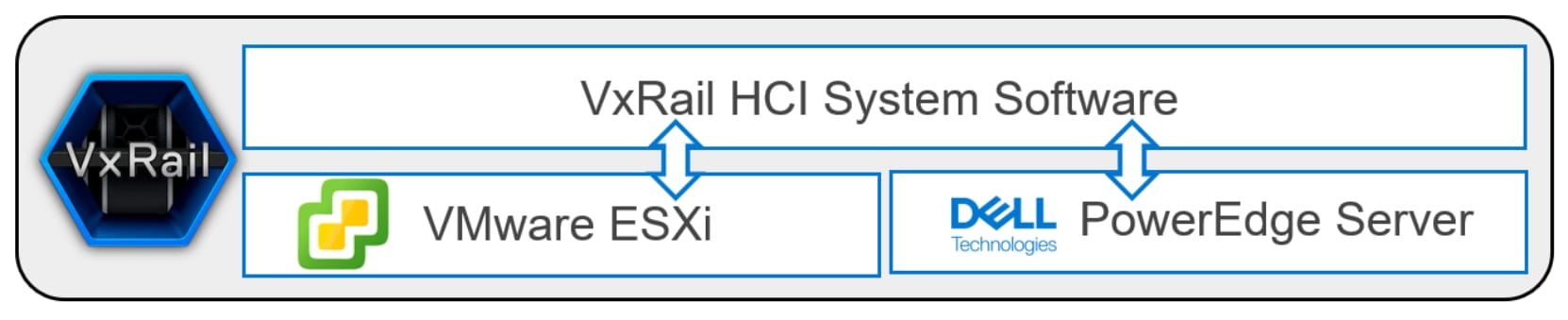
Figure 2. VxRail stack
With VxRail HCI System Software, system updates are simple and automated. Customers can have confidence in knowing that they are going from one known good cluster state to the next (known as VxRail Continuously Validated States), inclusive of all the managed software and hardware component firmware. Customers no longer have to verify hardware compatibility lists, run test and development scenarios, sequence and trial updates, and so on. The heavy lifting of sustaining and coordinating cluster lifecycle management is already done for them. In short, VxRail helps create IT certainty.
VxRail cluster management is integrated into the vCenter Service interface via the VxRail Manager vCenter plug-in. The vCenter plug-in provides a fully integrated experience that is familiar to VMware users. The benefits of cluster management services are extensible. The services use RESTful APIs to position the VxRail system as the platform of choice for software-defined data center (SDDC) and infrastructure as code (IaC) cloud deployments, as well as for customers who prefer to manage clusters at scale through scripts or custom automation solutions.
As part of the capabilities available with VxRail HCI System Software, Dell APEX AIOps Infrastructure Observability delivers SaaS-based VxRail multi-cluster management capabilities. They include global visualization, simplified health monitoring, and multi-cluster management through a cloud-based web portal. These features build upon the LCM services to increase operational efficiency, especially for customers who have a large footprint of VxRail clusters and who have found managing at scale to be challenging.
VxRail security and compliance
Dell VxRail is a resilient, secure, and modern HCI system that directly addresses the challenges of security and compliance in modern-day environments.
The VxRail system is engineered, built, configured, and maintained based on the Dell Secure Development Lifecycle (SDL). The SDL follows a rigorous approach to secure product development, including executive-level risk management before products are shipped to market. vSphere—a significant part of VxRail HCI—has been developed using a similar approach, the VMware Security Development Lifecycle.
All VxRail software components, which are illustrated in Figure 2, have integrated security, with corporate security processes, unique security features, and supply chain control. Customers can be confident that VxRail can fit into their secure IT infrastructure design.
Each VxRail component has integrated security, with corporate security processes, unique security features, and supply chain control, so customers can be confident that VxRail can fit into their secure IT infrastructure design. The hardware consists of Dell PowerEdge servers and Intel® or AMD processors. The virtualization and software layers include vSphere and vSAN, which are integrated into the kernel of vSphere. The integrated software and management included with VxRail consists of VxRail HCI System Software; VMware software and vCenter Server; and Dell Technologies software, including RecoverPoint for VMs and Secure Connect Gateway that are optionally available for IT teams to deploy. Dell Technologies and VMware jointly engineer the components, which are delivered by and supported exclusively by Dell Technologies as a single product—VxRail.
VxRail is designed to meet several standards including Common Criteria EAL2+ certification and USGv6 certification, making it IPv6 Ready. The VxRail Product Security Configuration Guide provides guidance to further harden VxRail deployments. Customers can also use the VxRail STIG Compliance Guide and automated scripts to further harden their environments.
To learn more about the VxRail Comprehensive Security by Design, see the Dell VxRail: Comprehensive Security by Design Whitepaper.
Where does VxRail fit in your environment?
VxRail HCI System Software
Overview
VxRail HCI System Software consists of multiple integrated software elements. They extend VMware native capabilities to deliver a seamless and automated operational experience, keeping the infrastructure in a pre-validated configuration to ensure that workloads are consistently up and running. VxRail HCI System Software is preinstalled on the VxRail system as a single virtual machine, the VxRail Manager VM.
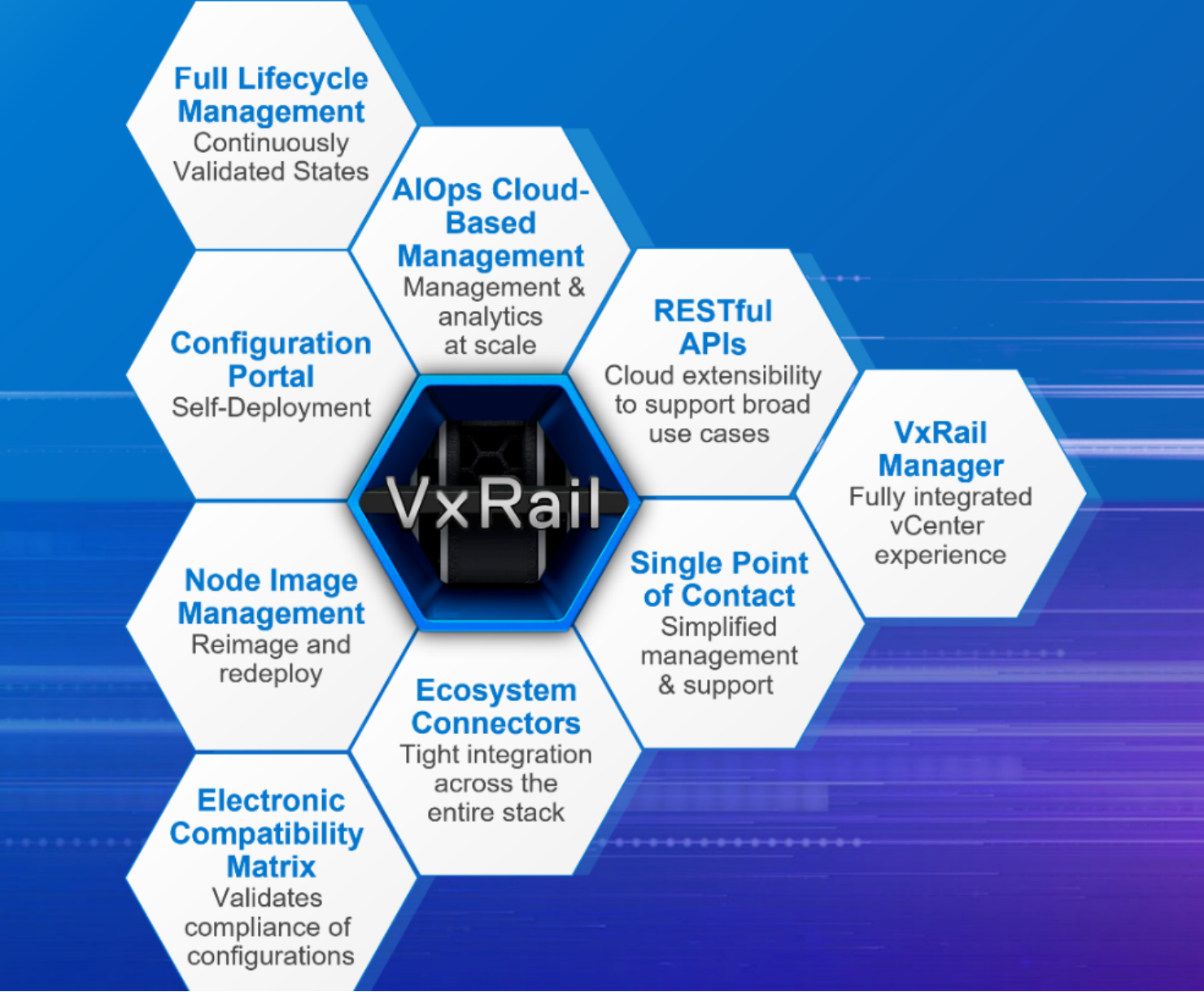
Figure 3. Core components of VxRail HCI System Software
The software services in VxRail HCI System Software can be grouped into three main areas: lifecycle management (LCM) for predictable outcomes, management flexibility and extensibility, and simplified services and support experience.
Lifecycle management for predictable outcomes
- Intelligent LCM functionality orchestrates automated cluster updates with pre-validated and pretested software and firmware components, ensuring that the HCI stack is in a Continuously Validated State.
- The electronic compatibility matrix serves as a compliance asset, providing validation that all possible configuration and update path permutations are sound. Customers can choose the VxRail Continuously Validated State of their choice to optimize each cluster for its respective workloads.
- Ecosystem connectors tightly integrate with infrastructure components including vSAN, PowerEdge server components, and Dell external storage. This integration enables automation and orchestration services across these stacks for simple cluster software and firmware updates.
For more information about VxRail LCM, see the Lifecycle management section.
Management flexibility and extensibility
- VxRail Manager, which is natively integrated with and accessed through vCenter, is the overall management engine for all VxRail operations. VxRail Manager is used to deploy, manage, update, patch, and add/remove nodes to and from a cluster.
- Dell APEX AIOps Infrastructure Observability’s SaaS-based multi-cluster management features are designed to provide centralized VxRail multi-cluster management powered by AI-driven operations insights through a software-as-a-service delivery model. The continuous innovation and continuous delivery approach allows for frequent, incremental updates to introduce new capabilities quickly. APEX AIOps Infrastructure Observability’s SaaS multi-cluster management for VxRail provides detailed health checks and predictive analytics. It further simplifies the VxRail cluster update process with on-demand pre-update health checks, update bundle download and staging, and cluster updates at scale.
- A broad set of publicly available RESTful APIs are provided to customers to deliver greater cloud and IT automation extensibility.
For more information about these features, see the Management flexibility and extensibility section.
Simplified services and support experience
Customers always have access to Dell Secure Connect Gateway (SCG) throughout the entire lifecycle of the VxRail infrastructure, providing proactive phone home support of any hardware and software system events and alerts.
VxRail Manager also provides built-in automation capabilities to simplify and streamline common cluster hardware serviceability tasks such as failed disk drive replacements. Orchestrating and coordinating the required steps to perform such a task with VMware software helps maintain workload availability during these types of serviceability operations and minimizes the risk of unplanned outages.
For more information about VxRail services and support, see the Simplified services and support experience section.
Lifecycle management
In today’s fast-paced digital world, organizations that want to stay competitive require ongoing infrastructure updates and patches to ensure they get the most from their technology investments. Staying current with the latest software updates and patches ensures that infrastructure is secure and optimized for performance while providing users with the latest features and functionality to better serve business needs.
VxRail LCM is built on ecosystem connectors to integrate vSAN cluster software and PowerEdge server hardware so that the ESXi host can be managed as a single system. This system integration enables the automation and orchestration necessary to deliver nondisruptive, streamlined HCI stack updates. VxRail LCM capabilities provide differentiated value through the ability to deliver pre-validated sets of software and firmware. Pre-validation ensures compatibility and compliance of the HCI stack configuration while maintaining the performance and availability required of the virtualized workloads running on the clusters.
Tested and validated VxRail software bundles that support every vSphere release, any-to-any version update paths, and the millions of VxRail configurations are “Continuously Validated States.” These Continuously Validated States are recorded in the Electronic Compatibility Matrix. The VxRail team’s investment in equipment and staff members dedicated to testing and quality make this possible.
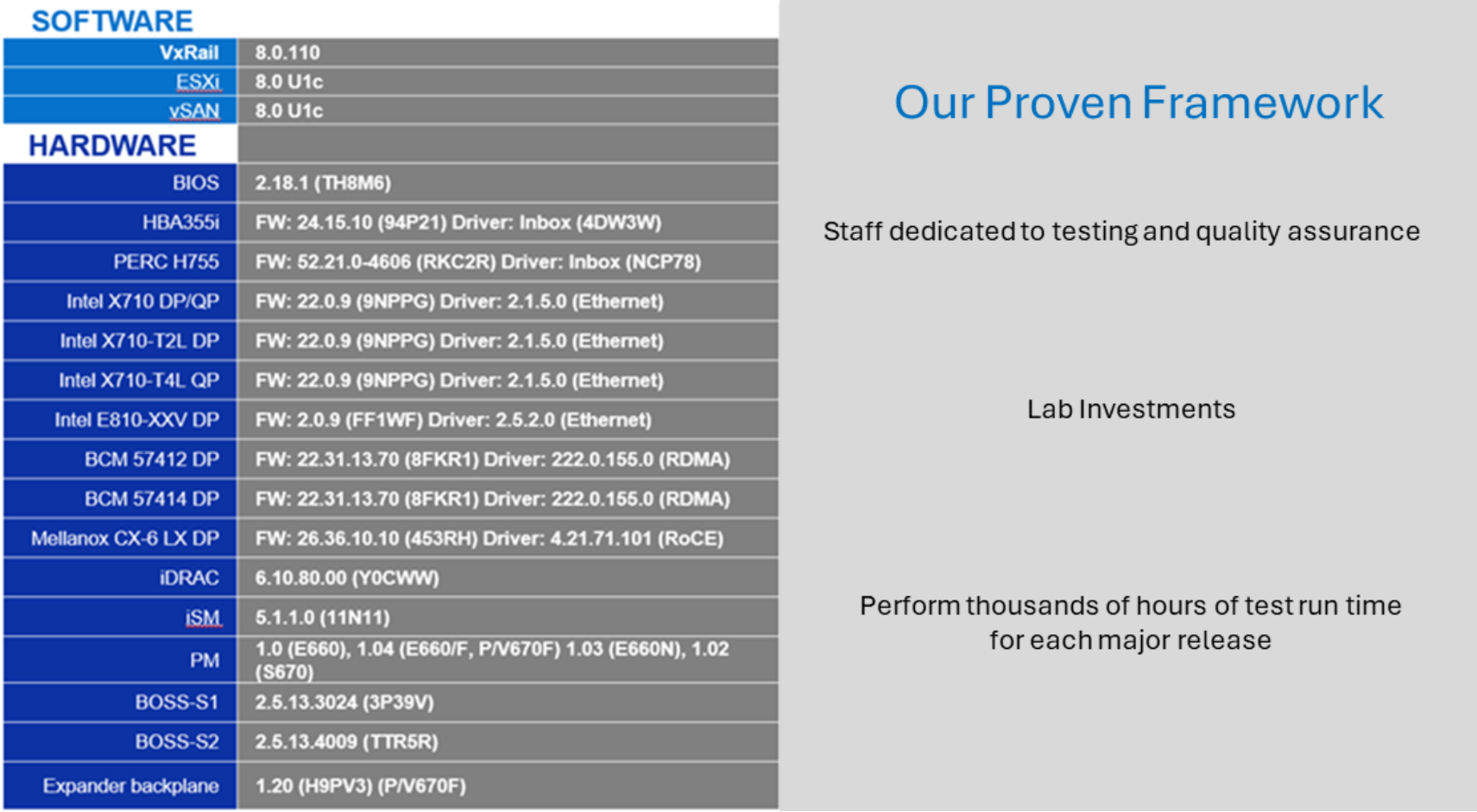
Figure 4. Snapshot of VxRail release support matrix and resource investments
Customer updateable software
The VxRail software bundle is customer updateable through a fully orchestrated, automated, and validated process. The automated software update is initiated from the VxRail Manager plug-in. VxRail Manager automatically downloads all software that is ready to be updated including VxRail HCI System Software, VxRail-managed vCenter Server, ESXi, and physical server component firmware and drivers.
Note: Customer-managed vCenter Server, Secure Connect Gateway, and RecoverPoint for VMs components are not part of VxRail Continuously Validated State update bundles and must be updated separately.
In following typical best practices, before a cluster update is initiated, there are essential steps which are performed that can be time-consuming and error-prone for administrators. As a result, this can affect the update success rate. As part of the VxRail LCM experience, VxRail simplifies the cluster update planning process with automation, presenting essential details to administrators so they can quickly make informed decisions.
When VxRail Manager is connected to the Dell cloud, it can automatically scan for new VxRail software versions for its cluster. From the VxRail Manager UI, users can view the available update paths for the cluster. Each update path provides information about the target VxRail software version, release notes, and estimated cluster update time. An update advisor report is automatically generated for an update path so that users can easily make an informed decision about whether to schedule an update for their cluster. The update advisor report is a single exportable report that consolidates the output of:
- A change analysis that details which components must be updated for the target VxRail software version
- Results from a cluster pre-update health check for use in determining whether the cluster is ready for an update or has issues that must be resolved first
- List of user-managed components such as a Fibre Channel HBA card or GPU card that users might need to update
Unconnected VxRail clusters can also benefit from the update advisor report. Instead of VxRail Manager accessing the Dell cloud, users would acquire the manifest information of the VxRail software version from the Dell Support website and upload it to their VxRail systems. The update advisor report is automatically generated every 24 hours so that users can review the latest information about their cluster from a single report. Once a user decides to proceed with a cluster update, the user can schedule the maintenance window.
At the scheduled time, users perform the following cluster update processes:
- Acquire VxRail software bundle: Once a decision has been made on the target version, users can initiate an Internet download from the Internet Updates tab. A change analysis is performed to determine which installation files are necessary for the cluster update to optimize the size of the bundle transfer, which can be particularly beneficial for bandwidth-constrained environments. For sites lacking Internet connectivity, update bundles can also be locally uploaded to the cluster. In this scenario, users must separately acquire the full software bundle from the Dell Support website and upload it from a machine in the same local network as the VxRail cluster.
- Check cluster readiness and run the LCM change report: Once the bundle is staged on the VxRail Manager VM, the cluster update process automatically runs a component change analysis.
Optionally, users can customize the cluster update with additional firmware and drivers for components that are not part of the VxRail Continuously Validated State, such as Fibre Channel HBAs and GPUs. By consolidating a cluster update with updates to components not managed by VxRail into a single boot cycle, the maintenance window can be further optimized to avoid multiple host reboots.
- Initiate the cluster update operation, or schedule the update, from the VxRail Manager UI: To start a cluster update, provide proper credentials for vCenter, the ESXi host, and VxRail Manager.
Note: Alternatively, customers can make a REST API call to update the software that has been downloaded onto VxRail Manager.
- Monitor the progress of the update operation from the VxRail Manager UI: When the cluster update is completed, the final validation step ensures that the update was successful, and the VxRail cluster is fully functional with the updated software. A copy of the updated bundle is also stored as a recovery bundle in the VxRail Manager VM.
The following figure shows the automated steps of a customer-run VxRail software bundle update.
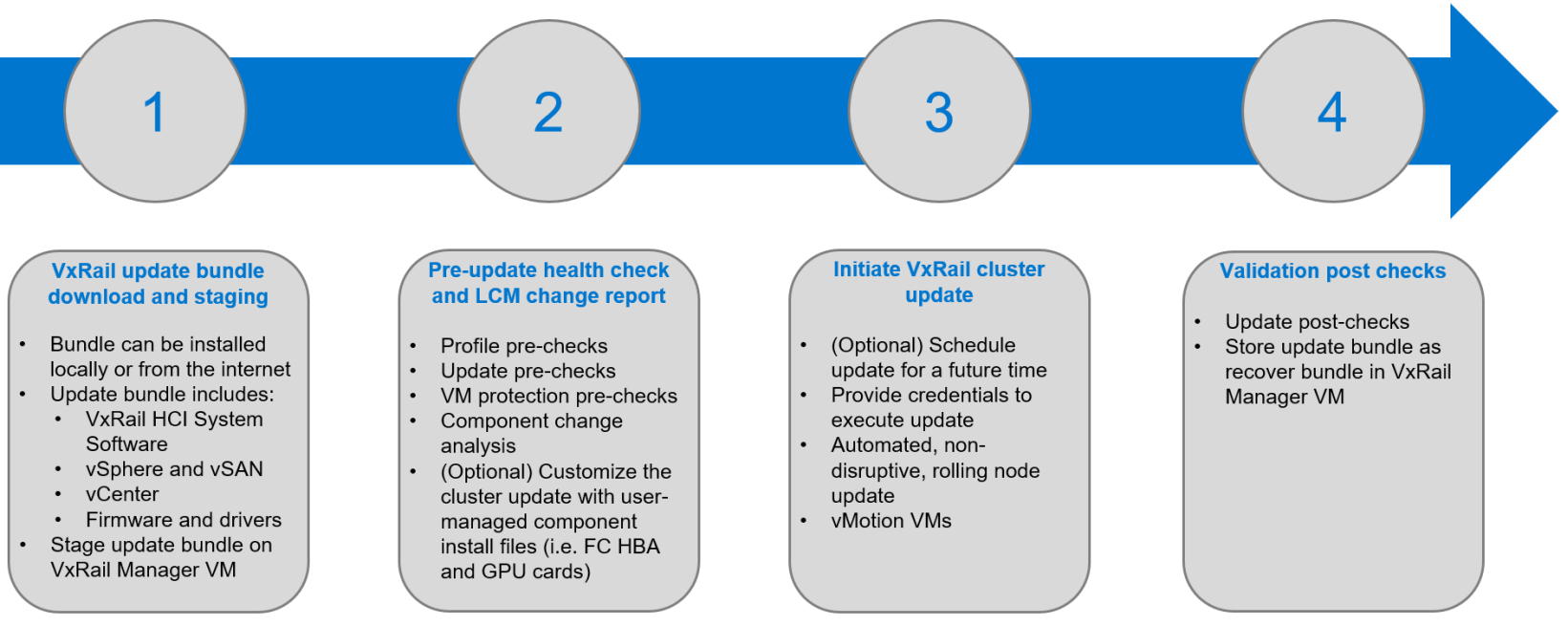
Figure 5. VxRail update workflow
Step 3 is performed one node at a time, where the ESXi host is placed in maintenance mode, and—using vMotion—the VMs are moved to other nodes, making the update process nondisruptive. During a cluster update, vSphere Distributed Resource Scheduler (DRS) is used to move VMs from the ESXi host that is being updated, providing for nondisruptive updates.
Serviceability
VxRail has its own monitoring and event alerting system that captures VxRail management issues and hardware-related issues on the PowerEdge server (through integration with iDRAC). VxRail also integrates with vCenter Server so that the events generate alarms that can be seen on the vCenter Server UI. This integration along with existing health monitoring of vSphere and vSAN on vCenter provides end-to-end visibility of the full VxRail stack.
For select events, VxRail can self-determine whether it requires the attention of the Dell technical support team to resolve. In these scenarios, VxRail automatically generates an alarm on vCenter Server. It collects relevant logs necessary to troubleshoot the issue and initiates a remote service call through the Dell Secure Connect Gateway with Dell technical support to facilitate a case creation with the supporting log materials. This self-driving feature offloads decision-making of the IT administrator and speeds problem resolution. For other scenarios, VxRail users can create service request tickets from the VxRail Manager UI.
VxRail users can also deploy VCF Operations to further monitor system events and provide ongoing holistic notifications about the state of the virtual environment and system hardware. When deployed, VCF Operations delivers real-time automated log management for the VxRail systems, with log monitoring, intelligent grouping, and analytics to provide better troubleshooting at scale across VxRail physical, virtual, and cloud environments.
Dell Secure Connect Gateway is also accessible from within the VxRail Manager plug-in or REST API to provide enterprise-class support and services. Secure Connect Gateway includes online chat support and Dell field service assistance.
Lifecycle management value tiers
VxRail provides innovations in various aspects of lifecycle management. The following figure shows where the benefits fit with respect to the customer value chain.
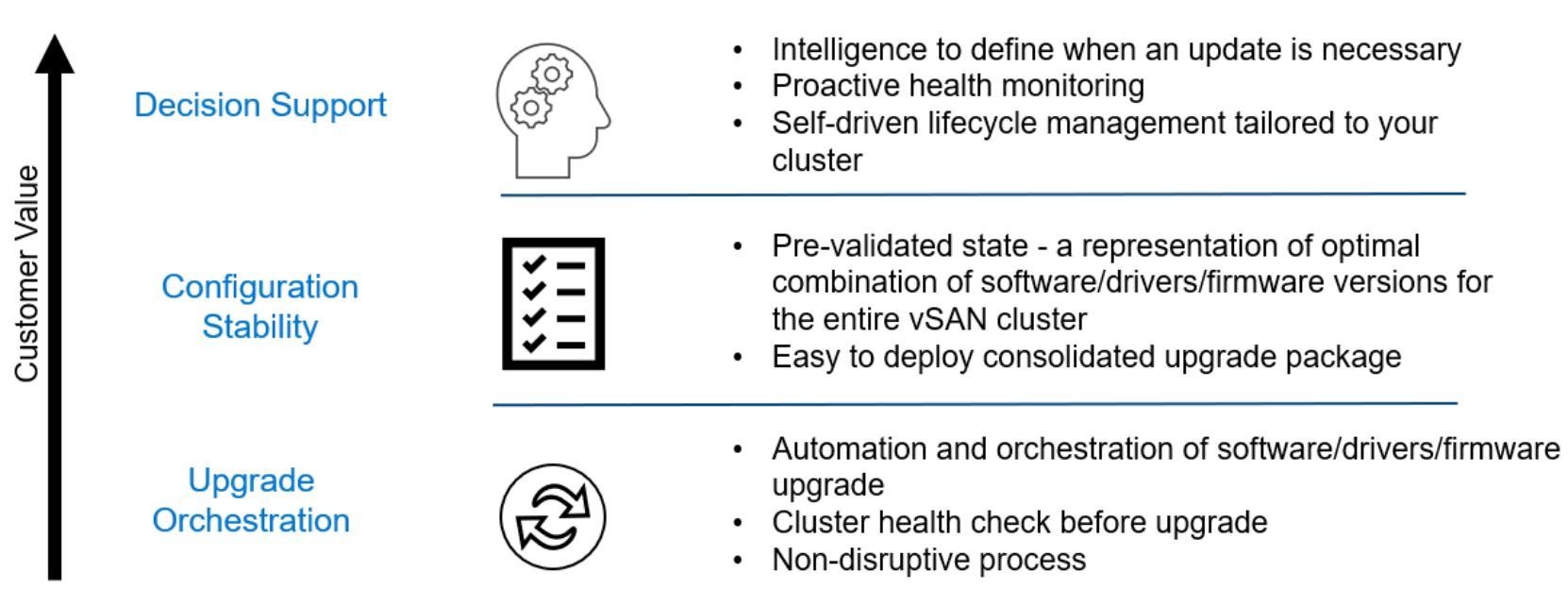
Figure 6. Lifecycle management value tiers
Update orchestration is the foundation, or the mechanics, for VxRail lifecycle management delivery. Regarding lifecycle management of an HCI solution, customers benefit from having an automated and orchestrated workflow to update both hardware and software together. This automated and orchestrated workflow reduces the time needed to update individual components separately. Having pre-update comprehensive health checks reduces the risk of update failure that ultimately impacts application uptime. An end-to-end update should be nondisruptive to improve uptime. VxRail delivers this value with its tight integration of VMware software and Dell PowerEdge server hardware.
VxRail delivers configuration stability with Continuously Validated States. Customers get a pre-validated configuration that enables them to take advantage of the latest features and updates rather than taking on the work and risk of defining compatible stacks of hardware and software components themselves. Business operations are not affected. Customers get the latest capabilities while the platform continues to meet security standards and compliance.
At the top of the customer value chain for lifecycle management is decision support. Armed with insightful information, administrators can quickly make better-informed decisions as they wade through a constantly changing environment that impacts the stability and security of their infrastructure. The list of pre-checks in the cluster pre-update health check are frequently updated to ingest new learnings. The update advisor report simplifies the presentation of the information. Automatically generating the report every day ensures that the most up-to-date information is readily available. VxRail Manager also generates a compliance drift report daily against the installed Continuously Validated State to confirm the cluster’s integrity. This all leads to providing organizations a trusted infrastructure that helps reduce risk.
Management flexibility and extensibility
VxRail Manager is a plug-in for vCenter that provides a fully integrated experience to manage VxRail clusters with a familiar interface. However, VxRail management expands beyond the VxRail Manager plug-in for vCenter to support different use cases. REST APIs extend the VxRail LCM capabilities for Infrastructure as Code (IaC) use cases to those such as organizations that want to deploy and manage VxRail clusters at scale, running batch scripts, configuration management tools (such as Ansible, Puppet, and so on), or custom automation for cluster operations.
APEX AIOps Infrastructure Observability’s SaaS multi-cluster management is a cloud-based management option for global orchestration of all the customer’s VxRail clusters from a single web portal interface. While VxRail Manager provides the complete management capability set for VxRail clusters, using REST APIs and SaaS multi-cluster management provides customers more options that can best align to their desired outcomes.
VxRail Manager
VxRail Manager features user-friendly orchestrated workflows for automating VxRail deployment and configuration and for monitoring the health of individual systems in the entire cluster. VxRail Manager also incorporates functionality for orchestrating hardware serviceability and system platform lifecycle management.
For instance, VxRail Manager guides system administrators through the process of adding new nodes to an existing cluster, and it automatically detects new nodes when they come online. VxRail Manager is also used to replace failed disk drives without disrupting availability, generate and download diagnostic log bundles, and orchestrate the application of VMware updates or software patches non-disruptively across VxRail nodes.
With the VxRail Manager plug-in for vCenter Server, all VxRail Manager features are integrated with and accessible from the vCenter Server so that users can benefit from them on a familiar management interface. With the VxRail Manager plug-in, the vCenter Server can manage physical hardware of the VxRail cluster.
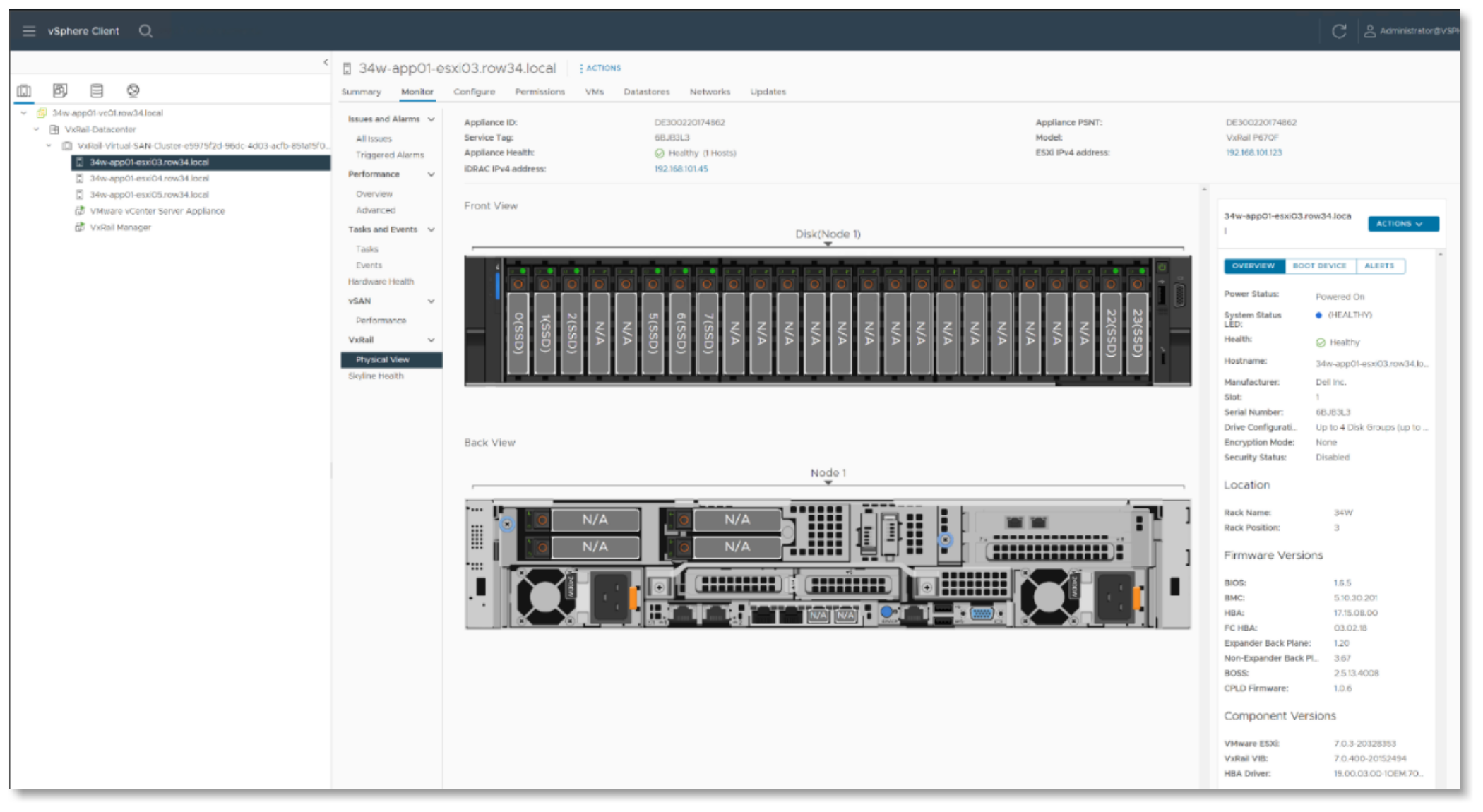
Figure 7. VxRail Manager plug-in for vCenter Server
In addition to obtaining support through the Dell Secure Connect Gateway, customers can get information and help from the VxRail Support page on vCenter Server. The Support page links to VxRail Community pages for Dell Knowledge Base articles, user forums for FAQ information, and VxRail best practices. The following figure is an example of the support view:
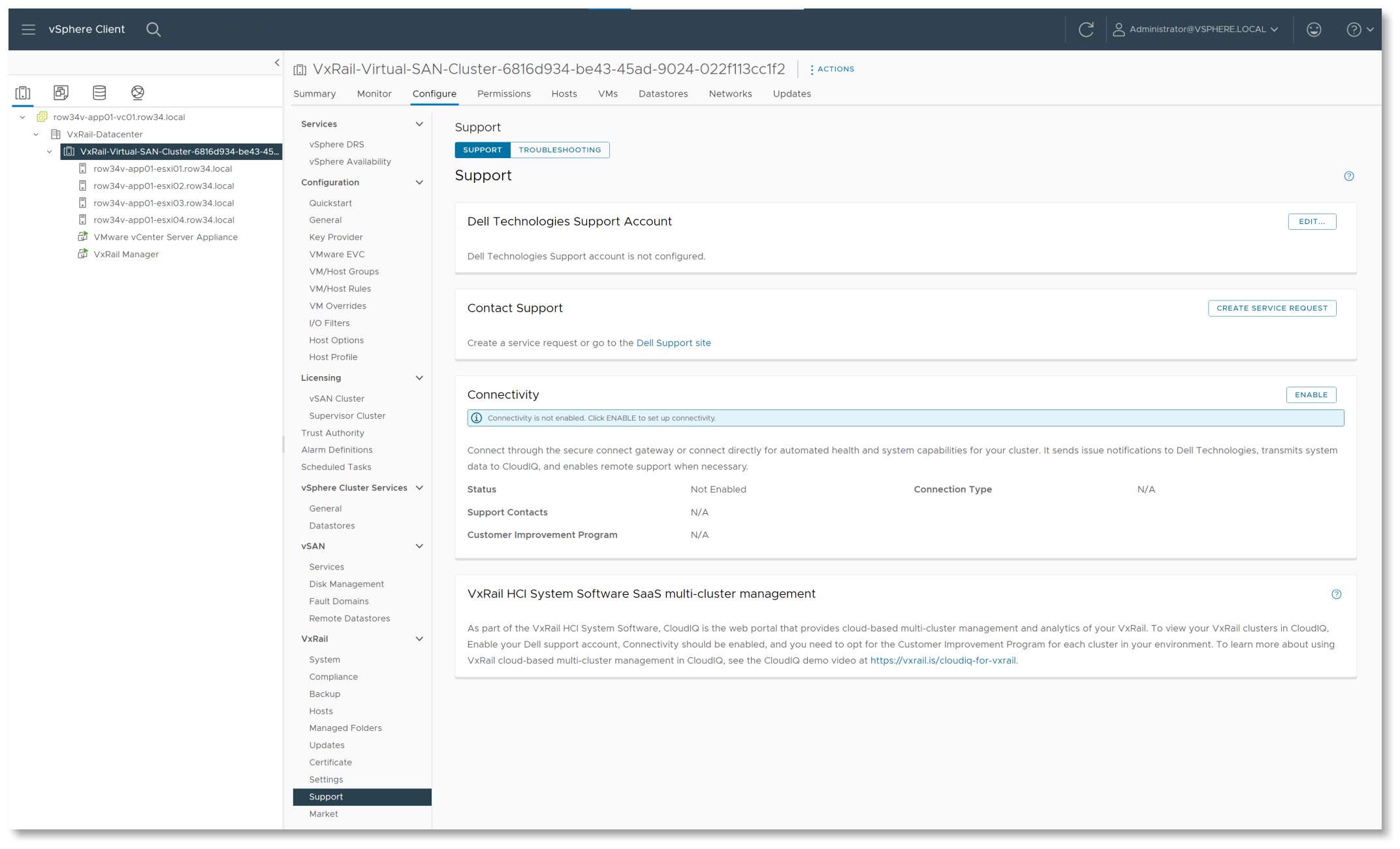
Figure 8. VxRail Manager Support tab
The VxRail Manager plug-in provides access to a digital marketplace for finding and downloading qualified software packages. Packages include Dell Virtual Storage Integrator Plugin (VSI), Dell RecoverPoint for Virtual Machines, and other software options that can be used with VxRail systems.
RESTful API
VxRail Manager drastically simplifies operations of the virtualized IT environment. The VxRail API takes this step further. It exposes VxRail Manager functionality through standard, easy-to-consume public APIs, which can be integrated into a broad spectrum of existing automation solutions. This benefit applies not only to large enterprises using scripts for automating IT processes and tasks but also to midsize enterprises that have limited IT staff.
The VxRail API can be used for the following use cases:
- Infrastructure as Code (IaC) environments can run typical administrative tasks such as monitoring, querying, reboot/shutdown, and lifecycle management updates from configuration management tools such as Puppet, Ansible, and Chef.
- VMware administrators can use PowerCLI with a VxRail API Windows PowerShell module, simplifying the learning curve.
- Administrators can use batch scripts or custom automation to manage clusters at scale.
- IT organizations can use VxRail as an essential building block for a fully automated VMware SDDC or private cloud stack through integration with VMware Cloud Foundation.
The VxRail API is easy to explore and consume by accessing the latest API documentation through the web browser using the Swagger integration.
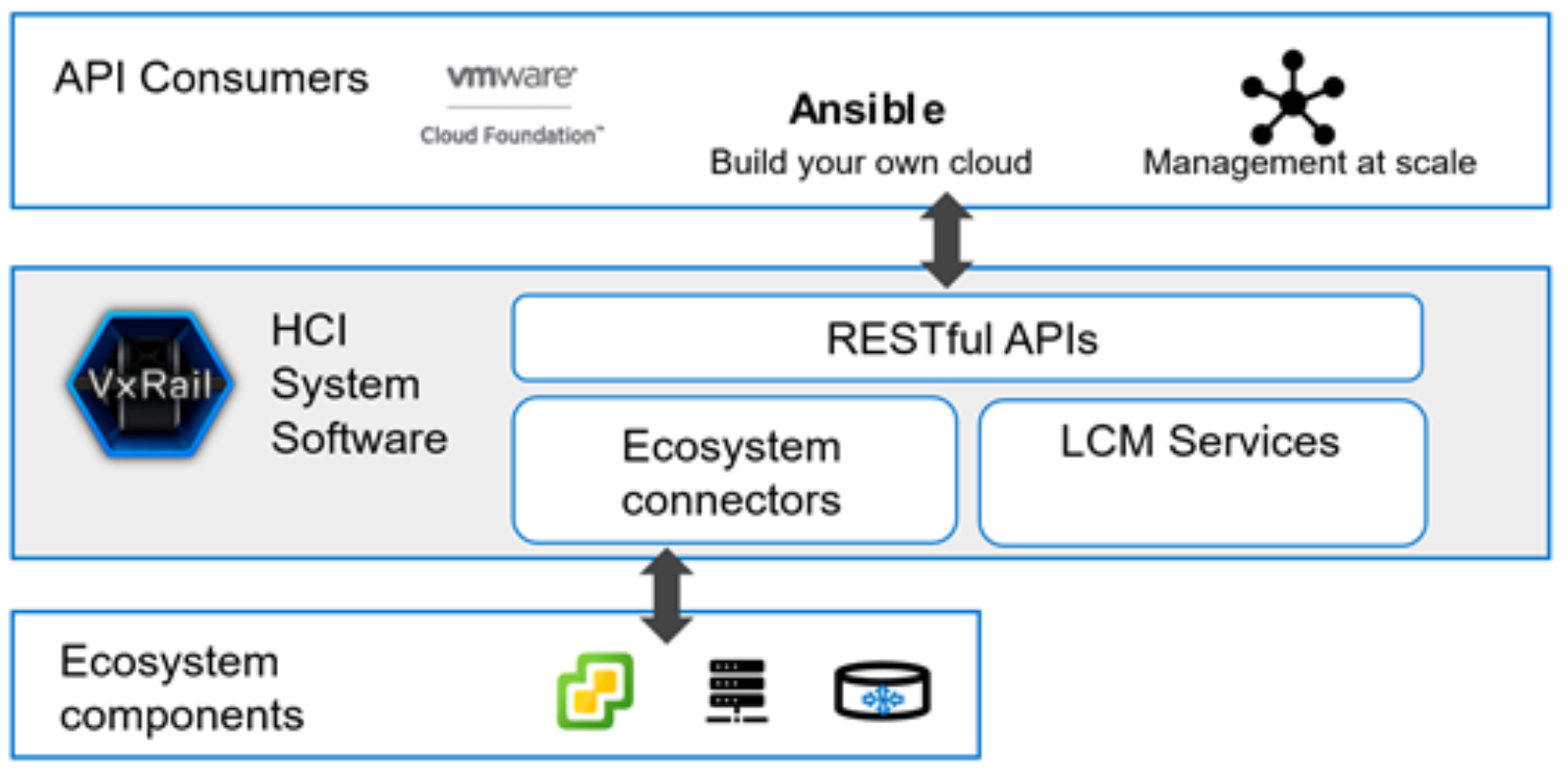
Figure 9. Connectivity of VxRail REST APIs
SaaS multi-cluster management with APEX AIOps Infrastructure Observability
VxRail LCM is an example of VxRail technology that can reduce time spent managing infrastructure. To further enhance operational efficiency, AI-driven operations and multi-cluster management are areas where VxRail can introduce these benefits:
- More operational simplicity to cut down time needed to manage clusters at scale
- Operational intelligence to offload some of the decision-making burden of IT personnel for LCM and maintaining cluster health
VxRail HCI System Software works with APEX AIOps Infrastructure Observability, which is a centralized data collection and analytics platform. APEX AIOps Infrastructure Observability’s SaaS-based VxRail multi-cluster management streamlines the monitoring and management of a customer’s multiple VxRail clusters, improves serviceability, and helps the customer make better decisions to manage their HCI performance and capacity. It is a cloud-based analytics platform that uses advanced telemetry collected from the VxRail clusters for its infrastructure machine learning to provide reporting and actionable insight. Its infrastructure machine learning uses onboard knowledge of Dell Technologies best practices and more than 700 common issues. It provides aggregate health scores for the entire HCI stack to enable customers to quickly identify areas to troubleshoot and to address areas to efficiently scale based on the projected growth of IT resources.
How does APEX AIOps Infrastructure Observability SaaS multi-cluster management work?
APEX AIOps Infrastructure Observability SaaS-based VxRail multi-cluster management is available with no additional hardware or software required for the VxRail cluster. It relies on a data collector service in the VxRail HCI System Software to aggregate performance metrics, state, and inventory information about the VxRail cluster. The data collector service aggregates the data and frequently transfers it to Dell Technologies Cloud by using the same connectivity agent as is used for dial-home services.
To send the data, the VxRail cluster needs to be Internet-connected, and the connectivity agent needs to be configured and enabled. The data repository is housed at Dell Technologies. APEX AIOps for Infrastructure Observability then incorporates its infrastructure machine learning to produce reporting and insight to enable customers to improve serviceability and operational efficiencies. This information is consumed through its Dell-hosted web portal which provides a single global view of a customer’s VxRail environment.
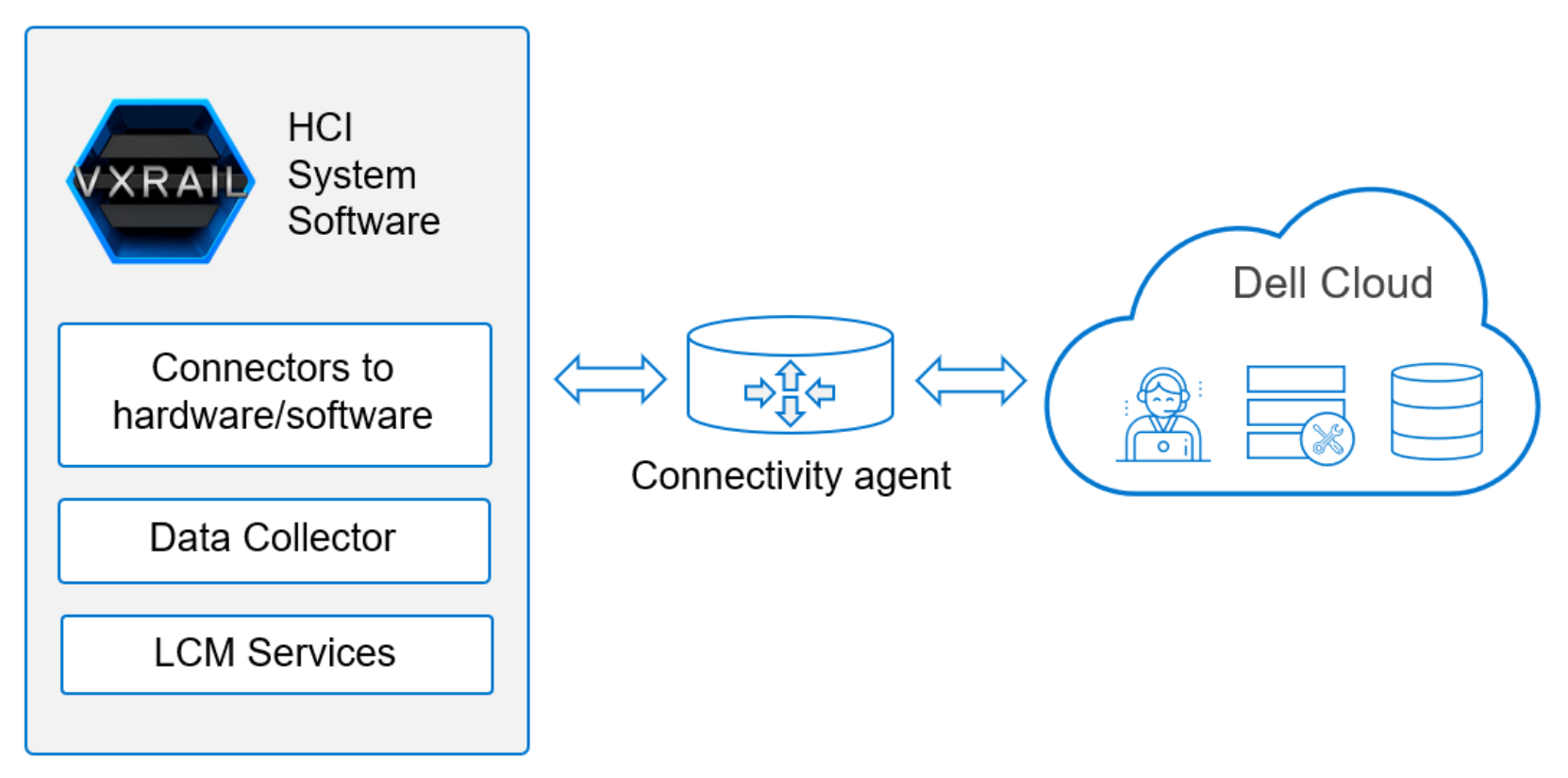
Figure 10. SaaS multi-cluster management connectivity
Data collection frequency setting options are:
- Do not collect (NONE)
- Once every 300 minutes (BASIC)
- Once every 30 minutes (MEDIUM)
- Once every 3 minutes (ADVANCED, which is the default setting)
Data collection frequency is configured in the telemetry settings either using REST API commands or the VxRail Manager plug-in. The timeliness of the content shown in APEX AIOps Infrastructure Observability depends on the frequency of the data collection that is configured for the clusters. SaaS multi-cluster management uses infrastructure machine learning to model and train data to create accurate predictions. The more data it can analyze, the better the models are.
APEX AIOps Infrastructure Observability SaaS multi-cluster management features
APEX AIOps Infrastructure Observability’s SaaS-based Vxrail multi-cluster management feature is designed for continuous innovation and continuous delivery so that frequent, incremental updates can be made to introduce new capabilities. It provides the following capability sets:
- Cloud-based management portal—SaaS multi-cluster management is accessed from the APEX AIOps Infrastructure Observability cloud-based web portal. It provides customers with a central management point for all their VxRail clusters. All features of SaaS multi-cluster management are made available through APEX AIOps Infrastructure Observability.
- Global visualization—Users have a centralized topology of all their VxRail clusters in one global virtualization view. Cluster resource utilization (CPU, memory, capacity, network), health scores, and alerts are available in a virtualization context. VxRail clusters are organized under Datacenter and vCenter Servers as found on the vCenter Server UI. The virtualization view, under the Monitor section in APEX AIOps Infrastructure Observability, provides a Summary tab for cluster information, Alert tab for reported health alerts, and VMs tab for an inventory of VMs running on the VxRail clusters.
- Simplified health scores—The health of cluster components is aggregated, creating a health score for the cluster. Users can quickly assess the state of their clusters and quickly identify clusters that require troubleshooting. Users can examine problem clusters to pinpoint the primary issue and view an accompanying Knowledge Base article to remediate the issue.
- Advanced metrics reporting— APEX AIOps Infrastructure Observability users can monitor CPU, memory, disk, and network performance and utilization metrics at a cluster level. Further examination of individual nodes is available with the Report Browser feature that allows for custom line-chart reports that are available for export.
- Lifecycle management—LCM planning and implementation capabilities can be conducted across multiple clusters with a single orchestrated workflow. On-demand pre-update cluster health checks (LCM pre-checks) can determine whether the cluster is ready for an update. The LCM pre-check can then orchestrate downloading the update bundle onto the VxRail clusters. Once the download is staged on the VxRail Manager VM on the cluster, a user can initiate the cluster update.
- Role-based access control—Integration of SaaS multi-cluster management with vCenter Server role-based access control allows users to regulate access and privilege to perform LCM operations. APEX AIOps Infrastructure Observability can register with the vCenter Servers so that privileges such as LCM pre-checks, update bundle download and staging, and cluster updates can be managed using vCenter role-based access control and enforced by APEX AIOps Infrastructure Observability.
Use cases
The features in APEX AIOps Infrastructure Observability for VxRail address multiple areas of system management. These features include:
- Global health monitoring—The combination of global visualization and simplified health scores provides a convenient and streamlined way to assess the health of the entire VxRail footprint and identify clusters needing attention. A user can see all their clusters in a single view, quickly spot poorly behaving sections of the topology, and then narrow their focus for troubleshooting. A separate “Virtualization” view organizes the VxRail clusters according to their associated vCenter Server, providing a more familiar experience for VMware administrators to monitor the clusters.
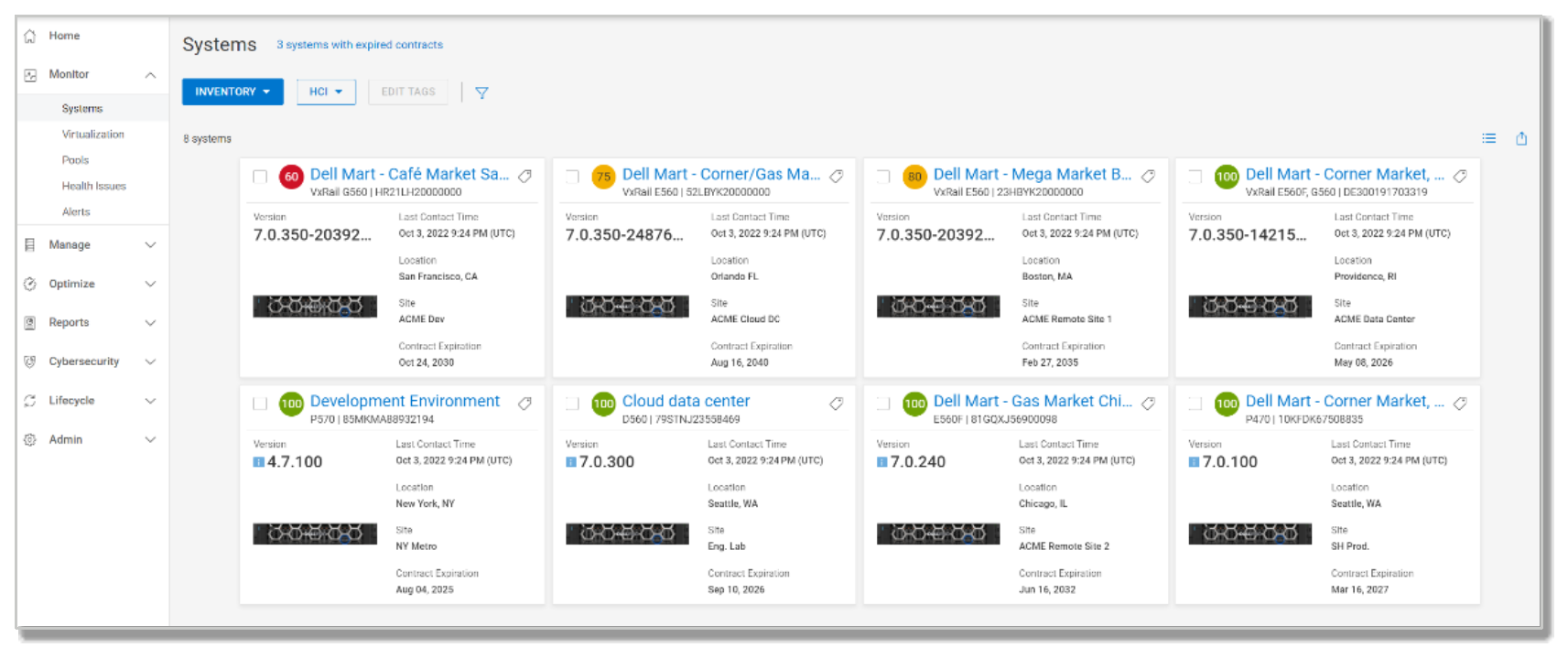
Figure 11. APEX AIOps Infrastructure Observability Systems tab
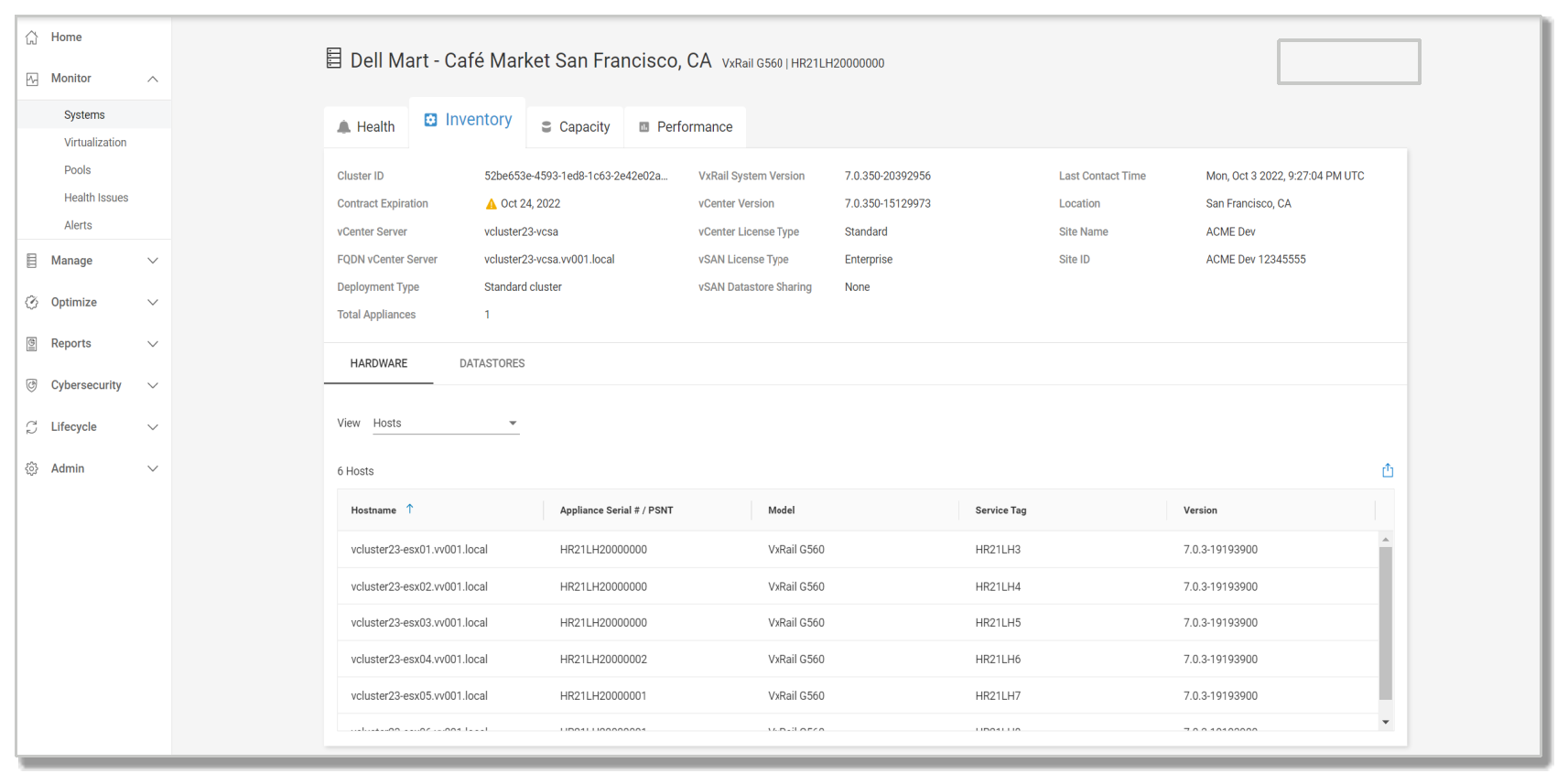
Figure 12. APEX AIOps Infrastructure Observability Inventory tab
- Cluster inventory—APEX AIOps for Infrastructure Observability features for VxRail can speed up daily inquiries that users might have. It provides a central platform for users to look for detailed information about the hardware and software versions and configurations on all their VxRail clusters.
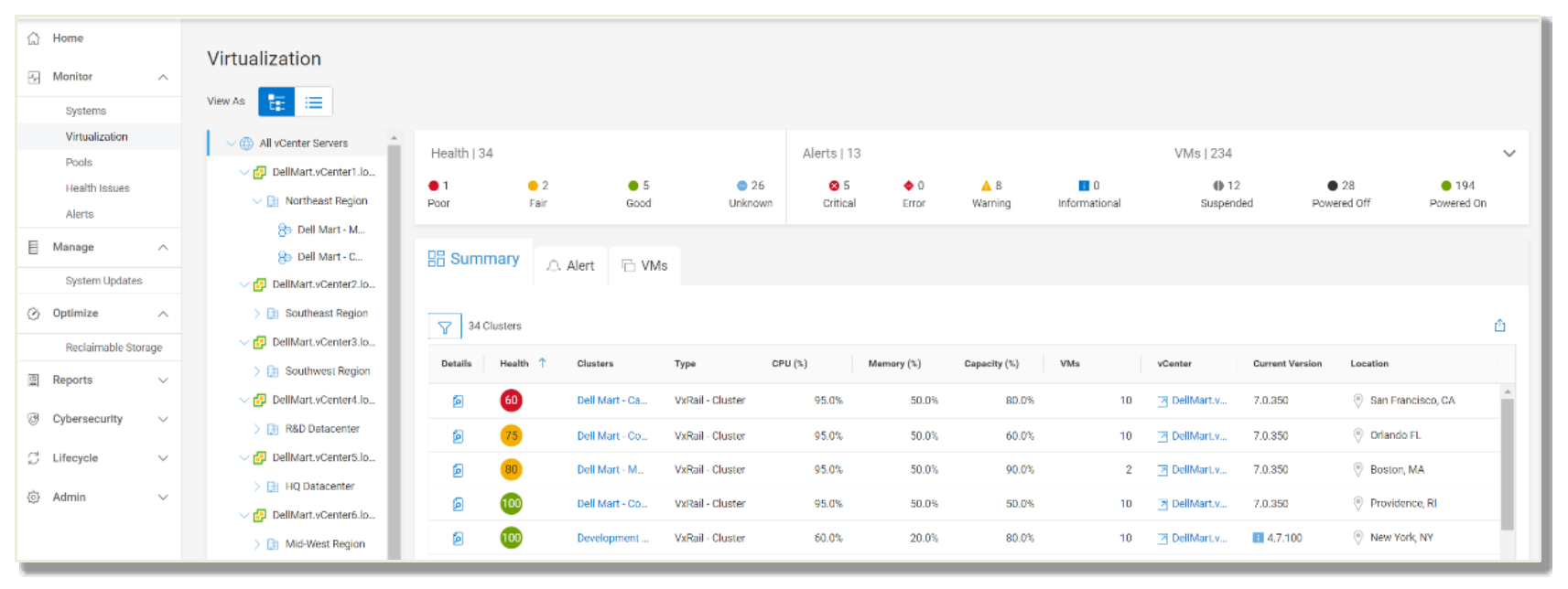
Figure 13. APEX AIOps Infrastructure Observability Virtualization view
- On-demand LCM pre-checks—VxRail LCM simplifies much of the update process through automation and orchestration and through configuration stability. However, finding out that a cluster is not ready for an update during the scheduled update window can be troublesome. With LCM pre-checks, a user can run a pre-check at any time to learn whether a cluster is ready for an update. Issues can be discovered and addressed during the update planning phase instead of at the time of the update. This feature is also designed to incorporate the latest health checks so that the pre-check is as accurate as possible to determine cluster update readiness.
- Update bundle download and staging—Downloading VxRail update bundles across multiple VxRail clusters can be challenging. Some clusters might be individually managed because they are geographically dispersed. Some clusters might have network bandwidth issues. APEX AIOps Infrastructure Observability orchestrates the downloads across many or all VxRail clusters in a single operation, which can offer significant time savings. In addition, it can identify the delta of the current VxRail version and the target VxRail version. Thus, the download package includes only the required component installation files instead of the entire update bundle. Bandwidth-strapped clusters can realize tremendous time savings, especially in cases where minor updates require only a few component updates.
- Cluster update—Combined with the LCM pre-checks and update bundle download and staging, APEX AIOps Infrastructure Observability can provide LCM for VxRail clusters at scale. Users can perform planning operations to gauge readiness before staging the update bundle and scheduling the maintenance window. When the time comes, customers can initiate the cluster update for multiple clusters in a single workflow. Users can customize the update path for each cluster. A time estimate based on telemetry data gathered about the VxRail install base is provided for each update path. A credentials manager further streamlines cluster updates at scale by automating infrastructure credentials input required to run the operation.
Note: The cluster update feature requires a fee-based add-on license which is applied to each node in the cluster.
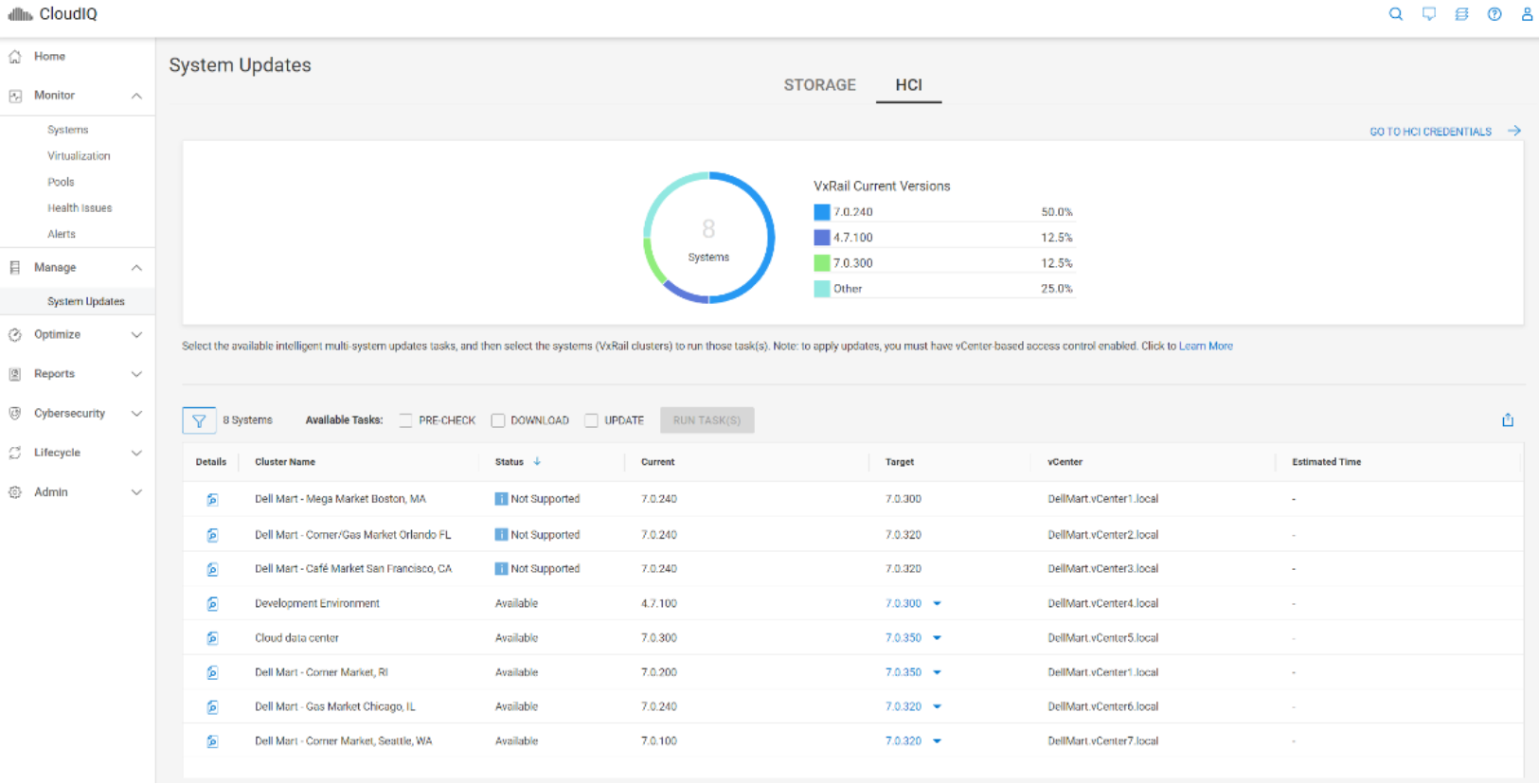
Figure 14. APEX AIOps Infrastructure Observability HCI System Updates page
Simplified services and support experience
VxRail hardware
VxRail platforms
VxRail nodes
The VxRail system is assembled with proven server-node hardware that Dell Technologies has integrated, tested, and validated as a complete solution. VxRail systems use either Intel® Xeon® Scalable family processors or AMD EPYC processors. The number of cores and total memory capacity vary among VxRail models.
Each server node includes the following technology:
- Single or dual Intel® Xeon® Scalable processors, each with up to 64 cores per processor, or a single or dual AMD EPYC processor with up to 128 cores per processor
- Up to 32 DDR5 DIMMs, providing memory capacity ranging from 64 GB to 8,192 GB per node depending on model
- A PCIe SAS disk-drive controller supporting 12 GB SAS speeds, if applicable
- A mirrored pair of BOSS NVMe M.2 cards used to boot ESXi on the node
- Dual or quad 10/25/100 GbE or dual 100GbE OCP networking card
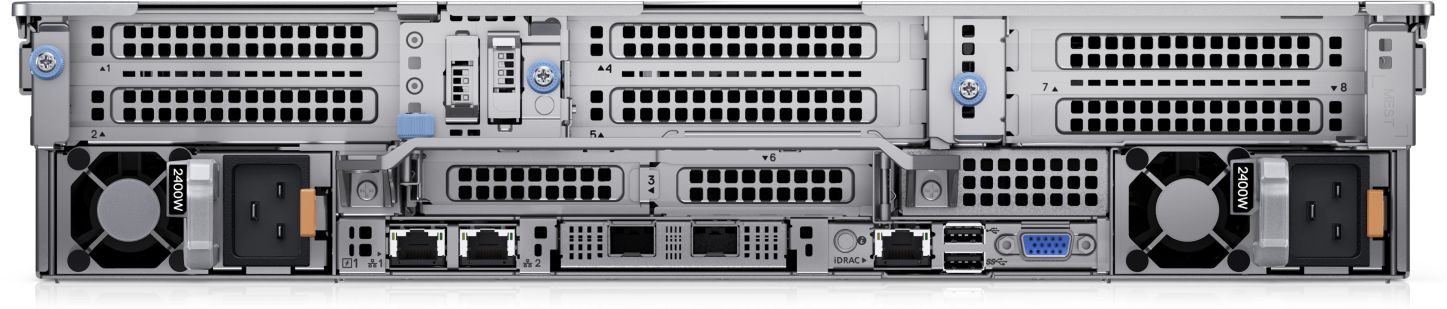
Figure 15. VxRail VP-760 rear view
VxRail systems built on the latest generation of Dell PowerEdge servers deliver the performance and reliability that customers need for the widest range of workloads. All include full lifecycle management from a single point of support. In short, VxRail is the fastest and easiest way to transform infrastructure. A lot of work and expertise goes into engineering a high-performance and reliable HCI solution, and the work does not stop after the initial deployment. Continuous validation is needed to keep the system running smoothly through software updates and node additions. As a turnkey, pre-integrated, tested, and validated HCI solution, VxRail can be quickly deployed, easily distributed, and relied on to increase the predictability, availability, and performance of the IT environment.
VxRail systems built on next-generation PowerEdge servers include multiple purpose-built platforms with build-to-order configurations. Configurations support a wide range of customer use cases, including graphics-intensive VDI, enterprise databases, high-performance computing, remote office, and more. With more processor options, a greater variety of NVMe drives, additional network connectivity options, and robust GPU accelerator expansion, customers can now more closely match a VxRail to their workload requirements. Organizations can buy what is needed when it is needed without the risk of overprovisioning.
VxRail models and specifications
VxRail nodes running vSAN OSA
VxRail nodes running vSAN ESA
VxRail dynamic node clusters
VxRail dynamic nodes are compute-only VxRail nodes used to form a vSphere cluster. VxRail dynamic node clusters rely on external storage resources for their principal storage. External storage resource types can be remote datastores from vSAN clusters using VMware vSAN cross-cluster capacity sharing or datastores from external storage on Dell storage arrays such as PowerStore, PowerMax, Unity XT, VMAX, and PowerFlex.
Vxrail dynamic node clusters further extend the workload types that VxRail can address. Administrators can deploy VxRail for workloads that might require enterprise storage-level data protection and resiliency or that can benefit from independent scaling of compute and storage for better cost economics. IT teams can continue to store their workloads on an enterprise array while benefitting from the VxRail simplified LCM. For applications that might be compute-intensive or storage-intensive, with VMware vSAN cross-cluster capacity sharing, customers can use a mix of compute clusters and vSAN clusters that can result in better resource utilization and optimized license costs. When VxRail is used to form vSphere and vSAN clusters, customers can benefit from a common operating model with VxRail HCI System Software.
VxRail dynamic nodes are compute-only nodes running ESXi. Internal storage is not provided nor supported. As a result, the use of vSAN for local HCI cluster storage is not used. VxRail HCI System Software is responsible for the LCM of the compute node. Generally, LCM of the Dell storage array providing the cluster principal storage is performed separately using storage array management tooling (except for the case of using VxRail dynamic nodes with Dell PowerStore arrays which is covered in the next section).
VxRail dynamic node options are available for a subset of VxRail models across generations. All configuration options that come with those supported models, except for cache and capacity drives, are available.
VxRail dynamic nodes and Dell PowerStore
VxRail has added exclusive integration for this configuration so that VxRail users can initiate Dell PowerStore LCM operations from VxRail Manager. VxRail users can upload the PowerStore update bundle, run a health check, and initiate an update from the VxRail Manager UI. This differentiating capability further empowers the VMware administrator managing a VxRail dynamic nodes and PowerStore solution. With this integration, the VMware administrator can manage both products from the vCenter Server console, using the Dell Virtual Storage Integrator (VSI) plug-in to provision from and manage data services in PowerStore and using the VxRail Manager plug-in for VxRail and PowerStore LCM.
For more information, please review the Dell VxRail and PowerStore: Better Together Whitepaper.
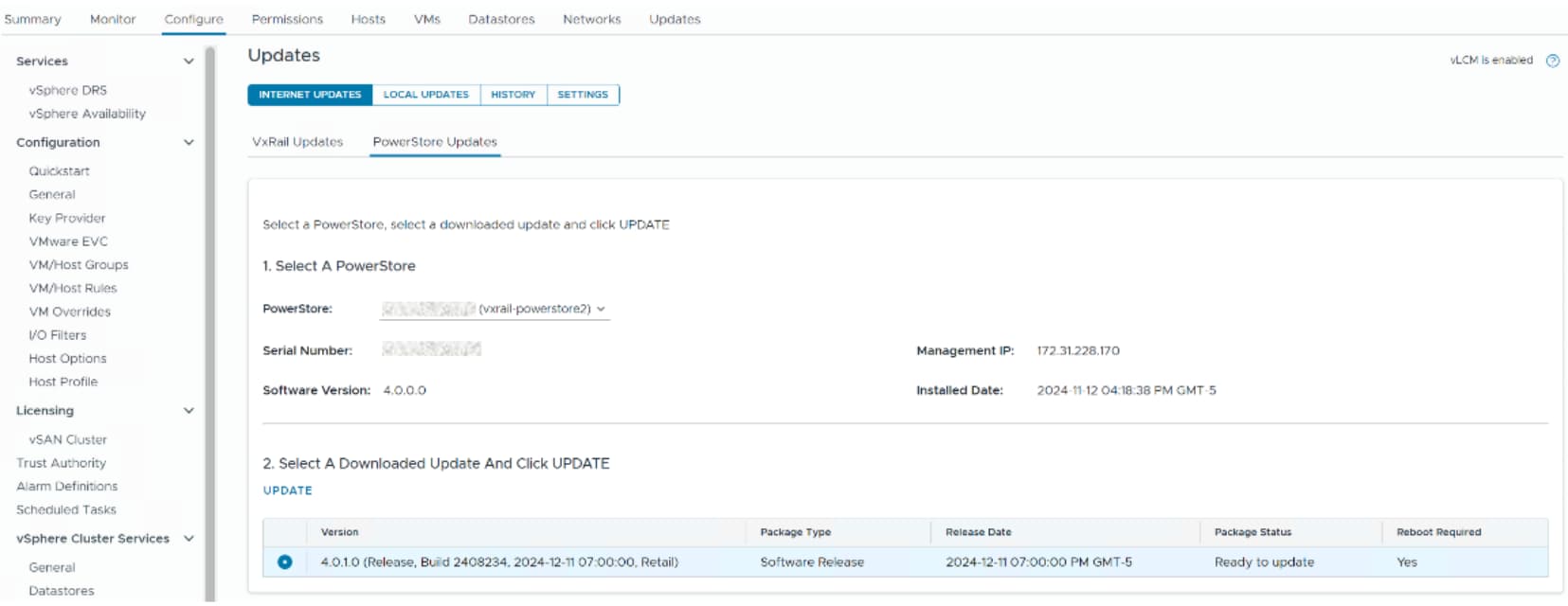
Figure 18. Dell PowerStore LCM from VxRail Manager
VxRail satellite nodes
Intel® Xeon® Scalable processor: Powerful processing for VxRail
Intel® Xeon® Scalable platforms are a powerful infrastructure that represents an evolutionary leap forward in agility and scalability. Disruptive by design, they set a new benchmark in platform convergence and capabilities across compute, storage, memory, network, and security. An innovative approach to platform design in Intel® Xeon® Scalable processors unlocks the power of scalable performance for today’s data centers and communications networks—from the smallest workloads to the most mission-critical applications.
|
Intel® Inside. Trusted clouds outside. Intel® innovation is driving the modernization and hybrid cloud transformation of the traditional enterprise data center. Migrating to the newest generation of high-performing and energy-efficient Intel®-based hardware tunes a data center for highly optimized performance across a broad set of enterprise workloads while lowering costs and improving resource utilization. Over time, evolving to a software-defined infrastructure (SDI) across all the critical domains of the data center (compute, storage, network) will deliver critical automation, orchestration, and telemetry capabilities to help businesses unlock the full capabilities of multi-cloud computing. With modern, industry-standard Intel® servers and technologies that run on SDI, customers can seamlessly manage an environment that supports development and delivery of cloud-native applications and mission-critical workloads on secure private clouds, while also integrating with public clouds, many of which already run on Intel® architecture. |

Intel®’s 5th Generation Xeon® Scalable processors have up to 64 cores and deliver highly enhanced per-core performance, as well as significant increases in memory bandwidth (eight memory channels per processor) and I/O bandwidth (80 PCIe lanes). The most data-hungry, latency-sensitive applications—such as in-memory databases and high-performance computing—will see notable improvements enabled by denser compute and faster access to large data volumes.
The convergence of compute, memory, network, and storage performance combined with software ecosystem optimizations makes Intel® Xeon® Scalable platforms ideal for fully virtualized, software-defined data centers that dynamically self-provision resources—on-premises, through the network, and in the public cloud—based on workload needs.
Intel®’s 5th Generation Xeon® scalable processors, codenamed Emerald Rapids, include the following features:
- Single or Dual Intel® Xeon® Scalable processors available with VxRail
- Up to 64 cores per socket with Platinum CPUs
- Faster UPI with up to 4 UPI links @ 20 GT/s
- Higher L2 and L3 cache, with 5MB per core being provided for L3
- Up to 8TB of total system memory with larger 256GB DIMMs
- Faster memory speeds, with up to 5600MT/s
- PCIe 5.0, delivering 80 lanes to double the I/O performance over PCIe 4.0
AMD EPYC processors
VxRail node storage disk drives
VxRail hardware options
Hardware delivery options
VxRail scaling
VxRail scale-out clusters start with as few as 2 nodes and can grow in 1-node increments up to 64 nodes, providing performance and capacity to meet a wide range of use cases. New systems can be added non-disruptively, and different models can be mixed within a VxRail cluster. Flexible storage options also allow a node to start with a few drives, and drives can be added as capacity requirements grow as shown in the following figure. Single-node upgrades and drive scalability protect an optimized initial investment. Customers can start with what they need and expand the VxRail cluster by adding nodes or drives—or both—to increase performance and capacity as needed.
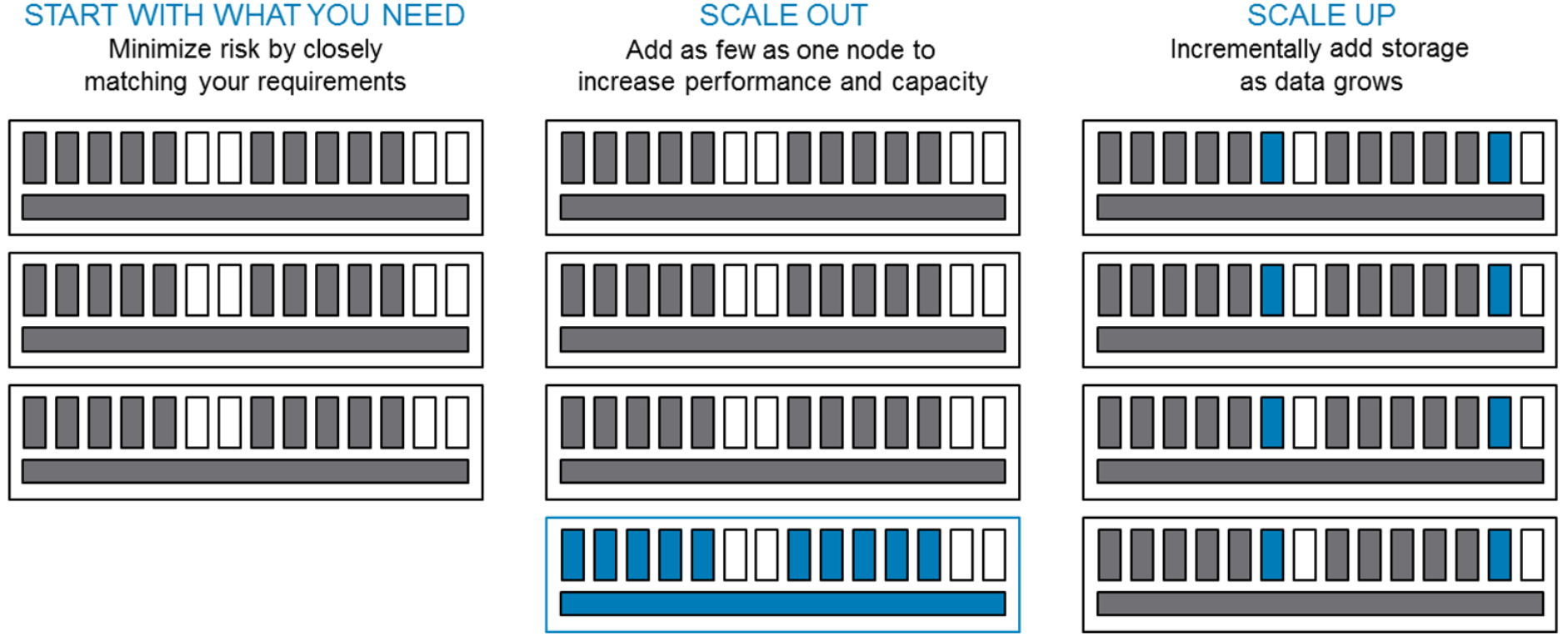
Figure 19. VxRail scale on demand
Note: Mixing rules may apply. Please refer to the VxRail documentation.
Upgradeable options
With VxRail, customers can upgrade nodes or add memory, NIC cards, cache drives, and capacity drives. GPUs can be upgraded or added in the supported node types. It is not possible to upgrade from all-flash to all-NVMe.
VxRail networking
Networking overview
The VxRail system is a self-contained environment with compute, storage, server virtualization, and management services making up the HCI stack. The distributed cluster architecture allows independent nodes to work together as a single system. Each node contributes to and consumes system resources. This close coupling between nodes is accomplished through IP networking connectivity. IP networking also provides access to virtual machines and the services they provide.
While VxRail is a self-contained infrastructure, it is not a stand-alone environment. It is intended to connect and integrate with the customer’s existing data center network. A typical implementation uses one or more customer-provided 10, 25, or 100 GbE top-of-rack (ToR) switches to connect each node in the VxRail cluster. For smaller environments, an option to use 1 GbE switches is available (restrictions apply), but these lower-bandwidth networks limit performance and scale. While the customer typically provides the network switches, Dell Technologies offers Ethernet switches that can be purchased along with the VxRail system.
The following figure shows typical network connectivity using two top-of-rack switches for redundancy. Single-switch implementations are also supported if needed.
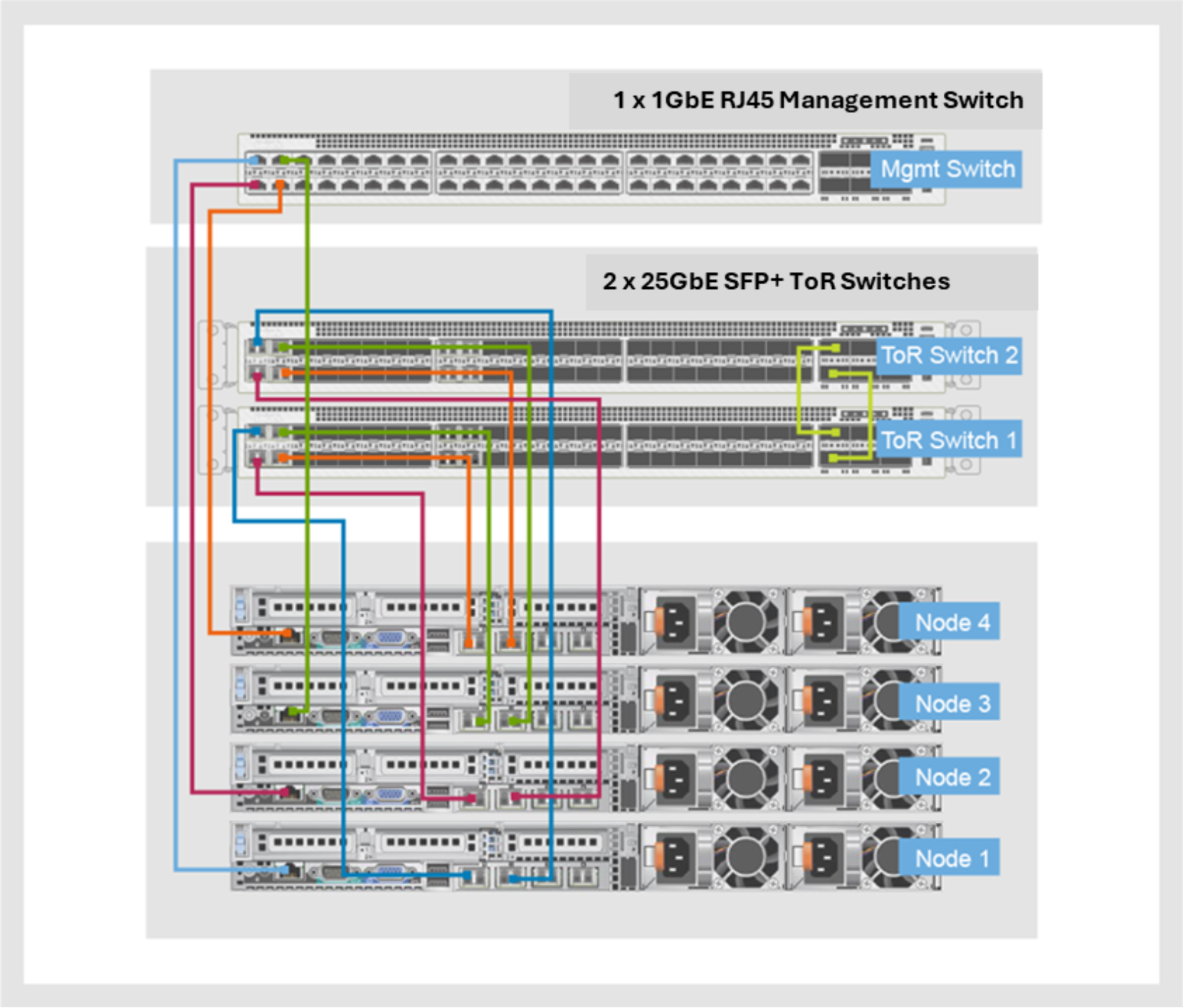
Figure 20. Typical VxRail physical network connectivity for 25 GbE configurations
The number of Ethernet switch ports required depends on the VxRail model. Most current-generation models require 2-port or 4-port 25 GbE connectivity for VxRail system traffic. Additional options of 2-port 100 GbE QSFP56, 2-port 25 GbE SFP28 and 4-port 1 GbE are available for some models. Additional network connectivity can be accomplished by adding PCIe NIC cards. VxRail management can configure an additional PCIe NIC card for network redundancy of the VxRail system traffic. Customers must configure the PCIe NIC cards separately for traffic apart from VxRail system traffic, primarily VM traffic, through vCenter.
Network traffic is separated using switch-based VLAN technology and vSphere Network I/O Control (NIOC). A VxRail cluster has the following types of system network traffic:
- Management—Management traffic is used for connecting to the VxRail Manager plug-in on vCenter, for other management interfaces such as vCenter, and for communications between the management components and the ESXi nodes in the cluster. Management traffic uses either the default VLAN or a specific management VLAN.
- vSAN—Data access for read and write activity as well as for optimization and data rebuild is performed over the vSAN network. Low network latency is critical for this traffic, and a specific VLAN isolates this traffic.
- vMotion—VMware vSphere vMotion allows virtual machine mobility between nodes. A separate VLAN is used to isolate this traffic.
- Virtual machine—Users access virtual machines and the service provided over the VM network or networks. At least one or more VM VLAN can be configured when the system is initially configured, and others may be defined as required post-cluster deployment.
Preinstallation planning includes verifying that enough physical switch ports are available and that the ports are configured for the appropriate VLANs. VLANs, along with IP addresses and other network configuration information, are used when the system is configured during installation. For detailed planning and configuration information, see the VxRail Network Planning Guide.
When the system is initialized during installation, the configuration wizard automatically configures the required uplinks following VxRail standards and best practices. The wizard asks for the NIC configuration:
Table 2. NIC configuration options
|
Network configuration |
Description |
|
2 x 10 GbE |
Management, vSAN, vMotion, and VM traffic are associated with these ports with the appropriate network teaming policy and NIOC settings. |
|
4 x 10 GbE |
|
|
2 x 25 GbE |
|
|
4 x 25 GbE |
|
|
2 x 100 GbE |
|
|
4 x 1 GbE |
This port is valid only for systems with hybrid storage configuration with a single processor. The four 10 GbE ports auto-negotiate down to 1 GbE. Management, vSAN, vMotion, and VM traffic are associated with the four 10 GbE ports with the appropriate network teaming policy and NIOC settings. |
During installation, port redundancy is available with active/standby and active/active NIC teaming policies. Customers can benefit from increased network bandwidth using active/active teaming and a link aggregation network connection. Also, redundancy at the network card level can be configured for VxRail system traffic using ports from network daughter and NIC cards. If one network card fails, traffic can continue to flow through the other card. If nodes have additional physical NIC ports for traffic apart from VxRail system traffic, the ports can be configured using standard vSphere procedures after installation.
VxRail ecosystem
Introduction
External storage resources for principal storage
External storage resources for supplemental storage
vSAN presents a robust, secure, and efficient shared datastore to all nodes within a VxRail cluster. However, often a requirement exists to access external storage to move virtual machines and data into a VxRail environment or move data between environments. FC SAN connectivity, IP-based storage, and vSAN storage through vSAN cross-cluster capacity sharing are supported.
An important distinction is that data in FC, NVMe, iSCSI, NFS, and additional vSAN datastores are self-contained and are not distributed to the disk groups within the VxRail cluster. External storage can be used to provide additional capacity to the VxRail environment, but external storage is typically not used to meet capacity requirements. VMFS can be configured over FC and iSCSI. NVMe is available over FC and TCP. NFS is available over IP. vVols are available through FC and IP.
Fibre Channel with VxRail
Customers can order FC host bus adapters (HBAs) with their VxRail for external storage to continue to use an existing storage array as a secondary storage to VxRail. Another use case is to migrate data from FC storage to VxRail vSAN datastores. Customers can connect to storage arrays that are supported by the HBA card and validated by VMware. However, Dell Technologies only supports connection of the HBA to Dell PowerStore, SC, Unity, Symmetrix VMAX or PowerMax, and XtremIO storage arrays that are qualified by E-Lab.
When configuring external storage through the FC HBA, customers can install VM, VIB, or driver files to operationalize the use of the external storage as required. VxRail does not include the firmware and drivers of the FC HBA in its Continuously Validated State updates. Customers are responsible for maintaining and updating the FC HBA. Customers can install multiple HBAs if the PCIe bus has available slots.
iSCSI with VxRail
iSCSI can be used to provide mobility for VMs and associated data onto and between VxRail environments. The following figure shows a VxRail environment that includes iSCSI storage in addition to the vSAN datastore.
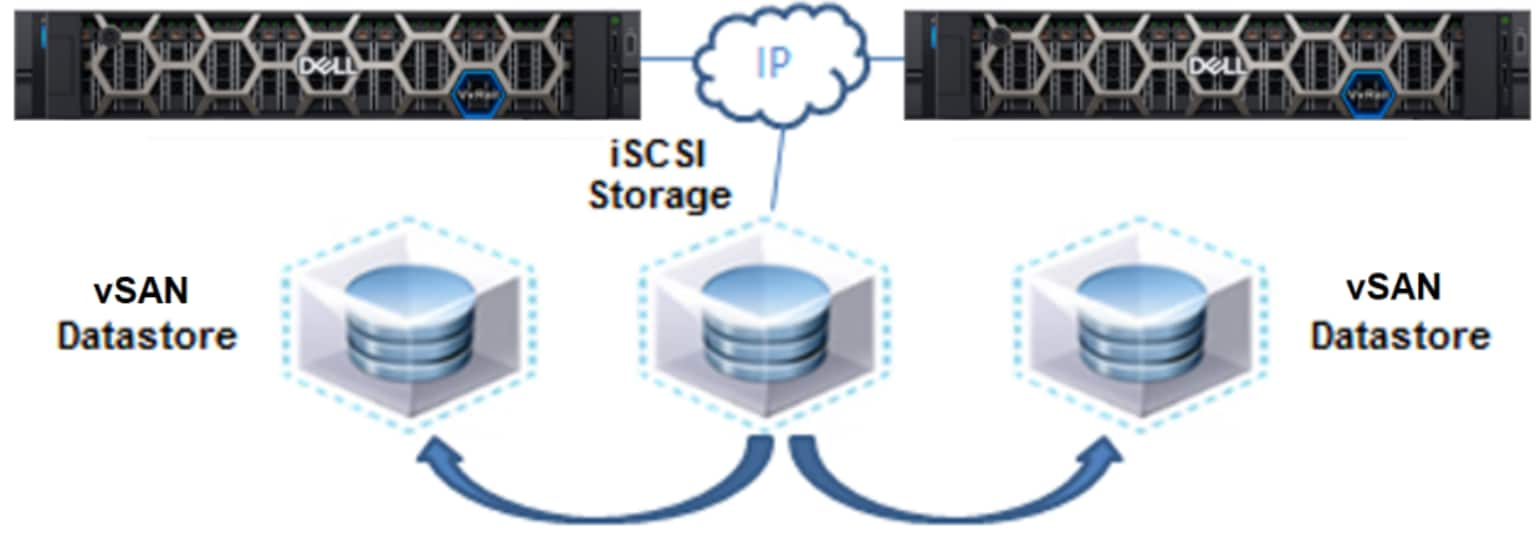
Figure 21. Data mobility into and between VxRail environments
Data on the iSCSI storage is easily moved into the vSAN datastore in the VxRail environment or between VxRail environments.
iSCSI provides block-level storage using the SCSI protocol over an IP network. SCSI uses a client/server initiator-target model in which initiators issue read/write operations to target devices and targets either return the requested read data or persistently save write data. iSCSI in a VMware environment is standard functionality. A software adapter using the NIC on an ESXi host is configured as an initiator, and targets on an external storage system present LUNs to the initiators. The external LUNs are configured as VMFS datastores. For more information about using ESXi with iSCSI SAN, see the vSphere product documentation.
iSCSI configuration is performed using the vSphere Web Client. The high-level configuration steps are:
- Create a port group on the VDS.
- Create a VMkernel network adapter and associate it with the port group.
- Assign an IP address.
- From the vCenter Manage Storage Adapters view, in the Add iSCSI Software Adapter dialog box, create the software adapter.
- Bind the iSCSI software adapter with the VMkernel adapter.
After iSCSI configuration is complete, iSCSI targets and LUNs can be discovered and used to create datastores and map them to the hosts in the cluster.
iSCSI works best in a network environment that provides consistent and predictable performance, and a separate VLAN is usually implemented. When planning the network requirements for the VxRail environment, consider iSCSI network requirements to ensure that connectivity to the external iSCSI storage system exists and that the additional network traffic will not affect other applications.
NFS with VxRail
A network file system provides file-level storage using the NFS protocol over an IP network. It can work in use cases such as iSCSI—the difference being that NFS devices are presented as file systems rather than block devices. The following figure shows a network file system that has been exported from a network-attached server and mounted by the ESXi nodes in the VxRail environment. This network-attached file system allows for data mobility into and between VxRail environments as well as access to additional storage.
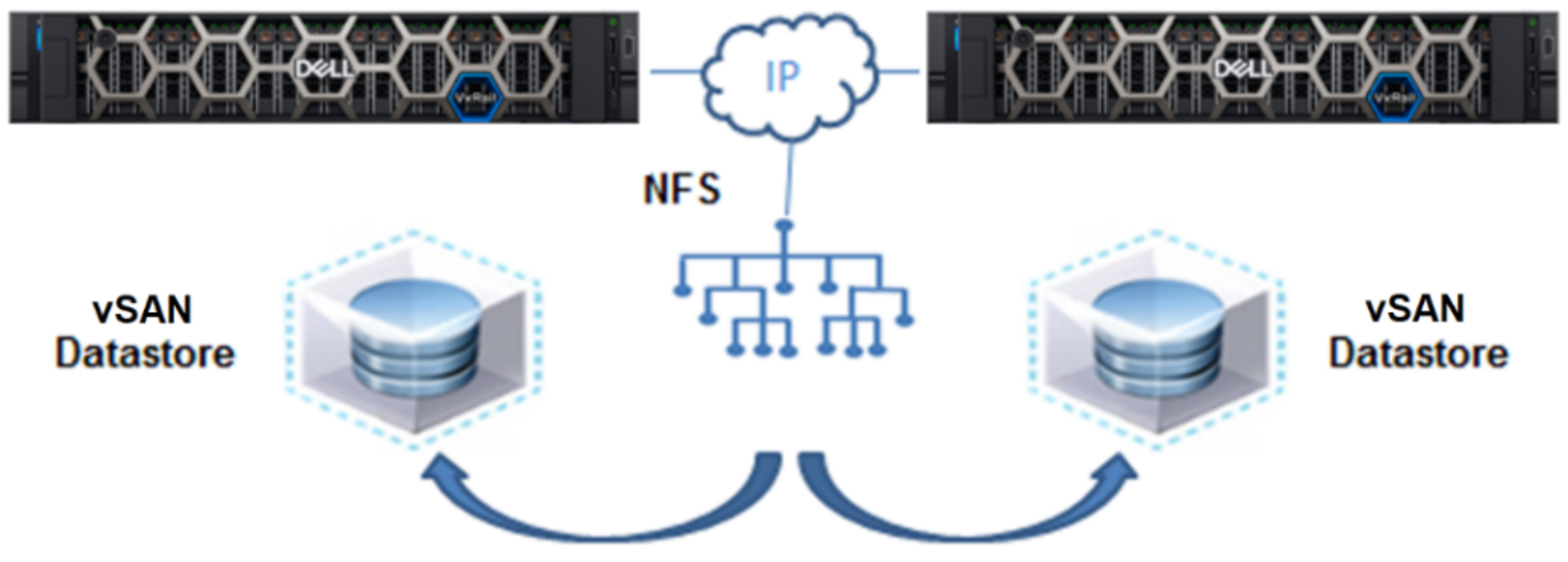
Figure 22. Network-attached file system with VxRail
The external NFS server can be an open system host, typically UNIX or Linux, or a specially built system. The NFS server takes physical storage and creates a file system. The file system is exported, and client systems—ESXi hosts in a VxRail system, in this example—mount the file system and access it over the IP network.
Like iSCSI, NFS is a standard vSphere feature and is configured using the vCenter Web Client. The high-level configuration steps are:
- Select Hosts and Clusters, and open the Related Objects tab.
- In the New Datastore dialog box:
- Select NFS as the datastore type and specify the NFS version.
- Specify the name of the datastore.
- Specify the IP address or hostname of the NFS server that exported the file system and the host that will mount it.
The NFS file system appears like the vSAN datastore. VMs, templates, OVA files, and other storage objects can be easily moved between the NFS file system and the vSAN datastore using vMotion.
As with iSCSI, NFS works best in network environments that provide consistent and predictable performance. Consider the network requirements for NFS when initially planning the network requirements for VxRail environment.
Data protection
Given the various data protection requirements that customers might have for their virtualized workloads, VxRail provides several data protection options to ensure that the appropriate protection level is available. The following figure organizes the data protection options according to the service-level objective that needs to be met, from continuous availability to archive.
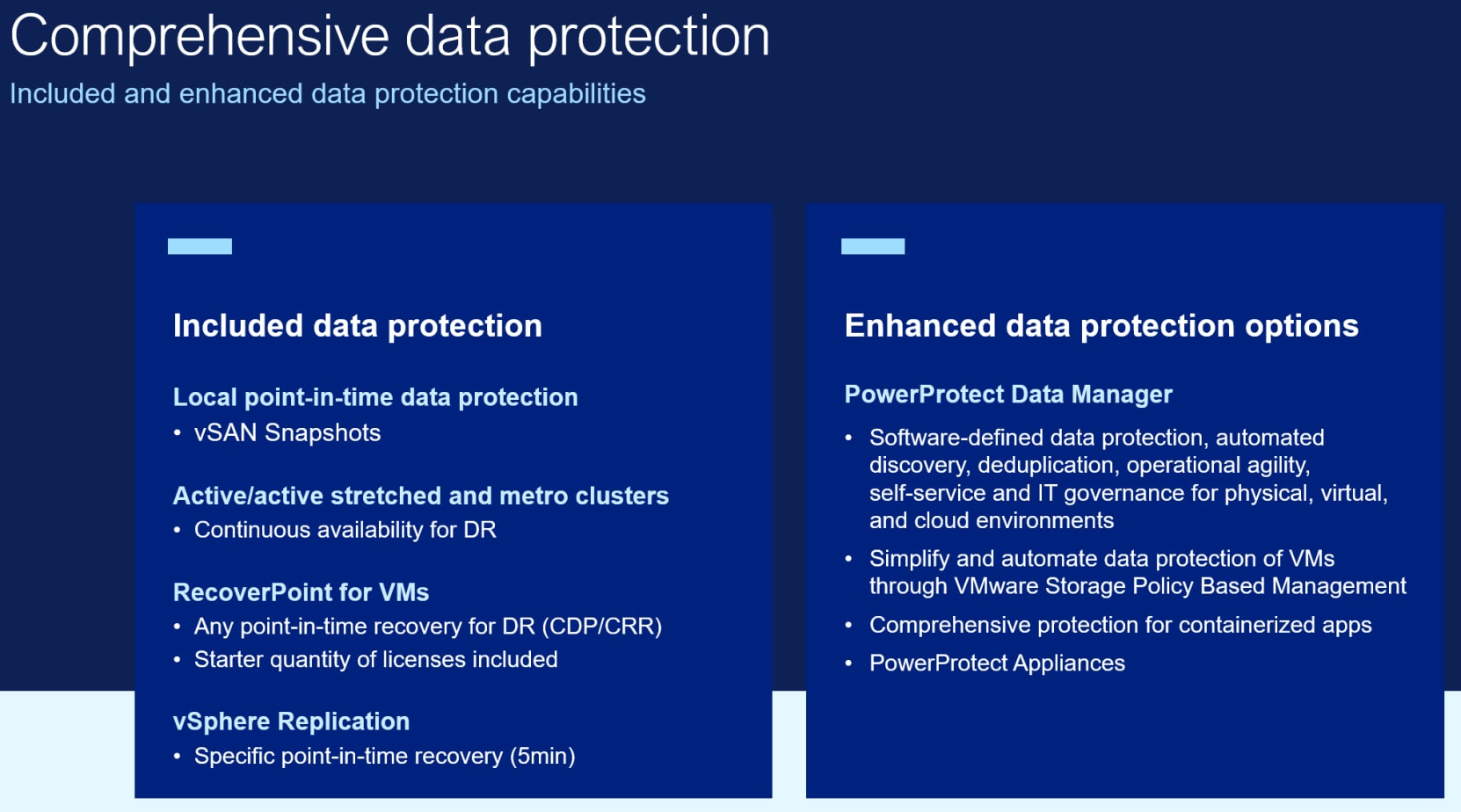
Figure 23. Data protection options for every protection level of need
A vSAN Stretched Cluster is a native vSAN software feature that provides customers with site-level protection with zero data loss and near instantaneous recovery. This setup has automated failover in case of site failures. For customers looking for disaster avoidance and zero recovery point objective (RPO), stretched clusters are the appropriate data protection option. VxRail LCM features support stretched cluster deployments. For more information, see the Dell VxRail Architecture Overview Guide.
Dell RecoverPoint for VMs provides a flexible disaster recovery replication solution for virtual workloads running on VxRail clusters. It can provide native VM-based synchronous replication and automated failover and failback between sites to mitigate site loss events. With its any point-in-time and asynchronous local replication capability, replicated copies or snapshots can be repurposed for test/development, and operational recovery, as well as short-term backup and long-term backup use cases. RecoverPoint for VMs is managed directly from vCenter Server. It is storage-agnostic so that VMs on VxRail clusters can be replicated to other storage options including cloud service providers for cloud disaster recovery solutions.
VMware vSphere Replication is a hypervisor-based asynchronous replication for VMs. It is fully integrated with vCenter Server and the vSphere Web Client. vSphere Replication can provide local data protection and can be an appropriate disaster recovery solution between sites for environments that can tolerate some data loss. vSphere Replication can be combined with VMware Site Recovery Manager to deliver automated failover and failback to minimize downtime.
Local backup and recovery solutions include Dell PowerProtect Data Manager software with PowerProtect appliance or Dell Integrated Data Protection Appliance as backup repositories. The PowerProtect software provides comprehensive backup and point-in-time recovery. The PowerProtect appliance and Integration Data Protection Appliance are purpose-built data protection appliances, designed as backup targets for environments in which capacity and balanced performance are priorities.
Cloud replication, backup, and archive options are also available with VxRail clusters. RecoverPoint for VMs can replicate VMs to VMware Cloud hyperscaler-hosted solutions deployed on AWS—for example—for a cloud site recovery solution. RecoverPoint for VMs and PowerProtect can also replicate and copy backups to AWS S3 for more cost-efficient backup or archive solutions.
Additional management solutions
VxRail solutions
Flexible consumption models
VMware Cloud Foundation on VxRail
VxRail 2-node cluster with vSAN configuration
Omnissa Horizon
Dell APEX Subscriptions
Dell APEX Subscriptions allows a customer to acquire the technology they need to support their changing business with payments that scale to match their actual usage. This model helps align their cost with usage and avoid paying for buffer capacity that is not used. It improves agility by providing instant deployment of capacity for usage when spikes occur in business operations. It improves budget agility and power by delivering better operational economics.
APEX Subscriptions works with customers to establish the committed capacity presently needed and the buffer capacity required in the future. Buffer capacity is measured using automated tools with their equipment. Each payment is for the amount of fixed committed capacity and variable buffer capacity.
If usage consistently consumes most of the buffer capacity, customers can opt to receive additional buffer capacity which increases their level of committed capacity and related payment.
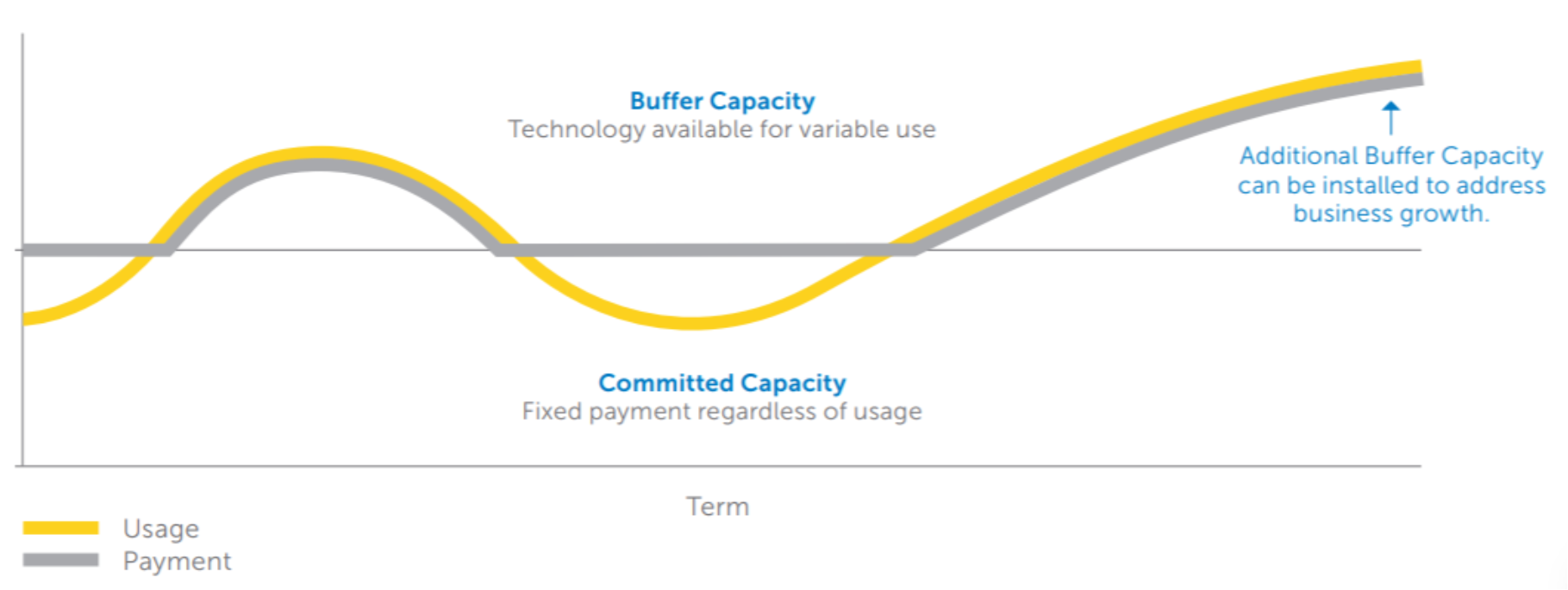
Figure 24. Relationship between technology usage and APEX Subscriptions payments
For more information about APEX Subscriptions, see Dell APEX Subscriptions.