Deploying Microsoft SQL Server Containers on OpenShift with Dell PowerFlex
Executive summary
Solution overview
Document purpose
Terminology
Audience
We value your feedback
Revision history
Technology overview
PowerFlex product overview
PowerFlex family
PowerFlex is a software-defined infrastructure platform that reduces operational and infrastructure complexity. PowerFlex empowers organizations to move faster by delivering flexibility, elasticity, and simplicity with extraordinary predictable performance for mission-critical workloads, while also providing resiliency at scale. The PowerFlex family provides a foundation that combines compute and high-performance storage resources in a managed, unified fabric.
PowerFlex delivers transformational value
Delivers stringent SLAs effortlessly
PowerFlex uses software to unlock the full potential of rapid advances in industry-standard hardware and deliver extreme SLA outcomes. PowerFlex aggregates resources across a broad set of nodes, unlocking massive input, output, and throughput performance while minimizing the latency. Its self-balancing architecture eliminates any hotspots and ensures consistency and simplicity over time. The system can be scaled while linearly scaling performance from a minimum of four nodes to thousands of nodes, on-demand and without any disruption. And with its self-healing architecture, PowerFlex can handle outages, upgrades, and maintenance minimizing the downtime resulting in 99.9999* percent availability.
Note: *Workload performance claims based on internal Dell testing. (REF-0000470)
Flexible and dynamic architecture
PowerFlex delivers transformational agility that enables organizations to rapidly respond to changing business needs. PowerFlex offers flexibility to mix and match the storage, compute, and hyperconverged nodes in a dynamic deployment, allowing you to scale storage and compute resources together or independently, one node at a time as per your requirements.
Shared platform for heterogeneous workloads
The platform can support a broad range of operating environments simultaneously such as, bare-metal operating systems, hypervisors, and container platforms with a unified underlying infrastructure platform and management. You can also support heterogeneous workloads with varying requirements on a flexible shared infrastructure platform and modernize your application architectures on your schedule.
Extensive automation for predictability and simpler workflows
PowerFlex offers full-stack IT Operations Management (ITOM) and Life Cycle Management (LCM) with PowerFlex Manager. It provides extensive automation capabilities with PowerFlex Manager REST APIs and custom Ansible modules to integrate with your infrastructure, application, and DevOps workflows. PowerFlex Manager enables automated deployments and expansions with minimal firsthand time for the IT team, letting them focus on other strategic initiatives.
Broad ecosystem of workload solutions
PowerFlex is designed to deliver superior outcomes at any scale for the most-demanding mission-critical environments. It is optimized for a wide range of validated workload solutions ranging from traditional relational databases and modern cloud-native NoSQL databases to throughput-intensive analytics workloads.
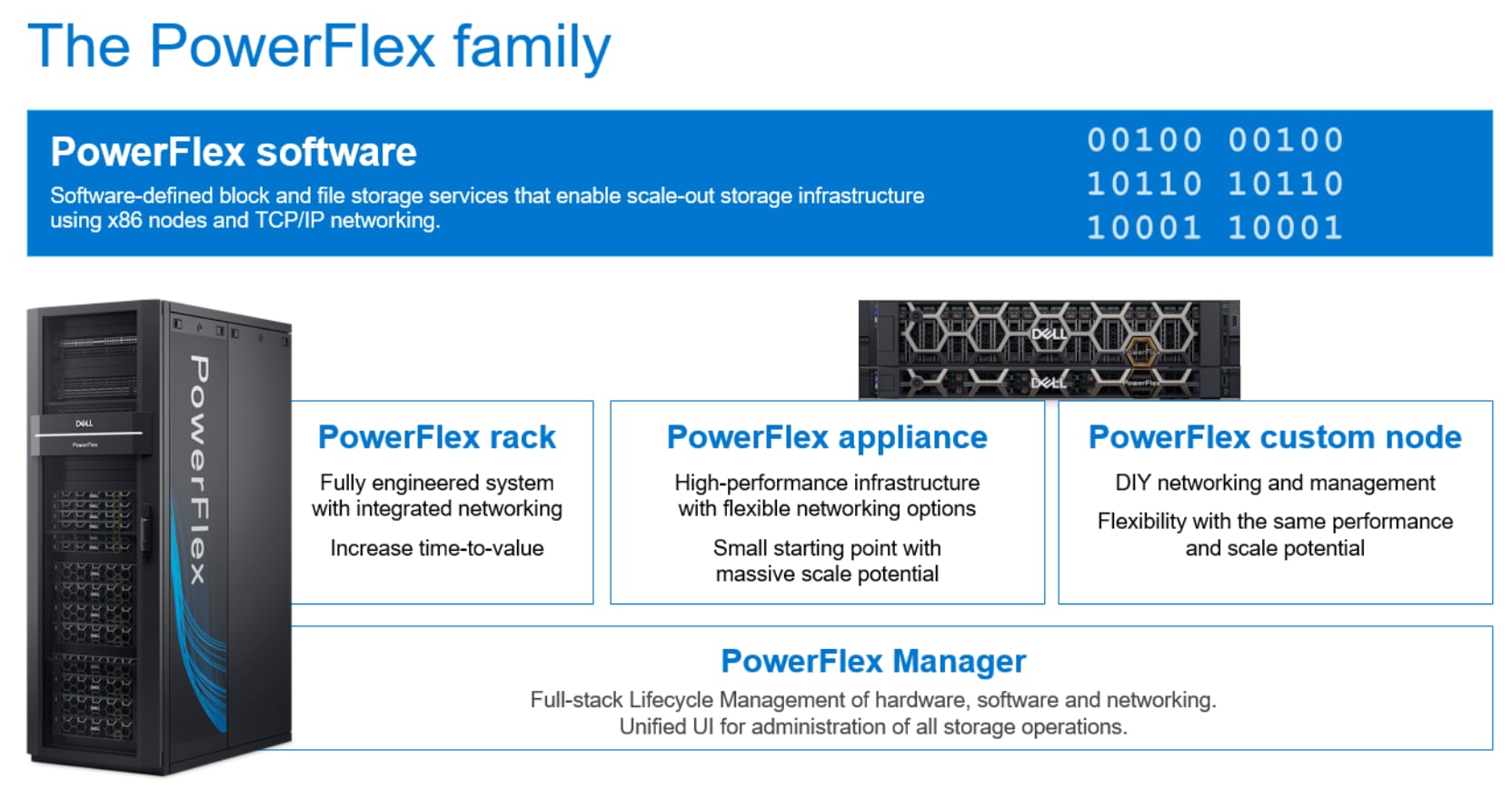
Figure 1. PowerFlex Portfolio
PowerFlex software components
Software is the key factor of success in the PowerFlex offering. PowerFlex software components provide software-defined storage services. The software components help to simplify the infrastructure management and orchestration with comprehensive ITOM and LCM capabilities that span compute and storage infrastructure, from BIOS and firmware to nodes, software, and networking.
PowerFlex
PowerFlex is the software foundation of the PowerFlex platform. It delivers high performance, highly resilient block storage service that can scale to thousands of nodes.
PowerFlex Manager
PowerFlex Manager is the software component in PowerFlex family that enables ITOM automation and LCM capabilities while enabling flexible APIs and extensive automation.
PowerFlex consumption options
PowerFlex is available in multiple consumption options to help customers meet their project and data center requirements. The PowerFlex appliance and PowerFlex rack provide customers the flexibility to choose a deployment option to meet their exact requirements.
PowerFlex rack
The PowerFlex rack is a fully engineered system, with integrated networking that enables the customers to simplify deployments and accelerate time to value.
PowerFlex appliance
The PowerFlex appliance allows customers the flexibility and savings to choose their own compatible networking. The PowerFlex appliance offers customers a smaller starting point of four nodes, while enabling them to use their existing network infrastructure.
With PowerFlex, the customers deploy to match their initial needs and expand with massive scale potential, without having to compromise on performance and resiliency.
Flexible consumption-based billing options
PowerFlex is available through APEX custom solutions by the APEX Flex on Demand and APEX Datacenter Utility for customers looking to adopt consumption-based OPEX models.
APEX Flex on Demand
APEX Flex on Demand allows you to pay for technology as you use it and provides immediate access to buffer capacity. Your payment adjusts to match your usage.
APEX Datacenter Utility
APEX Datacenter Utility is the leading product portfolio from Dell Technologies that provides support to manage your data center and its operations. It provides a simple and single invoice for monthly payments that are based on a predictable rate and vary based on your usage.
Red Hat OpenShift Container Platform
PowerFlex CSI Driver
Microsoft SQL Server on containers
Solution architecture
Overview
Logical architecture
The following diagram shows the logical architecture of the containerized SQL Server instances that is deployed on eight PowerFlex hyperconverged nodes with Red Hat OpenShift cluster. It also illustrates the OpenShift cluster that has three control planes and eight worker nodes. Same PowerFlex cluster nodes are acting as worker nodes in the setup. There are three deployments that are involved in this architecture:
- PowerFlex deployment
- OpenShift Cluster deployment
- SQL Server pod/container deployment
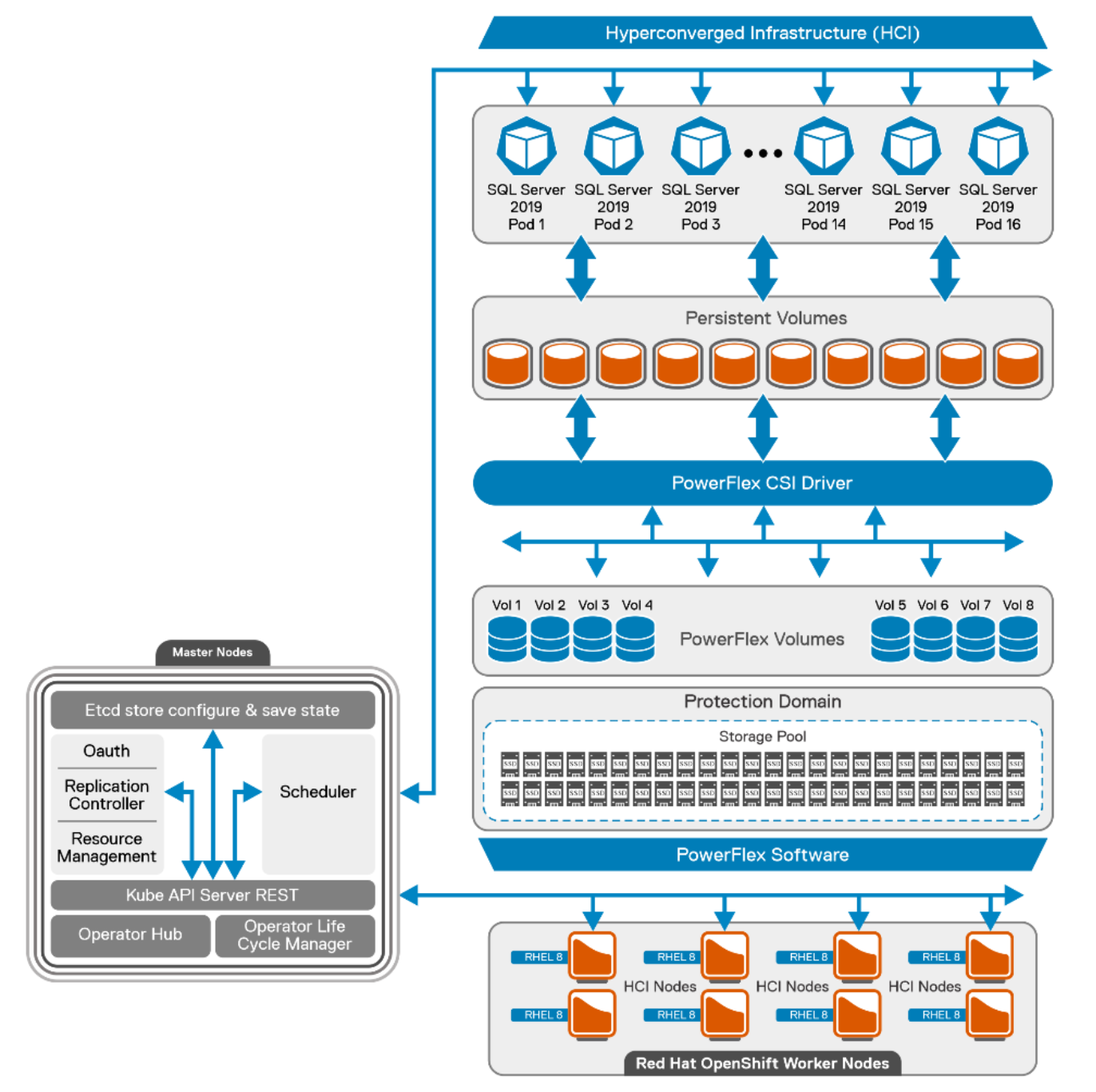
Figure 2. Logical architecture of SQL Server 2019 with OpenShift containers
PowerFlex deployment
The PowerFlex cluster is built from eight bare-metal nodes that are configured in the hyperconverged deployment model. PowerFlex cluster leverages its storage data server (SDS) component to provide resilient storage layout.
Each node is populated with ten solid state drives (SSDs) of size 960 GB. These total 64 disks from eight nodes are aggregated to make one resilient storage pool and the usable storage volumes are carved out as required. SDSs are optimized for rebuild, rebalance, and I/O parallelism. The user data layout among SDS components is managed through storage pools, protection domains, and Volumes. PowerFlex storage layout for this reference architecture is as follows:
- Single Protection Domain (domain 1) is allocated from the SSDs in the eight PowerFlex nodes.
- Single Storage pool (SP-SSD-1) is created on a new protection domain and then persistent client volumes are created from this Storage Pool.
All the SQL Server pod volumes are provisioned by the PowerFlex software from the storage pool as requested by the PowerFlex CSI driver. For more information about PowerFlex recommendations, see PowerFlex Best Practices.
For more information about the configuration of PowerFlex nodes and VM configuration, see Appendix Configuration details.
OpenShift cluster deployment
This section outlines the basic constructs of an OCP deployment on PowerFlex family.
The OpenShift cluster contains the following important elements:
- Helper node
- Bootstrap node
- Control plane node
- Worker node
Helper node
The Helper node is the intermediate host that helps to deploy and manage the OCP cluster. It is a Linux host with OpenShift binaries that are installed to deploy and manage the cluster. In this guide, the helper node is seen as the service node and is deployed on to a separate VM.
All CLI-based commands are run from the service node. This guide uses Red Hat Enterprise Linux 8 minimal ISO for operating system installation. The service node is configured to host the OpenShift installation binaries and to generate the ignition file to deploy all the nodes of the cluster.
Bootstrap node
The bootstrap node is the first node to be booted to the custom ISO. The purpose of the bootstrap node is to configure the control plane and install the control plane components on the active nodes. This configuration is achieved by creating a temporary OCP cluster for deploying the control plane API and the control plane nodes. Once the master nodes are up and the bootstrapping process is complete, the bootstrap node is used for the OCP installation process. In this architecture, the bootstrap node is deployed on the VM.
Control plane nodes
Control plane nodes create, schedule, and manage all aspects of the OCP cluster. control plane nodes can be configured to allow for pods to be scheduled on them, that is, for them to serve as worker nodes. This solution does not schedule workloads on control planes. The following is a list of the other main services that the control plane nodes are needed for:
- API interface
- Authentication or authorization
- Container scheduling
- Controller management
- Configuration database and etcd
Kubernetes manages the containers using a declarative model where the required state of the cluster is maintained. The control plane (Master nodes/API) continuously monitors the state. Controllers check for the current and the required state in loops. When a configuration change is detected, the control plane responds by updating the state of the resource. For example, to change any kubelet on OpenShift nodes a machine configuration YAML resource file is applied to the cluster. Once the control plane realizes that the required state of the nodes no longer matches the running state, it corrects the state by implementing the change that is applied using the machine configuration file.
Three control plane nodes are hosted on separate VMs to avoid using the resources from the PowerFlex HCI nodes. Red Hat Enterprise Linux Core operating system (RHCOS) is the default operating system on all the control plane machines.
Worker nodes
In the OpenShift Container Platform 4.9, you have the option of using the Red Hat Enterprise Linux (RHEL) machines as a compute machine that is also known as worker machines, in a user-provisioned infrastructure installation method of cluster deployment.
This reference architecture uses the PowerFlex HCI nodes as worker nodes that are deployed with the Red Hat Enterprise Linux operating system. Eight worker nodes are used to host the SQL Server 2019 workload.
Following are some of the pre-requisites before adding the Red Hat Enterprise Linux based compute or worker nodes to the cluster:
- Must have a valid OpenShift container platform subscription with the Red Hat account.
- Base operating system on the worker nodes should be RHEL 8.4.
- Separate RHEL 7 machine is required to run an Ansible playbook and add the worker node to the cluster.
- Must have OpenShift CLI installed on the RHEL 7 machine.
- Ensure that the RHEL 7 machine can access all the worker nodes and the helper nodes.
- Enable the password less SSH to all the worker nodes and the helper node.
For more information about adding an RHEL worker node in the OCP, see adding RHEL compute nodes to a cluster.
This reference architecture follows the user-provisioned method of cluster deployment. Every node, component is deployed manually by the user and not with the installer based provisioned installer. The following table shows the different nodes that are deployed in the cluster:
Table 2. OpenShift cluster node details
|
Name |
Status |
Roles |
|
node1.hci |
Ready |
worker |
|
node2.hci |
Ready |
worker |
|
node3.hci.lab |
Ready |
worker |
|
node4.hci |
Ready |
worker |
|
node5.hci |
Ready |
worker |
|
node6.hci |
Ready |
worker |
|
node7.hci |
Ready |
worker |
|
node8.hci |
Ready |
worker |
|
ocp-cp-1.lab.ocp.lan |
Ready |
control plane |
|
ocp-cp-2.lab.ocp.lan |
Ready |
control plane |
|
ocp-cp-3.lab.ocp.lan |
Ready |
control plane |
Note: For more information about the configuration of OpenShift nodes and VM configuration, see Appendix Configuration details
PowerFlex CSI deployment
The PowerFlex CSI driver is used to provide persistent storage to OCP through the PowerFlex storage system. The CSI driver installs the custom resource definition (CRD) in the storage.dell.com API group and requires a few input parameters to be provided such as: the PowerFlex end point (gateway details) and the system name to connect to the PowerFlex cluster. A secret key is created in the namespace to connect to the end point. This secret key stores the credentials to connect to the PowerFlex cluster. Upon successful deployment of the CRD.
The following table shows the storage controller and CSI pods that are deployed in the cluster:
Table 3. Controller and CSI pod details
|
Name |
Status |
Node |
|
vxflexos-controller-5759bc87c5-gwm7w |
Running |
node5.hci |
|
vxflexos-node-4m4fx |
Running |
node5.hci |
|
vxflexos-node-9w56f |
Running |
node2.hci |
|
vxflexos-node-cs6d8 |
Running |
node7.hci |
|
vxflexos-node-l7kjj |
Running |
node4.hci |
|
vxflexos-node-ndqcn |
Running |
node8.hci |
|
vxflexos-node-qzlzg |
Running |
node3.hci |
|
vxflexos-node-w59wf |
Running |
node6.hci |
Each CSI pod facilitates the storage provisioning and the file system creation on the worker nodes. CSI uses the storage classes to dynamically provision the volumes. A storage class is an object that describes the policy for the quality-of-service levels. These policies define the provisioner reclaim policy and driver details. The PowerFlex CSI provides YAML files to deploy the storage classes. EXT4 and XFS are the two standard storage class templates by PowerFlex CSI. It is recommended by Microsoft to use XFS for database volumes. Hence, the XFS storage class is deployed to provision the volumes with the XFS file system.
Table 4. CSI storage class
|
Name |
Provisioner |
Reclaim policy |
Volume binding mode |
Allow volume expansion |
Age |
|
vxflexos-xfs |
csi-vxflexos.dellemc.com |
Delete |
Immediate |
true |
102d |
The CSI driver for Dell PowerFlex can be deployed by using the provided Helm v3 charts and installation scripts on both Kubernetes and OpenShift platforms. For more information about the PowerFlex CSI installation using Helm charts, see PowerFlex CSI Documentation.
SQL Server pod/container deployment
This reference architecture deploys the SQL Server as a stateful application. SQL pods are deployed across eight worker nodes. Each node hosts two SQL Server pods. Each pod is hosting a single container image of the SQL Server 2019 instances and the data is stored on the persistent volume provisioned by the PowerFlex CSI plug-in. The controller verifies if the current state matches the wanted deployment state, and creates a ReplicaSet if necessary, and then creates the pods.
The following table shows the deployment of the SQL server pods on the OCP cluster:
Note: The names may be different in your environment.
Table 5. SQL Server pod details
|
Name |
Status |
Node |
|
sql1-58b97fb88f-jw54v |
Running |
node1.hci |
|
sql10-778d847d7-k78lq |
Running |
node3.hci |
|
sql13-7b4cc476f4-fgm2s |
Running |
node4.hci |
|
sql14-5dc4d4c65b-lnlst |
Running |
node4.hci |
|
sql17-8d6d7fbf5-8prqh |
Running |
node5.hci |
|
sql18-6b8c59645c-bz9r9 |
Running |
node5.hci |
|
sql2-6d7b874595-mbsjh |
Running |
node1.hci |
|
sql21-7bdd69cbbb-dnmh8 |
Running |
node6.hci |
|
sql22-f55796588-l66r9 |
Running |
node6.hci |
|
sql25-7bdbc6576c-grll7 |
Running |
node7.hci |
|
sql26-78d5bd4777-kz9cv |
Running |
node7.hci |
|
sql29-7796c56476-fbprb |
Running |
node8.hci |
|
sql30-6f87df878d-qjsqz |
Running |
node8.hci |
|
sql5-77c4cfd88d-x7gsv |
Running |
node2.hci |
|
sql6-694d44bcf8-nstkx |
Running |
node2.hci |
|
sql9-85f87548d7-7ks5k |
Running |
node3.hci |
SQL server ConfigMap
This solution uses the ConfigMap object to pass the SQL Server startup parameters. This ConfigMap file provides a few important parameters for each SQL Server pod. It defines the default data and log directory path to the pod. This is an important Kubernetes object used to pass the required information to the application deployed.
The ConfigMap is like the secret key, but it is designed to support working more conveniently with strings that do not contain sensitive information.
SQL server pod database layout
To get an optimal database performance it is a good practice to design the database layout. The SQL Server Database files are mostly categorized as random and sequential files. Storing all the files in one partition/drive is a sign of bad database design. To fully use the SDS storage pool capacity and I/O performance, database and log files are separated across different volumes for better I/O throughput.
The following figure shows the SQL server pod database layout. The layout includes database files; transaction log files and temp files distributed across different volumes.
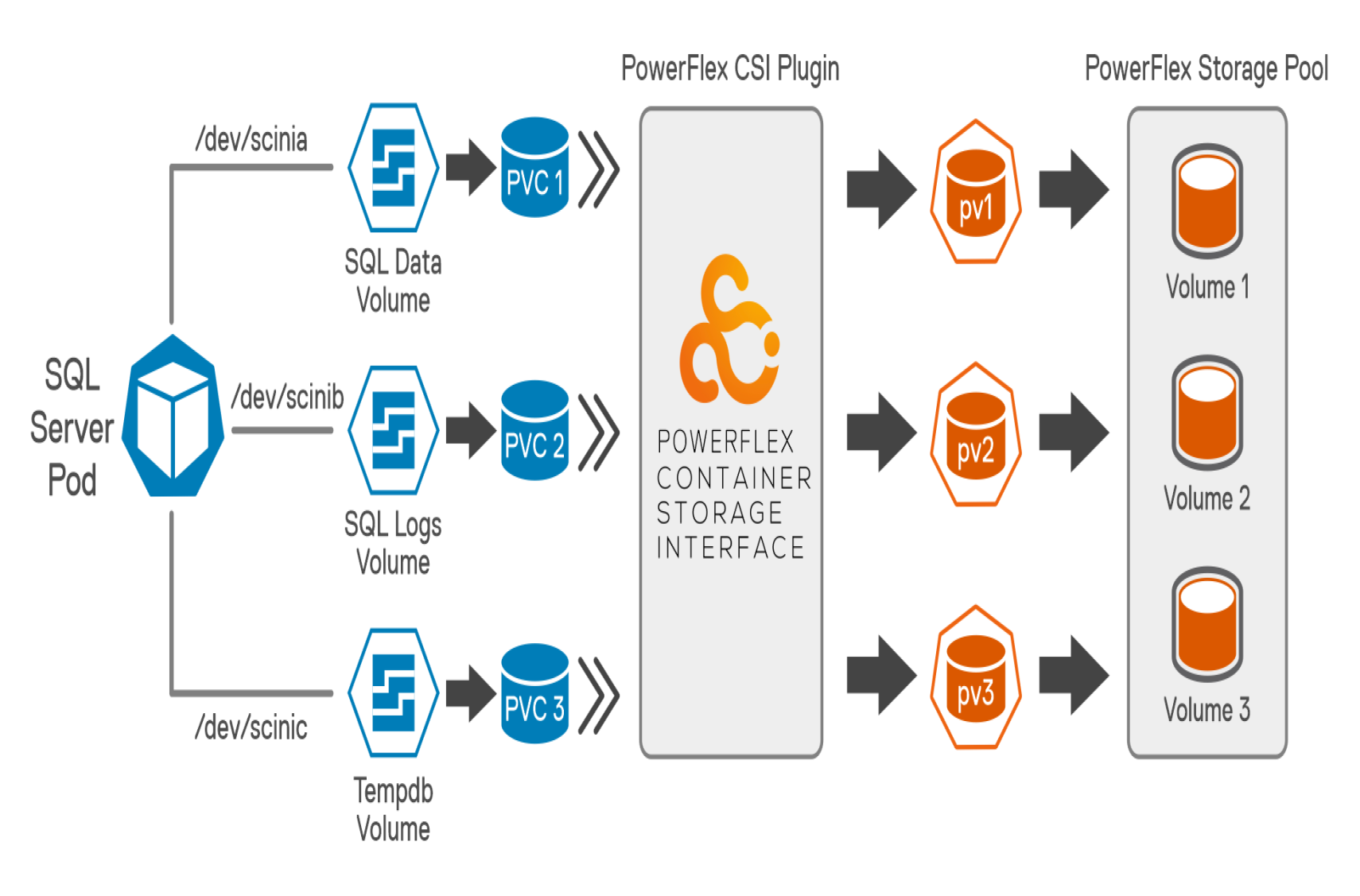
Figure 3. SQL server Pod database layout
As a best practice, The TempDB files are moved from their default location to another persistent volume to optimize the database performance. Preallocating space for TempDB and assigning a large file size accommodates most typical workloads and results in optimized performance. Also, increasing the number of tempdb files reduces the database contention. This reference architecture recommends configuring 16 tempdb files to improve the database performance.
The following table shows both the volume size and file systems used for this solution to store a sample database:
Table 6. Pod storage details
|
Volume name |
Size |
File system |
Purpose |
|
/dev/scinia |
304 GB |
xfs |
SQL data volume to store datafiles |
|
/dev/scinib |
200 GB |
xfs |
SQL log volume to store database transaction log files |
|
/dev/scinic |
304 GB |
xfs |
SQL temp volume to store tempdb files |
Network architecture
The following diagram shows the network architecture configured for this solution using the PowerFlex best practices:
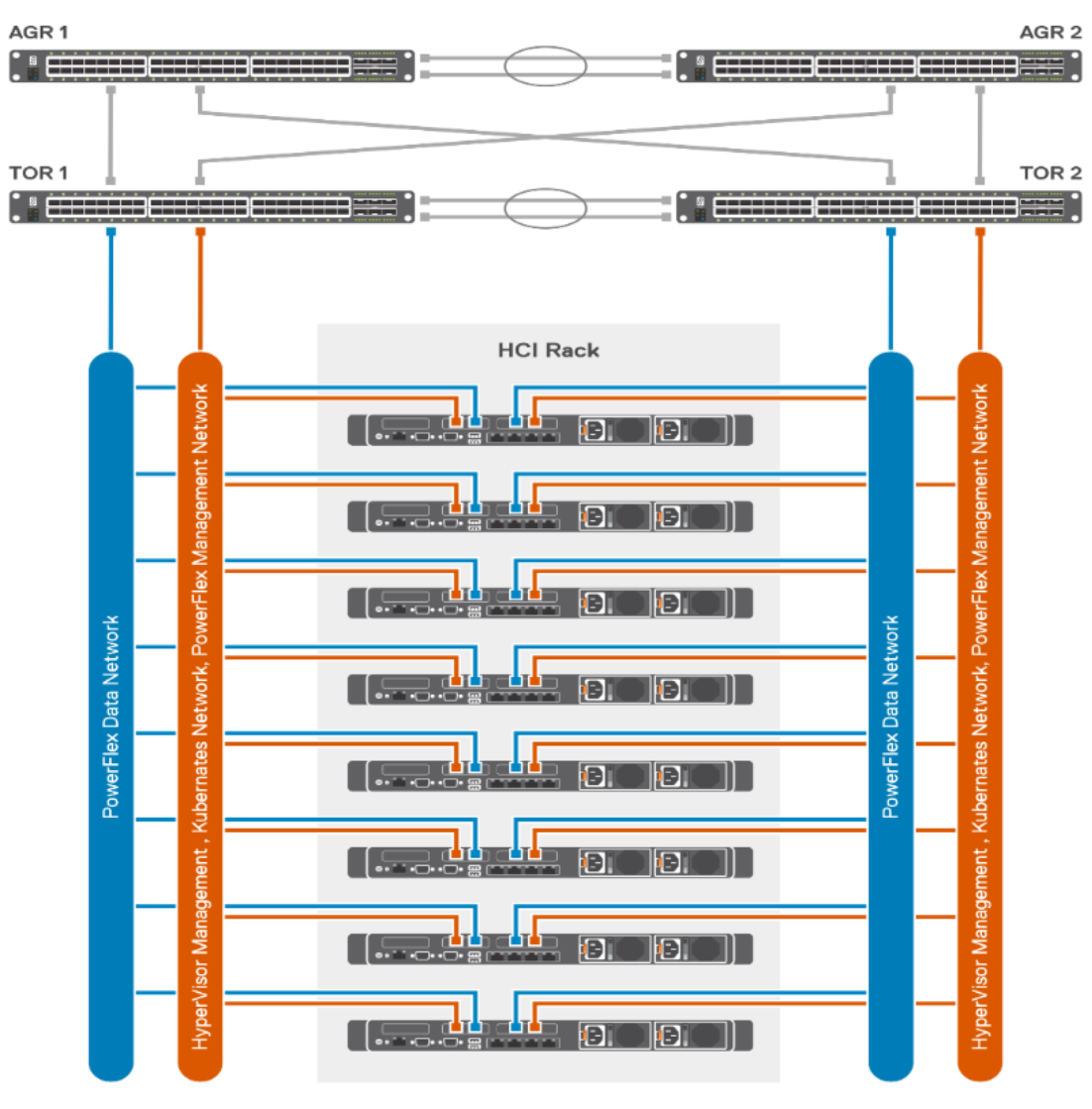
Figure 4. HCI network configuration
- Two Dell S5048F switches are configured with VLT to provide fault tolerance and enable connectivity with other switches. Storage nodes, Compute nodes, Management, and other teamed networks use the Link Aggregation Control Protocol (LACP).
- Two dual-port 25 Gb Mellanox NICs on each server provide 4 x 25 Gb ports.
- SDS and SDC data communication use dedicated 2 x 25 G uplinks in bond topology.
- Application management and PowerFlex management use another dedicated 2 x 25 G uplink in bond topology.
For more information, see PowerFlex rack architecture.
Performance tests
Overview
Test methodology
To validate the performance of the SQL Server 2019 on a containerized environment, an OLTP workload is simulated by using the HammerDB tool. OLTP workload typically runs a specific set of queries (read and write) against the database. These set of queries are called database transactions and is measured in TPM (Transaction per minute).
For this reference architecture, a sample database is populated with 100 GB of data on each SQL Server pod and multiple virtual user tests are run for a fixed interval of time against each pod to get optimal TPM numbers. The lab setup is configured as described in the logical architecture section of this document. The following figure shows the test methodology:
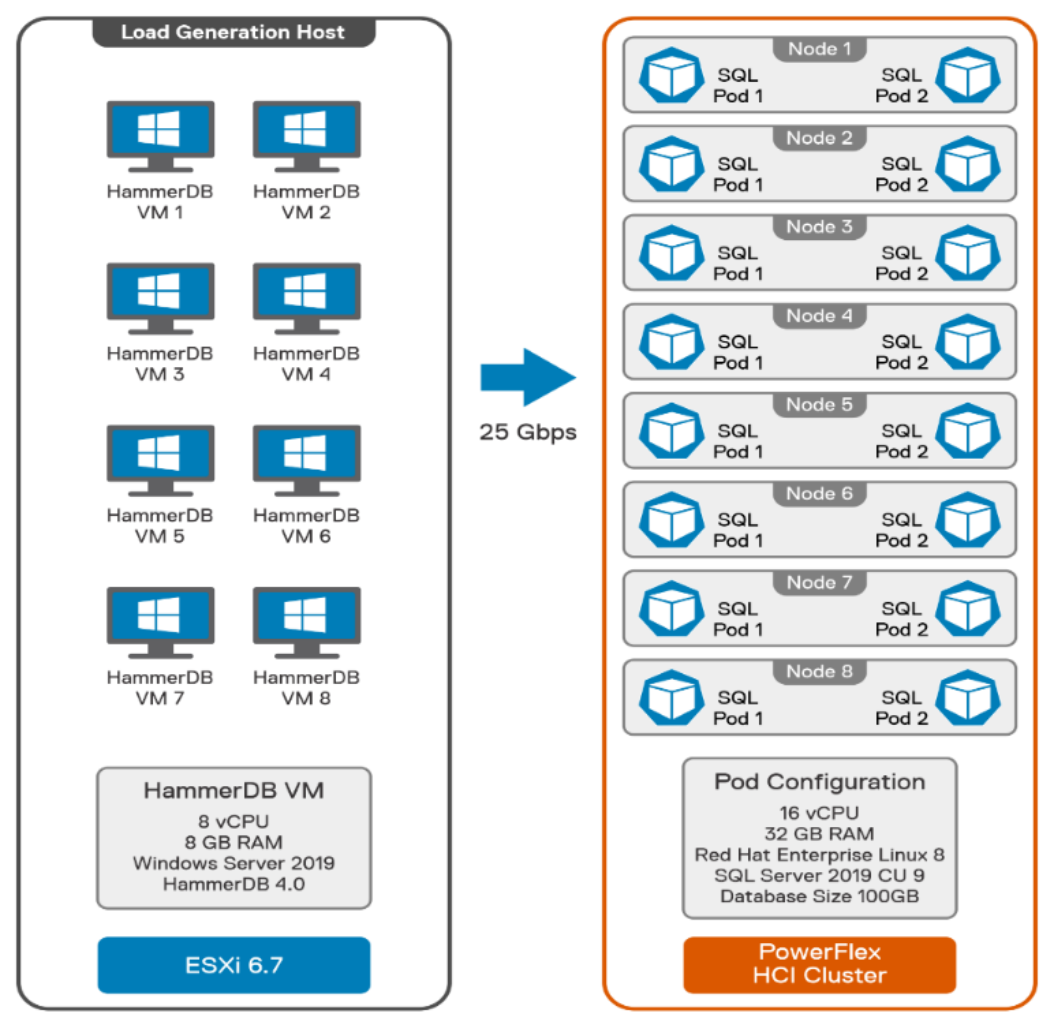
Figure 5. HammerDB load testing
The HammerDB tool is installed on dedicated VMs. These VMs are hosted on separate ESXi servers so that the CPU resources are not consumed from the worker nodes. A real-life scenario is stimulated where the clients are not running on the same nodes as the actual database. Therefore, the load is generated in a client/server model as shown in Figure 5, and the resources of the worker node are dedicated to the SQL Server pods only.
Note: In this reference architecture, we are testing with dedicated VMs running on VMware vSphere. Alternatively, the OCP worker nodes can be deployed on another virtualization platform or bare metal servers.
Each VM is running two HammerDB test tools (instances), each configured to a stand-alone SQL Server pod. Therefore, each VM is pointing to 2 SQL Server pods that are hosted on a dedicated worker node. A dedicated 25G connection is used between the ESXi host and the worker nodes for the client network. Multiple runs were performed by simulating the number of virtual users against the sample database that is populated on all the pods.
Test results
Following two scenarios have been tested using the above methodology:
- Scale out test – Maximum number of pods in the cluster.
- Scale up test – Increasing the CPU/memory resources of the pods in the cluster.
More information is available in the best practices section to tune the pods and SQL Server for the above tests.
Scale out test
The objective of this test is to check the scale out performance of the SQL Server pods across the OCP cluster. Four pods containing 16 CPUs per pod are deployed on each node scaling to 32 (eight nodes * four pods per node) pods across eight worker nodes maximizing the compute capacity of the worker nodes. Thirty-two HammerDB instances generate the OLTP load simultaneously by running the Benchmark. One to one mapping is considered between HammerDB instance and SQL pods to simulate a real-life client/server scenario.
The following graph shows the TPM performance for 32 pods running on an OpenShift cluster containing three control plane and eight worker nodes:
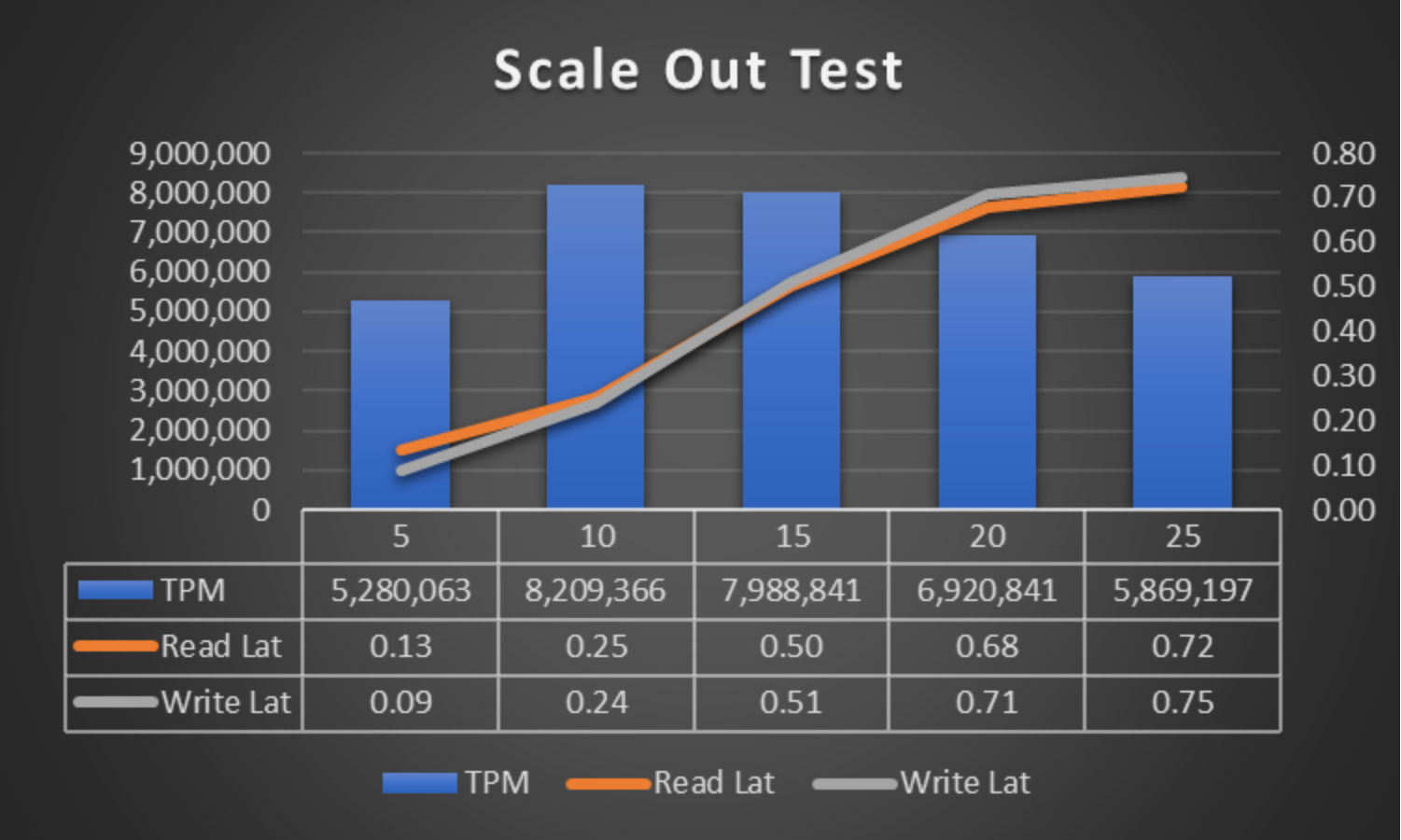
Figure 6. Scale out test graph
As seen from the above test results, approximately 8.2 million TPMs are achieved with sub millisecond read and write latency.
Scale up test
This test focuses on scaling up SQL Server pods with high CPU resources. Two pods containing 32 CPUs per pod are deployed across each node. A total of 16 (eight nodes * two pods per node) pods are deployed across eight worker nodes maximizing the available compute capacity. Sixteen HammerDB instances generate the OLTP workload simultaneously. SQL Server pods and HammerDB instances are mapped in a 1:1 ratio depicting a client/server scenario.
The following chart shows the TPM performance for 16 pods of 32 CPUs each on an OpenShift cluster containing three control plane and eight worker nodes:
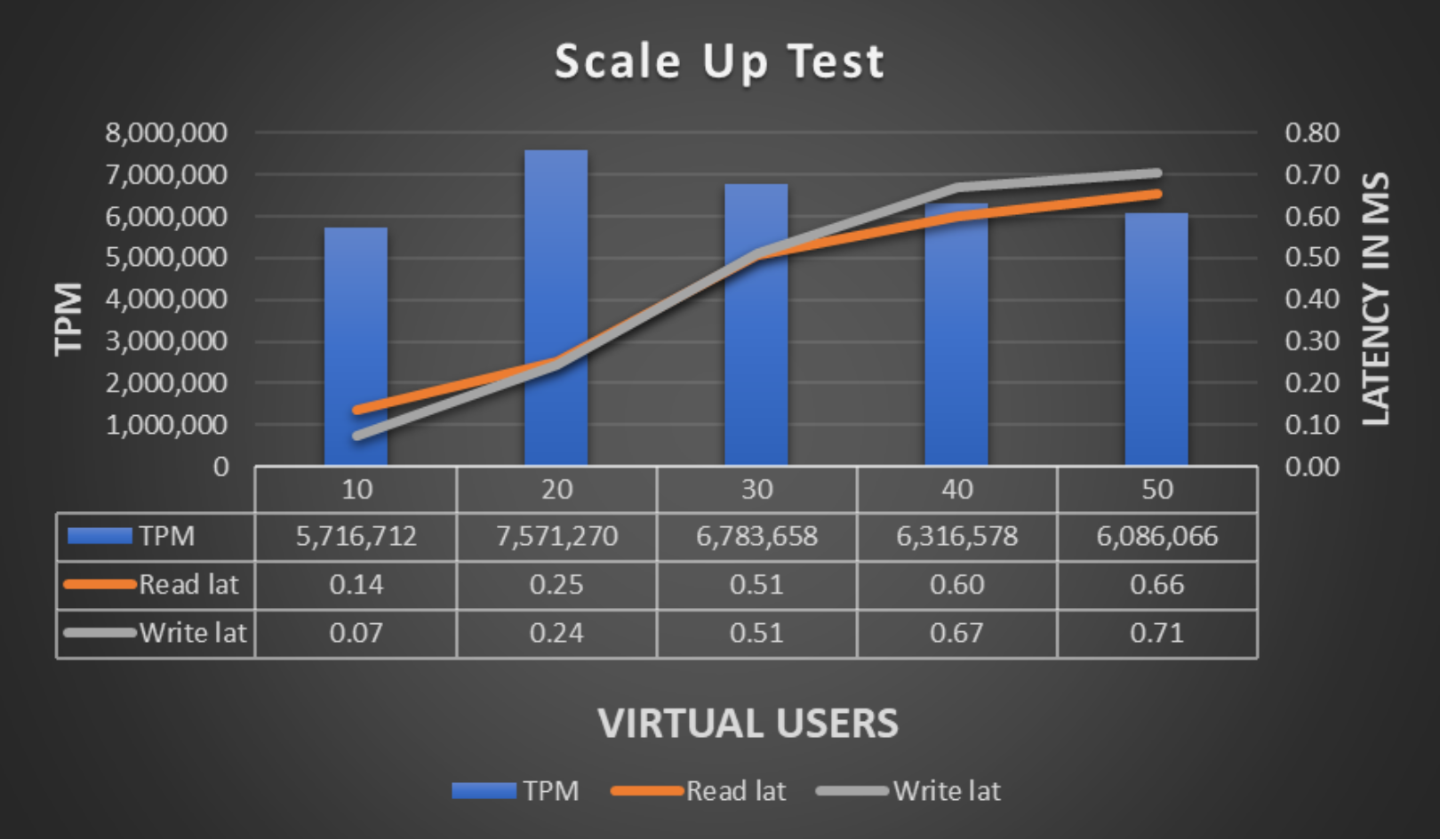
Figure 7. Scale up test graph
As seen from the above test results, the maximum transactions achieved are 7.5 million TPMs under sub millisecond read and write latency.