
Deploying PostgreSQL on Dell PowerFlex

Sep 26, 2026
Deploying PostgreSQL on Dell PowerFlex This white paper describes the performance and best practices for deploying PostgreSQL database with Dell PowerFlex and illustrates the integration of Dell PowerFlex native snapshot features, providing solutions for database backup and recovery scenarios.

Introduction

Executive summary

As organizations transform to meet the rapidly changing workload demands and ever evolving requirements, they need to consider several critical factors when deciding on deployment options for their workloads. These factors include performance, flexibility, reliability, availability, and scaling.

PostgreSQL and PowerFlex benefit from each other in many ways. PowerFlex can provide all the performance needs of the databases while being able to scale and grow with demand. PowerFlex is a software-defined infrastructure. It enables organizations the flexibility to deploy database workloads on-premises.

On-premises deployments offer greater control and customization options, allowing organizations to fine-tune hardware configurations and optimize performance according to specific workload requirements. By using PowerFlex capabilities, organizations can optimize their infrastructure choices and adapt to their evolving needs.

PowerFlex fulfills PostgreSQL performance requirements and enables organizations to optimize their infrastructure choices. Ensuring data protection is equally crucial.

Data protection is vital in scenarios such as database corruption, accidental deletions, or cyberattacks. Using PowerFlex native snapshots, in coordination with the database APIs, users can create or restore database backup copies in seconds, regardless of the size of the database. Additionally, using PowerFlex native snapshot consistency, users can create ad-hoc or policy-based consistent database copies that can be restored or mounted for test, development, reporting, data analysis, or similar purposes.

This white paper also describes performance best practices for deploying PostgreSQL databases on PowerFlex and it demonstrates the utilization of Dell PowerFlex native snapshot capabilities for streamlined database backup and recovery processes.

Revisions

Date

Description

September 2023

Initial release

April 2024

Update for snapshot and recovery

Audience

The audience for this paper includes system engineers, field consultants, IT administrators, technical architects, and anyone else who is interested in configuring and deploying PostgreSQL database using Dell PowerFlex.

Readers are expected to have an understanding and working knowledge of databases, PostgreSQL, AWS, and PowerFlex software-defined storage.

Terminology

The following table provides definitions for some of the terms that are used in this document.

Table 1.    Terminology 

Term

Definition

DNS

Domain Name System

ITOM

IT Operational Management 

IOPS

Input/Output Operations per Second

LACP

Link Aggregation Control Protocol

LCM

Life Cycle Management

NTP

Network Time Protocol

RHEL

Red Hat Enterprise Linux

SDC

Software Defined Client

SDS

Software Defined Storage

SLA

Service level Agreement

WAL

Write Ahead Logging

Product overview

Product overview

PowerFlex family 

PowerFlex software-defined infrastructure enables broad consolidation across the data center, encompassing almost any type of workload and architecture. The software-defined architecture offers automation and programmability of the compete infrastructure and provides scalability, performance, and resiliency to enable effortless adherence to stringent workload SLAs. The PowerFlex family provides a foundation that combines compute and high-performance storage resources in a managed unified fabric. PowerFlex comes in flexible deployment options such as rack, appliance, or custom nodes and in the public cloud, that enable independent (two-layer), HCI (single-layer), or mixed architectures. PowerFlex is ideal for high-performance applications and databases, building an agile private/hybrid cloud, or consolidating resources in heterogeneous environments. 
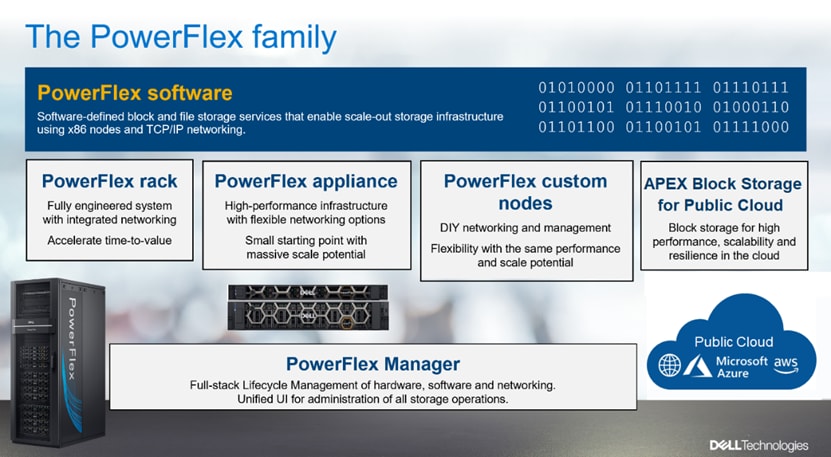
This figure shows the PowerFlex family components.

Figure 1.    PowerFlex Family

PowerFlex software components  

Software is the key differentiation and the “secret sauce” in the PowerFlex offering. PowerFlex software components not only provide software-defined storage services, but also help simplify infrastructure management and orchestration. This enables comprehensive IT Operational Management (ITOM) and Life Cycle Management (LCM) capabilities that span compute as well as storage infrastructure, from BIOS and Firmware to nodes, software, and networking. 

PowerFlex 

PowerFlex is the software foundation of PowerFlex software-defined infrastructure. It is a scale-out block and file storage service that is designed to deliver flexibility, elasticity, and simplicity with predictable high performance and resiliency at scale.  

PowerFlex Manager (PFxM) 

PowerFlex Manager is the software component in PowerFlex family that enables ITOM automation and LCM capabilities for PowerFlex systems. In PowerFlex 4.0, the unified PowerFlex Manager does the job of three separate tools that are used in previous releases PowerFlex Manager, the core PowerFlex UI, and the PowerFlex gateway. By building a next-generation UI on top of Kubernetes and embracing a modern development framework, the latest release of PowerFlex Manager continues to improve the ease of management. For Dell APEX Block Storage for AWS, the PowerFlex element manager can be leveraged for some of the management capabilities. 

PowerFlex file services  

PowerFlex File Controllers also referred as File Nodes are the physical nodes that enable the presentation of PowerFlex software defined File Services. They host the NAS Servers, which in turn host the tenant namespaces and file systems, mapping PowerFlex volumes to the file systems presented by the NAS Servers. All major protocols are supported: NFS, SMB/CIFS, FTP, NDMP, and so on. 

PowerFlex with NVMe over TCP (NVMe/TCP)

NVMe is a family of open specifications that defines an industry standard for both a logical interface and a communication protocol for accessing block storage across an internal PCIe fabric or through external fabrics such as TCP/IP and FC. NVMe is designed to take advantage of the internal parallelism and low latency inherent in flash-based media SSDs.

NVMe/TCP is an extension of the NVMe base specification that defines the binding of the NVMe protocol to message-based fabrics using TCP. By binding the NVMe protocol to TCP, NVMe/TCP enables the efficient end-to-end transfer of commands and data between NVMe hosts and NVMe controller devices by any standard Ethernet-based TCP/IP networks.

From PowerFlex release 4.x onwards, support for NVMe/TCP has been added for on-premises deployment with the introduction of a new Storage Data Target (SDT) component installed in the storage layer. The NVMe initiator in the operating system or hypervisor communicates with the SDT, which then communicates with the Storage Data Server (SDS). The NVMe initiator is part of the kernel of the application host operating system or hypervisor.
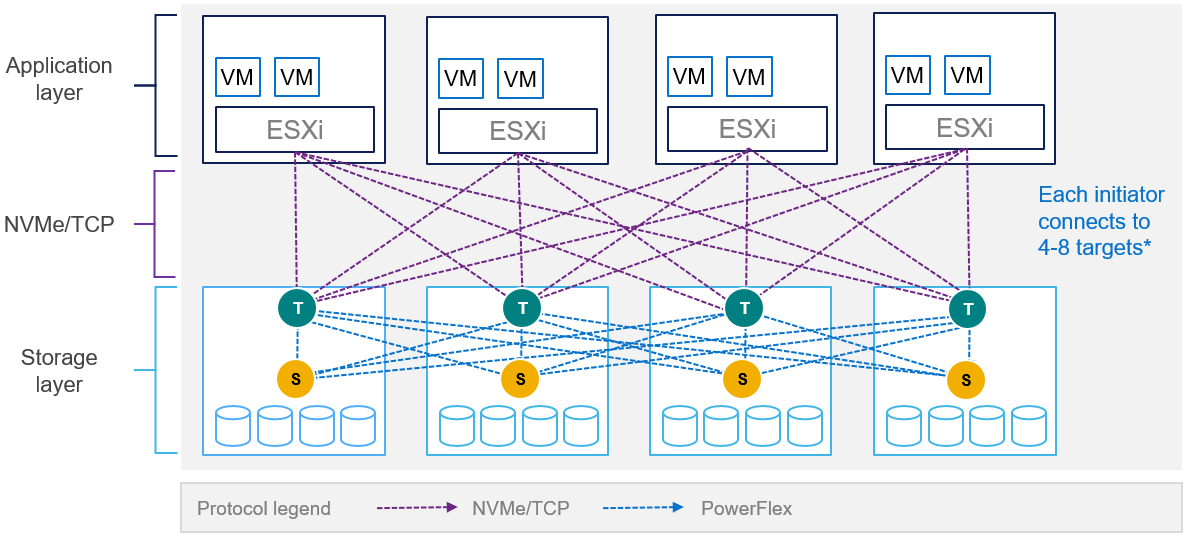
This figure shows the PowerFlex NVMe/TCP architecture.

Figure 2.   PowerFlex with NVMe/TCP

For more information, see PowerFlex with NVMe over TCP.

PowerFlex deployment architectures
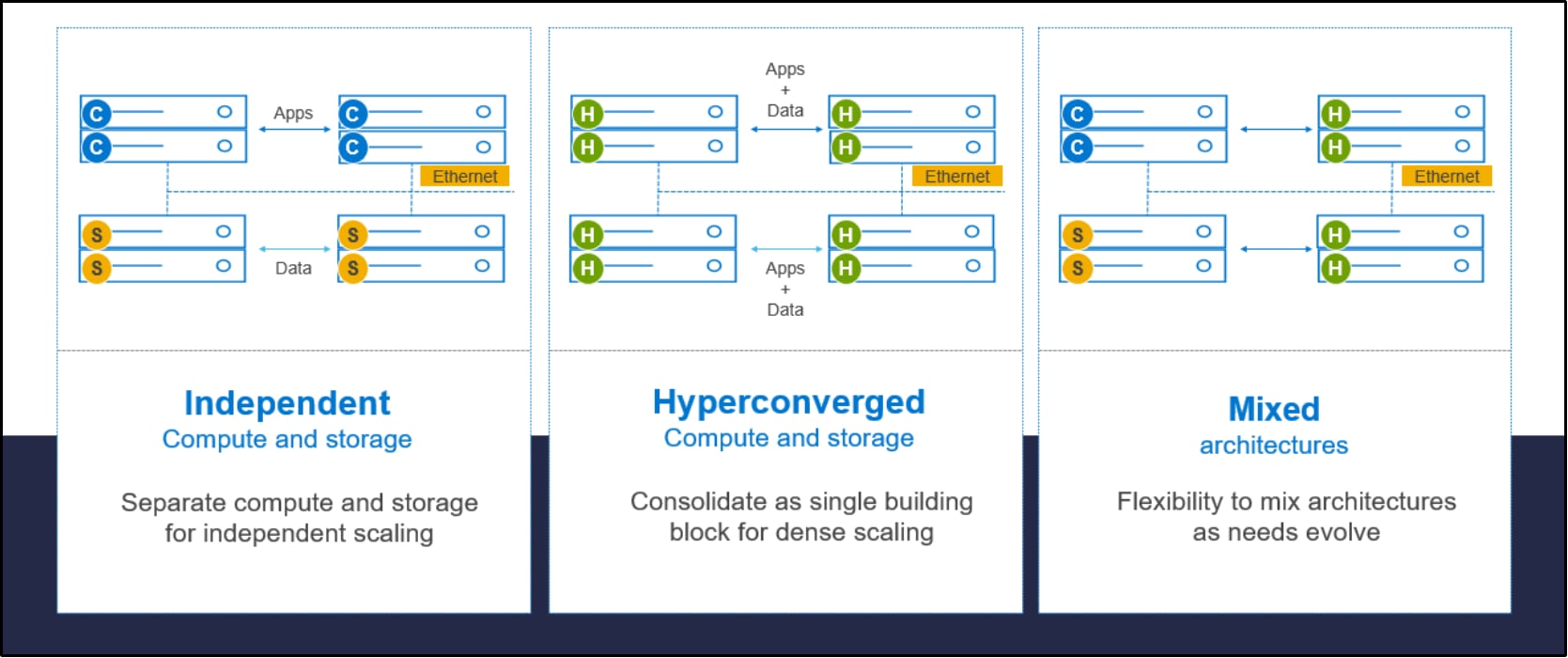

Figure 3.    PowerFlex deployment architectures

PowerFlex software-defined storage offers flexibility of deployment architecture to help best meet the specific deployment and architectural requirements. PowerFlex can be deployed in a two-layer (Independent), single-layer (Hyperconverged/HCI), or a mixture of the two architectures (Mixed). 

Independent architecture 

In an independent architecture, or two-layer architecture, some nodes provide storage capacity and host datasets while other, separate, and independent nodes, host applications and workloads. Compute and storage resources can be scaled independently by adding nodes to the cluster. This separation of compute and storage resources can also help minimize software licensing costs in certain situations. And this architecture can be ideal for hosting high-performance high-value databases and application workloads. 

Hyperconverged architecture 

In an HCI architecture, each node in the cluster contributes storage resources and hosts applications and workloads. This architecture allows you to scale your infrastructure uniformly and with a predefined building block that adds both storage and compute resources. This architecture is appropriate for data center and workload consolidation. 

Mixed architecture 

In a mixed architecture we have a combination of both the HCI and Independent architectures.  As shown in the figure above there would be some storage only nodes, compute only nodes, and HCI nodes as part of the same PowerFlex cluster. And using PowerFlex storage-only nodes, storage can be accessed and consumed by several applications and workloads that are hosted outside of the PowerFlex cluster. This is a desirable architecture when working with an existing compute infrastructure and adding high-performance software-defined storage. This can also be a starting point for a two-layer server SAN deployment as external workloads are migrated to PowerFlex.

PowerFlex consumption options

PowerFlex rack 

PowerFlex rack is a software-defined storage platform that delivers flexibility, elasticity, and simplicity with predictable performance and resiliency at scale by combining compute as well as high-performance storage resources in a managed unified network. This rack-scale engineered system, with integrated networking, enables customers to achieve the scalability and management requirements of a modern data center.  

PowerFlex appliance 

PowerFlex appliance is a PowerEdge server which has been configured to be a node in a software-defined storage deployment. This offering allows customers the flexibility and savings to bring their own compatible networking. 

PowerFlex custom nodes 

PowerFlex Custom Nodes are validated server building-blocks configured for use with PowerFlex. They are available with thousands of configuration options and are available for customers who prefer to build their own environments.

Dell APEX Block Storage for Public Cloud

PowerFlex software is also available in the public cloud as Dell APEX Block Storage for Public Cloud. It offers the same on-premises benefits of high-performance, linear scalability, and high resilience as in cloud. It also adds cloud-specific benefits, such as large volume sizes, extreme performance based on NVMe drives, and predictable scalability. The Dell APEX Block Storage self-healing architecture simplifies and increases the availability of infrastructure. It is designed to remain running even when it encounters failures. With fast rebuilds, Dell APEX Block Storage recovers rapidly from failures and keeps operating, without degrading performance or compromising availability. You can also extend this availability and configure it to protect your application availability across multiple availability zones.

PowerFlex CSI/CSM

An important component outside of PowerFlex that enables a flexible consumption model for Kubernetes is the PowerFlex CSI driver, developed as a part of the Dell Kubernetes strategy. After loading the CSI driver for PowerFlex into Kubernetes, it can be used to provision persistent volumes from the underlying PowerFlex storage resource. If the Kubernetes deployment is running low on PowerFlex storage resources, you can add PowerFlex storage nodes to increase the system capacity and performance. 

 The CSI driver connects the PowerFlex system and Kubernetes deployments. It is a storage broker which dynamically provisions volumes from PowerFlex through the PowerFlex API gateway to the Kubernetes cluster. Once the volume is available on PowerFlex, it is immediately mapped to the requesting pod. If a pod is destroyed or rescheduled, the CSI plug-in ensures that the volumes are remapped upon rescheduling of that pod.   

  • Customers running Kubernetes clusters on PowerFlex use the Dell Container Storage Modules (CSM), which extend the CSI driver capabilities. These modules: 
  • Provide enterprise storage capabilities to Kubernetes for cloud-native stateful applications.  
  • Reduce management complexity, so that developers can independently use enterprise storage with ease and automate daily operations.  
  • Extends storage functionality and capabilities beyond using the CSI driver alone.

These modules include snapshot, observability, authorization, application mobility, and resiliency.   

PowerFlex supports multiple operating systems, different deployment options on-premises and public cloud deployment model (available in AWS and Azure). PowerFlex is validated with the leading Kubernetes distributions as shown in the following figure:
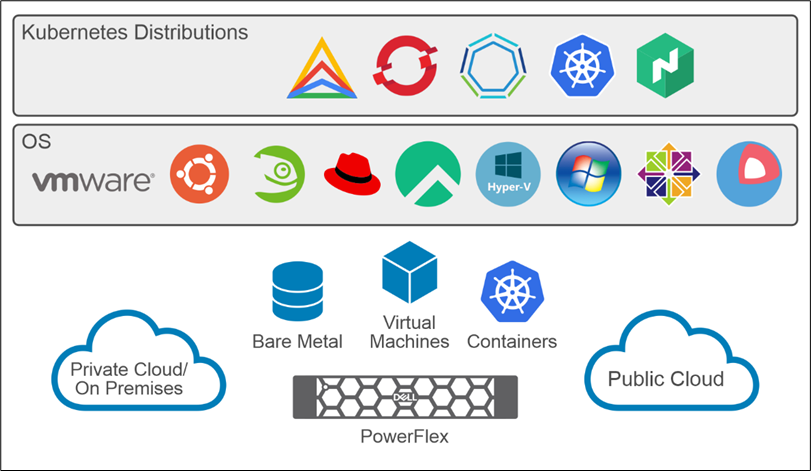
This figure shows the different kubernetes distributions in PowerFlex.

 Figure 4.  PowerFlex for different Kubernetes distributions

PostgreSQL

PostgreSQL also known as Postgres, is a powerful open-source relational database management system (RDBMS). PostgreSQL is known for its robustness, scalability, and extensibility. PostgreSQL offers a wide range of capabilities, including support for complex datatypes, transactions, concurrency control, and advanced query optimization. PostgreSQL is used as the primary data store or data warehouse for many web, mobile, geospatial, and analytics applications. 

The following figure shows a high level architecture diagram of the PostgreSQL database: 
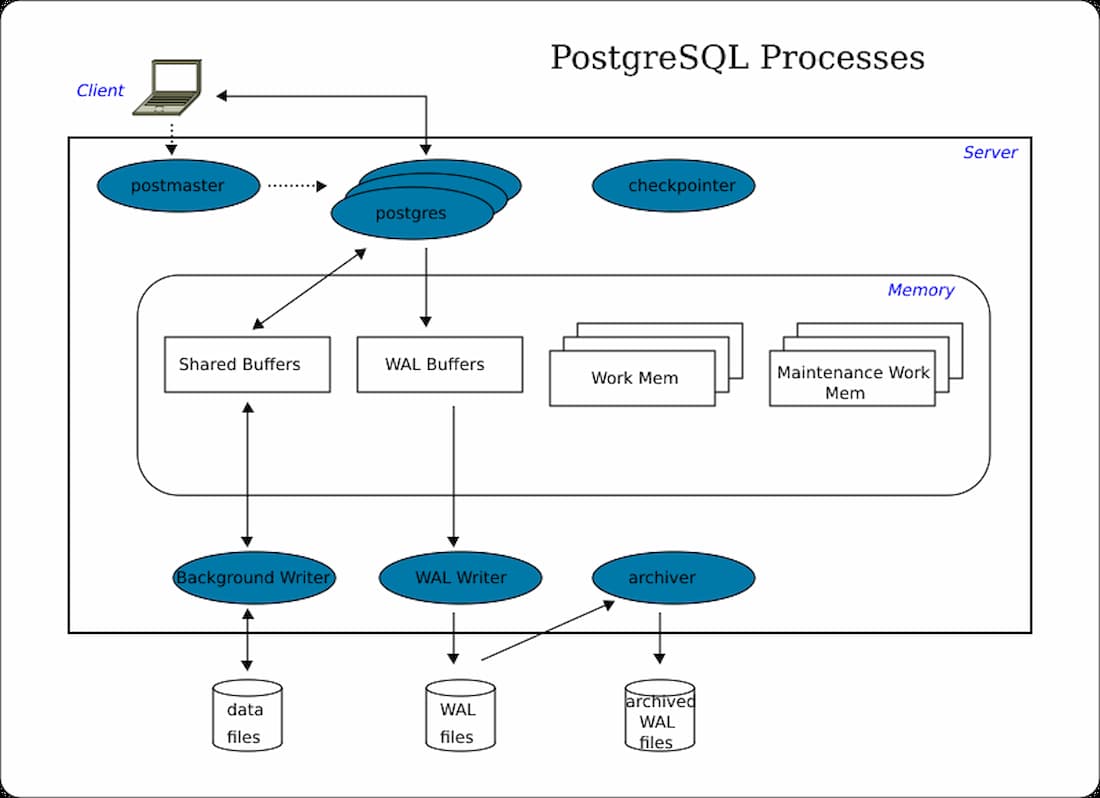
The PostgreSQL architecture diagram, showing the text below a hierarchy of blue PostgreSQL processes, outlined in black.

Figure 5.  PostgreSQL Architecture diagram

When a client application requests a connection to a database:

  • The PostgreSQL server first talks to the postmaster daemon process through the client library and checks for authentication and authorization at the requested port of PostgreSQL.
  • Then it starts the background server processes (postgres) which helps to establish connections from the client applications to the database.

For more information about PostgreSQL, see PostgreSQL documentation.

PostgreSQL deployment

Solution overview and architecture

 Overview

Deploying PostgreSQL on-premises with PowerFlex as the software defined storage, offers organizations a self-hosted solution for managing their databases while supplying a robust and reliable solution for managing their data. PostgreSQL provides customers complete control over their data and infrastructure. PostgreSQL also enables the customer to use existing supported hardware and storage resources, optimizing cost-efficiency, and performance.

Logical architecture

The following figure describes the logical architecture of PostgreSQL database that is deployed on Dell PowerFlex 4.0 with a two-layer deployment architecture:
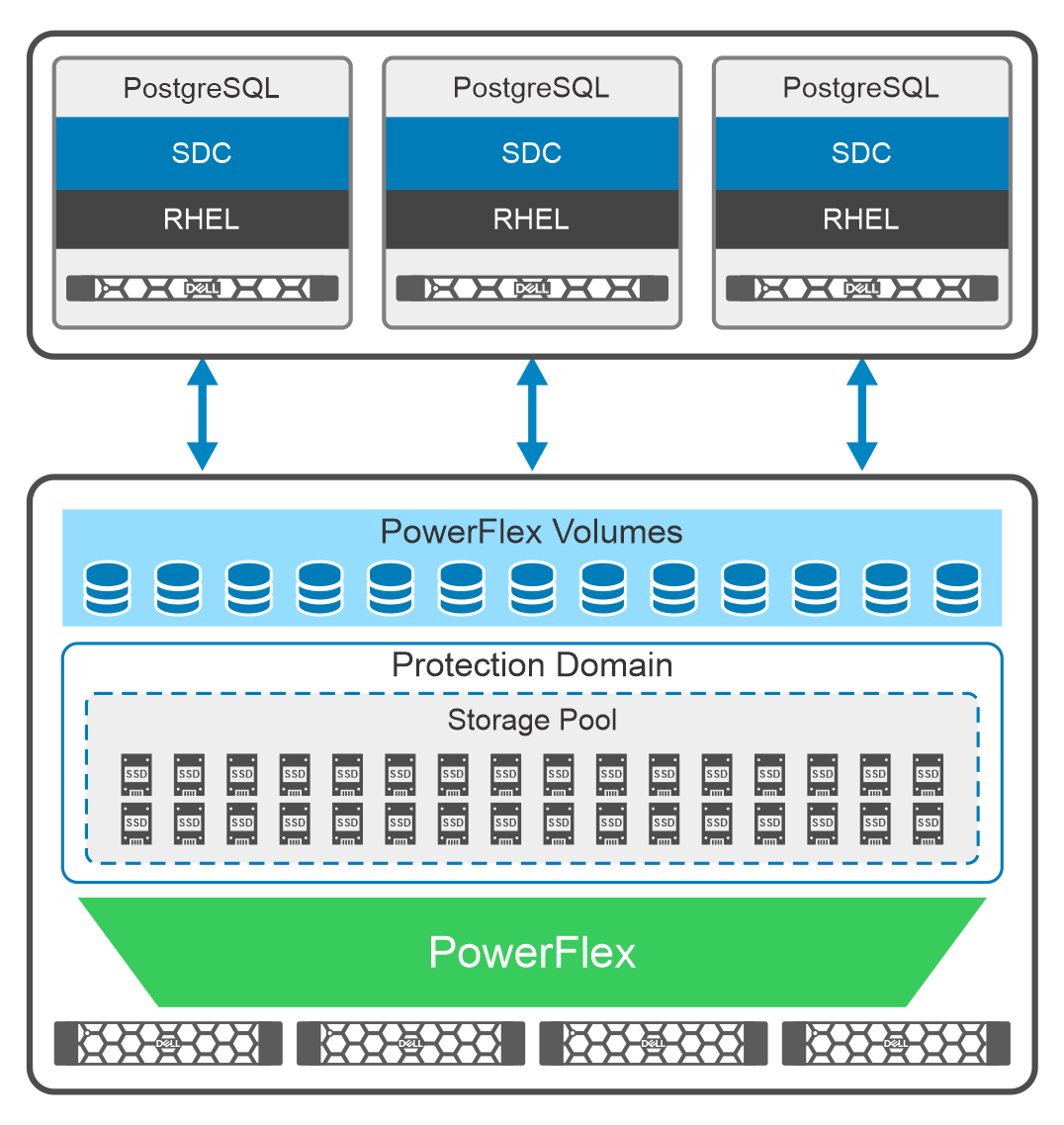
 

Figure 6.  Logical architecture: PostgreSQL on PowerFlex two-layer deployment

PowerFlex deployment is configured as a two-layer architecture with a single PowerFlex protection domain that consists of four SDSs, and one storage pool within the protection domain. The PostgreSQL database volumes are created from this storage pool.

Four PowerFlex R750 servers, each with SAS SSDs disks, are used as storage only nodes. The PowerFlex SDS components are installed on each of these servers which contribute to the PowerFlex storage pool. These SAS disks provide an aggregated storage pool capacity of 26 TB within a single protection domain.

In the on-premises lab environment, three PowerFlex R650 servers in bare metal configuration are used as compute only nodes with Red Hat Enterprise Linux operating system. The PowerFlex SDC component is installed on each of these servers and provides access to the volumes created in the storage pool. The PostgreSQL databases are then deployed on these servers using the PowerFlex volumes. 

For more information about the software and hardware that is used in the lab tests, see PowerFlex Node specifications.

Note: Many best practices described in this paper, also apply to the virtualized, and container-based PostgreSQL deployments with PowerFlex.


Network architecture

The following diagram shows the network architecture of this solution:
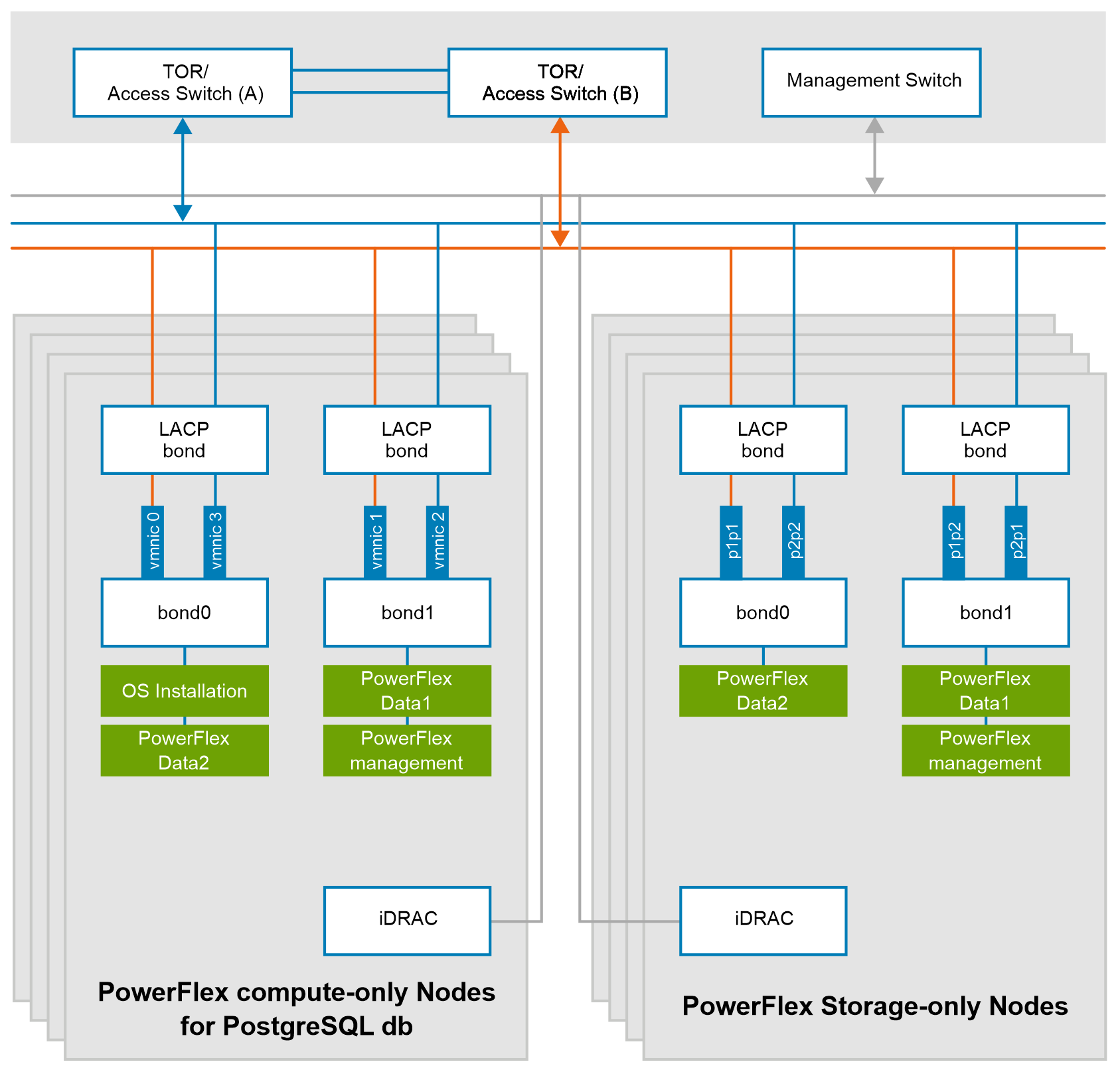
Figure 7.   Network design of PowerFlex nodes

At the physical layer, two supported Top of Rack (TOR) switches are used for redundancy and load-balancing purpose. A peer link is configured on both the TOR switches.

The network ports of different network interfaces on each PowerFlex node are configured to carry PowerFlex management and PowerFlex data traffic. An LACP bond is configured at the host level with two network interfaces to form a single-bonded (logical) interface for increased bandwidth and redundancy.

The bond0 and bond1 are the LACP bonded interfaces and are configured with multiple VLAN tagged interfaces for all the PowerFlex networks. The traffic is logically separated by creating VLANs which segregates different traffic on the bond interfaces as shown in the preceding figure.

Deploying PostgreSQL

This section describes the steps taken to create the lab environment that was used for the performance tests and validation of the best practices that are described in this paper.

Prerequisites

Each compute node is mapped with PowerFlex storage volumes, where two volumes are used for the database datafiles and the third one for the write ahead logging (WAL). The PowerFlex volumes are seen as /dev/scini* devices. They are formatted as XFS filesystems and are mounted to their respective mount points with appropriate permissions, as shown in the following example. 

# sudo mkfs.xfs /dev/scinia

# sudo mkfs.xfs /dev/scinib

# sudo mount /dev/scinia /mnt/logs

# sudo mount /dev/scinib /mnt/xfs-pgdata

# sudo chown postgres:postgres /mnt/logs/db1

# sudo chmod 0700 /mnt/logs/db1

# sudo chown postgres:postgres /mnt/xfs-pgdata/db1

# sudo chmod 0700 /mnt/xfs-pgdata/db1

For other configuration recommendations, such as for udev rules and fstab entries, see the best practices section. 

Deploying the PostgreSQL databases

Steps to install and configure the PostgreSQL databases:

Step 1:

Run the following command to download and install the PostgreSQL software:

 # sudo dnf install -y https://download.postgresql.org/pub/repos/yum/reporpms/EL-8-x86_64/pgdg-redhat-repo-latest.noarch.rpm
 # sudo dnf -qy module disable postgresql
 # sudo dnf install -y postgresql15-server

Step 2: 

Once the PostgreSQL software is installed, the database needs to be initialized and pointed to make use of the mount points created in the prerequisites section. In the following example two PostgreSQL databases are running on two different ports are being initialized:

# sudo /usr/pgsql-15/bin/pg_ctl -D /mnt/xfs-pgdata/db1 -l /mnt/log-pgdata2/log-db1/db2.logfile -o "-p 5436" start 

# sudo /usr/pgsql-15/bin/pg_ctl -D /mnt/xfs-pgdata2/db2 -l /mnt/log-pgdata2/log-db2/db2.logfile -o "-p 5438" start

Step 3:

To automatically start the databases, at startup a systemd service is created. The systemd enables and runs the PostgreSQL database at system startup. The following example shows a sample systemd service configuration:

# cat /etc/systemd/system/postgresql-db1.service
 [Unit]

Description=PostgreSQL instance on disk1-scinia

After=network-online.target

After=tuned.service 

[Service]

User=postgres

Group=postgres

Environment=PGPORT=5436

Environment=PGDATA=/mnt/xfs-pgdata1/db1

Type=forking

ExecStart=/usr/pgsql-15/bin/pg_ctl -D /mnt/xfs-pgdata/db1 -l /mnt/log-pgdata2/log-db1/db2.logfile -o "-p 5436" start 

ExecStop=/usr/pgsql-15/bin/pg_ctl -D /mnt/xfs-pgdata/db1 -l /mnt/log-pgdata2/log-db1/db2.logfile -o "-p 5436" stop

ExecReload=/usr/pgsql-15/bin/pg_ctl -D /mnt/xfs-pgdata/db1 -l /mnt/log-pgdata2/log-db1/db2.logfile -o "-p 5436" reload 

Restart=always

RestartSec=3 

[Install]

WantedBy=multi-user.target

Step 4:

Enable and start the created systemd services:
# sudo systemctl enable postgresql-db1.service
# sudo systemctl start postgresql-db1.service

Step 5:

At this point the two PostgreSQL database server software processes are successfully initialized and running, listening for the client connectivity at the configured ports. You can now create the user databases in each of the processes with the desired database name as follows:

# sudo -u postgres createdb -h localhost -p 5436 mydb1

# sudo -u postgres createdb -h localhost -p 5438 mydb2

Note: The commands to deploy other environments, for example, using different operating systems, database features or file system structure will vary.

Test configuration of PowerFlex

Configuring the storage and compute nodes

The following table shows the hardware and software configuration of storage and compute nodes that are used in the on-premises setup that is used for Dell PowerFlex two-layer mode of deployment:

Table 2.  Storage node configuration

Hardware

Configuration

Server model

PowerFlex R750

CPU

2 x Intel 6330 Xeon 28 Cores 3.1 GHz

Memory (GiB)

512 GB RAM with 2 x 16 GB NVDIMM

NIC

4 ports 25 GB Mellanox Connect-X 5

Storage

12 x 1.6 TB SAS SSDs

Software

Configuration

Operating system

RHEL 8.6

Dell PowerFlex software release

4.5.1


The following table shows the hardware and software configuration of the compute nodes on-premises setup that is used for a Dell PowerFlex two-layer mode of deployment:

Table 3.    Compute node configuration

Hardware

Configuration

Server model

PowerFlex R650

CPU

2 x Intel 6330 Xeon 28 Cores

Memory (GiB)

256 GB

NIC

4 ports 25 GB Mellanox Connect-X 5

Storage

BOSS S1 Controller 2 x 240 GB SATA SSD

Software

Configuration

Operating system

RHEL 8.6

Dell PowerFlex software release

4.5.1

PostgreSQL

16.1


PostgreSQL performance tests

This section describes the tests that were performed to validate the PostgreSQL database performance on-premises with the two-layer PowerFlex system deployment. 

The benchmarking tool that is used for these workloads is pgbench, which is designed for PostgreSQL database performance testing. By running predefined patterns of database transactions and queries, pgbench creates a workload that mimics the behavior of intensive real-world applications. This workload allows database administrators and developers to gauge the performance of their PostgreSQL instance under different scenarios, identify bottlenecks, and make informed decisions about system optimizations. For more information about pgbench tool and its options see, pgbench and pgbench-options.

The following use cases have been tested:

  • Use case 1: Read-only workload with 100 percent reads
  • Use case 2: Mixed workload with 50-50 percent mix of reads/writes  

The first use case, which is a 100% read workload, is used to create a high system stress while monitoring the PowerFlex storage IOPS and latency metrics. This test demonstrates the storage system ability to service read-only transactions while maintaining high IOPS and low latencies.

The second use case, which is a mixed workload of read and write transactions, is a more common database activity pattern for most applications. This test demonstrates the storage system ability to service common mixture of read and write transactions while maintaining high IOPS and low latencies.

The goal of both test cases is to stress the storage subsystem by keeping both host and database cache small, and therefore generating high level of storage I/O requests.

Two PostgreSQL databases are created in each of the three compute only nodes and loaded with 300 GB of data, for a total of six databases and 1.8 TB of data. The test parameters that are used for each database workload are identical, where the IOPS metric is a sum of the database volumes IOPS as reported by PowerFlex, and the latency metrics are the average latencies for the run, as reported by PowerFlex.

In use case 1, where read-only workload is used, only one PostgreSQL database in each of the three nodes is used. Due to the higher IOPS and resulting CPU demand, it saturated the resources in the compute nodes and there was no need to add the second database workload in each node.

In use case 2, where a mixed workload is used, both PostgreSQL databases in each of the three nodes are used. As a mixed workload has higher demand on database resources, both databases were used before the compute nodes were saturated.

It should be noted that the PowerFlex storage resources were capable of sustaining the high workload from each use case while maintaining sub millisecond latency, demonstrating its ability to support the additional load.

Loading the database

Each database is loaded with data before the tests are performed as shown in the following example: 

# pgbench -U postgres -i -s 20000 mydb1

# pgbench -U postgres -i -s 20000 mydb2

For the database load, a scale factor of 20,000 is used to generate 300 GB of data as shown in the following figure:
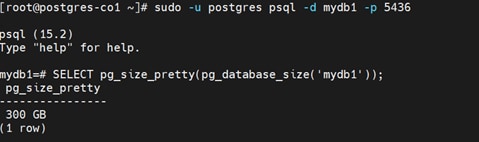
A picture containing the screenshot of database capacity.

Figure 8.  PostgreSQL database capacity after loading data

Use case 1: read-only workload

Pgbench uses the -S option for running a SELECT query, or a read-only workload. The number of clients and threads are variables that can be changed based on available system resources. The following example shows the pgbench parameters that were used to run each of the PostgreSQL databases:

# pgbench -U postgres -c 320 -j 90 -T 6000 -S mydb1 -p 5436

‎Figure 6 shows the test results. The test demonstrated the ability of the system to support 1,142,401 IOPS (1.14 million IOPS) while maintaining a sub millisecond read latency in this test environment.  
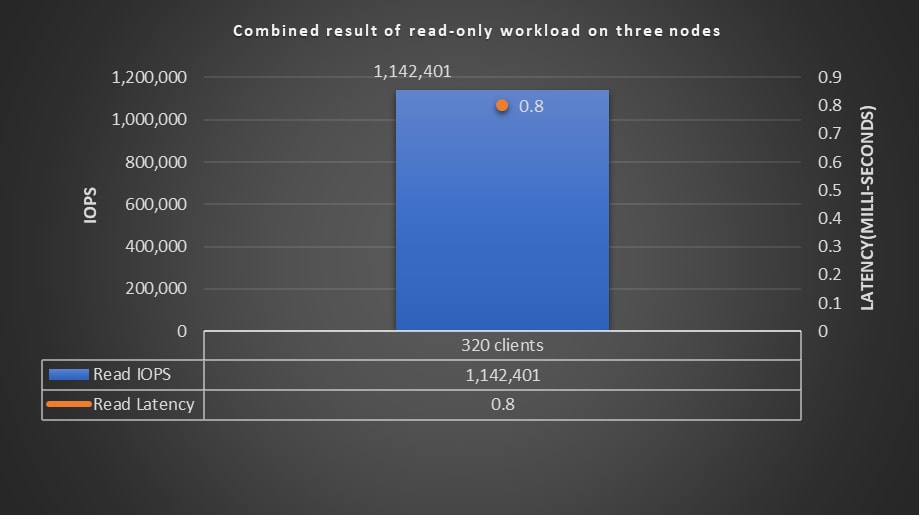
 A picture containing the performance graph for read-only workload.

Figure 9.  Performance graph for read-only workload

The following figure shows the results of the PostgreSQL read-only workload from the PowerFlex Manager dashboard:
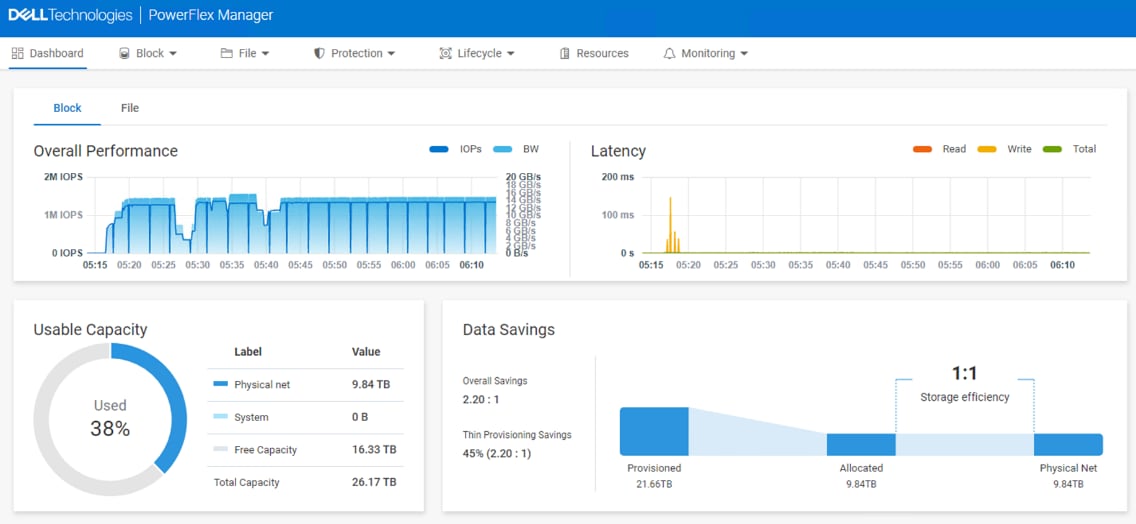
This figure shows the PowerFlex dashboard for a read-only workload.

Figure 10.  PowerFlex 4 dashboard for read-only workload

Use case 2: Mixed workload read/write (50-50)

Pgbench uses the -S -N option for running 50 percent read and 50 percent write workload. The test runs 50 percent of the UPDATE and 50 percent of the SELECT queries on the database. The number of clients and threads are variables, that can be changed based on the available system resources. The following example shows the pgbench parameters that were used to run each of the PostgreSQL databases:

# pgbench -U postgres -c 250 -j 80 -T 1200 -N -S mydb1 -p 5436

# pgbench -U postgres -c 250 -j 80 -T 1200 -N -S mydb2 -p 5438

For this test, two postgres instances are running at port 5436 and port 5438, each instance is running with 250 client connections and 80 threads and performance is measured under sub millisecond latency.

The following figure shows the results of a mixed workload. The test demonstrated the ability of the system to support 521,000 IOPS (~521 K IOPS) while maintaining a sub millisecond read/write latency in this test environment.  
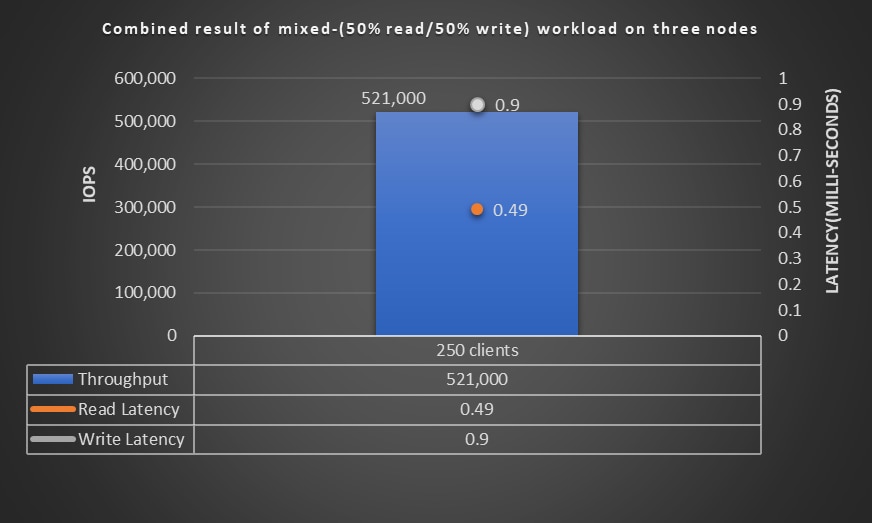
 This figure shows the performance graph of a mixed workload.

Figure 11.   Performance graph of mixed workload   

The following figure shows results of PostgreSQL read/write workload from the PowerFlex Manager dashboard:
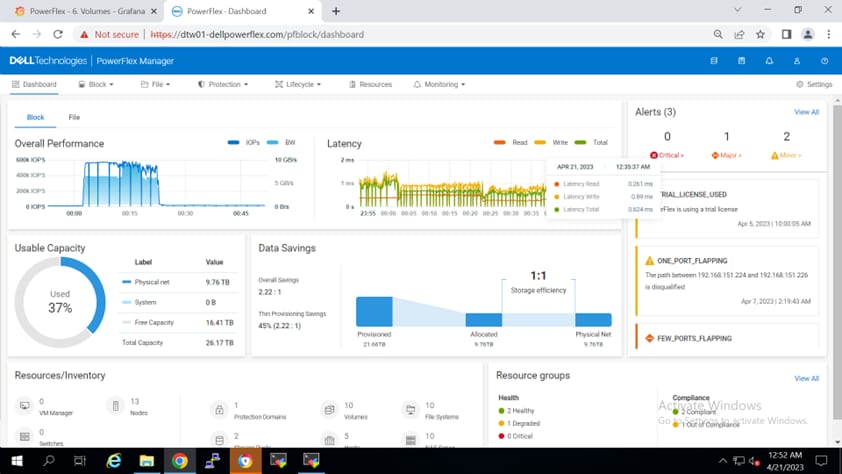
This figure shows the PowerFlex  dashboard for mixed workloads.

Figure 12.  PowerFlex dashboard for mixed workload

Data protection of PostgreSQL

PowerFlex snapshot as backup and recovery solution

Overview of PowerFlex snapshot

PowerFlex snapshots are consistent block images in the form of addressable target storage volumes that capture the state of their source volumes at a specific point in time. They are thin-provisioned (do not take any additional storage capacity when created), and writable, unless you select the Secure Snapshot or Read Only options. Once created, a snapshot becomes a new volume that can be managed like any other volume exposed by the storage system. When the snapshot is created with secure snapshots option, it ensures data retention compliance by preventing alteration or deletion until a set expiration time.

Snapshots can be managed manually through the PowerFlex UI, CLI, or REST API, with automated policies available for creation, retention, and deletion according to predefined schedules. Snapshots and their source volume are organized into a Volume Tree (V-Tree). The V-Tree includes the root volume and all descendant snapshots resulting from that volume. A V-Tree includes not only snapshots taken of the root volume at different points in time, but also descendants that are snapshots of snapshots. For example, it is a common practice to create a snapshot of a production database, mask any proprietary or private data, then create additional snapshots and provision them to groups such as Development and QA.

For more information about PowerFlex snapshots and how to use them, see the Dell PowerFlex: Snapshots Technical White Paper.

Note: Snapshots don’t protect against hardware and storage system failures, as the snapshots are stored on the same storage system as the original data. To protect against such failures, remote replication and/or other backup strategies should be implemented by the organization to realize maximum data protection.  

Data consistency using snapshots

PowerFlex snapshots support the notion of data consistency or consistency group. It allows you to take a snapshot of single or multiple volumes that can be selected simultaneously. All snapshots taken when you select multiple volumes this way form a consistency group. The snapshots in a consistency group are guaranteed to be from precisely the same point in time. They can be used to capture a crash-consistent (or storage-consistent) image across multiple volumes, making it an efficient way to create database copies.

To ensure that the database can restart from that snapshot image, the snapshot must include all the volumes holding the database datafiles and transaction log files. Once this snapshot is mapped to the target host, the PostgreSQL service pointing to the snapshot data can simply be started. As a result, the database copy has all committed transactions accurately to the time the snapshot was created. When a snapshot is taken in coordination with the PostgreSQL database APIs, it can also serve for database backup and recovery, as demonstrated later in this paper.

PowerFlex does not force the notion of a consistency group after it is created. It is the responsibility of the user to continue to treat the volumes as a group for operations such as mounting them to a server, deleting them, creating additional snapshots from these volumes, and so on. To help the user with the notion of a group, a user-friendly alias can be provided while creating and restoring the snapshot.

PostgreSQL data protection options and use cases

PostgreSQL provides several options for backups such as its built-in tool (pgdump or pg_basebackup), operating system level options or other third-party backup tools that use database data dump or file copy. However, as databases size grow, a snapshot-based backup becomes more efficient compared to a logical backup like pg_dump, due to the long time and performance overhead incurred while copying large amounts of data. Storage-based-snapshots, when following the procedure to create valid database backups, take seconds to create, regardless of the database size. In addition, they offer faster recovery as their data is immediately available and does not need to be copied back. In addition, storage-based snapshot backups provide the ability to recover individual objects by mounting the snapshot image to a new location and observing its data or exporting the required components.

Database administrators must assess transaction frequency, database size, change rate, application criticality, space constraints, and risk tolerance to plan for effective restoration and contingency measures.

In this section following use cases are described:

  • Manual and policy-based snapshots that create point-in-time database copies
  • Database backup process
  • Complete database recovery
  • Incomplete database recovery

Note: The use cases are also applicable to virtualized environments, although some additional steps may be required to manage the datastores in the hypervisor.

Prerequisites

Each compute node is mapped with PowerFlex storage volumes, where one volume is used for the datafiles, one for transaction logs, and one for archiving the write ahead log (WAL) files. The PowerFlex volumes are seen as /dev/scini* devices. They are formatted as XFS filesystems and are mounted to their respective mount points with appropriate permissions. PostgreSQL is installed, services are run, the database is initialized, and loaded with data to simulate a customer workload.

postgres=# SELECT pg_size_pretty(sum(pg_database_size(datname))) AS total_size

FROM pg_database;

 total_size

------------

 135 GB

(1 row)

Use Case 1: Manual and policy-based point-in-time database snapshots

Creating a quiesced point-in-time database snapshot results in a database copy that includes all committed transactions up to the time of the snapshot creation. An administrator can perform this task on demand or automate it by job scheduling or by creating a snapshot policy. These database snapshots can help to:

  • Create and refresh environments for testing, development, and QA purposes.
  • Verify the database data consistency and integrity.
  • Troubleshoot database issues by mounting a snapshot as a ‘sandbox’ to inspect and correct portions of production data that may have been inadvertently modified or deleted. These portions can be investigated, and the production database corrected appropriately.

PowerFlex snapshot operations can be performed from PowerFlex Manager UI, PowerFlex CLI, or by using PowerFlex REST APIs. Note that this section refers to database point-in-time consistent copies. For creation of quiesced database backups, a coordination with PostgreSQL database APIs is required.

Manual PowerFlex Snapshots

Manual snapshots offer flexibility and control for creating on-demand copies, allowing users to capture specific database states as needed, such as before implementing updates, changes, or for ad-hoc data protection.

The following steps detail how to create a PowerFlex snapshot manually of PostgreSQL database volumes:

  1. Optional: For demonstration purposes, we use pgbench to simulate an on-going user workload while snapshots are created and use a test table called ‘authors’ with known database records entered at specific times to demonstrate which of them the snapshot captures.

/usr/pgsql-16/bin/pgbench -U postgres -c 50 -j 30 -T 6000 -N -S mydb1 -p 5436

\c mydb1

CREATE TABLE authors(

              author_id SERIAL PRIMARY KEY, 

              first_name VARCHAR(100) NOT NULL, 

              last_name VARCHAR(100) NOT NULL

);

INSERT INTO authors (author_id, first_name, last_name)

VALUES (1, 'Tony', 'Jackson'), (2, 'John', 'Lee'), (3, 'Annie', 'Frank');

To create a snapshot manually, in PowerFlex UI, under Block > Volumes, select all the volumes that the database resides in, including data, and log volumes, and click create snapshot. The following figure shows how to create a snapshot manually:
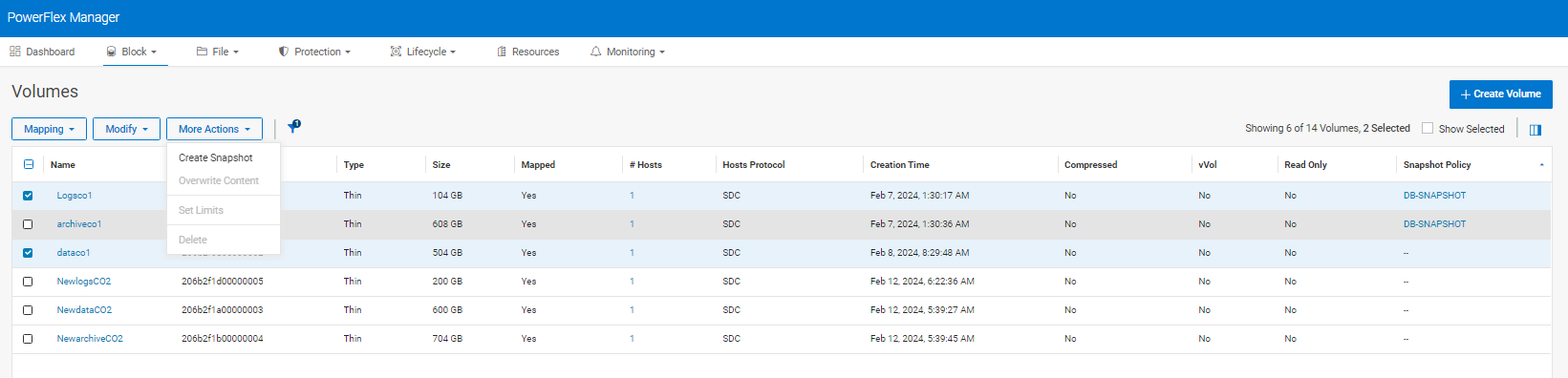
This figure shows how to create a manual snapshot.

Figure 13.  Creating a snapshot manually

The PowerFlex volumes included automatically construct a snapshot consistency group. The following dialog is displayed, and the snapshots are created with the names and suffixes specified. For snapshots that are only required for recovery purposes, Dell Technologies recommends that you keep the Read Only option (default) selected as shown in the following figure:
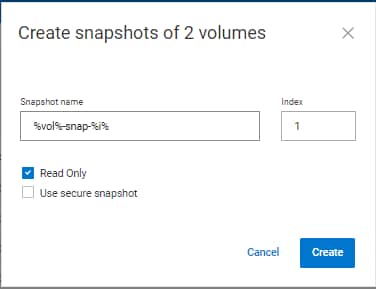
This figure shows how to create a manual snapshot.

 Figure 14. Snapshot name and values

 Snapshot volumes ‘Logs-snap-1’ and ‘data-snap-1’ are created. These snapshots capture a quiesced image of the PostgreSQL database and can be used to start the database with data valid to the time the snapshot was created. To use a snapshot, the snapshot volumes are mapped to a host, the XFS filesystems on the snapshot volumes are mounted, the PostgreSQL service is pointed to these filesystems, and started, allowing the user to connect to the database and access the data from that snapshot. The following figure shows how to map a snapshot:
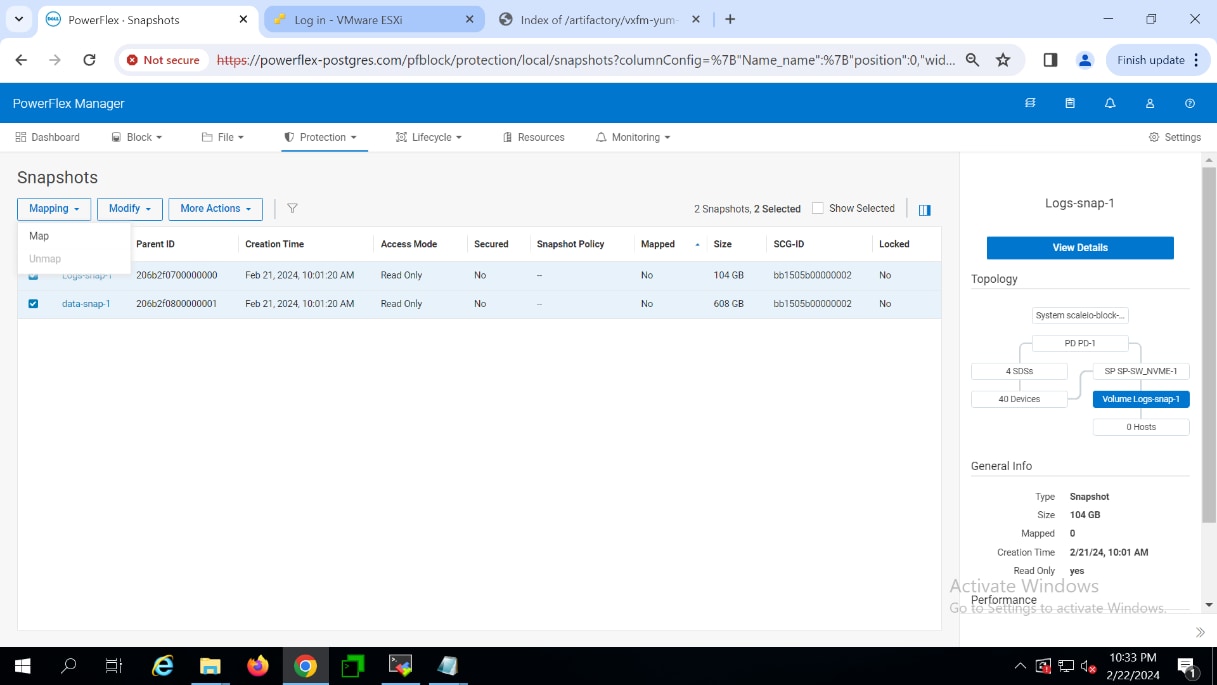
This figure shows how to create a manual snapshot.

Figure 15. Mapping a snapshot

 The following commands show an example of mounting the XFS filesystems and starting the PostgreSQL service:

# sudo mount /dev/scinid /mnt/xfs-pgdatadb1

# sudo mount /dev/scinie /mnt/logs

# sudo systemctl start postgresql-db1.service

Where /dev/scinid and /dev/scinie are newly discovered snapshot volumes.

Policy based snapshots

Policy-based snapshots automate snapshot creation, retention, and deletion based on predefined schedules or conditions, ensuring consistency and reliability in snapshot management. This approach streamlines the snapshot creation and deletion processes, improves data protection, and reduces administrative overhead compared to manual snapshot management.

The following steps detail how to create a policy based PowerFlex snapshot of PostgreSQL database volumes:

  1. To create a snapshot policy, in the PowerFlex Manager UI, click the Protection tab, then click Create Snapshot Policy to open the policy wizard. A new wizard of Create Snapshot Policy appears. In the wizard, enter the policy name, interval, and desired retention period as per the business need. Click Create and Activate. The Create button creates the policy but the state will be Paused. The following figure shows the Create Snapshot Policy wizard:

This figure shows the snapshot policy creation window.

 Figure 16.  Snapshot policy creation

When using the snapshot policy, a policy rule is created that defines the time interval between snapshot creation and the retention period (or in other words, how many snapshots to keep).

 To create the policy described above, use the following CLI command:

# scli --login --management_system_ip 10.10.10.10 --username admin --password *****

# scli --add_snapshot_policy --snapshot_policy_name snap_policy_hourly --snapshot_creation_cadence 60 -- number_of_snapshots_per_retention_level 12,7,4

In the above example, the name of the policy is DB-SNAPSHOT.  It creates a snapshot every 2 hours and keeps 12 of them. Making sure that snapshots of each of the two hour intervals for the past 24 hours are available. The policy rule can include a multilevel retention structure to retain the snapshots in minutes/hours/days or weeks. The above policy also describes another level of retention to keep one daily copy of the snapshot for a week.

After the policy is created, to assign it to the database volumes, select the policy, then click More Actions and Assign volumes. Select the volumes on which the snapshot policy is to be applied (in this case, the data and log volumes of the PostgreSQL database). Users can view the volumes created by the snapshot policy in the PowerFlex UI > Block > volumes tab. The following figure shows a snapshot policy to volumes window:
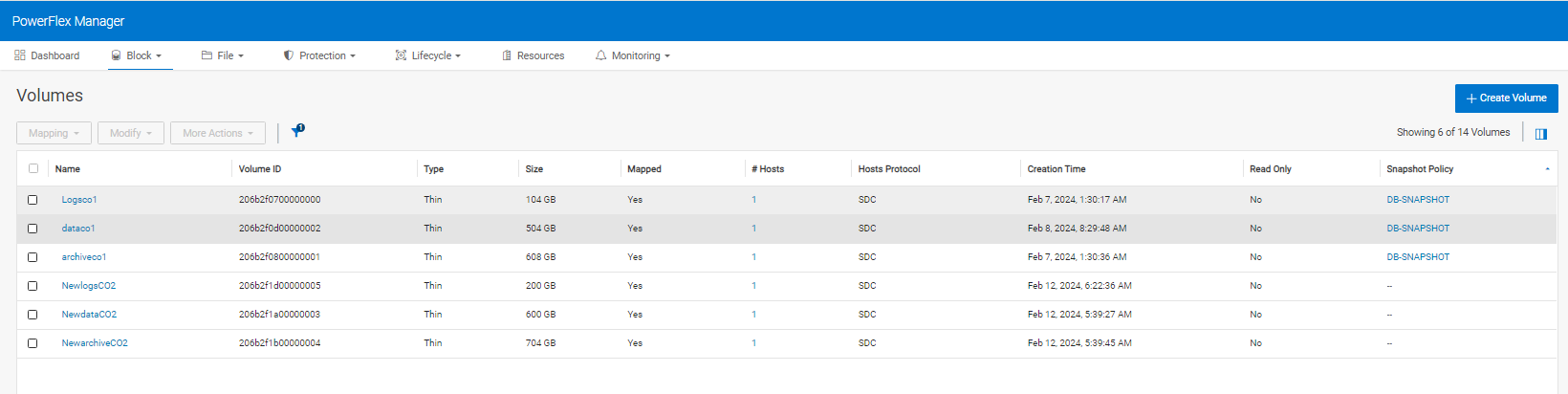
This figure shows the snapshot policy to volumes window.

Figure 17.  Snapshot policy to volumes

 2. Snapshots are automatically created once the defined rule condition is met. To use a snapshot, the snapshot volumes are mapped to a host, the XFS filesystems on the snapshot volumes are mounted, the PostgreSQL service is pointed to these       filesystems and started, and then the user can connect to the database to access the data from that snapshot.

Note: PowerFlex snapshots in a consistency group are guaranteed to be from precisely the same point in time. Hence, it is important to take the snapshot of the data and log volume together to restore and recover the database in a consistent state. In the event of a database issue, administrators should manually stop snapshot policies to prevent data loss. It can be enabled once the database is restored.

Use Case 2: Database backup process

Effective backup procedures are vital for data protection and business resilience. PostgreSQL's pg_backup_start and pg_backup_stop options facilitate streamlined backup processes, maintaining data integrity throughout. Also, it is important to ensure that WAL archiving is enabled and working correctly.  Additionally, that snapshots are taken periodically. 

The following steps describe the database backup process of PostgreSQL database volumes using PowerFlex snapshots.

1.    Map a PowerFlex volume for WAL archive logs and mount it with the required permissions.

# sudo mkfs.xfs /dev/scinic

# sudo mount /dev/scinic /mnt/archive

# sudo chown postgres:postgres /mnt/archive 

# sudo chmod 0700 /mnt/archive

Enable WAL archive logging and restore command options as a part of recovery preparations in the postgres.conf file of the database. 

# wal_level = replica

# archive_mode = on

# archive_command = 'cp %p /mnt/archive/%f'

# restore_command = 'cp /mnt/archive/%f %p'

# log_directory=/mnt/logs/

2.    Run the following commands and restart the database service for the changes to be effective.

# /usr/pgsql-16/bin/psql -c "ALTER SYSTEM SET archive_command TO 'cp %p /mnt/archive/%f'" -p 5436

# sudo systemctl start postgresql-db1.service

3.    Verify that the configured WAL archive logging is working, any data that is written to db creates the WAL logs in the mounted directory here > /mnt/archive.

[postgres@conode1 mnt]$ ls -l /mnt/archive

total 103514120

-rw-------. 1 postgres postgres 16777216 Feb 13 06:36 000000010000001B00000002

-rw-------. 1 postgres postgres 16777216 Feb 13 06:36 000000010000001B00000003

-rw-------. 1 postgres postgres 16777216 Feb 13 06:38 000000010000001B00000004

-rw-------. 1 postgres postgres 16777216 Feb 13 06:38 000000010000001B00000005

4.    To create a point-in-time snapshot for consistent database backup, it is necessary to initiate a checkpoint in snapshot mode using the pg_start_backup() function. This ensures that the backup maintains consistency and recoverability up to the starting point of the backup. Below are the commands to be run after logging into the database.

mydb1=# SELECT pg_backup_start(label => 'backup', fast => true;

 pg_backup_start

-----------------

 1B/3000028

(1 row)

5.    Take a snapshot of data and log volumes from the PowerFlex UI. Once the snapshot is taken, run the below with function pg_backup_stop. This function terminates the backup mode of the database and performs an automatic switch to the next WAL segment.

mydb1=# SELECT * FROM pg_backup_stop(wait_for_archive => true);

NOTICE:  all required WAL segments have been archived

    lsn     |                           labelfile                            | spcmapfile

------------+----------------------------------------------------------------+------------

 1B/3000138 | START WAL LOCATION: 1B/3000028 (file 000000010000001B00000003)+|

            | CHECKPOINT LOCATION: 1B/3000060                               +|

            | BACKUP METHOD: streamed                                       +|

            | BACKUP FROM: primary                                          +|

            | START TIME: 2024-02-13 01:46:28 CST                           +|

            | LABEL: backup                                                 +|

            | START TIMELINE: 1                                             +|

(1 row)

The above protection process creates valid database snapshots leveraging PowerFlex snapshot technology in coordination with the database APIs. If a database recovery is required, it can be accomplished through two distinct methods: full recovery or partial recovery up to a specified recovery point. Use cases 2 and 3 outline the comprehensive steps for both scenarios, ensuring a seamless restoration process.


Use Case 3: Full database recovery

The exact process for a full database recovery may vary from database to database. Database recovery encompasses restoring the desired snapshot and applying subsequent archived logs to restore the database to its desired state. This method ensures data integrity and minimizes downtime in case of database corruption. 

The following steps describe the complete database recovery use case of PostgreSQL database volumes using a PowerFlex snapshot.

1.    To create a database recovery scenario, we are running additional database transactions by pgbench and manual scripts to insert tables and data. The database size is augmented by an additional 10 GB of data since the last snapshot was captured. 

postgres=# \c mydb1

You are now connected to database "mydb1" as user "postgres".

mydb1=# SELECT pg_size_pretty(pg_database_size('mydb1'));

 pg_size_pretty

----------------

 145 GB

row)

2.    A database corruption is simulated by deleting some of the data files, an event that justifies a database restoration and recovery. To start the recovery process, the PostgreSQL service is stopped to avoid any locks or open files. The existing data     filesystem is unmounted prior to restoring the snapshot volume. 

Note: The transaction log filesystem is left as it is, assuming it was not corrupted, which is the only way to perform a full database recovery. If the transaction logs are not available, Use Case 4 should be followed instead of 3. 

The latest snapshot of the data volume is mapped and mounted to the node for recovering the database. For example, the snapshot that is mounted on the target node gets discovered as scinid and scinie devices:

# sudo mount /dev/scinid /mnt/logs

# sudo mount /dev/scinie /mnt/xfs-pgdata

Note: Only the data volume is restored and mapped to the host and not the transaction log volume. The assumption in this use case is that the transaction logs have survived the disaster and can be used to perform a full database recovery. If you restore the log volume, you overwrite these latest transactions with old data from the time of the snapshot creation.

3.    Log in to the mounted directory and verify the content of the postgres.conf file has the following configurations: 

# wal_level = replica

# archive_mode = on

# archive_command = 'cp %p /mnt/archive/%f'

# restore_command = 'cp /mnt/archive/%f %p'

# Log_directory=/mnt/logs/

4.    Create an empty recovery.signal file in the data directory. Start the PostgreSQL service for this mounted database.

# touch recovery.signal

# sudo systemctl start postgresql-db1.service

5.    Once the postgresql service starts successfully monitor the log files. When the log displays the message indicating that the database system is prepared to accept connections and has finished writing all database files from its archive logs, the recovery process is completed.

tail -f /mnt/logsdb1/log/postgresql-Wed.log

2024-02-10 15:29:28.082 CST [3598396] LOG:  restored log file "000000010000002800000028" from archive

2024-02-10 15:29:28.102 CST [3598396] LOG:  restored log file "000000010000002800000029" from archive

2024-02-10 15:29:28.206 CST [3598396] LOG:  restored log file "00000001000000280000002A" from archive

2024-02-10 15:29:41.120 CST [3598394] LOG:  checkpoint complete: wrote 16274 buffers (99.3%); 0 WAL file(s) added, 0 removed, 55 recycled; write=0.060 s, sync=0.003 s, total=0.089 s; sync files=31, longest=0.002 s, average=0.001 s; distance=897002 kB, estimate=897002 kB; lsn=28/A2000028, redo lsn=28/A2000028

2024-02-10 15:29:41.136 CST [3598392] LOG:  database system is ready to accept connections.

6.    Verify successful connection to the newly recovered database from the snapshot volume and verify the presence of manually added data and tables, ensuring they contain the recovered content.

For more information about the command line options, see continuous archive Postgres backup.


Use Case 4: Partial database recovery

Partial database recovery of a PostgreSQL database might be used in scenarios where a specific point-in-time view of the data is required for analysis or auditing purposes, even if it does not reflect the latest state of the database. However, unintended incomplete recovery could occur due to errors during the restoration process or incomplete application of transaction logs. In such cases, data inconsistencies or loss may occur, potentially impacting database integrity and usability. A database administrator has the capability to perform a partial recovery to a specific time as designated by the user. This is achieved by using the recovery_target_time function within the postgres.conf file, allowing verification of data at the specified moment. Then, the administrator can revert to the most recent state to transition to a complete recovery phase.

The following steps describe the partial recovery process for PostgreSQL database volumes using PowerFlex snapshot:

1.    To create a partial database recovery scenario, we are running additional database transactions using pgbench and manual scripts to insert tables and data. The database size is augmented by an additional 10 GB of data since the last snapshot was captured. 

postgres=# \c mydb1

You are now connected to database "mydb1" as user "postgres".

mydb1=# SELECT pg_size_pretty(pg_database_size('mydb1'));

 pg_size_pretty

----------------

 145 GB

(1 row)

In the case of partial database recovery, we will utilize the recovery_target_time parameter, which will restore only a portion of the data, approximately 7 gigabytes, up to the specified timestamp instead of full 10gigabytes of data written.

2.    A database corruption is simulated by deleting some of the data files, an event that justifies a database restoration and recovery. To start the recovery process, the PostgreSQL service is stopped to avoid any locks or open files. The existing data filesystem is dismounted prior to restoring the snapshot volume. If the transaction logs did not survive the disaster and the transaction log snapshot volume is to be restored as well, unmount the transaction log filesystem as well.

The latest snapshot of the data volume (and if required, also the transaction log volume) is mapped and mounted to the node for recovering the database. For example, the snapshot that is mounted on the target node gets discovered as scinid and scinie devices:

# sudo mount /dev/scinid /mnt/logs

# sudo mount /dev/scinie /mnt/xfs-pgdata

3.    Log in to the mounted directory and verify the content of the postgres.conf file has the following configuration: 

# wal_level = replica

# archive_mode = on

# archive_command = 'cp %p /mnt/archive/%f'

# restore_command = 'cp /mnt/archive/%f %p'

# Log_directory=/mnt/logs/

# recovery_target_time= ’2024-02-13 06:48:00’

    Note that with the recovery_target_time parameter set to '2024-02-13 06:48:00', the database recovery process will extend only up to this specified time frame. Any data written to the disk after this timestamp will not be included in the recovery.

4.    Create an empty recovery.signal file in the data directory. Start the PostgreSQL service for this mounted database.

# touch recovery.signal

# sudo systemctl start postgresql-db1.service

5.    Start the postgresql service and monitor the log files, notice that the recovery of database from archive logs happen only till the specified time in recovery_target_time and the database system is ready to accept connections once it is recovered till that timestamp.

6.    Once the postgresql service starts successfully monitor the log files. When the log displays the message indicating that the database system is prepared to accept connections and has finished writing all database files from its archive logs, the recovery process is completed.

tail -f /mnt/logsdb1/log/postgresql-Wed.log

2024-02-10 15:29:28.082 CST [3598396] LOG:  restored log file "000000010000002800000028" from archive

2024-02-10 15:29:28.102 CST [3598396] LOG:  restored log file "000000010000002800000029" from archive

2024-02-10 15:29:28.206 CST [3598396] LOG:  restored log file "00000001000000280000002A" from archive

2024-02-10 15:29:41.120 CST [3598394] LOG:  checkpoint complete: wrote 16274 buffers (99.3%); 0 WAL file(s) added, 0 removed, 55 recycled; write=0.060 s, sync=0.003 s, total=0.089 s; sync files=31, longest=0.002 s, average=0.001 s; distance=897002 kB, estimate=897002 kB; lsn=28/A2000028, redo lsn=28/A2000028

2024-02-10 15:29:41.136 CST [3598392] LOG:  database system is ready to accept connections.

7.    Verify successful connection to the partially recovered database from the snapshot volume and verify the presence of manually added data and tables, ensuring they contain the recovered content.


Best practices

PostgreSQL tuning considerations

Postgresql.conf configuration 

Each PostgreSQL database has its own configuration files. It is recommended to carefully review and edit the tunable parameters of postgresql.conf configuration file to meet the specific needs of the database workload.

Values for configurable parameters like data_directory, port, max_connections, shared_buffers, min_wal_size, max_wal_size can be specified based on the system configuration. The recommended value for these tunable parameters depends on the overall system resources available.

For tuning the PostgreSQL parameters, online tools can be used. For more information, see the following example, Postgres Tunable parameters.

System settings and tuning considerations

Disk rules

Following best practices are recommended while configuring PostgreSQL on RHEL system.

  • It is recommended that you use UDEV rules so that the device IDs are used in a persistent manner to set permissions and accessible aliases. The UDEV rules identify the disks by using a unique WWN for each device to create a symbolic link and associate permissions to the device that is persistent across the reboots. Aliases and permissions are often set differently by different customers. The following examples show a sample configuration file with UDEV rules.
  • To get the device identifier, run a command similar to the following:

# /lib/udev/scsi_id --page=0x83 --whitelisted --device=/dev/scinia 

The following example shows a sample UDEV rule that uses the device identifiers to set device permissions and user-friendly aliases that can be used for the PostgreSQL database:

  • # cat /etc/udev/rules.d/99-my-disk.rules
    ##Postgres disk information
    KERNEL=="scini*", SUBSYSTEM=="block", PROGRAM="/lib/udev/scsi_id --page=0x83 --whitelisted --device=/dev/%k", RESULT=="29542b332e1be630fca160dcb0000002b", SYMLINK+="disk1-scinia-logs" OWNER="postgres", GROUP="postgres", MODE="0700"
  • KERNEL=="scini*", SUBSYSTEM=="block", PROGRAM="/lib/udev/scsi_id --page=0x83 --whitelisted --device=/dev/%k", RESULT=="29542b332e1be630fca160aa500000007", SYMLINK+="disk2-scinib2t-pgdata1" OWNER="postgres", GROUP="postgres", MODE="0700"
  • To reload udev rules:

udevadm control --reload-rules && udevadm trigger

  • Use separate volumes for the database and log files as a best practice to avoid performance bottlenecks.
  • Add the following entries of scini volume mount points in: /etc/fstab:

/dev/scinia /mnt/logs xfs _netdev 0 0

/dev/scinib /mnt/xfs-pgdata xfs _netdev 0 0

/dev/scinic /mnt/xfs-pgdata2 xfs _netdev 0 0

System tuning

For information about the general guidelines for tuning the setup based on the system configuration, workload, and available resources, see system tuning.

PostgreSQL backup-recovery considerations

Overview

The topic of data protection is much broader than the use of storage snapshots for purposes such as creating database point-in-time copies or database backup copies (storage snapshots that the database can use to perform recovery operations). 

Data protection includes many other aspects, such as protection from natural disasters, hardware or software failure, malicious attacks, backup locations and retention, physical security, and more. 

For example, it is very common that a backup snapshot copy is mounted to a backup host and from there the data is sent for safekeeping in a backup appliance, such as Data Domain, another site, or cloud storage (for example, S3). Other solutions include remote replication of the database to another location, high-availability clustering, and so on. 

Data protection can also cover security aspects, such as data encryption, authorization, authentication, access controls, site security, and more. While these important topics are not in the scope of this paper, the reader is encouraged to familiarize themselves with them and develop an overall data protection strategy for their business-critical applications.

Storage layout considerations

The following storage layout best practices are recommended:

  • To benefit from Power Flex snapshots to create database copies that can be, all the database data files and write-ahead logs (WAL) need to be included in the same snapshot operation. Therefore, the database should reside on Power Flex volumes, and these volumes include as a unit in each such snapshot operation. If the snapshot is needed, the volumes are mounted to a host and the PostgreSQL database services is started. As Power Flex snapshots are consistent, PostgreSQL will simply start the database copy with the data showing all the committed transactions up to the point of the snapshot creation time.
  • To benefit from Power Flex snapshots to create valid PostgreSQL database backups, it is important to not only place the database data files and WAL on Power Flex volumes, but also to separate them to different volumes. When the database files and WAL are on separate Power Flex volumes, if the WAL survived the event that caused the need for database recovery, we can restore just the data files volumes without overwriting the WAL data which includes the latest transaction records. This will enable a full database recovery of all committed transactions.
  • A solution that allows the Power Flex snapshots to serve both as a backup image as well as a point-in-copy image is when the snapshot creation always include both data files and WAL volumes. In a recovery scenario, just the data volumes can be restored, and if a point-in-time copy of the database is desired, both the WAL and data files volumes can be restored. Remember that to create valid backups, PostgreSQL APIs need to be invoked, as described in the backup use case earlier.

WAL archiving considerations

The following WAL archiving best practices are recommended:

  • PostgreSQL write-ahead log (WAL) files are generated based on the activity in the database, and database WAL and archiving parameters. These files, while very useful in case the database requires a recovery, can fill up the filesystem after some time. A common strategy is to back them up to a separate archive directory. This archive directory can be a separate PowerFlex volume that can be protected using periodic snapshots, remote replication, of backup to other media such as by using Dell PowerProtect software.
  • During database recovery, the snapshot containing the data files is restored and that is the starting point of the recovery process. PostgreSQL database engine looks for the WAL records associated with that point in time to re-apply them to the data files. If all these WAL records are already present in the WAL directory, then it will find them there and use them. If these WAL records have been archived it will look for them, based on the database parameters, in the archive directory, copy them to the WAL directory, and then use them during the database recovery process.
  • For more information about PostgreSQL archiving process, see Continuous Archiving and Point-in-Time Recovery.

PowerFlex snapshot policies considerations

The following PowerFlex snapshot policies best practices are recommended:

  • When you use the PowerFlex snapshot policy, a set of snapshots is created and maintained at regular intervals, that creates a series of point-in-time database copies. It is important to remember that the policy is not aware of any events that occur at the database level. If a catastrophic event that requires database recovery occurred, it is important to stop the policy so it will not create new snapshots of the corrupt data, and remove older snapshots with valid data.
  • Once the database is corrected and valid again, you can put the snapshot policy  back in place.

Conclusion

Conclusion

PostgreSQL is an advanced database system that can support different types and sizes of workloads with a high performance and a robust set of features. Customers can deploy PostgreSQL on-premises with PowerFlex software-defined infrastructure.

The PostgreSQL database deployment on PowerFlex demonstrates the ability to support demanding performance requirements even if the capacity or workload continues to grow. Using the PowerFlex two-layer software defined infrastructure design, customers can deploy and scale both PowerFlex storage and compute nodes independently to match the growth demands of their critical workloads.

The tests in this paper demonstrate that Dell PowerFlex helps achieve high performance at sub millisecond latencies for PostgreSQL database workloads. The document also provides the deployment best practices for running high value PostgreSQL workloads. Furthermore, the inclusion of data protection through PowerFlex snapshots enhances the reliability, availability, security, and resiliency of PostgreSQL deployments. 

This paper also highlights the importance of using PowerFlex snapshots for backup and recovery, ensuring data integrity in PostgreSQL environments. Dell PowerFlex offers a robust solution for organizations seeking reliable, high-performance database deployments with efficient data protection capabilities. 


References