Document Summarization
A full-stack document summarization application that processes text and document files to generate concise summaries with enterprise inference integration.
The Document Summarization Blueprint describes a full-stack application designed to generate concise summaries from various text and document formats. The system accepts direct text input or uploaded files (PDF, DOCX, and TXT) and processes them through a backend that integrates enterprise-grade inference endpoints. The core objective is to create an intuitive, secure, and highly reliable summarization workflow suitable for enterprise environments.
The application supports extensive backend functionality such as OCR-enabled PDF extraction, DOCX parsing, token-based authentication, input validation, CORS support, and structured logging. It enforces file size limits (up to 50 MB for PDFs/DOCX) and exposes healthcheck endpoints to ensure operational reliability. The architecture comprises a React-based frontend, a FastAPI backend, a document processing service, and an LLM inference service that communicates with enterprise inference gateways, such as GenAI Gateway or APISIX.
A key architectural flow is outlined: users submit text or files via a responsive web interface built with Vite and Tailwind CSS. Uploaded content is routed to the backend, where text is extracted if needed. The LLM service then sends this text, along with an authentication token, to the inference endpoint (e.g., Llama3.18BInstruct). The generated summary is returned and displayed in real time.
The document provides detailed deployment instructions using Docker and Docker Compose, requiring two .env files, one for Docker and one for backend configuration. Users must specify inference endpoint URLs, authentication tokens, model names, token limits, and SSL behavior. Verification commands and logmonitoring instructions ensure correct setup.
The user interface section explains how to access the UI, choose between text or file input, generate summaries, and configure the frontend for production environments.
Link to download the code: https://github.com/opea-project/Enterprise-Inference/tree/main/sample_solutions/DocSummarization
Project Overview
The Document Summarization application processes multiple content formats to generate concise summaries. Users can paste text or upload documents (PDF, DOCX, TXT). The backend uses enterprise inference endpoints with token-based authentication for all text summarization operations.
Features
Backend
- Multiple input format support (text, PDF, DOCX, TXT)
- PDF text extraction with OCR support for image-based PDFs
- DOCX document processing
- Enterprise inference integration with token-based authentication
- File validation and size limits (PDF/DOCX: 50 MB)
- CORS enabled for web integration
- Comprehensive error handling and logging
- Health check endpoints
- Modular architecture (routes + services)
Frontend
- Clean, intuitive interface with tab-based input selection
- Drag-and-drop file upload
- Real-time summary display
- Mobile-responsive design with Tailwind CSS
- Built with Vite for fast development
Architecture
Below is the architecture showing how user input is processed through document extraction, then summarized using the enterprise inference endpoint.
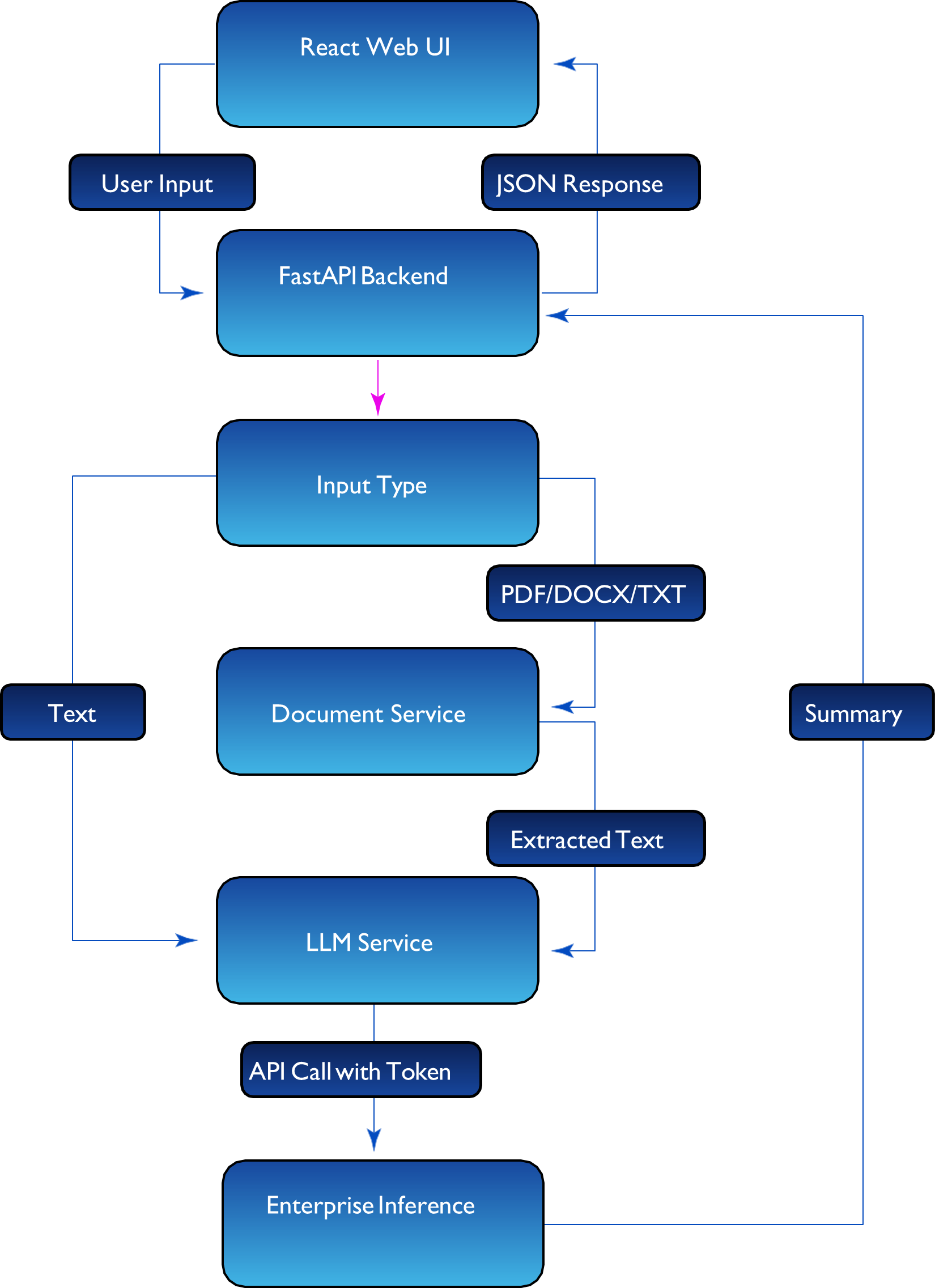
The application consists of:
- Document Processing Service: Extracts text from PDF, DOCX, and TXT files
- LLM Service: Generates summaries using enterprise inference API
- API Layer: FastAPI backend with token-based authentication
- UI: React-based interface with Vite and Tailwind CSS
Service Components
- React Web UI (Port 5173)
Provides intuitive interface with drag-and-drop file upload, tab-based input selection, and real-time summary display - FastAPI Backend (Port 8000)
Orchestrates document processing, handles token-based authentication, and routes requests to appropriate processing services
Typical Flow:
- User inputs text or uploads a document (PDF/DOCX/TXT) through the web UI.
- The backend processes the input:
- Text: Sent directly to LLM service
- PDF/DOCX/TXT: Extracted using document service with OCR support
- The LLM service uses the pre-configured token to call the enterprise inference endpoint.
- The model generates a summary using the configured LLM (e.g., Llama-3.1-8B-Instruct).
- The summary is returned and displayed to the user via the UI.
Prerequisites
System Requirements
Before you begin, ensure you have the following installed:
- Docker and Docker Compose
- Enterprise inference endpoint access (token-based authentication)
Required API Configuration
For Inference Service:
This application supports multiple inference deployment patterns:
GenAI Gateway: Provide your GenAI Gateway URL and API key
- To generate the GenAI Gateway API key, use the generate-vault-secrets.sh script
- The API key is the litellm_master_key value from the generated vault.yml file
APISIX Gateway: Provide your APISIX Gateway URL and authentication token
- To generate the APISIX authentication token, use the generate-token.sh script
- The token is generated using Keycloak client credentials
Local Development Configuration
For Local Testing Only (Optional)
If you're testing with a local inference endpoint using a custom domain (e.g., api.example.com
mapped to localhost in your hosts file):
- Edit backend/.envand set:
LOCAL_URL_ENDPOINT=api.example.com
(Use the domain name from your INFERENCE_API_ENDPOINT without https://) - This allows Docker containers to resolve your local domain correctly.
Note: For public domains or cloud-hosted endpoints, leave the default value not-needed.
Verify Docker Installation
# Check Docker version
docker --version

# Check Docker Compose version
docker compose version

# Verify Docker is running
docker ps
Quick Start Deployment
Clone the Repository
git clone https://github.com/opea-project/Enterprise-Inference.git
cd Enterprise-Inference/sample_solutions/DocSummarization
Set up the Environment
This application requires two .env files for proper configuration:
- Root .env file (for Docker Compose variables)
- backend/.env file (for backend application configuration)
Step 1: Create Root .env File
You can either copy from the example file:
cp .env.example .env
Then edit .env if needed, OR create it directly:
# From the DocSummarization directory
cat > .env << EOF
# Docker Compose Configuration
LOCAL_URL_ENDPOINT=not-needed
EOF
Note: If using a local domain (e.g., api.example.com mapped to localhost), replace not-needed with your domain name (without https://).
Step 2: Create backend/.env File
You can either copy from the example file:
cp backend/.env.example backend/.env
Then edit backend/.env with your actual credentials, OR create it directly:
cat > backend/.env << EOF
# Inference API Configuration
# INFERENCE_API_ENDPOINT: URL to your inference service (without /v1 suffix) #    - For GenAI Gateway: https://genai-gateway.example.com
#    - For APISIX Gateway:
https://apisix-gateway.example.com/Llama-3.1-8B-Instruct
#    Note: APISIX Gateway requires the model name in the URL path #
# INFERENCE_API_TOKEN: Authentication token/API key for the inference service #    - For GenAI Gateway: Your GenAI Gateway API key
#    - For APISIX Gateway: Your APISIX authentication token INFERENCE_API_ENDPOINT=https://your-actual-api-endpoint.com INFERENCE_API_TOKEN=your-actual-token-here

# Model Configuration
# IMPORTANT: Use the full model names as they appear in your inference service
# Check available models: curl https://your-api-endpoint.com/v1/models -H "Authorization: Bearer your-token"
INFERENCE_MODEL_NAME=meta-llama/Llama-3.1-8B-Instruct

# LLM Configuration LLM_TEMPERATURE=0.7 LLM_MAX_TOKENS=2000

# Local URL Endpoint (for Docker)
LOCAL_URL_ENDPOINT=not-needed

# Service Configuration SERVICE_PORT=8000 LOG_LEVEL=INFO

# File Upload Limits MAX_FILE_SIZE=524288000 MAX_PDF_SIZE=52428800 MAX_PDF_PAGES=100

# SSL Verification Settings
# Set to false only for dev with self-signed certs VERIFY_SSL=true
EOF
Important Configuration Notes:
- INFERENCE_API_ENDPOINT: Your actual inference service URL (replace https://your-actual-api-endpoint.com)
- For APISIX/Keycloak deployments, the model name must be included in the endpoint URL (e.g., https://apisix-gateway.example.com/Llama-3.1-8B-Instruct)
- INFERENCE_API_TOKEN: Your actual pre-generated authentication token
- INFERENCE_MODEL_NAME: Use the exact model name from your inference service
- To check available models: curl https://your-api-endpoint.com/v1/models -H "Authorization: Bearer your-token"
- LOCAL_URL_ENDPOINT: Only needed if using local domain mapping
- VERIFY_SSL: Controls SSL certificate verification (default: true)
- Set to false only for development environments with self-signed certificates
- Keep as true for production environments
Note: The docker-compose.yml file automatically loads environment variables from both .env (root) and ./backend/.env (backend) files.
Running the Application
Start both API and UI services together with Docker Compose:

# From the DocSummarization directory docker compose up --build

# Or run in detached mode (background) docker compose up -d --build
The Backend will be available at: http://localhost:8000
The UI will be available at: http://localhost:5173
View logs:
# All services
docker compose logs -f

# Backend only
docker compose logs -f backend

# Frontend only
docker compose logs -f frontend
Verify the services are running:
# Check API health
curl http://localhost:8000/health
# Check if containers are running docker compose ps
User Interface
Using the Application
Make sure you are at the http://localhost:5173 URL
You will be directed to the main page with the summarization interface
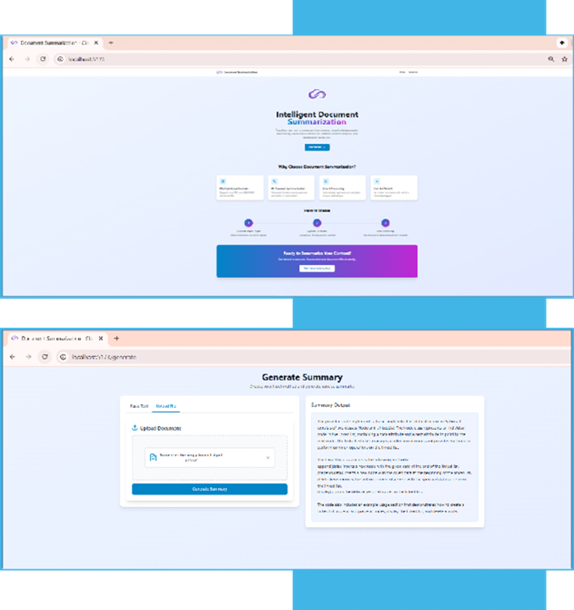
Summarization Interface
- Navigate to the summarization interface
- Choose input method:
- Text Input: Paste or type text directly
- File Upload: Upload PDF, DOCX, or TXT files (drag-and-drop supported)
- Click "Generate Summary" to process your content
- View the generated summary in real-time
UI Configuration
When running with Docker Compose, the UI automatically connects to the backend API. The frontend is available at http://localhost:5173 and the API at http://localhost:8000.
For production deployments, you may want to configure a reverse proxy or update the API URL in the frontend configuration.
Stopping the Application
docker compose down
Troubleshooting
For comprehensive troubleshooting guidance, common issues, and solutions, refer to:
Additional Info
The following models have been validated with DocSummarization:
| Model | Hardware |
|---|---|
| meta-llama/Llama-3.1-8B-Instruct | Gaudi |
| Qwen/Qwen3-4B-Instruct-2507 | Xeon |