EDB Postgres AI on OpenShift cluster using CSI driver for Dell PowerFlex
This white paper evaluates the performance of EnterpriseDB deployed on Red Hat OpenShift container platform, hosted on Dell PowerFlex.
Modern enterprises are rapidly embracing cloud-native architectures to achieve agility, scalability, and operational efficiency. As the backbone of business-critical applications, databases must evolve to meet these demands without compromising performance or reliability. EDB Postgres® AI (EDB PG AI) for CloudNativePG™ (CNPG) addresses this need by delivering an enterprise-ready, Kubernetes-native PostgreSQL solution that integrates seamlessly with cloud-native application environments.
Red Hat OpenShift Container Platform enables enterprises to manage Kubernetes environments across on-premises and public cloud deployments, enabling teams to build and run applications consistently anywhere.
Dell PowerFlex is a software-defined storage platform that delivers deployment flexibility, linear scalability, predictable high performance, and enterprise-grade resilience for both traditional and cloud-native production workloads. The PowerFlex CSI driver supports dynamic provisioning of persistent volumes for containerized applications such as PostgreSQL, ensuring that mission-critical workloads benefit from robust, scalable, and fault-tolerant storage.
This white paper demonstrates the performance of EDB PG AI on Red Hat OpenShift hosted on Dell PowerFlex. It also provides examples of different replication modes and explains how they impact performance and availability.
Introduction
Introduction
Revisions
Table 1. Revision History
Date
Description
March 2026
Initial release
Audience
The audience for this document includes database administrators, system engineers, field consultants, IT administrators, technical architects, and others involved in configuring and deploying enterprise database clusters on PowerFlex.
Readers should have a basic knowledge of PowerFlex, Red Hat OpenShift, and EnterpriseDB technologies as well as familiarity with storage, compute, and networking concepts and topologies.
Terminology
The following table provides definitions for key terms that are used in this document.
Table 2. Terminology
Term
Definition
AI
Artificial Intelligence
API
Application Programming Interface
BC
Business Continuity
BIOS
Basic Input/Output System
CNCF
Cloud Native Computing Foundation
CNPG
Cloud Native PostgreSQL
CSI
Container Storage Interface
CSM
Container Storage Module
DNS
Domain Name System
DR
Disaster Recovery
EC
Erasure Coding
EDB PG AI
EDB Postgres AI
GDPR
General Data Protection Regulation
GenAI
Generative AI
HA
High Availability
IOPS
Input/Output Operations per Second
ITOM
IT Operational Management
LCM
Life Cycle Management
LLM
Large Language Model
MG
Medium Granularity
MTU
Maximum Transmission Unit
NIC
Network Interface Card
NTP
Network Time Protocol
OS
Operating System
PCI DSS
Payment Card Industry Data Security Standard
PGDATA
PostgreSQL data directory containing configuration and data files
PTR
Pointer Record
PV
Persistent Volume
QoS
Quality of Service
RAM
Random Access Memory
RPO
Recovery Point Objective
RTO
Recovery Time Objective
SDC
Storage Data Client
SDS
Storage Data Server
SLA
Service Level Agreement
SOC 2
System and Organization Controls 2
SVI
Switched Virtual Interface
TDE
Transparent Data Encryption
TPS
Transactions Per Second
UI
User Interface
VLAN
Virtual Local Area Network
VM
Virtual Machine
WAL
Write-Ahead Log
We value your feedback
Dell Technologies and the authors of this document welcome your feedback on the solution and the solution documentation. Contact the Dell Technologies Solutions team by email.
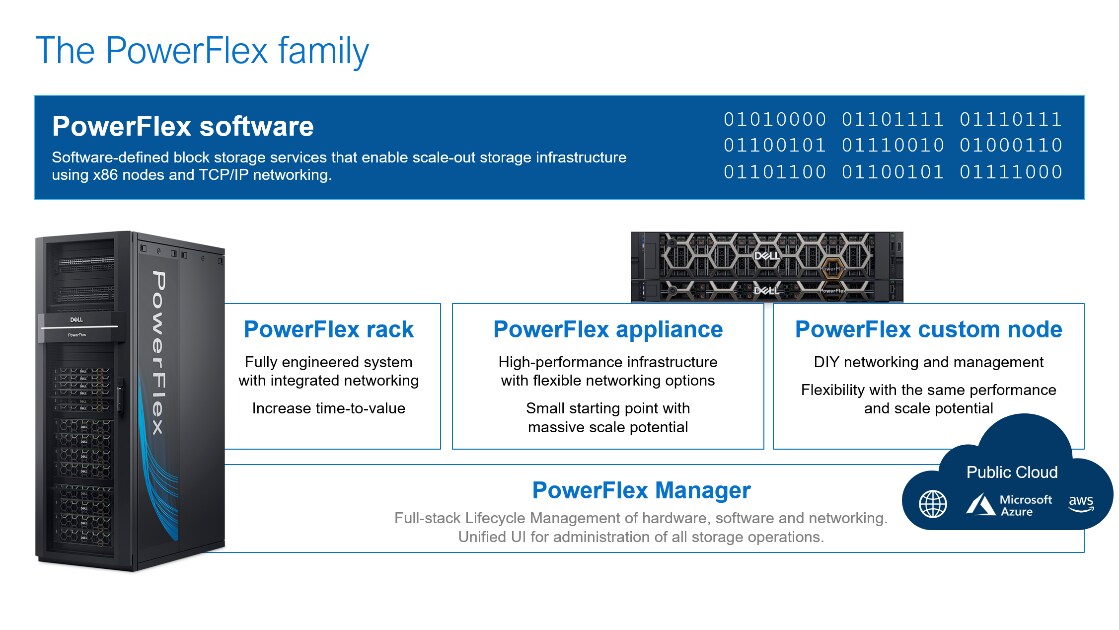
PowerFlex software-defined storage enables broad consolidation across the data center, encompassing most block storage workloads with ease. The software-first architecture enables automation and programmability of the complete infrastructure stack. PowerFlex provides scalability, performance, and resiliency to enable effortless adherence to stringent workload SLAs.
The PowerFlex family provides a foundation that combines compute and high-performance storage resources in a managed, unified fabric. PowerFlex comes in flexible consumption options (rack, appliance, and custom nodes) that enable various independent, disaggregated architectures. PowerFlex is ideal for high-performance applications and databases, building an agile private/hybrid cloud, or consolidating resources across heterogeneous environments.
Figure 1. PowerFlex family
PowerFlex Software Components
Software is the key differentiation in the PowerFlex offer. PowerFlex software components not only provide the distributed software-defined storage services but also help simplify infrastructure management and orchestration.
PowerFlex Core Software
PowerFlex is a software-defined scale-out block storage service that is designed to deliver flexibility, elasticity, and simplicity with predictable high performance and resiliency at scale.
PowerFlex Manager enables comprehensive IT Operational Management (ITOM) and Life Cycle Management (LCM) capabilities that span compute as well as storage infrastructure, from BIOS and Firmware to nodes, software, and networking.
PowerFlex Deployment Architectures
PowerFlex software-defined storage can be deployed in a disaggregated architecture (independently scalable compute and storage layers).
Independent architecture
In an independent, or disaggregated, architecture some nodes provide storage capacity for data in applications, while other separate and independent nodes provide compute resources for applications and workloads. Compute and storage resources can be scaled independently by adding nodes to the cluster while it remains active. This separation of compute and storage resources helps to minimize software licensing costs in certain situations. This architecture is ideal for high-performance databases and application workloads.
Disaggregation gives organizations the freedom to choose different LCM options that best align with their operational models. Not only can PowerFlex Manager manage the LCM of PowerFlex storage infrastructure, it can also manage LCM of PowerFlex compute nodes. With this freedom, there is also the choice to manage compute estates that connect to PowerFlex with other tooling.
PowerFlex consumption options
PowerFlex Rack
PowerFlex rack is a software-defined infrastructure platform that combines compute and high-performance storage resources in a managed unified network. This rack-based engineered system, with integrated networking, enables customers to achieve the scalability and management requirements of a modern data center.
PowerFlex Appliance
PowerFlex appliance is a PowerEdge-based server which has been configured to be a node in a software-defined storage deployment that runs PowerFlex software components. This offering allows customers the flexibility and savings to bring their own compatible networking or make use of full network automation using a supported set of Dell or Cisco switches.
PowerFlex Custom Nodes
PowerFlex Custom Nodes are validated PowerEdge-based server building-blocks configured for use with PowerFlex. They are available with thousands of configuration options for customers who prefer to build their own environments.
PowerFlex in the Public Cloud
PowerFlex software storage services can be deployed on recommended instances (with attached storage) in Amazon Web Services or Microsoft Azure. Only the EC and MG data layout as well as the Independent (disaggregated) architecture are supported. Where available, native asynchronous replication may be used to migrate data between cloud and on-premises PowerFlex systems, or to establish cloud-based BC/DR data protection schemes.
PowerFlex CSI/CSM
An important component outside of PowerFlex that enables a flexible consumption model for Kubernetes is the PowerFlex CSI driver, developed as a part of the Dell Kubernetes strategy. After loading the CSI driver for PowerFlex into Kubernetes, it can be used to provision persistent volumes from the underlying PowerFlex storage resource. If the Kubernetes deployment is running low on PowerFlex storage resources, you can add PowerFlex storage nodes to increase the system capacity and performance.
The CSI driver connects the PowerFlex system and Kubernetes deployments. It is a storage broker which dynamically provisions volumes from PowerFlex through the PowerFlex API gateway to the Kubernetes cluster. Once the volume is available on PowerFlex, it is immediately mapped to the requesting pod. If a pod is destroyed or rescheduled, the CSI plug-in ensures that the volumes are remapped upon rescheduling of that pod.
Customers running Kubernetes clusters on PowerFlex use the Dell Container Storage Modules (CSM), which extend the CSI driver capabilities. These modules:
Provide enterprise storage capabilities to Kubernetes for cloud-native stateful applications.
Reduce management complexity, so that developers can independently use enterprise storage with ease and automate daily operations.
Extends storage functionality and capabilities beyond using the CSI driver alone.
These modules include replication, observability, authorization, application mobility, and resiliency.
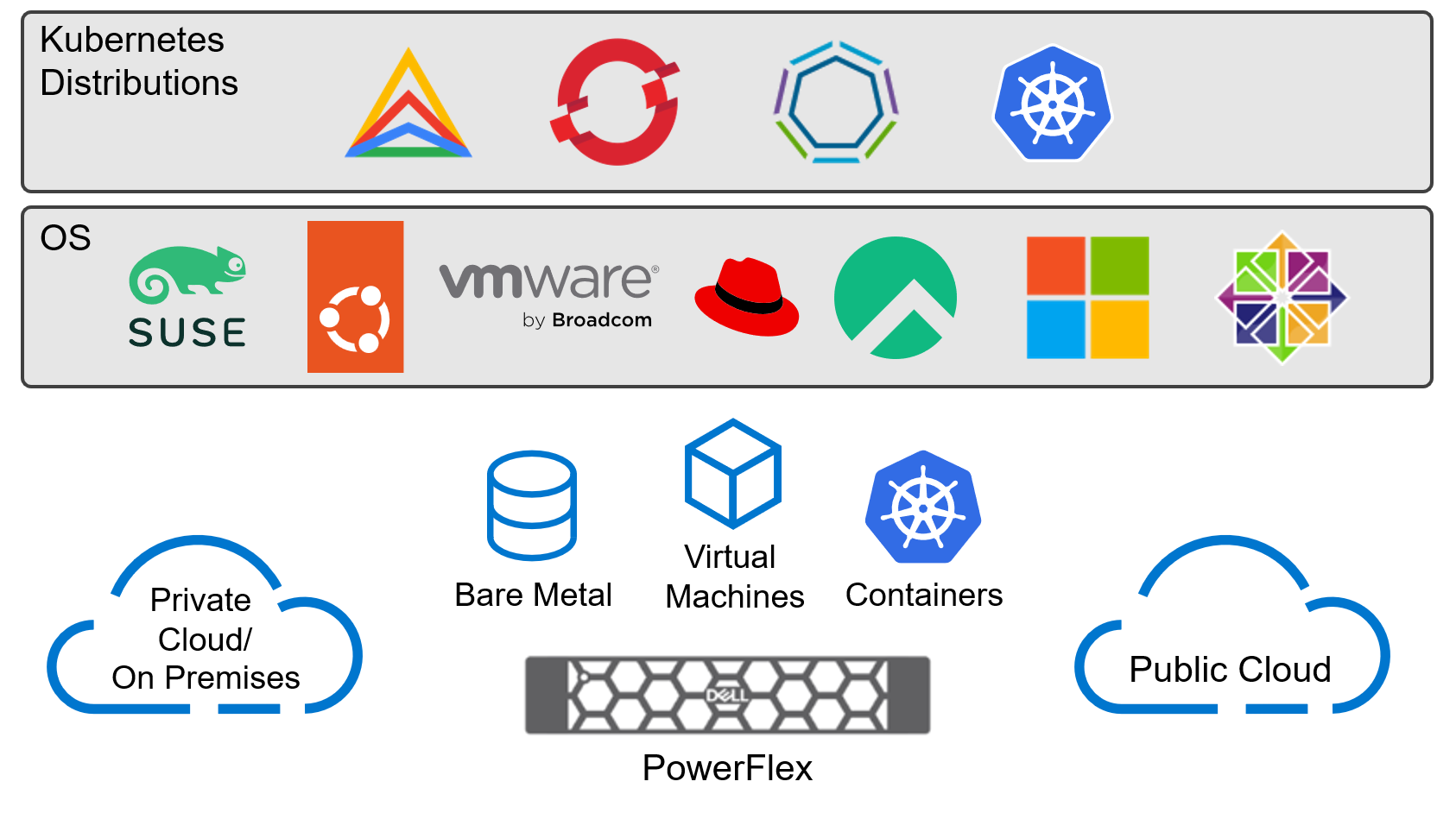
PowerFlex supports multiple operating systems. PowerFlex is validated with the leading Kubernetes distributions as shown in the following figure:
Figure 2. PowerFlex for different Kubernetes distributions
Red Hat OpenShift
Red Hat OpenShift
OpenShift Container Platform
Red Hat OpenShift Container Platform provides developers and IT organizations with a hybrid cloud application platform for deploying both new and existing applications on secure, scalable resources with minimal configuration and management overhead. The OpenShift Container Platform provides an enterprise-grade Kubernetes environment for building, deploying, and managing container-based applications, alongside virtualized workloads, across any data center where Red Hat Enterprise Linux is supported.
OpenShift Assisted Installer provides a SaaS-based managed service to deploy OpenShift clusters in various configurations, including bare metal servers and on-premises nodes, from the Red Hat Hybrid Cloud Console. You do not require a dedicated bootstrap node before installing a cluster and you do not need to preinstall Red Hat CoreOS on the nodes. Cluster deployment parameters are populated within the web UI and nodes are booted with an ISO image that is downloaded to complete the cluster deployment.
EDB Postgres® AI (EDB PG AI) is the first open, enterprise-grade sovereign data and AI platform—secure, compliant, and scalable, on-premises and across clouds. Built on Postgres, EDB PG AI unifies transactional, analytical, and AI workloads, enabling organizations to operationalize their data and LLMs while maintaining control over sovereign environments. As one of the most active contributors to the PostgreSQL project and the original developers of open source CloudNativePG, EDB is deeply invested in the vitality of the global community.
In this paper, EDB Postgres AI provides an enterprise-ready, Kubernetes-native Postgres stack, powered by the open source CloudNativePG operator created by EDB.
Key Features and Capabilities
Database
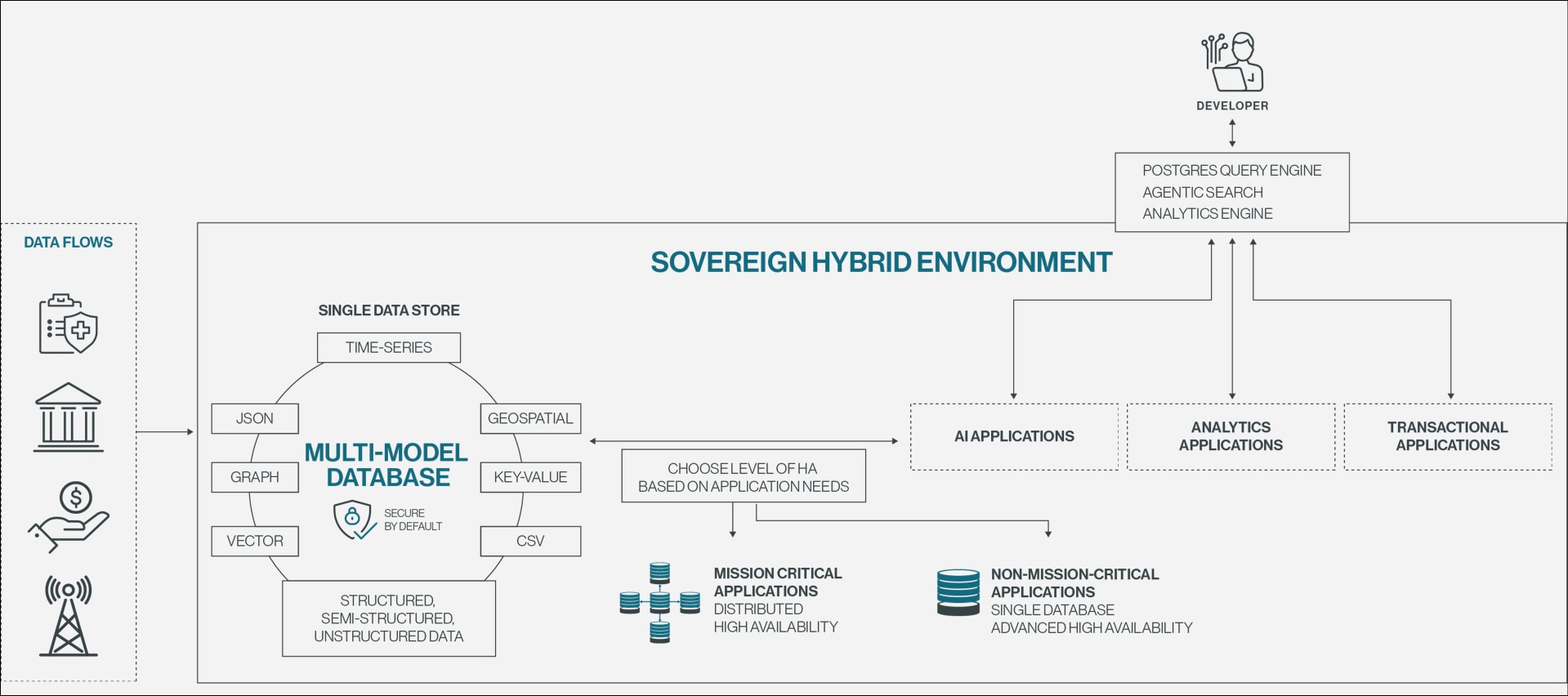
EDB PG AI offers an enterprise-hardened Postgres database for transactional, analytical, and AI workloads with always-on availability (up to 99.999%) across any deployment environment. Advanced security features, including Transparent Data Encryption (TDE), and compliance readiness for GDPR, PCI DSS, and SOC 2 enable you to use open Postgres for mission-critical applications.
Figure 3. EDB PG AI includes sovereign Postgres database with multi-model support, hardened security, and high availability for transactional, analytical, and AI workloads.
Get up to 30x faster insights from your operational data with EDB PG AI’s analytics engine. Power agentic analytics with Lakehouse interoperability in a highly available, sovereign data platform.
EDB PG AI is a complete Postgres platform for GenAI inferencing. It provides a low-code/no-code AI Factory that combines knowledge bases, observability, and agent orchestration to enable production-ready GenAI up to 3x faster—in weeks instead of months or years.
Unlock hybrid control and unified observability in your sovereign container. Manage, transform, and observe your AI-ready data with a single interface. Cloud-native automation boosts team productivity up to 30% and intelligent recommendations accelerate app performance up to 8x.
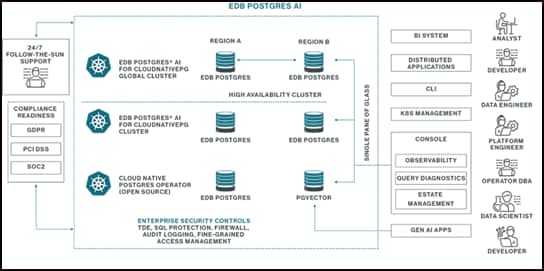
Figure 4. The EDB PG AI architecture for enterprise-grade Postgres in Kubernetes-native deployments
CloudNativePG is the Kubernetes operator designed for Postgres, 100% open source and community driven, proudly created by EDB. Now accepted into the Cloud Native Computing Foundation (CNCF) Sandbox, CNPG sets the standard for PostgreSQL in the Kubernetes era.
EDB PG AI provides enterprise-grade CloudNativePG with hardened defaults, tested reference architectures, and 24x7 support for production OpenShift environments. Enhanced lifecycle services and distributed high availability automates the most demanding aspects of PostgreSQL management in Kubernetes and enables operations for geo-distributed, active-active clusters.
With EDB PG AI, users get direct access to the creators and primary maintainers of CNPG. EDB's award-winning global support provides rapid response times, proactive security patches, and architectural guidance, ensuring critical applications are backed by the world’s deepest well of Postgres and Kubernetes expertise. Additional security features shrink the attack surface while built-in Oracle compatibility and certified support on RedHat OpenShift enable dynamic deployment across enterprise ecosystems.
This delivers seamless hybrid portability, powers high-performance microservices, and enables database-as-a-service automation that empowers teams to manage hundreds of database instances with ease.
Solution Architecture
Solution Architecture
Overview
In this solution, EDB PG AI for CNPG with version 18.x of Postgres is deployed on a Red Hat OpenShift cluster, which is hosted on PowerFlex in a two-layer configuration. The setup runs on bare metal for both the PowerFlex storage nodes and OpenShift cluster nodes.
Logical architecture
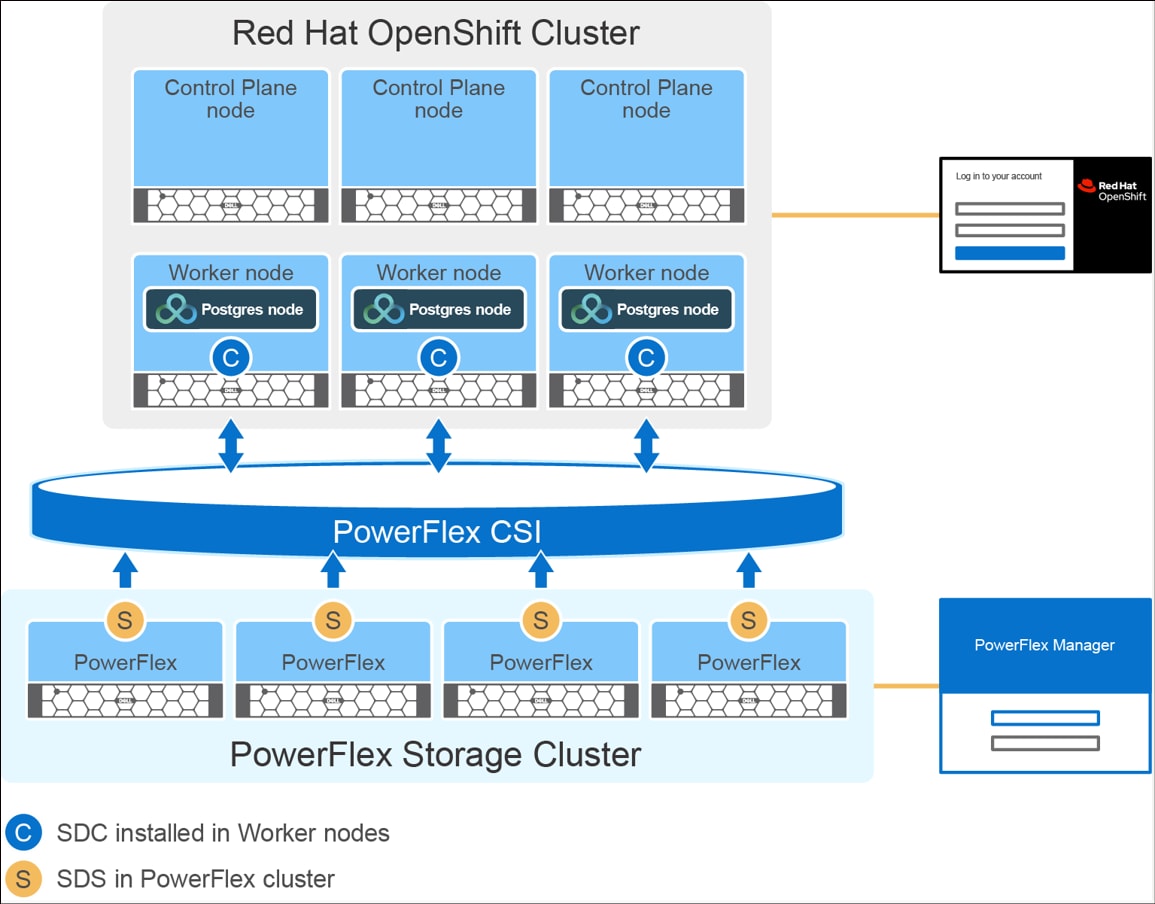
The following diagram illustrates the two-layer architecture of the EDB PG AI instances on Red Hat OpenShift cluster with PowerFlex system.
Figure 5. Logical architecture of EDB PG AI on Red Hat OpenShift with Dell PowerFlex
The two-layer PowerFlex system consists of:
PowerFlex storage-only nodes
The storage-only node deployment is performed using PowerFlex Manager with the non-bonded NIC port design template. The Storage Data Server (SDS) is installed on four PowerFlex nodes, which contribute their storage to the PowerFlex system. A single protection domain and a single medium-granularity storage pool are configured on the PowerFlex system to offer the appropriate balance of performance and rebuild efficiency. The disk drives from each storage-only node are aggregated to form the storage pool.
OpenShift cluster
The OpenShift cluster is deployed using the OpenShift Assisted Installer with a highly available architecture that includes three control plane nodes and three worker nodes.
The control plane nodes host critical components such as the API Server, Controller Manager, Scheduler, and etcd, ensuring high availability and fault tolerance for cluster management.
The worker nodes are dedicated to a single EDB PG AI cluster, each hosting a PostgreSQL instance (primary or replica). These worker nodes are designated as PostgreSQL nodes within OpenShift cluster using ‘node-role.kubernetes.io/postgres’ label. This label helps identify the nodes that should handle PostgreSQL workloads. Label-based scheduling is recommended by EDB as a best practice to isolate Postgres workloads on OpenShift.
Next, the PowerFlex CSM operator is installed. During this installation, the PowerFlex Storage Data Client (SDC) is automatically deployed on the OpenShift worker nodes. The PowerFlex CSI driver enables provisioning of persistent storage from the PowerFlex storage cluster. For more information, see Installing the CSM Operator for PowerFlex.
Network Architecture
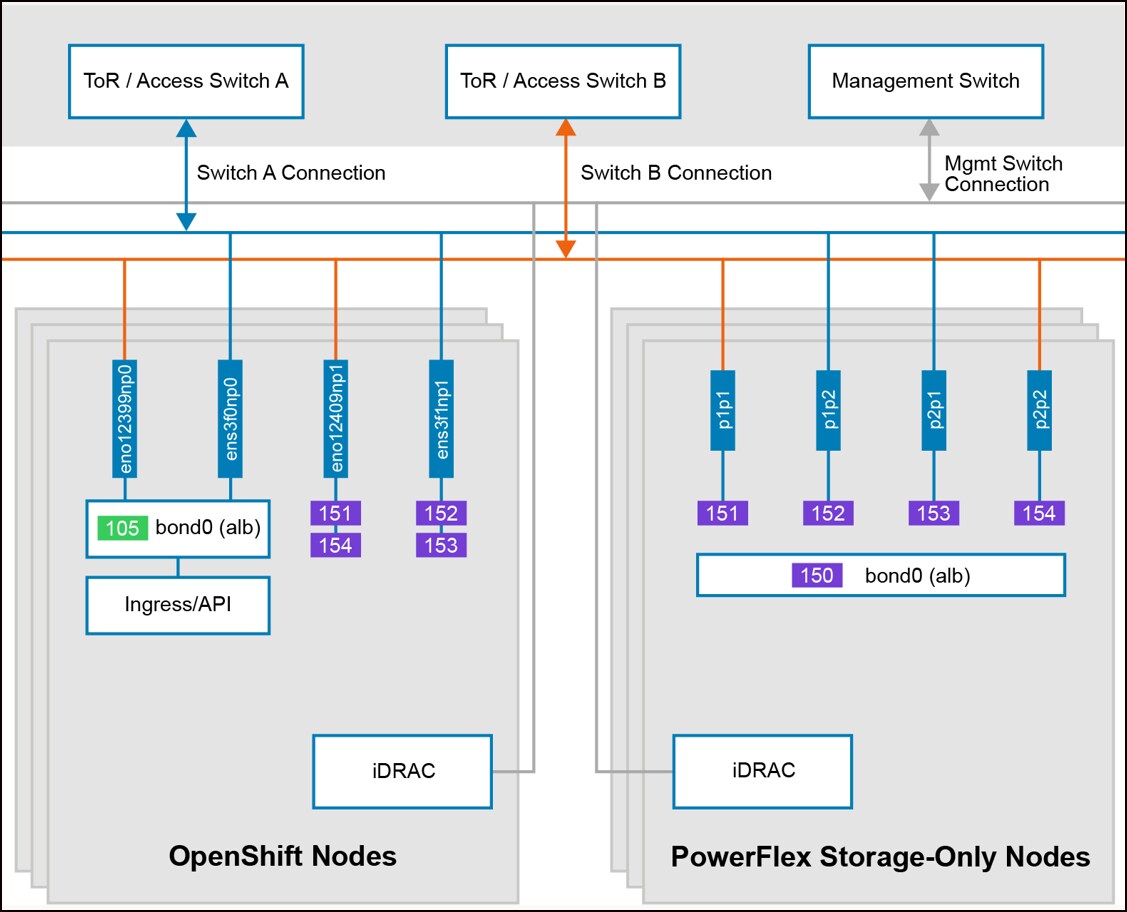
The following diagram illustrates the network architecture of the PowerFlex storage-only nodes and OpenShift nodes.
Figure 6. Network architecture of Red Hat OpenShift nodes and PowerFlex SO nodes
The network layer consists of the following types of connectivity:
Each of the PowerFlex storage-only nodes and OpenShift nodes are attached with two dual-port 25 GbE NIC cards.
All nodes are connected using a trunk configuration. The PowerFlex system is deployed using a multi-VLAN network, where aggregation switches are configured with the appropriate switched virtual interfaces (SVI) and allowed VLAN lists on the trunk ports.
On the storage-only node deployment, the PowerFlex storage management network is configured in mode1 bonding (active-backup mode) across all 4 x 25 GbE ports. Meanwhile, the PowerFlex data networks are configured separately (not bonded) on each of the four 25 GbE ports. The network traffic is logically separated by dedicated VLAN networks.
For the OpenShift cluster deployment, the application management network is configured in mode1 bonding across 2 x 25 GbE ports. The two PowerFlex data networks (data-1 and data-4) are configured on one 25 GbE port, and the other two PowerFlex data networks (data-2 and data-3) are configured on the remaining 25 GbE port. The network traffic is logically separated by dedicated VLAN networks.
The following table lists the different VLANs that are used for PowerFlex system along with their purposes:
Table 3. Network details for PowerFlex system and OpenShift cluster
VLAN
Network name
Description
Switch port configuration
101
Hardware management
Connectivity for PowerFlex node iDRAC interfaces
Layer-2/Layer-3 connectivity
105
Hypervisor/Application management
Management interface for OpenShift nodes
Layer-2/Layer-3 connectivity
150
PowerFlex management
Operating system management for PowerFlex nodes
Trunk port, mode 1 bonding (active-backup)
151
PowerFlex data 1
SDS-to-SDS and SDS-to-SDC data traffic
Trunk port. (non-bonded) When a data network is not assigned to multiple links.
152
PowerFlex data 2
SDS-to-SDS and SDS-to-SDC data traffic
Trunk port. (non-bonded) When a data network is not assigned to multiple links.
153
PowerFlex data 3
For SDS-to-SDS and SDS-to-SDC data traffic
Trunk port. (non-bonded) When a data network is not assigned to multiple links.
154
PowerFlex data 4
For SDS-to-SDS and SDS-to-SDC data traffic
Trunk port. (non-bonded) When a data network is not assigned to multiple links.
CloudNativePG Basic Performance Test
CloudNativePG Basic Performance Test
Overview
Before examining high-concurrency scaling and replication durability, we first established a baseline using a "small" PostgreSQL instance. This section explores how a resource-constrained environment (1.5 vCPUs) handles storage layout on Dell PowerFlex.
This foundational performance test outlines the process of experimenting with multiple volumes in PostgreSQL to increase flexibility and scalability1. This test covers single-replica volumes using the Dell PowerFlex CSI storage class provisioner (csi-vxflexos.dellemc.com).
1 These are generic performance test performed with out-of-the-box default configurations and no specific PostgreSQL optimizations. Based on the standard pgbench TPC-B–like workload, these figures provide a conservative measure of performance. In a production environment with professional tuning from EDB and Dell, you can expect significantly better results.
Prerequisites
Ensure the following requirements are met before initiating the tests:
Install the latest version of EDB Postgres AI for CloudNativePG by following these instructions.
To ensure a clean baseline, the following procedure was used for a PostgreSQL instance with a dedicated WAL use case:
Provision a CNPG cluster with 1.5 vCPU and 14 GB RAM limit, ensuring a Guaranteed QoS class. The Guaranteed QoS class pods operate under the most stringent resource constraints and receive the highest eviction protection. The Guaranteed QoS class pods are not subject to termination unless they exceed their defined CPU and memory limits, or the node lacks any lower priority pods eligible for preemption.
Initialize pgbench at a scale of 4,500 (approx. 66 GB), intentionally making the dataset roughly four times larger than the available host RAM to force storage I/O.
Run the TPC-B–like workload (three updates, one delete, one insert) with a progressively increasing concurrency clients of 4, 8, and 16 for five minutes.
Capture database TPS and latency, along with PowerFlex physical IOPS and PV latencies.
Use Case: PostgreSQL Instance with a Dedicated WAL Volume
Test Objective
This test introduces I/O isolation by placing the Write-Ahead Log (WAL) on a separate volume. This is the best practice for performance and availability, as it physically separates the two data types on the host and prevents sequential log writes from competing with data file access.
Test Results
The results showed TPS ranging from 2,929 to 3,020, average PostgreSQL latency between 1.35 ms and 5.46 ms, and PowerFlex storage metrics indicating total IOPS between 9,655 and 11,200 with read/write response times under 0.3 ms. This configuration establishes the architectural foundation for higher-performance scaling seen later in this document.
Table 4. PostgreSQL instance with separate PGDATA and WAL volume
Test No.
Clients
PostgreSQL transactions per second (TPS)
PostgreSQL average latency (ms)
Physical read IOPS
Physical write IOPS
Physical total IOPS
PV read latency (ms)
PV write latency (ms)
1
4
2,959
1.35
4,510
6,570
11,080
0.16
0.25
2
8
3,020
2.65
5,010
6,080
11,200
0.16
0.26
3
16
2,929
5.46
5,000
4,655
9,655
0.17
0.27
In the baseline configurations described above, the Dell PowerFlex storage layer consistently operated at low utilization, as the 1.5 vCPU limit acted as the primary bottleneck for the PostgreSQL instances. This result demonstrates that the system can support more demanding workloads before reaching performance limits.
Because modern enterprise workloads require more than 1.5 vCPUs, it is necessary to evaluate the system's saturation points under high-concurrency scaling. In the following sections, we transition to three-node clusters with up to 48 vCPUs to quantify the performance overhead and latency trade-offs required for mission-critical, synchronous replication.
CloudNativePG Performance Tests with Different Synchronous Replication Options
CloudNativePG Performance Tests with Different Synchronous Replication Options
Overview
EDB PG AI for CNPG provides a highly customizable approach to managing synchronous replication in PostgreSQL clusters through the .spec.postgresql.synchronous stanza. Quorum-based replication is highly effective in a typical synchronous replication setup within a single OpenShift cluster.
This section evaluates the performance of PostgreSQL instances across a range of compute allocations—specifically 8, 16, 32, and 48 vCPUs—to observe how the system scales with increased resources1. To optimize I/O throughput, each cluster is configured with separate volumes for PGDATA and WAL files, using the high-performance Dell PowerFlex CSI storage class provisioner in OpenShift.
The primary objective is to quantify the performance "price" associated with three distinct levels of transaction protection defined by the synchronous_commit option in PostgreSQL:
Asynchronous replication (local): Transactions are confirmed as soon as the primary database WAL is durably written to its disk. This configuration removes the "network round-trip" delay, significantly reducing latency and maximizing throughput for workloads where limited data loss is acceptable in the event of a node failure.
Synchronous durability (on): Success is reported only after the WAL has been flushed to disk on both the primary and the required number of synchronous replicas (one in this case). This introduces a latency penalty proportional to the network speed, but guarantees that data exists on at least two nodes before a transaction is finalized.
Synchronous consistency (remote_apply): The highest level of protection, requiring a transaction to be received and applied to the database state on the required number of replicas before success is reported. This setting acts as a natural regulator of write speed, ensuring requested number of synchronous standbys are always in a consistent state with the primary, and optimizing the cluster for near-zero Recovery Time Objective (RTO) during automated failover.
Importantly, the synchronous_commit parameter is highly granular. While the default is defined at the server level, it can be strategically overridden by applications at the session or transaction level. This provides developers with the flexibility to prioritize consistency for critical financial operations while maintaining high-speed processing for less sensitive data.
1 This test represents generic performance tests performed with default configurations; no specific optimizations were applied to PostgreSQL or the underlying environment. Using standard pgbench TPC-B–like and SELECT-only tests ensure a consistent and recognizable workload. Consequently, the resulting figures provide a conservative measure of the performance you might expect in similar conditions. While these results provide a helpful baseline, we strongly recommend that users perform their own testing using workloads that closely mirror their specific production environments rather than relying solely on generic pgbench metrics. Tailoring tests to your actual data patterns and query complexity will provide a much more accurate representation of how the system will behave under real-world conditions.
General Test Procedure
This section details the standardized testing procedure to evaluate both asynchronous and synchronous replication. To ensure a clean and repeatable baseline, each experiment follows these specific steps.
Infrastructure Setup and Validation
The EDB PG AI for CNPG cluster is deployed using a three-node architecture (consisting of one primary and two replicas). An anti-affinity policy is enforced so that each pod (primary or standby) runs on a distinct physical worker node, preventing resource contention and ensuring realistic network overhead. Before the performance tests begin, the environment is validated to ensure each PostgreSQL pod has a “Guaranteed” Quality of Service (QoS) class. CPU and memory resources are explicitly allocated to match the specific requirements of the test (for example, 8 vCPUs and 400 GB of RAM).
Storage Configuration
To improve performance and scalability, the PGDATA and WAL directories are placed on separate volumes. All volumes rely on the Dell PowerFlex CSI storage class provisioner.
Database Initialization
To ensure the performance metrics reflect storage capabilities rather than memory caching, the database is initialized using pgbench at a scale of 144,000 (approximately 2 TB). This creates a dataset significantly larger than the available system memory, forcing the workload to exercise the underlying storage layer.
Workload Execution and Data Collection
The performance testing phase involves running both TPC-B–like and SELECT-only workloads with pgbench. The TPC-B–like workload is particularly intensive, as each transaction consists of five separate queries: three updates, one delete, and one insert. This profile ensures a heavy write load that stresses the transaction log and data files.
For each configuration, the number of concurrent clients is gradually increased to observe how the system handles increasing concurrent pressure. During these runs, a dual-layer metric collection strategy is employed:
PostgreSQL Layer
Tracking Transactions Per Second (TPS) and average transaction latency, as provided by pgbench.
Storage Layer
Monitoring Dell PowerFlex and CSI metrics, specifically physical read/write IOPS and Persistent Volume (PV) latency. All metrics are strictly synchronized to the same time window as the pgbench execution to ensure data integrity.
CPU Scaling Iterations
Finally, the tests are repeated using a CPU scaling loop (16, 32, and 48 vCPUs). For each target, the deployment manifest is updated and applied, followed by a monitored rolling restart. Once all pods are confirmed as healthy and running with the new resource allocations, the workload and collection steps are repeated to measure the impact of vertical scaling.
Use Case 1: PostgreSQL cluster with ‘synchronous_commit’ set to ‘local’
Test objective
The primary objective of this test is to establish a performance baseline where synchronous_commit is set to local. In this mode, a transaction is confirmed once the primary database WAL is durably written to its disk, removing the latency penalty of waiting for replica acknowledgments.
Test Results
TPC-B–like workload when ‘synchronous_commit’ set to ‘local’
The following results highlight the performance metrics for the write-intensive TPC-B–like workload. As shown, TPS scaled effectively from 13,126 to 34,896, demonstrating significant performance gains as CPU resources and client concurrency increased.
Underpinning these results, Dell PowerFlex delivered robust I/O scalability. Total physical IOPS increased from 113.8K to a peak of 290.6K. Notably, PV read latency remained well within the sub-millisecond range (0.20 ms to 0.65 ms), while write latency stayed between 0.35 ms and 0.71 ms, confirming highly responsive storage behavior even under heavy transaction pressure.
Select-only workload when ‘synchronous_commit’ set to ‘local’
The select-only performance tests evaluate read-only performance scaling. TPS improved significantly from 57,115 to a peak of 173,017, showing effective utilization of additional CPU cores for read operations.
PowerFlex again demonstrated linear I/O scalability, with total IOPS peaking at 338.15K. Despite high throughput, storage latency remained consistently low, with read latency staying below 0.50 ms across all tests. This highlights the suitability of this configuration for high-concurrency read workloads.
Use Case 2: PostgreSQL cluster with ‘synchronous_commit’ set to ‘on’
Test Objective
The primary objective of this test is to measure the performance impact of full data durability. With synchronous_commit set to on, the primary database waits for the WAL to be flushed to disk on both the primary and the required synchronous standbys (one in this case) before reporting success.
Test Results
TPC-B–like workload when ‘synchronous_commit’ set to ‘on’
The results for the write-intensive TPC-B–like workload show a notable shift in performance compared to asynchronous settings. While TPS scaled from 11,623 to 25,125, the average latency is significantly higher due to the requirement for replica acknowledgment.
Despite the inherent coordination overhead of synchronous replication, Dell PowerFlex provided a robust, high-performance foundation. Total physical I/O delivered strong scalability, increasing from 84K to a peak of 195.6K IOPS. Even under this increased load, PV read latency remained sub-millisecond—rising only slightly from 0.21 ms to 0.31 ms—while PV write latency stayed consistently between 0.39 ms and 0.52 ms.
These results indicate that the storage layer handled every durable write request with exceptional speed, ensuring that the storage itself was not a bottleneck. In this shared-nothing architecture, PostgreSQL engine manages replication logic, so the observed "price of durability" is primarily paid at the network and database coordination layer. The database must ensure the WAL is flushed locally and wait for acknowledgment from the synchronous replicas before finalizing the transaction, a process supported by the low-latency response of PowerFlex storage.
Select-only workload when ‘synchronous_commit’ set to ‘on’
Because select-only workloads are read-heavy and do not generate WAL entries for replication, the impact of the synchronous_commit setting is minimal. TPS scaled robustly from 54,602 to 163,229, closely matching with the results from the asynchronous configuration.
The following table shows that PowerFlex delivered strong I/O scalability, with total IOPS increasing from 135.8K to a peak of 369.8K. PV read latency remained sub-millisecond, rising from 0.20 ms to about 0.48 ms, while PV write latency stayed between 0.35 ms and 0.72 ms, indicating consistently responsive storage performance under load.
Use Case 3: PostgreSQL cluster with ‘synchronous_commit’ set to ‘remote_apply’
Test Objective
This test evaluates the "Consistency-First" model by setting synchronous_commit to remote_apply. In this mode, a transaction is considered successful only after it has been written to the primary and applied on the required number of synchronous replicas (one in this case). This provides the highest level of read-consistency, ensuring that any subsequent read from a replica immediately reflects the committed transaction.
While this mode introduces the highest write latency overhead, it is highly beneficial for CNPG automated failover scenarios. Because the standby is already synchronized with the primary, RTO is further minimized during promotion.
Test Results
TPC-B–like workload when ‘synchronous_commit’ set to ‘remote_apply’
The results for the write-intensive TPC-B–like workload demonstrate the performance characteristics of the "Consistency-First" model. While TPS scaled from 10,581 to 23,799, it is essential to highlight the increased database latency associated with this setting. At the highest concurrency level (640 clients), average transaction latency reached 31.6 ms.
This latency is higher compared to “synchronous_commit = on” (~28 ms) and “synchronous_commit = local” (~14 ms) settings. This increase is the expected and intentional behavior for a cluster configured for remote_apply. This setting acts as a natural regulator for application write speed, ensuring that the primary does not outpace the synchronous replicas. This architectural "governor" guarantees that the standby nodes remain fully consistent with the primary, facilitating a near-zero RTO during automated failover.
Despite this increase in database-level wait times, the Dell PowerFlex storage layer remained highly efficient. Total physical IOPS peaked at 198.2K, while PV write latency stayed consistently between 0.34 ms and 0.48 ms. Maintaining sub-millisecond PV write latencies ensures that the storage layer never adds unnecessary delay to this coordination, allowing the PostgreSQL engine to manage data consistency as efficiently as possible.
Select-only workload when ‘synchronous_commit’ set to ‘remote_apply’
As in previous tests, select-only performance remains largely unaffected by the synchronous commit setting, as read operations do not trigger replication coordination. TPS scaled impressively from 65,116 to 196,543.
The following table shows that PowerFlex delivered strong I/O scalability, with total IOPS increasing from 83.6K to a peak of 332.8K. PV read latency remained sub-millisecond, rising from 0.18 ms to about 0.43 ms, while PV write latency stayed between 0.30 ms and 0.60 ms. These results indicate consistently responsive storage behavior under load.
This section outlines the best practices for deploying PowerFlex and running EDB PG AI for CNPG clusters on Red Hat OpenShift using PowerFlex storage to achieve optimal performance, availability, and reliability.
PowerFlex Best Practices
Consider the following recommendations when deploying PowerFlex:
In two-layer PowerFlex deployments, host and storage traffic should use separate networks. This separation isolates rebuild and rebalance traffic from client traffic.
For optimal performance, configure the physical ports on the 25 Gb Ethernet switches that connect to the PowerFlex data network adapters and Red Hat OpenShift management network adapters with an MTU size of 9,216 bytes. Jumbo frames must be enabled consistently across the entire network path, as configuring them on only a subset of network components can result in fragmentation or frame encapsulation/de‑encapsulation issues, leading to degraded performance.
Ensure that all PowerFlex data networks are assigned and accessible from every storage data client (SDC).
Use a non-bonded NIC port design for PowerFlex storage-only node deployment to achieve maximum performance.
PowerFlex SDS components within a protection domain should run on the hardware with equivalent storage and network performance.
Create PowerFlex storage pools using drives with consistent capacity and performance characteristics. Use fewer storage pools to reduce complexity and simplify management.
Configure and synchronize NTP with the system clock across all PowerFlex storage and OpenShift nodes. All systems must synchronize with a designated NTP server to ensure consistent timekeeping and avoid operational discrepancies.
Ensure that Domain Name System (DNS) records, including both forward lookup (A records) and reverse lookup (PTR records), are thoroughly set up and correctly configured to provide reliable name resolution across the infrastructure.
EnterpriseDB Best Practices
Consider the following recommendations for EDB PG AI deployments:
To ensure consistent performance and prevent "noisy neighbor" interference, isolate PostgreSQL instances on dedicated worker nodes.
Provision separate volumes for data files and the Write-Ahead Log. This separation of WAL and data I/Os increases the system resiliency (as the WAL protects the data, and therefore should not share the same volume). It also allows optional database backup using storage snapshots (not covered in this document).
Before selecting a replication strategy, define your Recovery Point Objective (RPO) and Recovery Time Objective (RTO). This will help define the type of replication you use and the number of standbys you create.
While the pgbench TPC-B–like tests used in this guide provide an excellent OLTP baseline for evaluating technology and storage performance, they represent a generic workload. Develop stress tests that reflect your actual production query patterns, data distribution, and transaction complexity.
For production environments requiring high availability (HA) or disaster recovery (DR), deploy a minimum three-node cluster (one primary and two replicas).
As shown in the tests mentioned above, start with ‘synchronous_commit’ = ‘on’ to achieve a balanced combination of durability and throughput for most OLTP workloads on PowerFlex. This setting ensures that transactions are durably flushed to at least one standby before confirmation, providing a robust balance of safety and performance.
One of the most unknown features of PostgreSQL is the ability to set synchronous_commit at the transaction level. For example, critical payment transactions can use remote_apply, while reporting or logging workloads use ‘local’. Educating development teams about this capability allows applications to be "performance-aware" without compromising resiliency.
Conclusion
Conclusion
EDB Postgres AI for CloudNativePG on OpenShift, powered by Dell PowerFlex, establishes a robust and highly scalable platform for containerized database workloads. For customers standardizing on OpenShift, EDB PG AI provides a fully supported Postgres stack reducing integration risk for mission-critical workloads. This joint study serves as a validation for enterprises transitioning mission-critical PostgreSQL instances from traditional infrastructure to a modern, cloud-native architecture.
The test results in this document demonstrate that deploying EDB Postgres AI on Dell PowerFlex storage achieves strong and predictable performance across the tested workloads. The platform consistently delivers sub-millisecond Persistent Volume (PV) latency. This allows the environment to sustain high IOPS and transaction rates across both write-intensive OLTP and read-only / select-only workloads on a 2 terabyte Postgres database.
Test Configuration Details
Test Configuration Details
Storage-only nodes
The following tables describe the hardware and software configuration details of PowerFlex storage-only nodes:
Mellanox ConnectX-5 EN 25GbE Dual-port SFP28 Adapter
Physical disks
10 x 1.92 TB NVMe SSD
Table 20. OpenShift nodes - Software version
Software
Version
Operating system
Red Hat Enterprise Linux CoreOS 4.18
OpenShift version
4.18.x (where x is the latest version)
PowerFlex CSM
2.14
PowerFlex SDC
EMC-ScaleIO-sdc-4.5-4000.111
EDB PG AI for CNPG
Latest stable version of the operator, with Postgres 18.x (where x is the latest minor version)
References
References
Dell Technologies Documentation
The following Dell Technologies documentation provides additional and relevant information. Access to these documents depends on your login credentials. If you do not have access to a document, contact your Dell Technologies representative.