Elastic Stack on Dell EMC VxRail
Executive summary
Introduction
Purpose
Audience
Terminology
We value your feedback
Product overview
Dell EMC VxRail
VxRail HCI system software
VxRail HCI System Software is integrated software that delivers a seamless and automated operational experience. It offers 100 percent native integration of VxRail Manager and vCenter so administrators can perform familiar vCenter Server tasks. Intelligent life cycle management automates non-disruptive upgrades, updates, and node addition or retirement while keeping VxRail infrastructure in a continuously validated state to ensure that workloads are continuously up and running. VxRail HCI System Software includes:
- Software-as-a-service (SaaS) multicluster management and orchestration for centralized data collection
- Analytics that use machine learning and AI to help customers keep their HCI stack operating at peak performance and ready for future workloads
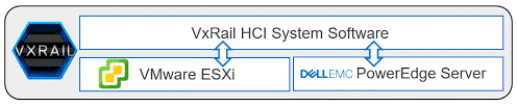
Figure 1. HCI System Software
VxRail HCI System Software provides IT teams with actionable insights to optimize infrastructure performance, improve serviceability, and foster operational efficiencies.Elastic Stack
The Elastic Stack includes four open source products — Elasticsearch, Kibana, Beats, and Logstash — that provide data collection, transformation, ingestion, storage, search, analytics, correlation, and visualization capabilities. While the logical architecture described and tested in this white paper did not use Logstash and Beats, they are relevant to explaining how the Elastic Stack works. In addition to acting as a search engine, the Elastic Stack:
- Provides users with a centralized logging and monitoring platform for their IT environment
- Enables organizations to ingest and explore operational logs and metrics from their IT infrastructure
- Provides security incident and event management (SIEM)
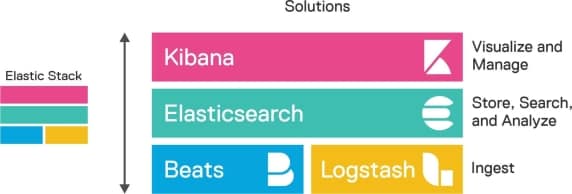
Image Caption
Figure 2. Elastic Stack components
The Elastic Stack includes numerous capabilities that help users easily build solutions focused in three areas:
- Enterprise Search: application search, site search, and workplace search
- Observability: logging, APM, and metrics
- Security: SIEM, endpoint, and security analytics
Value-added features such as machine learning, alerting, mapping services, Canvas, cross-cluster replication, cross-cluster search, field- and document-level security, and cluster authentication can be leveraged to meet the mission and business requirements of each organization. Many of these capabilities are free, and others can be obtained through an Elastic subscription that includes support.
Elastic Stack architecture
Architecture overview
The Elastic Stack is designed to help users import data of any format and source and to search, analyze, and visualize imported data in real time.
The following figure shows the components available in the Elastic Stack:
- Beats are agents that ship the data from different systems.
- Logstash collects logs and events data. It parses, filters, and transforms the data.
- Elasticsearch stores, searches, and analyzes the data.
- Kibana is used to visualize the data.
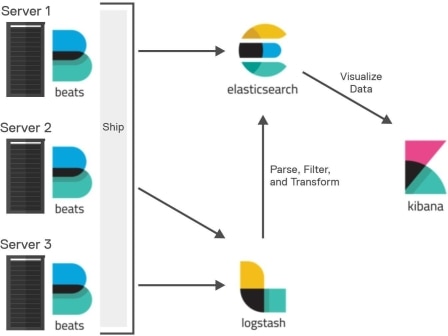
Figure 3. Elastic Stack architecture
Elasticsearch
Logstash
Logstash is an open source data extract-transform-load (ETL) tool packaged with many plugins. Its role in the Elastic Stack is as a server-side generic data collector and processor. Logstash provides the capability to receive data from multiple inputs, apply a multitude of filters to the inputs, and output them to multiple types of sources simultaneously. Logstash operates in three stages for event aggregation and processing: collection, processing, and dispatching. The collection stage consists of inputs that generate events; processing consists of filters for modifying those events; and dispatching sends the events elsewhere as output.
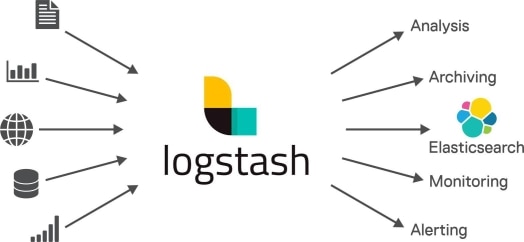
Figure 4. Logstash
Kibana
Kibana is an open-source, browser-based UI that can be used to search, analyze, and visualize data stored in Elasticsearch indices. It contains several different analytic applications, such as Graph, Machine Learning, Metrics, and Logs, as well as configuration management and administration capabilities for the Elastic Stack. Kibana visualizations include histograms, line graphs, pie charts, sunbursts, and more. You can also design your own custom visualizations to suit your needs and all the visualizations leverage the capabilities of Elasticsearch.
A sample Kibana dashboard is shown here:
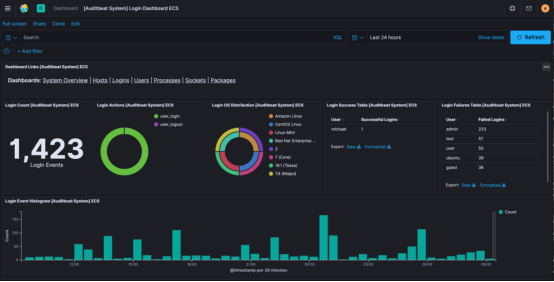
Figure 5. Sample Kibana dashboard
Beats
Beats are open source, lightweight agents that collect data from system components. Beats can send collected data to different destinations, though Logstash and Elasticsearch are the most common. Along with the many Beats contributed by the community, Elastic provides and supports seven: Filebeat, Metricbeat, Packetbeat, Heartbeat, Auditbeat, Winlogbeat, and Functionbeat. Each Beat collects a specific set of data from the systems on which it is deployed. Beats also contain a “module” capability that allows for the automated collection, ingestion, and visualization of supported data types with a single command.
For example, Metricbeat is used to collect host metrics for memory usage, CPU usage, disk space, and network utilization, whereas Filebeat is used to send file data such as logs.
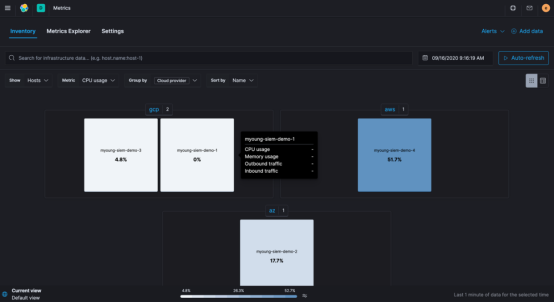
Figure 6. Sample Metricbeat dashboard
Solution architecture
Introduction
Logical architecture
The diagram below shows the logical architecture of the Elastic Stack on Dell EMC VxRail. We configured the VxRail hyperconverged cluster using VxRail Manager, which automated the entire deployment process.
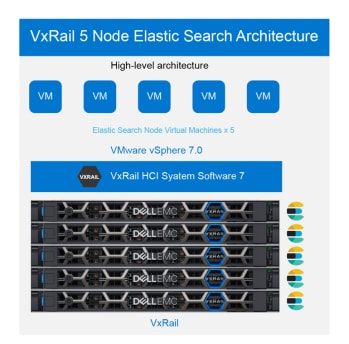
Figure 7. Solution architecture
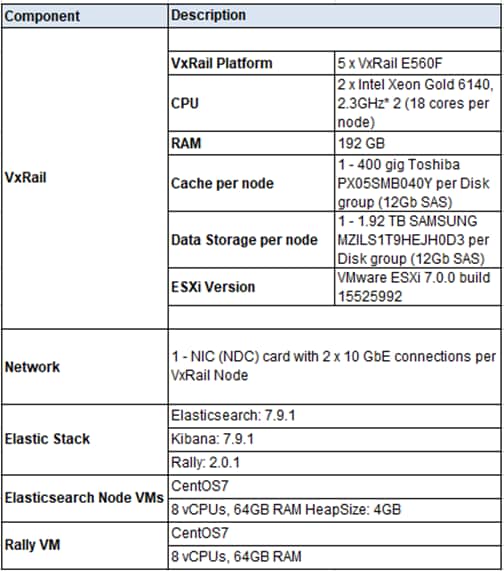
We created a single VxRail cluster with the associated vSAN datastore for Software-Defined Storage (SDS). We populated each host with two 1.92 TB SSD vSAN capacity drives and two 400 GB SSD vSAN cache drives. We used these disks to create a datastore storage pool to which VM virtual disks (VMDKs) were stored.
We deployed the Elastic cluster VMs onto the vSAN datastore. The Elastic cluster comprised five VMs of Elasticsearch, one on each VxRail.
For details regarding the configuration of the VxRail nodes, see Appendix B: Configuration details.
Network architecture
The following figure describes the high-level network architecture of the VxRail cluster:
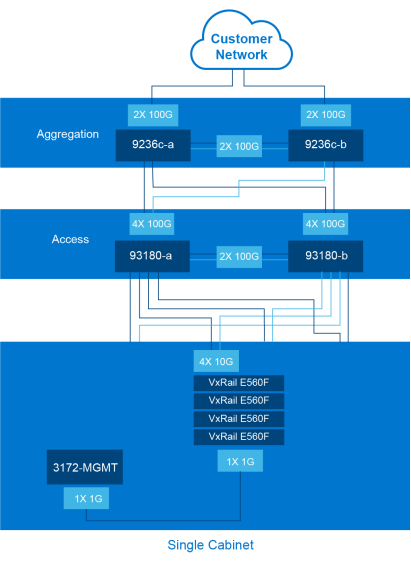
Figure 8. Network architecture
We built this network using 2 x 10GbE connectivity. At no point during our testing did we encounter network saturation. VxRail can use 25 GbE connectivity when greater networking performance is required. See the VxRail Networking Guide in Dell EMC VxRail Documentation.
Table 2. VxRail networking details
|
Components |
Description |
|
Cisco Nexus 93180YC-EX |
10 Gbps and 25 Gbps TOR switches |
|
Cisco Nexus 9332PQ |
25 Gbps Aggregation switches |
|
Cisco Nexus 3172TQ |
1 Gbps and 10 Gbps Management switches |
|
VxRail |
2 x 10 GbE links |
Testing
Introduction
Test methodology
Rally
Rally is a benchmarking framework designed to measure the performance of Elasticsearch in very small and specific pieces. It also can be used to perform the following tasks:
- Set up an Elasticsearch cluster for benchmarking, and tear it down afterward
- Manage benchmark data and specifications across Elasticsearch versions
- Run benchmarks and record results
- Find performance problems by attaching telemetry devices
- Compare performance results
For more information about Rally, see Getting Started with Rally.
Modifications made to the track JSON file:
We modified the Rally configuration as follows, as part of the setup:
Applied a number to each IP conversion as suggested in the original readme file.
- Removed illegal characters from the "object_mappings.sort"
- Transformed the source data to a bulk-friendly JSON format (ignoring all entries that contained unrecognized/problematic characters and invalid IP addresses like "0". Approximately 0.001% of the source data was lost due to this modification.)
Rally-Tracks
Tracks are repositories that contain the default track specifications for the Elasticsearch benchmarking for the Rally tool. Tracks are used to describe benchmarks for Rally and to provide a consistent and repeatable test.
Rally has created a tutorial on how to create your tracks.
For this paper the NYC Yellow cab data was used for the track.
This dataset includes trip records from all trips completed in yellow taxis from in NYC from January to June in 2015. Records include fields capturing pick-up and drop-off dates/times, pick-up and drop-off locations, trip distances, itemized fares, rate types, payment types, and driver-reported passenger counts. The data used in the attached datasets were collected and provided to the NYC Taxi and Limousine Commission (TLC) by technology providers authorized under the Taxicab Passenger Enhancement Program (TPEP). The TLC did not create the trip data, and TLC makes no representations as to the accuracy of these data.
The dataset can be found here:
http://www.nyc.gov/html/tlc/downloads/pdf/data_dictionary_trip_records_yellow.pdf[2]
HTTP Logs Track
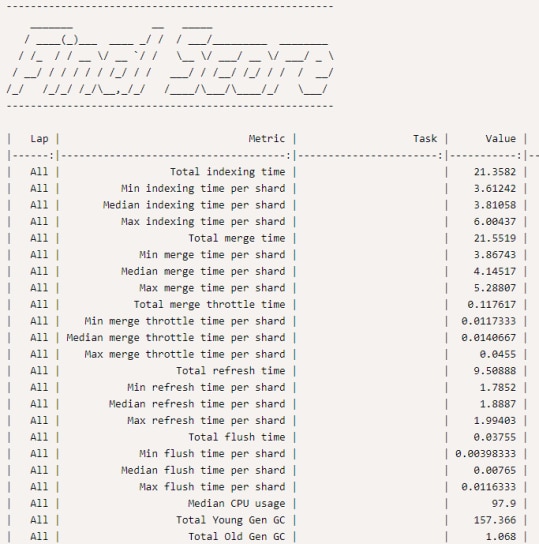
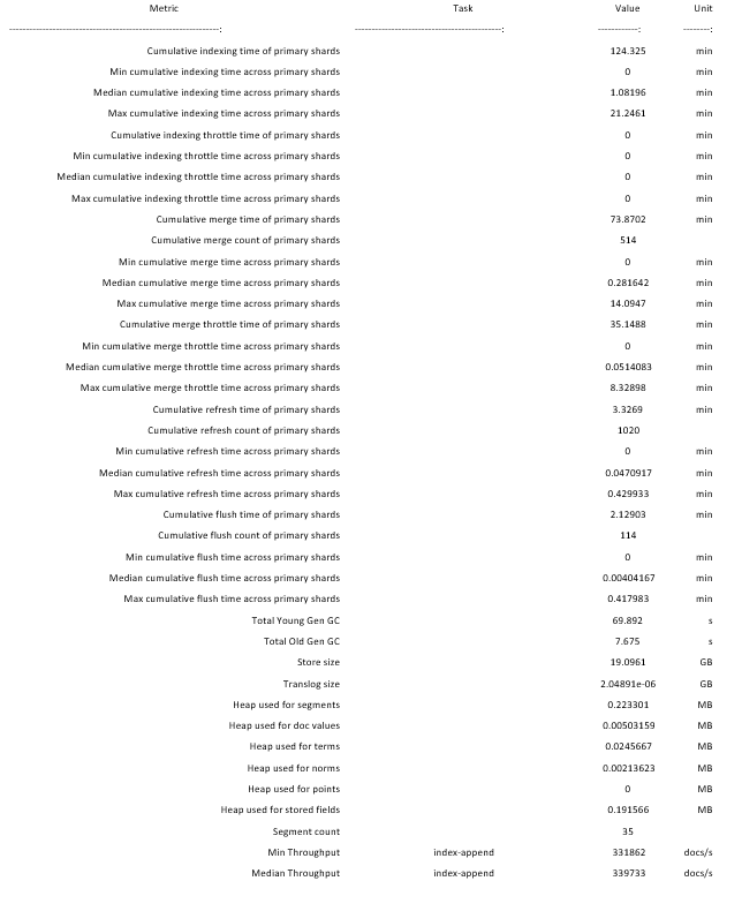
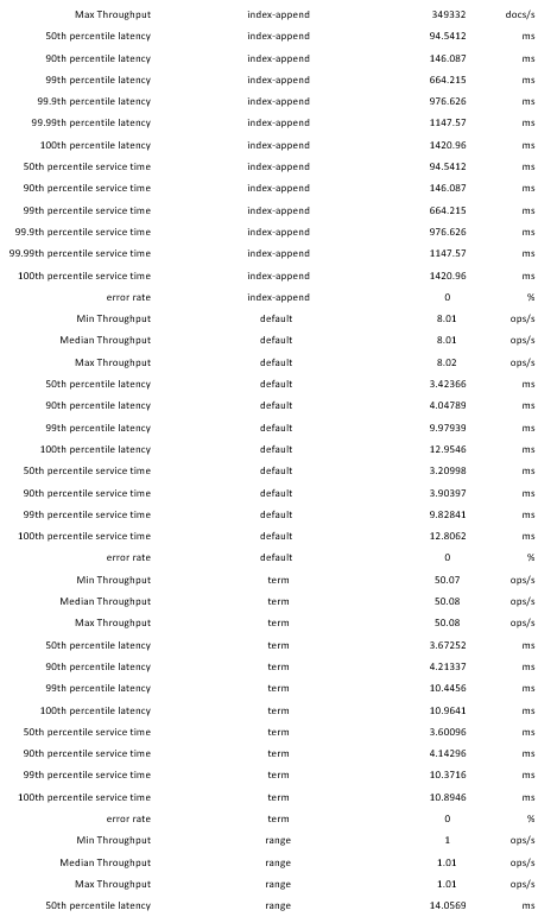
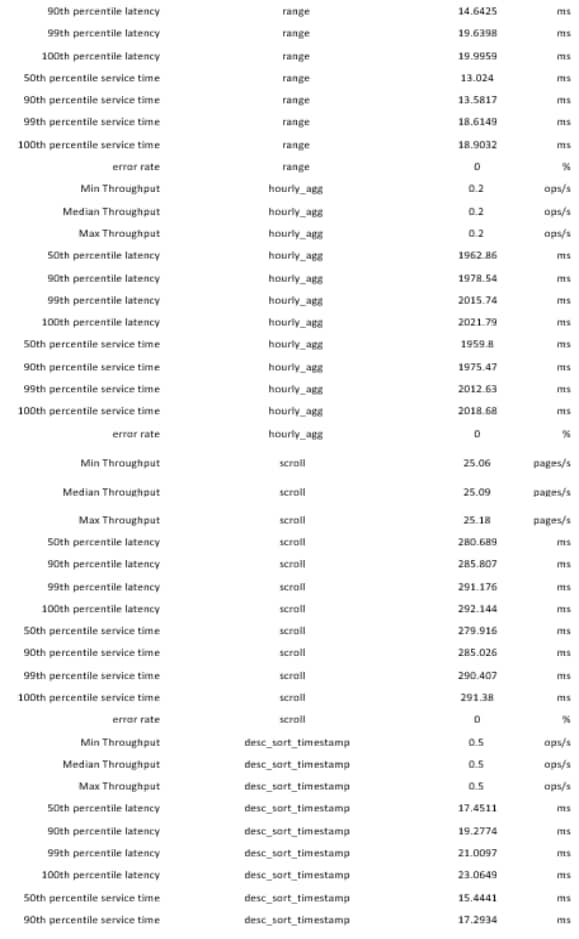
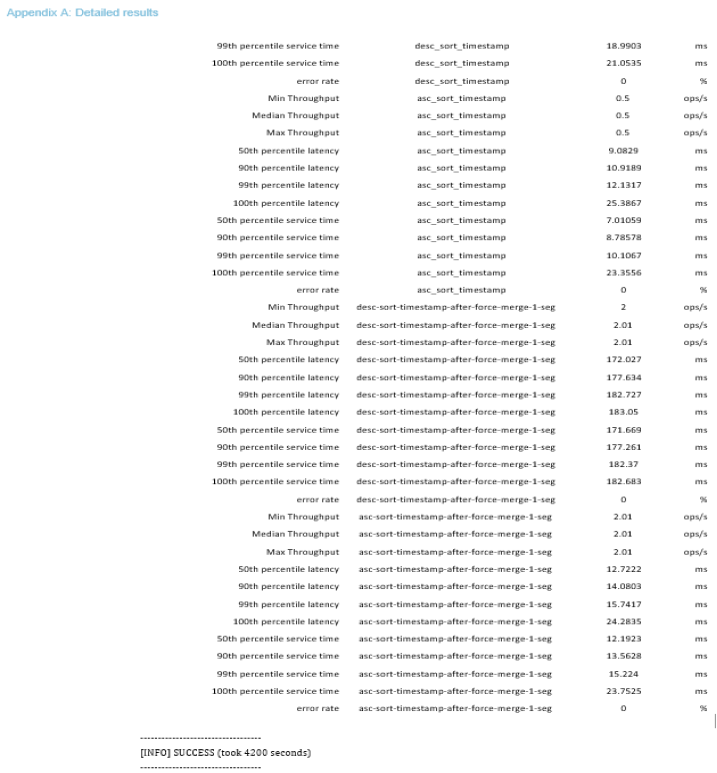
At the end of each Rally race, Rally will produce metric, task and score values, so that an administrator can tune and maintain consistency.
The final score result of the NYC yellow taxi cab Rally with the complete values are shown in Appendix A: Detailed results.
Test scenarios
We implemented the following test scenarios during our solution testing:
- We first tested a single Elastic node with the benchmarking tool to reveal baseline numbers.
- We then tested a five-node Elastic node cluster with the benchmarking tool to reveal performance results.
Tested configuration
Rally runs on a separate host to benchmark the performance of the Elasticsearch cluster that is hosted on a VxRail cluster, as shown in the figure below.
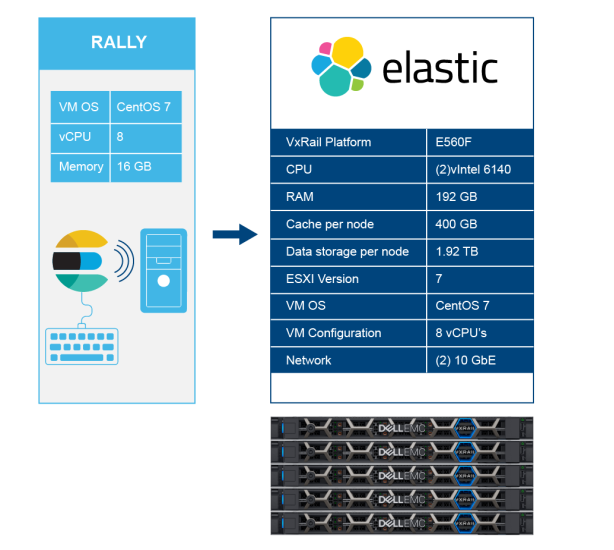

Figure 9. Commands used for the http_logs track
Use Case
Using Rally, we selected and ran the http_logs track. This track contains data gathered about the trips of Yellow company Taxis in New York in 2015. It can be downloaded from https://data.cityofnewyork.us/Transportation/2015-Yellow-Taxi-Trip-Data/ba8s-jw6u
Some key results for track http_logs are represented in the following table:
|
Parameters |
Value |
|
Index Throughput |
349,332 documents per second |
|
Cumulative indexing time of primary shards |
124.325 |
|
Total Young Gen GC |
69.892 seconds |
|
Total time to run the tests |
70 minutes |
|
Median Throughput for index-append |
339,733 documents per second |
|
Median Throughput for term |
50.08 operations per second |
For detailed results, see Appendix A: Detailed results
Best practices
Introduction
Elasticsearch
VxRail
VxRail network
Deployment
Deployment of the Elastic Stack on VxRail
Summary
Conclusion
References
Dell EMC VxRail Documentation
VMware documentation
Elastic documentation
Appendix A: Detailed results
Rally Numbers: Http_logs track
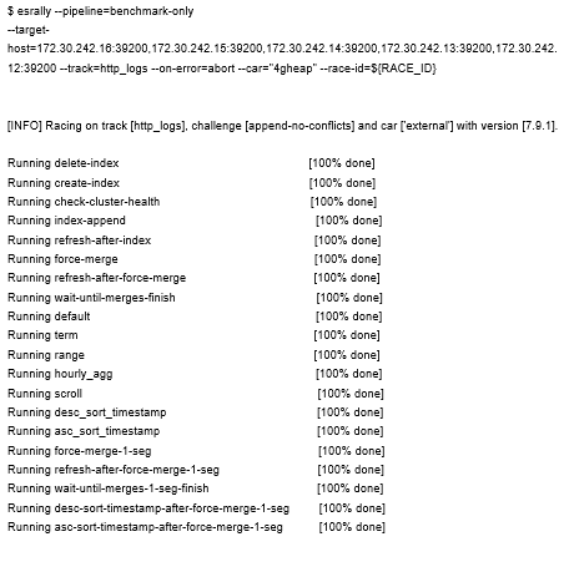
Here are the results of our testing for this validation paper. This includes the Rally command used as well as the final scores via the http_logs track file.
Appendix B: Configuration details
Configuration details
Table 3. Configuration details