Generating Performance Data for your PowerStore Arrays with Python
If you run Dell PowerStore in production, having a quick way to script IOPS, bandwidth, and latency checks is priceless—whether you’re validating a change, troubleshooting a hotspot, or feeding a dashboard. Quick and reliable access to metrics whether through a Grafana dashboard or your own tools can reduce time to resolution and provide a historical reference for planning and comparison.
The PowerStore REST API is fully documented on our Developer Portal, Reference materials are also available on the appliance in several formats:
- Swagger UI — https://<cluster management ip address>/swaggerui
- JSON — https://<cluster management ip address>/api/rest/openapi.json
We also provide an SDK for Python which gives our customers fast access to API calls with pre-written functions enabling rapid development with our APIs with minimum effort. The PowerStore API and SDK enable you to support a variety of operational tasks including:
- Troubleshooting: Identify latency spikes and correlate with host activity using Python.
- Dashboarding: Feed PowerStore metrics into Grafana for real-time monitoring.
- Capacity Planning: Use historical data to forecast workload and storage needs.
- Automation: Integrate performance checks into provisioning or health scripts
In this blog I’ll take you through the installation of the PyPowerStore SDK and a short example showing you how to get started with the SDK and gather some performance data.
What you’ll need
- Python 3.6 or higher installed on your workstation/vm/container
- PyPowerStore (>= 3.4.1.1) installed in your python environment, you can use venv if you require.
pip install PyPowerStore
Note, at the time of writing version 3.4.1.1 was not available on pypi however you can clone and install from GitHub following instructions in the readme.rst file.
Now you’ve got PyPowerStore ≥ 3.4.1.1 installed, you’re in great shape to start pulling inventory and telemetry from your PowerStore clusters via REST. Below is a practical pattern you can drop into your workflow (PyCharm, Windsurf, VS Code, etc.) that:
- Authenticates securely
- Pulls one or more resources (volumes, hosts, appliances, etc.)
- Handles pagination & retries
- Exports to JSON and/or CSV
- Works across multiple arrays in one run
- Is easy to extend
Assumptions
- You have PowerStore REST reachable (typically https://<array_ip_or_fqdn>/api/rest)
- You have a user with sufficient privileges
- You prefer storing creds in environment variables or a .env file (recommended)
The PowerStore API will return metrics at different interval granularity for different purposes, troubleshooting or trending. Depending on which one you query you will receive different output time frames. You can trim this output should you need with your python code. Most use cases will be polling for data on a regular cadence (hourly) with shorter intervals to this may not be necessary.
|
Interval |
Output Timeframe |
|
Five_Sec |
1 hour |
|
Twenty_Sec |
1 hour |
|
Five_Mins |
1 day |
|
One_Hour |
30 days |
|
One_Hour |
2 years |
A simple script shown below will connect to my PowerStore appliance and gather the performance metrics or the appliance level. These metrics will help build a picture of the overall performance of the PowerStore appliance.
If you want to see query other available entities/fields (appliance, node, volume, filesystem, etc.) and request options? Check the PowerStore REST reference for /metrics/generate here:
https://developer.dell.com/apis/3898/versions/4.1.0/reference/openapi.json/paths/~1metrics~1generate/post. Also check out the whitepaper: Dell PowerStore Monitoring Your System.
from PyPowerStore import powerstore_conn
 from pprint import pprint
 import os

 CONN = powerstore_conn.PowerStoreConn(
      username=os.environ["PowerStore_user"],
      password=os.environ["PowerStore_password"],
     server_ip="123.245.182.151",
     verify=False,
      application_type="CustomAPI",
     timeout=180.0,
 )
 hostlist =   (CONN.provisioning.get_hosts())

 for host in hostlist:
     pprint ((CONN.metrics.get_performance_metrics(
      entity="performance_metrics_by_host ", entity_id=host["name"],
                                      interval=" Five_Mins")))

 metric_result = (CONN.metrics.get_performance_metrics(
     entity_id="A1", entity="performance_metrics_file_by_appliance",
     interval="Five_Mins"))

 pprint(metric_result)
This snippet authenticates with your PowerStore array and pulls performance metrics using the Python SDK.
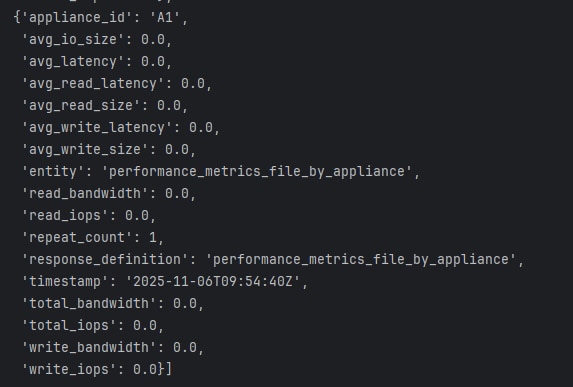
Below is the example output from running the script above, note this was a lab system with no IO running but you can get an idea of the returned metrics.
Using PyPowerStore not only simplifies API interactions but also ensures compatibility with PowerStore’s evolving REST interface. Whether you're building dashboards, scripting provisioning tasks or automating health checks, this SDK is a great tool to have in your Python toolbox, it’s fully loaded for most operations and provides the backbone to our Ansible Collection for PowerStore so it’s very well tested.
For broader observability, you may wish to export your data to tools like Grafana, where you can build real-time dashboards to monitor array health, performance trends, and workload behavior. This can be done by pushing the metrics to a time-series database like Prometheus or InfluxDB, which Grafana can query.
Hopefully this post has been informative and provided some practical examples. Have fun exploring, and if you encounter any issues with the SDK, please don’t hesitate to open an issue on GitHub — we’ll be happy to assist.
As you’ve seen, the PowerStore API offers a rich set of functionality, enabling you to query performance data from your arrays and manage their configuration in an automated and efficient way.
Author: Paul Martin Senior Principal Engineer Technical Marketing
@rawstorage